On July 31st, Google rolled out an instant verification option for local businesses that have already verified their websites with Google Webmaster Tools.
There is, however, very specific cases. As the Google support page linked above states, it’s important to note “that some business categories may not be eligible for instant verification.”
Webmaster tools verification option won’t work for your business if:
You’re creating a new listing
The pre-existing listing is already claimed by another user and your business has to request ownership
You have to change the website on the pre-existing listing you want to claim
Webmaster Tools isn’t verified BEFORE you claim the listing
Webmaster Tools isn’t verified in the same account that you are claiming your business listing in
Your company’s “My Business” category is not one of the Google approved categories eligible for this verification.
“My Business” pages we tested:
Car dealership: Claimed in account with pre-existing listing in need of claiming – worked
Heating supplies provider: Had ALL ideal criteria. Listing had correct site and was available to claim, and WMT was already verified in the account. – didn’t work (So this business must have a category problem that makes it ineligible.)
Real Estate: Created new listing- didn’t work
Basically, if it’s possible, Google will automatically verify your business on its own when you claim your business in Google My Business. Google skips giving you any verification options altogether and just auto-verifies the listing.
Assuming this new Google My Business feature is a work in progress on Google’s end, maybe once we see more categories accepted, it will become more doable and the qualifications may not be so restrictive. Even then, with the stipulations currently, it would be a rare occurrence.
Google+ is SO complicated! That’s what a lot of our clients tell us. They get frustrated and, to be honest, so do we.
There are so many questions! It can be overwhelming.
What kind of Google+ page should you create?
Which Google+ page should you use for posts and updates? Which page should you connect to your YouTube channel? How many types of Google+ pages are there?
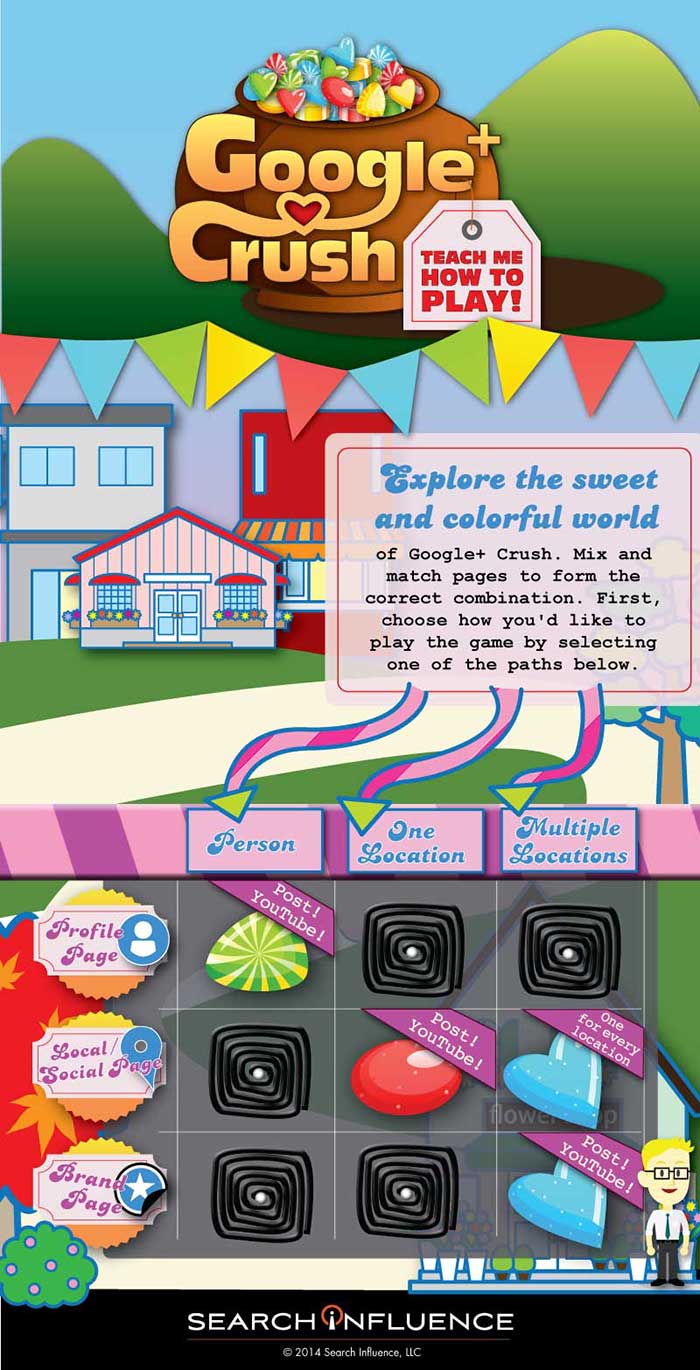
To simplify this Google/YouTube situation, we’ve created this sweet little infographic to show:
Which pages you should create
Which page(s) you should use for regular posts and updates
Which page you should connect to YouTube
As a reminder, there are three types of Google+ Pages:
Google+ Profile
Google+ Local/Social Page
Google+ Brand Page
Explore the sweet and colorful world of Google+ Crush.
Mix and match pages to form the correct combination, create the appropriate profile, and send the right social signals. First, choose how you’d like to play the game by selecting one of the paths.
If Google+ Crush Isn’t Your Type of Game, Just Read the Manual:
Are you looking to use your G+ profile for personal reasons (not associated with a business)? Start posting on your Profile Page and connect this page to your YouTube Channel.
Are you a business with just one location? Start posting on your Local/Social Page and connect this page to your YouTube Channel.
Are you a multiple location business? Create a Local/Social Page for each location. You should post to your Brand Page and connect your Brand Page to your YouTube Channel.
Sugar crush! Remember, Google likes it when you play in their sandbox, so go ahead and start posting on Google+ and use YouTube channel to create your unique videos.
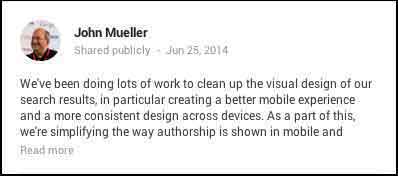
Last Wednesday, June 25, John Muller, Webmaster Trends Analyst at Google, made a pretty big announcement on his Google plus page. In the ongoing effort for a better and more consistent mobile experience, Google has decided to remove authorship circle count and profile photos from search results. Muller said, “Our experiments indicate that click-through behavior on this new less-cluttered design is similar to the previous one.”
So, essentially the pretty but cluttered results weren’t positively influencing clicks.
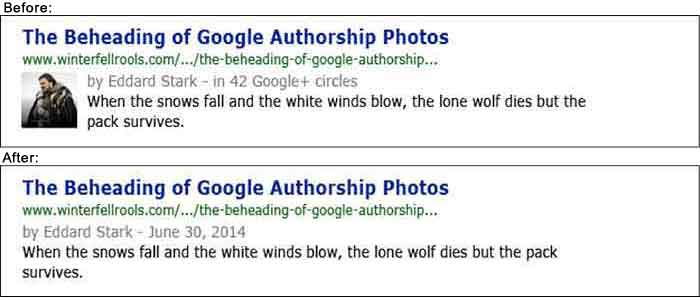
What Does This Update Look Like?
Basically, the only change is that the author’s photo and circle count is gone.
So Why Bother With A Photo?
You might be thinking that this update means you’re now saved a step in optimizing your profile and content to appear in search results. In Google’s News section, however, your photo associated with your author Google+ will still appear. In fact, Google’s support page on “Author information in search results” still currently says that if “you want your authorship information to appear in search results for the content you create, you’ll need a Google+ Profile with a good, recognizable headshot as your profile photo.” You can also follow that link to find steps on how to get it set up properly.
I’m continually impressed by Google’s consistent updates to improve user experience. Many businesses could benefit from this kind of consumer-centric behavior.
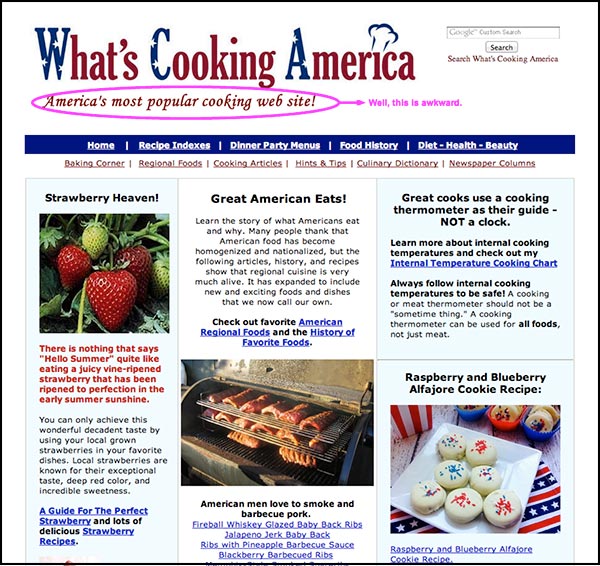
Once upon a time, there was a woman named Linda Stadley. Her recipes brought so much joy to her and those around her that she generously decided to share them with the Internet. So she created www.whatscookingamerica.net, and for 17 years her recipes reigned supreme. She lived happily ever after until Google unleashed its mighty Panda 4.0 paw and ended her domination of the search engine results page faster than you can say Jack Robinson. Users everywhere weep for her loss of traffic.
…that website though. The writer of this article says it all with his closing statement, “I feel bad but the site does need a facelift.” Well, yeah. This article speaks to the very nature of Google updates: even though they may not make everyone happy, the goal is to help all users find the best information first. Let’s be real here. This site lacks a lot of the features that make a website useful to users looking for recipes (like reviews, for example); therefore, more useful websites will get better rankings because they give people more of what they’re trying to find. Google would probably reply with something along the lines of “sorry we’re not sorry.”
Do you want Google all up in your business? You’re in luck. Google just released the My Business iOS app (as discussed by Mary Silva). The noteworthy features (for both the iOS and Android app) include the ability to edit your business listings and view local insights. Missing from this app is Google Analytics and Adwords Express. You can also access all the features of your Google Plus account. JUST WHAT WE’VE ALWAYS WANTED, said no one ever. The thought behind this was probably something along the lines of, “hey wait a minute, no one seems to be posting to their Google Plus account, maybe they would if they could do that on their phones?” We will see Google, we will see.
Facebook hasn’t been poisoned by moms and businesses? What?! As it turns out, Facebook is still popular with teenagers. Forrester Research released a report revealing that 75% of Facebook users ages 12 to 17 use Facebook once a month, with 28% of this age group claiming to use Facebook “all the time.” Of course, numbers don’t always give the whole story. Yeah, these kids are logging on, but are they actually using Facebook? Who’s to say these kids using Facebook everyday are not just scrolling through the newsfeed absentmindedly? Well, this may be the case, because a niche study reveals Facebook lost to Instagram for the most engaging platform.
There’s a lot to consider here. For one, how will this trend change in the future? Have teens just been classically conditioned to check their Facebooks like a hopeless romantic checks Craigslist missed connections? Do more engaging platforms have more of an advantage in retaining and attracting new users? Time will tell.
Well, this is a fun one. A group of activists in favor of net neutrality were arrested for protesting outside Google Headquarters. What were they doing there, you ask? The group calls for Google to “stand with us in support of an Internet that is free from censorship, discrimination, and access fees.” The group asked Google, among other demands, to change their homepage for a day to include a link to the FCC petition. You may be thinking, ‘but Google isn’t exactly the bad guy here trying to end net neutrality for all, why are they protesting there anyway?’ And you would be thinking correctly. According to this article, Google declined to comment on the arrests. I can’t blame them, as it seems these protesters might have a classic case of misdirected rage.
Quality images matter because they increase user experience. Yes, we know this. The advice in this article seems rather obvious, but there’s something to take away here. Specifically, what makes an image useful? This article proposes eight different types of images that provide users with the information they need. The top eight being: stock photos, screenshots, charts and graphs, personal photos, still frames from popular movies and TV shows, infographics, custom art, and comics. I would like to point out that most of these (except stock photos) could and maybe should fall under #7 “custom images.” I feel this article missed out on the opportunity to highlight the way that custom images serve more of a functional purpose for marketing than non-custom images. An infographic, comic, or screenshot that is custom and directly relevant to your business would obviously be more useful to users than one that is not.
It’s finally here! Adwords now tracks click-to-call conversions on mobile devices. This can easily be added to a specific landing page with a little bit of coding. This feature will allow you to track calls through the same venues as your other performance metrics and customize the value of the incoming call. This blog post has step-by-step instructions on how to implement this new feature on your site!
This week Google Wallet released its Instant Buy API for iOS apps. This was first released for Android apps a year ago. This free service can be accessed with your Google+ login and stores your shipping and credit card information. Merchants can then use the information to complete the transaction. Google Wallet aims to eliminate the frustration of mobile device shopping and decrease shopping cart abandonment.
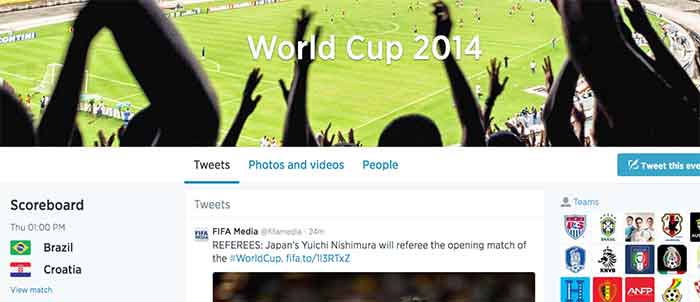
Facebook and Twitter are engaged in a Battle Royal almost as intense as the World Cups itself. With yesterday’s commencement of the Fifa World Cup, these two social media powerhouses pull no stops to be become the No. 1 platform for Fifa fans to electronically engage.
Facebook’s campaign provides fan with a Trending World Cup Page. Here fans can access the latest scores, view highlights and interact with a global map to pick their favorite teams
Use #WorldCup and #WorldCup2014 to access Twitter’s World Cup landing page. Here you can create a Fifa-specific profile and choose a cover photo and profile picture to support your team. Don’t forget to include your HashFlag. Introduced during the last World Cup, these three-letter hashtags can be used by fans to unlock an image of a country’s flag.
Which social media platform will reign supreme? Only trending numbers will tell. Let the games begin!
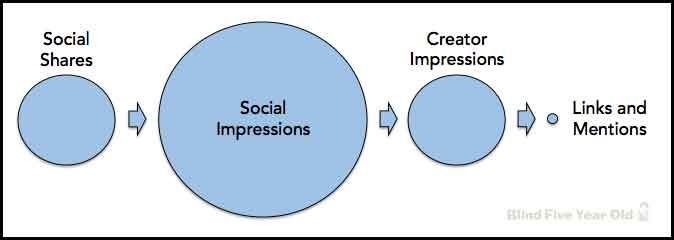
While the power of social media seems encompassing, Google is currently not using social signals, even from Google+, in its algorithm to calculate search results. You might be asking yourself why you’re putting so much effort into social now. Fear not! Maximizing the potential of a Google+ listing and other social outlets does have benefits. The Blind Five Year Old breaks down social media activity to explain that its not necessarily the activity itself, but the result of that activity that matters.
Link building is an integral part of all SEO campaigns. They can help build your company’s brand, build public awareness, increase profit and, of course, lead to more links. Links can also help build your site’s authority in the eyes of search engines. But what about nofollow links? While they seem unfathomably dreadful, this blog posts offers a silver lining and techniques to utilize those nofollow links.
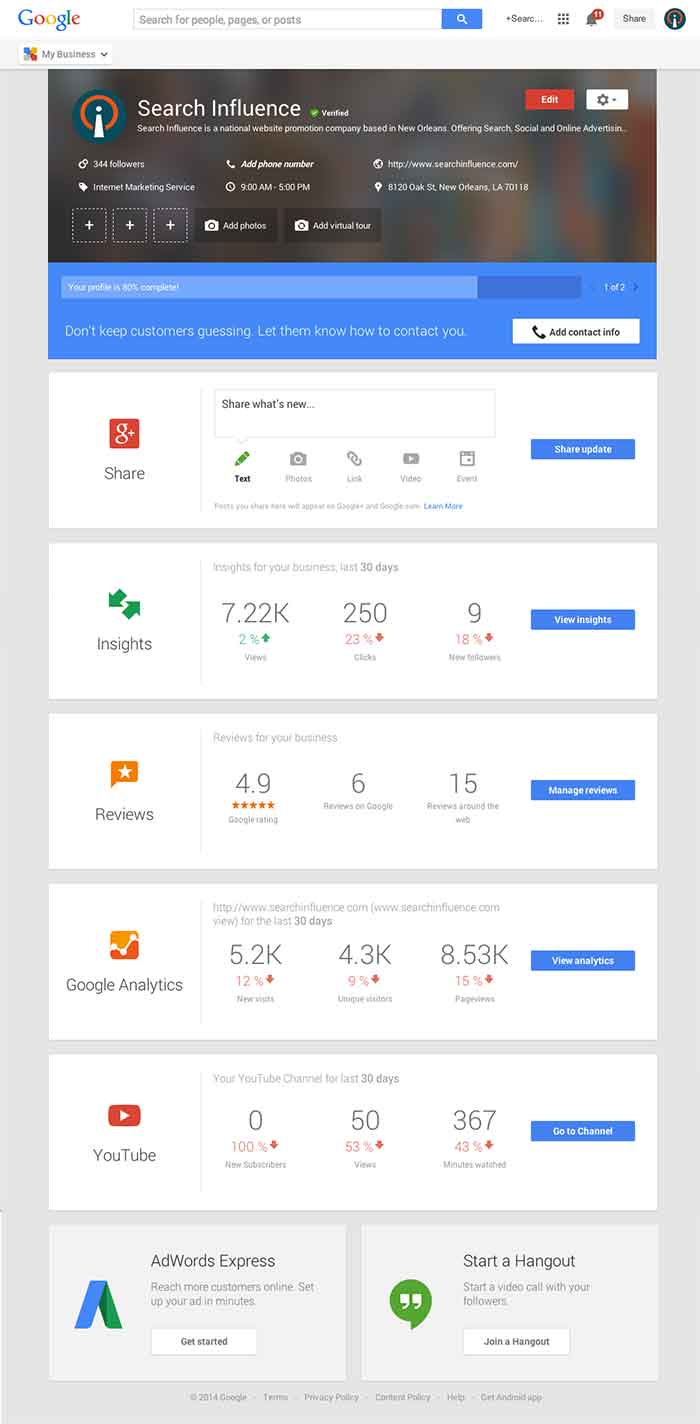
Today, Google launched Google My Business. This new, more intuitive Google Places serves as a one stop shop for small businesses to do the normal Google Places work like updating business info, adding photos, connecting with customers through Google Plus posting, and staying on top of reviews. They also launched an Android app for managing Business Tools on the go (with the promise of an iOS app launching soon). Watch Google’s introductory video to Google My Business here.
Changes For Users New and Old
All new businesses to Google will start in Google My Business. As for current Google Places users, a blog post from Google earlier today said, “We’re also upgrading current users of Places for Business and the Google+ Dashboard to this new experience.” For those who just sat through and are still cleaning up the mess that was the upgrade to the new Google Places, don’t worry! You won’t have to go searching for which dashboard your listings are in or anything like that. It seems that Google My Business is a mostly superficial change that has already happened and just means a newer looking dashboard and a few extra features and controls (like easy access to Youtube, AdWords, and Analytics).
Quick & Easy Editing
These new features are pretty awesome. From your dashboard, first you’ll see the area for easily managing the individual aspects of your primary business information where previously you would have navigated through an “Edit Business Details” button. Connected to the bottom of this dialogue, there will be a blue box that allows you to edit the business information needed to get your profile to 100% complete. Google My Business has succeeded in using minor dashboard edits to make major usability improvements.
Streamlined Sharing
The next box is a basic G+ Share box for social posting to your business page. Share texts, photos, links, videos, and events easily all from one location. Side note: I recently found out, thanks to a post from Mike Blumenthal, that there is now an easy way to connect your business’ brand page to a location. So, if you have been posting socially from a Google Plus brand page for your business, you can now easily transfer that engagement into your verified local page.
New Data & Graphs
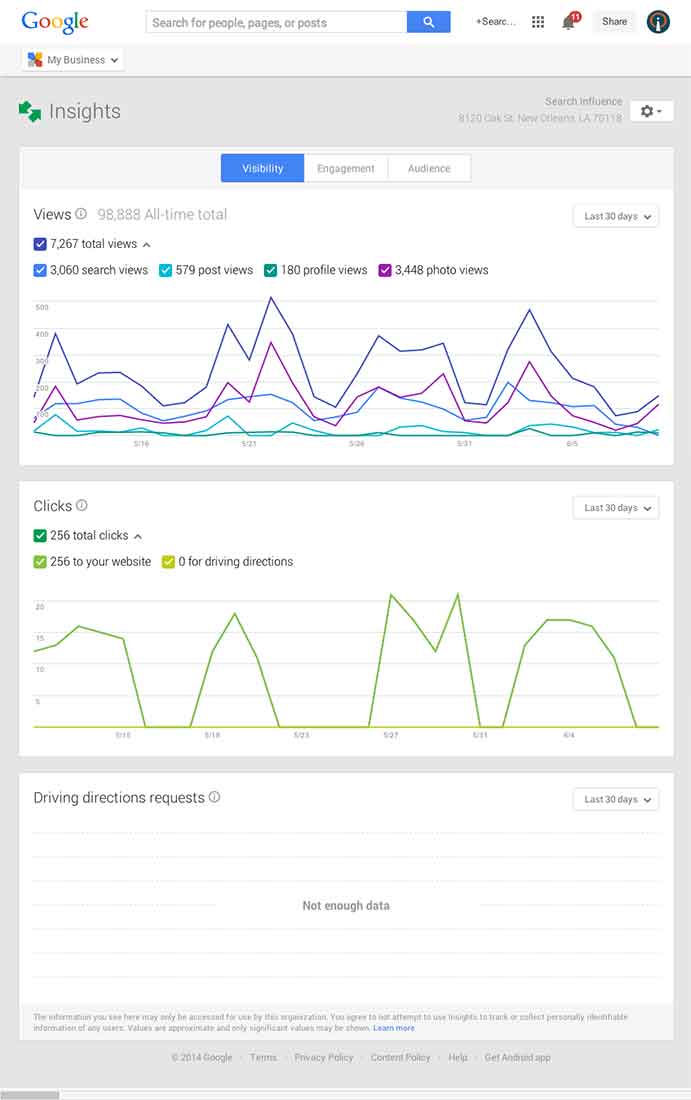
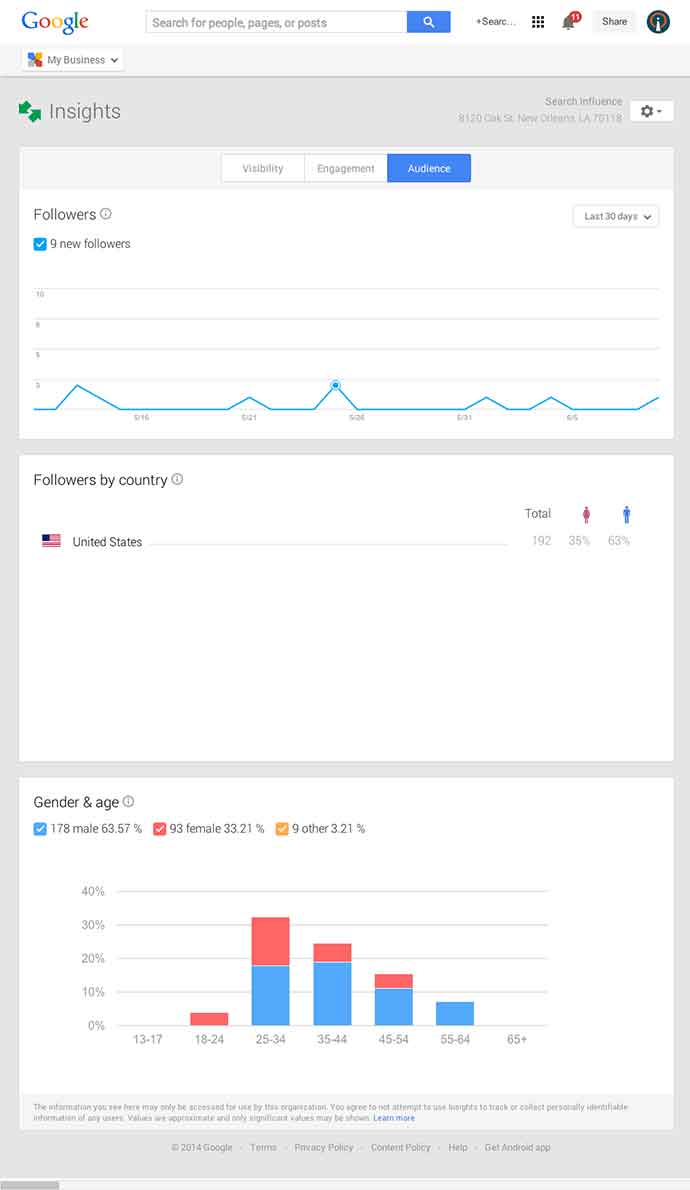
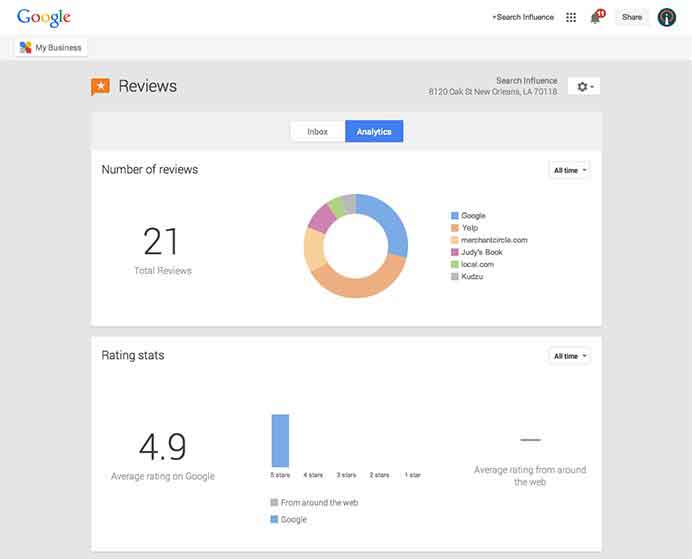
Next, you’ll find the Insights Tool. Here, you can see how many views your G+ page has gotten over a period of time, how many clicks occurred, and where they went (either looking for Google Maps driving directions or directly to your website). The next feature (and my favorite addition to the Google My Business dashboard) is the reviews section. When you click into “Manage Reviews,” you’ll see your Google reviews as well as other business reviews from around the web. If you click “Analytics” at the top of this page, you can see a really streamlined graphical representation your review information or “Rating Stats” and where your business’ reviews come from.
Additional Tools
You will be able to see other tools like Google Analytics (if you have it installed on your site), YouTube (if you have a channel connected), and AdWords Express (again, if you use it). If you don’t use the above tools, they will still appear at the bottom of your dashboard with the option to “Get Started” if you want to use them! You’ll also see a place to “Join a Google Hangout” at the very bottom of your dashboard. All in all, the new Google My Business looks looks both beautiful and user friendly, presenting a new way to manage businesses’ online reputations through Google.
Can you believe the little guy is already 5 years old?! Microsoft’s search engine has made some solid strides over the last five years, gaining more of the search market share, and taking Yahoo’s 2nd place rank. While Google continues to dominate, Bing has been challenging users to make the switch, but it looks like the only share they’re gaining is from Yahoo.
Although they will probably never match Google, Bing’s success as credible search platform has lead to partnerships outside of Microsoft, putting search into services and apps, including third-party apps. With the progress they’ve made so far, it’ll be interesting to see where they’ll be in 5 more years.
Google has released an update to Google+ that will finally make it possible to merge a Google+ Local page with a Brand page. After Google Places began integrating Google+, many businesses were confused and frustrated when realizing that they were unable to integrate their existing Google+ Brand pages with their verifiedLocal page.
The problem has been solved with this recent update, and businesses are now able to merge all of their local data with their Brand page. This will allow for all of the local features to also be integrated, which include reviews, business information, and the map. This article give specifics about the changes to your pages when making the switch.
Google+ still has a several other kinks that they need to address, but this is a step in the right direction and will bring some much needed relief to many business owners (and marketers!). Happy merging!
Since the release of Panda 4.0, press release agencies have seen a severe drop in traffic, which has everyone questioning the value of using them for SEO marketing efforts.
The algorithm update has primarily affected the press release sites’ rankings in search results, specifically when used to manipulate the search results with irrelevant content. This means that the press releases most affected are spammy and were being used as a way to game search results while not providing any useful information for the searcher.
The good news is that press releases are still a very valuable marketing tool, when used for the right reasons (to announce timely and newsworthy information). This particular impact of the Panda update on press release sites is just another way that Google is cleaning up search results, proving just how important it is to always produce the most relevant and useful content for your business.
It’s pretty clear that Google loves their products and wants you to use them. All of them. And the more active you are, the better. For Google+, not only is it important to be active, it’s important that you engage and build up your fanbase—follow and be followed. This article shares some great tips and tricks to get started on building your fanbase and to create and maintain engaging content for your followers.
Remember that old Myspace page you had 10 years ago? Neither do we. If you’re one of the lucky people that has access to or even uses that old email account, Myspace wants to remind you by sending you old embarrassing photos. While these admirable marketing efforts probably won’t make you go back, it will, at the very least, drive more traffic to their site so that you can laugh at those photos…and then delete your account.
Facebook, Twitter, Google+, YouTube, the list goes on…
Everyone knows keeping up with the current trends is important when it comes to marketing your business, especially on social media. It seems like each year there is a new social media craze that everyone is using, and it sometimes gets difficult deciding which platforms are the best for your business.
Most social networks perform in a way where businesses can share written or visual content with their followers. Think of how Facebook and Twitter perform – brands share interesting text or pictures in hopes that followers will “like” “comment” or “retweet” the posts.
However, there is nothing quite like watching an interesting, funny, or moving video. That is where Vine comes in. Created by its parent company Twitter in 2013, Vine brought a whole new way to market your business through videos.
Well, Isn’t That What YouTube Does?
Vine Profile
Vine is similar to YouTube in that they are both platforms where users and brands can share video content with their followers. However, there are many differences that make Vine unique.
In the same way that Twitter limits users to 140 characters per tweet, Vine limits videos to a mere 6 seconds. This causes users to be really creative in getting the message across to viewers because there is such a limited time.
“Vines” are looping videos, meaning they will continue to play continuously as long as you are watching them.
Vine also has stop-motion capability, allowing users to record a portion of the video, stop recording, then start again at a different time.
Also similar to Twitter’s retweet, Vine has “revine” capability that allows users to share videos that they think are interesting to their followers.
Interestingly enough, because of the creative nature of the app, many ordinary people have become “Vine Famous,” acquiring millions of fans since its inception in 2013. However, many businesses have also branched out and started using Vine to market their brand.
How Can Vine Help Your Business?
Vine can be beneficial for both new and loyal customers of your business.
For new customers, you can gain awareness for your business through Vine. Millions of people view the popular pages and the trending #hashtags each day. Participating and getting your Vines exposed to more people could introduce your business to someone that didn’t know about it previously.
For already loyal customers, Vine can offer a different way for them to see your business. For example, if you are a clothing store, making Vines of backstage action at a fashion show would be interesting to people who already have an interest in your brand.
Tips for Getting Started
Now that you know what Vine is and why it is important, here are a few tips to help you get started!
Use Hashtags: Join the conversation with other users on Vine and make videos relevant to the trending hashtags. An always popular one is #HowTo. Getting your business seen on these trending subjects increases the probability of your video getting seen, liked or even revined by other users.
Cross-Post Vines to Twitter: Vine is still such a new technology that not everyone is using yet. You can post your Vines to your brand’s Twitter account to get even more exposure.
BE CREATIVE: Vine is not the platform to just make videos just for the sake of making them. Because of the looping and stop-motion features, you can really make something unique and interesting that other people will find shareable. The best Vines are the ones that are funny or extremely visually appealing (think optical illusion or magic).
Have A Call To Action When Applicable: Contests on Vine are popular. Have your followers create a unique video of themselves using your product, and revine the winner! This makes loyal customers feel special when their favorite business is actually acknowledging them.
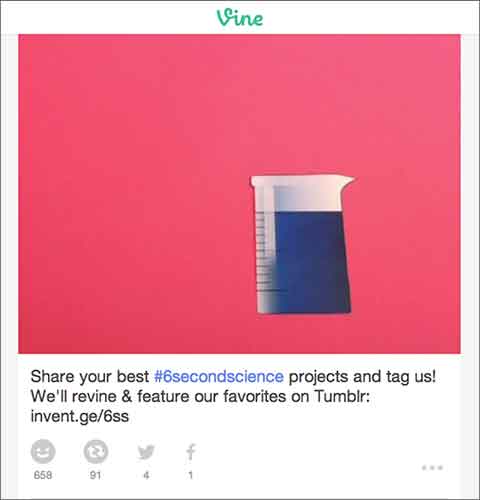
Above you can see an example of a great Vine from GE. They encouraged their followers to be creative and make a #6SecondScience video, and in return they would revine a winner.
Finding out how to use Vine can be difficult at first, but finding your niche and posting to this app can definitely be beneficial when it comes to keeping loyalty among customers and finding new ones. However, just like any other social media platform, it is important to keep up with the updates of the app and stay current with this ever-changing technology.
Facebook has finally launched a major change that may have an impact on their real-time efforts. With the privacy updates, users’ posts will now default to only be visible by friends, and all users will be encouraged to check on their privacy settings if they have not been updated recently. Greg Finn says he expects that this update may cause hashtags and real-time conversations to continue on their decline.
Beginning in June, “Elite” users will be allowed to share their review of local businesses via a short video. These videos will first appear inline with the photos, but will eventually also appear along with the reviews like photos currently do.
Google+ launches Stories and Movies that will bring together your photos and videos to highlight your favorite moments from your travel or an event. Google’s Story will arrive within 24 hours after you return from your vacation. After you receive your story, you will be able to customize it and share it. Google+ Movies will include related photos and videos along with a soundtrack and special effects.
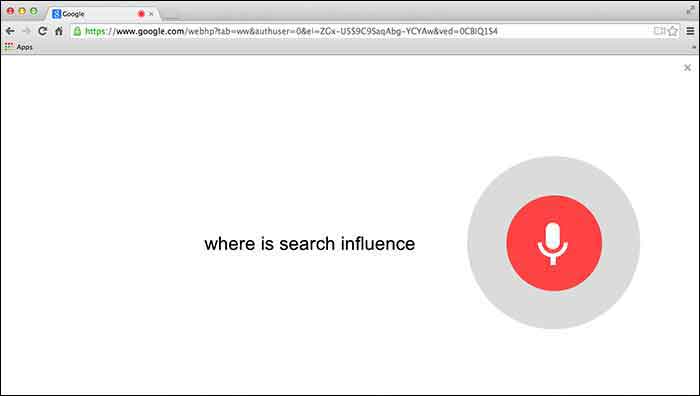
Users will first need to give Chrome permission to use the mic on their computer. Then you can simply go to Google.com and say “Okay Google” to trigger the voice search followed by your search request.
5. Google Paid “Dealers Nearby” Appears To Have Gone Live
– Mike Blumenthal
Mike Blumenthal noticed that Google’s new paid ads (now appearing within the knowledge graph) are live. This seems to be only the case in the US according to the comments thread on Dr. Pete’s tweet regarding this update. Mike Blumenthal suggests that we may one day see Google selling competitors space in branded knowledge panels.
You know your target demographic. If you don’t, social media should be the last thing on your mind. Properly addressing your demo group is essential in establishing a relationship with your followers on any social media platform.
Social Media Optimization (SMO) is used to directly target potential customers with relevant information, and eventually provide them with opportunities and incentives to become active customers. Proper SMO should also give current customers incentive to provide positive feedback so that others view your brand as trustworthy.
Your Message
For professional organizations, like law firms, business consultants, or industrial suppliers, news and advice are likely the fastest way to become a trusted voice amongst your demographic. Provide information your clients can use, “Tips to protect your rights,” or “Break through in industrial oven designs.” Be a voice of insight at the forefront of your field.
If your target is the general public you need to be both friendly and local. Plus, direct social media interaction is key. If you post about an upcoming event in town, keep an eye out for responses on your Facebook feed or from your Twitter followers. Be aware of comment chains on your feed; respond to comments in an upbeat and positive way. Generally resist the urge to comment outside of your own page in regard to individuals (it can be viewed as overreaching or unprofessional).
I know it sounds obvious but social media should be social and light hearted, so any sales efforts should be low pressure if they occur at all. A more effective strategy is to create interesting internal blogs, (then spread them through social media) so that you increase traffic to your page, which increases the chances of a conversion. You may not go viral but you can still reach your audience.






 3.
3.  5.
5. 
 1.
1.