For those of you unfamiliar with the site, Reddit.com is a social site composed of user submitted images, text posts, links, news stories and more. Reddit is a huge community with roughly 115 million unique visitors. This site offers low cost ads with high potential to engage users and even go viral. Advertising on Reddit requires different tactics than on other sites, though. Ads are treated like any other content, meaning “Redditors” have the ability to vote your ad up or down, affecting its visibility. Your voice and overall strategy on Reddit must be handled differently than on other sites. This handy guide gives a lot of great advice to help get your business started.
2. Google Bulk upgraded to allow multiple administrators -Blumenthals
Google+ is finally getting a much-needed multi-admin feature! Corporate Google accounts can now create listings for all of their locations and then authorize separate Google accounts as admins. The bulk upload tool hasn’t been embraced in the past, but demand from SEO companies and business owners finally convinced Google to update their bulk upload backend as well. With an upgraded account, a single corporate account can manage up to 10,000 locations with full control. This is going to make social media management much easier for business with multiple locations!
Scheduling your social media posts well can actually make a big difference in how many people see them. Web traffic to these sites change greatly depending on the day of the week and time of day. There is no set calendar that is best for all social media sites; people use them all differently. Facebook yields high results during weekday afternoons while Pinterest has increased traffic on the weekend. Check out this handy infographic for details on the best and worst times to reach out on Facebook, Twitter, Linkedin, Pinterest, Tumblr and Google+.
This post is short and sweet because the subject is pretty simple. Youtube has a new feature allowing users to add a 3-second intro to all of the videos on their channel. This feature is valuable for creating a distinctly branded channel. Viewers can begin to identify your videos easily based on the consistent intro. Currently the only limitation on these intros is that they may not be used for advertising or sponsorship purposes.
Foursquare, in a bold move, is removing their key feature, “check-ins.” Checking in will now be done on their new app, Swarm. Swarm will focus on the social aspects: checking into locations, finding friends, and even being able to chat to people you know nearby. Foursquare will continue to exist with a focus on discovering local businesses and serving as a competitor to Yelp. The success or failure of this division could determine the future for this company.
In the office I am often asked to help with doing things in Google that turn out to be fairly simple tasks but are often hard to figure out. For example, creating a custom YouTube channel URL is fairly simple to do, but the place you make this edit is not the most obvious to find. So, I’m going to walk you through 5 Google tasks I am most commonly asked to help with.
1. Change the Name of a G+ page
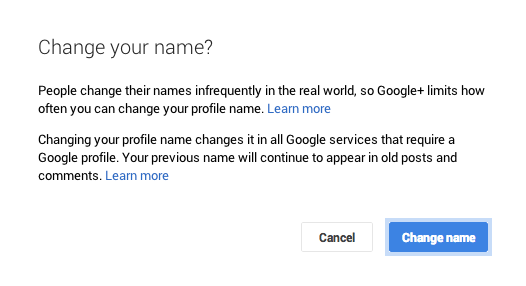
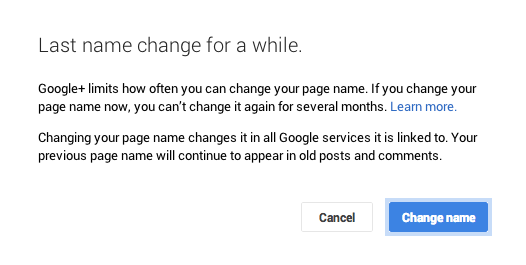
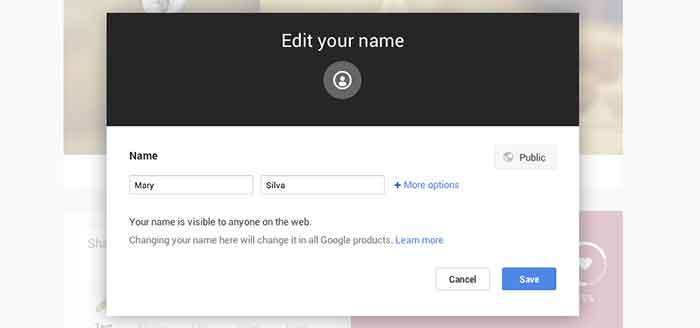
Sometimes we’ll bounce around for several minutes looking for where the settings tab or options part of a page is just to change one tiny detail. In the case of changing the visible name of your personal G+ page or the the listed name of your business, a quick and easy way to make the edit is through the front end of your Plus Page while logged into your account. All you have to do is click your name! From there a popup will appear allowing you to edit this field. It’s important to note that you’re not allowed to do this as many times as you’d like with your personal profile page though. You can change your profile name only up to 3 times in two years.
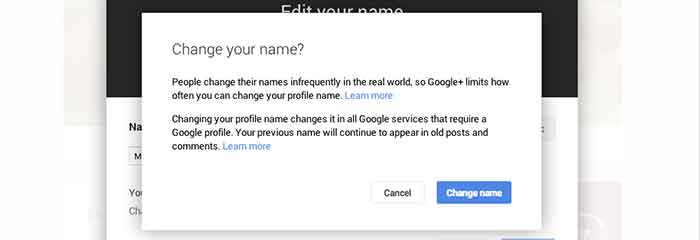
When changing your personal profile name you’ll see this warning about frequency:
“People change their names infrequently in the real world, so Google+ limits how often you can change your profile name.”
2. Make Community/MapMaker Edits to G+ Local Pages
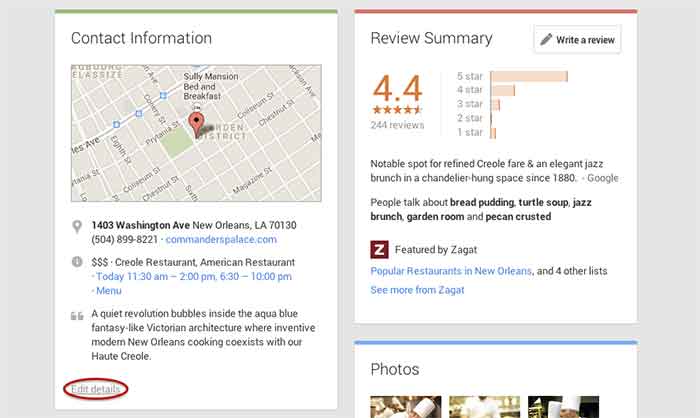
The most common community edits we need to make to a listing happen when we’re just starting out and the listing we want to claim is owned and/or verified by someone else. The process for requesting ownership of a listing can be a lengthy one, and in the meantime you may want to update your business information from the front end. To do so, simply navigate to the Contact Information section of the businesses Plus Page under the About tab. Then click “edit details” in the bottom left corner of the Contact Information box. The next page is the Map Maker editing screen that allows you to not only submit edits about the contents of the listing, but to also report a listing as a duplicate or closed location and report reviews that don’t belong.
3. Link/Verify A Website
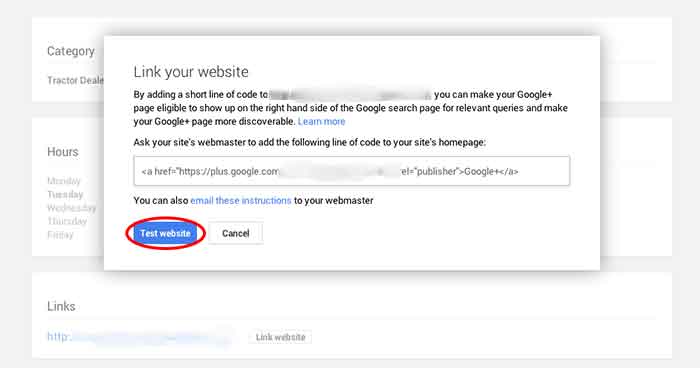
We’ve recently discovered an issue when linking a business’s site to a Plus Page. After having the code added to a business’s website for linking to the Plus Page, you have to go back into G+ to make Google search for and verify that the code is on the site. You probably wouldn’t have encountered this had you done the entire process of adding the code to the site after getting it from Google, but often it’s a matter of getting the code and giving it to your developer to put on site. So in this case, you’d want to make sure to go back to where you got the code and click “Test website” in order to tell Google to check for the code. This can all be accessed from the front end of your Plus Page by clicking “Link website” under the Links section of the About page.
4. Add or Edit Managers of a G+ Page
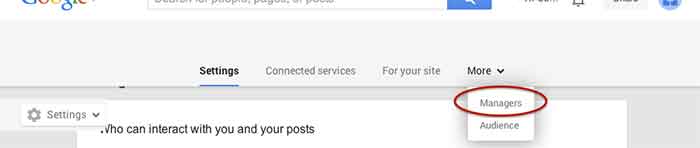
Adding a manger to a Google Plus Page can be helpful for many situations. Businesses often want to have someone help with social media posting but don’t want to just give that person all of their login information since that is often linked to personal Gmail inboxes and the like. As with editing the name of a page, adding a manager can be done more than one way from within the account. I, however, find that the easiest and quickest way to do it is by going to settings from the home drop down in the top left corner when logged into Google Plus. Then, simply navigate to the Managers tab on the top left to access the manager permissions editing page.
5. Create a Custom YouTube Channel URL
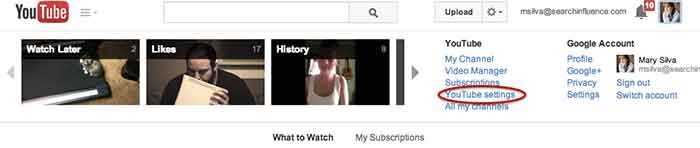
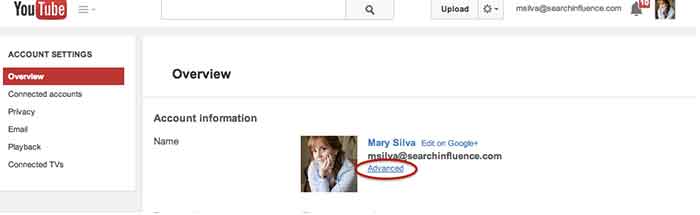
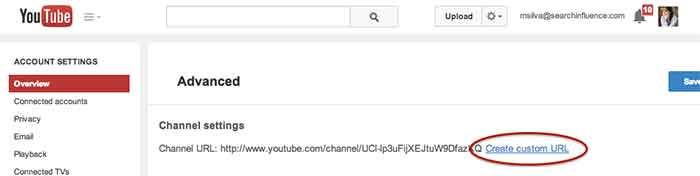
You knew this one was coming based off of that intro, didn’t you? So, from the top right drop down menu of YouTube, click “YouTube settings,” then “Advanced,” and finally “Create custom URL.” It’s that simple but not exactly the most intuitive place to look for it, given the many other options in YouTube.
I hope at least one of these steps was helpful for you, if not all of them. Let me know in the comments below what you think!
Last week I had the amazing opportunity to attend Pubcon New Orleans for the first time. It was one of the most fruitful learning and networking experiences I’ve had the chance to be a part of. I felt like I could spend forever just absorbing everything I could from everyone I met. One of the major themes that I got from all the speakers I saw at PubCon was the importance of good content. So, now I’m here to tell you about some of the main takeaways I got from the particular sessions I attended.
Peter Shankman: Keynote
The keynote by Peter Shankman focused primarily on the power of good customer service. His four main points were Transparency, Relevancy, Brevity, and Top of Mind. He said you don’t have to go crazy with customer service, just be “one level above crap.” On this note he mentioned the Morton’s Steakhouse story where he jokingly tweeted at them about wanting a porterhouse steak upon landing in New Orleans from a flight. They then sent someone to meet him with a steak when he got off the plane. This simple gesture(although not scalable for every brand) led to a lot of great publicity for Morton’s. It’s all about making your customer feel special.
An audience you are more transparent and honest with that feels invested in is 78% more likely to buy. Peter also said that when(not if) you screw up, own it. People are 44% more likely to stick with you if you own it. He mentioned the stark difference between how Eliot Spitzer handled his prostitution scandal by admitting the fault and resigning versus how Anthony Weiner handled his sexting scandal by saying he got hacked and not owning up to it.
Peter mentioned the importance of being relevant and listening to your audience as well. He mentioned a non-profit that saw a 37% increase in donations just by being engaging and active with their audience online.
The third important facet Peter Shankman mentioned was brevity. He particularly said that brevity is the future of social media and not just in the way we think of it through Twitter now. He said jokingly that we’ve all become the dog from the movie Up, because recent studies show that we have a 2.7 second attention span. Shankman said that mobile messaging is the future and Twitter is just the pipe, so we must learn to write well and concisely.
Finally, Peter talked about the importance of being top of mind. You want to be the first person someone thinks to go to for whatever they need. He also mentioned the idea of having “zombie loyalists,” or people who have you at the top of their mind for recommendations.
Will Scott: Barnacle SEO
Next I had the opportunity to sit in on Will Scott’s talk about Barnacle SEO(a term he coined in a Local Search News post back in 2008). Barnacle SEO is all about leveraging authority for local search. Specifically, the idea is to attach oneself to a “large fixed object” and wait for customers to “float by in the current.” It’s not as simple as using someone else’s authority, because Will says the most important thing in business is sincerity. “If you can fake that, you’ve got it made,” he says.
He also mentioned that Google’s weakness is sites they consider super authoritative like YouTube, Yelp, Pinterest, Facebook, YP.com, and such. This is making Barnacle SEO have a huge comeback. YouTube for example dominates universal search and according to a MarketingLand infographic, 8 out of 10 video results are from YouTube.
Although using backlinks from these authoritative sites and directories like YP.com for local SEO efforts is important, it’s also super important to “keep it clean-ish” by using tools like Whitespark.
Greg Gifford: Local SEO- It’s No Laughing Matter
After Will Scott, Greg Gifford, Director of Search and Social at AutoRevo, took to the stage with his presentation about the complications of local search. His awesome presentation featuring punny references to 142 movies and also contained precise, actionable tips. He mentioned the changes in local search like the maps pack finally stabilizing at seven listings and how optimized vertical and local directories now rank very well. A huge opportunity for small businesses to rank well lies in simply adding city and state to title tags.
Greg also mentioned how the goal of Google Plus Local(aka Google Places) seems to be like a drive through, a place for people to get what they need by getting in and out quickly. He also brought up the Google email about “duplicate listings” that rolled out with Google finally merging the old dashboard to the new. If you want to know more about this email, check out my blog post here.
His optimization tips for G+ included writing long, “awesome” descriptions using formatting and links, uploading lots of photos, using as close to the max 10 categories as possible while keeping them relevant, engaging in the fairly few number of users on G+, and circling users as a business. As far as reviews on G+ go, he mentioned that you have to earn them and ask for them, you need at least five reviews to see the star average, you should shoot for 10 then diversify, one to two reviews a month is normal, and having them come in consistently rather than in bursts is important.
Casey Markee: The “Big Easy” Guide to Google-Friendly Link Earning
Casey Markee started his presentation with a quote from Matt Cutts saying, “The objective is not to make your links appear natural, the objective is that your links are natural.” He mentioned that the “four tenants of Google-friendly links” are those that provide clear value for the user, are niche-relevant, get clicked to send some measurable form of trackable analytics traffic, and are “earned” freely versus being given.
He listed nine link “earning” classes that Google still loves which included:
Link Bait Type Content- Sharable and Buzz-Worthy
Evergreen Content- No Expiration Date
Local Link Earning- Publish Local Resources
Scholarship Link “Earning”- Ex: SilverCross.com Ability Achievement Scholarship
Beneficial Link “Earning”- Participate in Online Forums
Sponsorship/ Partner Building- Support Causes
Profile Links- Social Profile Building
Selective Guest Blogging- Quality not Quantity
Brand Mentions- Get Regular Mentions Turned Into Live Links
He ended with saying that link earning is a marathon not a sprint, and that quality content is key!
Mike Stewart: Building a Future Proof Plan for Organic Local Search Rankings
The biggest takeaway I got from Mike Stewart’s presentation was to think beyond Google search and about other places where people often search like Siri, Amazon, Facebook, and Bing. He also explained the difference between some white hat and black hat SEO tactics, and the importance of doing it right. Mike took us back to basics explaining that “SEO is about creating, editing, organizing, and delivering content and metadata to increase relevance to specific keywords on the web.”
Finally he gave us “Seven Simple Content Ideas That Drive Shareability” which are as follows:
GIVE: Offers, discounts, deals, and contests that everyone can benefit from
ADVISE: Tips, especially about problems that everyone encounters; how to do something
WARN: Warnings about dangers that could affect anyone
AMUSE: Funny pictures and quotes, as long as they’re not offensive to any group
INSPIRE: Inspirational quotes
AMAZE: Amazing pictures or facts
UNITE: A post that acts as a flag to carry and a way to brag to others about your membership in a group
This is just a very small portion of the many helpful tips and tools I learned at PubCon this year! Let me know what you think about all the tactics you’ve learned here today.
Welcome back to the wonderful world of Google! Last week I explained in a post the email that Google Places for Business has been sending out to business owner accounts.
Part of that email included a bit about your account containing listings that were identified by Google as being duplicates existing within your account. Now I’m here to explain to you the two most common ways in which we see duplicate Google listings and how they can be addressed.
Internal Duplicates
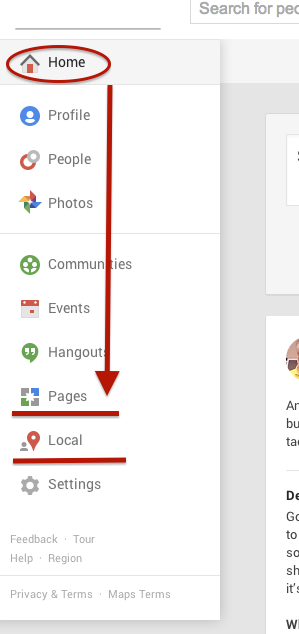
One way we tend to see duplicate listings in Google Places is from within your business owner account, in your own business dashboard. To see how your businesses are appearing in your account dashboard, go to the Places for Business dashboard, which can be found by going to plus.google.com. Then click “Local”(to see your Location pages) and “Pages”(to see your Location, Brand, or other Google Plus Pages) in the drop-down on the left.
The Local dashboard is where we generally identify internal listing duplicates. With the bulk dashboard updates performed by Google, we’ve seen this happening quite often. Since a lot of businesses have been force pulling their listings into the new dashboard by claiming them through the Places section of plus.google.com, there appears to be two listings in the dashboard of these accounts after Google’s mass update.
Generally, one of these listings appears as verified (the one forced pulled into the new dash) and the other as unverified (the one Google pulled over). Sometimes they both lead to the same G+ page when you click through the “view this listing” link in each. This is just a weird hiccup, and if you wish to clean up the dashboard by deleting the unverified one, it will not affect your listing. As long as you have the verified listing in the new dashboard, you are the sole owner of said listing under this new update.
In other cases, however, we’ve created a verified local social page through our force pull into the new dashboard that has all of our social content like G+ posting and YouTube videos. Then, when Google pulls in the location page from your old dashboard, that page is a “duplicate” with all your old reviews on it. In this case, both pages would have content that you wouldn’t want your business to lose through “deleting” a duplicate. So, you’d want to make sure the reviews from the location page are moved over to the newer, verified page before having it deleted. This will require a phone call to The Google Places Team support center.
Obviously if one of these pages has content that you don’t mind losing or doesn’t have any content, that page can be deleted. If the one you want to delete is the verified one and you need the unverified page to be your primary, verified listing, you might be able to avoid having to reverify the listing through getting assistance from The Google Places Team.
External Duplicates
Another way in which we see duplicate Google business listings is on the front end through Maps search results. You’ll see below that Hedonism II has a couple of duplicates that come up in Maps results. Getting these kind of duplicates cleaned up is a bit easier than the situation explained above. What you’ll do to remove these duplicates is called making a “community edit” or “mapmaker edit.”
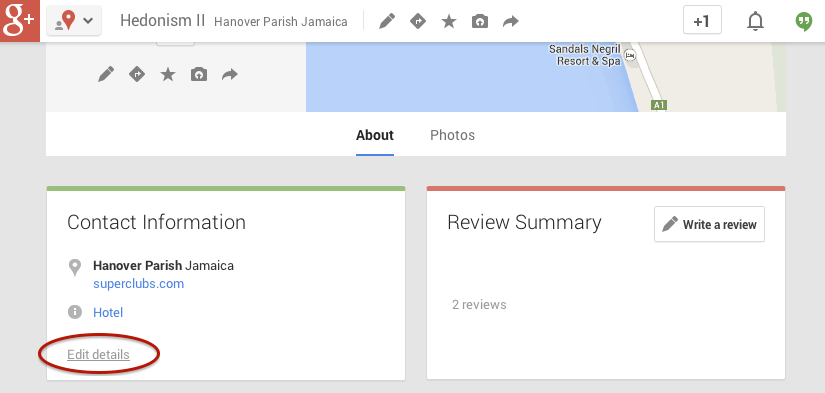
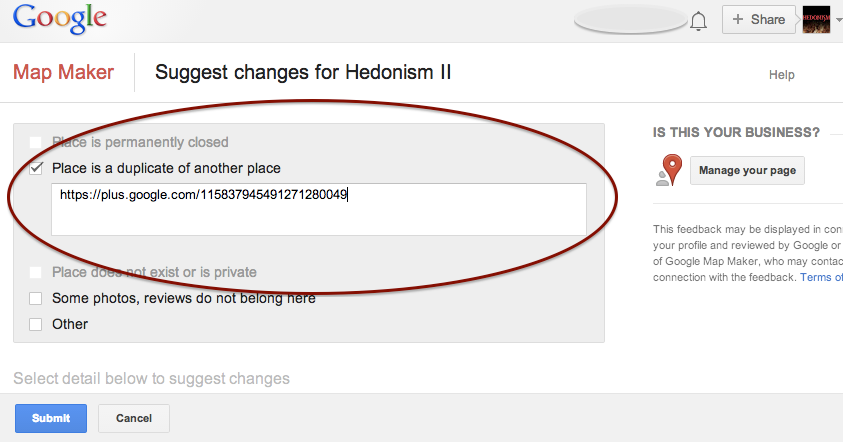
Go to the duplicate listing you’d like Google to remove. Under the “About” section of the Plus page, then at the bottom of the “Contact Information” you’ll see the option to “Edit details.” Once you click that, you’ll have to option click a check box to suggest to Google that this “Place is a duplicate of another place.” You’ll also have a box in which you can leave comments about the report. I suggest leaving a link to the correct/verified page in this field to help the duplicate identification process. See screenshots of this process below.
In my experience, these changes will usually take affect within a week of reporting if Google deems it an accurate report. If no changes take affect in a week, I usually send the report again, wait a week, and repeat again as needed(I’ve never had to report more than 3 times, though).
Understanding the many nuances of what’s going on here might seem fairly daunting, but the level of which you wish to understand these intricacies is dependent on how much control you wish to have on your business reputation/ presence in Google.
If you have any questions, feel free to comment below!
We’re still not panicking about all of Google’s updates! As many of you already know, Google has been sending out a Google Places for Business email that reads as follows:
The Message
Hello,
We’d like to inform you that Google Places no longer accommodates more than one authorized owner per business location. Your account contains one or more listings that have been identified as duplicates of other listings and as a result, some of the information you provide will not be shown to Google users anymore.
To get more information or request access to the other listings, please log into your Google Places account.
Sincerely,
The Google Places Team
As this message is kind of vague/ confusing, I called a Google rep to get clarification on exactly what’s going on here. Bear with me as I explain what this means exactly and how it’s affecting business listings.
The Meaning
Google is finally pulling all listings into the new Places for Business dashboard. In the old dashboard there could be multiple owners of a listing, but in the new dashboard there can only be one.
As Google performs these batch listing upgrades, the first owner whose account is upgraded gets grandfathered in, so to speak, and they will be the sole owner of the listing through the new dashboard. If someone has already claimed and verified a listing in the new dashboard, however, then no one will experience the “grandfather” situation in the batch upgrades as it is already verified in the new dashboard and has its one owner.
The good news is that many of us have been force pulling businesses into the new dashboard by claiming them through the Places section of plus.google.com. So the latter situation will have already occurred for most, and we will be the current, sole owner of verified listings in the new dashboard. (If you lose ownership of your listing in the batch update by Google, you can still request it back, it will just take time through a two week request period and contact with Google.)
We have seen cases, however, where after the batch update by Google there appears to be two listings in the dashboard of accounts who have already pulled their listing into the new dash on their own. Generally one appears as verified(the one we forced pulled into the new dash) and the other as unverified(the one Google pulled over), but they both lead to the same G+ page when you click through the “view this listing” link in each. This is just a weird hiccup, and if you wish to clean up the dashboard by deleting the unverified one, it will not affect your listing. As long as you have a verified listing in the new dashboard, you are the sole owner of said listing.
Now What?
Basically, anyone who has ever had a listing in the old dashboard is receiving this generic email, and it is not necessarily an indication as to whether or not the listing is owned/verified in the new dash in your account. So, as long as we’re keeping on top of our business listings’ dashboards, there is no cause for alarm! There’s also the note about duplicate listings in the email. Duplicate listing issues are not something that occur in every account which receives this email. More to come on addressing duplicates in the new dashboard next week! If you’d like to see what others are saying about the email, check out Search Engine Land’s post from earlier this morning or these forums where people have been discussing particular, individual issues encountered (Google Product Forums and Local Search Forum).
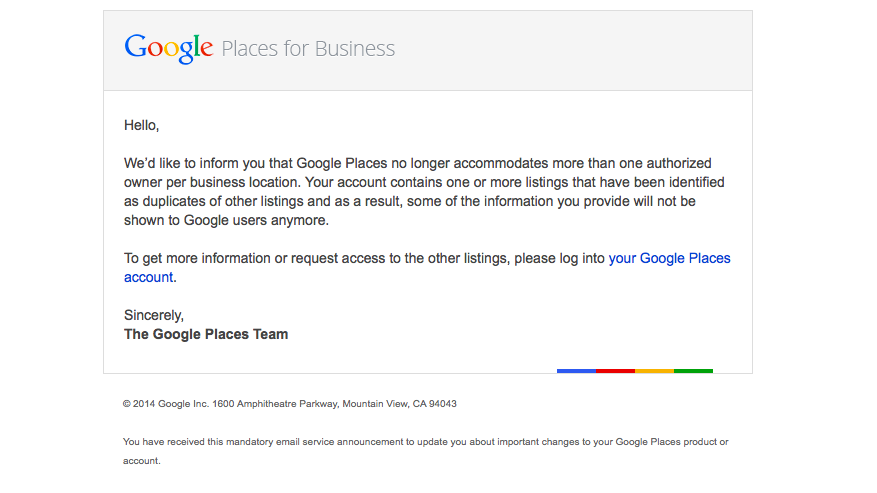
Here’s a screenshot of the actual email for those of you who would like to see it:
If you have any questions or comments about this situation, feel free to comment below! Stay tuned for how to handle duplicate listings!
You may have heard the buzz lately about an email going out to business owners in Google Places telling them that they have three weeks to update their listing. If the listing isn’t updated, it will no longer be visible to Google users. The good news is that this is actually something that is only occurring for Australian businesses. Basically, you don’t have to worry!
When we first heard about this issue at Search Influence, we were alarmed because an update like this could potentially affect many of our clients’ accounts. So, I decided to delve deep into the web and find out as much as I could from various online sources, and what I found was even more worrisome and ambiguous. Search Engine Watch’s post was the first that brought this issue to my attention. The post provided great information on what needed to be done by those receiving the email, but nothing about the scale of the email rollout and who was being contacted and why.
The Word From Google
Search Engine Journal’s post was awesome enough to give us the exact email google sent out, which reads as follows:
Hello,
Due to changes in Google Maps, we’d like to inform you that unless you review and confirm the information in your Google Places account, we will no longer be able to keep and show it to Google users after February 21, 2014.
If you wish to keep your listing active, follow these three easy steps:
1. Log in to your Google Places account
2. Review and update your information
3. Click the “Submit” button
Sincerely,
The Google Places Team
The fact that the email instructed businesses to click a “Submit” button when updating indicated to me that these were businesses in the old dashboard. So, I thought I had a clue as to who was being contacted at this point.
Next, I went to discussions on MOZ and Google Product Forums where I started seeing comments that maybe this was only something happening in Australia.
Calling The Google Places Team
After seeing both of these slightly alarming, but informative posts I decided to go straight to the source and call The Google Places Team. They were super helpful in taking the time to get to the bottom of the email and were forthcoming about the issue at hand. They also understood that something like this could affect a company like ours on a pretty large scale. The rep on The Google Places Team reached out directly to Google and was able to confirm with me that this is indeed something only happening to Australia Maps.
There have been speculations as to whether or not this is something that could start happening outside of Australia, because Google has a tendency to do things in a test market before rolling them out worldwide. From what the Google rep told me, however, it seems like this is only happening because of an issue that was occurring specifically with Australia Maps.
So, DON’T WORRY! United States Places Businesses are NOT at risk!!
It’s curious how when you’re looking so intently at one thing, something so much bigger sneaks up behind you. Like when you’re a six-year-old kid all excited at your birthday party opening presents, your mom buzzing around taking lots of pictures demanding everyone to “smile,” and your dad sneaks in behind you rolling in a bright shiny new bicycle!
That’s how I have been feeling the last week or so. Like I just got a bright shiny bicycle with a horn and a bell and handlebar fringe!
I have been head down, concentrating on a project with numerous Excel spreadsheets, lots of cups of coffee, data overload, and a glazed look in my eye. When I was poking around in yet more data, I found that Google snuck up behind me with a big bright shiny present. I gotta say, it’s a pretty exciting surprise when I see the majority of our clients have an increase in January’s organic traffic; and not just any increase, impressive increases that makes big smiles all around the office.
So, was there a Google update when I wasn’t looking?
Because the increases in Analytics are seen across so many clients, across so many industries, there had to be an algorithm shakeup. Lo and behold, on January 9th, Barry Schwartz announced the chatter on it “Is Google Search Updating?”
The post’s comments express some winners and losers as expected with any update. I had to dig to find some excitement similar to my own:
Vibhu Gauba
• 16 days ago
“Tracking almost like 700-800 clients of ours and all have moved up !!!!”
and …
SAJID
• 16 days ago
“Wao… Thats gonna be a wonderful update… My traffic rose about 250% from last few day”
Barry Schwartz’ post drove me over to Algoroo. Algoroo was developed by Dejan SEO, and they say “Algoroo tracks Google algorithm changes by observing turbulence in rankings of thousands of keywords. When the bar is high, it’s likely that Google has made a tweak to their algorithm.”
They posted on recent, significant algo updates which is interesting and related to the topic. This unannounced, unacknowledged January update is the 6th most strongest update since May 2013 Penguin.
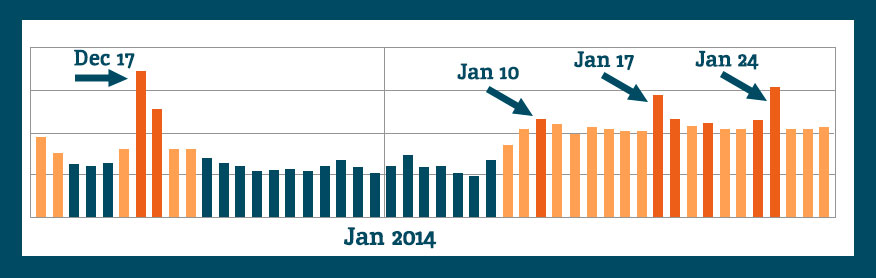
When we look at the Algoroo chart for more recent dates, we see some definite turbulence in keyword rankings:
The chatter indicates that there was an unannounced update, and a fellow blogger commented, I’m going to enjoy it while I can.
Crawl Rate as an Indicator?
Some of the commenters on the webmasterworld forum had a short burst of discussion around crawl rates trying to find some commonality among websites’ changes, or at least as an indication of “something” happening.
White Dove says, “I’ve seen an increase of crawling activity, including pages that don’t exist anymore.”
Shai comments, “Although no major changes in rankings, I can see some strange crawling occurring on around 30 sites. Not found anything in common between any of them yet.”
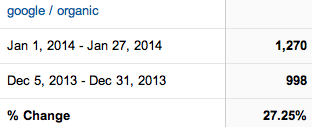
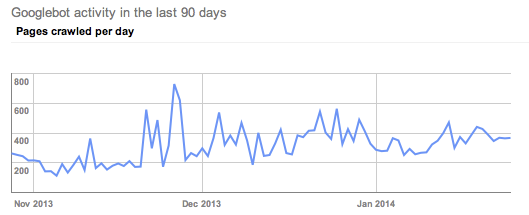
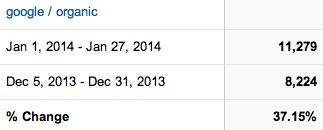
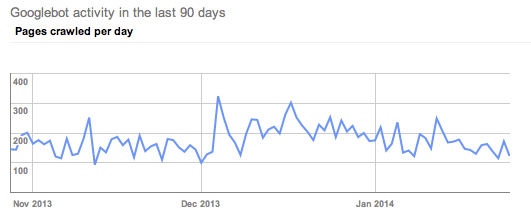
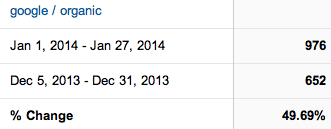
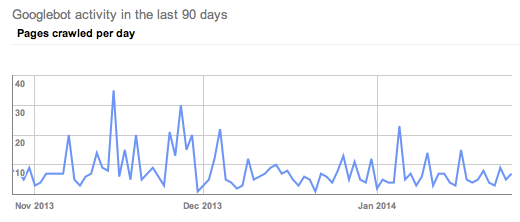
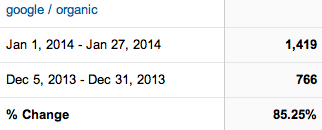
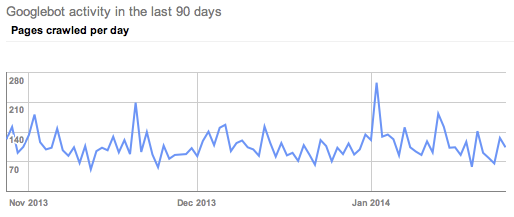
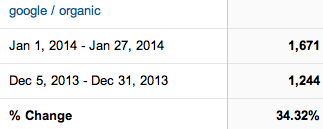
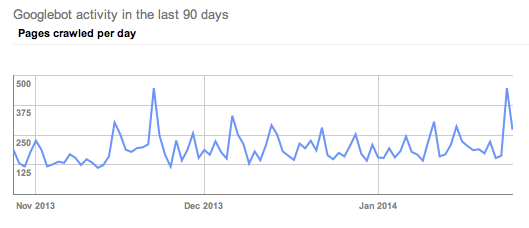
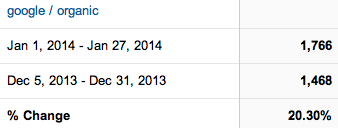
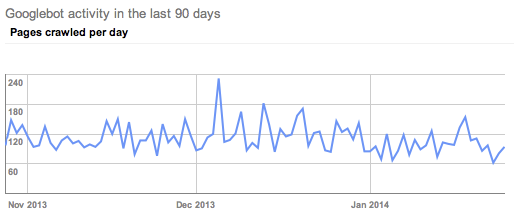
I want to check this out, so I’m looking at clients who I know have improved organic visits in January and scoping out their crawl rates. (Screen shots are Google organic visits Jan 1, 2014-Jan 27, 2014 Compare to: Dec 5, 2013-Dec 31, 2013. Crawl rate charts are showing last 90 days.)
Client A has fantastic organic increases in January. I will take 27% organic increase any time.
A’s crawl rate shows a clear uptick in crawl rate, but not in January. His crawl rate started picking up in late November.
Client B had a 37% increase in Google organic traffic.
His crawl rate picked up in early December.
Client C had great improvements.
If anything, I would say his crawl rate slowed in January.
I had to dig around to find these somewhat obvious examples of the above crawl rate changes. Most of the clients within this same industry had crawl rates like Client D.
Client D has exciting organic visit increases in January.
The crawl rate doesn’t indicate any clearly obvious trends.
All of the clients looked at above are in the same industry, so let’s look at another industry to see if the trends are widespread.
Client E is enjoying a 34.32% increase in Google organic traffic in January.
Their crawl rate also picked up in late November.
Client F has a 20% increase in Google organic.
His crawl trends seen in Google Webmaster tools show a slight decrease in crawl rate in January.
I poked around at other clients in GWT, and I’m not real sure we can pull any decided trends from the crawl rate theory. I didn’t check every Search Influence client, nor did I create elaborate charts of crawl rates per month. I’m comfortable seconding Shai from the webmasterworld forum, “Not found anything in common between any of them yet.”
Search Queries
I’m not seeing any huge changes in rankings data for the keywords we are tracking. We have some ups and downs, but nothing out of the ordinary. We update tracking information regularly, so until the next keyword ranking report is updated, Google Webmaster Tools can tell me some great information, too.
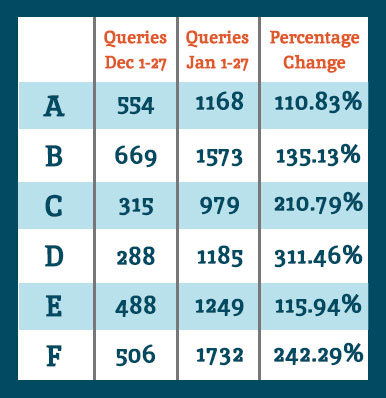
Google Webmaster Tools Search Queries data shows a lot of keyword data that we don’t track in our keyword reports. So for the example clients noted above, I see they all had an increase in Google search results shown in GWT.
When we look at the Queries data for the same comparisons as the organic search data at the top of this post, we see they all had an increase in showing up for searches. Google defines Queries as: “The total number of search queries that returned pages from your site over the given period.”
I interpret this as our websites are ranking for more varied keywords and more than we are tracking. It’s typical for a website to rank for more than you are actually tracking. It’s unreasonable to track for all of the possibilities.
I want to acknowledge that there is seasonality in January search for some industries. Some of the organic increases can be attributed to seasonal search trends, but never at these levels. Also, last week I spoke with client F telling him about the January organic goodness, and his response was January was usually dead for him, and the phones this last month have been ringing. Yes, seasonality is often a factor for any month-to-month increases or decreases, but these data are suggesting something bigger.
Bottom Line
Any time there is any Google algorithm update, whether announced or perceived, there will be winners and losers. I’m happy our client sites are on the positive side of whatever changes were implemented. Yes, it’s good to be a winner today, but it’s not without effort. I can repeat what everyone has been talking about for months and months:
Clean fresh content on a regular basis
Encourage client engagement on Google+
Cleanup any residual devalued links
Earn links with great content and local community participation
These are just a few actions to take in earning trust and traffic from Google search.
If you’ve noticed any changes in search traffic or rankings in January, we would love to hear about it in the comments below.
Some may know Google Plus as a weak attempt by Google to compete with Facebook. However, it can be used for much more than just engaging with your target audience. Google’s social media platform can also help your SEO efforts while providing quality content and information to followers.
Here are three reasons why your business needs to be active on G+:
1. Google+ Posts are Crawlable
Unlike other social media platforms, all Google+ posts are crawlable by the search engines. Your business’ Twitter or Facebook profile may show up for your brand name search, but specific posts and updates are not indexed. All Google+ posts are indexed in minutes, and some even say seconds.
You can use your G+ posted content to target specific keywords. Each post has its own url, and the first 45-50 words in the post become the title tag. Links within Google+ posts are followed links. As you post content linking back to your website and that content is shared, the authority of your Google+ page and website are growing.
2. Boost CTR with Google Authorship
According to Google, authorship has no impact on the SERPs. However, Google Authorship can help you get more traffic to your website, which is why we are all trying to rank on page 1 to begin with, right?
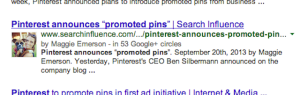
By associating a G+ profile with pages on you wrote on your website, the profile photo of your G+ shows up with those pages in the search results. The image in the search results sets your site apart from the others and makes it more eye catching. Authorship increases the likelihood a searcher will click your site in the search result. And although authorship does not have a direct correlation with rankings now, we anticipate it will in the near future. And for now, using it for more traffic to your site is enough incentive to get on board.
3. Potential Increase in Rankings
The number of +1’s your G+ business page gets has been shown to correlate with top rankings in the SERPs. Moz did a correlation study to determine what aspects of a website show a strong connection to high Google rankings. The number of +1’s came in second only to page authority, with number of linking domains and Facebook shares, likes, and comments as the next most influential. Searchmetrics also did a similar study that found the number of +1’s to be the most highly correlated factor with top Google rankings.
Yet, Matt Cutts is very adamant that the number of +1’s for a Google business page “has no direct impact on their web search ranking algorithm” and “correlation does not equal causation.” Although this may be true, a business can no longer ignore Google+ and its added SEO value.
As a social platform, G+ is equally as important as Facebook. And Google+ goes far beyond social reach, it provides a great opportunity to boost your SEO efforts. So go ahead and get active on G+, the benefits are only continuing to grow!
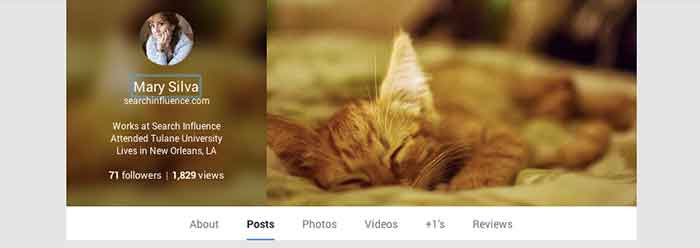
As you all probably know by now, every Google account now has a personal Google+ profile associated with it. A common practice in SEO and setting up a Google Local listing in the past has been to create a Gmail account specifically for business purposes. This generally included using a business name as a First and Last name in the Google account setup. For example, if I owned “Delicious Cupcakes Shop,” the Google account name would be Delicious (First) Cupcakes (Last), not Mary Silva.
What Changed?
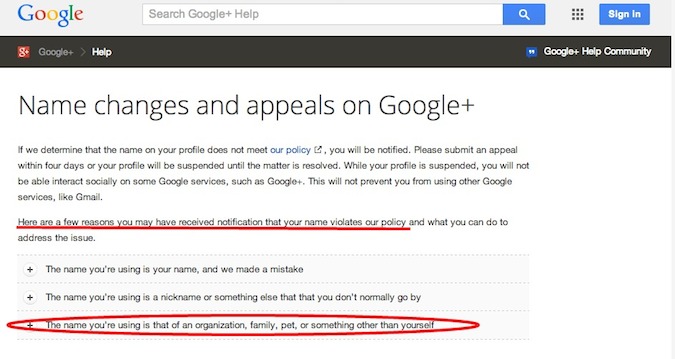
Now we’ve learned, however, that with the new Google+ profiles being created for accounts, having a non-human name as your profile is grounds for having your account suspended and your Google services revoked. This includes having your account associated business page removed from search results. If your profile goes more than 60 days under suspension, Google will start to automatically remove your content from their system. Learn more about “Google+ Profile Suspensions” here!
Also, regardless of the Google suspension penalty, having a page with your business name that would now be a public profile would possibly lead to confusion and appear as a sort of duplicate business page. So cleaning up your account name is definitely an essential move to make now.
Even Google has acknowledged that having what they consider an “improper name” will happen, and offer explanation on what happened. They’re clearly aware of the fact that many accounts may have been set up with something other than a person’s name.
What Now?
If you’re like many other business account managers who have set up an account using your business name as the account name, you might ask, “What’s the next step in getting this cleaned up?” Well, it’s actually quite simple! All you have to do is follow the next few steps:
Step 2: There are 3 circumstances you might encounter after login:
2a: If your account is being accessed for the first time since the Google update that created Plus pages for each account, you will see a form where you will set up the Plus page for your account for the first time. Update the “First” and “Last” name fields with whatever human name you desire.
2b: If your account has already been set up through Google+, then you’ll have to check that the name of the account is a human name and not the business name. Here’s how!
In the top right corner of your homepage, hover over the user photo and then click “view profile”
Next, hover over the name and you’ll see that you can “click here to change name”. Update the “First” and “Last”name fields with whatever human name you desire.
Note that for both profiles and pages, Google limits how often you can change them, so choose wisely whenever changing this information in your account.
2c: If the your account has already been flagged/suspended, you’ll see a red banner across the top of your page when you login informing you of the suspension. Follow the same steps for part 2b but you’ll have to check back in 48 hours to make sure Google accepts the changes and removes the suspension. You’ll also have to see if the account has lost Google privileges and respond accordingly.
Hope this has been helpful to anyone who has encountered this issue or has a business account with Google! If you or your business have experienced similar trouble with Google, let us know in the comments!
Google has just announced a revolutionary social ads concept for brands dubbed “+Post ads.” +Post ads will allow marketers to re-package selected Google+ posts for promotion by way of Google’s display ad network.
Unlike Facebook ads which live only within the walled garden, Google is taking the revolutionary step of pushing these ads OFF of Google+. In fact, Google+ will, for now, remain pristine, with no apparent ads.
+Post ads have the potential to be more disruptive due to their “content as display” nature. It is likely the novelty will wear off in time, but in the early going brands who jump into this platform will likely see great exposure for their Google+ social content.
For more information, see the related Google site. Our own Jeanne Gaudet has also contributed a brief writeup (published under my account) to the LocalU.org blog.





 One way we tend to see duplicate listings in Google Places is from within your business owner account, in your own business dashboard. To see how your businesses are appearing in your account dashboard, go to the Places for Business dashboard, which can be found by going to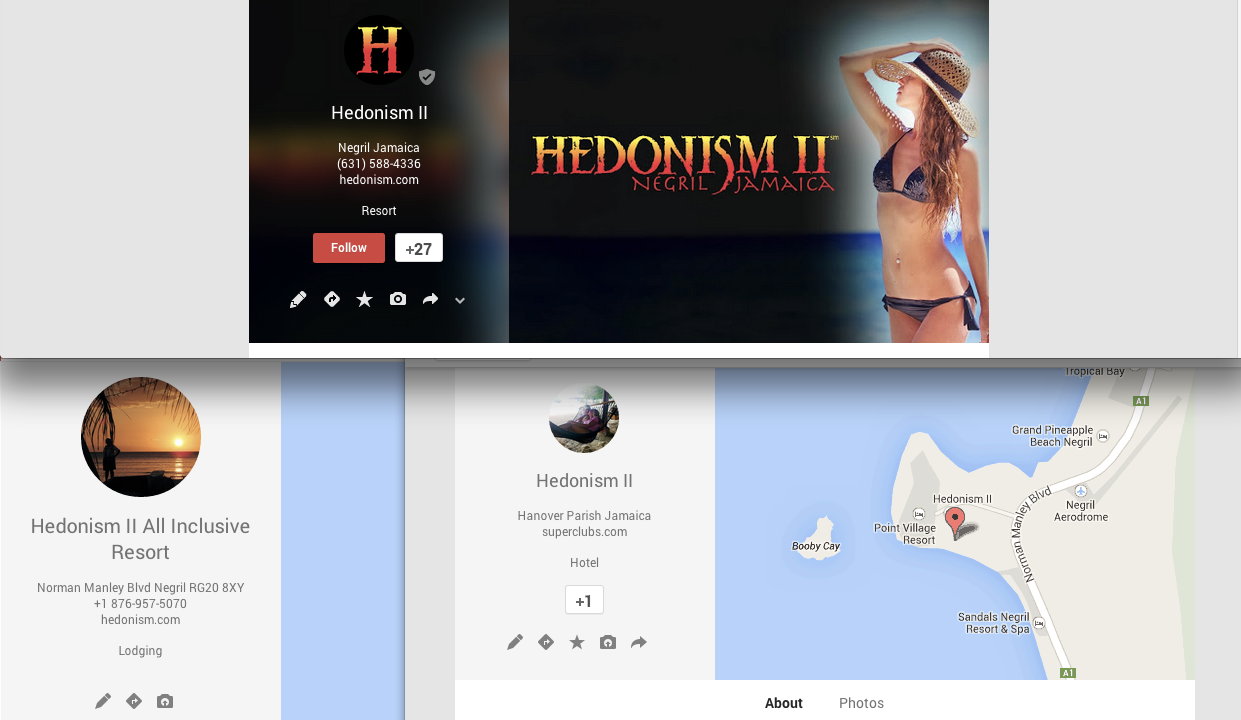
 Google is finally pulling all listings into the new Places for Business dashboard. In the old dashboard there could be multiple owners of a listing, but in the new dashboard there can only be one.