Tag: google my business

  • Google Maps: Ongoing List of COVID-19 Updates (June 2021 Update)

    Note: this post was updated on June 9th, 2021.

    Many of the changes that Google made to Google My Business for COVID-19 will likely stick around after the pandemic. Consumer behavior changed and Google adapted to help businesses meet those needs.

    On the other hand, a lot of functionality was limited in the immediate aftermath of COVID-19. Currently, listings more or less have the same functionality as they did prior to the pandemic. A lot of these limitations, such as removing the reviews option, were to prevent overreactions on things like hospital listings in the immediate aftermath of the pandemic. As things settled down, these features returned.

    COVID-19 Google Maps Updates

    • Google removed the option to leave reviews and ask questions in the Q&A section. They now have returned the ability to leave reviews for all business categories besides drug rehab and narrow sets of medical categories like hospitals.
      • UPDATE: Both reviews and questions and answers are back to the pre-pandemic functionality, regardless of category. The changes Google made resulted from uncertainty and potential harm done to certain listings, but as “normalcy” returns, so have these sections.

    Screenshot of Google My Business reviews live on SERP

    • As of today, Google does not permit video uploads to the channel. Previously, businesses could include videos in the overall Photos section. Google has not said when they will update this feature.
      • UPDATE: Videos are now viable and usable on all listings.
    • The company has slowly rolled back out the Q&A section, with service industries seemingly being the first to get these back. There is no clear timetable for the full rollout.
    • Google removed the ability to use their previously supported Chat feature for help. This is likely due to staffing issues related to COVID-19, so the only method to reach Google is through this form.
      • UPDATE: This form remains functional, but the response times vary depending on numerous factors.
    • Google rolled out the ability for chains to use Google Posts.
    • Google is working on features that will help users in the post-COVID-19 world. According to Ramesh Nagarajan, Product Management Director of Google Maps,

    “When you look up public transit directions for a trip that is likely to be affected by COVID-19 restrictions, we’ll show relevant alerts from local transit agencies. These alerts can help you prepare accordingly if government mandates impact transit services or require you to wear a mask on public transportation.

    When navigating to medical facilities or COVID-19 testing centers, we’ll display an alert reminding you to verify eligibility and facility guidelines to avoid being turned away or causing additional strain on the local healthcare system.”

    • It is unclear how this impacts businesses, but it is a sign that businesses should communicate their status around these issues on their profile using the numerous features Google introduced.
    • The “Temporarily Closed” option for listings will remain for as long as needed. It is important to note that Google insists marking business locations as temporarily closed will not impact your ranking.

    Ongoing COVID-19 Google Maps Updates

    • Temporarily Closed option added for listings.
      • UPDATE: This option remains available for businesses.
    • Google added Takeout, Delivery, and Dine-In badges for restaurants and bars to show which options they currently offer.
      • UPDATE: These options remain available and will likely stay for the near future. The relevance of having information about “no-contact“ options will depend on the length of the pandemic, but that may be a consumer behavior that remains.

    Screenshot of dine-in, takeout, no contact delivery attributes on Google My Business listing

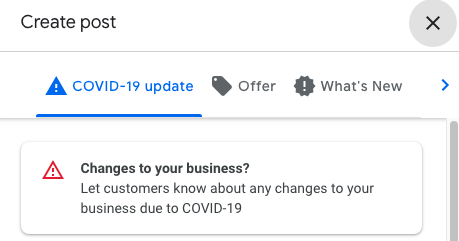
    • There are two COVID-specific post options right now. Both of these are great ways to update users about the status of your business.
      • UPDATE: These post features remain available to businesses.
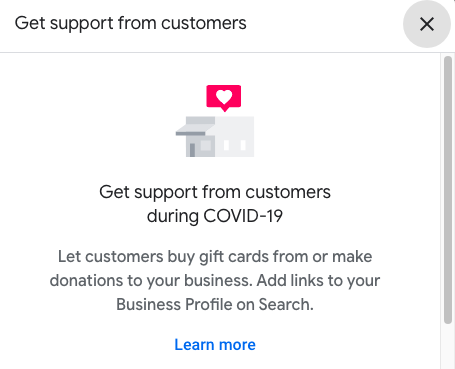
        • Ways to support your business
        • General update about your status

    Screenshot of get support from customers option offered by Google My Business


    Screenshot of options related to COVID-19 in Google My Business Posts

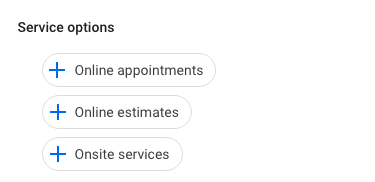
    • Google added backend attributes that help inform both Google and potential customers about what type of online and on-site services you provide.

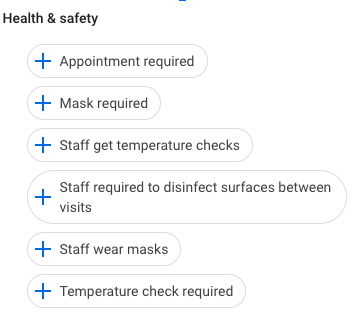
    • Google is now allowing businesses to display COVID-19 safety measures including mask requirements, staff requirements, and temperature checks.
      • UPDATE: Google has added more details around the safety measures taken by businesses.

    Screenshot of Google My Business safety options

    • UPDATE: During the course of COVID-19, numerous businesses pivoted to offering online services. As a result, Google rolled out features to help businesses connect with users looking for virtual experiences. Some of these include online care, online classes, and online appointments.

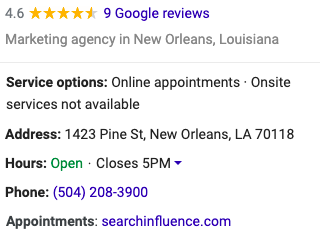
    Screenshot of main business information on google my business listing

    Today, Google has essentially returned their listings to their pre-COVID functionality with the added benefits of having service and safety information more present on the listings. These are features that are likely to stay and help increase engagement with listings and provide more user-centric information beyond the business address and phone number.

    If you’re interested in discussing how Search Influence can help you navigate the post-COVID business landscape and your ongoing marketing efforts, please reach out to talk to a strategist about your digital marketing goals.

    Here are some additional resources to help your business run as smoothly as possible during this period.

    Images

    Mobile device

  • A Quick (How-to) Guide on Updating Hours and Business Info on Google My Business

    During a crisis, some businesses can continue operating with modified hours while others might have to close temporarily. Google is working on implementing the “Temporarily Closed” feature on Google My Business (GMB) pages in the upcoming days. We will update this post when the “Temporarily Closed” feature is available.

    In the meantime, we recommend updating your hours and sharing a post via GMB to keep your customers informed on your status.

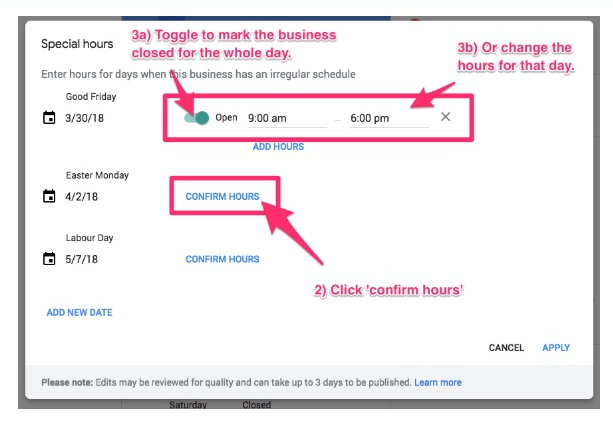
    How to Update Your Business Hours on Google My Business:

    1. Sign in to Google My Business
      a. If you have multiple locations, open the one you’d like to manage
    2. Click “Info” from the menu
    3. Next to “Add Hours” or your current business hours, click “Hours”
    4. Turn off each day of the week that your business will be closed temporarily
    5. Next to each day of the week that your business is open with limited hours, click “Opens At,” and then select the opening time
    6. Next to each day of the week that your business is open with limited hours, click “Closes At,” and then select the closing time
    7. After you’ve finished setting your hours, click “Apply”

    A screenshot of Google My Business backend showing the special hours feature

    How to Post a Google My Business Post to Share More Details on Your Business Status:

    1. Sign in to Google My Business
    2. If you have multiple locations, open the one you’d like to manage
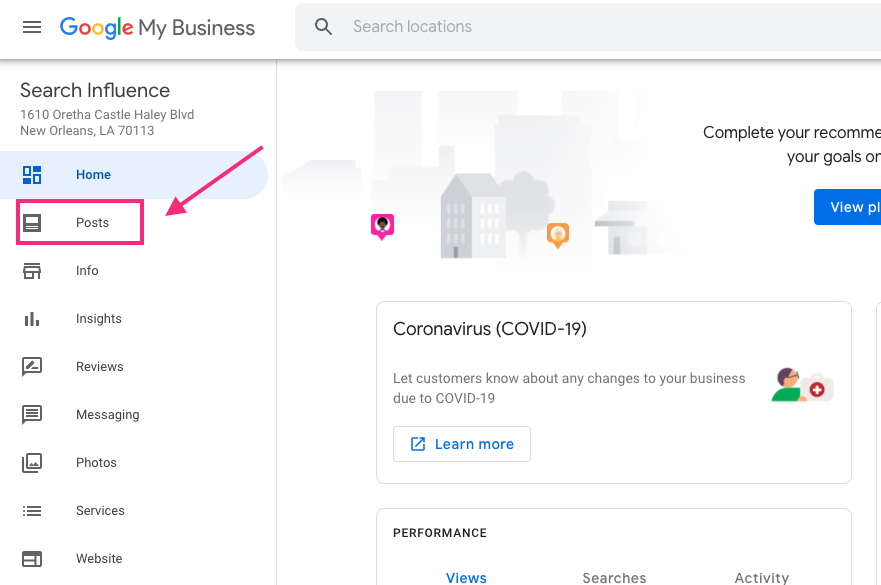
    3. Click “Posts” from the menu


    4. At the top of the page, choose the type of post you’d like to create from the options given. We recommend you use “What’s New” for the latest updates
      a. Options to add photos, videos, text, offers, and a button to your post appear. Click each field and enter relevant information
    5. To see a preview of your post, click “Preview”
    6. If you’re happy with your preview, click “Publish” in the top right. If you’d like to change your post, click “Back” in the top left. Edit your draft until it’s ready to publish
    7. Google removes published posts seven days after the post’s tab of your Google My Business listing

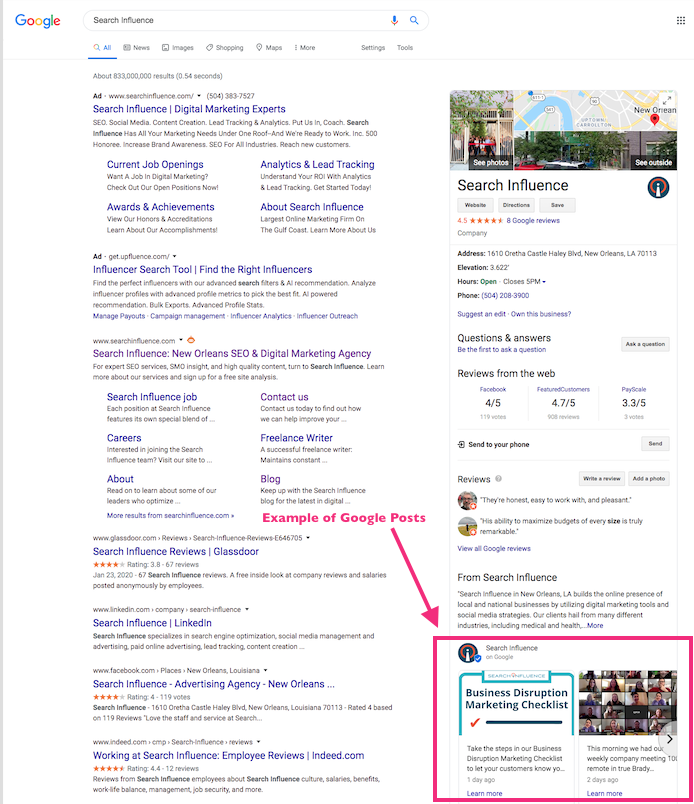
    A screenshot of Search Influence's Google My Business Listing showing an example of Google Posts


    All uploaded media must meet the following size requirements:

    • Minimum: 400×300 pixels and 10 KB size limit.
    • Maximum: 10000×10000 pixels and 25 MB size limit.

    Check out this video if you need to claim your business. We’re here to support you as we all work together and work through what this time means for businesses. For more tips on how to communicate your business status, check out our Business Disruption Marketing Checklist or contact our team directly if there is any way we can assist you.

    Images:

    Black Smart Phone

  • Why You Should be Posting on Google My Business

    “Just Yahoo it,” said no one ever. It just doesn’t have the same ring as “Google it,” which was officially added to the Oxford English Dictionary and the Merriam-Webster Collegiate Dictionary in 2006. That’s because Google has practically monopolized internet searching. According to NetMarketShare, Google accounted for over 79 percent of all global desktop search traffic in 2017, followed by Bing at 7.27 percent, Baidu at 6.55 percent, and Yahoo at 5.06 percent. In addition, Google receives over 63,000 searches per second on any given day. In the U.S., more Google searches take place on mobile devices than on computers, and 30 percent of mobile searches are related to a location. It’s obvious that to succeed in the SEO world, you have to play by Google’s rules.

    So, Just How Do You Play By Google’s Rules?

    One way to do this is by creating a Google My Business (GMB) page for your company. This page allows your businesses to manage their online presence across Google, through a physical location. Within this company page, Google has a social posting platform that allows business to provide “up-to-date posts from verified people, places or things, directly in search results.” These public posts allow businesses to share company updates to feature what’s new, respond to customer reviews, and add photos to highlight what makes your business special, and build brand awareness.

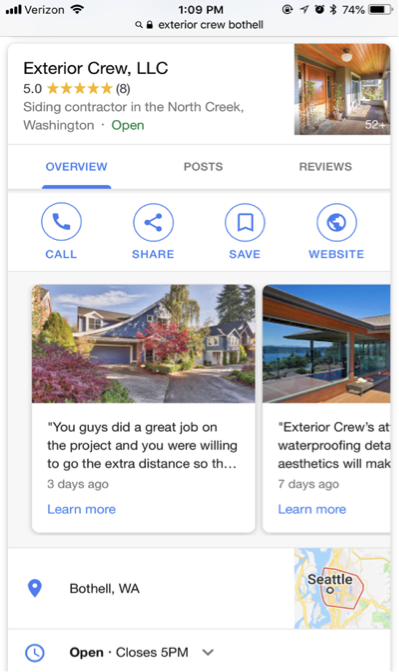
    Screenshot of a Google My Business post from Exterior Crew, LLC

    These posts are particularly captivating because, rather than appearing in the search results, they are displayed in the knowledge panel, which presents a more engaging visual aid. This is NOT to be confused with Google +, which was Google’s attempt to compete with Facebook as a social platform. And let’s be real; it was a major fail. Realizing this, Google reconstructed their platform and created GMB. Google + profiles and pages still exist, but they are now subpages of a GMB page.

    The Start of Google Posts With Candidate Cards

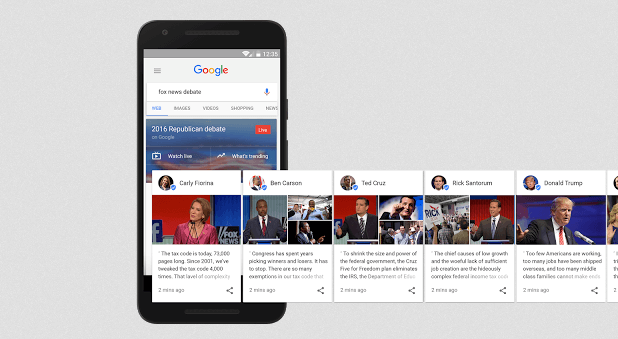
    Before July 2017, Google’s now-called “Google Posts” were only accessible to few. It all started with “Candidate Cards.” You may remember seeing these around the 2016 presidential election. Google described these as non-ad privileges, giving 2016 Republican and Democratic candidates a place in Google search.

    Image of Google's candidate cards - Search Influence

    Proving to be both appealing and informative by viewers, Google allowed the expansion of these cards for celebrities and sports teams. As of June 2017, GMB brought these now-called “Google Posts” to local businesses as an easy way to help attract new customers and build relationships with the customers you already have. These posts have proven particularly effective in promoting flash sales or promotions, emergency updates, such as school closings, and sharing job openings. In addition, these posts contain a call to action (CTA) feature, which provides an easy and direct way for customers to book appointments or reservations.

    Benefits of Google Posts Over Traditional Social Media Posts

    You may be thinking, why would I need to use Google as a social platform when I already use Facebook, Twitter, Instagram, etc.? And you have a point. These social platforms are still great ways to post updates about your business. Although similar, Google Posts offer a few advantages that the typical social media platforms do not, including the following:

    They’re more searchable

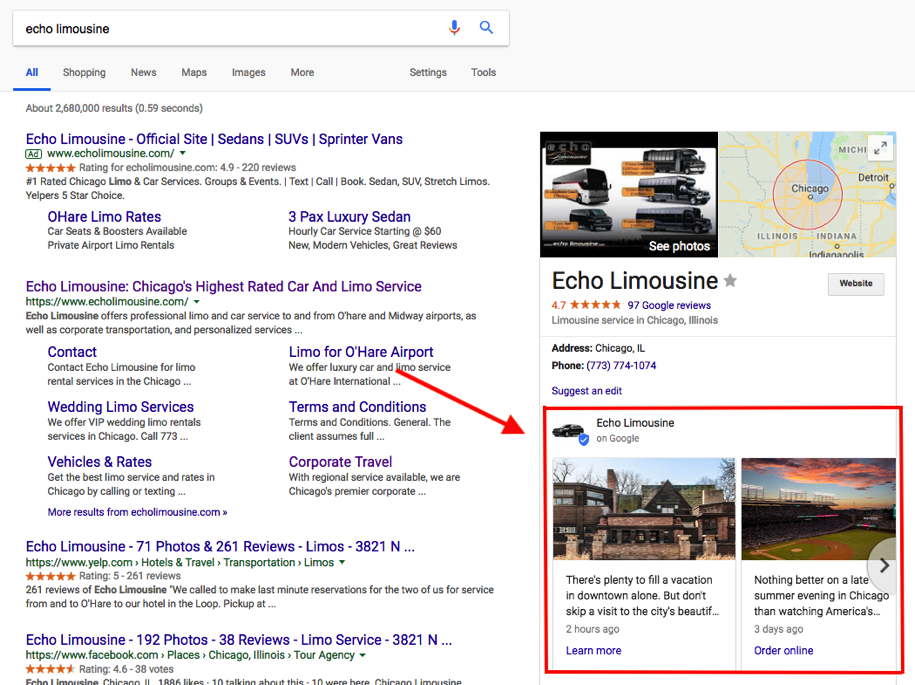
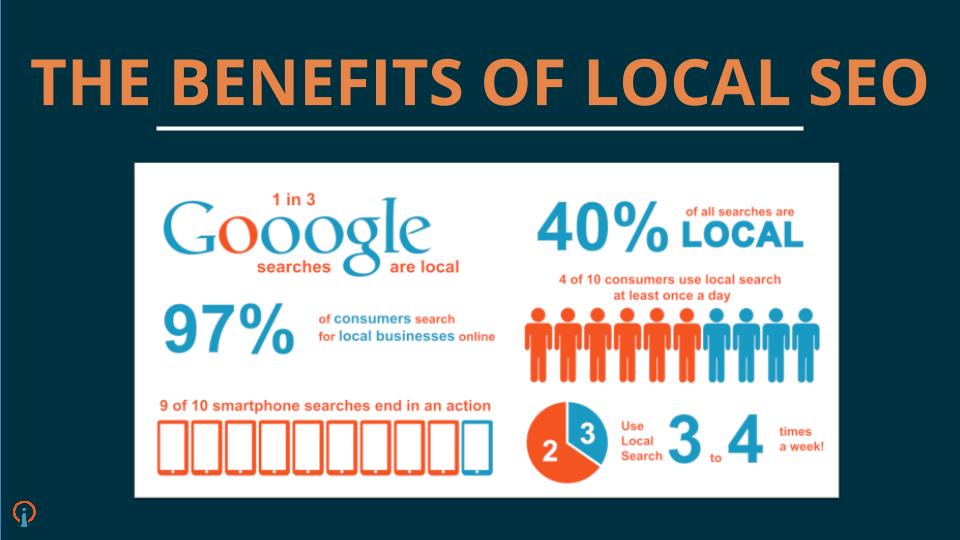
    You can literally “Google it.” When searching for a business, these posts will appear directly on Google Search and Google Maps pages. When someone searches for your business, your location address and phone number will appear in the knowledge panel on the right-hand side of your search results. Your company’s address/location is the primary piece of information searched for by local customers. In regard to mobile, local searches lead 50 percent of viewers to visit stores within one day.

    Screenshot of a GMB post by Echo Limousine - Search Influence

    You will expand your reach

    Not only does Google lead the way in search engine results, but it also surpasses Facebook search queries. According to Adweek, Google averages 3.5 billion searches per day, compared to Facebook’s 2 billion per day. In addition, 82 percent of people turn to search engines to find local information.

    Keyword Searches

    On Google, you can use keywords to target certain audiences—specifically, people that are already looking for your services. Since these people already have an idea of what they are looking for, they are likely to be further along in the decision stage, meaning they are more likely to convert into a client or customer. By contrast, Facebook is geared more toward targeting specific interests and in-depth personal information to lure in a potential customer.

    Impact on your ranking

    Google’s goal is to provide you with the most relevant information based on a search query. When you post new content directly through your GMB listing, you are sharing relevant content and information about your local business, which contributes to building your location authority. This tells Google that your business is legit. The more you legitimize your business to Google, the higher ranking you will get. The higher ranking you have, the higher you will appear on Google search and gain more traffic to your site.

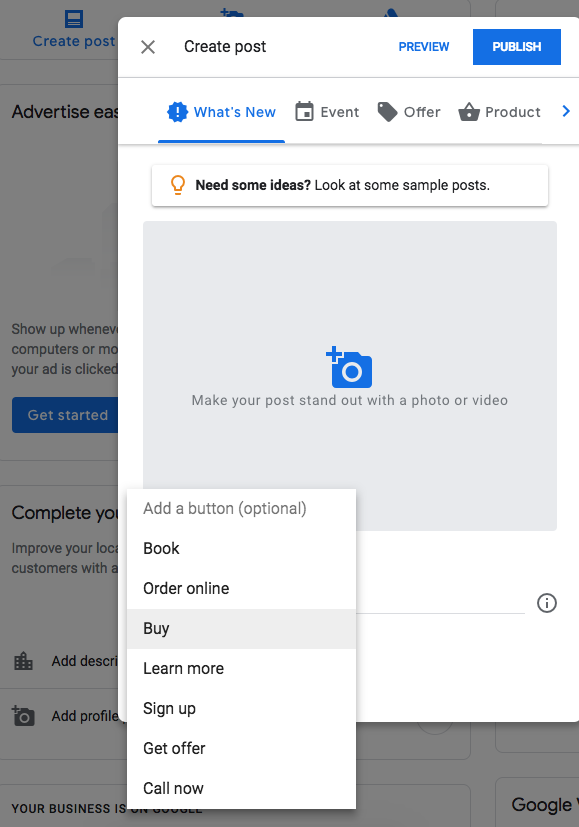
    Screenshot showing how to create a Google My Business post - Search Influence

    Connect with your customers directly

    You can include CTA buttons on all of your GMB posts. Call to action buttons have been proven priceless for converting customers. According to Everything You Need to Know About the Psychology of the Call to Action by Neil Patel, the human mind expects a call to action button. “Our minds are prepared for and are expecting an experience of being called to act and have already decided that there will be a CTA. We know that expectation affects behavior. That’s why people know to act on the CTA. They aren’t staring at the CTA button wondering what it is. They know its a button they are being asked to click.”

    Some examples of how a business can utilize these buttons include the following:

      1. Make a reservation
      2. Sign up for a newsletter
      3. Learn more about the latest offers
      4. Buy a specific product from your website
      5. Call now

    Get backlinks

    Everyone knows that backlinks have a huge effect on organic search results. By posting compelling content on your GMB posts, people are more likely to engage and reference information from your site. You can also link your site pages in a post, making it easier for researchers to find your pages.

    Start Posting!

    Although still green, GMB posting is projected to be incredibly valuable to local businesses. Facebook, Twitter, and Instagram are saturated with businesses looking to promote brand awareness. But since GMB posts are still in the early phases, it hasn’t been flooded by the masses just yet—which is why you should get in now! GMB is an excellent platform that allows your customers to stay in the know of what is going on with your businesses. Not to mention, it’s free! What do you have to lose?

    Here at Search Influence, we’re constantly staying on top of new ways in which we can help our clients be found online and thrive in their industry. If you’re interested in honing your local SEO strategy with rich, relevant Google My Business posts, then request your marketing analysis today to get started.

    Images:

    Candidate Cards

  • Grow Your Business With These 7 Digital Marketing Tactics

    Members of the Search Influence team gave their insight on tried and true digital marketing strategies. These strategies apply to every industry, from plastic surgeons to attorneys, and many can be implemented across different channels of marketing. Using a mix of or all of the 7 tactics below is a sure-fire way to optimize your business’ online potential.

    1. Mobile

    Before updating the aesthetics or adding content to your site, it’s of the utmost importance that you make sure your site is responsive and functions properly on both desktop and mobile. More than half of users say they wouldn’t recommend a business if they encountered a poorly designed mobile site.

    “To me, the biggest trend (and this is as much a wish as it is a prediction) is that small businesses begin to take mobile optimization more seriously. I’m still surprised by the number of businesses I see in my day-to-day life that haven’t reacted to the continuous uptick in mobile search by having their site optimized for mobile users.

    My main focus, in terms of a trend, is the expansion of mobile search as a primary source of information. The trend will be more companies utilizing tools like Google AMP in order to improve the mobile user experience. Currently, far too many don’t take the number of leads they can get from a mobile-optimized site.” – Cory Agular

    Later in this post, I’ll go over AMPs and some more specific mobile moves, but I really want to emphasize that mobile should be incorporated in every aspect of your online marketing campaign. Google has stated that not only are 60% of users unlikely to revisit a mobile site they had difficulty visiting, but also 40% will then go on to visit a competitor’s site. You’re not supposed to judge a book by its cover, but if you can’t open the book, you’re not even going to try reading it.

    Image Of A Cell Phone Searching - Search Influence

    2. Schema Markup

    Schema markup, coding that can be added to a page on your site, makes information more easily readable to search engines like Google. This code labels pieces of important information on the page. Search engines not only understand the information better but they can also provide richer search results to users.

    “As far as I’ve noticed, Schema’s been underutilized… however I’m seeing a lot more talk acknowledging it for its on-site SEO value and correlation with rich snippets and Google’s knowledge graph. And as we’ve seen, Google’s been working to improve its algorithm and knowledge graph to really ‘understand’ content to better predict user trends.” – Kiersten Kampschroeder

    “It’s been increasingly popular to integrate schema into your content. I think that providing meta information using schema markup not only helps SEO, but it also aids the programmer and contributes to making better semantic websites. 2017 will be the year where instead of thinking how we can ADD schema to existing sites, we instead shift toward creating websites with schema markup baked into their design and writing content with schema markup in mind. I’d compare thiscoming year with what happened with responsive design 3–4 years ago. That was the shift where everything became mobile first. 2017 will be the year schema is integrated into the general development workflow.” – Member of Web Development Team

    A search for “breast augmentation new orleans” shows how review schema implemented on Dr. Kinsley’s site appears in results:
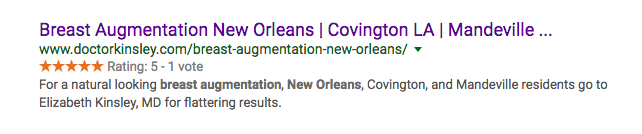
    Image Of Dr. Kinsley's Search Results - Search Influence

    3. GIFs

    While 2016 saw a rise in GIFs, an acronym for Graphics Interchange Format, they were first debuted by Steve Wilhite of Compuserve in 1987. They are the epitome of #thirtyflirtyandthriving. These dynamic, digestible pieces of content are easy to create and share and provide a more engaging user experience than a single static image.

    “GIFs are important to any brand aesthetic, be it personal or public, because they offer a truncated version of the desktop’s fluid experience (i.e. video).

    GIFs are a better option now since they’re more pervasive and different social media platforms accept them or give you a way to use them easily. Instagram, Twitter, Facebook, and Facebook Messenger are all compatible with GIFs now.

    Twitter actually integrated, similarly to Facebook, a GIF search within the post tool. [It has] allowed for a closer relationship between Facebook and Twitter, as well. You’ve always been able to link the two accounts, … [but] now, it looks like Twitter, when auto-posted to Facebook, is fully integrated into Facebook’s platform and presents the post as it would be presented on Twitter.” – Member of Graphics Team

    There are so many reasons you should incorporate GIFs into your marketing strategy this year. As mentioned, the fluidity of GIFs can make the creation of cross-platform content so much easier. They’re easy to create and even easier to share. Most of all, it’s a fun and unique way to reach your consumers!

    So, why not shake things up a bit?

    4. Social and Mobile Paid Advertising

    In 2016, we saw a rise in mobile advertising, but this year, with more than half of searches on mobile devices, it will be an essential component of an effective and well-rounded search engine marketing campaign. Expanded ads are now easily translatable between desktop and mobile, but it’s almost important to mobile users’ needs when determining the content, location, and timing of your paid ads.

    Social advertising like Facebook Paid Ads are showing increased popularity and effectiveness. The level of granularity continues to rise with Facebook audience targeting, and we have seen an increase in conversions even as CPCs remain low.

    “With the introduction of ‘new’ campaign objectives, such as lead generation and local awareness, Facebook really does seem to be a place for lots of growth. With Facebook trying to essentially phase out Fan Building campaigns, local awareness campaigns present an interesting opportunity for smaller budget clients who want to focus on a local market.” – London Fougerousse

    While Facebook ads are more cost-effective than traditional paid ads, that’s not a reason to rely on them solely. The decision to use Facebook vs. Google Adwords or a mixture of the two is truly dependent on a variety of factors, such as your location, industry, and goals. I recommend hopping on the mobile train sooner rather than later. Forecasters are predicting that by 2019, 72% of digital ad spend will be on mobile advertising!
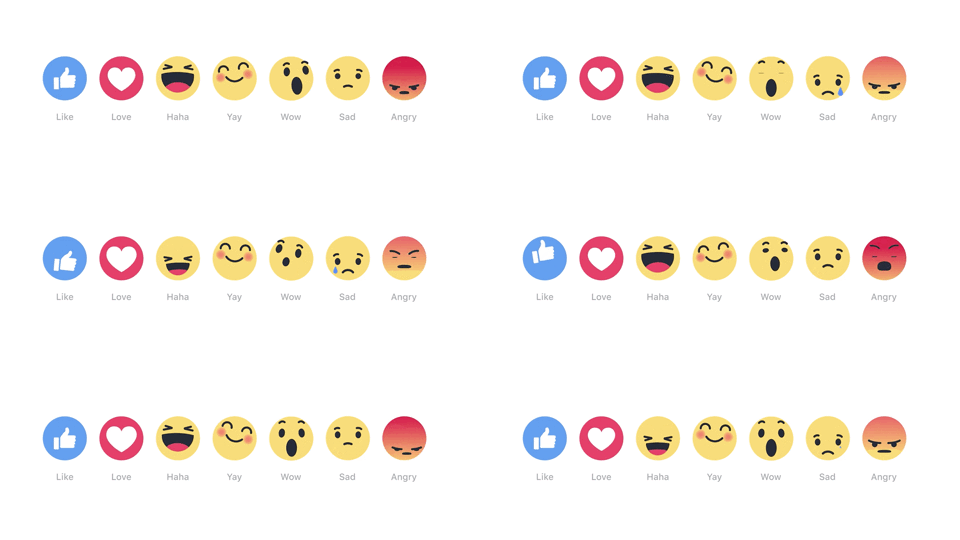
    Image Of Smiley Face Emojis - Search Influence

    5. Google’s Accelerated Mobile Pages

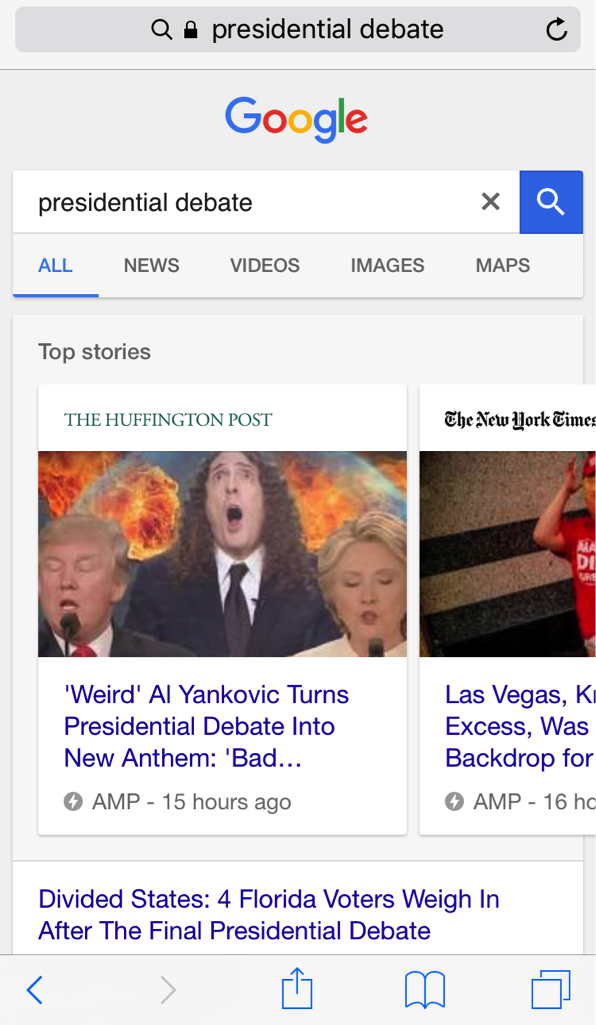
    As I mentioned at the beginning of this post, mobile should be a consideration for all of your online marketing efforts. Google’s Accelerated Mobile Pages (AMPs) are a way to take that focus even further. AMPs are not a ranking factor in Google (for now) but they can positively impact impressions, clicks, and user experience.

    “Since the rollout of AMPs in mobile SERPs this past spring, pages have typically only been found at the top of the results page in a carousel—which is still prime real estate—however, Google recently announced that AMPs will soon also begin showing in the organic results and supporting more content types. We’ve all heard the mobile-friendliness search stats, and adopting AMPs is another way to bring content to your consumers instantly and on the go.

    “Historically, AMPs have been utilized mainly by news publishers, but with the expansion to the organic results, I can see a future for almost every type of industry. Shopify, eBay, and Fandango recently announced their integration of AMPs, so this is a good trend for e-commerce clients especially to be conscious of. And Google also hinted that they will begin supporting more content types like live videos, galleries, etc., which can also open more doors for clients to take advantage of.” – Member of Account Management Team
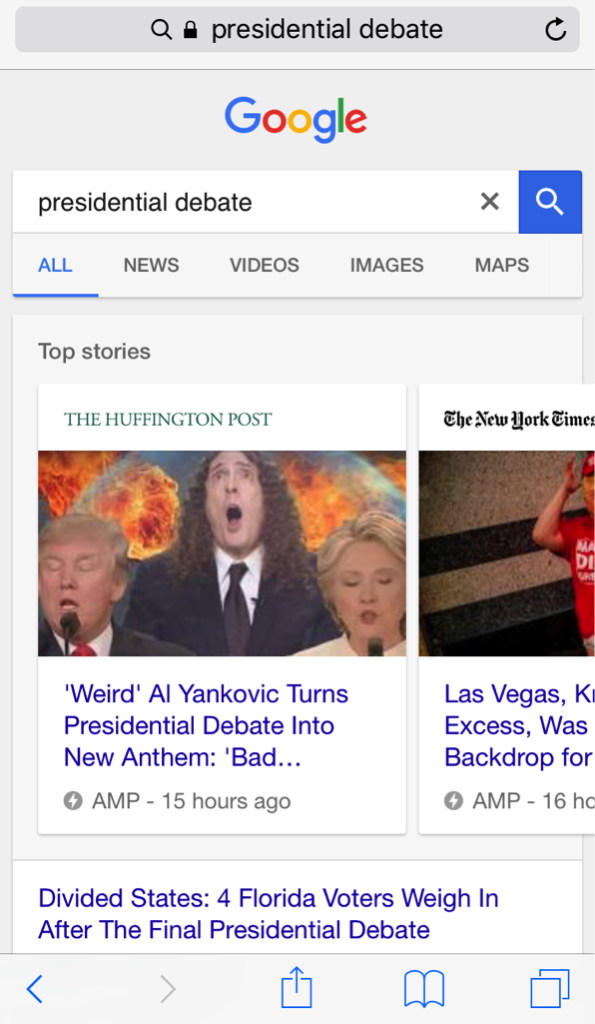
    Image Of Google Search Of Presidential Debate - Search Influence

    The increased speed of Accelerated Mobile Pages leads to a better user engagement, and those (potential) customers/clients are more likely to return to your site if it was able to quickly provide them the information they were looking for. A recent study shows that with AMPs, The Washington Post saw a 23% increase in mobile search users who return in 7 days. If you’re a business receiving the majority of your site traffic from mobile devices, AMPs could be a strategic way to boost your online presence above and beyond your competitors.

    6. Video

    Video is not just for YouTube. It should be incorporated into as many of your online marketing efforts as possible: product/procedure pages on your site, email marketing, display ads, social platforms, and everything in between!

    “For online marketing rich content could include native video content and paid video ads on both YouTube and Facebook Video Display ads. Also, I think brands will begin to utilize Facebook Live more for events and branded content to engage their fans.

    “I believe these videos will be prominent cross-device! Today, people are constantly moving between devices throughout the day and advertisers need to be innovative and streamline their message to engage users across all devices.

    “For Facebook Live, I would recommend this for brands and businesses that have a strong Facebook following. Facebook Live is a tool to engage your audience, not necessarily build an audience. These videos are best for events, conferences, speaking engagements, big company announcements, etc. There are so many options to deliver creative, curated content!” – Sophie Kirk

    Rich video content is content that keeps on giving. One video can apply organic, paid, and social campaigns across devices, and can be broken down and repurposed to create a number of assets. Videos are not only attention-grabbing, but are also a great way to establish your brand’s message and have lasting effects in terms of brand recall.

    7. Links

    Links might not be the most exciting item on this list, but they’re certainly one of the most important. Link building is an essential aspect of a well-rounded SEO strategy! When the search engines crawl pages on your site, links are used to identify how it relates to other internal pages and other sites. Links connecting one site to another can indicate that a particular page/site is the authority on a given topic. But, as you should know, not all links are created equal!

    Google first launched its Penguin Update in spring of 2012 and rolled out its final update, Penguin 4.0, this past fall. Penguin is Google’s effort to catch sites that are using “black-hat SEO” techniques like spammy link acquisition to affect search rankings.

    “In 2017, ‘link’ will no longer be a dirty 4-letter word. For far too long, bad link building has been lumped in with quality link earning. Everyone got freaked out by Penguin and the industries either shied away from “linkbuilding,” or, if they were doing it, were hush-hush about it.

    “Google’s initial differentiator was to focus on links as votes, which is at the core of PageRank. Google has, in the past, described their foundational algorithm by stating: PageRank works by counting the number and quality of links to a page to determine a rough estimate of how important the website is. The underlying assumption is that more important websites are likely to receive more links from other websites.” – Paula French

    Google truly is looking for quality over quantity when it comes to link building, but that’s just part of the SEO puzzle. If your site is suffering from technical issues or lacking rich, natural content, links will not save you. Make sure your online marketing strategy includes both on and off-site efforts.

    Image Depicting Online Marketing Tactics - Search Influence

    These 7 online marketing tactics are an inexpensive way to boost awareness of your practice and bring in new, revenue-generating patients. With a little strategy and effort, you can have a comprehensive SEO campaign that brings your practice’s website up to speed!

    Image Resources:

    Cell Phone Image

    Facebook Emojis Image

    Social Network Image
  • How a Debate About Onions Showed Google Might Not Be Infallible

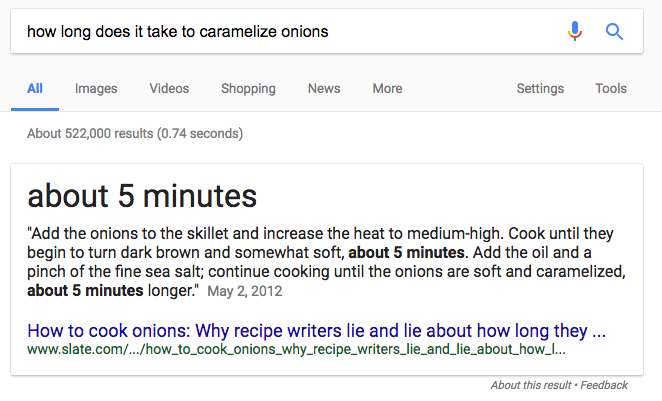
    A couple of weeks ago, I was driving to meet a friend for dinner when I heard a segment on NPR’s Marketplace that featured Tom Scocca talking about his article on Gizmodo about caramelized onions. At first, it seemed like many a segment on NPR we’ve come to expect—interesting and mildly entertaining. It wasn’t until the segment got to the point of the matter that I was hooked. When people were searching on Google for “how long does it take to caramelize onions?” they were getting misinformation. How could such a simple question turn up a false response from the world’s largest, and arguably smartest, search engine? I wondered, are there other moments like this that have happened between users and Google?

    How Did Google Misinterpret What Is Common Knowledge to Most Chefs?

    To be fair to Google, this wasn’t entirely their fault. The initial blame goes back to the thousands of recipes that live on the internet telling readers how to caramelize onions, from an at-home amateur cook’s blog to the New York Times. For whatever reason, instead of telling home cooks to patiently take their time to cook the onions on a low to medium heat for upwards of 30-45 minutes, a lot of recipes listed the expected cooking time as 5-10 minutes. If you’ve ever attempted to caramelize onions in this amount of time, I’ll go ahead and break it to you—it’s impossible. To save you from a bunch of food chemistry, I’ll just say that it has to do with the sugar content in onions.

    Purple Onion Cut In Half - Search Influence

    So, why is there so much content online that gives users, and in turn Google, misinformation? The simplest answer is that writers of recipes were trying to simplify a process that would turn an ordinarily easy recipe for a weeknight meal, like French Onion Soup, into a 1 ½ –2-hour ordeal. In Scocca’s Slate article written in 2012, he gave many different examples of well-known chef’s attempts and failures at trying to achieve caramelization in less than 20 minutes. The article is littered with keywords Google would love and came from a highly reputable source. At its beginning, he references the 5-10 minute myth, and for a while, this had a positive response—The New York Times changed their language when talking about caramelization in their recipes, and even the Wikipedia page was updated as a result.

    But, when people typed “how long does it take to caramelize onions” into Google, they continued to see the false expected cooking times appear in Google’s search result box that is supposed to give users “one true answer,” a term coined by Danny Sullivan, founder of SearchEngineLand.

    How Long Does It Take To Caramelize Onions Google Search - Search Influence

    It turns out, Google was looking at Scocca’s Slate article, with all of its high word count and keyword-laden, well-written text, as the authoritative source. The only problem was that its algorithm focused on and crawled the first paragraph that referenced the 5-minute cooking time. The myth Scocca was trying to debunk ended up getting “bunking,” to use his inverse take on the word.

    Users Push for Quick Answers

    Google hasn’t always answered questions. Users typed in what they were looking for, and they got a list of web pages that may help them find it. But Google realized people wanted short, quick answers to questions, so they developed the short answer box. It’s virtually set apart from the search results and has a slight drop shadow.

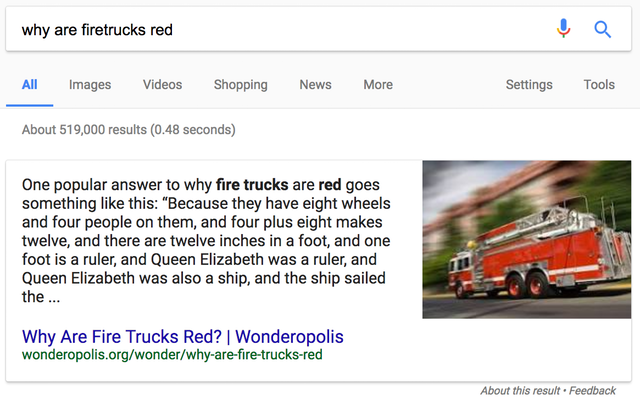
    This also isn’t the first time Google has had issues with its short answer box. About a month ago, if you were to ask “Is Obama planning a coup d’etat against the U.S. government?” the response was that he indeed was planning a communist coup at the end of his term. Ask why a fire truck is red and you got a Monty Python joke. While the latter could lead to some harmless John Cleese quotes passed around the office, the former could actually misinform the public in a harmful way.

    Why Are Firetrucks Red Google Search - Search Influence

    Google’s Response and Their Plan to Fight False Information and Fake News

    Google has been dealing with this for a couple of years now. In 2015, they announced that they were using RankBrain, an artificial intelligence algorithm, in combination with Knowledge Graph, which pulls information for short queries from sources like Freebase, Wikipedia, and the CIA World Factbook—very reputable sources. It currently contains 3.5 billion facts. And, with all of these instances of inaccurate snippet responses, Google was quick to fix the issues. Searching for the cooking time for caramelizing onions now brings up the correct answer. Also, along with Facebook, Google also upped their fight against fake news by using fact check systems in their searches and feeds. So the big question is, how does all of this relate to your small business, practice, firm, bakery, brewery, insurance agency, etc.?

    The Importance of Rich, Accurate Content

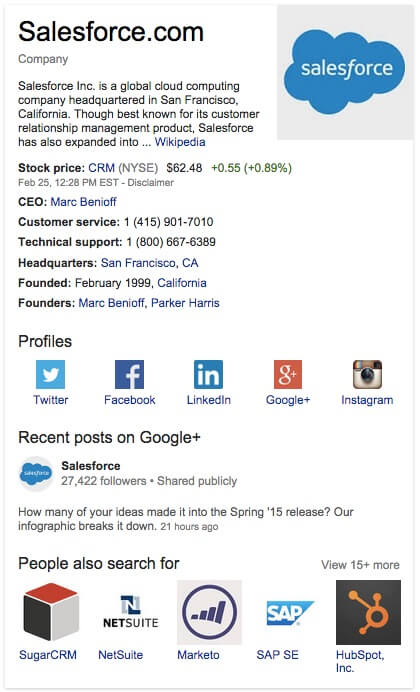
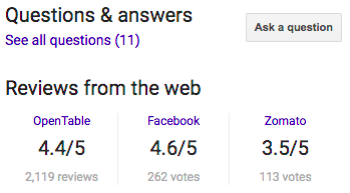
    Whether you’re working on new content or need on-site or local search optimization, the importance of producing educational, on-point, authoritative content is key. The Knowledge Graph’s “panels” pull information from your “about us” page, including contact information. These show up in the sidebar of searches and can include photos from your Google+ page as well as any reviews of your business. So, it should be a no-brainer that your Google+ page should be up to date and any reviews of your company are responded to promptly. Above all, make absolutely sure that your NAPs are consistent and current; an incorrect address showing up in a panel is not the quick answer that potential customers want.

    Salesforce Google Plus Account Screenshot - Search Influence

    There’s also the chance that your longer content could be pulled into a short answer box. At first, Google’s Knowledge Graph was pulling just short answers to questions, but it has since gotten smarter at pulling answers from longer content, like how-to guides with 20-point checklists or in-depth, 1,000+ word content that gives users lots of useful information to peruse. As always, make certain your content is not only accurate but also engaging enough to pull viewers deeper into your site and actually convert.

    Does This Completely Change SEO?

    In short, no. As this article from SearchEngineLand points out, in most cases, “the source getting pulled into the Knowledge Graph is already in the first few organic search results anyway.”

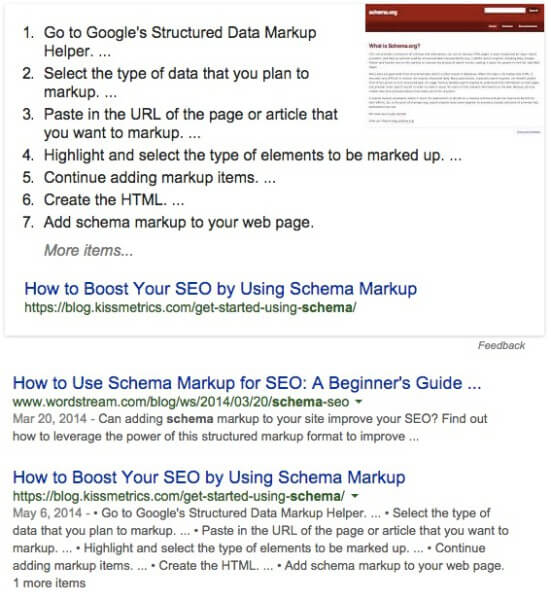
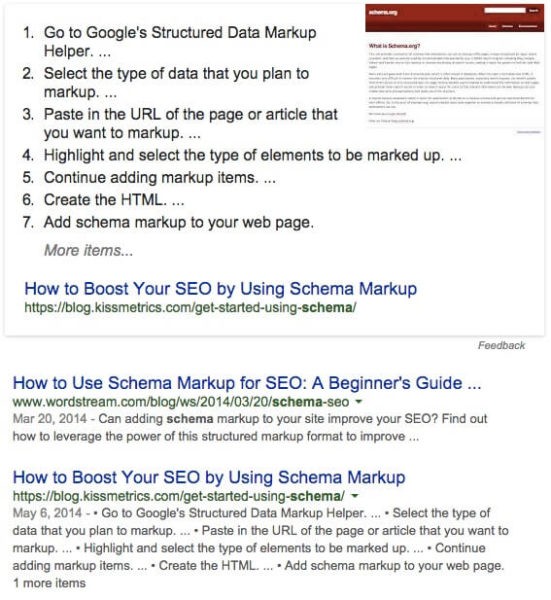
    How To Boost Your SEO Using Schema Markup Screenshot - Search Influence

    Good SEO will improve your ranking regardless and will, in turn, improve your chances of showing up in a short answer box. But even if your business never shows up there, your target audience is still searching for more than just a quick answer. They’ll want to dive into your site for in-depth, relative information. Similar to previous algorithm updates with Hummingbird and Panda, there may be some minor ups and downs in organic search numbers. But if your content is consumer-focused, educational, expertly written, and optimized, then your SEO plan will help out Google’s Knowledge Graph as well.

    If anything, these inaccuracies in Google’s AI have taught us that the search begins and ends (ideally in conversion) with the user. Keep in mind the unique relationship between your business and your potential client.

    Make It Easier for Google

    So, what are some additional steps you can take to make sure your site is up to current SEO best practices? Check out our recent white paper on things to avoid when building or optimizing your website. It includes valuable information, like configuring your URLs and making sure you’re mobile-friendly. Have any more questions on how to increase website traffic? Reach out to us at any time.

    Images

    Onions

    Short Answer Box via Gizmodo

    Fire Truck via TheOutline.com

    Knowledge Graph Panel via SearchEngineLand

    Short Answer Box via SearchEngineLand

  • #NOLATech Week 2016: How To Drive More Traffic To Your Site

    In conjunction with NOLATech Week 2016, Search Influence hosted a workshop to help support small businesses in their online marketing efforts. Paula Keller and Mary Silva presented on how to boost your local search rankings and ways to drive traffic to your website respectively.  

    Paula Keller’s “How To Boost Your Local Search Rankings”

    Paula’s “How To Boost Your Local Search Rankings” presentation took the audience through what types of businesses benefit from local SEO efforts. It also detailed the different types of Google My Business pages and how to use them. With the insight from Paula’s presentation, business owners can better understand how to optimize their business both onsite and offsite to gain better local search rankings.

    search-influence-university-how-to-boost-your-local-rankings-10-11-2016


    Mary Silva’s “10 Ideas To Drive Traffic To Your Website”

    Mary’s “10 Ideas To Drive Traffic To Your Website” presentation tackled concepts that influence your site’s user experience and actionable ways to help improve traffic to your site. It covered topics ranging from highly technical concepts like Schema markup and Google Search Console Analysis to less laborious efforts like directory and authoritative link earning. She explained how to use Schema.org rich snippets to create more engaging search results for your website on Google. Her presentation also went into detail on how to use social media efforts effectively to not only post but also promote engaging content like infographics. “Think of your online marketing efforts as a service,” said Mary, Internet Marketing Team Lead at Search Influence. “We know our users, and we’re getting them closer to their end goal faster. Make your overall goal to give users a cleaner, better experience and make users lives easier. ”

    search-influence-university-10-ideas-to-drive-traffic-to-your-website-5-26-2016

    In utilizing some of the tips and tools explained in these two presentations, guests could help increase their business’s online success in many ways including, but not limited to, improved visibility in local search results and increased traffic to their sites.

    For more information on the event, visit townsend.bunksite.com/ or contact the office directly at 504-208-3900 or Search Influence, 935 Gravier St #1300, New Orleans, La. 70112.


  • Here Are Our Top 5 Blogs From September

    Another month, another top five blogs from Search Influence! All of these posts are chock-full of information that will help you keep your website in tip-top shape and give you some insight into life at Search Influence. Subscribe to our blog to stay up to date on what’s going on in the world of SEO and Search Influence.

    #5: How Google Possum Has Affected 3 Pack: A Before and After Review

    Google’s newest update has had some drastic effects on the search results 3 pack. Amy Arnold gives us the lowdown on some listings that are pretending to be dead.

    Google Possum Update

    Look at that beautiful Google update devouring those listings.

    #4: What Happened to Facebook’s 20% Text Grid Tool?

    Michelle Neuhoff Boyd is back at it again this month and refuses to leave the top five standings. Whether you’re a Facebook fiend or a business taking advantage of the social platform, this blog entry has mountains of information about the inner workings of the Social Media giant.

    #3: Happy Working Parents Day: 10 Influencers on Lessons From Their Working Parents

    To celebrate National Working Parent’s Day, Mary Silva whipped up a heartfelt blog post complete with written and video interviews of some of our employees. Tears may be shed by the time you reach the end of the video, so be sure to have that tissue box ready.

    Kid nodding head

    #2: Search Influence Adds 3 New Hires in August

    Search Influence added three more employees in August and a lot of people were interested. Learn more about our new team members in this post compiled by Melissa Verzwyvelt.

    #1: Barnacle SEO – Local Search Engine Optimization for the Sam’s Club Crowd

    Last but not least, Mr. Barnacle SEO himself, Will Scott, saw a massive resurgence in popularity of his blog where he coined the industry changing term. Take a gander at this super informative blog.

    While you’re at it, follow our blog to get the latest updates from Search Influence.

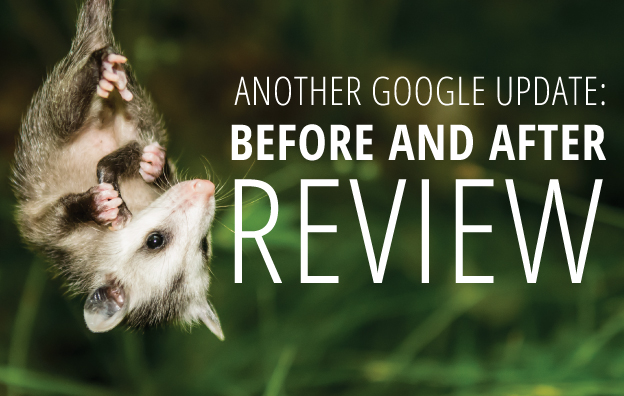
  • How Google Possum Has Affected 3 Pack: A Before and After Review

    Google Possum Update

    Throughout September, the local search industry has been watching the results of the dubbed Google Possum update.

    In August 2015, Google shook up local search results, which changed the Map Pack from a 7 Pack to a very exclusive 3 Pack. This change was a dramatic one by omitting many local businesses and by making inclusion nearly impossible for businesses in the exterior of city limits and in suburbs.

    Fast-forward two years, and we now have Possum.

    “Possum?”

    Joy Hawkins wrote an excellent blog post summarizing the effects observed by the Possum update, and in that post she attributes Phil Rozek with creating the Possum moniker because “it is fitting since many business owners think their Google My Business listings are gone, when in fact they are not. They have just been filtered — they’re playing possum.”

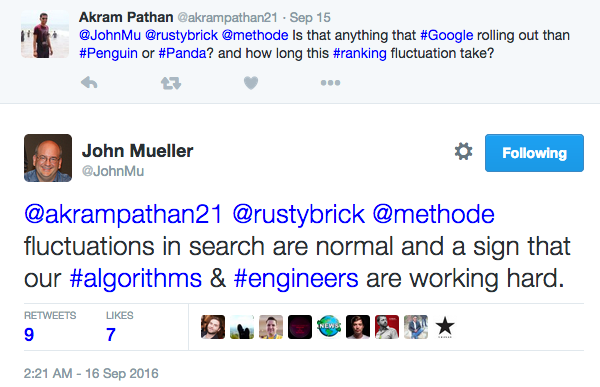
    And officially? … Possum is an unannounced update, meaning the SEO community collectively compared notes and decided this was an algo update. Google did not directly announce or confirm this update. However, John Mueller did Tweet a comment, which I completely paraphrase as “if you see stuff happening, maybe the Google Engineers are doing something.”

    Possum Update Tweet


    “Google is now filtering based on address and affiliation.”

    In her post on all things Possum, Joy Hawkins cleanly lists the effects of this change. Among her list is the observation that Google is now filtering results based on duplicate address, website, or affiliation.

    We see duplicates all the time in map results for local searches for any place that has multiple practitioners:

    • Doctors (plastic surgeons, orthopedists, dermatologists … )
    • Lawyers
    • Dentists and orthodontists
    • Hair salons
    • Etc.

    For example, a doctor’s clinic can have numerous Google-allowed listings: one for the practice and one for each physician or practitioner seeing patients at that practice. Each of these listings will have the same address, phone number, and website, so one clinic or practice can end up with multiple listings and dominate the results landscape.

    But user experience for such a repetitive Local Pack is not ideal, and Google is all about user experience. We have a plastic surgeon client, Deluca Plastic Surgery in Albany, NY, who has been fighting this battle for a long time.

    Dominating the Local Pack No More

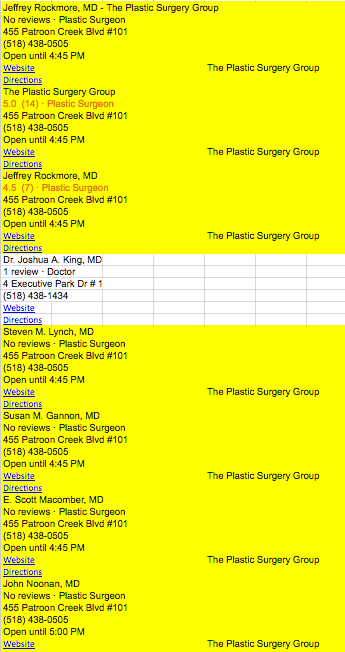
    Anyone searching “plastic surgery Albany NY” back in April 2016 would have seen the 3 Pack all leading to the same practice. In fact, in the “More Places” Maps results, the same practice completely dominated with positions 1, 2, 3, 5, 6, 7, 8, and 16. What the heck, Google?!

    I had copied and pasted the Maps results into a spreadsheet just for fun back in April. I’m glad I did, because I can share this story with you. Here are just the first eight results from that April 2016 Maps search—those in yellow all lead back to the same practice:

    April 2016 Maps Search Results

    Our client was ranked at 18th and 20th. Our client is in Albany, and the website had and has stronger Domain Authority, stronger NAP, more reviews, and on and on, so it just didn’t make sense.

    We did some work to mitigate those results. We had some minor success, but fighting a battle against Google’s algorithm, you might not always come out a winner.

    And Then Possum Came Along

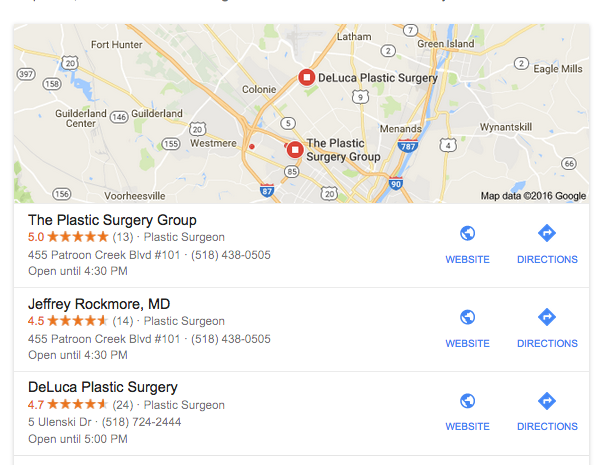
    Today, we now see Deluca in the 3 Pack. Woo hoo!
    Google maps results after Possum roll out

    We are feeling pretty good about this (don’t take the wind out of my sails), but we acknowledge that all is not perfect in this scenario. In this 3 Pack, the doctor in the second listing is a plastic surgeon at the practice represented in the first listing.  He has the same address and phone number, but he has his own, personally branded, website.

    This is one example among millions of searches, but it may suggest that domain is a primary indicator of the duplication filter. This needs lots more observation and input, and I encourage you to let us know if you have seen 3 Pack changes this September.

  • Local SEO: How to Clean up Citations for Better SERP Visibility

    seo-google

    Google, Bing, and other major search engines are constantly changing and developing their search engine results pages (SERPs). Major components of these pages include organic, paid, and local results. With the ever-increasing use of mobile, these local results are growing in importance in overall SEO strategy.

    SERP Screenshot

    So how does one account for local SEO, you may ask?

    This is where citation cleanup comes into play.

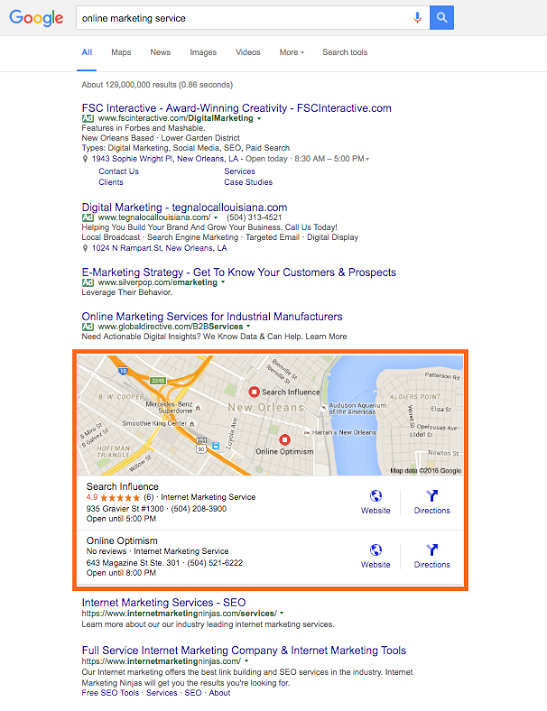
    Citations are the presence of a business’s name, address, and phone number (NAP) on any website. As search engines crawl websites and find instances of a business’s NAP, they look for consistency in that information, so the more accurate and consistent your citations are across the internet, the better your business will rank in a local search (i.e. in Google and Bing maps as well as in the maps packs on SERPs).

    Ensuring this consistency is called citation cleanup. From my experience, there are four major steps to effective citation cleanup:

    1. Ensure your address is USPS verified.
    2. Update your NAP on your website.
    3. Audit and build your citation on the major data feeds and directories.
    4. Find your remaining existing citations and make sure they are all consistent.

    Let’s break this down and go into a little more detail.

    Ensure Your Address Is USPS Verified

    This is an important place to start because, as you’ll find later on, many of the directories you end up submitting to or cleaning up have standard formatting that in most cases aligns with USPS’s own standards. So, if your format doesn’t match it will be harder and less likely to achieve consistency.

    Update the NAP on Your Website

    After the USPS verifies your address, make sure it’s reflected on your website. Include your whole NAP as a structured citation. Your website is the baseline for your NAP; this is what Google and other crawlers will compare other citations to, so it must be correct and formatted here.

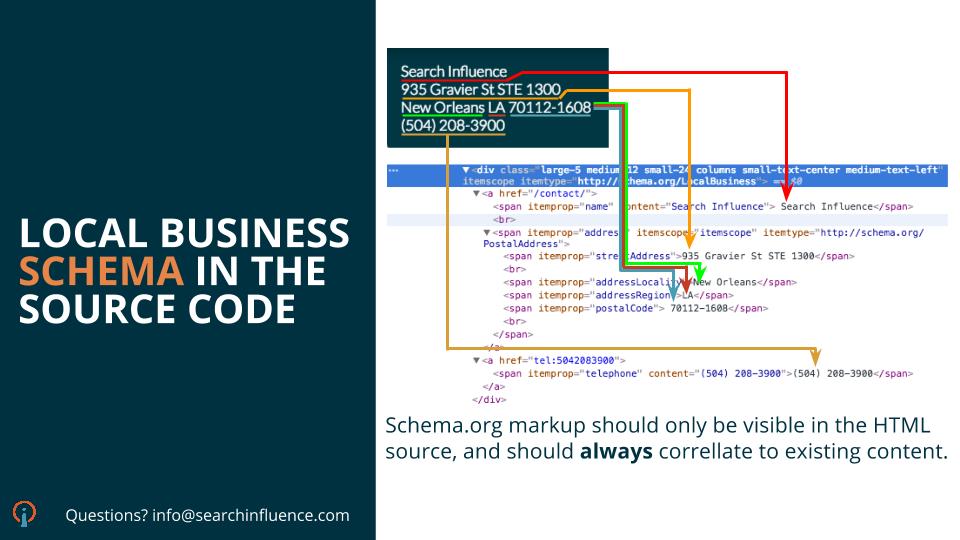
    **For a little extra oomph, consider marking up your citation on your website with structured data like Schema. This will help crawlers understand it better as your NAP.

    Audit and Build Citations on Major Data Feeds and Directories

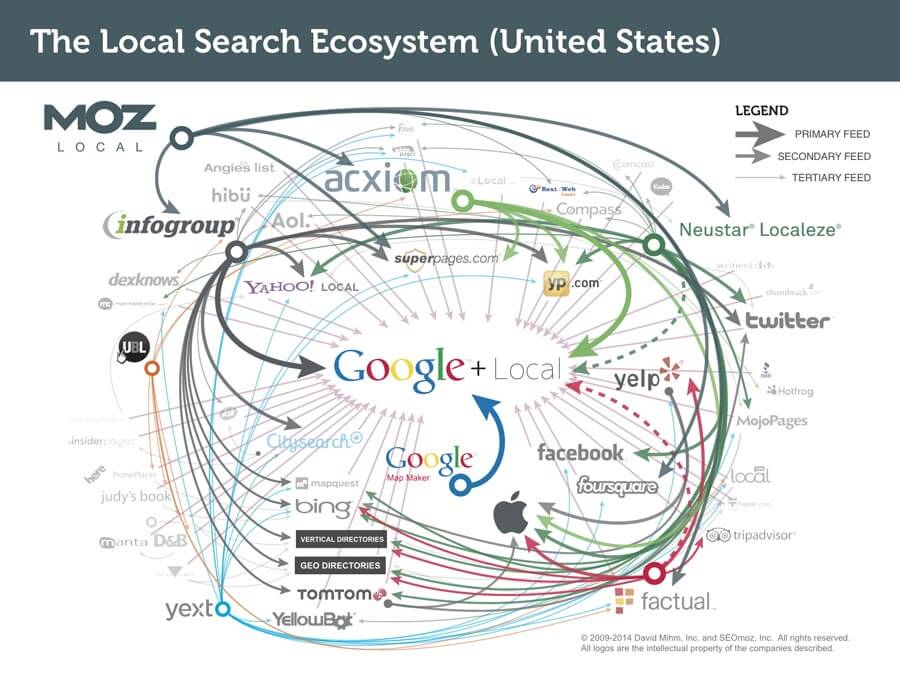
    Local_Search_Ecosystem_US

    The reason I put this before doing actual cleanup of existing citations is because citation dissemination is a hierarchical process within a large ecosystem of directories. There are a few feeds that push to other smaller directories where your citation may already exist, so updating these and the major directories first will make cleanup later on a little easier.

    There are four major feeds to check first: Infogroup, Acxiom, Localeze, and Factual. These feeds trickle down to other directories and local search engines, including Yahoo! Local, Apple Maps, SuperPages, etc. This is also where that USPS-verified address comes into play, especially. Part of the reason these four directories are so authoritative is because they have such strict guidelines on address verification.

    Along with those feeds, you also want to update the major local directories. Since many of these are directly on those search engines’ sites, this is absolutely essential to local rankings. These major directories include: Google Maps, Bing Maps, Yelp, YP, Foursquare, etc. You may also consider auditing your social media accounts to make sure your NAP is correct there as well.

    Find Remaining Existing Citations and Make Sure They Are All Consistent

    Once you’ve built your major citations, you’re ready to do some additional cleanup, if necessary. It’s useful for all businesses to be aware of their citations across the internet, but some businesses may need additional cleanup more than others.

    If you’re a business who’s recently changed their name, address, phone number, or website, you should definitely consider more extensive search and cleanup. The same goes for those who are still seeing problems with their local rankings. You may be missing a citation or set of citations that’s affecting your rankings.

    There are a number of ways to do this. You can use Google just to search for instances of your citation manually, or you can use a service to do a more in-depth search for your citation and its variations across the internet.

    Either way, you’ll find that your citation can be updated on some sites more easily than others. You may need to submit forms to have it updated, contact website administrators, or go through other channels to get it done.

    If you’re business is at this point, you may find it more cost-effective to hire an agency or service to do this kind of cleanup.

    However, once you’ve successfully cleaned up your citations, you’ll rest easier knowing that your business information is correct across the internet.

    Citation cleanup is an important factor in local and overall SEO. By ensuring NAP consistency, you’re gaining valuable traffic from local search engines! To learn more about why NAP consistency is important with your SEO, you can watch this short video.

    Image 1 Credit
  • Here Are Our Top 5 Blogs You May Have Missed Last Month

    Woah! Did June fly by for you, too? If you are on the beach this week and doing some summertime reading, here are our most popular five blogs from last month that you will want to check out.

    Knowledge is power gif

    What Happened to Facebook’s 20% Text Grid Tool?

    Michelle’s blog is coming in hot as Search Influence’s most-read blog of 2016! If you’re advertising on Facebook, you need to understand the rules and limitations of the images you include. Facebook’s allowance for text within ads has changed slightly over the past few months, so be sure to read up about the latest updates and what they mean for online advertisers.

    5 Medical Practices Effectively Using Instagram

    Calling all doctors: Is your social media strategy healthy? Are your social media channels helping you generate more traffic to your site and more qualified leads? Read how these five medical practices have been utilizing Instagram to further establish their brand, increase their online presence, and stimulate user engagement.

    Instagram gif

    These 10 Expert Tips Will Drive Traffic to Your Business’s Website

    Feel like you’re doing everything to strengthen your online presence but still not seeing the traffic numbers you’d like to see within Analytics? From schema markup to shareable content to video syndication, we provide ten valuable tips from industry experts to help you increase your site traffic with ease.

    Getting Hands On With the New Google My Business

    Though originally written in 2014, this June blog is still hyper-relevant to the industry. Quite a lot has changed within the Google landscape since 2014, but it can be JUST as confusing to navigate through business pages and local profiles. Let Mary guide you through what’s changed in the world of Google business and what these changes mean for your bottom line. Additionally, if you need help claiming your Google My Business page, check out this recently-completed Search Influence video to painlessly walk through the steps!

    5 Rookie Mistakes That Will Ruin Your New Website’s SEO

    Just launched a new site? Don’t let all of your efforts go to waste; make sure your site is optimized properly so search engines deem it “worthy!” Read on to learn about five big new-site mistakes, and ensure that your site is strong and ready to rank.

    Gif 1 Credit  |  Gif 2 Credit