Tag: google my business

  • 4 DIY SEO Tips for the Small Business Owner

    martinis for DIY SEO

    My husband and I have some friends who are in town every year at the end of August, without fail, so we know we have a dinner date with this couple at the peak of hurricane season every year.

    Hurricane Isaac 2012This year, we met our friends on the Saturday night after Hurricane Isaac passed through. Our friends had another couple in New Orleans who had been without power going on five days, so they were desperate to get out of their hot, humid house and enjoy good food in the air conditioning and possibly have a drink or three. The more the merrier, so the four of us were meeting the two of them at the bar.

    This restaurant is usually very popular, but was especially hopping that night because they had power. Most of the items on the menu were sold out, but we enjoyed the few things the kitchen still had. So in conversation she asked did I work?… what did I do? … the way these conversations usually go. When I told her, her eyes lit up, and I was her best friend that evening. She had a 2 year old yoga studio that was doing decently, and she wanted the yoga business to be strong and really successful. She recognized that the web was an untapped potential for her, and she was overwhelmed with her known options and with the options she knew probably existed but didn’t know about.

    Search Influence has a mission that simply states “We are here to help small business succeed online.” It is our company goal to help this small business owner who was sitting across from me, and I would love to be able to help her dominate the yoganistas in her city.

    I have had this experience more than a few times, where a very small, very local business has absolutely no marketing budget, but they know they need to do “stuff” online to grow or even just to survive. I’m not talking about businesses local to their city; I’m talking about businesses that serve their neighborhood primarily. Super local.

    A few suggestions for a very small business who has done almost nothing online yet.

    If I met the owner of a very small, very locally-focused business who had done virtually nothing online and had very little time to devote to online marketing, what priorities would I tell that SMB owner for DIY SEO?

    I polled our Account Managers to see how much they agreed/disagreed with me, so these priorities are the collective answer of most of our accounts team. The difficulty is there is so much an SMB owner could be doing, but my intent was to focus on those things that are not technical — i.e. no website edits. A lot of business owners that I meet that offer services to a very specific community don’t know how to edit their websites because they have never had to, and they are busy working on growing the business, taking care of personnel, managing operations, et cetera.

    With that in mind, here is by no means a comprehensive list of all things a business owner can do on his/her own — just a few things that came up in my conversation and then bounced around our accounts team.

    Totally unscientific DIY SEO survey

    Countdown of DIY SEO Tips based on number of responses of my totally unscientific internal survey …

    #4 — with only 1 survey responder considering it as the priority for an SMB’s very limited time and money … monthly newsletters. Monthly newsletters are a great tool for many businesses. However, the business has to build up an email list of recipients first. You can buy a list, but it’s so much better to build the contacts yourself with your customers optioning in to receive your message in their inbox. You also have the challenge of deciding what message makes an impact on your business but also is interesting to your email group.

    You need to grow your email list first, and realize that you are messaging people who are likely already customers. In all I agree that this is a valuable tool, but not for a super small business at such an early phase of operations.

    Facebook fan building#3 – 1 response suggesting an offer made through Facebook. This also is a valuable tool, but again, the business generally has to have some Fans on Facebook before they start offering coupons and contests and all of that jazz. My yoga-diva dinner companion did not have a Facebook Page worth mentioning, so this would not be an option for her yet.

    #2 – 4 responses voted for regular Facebook updating. Our accounts team sees every day how a well-maintained Facebook Page can work for a small business. It’s exciting to see strong fan building, active commenting, and referral traffic driving to the client’s website. All of this can be very effective (and fun!). It absolutely be a valuable tool when developed at the right time in a business’s growth.

    fantastic Facebook fan buildingOne of our accounts team responded to my internal survey, “Facebook Updates and Newsletters are great, but they are worthless unless they have a following. To me, Facebook could be easier for one person to manage, but significant effort would have to be made to promote the Facebook Page.”

    Just like monthly newsletters and making an offer on Facebook, you have to build to a level where you have an audience to whom you can broadcast your message. Lots of work has to be done for the Facebook Page before it’s going to work for you.

    #1 – Tied for #1 … 5 responses for “Create/edit listings in 10 online directories other than Google+.” If a small business owner had only 1 hour to devote to their online identity, 5 of our accounts team suggested that s/he should review the businesses’ listing in 10 directories other than Google+. My totally unscientific survey didn’t indicate which 10 directories, but it can be assumed that the list would include directories such as Yelp, Yahoo, Bing, YellowPages, and Superpages. There are countless other examples, but you want to devote your time only to those directories that you have seen often enough like Kudzu or Merchant Circle.

    #1 – Tied for #1 … 5 of the accounts team responded that claiming Google+ Local Page is the thing you should spend a few minutes claiming and filling up with your business information, maybe some pictures.

    This was my priority suggestion at dinner that night. She wasn’t sure what a Google+ Local listing was, a lot of business owners don’t, and they should.

    (TIP! If you claim your G+ Local listing, claim it in an email box that you won’t mind sharing with an SEO agency — that is, don’t claim G+ with your personal email account. One day you might hire a website promotion company like Search Influence to help your rank better in Google results, and when you do, you will want your account manager to have the login to your G+ — but if it’s the same account as your personal email, you might not want to share it.)

    There are countless small business DIY SEO tips for the savvy owner out there. What are some of your favorites?
  • 5 for Friday – Links, Stories & Posts for Your Weekend

    • Google+: A Year of Missed Opportunities – Mashable.com

    Google+, the proposed “Facebook killer,” is turning out to be more Elmer Fudd than Brutus. Our blog noted the early successes of Google+ over a year ago, citing its sleek design and seamless integration of Google profiles and contacts. Yet Facebook’s de facto archenemy stumbled at the start gate, disallowing aliases and stalling for four months before allowing brands and news platforms to set up profiles. The numbers are startling: users spent an average of 3.3 minutes on G+ in January, compared to seven hours on Facebook. In the last year Facebook has grown from 700 million users to 900 million, a growth that exceeds the entirety of the G+ population. For small businesses interested in the clean, professional, design of G+, note that historically Google has added layers of complexity to augment their online platforms. With a growing sentiment that the Facebook juggernaut has shed its user-friendly coat, the question is: can Google take advantage of the sea change?

    Understanding Google Places & Local Search – Developing Knowledge about Local Search – Blumenthals.com

    On May 30th, Google Places was replaced with Google+ Local. With 97% of consumers searching for local businesses online, having a presence on Google Maps is a necessity — if you can figure it out. MapMaker effectively took the burden of mapping the world off the folks at Google and placed it on savvy cartographers and small business owners alike. With categories functioning like keywords, a business owner can enhance their presence on Maps and keep the information up to date—especially helpful for start-ups.

    Though with Google Mapmaker lacking a comprehensive set of categories, small business owners want to know: “What is the best practice for adding categories in MapMaker?” The short answer is that avoiding keyword spam, using five standard categories (like ‘Gas Station’ if you’re a gas station), and editing the categories directly on the Place page will help create more cohesion between the two pages. As Mike Blumenthal delves into detail about the ins and outs of categories, one begins to see why Google democratized the effort. A complex list of practices to set yourself apart from the competition—if you’re willing to learn.

    Facebook Email Fiasco: 900 Million+ Profile Updates Without Permission – SearchEngineJournal.com

    Can Facebook do anything right, or are we just too invested? While most Facebook users consider their inbox to be an extension of the chat feature, it’s actually a collection point for your Facebook email (yes, you have one): [email protected]. Check your company’s Facebook page. For if you wish to generate traffic to your business email from the email address displayed on your profile, note that the address displayed on your timeline is no longer your business email. This change has given ammunition to Facebook critics who note that changes made for “our privacy and security” seem to be made while violating privacy and security. To display your “real” email address again, navigate to your profile, click “Update Info,” then “Contact Info,” and “Edit,” then customize your email address options.

    Hitwise: Bing Has Chipped Away 5 Percent Of Google’s Search Share Over Past Year – SearchEngineLand.com

    Though “Bing it” is still an unlikely response to the big questions (Dude, what movie is that guy from?) of everyday life, don’t think Windows’ “decision engine” is down for the count. Launched in June 2009 as a competitor (or, depending on your point of view, goat in the T-Rex pen) to Google, Bing has not yet undertaken the search engine behemoth. In the last 12 months, though, Bing has taken 5% of Google’s market share. That’s news. A bigger story, perhaps, is that Google has declined by 5%. The “sick man” of search engines, Yahoo, has dropped for nine consecutive months. With rumors of internal struggle and the floundering of Google+, the question is: has Google stretched itself too thin?

    Google’s Developer Dilemma: Open Up Google+ Or Hold On To ‘Something Special’? – MarketingLand.com

    In related news, El Goog is displaying a stubborn side. During a “fireside” chat with developers at the 2012 Google I/O conference, several members of the Google+ team explained that their “tentative” approach to opening up Google+ to full read-write API is a result of “something special” and “magical” happening on Google+. As of yet, no news on what that means. Google’s desire to shelter their baby could pay off in the long run. After all, who got anywhere trying to satisfy everyone? The Google team reports that API access would result in spamming. If Google+ plans to remain inside the cocoon too long, though, developers and businesses alike may become frustrated. The conference was not all bad new for developers, however; Google hinted that big developments are in the team’s plans, such as adding Google+ comments to the API and making vanity URLs available to all users.

  • Google+ Local Business Pages: The Future of Local Search

    If you’ve been perusing the Search Marketing blogosphere, you no doubt heard the big news from Google today. If not, we’re here to give you the skinny on Google+ Local. What it means for you, how to prepare, and how this will change the local scene forever.

    Long story short: Say goodbye to Google Places, and say hello to Google+ Local. It’s long been rumoured that Google would soon integrate the two, creating a more social experience for local search. So, what’s included in the update?

    First, you can still access and manage your business in the Google Places LBC, and all of the user-generated content that exists there currently will be pulled over, e.g. reviews and photos. The content will display as coming from “A Google User” until you migrate them from your old Places page to Google+ Local.

    You’ll also have the ability to decide which user content displays publicly and what remains privately attributed to “A Google User.”

    Next, you may have read way back in September 2011 that Google acquired Zagat, the local reviews juggernaut. Now we all know why. Not only will Zagat’s reviews be brought over to Google+ Local, but their trusted 30-point rating system will now replace the measly 5 star system used in Places. This will enable users to provide a more personal experience than the previous system, with the ability to rate specific aspects such as food, atmosphere, and service.

    OpenTable has also been integrated into the listing, where users can reserve a table directly from applicable Google+ Local business pages.

    Another big change is that Google+ Local Pages will be indexed, according to Search Engine Land.

    From a user standpoint, the new pages provide a much more social experience. They’ll be able to search for business reviews made by those within their circles, which adds much more trust than those from faceless strangers.

    What does all this mean for the small business owner? It will place even more importance on having a clean Google+ page that is consistent across the board, and well-integrated with your site using authorship markup. Google+ Local makes reviews and photos more integral than ever before.

    All these changes are allowing Google to get a much needed leg up over Facebook, Twitter, and Yelp. The “Local” tab will appear in your Google+ business page, and all of the listings will be available across Google organic search, maps, mobile, and Google+. For now the mobile look has already come to the Android phones but iPhone users will be able to start seeing these changes as soon as it’s approved by Apple.

    If there’s one thing you should take out of this post it’s this: If you don’t have a Google+ page for your business yet, you better get to work ASAP. For a quick and easy guide on how to best create one, download our ebook.

    This blog was written in collaboration with Tina Hua.


  • Fake Google Places Pages: When a Wiener Joke Outranks You…

    internet is serious business

    SEO largely depends upon undisclosed and constantly evolving criteria for page authority, making it inherently unpredictable. Google makes the rules; the industry responds accordingly.

    Local results in the SERPs exemplify this. Whether they appear, as well as how they appear, is entirely at Google’s discretion. That being said, Google’s discretion is sufficiently discreet in most instances. Furthermore, most people pay more attention to local results in the SERPs than they do to organic ones, which vindicates their prominence. However, local can get pretty sloppy sometimes. Unrelated businesses weasel into the results here and there.

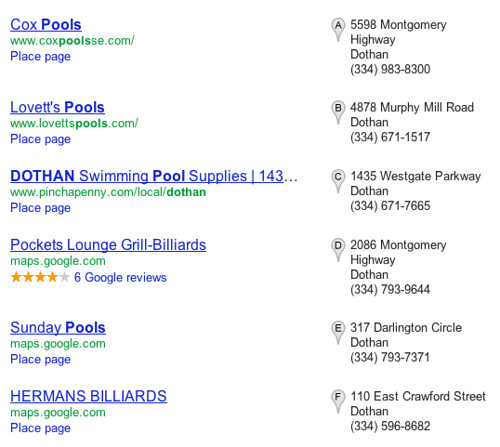
    I recently saw a meaty example of this in a 7-pack for the term “pools dothan al.” By virtually all measures, that is an unremarkable keyword. I was understandably not expecting anything noteworthy.

    Primarily, the businesses in the aforementioned 7-pack sell and install pools, but a couple listings are for billiards halls. Pool is a homonym, which makes it difficult for Google to distinguish which “pool” a user is looking for. Regardless, I would guess exactly 0 people in Dothan, AL are looking to play some “pools” at the local bar this weekend.

    This made me realize what problems homonyms and homographs create for local search. For example, take the keyword “bank” and the location Westbank, a suburb of New Orleans. If I search for “westbank bank,” no relevant local results appear. If I then click on the Maps tab from that same results page, Google drops me onto a Wendy’s in Iowa. I’m sure there are a million other similarly dysfunctional examples; that’s just the first that came to mind. Joseph, our Maps guy, noticed a strip club twerked its way into the 7-pack for “new orleans pools”. But I digress.

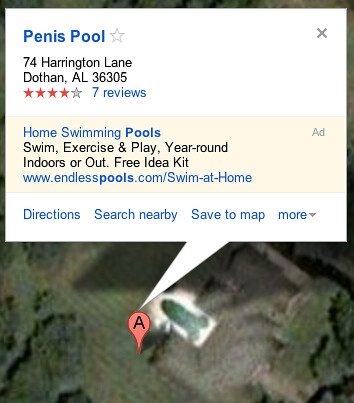
    What really caught my eye in these results was a listing titled Penis Pool. Yep. Penis Pool. I’ve seen plenty of features sophomorically revised in Mapmaker before (for example, one enterprising young cartographer removed the J from a feature previously titled Janus Automation), but I’ve never seen a Place page like that.

    Penis Pool

    I was very curious how Penis Pool snuck its way into the bottom of the 7-pack. I asked a few people to check it out, and Joseph quickly pointed out that the pool does in fact show up on the satellite view. Once I saw it, I couldn’t really disagree with the name or Penis Pool’s status as a landmark in Dothan.

    How did this happen? Presumably, somebody spotted this on the map, added a Place page, and subsequently shared it with all of their friends. Glowing reviews ensued and the link eventually found its way to a few different blogs. Considering this cannot be an especially competitive field in a very small town, Penis Pool’s local authority grew into a veritable Leviathan, and perhaps even rudely whipped some other business out of the rankings.

    Penis Pool satellite view

    Should you be worried about a Penis Pool near you? Maybe. It is safe to say the internet’s propensity for wiener jokes > your local SEO efforts. With the right mix, it’s easy to imagine similar examples popping up elsewhere. Just hope nobody starts digging a phallic-shaped pool in your city.

  • [eBook] Google Plus for Business

    Google Plus for BusinessTake Seven Steps to Social Media Heaven today! 90 million users can’t be wrong: Google+ is the newest and fastest-growing social network, recently opening its doors to small businesses. The multifaceted integration with search, social discussion and sharing, and the rise of a platform for authority has made Google+ a must for any business.

    Using Google Plus for Business

    Want to know how to leverage Google Plus for Business? Download our free eBook now!

    We’ll walk you through:

    • Setting up your Google+ page
    • Designing a compelling targeted profile
    • Sharing meaningful content and interacting with your users
    • Measuring what Google Plus does for your Business
    • Strengthening your site for Google Plus for Business
    • Going beyond social and making a difference in social-search.

    Find out the latest tricks and tips in social media today. Download our eBook to get started.

    What Can a Google Plus For Business Page Do?

    With an engagement rate topping 60%, Google+ is a goldmine of social interaction. Hangouts with your users, highly-targeted circles, and integration with both search and other Google apps makes Google Plus for Business a worthy investment for any small business. But it’s a complex social network, and less intuitive than Twitter and Facebook — make sure you know how to traverse the rapids of this new social network by downloading our Google Plus for Business eBook now!

    A well-tuned Google+ page can be a conduit for discussion, a traffic generator, and a wellspring of highly targeted and engaged website visitors both on and off the social network. Find out today how to focus the energy from Google+ to your business by building your business page and what aspects make effective social media campaigns on Google+.

    Running around in Circles? Confused by it all? Contact Search Influence today to get your Google Plus for Business page running at full steam.

  • Google Places Page Redesign — Local Search Goes Minimalist

    Hot on the heels of big redesigns to a whole suite of Google services, including Docs, Reader and Gmail, searchers will soon see shakeups in the way local listings are displayed on their results pages. Instead of the familiar red pin of Google Maps, searchers looking for businesses matching a given term such as breast augmentation Maryland will now be greeted with a row of grey icons which can be expanded with a click to show a highlighted popout with site preview, map and reviews:

    Google Places results page when no selection is highlighted.
    Results page with mini-Place page expanded.

    This is a noteworthy move for Google Local, given the powerful results that the “red pin” logo has attained over the last few years. The mini-Place Page embedded within search results seems to agree with the growing shift toward minimalism the company has encouraged in its recent redesigns, such as the sleek-and-clean new Google Reader. Additionally, the new system serves an important purpose in helping searchers find the things they’re looking for (location, directions, reviews, pictures and details, et cetera) without actually leaving the SERPs. Google is also making it easier on its searchers to review and edit local places listings by placing a feedback link (visible in the second, expanded screenshot) directly in the foldout, thus helping prevent problems like the infamous potential to mess with competitor’s listings via maliciously reporting a business as “closed.” With this error seemingly remedied or at least remediated, it will be interesting to see if other Google bugs such as the appearance of potentially inappropriate photos on Place pages will be given attention as well.

    Given the increased power of many browsers and the capability offered by new tools such as HTML5, it’s clear that most users’ browsing capabilities can handle the change — but is it an innovative way to get the data you need without having to trawl through multiple unique pages, or a confusing overload of information? What do you think?

  • Naughty, naughty: Google Places turns up risqué photos for cosmetic surgery businesses


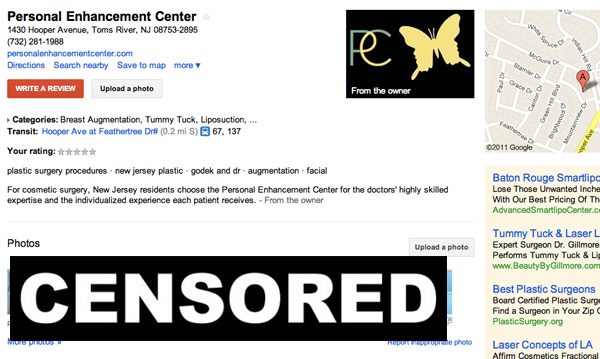
    Google has a crackerjack team of people helping to make their products bigger and better all the time, or at least, that’s the impression we get from them. I just might have caught an embarrassing typo in Google Docs last week, but otherwise, they seem to be pretty much on the ball. That is, unless you visit their Places page, which apparently is hot to show you photos of women’s bare breasts and much more — if the place you’re looking for happens to be a cosmetic surgeon’s office.

    Of course, the websites for most cosmetic surgeons feature a before and after page, but traditionally it takes some clicks to get to and obviously are not plastered all over the landing page. I’m sure some people would be impressed if they went to a doctor’s site and the first thing they saw was a pair of surgically-perfected double D’s, but most medical professionals prefer a subtler approach. And who can blame them?

    Speaking of class, Google, where’s yours? SafeSearch protects what images we see (although, admittedly, even Moderate can be a bit racy at times), but surely businesses will be less than pleased to see that they are being represented by a wall of women without their tops. Not that the images themselves are shameful, mind, but that’s the type of thing that should be taking place behind several layers of clickthrough. On the other hand, surely cosmetic surgeons will feel compromised if they have to pull their before and after galleries from their websites, as potential clients will want to see what the final products of their work looks like.

    It’s a little faux-pax … but nothing Google can’t remedy. Still, will they fix it? Since the images are clinical and not sexual in nature, they may have slipped through SafeSearch’s protocols. If Places automatically pulls the most viewed images, as intelligent as Google may seem, this still proves it to be a modern machine — not quite capable of thinking for itself just yet. We may have to wait a few more years until our networks can provide the same thoughtful attention to detail that humans do. Maybe we’ll be useful for a while longer after all!

  • Google Isn’t Bowing Down

    So, in case you haven’t heard, there was a major update to Google Places late last week. My Friday was filled with confusion, frustration and a feeling of something worse to come. It was sort of like a David Lynch movie with a Local twist. Now that the smoke has cleared, one question remains. What is Google up to?

    Google Places Update

    Before I get into the possible reasons for this update, here is a rundown of the most prominent changes that have been made to business listings on Google Places.

    • Google reviews are the only ones to include snippets now.
    • Third-party reviews have been relegated  to a  “Reviews from around the web” section at the bottom of the page.
    • Third-Party citations have been removed completely.
    • A big red “Write a review” button has been added in two prominent positions.
    • The “More about this place” section is gone.
    • The “What people are saying” section has been replaced by “descriptive terms”.

    Now, back to the question-at-hand. What is Google up to? The Wall Street Journal’s Amir Efrati suggests that Google is bowing down to it’s competitors under growing pressure from the FTC’s antitrust investigation. Saying that, by removing third-party reviews from Places pages, Google is distancing itself from the claims that they “steal” content from the likes of Yelp and Citysearch, post it on their own Places pages, and give those pages preferential rankings in search results. While I see where Amir is coming from, I don’t think that Google is bowing down at all. Quite the contrary, actually. I believe that Google is putting their attack plans into motion.

    Google was initially designed to index third-party content in an easily searchable and user-friendly format. By removing third-party citations and review snippets and promoting their own reviews in what is usually the #1 ranked search result within it’s own #1 ranked search engine, Google has formatted their local search results in a way that obviously favors their own content over that of their rivals. This is the exact reason why the FTC is investigating Google in the first place.

    In other words, Google isn’t interested in displaying reviews from Yelp, Citysearch, and other prominent sites, they want to make those reviews obsolete. If you look at the changes to Google Places from this perspective, it doesn’t seem like Google is that worried about the FTC’s investigation. With all that money they are spending on federal lobbying, I guess Big G thinks they’ll come out on top like Microsoft did in the 90’s.

    Ultimately, not much has changed when it comes to what really matters… getting results. Google Places is still the holy grail of Local SEO. There haven’t been any reported drops in rankings due to this update, so no major algorithm changes are believed to be involved. This means that while Google may not be displaying third-party reviews and citations, they still matter when it comes determining the rankings of local search results, for now.