Tag: google my business

  • Google My Business for Doctors: Visibility, Authority, & SEO

    One of the first steps in improving your searchability with Google is to claim or create a Google My Business listing. With Google My Business, you can manage your information in Google Maps and Google Plus. Since My Business is owned by Google itself, the links gained from these profiles are highly valuable and authoritative.

    However, if you’ve ever tried to claim your Google My Business listing, you may have seen how complex it can be, especially for businesses like medical practices. You may have had questions like: “How do I represent multiple locations for my practice” or “What if I want patients to be able to find their doctors in addition to my practice?” Well, today we’ll go through how to establish your Google My Business presence with exactly those questions in mind, and more!
    1603-SI-KierstensBlog-KG-A-01

    First, let’s dive a little deeper into the world of Google My Business. Google My Business is essentially the dashboard in which you can maintain your information with Google directly. This means that by creating a listing in Google My Business, you’re also creating a Google Plus page and, if establishing a local presence, a Google Maps listing as well. By doing so, you’re telling and verifying with Google, “Hey, I’m a real business, and here’s my real information!” By maintaining that information and posting to your Plus page, you’re proving to Google that you’re the authority on your business and that your business is a valuable resource for users to find.

    Sounds great, right? Who doesn’t want an in with Google? For many businesses, this can be as simple as claiming and verifying a single business listing. But for medical practices, it can get pretty complicated.

    Claiming Your Google My Business Local Listing(s)

    To begin, claim and verify your practice’s primary local business listing. If you are a multi-location business, go ahead and claim the local listings for each of your addresses. Each local listing will need to be verified by either phone or postcard, and no edits can be made until then. Once that’s done, check out these tips and guidelines for building your practice’s Google My Business presence:
    1603-SI-KierstensBlog-KG-B-01

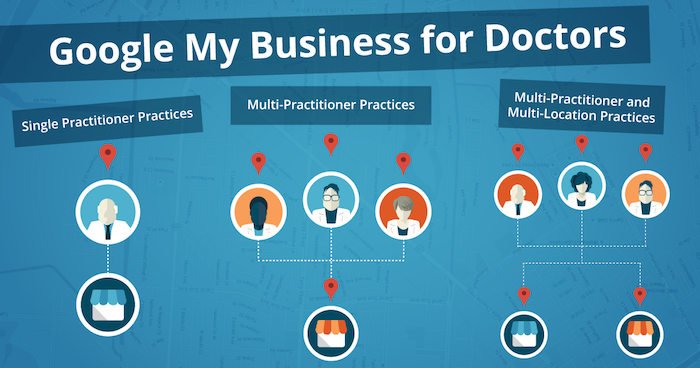
    1. Single Practitioner Practices
      For practices with just one public-facing doctor, you’ll need to decide whether or not to use that doctor’s name instead of the business name. This is wholly a personal decision, but do not create Google My Business pages for both.
    2. Multi-Practitioner Practices
      For practices with multiple public-facing doctors, it is acceptable to create local pages for each doctor, in addition to the practice’s local page. If this is the case, do not include your business name in the name of the practitioners’ pages. And try to differentiate between these pages with either a different phone number or suite number for each doctor, when possible.
    3. Multi-Practitioner and Multi-Location Practices
      For doctors who work at multiple locations, it is acceptable to create separate local pages for each doctor for each location, according to Google’s guidelines. However, it’s even more important that you’re able to differentiate between these pages with separate phone numbers and/or suite numbers. The practical likelihood that Google will flag these as duplicates is higher so proceed with caution! If your goal is to make sure clients can find their doctor’s contact information for each of their locations, then this is a solid practice. Otherwise, if you’re trying to get all of your doctor’s to rank for general searches you’ll need to do more than just add them to Google My Business.

    Brand Pages

    As mentioned before, Google My Business is two pronged; it lets you manage both your local presence via Google Maps and your social presence via Google Plus. If you’re a multi-location practice, consider creating a Google Plus Brand page in addition to your local pages to consolidate your social presence. Brand pages are not linked to Google Maps in any way. Instead, they are purely social platforms for you to manage…you guessed it, your brand! So rather than doing so on each of your local pages, you can post to your one Brand page and gather the same clout with Google.

    That wasn’t so bad, right? Remember to keep these pages updated and treat your primary Google Plus page as a social media profile, like Facebook or Twitter. By doing so, Google will be able to better recognize you as a trustworthy and authoritative source.

    Now that all your pages are claimed, verified, and updated, you’re one step closer to a solid SEO presence!
  • Google My Business Brings the Holiday Cheer with Special Office Hours Pre-Sets

    4

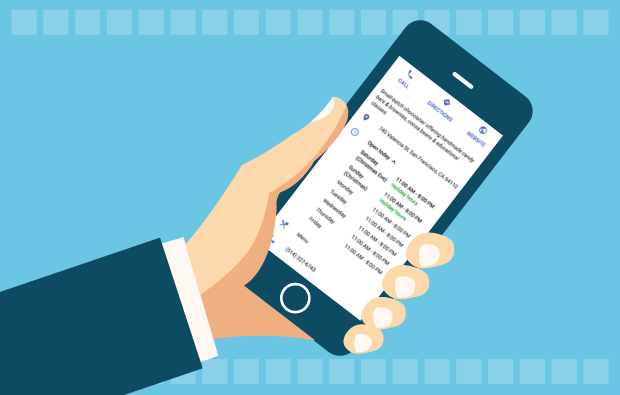
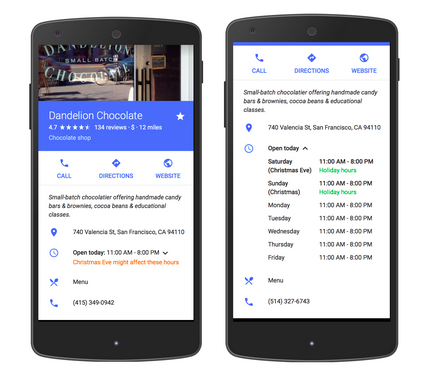
    Yesterday, a new My Business feature was published by Google in the product forums. This new feature allows business owners to pre-set special hours to their My Business listing for holiday closings or special times that are exceptions to your day-to-day office hours.

    google my business special hours exampleThere is more information in Google Support documentation. If you have many locations to update, there is a spreadsheet upload feature. If your business has hours that extend into a second day, there is information on how to manage that scenario.
    Editing Your My Business Special Hours

    This morning, I updated the office hours of a local credit union. This feature will be especially helpful in publicizing the dates their office is closed in the upcoming weeks. It will also be especially helpful to the community for finding the times each branch is closed, and we know Google is focused on user experience.

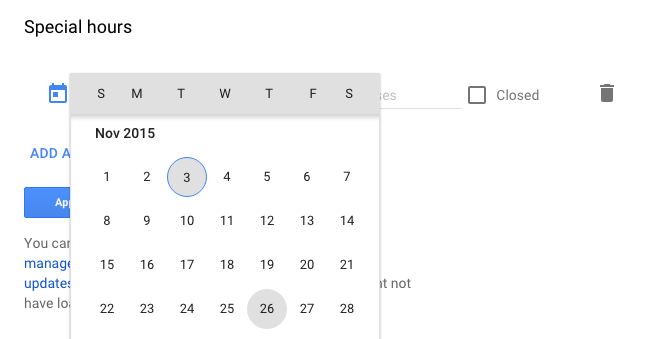
    Once you log into your Google account, navigate to your list of locations and choose one location to edit the location details. Scroll down to “Special Hours” below the standard “Hours.”

    choose the holiday date for special hours

    Click on “Special Hours,” and you can choose a day from a drop-down calendar and either apply early closing hours or mark if the office is closed the entire day.

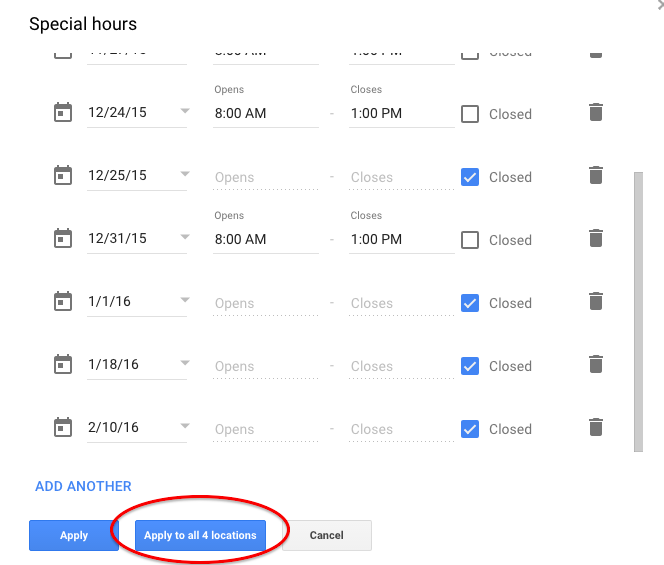
    If the hours will be the same at all of your locations, Google has thoughtfully provided a button to apply the hours to all locations within your account.

    Your final Special Hours or office closing times may look something like this for your summary review. Some days they are closed, and some days the branch is closing early:

    apply special hours office closed times to all locations

    Great New Feature

    You may want to set up some reminders to update your holiday hours every quarter or every six months.

    I know businesses have wanted this feature for quite some time, and now it’s available just in time for Thanksgiving and the December holidays. Very good timing, Google!

  • For Small Law Practices, Online Resources Can Be Judge & Jury

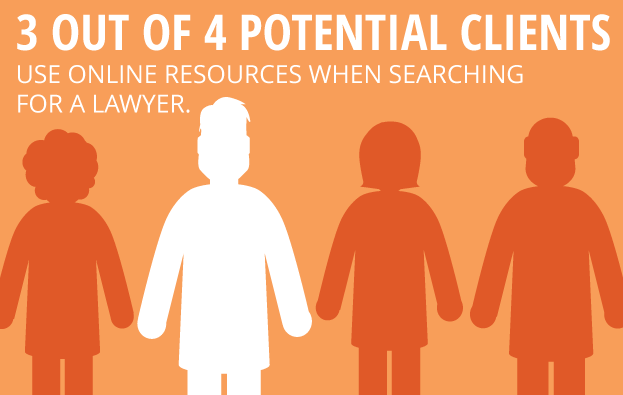
    For many solo practitioners and small law firms just starting out, establishing a consistent client base is the number one priority. In the increasingly competitive land of marketing your law practice, it’s imperative to look beyond the traditional methods such as putting your picture on a billboard, directly contacting potential clients, or simply hanging out your shingle. According to a survey conducted by the Research Intelligence Group, three out of four potential clients use online resources when searching for a lawyer. With that in mind, utilizing a few simple tips can make a huge difference in getting your new law practice found online.

    1511-SI-Newsletter-KG-E-02

    1. Develop and Promote High-Quality Content

    If you’re just in the initial stages of developing your website, it’s wise to keep things simple and focus on quality rather than quantity. For instance, create a few targeted website pages that are written with the potential client in mind, rather than cluttering up your site with an overload of information. Once you have high-quality content in your arsenal, make sure to utilize a social network to promote that content. Also, consider focusing on one social network that you expect will attract the most business, and write timely and substantive posts for that one network.

    LawyerFortunCookie

    2. Create a Blog

    One important way to increase your online visibility and improve your chances of getting to the top of Google’s organic search results is to create a relevant and authoritative blog on your website. A blog is a great way to establish your authority on subjects relevant to your practice while also allowing for the occasional posting of upcoming community events or helpful nonlegal articles. You can also set your blog to automatically post to social media platforms such as Facebook, Twitter, and LinkedIn.

    GavelAndGlobe

    3. Focus on Local

    Think of your potential client base and how you would traditionally market to that group. Getting involved with your community by speaking at regional networking events and participating in local organizations can help establish yourself as a local expert in your field. Internet marketing is another step in that process and can go a long way in bringing in new business. For example, creating consistent profiles across local directories can help you rank higher on Google. Also, consider developing a strategy for gaining local user reviews on websites such as Yelp.

    Starting your own law practice can be daunting, but utilizing these simple tools can make a big impact in helping potential clients find you online.

    Image Sources:

    Lawyer Fortune Cookie

    Gavel and Globe

  • A Tale of Two Google+ Updates: Shutting Down G+ Pages & Disconnecting YouTube From G+

    Shuttered Google Local Pages - Search Influence

    In the past week, two new Google Plus updates have come to light. First, we found out that as of July 28, Google has plans to shut down inactive and unverified Google My Business (aka Google Plus) listings. On Monday, July 27, Google’s Bradley Horowitz posted on Google’s official blog that in the coming months, it will be removing the requirement for users to have Google+ profiles to use various Google products such as YouTube and Google Photos.

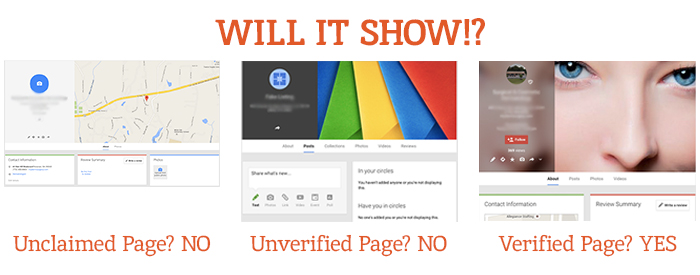
    The Update: Google My Business is Shutting Down Unclaimed, Unverified Listings & Unverifying Inactive Accounts’ Listings

    On July 23, a Local Search Forum user posted an email they received from Google as follows:

    UPDATE – Announcement from Google July 22, 2015

    Dear photographers and agencies,

    In the past few months, you may have seen some changes in the look of Google+ pages that have been associated with Google My Business (GMB) accounts. These changes, including how we treat business pages without owners, are part of Google’s ongoing effort to simplify people’s experience with our tools. We are constantly working to provide only valuable and rich content to our users.

    On July 28, Google will begin shutting down those GMB–associated Google+ pages that have not been associated with user accounts and are also not verified. You may find that some of your Business View tours also sit on such pages, but note that after this removal of unverified Google+ pages, the Business View tours will still remain available on Google Maps and Google Search.

    Here are a few recommendations for informing any business customers that may be impacted by this:

    Encourage your business customers to verify their listings if they wish to retain their Google My Business page …

    If a business owner decides later that they would like to have a Google My Business page, please advise them to create a new page and verify their listing. The Business View virtual tour can be then transferred to the new verified listing. Please log a case to our support teams to request that images for your business customer be forwarded to the new GMB page.

    Please point your business customer to their images in Google Maps.

    Best,

    The Google Maps | Business View team

    This was specifically geared towards photographers so they would know how to handle the effect on Business View tours. What this means for all Google My Business users is that unclaimed local pages will most likely no longer be visible (as Google has always said is the case for unverified Google Plus Local pages).

    Different Google Local Pages - Search Influence

    As always, this update is accompanied by Google’s explanation that all actions are in the best interest of users and geared towards improving the user experience. Thanks, Google!

    On June 4, via the Google Business Help forums, Jade Wang (come visit us in NOLA again soon 😉 ) of the GMB Maps team also announced: “If a user is unresponsive to our attempts to contact him or her and has not logged into Google My Business for a significant length of time, then we may unverify pages in the account.” Here’s the full update from Jade:

    In some cases, we may contact Google My Business users via email to confirm that they are still actively managing a business page. If a user is unresponsive to our attempts to contact him or her and has not logged into Google My Business for a significant length of time, then we may unverify pages in the account. We’re doing this in order to continue to provide users with the best experience when they’re looking for local businesses like yours. If you find that a page in your account has been incorrectly unverified, please contact support to get assistance restoring verification.

    It’s a good idea to keep an eye on the inbox associated with your Google My Business (Locations) account. It’s also a good idea to regularly log into Google My Business (Locations) to confirm that your business information is current and accurate.

    My Take On It

    Both of these updates could mean great news for businesses that have struggled with requesting ownership of listings that were verified in the past by a person or an account they no longer have access to. To fix this issue in the past, you’d have to submit an ownership request form to Google to gain access to these listings. Then, you’d have to wait 10 business days (as per Google’s rules) and reach out to support (they could check to see if the account never responded to the request). After this 10-day period, the support representative could determine that the account that owned the listing was inactive and release the listing to you for claiming and verification.

    Basically this means inactive accounts are no longer roadblocks to getting access to business listings in Google My Business!

    While some issues may be alleviated with the update, what’s harder for search engine optimization work is that now it’ll be more difficult for us to see unverified duplicate G+ pages, old or closed G+ pages, and practitioner G+ pages that could be hurting businesses’ local rankings. Map Maker should allow us to still see the data but not the pages themselves.

    But there are signs this hasn’t rolled out completely yet. I have some unverified, fake listings in my Plus account (shhh, I know) that I use for training purposes that haven’t been touched yet. This is likely a slow rollout that started July 28. I did notice some changes to Maps navigation recently that were probably in preparation for this, though. For example, you used to be able to click “Write a review” from the Maps results to get to the G+ local page for a business, but now that just opens a review dialogue in the Google search results for that business in another window. This makes sense, since unclaimed businesses will no longer have pages.

    The Update: Google+ Is Disconnecting From Unnecessary Services

    On Monday, July 27, Bradley Horowitz posted on Google’s official blog that Google+ would be moving towards a “more focused Google+ experience,” which basically means no longer forcing users of various other Google products to have a G+ profile to use said products.

    Specifically, Google wants to foster the natural sharing environment of G+ by adding new features such as Google+ Collections. This update means that all you need to share content, communicate, and have a YouTube channel (among other things) is a Google account and not necessarily a G+ profile. Also, it will continue to keep Google accounts private and unsearchable. For those who were forced to create G+ profiles to use YouTube and other Google products in the past, Google promises that it will “offer better options for managing and removing those public profiles.”

    My Take On It

    Congrats to everyone who was pissed when they couldn’t use YouTube without a Google+ profile!

    Mad Men Cheers Joan

    At first, it seemed that G+ pages that are already connected to YouTube channels might be disconnected. But, that last comment about offering ways to get rid of unwanted G+ profiles, points to the fact that this update will not actively affect anyone in this way.

    Since this update has not yet rolled out, however, it is important for users to realize that they should not delete their G+ yet! Doing so prior to roll out will force you to delete your entire YouTube presence!

    Let me know your thoughts on all of these new Google updates! I’d love to hear what other users think of these changes.

    Image source:

    Mad Men gif

  • How to Win Followers and Influence People: Build Your G+ Following in 3 Steps

    We’ve cracked the code to successfully increasing the Google+ following for a small business (or at least we know we’re on to something). Our little experiment shows that if you follow three simple steps, you can gain more followers on Google+.

    Now, before you equate the importance of Google+ (colloquially referred to as “The Plus”—it’s a thing, I promise) to that of utensils at a pizza shop or a certain search engine that rhymes with “wing,” it is important to note that although Google has consistently denied any causal relationship between what shows up in a Google search and activity on “The Plus,” evidence shows there may be reason to listen up. Besides, even if you don’t drink the Kool-Aid and immediately become a Google+ fanatic, I think we can all agree that vying to be in Google’s good graces is always a smart idea. I mean, come on, you wouldn’t skip your boss in line at the movie theatre or punch Ryan Seacrest in the face after winning a trip to Hollywood (OK, I can’t make any promises on that one), but you get the point. Don’t bite the hand that feeds.

    Follow and Compliment

    Now that we have established that Google+ matters, let me clue you in on a little G+ secret. People on social networks are like that hyper-masculine guy on your road trip: all they want is to be followed and complimented. Following, and subsequently +1’ing a person on Google+, is like referencing your buddy’s cheese blog in the bar you are currently patronizing with a group of friends. Not only have you discovered him on an incredibly remote platform, but you’ve even followed up with a compliment! Go you, Stanley, you’re relevant, and people appreciate your knowledge of cheese.

    In all seriousness, though, over the past few months our experimentation shows that you will receive at best a 40 percent return rate in followers. For every 100 people followed and +1’ed, we received approximately 40 follows in return. It is important to note that the client happened to be a particularly interesting and popular business. That’s not to say the inherent love of HVAC nuances isn’t bountiful across the land, but it’s just something to keep in mind.

    Given the fairly low rate of return, you can see how this may prove to be quite taxing if your goal of followers is in the hundreds, especially considering Google+’s limit of 50 follows per day. So what shall we do as small businesses owners armed with this knowledge? Luckily, as your in-house guinea pig, I am here to break it down into three simple, effective steps.

    3 Steps to Building Your G+ Following

    1) Start by following larger, established pages in your geographic area. Think The Wizarding World of Harry Potter if you are located in Orlando. If you need help getting to the Google+ page for The Wizarding World of Harry Potter, I can’t help you. If you have to ask, you’ll never know. If you know, you need only ask.

    2) Once you have lost yourself in a voracious “following” spree, now it is time for flattery. The people who occupy the comment threads of your newly acquired network are relevant to you in a few ways. Not only do they most likely engage with local businesses, but they are also active on “The Plus” ← there it is again! See, I told you it’s a thing. Start following and +1’ing posts in your stream you deem relevant to your business’s interests.

    3) Be sure to watch out for exceeding Google’s “follow” limitation on a larger scale. After you exceed 1,000 people/pages followed on Google+, we’ve noticed that the social network gets a little buggy. If you begin “maxing out” of follows well before your promised allotment of 50, simply take a break for a week, binge on some Netflix, and live to fight another day.

    That’s all for now, folks! If my team discovers any new, innovative ways to garner your Google+ following, we will be sure to let you know. If you hear nothing, that means Skynet, ahem, I mean Google has discontinued “The Plus.”

    Image sources:

    Kool-Aid GIF

    Guinea pig GIF


  • Return Of The YT Channel: Moving YouTube Channels Between G+ Pages In 2015

    Move YouTube Channels Between Google Plus Pages

    In the early ages of YouTube and Google Plus connections, disconnecting and reconnecting channels to the correct G+ page was not an easy feat. I once wrote a blog about this lengthy workaround for LocalU. Not long after that blog post, Google released a support form that allowed you to have a YouTube support specialist do the reconnection for you. While this support was amazing and usually reconnected channels within 24-48 hours, it required a middleman to get the work done and wasn’t immediate.

    Now, Google has released a way to reconnect your channel to another page within your account in the Advanced Settings section of YouTube! If everything is in one account, then this reconnection takes mere seconds. Often, however, we find ourselves in a situation where the channel is connected to a personal Google Plus page in one Google account, and we want it connected to a business page in another login.

    So I’m here to walk you through how to handle both of the aforementioned situations.

    Reconnecting A Channel Within One Account

    We’ll start with the simple one. You’ve got a YouTube channel connected to one page (probably a person page, maybe a random brand page), and you want it connected to your official business page on Google plus. Whatever shall you do!?

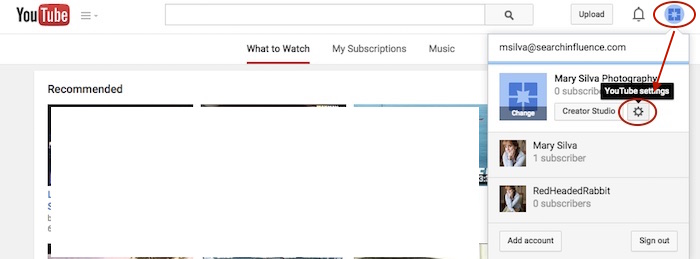
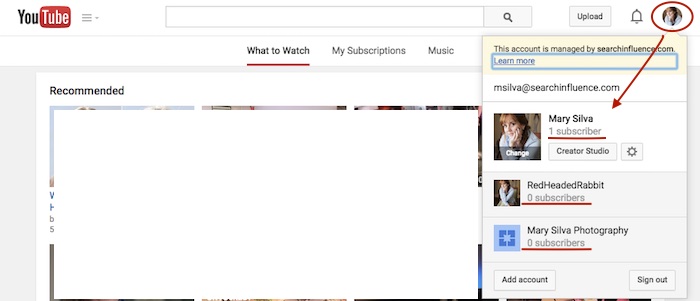
    Step 1: Go to YouTube.com and log in to your Google account. In the top-right corner of the page, click on the circle that shows your page icon to see a list of pages and their channels within this account.

    YouTube Users

    Usually, when you first log in to YouTube, you’re automatically managing or acting as your personal Google Plus page (the profile listed first in the dropdown is the one you’re currently acting as). To manage another page, which is what we’ll need to do to move channels, you’d just click the page you wish to manage from the dropdown.

    Deleting Unnecessary Channels Side Steps:

    Before we can proceed with moving channels, however, note that in the screenshot above, both of the extra pages have “subscribers” listed under their page names. This means that channels have been created for both of these pages already (otherwise we’d see “Create a Channel” below the page names). So if we want to move a channel to the page “Mary Silva Photography” in this account, then we’ll have to free it up for receiving a channel by deleting the unwanted channel that is currently connected to it.

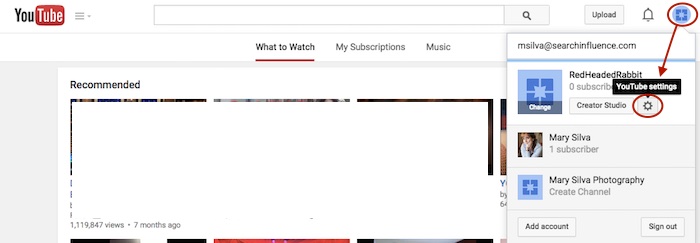
    This can be done fairly easily by clicking the “YouTube Settings” gear from that top-right dropdown while managing the page from which you want to delete the channel.

    Screenshot 2015-05-18 10.36

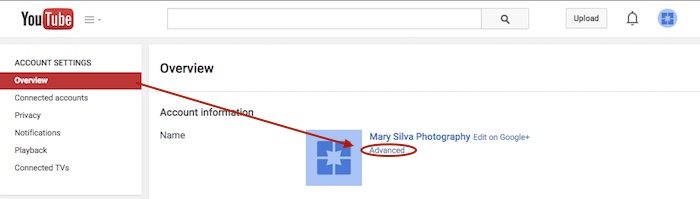
    Then click “Advanced” under the page name in the “Overview” tab.

    Screenshot 2015-05-18 10.37

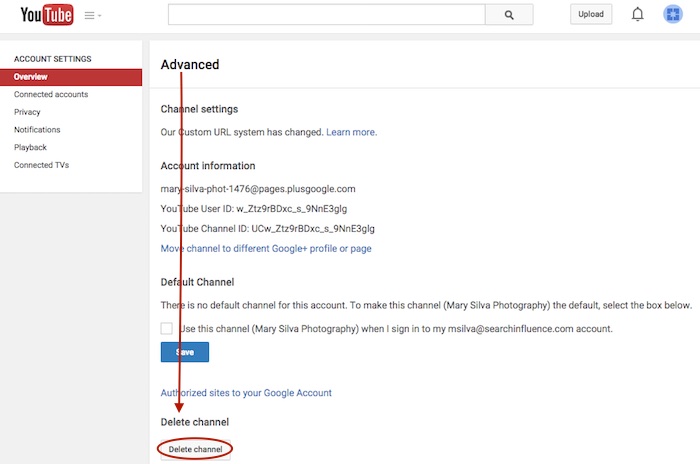
    At the very bottom of the page, you’ll see the “Delete channel” option. Once you click that, you’ll probably have to re-enter your password. Brace yourself.

    Screenshot 2015-05-18 10.38

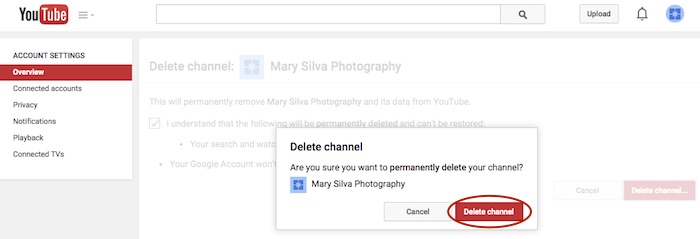
    You’ll see a verification page to confirm what you’re about to do. Check the box and click “Delete channel” to get one more verification dialogue, then click “Delete channel” one last time to complete the process.

    Screenshot 2015-05-18 10.41

    Now we can get back to moving the channel. In this example, we’ll pretend that the channel connected to “RedHeadedRabbit” needs to be moved over to “Mary Silva Photography.” As you can see in the next screenshot in Step 2, “Mary Silva Photography” now shows “Create a Channel” in the dropdown, so it’s free to take on the channel from the “RedHeadedRabbit” page.

    Step 2: Click on the page that has the channel you want to move in the top-right dropdown to manage the page (in this case, “RedHeadedRabbit”), and then the aforementioned “YouTube Settings” gear should appear for that page. Navigate back to the “Advanced” settings page from the “Overview” tab just as you would have to delete the channel.

    Screenshot 2015-05-18 10.47

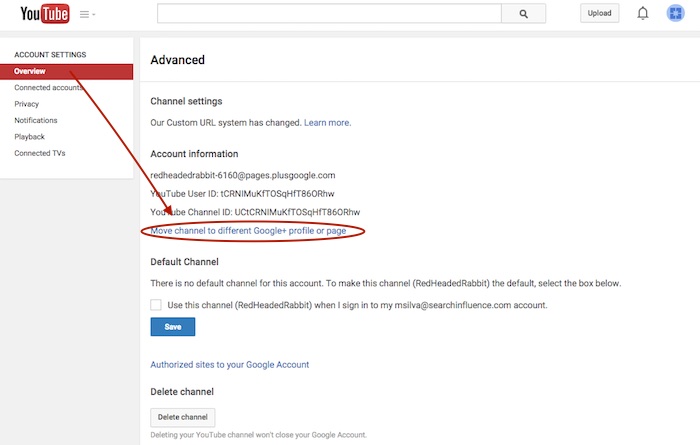
    Step 3: This time, however, you’ll want to click the “Move channel to different Google+ profile or page” option just above the “Default Channel” header. Google will probably make you enter your password again, so brace yourself.

    Screenshot 2015-05-18 10.48

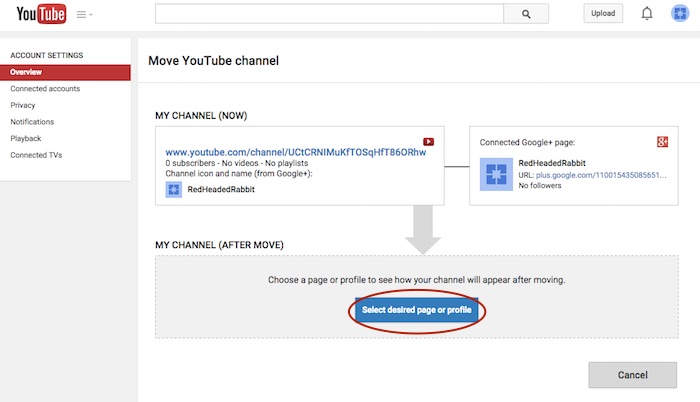
    Step 4: Now you’ll see the “Move YouTube channel” page. Under “MY CHANNEL (AFTER MOVE)” click the “Select desired page or profile” button.

    Screenshot 2015-05-18 10.49

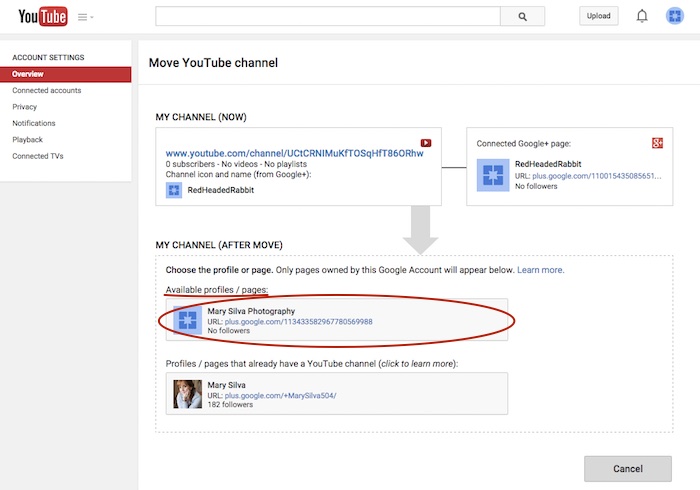
    Step 5: Choose the page you want to move the channel to from the “Available profiles / pages” section.

    Screenshot 2015-05-18 11.05

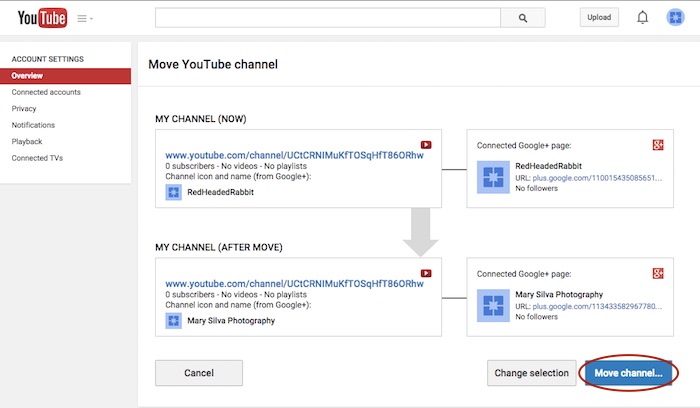
    Step 6: Confirm where you’re moving the channel (you can click links on this page to double-check that you’re moving the right channel to the right Plus pages) and click “Move channel…” to complete the transfer.

    Screenshot 2015-05-18 11.06

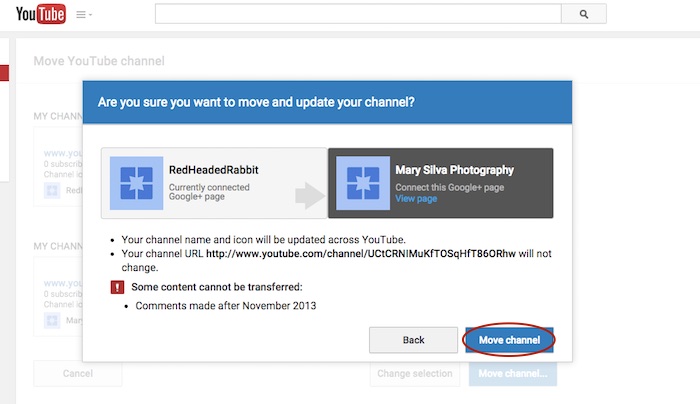
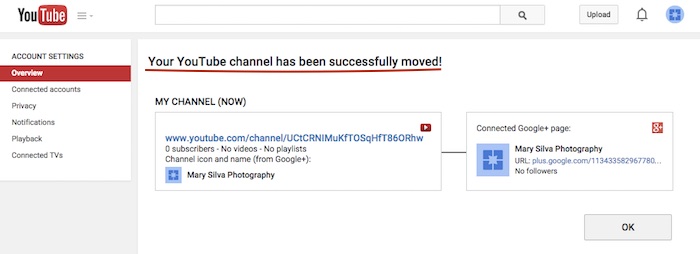
    Step 7: Click “Move channel” in one last confirmation dialogue box, and you’re done! You’ll see one last confirmation screen about the successful channel transfer.

    Screenshot 2015-05-18 11.13

    Screenshot 2015-05-18 11.09

    Reconnecting A Channel With Two Different Accounts

    As previously mentioned, we often find that we have a channel connected to a personal Google Plus page in one Google account, and we want it connected to a business page in another login. The steps for moving the channel will be the same as above, but first, we must get the pages all set up properly within one account.

    The account that has the channel has to be the OWNER of the page that we want to move the channel over to. So we need to go through adding the YouTube channel account as a manager of the business page within the other account first. Then we can go back and transfer ownership of the business page over to the channel account completely.

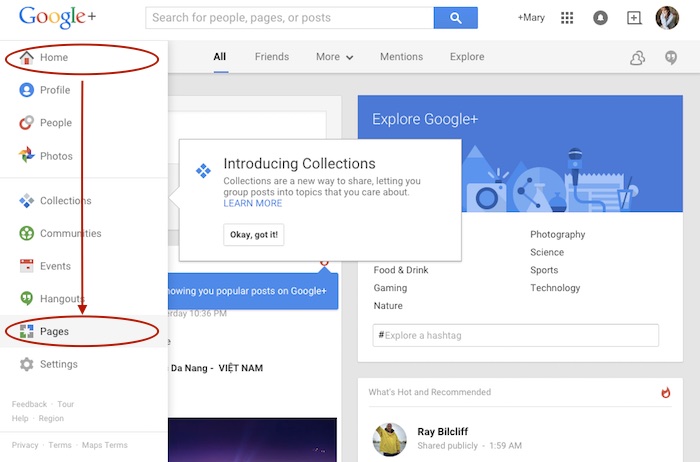
    Step 1: Log in to the account that the main business is claimed in and go into your Pages.

    Screenshot 2015-05-18 11.30

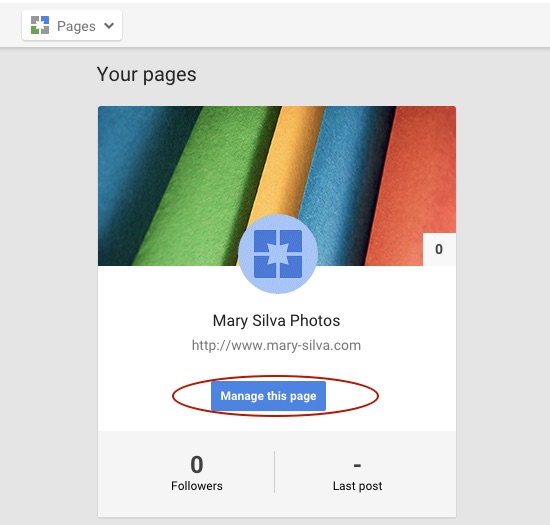
    Step 2: Choose “Manage this page” for the listing that you want to make the YouTube account a manager of.

    Screenshot 2015-05-18 11.31.30

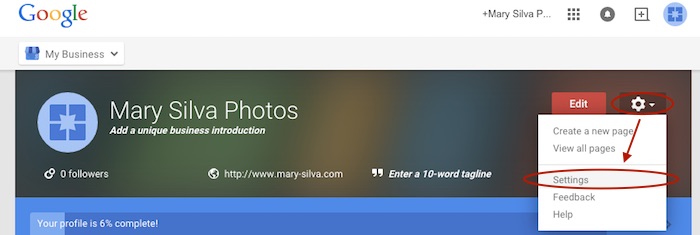
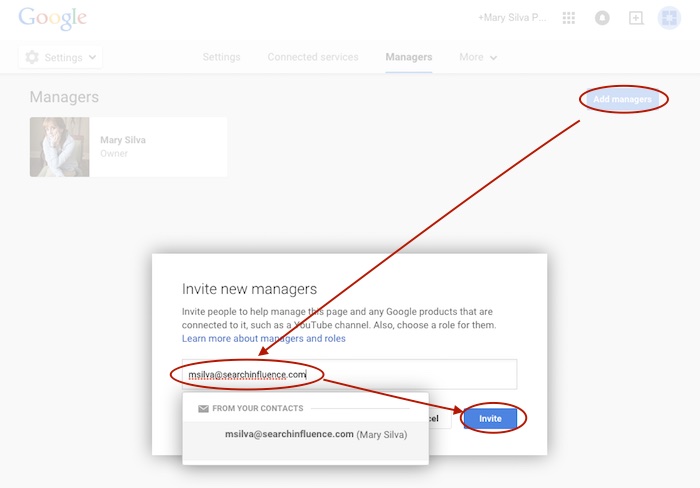
    Step 3: Go to “Settings” in the dropdown. Then, choose “Managers” under the “More” tab and add the email address for the YouTube account as a manager by clicking “Add managers.”

    Screenshot 2015-05-18 11.31.44

    Screenshot 2015-05-20 12.46.32

    Screenshot 2015-05-18 11.32

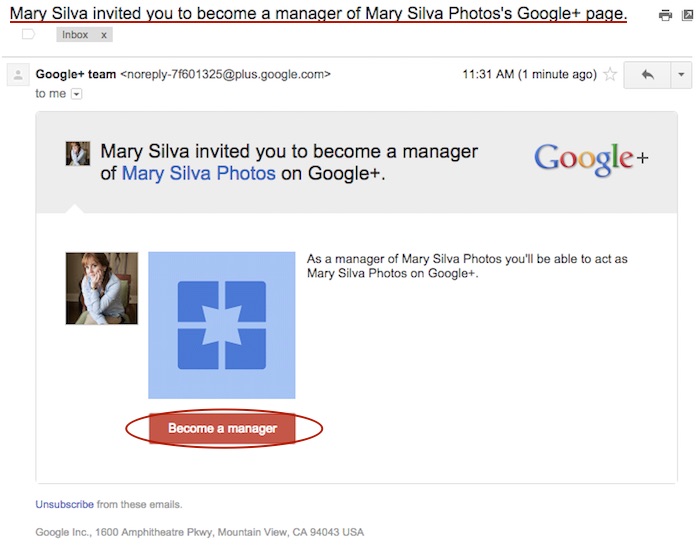
    Step 4: Log in to the email for the account with the YouTube in it. Look for the email that says “Person Name invited you to become a manager of the Business Name’s Google+ page” and click “Become a manager” within that email.

    Screenshot 2015-05-18 11.33.15

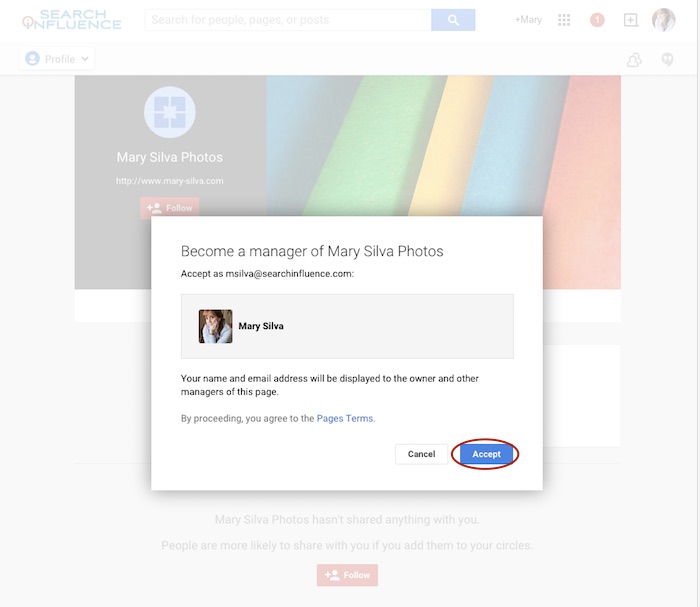
    Step 5: The link from the email will take you to the Google Plus page and automatically open a “Become a manager of Page Name” dialogue where you’ll click “Accept” to complete the managership setup.

    Screenshot 2015-05-18 11.33

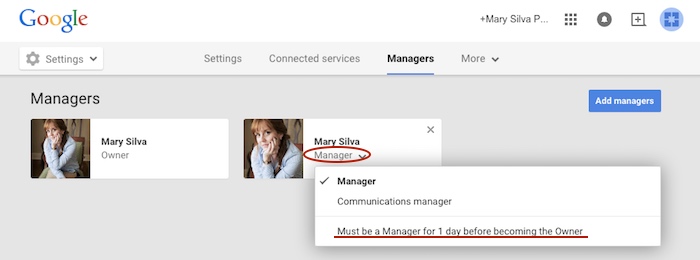
    Here’s where we wait…Unfortunately, for security reasons, Google requires an account to be a manager of a page for at least one day (as seen in screenshot below) before ownership of the page can be transferred over. So wait a day and come back to me when you’re ready to wrap this up. 😉

    Screenshot 2015-05-18 11.38.58

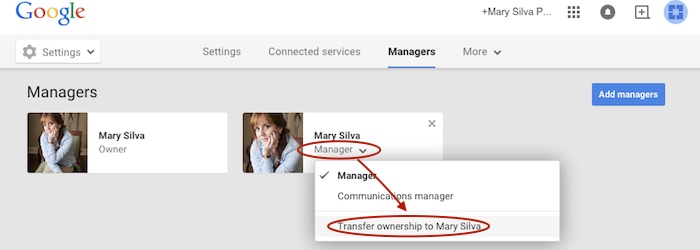
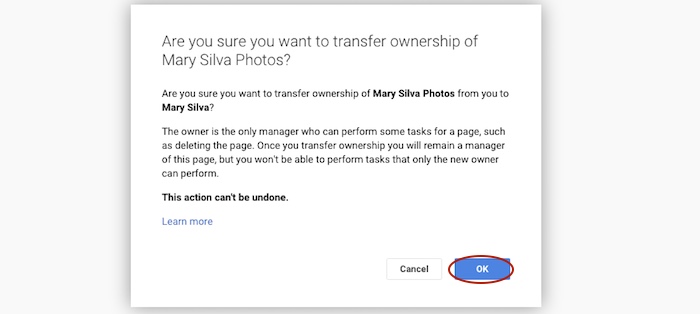
    Step 6 (One Day Later): Now log back in to the account that owns the page and follow steps 1-3 again to get back to your “Managers” settings page of your official business page. When you click “Manager” under the account name, you’ll see a dropdown with the option to “Transfer ownership to Person Name” where you previously saw “Must be a Manager for 1 day before becoming the Owner.” Once you click that, you’ll click “OK” to verify the transfer of ownership, and then the transfer is complete!

    Screenshot 2015-05-19 12.54.22

    Screenshot 2015-05-19 12.54.37

    You’ll get an email in that new owner account saying something like, “Person has made you the owner of the Page Name Google+ page.” Unlike the managership process, you don’t have to click anything in an email, so the ownership has been transferred completely, and you’re done!

    Now that you have everything set up properly, you can proceed with steps two to seven in the “Reconnecting A Channel Within One Account” section above.

    Hopefully this extensive tutorial helps you through all of your YouTube woes. To learn more about the ins and outs of Google Plus pages in Google My Business, you can read more on the blog here.

  • Googleplasty: How to Reshape Your Search Results (Part 2)

    As more businesses begin to take efforts to improve their online presence, standing out in search results of highly competitive markets and areas becomes even more difficult—and nowhere is this perhaps more true than in the cosmetic medicine industry.

    In order to reshape your search results through the art of “Googleplasty,” you must know what factors make your business rank high in a Google search. Since we now know all about the different types of search results from part one of this two-part blog series, let’s talk about the most important factors that play a role in how high your practice ranks.

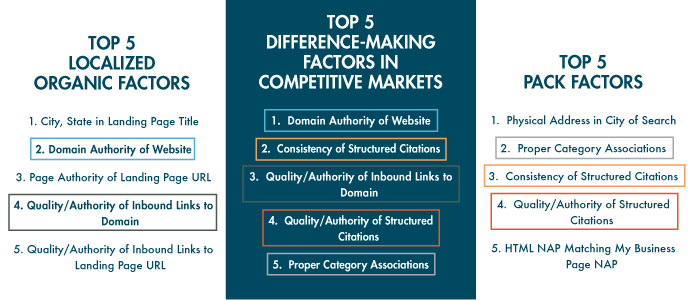
    The following three “Top 5” lists of factors are from from Moz’s 2014 Local Search Ranking Factors survey. The information came as a result of surveying 40 industry experts to determine what had the most influence on ranking in Google search results.

    top 5 search ranking factors

    As you can see, all of the factors that are integral in competitive markets also play a part in either localized organic or maps pack results. Due to their repeat importance, I think they’re the five factors most worthy of discussing in detail.

    1. Domain Authority of Website

    domain authority

    First up on our list as the most important factor in competitive markets is Domain Authority, which isn’t much of a shocker. Domain Authority is a proprietary measurement (created by Moz geniuses) of a domain’s power within a 100-point scale. This score can be used to predict if a site is likely to rank in Google’s search results and can also be used to track a site’s growth and increase in strength.

    It is a metric that combines other metrics such as age, number of links, and quality of links, so it’s not easy to manipulate through singular or direct efforts. As it is directly put on Moz’s site, “The best way to influence this metric is to improve your overall SEO.”

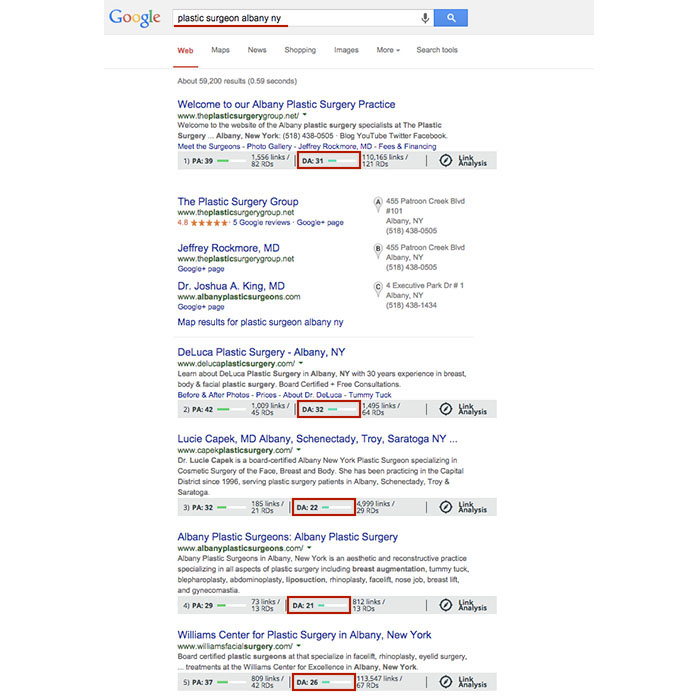
    Using Moz’s MozBar to see domain authority of pages in search results, you’ll see that the top five business sites in the localized organic results for “plastic surgeon albany ny” have Domain Authorities of 31, 32, 22, 21, and 26, respectively. As you can see here, having a score that is higher by a single point won’t guarantee that you rank above your competitor, but in this search example, business sites past the first page of results tended to have Domain Authorities lower than 20.

    Domain Authority Search Results

    2. Consistency of Structured Citations

    structured citation consistency

    While this factor isn’t as high ranking for localized organic results, it is third for the top maps pack factors and second here in the top factors for competitive markets. One reason for this is that in many competitive markets, such as plastic surgery or cosmetic dermatology, you’ll find maps packs in search results.

    To start, a citation is a place on the Web where a business’ name, address, phone number, and often website can be listed (sometimes referred to as the NAP of a business – name, address, phone). Any combination of the NAP, with or without all parts, listed on a site is considered a citation. A structured citation in particular is a listing of business information found on a directory website (e.g. YellowPages.com and Yelp.com). On the other hand, an unstructured citation can be business information on non-directory sites like newspaper sites, press release sites, and blogs, to name a few.
    By increasing the number of matching information sources (and therefore matching signals) to Google, you also increase your chances in having Google match this information to search queries, according to a recent webinar with Google’s Heather Wilburn. So if you want to be matched with potential patients searching for businesses like yours in your area, consistent business information across the Web is one of your best bets, especially in competitive industries like cosmetic surgery.

    3. Quality/Authority of Inbound Links to Domain

    inbound links to domain

    An inbound link to your domain (aka inlink or backlink) is exactly what it sounds like, a link leading to your website. The relevance to your industry or location and the authority of a website linking to yours in and of itself are the two best traits for quality links. Buying links or having links from random, spammy sites will hurt, not help you. Links from local sites and popular sites are a pretty safe bet. You can seek out local sponsorship opportunities as a good link-building effort or help other sites clean up their broken backlinks by using your working ones.

    To differentiate between natural link building versus spammy link building, remember that it’s all about user experience and what makes sense to the user. If your efforts don’t uphold the ideal of providing the best user experience possible, then they’re probably not good.

    4. Quality/Authority of Structured Citations

    structured citation quality

    As mentioned above, a structured citation can be any directory site that lists any variation of your business’ NAP or website. While consistency is most important, you also want to make efforts to build high-quality, authoritative citations in directories.

    Just like there are many factors to improve your own site’s authority, there are also many factors to determine the quality of a directory. You can delve into Whitespark’s blog on how to identify quality citation sources for a detailed breakdown, but basically a good rule of thumb is to look for high domain authority and human moderation in directory sites. Examples of human moderation include how DMOZ requires submission review by its team before a link goes live or how Google Plus, Yelp, and Bing listings all require verification via phone call or a postcard sent to the business.
    Google also considers niche directories highly authoritative. A niche directory is an industry-specific or location-specific directory. Since the Pigeon algorithm update, this kind of citation building has become especially important, and searching for your industry’s keywords will often help you identify these niche directories. If you search for “plastic surgeon columbus oh,” you’ll see that the directories healthgrades.com, vitals.com, and smartplasticsurgery.com appear on the second page of search results. Often, these types of directories require either verification or payment for those seeking to be listed on their site. If you understand the concept of barnacle SEO, you know that being listed on these types of big, authoritative sites is a great way to improve your own visibility to potential customers. Use your discretion to decide if the opportunity cost of getting on a directory isn’t too high to be worth the effort.

    Warning: If a site ever requests a “reciprocal link” to its site on your site in order to be listed, this is NOT A GOOD practice, and they are not worth your time.

    5. Proper Category Associations

    category associations

    Having proper category associations is another important factor for ranking in the maps pack that can set you apart from the rest in a competitive market. It’s a pretty simple concept, and it basically boils down to the part of the guidelines for representing your business on Google that tells businesses to “Choose categories that are as specific as possible, but representative of your main business.” A cosmetic surgeon with the primary category on the Google Plus local listing set to “surgeon” is less likely to rank above one with a primary category set as “plastic surgeon” in the maps pack, for example.

    Though this is a lot to grasp and take action on all at once, having the foundation and understanding of best practices to improve user experience and to better your business online will greatly improve your successes online in the long run.

  • Googleplasty: How to Reshape Your Search Results (Part 1)

    As businesses grow more in touch with their online presence, it becomes more and more challenging to stand out in the search results of highly competitive markets and areas—and nowhere is this perhaps more true than in the cosmetic medicine industry.

    Search Influence - Plastic Surgeon Local Google Search Results

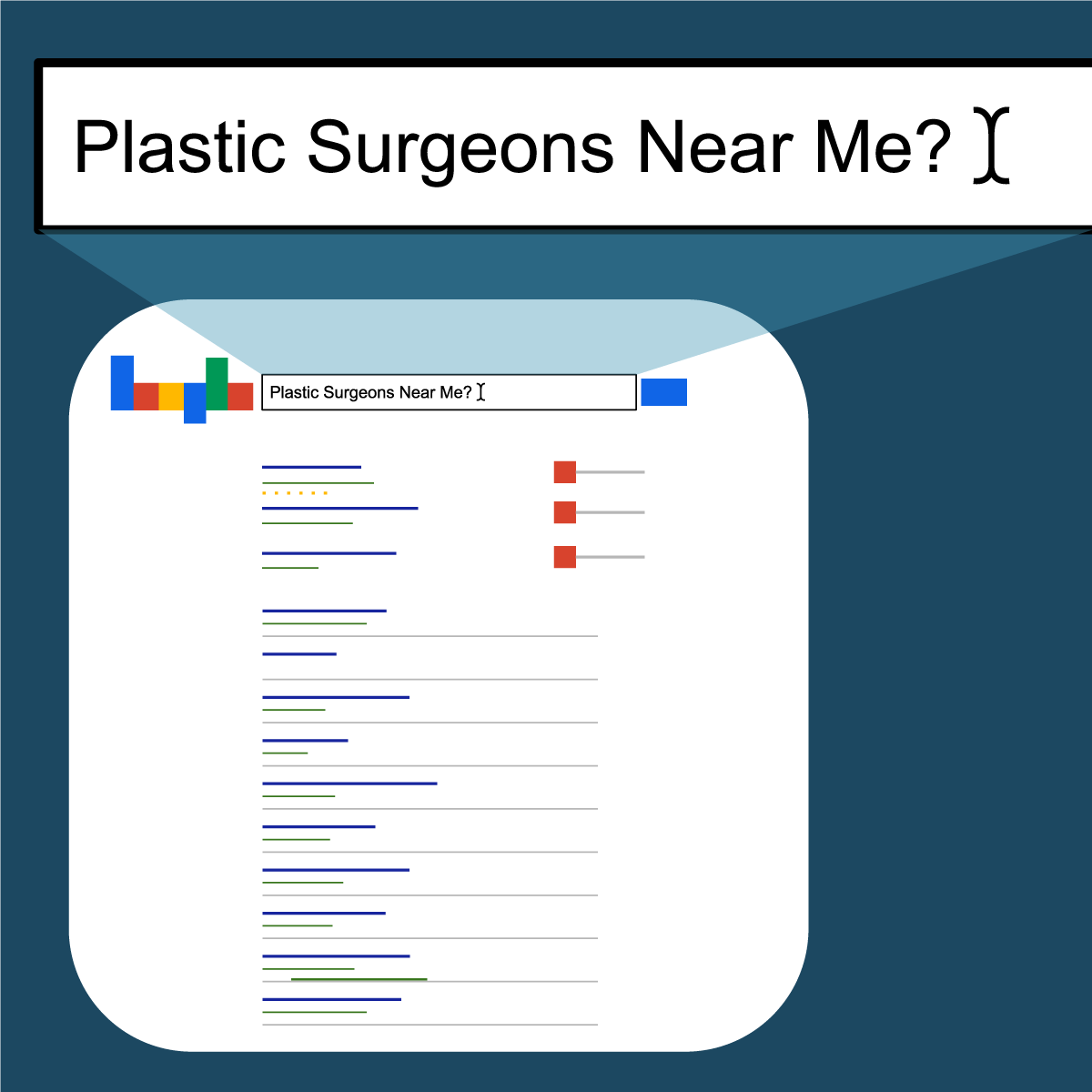
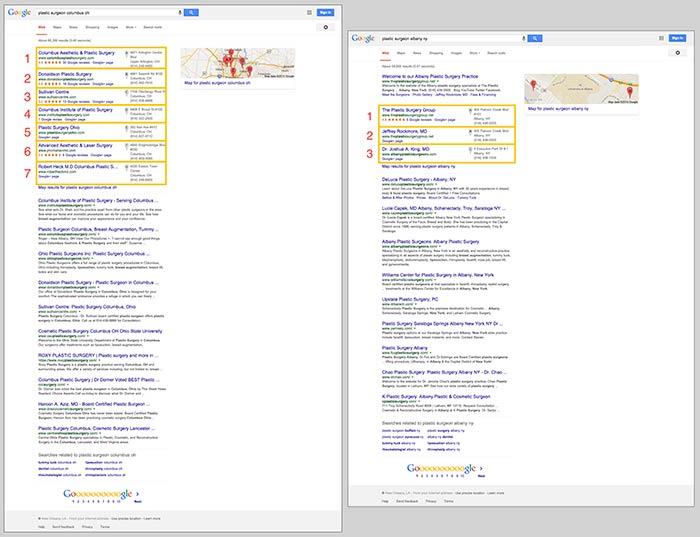
    First things first, let’s make sure we’re on the same page about the two major kinds of results that we see in desktop results for plastic surgeons. “Localized organic” search results and “maps pack” results typically appear together in what is referred to as “combined” search results. The factors that determine what appears in these two areas are not the same, as you can tell by the the difference in results and by the appearance of a site more than once between the two. Maps packs can come in a variety of forms and don’t show up for all search queries, which is also important to note.

    In the screenshot below on the left for the search “plastic surgeon columbus oh,” you’ll see 10 localized organic results below a 7-count maps pack. In the screenshot on the right for “plastic surgeon albany ny,” you’ll see 10 localized organic results, but the 3-count maps pack appears below the first organic result.

    Search Influence - Google Maps Pack Plastic Surgeon

    Stand Out in the Maps Pack

    In the maps pack itself, the most striking features are the review stars and rating display. The data in the maps pack area is pulled directly from Google Plus local listings in Google Maps. So, to make your practice stand out in the maps pack, you should claim and verify your Google Plus listing via Google My Business.

    Once you’ve claimed and verified your listing, you’ll want to get reviews from your patients. It’s important to understand that one or two reviews a month over a few months is better than 15 reviews in one week. As with most online marketing strategies, natural behavior is the best behavior.

    Stand Out in Localized Organic

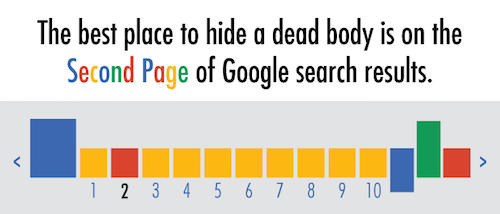
    The most obvious way to stand out in the localized organic results is to be ranking as high as possible and to AT LEAST be in the top 10 so that you’re on the first page. As the age-old SEO joke goes, “The best place to hide a dead body is on the second page of Google search results.” Hardly anyone looks past the first page, and—according to eye-tracking data—not many look past the top half of the search results page.

    Search Influence - dead body Google Search Results meme

    The Google PageRank algorithm that determines these rankings takes into account somewhere around 200 factors, so it’s not as simple as pinpointing one or two efforts to be made.

    Now that we’ve got a better understanding of what we’re looking at in search results, we can start to understand the major factors that affect ranking in each of these sections. Stay tuned for my next blog, where we’ll talk about the top five ranking factors in the maps pack, in the localized organic results, and in competitive markets!

  • Google & Twitter Rekindle Old Flame with New Deal

    Today, I’m going to tell you a love story between two Internet powerhouses. There’s drama, there’s intrigue, and there’s a rekindling of romances. Is it for the money? Is it for the power? That’s for you to decide.

    You may have heard that in February, Twitter CEO Dick Costolo announced that Twitter and Google have rekindled a former partnership. Apparently, the two companies have agreed to a deal that would put a real-time feed of tweets from Twitter back into Google’s search result pages at some point in the first half of this year.

    In this post, I’ll lay out what we do know about these star-crossed lovers: a little bit of background on the duo’s previous tryst, how this new partnership benefits Google and Twitter individually, and what this means for you (especially if you’re a business owner).

    The Skeletons in the Closet

    Back in 2009 (or centuries ago in Internet time), when Twitter was a mere three years old, the two companies formed a similar agreement. As that young relationship took off, Google unleashed something it called Real-Time Search, which featured current tweets and other instant information appearing right alongside your searches. Real-Time Search was well on its way to becoming pretty awesome when, suddenly, in 2011, that feature and the relationship met a tumultuous end. Twitter decided not to renew partially due to growing pains and partially because the COO at the time, Ali Rowghani, was into keeping Twitter’s content proprietary to its users. As a result, Google was left to crawl Twitter’s site in order to index tweets, which is clearly a recipe for failure, and thus, the two were left to go their separate ways. Until now.

    What’s in it for Google?

    When Google was a young, nascent startup, the founders formed a list of the 10 things that comprise the company philosophy. Topping this (pretty tender) list is, “Focus on the user and all else will follow.” If you keep reading, you’ll find that numbers three and four respectively are, “Fast is better than slow,” and “Democracy on the Web works.” The list also includes several items oriented towards the power of and need for information.

    With Twitter, Google gets fast, user-focused information. And as that old adage goes, information is power. Or is it knowledge? Regardless, you get the idea. Twitter is powerful: it has facilitated uprisings, coordinated revolutions, encouraged dialogue on important issues, revolutionized protests, and most of all, it’s user-generated. That kind of authority and relevancy is pretty invaluable.

    Search Influence Twitter Firehose Image

    So, in this partnership, Google gains access to what’s known as the “fire hose” of tweets, which basically means it gets a stream of 9,000 tweets per second, giving it immediate access to whatever is going on in the Twitter-sphere at the time. This kind of power allows Google to provide even more relevant, reliable information to its users.
    At this time, it is unclear whether or not Google will be paying for these tweets, though it did last time. If it does pay this time, however, there’s a good chance it won’t be very much, given that Twitter came to Google asking to rekindle this flame. So, who can really blame Google for wanting to try this whole partnership thing again?

    What’s in it for Twitter?

    In case this wasn’t already clear, I’ll give you a short answer: GLOBAL EXPOSURE. Google is a socialite with connections to everyone, everywhere, and Twitter is just trying to get in on a piece of that sweet pie. If you’re anything like me, you may be thinking, “Well, isn’t Twitter doing just fine on its own? Can’t it be successful without returning to its almighty ex?”

    The answer to that, apparently, is…not so much. In 2013, 46 percent of Twitter users visited the site daily. In 2014, that stat dropped down to 36 percent. On top of losing grip on what was once seen as a stalwart user base, Twitter has the smallest market share out of the top five social media sites. Finally, only 19 percent of the U.S. adult population uses Twitter, which seems fine, but that is the lowest amount of all the top five social media platforms. Who knew Twitter was the runt of the social media litter?!

    They did. And this is their effort to remedy that. By partnering up with Google again, Twitter gets a marketing cachet like never before. They’ll likely see more signups, more engagement, and higher ad revenue. As Costolo so eloquently put it in a recent earnings call, it’s all about the eyeballs:

    “We’ve got the opportunity now to drive a lot of attention to and aggregate eyeballs, if you will, to these logged-out experiences, topics, and events that we plan on delivering on the front page of Twitter. And that’s one of the reasons this makes a lot more sense for us now.”

    Though this almost certainly does not mean tweets will magically get favor from the Google gods and outrank other types of content, it does promise lots of rewards for Twitter.

    What does this mean for YOU?

    Basically, it means you should use Twitter. If you’re a business that works online in any capacity, this will likely be a positive development. Through this agreement, you can expect better, localized SEO results and new advertising benefits every time Google picks up your tweet.

    However, it’s important to keep in mind that this also means tweets have a bit more longevity now. There’s a chance that Google will archive relevant tweets, which means they could show up on a search results page six months down the road.

    In the same vein, any negative tweets from disgruntled customers have the potential to leave a more enduring imprint on a related Google search. It could be best practice to invest in some kind of social media/Google monitoring service so you can stay up to date on what’s being said. If you opt to respond to a negative Tweet, make sure you remain professional and work to mitigate the issue.

    On the other hand, positive feedback from clients on Twitter will also show up on those results pages, meaning the invaluable customer testimonial is making a mean comeback.

    What happens now?

    Now, we wait. As tweets enter the public domain, it’s hard to say what will happen to the importance of Twitter followers and Google+. If you’re wondering where exactly the tweets will appear, Bloomberg theorizes that they “will start to be visible in Google’s search results as soon as they’re posted.” This leads us to believe they’ll probably show up in a section like the existing Knowledge Graph; however, it’s also possible that they’ll position the feed to the right of the current search results.

    Who’s to say where this Internet powerhouse duo will take us next? Share your thoughts, predictions, and questions in the comments section below. We’d love to hear from you!

    Image source:

    Hashtag Burn

  • Defibrillate Your Clinic’s Social Media Plan in Five Steps
    Over the past decade, there have been steady increases in the acceptance, usage, and number of social networks. With membership in the hundreds of millions and even billions, social media networks like Facebook, YouTube, and Twitter have become excellent platforms for businesses that want to reach and engage their audiences. Because they form part of a more niche industry, it is crucial for hospitals, healthcare practitioners, pharmaceutical companies, and others in the healthcare industry to have a detailed online strategy in place across various social media platforms. Below are five steps to designing a comprehensive social media plan that take into consideration the challenges and specific needs of the healthcare industry.
    Challenges

    Healthcare providers face a number of unique obstacles when entering the world of social media. Businesses in this industry typically have multiple stakeholders, from existing patients to future patients to other physicians. Each stakeholder has unique expectations regarding communication standards and topics, and a fully fleshed out plan that follows these steps should take these expectations into consideration.

    The healthcare industry is strongly regulated by organizations like the FDA. However, in the recent surge of social media outlets and usage, the healthcare industry has faced a unique challenge: the reigning regulatory offices have not cited clear guidelines regarding the use and management of these social media platforms. Seeing as some information on the topic has been released, it is important that you review these sources before creating a social media plan for a business in the healthcare industry.

    Creating Your Plan

    1. Define Your Personality

    As a business and as a brand, you will need to define your online social personality: how do you want your stakeholders and audience to perceive you? Thinking of your brand as an individual will allow you to adopt a more coherent voice across your chosen social media platforms. To help define your voice, ask yourself questions like the following:

    • What color would you associate with your brand?
    • If your brand was a person, what kind of clothes would they wear?
    • What type of car would this person drive?
    • How would his or her friends describe him?
    • Does this person have likes or dislikes?

    Although it may be difficult in the beginning to uncover the personality of your practice, carefully designing this aspect of your social media strategy will allow you to create a more concrete tone and voice.

    Along with defining your voice, take the time to study and understand your stakeholders. Decide which groups you would like to reach: existing patients, future patients, other healthcare professionals, insurance companies, or any combination of these. This decision will impact the tone and purpose of your social media campaign, as each of your audiences will react best to content that is specifically designed for them. By keeping your target audience in mind, you will enhance your ability to focus your social media updates, allowing you to promote audience engagement and build a stronger, more trusting relationship.

    2. Listen

    After you have settled on the tone and audience of your social media strategy, pause to listen to the existing conversation. Determine how your audience and competitors interact within the social space, monitor conversations about your industry, and track the ways in which your brand is discussed online. Using tools like Google Alerts and hashtags, Sprout Social, monitoring forums and other online spaces to understand the existing conversations.

    Listening to the discussions that are in place across the spectrum of social media platforms will allow you to gain a sense of which healthcare topics are currently trending. It will also help you to identify the concerns, questions, and interests of your target audience, allowing you to build a strategy to address these topics during your social media campaign.

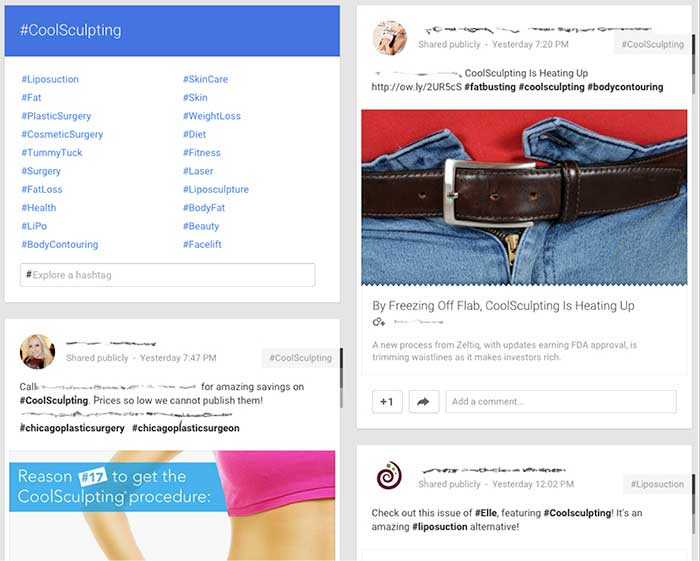
    GooglePlusIndustryHashtags

    Example using Google+ to review similar hashtags and industry competitors

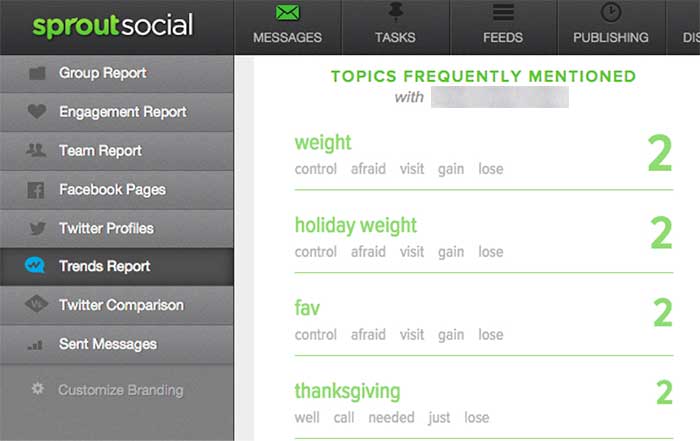
    SproutSocialConsumerConversation

    Example of using Sprout Social to understand how consumers are talking about your brand.

    3. Find Your Voice

    Next, begin your own conversations! Look for areas in the industry that lack a strong voice. Use that space to make a name for your brand and to demonstrate your expertise. Also, provide topics and the secure space for conversations regarding the health industry and health issues. Help moderate conversations to keep the discussions moving and the connections building. Encourage your audience to converse with you and with each other to foster a sense of community.

    To make use of your influence on social media, you can use a number of strategies:

    • Add personal, authentic stories: Depending on your goal, these can consist of success stories, anecdotes of achievement, or triumphs over a disease or disability.
    • Facilitate conversations and actions: Give healthy-eating challenges or build a place to help raise awareness for widespread health issues.
    • Wow the crowd with numbers: Build credibility by showing your audience the bigger picture. Share statistics, infographics, and other information about your industry or practice.

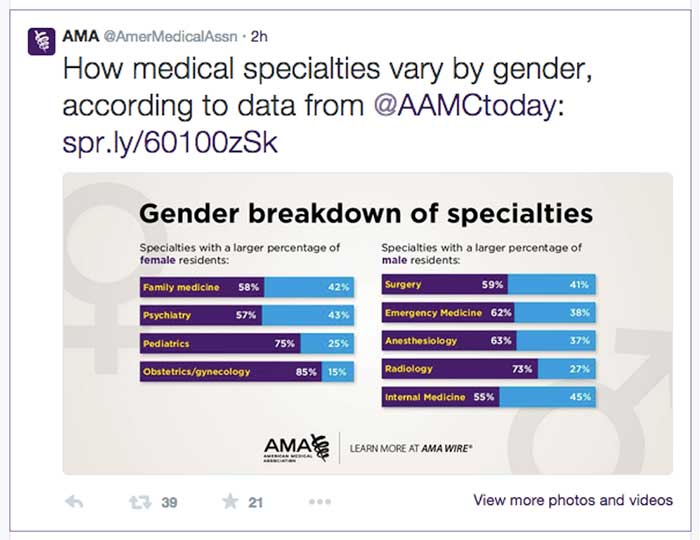
    AmericanMedicalAssociationExample

    Example from the American Medical Association using numbers to engage in a conversation. Only 2 hours after being tweeted this post received 39 retweets and 21 favorites.

    TwitterHealthcareDiscussion

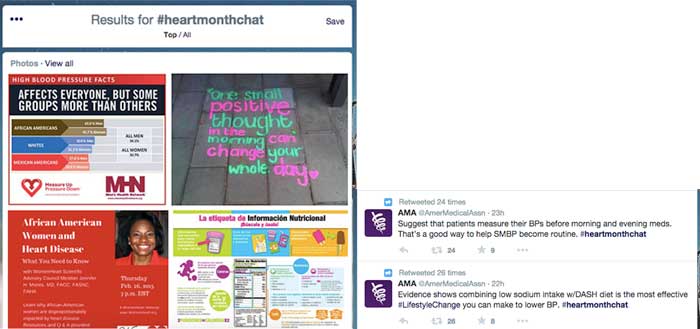
    Example of Twitter healthcare community discussing heart health online via #heartmonthchat and how the American Medical Association was able to find their voice in the conversation giving advice and statistics. Both tweets were retweeted and favorited several times.

    4. Collaborate

    Social media has become a frequent place of feedback for companies, and you can take advantage of this fact by using the social space to collaborate with your audience and with others in your industry. Do not be afraid to talk to your audience about their experiences and how to improve them in the future.

    Use social media as a place to work with other practitioners and organizations to raise awareness regarding healthcare topics. By working with others, you can increase your audience reach and further your message.

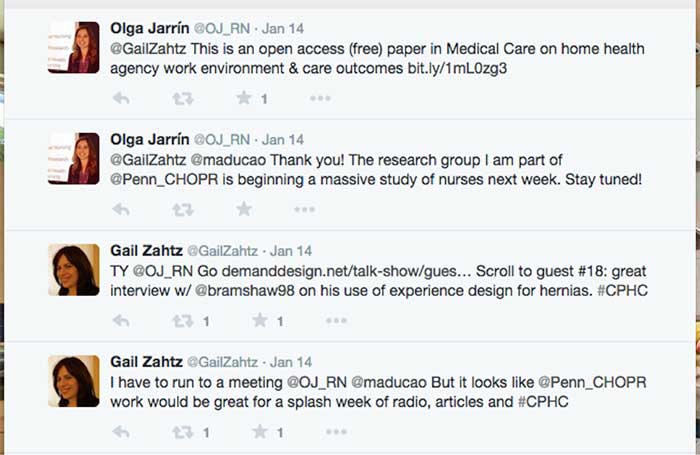
    GailZahtzHealthcareTwitterAdvice

    Example of Gail Zahtz (expert in patient-doctor relationships, offers advice to healthcare industry) collaborating with others in the healthcare industry to make information more readily available.

    5. Measure Your Success

    Although the last step in this plan is to measure your success, it is important to review your achievements on a regular basis and throughout each step of the process. Measure growth and success in the online space by an increase in followers, consistent interaction, and rising mentions across social media platforms.

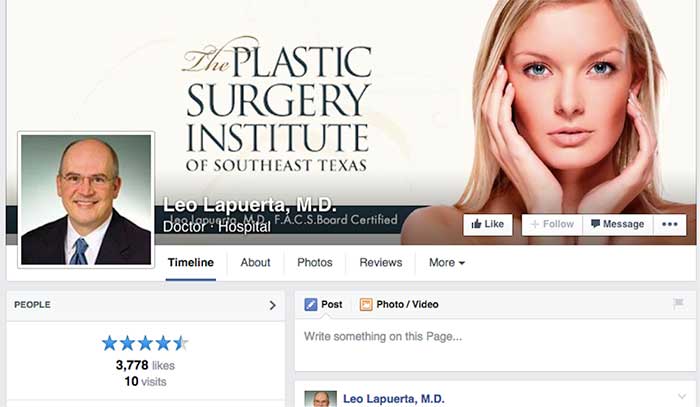
    ThePlasticSurgeryInstituteFacebookLikes

    Example of growth of likes on Facebook using these steps. Prior to this campaign beginning, The Plastic Surgery Institute of Southeast Texas ~500 page likes.

    Consider the steps above when designing your own social media strategy. For more inspiration, check out some of these healthcare companies that have successfully created an empowering online presence!