Tag: google my business

  • Let’s Get Medical: How To Manage Healthcare Listings On G+

    When it comes to adding healthcare listings in Google My Business (now the one-stop shop that includes Google Plus business management), there are many things to consider when managing multiple entities within one location. While building out multiple listings unnecessarily is not ideal, some instances may call for multiple listings in order to distinguish between unique departmental differences.

    If there are multiple departments within your hospital or practice that have unique information (for example, a different phone number from the main hospital or practice) and operate differently from the primary location (for example, unique hours are typically considered an operational difference), then it is best to build out separate location pages for each of the departments to provide this information to customers more clearly.

    Let us delve into an explicit example of this. If your general hospital houses a hospital pharmacy and an emergency department, then these departments serve different purposes and might have separate hours and phone numbers.

    IMPORTANT NOTE BEFORE PROCEEDING: The following examples are ENTIRELY FICTIONAL BUSINESSES.

    Creating Pages:

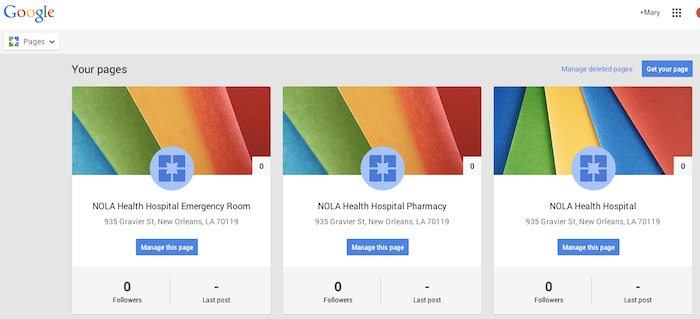
    Let’s say the aforementioned example is called NOLA Health Hospital. NOLA Health Hospital, in this instance, should have three Local (Storefront) Google Plus Pages. Note that these pages, while most likely using the same address, should have unique phone numbers. They should also have unique names; for example, “NOLA Health Hospital,” “NOLA Health Hospital Emergency Room,” and “NOLA Health Hospital Pharmacy” would be the proper names. These pages should also list their hours of operation according to their department-specific hours. If these pages were properly set up in the Google My Business dashboard, they would look like the following screenshot.

    Google My Business Dashboard - Search Influence

    Setting Categories:

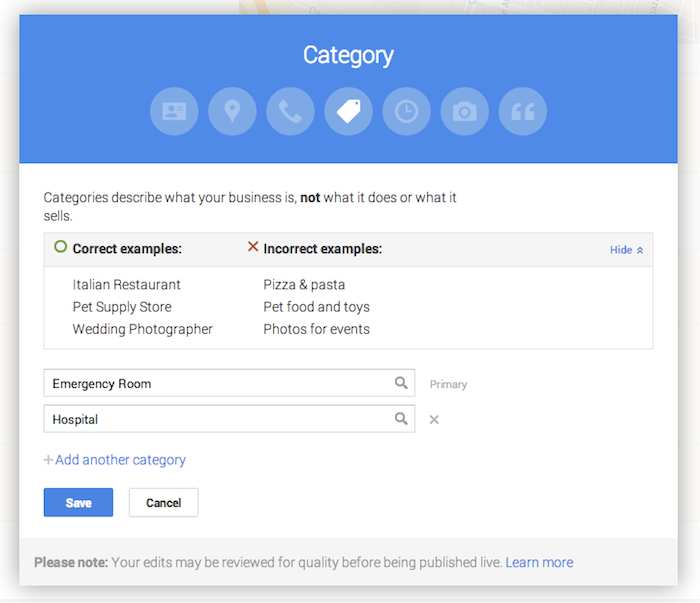
    Now that you have created the pages, it is important to use the categories to distinguish the differences between them. Google’s guidelines for businesses explicitly state that “For each department, the category that is the most representative of that department must be different from that of the main business and that of other departments.” This means that the primary category for each page should be different. In this example, NOLA Health Hospital Emergency Room will have the primary category “Emergency Room,” NOLA Health Hospital Pharmacy will have the primary category “Pharmacy,” and the general hospital of NOLA Health Hospital will have the primary category “Hospital.”

    Google Plus Page Editing - Search Influence

    While these settings are typically arranged during the page creation process, they can also be edited after the page is created. Click on “Manage this page” from the Pages dashboard, then click “Edit” in the top right-hand corner, and finally click into the “Category” section of the editing page to adjust the category. This is also where you can build out supplemental categories for the page. However, it may be wiser to use a few specific categories, as Google’s guidelines advise that it is best to “choose the fewest number of categories it takes to describe your overall core business.”

    As always, if you’re ever confused about how to proceed with your page, you can find the Google My Business “Guidelines for representing your business on Google” on the support site.

  • Behind the Scenes: How Social Media Is Being Used in the Local Film Industry

    Unless you have been living under a rock for the past ten years or so (and not just any rock, but one without TV or Netflix), chances are you have watched a movie that was filmed here in New Orleans. The city – and the state as a whole – has seen an explosion of film and television productions over the past several years, earning the region the title of “Hollywood South.”

    From comedies like 21 Jump Street to Oscar-winners like 12 Years a Slave, Louisiana has even surpassed film production stalwarts like Los Angeles and New York City to become the country’s production capital – all thanks to the highly lucrative tax credits introduced in 2002.

    And while the big-budget movies are driving the local industry (check out NOLA-shot blockbusters Jurassic World and Terminator: Genisys in theaters this year), this influx has also helped inject momentum into the independent film industry – more specifically, the micro-budget indie film scene. These are projects made by passionate local filmmakers looking to find a foothold in the industry at large.

    These are not films the average moviegoer is typically going to be able to see or even hear about. So how do these filmmakers get the word out? How do they raise the funds to even get it made? And how do people find out where they can see these smaller films?

    The best and easiest way is through social media, an umbrella term that can be divided into several different platforms (Facebook, Twitter, Instagram, etc.). The most effective social media strategies take a multi-faceted approach into account and are tailored to suit each medium’s strengths to maximize effectiveness.

    I talked to a few local filmmakers about the importance of social media and other Internet marketing strategies. I found that first and foremost on these filmmakers’ minds is exposure, whether for fundraising or promotional purposes.

    Fundraising and Promotion

    “Facebook is a useful platform that enabled a community to form around the project. It is very useful in promoting fundraisers and screenings,” explains Sam Bass, who has helped with the social media campaigns for two films, How to Disappear Completely and Give Light: Stories from Indigenous Midwives. “Twitter is better for engaging with people outside of your immediate community with the potential to lead to significant opportunities and connections.”

    “We began our social media campaign to draw attention to our Kickstarter,” says Hunter Burke of Construct Films, who is using social media to raise funds for and promote the film Atchafalaya. “It was the quickest and most effective way to get our message out.”

    Greg Tilton, director-producer of reddit doc, had a similar mindset, but he wanted to lay the groundwork for their project before asking for fundraising help. “Social media was key because I did not want our IndieGoGo campaign to be the first time someone had heard of the project,” he states. “It’s been successful because people who don’t know me or my immediate network are following and engaging the project.”

    Mac Alsfeld, the writer-director-star of Father-Like Son, found social media to be most effective after the film was made. “We heavily relied on Twitter to build a relationship with festivals,” he explains. “I think it is important to show festivals that you are the type of filmmaker that will market yourself and that festival to potential filmgoers.”

    Getting Help

    For these filmmakers and others, this was a very important part of the behind-the-scenes process. For the most part, they were navigating the tricky waters of social media without any substantial professional Internet marketing experience – though some had help.

    Burke turned to a friend who had social media marketing and crowdfunding experience. “I really owe a lot to him for educating me on what is standard, what has worked in the past, and also coming up with some wonderful ideas. Without him, I would have been totally lost.”

    Lucky enough to be dating someone in the tourism and marketing industry, Tilton found it helpful to have someone more experienced to bounce ideas off of. “As I experimented, talked to her, and read a lot of articles online, I slowly built up my knowledge. She was a great sounding board for ideas.”

    Thoughts on Social Media

    Even without much prior experience, these filmmakers now have some very astute thoughts about the medium overall gained from their newfound experience.

    “I do believe that it is VERY important to have a presence within the social media community,” declares Kenna J. Moore of Ghost of Elysian Films, who was awarded the Emerging Vision Award for a Louisiana Filmmaker at the 2013 New Orleans Film Festival and the Louisiana Shorts Jury Award in 2014. “It is crucial that our image and what is being put out there is closely monitored. I like to have a presence but stay away from all of the ‘look-at-me’ syndrome that one can easily fall victim to in most social media settings.”

    “The thing about social media is that it is, at its core, incredibly voyeuristic,” says Tilton. “Many people do follow the musings of their interests, so there is a large audience to be engaged and many want to be a part of something big. You can find that audience.”

    Tips for Fellow Filmmakers

    As for fellow indie filmmakers feeling overwhelmed by social media, all the filmmakers have useful tips to share:

    Bass: “Have a social media strategy. Know how to work it. And don’t panic when nothing happens for a week. The most important things are follow-through and relationship building.”

    Alsfeld: “Show people that you have passion. Use your social media to blast information. And even more importantly, have fun. Don’t be boring.”

    Burke: “We performed the best when we released media. Posting a picture, an interview with the filmmaker, or a sample of the score really got our audience interested. People really responded to something they could interact with. Make it a fun experience. Keep it simple. Leave them wanting more.”

    Moore: “I’ve learned that social media has pros and cons. Some people gain opportunity and references from it. Some social media activity allows for negativity and distraction. I would encourage people to stay focused.”

    Tilton: “If you have nothing to say, don’t say anything. So many people are retweeting and posting haphazardly. It’s just a jumble of buzzwords and hashtags. Just make sure it’s always quality and you will find that pays off bigger.”

    Additional Resources
    Here are some more tips directed specifically at indie filmmakers on making the most out of social media:

    7 Tips for Promoting Your Indie Film on Social Media via Premium Beat

    6 Tips on Using Social Media for Your Indie Film via Media-Match

    Image Sources:

    3, 2, 1 Film Image

    Social not-working Image

    The End Image

  • Law & Order SEO: Finding The Culprit Behind Your Decreased Organic Traffic

    As digital marketers, we regularly analyze site traffic to ensure that our efforts are producing positive results. But what happens when you’re doing all the right things in your SEO campaign (high-quality website content, blogging, link-building, etc.) and your Google organic website traffic is consistently going down?

    1) Traffic Deep-Dive

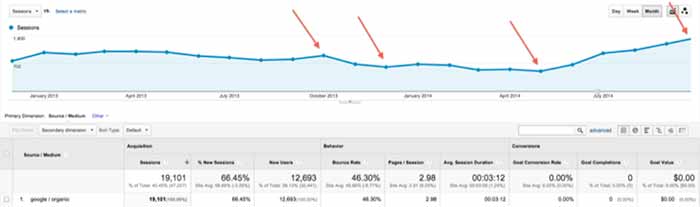
    First, log into Google Analytics and narrow your search down to Google organic traffic over the largest date range possible. Look for trends of upward or downward traffic and make annotations of known changes that might have caused traffic to change (such as a new website launch or the installation of a blog). Also, check traffic by landing page to see if only certain pages were affected.

    TrafficDeepDive

    2) Compare to Algo Timeframes

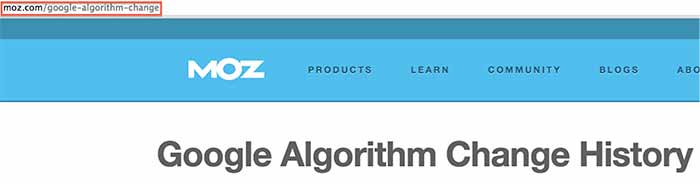
    Next, see if any of the changes correspond to one of Google’s algorithm updates using the Moz algorithm timeline. Keep in mind that the date might not be exact, because the updates often take time to roll out. If you can attribute the traffic change to an algorithm update, take the necessary action depending on the update. Hit by Panda? Focus on your content strategy. Hit by Penguin? Take a close look at your inbound links and check for a manual action.

    AlgorithmChangeIssue

    3) Investigate Other Possible Culprits

    If your traffic change didn’t correspond to a Google algo update, this is when your analysis gets a little tricky, as there are many possible reasons for the change. Here are some things to check when searching for the source of your traffic change:

    • Rollout of a new website (setting up 301 redirects is essential to this process as well as carrying over all SEO optimizations)
    • Removal or adjustment of your content
    • Relocation of your business (your citations need major focus)
    • Discontinuation of an ad campaign that was generating traffic
    • Adjustment of technical elements of your site, such as meta-tags or robots.txt
    • Change or removal of your Google Analytics tracking code (surprisingly common)
    • Change in the marketplace or seasonality (like a decreased demand for your products/services in general or during a certain part of the year)—check out Google Trends
    • Messy directory profile (check your percentage of correct citations using Moz “Check My Listing”)

    These tips will hopefully help you get to the root of the issue and take the necessary action to achieve your SEO goals. If you need a professional team to do the work for you or to assist you in your efforts, you can always call us: we’ll be happy to discuss our SEO packages with you.

    Have any additional recommendations for things to check? This list is not exhaustive, so please help add to it!

  • Five For Friday: Google Language 101 – Metas, SEO, & Link Building Without Content

    12507215604_e7408e02c4_z1. Link Building Without Content Creation  – Search Engine Journal

    A common misconception about link building is that content creation is a necessary part of it. While new content certainly helps, Jon Ball recently posted an article arguing that updating content is not always necessary, especially for small businesses that lack the resources to invest in new content. Small businesses, he claims, shouldn’t dismiss link building just because they think it is too costly or time-consuming. Fortunately, Ball offers five link building approaches that do not require content creation.

    2. Google+ Finally Lets Us Pin Posts! –  Marketing Land

    Finally, Google+ users can highlight certain posts to make them stand out. Early last week, Google+ announced that users can now pin posts to the top of their pages. Google+ is a little late on the trend, as Facebook and Twitter have already offered this feature to users. So far, Google+ pinned posts are only visible on a desktop or Android device. What does this mean for businesses? With this new feature, you can increase the visibility of posts you want your users to see.

    3. 2015: Over Half of Search Spending Goes to Mobile – Marketing Land

    5143183460_944dd8ac97_z

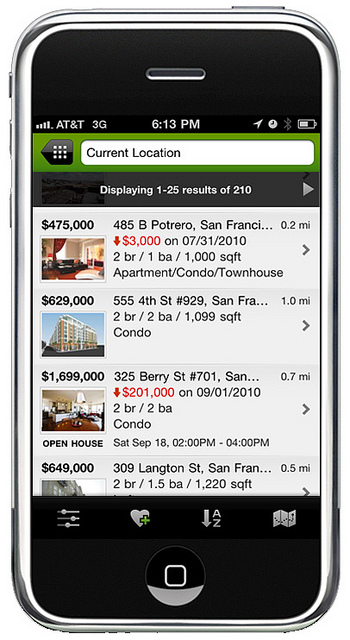
    A new study conducted by eMarketer shows that in 2015, spending on mobile paid search ads and SEO is predicted to be at 50.1%. This is due to a change in consumer behavior, which has veered away from searching on desktops to show a preference for searching on tablets and smartphones.

    4. Caution: Don’t Ignore Meta Descriptions – Search Engine Land

    Google has continually stated that meta descriptions do not impact search engine rankings, which has led many people to disregard them. However, Neil Patel argues that these descriptions are still important. While the content in a meta description is not considered in Google’s search ranking algorithm, the click-through rate (CTR) is part of Google’s search ranking algorithm. Instead of ignoring meta descriptions, businesses should write optimized meta descriptions to increase CTR and overall site rankings.

    5. Five “Googley” SEO Terms Explained – Search Engine Watch

    Misunderstanding search industry terms could cost you an entire SEO campaign. Kristine Schachinger discusses five commonly misunderstood Google terms that can lead to negative implications in the long run. In Schachinger’s opinion, the most commonly misunderstood Google terms are:

    1. Robots.txt
    2. Google DNS
    3. Penguin, Panda, Penalties
    4. Duplicate Content Filter
    5. PageRank

    To avoid accidental negative SEO implications, she offers the correct definition and usage for each commonly misunderstood Google term.

    Thanks to Christopher Sessums for the blue five and Trulia for the mobile app images!

  • Old Google Plus Guidelines Go Out Of Business

    bowing to google - search influenceTwo nights ago, on December 1st, Google updated the business guidelines for pages in Google My Business (aka Google Plus). I’m here today to walk you through what’s changed and to give examples of good and bad practices of these new guidelines. It’s important to note, however, that these tips aren’t standalone. Having a thorough understanding of the “Guidelines for representing your business on Google” is essential to using this blog to your advantage.

    Descriptors in the Business Name Are NOT Allowed

    Back at Pubcon last year, I heard a lot about how to use descriptors and why you should be using them. While in theory it’s a great idea, when asked if we should be using this in house, my thought was that it ruins the principle of NAP (Name, Address, Phone Number) consistency across the web and that Google probably wouldn’t stick with it. Sure enough, this was one of the changes two nights ago.

    Before:

    In addition to your business’s real-world title, you may include a single descriptor that helps customers locate your business or understand what your business offers.

    Now:

    Your name should reflect your business’ real-world name, as used consistently on your storefront, website, stationery, and as known to customers. Any additional information, when relevant, can be included in other sections of your business information (e.g., “Address”, “Categories”).

    Note the word “consistently” in the new guidelines. The examples Google gives in the new guidelines say you can’t include the following in your business name:

    • taglines
    • store codes
    • trademark signs
    • unnecessary all caps
    • hours info
    • phone numbers or websites
    • special characters (e.g. %&$@/”) or legal terms (e.g. LLC Ltd) – unless part of your real name
    • services or products
    • location information

    My advice is to pick an official business name and stick to using it everywhere. Avoid punctuation if possible, because it just provides another opportunity for inconsistency.

    BAD: Starbucks Downtown

    GOOD: Starbucks

    Importance of Name & Category Consistency for Chains & Brands

    Now:

    All business locations within the same country must have the same name for all locations.

    All locations of a business must share the one category that best represents the business.

    Along the same lines of not using unique descriptors, if your business has multiple locations, the name and categories of their pages should reflect the same information. Note that there are instances of when variances are acceptable to Google that you can read more about within the guidelines.

    BAD: Location #1 – Name: The Search Influence, Location #2: Search Influence

    GOOD: All Locations – Name: Search Influence

    BAD: Search Influence Page #1 – Category: Advertising Agency

    Search Influence Page #2 – Category: Internet Marketing Service

    GOOD: All Search Influence Pages – Category: Internet Marketing Service

    Categories Must Be As Specific As Possible

    Before:

    Select at least one category from the list of available categories.

    Now:

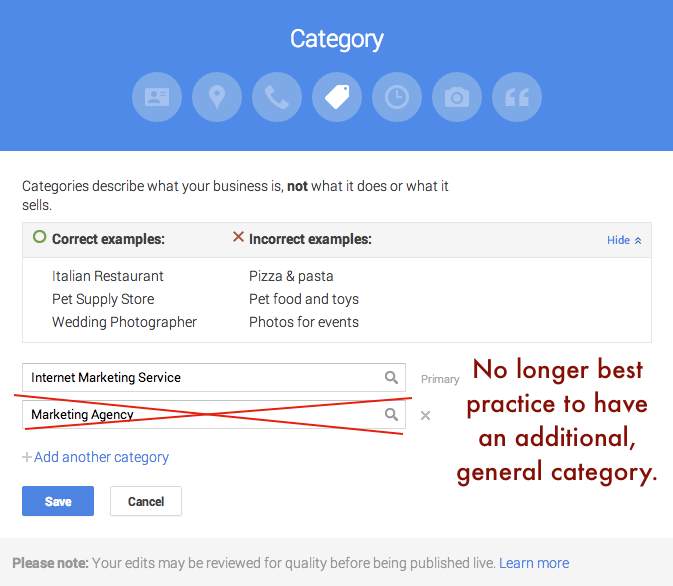
    Use as few categories as possible to describe your overall core business from the provided list. Choose categories that are as specific as possible, but representative of your main business.

    This is one that will mostly affect major niches like doctors and lawyers, as there are a lot of general terms that could apply to these types of businesses. In the example above where I showed Search Influence with the categories Advertising Agency and Internet Marketing Service, our more specific category would be the latter. Adding Advertising Agency as an alternate would not be best practice.

    BAD: NOLA Hospital – Categories: Hospital, Children’s Hospital, Doctor, Surgeon

    GOOD: NOLA Hospital – Categories: Children’s Hospital
    Google Plus Categories Guidelines - Search Influence

    Departments Within One Location Must Have Unique Categories

    Before:

    Departments within businesses, universities, hospitals, and government buildings may be listed separately. These departments must be publicly distinct as entities or groups within their parent organization, and ideally will have separate phone numbers and/or customer entrances. Businesses that operate in a service area, as opposed to a single location, should not create a page for every city they service.

    Now:

    Publicly-facing departments that operate as distinct entities should have their own page. The exact name of each department must be different from that of the main business and that of other departments. Typically such departments have a separate customer entrance and should each have distinct categories. Their hours may sometimes differ from those of the main business.

    If you choose to represent the various departments of your business through multiple pages in Google My Business (e.g. Hospitals, Schools), each page should have a unique department. Also, as per normal Google guidelines for multiple pages at one location, each page should have some unique location identifier, which would be either a unique suite number/address or a unique phone number.

    BAD: NOLA University – Category: College

    NOLA University Cosmetic Surgery Department – Category: College

    GOOD: NOLA University – Category: College

    NOLA University Graduate School – Category: Graduate School

    Multiple Brands At One Location Must Choose ONE Name

    Now:

    If your business location combines two or more brands, do not combine the brand names into a single page. Instead, pick one brand’s name for the page. If the brands operate independently, you may use a separate page for each brand at this location.

    The examples Google gives for this update seem to pertain to places like fast food restaurants where, for example, a KFC and Taco Bell are in the same building. In that instance, a page called “KFC / Taco Bell” would not be acceptable, and they would have to have two separate pages if they’d like to represent both business names.

    At first, I thought this might affect car dealerships that use multiple business names for multiple pages but are at the same location. However, as long you have separate pages for multiple “brands” at the same location, you should be fine. It is important to note that multiple businesses at the same location need at least one form of unique location identifiers, whether it be a different phone number for each brand at the one location or a different suite number for each brand at the one location.

    BAD: Page #1 – Name: KFC / Taco Bell

    GOOD: Page #1 – Name: KFC Page #2 – Taco Bell

    BAD: Page #1 – Mary’s Jeep, 935 Gravier Street, New Orleans, LA (504) 208 – 3900

    Page #2 – Mary’s BMW, 935 Gravier Street, New Orleans, LA (504) 208 – 3900

    GOOD: Page #1 – Mary’s Jeep, 935 Gravier Street #1300, New Orleans, LA (504) 208 – 3900

    Page #2 – Mary’s BMW, 935 Gravier Street #1301, New Orleans, LA (504) 208 – 3900

    No Practice Name in Practitioner Names of Multi-Location Practices

    Now:

    If the practitioner is one of several public facing practitioners at this location:

    The organization should create a page for this location, separate from that of the practitioner.

    The page for the practitioner should be titled with name of the practitioner only, excluding that of the organization.

    The reason the now improper formatting is bad practice is that it impedes the user experience and could prevent someone from finding the page they’re looking for if practitioners with the practice name in their name are showing up in practice search results. This needs no further explanation in my opinion, so straight to examples.

    BAD: NOLA Cosmetics: Mary Silva

    GOOD: Mary Silva

    Solo Practitioner Name Formatting

    Now:

    If a practitioner is the sole public-facing one at this location and represents a branded organization, the practitioner page should not be separate from the organization’s page. Instead, create a single page, titled using the following format: [brand/company]: [practitioner name].

    Along the same lines of the last guideline, to help users find this type of business, practitioners who own a branded practice and are the only practitioner of said practice should have just one page that combines their name with the branded name.

    BAD: Page #1 – NOLA Cosmetics Page #2: Mary Silva

    GOOD: ONE PAGE – Nola Cosmetics: Mary Silva

    What Happens If I Get This Wrong?

    Some of these guidelines appear to be less enforceable than others, in my opinion. So I’d say it’s best to adhere to them and get your pages fixed as soon as possible. If it’s something like pages that appear to be duplicates because there are multiple businesses at the same location with matching info (matching category or matching phone and address), it might get flagged by Google’s algo as a duplicate page violation, but only time will tell how strictly these changes will be enforced.

    If you’d like to see the old version of the guidelines to compare them to the new, my way of doing this was to use the Internet Archive Wayback Machine and look at the guidelines page on November 30, 2014. Also, Mike Blumenthal provided a concise, comprehensive list of these updates in his blog!

    Hope my thoughts and these examples help. Good luck in all of your Google My Business endeavors! Also, thank you to Amanda DiSilvestro at business2community.com for the bowing to Google image.
  • New Gmail Inbox Has It All, But Can It Separate Naughty From Nice?

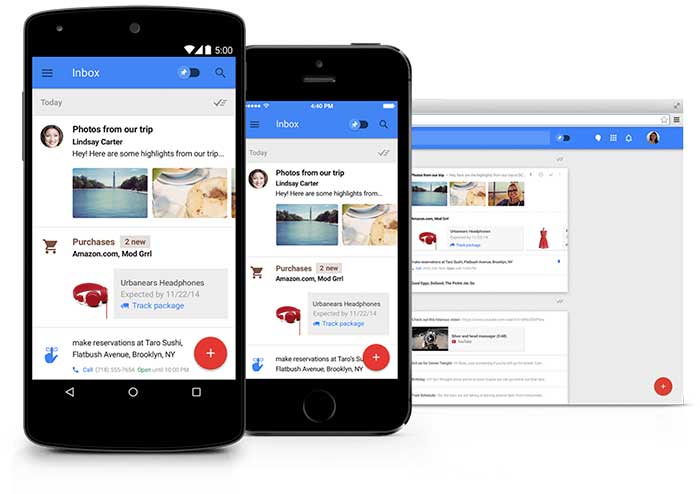
    Always on a mission to improve user experience, Google recently released a fresh new look to “Inbox by Gmail.” This update provided additional labels for better organization of your inbox, reminders, snooze options, attachment previews, and more.

    Invite Only

    Recent buzz about Inbox by Gmail has circulated, especially during the first phase of the invite-only system. People are curious about Inbox by Gmail because they want to be part of this exclusive group. If you have yet to receive an invite, send an email to [email protected], and ask politely. Maybe Google will invite you in their next circulation.

    InboxByGmailImage

    Organize With Labels

    Google announced Inbox by Gmail “is a better way to get back to what matters.” For this reason, Google created more categories of labels to keep emails organized. Gmail currently bundles emails under tabs “Primary,” “Social,” and “Promotions.” Inbox by Gmail will have many more label tabs available, like “Updates,” “Finance,” “Purchases,” “Travel,” and “Forums.” You also will have the option to create your own labels. This exciting feature organizes emails for you before they arrive in your general inbox.

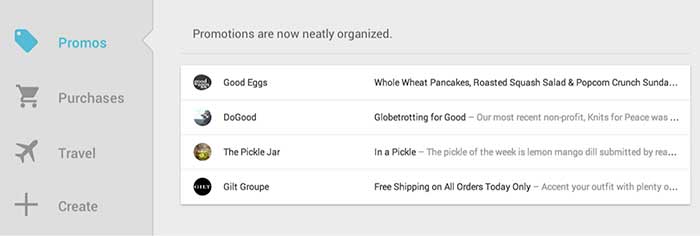
    InboxByGmailPromotionsImage

    Timeline

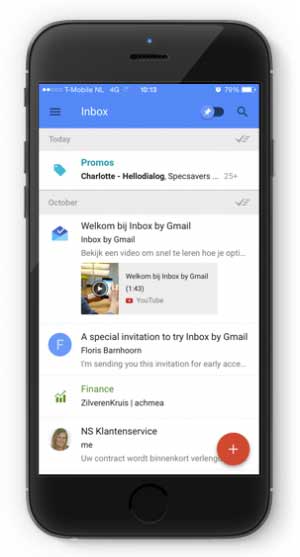
    Warning, your general inbox will look different. When an email belongs to a label, it will be automatically placed within its designated tab. In your general inbox, you will only see who sent the email. This way, you will have less emails showing in your general inbox.

    Mark Your Mail

    Other features: you can mark emails as “important,” as a “to do,” you can add reminders to emails (with extra information like phone numbers), and you can snooze an email to get it out of your inbox until you’re ready to view it.

    More Features

    You can see the highlights of your email without opening the message. The new inbox previews reservation information, online orders, and pictures. You can also get real-time flight updates and speed dial a friend – all from your Gmail account.

    InboxByGmailSmartphoneImage

    Promotional Email

    There are two reasons why I’m not excited as a professional, serving my clients who send the occasional promotional emails:

    1. Promotional emails are now one click further away from the target audience. These types of emails are thrown under a tab and may never be seen.
    2. In their general inbox people will only see a preview of all of your promotional emails. This will include the name of the person or business that sent the promotional email, but not the subject. This update will have a huge impact on the open rate of promotional emails.

    InboxByGmailPromotionsPreviewImage

    Three tips for promotional email to pass the new application:

    1. Address the email to the name of a person rather than a business so the email looks more personal.
    2. People will scan the “Promotions” or “Social” inbox very fast, so you need to be unique and engaging to be noticed. Your subject line is extremely important. Perform some A/B testing to find out which type of subjects score best.
    3. Be relevant – send people emails they would want to read.

    Inbox By Gmail: Yes Or No?

    For personal-use and some business purposes, this new update deserves a big resounding YES! For people or businesses who send promotional emails, this demographic echoes a big fat NO!

    Get an invite and let us know by email what you think of Inbox by Gmail. Your email will end up in our label “VIM” – Very Important Mail.

  • Don’t Be Afraid To Stop & Ask For Directions: Making Google My Maps for SABs

    As promised in my last blog about the new Google My Maps, I’m here today to teach you how to how to create My Maps for service area businesses (often referred to as SABs) that have highlighted boundaries of what counties or parishes they service.

    Before we delve into this guide, let’s start with the basics like what exactly is a KML file. KML is the file format used to show geographic data in mapping programs. It is an XML based format and stands for Keyhole Markup Language. Now that you know what this file type is, let’s see how you can use it.

    How to Use Old 2011 KML Files

    Fun Fact: The U.S. Census Bureau holds kml files for all county guidelines here!

    As you can see, they’re from December 2011, so any boundaries that have changed since then will be incorrect. In a very general sense however I’ve found these codes very useful in the past. Each file contains all county boundaries in one state, but the tricky part is that they don’t tell you what state it is in the file name. I went ahead and downloaded them all a long time ago and updated the file names to reflect the state they contain. It’s pretty closely in alphabetical order so if you just use a list of US states in alpha-order next to the list of files in numerical order it should match pretty closely.

    Once you’ve figured out which file contains the state you’re looking for, find the county or counties that you want to display in your map, and move it’s entire code for each county (should start with “Placemark” attribute and end with the closing of the “Placemark” attribute) just below the “Document” attribute. Once you’ve moved the boundaries you want to keep to the top of the KML file, remove all the excess counties and leave the closing attributes for “Document” and “kml” at the bottom.

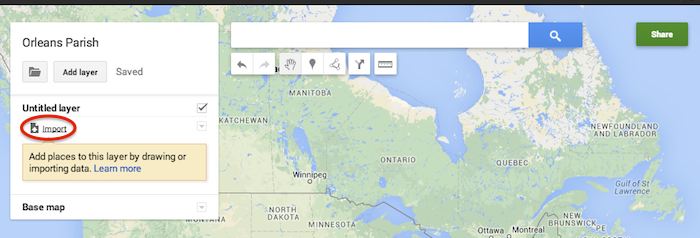
    Now that you’ve successfully prepared your KML file, in My Maps, click Import on the left and choose your KML file from your computer.

    Import A KML File To My Maps - Search Influence

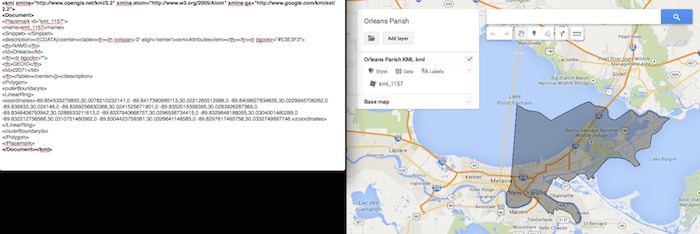
    See the screenshot below for an example of how your KML file should generally look if you’ve done it correctly. The screenshot shows the file for Orleans Parish of Louisiana in TextEdit and then what said file looks like imported into My Maps. (NOTE: In order to show a not so massive screenshot of the KML code, I removed about 3/4 of the coordinates. There are a massive amount of coordinates used to make up these detailed boundaries.)

    Preparing Viewing A KML File In Google My Maps - Search Influence

    How to Use New 2013 KMZ Files

    The U.S. Census Bureau also has the most up to date 2013 files, which are KMZ format (note the .kmz instead of .kml extension). This is essentially zipped KML files with a .kmz extension, but if you use a Mac like me, unzipping or unpacking the zipped file is not easily achieved. The 500k file contains the most detailed boundaries out of the 3 options.

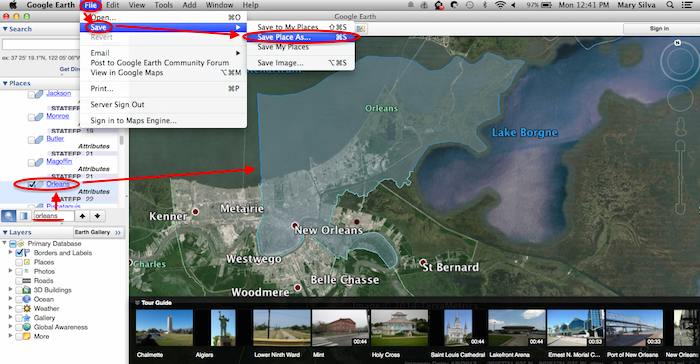
    So, the way I handle this KMZ file is to open the entire file in Google Earth and export just the KML file of the areas I want displayed. To do so you’ll use the search feature of Google Earth on the left at the bottom of the “Places” window to search for and select the areas you want displayed. Since many counties have the same name you’ll want to make sure it’s showing up in the state and location it’s supposed to. Also, note that if you’re trying to add multiple counties in the same state, the Attribute number to the right of the county will be the same for all counties within the same state. This should help you easily identify the counties you’re looking for when adding multiple.

    Once you’ve selected the geographic areas you want displayed on your map in the “Places” section, then save the file as a KML file by clicking File>Save>Save Place As….

    Saving A KML File from Google Earth for Google My Maps - Search Influence

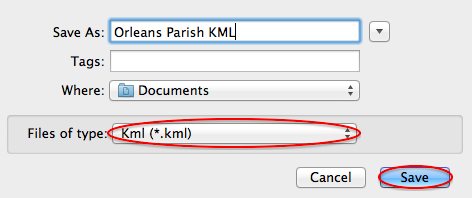
    My Maps will not accept a KMZ file, so make sure to save as a KML.

    Saving a Map in Google Earth As a KML File to Use in My Maps - Search Influence

    Once you’ve saved your file, follow the same steps mentioned above to import the KML file to My Maps. I’m not sure if the paid My Maps Pro is any different, but it appears to me that you cannot import multiple KML files to one My Map. So, in the event that you want to represent multiple service areas in one My Map, you’ll want to have all of the geographic area codes in one KML file.

    This Google Earth process can also be used instead of manually editing the older KML file codes as shown in the first instructional section in case you don’t want to delve into the coding via text edit. It’s definitely an easier route, but for me, Google Earth can sometimes run slow when trying to handle these files and I don’t mind manually editing code.

    Hopefully these steps and screenshots help out a fellow My Mapper!

  • Five For Friday: Amazon Gets Physical, Tinder Cleans Up, & G+ Asks, Am I Pretty?

    FiveForFridaysColorfulFive

    1. Google Testing New Local Interface In Web Search Results – Search Engine Roundtable

    Google is testing a new interface for showing the local web search results. Back in August, we saw that Google was showing the local carousel within the results, but this new interface is simply a list of the results and isn’t going to preview a map within the carousel.

    2. Tinder Spammers Move to SMS After Improvements To Dating App’s Security – Tech Crunch

    For awhile now, the dating app Tinder has been overwhelmed with spam bots, or accounts created to flirt with Tinder users and then direct them to adult sites. However, this summer, Tinder was called out by Symantec and therefore had to address the issue with an update. At first it appeared the update addressed the issue, but a new report is showing that the spammers have just moved to using SMS texts.

    3. Report: Amazon To Open New York Retail Store – Marketing Land

    Recept news reports say that Amazon is planning to open a Manhattan store just in time for holiday traffic. According to WSJ, the new store, opening at 7 West 34th Street, is to operate as a mini-warehouse of sorts, allowing returns and pickups. Others had reporting that this might be a place for Amazon to showcase it’s upcoming products such as new e-readers, the Fire Phone, or Fire TV. Either way, this could be a game changer for this e-commerce provider.

    4. Google Adds The Ability To Post Polls On Google+ – Marking Land

    As of October 9th, Google+ is giving users the ability create and share polls. This was a tool Facebook was offering back, but then pulled back in 2012 finding it redundant. This new feature in Google+ will on the web and Android versions within the next few days, and then eventually iOS.

    5. Google Makes Conversational Search Even More Intelligent – Search Engine Journal

    OpenTableLogoImageOn October 9th, Google announced an update to their conversation search functionality which should make it easier for planning. Overall the new features include, location-based searches, making reservations, and finding directions. These new features are now available on the Android and iOS app. What does this mean for businesses? It’s more even important to optimize your site for local search as well as to verify your Google+ local listing. If you own a restaurant, then you should ensure you are listed on OpenTable so you don’t miss out on potential customers!
  • The Beheading of Google Authorship

    So unless you’ve been living under a rock, you already know, or at least have an idea, of what happened to Google Authorship. Back in June, we saw the ominous sign that Google removed Authorship circle count and photos from search results. Between its low implementation rates and high error of implementation, Google Authorship was simply proving not to be a strong search signal. Google’s continual changes are almost always driven by the goal to improve usability and to make search results more relevant to users.

    Why?

    So, why, after 7 years, is Google getting rid of this feature, and why did they even have it in the first place?

    In 2007, Google patented Agent Rank (aka Author Rank) with the idea of creating a search signal to improve the rankings of authoritative, reputable authors. They understood the power of personal connection and the desire for people to connect with other people online. As the years went on, rel=”author” was rolled out to webmasters everywhere, and with the start of Google+, the Authorship project came full circle. This was, at the time, a solid way to prove authenticity of writers for those searching for trusted results.

    However, as time went on, it became apparent that the use cases of Authorship markup were either limited or done incorrectly. In a study performed by Stone Temple Consulting, which sampled 500 authors over 150 different major media sites, it was found that 70% of authors didn’t even try to connect their content and authorship to one another, and that 72% of sites that did attempt markup, had errors.

    Google’s research also found that providing author information in search results didn’t help users, and if anything, distracted from search results.

    Now What?

    GPlusGifFirst, this doesn’t mean that Google is diminishing the value of markup in general, just this particular type of markup. In a post on his Google+ page, John Mueller said, ”Going forward, we’re strongly committed to continuing and expanding our support of structured markup (such as schema.org).”

    It is clear, that in their ideal world, Google will find a better way to come back to this Authorship feature. According to Mark Traphagen, Sr. Director of Online Marketing for Stone Temple Consulting, this is far from the end of authorship. Google just needs to have the ability to more confidently determine who the voices of a niche are without relying on markup. In Mark’s words, “author authority is going to have to be based on much more sophisticated means of machine-based identification and understanding,” which, as you can imagine, we are a long way away from.

    Moving forward, I think it is important for authors to continue using the best Authorship practices, because Authorship still exists, just with a lesser role in search results. And there is no evidence that having a strong Authorship presence won’t influence your results in a more indirect way. Also, quality content will always be a strong ranking factor, and providing multiple, non-spammy ways to access said content across the web (like through the “Contributor to” section of your Plus page), will always be a good practice.

    ThumbsUpImage

    Image Source:
    Thumbs Up Gif

  • HashTag, You’re It: Tagboard Allows Businesses To Display Hashtags In One Place

    Do you use a certain hashtag to promote your business on social media? Do your customers have a popular hashtag they use when posting about your business?

    If you answered yes, then it’s time to get excited because TagBoard makes it a whole lot easier to keep track of popular hashtags from your fans across multiple social media platforms.

    What is Tagboard?

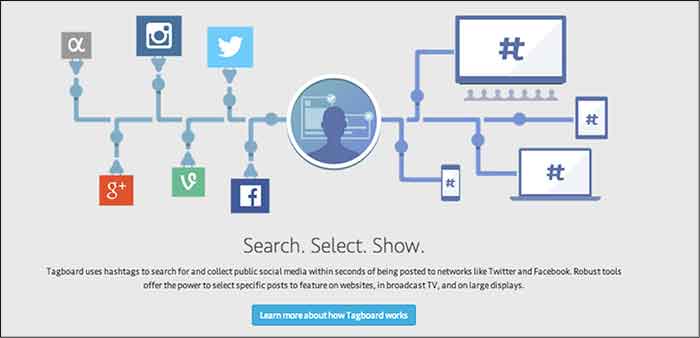
    Tagboard is a tool that lets you see all similar hastags across multiple social media platforms. The platforms that Tagboard searches are:

    TagboardPlatformsDiagramImage

    How can your business benefit from Tagboard?

    Tagboard uses an easy way to search for specific hashtags! All you have to do is search any hashtag to see a feed of all related hashtags and updates from the various social networks Tagboard scans.

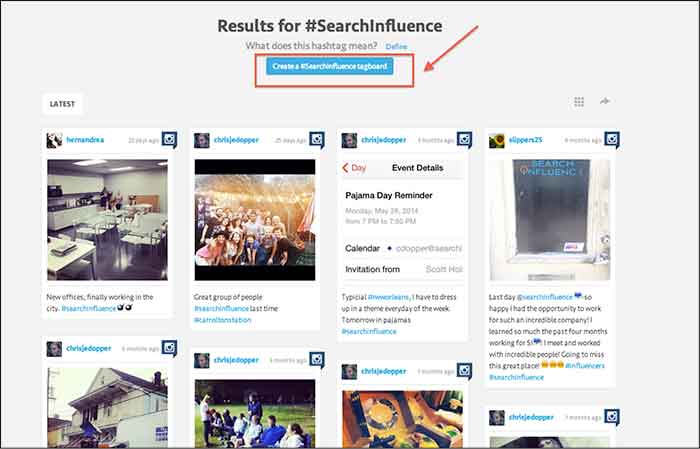
    Take Search Influence as an example. When searching for #SearchInfluence, multiple posts populate the board. If you want to use this hashtag as your own and custom brand it, you simply click on “Create #Hashtag Tagboard.” This is beneficial to getting your hashtag out there once created and seeing the interaction once the hashtag goes viral across multiple platforms.

    TagboardResultsImage

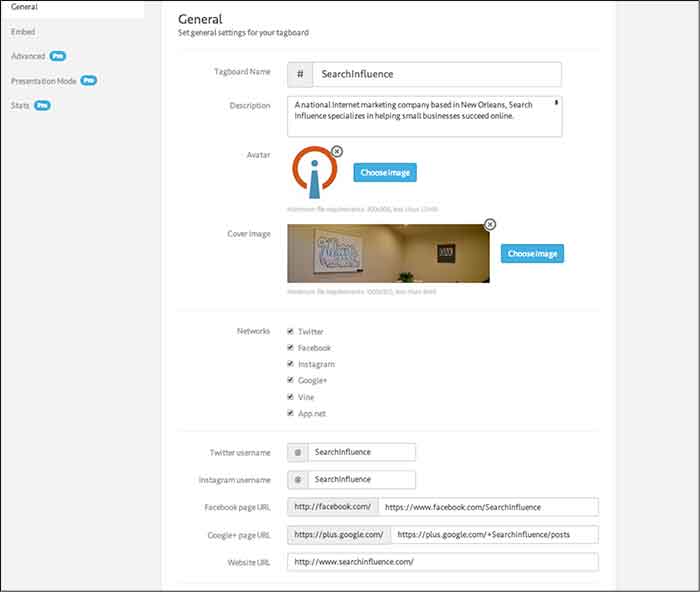
    Once “Create #Hastag Tagboard” is selected it prompts you to complete a short form to fill out and customize to your brand and business.

    TagboardSettingsImage

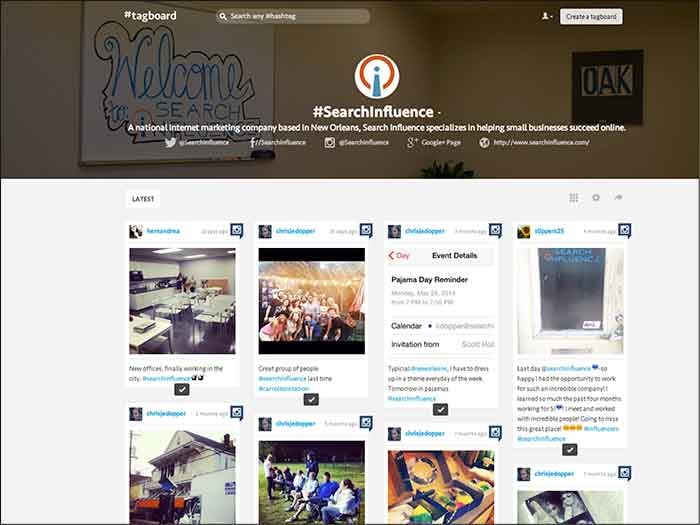
    After filling out the form, your tagboard is complete and ready to be shared. Simply click on the “Share Tagboard” button and copy and paste the link into anywhere you want to promote or share you Tagboard.

    TagboardHomepageImage

    You can make multiple custom Tagboards for multiple hashtags. The possibilities are endless.

    Bonus SEO Benefits!

    As a bonus, Tagboard.com is an authoritative website in itself! Moz’s Open Site Explorer reports Tagboard has a domain authority of 68/100. When you go through the steps above to create your own hashtag Tagboard, the resulting page provides a followed link back to your website and other social media networks.

    Using Tagboard to claim your hashtags is a great way to further your website’s SEO and online reputation.

    What hashtag do you use to promote your business? Comment below to share your successes in using hashtags.