Tag: content strategy

  • Google Gives Answers To Life, Love, & The Universe

    As you may or may not have noticed, prevalence of Google’s answer boxes among search results has increased dramatically. Google’s algorithm updates have always pushed the search engine to more closely mirror the human searchers, aiming to provide the best answer to each question. With the collection of Google’s Knowledge Graph (their personal database of information and the interconnectivity of ideas), they have announced their goal of transforming from an “Information Engine” to a “Knowledge Engine.”

    From Google’s Knowledge Graph, a new item has emerged in search results: the answer box.

    If you haven’t seen them (and have no idea what I am talking about), let me back up. According to Moz, Google now displays a direct answer in 3.5% of search results, as opposed to the standard 10-pack of results, sprinkled with some PPC ads.

    These direct answer results have been around for well over a year (I found posts introducing them in August of 2013). However, answer boxes are being seen in 44% more search results after the rollout of Panda 4.1. So, more people are seeing them and more people are talking about them!

    Answer Box 1.0

    The first generation answer box was a Google SERP feature. These early answer boxes provided short, direct snippets of information that were concise and, ultimately, limiting. Below is a perfect example that still holds this early answer box format:
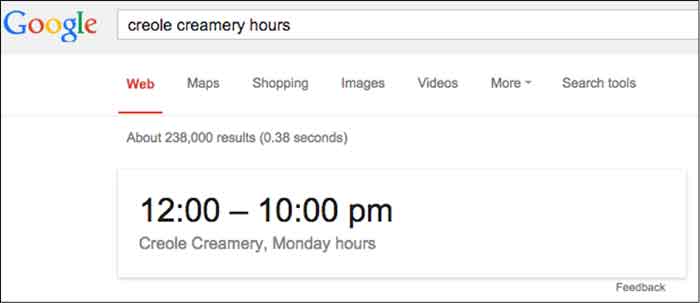
    Google Answer Box Hours Of Operation Image - Search Influence

    Dr. Peter J. Meyers provides 101 other examples of early answer boxes in this blog. Quickly scrolling through them, you’ll notice they all look pretty similar and pretty boring.

    Answer Box Evolution

    Over time, the answer box has drastically evolved. Google quickly realized that it could not index every possible answer to every possible question. Spoiler alert, Google doesn’t like to be limited. So, instead, Google used its vast index of the Internet to pull results from sites, creating a completely different answer box that looks more like:
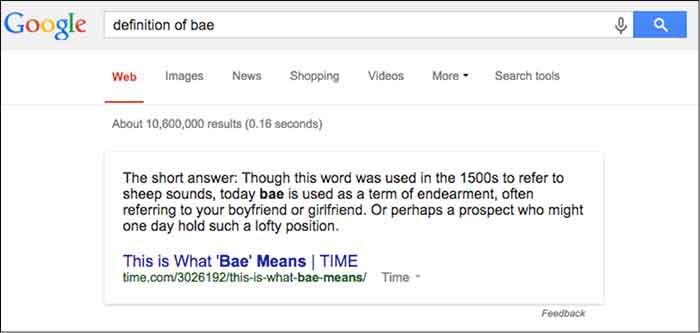
    CDC Information Pull Google Answer Box Image - Search Influence

    This, however, can pose problems. Sometimes, Google pulls answers from long-outdated websites, which can provide an incorrect or inappropriate answer.

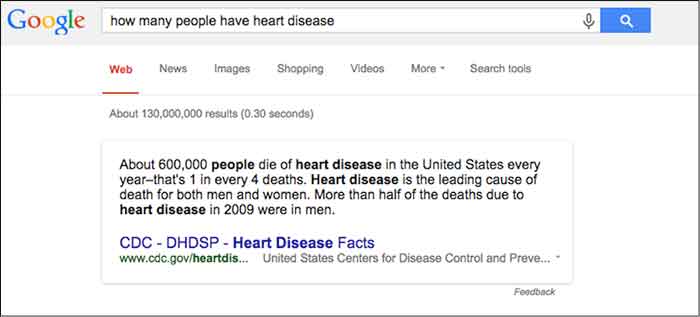
    There are going to be instances where Google provides an insufficient or incorrect answer. When this happens, rejoice because even Google is imperfect. One example (and, yes, I’m being excruciatingly picky here) cropped up while I was doing research for one of our clients.
    HowManyHeartDiseaseGoogleAnswerImage

    Initially, my reaction was “Cool, that’s some information that I could use,” but then I realized it wasn’t the information I was looking for.

    StarWarsJediMindTricksImage

    Nice try Google. I was looking for how many people have heart disease, not how many people die from heart disease.

    But, you’ll notice that there is this handy “Feedback” button at the bottom. Here, you can write a personal message to Google telling them to get their act together. Yes, you can be a part of the Google movement.

    Other issues can occur when Google pulls from sites that are out-of-date. So be on the lookout, and when you find inaccuracies provide concise feedback, and be on your merry little way.

    Other Answer Box Speciation

    Population – This one is actually interactive and will show the population anywhere along the measured domain.
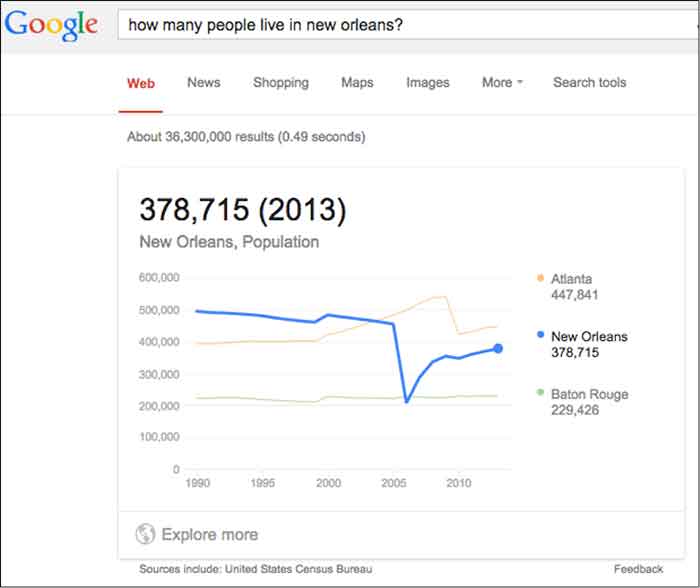
    Interactive Population Google Answer Box Image - Search Influence

    Etymology & Definition – As a copywriter, this is a personal favorite of mine. I imagine this will do wonders for future linguists and English majors as they can find definition and historical context, all in one search.
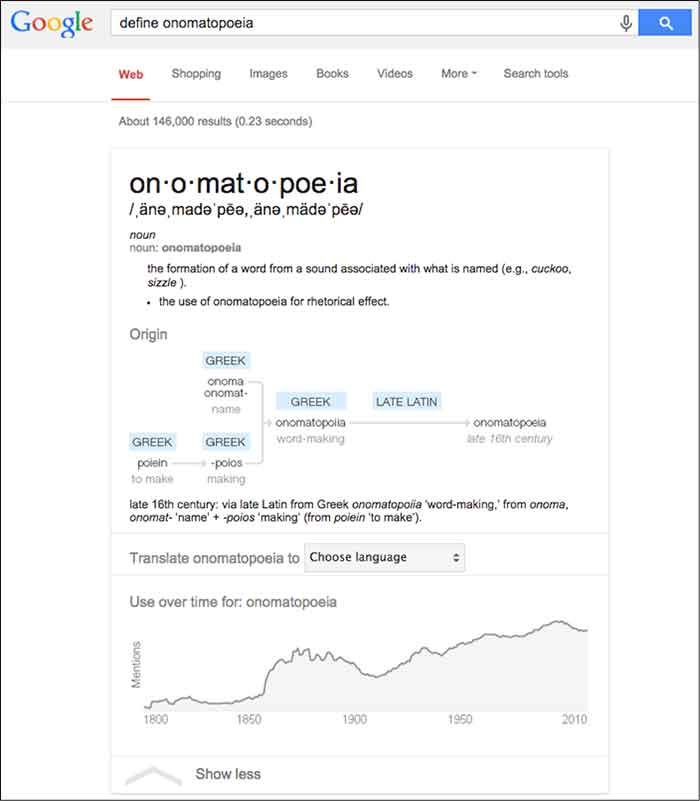
    Definition Google Answer Box Image - Search Influence

    General Knowledge – What is a thing? Compare and contrast objects or see a specific object defined across a wide array of variables.
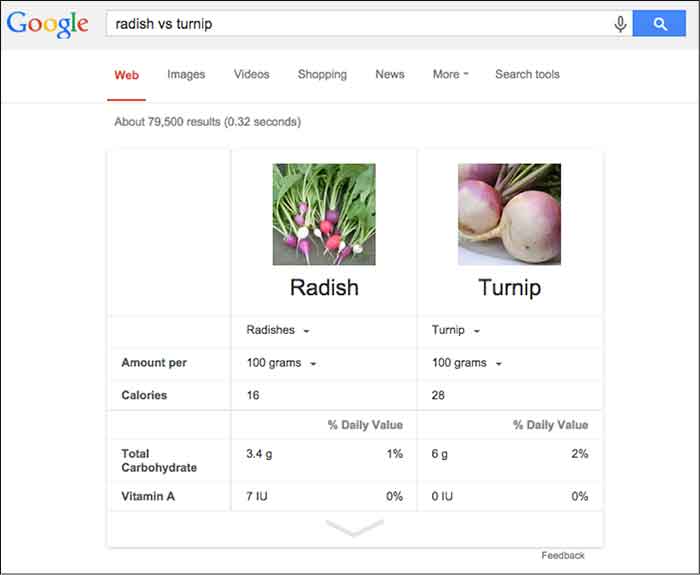
    Comparison Google Answer Box Image - Search Influence

    These are just a few examples of an infinite amount of possibilities and I expect Google to only further diversify its answer boxes as its Knowledge Graph continues to expand. However, you’ll notice that, in general, the newer answer boxes seem much more comprehensive, colorful, and engaging. It seems fairly certain the we will continue to see these answer boxes more often as Panda stays on patrol.

    Why Now, Google?

    Plain and simple: mobile search is on the rise. Mobile users already account for more than half of all site traffic. The percentages are even more staggering for social sites such as Facebook and Twitter. Google is in tune with the mobile trend.

    The mobile searcher is a completely different animal than the traditional laptop user. Personally, when I am searching on my phone, I am looking for something very specific. That could mean any number of things — hours of operation, contact info, a trivial fact… The point is, I’m not in the mood to sift through a second layer to find that information. Google appeals to the mobile user in all of us with these answer boxes.

    Also, Google’s answer boxes are another push for clear, concise, valuable information. Google is, afterall, a search engine. Users are searching for information. Google continually updates its algorithms to effectively provide the best possible information.

    On its own site, Google says, “Get answers no matter where you search. Information from the Knowledge Graph is available on your desktop, tablet, and smartphone. So wherever you search on Google, you’ll find that answers and discovery are at your fingertips.”

    What Does This Mean For Your Site?

    In theory, if you’ve earned enough authority points from Google, your site could be a source included in the answer box. Unfortunately, unless you are the CDC or Times.com, this is highly unlikely for broad searches. To get pulled into more localized questions, there are things you can do to signal to Google, “Hey, this is an important piece of information.”

    One such way is schema, which classifies bits of information so that it is easier for search engines to digest. You can learn loads more about schema here and in an upcoming blog post.

    What kinds of answer boxes have you seen? Have you come across any issues with terrible (or terribly funny) Google answers? What do you think of them? Let us know!

    Image Source:

    Thanks to Tina Grimes for sharing the Star Wars mind trick gif.
  • What’s Black and White and Impacts 3-5% of Search Queries? Panda 4.1!

    In the last two months, Google has been busy improving the Panda. In early August (Aug. 8, 2014, to be exact), there was a lot of chatter from the SEO community seeing the flux in Google Analytics accounts, which was generally accepted as an unconfirmed monthly Panda data refresh.

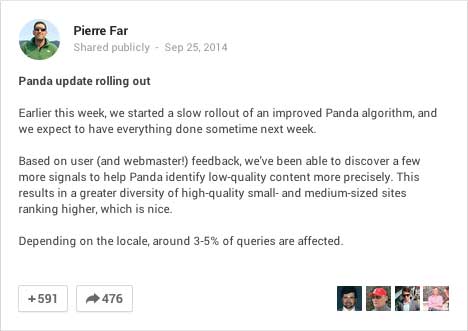
    In early September, there was a large Panda data refresh, and on Sept. 25, Google’s Pierre Far announced yet another Panda algorithm update, (the previous Panda algo update was May 19).

    GooglePlusPostPandaAnnoucedImage

    And just to keep you on edge, ceaselessly examining your Analytics data, the rollout of this Panda has been sloooowwwwslothlike. Google confirmed that some Google data centers were not updated until “October 6 or later.” So, your website could have seen the algorithm at some point before Sept. 25 and after Oct. 6 – that’s a two-week time frame to analyze!

    What is Panda?

    There are so many blog posts out there describing the Panda algorithm, I will just summarize it briefly. If you’re interested in reading about it in more detail, here’s a good blog post, and some excellent reading here.

    Panda is an algorithm that filters the search results to:

    1. Reward high-quality content with more presence
    2. Push sites with thin content down to rank lower

    Google says low quality or thin content is text that

    •   Is very short in length
    •   Offers very little useful information to the consumer
    •   Is unoriginal or copied

    Your website content should not be self-serving; it’s all about providing information to the consumer to educate them with detailed and authoritative information.

    PandaContentPullQuoteImage

    This most recent Panda is an algorithm update, which is supposed to reward more high-quality small and medium-sized websites. From Par’s G+ post:

    “Based on user (and webmaster!) feedback, we’ve been able to discover a few more signals to help Panda identify low-quality content more precisely. This results in a greater diversity of high-quality small- and medium-sized sites ranking higher, which is nice.”

    This update is significant because it added more signals to better identify lower quality sites. Earlier algo updates have rewarded big directories for local searches, so this update is exciting because small- and medium-sized websites have a fighting chance for ranking in their local markets.

    Google Updates vs Data Refreshes

    To paraphrase, an update is a change in the algorithm. A data refresh is when the algorithm has not changed, and new data that is pushed through the data centers, such as new crawl data, is updated in the various data centers across the Google universe.

    Updating the data centers is one reason why updates are seen at different times for different geographies.

    I am quoting this really old Matt Cutts blog post here:

    Algorithm update: Typically yields changes in the search results on the larger end of the spectrum. Algorithms can change at any time, but noticeable changes tend to be less frequent.

    Data refresh: When data is refreshed within an existing algorithm. Changes are typically toward the less-impactful end of the spectrum, and are often so small that people don’t even notice. One of the smallest types of data refreshes is an:

    Index update: When new indexing data is pushed out to data centers. From the summer of 2000 to the summer of 2003, index updates tended to happen about once a month. The resulting changes were called the Google Dance.”

    What are data centers? Google crawls the websites out there and caches those in their gigantic index. That index is huge and is stored on thousands of machines. Those thousands of machines live in various Google data centers around the world. To truly geek out, read more about Google data centers here – these centers are where the Internet exists.

    Did Panda Help or Hurt Your Site?

    When you look in Google Analytics, it may be easy to see a drop off or dramatic increase. For example in the graphic below, I’m guessing Panda rolled out in the business’ local area around Oct. 6, and it didn’t go well for the site:

    Panda rolled out Oct 6, 2014

    And on Sept. 29, this site was Panda-happy:

    increase in Google organic traffic after Panda September 2014

    For most of the sites I looked at, the visual changes were more subtle, so I usually toggle between the data by week vs. the daily data. The weekly data shows me a week where the decreases started, which correlates to the earlier rollout dates:

    weekly analytics view to pinpoint Panda rollout

    When I switch to the daily data, I can clearly see the dips in traffic. I have to pinpoint Saturday, Sept. 20t or Wednesday, Sept. 24 as the day this site got the Panda.

    daily Analytics shows dips in Google organic traffic after Panda

    The Sept. 20 might be a little early to fit in the Panda time frame, and I am accustomed to seeing a spike immediately before an algo filter, so I’m going for Sept. 24. Using Sept. 24 as the before and after date, this website has seen 12% decrease in Google organic traffic.

    12% decrease in Google organic traffic after Panda Sept 2014

    This website with the 12% decrease in Google organic traffic after Panda is a good website for an authoritative local business. What this drop tells us is even if the content on the site offers really great information for the consumer as this one does, it might be old and/or thin. Someone may have copied it over the years. We might need to add other content to our pages with images and videos. Content is not just text. We need to take a good look at the age of the text and the variety of the content on the page. With this review, we can create a strategy for improving the content for the next Panda data refresh.

    What to Do Now

    PandaImageWebsite owners or managers who see a Panda smack really need to take a critical look at the content on the site. To succeed, the content needs to be information rich, and not self-serving.



    An example of self-serving content is content that is stuffed with keywords, abundant keyword use on a page not only in the body text, but also in the URL and alt tags. This is also sometimes referred to as over-optimization.

    Self-serving can also mean the content talks too much about the business instead of talking about the product or service the consumer is trying to learn about. Talking about the business is great as long as it’s on the About page or the home page. Leave products or service pages to be about those topics.

    This is a great list compiled by Josh Bachynski “The Complete Google Leaked PANDA Do & Don’t LIST – 2011 to Present.”  This list really dives into the aspects of good and not-so-good content.

    Google published a list of questions to ask when writing content. The full list is here. I have chosen some to republish below:

    • Would you trust the information presented in this article?
    • Is this article written by an expert or enthusiast who knows the topic well, or is it more shallow in nature?
    • Are the topics driven by genuine interests of readers of the site, or does the site generate content by attempting to guess what might rank well in search engines?
    • Does the article describe both sides of a story?
    • Does this article provide a complete or comprehensive description of the topic?
    • Are the pages produced with great care and attention to detail vs. less attention to detail?

    Diversity of content and freshness of content are also factors to consider.

    Diversity of content helps readers in various ways. Content can mean images. Original images are best rather than stock images, but stock images work. Content can also mean videos, charts, calculators, and reviews. Content is anything that helps the consumer learn more to make well-informed decisions.

    For content freshness, a blog is probably the easiest approach to keep the website updated regularly without having to rewrite your page’s content too often.

    If you have a specific owner or practitioner who is the authority on the information, claim that using Author markup – authorship thumbnails are gone from SERPs but that doesn’t mean the Author authority is gone.

    There are so many tactics for coming back after a Panda smack, and the best strategy is a mix of tactics. It will likely take time to create really good content and build back your website credibility, but it is a necessary investment for your site’s success.

    If you think your site is suffering from the Panda, give us a call. We would be glad to help.

  • 5 For Friday: Winning at Local Search, Snippets in Search, & Investing in Content

    1. Google Structured Snippets Officially in Search Results
    – Search Engine Land

    Schema markup and other forms of structured data are being used by webmasters to display Google structured snippets, but this isn’t the only way more data is pulled into the search results. Google has been testing out new forms of this “structured data.” Data for a particular search result is now being pulled from “Knowledge Graph and other data sources.” Google is pulling more and more information from sites to show in search results in order to “provide the most relevant information to the user.”

    2. Be Careful of Switching to HTTPS to Improve Google Rankings: The Buffer Story [UPDATE]
    – Search Engine Land

    In early August, Google announced they would be putting more trust in secure sites as a ranking factor. One particular case in which a site adopted this practice early actually saw a major drop in traffic immediately following. This was an issue on Google’s part during the roll out of this new algorithmic adjustment. It has since been corrected, but the moral of the story is: Be cautious before making such a big website change.

    GoogleAlgoImage

    3. How to Win at Local SEO with Reviews, Citations, and Local Events
    – Search Engine Journal

    Recent Google algorithm updates have local businesses panicking trying to react to these new updates. While it is not time to panic, it is time to make sure you have all your local SEO basis covered. Make sure you are still completing all of the long lasting local search practices – consistent local listings, social media presence, and on-page optimizations. Make sure to take things to the next level by optimizing your local listing and reaching out to customers for reviews. This article takes local search even further by explaining how to leverage your local events online!

    pinslocalbusinessimage

    4. How to Use Keyword Research to Find New Landing Page Testing Ideas
    – Search Engine Watch

    Deciding on which elements of a landing page to test can be difficult and the options are endless. This article describes a shortcut for coming up with winning test ideas, which is competitive keyword research. Many available tools online allow you to view the landing page for given keywords your competitors are using. By viewing different competitors and their landing pages, you can get many different A/B testing ideas to improve your paid search campaign.

    5. Don’t Forget to Invest in Content (Not Just “Content Marketing”)
    – Search Engine Watch

    Businesses are jumping on board with the idea of content marketing, but many are solely investing in content creation. They know they need to be using content in their marketing strategy but they are getting their intern to work on it. Business owners need to be focused on the actual content creation process and what is being published because anyone can write but it may not be representing your brand in the best way. This article focuses on 4 main reasons business owners need to invest in content, not just “content marketing.”

    Image Sources:

    Google Algorithm Image

    Local Business Pin Image


  • Give Your Site Some Link-building Lovin’

    MclovinYourLinksWith this year’s Google algorithm updates, we’ve heard a lot of buzz about implementing disavows and getting rid of bad, non-relevant links to your site. However, what we’ve heard less about is what to do after you get rid of all of those links. Now that those disavowed or deleted links are no longer helping, (or hurting) your site, it’s important to build up a profile of links that are strong, relevant, and influential to help elevate your site back to its previous authority and status. Here are some tips to help give your site the link building lovin’ that it needs.
    1. Create A Link Building Strategy

    Just like with any marketing endeavor, it’s important to create a roadmap and set goals to get a clear sense of where you want your efforts to take you. Take a look at the current links pointing to your site. Then, decide which types of links are relevant and helpful to your site (the kind of links you’d like to pursue more of). Based on that, allocate a budget, time, and metrics to measure your upcoming link building efforts.

    2. Use Real-Life PR Opportunities

    A great way to get natural links back to your site is to do it the old-fashioned way with PR opportunities. Host an event, go to conferences, engage in your community, leverage relevant organizations — all of these activities not only build your brand, they also provide credible linking opportunities for your website.

    Remember: Almost anything that happens offline can be captured online as well.

    3. Leverage Great Shareable Content

    The adage “content is key” is especially applicable when it comes to link building. People are consuming massive amounts of content on the Internet everyday. Content is a great way to capture viewers’ attention. Additionally, when viewers share a piece of content or use it on their own site, your website is attributed as the source.

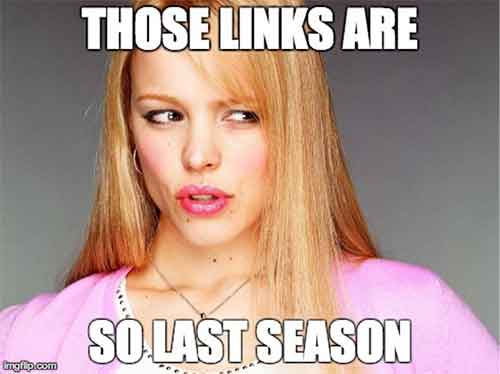
    Getting rid of old, irrelevant links to your site is just like cleaning out your closet. Every wardrobe needs updating, so send last season’s links to the thrift store and go find yourself the latest collection of new links to give your site a boost.

    LinksSoLastSeason

    Image Sources:

    Link Memes

  • Let Your Business Be Known: 5 Tips for Improving Your LinkedIn Presence

    linkedinlogoimageLinkedIn is a great resource for business-to-business companies to increase brand awareness and build valuable connections. You may have set up a Company Page, but are you really making the most of the networking site? Use these tips to maximize the benefit of your company’s LinkedIn presence!

    Set Up Showcase Pages

    curtainsstagespotlightimageIf your company has a certain brand or product you’d like to emphasize, set up a Showcase Page. Showcase Pages are extensions of your Company Page that spotlight specific products, brands, divisions and more. This allows users to follow the aspects of your business that most interest them. Use this feature to share updates and maintain dialogue with a highly targeted audience.

    Share Your Content

    ShareFlyingPaperPlanesImageLinkedIn’s publishing platform was originally only accessible to about 500 select influencers. Now, this feature is open to all LinkedIn users. If you’re already writing blogs for your website, this is a simple way to reach and engage even more users. Additionally, sharing on LinkedIn gives you the benefit of showcasing your expertise to others in your industry. Share your content, earn followers, and expand your influence online!


    Join Groups (Or Make Your Own!)

    Groups allow you to make connections with users who share your interests or work in a similar industry. Use groups to network, stay up to date on industry news, and share content with a targeted network. There are over 1.5 million groups on LinkedIn, but if you can’t find one that’s a good fit for your business, then you can create your own!

    Engage With Your Followers

    PenguinsRunningGifImageGaining followers is important, but it’s only part of the puzzle. Remember to engage with your connections. Maintain dialogue through regular posts to your Company Page, Showcase Pages, or groups. Share relevant resources, industry news, and your valuable insights. Make sure the content is engaging and gives people a reason to share or comment on your update. Keep the conversation alive by responding to audience comments.

    Get Ideas From Others’ Successes

    idealightbulbimageFeel like you could use some more guidance? Get inspiration from successful company pages! Check out LinkedIn’s 10 Best Company Pages of 2013 to see how top companies are making the most of the network. Also, take a look at some of LinkedIn’s social media case studies to learn about businesses who have used LinkedIn to their advantage.

    LinkedIn can be a valuable resource for your business if you apply these tips. Are you using LinkedIn for your business? Do you have any additional tips? Share in the comments!

    Image Sources:

    Linkedin logo

    Showcase

    Paper Planes

    Penguins

    Idea bulb

  • Five for Friday – LG Hires Bros to Build Brand, Your New Favorite Robot & Google Sees the Future of Eye Care

    Comic5

    1. LG Teams Up With Bro-tastic YouTube Network for Content Marketing Campaign
    – Advertising Age

    YouTube famous stars known as Dude Perfect are getting more than just views from their unbelievable, athletic trick shots. They have already acquired advertising leads with brands such as Pringles, Nerf, and as of this week, smartphone maker LG.

    LG hopes that by standing behind these bros, they can extend their reach to younger audiences and hopefully create some competition for other dominating brands in their industry.

    Incorporating this “jaw dropping” content may boost LG’s brand recognition, but stealing market share from Apple may be a bit of a reach.

    RobotWavingHandSmallImage2. Say Hello to the Robotic Personal Assistant of Your Dreams
    – Entrepreneur

    Meet Jibo, a robotic personal assistant created by Dr. Cynthia Breazeal, a Boston-based professor and entrepreneur. Jibo is a “family robot,” designed to interact with your household, take photos and remind you of important events.

    Having had a strange personal experience with Siri, I’m a bit skeptical of personalized interaction with a computer. Jibo seems to break the mold, but will this technology continue a pattern of diminishing personal interaction in today’s culture?

    3. Novartis, Google to Develop Contact Lenses to Monitor Blood Sugar
    – Mashable

    Google is currently joining with Novartis, a Swiss pharmaceutical research and sales company, to develop smart contact lenses. These lenses, expected to make their debut as early as next year, will be equipped with blood glucose monitors and autofocus for troubled vision.

    “The promise here is the holy grail of vision care, to be able to replicate the natural functioning of the eye,” Jimenez said in the Bloomberg report.

    As if being “the holy grail” of the internet was not impressive enough, Google is taking it a few steps further and improving health care and the quality of life as well.

    ContactsEyeImage

    4. Prototype Improves Mobile Typing by Ditching the Keyboard
    – DNews

    Are you fed up with ineffective, awkward mobile and tablet typing methods? Well, a startup based in Austin, Texas is in the early stages of creating a nonexistent keyboard to solve that #FirstWorldProblem.

    Just as the name implies, the AirType project’s goal is to create a system allowing the user to type freely with no restriction but the mobile sensors around your hands and knuckles. Not only does this keyboard (or lack there of) allow you to type freely, it will also adapt to your activity and begin recognizing your habits, like voice recognition for your hands.

    5. Retargeting Is Flawed; the Future Is Pretargeting
    – Digital Next

    What if ads were designed to service needs that we don’t even know we have? Retargeting will soon be a thing of the past, the future of advertising is our future behavior.

    Most are familiar with retargeting efforts, taking products and services we already recognize and driving marketing for those brands. Marketers are beginning to refocus their goals to be more predictive and create wants and needs we may have in the future. The more information consumers divulge, the more predictive marketers become.

    Image Sources:

    Niek Beck, Moms contact


  • Five for Friday – Google Launches Click & Drag for Maps, A New Twitter Record, & Pinterest Gets Even Easier!

    FireworkFiveImageMarketing Land publishes new research on tweet indexing in Google search results. Google Maps rolls out handy “click and drag” update. Why your content needs images to get the attention of engaged readers. The most talked about World Cup game breaks a Twitter record. Big brands begin testing a new way to interact with Pinterest followers.
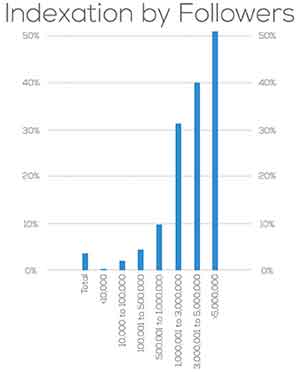

    1. Twitter A-Listers Are More Likely To Have Their Tweets Indexed In Google Search Results
    -Marketing Land

    It’s official: your tweet will never be on Google search.  A study by Stone Temple Consulting reveals that Google will likely only index your Tweets if you have over one million followers.  After analyzing 963 Twitter accounts, the study found that tweets from accounts with a million+ followers were indexed 30% of the time.  As the number of followers increased, so did the indexing percentage.  Although there were a very small percentage of tweets indexed by Google from accounts with fewer than a million followers, the amount is negligible compared to Twitter’s heavy hitters.

    On the bright side, we can all rest assured knowing the wit and wisdom of Kanye West in 40 characters or less is only a quick Google search away.

    IndexationByFollowersImage

    2. Click And Drag To Measure Distance In New Google Maps Update
    -Search Engine Journal

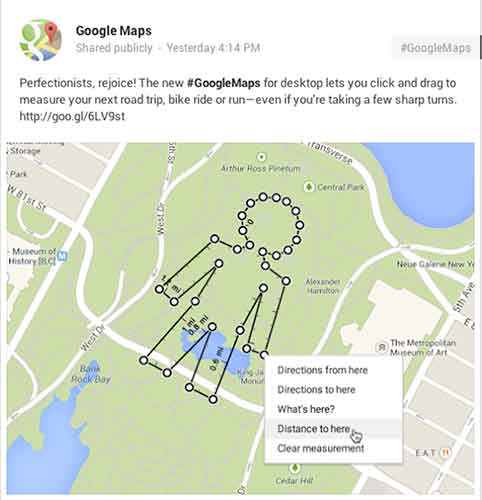
    Do you often take the road less traveled, only to be frustrated by not being able to measure just how far you’ve gone?  Relief has arrived!  Google announced a Google Maps update this week that allows users to click and drag to measure distances.

    Google might call me a perfectionist, but I’ve already thought of five practical applications for the new feature:

    1. Settle the argument whether you or your friend lives closer to your favorite hangout, and see if it’s truly in the middle (shortcuts finally included).

    2. Calculate how long it will actually take to detour from your road trip to see the world’s largest ball of twine.

    3. Get an accurate distance when Google’s driving directions fail because you know Maple Street is closed for repairs but it insists on sending you there anyway.

    4. Enjoy your next run (or bike or leisurely stroll) sans Nike app and still be able to calculate how far you went.

    5. Answer the age-old question: how far would it be if I wanted to walk in the shape of my name through this park?

    GoogleMapsMeasureDistanceImage

    3. Use Images (Not Just Words) to Turn Your Distracted Visitors into Engaged Readers
    -Copyblogger

    It’s an adage as old as time: a picture is worth 1,000 words. Pamela Wilson makes the very relatable analogy of the oversaturation of words in content marketing to an overstimulated child (if you don’t have kids, think about the one throwing a temper tantrum at the park last week).  We are visual people, so why aren’t we incorporating images while producing content online more often?

    Her tips vary from basic (remember to actually use images and not just words) to creative and insightful (doctor up a purchased stock photo to make it more unique).  Much like the sight of an image itself, lost in a sea of text, the blog is refreshing in its take on reaching your audience through content production.

    4. Germany’s Stunning World Cup Win Over Brazil Is The Most-Tweeted Sports Game Ever
    -TechCrunch

    The spirit of Brazil’s soccer team wasn’t the only thing broken after Tuesday’s World Cup match against Germany; the game was the subject of 35.6 million tweets, breaking the record for the most-discussed single sports game on Twitter. At the peak of the Twitter fury was Sami Khedira’s goal against Brazil to bring the score to 5-0 Germany, which resulted in 580,166 tweets per second.

    The record replaces this year’s Super Bowl, which garnered 24.9 million tweets.

    GermanyWorldCupImage

    5. Pinterest Makes It Easier to Follow E-commerce Brands
    -Adweek

    Pinterest has been busy working towards winning the title “Big Brand’s Best Friend.”  Following the release of its API in November, they’ve now tweaked the “follow” button to make it easier for consumers to connect with eCommerce sites.

    Currently being tested by Wayfair, Whole Foods, ModCloth, and GoPro, the new “follow” feature improves user experience by pulling in the company’s latest pins in a pop-up window instead of taking the shopper off-site.

    As a lover of Pinterest, I say bring it on!  Anything that lets me connect with my favorite brands quicker and more easily is a winner in my book.

  • Is Your Website Healthy? Increase Its Organic Intake & Watch It Grow!

    Whether you’ve noticed it or not, all website owners are in the parenthood business. Our websites are our babies; despite how frustrating they can seem, how stressed they make us, and how much of our money and time they require, we love them anyway. And, of course, we want them to live long, healthy lives. So, whether your business is currently raising a newborn, keeping track of an 8-year-old, or guiding a young adult, your baby deserves undivided attention, precious care, and the healthiest food available.

    100 Percent Organic Image - Search-Influence

    Why Choose Organic?

    Just as any living and working body, your site deserves a high intake of organic food, and in this case, every visitor is a small portion of a meal. Organic traffic is traffic that comes to a website through unpaid links from search engines, directories, and more. Because organic traffic is considered natural, it’s not a quick process but rather builds over time. Its success is directly related to the content on the site and the number of backlinks it receives from trustworthy sites. Since you’re the parent of this functioning being of the virtual world, you’re responsible for its wellbeing.

    Website Healthy Eating Image - Search Influence

    The Recipe To Increasing Organic Traffic

    The organic method is not only a high-quality and reliable tactic, but it’s also free and increasable. Plus, high numbers in organic traffic will naturally inflate your search engine rankings. How do you do this? Here are a few, efficient ways to increase your site’s organic traffic:

    • Build a site with relevant, unique content that’s up to date and free of grammatical errors.
    • Add keywords as naturally as possible into your compelling content. (Don’t overuse them.)
    • Do NOT post duplicate content on your pages.
    • Start an engaging blog.
    • Only have dependable, authoritative backlinks to your site. (Strive to have content that others want to link to. Don’t use link schemes.)
    • Optimize your photos.
    • Remember to add page descriptions.

    Healthy Choices Scale Image - Search Influence

    The Final Health Check

    The question at hand is simple: Is your website healthy? Or, is it stuffed with too many keywords? Is it living on manipulative, artificial backlinks? Is its body suffering from the lack of unique content nutrients? Deceptive preservatives will decrease your traffic and discredit your right to rank high on Google, Bing, and other search engines. Fill your site’s body with authentic, creative content with striking, optimized photos and strong backlinks. Then, you can sit back and watch its organic traffic grow.

    Your website has a heart. Treat it like it does, and give it your best.

    Website Healthy Heart Image - Search Influence

  • 5 for Friday – G+ On Your Phone, Teens On Facebook, & Tips For Powerful Images

    5ForFriday

    1) CNBC: This 17-Year-Old Website Devastated By Google’s Panda Update – Search Engine Roundtable

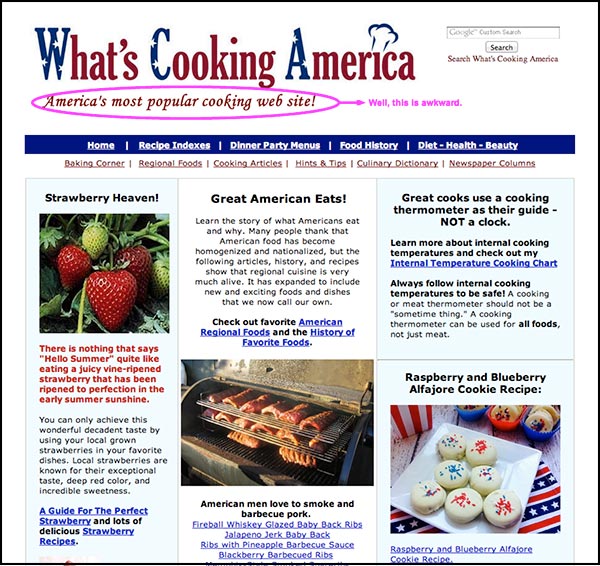
    Once upon a time, there was a woman named Linda Stadley. Her recipes brought so much joy to her and those around her that she generously decided to share them with the Internet. So she created www.whatscookingamerica.net, and for 17 years her recipes reigned supreme. She lived happily ever after until Google unleashed its mighty Panda 4.0 paw and ended her domination of the search engine results page faster than you can say Jack Robinson. Users everywhere weep for her loss of traffic.

    …that website though. The writer of this article says it all with his closing statement, “I feel bad but the site does need a facelift.” Well, yeah. This article speaks to the very nature of Google updates: even though they may not make everyone happy, the goal is to help all users find the best information first. Let’s be real here. This site lacks a lot of the features that make a website useful to users looking for recipes (like reviews, for example); therefore, more useful websites will get better rankings because they give people more of what they’re trying to find. Google would probably reply with something along the lines of “sorry we’re not sorry.”

    WhatsCookingAmerica-Website

    2) Google My Business iPhone App Now Available – Blumenthals

    Do you want Google all up in your business? You’re in luck. Google just released the My Business iOS app (as discussed by Mary Silva). The noteworthy features (for both the iOS and Android app) include the ability to edit your business listings and view local insights. Missing from this app is Google Analytics and Adwords Express. You can also access all the features of your Google Plus account. JUST WHAT WE’VE ALWAYS WANTED, said no one ever. The thought behind this was probably something along the lines of, “hey wait a minute, no one seems to be posting to their Google Plus account, maybe they would if they could do that on their phones?” We will see Google, we will see.

    3) Wait A Minute. Facebook Is Still A Big Hit Among Teens? – Marketing Land

    FacebookGraphic

    Facebook hasn’t been poisoned by moms and businesses? What?! As it turns out, Facebook is still popular with teenagers. Forrester Research released a report revealing that 75% of Facebook users ages 12 to 17 use Facebook once a month, with 28% of this age group claiming to use Facebook “all the time.” Of course, numbers don’t always give the whole story. Yeah, these kids are logging on, but are they actually using Facebook? Who’s to say these kids using Facebook everyday are not just scrolling through the newsfeed absentmindedly? Well, this may be the case, because a niche study reveals Facebook lost to Instagram for the most engaging platform.

    There’s a lot to consider here. For one, how will this trend change in the future? Have teens just been classically conditioned to check their Facebooks like a hopeless romantic checks Craigslist missed connections? Do more engaging platforms have more of an advantage in retaining and attracting new users? Time will tell.

    4) Net Neutrality Protesters Arrested At Google HQ – Techcrunch

    Well, this is a fun one. A group of activists in favor of net neutrality were arrested for protesting outside Google Headquarters. What were they doing there, you ask? The group calls for Google to “stand with us in support of an Internet that is free from censorship, discrimination, and access fees.” The group asked Google, among other demands, to change their homepage for a day to include a link to the FCC petition. You may be thinking, ‘but Google isn’t exactly the bad guy here trying to end net neutrality for all, why are they protesting there anyway?’ And you would be thinking correctly. According to this article, Google declined to comment on the arrests. I can’t blame them, as it seems these protesters might have a classic case of misdirected rage.

    5) The 8 Types of Images That Increase the Psychological Impact of Your Content – Copyblogger

    Quality images matter because they increase user experience. Yes, we know this. The advice in this article seems rather obvious, but there’s something to take away here. Specifically, what makes an image useful? This article proposes eight different types of images that provide users with the information they need. The top eight being: stock photos, screenshots, charts and graphs, personal photos, still frames from popular movies and TV shows, infographics, custom art, and comics. I would like to point out that most of these (except stock photos) could and maybe should fall under #7 “custom images.” I feel this article missed out on the opportunity to highlight the way that custom images serve more of a functional purpose for marketing than non-custom images. An infographic, comic, or screenshot that is custom and directly relevant to your business would obviously be more useful to users than one that is not.

  • #Ibelievethatwewillwin #Ole! #WorldCup

    As the world gathers in sport bars across the globe to watch the gorgeous and very talented FIFA team members, I’ve realized that the World Cup is kind of like the Super Bowl, just bigger, better, and hotter!

    Besides the commercials and the fact that the Super Bowl is only something America partakes in, one distinguishing difference between the World Cup and the Super Bowl is the branding. While the Super Bowl has consistent branding and logos every year, the World Cup continuously changes. For example, the Super Bowl uses a consistent hashtag (#SB14) that is created by the NFL and encouraged by fans to use in the days leading up to the big night. With the World Cup, there is no consistent branding.  Which is ironic since this is the one sport the world comes together to participate in and cheer on — the original football league. Which got me thinking, sports franchises should be treated just like any other business, as should the structure of their social media campaigns. The leagues should maintain a consistent brand, continue to publish content throughout the series, and encourage fans to get engaged.

    1) Consistent Branding

    It’s funny how one word can change your branding so much!

    #football vs. #soccer
    #brazil vs. #brasil

    Regardless of which country a team is from, the league should constantly present their branding on a worldwide scale. T-shirts, jersey logos, mugs, soccer balls (or footballs) and of course, hashtags.  The most commonly used hashtags for the World Cup is #worldcup with a 71.8% of tweets containing #worldcup in content published on Twitter. Other popular hashtags include:

    #brazil – 31.5%
    #fifa – 17.22%
    #football – 19.09%
    #fifta2014 – 13.29%
    #brazil2014 – 3.8%
    #soccer – 3.8%
    #brasil2014 -3.8%
    #france – 3.5%
    #fifawordcup – 3.5%
    And my favorite #Ibelievethatwewillwin

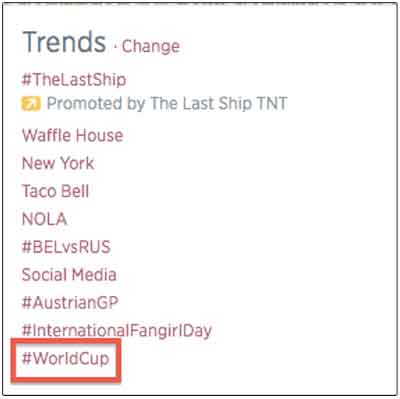
    TrendsWorldCup

    Although the league has no control over what countrymen and women are going to post or which team they are going to support, encouraging a hashtag is one way to control the branding of your business.

    2) Content is king

    The biggest social network participating in the World Cup is Twitter

    TwitterWorldCup

    With 645,750,000 people on Twitter, fans are just waiting for the latest tweet by a team member or the team. Publishing content to keep fans informed is key to a successful social media campaign. Publishing updates to the team’s status such as posting superstitions of the game results, or posting pregame photos, is what the soccer fans want. Don’t forget that your employees — or team members! — are extensions of your brand too. Encouraging employees to publish content and post pictures is also important to the overall brand image, and its success.

    TwitterESPNWorldCup

    3) Keep ‘em engaged!

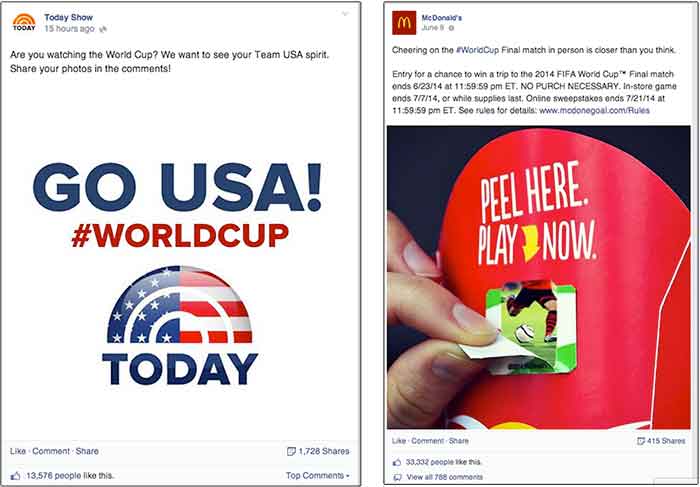
    In addition the informational content, make sure you are keeping your fans engaged with your brand. Many brands encourage engagement by asking fans to participate in poles, questions, or even contests. One of the biggest World Cup sponsor’s, McDonalds, jumped on this bandwagon in their offline “Peel, Play, Ole, Ole” campaign.

    TwitterPostsWorldCup

    For those businesses that aren’t FIFA sponsors, engaging with fans on Instagram and Foursquare are great for brand awareness. Asking fans to post pictures with your product, or check-in specials at locations are easy ways to increase a brand’s presence while engaging with fans.

    Regardless if your business is in a worldwide event that only comes around once every four years, or if it is the neighborhood corner grocery, these three tips can benefit any social media campaign.

    So y’all get ready Russia! #fifa2018 #worldcup #fifarussia #USA #USA #USA