Tag: content strategy

  • 4 Tips for Finding the Right Blog Length in 2016

    4-14-2016-BlogImage4

    When you have your own blog, there are a lot of things to consider if you want it to be successful. One common question people ask is, “How long should a blog post be?” Unfortunately, there is no cut-and-dry answer. Instead, the length of a blog post should depend on a few things, so I’ve put together a short list of important factors to consider when writing your blog posts.

    1. What is the topic of your blog?

    Is it fun and playful or technical and formal? If it’s more technical, it will probably require a lot of explaining and therefore have a longer word count. This would especially apply for very niche businesses like law or medical offices. If I am reading a blog about chemical peels, I will probably want to learn about the procedure itself, how it works, and what to expect after the procedure. This would require a pretty lengthy post. On the flip side, if I am reading a blog post about what I should do this weekend in Austin, a short list will do.

    2. What good is a blog if no one knows it exists?

    A study done by SerpIQ found that the average content length on the first ten search results is 2,000+ words. No worries: this doesn’t mean that every post on your blog should be research-paper length. Instead, try to include a few longer posts here and there. I would do some research and find some more specific topics that readers will want to learn about that require a lot of information.

    By writing some longer posts, you will also be able to include the topics you want to be ranking for more often than in short posts. It’s best practice to include the topic once every 100 words, so if you have a blog that’s 300 words, you should make sure the topic is mentioned three times total, which isn’t very much compared to a blog that’s 2,000 words long. Also, with a higher word count, there are more chances for you to include differently worded variations on that topic.

    3. Analyze past blog posts.

    What blogs do your readers like the most? Once your blog is established, take a quick analysis of the posts. Which ones get the most shares or comments, and how does that relate to the length of the post?

    4. Who is your target audience?

    What kinds of people do you want your blog to speak to? What is their day-to-day schedule like? Are they stay-at-home moms who might have a more flexible schedule and therefore would be more interested in long blogs? Or are they medical professionals who have a day full of appointments and would prefer blogs that are short and to the point?

    The most important thing to remember is that there is no rule on the length of a blog post, so if your topic can perfectly be explained in 300 words, leave it at 300 words. You shouldn’t feel like your blog isn’t long enough or you need to add words just to have a higher word count. If there are parts of your blog post that are “filler” or “fluff” and don’t really contribute, don’t hesitate to take them out.

    So how long should a blog be? Now you know the answer isn’t a simple one! The next time you’re writing a blog post, think about these four things, and hopefully you’ll reach a happy medium for a successful blog.

    Image Credits:
    Jim Carrey GIF
    Tom Hanks GIF

  • These 5 Easy Ideas Can Help Your Site Reach 80% of Your Patients

    4-14-2016-BlogImage5

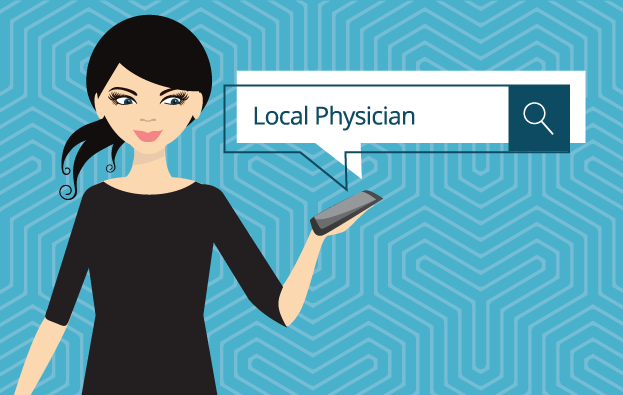
    Your patients might not be able to read your handwriting, but there should be no confusion with your website. According to a Pew Research Center survey, 80 percent of respondents look for health information online, and 44 percent actually search for physicians and healthcare professionals. As more and more people turn to the Internet to search for medical service providers, these tips will help you launch a website that connects new patients to your practice or clinic.

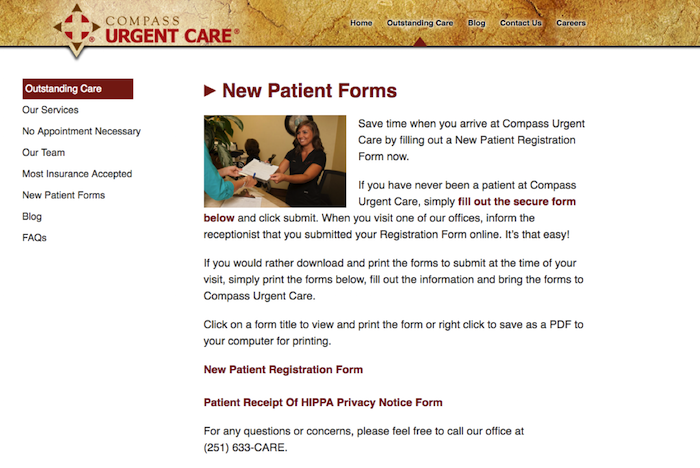
    1. Patient Forms

    Your website should make it easy for new or returning patients to access patient intake forms, schedule appointments, and update records. Registration forms can even be placed under their own tab, which will make it easier for website visitors to become registered patients. In general, always make things easy to find.

    New Patient Forms

    2. Mobile Responsiveness

    In the United States, there are more mobile searchers than desktop searchers, and this trend is expected to increase. There are two reasons your medical website needs mobile-responsive capabilities. Patients searching on a tablet or smartphone are likely to spend more time on your website if it is easy to navigate. A non-mobile-friendly website can be confusing, creating incentive for the searcher to move on to a different website, possibly that of your competitor.

    Furthermore, next month Google will start the roll out of a mobile-specific algorithm. Google is continually striving to improve the user experience, and if your website does not make the cut, it could be completely excluded from mobile search results.

    3. Patient-Centric and Informative Content

    Going to the doctor’s office can make some people feel anxious, but your website can provide comfort and instill confidence even before a patient walks through your door. All content should be patient-centric and make website visitors feel like they will be in safe hands. You can even give your website some personality by including bios for yourself and your staff. In an “About Us” or “Our Staff” section, you can not only show off impressive credentials but also demonstrate that you can engage with patients.

    A strong medical website also includes news, information, and updates. This platform should be a marketing tool and resource for patients. Refreshing your site with blog posts, medical news, and alerts will show patients that you follow current issues and are an attentive professional. A website with a regularly updated blog will also rank higher in the search engine results.

    4. Services and Insurance

    Again, all information should be easy to read and find, especially services and insurance information. Give detailed explanations of your services, and note if there are any special considerations. There should never be any confusion about payment, so clearly state whether you accept cash or if other arrangements are acceptable. Discussing insurance plans and payment methods creates an opportunity to include a call to action. Ask website visitors to contact your office with any further questions about services or insurance.

    5. SEO

    “If you build it, they will come”—this adage does not apply to websites. It can take a little time for your new website to get noticed by search engines. An SEO campaign can improve your website’s search engine rankings and drive more traffic to your website. On- and off-page optimization, social media management, title tags, meta data, image optimizations, NAP consistency, professional listings, and many other factors play a role in boosting your Google ranking. Search Influence can create a SEO campaign that will promote your website, connecting you with patients who are more digital than ever before.

    Image Credits:
    Doctor Meme Image

  • Bloggin’ Like “The” Boss: Think Like Bruce Springsteen to Boost Your SEO

    Keeping up with the ever-evolving world of SEO can be overwhelming. Blogging has been considered a beneficial marketing tool since the late 1990s and continues to be an excellent way to keep your business’s SEO relevant and reliable. However, just because blogging has been around for some time does not mean that it is a simple task. There are questions that arise when blogging, especially if it’s your first attempt. Why should I blog? How do I choose a topic to blog about? Well, in this blog…about blogging, Bruce Springsteen and I offer a few tips and tricks to ensure that you start Bloggin’ Like a (The) Boss.

    1603-SI-Newsletter-0331-KG-A-02

    Why Should You Blog? You’re About to Be “Blinded by the Light.”

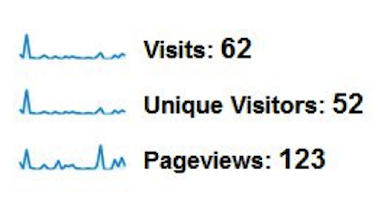
    There are a few reasons why blogging is so beneficial for a business, but one of the most important is that it helps to drive traffic to your website. Here is a screenshot of a business’s analytics the month prior to creating and launching their blog:

    Before Graph 1

    Before Numbers 1

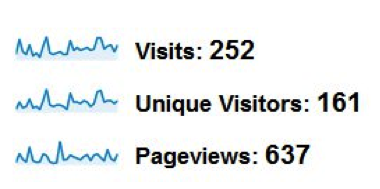
    Here is a screenshot of a business’s analytics for the month after they created and launched their blog:

    After Graph 1

    After Numbers 1

    As you can see, the visits, unique visitors, and pageviews vastly increased the month after the blog went live.

    In short, the more relevant, optimized content you put onto the Internet about your business, the knowledge that you have, or even the services that your company provides, the more opportunities you create for a user to discover your business, its products, and its website. They can also create a direct link back to your website.

    Blogs are an excellent way to help establish your website’s authority. As Google continues to advance and get smarter, so do the ways in which it determines what information is important, natural, and helpful to the user. Consistently creating new and useful content around aspects relating to your business does exactly that.

    Blogs can help to position your business as a leader in your industry. By crafting blog topics and content around current happenings in your industry, you can showcase your knowledge and expertise within your market.

    How to Choose a Topic That Will Make Your Blog Rankings “Born to Run”

    With endless options, choosing a topic can be overwhelming. Start with a category. Although categories are broad, you are creating an overall idea and theme that can easily be narrowed into a specific topic. The category should be one that you are interested in and knowledgeable about.

    Take steps toward narrowing your category. Look at your category as a whole, and then choose the aspects within this area that you know the most about and that you think will be the most helpful and interesting to your readers. For example, if Bruce Springsteen happened to be the broad category that you chose, you could break it down with the following subjects: world tours, autobiography, and best-selling albums. Without even realizing it, you have created potential blog topics. Now all you have to do is choose your topic from the list you created for yourself!

    You will need to elaborate on the topic that you have chosen. Create a list by obtaining facts and details, and develop a list of questions that your blog should answer about your topic. Then make an outline to help structure your blog, incorporate all of the necessary facts and details, and make sure it answers all of the potential questions the reader may have. Once your outline is complete, you are ready to start “Bloggin’ Like a (The) Boss!”

    The digital marketing industry is composed of numerous beneficial and effective ways to better your business and its online presence. Because of this, it can be difficult to choose which strategies to move forward with. Blogging, like Bruce Springsteen, has proved its value for decades and continues to prove its importance in today’s ever-changing world.

    Image Credits:

    America Bruce Springsteen GIF
    Bruce Springsteen Thumbs Up GIF
    Bruce Springsteen Dancing GIF

  • Upgrade Your Website with Fresh Content and Some Help from Beyoncé

    In this ever-evolving age of Google, there seems to always be a way to upgrade your website and its search engine presence. Fresh content will not only ensure your website is up to date, but it can also inform your frequent customers of new information, let Google know that it should crawl your site, and add overall value to your site. Well, Beyoncé is here to help us give you our reasons for why a fresh content upgrade is so important.

    1. Give Them a Reason to Come Back

    Customers who periodically visit your site are likely to return when they know that you are updating your website frequently. I suggest something simple like adding a newsletter or on-site blog. Blogs don’t have to be publicity pushes or “salesy” advertisements. They can be fun ways to share content and let your consumers know that you are engaged in your business’s growth in a competing market. Also, you can use them as an excuse to show off your favorite Beyoncé GIFs.

    2. New Content = New Site Crawl

    Googlebots love to crawl new sites! Google pays special attention to existing sites that have previously been crawled but contain new content. This can be easy for any business to do, as most industries see gradual changes in techniques, best practices, and technology over time. There are new processes, seasonality changes, and all sorts of things that could warrant an extra boost in your content. Don’t feel like you need to rewrite from beginning to end; spicing your content with updates or including additional information to a page that may be lacking is a great way to upgrade your content. The new content should be relevant and engaging for your customer so that you stand out among your competition, or background dancers.

    3. Increase Your Authority

    Your fresh content will engage users and help increase your domain authority. If you aren’t convinced yet that fresh content will help your website, check out this blog about tracking your changes through Google Search Console. This tool can help show you how your site traffic changes when you update your content. The upgrade of content can gain page authority, along with domain authority, which can produce higher rankings for your site overall.

    Website content is by far one of the most important parts of your site and one of the easiest ways to change things up to increase visibility for your business. There are many sides of an SEO campaign, but upgrades to your content keep you relevant and let’s those in your industry know you are a force to be reckoned with.

    Image Sources:

    Upgrade U GIF
    Head Shake GIF
    Background Dancers GIF
    Hair Blowing GIF

  • How To Fix A Manual Action

    How To Fix A Manual Action

    In recent weeks, there’s been chatter about a large influx of manual actions. This got me thinking: how many people actually know how to fix manual actions? Stay tuned, ’cause you’re gonna learn today!

    But First, the Basics: What Is a Manual Action?

    A manual action is a manual penalty applied to a website by a member of Google’s Web Spam team. According to Google, there are a few common types of manual actions:

    • Hacked site
    • User-generated spam
    • Spammy freehosts
    • Spammy structured markup
    • Unnatural links to your site
    • Thin content with little or no added value
    • Cloaking and/or sneaky redirects
    • Unnatural links from your site
    • Pure spam
    • Hidden text and/or keyword stuffing

    In today’s post, we’ll be discussing a few of the most common types of manual actions.

    How Do I Know My Site Has a Manual Action?

    SEO practitioners know that performance fluctuations are expected, especially since Google’s algorithm is constantly changing. If you’re beginning to see your website rankings drop consistently, that’s usually an indicator of a possible manual action (or partial manual action). However, if you’re unsure, check out Google Search Console (aka Webmaster Tools for those late to the name-change party)! Once in the Search Console, you will see one of two actions displayed on the Manual Actions page:

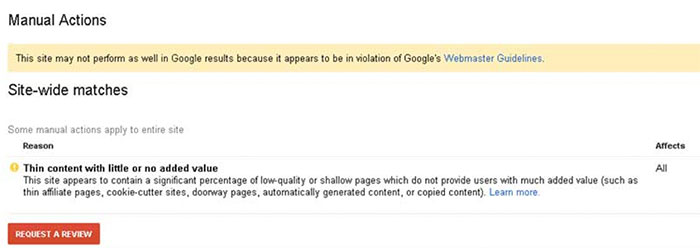
    1. Site-wide matches
    2. Partial matches

    Each action will display a reason as to why your site received the action, as well as how the action will affect your site.

    So My Site Has a Manual Action…What Now?

    The good news: we can fix this! The bad news: fixing a manual action takes quite a few steps. The first thing you will want to do is determine what kind of manual action your site has. If you see this message, this means that Google has detected a pattern of unnatural deceptive or manipulative links pointing to your site. According to Google, here are the recommended actions to take:

    First, review Google’s Webmaster Guidelines on linking.

    Next, follow the steps below to identify and correct the violation(s):

    1. Download a list of links to your site from Search Console. You can download your links arranged either by hostname (Links to Your Site > Who links the most > Download more sample links) or in chronological order (Links to Your Site > Who links the most > Download latest links).
    2. Check this list for any links that violate our guidelines on linking. If the list is large, start by looking at the sites that link to you the most or links that were created recently (in the last few months).
    3. For any links that violate our guidelines, contact the webmaster of that site and ask that they either remove the links or prevent them from passing PageRank, such as by adding a rel=”nofollow” attribute.
    4. Use the Disavow links tool in Search Console to disavow any links you were unable to get removed.

    Once you’ve removed or disavowed the unnatural links, the last step is to submit a reconsideration request. A reconsideration request is a formal request to Google to reconsider giving your site a penalty. You will want to let Google know about everything you did to clean up your site, including documentation about the links you removed or tried to remove.

    Here comes the bad news: once you submit the request, you have to be patient.

    ryan reynolds ugh annoyed eye roll

    I know, people. I know. Ain’t nobody got time for that! BUT it will all pay off on that beautiful day when Google sends you that wonderful message in Search Console and approves your reconsideration request!

    FYI, this will be you:

    love actually hugh grant

    Hacked Site…Uh Oh!

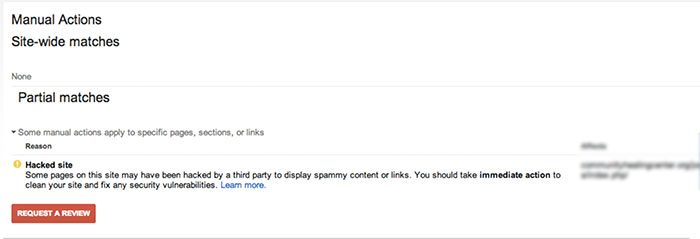
    Google may give your site a partial manual action if it notices that your site has been hacked. If you check the manual actions tab in Google Search Console, you will see a notice called “Hacked Site.”

    ManualActionsSiteWideMatchesImage

    According to Google’s Web Spam team, there are a few steps you will want to take if you’re the victim of a hacking:

    • Contact your host provider.
    • Quarantine your site by taking your site offline (change all passwords and check new user accounts).
    • Check the Google Search Console.
    • Assess the damage. If your site was hacked with spam, the display warning will be “This site may be hacked.” If you’ve been hacked with malware, the display warning will state “The site may harm your computer.”
    • Identify the site’s vulnerabilities and list them out.
    • Clean up the website to prevent future security problems.

    Once all hacked content is removed, “Request a Review” in the Google Search Console. Again, patience. Ugh.

    Thin Content with Little or No Value

    For the non-SEO practitioners, you might be thinking, “What does that mean?” In a nutshell, Google launched a quality update in May 2015, specifically for onsite content. This means Google is placing more of an emphasis on sites producing quality content and penalizes those with content that is not useful to visitors.

    ManualActionSiteWideMatchesThinContent

    How to Fix Your Content, According to Google:

    • Remove any duplicate content from your site that is found anywhere else on the Internet.
    • Eliminate affiliate links on pages with little to no valued content, or add some value to the page’s content.
    • Get rid of auto-generated content pages.
    • Improve the website content to provide significant value for your site visitors!

    Once again…cue the reconsideration request.
    Remember, patience is a virtue!

  • A Brand by Any Other Name: The Importance of Brand Consistency

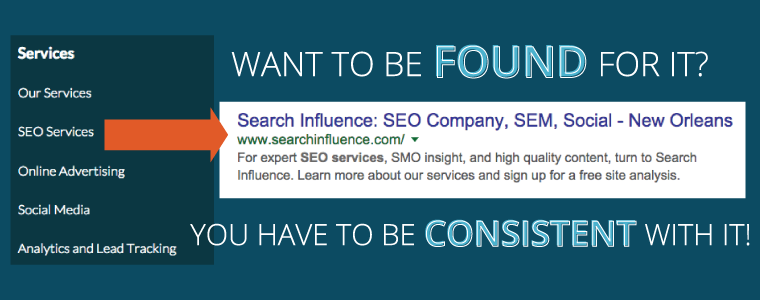
    In the world of SEO, consistency really is key. Any deviation from the norm can negatively affect you in search results and in the eyes of your potential customers. Consistency with your NAP (name, address, phone number) is important throughout your website, social channels, and on any directories you’re listed on. Your NAP isn’t the only thing you should be concerned with when it comes to being consistent, however. Branding consistency is also something everyone should consider.

    Branding isn’t exactly something a lot of small businesses can budget to have concern for. The term itself implies hiring graphic designers, brand management firms, or other big-budget solutions you may not be able to even consider. For the sake of this blog, however, let’s assume branding only refers to your image and content consistency.

    Your Image

    For a lot of small businesses, branding ends at your logo. You may be working with WordPress or other do-it-yourself CMS systems that allow you to plug in your logo and make a few tweaks here and there to how things look, but that’s usually as far as it goes. Maybe you threw some of your colors in there too to liven things up a bit. Now, not all of us can be WordPress experts, but it can be worth the extra effort to make sure things look consistent throughout your site. Is your logo flat and modern looking? Make sure any elements, buttons, or boxes on your site are also flat and modern. If your logo is round and poofy, it might make sense to find some round and bold options instead. It doesn’t have to be perfect, but your logo and website should have the same look and feel.

    The goal here is to have consistency throughout your site. When a potential customer clicks through your pages, you want them to always know where they are, what company they’re looking at, and to be greeted by pages that look like they go together. Much like consistency with your NAP, all you’re doing here is ensuring that the customer knows they can trust your business.

    3-logo-website

    Your Content

    Other than your image branding, another important thing customers factor into whether or not they’ll do business with you is your content branding. You want the customer to be able to search for something, see consistency with your brand being associated with that search, and trust you for that. Use your brand name as much as you can in your content. Not to the point where it seems spammy, but sprinkled in there enough for it to be associated with what people might be searching for.

    When looking for someone to do business with, your potential customers are looking for someone they can trust. If they’re fumbling around a site that uses different color schemes than your uniforms or fleet, they might think they’re in the wrong place. Having consistency in your online presence is as important as your name these days, so get to it!

    Consistent Logo Example Image

  • Don’t Leave Your Website Buffering: How to Make Big SEO Gains with Video Content

    Everyone likes watching videos on the Internet—funny videos, cute animal videos, cute kid videos, and cute videos with kids AND animals.

    And while there will always be a place for these videos in our hearts and on the web (what would YouTube be without them?), video content has recently found a new, even greater purpose on the Internet. In recent years, videos have emerged as an integral part of any and every SEO campaign. Based on four main metrics, there are several ways video content can help your business and website gain more traction.

    • With YouTube rising to the lofty status of the world’s second-largest search engine (behind only Google, which just so happens to own YouTube), videos are getting more screen time than ever.
    • Videos have been proven to improve SERP rankings. Because YouTube and Google are in such close cahoots these days, videos from the popular video site are ranking higher than ever in Google searches. The more popular a video, the higher its authority, which affords a greater opportunity of appearing at the top of search pages.
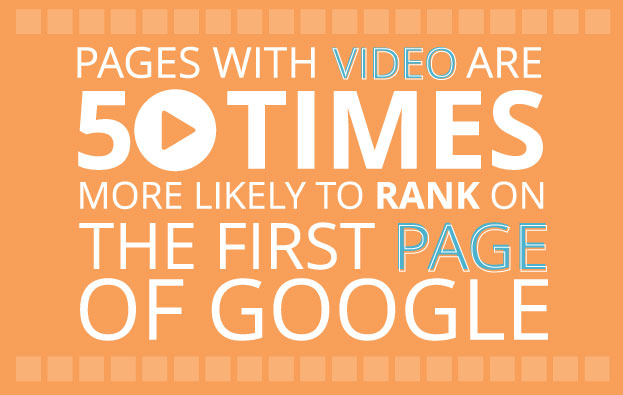
      • A study conducted by Forrester discovered that pages with video are about 50 times more likely to rank on the first page of Google search results.

    1511-SI-BlogImage-B-01

    • For that reason, among others listed below, here is Search Influence’s latest video, a brief case study about our partnership with the Audubon Nature Institute in New Orleans.

    • This is also why properly optimizing videos is so important—all video content (title, description, transcription, links, etc.) is crawled and processed by the search engines.
    • Every business should have their own YouTube channel that is accessible via their website. But to make even better use of videos, embedding YouTube videos directly onto website pages has been proven to be even more effective.
      • Embedded videos can improve click-through rate with up to a 41% higher CTR than plain text, according to study conducted by Cisco and aimClear.

    • Embedded videos can also reduce bounce rate. The longer a visitor spends on a website, the more authority it is given by Google. Unfortunately, the average online attention span is less than 10 seconds. Video content allows visitors to become engaged with something on your site for a longer period time. The average length watched of a single Internet video is over 2.5 minutes—all that extra time is crucial in the SEO world.
    • Videos communicate a lot of information quickly, which lets people sample content without committing to reading lengthy text. Videos are also much more useful in establishing trust with potential customers than written content, especially if the video features the business owner or a client testimonial.
    • Finally, video content is much more likely to generate social interaction and shares, which equals quality backlinks. Videos are easy to watch and share, therefore more appealing and likely to be watched (and allowing for more people to discover the video, and by extension, discover the business in general).
      • In a fascinating experiment, Gemma Holloway at Koozai compared two posts covering the same exact topic—one featured a short video introduction and the other had only text. The video post received between 200% to 300% more page views and shares on social media than the text-only article.

    So don’t leave your website or your business buffering. Incorporate videos into your SEO and Internet Marketing strategy and watch the benefits play out on your computer screen!

  • Write Content Worth Reading: 3 Listicle Hacks from the Pros

    Listicles have infiltrated our culture with a gusto that can only be compared with that of the emoji. It is now a common occurrence for one to set a 10 p.m. bedtime only to get lost in the depths of BuzzFeed, furiously clicking on any headline that references some obscure 90s Nickelodeon cartoon until the bleary-eyed consumer looks at the clock in the corner of their computer screen and sees what they feared the most: 3:30 a.m.

    9-11 image 1

    BuzzFeed and similar websites have been selling real estate on their homepages for businesses to pay to display their own listicles. This attracts a lot of eyes, but in order for these listicles to gain traction and have as much reach as possible, they must be compelling. And in order to be compelling, the listicle must provide three essential elements.

    1. A Click-Worthy Topic

    Not every topic is fit to put into listicle form. A rote display of the new models of heating equipment could be a list, but it is not something that many people would click on. Successful topics communicate shared experiences across a wide variety of people. Say a company did want to advertise heating equipment; instead of showing a series of heater models, it would be a better idea to make the topic something more click-worthy, such as “15 Dogs Trying to Stay Warm.” This is a click-worthy topic because it promises the reader at least 15 pictures of dogs enacting human emotions. Once the listicle is written, the company can then go back and subtly insert hyperlinks into the content and direct the reader to their heating equipment.

    9-11 image 3

    2. Relevant Pictures and GIFs

    The genius behind listicles is how they are able to communicate abstract thoughts and feelings through a series of short sentences and images. It is essential that the images used in a listicle perfectly align with the ideas that they are trying to convey. Take for example a recent BuzzFeed post by Dave Stopera entitled “16 Things That Will Instantly Destroy Any Friendship.” Stopera expertly uses a photo of someone holding a Draw 4 Wild card during a game of Uno with the simple subheading of “2. AND THIS.” What makes this such a strong image is that those who are intimately familiar with Uno have been on both sides of that situation before, either having to draw four cards or causing someone to draw four cards.

    9-11 image 2

    It is important to travel the depths of the Internet and keep an eye out for relevant images and GIFs. In fact, keeping a folder full of the best GIFs and images found on the Internet is a highly recommended practice this day and age. That way when an idea for a listicle or even a social media post pops in one’s head, the perfect image is already there to be utilized.

    3. An Irresistible Title

    Even with a compelling topic and charming content, a listicle is nothing without a perfectly crafted headline. The headline is the first thing the reader sees about the listicle, and it should create a Pavlovian response that makes the reader click no matter what they are in the middle of doing. But what constitutes a title that an Internet user will compulsively click?

    Think about the crux of the topic. An article about candies that are no longer available in stores can get away with a simple title that expresses exactly what it is about, such as “Ten Candies No Longer Sold In Stores.” That might get some users to click on it out of curiosity, but a little more creativity—and the use of a few popular words—may increase the article’s reach.

    Going back to the “16 Things That Will Instantly Destroy Any Friendship” BuzzFeed post, there are a few things the title has going on. For one thing, there is a number at the beginning. This lets the reader know how much time they will have to devote to the post as well as how much enjoyment they will garner from it. The title also effectively conveys the topic, allowing the reader to gain insight into what the post will contain. The last element is the implementation of hyperbole. The contents of the article do not actually contain anything that would instantly end a friendship, but the hyperbole defines the shared anger amongst the players of the games featured.

    With this information, a better title for the candy post would be something such as “Ten Candies You Will Cry To Learn Are No Longer In Stores.” This title effectively communicates the loss the fans of these candies will feel when they learn that they are no longer being produced. Then when the reader clicks the link they will engage with the listicle in two ways; they will either reflect and enjoy the nostalgia on the candy or they will vehemently argue about the listicle’s contents. Either emotion is likely to elicit shares on social media.

    Keeping those essential elements in mind will allow businesses to create effective listicles that get spread across social media platforms, making this a great way to bolster your business’s online marketing strategy.

  • This Just In: Generating Topical Content for Press Releases

    Press releases are great for businesses for a number of reasons, including increased visibility, enhanced SEO, reputation management, and brand awareness. In order to get the most bang for your buck, it is important to make sure that your press release is actually newsworthy and not just “fluff.” Some suggest publishing a new press release as often as twice a month, but what if you don’t have any news worth writing about?

    Daily news newspaper headline reading new press release concept for breaking news

    Here are some tips that will show you how to use industry news and turn it into a newsworthy press release for your business.

    1. Identify new trends within your industry.

    Look for any new or different trends happening in your industry. I don’t know about you, but I love to keep up with what is new or changing in industries that I’m interested in.

    2. Consider how general industry news affects your business.

    Take any news in your industry, whether it’s technological advances, new laws, or upcoming conferences, and relate it to your business. For example, if you just attended a conference and are using the information you learned to begin offering a new product, service, or special, write about it! Another example: if researchers just found out that this treatment helps do XYZ, and your business offers that treatment, write about it!

    Press Release 2

    3. Put a local spin on major news.

    Take a major news story relevant to your industry and write about how it affects your business locally. For example, if a new law was passed and your processes, offerings, etc. are changing as a result, write about it! It’s always interesting to see how changes on a larger scale affect businesses on a smaller scale.

    Coming up with a good press release topic can be tough, but using these tips will help you think outside the box and keep your topics fresh and newsworthy! If your content marketing strategy could use an extra hand, get in touch with us.

  • For Small Law Practices, Online Resources Can Be Judge & Jury

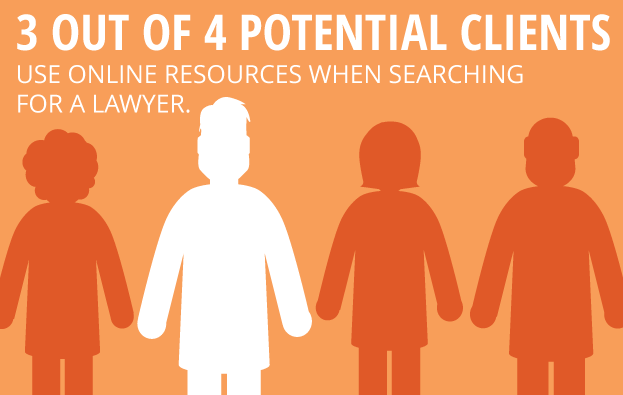
    For many solo practitioners and small law firms just starting out, establishing a consistent client base is the number one priority. In the increasingly competitive land of marketing your law practice, it’s imperative to look beyond the traditional methods such as putting your picture on a billboard, directly contacting potential clients, or simply hanging out your shingle. According to a survey conducted by the Research Intelligence Group, three out of four potential clients use online resources when searching for a lawyer. With that in mind, utilizing a few simple tips can make a huge difference in getting your new law practice found online.

    1511-SI-Newsletter-KG-E-02

    1. Develop and Promote High-Quality Content

    If you’re just in the initial stages of developing your website, it’s wise to keep things simple and focus on quality rather than quantity. For instance, create a few targeted website pages that are written with the potential client in mind, rather than cluttering up your site with an overload of information. Once you have high-quality content in your arsenal, make sure to utilize a social network to promote that content. Also, consider focusing on one social network that you expect will attract the most business, and write timely and substantive posts for that one network.

    LawyerFortunCookie

    2. Create a Blog

    One important way to increase your online visibility and improve your chances of getting to the top of Google’s organic search results is to create a relevant and authoritative blog on your website. A blog is a great way to establish your authority on subjects relevant to your practice while also allowing for the occasional posting of upcoming community events or helpful nonlegal articles. You can also set your blog to automatically post to social media platforms such as Facebook, Twitter, and LinkedIn.

    GavelAndGlobe

    3. Focus on Local

    Think of your potential client base and how you would traditionally market to that group. Getting involved with your community by speaking at regional networking events and participating in local organizations can help establish yourself as a local expert in your field. Internet marketing is another step in that process and can go a long way in bringing in new business. For example, creating consistent profiles across local directories can help you rank higher on Google. Also, consider developing a strategy for gaining local user reviews on websites such as Yelp.

    Starting your own law practice can be daunting, but utilizing these simple tools can make a big impact in helping potential clients find you online.

    Image Sources:

    Lawyer Fortune Cookie

    Gavel and Globe