Blog

  • Join Us in Welcoming Our Newest Team Member!

    We’re thrilled to welcome Emily Borne to Search Influence. Emily joins our team as a Junior Editorial Internet Marketing Associate. Meet the newest member of our team!

    Emily Borne, Junior Editorial Internet Marketing Associate - Search Influence

    Emily Borne – Junior Editorial Internet Marketing Associate

    Growing up in the suburbs of New Orleans, Emily often imagined working in the heart of downtown. Her love of words and language led her to major in English Secondary Education at LSU. Before entering the real world, she worked at Walt Disney World and definitely misses the free park admission. She worked briefly as a middle school English teacher, but she is now happy to call Search Influence home! Emily is a lover of musical theatre, so catch her performing in local productions.

    Welcome to the team, Emily!


  • Five Surefire Signs Your Online Reputation Needs Work

    A bad reputation is terrible for business, and yet online reputations are difficult for many business owners to fully understand—much less control. When a customer is upset in your restaurant or store, it’s relatively easy for a manager to handle the situation in person. Problems with online branding can be harder to detect than an angry patron. A negative online review might feel less urgent than a disgruntled customer screaming at your employees, but that review may be seen by countless potential customers in the future. An unpopular social media presence is a missed opportunity for cost-effective community engagement, and unpopular websites appear lower in search rankings. Learn how to identify the signs of a reputation problem online and protect the future of your brand.

    Thumbs down key on a keyboard - Search Influence

    1. Your Bounce Rate Is High

    We all do it. You visit a website, but it doesn’t have what you wanted, so you return to the search engine and try elsewhere. When your website has a high bounce rate, it means that people aren’t finding what they wanted. Bounce rate issues are insidious because they erode your online reputation with search engines, but they can be caused by a combination of overlapping factors. Low-quality content can drive up a bounce rate, but so can technical details about website formatting.

    Websites that aren’t responsive or mobile-friendly have a high bounce rate because mobile users are unable to access the content. On the other hand, some sites are difficult to navigate on any device because of unclear menu options and poor organization. The text on a page should be clear and helpful, relevant to the topic at hand. If a link about a specific product directs to a landing page with information about the general industry, then users may decide to search elsewhere. The easiest way to address a high bounce rate is to work with a web designer and content creator to improve the user experience.

    2. There’s an Increase in Negative Reviews

    It’s impossible to please everyone, and some customers always seem to find a reason to be disappointed. Nevertheless, a streak of negative reviews can undermine any online reputation. When negative reviews appear, it is important to address the reviewer’s concern within your company. Accept the feedback as an opportunity to prevent a repeat of the same disappointment.

    When the reviewer’s concerns are being addressed, it sometimes makes sense to reply to the review. Make it a brief and professional response to avoid getting entangled in an argument. As quickly as possible, move the discussion out of the public eye, preferably by providing an email address for further correspondence. Many people are more understanding and open to resolution in direct correspondence, but remember that anything you write in email can still be copied into a public forum. Ultimately, any response to negative reviews is an exercise in damage control. The best solution is prevention, providing such a high quality of service that the positive reviews outnumber negative ones.

    3. Your Social Media Engagement Is Lacking

    Social media marketing is a cost-effective way to interact with customers and build your brand awareness. An inactive Facebook page is a missed opportunity for advertising, and so is a mismanaged page. Excessively promotional posts don’t offer value to your audience and can give a negative impression. If none of your recent posts have any likes, shares, or comments, then your audience is not engaged with your message.

    Rather than only promoting your business, use social media to share other kinds of content as well. Share informational posts about recent news and updates relevant to your industry or community. Include frequent posts that aim primarily to elicit engagement, whether they share a cute animal picture or joke. Depending on what’s appropriate for your industry, you can also post a poll asking for people to voice their preference between popular techniques or theories.

    4. Your Website Is Not Authoritative

    Authoritative websites rank higher on Google, but building authority takes time. One of the most reliable methods for building authority is inbound links. When important, trustworthy websites link to your website, it shows search engines that your content is a trustworthy authority on those subjects. In the early days of search engine optimization, you could improve your ranking by posting links to your website in random blog comments and basically spreading the links as many places as possible. Now, algorithms are smart enough to sort out what is authentic, and will not reward those who take shortcuts to improve their ranking.

    To build authority, invest time into quality content that provides useful information to visitors. Accelerate the authority-building process by getting your business (and website) mentioned in newspapers and trade journals, resources that have already established themselves as reliable. Ultimately, a high quality and helpful website will be shared by people organically as a resource. Your authority will grow as visitors share your page with their friends.

    Rotating image of a person's identity - Search Influence

    5. Your Branding Is Inconsistent

    Inconsistent branding isn’t always as obvious as it sounds. Some companies might change their name while keeping the same website, and then it’s obviously important to go through and eliminate all appearances of the old name. On the other hand, many businesses use a shortened version of their full name in casual conversation. It can be tempting to use the shorter name in website content, making the tone friendly and hospitable, but search engines don’t appreciate that your company’s nickname isn’t an altogether different name. If a search engine thinks your business can’t keep its own name straight, then that’s a sign that the content may not be reliable. Avoid using shortened versions of your name, and make sure to proofread when you’re publishing content and adding your business to online directories.

    To protect and improve your online reputation, talk with a digital marketing consultant. The team at Search Influence has experience managing all the key aspects of your brand’s internet presence.

    Images:

    Changing Identity 

  • WordPress vs Google Sites: Why You Should Be Using WordPress

    WordPress is by far the most popular website management system in the world and shows no sign of slowing down at all. What started in 2003 as a PHP and MySQL based open source software has turned into a community of millions of users worldwide that all collaborate to make website management easier and more intuitive. What this means is that all of their site files are available for download at their website for free. Uploading the files to your web server allows you to connect a domain and start using WordPress for your own site. Just one look at this breakdown from Fresh Consulting shows the dominance of WordPress in the CMS market.
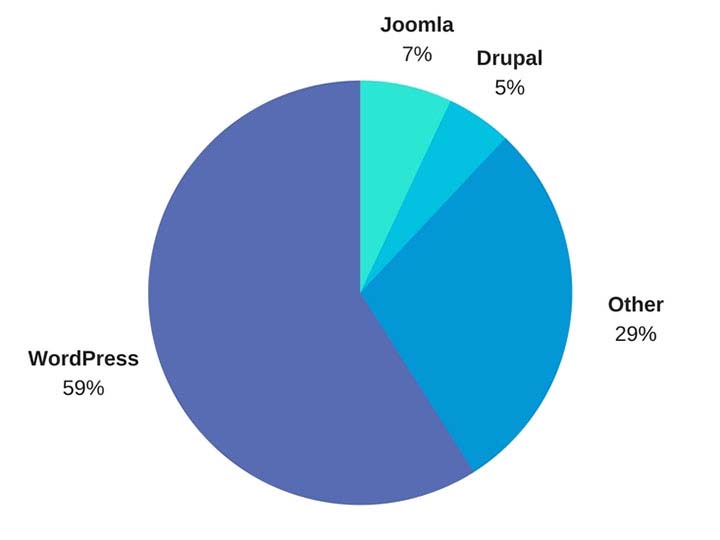
    WordPress Market Share represented in a pie graph - Search Influence

    So Why Should I Use WordPress?

    1. It’s Free

    Well, first and foremost, it’s free. As previously outlined, upload the files to a web server and you can work from there. Immediately cutting down on a business cost at the very beginning is always a bonus.

    1. Constantly Updated Options for Themes and Plug-ins

    In addition to that, it is also an insanely popular open source software, which means that millions of users are creating and updating new themes and plugins to help customize your website experience as both an administrator and for users visiting your website. Did I mention it was free?

    1. Easy to Use Editor

    The ease of use of WordPress is also another big selling point of using this platform. For the non-developers out there, WordPress offers a native “what you see is what you get” (WYSIWIG) editor that is easy to use and gives you complete control of the page.

    1. Media Storage & Access

    It also preserves the capability to all sorts of media such as videos, audio clips, and images and has a very convenient file uploader for non-developers who aren’t using an FTP GUI such as Filezilla. This is a convenient way for developers to upload small batches of files that might not necessarily require connecting directly to the server.

    1. For Developers: Open Source Customization

    For the developers, a completely open source code allows complete customization if desired, and easy access to the template files makes minor edits quick and easy. What this means is that if you do happen to have a developer or developers on your team, they won’t necessarily have to struggle and create workarounds in many situations—all of the code is available to them from the beginning. In addition to that, there is also a bustling community of users that create all sorts of templates and plugins that are all open source as well.

    1. WooCommerce for Ecommerce

    Sure, building and creating a website is one thing, but WordPress also offers the WooCommerce plugin, the world’s most popular E-Commerce platform that currently powers 30 percent of the world’s E-Commerce websites. So if your desire is more on the side of selling goods as opposed to brand awareness, then WordPress has you covered there. WooCommerce is free and comes ready to sell right out of the box with loads of free extensions, including one that provides full Google Analytics integration whether you’re using the standard or enhanced Google Analytics E-Commerce. When configured properly, this extension can show detailed data, such as drop off points in your sales funnel.

    woocommerce logo - Search Influence

    WordPress logo - Search Influence

    1. Search Engine Optimization

    Probably the most important feature of WordPress is the Search Engine Optimization (SEO) is a cinch. So easy that Matt Cutts gave them a shoutout in one of his presentations when he was the head of the Web Spam Team at Google. The easiest way to tackle this solution is by adding a free SEO plugin, such as Yoast SEO or All in One SEO, which gives you complete control over your title tags and meta descriptions. Your developer can also easily implement structured data (the code that creates the answers and fancy cards in Google search results) in JSON-LD, which is Google’s preferred format. It’s worth mentioning that some other CMSs don’t play nice with this code and will strip it from your pages. Optimizing your massive images that you may have taken of your business or product with your fancy DSLR camera is an easy task with a plugin like Smush Image Compression and Optimization to help your site maintain its speed, which is something Google definitely cares about dearly.

    How Does WordPress Compare to Other Content Management Systems?

    1. Flexibility

    The “ease of use” selling point for non-developers was originally one of the main selling points of WordPress, but a lot of other Content Management Systems (CMS) are beginning to catch up in that area. Comparatively speaking, a CMS at face value should have a high level of accessibility for people who don’t necessarily know HTML, CSS, JavaScript, PHP, or any other coding languages that are used online. CMSs such as Wix and SquareSpace have begun to gain a lot of steam in recent years, primarily due to large advertising budgets, but still have yet to catch up to the popularity of WordPress. A large part of the continued success of WordPress is the amount of flexibility it offers.

    1. Open Source Software

    As I stated before, WordPress and all of its code is open source, meaning that it is available to the general public. The platform itself is coded in PHP and MySQL, which allows developers to have a field day, creating beautiful templates and all sorts of cool effects that they want for websites. In addition to that, open source code helps create larger communities of users that can help with any sort of idea that you can think of, rather than having to simply rely on WordPress documentation. This community effort leads to a very expansive forum where WordPress users can oftentimes find the answer to any question they may have or join in and offer some unique solutions that they may have come up with.

    A lot of WordPress critics often parrot that a WordPress site isn’t much fresh out of the box, which I personally find to be very disingenuous. SquareSpace and Wix both have a strong selling point for making beautiful websites, while WordPress users see the Twenty Seventeen theme and more than likely cringe at its visage. However, anyone can navigate to the free themes that WordPress offers. After finding one that you like, implementation takes about 5 minutes and 3 clicks of your mouse. This makes it very easy to dispel the myth of all WordPress sites being ugly.

    How Can Other CMSs Be Problematic?

    Here at Search Influence, I’m on the Web Development team where, in coordination with our Account Management team, I implement our proprietary tracking system and on-site optimizations, in addition to the various other projects that may come along. Here are a few instances I’ve found in which other CMSs can present problems.

    1. No Access to Source Code

    Having access to the source code of a website is imperative for accurate implementation of anything on a website. So, it’s safe to say that I’ve come across quite a few issues with some of WordPress’ competitors, which creates abounding frustrations.

    1. Removal of Custom Coding

    One example that I see a lot involves CMSs that strip schema from their web pages, whether it’s coded in JSON-LD or in the microdata format. With Google being very mobile and local-focused, not being able to add structured data to your website means that you’re probably missing out on having your business showing up on the knowledge graph on the right-hand side of the search results. Another quick example would be CMSs that strip title tags and alt text from images. Google uses alt text to determine what an image is and then possibly add it to its image results. The title tags are used for accessibility purposes on the user end.

    Ron Swanson from Parks and Recreation throwing a computer into a dumpster - Search Influence

    1. Lack of a Community

    WordPress has a technically apt community that is generous with their knowledge. In addition to the 50,000+ plugins available, WordPress.com hosts a forum for users with 40,000+ topic threads. It’s hard to match that level of technically sophisticated users available as a resource.

    1. Faulty Built-in Integrations

    Just recently, I was setting up E-Commerce tracking on a SquareSpace site that was using the SquareSpace store. After some searching that took much longer than it would’ve taken to find the solution in the WordPress community, I found that SquareSpace has Google Analytics E-Commerce tracking integrated into their platform. Seems easy enough—drop in the tracking code and let the data flow like a river. After completing a test purchase, my data populated perfectly and I gave myself a pat on the back and wished the client a great campaign.

    Turns out, the integration was completely busted and stopped tracking. I ended up having to set everything up manually. Also, SquareSpace is a pretty poor platform to setup product data and all the other fancy bells and whistles that can be added via Google Analytics. To top that off, I found that the source of the problem is that their storefront uses the classic Google Analytics code, which was officially discontinued in 2012!

    To the contrary, with a WordPress installation, the WooCommerce plugin and the Google Analytics extension can be added to pull all sorts of fancy data, like product data, cart data, dropoff data, etc. The setup for WooCommerce is very clean, and I haven’t had any issues tracking all of the data or the data mysteriously disappearing on me. Even if you don’t have any experience with a particular plugin, the popular plugins have a slew of documentation written by the creators as well as large communities focused on making sure everything works as intended.

    So How Does One Take Advantage of This Powerful Tool?

    Self-Hosted vs. Hosted Through WordPress.com

    WordPress.com does offer its own hosting service, though I will say a business owner should spring for the “business” plan if they plan on hosting through WordPress.com. If not, I highly recommend self-hosting if there is a developer available. Self-hosting truly unlocks the full potential of WordPress, with the ability to completely customize every single aspect of your website. With server access, the possibilities are nearly limitless. Having an open source code that a developer can harness the power of, a community of millions of innovators to back it, and a level of ease that non-developers can take advantage of makes WordPress, in my opinion, the best CMS currently on the market.

    Choosing a CMS platform while either creating a site or updating your old site is very crucial to the success of the website. Getting looped into a poor CMS and linking your domain to it for a year or more may feel like you are stuck with it until your contract is over. But if it’s costing you business, it may be worth the switching cost!

    We’ve helped many businesses transition to WordPress, sometimes keeping the same general feel of their current site design. If this all seems daunting to you, reach out to us for support. We’ll work with you to figure out the best plan of action. Don’t risk missing out on valuable conversions or leads because of the limitations of a clunky CMS that doesn’t allow you to optimize the potential of your website.

    Images:

    WordPress Market Share

    WooCommerce

    WordPress

    Ron Swanson – Computer Trash

  • Search Influence works to shrink the gender wage gap

    “According to the National Partnership for Women and Families, Louisiana has one of the widest gender pay gaps in America. Women in Louisiana are paid 68 cents for every dollar paid to men, amounting to an annual wage gap of $15,898.”

    Alison Zeringue - Search Influence - WDSU - Shrinking the Gender Pay Gap - February 2018

    A Princeton study that was focused on Denmark finds that the gender pay gap is really more of a “childbearing” pay gap, cited as a “penalty for bearing children.”

    “Because of their traditional role as family caregivers and a lack of flexibility and support from full-time employers, women often feel forced to choose lesser paying positions or to work in lower-paying industries to get the flexibility they need to support their families,” says Alison Zeringue, our Director of Account Management. Alison is part of our 75% female leadership team, and, the mother of a one year old.

    At Search Influence, our compensation strategy, including both our pay and benefits package, is intended to create an equally rewarding and flexible work environment to allow all employees – from entry level positions through senior leadership – to not have to make the choice between being present for their families and maintaining a full-time position. This helps lessen the pay gap as it allows for women to feel more confident in their choice to return to their full-time responsibilities here after maternity leave, knowing that they’ll be supported. We believe this shows in our 74% female company, and, even more so in our leadership team.

    Our local NBC affiliate, WDSU, visited with us last week as well as Anna Mahoney, Ph.D., from Tulane University to dive into this story and learn how it is affecting the workforce, and what our company is doing about it.

    Watch the video here on WDSU’s website: Local company works to shrink the gender wage gap in Louisiana


  • Drive-thru Walmart Pickup opens in former Whitney Bank, powered by online ordering

    A drive-thru only Walmart Pickup is set to open in a former Whitney Bank in Metairie, LA, immediately outside New Orleans. It’s been a somewhat quiet effort that went largely unnoticed until the location appeared as an option on Walmart.com, stating it’s opening today, January 12, 2018, and as the sign finally went up on the building.
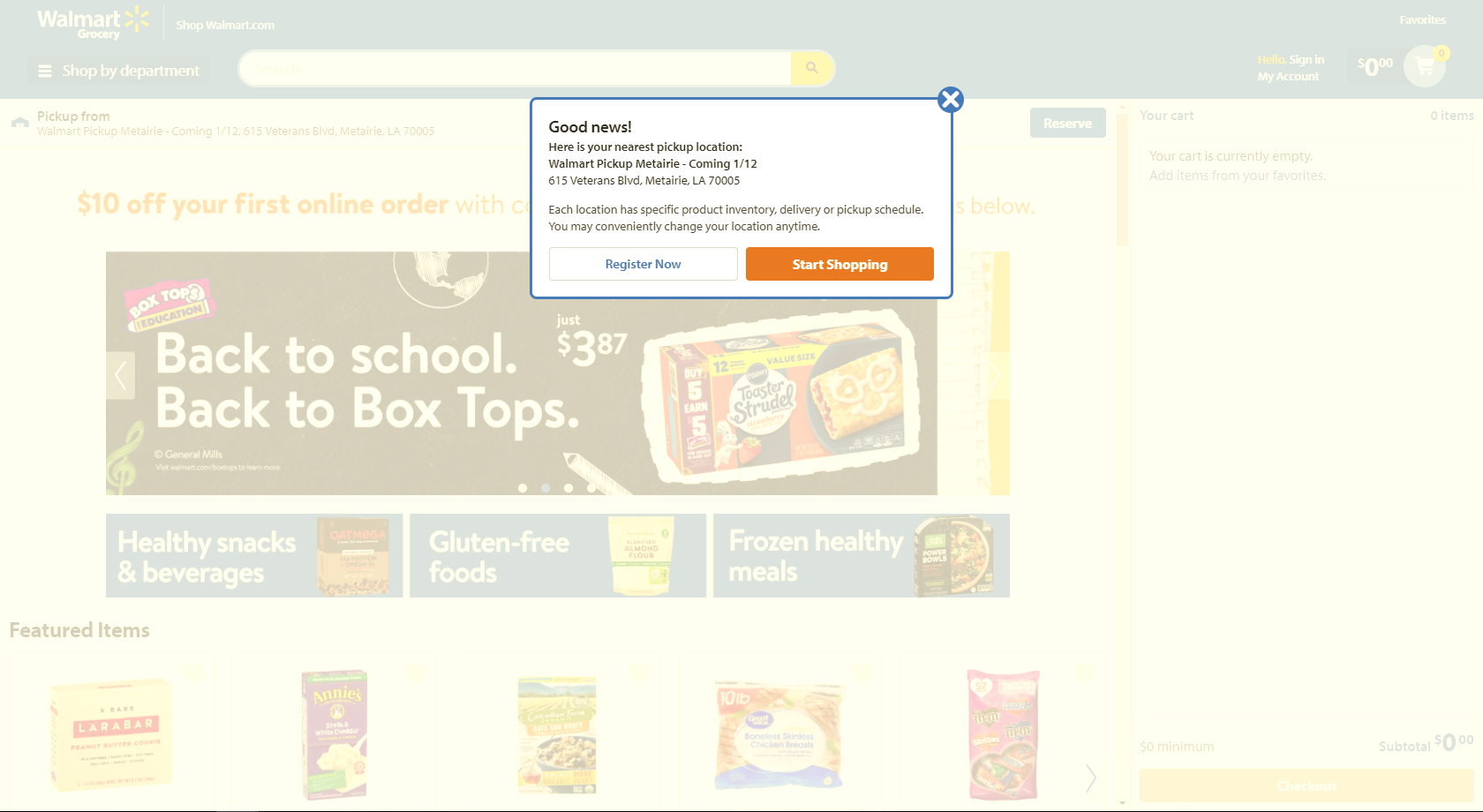
    While many banks have been consolidating locations due to the prominence of online banking, former branches, which of course are conveniently located, present an interesting expansion opportunity for companies like Walmart. This is especially true for the former bank at this site – previously a Whitney Bank location, which is a casualty of the Hancock Whitney merger of 2011, which finally embraced a rebrand and consolidated 20+ locations.

    The drive-thru pickup will be powered by online orders, where, according to a November 2017 Fox8 article, you’ll be able to choose from over 30,000 grocery and toiletry products.

    In 2014, a Forbes article cited this concept as a “head scratcher.” Today, in 2018, this seems like an obvious move for a company competing with Amazon’s incredibly popular free 2-day Prime shipping.

    Why do we care?

    Well, companies like Amazon and Walmart set the standard for the convenience of both online and offline customer experience, to which small and medium sized businesses must pay attention and respond. Many consumers were formerly accustom to calling ahead to a local store or shop to reserve something, and then swing by and pick it up.

    Today, most are looking online first for in-store availability. Stores have begun catering to this convenience to which we have all grown accustom to. A practical example of this comes from Home Malone, a local shop that carries only local artists’ work and goods, advertised an in-store pick up online option this year for the holidays as a way to compete with the ease of online ordering.

    Look forward to a follow up post on ways small and medium sized businesses should be using Amazon and Walmart to improve their customer experience.

  • “Today in” Facebook feed highlights local news and events

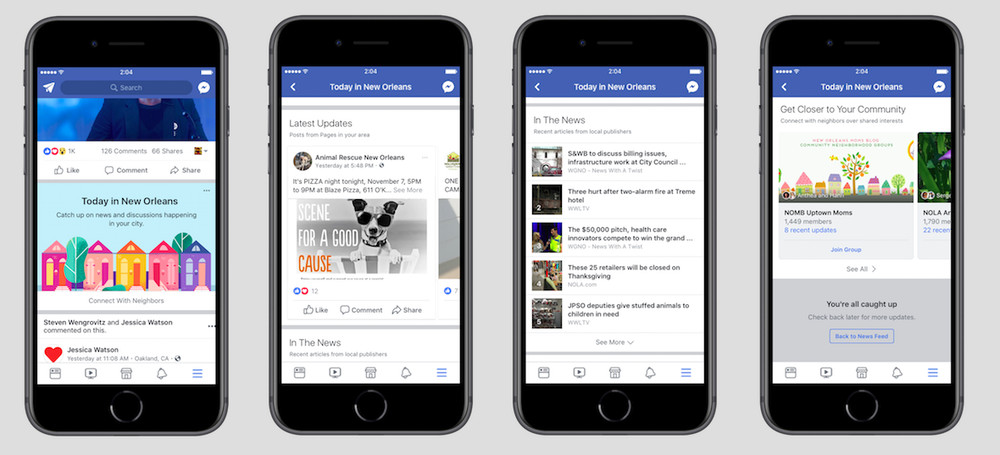
    An image of the new Today In feature that is being tested by Facebook
    Facebook has launched, in a small number of locations, a new “Today in [location]” feed.

    “Today in” will algorithmically identify news and events from the users specified location. For now, the feature is only available in: New Orleans, La.; Little Rock, Ark.; Billings, Mont.; Peoria, Ill.; Olympia, Wash.; and Binghamton, N.Y. It is expected Facebook will roll it out further on successful test of the features.

    Check out a roundup of the major articles I wrote on the LocalU blog.

  • #FreelanceFriday: What Freelancers Need to Know Before, During, and After Doing Their Taxes

    This blog is part of our Freelance Friday series, where we discuss everything and anything related to freelancers. For more freelance information, tips, and trends, follow us on Twitter.

    It’s the end of yet another year. Mixed in with all the holiday celebrations is a sense of closure on the past year and the beginning of a new one. Helping bridge the gap between the old and new is everyone’s favorite time of year–tax season!

    Okay, tax season is probably not most people’s favorite time of the year, but it is an extremely important one nonetheless. Everyone who is gainfully employed–including freelancers–are required to pay taxes. And even though Tax Day isn’t until April, you should start preparing for it now (if you haven’t already).

    Determining Your Income

    Most freelancers work with several companies and/or clients, as well as other jobs and side gigs to make ends meet. Before tax season gets started, it’s important to gather all sources of income so that everything is accounted for and reported. Search your desk, your computer, under the couch, and everywhere else for all the receipts and invoices you accumulated throughout the year.

    Taxes are different for everyone, especially freelancers. Freelancing is a unique job in many ways, including major perks like more freedom and flexibility. So, it should come as no surprise that taxes for freelancers is a little different as well.

    Self-Employment Taxes

    The first major thing that sets freelancer taxes apart is the self-employment tax, which covers Social Security, Medicare, and additional state taxes for individuals who work for themselves. This main part of the self-employment tax comes out to 15.3%. 7.65% covers your share of Social Security and Medicare and another 7.65% for the share an employer would normally pay (though you can deduct all or some of the employer portion). Additional state self-employment taxes vary by location.

    Whereas regular wage earners have these taxes withheld from their paycheck, if your independent freelance business generates more than $400 annually, you have to pay this tax during tax season. It is best to plan ahead and set aside some money throughout the year to cover this obligation. This will keep it present in your mind, alleviate pressure, and help eliminate any surprises year after year.

    Paying Estimated Taxes Quarterly

    Paid periodically throughout the taxable year, estimated taxes are fractional payments of your final year-end tax liability that you ultimately responsible for. The payments are required to be paid by specific dates throughout the year (Apr 15, Jun 15, Sept 15, Jan 15) using specific IRS forms. If you fail to make these payments throughout the year, the IRS will tack on late fees to the total you ultimately owe.

    To accurately determine your estimated tax payments, it is crucial that you keep up-to-date and accurate financial records that will allow you to keep an ongoing calculation of your business’ profits. Knowing your profit in any given quarter will help you determine how much you should pay to the IRS for these quarterly payments.

    If you have a full or part-time job where you receive a W-2, you can likely void paying estimated taxes simply by increasing your withholding at that job.

    Necessary Tax Forms

    The main form you will need depends on what kind of freelancer you are. If you freelance as a side gig or as an established LLC, you will report your income and make payment via your annual Form 1040 individual return.

    If your freelance business is on a larger scale than that–such as a structured multiple-member LLC or a corporation–you will need to file a separate return for your business. For example, a partnership return requires a Form 1065, a C-corp needs a Form 1120, and an S-corp return uses a Form 1120S. No matter what federal form you end up using, make sure you to all get the corresponding state forms as well!

    Next up, is your 1099. If you are paid more than $600 from any one client, they are obligated to send you a Form 1099-MISC. Companies are required to provide contract workers with this form by January 31, so that you have plenty of time between then and Tax Day.

    If your freelance payments are sporadic and/or not your main source of income, you can list them under the “Other Income” section of your main tax return. However, if your work is substantial enough to be considered self-employed, you must report this income on a Schedule C attachment to your tax return.

    Itemize and Record Business Expenses

    One of the advantages of being self-employed and having a 1099 is more flexibility with deductions. The IRS guideline for freelancer tax deductions is that expenses must be ordinary and necessary. A good thing to keep in mind is: if you would have purchased something even if you weren’t running a freelance business, it will likely not qualify for a deduction. And remember to always keep those receipts!

    According to TurboTax, freelancers can write off some expenses for: business-related travel and food (up to 50%), office expenses, and required equipment and supplies, as well as continuing education, certifications, registrations, and licensing fees.

    Close out the Year and Start Prepping for the New One

    Being your own boss means making sure things get done. The biggest part of this is making sure you get paid promptly and accurately. Find out who still owes you money and make sure you get it in time for that year’s taxes.

    Another major responsibility is organization, particularly accurate record keeping. If you are scrambling this tax season and in years before, make a commitment to help yourself throughout the year rather than in just the final weeks. Develop a filing system for receipts and invoices (both paper and digital), create spreadsheets to track all work and payments,

    Ask Questions and Get Help

    Freelancing comes with a lot of perks, but the trade-off is that you have to do your own taxes. It can be difficult, time-consuming, and generally overwhelming. Don’t be afraid to ask for help.

    Certified tax preparers and accountants know what needs to be done and how to do it. Take advantage of the offseason to meet with these professionals, because once tax season gets into full swing by February, March, and April their schedule fills up quickly.

    Images:

    Tax Season

    W-2’s, W-9’s 

    Prince John 

  • Search Influence Welcomes Two New Account Managers

    Search Influence welcomes two new account managers, expanding our team of experts offering personal service and trackable results for our clients.

    Photos of Leslie Williams and Shauntae Joseph - Search Influence

    Leslie Williams – Account Manager

    A New Orleans native, Leslie graduated from Louisiana State University with a Bachelor of Science in Marketing as well as her MBA. Previously, Leslie spent time in sales roles at Nola.com/The Times-Picayune and most recently Cumulus Media. Leslie runs a fashion and lifestyle blog in her free time and is a new mother to 6-month-old Sebastian.

    Shauntae Joseph – Account Manager

    Born and cultivated in New Orleans, Shauntae graduated from LSU with a Bachelor’s Degree in Biological Sciences. After completing her degree, she spent time working in office management and financial analysis. In her spare time (this really doesn’t exist due to her two offspring), Shauntae spreads her light through her personal blog. She is excited to bring her personal and professional glow to the SI Team!

    Welcome to the team, Leslie and Shauntae!

  • Repurpose, Recycle, Reuse: How to Extend the Life of Your Content

    Just as nothing on the internet ever truly dies, how a tweet can survive long past its creation and subsequent deletion, or how a web domain created twenty years ago can still exist, albeit in an updated version of its once pixelated visage, your content should never fade into obscurity.

    Sure, you could let your content sit for months or years unchanged, be it a blog or testimonials page on your main site, but you would be missing out on opportunities to take advantage of the dynamic nature of the internet. The internet is not a rigid landscape—far from it. It’s malleable, adjustable, and constantly changing. Your content should align with this adaptability, too. But, how exactly can you do that? By recycling and repurposing your content, that’s how.

    Image Recycling Paper Bin - Search Influence

    What Is Repurposed Content?

    Once you’ve finished that final line of copy and then published your content to your site or blog, there are many different ways that you can keep going from there. Repurposing content is a way in which you can take existing content that you’ve previously published, and transform it into a different type of format.

    For instance, if you notice that an eBook or long form blog post is either receiving a high number of downloads or page views, then an option exists for repurposing that piece of content into any of the following options:

    • SlideShare
    • Podcast
    • Infographic
    • Webinar
    • How to Guide
    • Q&A
    • White Paper

    The choices are nearly limitless since everyone consumes content in so many different ways. Where someone may love to sit down with a 90-page eBook, others may prefer that information read aloud to them through a video webinar. Stagnant organic traffic is a stat that no marketer likes to see. But sometimes, all your content needs is a little refreshing through the lens of another format, a new spin, or a different light.

    Girl Walking Upside Down - Search Influence

    Chances are you already have some well-performing content on your site. Instead of going through the painstaking process of looking at each one and trying to determine if it merits repurposing, look at your specific metrics. Aaron Agius from LouderOnline recommends page views, time on site, and social engagement. One of the nice things about repurposing your content is that it shouldn’t take you an enormous amount of time to achieve. Blogs can be quickly turned into eBooks or white papers, with minimal re-writing, giving you an entirely new form of content that can draw more views. And as we should all know, by the rule of seven, it can take some time before a buyer is willing to make a firm commitment.

    What Are Some Examples of Repurposed Content?

    Blog → SlideShare
    The team at Copyblogger is known for producing quality content that focuses on writing marketing copy for small and large business alike. They took one blog post by Pamela Wilson, “The 3-Step Journey of a Remarkable Piece of Content,” and transformed it into a SlideShare. As of today, that SlideShare has garnered 42k views. While the original blog post is around 750 words, the SlideShare takes about 30 seconds to consume. It pulls the most pertinent information from that blog and gives it to us in an easy-to-digest format.

    Video → Blog
    The team at Moz is well known for their Whiteboard Friday videos spearheaded by Rand Fishkin. Not only do these videos dive into often-complex SEO strategies in a more easily digestible format, but they’re also distributed as blog posts with transcriptions.

    Repurposing your content can also help to alleviate some of your content scheduling stresses, because most of the work has already been done!

    Recycling Boxes Hanging - Search Influence

    Everybody Loves Recycling

    Recycling content is a great way to make sure your content reaches its fullest potential and greatest audience. Not everyone may have seen that blog you shared a few months ago. If you noticed a large spike in organic traffic after the initial posting and are frustrated with a subsequent drop-off then recycle it. Whereas repurposing involved changing your content into a new format, recycling is fairly straightforward.

    ICYMI: In Case You Missed It
    One way to recycle your content may just be the simplest—share it again through your social channels. This is especially true for evergreen content that will always be useful for your viewership. That being said, it’s not quite that simple. You should never be sharing the exact same social post about a blog as you did a few months ago. Ideally, you’ve made an update or change to the blog, as well as the social post itself. Otherwise, you run the risk of looking like you’re trying to package your old post as something new. When posting, consider including an “in case you missed it” (ICYMI) notifier.

    Update Your Content With New Information

    An example of an updated post that was recycled comes from Search Influence Internet Marketing Team Lead Michelle Neuhoff Boyd. Her blog, “What Happened to Facebook’s 20% Grid Tool?” received an update about three months later with new information.

    Say Goodbye To The Grid Update - Search Influence

    This is a great example of a chance to remind your readers of the value of your content. A week before this update went live, the blog received 74 unique page views. The week following the update, it received 139 page views. Throughout the month of the update, it received 366 page views.

    It also capitalized an important aspect of choosing when to recycle content—trending topics. When this is the case, don’t worry about waiting too long to get your content out there. This ensures that it reaches your viewership when they’re most actively talking about a current trend.

    How’s the Traffic Looking?

    Another way to determine what content you should recycle is by looking at what pages are getting traffic. For example, if you have an old blog that is continuing to get a ton of traffic, consider taking a look at it again to see if it can be updated with relevant industry news or updates. This can take an already well-performing piece of content and extend its life even further.

    These are just a few of the many ways that you can repurpose and recycle your content. With so many different formats for content these days, there are scores of opportunities abound. By paying close attention to the metrics of your content and recycling those that once performed well or repurposing them in fresh, novel ways, you can keep your brand’s voice relevant in the ongoing but ephemeral dialogue that is the internet. Have you experimented with repurposing or recycling your content? We’d love to hear about it in the comments below. We’re also happy to give guidance on directing your content so that it reaches more eyes.


    Image Source:

    Recycling Container

    Girl Upside Down – Photo by Tanja Heffner on Unsplash

    Recyclable Paper Boxes – Photo by Jon Moore on Unsplash

  • Your Website Is Yours—Make Sure You Own It

    Imagine you open your dream business with the perfect name, perfect location, great employees at every level, and a great building to host your perfect products. To finish off the grand opening, you hire an outside contractor to do some work for you and you give them all of your keys and tell them to hold on to them even after the work is done and you never ask for them back. This sounds like a silly mistake that is complete hyperbole that no business owner would ever commit. But sadly, this happens every single day when business owners don’t secure their credentials after outsourcing for website creation. Regardless of whether this action was malicious, careless, or just protocol, you stand to lose a lot and have a giant headache if you don’t have proper control of your website and online presence.

    6 questions to ask your website provider

    If your site has yet to launch and you’re reading this right now, you need to take proactive measures to ensure that you have complete control of your website. When a company creates a website for you, they like to use the companies and resources that they like to use. The glitz and glamor of a slick and pretty website can quickly make a business owner forget to ask for administrative access to their own property. Before signing a contract to have a website created for you, make sure you ask the right questions.

    1. Who is hosting my site?

    There are plenty of hosts across the internet, and knowing which one hosts your site is vital if you need to wrest control of your intellectual property. If you forget which one hosts your site, you can search Domaintools, a free domain lookup resource that can tell you which company hosts your domain, unless you opted to pay to have your information hidden. You should also ensure that your email has its own account and is the primary owner of the hosting service. Even if you pay the contractor to complete the necessary setup for you, there is a chance that they’ll add your site to their list of websites that they own. If your relationship fractures, you’re at their mercy. If the contractor chooses not to release your domain, you might have to find a new domain and site.

    Mark Wahlburg Smashing A Computer - Search Influence

    2. What is my server login information?

    Though this may not be relevant to you directly, if you do decide to use a different company for implementing website content, there is a 100% chance that they will at least request this information. Our web developers here at Search Influence, such as myself, utilize this information to create a staging environment for your website. That way we can add all of our changes without altering the live site or disrupting the flow of your website while we work on it. If you don’t have this information but you are the primary owner of your domain and hosting service, you can contact them to receive this information or retrieve it from the backend.

    3. What is my CMS login?

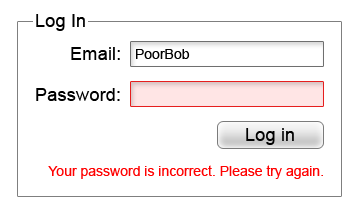
    Incorrect Password Screenshot - Search Influence

    Please—I’m actually begging, please do not sign a contract to purchase a website and not have a login created for yourself where you are the primary owner. With ownership of the CMS, you can easily give another web developer the necessary permissions they need to make any edits to your website. Some website creators may be reluctant to hand this information out or give you the highest level of access since there is the potential to completely take a site down permanently if the user changes some files that are integral for the site to run. Your CMS login may also be called your WordPress, Joomla, Drupal, or Squarespace login.

    4. Do I own my domain name?

    With easy-to-use services such as Namecheap, it is easier than ever to own your own domain even if you don’t plan on building the website yourself. The purchaser of the domain can add it to any profile they so choose. If you don’t have ownership of whatever account the new domain name is attached to, you don’t own your website.

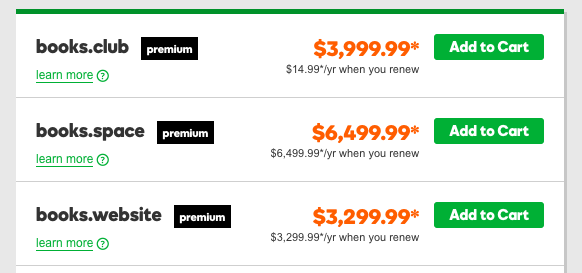
    How Much Popular Sites Go For - Search Influence

    Knowing the potential of how much popular website names can go for, someone that owns your domain can take as much of your money as you’re willing to give them to get it back. Not only that, the likelihood of legal recourse being in your favor is close to none unless you can somehow find a loophole in the contract that is probably ironclad.

    5. Do I own my social media profiles?

    While this doesn’t relate directly to your website itself, this is still in the same vein. Most social media platforms will either have a way to add users as managers on your account, or the company that will handle your online reputation management will have a third party platform that they use to add content to your favorite social media platforms. Facebook, for example, will allow you to add managers to your business account, and managers can write and schedule posts in your steed. As far as social media management platforms are concerned, your social media company will be required to log in, but once will be sufficient unless you decide to change your password. This is very important because the process of re-claiming a social media profile is a very long and drawn out process requiring many different steps of verification. Not my idea of a good time if you ask me.

    6. What about my Google Analytics account?

    Just like everything else outlined here, you will also need to have control of your Google Analytics account. In case you don’t have any tracking on your site, Google Analytics is the popular service offered by Google that allows you to track site visits and a multitude of other metrics. The first rule of Google Analytics is once your historical data is gone, it’s gone forever. If you request Google Analytics to be added to your site for the first time, create the account yourself and then add other users as administrators to take care of the rest. Lunametrics gives a great run down of different views in Google Analytics. At the very least, you should have your own view with completely untouched data, and it should be labeled as such before any marketing company tinkers around with your views.

    Even if you’re past the point of setup, all of these outlined items are necessary to maintain complete control of your website and your online branding. Without it, you could get locked out of your business’ entire online personality. It doesn’t even have to be anything malicious either. Your best friend who is a developer could go on vacation in the Appalachian Mountains and not have access to email. Your nephew who runs your Google Analytics account can get a new phone number and lose access to the Google account and have to wait however long Google decides to verify his identity before you can see the results of your latest paid search campaign.

    If this seems like a huge undertaking, our talented experts at Search Influence have everything you need to get launched properly. In addition to our web development team that is dedicated to the technical performance of your website, every client at Search Influence is assigned a dedicated Account Manager to help you strategize, and even keep your website’s credentials in order. Contact us and request a free digital marketing analysis today.


    Images:

    Mark Wahlberg Computer Smash