Author: Jared Jones

  • Pinterest Rich Pins, a Complete Guide

    Google’s Rich Snippets changed the face of the search game for the better, and now Pinterest has done a very good impression of it—and it is pretty darn good. Pinterest’s Rich Pins are a new feature that allows Pinnable content to display better information to avid Pinners.

    Phoebe from friends stating "Oh my God, you're rich"

    What Is a Rich Pin?

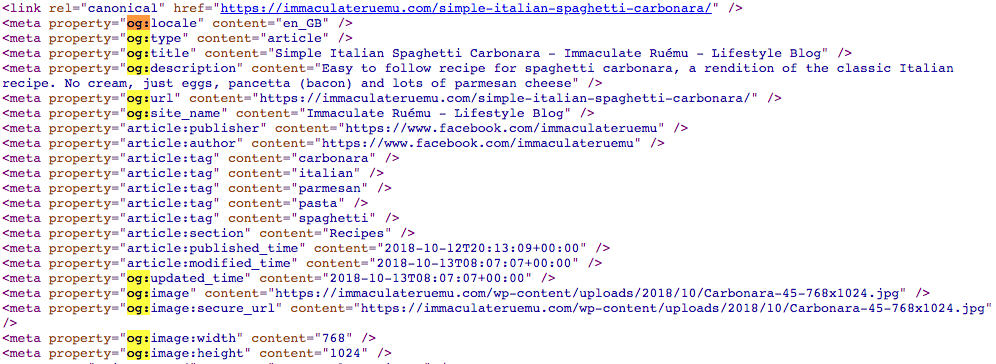
    A Rich Pin differs from normal pins by displaying additional information to users instead of only the pin title. Rich Pins use metadata in accordance with schema.org and the Open Graph Protocol to display this additional information on your pins. Open Graph may sound familiar because it’s what’s already used to display information on social media platforms such as Twitter and Facebook. Pinterest takes this principle a bit further by essentially combining the Open Graph Protocol with Article, Product, and Recipe schema types from schema.org to display detailed rich results on their websites. Below is a comparison of the Carbonara recipe from Immaculate Ruemu and My Gorgeous Recipes.

    Carbonara recipes used as rich pins on Pinterest

    As you’ll see, neither recipe uses guanciale, but I’m willing to forgive Ruemu because of the wealth of rich data that shows up in her Pinterest SERPs.

    How Do You Get a Rich Pin?

    Getting a Rich Pin is as simple as following Pinterest’s official Rich Pin Getting Started Guide, but is also as difficult as following Pinterest’s official Rich Pin Getting Started Guide. The two ways to add structured data to show up in Rich Pins is to use Open Graph Tags in the header of your web page or to use meta tags in the body of your web page. Ruemu opts to add some open graph tags to the head of her recipe pages so that she ends up with Rich Pins whenever she pins to Pinterest.

    Open graph markup example

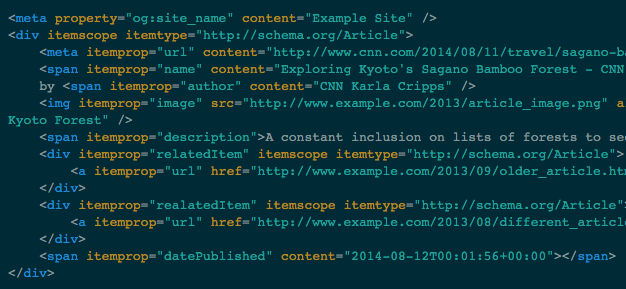
    The alternative to this method is to add meta and span tags to the portions of your content that you want to show up in Rich Pins.

    Example of span tags used for rich pins from Pinterest

    Once the tags are in place on your website, you’ll just need to apply for Rich Pins using Pinterest’s validator, then select what type of markup you used. Though Pinterest does support both methods of markup, one takeaway is that adding markup to the body of your articles, recipes, or pages, generally has to be completed manually and can be very cumbersome to constantly do every time you want to create a new post. A developer has the ability to add Open Graph Tags to the head element of your template files so that this information is served up dynamically and changes to the appropriate content, depending on what is actually being posted. If you don’t have a developer, Search Influence has a full development team capable of implementing detailed and difficult changes to existing websites.

    Another option is to use a WordPress plugin to take care of this for you (if your site uses the WordPress CMS). This does require some research, however; plugins can sometimes be a lot larger than they appear and bloat your site size or even slow it down, in some cases.

    Why Should I Markup My Site?

    Some users may be initially turned off from the idea of Rich Pins since it displays so much information from your site without the user having to visit your site, but as research has shown, Rich Results on Google have a higher CTR and lower bounce rates. While we don’t know exactly why users want to click rich results more, we can see the added authority from a visual standpoint at least. Ruemu’s Carbonara recipe lists all the ingredients, its 5 stars out of 10 review rating, and cook time, all on the Pin itself. So if you’re looking to whip up some Carbonara for dinner, her Pin gives you the high-level information before even clicking through. So when you actually click through, you know that the recipe itself is legit.

    Much like Google’s own Rich Results, Rich Pins don’t actually guarantee higher positional ranking or any of that other jazz. What it does offer is a tangible effect of some backend work on your website that you’ll be able to see on the front end of Pinterest, which has an already proven record of success with users. Keep in mind that Rich Pins are currently only available for recipes, articles, or products. If your website does feature any of these, feel free to enlist Search Influence to assist you in updating your website to efficiently use Pinterest’s Rich Pins.

    Images

    Carbonara

    Carbonaro Pt. 2

    Code 1

  • How Do I Get My Business on Google My Business?

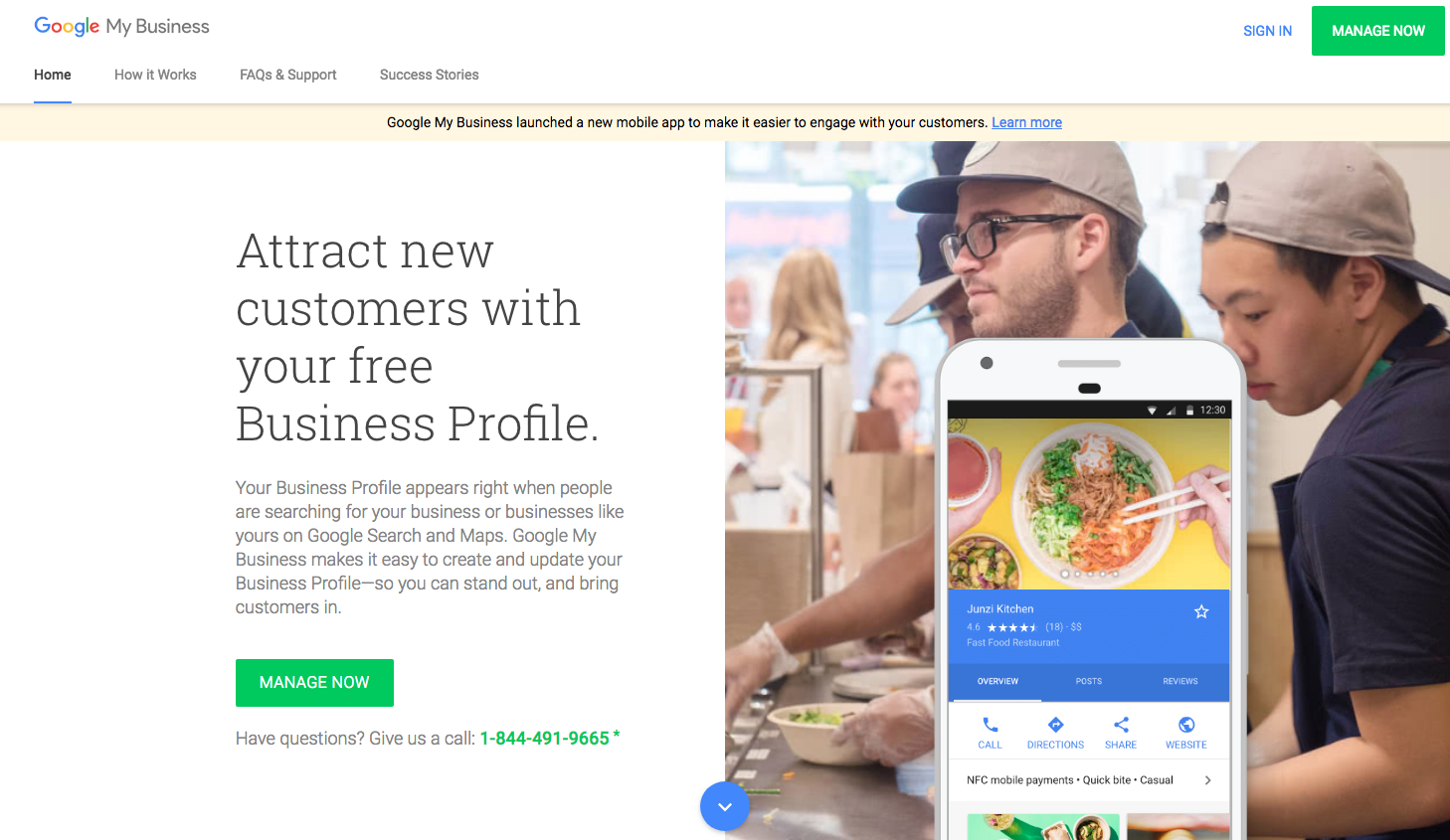
    Homepage of Google my Business on a computer screen at Search Influence in New Orleans, LA

    Google My Business is a free tool offered by Google that lets business owners create a listing for Google Maps and Google Search. Google My Business (GMB) also offers the ability to manage your listing in many ways, but the first step is to get listed. So, how do you get listed on GMB? This step-by-step guide will show you precisely how.

    Add or Claim Your Listing on Google My Business

    1. Go to Google My Business and Click the “Manage Now” Button

    2. Head over to the official Google My Business website. You’ll find the bright green “Manage Now” button in multiple places, but they all lead to the same place. Note that this does require a Google Account to complete, so make sure you have one available that will always be easily accessible.

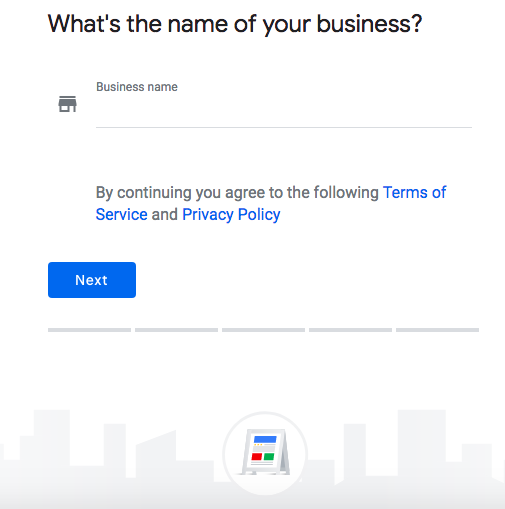
    3. Enter Your Business Name

    4. Enter the name of your business in the box that is presented to you on this page. If your business has already been claimed and verified, you’ll receive a notice that will instruct you to use the recovery email address to get access to the listing. If not, you’ll enter your address on the next screen; the option to hide your address for service area businesses is in this step as well.

      Screenshot of Google My Business page on a computer screen at Search Influence in New Orleans, LA

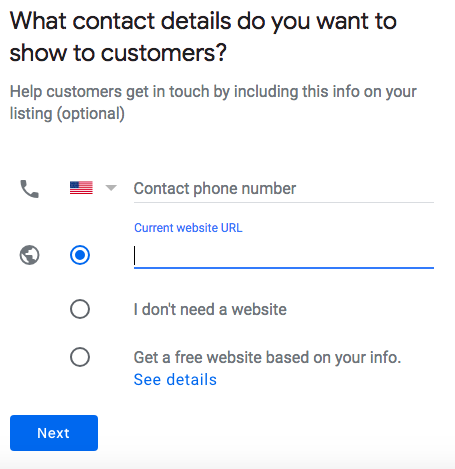
    5. Add Contact Information

    6. A potential customer doesn’t have much value if they can’t contact your business. Entering your phone number and website will display it on your GMB listing. You’ll also enter your address here. Be aware, Google will not allow any P.O. boxes for business addresses. Don’t worry if you own a service area business and don’t want to have that information displayed all across the internet; you can choose not to display your address.

      Contact info page of Google My Business on a computer screen at Search Influence in New Orleans, LA

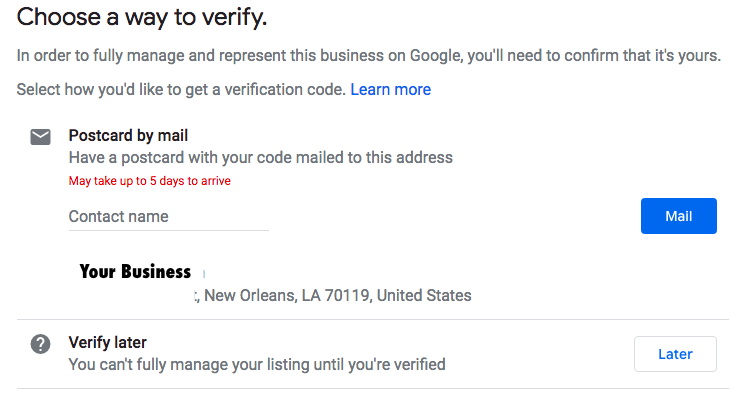
    7. Verify Your Business

    8. After clicking finish, you’ll be taken to a screen to verify your business listing. The most common verification method is through the mail. Google will send a postcard to the address that was entered for the listing to verify that it actually exists at the location that was added to the GMB platform. Once a millennia (internet time of course), Google decides that a simple phone call is enough to verify a listing. The chances of this happening are very rare, so make sure to keep an eye on your mailbox!

      Postcard verification page of Google My Business on a computer screen at Search Influence in New Orleans, LA

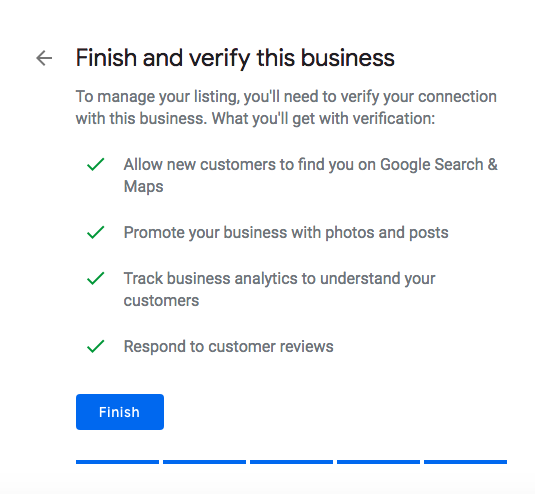
    9. Confirm Your Business

    10. After verifying your business, you’ll just have to confirm your business details one last time, and you now have a shiny new Google My Business listing! Now that all of your information is verified and confirmed, your listing will show up in Google Maps and in Google Search whenever it matches a relevant search query.

      Screenshot on a computer screen of a Google My Business page at Search Influence in New Orleans, LA

    What Can I Do With Google My Business?

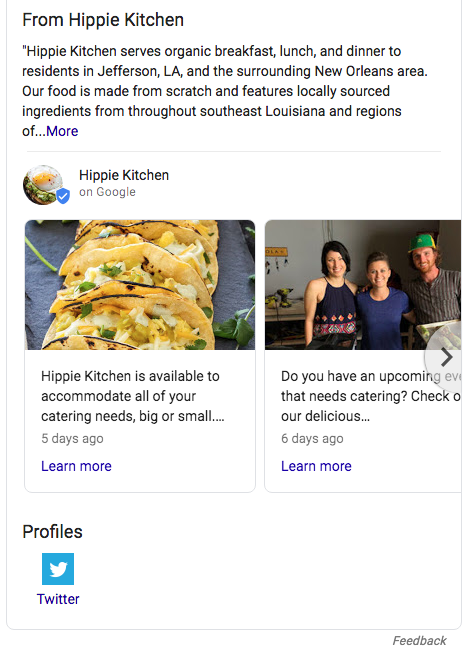
    Admittedly, verification is only the first step of your GMB journey. In addition to the visibility that it provides you on Google Maps and in Google Search, Google My Business allows you to interact directly with users. The first way is by posting on Google My Business. Users can “follow” your business on Google Maps, which allows them to view posts on their mobile device. These posts also show up in Google Search results. You can add a call to action that gives users a direct way to interact with your business when discovering your posts.

    Example of a post on a Google My Business page at Search Influence in New Orleans, LA

    Optimizing your profile is another customizable feature of GMB. You can add a menu, add a service area if you service more than your storefront, add product listings, ensure that you have the most accurate categories associated with your business, add photos, and much, much more. There is a GMB mobile app that also lets you manage on the go while at work or while working on vacation, as some people like to do. It gives you some very thorough metrics like top search queries, calls from your listing, website clicks from your listing, how many direction requests you receive from Google Maps, and a suite of other features. All this may sound like a lot, and it is. Managing your online presence can be tough, but Search Influence does offer local SEO services that cover every corner of Google My Business.
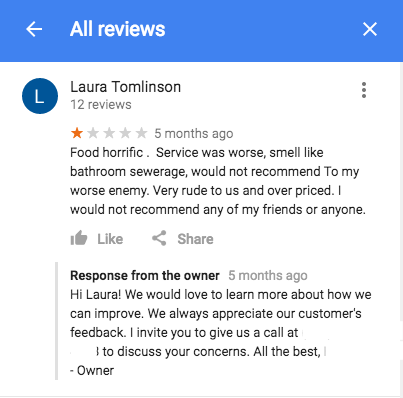
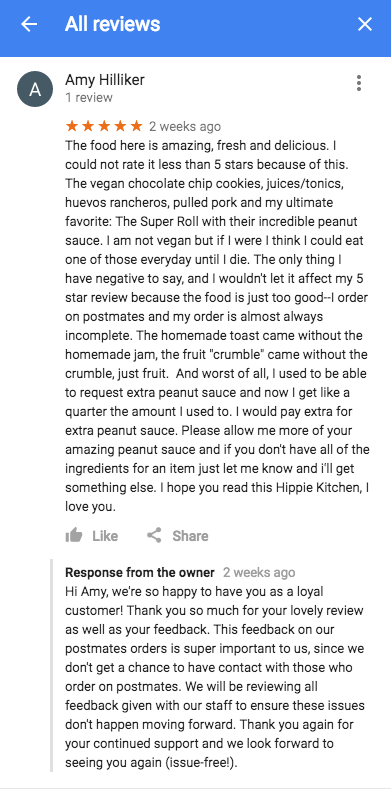
    Another bonus is that the strength in Google My Business’s signals for significant local search relevance was increased just from having a GMB listing. Once your business starts to receive some reviews, for better or for worse, this also improves your local presence. Even if a review is not favorable, it does provide a good opportunity to reach out to dissatisfied customers in a professional and public manner. Having a high rating with a large number of reviews is definitely something that looks good to people who find your business while searching on Google.

    Example of a bad user review on a Google My Business listing at Search Influence in New Orleans, LA

    Example of a user review on a Google My Business listing at Search Influence in New Orleans, LA

    Google My Business is essential to any business attempting to optimize their local SEO, which should be almost every small business. With a whole suite of services, this platform has progressed light years from the old Google+ Local and will only continue to grow. At Search Influence, we set up and manage GMB accounts for countless clients and continue to follow and track best practices. Don’t wait to take advantage of this free service! Get in touch with us for your local SEO needs and explore our complete digital marketing services.

  • Gutenberg Has Arrived–Are You Ready?

    WordPress 5.0 has been officially released as of Thursday after many delays and false starts. Are you ready for this new editor? Short answer: probably not.

    WordPress logo - Search Influence

    A New WYSIWYG Editor From WordPress

    WordPress 5.0 replaces the old native text editor with its new “What You See Is What You Get” editor called Gutenberg in reference to the inventor of the printing press. This allows users to create content blocks for images, text, videos, and a slew of other elements that they would want to add to a site. At face value, this sounds great since almost every other modern day CMS offers this functionality. This is definitely a step in the right direction for WordPress. They’ve always touted themselves as being a platform that caters to both developers and content publishers, but the standard text editor was never really enough for someone without some coding experience to publish anything aside from text. Gutenberg promises to streamline this process for non-developers creating websites.

    This update is not without flaws, however. If you check the WordPress GitHub, there are currently 285 bugs as of writing this and nearly 1400 issues total! As with any major release, bugs abound, but Matt Mullenweg reports that 5.0 is still stable enough for an official release. In addition to the bugs that have already been reported, an overhaul of the editor itself does run the risk of causing some issue on your website. Depending on whether or not you have a custom template, a plugin used for editing such as Visual Composer, and how your content is laid out on your pages will affect the transition to Gutenberg.

    Classic Editor Plugin Isn’t Going Anywhere Anytime Soon

    There is some good news here though. WordPress has already released the Classic Editor, which can be installed before upgrading to version 5.0. This plugin will not only maintain the Classic Editor we all know and love, but it will also hide references to both Gutenberg and updating to it. The best part about the Classic Editor is that it will be supported until 2022, so you won’t have to worry about Gutenberg until then. With the feature to hide the references to Gutenberg, you won’t have to worry about someone else who may use your site activating it and causing chaos on your site.

    If you do decide to try out Gutenberg, it is highly recommended that you create a full backup of your site and test out compatibility in a demo environment of your site. Once you’ve concluded that Gutenberg is compatible with all of your plugins and theme features, you can feel somewhat safe attempting to upgrade. In all likelihood, themes and plugins that relied on the classic editor, will probably not work that well with Gutenberg.

    So, before you update to WordPress 5.0, make sure you install the Classic Editor Plugin or you will default to Gutenberg, which has the potential to wreak havoc on custom templates and some plugins that haven’t been kept up in a timely manner. In addition to this, like many WordPress updates, there are likely to be some bugs lying about so maybe waiting until it’s a bit more stable would be a good idea. Need some assistance updating to 5.0? Our development team at Search Influence can help. Fill out the form to the right, or give us a call at 504-208-3900.

    Images:

    Yass

  • How to Drive Conversions With the Right Contact Form—And What to Avoid

    Your business’ shiny new website just launched and everyone assumed a deluge of fresh new leads would follow. To everyone’s dismay, the predicted deluge turns out to be nothing more than just a trickle. What gives exactly? “Build it and they will come” may ring true with your traffic itself but that quote lacks an “and convert” at the end. In years past, traffic was the key metric for a lot of businesses since it was assumed that those users would appreciate the brand awareness. Fast forward to the present day in the “Silicon Age” where users not converting is sure to set your business behind further than the Bronze Age.

    One easy way to convert users into customers is through the usage of a handy-dandy online form, but just having a form doesn’t guarantee a conversion rate anywhere near your industry benchmark. I’m here to help bolster those forms from some boxes into lead machines!

    Positioning

    Back when there were only brick and mortar buildings, there was always a huge focus on location, location, location. That phrase may seem like it belongs in the Bronze Age, but it instead adapted to the changing times and is still just as important as it was before. The location of your form is integral to the success of any lead collection campaign. Forms should always be placed in a very obvious place and above the fold, which is the portion of a page that initially loads in the screen’s viewport, as often as possible. Having a form in a good location puts it on users’ minds as soon as they visit your website and makes it more convenient to convert. Overlaying the form over a banner image is a good start for more visibility.

    Another excellent location for your form is on the sidebar of your site. This allows casual site perusers to convert at their own leisure instead of forcing them to a contact page or trying to lead them back to whatever landing page they entered the site within. One last location for a form is on your contact page, of course. Any site user would expect a way to contact your business on the contact page. In addition to an address, phone number, or email, a contact form is a perfect way to capture visitors’ information and nurture leads to eventually becoming loyal customers of your business.

    Layout

    Now that you’ve figured out where to place your form, the next step is to create a form that users can easily understand, fill out, and convert on. One big helper that was pointed out in a Google AI test is how users’ eyes focus on form fields. Having your labels above the inside of form fields is preferable to labels next to the form fields. This allows users to better scan the information and breeze through forms quicker, which leads to lower rates of dropout and errors in fields. Speaking of fields, try not to overwhelm your users with a bunch of unnecessary fields for information that can be gathered further down the line. If you aren’t shipping something to someone, why would you require a home address? If you’re sending users a brochure via email, why would you require a phone number? Requiring an excess of information makes users go “hmm…” and abandon the website completely. This is not to say that long forms have no place on the internet, rather every bit of information should be relative to the call to action.

    Here at Search Influence, we use our own proprietary lead tracking system to create fully customizable and extremely flexible forms that can keep track of your website leads in an easy-to-read reporting system. With our forms, you’ll know where your leads come from the most and learn how to optimize your campaigns to maximize your lead generation.

    Call-to-Action

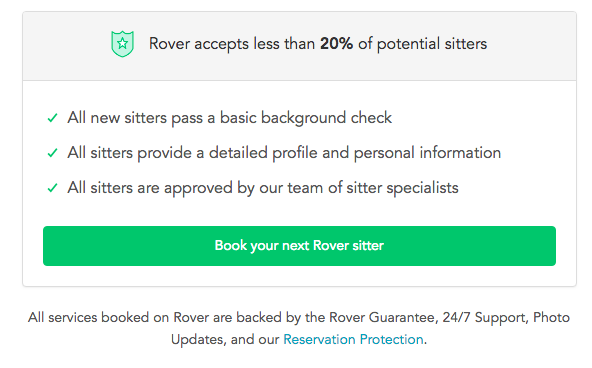
    A “Call-to-Action” (CTA) refers to the phrase that is meant to draw users into completing conversions. In the case of forms specifically, this would be the text that is on the submit button. Hubspot compiled a list of 31 Call-to-Action examples taken from many different corners of the internet and from varying industries. The main takeaway here is your CTA needs to be catchy and draw a user in. “Submit,” which may be seen fairly often around the internet, doesn’t quite cut it anymore. The end of a form should establish some sort of value to a user. Saying “Submit” simply tells the user that you’ll gladly collect their information and may or may not do anything with it.

    Screen shot of a call to action from Rover - Search Influence

    Having detailed text on the CTA button encourages users that your form is something worthwhile whether they’re about to “Subscribe to our newsletter” or Rover.com‘s “Book your next Rover sitter.” Users want to know the value of giving up their precious personal data, so make sure your form is honest and straightforward with how the users’ data will be used.

    Mobile

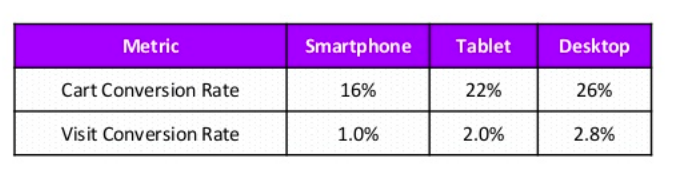
    One factor that can’t be ignored is the impact of mobile users on your website. Considering mobile users surpassed the amount of desktop traffic almost two years ago—eons in internet time—ignoring mobile users is a recipe for failure. What’s even more surprising is that in the same year, even though there were more mobile visits to websites worldwide, mobile users converted almost 65% less than desktop users according to the 2016 Adobe Mobile Retail Report.

    Table of mobile conversion rates - Search Influence

    Our advantage here is that this data is like, eons old. We’ve progressed since then and have become more accustomed to serving mobile users and Google even recognizes the efforts that developers put in to make their websites mobile friendly and adjusted their search to index mobile sites first. This coupled with the rising magnitude of mobile traffic means that being able to capture leads efficiently on mobile platforms is imperative for any campaign.

    At Search Influence, we have everything you need to start a lead generating campaign, from SEO services, digital advertising, social media management, and the capability to track your campaign with pinpoint accuracy. We also practice what we preach; check out the form in the sidebar if you don’t believe us.

  • Google to Roll Out Chrome 68 Security Update

    Google to Roll Out Chrome 68 Security Update

    Is your website safe from google's not secure warning - Search Influence

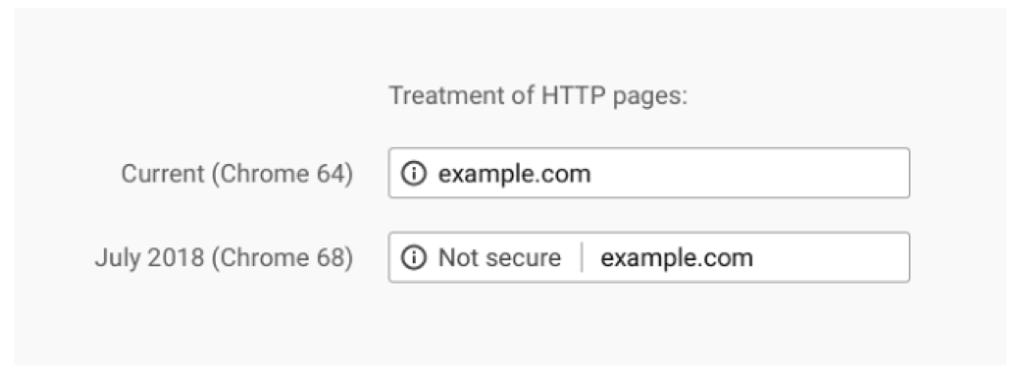
    After years and years of warning, the time is finally upon us. In July 2018, Google Chrome will release its 68th version, which will, for the first time, clearly mark sites that do not have SSL certificates as “Not Secure” in the address bar.

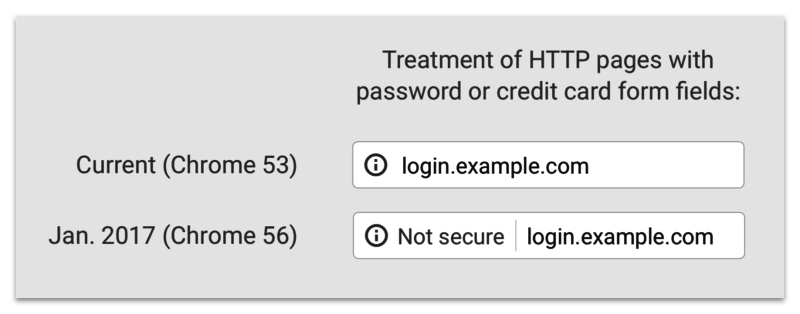
    Previously, a small exclamation point encased in a circle would be included with these websites, but now, the actual words will appear next to the web address to add a bit more shock value to the lack of the SSL certificate. The screenshot below from Google’s Security Blog shows the stark difference that we’ll see once Chrome updates this summer.

    Treatment of HTTP pages image - Search Influence

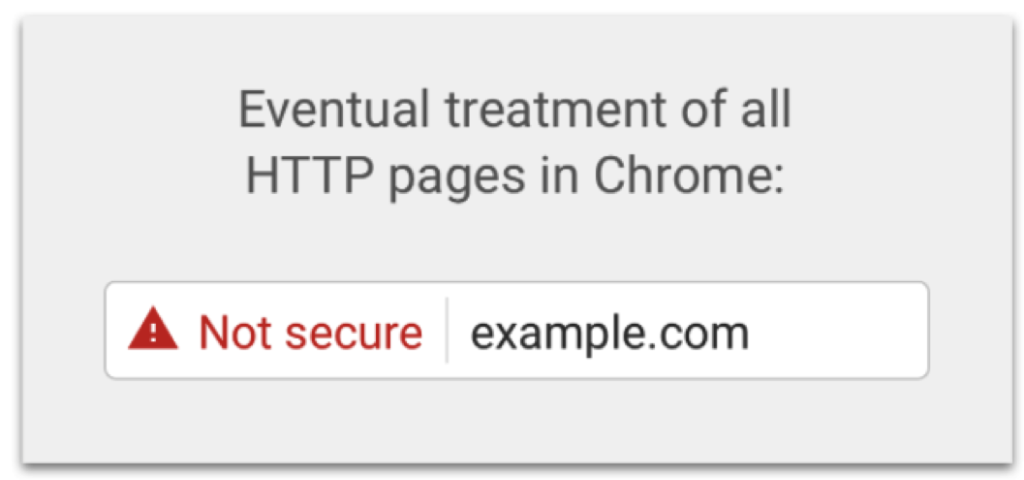
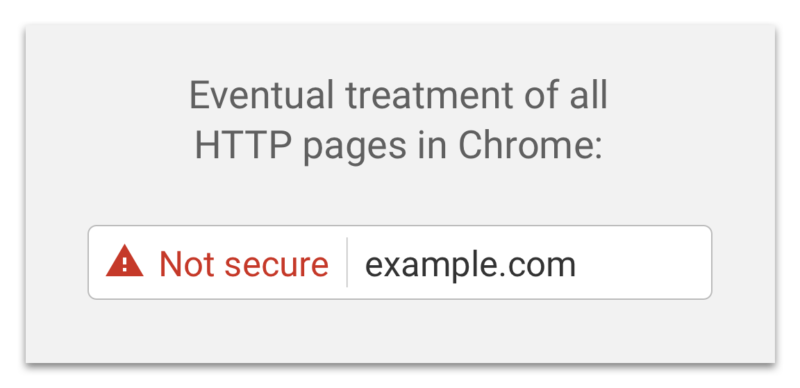
    If that isn’t enough to have you change to https, Google has also revealed an “eventual” timeline for non-https websites to have this even more threatening alert in the address bar:

    Eventual treatment of all HTTP pages in Chrome graphic - Search Influence

    Waiting until the last minute to update your site is a recipe for disaster. Updating your site to https isn’t as easy as flipping a switch, and some technical knowledge is required to help it go off without a hitch.

    To learn more about the switch from HTTP to HTTPs, check out our blog The Final Countdown: Secure Your Website to Align With Google’s Update to Chrome, or contact us for help in the transition.

  • Marketing Basics for Animal and Pet Influencers

    Pictures of animals are consistent crowd-pleasers on the internet. Unlike content that’s favored by certain demographics, kittens and puppies (or baby animals of any variety) are universally appreciated by just about all age groups and political alignments. Animals can even be educational, like our cats that explained Google Analytics. Still, with all the competition out there, effective influencer marketing requires more than a cute nose and furry belly. Learn how to make the most of your pet’s presence on social media platforms like Instagram, and how this strategy can even help bigger organizations like zoos engage with their audience.

    1. Keep a Leash on Your Branding

    Once you have a clever name that encapsulates the animal’s personality, decide whether you are aiming for funny, artistic, or educational content. Rather than following every trend and impulse, stick to consistent types of posts. If you have a quality camera and understand the basic rules of composition in photography, then your artistic approach might capture your pet in the best possible light. On the other hand, if your pet is constantly getting into trouble, then documenting messes and misadventures will keep followers entertained. Adapt your strategy to the starring animal’s strengths, and watch which images get the biggest reactions.

    2. Use Captions, Hashtags, & Locations

    Picture captions reward viewers for spending time with each image, and hashtags are a critical part of Instagram and Twitter communities. Creative hashtags add humor, and they’re an opportunity to link your pet’s profile to similar pages or topics. Link your pet to pages with the same breed and the same region. Depending on the size of your town, you can make your city or state part of your pet’s profile, including pictures of your pet at local landmarks. Don’t forget to use Instagram’s location tagging to let users know where your photos were taken. Instagram’s geo-tagging feature makes it really easy to select a nearby location based on your GPS location. And, posts with a location receive 79% more engagement than those without.

    3. Find Your Animal’s Photogenic Side

    If you’re serious about pet marketing, then you’ll need to post nearly every day to keep your audience engaged. Don’t forget to use the “Stories” feature for video updates and behind-the-scenes snippets, and you can even highlight stories in the bio for your pet’s account. On Instagram, your pet’s profile pic should be an endearing headshot that works well as a circular thumbnail. It should be close enough to nearly fill the available space, but it shouldn’t be so close that your pet is hard to identify. A background of a contrasting color is helpful. It also helps if your animal has a distinctive appearance, but an engaging personality is even better. Maru the cat is the Guinness world record holder as the most watched animal on YouTube, and he’s most popular for his awkwardly persistent attempts to fit into tiny boxes.

    4. Make Your Furry Friend a Brand Ambassador

    Zoo animals and business mascots are popular, and they make organizations more relatable. Inundated with advertisements and marketing campaigns, most customers are suspicious of salespeople. Even when a business representative is friendly and helpful, the potential customers are waiting for the sales pitch. A labrador mascot might be motivated by attention and food, but his wagging tail disarms even the most cynical viewer. The customers who meet your cat or dog at the office will appreciate being able to share their antics with friends. Rather than using your furry friend to promote your business, connect them to the values and causes that align with your mission. For a zoo, this could be spreading the word about endangered animals or sharing fun facts about the animal.

    5. Choose a Unique Animal

    Zoos and businesses looking for mascots have a wide range of options. A unique species, like an orangutan or llama, makes it easier to stand above the herd. If you already have a personal pet or a dog that regularly comes to the office, then there’s no need to shop for something more exotic. When it comes to animal ownership, it would be irresponsible to get an animal that you don’t have the time or resources to keep for the duration of its life. Businesses in need of a mascot might be able to sponsor an animal at the zoo or find someone in the community who already owns a unique animal. If you’re working with a dog or cat, just try to find the qualities that make your pet unique. Browse through successful pages like Mannie the Frenchie, and you’ll see what it takes to become “the world’s most followed bulldog.”

    6. Avoid Overtly Promotional Posts

    After they reach a certain level of popularity, the owners of influencer pets are often contacted by businesses looking to sell and promote products. Freebies might be offered in exchange for promotional posts showing or mentioning the product. Some owners will be happy accepting free swag, but their more ambitious peers will hold out for paid sponsorship deals. When profiles advertise for every company that sends free swag, they risk alienating their fanbase. The same trap is possible with business mascots that always seem to announce sales and products. Your fans would prefer to see cute pictures, rather than constant sales pitches.

    7. Socialize With Others

    Especially when you’re first getting started, it’s a good idea to seek out profiles with a similar style. First, you’ll need to have a few pictures to establish your brand. Then, you can interact with posts and pages that feature the same breed or deploy a similar sense of humor. That way, people who follow the other page are more likely to notice that there’s a new dog on the scene. With luck, you might even get likes and shares from the leaders in the pack. If you’re still getting the hang of Instagram and other social media platforms, then following successful pages will provide inspiration for how to make the most of the site.

    Developing and curating an animal’s social media channels can require a significant investment of time. It’s important to learn about the community and determine what kind of niche your content can fill. It’s even more important to have fun, both because it makes your enthusiasm infectious, and it helps you avoid producing stale content. If you’re not already familiar with online communities like YouTube and Facebook, consider contracting a company to handle your social media management. Search Influence provides a variety of digital marketing and SEO consulting services.

    We’d be happy to help you design a strategy to effectively promote and strengthen your brand’s presence and following online. Pet influencers are a great alternative to more conventional marketing techniques, and animal content reaches across a diverse spectrum of communities online. Contact the team at Search Influence to get an assessment of your online presence, and we can help you become top dog in your chosen field.

    Images:

    Dog With Shades

    Maru the Cat

  • WordPress vs Google Sites: Why You Should Be Using WordPress

    WordPress is by far the most popular website management system in the world and shows no sign of slowing down at all. What started in 2003 as a PHP and MySQL based open source software has turned into a community of millions of users worldwide that all collaborate to make website management easier and more intuitive. What this means is that all of their site files are available for download at their website for free. Uploading the files to your web server allows you to connect a domain and start using WordPress for your own site. Just one look at this breakdown from Fresh Consulting shows the dominance of WordPress in the CMS market.
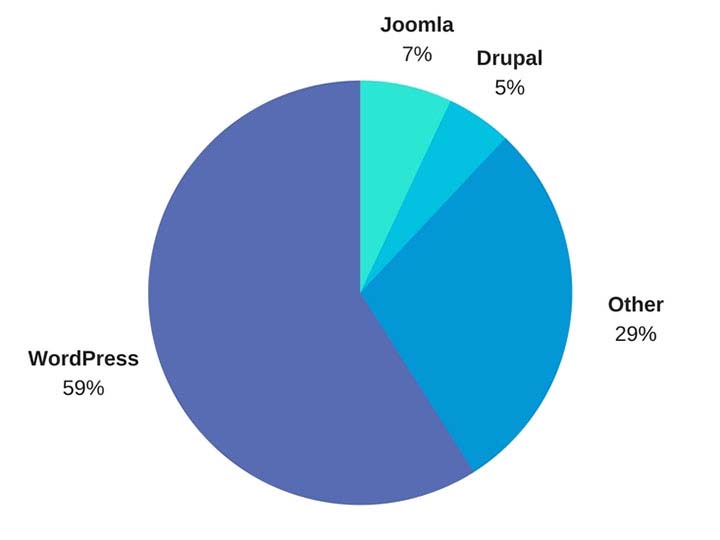
    WordPress Market Share represented in a pie graph - Search Influence

    So Why Should I Use WordPress?

    1. It’s Free

    Well, first and foremost, it’s free. As previously outlined, upload the files to a web server and you can work from there. Immediately cutting down on a business cost at the very beginning is always a bonus.

    1. Constantly Updated Options for Themes and Plug-ins

    In addition to that, it is also an insanely popular open source software, which means that millions of users are creating and updating new themes and plugins to help customize your website experience as both an administrator and for users visiting your website. Did I mention it was free?

    1. Easy to Use Editor

    The ease of use of WordPress is also another big selling point of using this platform. For the non-developers out there, WordPress offers a native “what you see is what you get” (WYSIWIG) editor that is easy to use and gives you complete control of the page.

    1. Media Storage & Access

    It also preserves the capability to all sorts of media such as videos, audio clips, and images and has a very convenient file uploader for non-developers who aren’t using an FTP GUI such as Filezilla. This is a convenient way for developers to upload small batches of files that might not necessarily require connecting directly to the server.

    1. For Developers: Open Source Customization

    For the developers, a completely open source code allows complete customization if desired, and easy access to the template files makes minor edits quick and easy. What this means is that if you do happen to have a developer or developers on your team, they won’t necessarily have to struggle and create workarounds in many situations—all of the code is available to them from the beginning. In addition to that, there is also a bustling community of users that create all sorts of templates and plugins that are all open source as well.

    1. WooCommerce for Ecommerce

    Sure, building and creating a website is one thing, but WordPress also offers the WooCommerce plugin, the world’s most popular E-Commerce platform that currently powers 30 percent of the world’s E-Commerce websites. So if your desire is more on the side of selling goods as opposed to brand awareness, then WordPress has you covered there. WooCommerce is free and comes ready to sell right out of the box with loads of free extensions, including one that provides full Google Analytics integration whether you’re using the standard or enhanced Google Analytics E-Commerce. When configured properly, this extension can show detailed data, such as drop off points in your sales funnel.

    woocommerce logo - Search Influence

    WordPress logo - Search Influence

    1. Search Engine Optimization

    Probably the most important feature of WordPress is the Search Engine Optimization (SEO) is a cinch. So easy that Matt Cutts gave them a shoutout in one of his presentations when he was the head of the Web Spam Team at Google. The easiest way to tackle this solution is by adding a free SEO plugin, such as Yoast SEO or All in One SEO, which gives you complete control over your title tags and meta descriptions. Your developer can also easily implement structured data (the code that creates the answers and fancy cards in Google search results) in JSON-LD, which is Google’s preferred format. It’s worth mentioning that some other CMSs don’t play nice with this code and will strip it from your pages. Optimizing your massive images that you may have taken of your business or product with your fancy DSLR camera is an easy task with a plugin like Smush Image Compression and Optimization to help your site maintain its speed, which is something Google definitely cares about dearly.

    How Does WordPress Compare to Other Content Management Systems?

    1. Flexibility

    The “ease of use” selling point for non-developers was originally one of the main selling points of WordPress, but a lot of other Content Management Systems (CMS) are beginning to catch up in that area. Comparatively speaking, a CMS at face value should have a high level of accessibility for people who don’t necessarily know HTML, CSS, JavaScript, PHP, or any other coding languages that are used online. CMSs such as Wix and SquareSpace have begun to gain a lot of steam in recent years, primarily due to large advertising budgets, but still have yet to catch up to the popularity of WordPress. A large part of the continued success of WordPress is the amount of flexibility it offers.

    1. Open Source Software

    As I stated before, WordPress and all of its code is open source, meaning that it is available to the general public. The platform itself is coded in PHP and MySQL, which allows developers to have a field day, creating beautiful templates and all sorts of cool effects that they want for websites. In addition to that, open source code helps create larger communities of users that can help with any sort of idea that you can think of, rather than having to simply rely on WordPress documentation. This community effort leads to a very expansive forum where WordPress users can oftentimes find the answer to any question they may have or join in and offer some unique solutions that they may have come up with.

    A lot of WordPress critics often parrot that a WordPress site isn’t much fresh out of the box, which I personally find to be very disingenuous. SquareSpace and Wix both have a strong selling point for making beautiful websites, while WordPress users see the Twenty Seventeen theme and more than likely cringe at its visage. However, anyone can navigate to the free themes that WordPress offers. After finding one that you like, implementation takes about 5 minutes and 3 clicks of your mouse. This makes it very easy to dispel the myth of all WordPress sites being ugly.

    How Can Other CMSs Be Problematic?

    Here at Search Influence, I’m on the Web Development team where, in coordination with our Account Management team, I implement our proprietary tracking system and on-site optimizations, in addition to the various other projects that may come along. Here are a few instances I’ve found in which other CMSs can present problems.

    1. No Access to Source Code

    Having access to the source code of a website is imperative for accurate implementation of anything on a website. So, it’s safe to say that I’ve come across quite a few issues with some of WordPress’ competitors, which creates abounding frustrations.

    1. Removal of Custom Coding

    One example that I see a lot involves CMSs that strip schema from their web pages, whether it’s coded in JSON-LD or in the microdata format. With Google being very mobile and local-focused, not being able to add structured data to your website means that you’re probably missing out on having your business showing up on the knowledge graph on the right-hand side of the search results. Another quick example would be CMSs that strip title tags and alt text from images. Google uses alt text to determine what an image is and then possibly add it to its image results. The title tags are used for accessibility purposes on the user end.

    Ron Swanson from Parks and Recreation throwing a computer into a dumpster - Search Influence

    1. Lack of a Community

    WordPress has a technically apt community that is generous with their knowledge. In addition to the 50,000+ plugins available, WordPress.com hosts a forum for users with 40,000+ topic threads. It’s hard to match that level of technically sophisticated users available as a resource.

    1. Faulty Built-in Integrations

    Just recently, I was setting up E-Commerce tracking on a SquareSpace site that was using the SquareSpace store. After some searching that took much longer than it would’ve taken to find the solution in the WordPress community, I found that SquareSpace has Google Analytics E-Commerce tracking integrated into their platform. Seems easy enough—drop in the tracking code and let the data flow like a river. After completing a test purchase, my data populated perfectly and I gave myself a pat on the back and wished the client a great campaign.

    Turns out, the integration was completely busted and stopped tracking. I ended up having to set everything up manually. Also, SquareSpace is a pretty poor platform to setup product data and all the other fancy bells and whistles that can be added via Google Analytics. To top that off, I found that the source of the problem is that their storefront uses the classic Google Analytics code, which was officially discontinued in 2012!

    To the contrary, with a WordPress installation, the WooCommerce plugin and the Google Analytics extension can be added to pull all sorts of fancy data, like product data, cart data, dropoff data, etc. The setup for WooCommerce is very clean, and I haven’t had any issues tracking all of the data or the data mysteriously disappearing on me. Even if you don’t have any experience with a particular plugin, the popular plugins have a slew of documentation written by the creators as well as large communities focused on making sure everything works as intended.

    So How Does One Take Advantage of This Powerful Tool?

    Self-Hosted vs. Hosted Through WordPress.com

    WordPress.com does offer its own hosting service, though I will say a business owner should spring for the “business” plan if they plan on hosting through WordPress.com. If not, I highly recommend self-hosting if there is a developer available. Self-hosting truly unlocks the full potential of WordPress, with the ability to completely customize every single aspect of your website. With server access, the possibilities are nearly limitless. Having an open source code that a developer can harness the power of, a community of millions of innovators to back it, and a level of ease that non-developers can take advantage of makes WordPress, in my opinion, the best CMS currently on the market.

    Choosing a CMS platform while either creating a site or updating your old site is very crucial to the success of the website. Getting looped into a poor CMS and linking your domain to it for a year or more may feel like you are stuck with it until your contract is over. But if it’s costing you business, it may be worth the switching cost!

    We’ve helped many businesses transition to WordPress, sometimes keeping the same general feel of their current site design. If this all seems daunting to you, reach out to us for support. We’ll work with you to figure out the best plan of action. Don’t risk missing out on valuable conversions or leads because of the limitations of a clunky CMS that doesn’t allow you to optimize the potential of your website.

    Images:

    WordPress Market Share

    WooCommerce

    WordPress

    Ron Swanson – Computer Trash

  • Your Website Is Yours—Make Sure You Own It

    Imagine you open your dream business with the perfect name, perfect location, great employees at every level, and a great building to host your perfect products. To finish off the grand opening, you hire an outside contractor to do some work for you and you give them all of your keys and tell them to hold on to them even after the work is done and you never ask for them back. This sounds like a silly mistake that is complete hyperbole that no business owner would ever commit. But sadly, this happens every single day when business owners don’t secure their credentials after outsourcing for website creation. Regardless of whether this action was malicious, careless, or just protocol, you stand to lose a lot and have a giant headache if you don’t have proper control of your website and online presence.

    6 questions to ask your website provider

    If your site has yet to launch and you’re reading this right now, you need to take proactive measures to ensure that you have complete control of your website. When a company creates a website for you, they like to use the companies and resources that they like to use. The glitz and glamor of a slick and pretty website can quickly make a business owner forget to ask for administrative access to their own property. Before signing a contract to have a website created for you, make sure you ask the right questions.

    1. Who is hosting my site?

    There are plenty of hosts across the internet, and knowing which one hosts your site is vital if you need to wrest control of your intellectual property. If you forget which one hosts your site, you can search Domaintools, a free domain lookup resource that can tell you which company hosts your domain, unless you opted to pay to have your information hidden. You should also ensure that your email has its own account and is the primary owner of the hosting service. Even if you pay the contractor to complete the necessary setup for you, there is a chance that they’ll add your site to their list of websites that they own. If your relationship fractures, you’re at their mercy. If the contractor chooses not to release your domain, you might have to find a new domain and site.

    Mark Wahlburg Smashing A Computer - Search Influence

    2. What is my server login information?

    Though this may not be relevant to you directly, if you do decide to use a different company for implementing website content, there is a 100% chance that they will at least request this information. Our web developers here at Search Influence, such as myself, utilize this information to create a staging environment for your website. That way we can add all of our changes without altering the live site or disrupting the flow of your website while we work on it. If you don’t have this information but you are the primary owner of your domain and hosting service, you can contact them to receive this information or retrieve it from the backend.

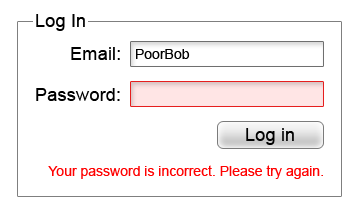
    3. What is my CMS login?

    Incorrect Password Screenshot - Search Influence

    Please—I’m actually begging, please do not sign a contract to purchase a website and not have a login created for yourself where you are the primary owner. With ownership of the CMS, you can easily give another web developer the necessary permissions they need to make any edits to your website. Some website creators may be reluctant to hand this information out or give you the highest level of access since there is the potential to completely take a site down permanently if the user changes some files that are integral for the site to run. Your CMS login may also be called your WordPress, Joomla, Drupal, or Squarespace login.

    4. Do I own my domain name?

    With easy-to-use services such as Namecheap, it is easier than ever to own your own domain even if you don’t plan on building the website yourself. The purchaser of the domain can add it to any profile they so choose. If you don’t have ownership of whatever account the new domain name is attached to, you don’t own your website.

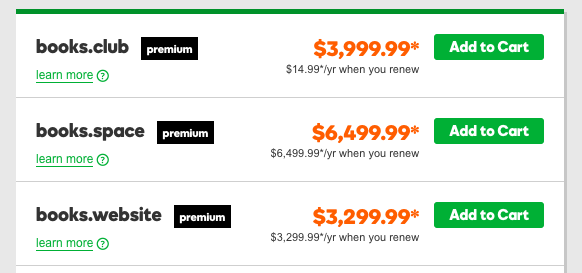
    How Much Popular Sites Go For - Search Influence

    Knowing the potential of how much popular website names can go for, someone that owns your domain can take as much of your money as you’re willing to give them to get it back. Not only that, the likelihood of legal recourse being in your favor is close to none unless you can somehow find a loophole in the contract that is probably ironclad.

    5. Do I own my social media profiles?

    While this doesn’t relate directly to your website itself, this is still in the same vein. Most social media platforms will either have a way to add users as managers on your account, or the company that will handle your online reputation management will have a third party platform that they use to add content to your favorite social media platforms. Facebook, for example, will allow you to add managers to your business account, and managers can write and schedule posts in your steed. As far as social media management platforms are concerned, your social media company will be required to log in, but once will be sufficient unless you decide to change your password. This is very important because the process of re-claiming a social media profile is a very long and drawn out process requiring many different steps of verification. Not my idea of a good time if you ask me.

    6. What about my Google Analytics account?

    Just like everything else outlined here, you will also need to have control of your Google Analytics account. In case you don’t have any tracking on your site, Google Analytics is the popular service offered by Google that allows you to track site visits and a multitude of other metrics. The first rule of Google Analytics is once your historical data is gone, it’s gone forever. If you request Google Analytics to be added to your site for the first time, create the account yourself and then add other users as administrators to take care of the rest. Lunametrics gives a great run down of different views in Google Analytics. At the very least, you should have your own view with completely untouched data, and it should be labeled as such before any marketing company tinkers around with your views.

    Even if you’re past the point of setup, all of these outlined items are necessary to maintain complete control of your website and your online branding. Without it, you could get locked out of your business’ entire online personality. It doesn’t even have to be anything malicious either. Your best friend who is a developer could go on vacation in the Appalachian Mountains and not have access to email. Your nephew who runs your Google Analytics account can get a new phone number and lose access to the Google account and have to wait however long Google decides to verify his identity before you can see the results of your latest paid search campaign.

    If this seems like a huge undertaking, our talented experts at Search Influence have everything you need to get launched properly. In addition to our web development team that is dedicated to the technical performance of your website, every client at Search Influence is assigned a dedicated Account Manager to help you strategize, and even keep your website’s credentials in order. Contact us and request a free digital marketing analysis today.


    Images:

    Mark Wahlberg Computer Smash

  • Security! This Site Isn’t Safe! What Will Google Do About It?

    Business is booming, leads are pouring in from your homepage form, and it seems that the direction of your company couldn’t be brighter. Then your leads seem to stop in the tracks and business slows down considerably. What could’ve happened? Your landing pages and main site call to action are perfect for getting users to fill in forms. Then, as you peruse your site, you notice something new, and now one of your greatest assets is your greatest foe.

    Google and The Internet

    I’m sure everyone here is familiar with the fact that Google got its start as a search engine and is now the most popular. After conquering the way people search, Google decided that it was time to innovate how people browse the internet itself. In September of 2008, Google Chrome was released in its beta format. This new web browser boasted being integrated with Google technologies and quickly put a foothold into the internet browser market. Now that Google controls a majority of the internet browser market share, their next big move is about to launch—security.

    Internet and Privacy

    The internet has come a long way since my childhood days of signing into AIM over a 14.4K dial-up modem. Now, I play League of Legends (yes I am using them as my example) with my gaming rig linked directly to my cable modem with a T1 cable that provides download speeds of at least 150mbps. With this rapid transfer of information constantly happening, one has to worry about the downsides, right? Right? Most of us don’t think about the downsides, but Google has thought of this for us. Back in January of this year, Google released its first major security update from the scope of usability.

    Image Screenshot of Google's first security update - Search Influence

    Previously, a lowercase “i” was displayed in the address bar and could be clicked to display more information about the particular web page including the security of your connection, how many cookies the page uses, and a plethora of other tidbits of information. Now, whenever you enter a password or a credit card number on a site that isn’t secure, a handy message pops up to indicate that your connection to the website is not secure.

    So What Exactly Is a “Secure” Site?

    A website that doesn’t have an SSL Certificate installed transmits all data as plain text. Meaning, if I type my name “Jared” or my email address, or even “281-330-8004” into a field on an http website and send it to the server, it will be sent and saved on the server as plain text. What this means is that any vulnerability that is exploited in one of these sites would hold a nice, tasty database of personal information for would-be attackers to exploit. Sites with https servers work a bit differently. Your computer and the secure site initiate what is commonly referred to as the “SSL Handshake” to confirm that it is trustworthy. The https sends its SSL Certificate over to prove that it is a source that can be trusted. Any information shared over this connection is encrypted, which means that even if an attacker is able to procure a database of information that doesn’t belong to him, it will be encrypted and unable to be read.

    And This Has to Do With Google How?

    At Search Influence, it is our duty to know Google as well as we know ourselves. Through various means, we keep tabs on Google and exactly what this robot and its creators are really up to. In our findings, we’ve discovered that Google is about to shake up the internet. On October 1st, Google Chrome will receive a security update that will change how it displays sites that are not secure.

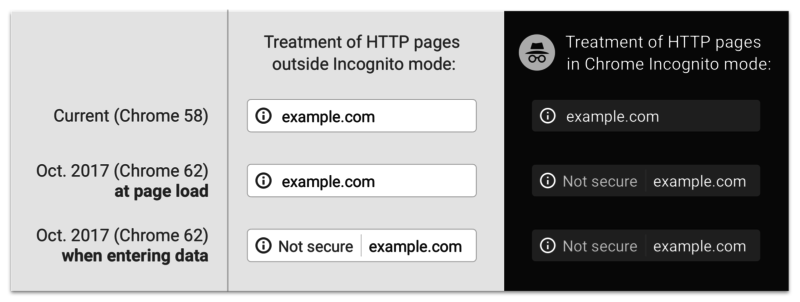
    Screenshot image of Google's past, present, and future "not secure" notifications - Search Influence

    The graphic above displays past, present, and future versions of Chrome. As you can see, the “not secure” notification in the address bar will not only display on password and credit card form fills, but on **ANY** form fill. Google is using its bots to track down any <input type=”x”> elements on your page and flagging them according to the notice that webmasters received in Google Search Console.

    That Doesn’t Seem THAT Bad

    If you feel this way, I’m personally inclined to agree with you. Most of my online purchases and passwords are already behind secure sites like Amazon and the like. If some hacker gets my email or my alternate email, why would I care? Well, if you think like me, there will be an eventual rude awakening. Google has already announced that it plans on marking all non-secure sites with a nasty red triangle and red text reading “not secure” in the address bar (see below).

    Screenshot of Google's "not secure" warning - Search Influence

    That tiny addition to the address bar may not cause a slowdown in form submissions on October 1st, but in the future, when that beautiful red triangle and glorious red text appear next to your web address, I’m sure people will think twice before submitting their personal information to your website. There’s no need to panic about this quite yet; Google hasn’t announced an official time of release for that update and, luckily, they’ve given us ample time to comply.

    Will This Slow My Site Down?

    Barely. Previously, this was an issue with https websites sometimes taking a half a second longer to load, but in this day and age, technological advances have reduced this slowdown time to a few milliseconds. If you do migrate your site to a secure server and notice significant slowdowns, it more than likely means that your site isn’t optimized for a secure server. Cloudflare has an in-depth article about bolstering your site’s configurations to improve speed after migration. The benefit of a visual that proves your site is secure is definitely worth the cost of a negligible increase in load time.

    In addition to migrating your website to a secure server, some auxiliary tasks must be completed to ensure your search rankings aren’t affected. Here at Search Influence, we know that your business is very important to you. Contact us for help ensuring your website is safe and secure for your visitors.

    If you want some more information about Google’s push for secure sites, check out the talk below by Emily Schechter, Google’s own Security Project Manager.

  • Gotta Go Fast! The Impact of Page Speed on Your Rankings

    “We have so much time and so little to do. Strike that, reverse it.”

    Roald Dahl, Charlie and the Chocolate Factory

    That may be a bit dramatic, but time is extremely important. In the digital age where a lot of people barely have the time to stop and say hello unless it was explicitly planned out in their schedule, a slow site can easily get lost in the abyss that is known as the internet. Though the forever relevant Bill Gates quote “content is king” should echo through anyone with a website, there are other factors that can make or break you as well. The best content in the world means nothing if no one sees it. If a tree falls in the woods and no one is around to hear, it does not make a sound; it makes vibrations that will never be converted into sound by ears. If a website has amazing content but a Page Speed as slow as molasses, does anyone ever read it? Probably not.

    How Optimized and Fast Page Speed can Bring in More Customers

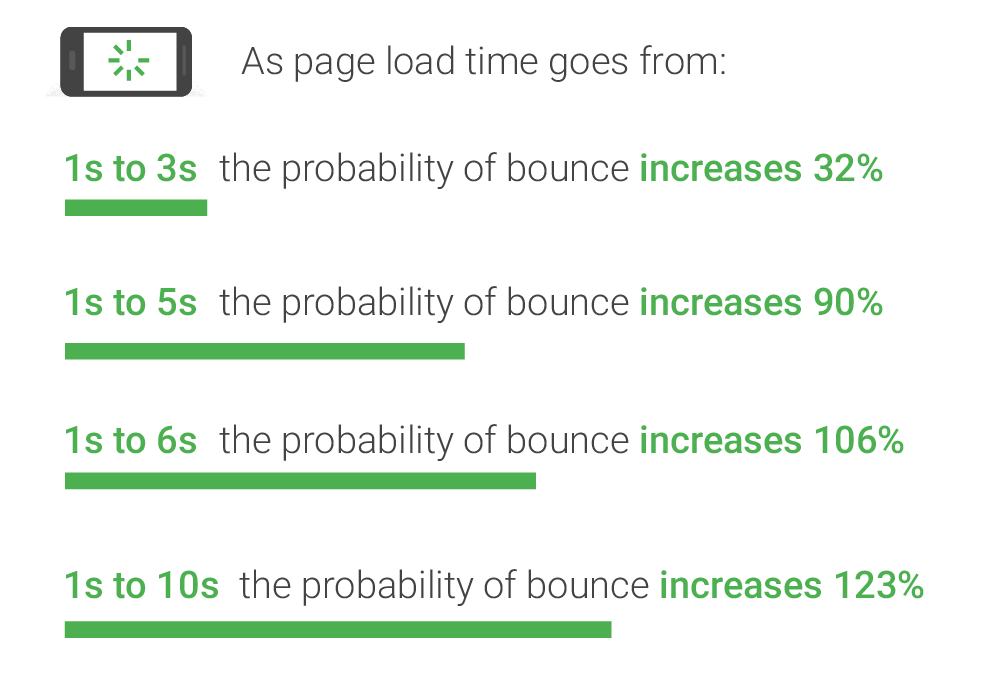
    As you may (or may not) have guessed, page speed is the amount of time it takes for your website to load. On the surface, slow page speed will turn visitors and potential conversions away from your site simply based on the fact that they can’t “use” it, per se. But surely someone would wait 7 seconds to view your homepage or interesting product, right? No. Straight from the source, Daniel An from Google provides this handy chart on the correlation of page speed and bounce rates:

    Image of bounce ratio percentages relative to page load time - Search Influence

    As you can see, if your page takes longer than one second to load, you may see a bounce, which is when a user leaves your site after viewing only one page. The bounce risk increases dramatically the longer it takes for your site to load. This stat doesn’t just apply to your home page either—these statistics will affect every single page on your website. Imagine running an online shop and having someone abandon an order because it takes their cart too long to load. Having engaging content is only half the battle; it has to be seen and digested for it to maximize its potential.

    Page Speed from the SEO Point of View

    From an SEO standpoint, Page Speed has a two-pronged effect on the ranking of your website. Back in 2010 (which is literally forever in internet time), Google spilled the beans on speed having a direct effect on the rankings of websites and encouraged everyone to analyze their page speed to ensure their pages were loading in a timely fashion. Looking at complex Content Management Systems that automatically add mountains of bloat to every single page you publish, it doesn’t seem like many people heeded the warning of Google.

    Image of a snail using a rocket to go fast - Search Influence

    From an indirect standpoint, Page Speed can have an impact on your website’s speed in relation to the crawl speed. Google’s web crawler has an allotted amount of time that it likes to spend crawling a website. Faster loading pages mean that Google’s web crawler can crawl the page faster and move on to the next one, which can lead to more of your pages being indexed. Mix that up with some spicy content and you’ve got a great stew going that can lead to increased Search Engine Rankings!

    Tips for What Website Owners Can Do to Improve

    I personally like to think of Google as the tough love parents that will always steer you in the correct direction, give you the tools to succeed, but punish you if you stray from the light. With that said, Google gives the entire internet a handy tool to test the speed of their website. My favorite online game, League of Legends, will be the topic of example for this go round. After running their URL through Google’s PageSpeed Insights tool, a score is given for both the desktop (61/100, Poor) and mobile (40/100, Poor) versions (it defaults to mobile speed, perhaps because mobile users are using the internet more than desktop users now) along with some details on how to fix the issues and exactly which files are causing the issues. An alternative to Google’s own tool (because we want to show our parents we can succeed our own way) is the Pingdom Website Speed Test. From my experience using both of these tools to compose Site Audits for our clients, Pingdom does give some more in depth information. For instance, the main reason for the League of Legends website taking so long to load is a video (listed below) that has to load twice before the website is considered to be loaded.

    Screenshot of video load time - Search Influence

    This video took over 17 seconds to load. Now for a website such as League of Legends that has the clout of millions of gamers fiending to see the details of the next character being released or an overview of the latest patch notes, these 17 seconds are no big deal. However, if your website was discovered by someone using the Google search “boutique new orleans,” that may be a different story, especially if they’re on the other end of our historic Magazine Street. They may have thought about venturing to your end of Magazine Street had they seen the flashy new “romphims” that your store was offering. Unfortunately for your shop, Magazine Street is loaded with boutiques, and potential customers may just tire themselves out on the other end instead of planning their Magazine Street romp around your boutique.

    Don’t fret, a lot of these fixes aren’t all that difficult to fix, so here are a few common fixes.

    1. Leverage Browser Caching: This fix allows some files on your site to be saved on a user’s local computer so that the next time they visit your site, they won’t have to be downloaded again. In addition to increasing Page Speed, it also lessens the stress on your server.
    2. Optimize Images: This fix involves formatting and compressing your images, which will drastically reduce their size.
    3. Minify CSS: Minifying your CSS is removing spaces, removing line breaks, and combining elements that have the exact styling to reduce the size of your CSS files (yes, even spaces increase the size of your files). You could do it yourself or use a tool such as CSS Minifier to do it for you, but make sure you test it before you completely remove your old CSS.
    4. Minify JavaScript: If you read the previous fix, you can guess what this section is about, just replace styling with functions and that’s the gist of it. JSCompress can take care of this for you.
    5. Enable compression: Using gzip to compress your resources allows them to transfer over the server quicker, which leads to faster page load speeds.

    These fixes are a great way to start pushing your Page Speed close to preferred industry benchmarks and are also among the easiest to implement. There are many more metrics that can be improved as well, but don’t fear—head to Google PageSpeed Insights and plug in your own URL to see how you fare and what you can do to improve. League of Legends has a team of web experts to make sure that even though their videos take close to 17 seconds to load, the rest of their site renders much faster. Here at Search Influence, we also have a team of web experts that are able to analyze and implement fixes to your website to improve its performance and rankings.

    The Importance of Mobile Page Speed Benchmarks

    As revealed in an article earlier in this blog, in November of 2016, the number of mobile and tablet internet users surpassed desktop internet users. This adds increased importance on your website’s mobile speed. With a society that is ever on the go, having a high level of accessibility and a mobile friendly website is considered a necessity for every business. A slow mobile site has a large chance of sending business elsewhere.

    An important addition to keep in mind is the impending rollout of Google’s “mobile-first index,” which should be rolled out soon according to Google and industry experts. This index will reportedly factor mobile content at a higher priority than desktop content. Though all details have not been made public as of yet since Google likes to release this info intermittently after the fact, mobile website speed will probably be one of the factors that are taken into account.

    With cell phones and tablets becoming more powerful and useful in everyday life, it is imperative that your website is optimized to be viewed on mobile if you want any hope of making a splash in the sea that we call the internet. No matter how powerful the receiving device is, there will always be the limiting factor of how quickly files can be transferred across the server. The simplest solution is to ensure that your website is optimized to make it as easy as possible to ford the data transfer river.

    If that sounds like a scary thought, feel free to reach out to the experts at Search Influence. We will gladly take the stress out of it and add you to the list of our many satisfied customers that continue to use our services year after year.

    Images:

    Bounce Rate Percentages

    Snail

    Screenshot