Blog

  • Your Referral-Based Business Still Needs Digital Marketing

    Most referral based businesses are pretty happy watching the dollars come in without having to invest in marketing. The business model usually looks a little something like this: company does good work → client is happy → client tells a friend they are happy with great work by company → friend works with company. Badabing.

    But wait, we missed a step! How’s the referral going to find you? Even if your name, number, address, and directions are written down, laminated, framed, and handed to a referral, they will still search online to find any business. According to Google, 97% of consumers use the web to search for local businesses.

    • 96% of people seeking legal advice use a search engine
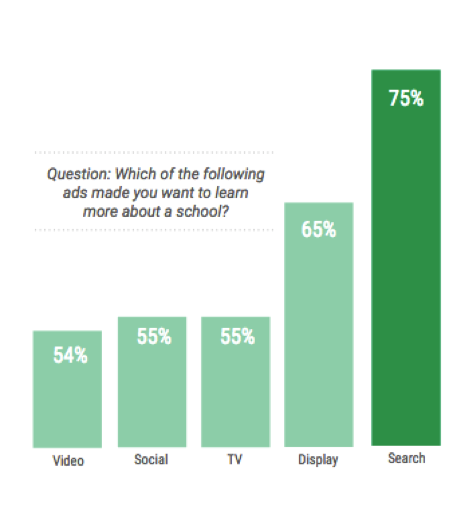
    • 56% of students turn to search when research programs/degrees
    • 78% of local-mobile searches result in offline purchases

    These stats prove search is the best opportunity to influence your audience buying decision and shape their perception of your company. If your business isn’t investing in digital marketing, which of your competitors will the referral contact once they can’t find you online?

    Who’s Representing Your Law Firm Online?

    Only 13% of people are referred to an attorney by a family or friend. If you don’t have a strong brand or search presence online when the referral or new lead is searching for you, what does this say about your reputation? Some may think, “How good can this guy be if I can’t even find him on Google!” Even if you have a compelling slogan, your law firm needs to be competitive in local search results.
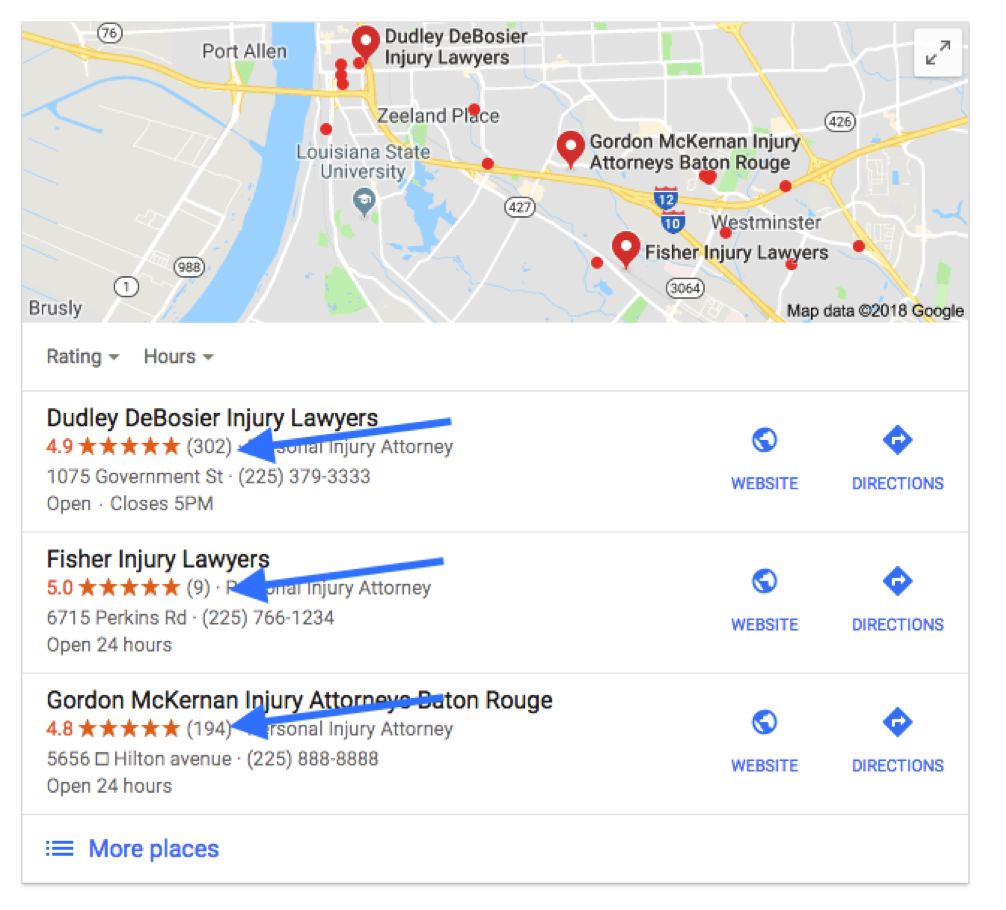
    If your law firm generates cases based on client or attorney referrals, make sure to get that word-of-mouth online! Ask for and publish reviews and testimonials on your site. Don’t forget to spread the word and feature testimonials on avvo.com, lawyers.justia.com, findlaw.com, and other industry related platforms.

    72% of people searching for legal advice only contact one attorney. So let’s make sure they find and contact you first!

    Google’s Power in the Universities

    According to Fortune, Millennials spend 27 hours a week consuming media. Getting in front of and grabbing the attention of millennials is becoming more competitive for universities. With educational resources and easy access to student loans, students are no longer applying to universities simply based on legacy or location. According to a Google Ipsos Research study in 2017, 20% of students read 3rd party ratings and reviews to compare schools, but you can expect that a higher percentage of searchers are influenced by the overall online reputation of a school.
    Building Your Reputation Online

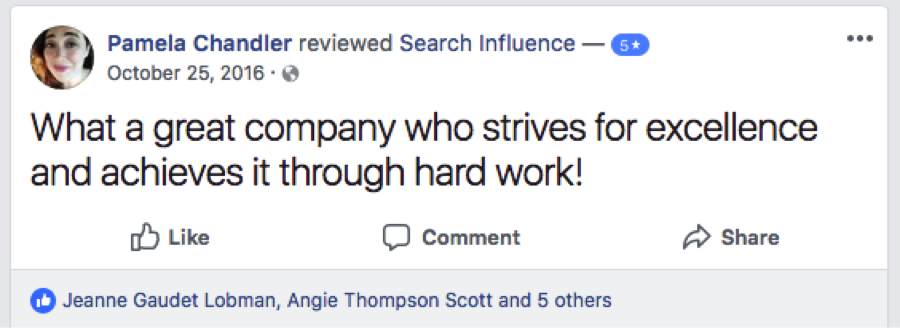
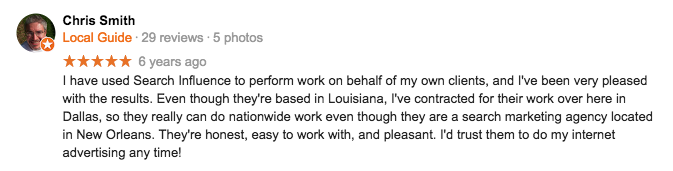
    Reviews aren’t promotional advertisements full of promises; they’re hard evidence that your company goes above and beyond for customers. Don’t just sit back and wait for reviews to appear. With 88% of people likely to trust a review from a stranger as they would a referral from a friend or family member, you need to encourage happy clients to leave reviews on your site and on 3rd party sites. Since Google reviews appear alongside search results, those reviews are particularly important for referral-based businesses.

    For 3rd party sites like Findlaw, Angie’s List, and Houzz, claim your profile and make sure all of your business information is accurate and updated. But don’t stop at conventional review sites! Video testimonials can be a great way to make online reviews more relatable. YouTube videos are easy to upload, and they can directly impact your search rankings. Before and after photos and videos for home renovations visually engage with an audience in ways content can’t. However you serve customers, look for a variety of ways to confirm that your services really set your company apart.
    The Market Is Wide Open

    Customers are searching for the products and services you provide, and they are influenced more by trusted and recognizable brands they engage with digitally. Google uses over 200 trust factors to rank websites and is constantly updating its algorithm. If you aren’t actively competing for searched products, services, and your audience’s attention, then you’re giving those undecided potential customers to the competition. So I’ll ask you again, if your business isn’t investing in digital marketing, which of your competitors will your referral contact once they can’t find you online?

    Contact the team at Search Influence for a consultation, and learn how to shift your digital marketing strategy into high gear. Find out about our company’s reputation by reading reviews from other industry leaders in SEO and digital marketing. You know your industry, and we can help make your expertise more evident online. Request a marketing analysis, and we’ll find opportunities to amplify the visibility of your referral-based business.

    Images:

    Search for Universities

  • Are Your KPIs Leading to a Healthy ROI?

    Marketing research displayed on multiple graphs and charts - Search Influence

    One metric that every small business owner should track and strategically work to improve is return on investment (ROI). Improving ROI can depend on boosting any number of individual indicators that help businesses focus on what they’re doing right and where they need to improve. Learn how these indicators apply to digital marketing and how to track, set goals for, and improve those indicators.

    What Are ROI and KPIs?

    Most business owners are familiar with the concept of ROI as an important, perhaps the most important, bottom line for any expenditure. ROI provides a simple ratio that expresses how successful an expenditure is relative to the income it generates. For some business decisions, calculating ROI is relatively straightforward. The ROI for a rental property, for example, would be based on the cost of buying the property plus taxes and upkeep divided by the amount paid by tenants each year. In the world of digital marketing, however, it can be difficult to determine the value of clicks, shares, and retweets, and to draw a direct line from any specific customer to a specific advertisement.

    Key performance indicators (KPIs) are more specific data that provide the metrics to analyze the effectiveness of a digital marketing strategy. In fact, ROI itself is a KPI. A business may select ROI as their #1 KPI, and then other secondary KPIs to watch as leading indicators of success. Paying attention to the right KPIs, and understanding how they relate to and inform ROI, can allow businesses to agilely hone a lean marketing approach around what works by cutting out the fat failing to provide a return.

    How to Determine Your KPIs

    It’s important to realize that not every metric is a KPI. For example, a tourism company might find it especially helpful to track how often promotional emails are forwarded or social media posts are shared. People like to share vacation experiences with friends who often rely on recommendations, and people also like to vacation with their friends. A high share rate could indicate a multiplier effect for some promotions, meaning that the marketing strategy is generating customers outside of a business’ subscriber list or social media following who nonetheless engage with the content. (Read more about creating customer advocates for tourism businesses). While every metric might not be important for your business, here are some common KPIs:

    Website traffic sources – Visitors enter your site from many avenues. The traffic sources can be organic, direct, referral, or paid. Each source can be reviewed to provide high-level information about your site traffic. Organic search traffic, when a visitor finds your website by searching keywords in a search engine and clicking through to your site, is the top source for generating traffic. It’s essential to improve SEO in order to increase your organic traffic.

    Engagement metrics – Take a moment to compare your favorite website to a website that you dislike. What impacted your experience on those sites? Optimizing your website for an intuitive user experience is essential. Bounce Rate and Average Time on Page are two key indicators of how visitors are interacting with your site. Be sure to monitor these metrics and optimize your website layout and content as needed.

    Conversion rate – This is a KPI that any business owner wants to see continually increase. Filling out an on-site form, clicking your number to call, or purchasing your product are just a few conversions that you want to encourage on your site. Each conversion can generate a lead for your campaigns. The higher the conversion rate, the higher the ROI.

    How Do KPIs Affect ROI?

    In a certain sense, ROI is the mother of all KPIs. The best performance indicator of almost any business investment is how much return it produces. Calculating ROI, however, requires an understanding of how a business’ applicable KPIs determine ROI.

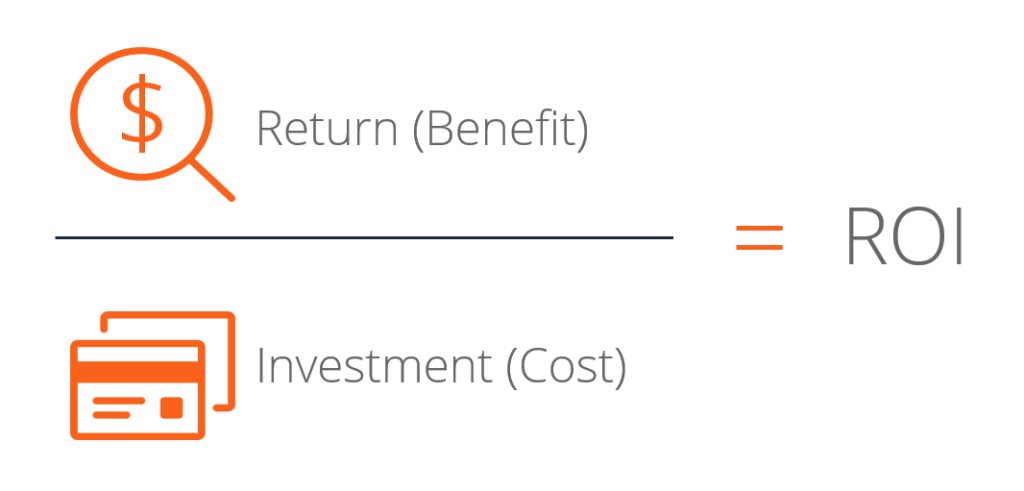
    A simple formula is just the return minus investment and then divided by the investment:

    Your result can then be expressed as a percentage. In order to account for your KPIs, your return should take into consideration factors such as the average lifetime value of a customer and conversion rate of turning leads into customers, in addition to the average profit margin.

    How to Set S.M.A.R.T. Goals for Your KPIs

    Businesses commonly use the acronym S.M.A.R.T. when setting KPIs; it stands for specific, measurable, achievable, results-oriented, and time-bound. Focus on goals that are detailed and clearly defined, and that can be tangibly measured to determine success or failure unequivocally. They should be within reach (a business that constantly falls short of its goals needs to rethink their achievability) and based on the objective ends rather than the means. Finally, they should have a definitive deadline to make sure goals aren’t kicked to the next quarter or year.

    Digital marketing may not quite be rocket science, but it does get pretty complicated. It’s important to determine what KPIs are most important to your industry, look to competitors and market leaders to see where indicators are comparable and where there’s a discrepancy, then develop strategies to boost those indicators. Small business owners have enough on their plate to worry about without poring over the nitty-gritty of analytics and lead tracking. Search Influence is a nationally recognized leader in search-focused digital marketing, with the expertise to help small businesses succeed in an ever-more digital world. Read testimonials from our clients to get a feel for how we can help your business grow, or contact us today to see what our understanding of KPIs can do for your ROI.

    Images:

    Social Media Machine

    ROI Calculator

    Rockets Away

  • Connect Your Brand With Your Community

    Human beings are social animals, but what kind of community would form around your company’s online branding? Brand loyalty is easily observed in beverage and automotive industries, and fans of a particular brewery or manufacturer often consider that brand preference a part of their personal identity. Coke or Pepsi, Chevy or Ford, and Windows or Mac: these rivalries and preferences elicit emotions like the choice between sports teams. The fans of a brand develop a tribal sense of community, but it doesn’t happen with just any company. What if you could make your brand inspire that degree of enthusiasm and loyalty?

    A collection of company branding icons - Search Influence

    Make Your Brand Relatable

    When kids try to make friends, the classic advice is to “be yourself.” Similarly, your online branding strategy needs to come from a genuine place if it’s going to build a following. Big promises and low prices will motivate a purchase, but you need to meet or exceed a customer’s expectations in order to make them a fan. When you think about brands that have been popular for decades, they have earned the lasting support of repeat customers. Quality products and reliable service aren’t just slogans, they’re perceptions that match the experience of satisfied customers.

    A branding campaign should not require an overhaul of the way you do business. It can be as simple as identifying your strengths or making your marketing more consistent. But where do you go once you’ve got your brand established? The first step is finding those that relate to your brand the most. Target the interest groups and demographics most likely to identify with your brand through online advertising, and track their progress along the consumer journey. After they’ve visited your site or clicked on an advertisement, keep your brand visible with targeted remarketing. Every impression and interaction is an opportunity to confirm the value and reliability of your brand.

    Three women having coffee and a business conversation at a diner - Search Influence

    Emphasize Human Interaction

    Automation is great for business efficiency, but customers appreciate interacting with your human employees. When an existing customer calls with a problem or question, they react differently when answers come directly from a person instead of a recorded message. We’ve all experienced the frustration of answering a dozen automated questions in order to complete a simple task. In contrast, it’s easy to imagine how it feels to interact with a single employee throughout an interaction with a business. Whether they’re contacting a travel agent, realtor, or secretary at a law firm, people have a different experience when they have the chance to repeatedly connect with the same human being. Their connection with that individual becomes their connection with the whole company.

    Of course, the conduct of your employees can have a positive or negative impact on the way your brand is perceived, depending on how they interact with customers. When training and managing employees, remember how their treatment of customers can impact the long-term reputation of the business. Efficiency is important, but be sure to acknowledge and reward employees who go the extra mile for customers. It can be as simple as remembering a name or some other personal detail. A friendly voice and attention to detail can make customers feel valued by your company, even when you’re offering a no-frills product or service.

    Find Followers on Social Media

    Find a voice that resonates with your target audience and sets your business apart from the competition. On social media, your company’s response to news and trends will give the public additional opportunities to identify with your brand. Whether you develop a presence on Facebook, Instagram, LinkedIn, or Pinterest will depend on your target audience and what’s appropriate for your industry.

    You’ll want to post frequently in order to keep your business visible, but the majority of the posts should not be directly promotional. That doesn’t mean you have to spend all your time writing your own witty blogs. Not everyone is rocking the digital marketing industry like Search Influence. Rather, you can share news stories and articles related to your industry and community. By sharing authoritative, newsworthy content, you prove to followers that your business is keeping up with the latest trends. Not only are you building your brand, but you’re also making your business a valuable resource to potential customers, even when they aren’t currently in the market for your services.

    One of the biggest benefits of social media is that it provides a more detailed view of your target audience. As your following grows, you’ll gain a more detailed understanding of the interests, demographics, and preferences of people interested in your company. This information enables you to develop customer profiles and more specifically define your target audience. Identify the trends that groups of your fans have in common, and you’ll have an edge on the competitors who still advertise indiscriminately to the public at large.

    How Does Community Generate Revenue?

    Your customers understand how traditional advertising works. Across all platforms, paid content and advertisements get a lower CTR than personal content generated by close friends and family. When a friend recommends a business or vacation destination, that recommendation is more impactful than a commercial. By building a connection with the community, your online branding can make itself a topic of conversation. You can design promotions that encourage fans to show their support on social media. When people see that a close friend voluntarily supports your business, that recommendation carries weight. Get customers to advocate for your tourist attraction, dealership, or boutique, and you have a powerful alternative to conventional ads.

    Establish Your Brand As a Community Ambassador

    Members of the public are generally skeptical about the motivations of corporations and businesses. The global economy never ran on gumdrops and compliments, but consumers like to see brands that make a visible effort toward conservation, disaster relief, and other causes with a broad base of support. Politically controversial issues are a gamble because they needlessly turn away potential customers. It’s far better to publicly give to a popular cause and leverage social media so that fans can share the news of your good work. Many of your donations to non-profits can be tax-deductible. Improving the image of your company isn’t a fast process, but it has the potential to greatly increase your revenue by converting potential customers into supportive fans.

    If you need help clarifying your brand or marketing your business online, our team can help. Grounded in a foundational understanding of SEO, we know how to build authority and make your business stand out. Digital marketing isn’t just a way to generate new leads—it’s an increasingly vital part of remaining competitive in today’s marketplace. Request a proposal from Search Influence to amplify the digital voice of your online branding.

    Images:

    Brands

    Facebook

    We Like You

  • How to Navigate the NEW Google Adwords Experience

    AdWords recently announced that they are fully switching to the new experience by the end of the year, and I’m here to tell you it’s going to be okay! The new experience has been available to all advertisers since October, but we’ve had exclusive access for a while and have been able to get acquainted with the new UI and I’m here to share our findings.

    For those of you thinking, “Google’s changing something AGAIN?” I’m right there with you! But with the following tips and resources, you’ll soon love all the new experiences it has to offer.

    So What’s so Different?

    Google updated the interface to provide, “a faster and more intuitive experience that’s focused on helping you reach your goals.” All the features you rely on are available in the new experience, and Google incorporated feedback as well, since this has been in beta for a while. They’ve also rolled out some exclusive features that are available in the new interface, so you have to switch to take advantage of them. Some of my favorite new features are below.

    A New “Overview” Page

    The overview tab provides performance insights that are generated by Google depicted as charts and graphs for you to quickly review and take action. These make reviewing data for devices and time of day much more visually appealing and easier to understand.

    Bid Adjustments for Calls

    Adjust your bids on call extensions to show call interaction ads more frequently. This allows you more flexibility and control over how often these ads appear and how customers can connect with your business. The bid adjustments range from -90% (I don’t want these to show as much) to +900% (yes, please, show these all the time!).

    Promotion Extensions

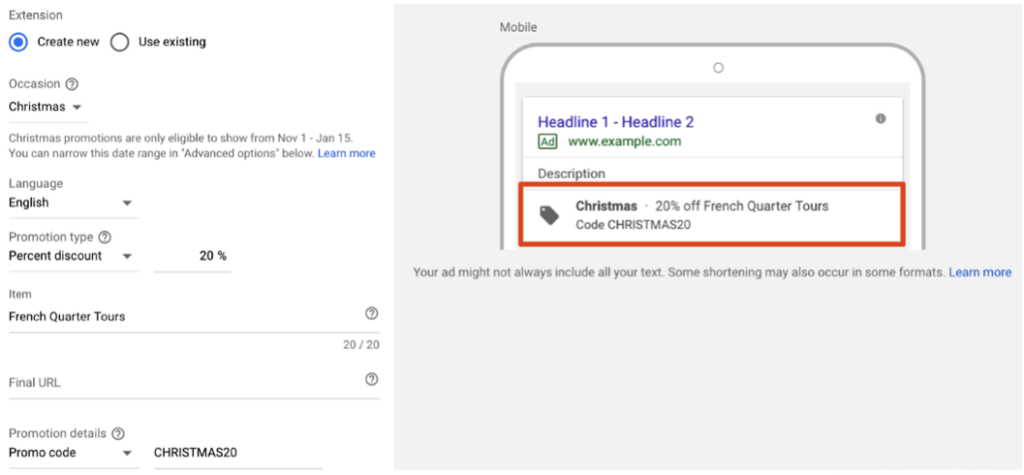
    Promotion extensions are pretty fantastic! They allow users to show and link to a special offer in their search ads and even include a tag icon to help the promotion stand out. You can highlight specific sales and offers, all while taking up more valuable real estate in the SERPs.

    Shortcuts

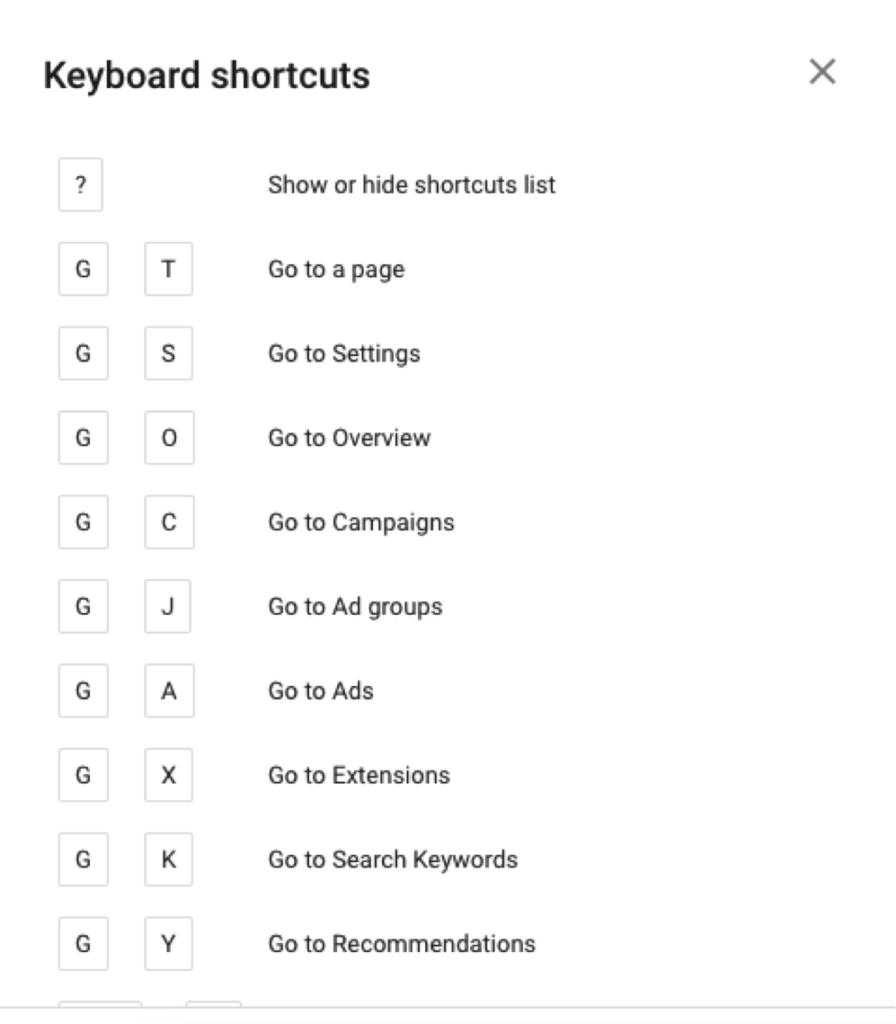
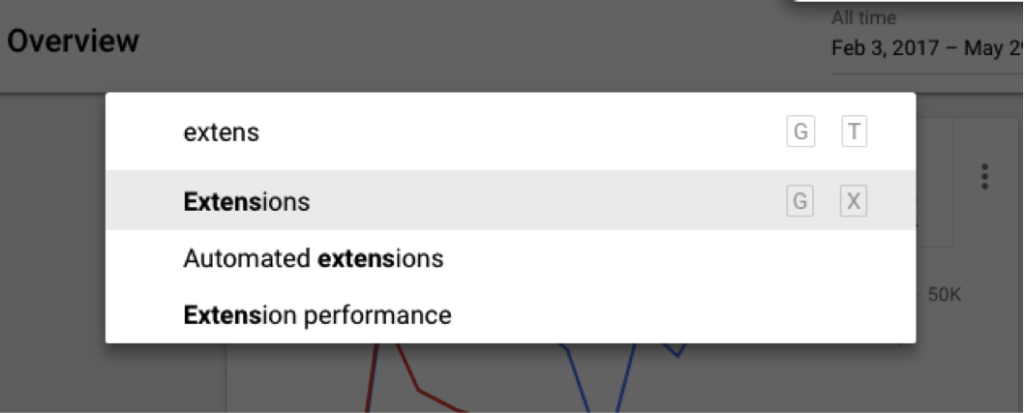
    One of my all-time favorite new features is the introduction of shortcuts. You can pretty much navigate to anywhere in the interface in a matter of seconds! Need a list of shortcuts, just hit the question mark on your keyboard. Hit G and T (GoTo) to bring up a search bar, making it super easy to find anything you need!

    Need More Help?

    I couldn’t possibly cover all of the benefits of the new AdWords experience but wanted to include a few more tips and resources to get you started.

    • The dimensions tab used to be one of my favorite places to go to pull reports to find actionable insights. I thought it was gone, but AdWords has re-named this and moved these reports to “Predefined reports,” found under the little graph icon in the upper right corner.
    • Google has a guided tour of the new interface, which is great for beginners to get familiar with the changes. They also have a Help Center, which has been updated to help you navigate all the new features (bookmark this page!).
    • Follow this page to view new information on AdWords features as they are added to the platform.
    • If learning by video is more your thing, check out the guides to the New AdWords Experience Part 1 and Part 2.
    • There are a few things that are changing and some features that are not yet available, so familiarize yourself with these in case you need to find a different solution.

    Getting on board with big changes like this can take some time, so I recommend that you start poking around now. The end of the year will come quickly and is a critical time for most advertisers, so the more experience you have with the platform the more you’ll be able to take advantage of all the new features to set your campaigns up for success. If you have any questions or need help navigating this switch, the Online Advertising team at Search Influence has experts that can help.

    All screenshots captured by Jeanne Gaudet Lobman on May 30, 2018

  • Why Are My Ads Disapproved by Google’s Misleading Content Policy?

    In its continual quest to better serve users, Google has cracked down on misleading content in advertisements as well as website content. When your advertising campaign is slammed for “misleading content,” it can come as quite a surprise. Because Google holds advertisers to a high standard, some of the violations might seem like harmless marketing strategies. Regardless of how the situation arose, it’s important to bring your website and account back in line with Google’s expectations. The sooner you resolve potential violations, the sooner you can get back to building your brand’s online reputation.

    What Is the Google AdWords Misleading Content Policy?

    “Misleading content” is an umbrella term that includes several types of violations, ranging from problematic testimonials to deceptive branding. The main objective of the misleading content policy is to provide a set of clear standards for online advertisers to follow as to not deceive users with exaggerated or false content. The central component of these standards states that:

    – Disclaimers need to be included alongside perceived claims, even if the claims are direct quotations from past customers.

    – Images that show before-and-after results also need disclaimers. More broadly, improbable assertions are likely to draw the attention of the Google AdWords team.

    We’ve all seen investment opportunities and weight loss programs that sound “too good to be true.” As you might imagine, some of the standards allow room for interpretation, and many affected advertisers find that they need to resolve multiple policy violations to resume advertising.

    At least, in theory, Google’s policy should benefit both users and advertisers. Users shouldn’t have to scroll past misleading or spammy content, and advertising slots will become more valuable as users learn that paid search results are also informative and trustworthy. When you edit your ads and website to align with the Google AdWords misleading content policy, you’ll also be improving content and sales copy that might have sounded suspicious to potential customers. The things that Google considers “misleading” may also be off-putting to your target audience.

    What Kinds of Businesses Are Most Impacted by This Crackdown?

    With shifting expectations for disclaimers and testimonials, medical businesses like plastic surgeons and dermatologists are particularly vulnerable to being caught on the wrong side of AdWords policies. Whenever possible, peer-reviewed journals and other reputable sources can be referenced to support claims. Images are useful for showing the results of weight loss programs and cosmetic procedures, but those types of images need to include disclaimers to emphasize that individual results vary.

    Investment firms, lawyers, and other businesses may run afoul of Google AdWords misleading content policy, even though they aren’t making medical claims. The misleading content policy looks for vague guarantees and other wording that implies certainty or permanence. Depending on the phrasing used to describe results, virtually any business can find itself on the wrong side of Google’s misleading content policies.

    How Does Google Review and Determine If Content Is Misleading?

    In case there was any doubt, Google doesn’t employ a review board of physicians or lawyers to determine which claims are unjustified. Instead, an editor on the Google team judges whether the wording or formatting of a page is misleading. When the editor finds one or more violations that justify disapproving the account, they may (or may not) make a note in your case file. With the number of campaigns and sites reviewed by editors, it doesn’t make sense for them to make exhaustive lists of recommendations beyond the first one or two violations.

    As a business owner, you might never interact directly with an editor at Google. When you call the account representatives on the Google helpline, they only have the information that editors chose to note in your case file. If you fix the problems that were cited as “misleading,” there may be additional problems found when your site is re-evaluated. It can be a frustrating runaround but don’t get angry at the person on the helpline. They aren’t the ones who flagged your content, and they don’t have the power to reinstate your account. Instead of focusing on the people who made the decision, it’s better to try to understand the aspects of the policy that might apply to your site and campaign.

    What Do I Need to Do to Get My Ads Approved and Running Again?

    Not everyone gets site-specific recommendations in his or her case file, and even if you’re lucky enough to get actionable advice, it’s still important to be proactive about finding additional violations. After your campaign account has been flagged, the responsibility is on your company (and your web developer) to make sure that your site and your PPC campaign meet the standards set by Google. Look through your landing pages in search of other potential violations.

    Could your seals and stamps be perceived as mimicking government seals? Site layouts and deceptive popups can also trigger penalties. Popup windows shouldn’t simulate messages or system errors, displays intended to trick users into clicking through or interacting by accident. As previously discussed, assertions about future results need to be carefully worded. Some violations are more obvious than others but use due diligence to ensure that your site complies with relevant policies.

    How Can I Avoid Getting Ads Disapproved in the Future?

    Look at the penalty “sandbox” as a learning opportunity, and try to avoid repeating the same mistakes in future campaigns. Make a point of looking beyond your PPC campaigns to your website and your company’s approach to branding online. The campaigns flagged by AdWords often have issues on the landing page, marketing strategies that may be mirrored across the rest of the website. Even if a PPC campaign can be restarted with changes to a few key pages, it’s worth adjusting other website content to align with misleading content policies. Search algorithms favor high quality, unique content, and the misleading content policy hints at indicators that could eventually affect overall search rankings.

    If you don’t have time to spend waiting on the Google helpline, consider getting professional help through digital marketing consulting. Google’s policies and expectations shift periodically, and anticipating changes can become a distraction from your day-to-day business.

    As a Google Premier Partner, Search Influence has over 25 employees certified in Google AdWords Search, Video, Mobile, Display, and Analytics. Our digital marketing agency keeps up to date with the latest trends in search engine algorithms and online advertising to best serve our clients. Contact us so we can help get your ads approved and running again.

    Image Credits:

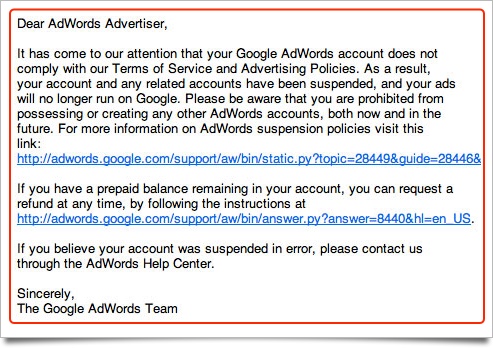
    Google Adwords Email

    Magnifying Glass

  • What Can Canva Do for You?

    Need a custom graphic for your blog or social media page? Canva is a drag-and-drop tool with millions of images and hundreds of fonts. Over ten million users have created over 100 million designs with the help of Canva’s user-friendly interface. While nothing will replace the instinct and creativity of a trained graphic designer, Canva offers a tool for simple, creative designs. Fortunately, it’s easy to sign up for Canva and take their free version for a test drive.

    What Is Canva?

    Whether you want custom social media icons for your website or new business cards for your sales team, Canva has free tools to support your visual projects. You can edit photos, create graphs, and develop print media. When you need a graph for your website or an upcoming presentation, you can start with a wide range of templates to graphically represent your data. When it comes to social media management, you may know that it can be a hassle to get images in exactly the right dimensions for each social media platform. With Canva, the images practically format themselves. Whether you need an ebook cover or Instagram post, Canva can hook you up with the proper dimensions. And, when you need to adapt a graphic for something new, you can even copy images from one project to the next.

    The variety of free templates, images, and other resources is staggering, and it is the ease of use that really puts this program in a league of its own. As if that weren’t enough, you can do the work in your web browser—no need to install software or download updates. Exploring their site is the best way to understand the full range of tools and options available.

    How Do I Get Started?

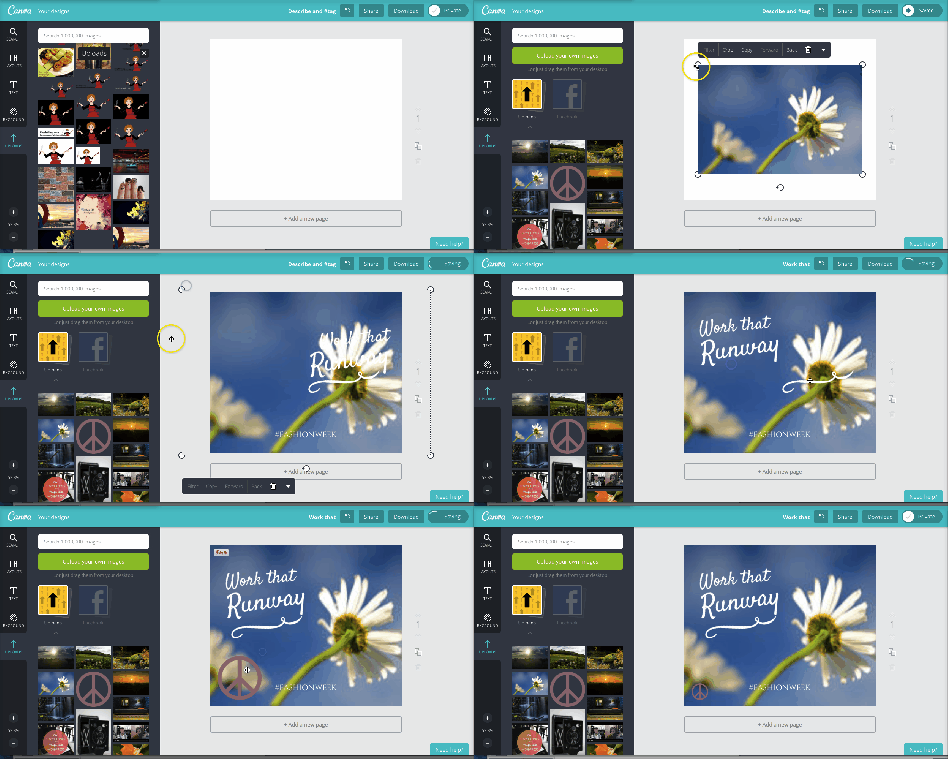
    When you sign up for Canva, an introductory tour highlights the key features of the site and their editing tools. Whatever you want to accomplish, you’ll have a wide range of templates available as starting points. For quick social media posts, templates are a great way to save time. By swapping out fonts and images, you can transform a template into something fresh, customized for your brand and message. Templates exist for all types of projects, and they can be tweaked as much as needed. As you become more comfortable with the process, you may eventually create your own layouts and designs from scratch, but templates make the design process fast and easy.

    Do I Need My Own Images?

    Not necessarily. Stock images and templates are great for a wide variety of applications. Browse through extensive folders of free-to-use images, grouped by theme and subject matter. You can even use the search tool for more specific images. If you want a higher quality photo, Canva allows you to purchase professional quality images for just $1. Plus, when you do have your own images to use for a project, they are easy to upload. Whatever image you choose, you’ll find the photo editing tools helpful in getting the color and size just right.

    What If I’m Not an Artist?

    If you don’t have a background in graphic design, then you’ll benefit from Canva’s extensive educational resources. Read blogs about the principles of design and composition, and complete tutorials on layouts, image editing, and advanced features on Canva. Some design lessons are even structured as weeklong courses on subjects like branding and social media. Even accomplished artists can still learn more about online promotion and education. A wealth of resources helps you optimize visual displays for business applications and the classroom.

    How Can I Collaborate With Coworkers in Canva?

    When you start developing content for your business, be sure to keep your work private, sharing only the finished work for public use. On the other hand, if you want to collaborate with a co-worker or client, you can also share access to unfinished projects. Whether you’re collaborating with someone in the same room or a different hemisphere, both of you can make changes to the same image. By working together, you can avoid the hassle of sending drafts and repeatedly getting feedback for each proof. For effective collaboration and a bigger variety of resources, it’s worth investing in a paid version of Canva.

    What’s the Difference Between Canva Free and Paid Versions?

    The basic editing tools on Canva are free. All users enjoy a gigabyte of storage for their files and photos, and they can use over 8,000 free templates. Up to 10 free users can collaborate together as a team, but more team functionalities are available to paid members, in addition to access to hundreds of thousands of photos and illustrations. You can get a better idea of the advantages of paying for Canva by signing up for the free trial period. A higher tier of professional service and support is available for companies that would benefit from having their own account manager and teams of up to 30 users. Discounts are available for users who pay by the year instead of monthly.

    Graphics are an important piece of any content marketing strategy, and Canva has the right tools to create your own custom images. The right visuals complete your branding and make every message more digestible from the first glance. Of course, even with the best tools, digital marketing takes time and expertise. To find out how our team at Search Influence can help you create the right infographics or social media campaign for your target audience, request a proposal today.

    Images:

    Canva

    Bob Ross

  • The Beginning of Google’s Mobile-first Index Rollout Is Underway—Are You Prepared?

    In 2016, Google announced they had begun testing a new ranking system based on indexing all mobile content first. Now, it’s official. The eagle has landed! The beginning of Google’s mobile-first indexing rollout is now well underway. As Google continues to move toward the big shift, it’s important that your company’s website is ready for the change.

    But how do you make the jump? Let’s start from the beginning.

    What Is the Mobile-first Index?

    Previously, GoogleBot would crawl your website and assign rankings based on the desktop version of your company’s website. Now that about 60 percent of search queries are made from mobile devices, Google is replacing desktop versions of sites in the index with their mobile counterparts via this mobile-first index. As a result, Google will determine rankings based on the quality of the mobile version ahead of the desktop version of the site.

    If the mobile performance, content, and user experience are up to scratch, your site receives a better ranking. If they are inferior, other sites will rank higher and you would take a hit.

    Ouch.

    How Do I Know When My Site Will Be Included in the Mobile-first Index?

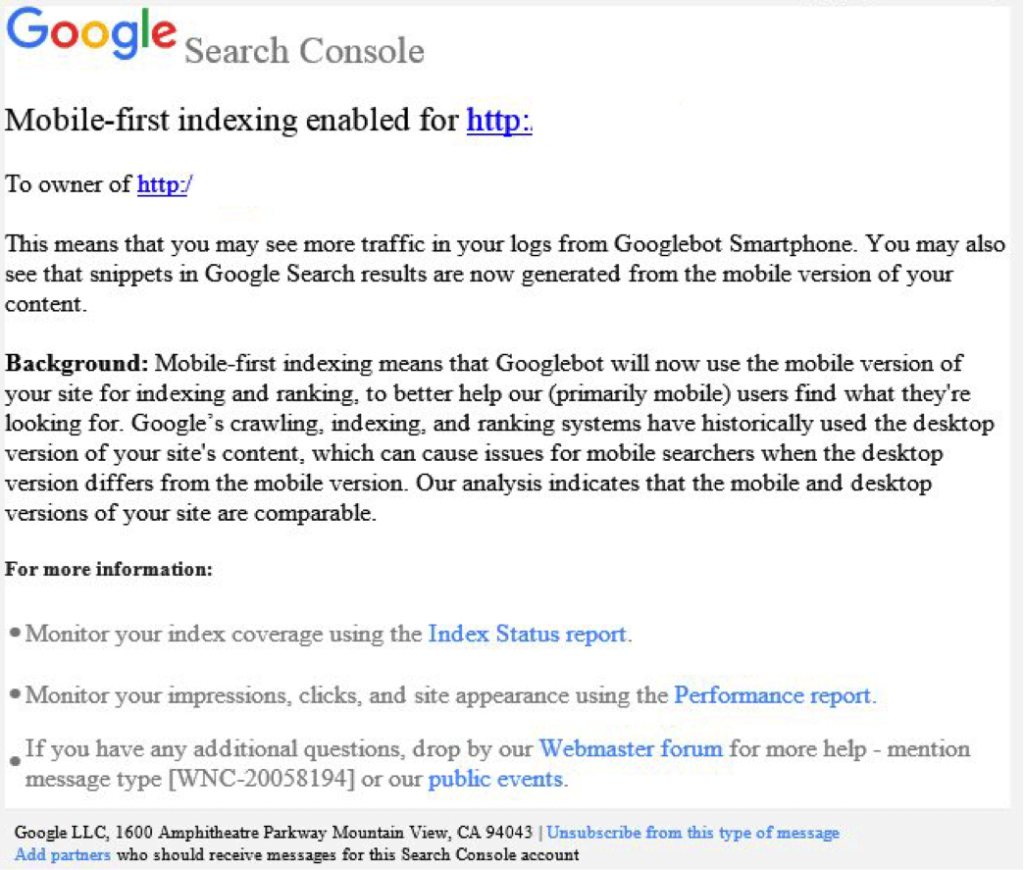
    Beginning this month, Google started notifying site owners and webmasters that their sites are migrating to mobile-first indexing through Search Console. The message looked like this:

    Screenshot of a mobile-first index notice from Google - Search Influence

    How Do I Prepare for the Mobile-first Index?

    Here are some tips to get you started.

    1. Mobile Page-speed

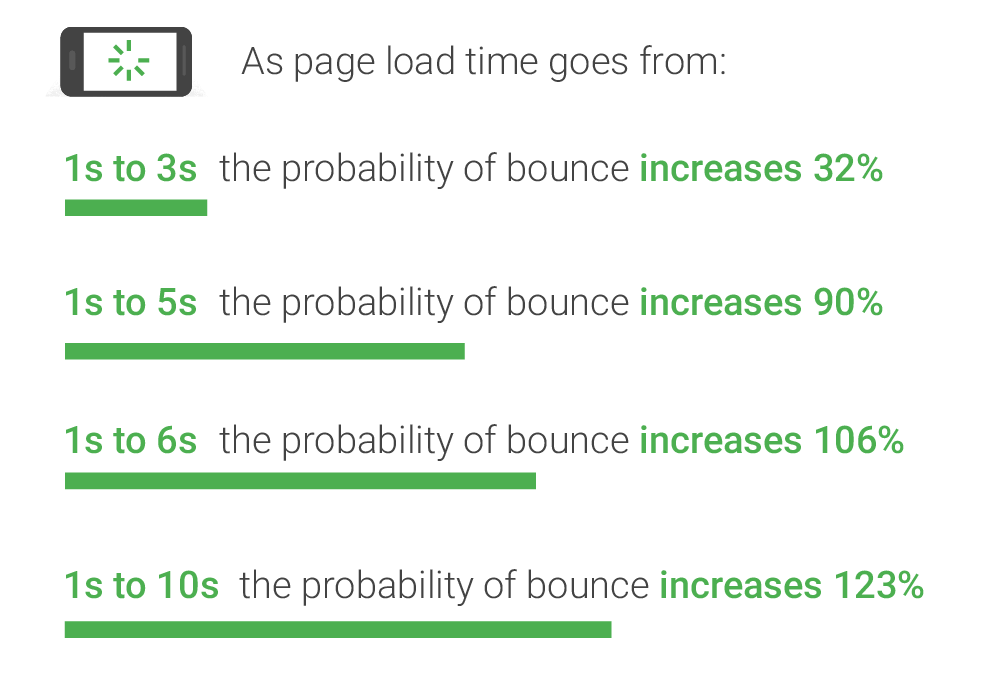
    According to Google’s mobile page speed study on Think with Google, as page load time slows down from one second to six, the bounce rate increases by 106%.

    A graphic of page load time relative to bounce rates - Search Influence

    So, make sure that your mobile website loads quickly and seamlessly. Google’s PageSpeed Insights is a handy tool for a basic test.

    2. Responsive Website

    A responsive website that is mobile-friendly works seamlessly across all devices. How do you make a website responsive?

    If your website is built on the WordPress platform, then creating a responsive design is very easy!
    Jared Jones’ post on the beauty of WordPress will make you a believer.

    3. Search Console Verification

    If you have separate mobile and desktop websites, verify the mobile version in Google’s Search Console. This proves that you own the site and directly affects how Google interprets and indexes it.

    Google’s Search Console help page provides you with all the ammo you need to get this done. More complex solutions for this preparation period includes content and image optimization, on-site directives and redirection, and schema structured data for your website.

    Talk to Us!

    At Search Influence, we are excited to start seeing the mobile-first index take form!

    To fully understand the impact of Google’s mobile-first index on your website, contact us for an audit and review of key aspects of your site’s mobile-friendliness. We’ll help you develop a roadmap to rectify potential risks to your search ranking and the content experience for your customers.

    Images:

    Parks and Rec

    Mobile-first notice Screenshot

    Page-speed Bounce Rates

  • Google to Roll Out Chrome 68 Security Update

    Google to Roll Out Chrome 68 Security Update

    Is your website safe from google's not secure warning - Search Influence

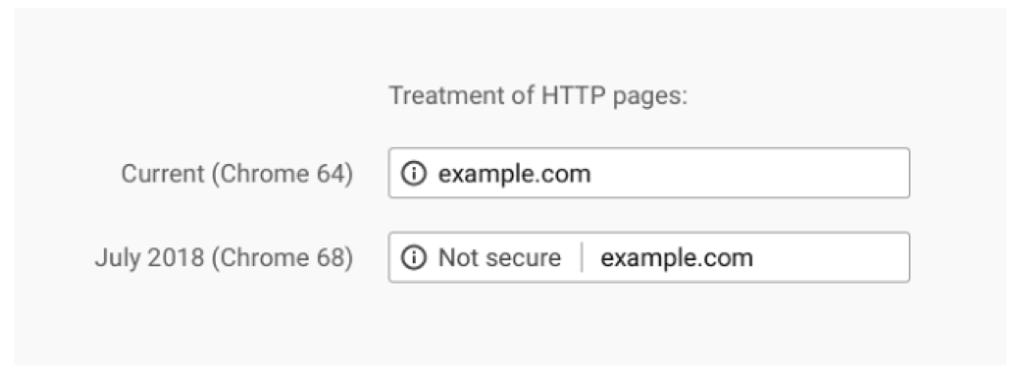
    After years and years of warning, the time is finally upon us. In July 2018, Google Chrome will release its 68th version, which will, for the first time, clearly mark sites that do not have SSL certificates as “Not Secure” in the address bar.

    Previously, a small exclamation point encased in a circle would be included with these websites, but now, the actual words will appear next to the web address to add a bit more shock value to the lack of the SSL certificate. The screenshot below from Google’s Security Blog shows the stark difference that we’ll see once Chrome updates this summer.

    Treatment of HTTP pages image - Search Influence

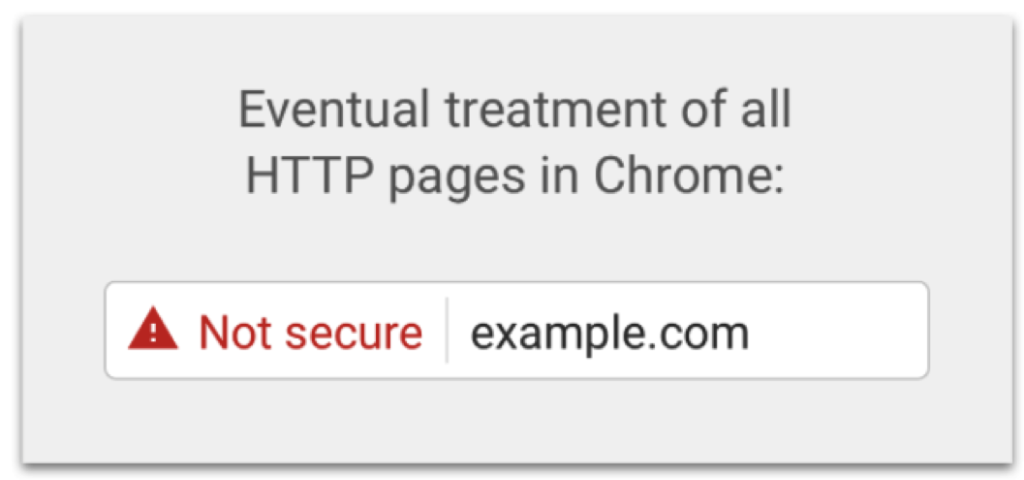
    If that isn’t enough to have you change to https, Google has also revealed an “eventual” timeline for non-https websites to have this even more threatening alert in the address bar:

    Eventual treatment of all HTTP pages in Chrome graphic - Search Influence

    Waiting until the last minute to update your site is a recipe for disaster. Updating your site to https isn’t as easy as flipping a switch, and some technical knowledge is required to help it go off without a hitch.

    To learn more about the switch from HTTP to HTTPs, check out our blog The Final Countdown: Secure Your Website to Align With Google’s Update to Chrome, or contact us for help in the transition.

  • In Press Releases We Trust: Why They Matter More Than Ever in the Fake News Era

    In Press Releases We Trust: Why They Matter More Than Ever in the Fake News Era

    Cision, an ever-growing resource for media and businesses, released their 2018 State of the Media report, which is based on a survey of journalists globally.

    Over 1300 journalists responded from six countries, 48% of which work in print (newspaper and magazine), and most of which no doubt have an online version of their publication.

    Per the Report, These Are the “Key Takeaways”

    • Being accurate is more important than being first.
    • Journalists are concerned about fake news and trust in the media.
    • Reporters and editors still trust the press release the most.
    • PR professionals are being asked to provide accurate, newsworthy information.*

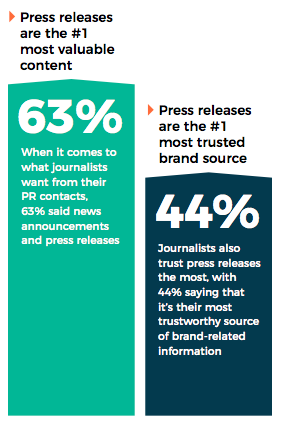
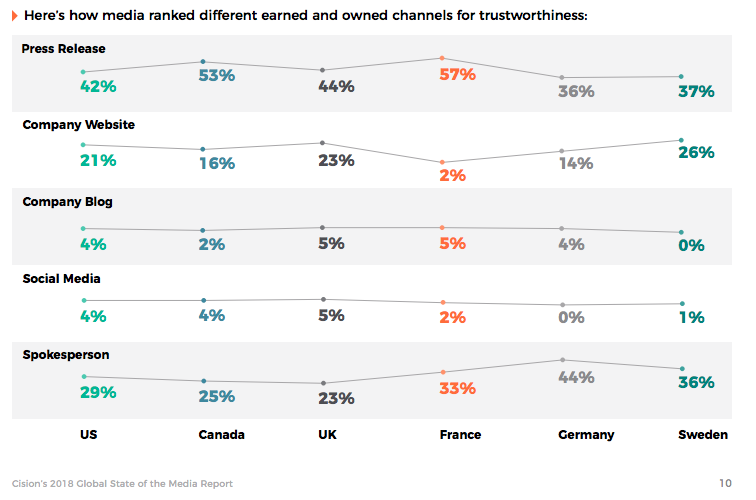
    The most actionable insight for businesses is that “reporters and editors still trust the press release the most”—42% rank press releases as the piece of owned media they trust most for accurate information, followed by 29% for a spokesperson, 21% for a company website, and just 4% each for company blog and social media.

    This was in some way surprising, as, there are so many articles online that reference other news stories. I’m sure you can recall reading something like “…according to a report by The New York Times.” This may be taboo for some publications, so, for your news to be considered as a topic, it’s critical you are publishing press releases for your company news.

    The Best Ways for You to Distribute Press Releases Are:

    1. Publishing on your own website (even if the info lives elsewhere like on your blog)
    2. Distributing through a service like Cision (PRWeb & PRNewsWire)
    3. Sending directly to journalists that have a specific interest in your industry, topic, or business—as the survey says, 27% of journalists say to “tailor the pitch to their beat” (a surprisingly low percentage in this age of personalization).

    SEO & Press Releases Have a Complicated History

    In 2013, with the release of Google’s Penguin algorithm update, there was a lot of chatter in the SEO community about stopping press releases as a link-building tactic. At the time, it was a paid way to generate links back to your site, which is frowned upon. At that time, many services, including PRWeb, changed outbound links to assure they would not penalize your Google rankings (by updating the links to be “nofollow”). Of course, companies continued to publish press releases, especially those who never once thought of PR as an “SEO tactic.”

    In short, take backlinks out of the discussion—distribution of press releases via reputable online sources like Cision is about getting news about your brand out there in a scalable way, which can have a positive downstream impact on your search engine rankings via brand building.

    Tell Me More!

    To fully dive into the State of the Media report, which goes deeper into thoughts on trust and “fake news,” download it from Cision’s website.

    Graphics courtesy of Cision’s State of the Media Report.

    * Key takeaways sourced from Cision’s 2018 State of the Media report.

  • 3 Practical SEO Tips to Get More Clients for Your Law Firm

    1603-SI-TheInfluencer-KL-A-04-lg

    Have you ever wondered why your competition appears at the top of search engine results pages while your firm is nowhere to be found? Attorneys today face new marketing challenges, including how to access the ever-increasing number of clients who are using the Internet to search for legal services online. These three practical SEO tips are the stepping stones to getting your firm’s website and the specific practice areas of your firm’s lawyers to appear prominently on the results pages of search engines like Google and Bing.

    Law Books Image

    1. Create High-Quality Content

    Most importantly, your site should feature content that is compelling and thoughtful. Rather than prioritizing obvious and underhanded SEO tactics such as keyword stuffing, organize your website so that there are separate pages dedicated to each of your practice areas and focus on writing comprehensive and user-friendly text to explain each practice area. Your content will naturally include the keywords that potential clients search for when they need legal help. For example, if a consumer is searching for a personal injury lawyer in New Orleans, they will be directed to the page on your site that explains how personal injury attorneys can help clients who have been injured in an accident that was the fault of another.

    2. Select High-Value Keywords

    Speaking of keywords, to see results with SEO, you need to do your due diligence and conduct keyword research so that you know exactly what consumers are searching for. The trick is to focus on your local area by using keywords related to your practice areas and where you are physically located. Try using a keyword planning tool that will tell you what keywords consumers are using to search for your type of legal services. For example, consider the case of The Law Office of Jerod Gunsberg. When their campaign first started with us in 2010, the firm was not ranking for any of their crucial competitive keywords. As of May 2018, they rank #3 for “domestic violence defense attorney los angeles”, #6 for “theft defense attorney los angeles” and #2 for “meth lawyer los angeles” and “prostitution lawyer”. By implementing an aggressive strategy in a highly competitive market, we got Jerod Gunsberg in front those in need of a defense attorney and closed quality cases. In the first 5 years of their campaign with us, the SEO strategy brought in 589 leads. With a 469% increase in organic traffic compared to the first month of their campaign, we continue to connect the right audience with strong cases to The Law Office of Jerod Gunsberg.

    Social media icons image

    3. Create and Optimize Social Media and Blog Presence

    For law firms, creating and regularly updating social media pages is another important step in making your firm more visible online. One way to build authority on Google is to create and optimize your Google My Business profile and engage in evolving Google My Business activity to increase your local presence. Most legal professionals make an effort to build their brand and audience on LinkedIn, but you can also create a social profile on sites like Facebook and Twitter and integrate them into your website. Make sure you focus on regular and relevant updates to your social media profiles by simply making updates on topics related to your practice areas. You can also increase the relevancy of your profiles by adding two or three paragraphs of information describing the type of legal services your firm provides. Lastly, consider setting up a blog where you publish your own interesting and unique content focused on your areas of law. Once your social media and blog presence is relevant and current, you will further strengthen your site’s SEO capabilities.

    Let us help you follow these three steps to build your online presence and help potential clients find you when they would never have known you existed!

    Image Credits:
    Law Books Image
    Social Media Icons Image