Category: Digital Advertising

  • Why Do Digital Agencies Have Setup Fees for Online Ads?

    Why Do Digital Agencies Have Setup Fees for Online Ads?

    We often get the question from prospective clients of why we have setup costs for our online advertising programs. They ask this question because some of the companies that they speak with either don’t seem to have setup costs or don’t communicate a setup cost as such. Even those who say they don’t have setup fees have some costs associated with building campaigns, but the extent to which they are or are not thinking strategically on behalf of their customers is a big factor in whether or not they will indeed charge for it.

    How Can a Media Company Not Charge a Setup Fee?

    Often, media companies choose not to charge setup costs. Sometimes this is because they use a third party that automates the process for them, eliminating some of the complexity and control of digital media buying.

    In other cases, a media company (TV, Radio, Newspaper or Cable outlet) may choose not to charge a setup cost because the difference between what they’re spending on advertising and what you’re paying is sufficient—they know they will make up whatever their actual costs are in a very short period. In other words, they may be keeping excessively high margins for what is, in essence, a commodity.

    The challenges of these perspectives are not very different

    In short, the advertiser—the merchant, the customer, the office—who is buying advertising services or other digital offerings doesn’t realize that in order to have those setup costs, the actual money spent on advertising has to, by definition, be lower. And, if the amount spent on advertising is lower, unless there are significant efficiencies in automation—which there seldom are—one will have a less effective advertising program.

    So, there really is no such thing as a “free lunch”

    When deciding how to advertise online, the most important thing to consider is whether or not your ads are going to be seen by your targeted prospects. With less money to spend on advertising, you have a choice of either targeting less precisely or displaying fewer ad impressions over time. With those two options, it’s easy to see how your campaign is less effective when a greater amount of the dollars are going to fat margins rather than the management of the campaign.
    Automation can be good

    In fact, we use automation to assure we don’t overspend and to do some interesting things like changing ads in the case of weather changes and special circumstances. But, there’s a dark side as well. For all the good automation does, it can also lead to irrelevant traffic, i.e. people who will never become customers but are still targeted by the automated ad buys. And, if not managed well, automation can lead to overspending the budget.

    To allow automation to work efficiently, the companies that use automated platforms for management of online advertising must, in the main, set and forget the campaigns. They are hopeful they will be able to deliver results through automation, not through active management.

    How Is Search Influence Different?

    We typically don’t think of ourselves as competition to traditional media companies who’ve decided to launch a digital agency arm. When we think of competitors, it’s typically the traditional agencies— traditional marketing agencies and pure-play digital marketing agencies. The reason that we identify these as the potential competitors is that within their advertising programs, there’s typically a focus placed on strategy.

    Strategy requires people. Digital and traditional agencies have grown over time based on the expertise of their team members. They are therefore able to deliver strategic plans rather than just automated processes. We have the people in place to deliver. Every one of our online advertising team members goes through a rigorous training process and must be certified in multiple areas of expertise before they get to own campaigns.

    As traditional media companies have come to realize that people are buying much less television, radio, newspaper, and Yellow Pages advertising, they need a replacement product. They have seen the value of digital advertising as an item of sale. As an item of sale, it’s not something in which they have invested significant strategic knowledge and development. The agencies with whom Search Influence competes have invested in at least some strategic development in their teams, whether it be through continuing education, certification, or years of experience.

    We are always looking for ways to optimize the potential of our clients and our team members, and that’s why we review automation systems with some frequency. We have yet to find one that delivers the results we can achieve with our human intervention. Of those we’ve tested, they may hit target budgets and costs per click (CPC), but they don’t deliver the same results. Again, what we’re after is not just traffic, not just customers, but the right traffic and the right customers. That said, we’ll always keep looking and exploring.

    As such, while we often find ourselves selling against traditional media “agencies,” we do not think that, when it comes to digital, they represent real competition or the value we know we can deliver.
    How Search Influence Helps Digital Advertising Clients

    Our core purpose at Search Influence is to Optimize Potential.

    So before anything, we engage in a thorough review of your existing assets, both digital and traditional analog media. We also engage in an equally comprehensive business review to assure we understand your goals for your possible future campaigns. This way, we can strategically map all of the relevant information to an effective digital campaign to deliver the best results.

    When thinking about what goes into the business decisions around advertising, we know that it’s much more than clicks or even calls. It’s about the right click and the right call at the right time. The goal is to deliver that refined prospect to your business with the expectation that they will move from prospect to customer. Before we spend one dollar on Google or Facebook, we will have investigated all of the facets of your needs and how they might impact our execution of your campaign.
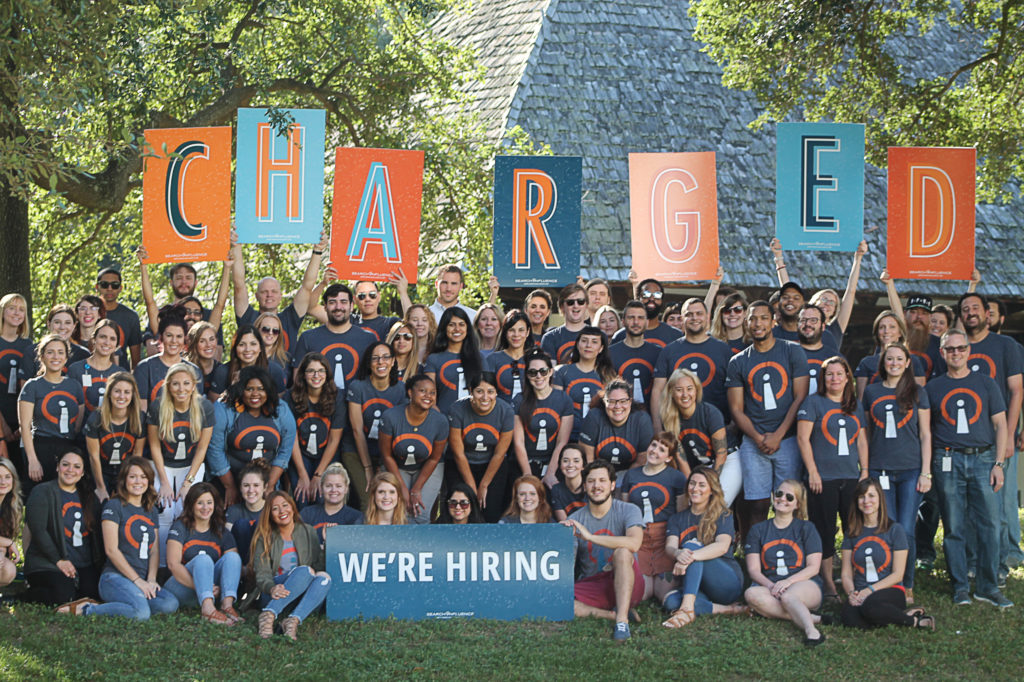
    Charged Employees of Search Influence

    Why You Should Care How About How We Get It Done

    You may think to yourself, “It doesn’t really matter how it gets done, as long as I get more traffic to my website, more calls, and more inquiries coming through.” The unfortunate truth is this: the wrong kind of contacts can cost you time and money.

    As the Pareto Principle implies, 20% of the prospects who might get in touch with you are going to be responsible for 80% of the business you will ultimately do.

    If you could tailor your marketing and advertising so that you only spoke to the 20% of customers who were going to drive the greatest value to your business, wouldn’t you have a much more successful business? Wouldn’t your team be more engaged if they knew that each client engagement, or patient interaction, was putting them with the right customers?

    We know it’s a lot of work to get this right, and only when you work with a strategic partner can you have an expectation that you will get what you need as early in the process as possible. When we work with clients, whether they’re spending $1,000 or $100,000, we work strategically to assure them we’re delivering the greatest value possible for their advertising dollars.

    Wouldn’t you rather spend your money on the most valuable customers? We think you should, and that’s why we believe that we are not competing with the mass-market automated systems that don’t deliver the kind of value you need. With a fundamental understanding of technology-enabled marketing and the expertise and know-how to back it up, we can be true partners to our clients regardless of their budget.

    If you’d like to learn more about the why and the how, we’d love to hear from you. Please fill out our contact form or give us a call. We’ll be glad to review your current situation and come up with some strategic recommendations.
  • Google Paid Search vs. Facebook Paid Social: Team Players or Adversaries?

    When it comes to choosing between Facebook and Google advertising, it’s important to note what your business’s goals are. Both platforms are beneficial to business in their own ways and often work in conjunction to help businesses achieve maximum online visibility, gain more customers, and increase leads and sales. In order to best understand the opportunities with these two advertising channels, it’s important to know what each has to offer.

    Google Paid Search and Facebook Paid Social

    No one can deny that as far as search engines go, Google takes the cake. With more than 3.5 billion searches being conducted every day, Google is by far the world’s most popular and widely used search engine. Because of this, advertisers are able to reach a broad potential audience who may be seeking their products or services. Google AdWords, the PPC advertising platform for Google, allows advertisers to utilize the Search Network and the Display Network. Through the Search Network, advertisers can bid on keywords and phrases to trigger certain Google searches. The Display Network offers visual ads and can reach those who are not just searching on Google, but on other sites as well (i.e. a banner displaying your business’s logo on YouTube).

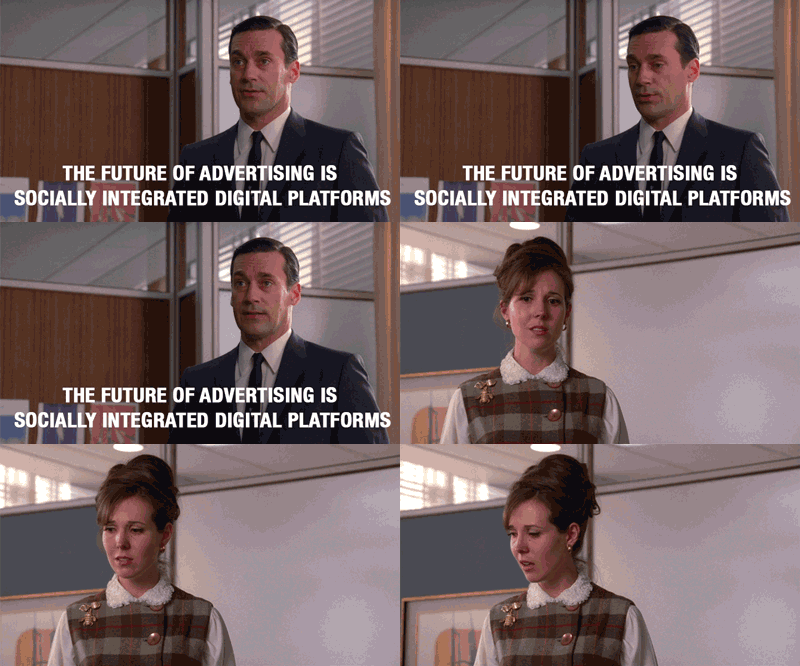
    Image Of Don Draper Discussing The Future Of Advertising - Search Influence

    Considered the pioneer of paid social advertising, Facebook has refined its process and has become an important part of many businesses’ marketing strategies. Like Google, Facebook is an extremely prominent website, with more than one-fifth of the entire world’s population active on the site monthly. Because Facebook users tend to share a lot of personal information—interests, relationship status, political views to name a few—Facebook advertising can target very specific demographics, showing Facebook users what they want to see.

    What Types of Ads Does Each Channel Offer?

    Both Facebook and Google include a variety of ad formats to appeal to a variety of audiences.

    Google Ads:

    • Text – These ads are only words, and can immediately reach customers as they search on Google.
    • Responsive – Size, appearance, and format can be adjusted depending on the ad spaces.
    • Image – Graphics that are static or interactive, and can be animated in .gif and Flash format. These can show on websites that partner with Google through the Display Network.
    • App Promotion Ads – As the name states, these ads can drive app downloads and engagement for your business. These will only show on devices that can support the app.
    • Video – These can stand alone or show in streaming video content on websites that partner with Google.
    • Product Shopping Ads – These show a photo, title, price, store name, and other details about a product you are selling.
    • Showcase Shopping Ads – This type of ad shows a product but expands when it’s clicked on to show related products and store information.
    • Call-only Ads – Ads that include your business’s phone number to drive phone calls. These types of ads only show on devices that support phone calls.

    Facebook Ads:

    • Domain Ads – With a simple format, this ad displays on the right column. This type of ad does not display on mobile.
    • Page Post Link – The most common of all Facebook ad types, this type of ad links to your external website and includes a large image for grabbing the attention of Facebook users.
    • Carousel Ads – A relatively recent development in Facebook advertising, these ads allow e-commerce advertisers to showcase up to five of their products, each with its own picture, link, and title.
    • Dynamic Product Ads – These ads target based on past actions on your website, also known as remarketing.
    • Lead Ads – Allows Facebook users to fill out a form on either desktop or mobile directly from Facebook.
    • Canvas – Only available on mobile, customers can interact with the ad by swiping through the carousel, zooming in and out or even tilting the images.
    • Page Like – This allows users to immediately like a Facebook page.
    • Page Post Photo and Video – Showcases pictures and videos from your business. Video advertising is especially engaging as Facebook video receives up to 8 billion video views per day!
    • Mobile and Desktop Apps – Similar to Google’s app promotion ads, these drive installs of a business’s app to mobile and desktop.
    • Event – Allows a business to promote their event to visitors.
    • Offer – This type of ad can only be created on a page with at least 50 likes, and it allows a user who clicks on the ad to redeem a special promotion.

    Google and Facebook: Friends or Foes?

    As previously stated, it’s highly common for Facebook and Google to be utilized together in a marketing campaign for their different advantages. Many marketers are drawn to Google because of the search volume and opportunity for exposure there. Google allows for targeting based on location, keywords, demographics, devices, and languages, as well as re-marketing, which can target users based on searches that have previously been conducted. While PPC ads are text-based, advertising opportunities are versatile. Extensions, user reviews, map data, and shopping ads are just a few examples of how Google advertising can be further optimized.

    Facebook advertising is not only extremely targeted but also highly visual, which many see as an advantage over Google. Facebook ads are essentially unavoidable, appearing in your target audience’s News Feed or the right column of their page. Because advertising on Facebook is based on specific insights and interests, chances are that the ad will be more engaging to the user.

    Image Of the Internet Being Friends - Search Influence

    Perhaps the biggest difference between each platform is the behavior of the users. When searching on Google for products or services, users have an idea of what they are looking for. Facebook, on the other hand, is not typically used to seek a product or service. However, the likelihood of a Facebook user to be exposed to a product or service that appeals to them is very high.

    While Google and Facebook are often seen as adversaries in the marketing world, the possibilities with each vary greatly. Try this team together for utmost potential in maximizing any campaign’s performance.

    Image Sources:

    Don Draper & The Future Of Advertising

    The Internet Shaking Hands

  • Want to Grow Your Medical Practice? Here’s 4 Ways Facebook Ads Can Help

    A How-To Guide for Growing Your Practice Using Facebook Image - Search Influence

    The world is filled with many ways to advertise a product or service. Simply hoping that your message makes its way to the perfect target audience certainly isn’t the best practice to ensure that your medical advertising efforts are a success. For medical professionals, it may be particularly tricky to target those individuals in your practice’s geographic reach, specialty area, or even other physicians looking to refer their patients to another trusted healthcare provider. Though it can seem nearly impossible to reach the perfect audience through traditional mediums like television or radio, Facebook is continuing to provide proven results for advertisers in the medical realm. A rich and unique resource of user personal interests and behaviors, Facebook is truly a health care advertiser’s dream!

    Image Of Baby Making A Joke About Doctors - Search Influence

    Whether you’re a specialist or a general family doctor, Facebook has the right tools to not only narrow down your ideal patient but also present your service in a way that truly connects these individuals with the personalized healthcare you can provide them.

    Here are 4 ways to use Facebook ads to your advantage:

    1. Use Facebook Display Ads to portray real people and satisfied patients in your ads.

    Facebook Display Ads can be the perfect way to send your audience to important areas of your website using striking images and creative calls to action. When using these types of ads, appealing to more potential patients is key. Using photos of real people and happy patients not only shows the success of your practice but makes ads more relatable to the audience. Finally, Facebook allows you to utilize their call-to-action buttons to tell users exactly what you want them to do when they see your ad. Consider using “Contact Us” or “Learn More” to drive potential patients to convert to actual patients!

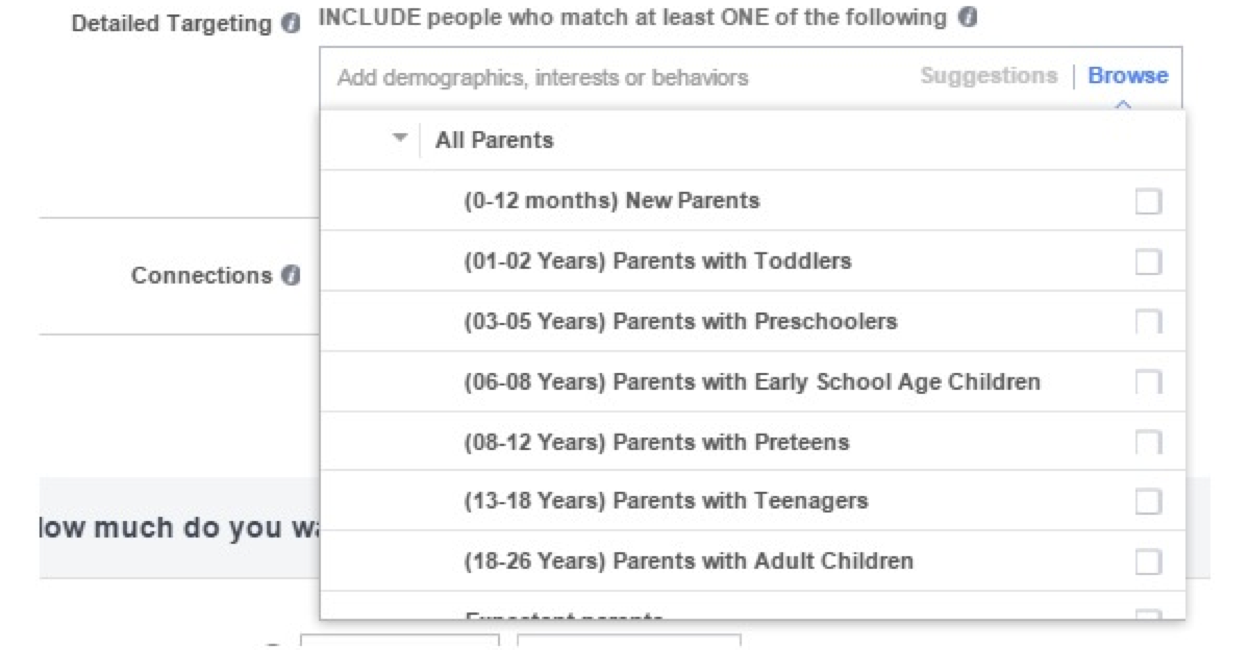
    2. Use Facebook’s ‘Detailed Targeting’ to your benefit.

    Facebook comes equipped with a number of targeting options that can be extremely helpful in identifying individuals that fit your target demographic. Everyone needs to see a doctor at some point, right? How about targeting people who have recently moved into your geographic area who might be looking for a new physician? You could also try targeting women who have recently become pregnant or seniors who might make more regular trips to the doctor.

    Picture Of Facebook Detailed Targeting Tool - Search Influence

    3. Referrals are your friend.

    Targeting other healthcare practitioners might not seem like the most effective idea at first, but using Facebook’s ‘Detailed Targeting’ to show your ads to other physicians or important referral sources always helps to keep your name at the tip of their tongue when talking to their staff and patients. Likewise, we all know that people seek advice on health care providers from their friends and family. It might be beneficial to target the connections of people who currently follow or Like your page. These tactics can only help drive more business!

    4. Don’t forget about HIPAA!

    It is always important to remember to follow HIPAA rules and regulations. When writing Facebook ad copy, never imply that you have knowledge about a sensitive health condition. Also, never collect or share personal information such as phone numbers or addresses. There are many successful ways to use Facebook ads to grow your practice that still align with HIPAA’s guidelines.
  • Here Are 10 Eye-Catching Medical Display Ads That Worked

    1609-SI-TheInfluencer-KL-A-04

    Need a little inspiration for your practice’s online ad campaign? The following medical display ads are some examples of online advertising at its finest. They boast an impressive balance of striking imagery, audience targeting, creative calls-to-action, and concise copy.

    These advertisements from Stewart Dermatology and Dr. Grant Stevens, FACS, at Marina Plastic Surgery utilize close-ups of women, which grab the attention of viewers more effectively than the alternative. Consider using real people in your ads to appeal to more potential patients.

    #1: Stewart Dermatology
    1

    #2: Dr. Grant Stevens

    2
    You can also target specific audiences to yield even better results for your online ads. For example, these ads from Gleevec and Allure Dental could target people specifically in New York or specifically adult males seeking dental or orthodontic work.

    #3: Gleevec

    3


    #4: Allure Dental

    4
    Using a creative call-to-action is also essential for conversions. The following ads from Medscape, Dermatology Associates of Wisconsin, S.C., and Hospital for Special Surgery challenge the viewer to do much more than “Click Here.” Consider trying “Request an Appointment” or “See Our Success Stories” on your display ads as a way to challenge your potential patients to more actively engage with your advertisements.

    #5: Medscape

    5


    #6: Dermatology Associates of Wisconsin

    6


    #7: Hospital for Special Surgery

    7


    Short and catchy phrases and slogans can do a great job of getting and holding viewers’ attention. Here are a few examples from Doctors of Osteopathic Medicine, Hass Plastic Surgery and MediSpa, and Coolsculpting: “We treat the woman. Not the symptom,” “Love the memories, forget the lines,” and “Lose the fat. No needles. No surgery. No downtime.”

    These slogans perfectly utilize short, concise phrases that successfully capture the viewer’s attention.

    #8: Doctors of Osteopathic Medicine

    8

    #9: Hass Plastic Surgery and MediSpa

    9


    #10: Coolsculpting

    10

  • Seeing Colors? Google Expands Paid Ads

    Google Ads

    Late last month Google changed the landscape of internet marketing once again. The latest update from Google expanded paid ads into two new areas, Maps and Local Finder. These two places were once a haven for those of us with beautiful, organic traffic, but we are set to be invaded by the strong-arm tactics of paid advertising.


    Local Finder Ads

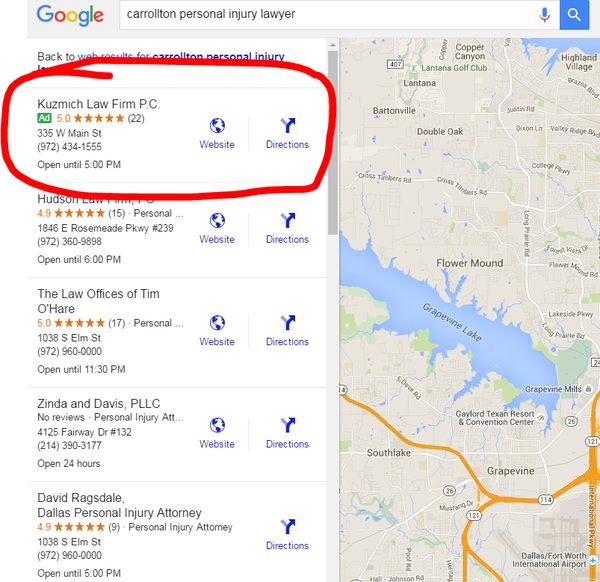
    This change is likely to cause tears of both sadness and anger. In case you forgot, let our very own Amy Arnold explain how Google eviscerated the old Local Pack. In short, Google decided to reduce the number of local businesses displayed in the Local Pack from seven to three. Some of the default information displayed was also removed in an attempt to streamline the app. Many users found that the top three results were not enough, which compelled them to click that little “More Places” link in the search for more leads. After the most recent changes, ads are now displayed at the top of the More Places section, which is similar to how they are placed in the regular search results.

    Green Google Map Ad

    In addition to the new Penguin update, explained by yours truly, local businesses also have to deal with their information being relegated by potentially three spots. Even though it is possible to get your website higher by paying, it seems that organic content creators have been hit hard enough to cry.

    Cat Crying GIF

    Maps Ads

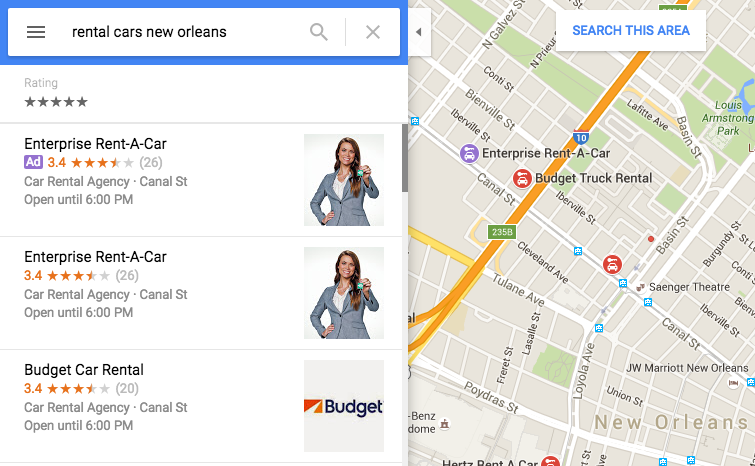
    Google Maps also received an ads revamp and a new color coding. Purple ads are now showing up, and Google decided to fill us in on exactly why that’s happening. These ads are controlled by AdWords, and users who have the location extensions enabled and are still charged the standard cost-per-click rate whenever a user attempts to get location details and directions or complete a mobile click to call requests. In addition to having your business show up at the top of Maps search results, a nice purple icon is also added to the map on your business location. By setting the targeted area, advertisers are able to give some extra range to their map pin in addition to appearing at the top of the list. Of course, if you plan on buying ads and placing your business at the top of search results to pay-per-click, you better make sure your business information is up to date.

    Google Purple Ad

    One thing you may have noticed from the above image is that the Enterprise Rent-A-Car is listed as both the top result and first advertisement. This would be an example of what not to do. A company may appear twice because it is already the top search result in this area. This redundancy happens a lot in regular search results, but the map ads allow you to select an area, allowing your ads to reach further than your search results normally would. This process is of course very confusing, but Search Influence’s expert Online Ads team is certified in Google AdWords and helps our clients gain maximum visibility. If this seems overwhelming, they’d be happy to take care of your advertising needs.

    Image 2 credit: Brian Barwig

  • Facebook Remarketing Explained – 4 Steps to Increase Your ROI

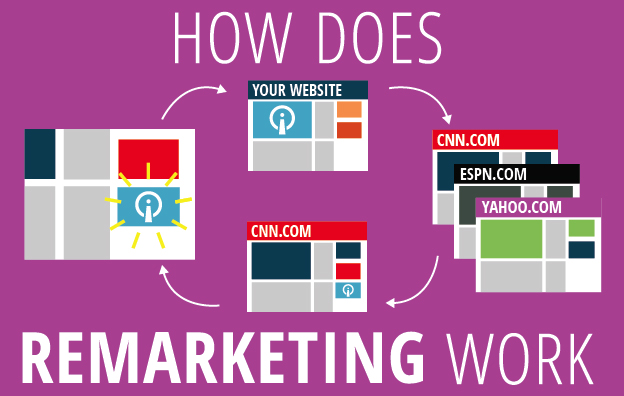
    How Does Remarketing Work?

    Have you ever window shopped for a new pair of running sneakers online and noticed they followed you around the Internet? Advertisements for those sneakers in the same color and size appear on almost every website you browse! You might even be scrolling through your Facebook News Feed and the sneakers pop up again. You may be thinking, “This is fate!” But no, this is not fate or the magic of the Internet.

    I’m going to let you in on a little secret called remarketing. One of the hottest trends in remarketing right now is using Facebook to target a select group of ideal customers with tailored ads. Your company’s marketing team can use this powerful marketing tool to nurture relationships with qualified customers and increase sales.

    What Is Remarketing?

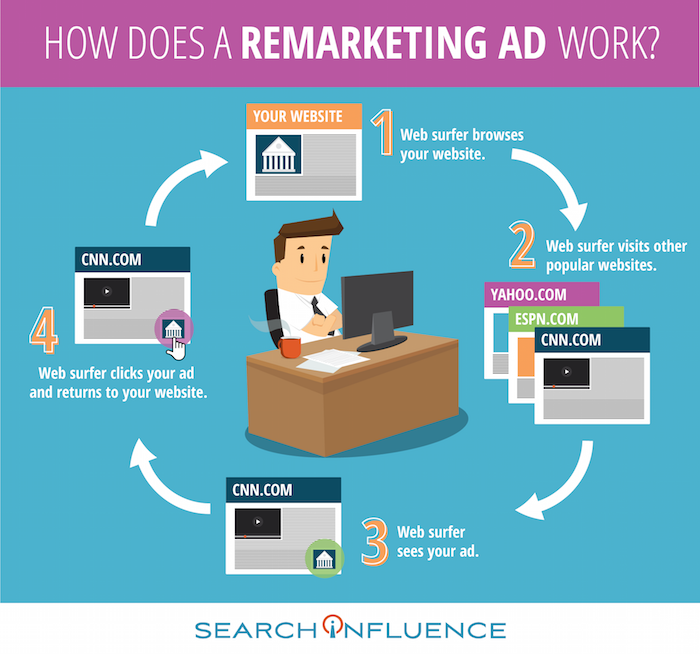
    Let’s say someone clicks on your brand’s Facebook ad. They’re instantly brought to your website, and they can browse your offerings. These people are generally qualified leads because they took the time to navigate away from their cluttered News Feed and click on your ad. However, they may not always complete an action like making a purchase, downloading an e-book, or providing their contact info. In fact, people rarely make a purchase the first time they visit a brand’s website or see an offer from the brand. These lost prospects are valuable, and you will want to continue your business experience with them.

    How Does a Remarketing Ad Work Infographic Image - Search Influence

    The overarching goal of remarketing is to place your brand at the top of consumers’ minds. Remarketing allows you to reach people who have previously visited your website and may not have made a purchase.

    A great way to revive your relationship with them is by showing tailored ads to them again on Facebook. To do this, you can use your brand’s Facebook pixel to create a Custom Audiences for Website Traffic that builds an audience based on your brand’s website traffic. The opportunities to nurture and build relationships with current and prospective customers on Facebook are endless.

    Why Should I Remarket on Facebook?

    Facebook remarketing ads get three to four times the response rate of regular Facebook ads. With over 1 billion people using the social media platform daily, making sure that you’re reaching the right people is critical! The Custom Audiences for Website Traffic feature seamlessly reaches your ideal customers by creating a Facebook audience representing a group of prospective customers and current customers who have visited your website. This feature has a few benefits:

    • Reach people who are genuinely interested in your brand through targeted Facebook Ads
    • Bring people back to your website to complete an action
    • Find new people who have similar characteristics to your website

    By targeting your ideal customers, you will grow your brand’s fan base, drive website traffic, build a rock-solid email list, and increase ROI. You will also avoid burning a hole in your advertising budget by lowering cost-per-click, driving higher conversions, capitalizing on social proof, and expanding market reach.

    How Do I Use Facebook Custom Audiences for Remarketing?

    Now that you’re an expert in remarketing, let’s dive in and set up a Facebook remarketing campaign for your brand. I’ve created a 4-step guide that outlines the setup process.

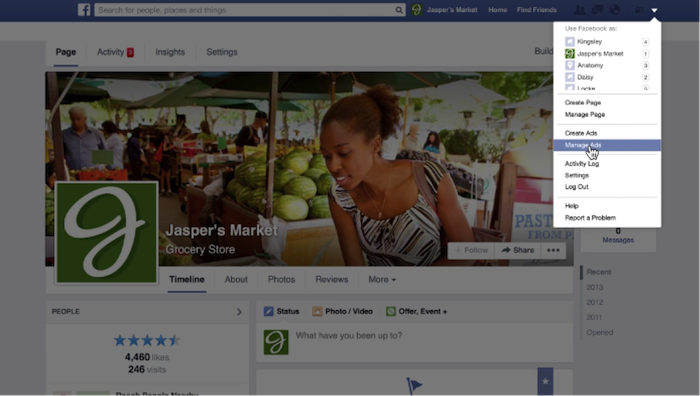
    1. Access Facebook Ads Manager. Log in to your Facebook account and navigate to the drop-down menu on the top left of your screen. Select “Manage Ads” from the drop-down menu.

    1 - Remarketing Drop Down

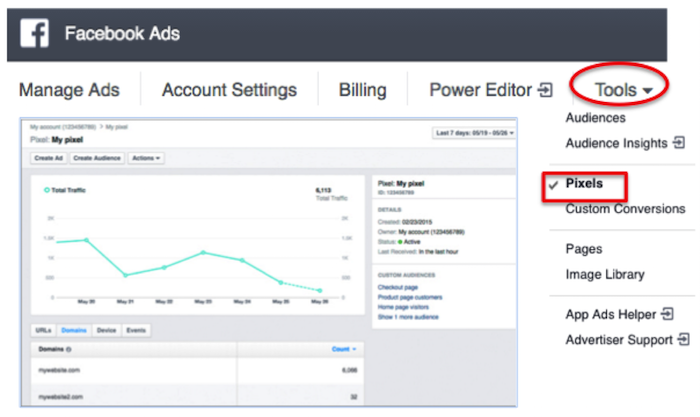
    2. Create a Facebook pixel. To pinpoint your website visitors so you can retarget them on Facebook, create a Facebook pixel and insert it on your site. Now that you are in Facebook Ads Manager, click on the “Tools” drop-down menu and select “Pixels.” Click “Create a Pixel” and give it a name. Then, copy and paste the pixel code into your website code.

    2 - Facebook Ads

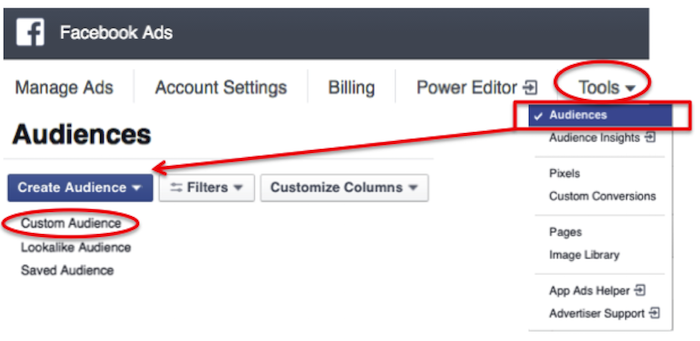
    3. Build a custom audience. Click on the “Tools” drop-down menu and select “Audiences.” You’ll see a blue button that says “Create Audience.” Click on that button and hit “Custom Audience” from the drop-down menu.

    3 - Audiences

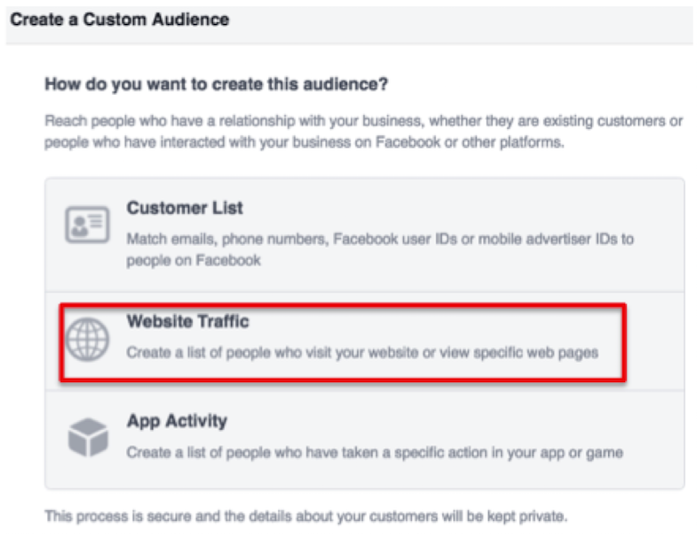
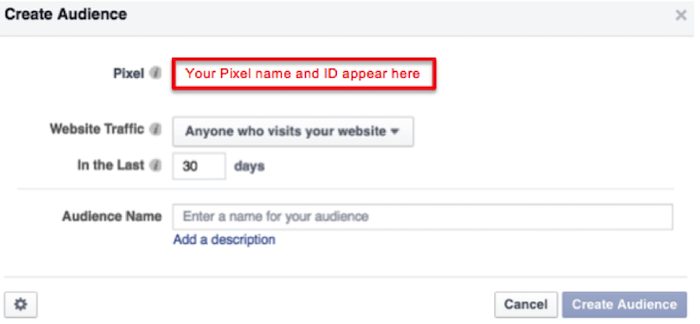
    Then, select “Website Traffic” and name your audience.

    4 - Website Traffic

    5 - Create Audience

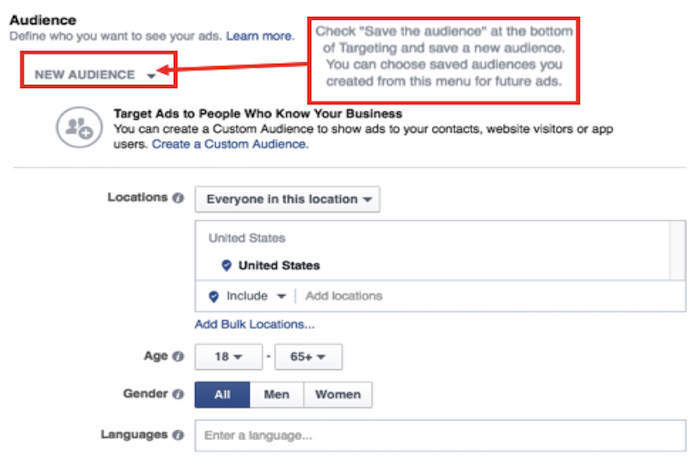
    4. Craft an Ad. In the ads create tool, you can access your custom audience when you choose who you want your ad to reach.

    6 - New Audience

    Voila! You’ve successfully created your remarketing campaign. If you have any more questions along your remarketing journey, you can reference Facebook’s simple remarketing guide.

    Image Credits:

    “Manage Ads” Menu Screenshot – from Video
    Pixel Graph Screenshot

  • How to Win Leads and Influence Potential Customers with LeadSNDR

    1603-SI-TheInfluencer-KL-A-03-lg

    Depending on your business, lead generation can be one of the most, if not the most, important performance indicator for your marketing efforts. Regardless of the medium (online, billboards, radio, etc.), a critical part of lead generation is asking yourself: How do you want to receive leads?

    At Search Influence, our CEO has a saying: “Do you want your door to swing, your email to ding, or your phone to ring?” Choosing the method of lead generation that works best for your business is the first step towards gaining qualified leads.

    Between the three, tracking the success of lead generation through emails and calls is typically more reliable than foot traffic. Unless you ask each customer who walks in the door how they heard about you, it’s unlikely you’ll be able to gather measurable results over time. In our experience, we’ve found the greatest success generating and tracking leads by using forms and call tracking through our in-house system, LeadSNDR.

    LeadSNDR logo image

    Lead Generation

    Lead generation marks the conversion of a website browser to a potential customer. By filling out a form or calling you for more information, the person is signifying to you that they are interested in your business and they’re ready to hear what you have to say.

    The methods utilized by LeadSNDR make it easy for that casual website browser to reach out to you, regardless of where they are on your website, so they can convert to a potential customer.

    We use both forms and call tracking to ensure you’re offering site visitors their preferred method of communication to reach out to you. There’s nothing more frustrating than searching a site for an email or phone number when you have a question. It’s more likely that you’ll give up and go to a competitor’s site than spend time searching the site you’re on.

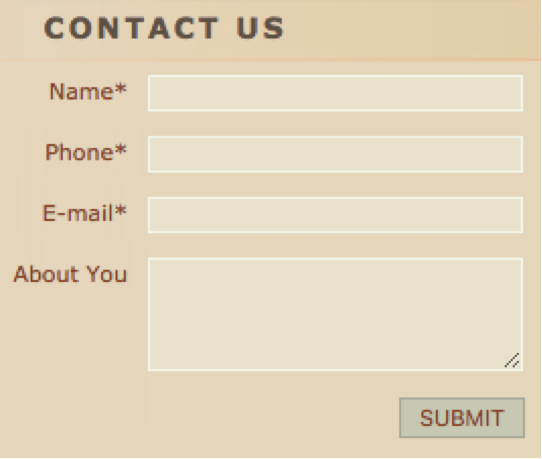
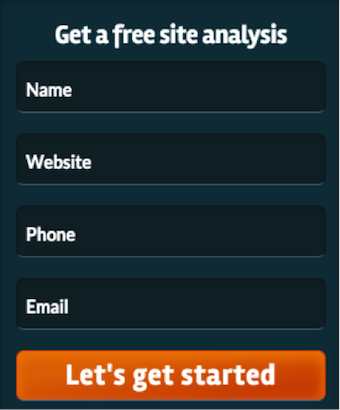
    With LeadSNDR, there is a mini form on each page that asks the minimum basic information required to get back in contact with your potential customer. By putting a form on each page, the site visitor doesn’t have to leave the page they’re on to get in contact with you, which provides a good user experience.

    Contact Us LeadSNDR Image

    We also put a larger form on the contact page with additional fields, in case the visitor wants to send more information, so you’ll be prepared to discuss their specific question when you contact them.

    It’s also important to make it easy for a potential customer to call you. We recommend putting your phone number big and bold in the header of your website so it’s easily visible regardless of which page you’re on, which also provides a good user experience.

    Large Contact Form LeadSNDR

    Lead Tracking

    You know that you want your email to ding and your phone to ring, you’re ready to put your number in the header of your site and forms on every page, but what do you want to know from your potential customers? You’ll likely want the basics like their name and how to get ahold of them, but what about the actual information you’re asking?

    The LeadSNDR form system is designed to suit the specific needs of your business with the ability to completely customize your form. You can specify everything from the colors and button text to the questions you’re asking your potential customers.

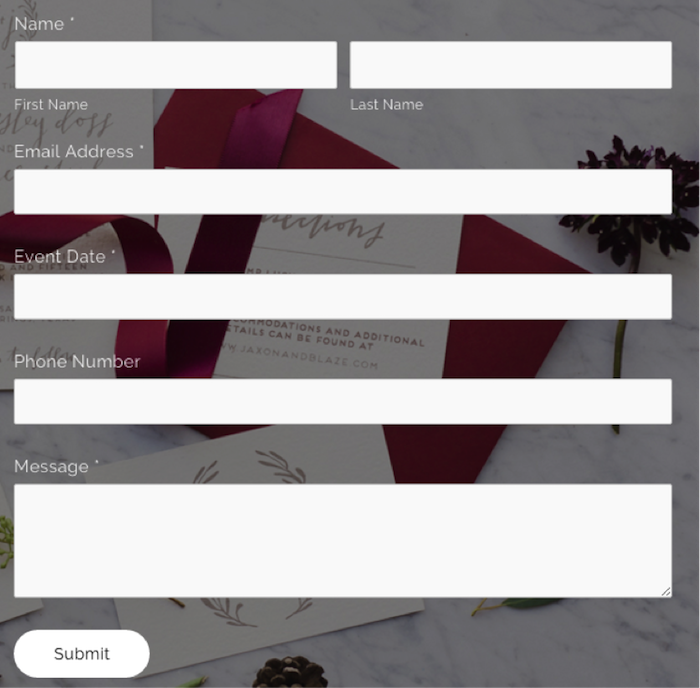
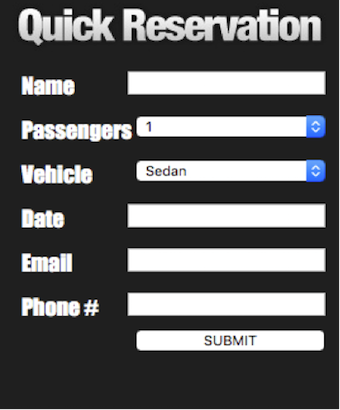
    Quick Reservation Form LeadSNDR Small Contact Form LeadSNDR

    Another key factor of the forms is the ability to gather information that is not asked of the customer but still valuable to tracking your leads. By integrating LeadSNDR with Google Analytics, you can see which search engine was used, if the user clicked on a paid ad or organic results, what page the user landed on, and even the IP address. This information allows you to examine trends and make informed decisions about improvements to your website to create more lead generation through form fills.

    For call tracking, it’s not only important to make it easy for a potential customer to call you, but also to know how they got to your site. LeadSNDR allows you to set up specific call tracking for numerous sources, which means that phone calls are catalogued by how a visitor arrived on your site. With call tracking, you can differentiate the amount of calls received from a Facebook post from calls received by Google organic search.

    The reporting system used in conjunction with LeadSNDR also gives you the data on the amount of calls you receive each month, their duration, the average number of rings before answered, and more. You’re also given the option to record calls to conduct quality assurance testing.

    Using LeadSNDR for Your Business

    By combining lead generation with tracking, you will be able to drive quality leads to communicate directly with your business and measure trends to set you up for future successes. LeadSNDR provides your business with the tools it needs measure the performance of your marketing efforts and convert site visitors to customers.

    For more information about LeadSNDR and how to increase your business’s leads, please contact us today.

  • How to Keep Your Law Firm’s Ads Legal

    With the recent death of Justice Antonin Scalia, the Supreme Court is on arguably on track for confusion, gridlock, and bipartisanship. This uncertainty could affect the future of affirmative action, abortion, union rights, and several other topics that are scheduled to go to court within the year. In the face of this uncertainty, we have been looking back at the famous Bates v. State Bar of Arizona ruling of 1977, which held major implications for digital marketing even before the World Wide Web was invented. In this case, the Court emphasized the benefits of advertising as a means of informing consumers of goods and services. A five to four opinion ruled that any restrictions on advertisements for legal services was in violation of the first amendment. The majority decision continued, however, to stipulate that advertisements that are “false, deceptive, or misleading, of course, [are] subject to restraint.” The opinion went on to address the grey area between perceptions of advertisements: “we recognize that many of the problems in defining the boundary between deceptive and nondeceptive advertising remain to be resolved…”

    In light of this acknowledged grey area, the question is: How do you keep your online legal ads legal?

    Legal Definition of Online Advertising

    Online advertising is not just limited to email blasts, pop-ups, or those dreaded YouTube clips that you must watch for at least five seconds. The legal definition varies by state, but in many states, online advertising is broadly defined to include your website and maybe even social media accounts. To be safe, assume that everything you or your firm publishes online is an advertisement.

    Avoid Misleading Claims

    To avoid false advertisement, everything you publish must be truthful and accurate. In terms of digital content, you will want to hook readers but not make over-exaggerated claims. This might take some creativity from your digital marketing team, but misrepresentation of services could lead to legal repercussions. It’s common sense. Don’t lie.

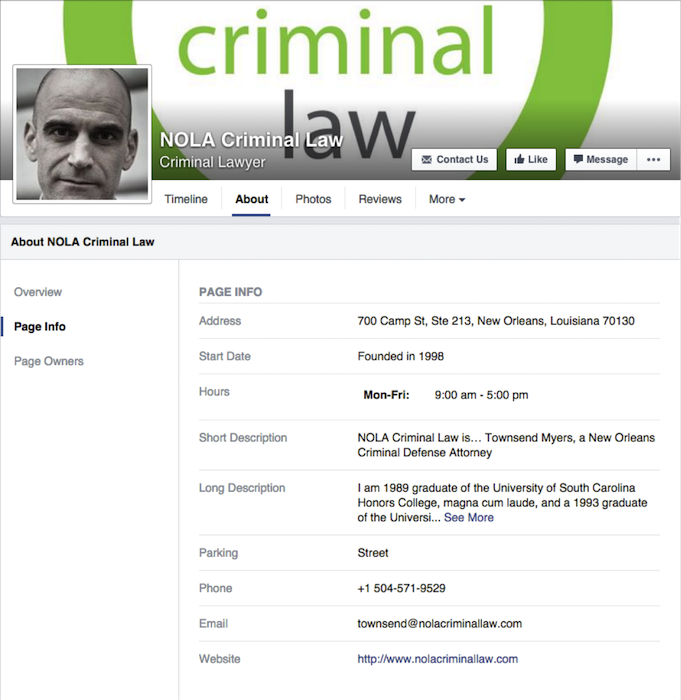
    NOLA Criminal Law Facebook Image

    Ad Targeting

    Because state laws vary, targeted ads are a great resource a firm can use to ensure ads only appear within a certain geographical region, avoiding inadvertently breaking another state’s regulations. You should keep all of your online ads relevant and targeted to your state or area. On top of staying within the realms of your state’s advertising laws, ad targeting also helps save you money. You can avoid appealing to people outside of your legal jurisdiction and reduce waste on your advertising budget.
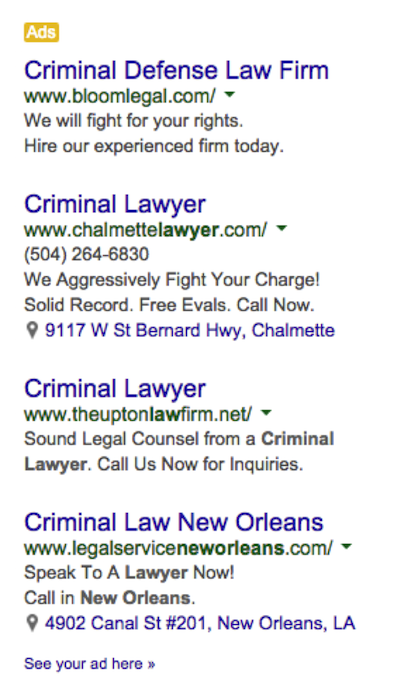
    Criminal Lawyer Google PPC Ads

    Creative Commons

    An image in an advertisement, whether a pay-per-click or on Facebook, needs to be creative and eye-catching. But all material published online or used in an advertisement still needs to comply with copyright laws. To ensure compliance, you can use creative commons material, join a stock photo website, pull images or graphics from a public domain repository, or ask the owner. A firm needs to get creative while staying safe.
    Even though the 1977 Bates v. State Bar of Arizona ruling solidified an attorney’s right to advertise, laws regulating the legality and specifics of Internet advertisements have yet to develop. We are operating in a grey area. To stay in the clear, make sure you everything you publish online is not a misrepresentation.

  • The Top 6 Metrics You Should Be Tracking in 2016, As Explained By Cats

    According to Facebook, 1.01 billion people log on to the social platform daily. Google sees impressive traffic as well, with 3 billion search queries per day…and that’s just the tip of the iceberg.

    Everyone is online these days. So it’s no surprise that online marketing has become increasingly more important to the modern business. But how do you know if your campaign is working? First, you might want to check out this Search Influence blog on what Google Analytics is and how to set it up for your site.

    After you’ve got your analytics set up, what exactly should you measure? And what does it mean?

    Here are the six metrics you should be measuring in 2016 as explained by cats. Note: screenshots are from analytics on my own personal site, which was set up pretty recently and has no online marketing campaigns associated with it.

    1. How many people are actually coming to your site?

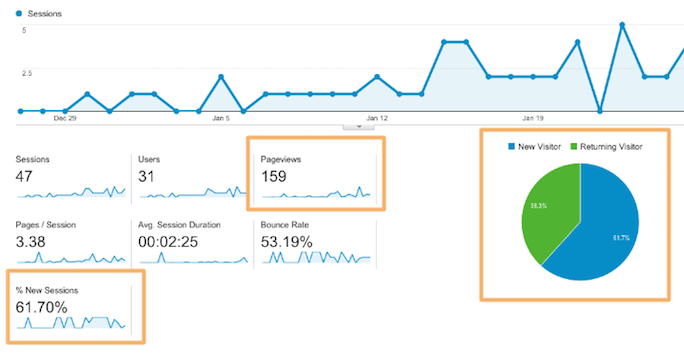
    Just because you build it doesn’t mean they will come. Measuring unique site visitors can give you big-picture insight into how well your campaign is performing.

    SI Blog Post - 2-8-2016 - Shaye Anderson

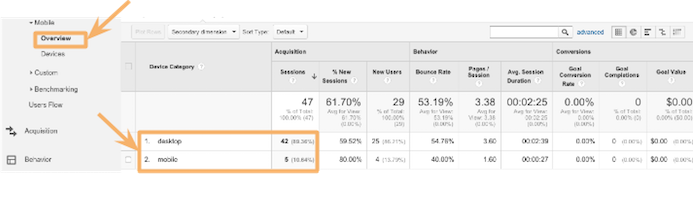
    2. What device are they using?

    Were they on a desktop computer or phone?

    Knowing which device people are using when they look at your site can direct you to present the most useful information in the most useful way. For instance, if someone is on their phone looking for contact information and hours of operation, it would be helpful to have a click-to-call phone number front and center. Or a button that says “Call!”

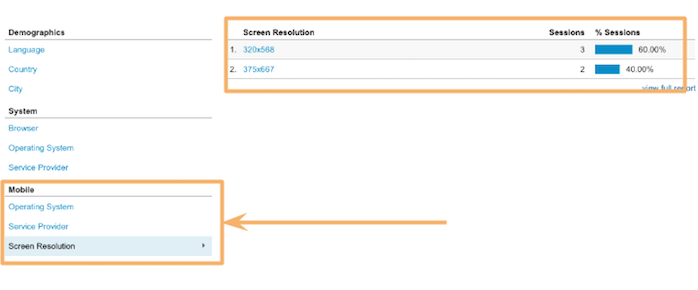
    You can also get as specific as screen resolution. This is especially helpful when dealing with any kind of graphic or visual representation on your site. Your information won’t be very helpful if people can’t even read it!

    SI Blog Post - 2-8-2016 - Shaye Anderson (1)

    SI Blog Post - 2-8-2016 - Shaye Anderson (2)

    3. Are they sticking around?

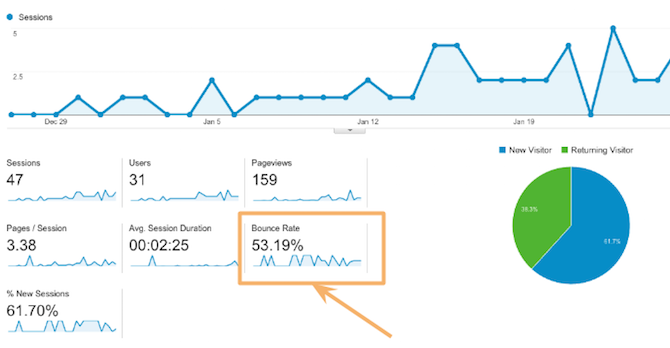
    It’s simple enough: if visitors find a page unhelpful, irrelevant, or hard to read, they’ll go elsewhere. When a visitor comes to your site and immediately leaves, that’s called “bouncing.” You should measure each page’s bounce rate to make sure you are sending out the right signals, delivering the right information, and providing clear content. So how do you know you’re in the green?

    “One thing that’s important is to be realistic about expectations with your bounce rate. High bounce rates are expected for certain pages (especially conversion capture points, such as checkout pages following a purchase) or on information-heavy landing pages. In these instances, high bounce rates can be taken to mean that the visitor came to your site, got what they wanted, and left. For average pages, an “average” bounce rate is much more preferable. It’s also important to be wary of very low bounce rates approaching or at 0%. This could be indicative of incorrectly installed Google Analytics and represents muddying of your data.” – Leigh Aucoin, Lead Web Developer at Search Influence

    SI Blog Post - 2-8-2016 - Shaye Anderson (3)

    4. How long are they staying?

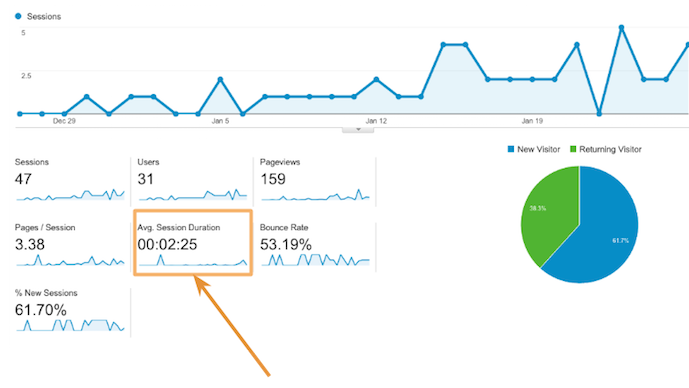
    Building off of #3, you obviously don’t want people to bounce; you want them to look around your site and convert (more on that in #5). So how long are they actually sticking around on your site? Short or long time-on-site can be good or bad, depending on the purpose of your site, what people are looking for, and how extensive the information is on your site.

    For instance, it’s reasonable that someone researching plastic surgery would spend a long time reading information about the procedure they are interested in. Also, it might make sense for an online visitor to spend a long time on an ecommerce site; they might buy more! But if someone is just looking for quick information—a phone number or hours of operation—it’s bad news if they need to spend a long time to find it!

    SI Blog Post - 2-8-2016 - Shaye Anderson (4)

    5. Are they converting?

    “Conversions” can mean many things, it really depends on your unique campaign and the specific page. A conversion could mean that a visitor fills out a form, makes a purchase, or calls a number.

    “Be aware of your business and what matters to you as a business, and how it’s made present on your site. If you sell items online, of course you’d like to track what led users to a purchase (a conversion in a more general sense). However, if you don’t sell items directly on your website, a form contact can be the next best measurement of a conversion. This means that you’ve been placed into contact with a potential customer. Ultimately, Google Analytics is a tool by which you can track any actions that a visitor to your site takes on your site and what leads them to do what they do.” – Leigh Aucoin, Lead Web Developer at Search Influence

    Search Influence has our own service called LeadSendr where we track conversions through a form on your site. You can find more information about that here.

    6. Are you seeing a return on investment?

    All these metrics are great, but they don’t mean much if you’re not seeing a return on investment. You want to make sure that your online marketing campaign works in tandem with your larger marketing goals, driving more customers to your business!

    All these metrics are great, but they shouldn’t be used in a one-and-done fashion. Use Google Analytics to check the success of your campaign efforts and then adjust your approach. A marketing campaign should be ever evolving. Using the metrics, you can learn from past mistakes and continuously improve your methods.

    Not sure where to get started with your site?

    Sit back, relax, watch this calming cat GIF, and let our team of experts craft a campaign that meets your business’ unique needs. What’s more, we track all the metrics for you! This way, you can worry about what matters most: your business!

    GIF Credits:

    Cats at Work
    Shark Cat
    Slipping Cat
    Cat in Box
    Cat Breaking Glass
    Money Glasses Cat
    Dancing Cat Graphic

  • 5 Tips to Improve Your Franchise’s Online Display Ad Campaign

    Blog4

    If you are a franchise business owner, you may have already encountered the difficulties that come along with trying to create brand consistency and improved user experience across all of the online marketing for your franchise businesses. If your primary goal up to this point has been to employ a streamlined strategy to ensure your online ads are yielding the most successful results, then you’ve likely already created quality content throughout all of your websites and set up a structure for your branded sites with consistent business location information across the Internet. You may have also gone the extra step to manage reviews and testimonials. Now that you’ve optimized your sites, you’re ready to apply your focus to online display ads to generate new consumer leads. If you’re just getting started, these five tips will help you set up the most successful display ads for your franchises.

    1. Keep It Simple

    With spending on online display ads projected to increase 90 percent between 2014 and 2019, it’s crucial to get ahead of the competition and get your franchise campaign set up properly the first time around. In short, creating a successful franchise display campaign involves reaching the right people with the right message at the right place. So you’ll want to focus on one service or product per ad and keep your message tailored to the consumer you’re trying to reach by making the content of your message relevant and easy to understand. Be sure to also include a clear call to action so the consumer knows what they get by clicking on your ad.

    2. Use the Company’s Recognizable Look

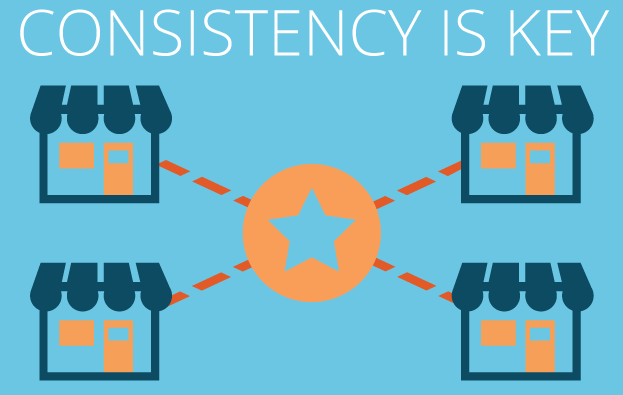
    One aspect of online display ads that can easily set you apart from the competition is the distinctive look of your brand. If your company uses the same logo, colors, and fonts across all of the franchise businesses, a consumer should see your ad and be immediately drawn to its recognizable look. When designing your ads, consider placing your logo at the top center for optimal results.

    3. Use Contextual Targeting

    Employing contextual targeting allows you to design your campaign so that your ads will be placed on sites whose content relates to what you’re selling. For example, if you are a frozen yogurt franchise with multiple locations, your ad might appear on a food blog or restaurant review site.

    4. Use Remarketing Ads

    Taking placement of online display ads to an even more sophisticated level, you may want to consider implementing a remarketing campaign. Remarketing lets you show ads to people who have visited your website or used your mobile app before. When people leave your website without buying anything, for example, remarketing helps you reconnect with them by showing relevant ads as they browse the web, use mobile apps, or search on Google.

    How Does a Remarketing Ad Work Infographic Image - Search Influence

    5. Target All Desktop and Mobile Devices

    As trends rapidly change and consumers rely more heavily on their mobile devices, it’s important to also target your ads across all desktop and mobile devices for maximum reach. Eventually, as you start measuring the clicks and leads generated from your online display ads, you’ll have a better idea as to what devices to spend more on. Make sure that you’re targeting by user and not by device for the most accurate results.

    If you follow these five tips and continually make adjustments as the campaign progresses and you get measurable results, you should see how big an impact display ads can have on all of your franchises.