Category: Digital Advertising

  • Your Guide To Google’s Newest Search Ad Type: Responsive Search Ads

    It seems lately that the changes to Google Ads and the types of ads you can create have been coming faster than some advertisers can handle. A few years ago, expanded text ads were a revelation. More headlines and higher character counts had us all loving the extra real estate we were able to have on the SERP. But now Google has come out with a whole new game changer—Responsive Search Ads. RSAs will save you time and management by relying on automation and machine learning to deliver the most relevant ad for each query. How do you take advantage of all this? By exploring this guide to adding responsive search ads to your paid search campaigns.

    What Are Responsive Search Ads?

    Responsive search ads are a new ad type that’s still in beta, and they might not be available in all Google Ads accounts. Unlike expanded text ads, where you create one static ad, responsive search ads use Google’s machine learning to assess which of the multiple headlines and descriptions that you create will combine to show the most relevant ads to searchers.

    How Do Responsive Search Ads Work?

    An advertiser enters up to 15 unique headlines (30 characters each) and four unique descriptions (90 characters each) to create an RSA. When a search triggers your ad, Google reads all of the signals available (search term, intent, device, time of day, and many many more) and uses machine learning to determine which of your ad assets will be the most relevant to the searcher. That is the ad combination that gets served.
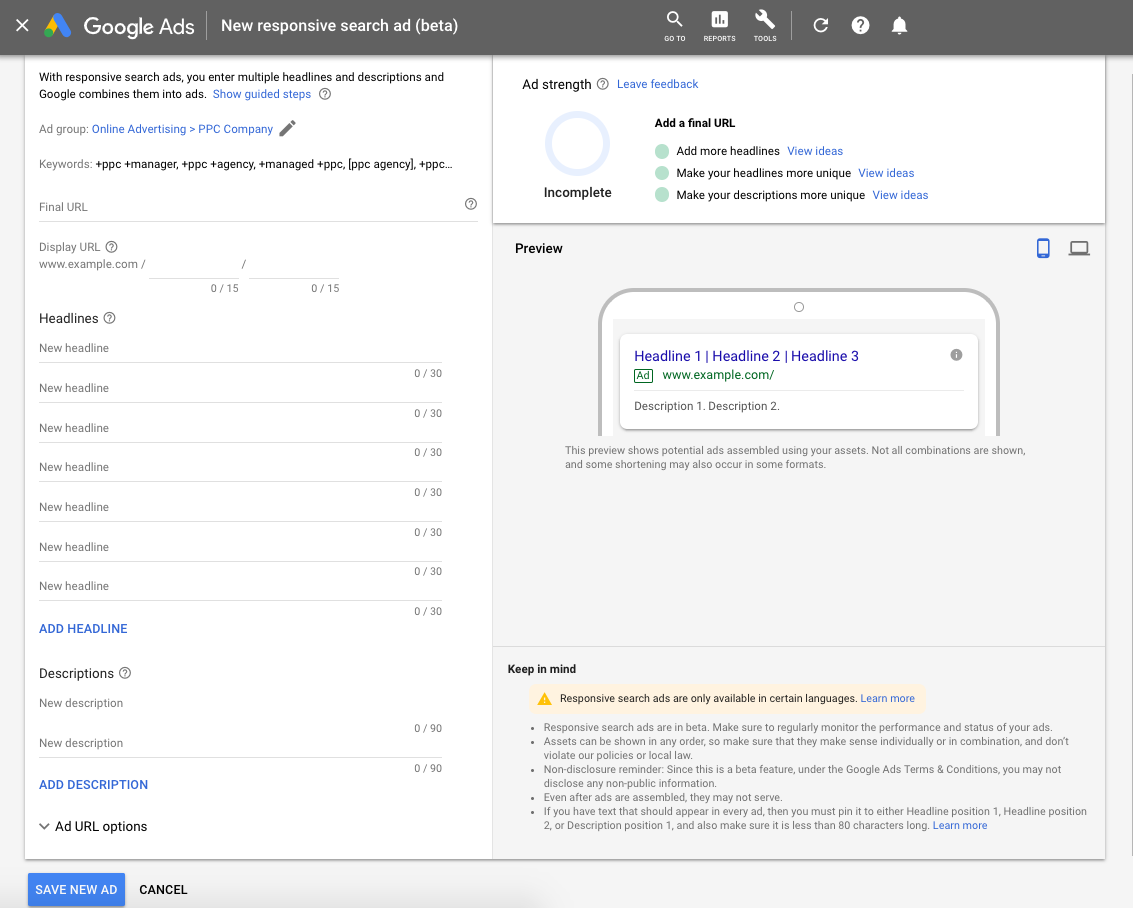
    Example of Google responsive search ads work performed by Search Influence in New Orleans, LA

    Responsive Search Ads Vs. Expanded Text Ads

    You might be wondering which ad type to use, and the answer is both. In fact, Google’s Matt Lawson writes that, because RSAs are still in beta, they aren’t going to capture all of the traffic that an ETA might.

    “Try to implement at least three ads per ad group with an optimized ad rotation. If you have access to responsive search ads already, you should remember to have at least one additional text ad in each of your ad groups. Responsive search ads are still in beta, and some traffic won’t be included in that experiment. You need a text ad to capture those impressions.”

    As for the differences between RSAs and ETAs, here’s a breakdown of assets:

    Responsive Search Ads Expanded Text Ads
    Number of Headlines Shown on the SERP 2 or 3 2 or 3
    Number of Headlines Written 3 – 15 2 – 3
    Characters in Each Headline 30 30
    Number of Descriptions Shown on the SERP 1 or 2 1 or 2
    Number of Descriptions Written 2 – 4 1 – 2
    Characters in Each Description 90 90

    As you can see, the searcher won’t be able to tell the difference between the two ad types. When responsive search ads were first announced, there was a lot of rejoicing of “more real estate on the SERP,” as the expanded text ads had lower character limits; however, the character counts of ETAs have been expanded once again to match the RSA character limit.

    What Are the Benefits of Using Responsive Search Ads?

    The most immediately obvious benefit of RSAs is that Google does the testing for you, virtually eliminating the need for you to run A/B tests. This can save tons of paid search account management time. Google claims that the constant testing will lead to the most relevant ad being shown for different search terms. This is something that a lot of advertisers need help with. Though there are scripts that can create reports approximating this effect, there is no way to segment ad copy performance by search term in the Google Ads interface.

    What About Disadvantages to Using Responsive Search Ads?

    All this time-saving automation comes at a price, of course: control. Someone with lots of time to test minor tweaks and analyze an abundance of data might prefer to conduct their own tests.

    Though there are options to “pin” a couple headlines and descriptions so that they always show (useful for compliance reasons or companies with strict branding), you are really limited in controlling the final version of the ad.

    Reporting options are subpar so far. We are offered very little insight into how each asset is performing, but we do have an asset-level report that shows how many impressions each headline and description has gotten, and a combination report that shows impressions for each combination.

    From this, you can infer which assets are performing best, but it’s only an assumption that’s based on trusting Google to properly optimize. Google says poor performers won’t be delivered, so if you see an asset getting few impressions, it might be underperforming.

    Along with the lack of control, RSAs also don’t support ad customizers at this time, with the exception of dynamic keyword insertion, which is actually encouraged. This means that you are unable to use countdowns, IF functions, inventory customizers, etc. with RSAs.

    Responsive Search Ad Best Practices

    Before you create responsive search ads, you might want to brainstorm a few benefits, features, and calls to action that you’ll want to include in your ads. Some of these features and tactics include…

    Unique and Varied Headlines

    You want your headlines to be distinct. Google says it has controls in place to prevent redundant assets from being served together, but headlines need to be different enough from each other that the system can adequately distinguish between them and serve relevant combinations. When building your ads, you will notice the Ad Strength meter in the upper right of your screen assessing the quality of your ads. This is what it might look like if your headlines are too similar:
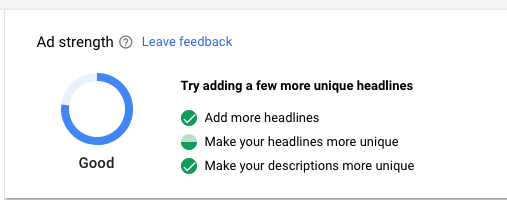
      

    Pay attention to the ad strength and get creative. You’ll also see the meter telling you to add more headlines. Strive to fill all 15 spots with a unique headline.

    You should also vary the length of your headlines. You don’t want to use all 30 characters in every headline. As with the content of the headlines, this gives Google more factors to test. Also, that third headline is more likely to show if it is short.

    Use Your Keywords—But Do So Sparingly

    You’ll want to include your keywords in some of your headlines, but not all of them. I like to keep only three or so keywords in the headlines and then maybe one or two in my descriptions. This leaves room for more of the business’ benefits, features, etc., and gives more variety. In addition to three keywords, I also use DKI in one of the headlines.

    Use Google’s Recommendations

    If you haven’t started implementing responsive search ads yet, but are opted into the beta program, you might see recommendations to do so in Google Ads.
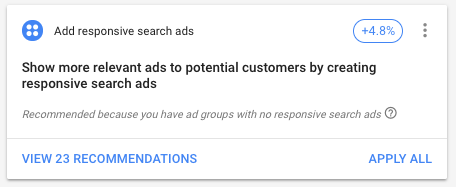
    Recommendations provided by Google Ads prior to starting campaign

    This is a great way to get started. When you view the recommendations, you’ll see that Google has already created some RSAs from headlines and descriptions that you are already using in your ETAs. Review these recommendations and make any necessary changes, then hit “Apply,” and you’ve got yourself a responsive search ad.

    Once you have ads running, you might also notice that when you go to add new headlines, Google will make suggestions based off your other ads and your landing page. Some of these might not be relevant to the particular keywords in your ad group, but some likely are relevant.
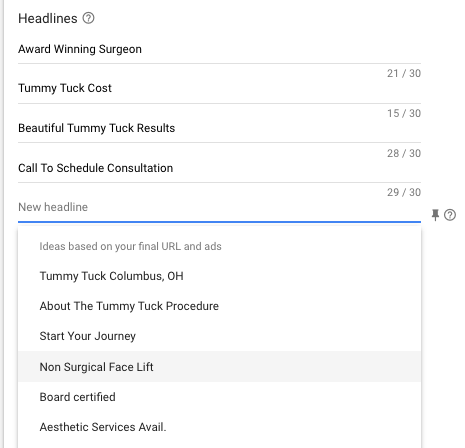
    More recommendations from Google prior to launching ad campaign

    How Many Responsive Search Ads Should I Use in an Ad Group?

    It’s best practice to have at least one RSA with two or three ETAs in an ad group, but you can include up to three responsive search ads in each ad group. Most advertisers won’t need this many, but if you are pinning headlines and descriptions, you might want to test pinning vs. not pinning, or A/B test the headlines you are pinning.

    Don’t Forget to Monitor Responsive Search Ad Performance

    Especially while RSAs are still in beta, advertisers need to be monitoring if they are performing as well or better than your ETAs. As always, focus on your bottom line, not solely on click metrics like CTR. Watch that Google’s optimizations aren’t suppressing your most profitable ad in favor of your most clickable ad. I recommend reading this piece on Search Engine Land about not relying too heavily on CTR and conversion rate for more information on this topic.

    A strong campaign for your business’ online advertising requires experts who are up-to-date on all of the latest roll-outs from Google and other advertising platforms. Search Influence can expand your business’ online presence. Start a conversation with one of our digital marketers today to grow your business.

  • Get the Most Out of Your Website With These Essential Google Analytics Metrics

    iPhone screen with google analytics at Search Influence in New Orleans, LA

    In today’s world, having an online presence is essential to business. With 27,378,962 live websites currently using Google Analytics, most business owners have heard of Google Analytics. But simply knowing about Google Analytics isn’t enough. Learning how to use the platform can provide business owners with insight into targeted audiences and what they think and feel about your products or services. Knowing the details of your customers’ behaviors will help you determine which pages are drawing customers to your site and which pages need some optimizing. Consider these questions to determine what is most important to your business.
    What Are People Doing on My Website?

    This is a measure of your site’s audience. Tracking your audience reveals who is using your site. When you know the type of person that is visiting your site, you can establish the direction and language of your site’s content and messaging in order to cater to this specific type of person.

    Session Duration

    This metric measures the amount of time that people spend on your website before leaving. The longer someone’s visit, the more likely they are to convert. Tracking this metric can help you determine which pages are effectively supporting your marketing strategy and which might need to be optimized.

    Pages per Session

    Like session duration, pages per session allows you to determine whether you are driving the right people to your website. A higher pages/session rate can indicate that visitors are engaged with your content and, therefore, more likely to convert.

    User Demographics

    This data allows you to segment the people who visit your site based on different criteria, such as their location, age, gender, and interests. Tracking this data allows you to gain a better understanding of who your customers are.

    New vs. Returning Visitors

    If visitors return to your site, that’s good news. It probably means that your audience is engaged and will be more likely to convert. Even if someone did not make a conversion the first time they came to your site, your brand has made enough of an impression to encourage them to return.

    Which Channels Drive the Most Visitors?

    This is a measure of your site’s page tracking. Page tracking is helpful to your business because it tell you how your traffic is coming to your site. Understanding this can help you determine which avenues are best for bringing traffic (and hopefully, conversions) to your site. Use this data to make decisions about where you might want to promote your site’s content.

    Fingers typing on a keyboard at Search Influence in New Orleans, LA

    Landing Pages

    Reviewing this metric will provide insight into the specific pages visitors are landing on. This knowledge allows you to:

    • Pinpoint the most and least popular pages of content
    • Track which keywords are most effective at driving organic traffic to your site
    • Identify the landing pages and paths that convert the most visitors and share these highly effective pages on social platforms

    Bounce Rate

    This metric measures the percentage of visitors who landed on a single webpage and then left without visiting any other pages. You can look at the bounce rate of the entire site or the bounce rate of individual pages.

    Exit Pages

    Exit pages measure the percentage of visitors to a single page that click away and completely leave the website. For a visitor to be measured in the Exit Rate, they must have come to your website, visited multiple pages, and then left. Exit pages are important because they let you see where your traffic drops off.

    Pages you want your visitors leaving:

    • Form completion thank you pages
    • Order completion pages

    Pages you do not want visitors leaving from:

    • Your homepage
    • A conversion form
    • During the checkout process

    Is My Website Leading to Conversions?

    This is a measure of your site’s goal tracking. Creating and monitoring your Google Analytics goals are important to your business because it enables you to track the progress of specific user interactions (that you have pre-defined) on your site. Goals should act as your targets to ensure your website is moving in the right direction.

    Laptop screen at Search Influence in New Orleans, LA

    Conversions

    A conversion takes place when a visitor completes an action that you consider important to your business. Examples of conversions could be filling out a form, completing a purchase, or signing up for an email newsletter. You can track these by channel or landing page to determine which sources are leading to the highest and lowest conversion rate. If your marketing strategy includes paid advertisements such as Google Ads or Facebook Ads, you should also be tracking the cost per conversion for all of your paid ads.
    Google Analytics provides you with nearly endless ways to track and review your website metrics. The metrics that most impact  your business will depend greatly on your company goals and industry (like tourism and travel, for instance). Once you have identified the Google Analytics metrics that matter the most to your business, you can determine how and where to allocate your marketing budget. A digital marketing agency can take tracking metrics off of your plate. If you’re interested in partnering with Search Influence, request a marketing analysis today.


    Images:

    Phone screen with Google search

    Hands typing on keyboard


  • CCPA and Political Ads: What You Need To Know and Why It Can’t Wait ‘til 2020

    The recently-passed California Consumer Privacy Act and proposed changes to political ads will change the digital marketing landscape in 2020. I know what you are thinking: 2019 just started, why should I already be concerned about complying with new rules and regulations that go into effect in 2020? As many companies learned through complying with the GDPR (General Data Protection Regulation), it’s much better to start implementing changes as soon as possible.

    With the recent breaches of consumer data, privacy and transparency have been major concerns. Passing the GDPR in 2018 was a huge step toward combating privacy concerns, but U.S. companies can still expect much more to come in the way of regulation and legislation. Not only will the US start enforcing their own data regulations, including the CCPA, but new rules are arising that would require greater transparency for political advertising.

    Lock on the keyboard of a computer at Search Influence in New Orleans, LA

    Key Components of the California Consumer Privacy Act (CCPA)

    Effective January 1, 2020, the CCPA aims to protect the privacy, security, and rights of California consumers. The law allows citizens, or the state itself, to bring action against a company for violations of the law. According to Varions, the rights given to Californians from this privacy act include the following:

    • Know what personal information is being collected
    • Know if their personal information is being sold or disclosed and to whom
    • Say no to the sale of their personal information
    • Access to the personal information that is being collected
    • Equal service and price if they choose to exercise privacy rights

    Why Being GDPR Compliant Doesn’t Mean You’re Automatically CCPA Compliant

    While the goals of the CCPA and the GDPR are extremely similar, businesses need to be aware that just because they comply with the GDPR requirements does not mean they are compliant with the CCPA. In many ways, the CCPA expands on ideas and regulations of the GDPR. For example, the CCPA requires a way for consumers to control their own information, as opposed to the required consent for data in the GDPR. The CCPA’s rule on notifying consumers if their data is sold to third parties and allowing them to opt out is another major difference.

    So what do marketers need to do to prepare for this 2020 deadline? First and foremost, they need to be sure to closely examine the data that they currently collect and how it is used. Data fields on forms, profiles, and landing pages are an important part of this scrutinization process. If they collect personal information, clear language and cookies need to be in place to inform users about what information will be stored, shared, or sold. Privacy policies must also be updated with steps the consumer can take to have their personal data deleted.

    What Could Change With Political Advertising for the 2020 Elections?

    The 2020 elections are not far off, and many political campaigns at both the national and statewide level have already been kicked off. After the controversy over the 2016 elections, protection of data and transparency with political advertising has been top of mind. In March of 2018, new regulations were proposed by the FEC for how political advertisers should run disclosures that are clear about who paid for the ad. After commissioners met in June, there was still no clear decision for an approved proposal.

    Currently, the FEC law requires that advertisements include disclaimers for three ad types: Communications by Political Committees, Express Advocacy by Any Person, and Solicitations by Any Person. The newly proposed rules would apply to the same ad types, but require that these ads state who paid for them and if a candidate authorized the ads. Another difference these policies propose is that advertisers will no longer be able to omit ad disclaimers based on size constraints. Instead of omittance, “adapted disclaimers” must be used, which would have the largest impact on online advertisements.   

    Keep in mind that while the majority of marketers may not be working directly with a political campaign, these rules still apply to anyone who expressly advocates for or against a candidate in paid digital ads. This could encompass a large variety of digital advertising users, even outside the realm of politicians. The urgency behind the push for new policies should encourage all advertisers to be more transparent in regards to paid political ads, not only in preparation for inevitable future regulation but also in an effort to maintain good faith with consumers.

    Despite the fact that the FEC has yet to pass an official regulation from these proposals, the Digital Advertising Alliance (DAA) has implemented new guidelines “designed to bring greater transparency and accountability” to political advertising. Under these guidelines, the DAA is urging political advertisers to use a purple PoliticalAds icon in the top right corner of ads, which will link to any required disclosure information. For advertisers using this icon, there should be little to no work left to do in order to comply with the FEC regulations once a final decision is made about the proposed disclaimer policies.

    Woman tapping on her watch at Search Influence digital marketing agency in New Orleans, LA

    What Else to Expect Before 2020

    A lot is still changing as far as privacy regulations are concerned. The CCPA has seen a lot of criticism for how quickly the law was pushed through, and for what some say is oversight on how certain aspects will be enforced. This backlash has led to speculation that the CCPA could still see a lot of change before it goes into full effect on January 1, 2020.

    Advertisers should be sure to keep an eye out for any more changes. Many data collectors are now pushing for federal regulation before other states pass laws and create a patchwork of varied laws, making compliance across the country much more difficult. However, don’t be deterred from continuing to take advantage of digital advertising channels. As stated in our recent blog by Alison Zeringue, spending on digital marketing and advertising has continued to grow. In addition to spending more on digital advertising, we are also seeing marketers increasing the use of targeted audiences, despite new regulations and privacy concerns being at an all-time high.

    If you’re concerned about the changes to digital advertising, the experts at Search Influence are here to help. We follow the news and the trends to ensure that our clients’ digital marketing campaigns are effective while following the letter of the law. In addition to creating regulation-compliant online ads, we track their performance as well. Start a conversation today to learn more about how we can help your business grow.

    Image:

    Tapping on Watch


  • Guide to Facebook’s Lead Generation Ads: What Can They Do for Your Business?

    You’ve probably heard this a million times by now, at least a couple thousand from us—if you aren’t on Facebook, then you’re doing your digital marketing all wrong. There are more than 2 billion people around the world who actively use Facebook monthly, and on average those people spend about 35 minutes a day swiping through their feeds and engaging with content from friends, family, and brands.

    Not only is Facebook’s audience large and engaged, Facebook offers an advertising tool that makes it easy for you to create advertising campaigns at a fraction of the price of traditional ad types. Our client Audubon Nature Institute generated $10,100 in total revenue while only investing $1,080 in ad spend on a Facebook Display campaign!

    What Are Facebook Lead Ads?

    Facebook Lead Ads are a type of Facebook ad that allows advertisers to collect information from prospective customers directly from the platform. Before Lead Ads, you would have to guide users to a landing page on your website to leave their contact information.

    Facebook has made it simple for you to create ad campaigns in a few taps and for potential customers to contact you with ease. Users simply tap your ad and their information is sent directly to you.

    Why Facebook Lead Generation Ads?

    • Facebook forms are made for mobile and allow users to submit their contact information in a flash
    • Because there is no need to click through to a landing page, there is potential for more conversions and less drop offs
    • You can reach your target customer where they are with Facebook’s countless targeting options
    • The Lead Generation forms are customizable, allowing you to build a form to ask the right questions
    • It’s easy to connect your CRM to Facebook to get your leads immediately and take action sooner
    • You can use Facebook Lead Generation Ads for quote and demo requests, sign-ups for your newsletter, event registration, access to gated content, and more
    • Many businesses and brands large and small have seen significant increases in lead generation and a reduction in cost per lead
    • Facebook advertising is cheaper than traditional ad types and can build more brand awareness
    • It saves you time

    Where Will My Leads Go?

    All of the leads you collect by way of your Facebook Lead Generation campaign will be stored on Facebook and can be downloaded to a CSV file. To download your leads, visit your Facebook page and click “Publishing Tools,” and you’ll see “Forms Library” under the “Leads Ads Forms” label.

    Pro Tip! Facebook also connects to popular CRMs like HubSpot and SugarCRM, enabling you to automate the process of pushing leads directly to your sales team. If you don’t take this step, you’ll have to download a CSV file regularly to see and take action on your new leads.

    Creating Your First Lead Generation Ad

    Before you begin building your campaign, you’ll need to make sure you have a Facebook Page for your business or brand. Building your campaign starts with visiting Facebook Ads Manager via business.facebook.com or accessing the drop-down menu on the top left of your screen. If you’ve never run ads before, you will need to create a Facebook Ads Manager account. You will be asked to link your business’s Facebook and Instagram page to your Facebook Ads Manager account.

    Building a campaign is simple and can be done in a few steps.

    1. Choosing Your Campaign Type

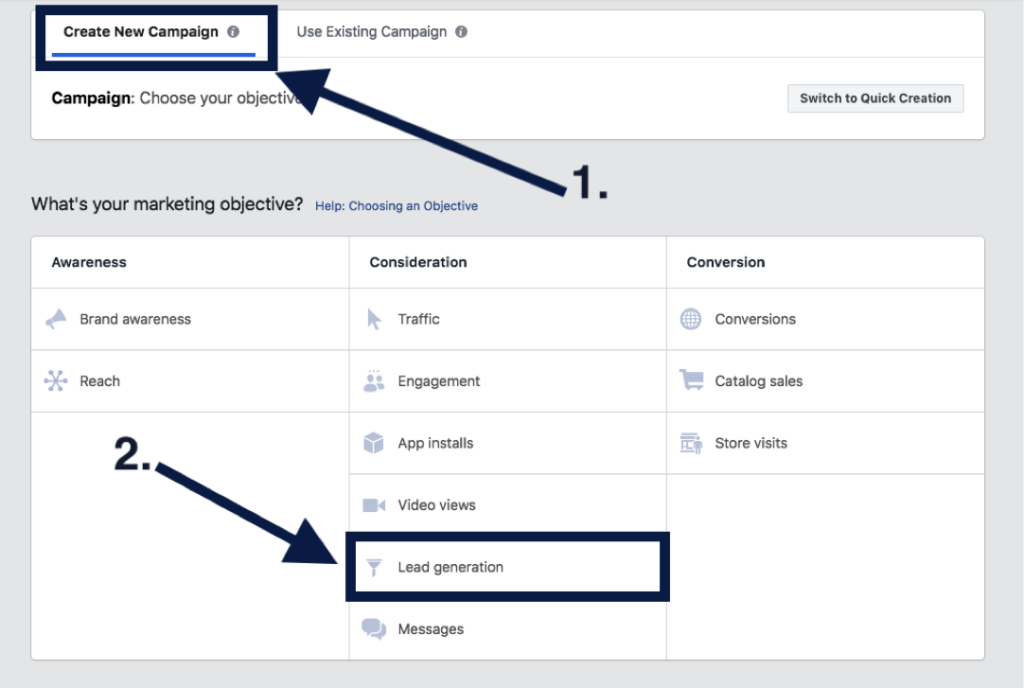
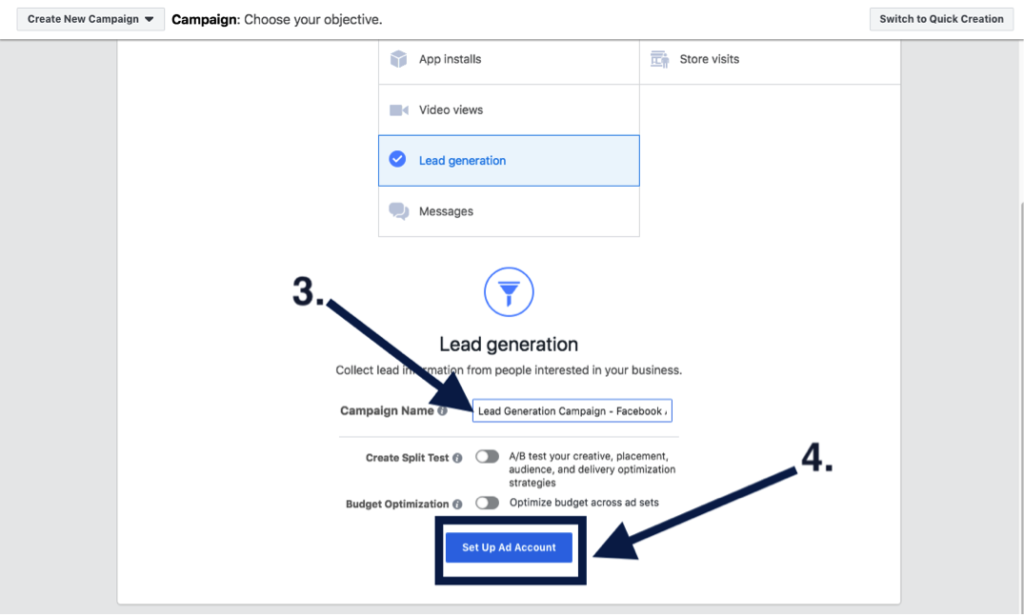
    Once you’re all set up and ready to go, you’ll want to create a new campaign and select “Lead generation” under the “Consideration” marketing objectives. You’ll want to give your campaign a relevant name and click “Continue.”

    2. Choosing Your Custom Audience & Budget

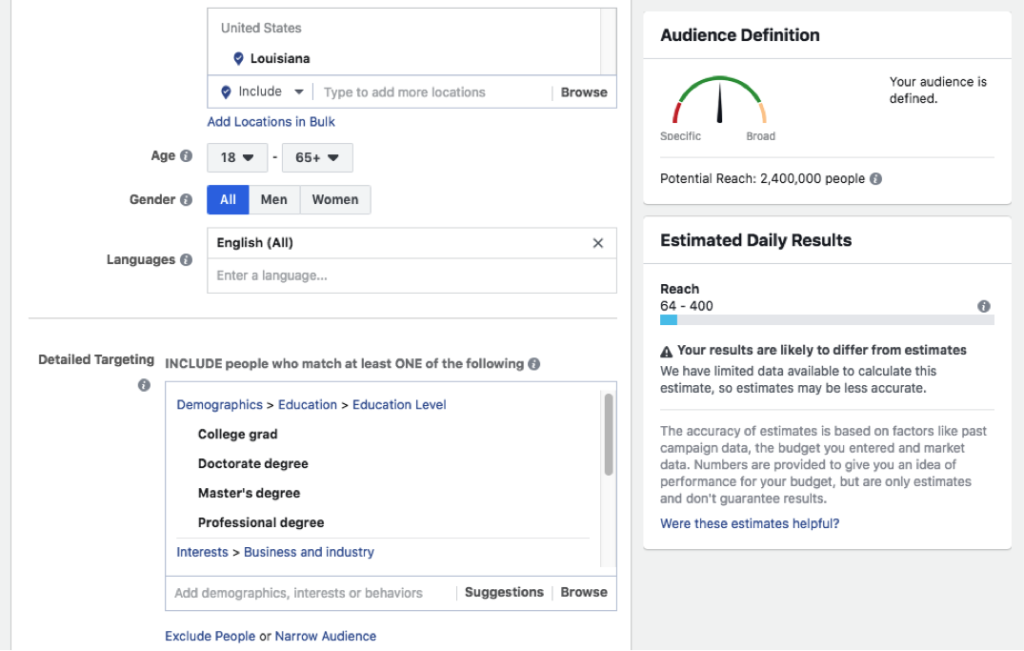
    Move forward with setting up your ad account, creating your custom audience, and setting your budgets. But don’t worry! Facebook offers optimization tools to help you adjust your budget and targeting after the campaign is launched, and they are always adjustable. Facebook offers several targeting options, including targeting by demographics like location, age, gender, and language. You can also target by other demographics, interests, and behaviors like education levels, if someone is interested in yoga, and behaviors like how they utilize Facebook. You also have the option to build an audience from a lookalike version of your current customers and website visitors.

    3. Creating Your Ad

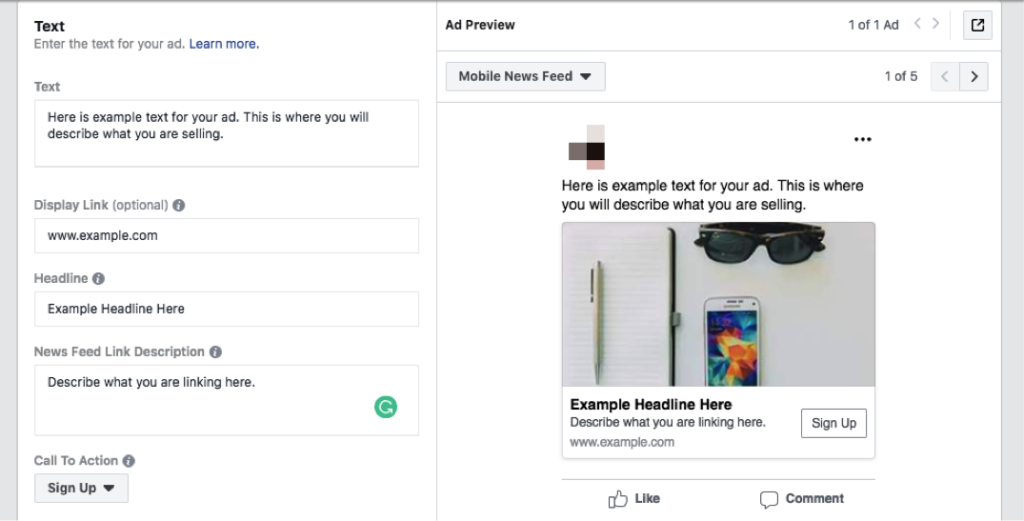
    After you have your custom audience and have set your budgets, you’re ready to create your ad. You’ll verify the pages you want your ads to be represented by and select your ad format. There are several ad formats to choose from. Carousel and video have been the most successful ad types in our experience. You’ll add in your ad text, display link, headline, news feed description, and a call to action.

    4. Creating Your Lead Generation Form

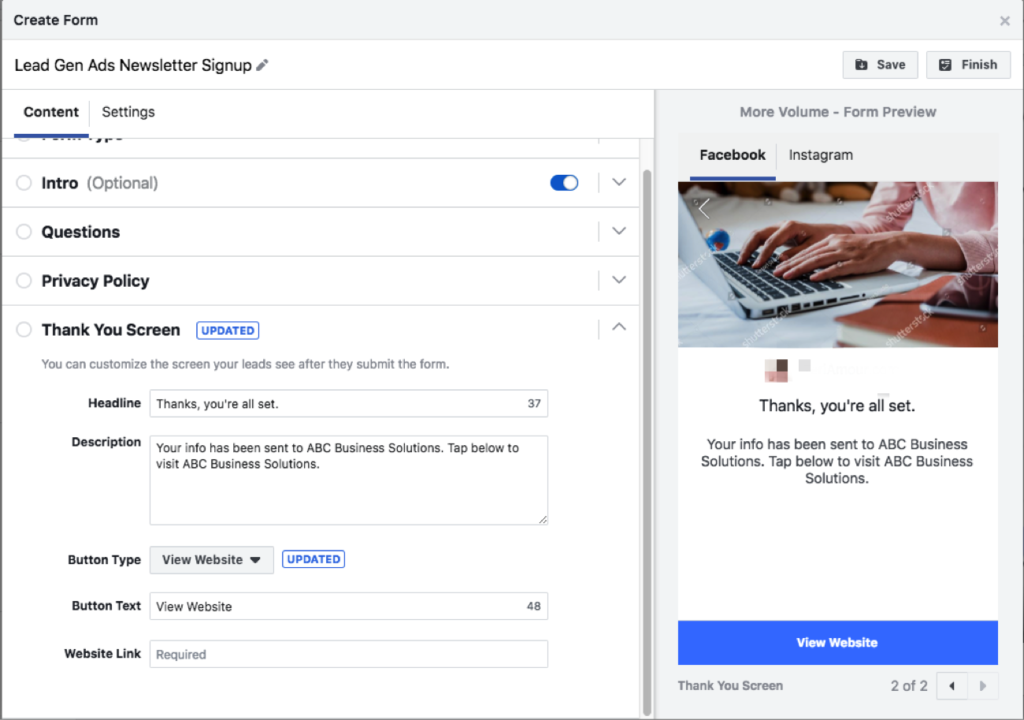
    Finally, the last step before you launch your campaign will be to create your lead generation form. Here you’ll introduce the product or service you’re promoting, add the questions you’d like to ask your audience, insert your privacy policy (it is mandatory to have one), and build your “Thank You” screen. Be sure to give your form a descriptive name so that you can identify it later when you need to download your leads.

    5. Publishing Your Campaign and Launching

    Congrats! You’ve launched your Lead Generation campaign. This is the part where you celebrate and wait for the leads to come pouring in.

    You’ll want to monitor your ad’s performance by testing and checking on it regularly! Try changing out your ad copy and graphics, or trying different targeting options—narrow your targeting if you find you’re reaching too broad of an audience and thus receiving unqualified leads. You could also update your form to ask more specific questions.

    Here at Search Influence, we’re invested in helping our clients grow their businesses through dynamic marketing strategies that drive qualified leads. If you’re interested in utilizing Facebook to bolster your lead acquisition efforts, request your marketing analysis today to get started.

  • How to Drive Conversions With the Right Contact Form—And What to Avoid

    Your business’ shiny new website just launched and everyone assumed a deluge of fresh new leads would follow. To everyone’s dismay, the predicted deluge turns out to be nothing more than just a trickle. What gives exactly? “Build it and they will come” may ring true with your traffic itself but that quote lacks an “and convert” at the end. In years past, traffic was the key metric for a lot of businesses since it was assumed that those users would appreciate the brand awareness. Fast forward to the present day in the “Silicon Age” where users not converting is sure to set your business behind further than the Bronze Age.

    One easy way to convert users into customers is through the usage of a handy-dandy online form, but just having a form doesn’t guarantee a conversion rate anywhere near your industry benchmark. I’m here to help bolster those forms from some boxes into lead machines!

    Positioning

    Back when there were only brick and mortar buildings, there was always a huge focus on location, location, location. That phrase may seem like it belongs in the Bronze Age, but it instead adapted to the changing times and is still just as important as it was before. The location of your form is integral to the success of any lead collection campaign. Forms should always be placed in a very obvious place and above the fold, which is the portion of a page that initially loads in the screen’s viewport, as often as possible. Having a form in a good location puts it on users’ minds as soon as they visit your website and makes it more convenient to convert. Overlaying the form over a banner image is a good start for more visibility.

    Another excellent location for your form is on the sidebar of your site. This allows casual site perusers to convert at their own leisure instead of forcing them to a contact page or trying to lead them back to whatever landing page they entered the site within. One last location for a form is on your contact page, of course. Any site user would expect a way to contact your business on the contact page. In addition to an address, phone number, or email, a contact form is a perfect way to capture visitors’ information and nurture leads to eventually becoming loyal customers of your business.

    Layout

    Now that you’ve figured out where to place your form, the next step is to create a form that users can easily understand, fill out, and convert on. One big helper that was pointed out in a Google AI test is how users’ eyes focus on form fields. Having your labels above the inside of form fields is preferable to labels next to the form fields. This allows users to better scan the information and breeze through forms quicker, which leads to lower rates of dropout and errors in fields. Speaking of fields, try not to overwhelm your users with a bunch of unnecessary fields for information that can be gathered further down the line. If you aren’t shipping something to someone, why would you require a home address? If you’re sending users a brochure via email, why would you require a phone number? Requiring an excess of information makes users go “hmm…” and abandon the website completely. This is not to say that long forms have no place on the internet, rather every bit of information should be relative to the call to action.

    Here at Search Influence, we use our own proprietary lead tracking system to create fully customizable and extremely flexible forms that can keep track of your website leads in an easy-to-read reporting system. With our forms, you’ll know where your leads come from the most and learn how to optimize your campaigns to maximize your lead generation.

    Call-to-Action

    A “Call-to-Action” (CTA) refers to the phrase that is meant to draw users into completing conversions. In the case of forms specifically, this would be the text that is on the submit button. Hubspot compiled a list of 31 Call-to-Action examples taken from many different corners of the internet and from varying industries. The main takeaway here is your CTA needs to be catchy and draw a user in. “Submit,” which may be seen fairly often around the internet, doesn’t quite cut it anymore. The end of a form should establish some sort of value to a user. Saying “Submit” simply tells the user that you’ll gladly collect their information and may or may not do anything with it.

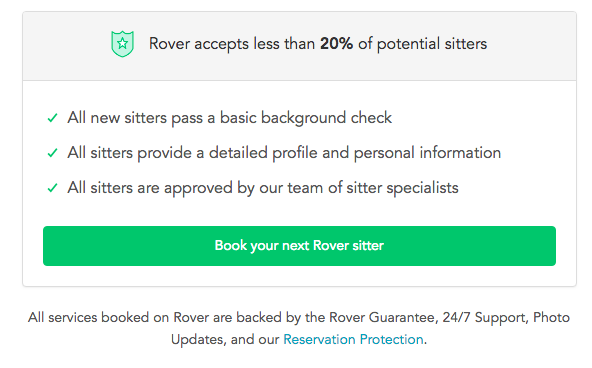
    Screen shot of a call to action from Rover - Search Influence

    Having detailed text on the CTA button encourages users that your form is something worthwhile whether they’re about to “Subscribe to our newsletter” or Rover.com‘s “Book your next Rover sitter.” Users want to know the value of giving up their precious personal data, so make sure your form is honest and straightforward with how the users’ data will be used.

    Mobile

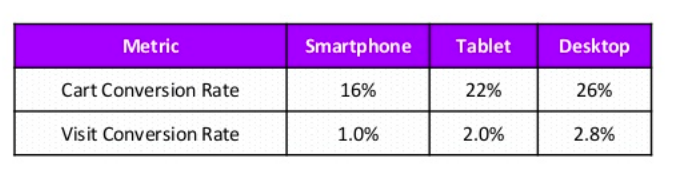
    One factor that can’t be ignored is the impact of mobile users on your website. Considering mobile users surpassed the amount of desktop traffic almost two years ago—eons in internet time—ignoring mobile users is a recipe for failure. What’s even more surprising is that in the same year, even though there were more mobile visits to websites worldwide, mobile users converted almost 65% less than desktop users according to the 2016 Adobe Mobile Retail Report.

    Table of mobile conversion rates - Search Influence

    Our advantage here is that this data is like, eons old. We’ve progressed since then and have become more accustomed to serving mobile users and Google even recognizes the efforts that developers put in to make their websites mobile friendly and adjusted their search to index mobile sites first. This coupled with the rising magnitude of mobile traffic means that being able to capture leads efficiently on mobile platforms is imperative for any campaign.

    At Search Influence, we have everything you need to start a lead generating campaign, from SEO services, digital advertising, social media management, and the capability to track your campaign with pinpoint accuracy. We also practice what we preach; check out the form in the sidebar if you don’t believe us.

  • Top 5 Google Analytics Metrics for E-commerce Tourism Companies

    Top 5 Google Analytics Metrics for E-commerce Tourism Companies

    With a growing number of travelers using mobile search to book their vacations, it’s a great time to be in the tourism industry, assuming you have an e-commerce option for your customers. Whether you’re offering hotel rooms, dinner reservations, or curated experiences, your customers are more likely than ever before to make their travel purchases online and on the go. But, how can you tell if the e-commerce side of your business is operating at peak performance? With a strong track record of successful marketing for zoos, museums, and other tourist attractions, Search Influence is here to help! We’ve compiled the top five Google Analytics metrics that your business should be tracking to make sure you’re optimizing your potential.

    1. E-commerce Conversion Rate

    Google divides the number of completed sales by the number of visitors to your website to provide your e-commerce conversion rate. This metric is one way to measure your business’ success in terms of online sales. While it does not measure how much revenue each sale brings in (that’s the average order value, and we’ll talk about it next!), your e-commerce conversion rate tells you how many visitors to your site have become paying customers. It’s an especially important metric to keep track of because converting current visitors into customers is much more cost effective than acquiring a new customer base.

    Of course, e-commerce isn’t the only conversion rate you can measure. Break down conversion points on your site into micro and macro. In the world of e-commerce, your macro conversion would be a purchased products/tickets. Micro conversions are smaller actions that lead up to the end goal of purchases. For tourism, this would likely include visits to key pages (like ticket pricing page), to adding something to a shopping cart, to email signups. You should watch your success of micro conversions and tune your campaigns to those as well, as each of these actions should be designed to drive customers toward macro conversions—increasing that e-commerce conversion rate of visitors turned into paying customers.

    2. Average Order Value

    Average order value tells you how much revenue online purchases generate for your business, on average. It is calculated by finding the total revenue generated from online orders and dividing it by the number of orders. According to some experts, like Databox, it could be the one most important metric for your e-commerce business to focus on.

    So, how do you improve your average order value? MonsterInsights provides some key suggestions.

    First, price your products with upselling in mind. For example, if you’re a photographer shooting on-site family vacation photos, you might offer a base package of 20 photos, with the option to add more at an increased price-per-photo rate.

    Second, offer product bundles at discounted prices. For example, if you’re running a walking tour company, you could bundle together a daytime and a nighttime tour. Customers will be enticed by the promise of extra touring for their dollars, and you’ll still gain more income than if they had just purchased a single tour.

    Finally, offer savings with a minimum order—something like, spend $100 and get $20 free. Customers may spend more than they ordinarily would just to access the discount. All three of these strategies can drive up your average order value, bringing in more revenue for your e-commerce tourism business.

    A close-up of a woman touching a screen - Search Influence

    3. Revenue Per Visitor

    Revenue per visitor is a crucial metric – increasing it can mean revenue growth for you without having to drive new visitors. You can increase this metric by both converting more visitors into customers and increasing your customers’ average order value. Revenue per visitor is calculated by dividing your total online revenue by the number of unique visitors.

    You can increase revenue per visitor by using any of the previously discussed methods, like upselling, bundling products, and offering discounts with a minimum spend. Keep in mind that a low revenue per visitor is not necessarily an indication that your business is struggling. For example, if you’re selling lower priced items, like postcards or other tourism souvenirs, your revenue per visitor will be much lower than for a company selling high-dollar items like cruise tickets or hotel suites. You’ll just need a larger number of unique visitors to boost your sales and drive revenue overall, and this should play heavily into your marketing goals and strategy.

    4. Customer Lifetime Value

    Customer lifetime value tells you the total value that an individual customer, acquired during a particular time period, has spent with your online business.

    This metric is best used for estimating appropriate marketing costs for your business, and for analyzing your customer acquisition strategy. For example, if your average customer will only spend $100 at your business over the course of their life, it isn’t worth paying hundreds of dollars to attract this customer. Maximize your return on investment (ROI) by keeping your marketing and advertising expenses reasonably lower than the income your average customer is likely to generate for your business. Most businesses are willing to spend 5-10% of revenue to acquire a new customer. (See more in our blog “What’s The Perfect Marketing Budget For Your Company?”)
    5. Return on Advertising Spend

    Speaking of ROI, let’s discuss return on advertising spend—or ROAS as it’s sometimes called—which is a key metric for determining the effectiveness of your digital advertising. It tells you how much income you earn for every dollar spent on advertising campaigns. If you’re running online ads and want them to be as effective as possible (who doesn’t?), you need to raise your return on advertising spend. Ideally, your ads should drive about three times as much income as you paid to advertise.

    A man viewing graphs and charts on a tablet - Search Influence

    So, how can you raise your return on advertising spend to this ideal 3x level? Conversion Fanatics Blog offers some great tips. First, do some testing to figure out what channels work best for your business. For example, if your Facebook ads tend to perform better than your Google ads, channel your dollars to Facebook, where your ads drive the most revenue. Similarly, test the times at which your ads have the best results. If you notice that holiday ads bring in more clients for you than summer ads do, it could be worth concentrating your ad dollars on that crucial time of year. Finally, you can dive into even more metrics. Monitor the user journey by tracking how many customers click on your ad, how long they stay on the resulting landing page, and so on. If you can pinpoint which stages of the user journey are working well for you, and which stages are losing potential customers, you can fine-tune your ads and landing pages for an improved user experience.

    These five metrics, all available through Google Analytics, are key components of e-commerce tracking for any online tourism company. For more information about how to optimize your travel business’ potential, contact Search Influence at 504-208-3900, or request a proposal today to hear opportunities from our strategists.

    Images:

    Camera and Phone

    Touchscreen

    Tablet

  • How to Navigate the NEW Google Adwords Experience

    AdWords recently announced that they are fully switching to the new experience by the end of the year, and I’m here to tell you it’s going to be okay! The new experience has been available to all advertisers since October, but we’ve had exclusive access for a while and have been able to get acquainted with the new UI and I’m here to share our findings.

    For those of you thinking, “Google’s changing something AGAIN?” I’m right there with you! But with the following tips and resources, you’ll soon love all the new experiences it has to offer.

    So What’s so Different?

    Google updated the interface to provide, “a faster and more intuitive experience that’s focused on helping you reach your goals.” All the features you rely on are available in the new experience, and Google incorporated feedback as well, since this has been in beta for a while. They’ve also rolled out some exclusive features that are available in the new interface, so you have to switch to take advantage of them. Some of my favorite new features are below.

    A New “Overview” Page

    The overview tab provides performance insights that are generated by Google depicted as charts and graphs for you to quickly review and take action. These make reviewing data for devices and time of day much more visually appealing and easier to understand.

    Bid Adjustments for Calls

    Adjust your bids on call extensions to show call interaction ads more frequently. This allows you more flexibility and control over how often these ads appear and how customers can connect with your business. The bid adjustments range from -90% (I don’t want these to show as much) to +900% (yes, please, show these all the time!).

    Promotion Extensions

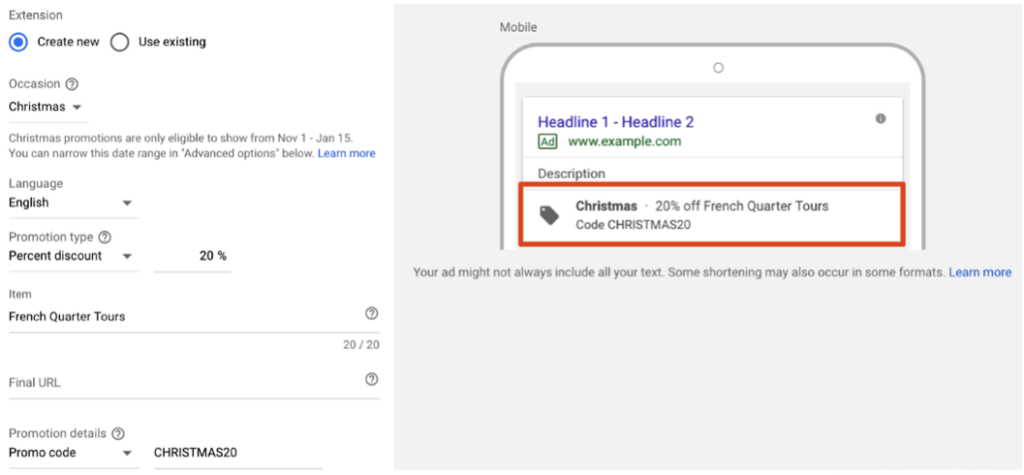
    Promotion extensions are pretty fantastic! They allow users to show and link to a special offer in their search ads and even include a tag icon to help the promotion stand out. You can highlight specific sales and offers, all while taking up more valuable real estate in the SERPs.

    Shortcuts

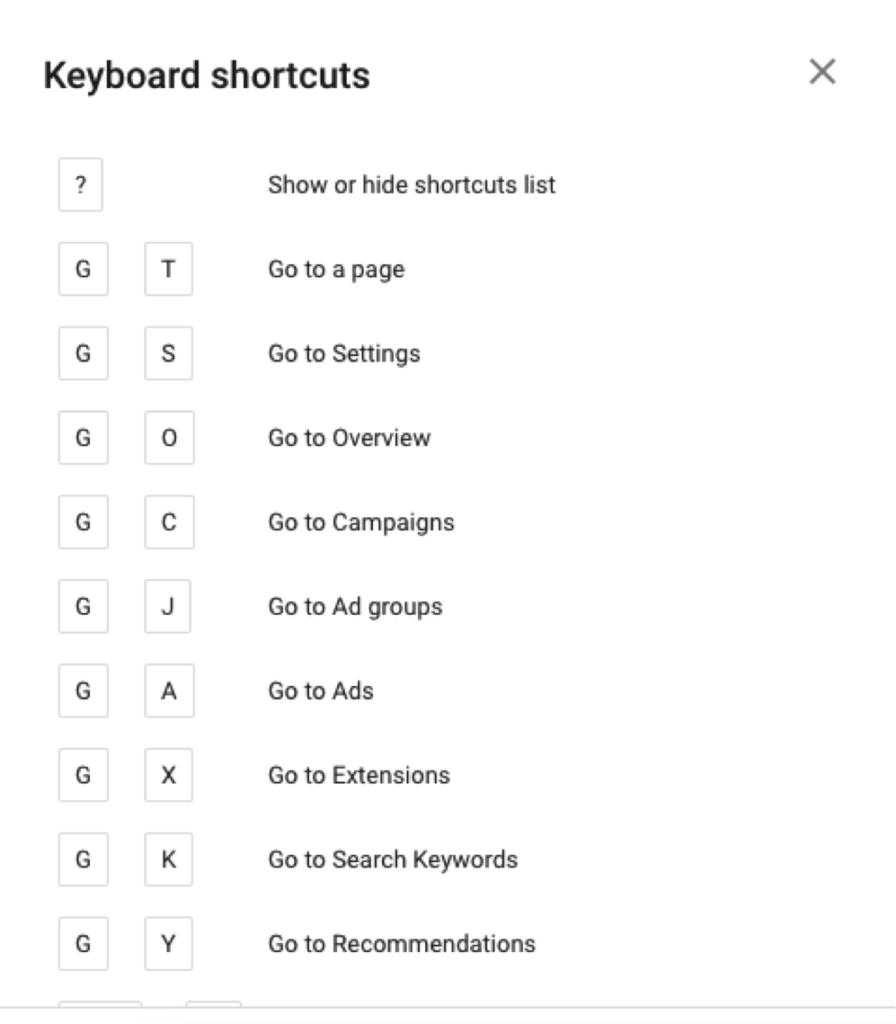
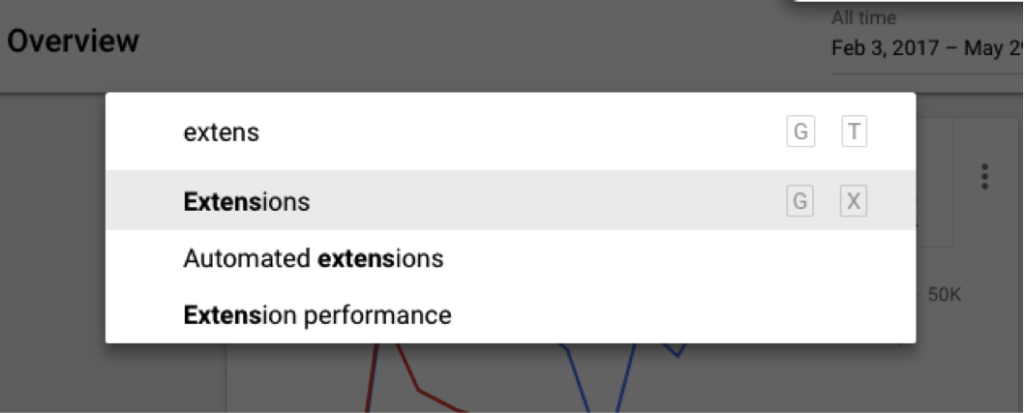
    One of my all-time favorite new features is the introduction of shortcuts. You can pretty much navigate to anywhere in the interface in a matter of seconds! Need a list of shortcuts, just hit the question mark on your keyboard. Hit G and T (GoTo) to bring up a search bar, making it super easy to find anything you need!

    Need More Help?

    I couldn’t possibly cover all of the benefits of the new AdWords experience but wanted to include a few more tips and resources to get you started.

    • The dimensions tab used to be one of my favorite places to go to pull reports to find actionable insights. I thought it was gone, but AdWords has re-named this and moved these reports to “Predefined reports,” found under the little graph icon in the upper right corner.
    • Google has a guided tour of the new interface, which is great for beginners to get familiar with the changes. They also have a Help Center, which has been updated to help you navigate all the new features (bookmark this page!).
    • Follow this page to view new information on AdWords features as they are added to the platform.
    • If learning by video is more your thing, check out the guides to the New AdWords Experience Part 1 and Part 2.
    • There are a few things that are changing and some features that are not yet available, so familiarize yourself with these in case you need to find a different solution.

    Getting on board with big changes like this can take some time, so I recommend that you start poking around now. The end of the year will come quickly and is a critical time for most advertisers, so the more experience you have with the platform the more you’ll be able to take advantage of all the new features to set your campaigns up for success. If you have any questions or need help navigating this switch, the Online Advertising team at Search Influence has experts that can help.

    All screenshots captured by Jeanne Gaudet Lobman on May 30, 2018

  • Why Are My Ads Disapproved by Google’s Misleading Content Policy?

    In its continual quest to better serve users, Google has cracked down on misleading content in advertisements as well as website content. When your advertising campaign is slammed for “misleading content,” it can come as quite a surprise. Because Google holds advertisers to a high standard, some of the violations might seem like harmless marketing strategies. Regardless of how the situation arose, it’s important to bring your website and account back in line with Google’s expectations. The sooner you resolve potential violations, the sooner you can get back to building your brand’s online reputation.

    What Is the Google AdWords Misleading Content Policy?

    “Misleading content” is an umbrella term that includes several types of violations, ranging from problematic testimonials to deceptive branding. The main objective of the misleading content policy is to provide a set of clear standards for online advertisers to follow as to not deceive users with exaggerated or false content. The central component of these standards states that:

    – Disclaimers need to be included alongside perceived claims, even if the claims are direct quotations from past customers.

    – Images that show before-and-after results also need disclaimers. More broadly, improbable assertions are likely to draw the attention of the Google AdWords team.

    We’ve all seen investment opportunities and weight loss programs that sound “too good to be true.” As you might imagine, some of the standards allow room for interpretation, and many affected advertisers find that they need to resolve multiple policy violations to resume advertising.

    At least, in theory, Google’s policy should benefit both users and advertisers. Users shouldn’t have to scroll past misleading or spammy content, and advertising slots will become more valuable as users learn that paid search results are also informative and trustworthy. When you edit your ads and website to align with the Google AdWords misleading content policy, you’ll also be improving content and sales copy that might have sounded suspicious to potential customers. The things that Google considers “misleading” may also be off-putting to your target audience.

    What Kinds of Businesses Are Most Impacted by This Crackdown?

    With shifting expectations for disclaimers and testimonials, medical businesses like plastic surgeons and dermatologists are particularly vulnerable to being caught on the wrong side of AdWords policies. Whenever possible, peer-reviewed journals and other reputable sources can be referenced to support claims. Images are useful for showing the results of weight loss programs and cosmetic procedures, but those types of images need to include disclaimers to emphasize that individual results vary.

    Investment firms, lawyers, and other businesses may run afoul of Google AdWords misleading content policy, even though they aren’t making medical claims. The misleading content policy looks for vague guarantees and other wording that implies certainty or permanence. Depending on the phrasing used to describe results, virtually any business can find itself on the wrong side of Google’s misleading content policies.

    How Does Google Review and Determine If Content Is Misleading?

    In case there was any doubt, Google doesn’t employ a review board of physicians or lawyers to determine which claims are unjustified. Instead, an editor on the Google team judges whether the wording or formatting of a page is misleading. When the editor finds one or more violations that justify disapproving the account, they may (or may not) make a note in your case file. With the number of campaigns and sites reviewed by editors, it doesn’t make sense for them to make exhaustive lists of recommendations beyond the first one or two violations.

    As a business owner, you might never interact directly with an editor at Google. When you call the account representatives on the Google helpline, they only have the information that editors chose to note in your case file. If you fix the problems that were cited as “misleading,” there may be additional problems found when your site is re-evaluated. It can be a frustrating runaround but don’t get angry at the person on the helpline. They aren’t the ones who flagged your content, and they don’t have the power to reinstate your account. Instead of focusing on the people who made the decision, it’s better to try to understand the aspects of the policy that might apply to your site and campaign.

    What Do I Need to Do to Get My Ads Approved and Running Again?

    Not everyone gets site-specific recommendations in his or her case file, and even if you’re lucky enough to get actionable advice, it’s still important to be proactive about finding additional violations. After your campaign account has been flagged, the responsibility is on your company (and your web developer) to make sure that your site and your PPC campaign meet the standards set by Google. Look through your landing pages in search of other potential violations.

    Could your seals and stamps be perceived as mimicking government seals? Site layouts and deceptive popups can also trigger penalties. Popup windows shouldn’t simulate messages or system errors, displays intended to trick users into clicking through or interacting by accident. As previously discussed, assertions about future results need to be carefully worded. Some violations are more obvious than others but use due diligence to ensure that your site complies with relevant policies.

    How Can I Avoid Getting Ads Disapproved in the Future?

    Look at the penalty “sandbox” as a learning opportunity, and try to avoid repeating the same mistakes in future campaigns. Make a point of looking beyond your PPC campaigns to your website and your company’s approach to branding online. The campaigns flagged by AdWords often have issues on the landing page, marketing strategies that may be mirrored across the rest of the website. Even if a PPC campaign can be restarted with changes to a few key pages, it’s worth adjusting other website content to align with misleading content policies. Search algorithms favor high quality, unique content, and the misleading content policy hints at indicators that could eventually affect overall search rankings.

    If you don’t have time to spend waiting on the Google helpline, consider getting professional help through digital marketing consulting. Google’s policies and expectations shift periodically, and anticipating changes can become a distraction from your day-to-day business.

    As a Google Premier Partner, Search Influence has over 25 employees certified in Google AdWords Search, Video, Mobile, Display, and Analytics. Our digital marketing agency keeps up to date with the latest trends in search engine algorithms and online advertising to best serve our clients. Contact us so we can help get your ads approved and running again.

    Image Credits:

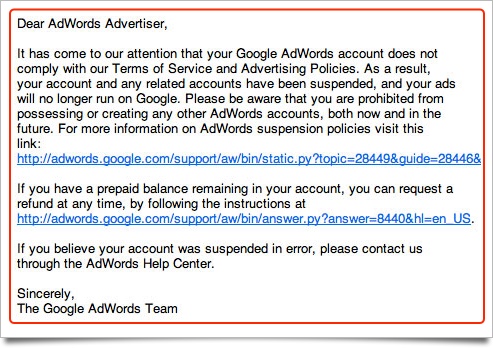
    Google Adwords Email

    Magnifying Glass

  • Paid Search, SEO, and the Evolution of Google

    Paid Search, SEO, and the Evolution of Google

    No man ever steps in the same river twice, for it’s not the same river and he’s not the same man. –Heraclitus

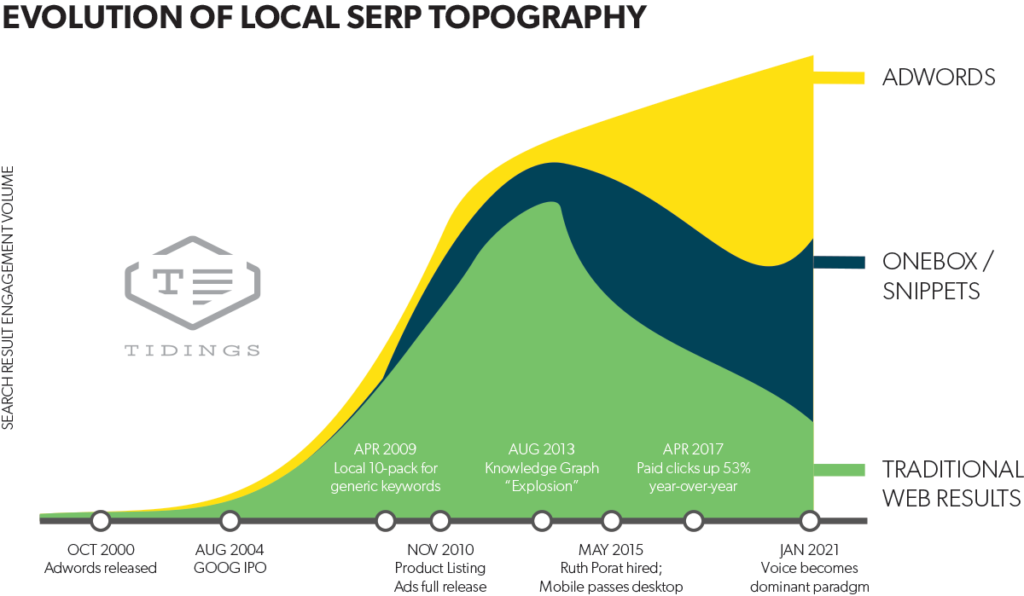
    One thing that’s certain in the world of search is that technology and user habits are always evolving. David Mihm recently wrote an excellent blog on the ever-changing landscape of search engines otherwise known as “SERP Topology.” We recently had the honor of hosting David as a guest speaker for a lunch & learn for the whole team. He provided us with some powerful insights about the evolution of Google. Here are some key takeaways.

    Local serp topography graph

    As you can see above, based on his predictions it is highly likely that Google search results will be more and more driven by paid advertising as opposed to traditional SEO in the next 5-10 years.

    Practically, this will impact your business in a few different ways. Some industries will continue to stay relevant with a traditional SEO approach, but for many, it will become a less effective strategy.

    If you’re a business owner, here are some things to keep in mind:

    1. What percentage of closed business is coming from digital marketing efforts?
    2. Where, specifically, are your leads coming from?
    3. How is your team converting those opportunities?

    Brand Awareness

    If you’re producing content, it will become increasingly important to promote that content using social platforms and other advertising options, such as Google Display Ads. Marketing your brand through ads will continue to be an important and useful strategy.

    Referrals

    The connection economy will continue to increase in importance. Who are the influencers in your industry online? Where are they? Find out what platforms the thought leaders are on and connect with them.

    Also, find out where your customers are hanging out. If it’s Facebook, then you should seriously consider developing a strong presence there.

    Lead Generation

    Organic SEO is very powerful, however, one of the downsides is that it can take a long time to grow results. Google ads are a great option to compliment SEO and content marketing strategies because you get instant feedback from your target audience. From there, you can take that feedback, find those great leads, and nurture them into customers.

    SEO

    Search engine optimization is not going away anytime soon. And, in the next 10 years, it will remain relevant for many industries. However, it won’t be quite as effective in the near future. As Google continues to generate the majority of its revenue from advertising expenditure, it inherently implies a push toward incentivizing businesses to use those tools.

    If you’d like to understand more about how to advertise your business online, or how you can best take advantage of SERP Topology, reach out here to chat with a strategist.

    Image:

    SERP Topology

  • Facebook Ads vs. Boosted Posts: Here are 4 Reasons to Always Choose Facebook Ads

    The world is filled with many ways to advertise a product or service. Simply hoping that your message makes its way to the perfect target audience is never the best practice to ensure your advertising efforts are successful and profitable for your business. With the increase of paid digital advertising on many online platforms, it is becoming more difficult than ever to reach potential customers the old fashioned organic way. As more content continues to flood these platforms, knowing how to utilize their advertising tools is more important than ever before. Facebook is continuing to reinvent the way the world does advertising. With the platform being a rich and unique source of users’ personal interests and behaviors, combined with the ability to present advertising information in compelling and creative ways, using Facebook to advertise your business is becoming a no brainer for both newbies and advertising professionals alike.

    With that being said, busy business owners might ask themselves, “Why should I spend the time to create Facebook ads with Facebook Ads Manager when there are simple tools like Boosted Posts that do the same exact thing?” The ease and simplicity of boosting an already posted Facebook post cannot be denied. With the click of a button and for as low as $5, your post can reach more people, potentially resulting in more engagement, increased traffic, and even better sales. Sounds great, doesn’t it? The major problem that many business owners come across with boosting posts is simply wasting money due to a lack of strategy tied to a specific business goal. Using Facebook ads can come with a bit of a learning curve. It is not as quick and simple and can’t be done directly for your page. Facebook ads can, however, bring some distinct advantages to the table that you can’t get with boosted posts. These advantages can help you grow your business by not only helping you to narrow in on your ideal customer, but also by presenting your business in a way that truly personalizes the experience and connects with these individuals.

    Here are 4 reasons to always choose Facebook ads over boosted posts for your advertising efforts:

    1. Facebook ads provide in-depth targeting options that go beyond just interest-based targeting used by boosting a post.

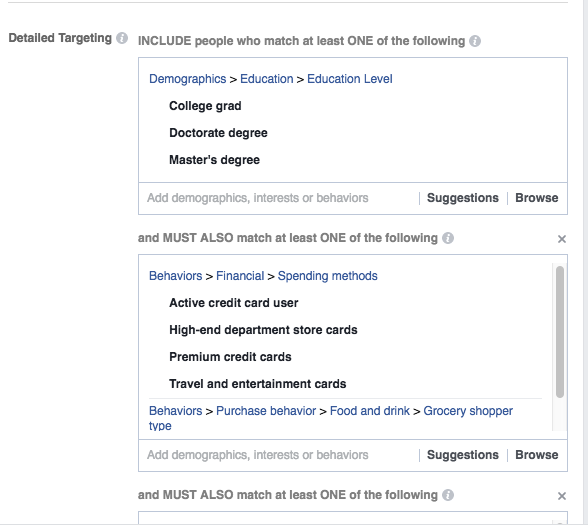
    Unlike Facebook ads, boosted posts are extremely limited in who you can actually target. There are only three targeting options: people who have already liked your page, friends of people who have liked your page, and people who you choose through a few basic targeting options. Though the first two options can provide some value to your business, just because someone likes your page doesn’t necessarily mean they are your ideal customer. Likewise, though there are a few targeting options with boosted posts, you cannot target behaviors or utilize detailed targeting, which means, for example, you can’t target someone who is a college grad AND an active credit card user. Instead, you can target users by their location, age and gender, and interests.

    Example Of Detailed Targeting Image - Search Influence

    Example of detailed targeting.

    Though Facebook Ads Manager can be daunting at times, it is certainly one of the best tools on the market to get in front of the perfect audience for your business. If you have a good understanding of your customers, what they are interested in, and how they behave, Facebook has the big data analytic capabilities to back your knowledge. Understanding how to use these targeting capabilities to your advantage can provide long-lasting value to your business.

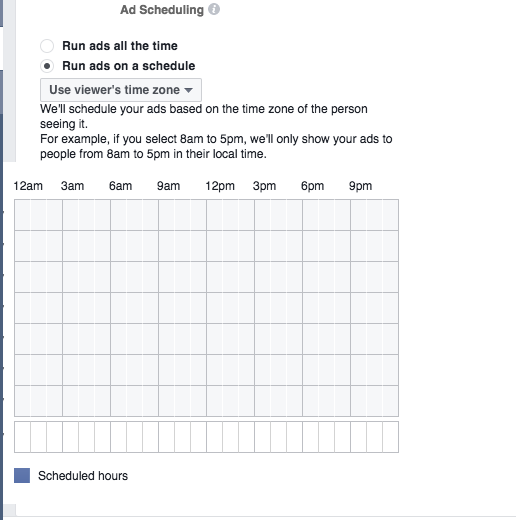
    2. Facebook Ads Manager allows you to schedule ads during times that matter most to your business.

    When using boosted posts, the advertiser has very little control, if any, over how and when a post is delivered. A boosted post can only run between one to seven days, limiting your ability to show ads during the time your ideal customer is on Facebook as well as during hours of the day that might be most important to you and your business, i.e. when your store is open or for the duration of a special event. Using Facebook ads allows you to pinpoint exactly when you want your ad to run. This can help to save your advertising dollars for when you need them most!

    Example Of Ad Sampling - Search Influence

    Example of ad scheduling.

    3. Take advantage of unique call to action buttons that tell your users exactly what action to take!

    Boosted posts are optimized for engagement, or likes and shares. If you are trying to entice a potential customer to click on your post’s call to action, this is not going to be the best way to do that. With Facebook ads, businesses have more of an opportunity to increase sales and traffic to their websites by using call to action buttons. These buttons help your audience understand the action you want them to take after seeing your ad. Including these in your ads urges users to move away from the ad and onto your site, giving them more of a chance to shop, sign up for an account or email list, or learn more about your product or service.

    Example Ad Using The ‘Book Now’ Call To Action Button - Search Influence

    Example ad using the ‘Book Now’ call to action button.

    4. Unique creative and placement options.

    Boosted posts come with only a few creative and placement options within Facebook. These ads can typically be spotted within your target audience’s News Feed. With Facebook ads, on the other hand, ads can be seen using Instagram and on the right-hand side of the Facebook platform. Facebook ads also come equipped with a number of creative possibilities, including multiple image ads, video ads, and slideshow ads. These can be used to entice and excite your target audience, making for a more enjoyable experience when discovering information about your business.

    Ultimately, Facebook Ads Manager is the perfect tool for all advertisers to get in front of their ideal customer using in-depth targeting and advanced delivery options alongside unique creatives. Though boosting posts might always be a simple and easy tool for advertisers with less experience, using Facebook ads is certainly the way to go to grow your customer reach in a creative and personalized way.

    Need help using Facebook Ads to impact your business? Search Influence is equipped with the expertise and experience needed to help you grow! Contact us today.