Category: Digital Advertising

  • Digital Marketing vs. Traditional Marketing

    If you’re having trouble deciding where you should spend your marketing dollars in 2020, then you’ve come to the right place. As the world becomes more digital, the way we market will continue to evolve. While traditional marketing has its successes, digital marketing is changing the way businesses are marketing to their consumers. Continue reading to find out the top four reasons you should be taking advantage of the benefits of a digital marketing strategy.

    Tina Fey in 30 Rock saying lets do this

    What Is Digital Marketing?

    Digital marketing helps you promote your brand online, increase website traffic, and deliver high-quality leads through a holistic marketing approach. The average person spends 24 hours a week on the Internet, which tells you it’s likely that the internet is where the majority of your potential consumers are spending most of their time. If you want to market your company’s brand in the right place at the right time, then it’s important you are being found online.

    The top four reasons your business should be taking advantage of the benefits of digital marketing are:

    1. Target ideal buyers
    2. Trackable and measurable results
    3. Communication and engagement
    4. Cost-effective

    1. Target Ideal Buyers

    When you market to your potential customers, you want to make sure you’re marketing to the right person at the right time. Digital marketing consists of different tactics that work together to get your brand in front of your ideal buyer. One tactic, Search Engine Optimization, will help to ensure your business is seen when a person is searching for a product or service applicable to your company. Other tactics like Google and Facebook Display, Paid Search, and Social Media Advertising will allow you to market to people who are likely to be intrigued by what your business offers. Though traditional marketing can be successful and does allow you to reach certain audiences, it certainly does not have the advanced targeting proficiencies of digital marketing.

    Keith Urban saying that was a bullseye man

    2. Trackable and Measurable Results

    The only way to know if a marketing campaign is successful is to measure its success over time. Tracking the results of a traditional marketing campaign can be extremely challenging, and, at times, impossible, while every tactic used in a digital marketing campaign can be measured. Susan Bogle, the Associate Vice President of Product Marketing at Southern New Hampshire University writes, “Today, analytics allow marketers to track user behavior at a highly detailed level: how many times they click on a link, how much time they spend on a web page, how often they open emails, and much more.” Being able to track results in a digital marketing campaign gives you the opportunity to see which tactics are performing well and which tactics could be altered for better success.

    3. Communication and Engagement

    According to a Hubspot blog written by Kayla Carmichael, “recently, 50% of marketers said they believe digital marketing has an edge over traditional because of the interaction digital marketing opens with customers.” Digital marketing allows for continuous engagement with your audience through different digital media channels. You are able to interact with your customers to ensure you have met all of their desired needs. A marketing team is able to create, support, and withstand a two-way conversation with its customers in a digital marketing campaign, while traditional marketing has little to no interaction with consumers.

    4. Cost-Effective

    Using digital marketing tactics is one of the most profitable ways to market your business. Investing a large amount of dollars in marketing and advertising can be a financial burden that many businesses have to deal with. Traditional marketing makes it almost impossible for smaller companies to compete with larger companies for advertising space. In contrast, digital marketing allows businesses both big and small to market on the same platforms and get more for their marketing expend. According to LyfeMarketing, “Social media is cheaper than any form of advertising available today. Unlike traditional, digital marketing is one of the only forms of media that can expose your business to over 1,000 people for less than $3.”

    Little pageant girl counting lots of money

    Traditional Marketing Is Good, But Digital Marketing Is Better

    Traditional marketing has been an exceptional form of advertising over the years, but the world has become more digital, so it’s important for your business to do the same. There is a time and place for both marketing strategies, but if you’re looking for tactics that will allow you to target your ideal buyers, track results, and communicate with your customers all at a reasonable price, then it’s time to invest in digital marketing.

    Are you looking to get into the digital marketing landscape? Don’t worry, the experts at Search Influence can handle all of your company’s digital advertising needs. Request a digital marketing analysis today—it’s our gift to you.

    A person grabbing a present through a cardboard computer screen

    Images:

    Tina Fey

    Keith Urban

    Pageant Girl

    A Gift for You

  • Three Ways to Improve the Quality Score of Google Ads

    At first, Quality Score may seem like an arbitrary number attached to your keywords, but there is so much that goes into it. Once you learn how to improve and maintain a keyword’s Quality Score, you can feel confident that you’re also improving the overall health of your Google Ads account.

    Defining Quality Score

    Google states that “Quality Score is intended to give you a general sense of the quality of your ads.” Quality Scores are provided at the keyword level and meant to reflect how the keyword performs in your account with regards to ad and landing page quality.

    Quality Score is reported on a scale of 1-10 and factors in expected click-through rate, ad relevance, and landing page experience. Overall, a healthy Quality Score averages around 6. Depending on how aggressively you want to improve Quality Score, start by reviewing keywords scored at a 3 or below for opportunities.

    It’s important to note that although it’s not used during auctions to determine Ad Rank, your historical Quality Score is a good indicator of how future ads will perform. Learn more about the ad auction in this video.

    Improving Quality Score

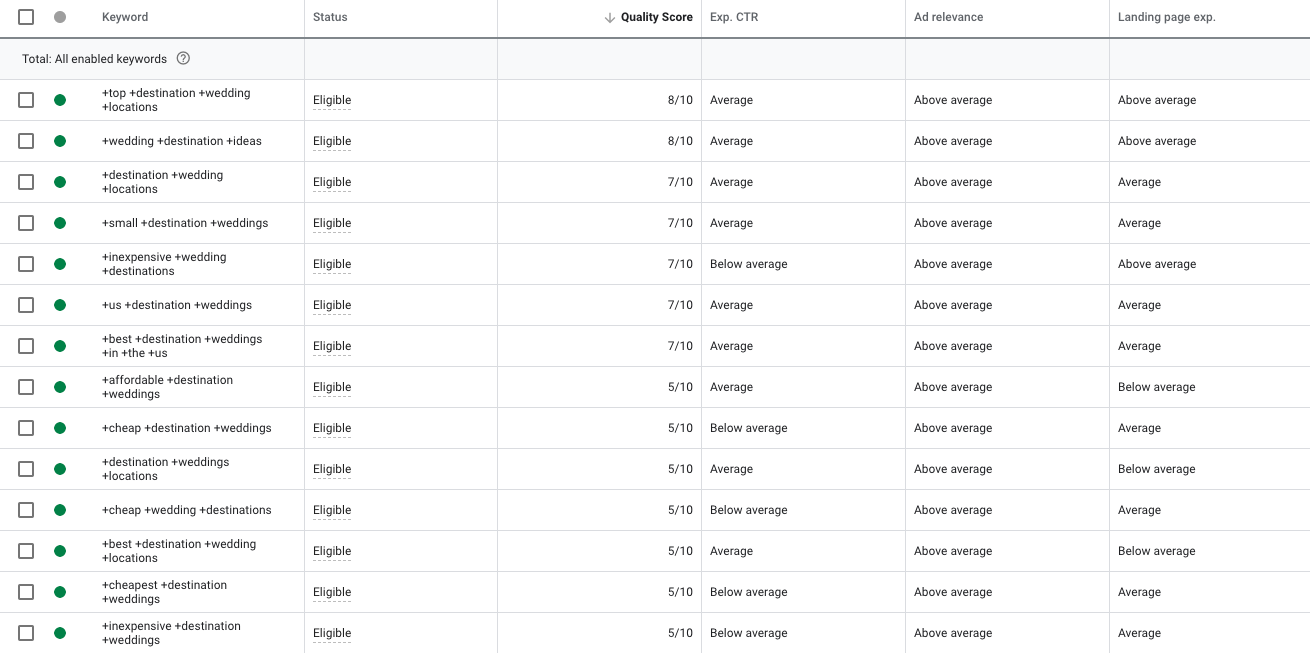
    Three factors can be optimized to enhance the Quality Scores of your keywords: expected CTR, ad relevance, and landing page experience. Each category can be rated as above average, average, or below average.

    Example of Google Ads campaign being managed by Search Influence in New Orleans, LA

    Let’s talk through each factor and recommendations on how to improve each one.

    1. Expected CTR: This is how likely it is that your ad will get clicked when shown for that keyword. Expected CTR is the easiest and most immediate element of Quality Score to improve.

    First, try reviewing the Search Term Report for keyword opportunities. This way, you can implement keywords more relevant for users. Once you add these keywords to your ad groups, pause the other keywords with low CTR.

    Another consideration is that your ads are not compelling enough for people to click. Test new ads with different messaging. A way to give your ad a natural CTR boost is by using Dynamic Keyword Insertion (DKI) in your ads. This trick is when you write {KeyWord:HeadlineText} in your headline, which then dynamically generates the headline as what the user searched.

    2. Ad Relevance: This measures “how closely related your keyword is to your ads.” An ad may be deemed relevant to a keyword when the keyword appears in the ad.

    If your keyword has a low QS because of ad relevance, instead of writing a brand new ad, try this. First, duplicate an existing ad that has high performance. Then, write in the low QS keyword as part of the ad.

    Also, ensure that your ads are answers for the queries the ad group most often receives. You can check queries using the Search Terms report. This is easier to accomplish when your ads and keywords are in specific ad groups consisting of tightly themed keywords.

    If you want to try something completely new, test Google’s Responsive Search Ads. This tool lets machine learning determine which of your ad headlines and descriptions will be the most relevant to the searcher. You can enter up to 15 headlines and four descriptions per ad!

    Something else to keep in mind is that Google looks at your site for relevance. Make sure you are landing every ad on the page that is most closely related to your keywords rather than only your homepage. Google takes into account keyword density on the site, so using relevant keywords on each landing page can also improve ad relevance.

    3. Landing Page Experience: This measures “how relevant and useful your website’s landing page will be to people who click your ad.” Landing pages that are not mobile responsive may take a hit in this factor. According to Statista.com, as of the second quarter of 2019, Google accounted for 95% of the mobile organic search engine visits in the U.S.

    Not all online advertisers can swiftly optimize landing pages as needed. If this is your case, start with making sure that your keywords and ads are relevant to the landing page’s current content.

    If that still doesn’t improve the Quality Score, you may want to consider the following for your landing page:

    • Making the page mobile responsive
    • Minimizing load time
    • Optimizing images with metatext, tags, title and alt text that include relevant keywords
    • Making conversion points clearly visible

    You should also consider improving your website’s content or testing new call-to-action buttons at each conversion point.

    Take Action Now

    As you can see, there are three factors that you can improve to increase Quality Score, yet there are only so many things you can do. If all of these possibilities seem overwhelming to you, start by making a list of optimizations you can tackle now, as well as some you may need to address later. Then, create an optimization schedule for yourself and revisit it each week.

    We are a Google Premier Partner, meaning we work on ad accounts daily to ensure clients maintain a strong Quality Score and campaign performance. If you find yourself unable to improve Quality Score, reach out to Search influence for specific recommendations and consulting services. Or let us work on your ad account directly with an online advertising package.

  • Facebook’s Pared-Down Targeting is the New Deal… But Is It a Big Deal?

    If you are as enthusiastic about Facebook advertising as the nerds at Search Influence, then 2019 was an exciting year for you. Among other developments, Facebook made some major changes to their targeting options, beginning in the Spring with new requirements for Special Ad Categories like housing, financial services, and employment. These new targeting restrictions were intended to prevent advertisers from doing what I call “creative discrimination,” for example, only targeting high-income people for real estate ads. Many resources explain these new Special Ad Categories and how to create effective audiences for them.

    Spiral staircase photographed from the top down

    However, in Summer 2019, Facebook announced another round of changes to targeting, including thousands of interest, behavior, and demographic criteria. This time, there was very little information available about the upcoming changes, and advertisers were understandably agitated. Facebook announced, “As of August 19, 2019, some targeting options may no longer be available for new campaigns.” Digital advertising discussion threads from Reddit to Quora lit up with discussions and speculation about the new changes. Advertisers feared they either wouldn’t be able to target their ideal customers anymore or that it would become more expensive to target them.

    I have great news, though: you probably have nothing to worry about. Three major factors should help mitigate your fears. First, although Facebook was not specific about which targeting features they removed, advertisers found that the criteria removed were outdated, redundant, or just not that useful. Second, creative advertisers could leverage other targeting criteria to make up gaps in audience coverage. Finally, cleaning up available targeting criteria falls in line with Facebook’s push for broader targeting in advertising campaigns.

    Facebook Taketh Away… But Also Giveth

    Before the changes took hold, Facebook helpfully highlighted affected audiences in Ads Manager so advertisers could get a head start on editing their targeting. The eliminated categories were largely irrelevant to all but the most targeted campaigns. For example, here at Search Influence, we found that some removed targeting options included song titles, foods, and streets in the French Quarter.

    Facebook suggested appropriate replacements for some of these targeting options (“Louisiana Creole Cuisine” instead of “shrimp and grits,” “French Quarter” instead of “Royal Street,” etc.). Some other criteria did not have a suggested replacement, but we found them easy to discard or replace with better targeting. Other removed categories included particular job titles, interests, and behaviors whose audience sizes were very small and not very useful. The result is that although thousands of categories were removed, there are still many ways to reach the exact audience you want with your Facebook ads.

    Introducing… The Replacements!

    Even advertisers who relied heavily on precise targeting could still find their ideal audiences with clever workarounds. As I noted above, Facebook offered alternatives for removed criteria right in Ads Manager. These alternatives seemed widely relevant and showed that Facebook had put some thought into the effects of their changes. Savvy advertisers immediately researched alternative criteria to replace the ones that had been removed.

    For example, we could replace the interest “Royal Street” (a shopping mecca in New Orleans’ French Quarter) with the interests “shopping” and “French Quarter.” This alternative could not only replace the “Royal Street” interest but could also help us reach other audience members who are likely to convert on our ads.

    Broaden Your Advertising Horizons

    Speaking of reaching more audience members, advertisers realized these changes fell in line with Facebook’s advice of broader targeting from advertisers. This advice seemed counterintuitive to many advertisers, who saw targeting changes as a ploy to force Facebook advertisers into paying more. However, Search Influence has found that broadened targeting has improved performance in many of our campaigns.

    Facebook explains broad targeting as “mostly relying on our delivery system to find the best people to show your ads to.” Essentially, you are leveraging a tool that Facebook has spent millions of dollars optimizing. As Facebook points out, “This approach can lead to us finding potential customers you never would’ve known about otherwise.”

    To help advertisers transition to this unfamiliar method of casting a wider net, Facebook bolstered some Ads Manager tools to help advertisers evaluate audience performance. The Audience Insights feature now shows advertisers detailed information about their audiences, allowing for better optimizations and planning.

    Along with new analytic tools, Facebook rolled out and encouraged advertisers to use the Detailed Targeting Expansion setting with somewhat broad audiences. This feature allows Facebook to find users who are similar to your audience for detailed targeting but can provide better results for your campaign at a lower price. Many advertisers have had success with broad targeting and Detailed Targeting Expansion and now advocate for simplified campaigns as a way to let Facebook do the work for your campaign.

    Target with arrows piercing the yellow center

    Stay on Target

    If you’ve made it this far since the targeting changes without any problems, you should be good to go. Because there are still thousands of options left to help you find those high-intent audience members, you may not even have noticed that thousands of options are suddenly gone. There are lots of ways to find your audience members, even if it means some creative combinations of interest, behavior, and demographic targeting.

    Finally, embrace broad targeting. Facebook has invested millions in technology that predicts user behavior, so do yourself a favor and use it. At the very least, testing your ideas against Facebook’s algorithm is a prudent way to optimize your campaigns. If you need help setting up a Facebook campaign or running tests in your current one, contact Search Influence to collaborate with one of our digital advertising experts!

    Images

    Stairs

    Target

  • 15 Quick Tips on Using Geolocation Targeting for Your Law Firm

    Once upon a time before GPS and Bluetooth, marketing your firm was an absolute nightmare of unknowns and shots in the dark. There’s a limit to the amount of kitschy commercials you can make, right? The era of big tech is upon us, and if you haven’t tapped into Geofencing marketing, then you’re already behind on the times. The opportunities to target customers in niche areas are boundless and only limited by your own creativity (and some local or state consumer privacy laws).

    So What Even Is Geofencing or Geolocation Marketing?

    When you Google geofencing the definition that appears is “the use of GPS or RFID technology to create a virtual boundary, enabling software to trigger a response when a mobile device enters or leaves a particular area.” Basically, it’s the ability to target your ads to users who enter a specific “fenced” geographic location to push relevant information when and where they may be looking for it and at any time in between. Not only will this strategy pull in new leads if you understand what you’re doing, but it will also bring in quality leads with intent to convert. Later in this post, I’ll list some key tips to optimizing this type of campaign.

    Magnifying glass and set of keys on top of map

    What Can Geofencing Do for My Firm?

    When you’re setting up your Google and Facebook Display campaigns, you no longer just have to input the city you’re looking to target. The market is already saturated with other law firms, and you’ll be paying top dollar to get your ads to show up, much less be the top result. The first step is to examine your demographics and target audience. Then, find specific neighborhoods or landmarks and really zero in on your exact customer. You know that intersection where there are always a lot of car accidents and the auto repair shop that services those wrecks? That’s an area you should target. Know of any physical therapy clinics or chiropractors? Bingo. If you’re an attorney that specializes in estate planning, look for higher-income areas like fine dining venues or country clubs and golf courses. Go where your customers are.

    Why cast a wide net in a large pond when you cast a small one where the fish are biting?

    15 Quick Tips to Get You Started

    Applying eyeblack prior to getting started

    1. Get to know your audience and demographics. Without this, you’re toast.
    2. Plan and prioritize your KPIs and performance metrics, then build your campaign from there.
    3. Exclude locations where you know your target customer won’t be.
    4. Target specific events within the town or city. Morris Bart does a great job of this by sponsoring Lil’ WeezyAna Fest in New Orleans.
    5. Bigger “fences” don’t always mean better. Keep a 4-5 minute travel radius from your desired location.
    6. Make sure the CTA is location-specific so that your customer understands the relevance of your ad and isn’t utterly annoyed by your brand.
    7. Timing is key. Try to have your ads show at relevant times for your customer, though this is obviously different for everyone.
    8. Use the data you receive from these campaigns to constantly improve them. What’s that quote that mentions insanity and doing the same thing over and over again?
    9. The message in the ad should prompt immediate action and usher the user to take the next step.
    10. Consider population density in the areas you’re targeting.
    11. Targeting your competition is a very good idea 🙂
    12. Use location-specific landing pages. Once again, these ads must be relevant.
    13. Use location-specific keywords, and even use slang!
    14. Set location-based bid adjustments so you don’t break the bank.
    15. Enable extensions in your ads for easy calling and emailing. People love convenience.

    The Future Is HereSpinning and pointing

    Hyper-targeting potential customers based on niche locations is the next big thing, and utilizing these features in your campaigns is easier than ever. Billboards may still have some value, but it’s more effective to post virtual billboards inside of a customer’s smart-phone or computer at a much lower price than traditional advertising or even PPC campaigns. Geofencing is still relatively new, which means you can stay ahead of the curve.

    Which Steps Should You Take Next?

    Get the ball rolling! It’s time to optimize your ads to target your key demographic. Need some help? No worries. We have an expert team of online marketers to get your campaigns up and running to gain new clients. Are you unsure of who you should be targeting or do you need to figure out which metrics matter to your business? We’ve got you covered. Request a proposal with Search Influence today.

    Images

    Dashboard

    Magnify

    Eyeblack

    Spin and point

  • How to Use Google Shopping to Increase Retail Sales

    It’s more important for retailers, now more than ever, to capitalize on the internet as an additional revenue source for their businesses. The vast majority of internet users in the U.S. are expected to shop online this year, with Statista estimating that 80% of all internet users in the country are expected to make at least one purchase online during the 2019 calendar year. Compound this fact with the matter of Google being the most used search engine worldwide with over 1 trillion searches taking place on the search engine per day, the importance of utilizing Google’s shopping tools to boost profitability can’t be overstated.

    What Are Google Shopping Ads?

    One of the most important Google tools that online retailers can take advantage of is Google Shopping Ads. Google Shopping Ads are product listing ads that are featured across Google’s Search and Shopping results. These ads differ from Google’s paid search ads in that they feature product pictures, while paid search ads do not. There’s also no need to set up text ads or bid on any keywords with the use of Google Shopping Ads, which is another key difference between the two popular ad types.

    Person using credit card to make purchase on Google Shopping

    Online retailers can use Google Shopping campaigns to promote their local and online inventory, and boost traffic to their websites and local stores. Shopping campaigns also give retailers the benefit of being able to find better qualified leads for their product offerings. By featuring detailed product information directly within your shopping ads, online retailers better help shoppers make well informed purchasing decisions, which in turn leads to increased conversions and purchases. In addition to including detailed product information within your Google Shopping Ads, there are several other key areas of importance that retailers must focus on in order to achieve success with a Google Shopping Ads campaign.

    Your Product Feed: The Key to Campaign Success

    One of the most important areas to consider when taking on a shopping campaign is the proper setup and optimization of your product feed. For context, Google Shopping is powered by two platforms: AdWords and Google Merchant Center. Google Merchant Center is where your product feed lives. Your data feed is simply information about the products that you want to sell formatted in an organized way that Google can read and understand. As we previously mentioned, you don’t bid on the keywords your Product Listing Ads show up for. Google instead crawls your feed and determines if one or more of your products is relevant for a particular search query. In this regard, Google Shopping has similarities to SEO. You need to structure the various elements of your feed so that Google can make sense of it and find it relevant for the appropriate search queries.

    The three most important elements to consider when building your product feed include the product title, product description, and Google product category. First and foremost, your product title should be accurate, descriptive, and include top keywords as well as the name of the product. Important information about the product should be frontloaded in the title, and additional descriptors such as make, model, size, or color are all helpful keywords to include in the title of your product.

    Secondly, product descriptions should follow the same guidelines as product titles. Ensuring that your product description accurately describes the item at hand, while also including relevant keywords and important product information at the beginning of the description all help increase the chances of your ad being shown for relevant search queries.

    Lastly, choosing an appropriate category for the products in your shopping campaign is an important (and required) step to getting your products to show up for the right search queries. Google has created a fairly exhaustive list of categories and subcategories that your products might fall under, which can be found here. There are currently over 6,000 categories and subcategories to choose from on Google’s list. Only one category per product can be selected, so it’s important to choose the most relevant category for the product at hand. This will help Google understand exactly what your product is when deciding to display your ad in response to consumer search queries.

    Carrying shopping bags after a lot of retail spending

    Getting Your Bidding Strategy Correct

    Aside from your product feed, your shopping campaign bids are the most important part of your ad strategy. Your bids will play a key role in determining which queries your ads show up for, along with the overall profitability of your campaign. Shopify suggests taking into account your product price, profit margin, and online conversion rate to calculate your initial cost per click bid. Once your initial bid is set, be sure to adjust your bids if you find that your ads aren’t gaining enough impressions, clicks, and conversions. Increase bids slightly—by $.05 to $.10 at a time—until the ads begin to generate more impressions and clicks.

    You’ll also want to be mindful of your daily budget, and monitor this metric closely. It’s very likely that a new campaign won’t hit their maximum daily budget in the first days and weeks. Over time, as your click-thru rates improve, and as Google gains more data on how users respond to your ads, they’ll begin to show them more frequently for relevant queries. Once this trend shifts, you’ll want to review your daily budget to allow for more impressions and clicks for your campaign.

    Campaign Performance Review & Ongoing Optimizations

    After your campaigns are set up, and you’ve settled on a successful bidding strategy, it’ll be time to track your success and review your campaign for optimization opportunities. Reviewing the amount of clicks and impressions for the products in your product feed can help you in deciding next steps to further boost the performance of your campaign.

    For example, products with a high amount of clicks but low conversions may benefit from a thorough review of their product page on your site. Could your product images be clearer? Does the page showcase product reviews? Think of the onsite page optimizations from a consumer standpoint, and make adjustments accordingly.

    Another report worth reviewing regularly is the search query report. Reviewing keyword performance will give you insight into whether adding negative keywords, changing up your product feed, or reducing certain product bids would be an effective optimization.

    When you partner with our team at Search Influence, we will handle every detail of your campaign to make sure it performs effectively so you can focus on growing your business. Our online advertising services can help you reach your target audience and make continuous improvements to your advertising strategy. Get started today by requesting a proposal online.

    Images

    Shopping

  • Capture More Potential Applicants With Lead Generation Ads

    Students rely on search engines to research and evaluate the colleges they are interested in attending. As an institution of higher education, you should nurture them from the early stages of research to when they begin applications. The applicant cycle, according to PerfectSearch, can take up to two or more years and should consist of multiple tactics, including targeted emails, paid search, SEO, and social media.

    Lead generation ads are great for capturing potential applicants who are close to converting, as well as those who are earlier in the process. Because of this, they are a great way to capture people who want to move quickly through the application process.

    Lead generation ads can be utilized on Facebook, Instagram, and LinkedIn. Since Facebook and Instagram are both under Facebook, if you set ads live on Facebook, they’ll also show on Instagram.

    Person setting up Facebook lead generation ads for their business

    What Are Lead Generation Ads?

    Lead generation ads are just that—ads that run on Facebook that are meant to generate leads. According to Facebook, lead generation ads let people show their interest in a product or service by filling out a form in the ad with their details and encouraging a business to follow up with them.

    Once a user clicks on the ad, a form will populate with the pre-filled information from the user’s profile. Meaning, they don’t have to type in their name, phone number, or email address. It’s a simple concept with a great return.

    Facebook’s lead ads can help you meet the following goals:

    • Finding new customers for your business
    • Finding out more about people’s interests
    • Getting people to sign up or register for your service
    • Getting people to enroll in your program
    • Getting people to download a brochure or manual

    Why Should You Use Lead Generation Forms?

    Depending on the type of form, filling in the information can be time-consuming and overwhelming. Collecting data and customer information is the key to success, so the more information you are able to collect, the better. According to data from Facebook, lead generation ads usually have high conversion rates because there are fewer steps in the conversion process. The mobile-friendly forms are created for easy converting.

    Leilani Bruce of Pacific54 states, “according to Adobe’s State of Digital Advertising 2018 report, 50% of Gen Z (18-19 year olds) and 42% of millennials (20-36 year olds) think social media is the most relevant channel for ads.” So the question should be WHY NOT use lead generation forms?

    You can customize the questions and information you collect. So, it would be a great idea to ask which programs or courses the potential applicant is interested in. From there, follow up with additional questions based on that user’s answers, but keep them simple and to the point.

    The forms run in more places than just Facebook’s newsfeed; they can also show up in Instagram feeds, stories, etc. Whether you’re using carousel ads, videos, or static ads, they all support lead generation ads. Using videos is recommended because users engage with videos more often than static ads.

    One great feature of Facebook is its self-learning and optimization, meaning that Facebook will automatically optimize your campaign to show your ads to people who are more likely to fill out the form. This leads to more conversions and highly qualified leads.

    As mentioned before, make sure to reach out to potential applicants in a timely manner, whether you follow up with more information or are just using remarketing to drive applications.

    Group of digital marketers working on Facebook lead generation ads

    Tips on Using Lead Generation Ads

    After capturing data from a pool of potential applicants, you can create a remarketing campaign to continue to target them. This allows you to remarket to someone who might have already interacted with one of your ads.

    Also, potential applicant information can be used to create a lookalike audience. According to Facebook, a lookalike audience is a custom audience that’s used to reach new people who are likely to be interested in your university because they are similar to your existing students. Make it easy for potential applicants to get in touch with you by utilizing a specific call to action (CTA) like click-to-call.

    Another thing Facebook is capable of is connecting with your university’s internal platforms. Facebook can easily integrate with MailChimp, Salesforce, Google Drive, or custom CRMs. Facebook recommends integrating CRM software since it allows you to see your leads in real time, letting you reach out to your leads more quickly. And the sooner you reach out to a potential applicant, the more likely they are to convert.

    If you’re looking for new techniques to drive more students to your university, the team at Search Influence has years of experience helping institutions of higher education increase the quality and size of their applicant pools. To learn more about our services, contact us online.

    Images

    Woman Typing

    Team Meeting

  • Sad That Google’s Retiring Average Position? Here’s How You’ll Be Better Off

    As Google has grown into an advertising powerhouse, it has created and improved ad performance metrics. After all, why would advertisers stick around without actionable data for boosting performance?

    Average Position is one metric that has been around since the launch of AdWords in 2000. You, like many other advertisers, may use this metric to track the success of your online ads.

    In late 2018, Google announced they would retire Average Position in September 2019. Let’s take a look at what this means for advertisers.

    What Does Average Position Mean?

    The Average Position metric shows the average position where ads are appearing on the search engine results page (SERP). At least, that was its original function.

    At first, Average Position helped advertisers gauge the effectiveness of their account changes. It’s easy to see why: if you know where your ads are appearing, you can work your way up to the top of the SERP with adjustments.

    Everyone wanted to be at the top because research showed that top search results get the most clicks by far. The Average Position metric was crucial for advertisers chasing the most valuable SERP space.

    What’s more, the immediate visibility of an ad at the top of the SERP made Average Position a popular, tangible metric.

    Great! We have an intuitive, valuable metric to measure our advertising performance. Why on Google Earth would they get rid of it?

    Princess Bridge gif for Search Influence blog post about Google Ads

    The Decline and Fall of the Average Position Metric

    … Because it’s no longer intuitive, and that makes it much less valuable. Let’s look at what changed over the years.

    Average Position used to be helpful when all ads appeared above the organic results. If your ad’s average position was 1, it meant the ad was at the very top of the SERP.

    Later, ads appeared at the top of the SERP and also down the right side. Google realized they could combine the ads’ spaces and create an auction for all the real estate on the page.

    Google restructured the SERP so only highly relevant ads would appear above the organic results. If no ad was relevant enough, they all appeared on the side of the SERP or below the organic results.

    Advertisers could no longer be certain where their ads were appearing. Even auction winners may never appear at the top of the page. By this point, Average Position was more of an “Average Auction Rank” metric.

    By now, Average Position data was less helpful for optimizing campaigns. There was just no good way to know where on the SERP your ads would appear. Even your best ads could be languishing at the bottom of the page in the dreaded No Click Zone.

    Average Position lost more value as Google reorganized the SERP and added features. So, what’s an advertiser to do? How can we find out how our ads are appearing to our audience? What will save our KPIs?

    New Metrics to Save the Day

    Google introduced two new position metrics ahead of the retirement of the Average Position. These new metrics are helping advertisers transition more easily. Here’s what they tell us:

    • Search Top Impression Rate is the ratio of impressions appearing anywhere above the organic results. It’s given by Impressions Above Organic / Total Impressions.
    • Search Absolute Top Impression Rate is the ratio of impressions appearing above all of the other ads that are above the organic results. It’s given by Absolute Top Impressions / Total Impressions.

    Raccoon gif for Search Influence blog about average position in Google Ads

    There are also a few helpful Impression Share (IS) metrics you can bid for to increase Impression Rates:

    • Impression Share (Top and Absolute Top) is the ratio of impressions at the top or absolute top of the SERP and the impressions you were eligible for.
    • Search Lost Impression Share Budget (Top and Absolute Top) shows how often your ad wasn’t top or absolute top because of budget limits. This metric can help with bidding and budget changes for more top-of-SERP impressions.
    • Search Lost Impression Share Rank (Top and Absolute Top) shows how often your ad wasn’t top or absolute top because of your ad rank. This metric can help identify ad copy and landing page changes for more top-of-SERP impressions.

    With these new metrics, advertisers are better able to gauge when and how often their ads appear at the top of the SERP. Moreover, with the Lost IS metrics, advertisers can dial in their optimization efforts to where they will have the most tangible impact on ad placement.

    Even though Google is retiring a much-loved metric, it’s safe to say that advertisers will wind up with even more and better information than before. Overall, this move is a boon to advertisers who crave control and incremental performance improvements.

    What This Means for Advertisers

    There’s no reason to be upset over Average Position. The first step is to familiarize yourself with the new metrics. Once you begin using them, you’ll quickly see how useful they are. Here are three ways the new metrics will benefit advertisers:

    First, advertisers will be able to create more competitive campaigns with these new metrics. For example, at Search Influence, the new metrics are working well along with the new Auction Insights tool. Using both gives us a starting point for optimization tasks. Now we have to do much less detective work to identify performance-increasing adjustments.

    Second, we can examine how our other KPIs (like CTR) are affected by our ad’s position on the SERP. This means we can zero in on the external and internal factors affecting our ad placements and we have more optimization options available.

    Finally, the new metrics will help engaged advertisers stay on top of their ad performance. Even not-so-engaged advertisers should find campaign optimization easier. Both groups should capture more valuable impressions and clicks with less testing, guesswork, and time.

    If you’d like to know more about how to boost your advertising power, get in touch with the digital advertising experts at Search Influence. We’ve got the expertise and experience to help you reach your business goals.

    Welcome! Everything is fine with Google Ads

    Images

    Princess Bride

    Raccoons

    Everything is fine. 

  • A Physician’s Guide to Choosing Target Audiences on Facebook

    One of the most important assets in any physician’s marketing strategy is knowing your potential patients. In a field as diverse as medicine, this can mean the difference between success and failure. Therefore, we’ve put together a helpful guide to Facebook’s targeting tools to help build and improve your online audiences.

    Define Your Patients

    The first step in any successful strategy is defining who you want to get in front of. Imagine the type of patient you’d like to attract and jot down every characteristic about them that you can think of. For example, if you’re a plastic surgeon who would like to do more tummy tucks, then what are some general attributes of a typical tummy tuck patient? Here are some questions to help you get started:

    • Are they women or men?
    • How old are they?
    • Are they married or single?
    • What is their household income?
    • How much disposable income do they have?
    • Do they have children? If so, how many and how old are they?
    • What kind of car do they drive?
    • What do they do for a living?
    • Which schools did they attend? What level of education did they reach?
    • What are their hobbies?
    • What types of clubs or organization are they typically involved in?
    • How do they spend their free time?
    • Have they ever had plastic surgery?
    • Have their friends had plastic surgery?

    Once your ideal patient has been defined, review Facebook’s guidelines to see which targeting options are available, or you can see all of Facebook’s Ad Targeting Options in one epic infographic.

    Locate Your Patients

    After your ideal patient has been profiled, the next step is to determine where they are. One of the biggest mistakes in marketing is casting your net too wide and spending advertising dollars on people who won’t turn into patients. Physicians must check their pride at the door and determine how far patients would realistically travel for their services. For example, a patient might travel 30 miles to see a specialist or surgeon but would likely never travel farther than 15 miles for primary care. Once you’ve determined how far a patient would be willing to travel to visit your practice, use Facebook’s tools to limit your targeting to these areas.

    Refine Audience Size

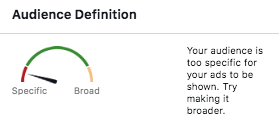
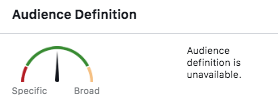
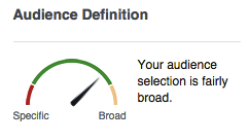
    Once your audience had been defined, take a step back to consider the size of the group. Review the  “Audience Definition” meter along with the “Potential Reach” number within Facebook’s campaign manager. The ideal audience has fairly specific targeting, but not so specific that the number of potential viewers is under 1,000. This ideal audience size is broad enough to be inclusive to anyone who shares the targeted interests but specific enough that the impressions aren’t wasted. You can tell that you’ve reached the ideal audience size once all of the necessary layers have been added and the numbers aren’t fluctuating as much.  

    Very specific Facebook audience targeting for Search Influence in New Orleans, LA

    Less specific, more general Facebook audience targeting for Search Influence in New Orleans, LA

    Very broad audience targeting for Facebook campaign done by Search Influence in New Orleans, LA

    Medical Industry Audience Limitations

    Due to ever-evolving privacy laws worldwide, specifically in the medical field, physicians must operate (pun intended) under more strict targeting regulations. This is especially true on Facebook. One of Facebook’s most useful features allows business to upload email addresses or phone numbers directly into the platform and create custom audiences from these lists. You can then create a wide variety of custom audiences based on those lists. However, businesses in the medical industry are not permitted to create such audiences through an upload or pixel users who have visited their site because it violates medical privacy laws. Therefore, medical practices must give their targeting even more thought to serve up ads to their ideal audience.

    With the tips outlined in this helpful guide to thoughtful audience creation, you, too, can be on your way to increasing engagement and building your online presence! At Search Influence, we have extensive experience working with clients in the medical industry. For more information about how we can help promote your practice on Facebook and other social media platforms, start a conversation with us today.

    Images

    Doctor

  • How to Track the Success of Your Online Ads

    Marketing can sometimes feel like a black box to business owners. Luckily, with digital marketing, there are ways to track pretty much everything so that you can know exactly how your campaigns are performing. As a marketer, I’m often up to my elbows in Excel sheets, pouring through the data provided from Google Ads or Google Analytics. But as you’ll soon learn, only looking at that data is not enough. To have successful campaigns, you, the business owner, must also be involved in the process to help track everything from the first impression to a closed lead.

    Gif of Colin Farrell shrugging about online ads

    How Do You Know If Advertising Is Effective?

    In order to determine if your advertising is working, you first need to do some self-reflection. Most business owners know they need to spend money on marketing in order to grow, and often, the first thing they do is begin vetting (and maybe even hiring) an agency. But truthfully, it’ll be more difficult for you and your agency to create winning campaigns if you haven’t defined your business and marketing goals before getting started.

    Luckily, we have put together an awesome guide that walks you step-by-step through the process of determining the metrics that matter to your business and how to tie those to marketing goals. To get started, gather the necessary stakeholders, download our guide, and fill out the worksheet. When you are done, you will have…

    The “M” in S.M.A.R.T. stands for “measurable,” and defining this on the front end helps you determine what Key Performance Indicators are important to you. This doesn’t have to be complicated, and the less metrics, the better!

    Man incorrectly measuring the success of his online ads campaign

    How Do You Measure the Success of a Campaign?

    Now that you’ve defined your metrics and KPIs, you’ll need to figure out what you need to track online and how you will track it. Some common things you might track are leads through phone calls and form fills, transactions and revenue through e-commerce purchases, or interest in your location through “Get Directions” button clicks. Let’s walk through some common platforms for tracking online actions.

    • Google Analytics: You can use this free platform to track user behavior on your website and set up goals to track form fills, clicks on buttons, views of key pages, and e-commerce transactions. This allows you to compare performance across all campaigns similarly, using the same attribution model and metrics. It integrates well with Google Ads (you can import your Google Analytics goals directly into Google Ads) but doesn’t send conversion data to other advertising platforms.
    • Ad Platform Pixels and Trackers: Each ad platform offers their own tracking solutions, so you can determine exactly which of your advertising campaigns, keywords, audiences, and ads are converting. If you are using something other than Google Ads, you’ll want to install these pixels in addition to Google Analytics. Most of them work very similarly to Google Analytics, but may have slight variations on how conversions are counted or tracked. Examples include Facebook Pixels, Google Ads Conversion Trackers, Bing Conversion tags, and LinkedIn Insight Tags.
    • Call Tracking Providers: Setting up call tracking is a must for businesses that receive a lot of phone calls. Call tracking works by placing a piece of code on your site that identifies the source of your site visitor and dynamically switches the phone number to attribute that call back to the source. More advanced call tracking providers are even able to tie these calls to specific ads. They offer a ton of features to make it easier for you to manage your internal process for answering and responding to these calls and to audit your team to ensure they are providing the best customer service. There are several different providers, so do your research on which one best meets your needs.

    Setting up all of these things on your website does require some coding skills, so it helps to consult with a developer (or a marketing agency like Search Influence) on the best ways to set up tracking.

    How Is ROI Calculated in Digital Marketing?

    I don't do math gif

    So now that you are tracking all of your online actions, you’re all set to calculate ROI, right? Well, not exactly. In fact, tracking just online conversions does not give you a full understanding of the success of your efforts. This is mostly true when it comes to lead-based businesses. If we deliver 100 leads to you, but not a single one turns into a client, would you call that a success? This is why it is SO CRUCIAL for you to track the quality of your leads and to provide that information to your marketing agency as close to real-time as possible.

    There are many ways to determine lead quality, but some important things to track include the following:

    • Lead Score: What is a lead worth to you? Devise a scoring system and train all customer service reps on this. Think about scoring the leads based on things like, “I want more leads like this!”
    • Score Reason: What makes the lead good or bad? What was the roadblock as to why this lead couldn’t become a customer?
    • Lead Stage: Did the person schedule a consultation? Have they been sent a proposal? Did they become a client? Document where each potential customer is in the process.
    • Customer Lifetime Value: What was the revenue associated with the services they received?

    Using a Customer Relationship Management (CRM) platform makes this process super easy. It can help you track the volume of leads, close rate, and average sale value, which are all important metrics to know and understand. It can also help your internal team keep track of who’ve they’ve talked to and when to follow up with them. The biggest benefit of having a CRM is having a ton of great actionable information to provide to your marketing agency so they can optimize campaigns to meet and succeed your marketing goals.

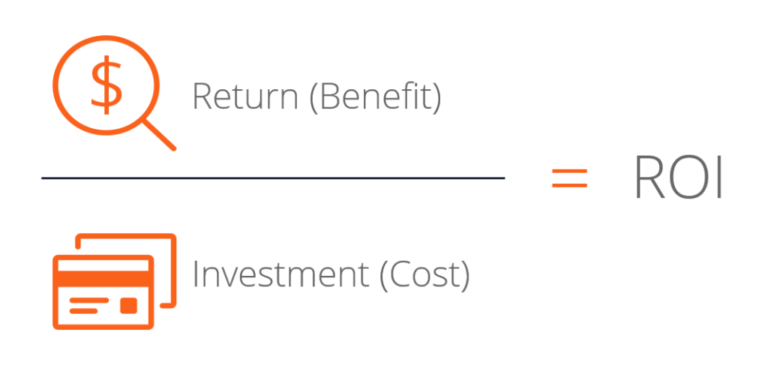
    Once this data is collected, you can also determine the Return on Investment (ROI) of your marketing efforts. You’ll take the total revenue you received, subtract the costs associated (return), and divide by your investment.

    ROI evaluation of online ads campaign from Search Influence in New Orleans, LA

    Combine the Data and Make Smart Decisions

    Implementing these tracking mechanisms and processes allows you to better understand exactly which campaigns and tactics are driving real revenue for your business. It is also one of the huge advantages of running digital advertising campaigns (real data that is tied directly to campaigns). It gives you and your marketing agency the insight to make decisions that you can trust will result in growth and allow you to continue to work toward your goals.

    If you need help figuring all of this out, don’t worry! Search Influence is stocked with seasoned pros at all things tracking and analytics, and we love to dive deep into numbers to figure out what is working for our clients. We will also provide guidance as you set up your internal systems to make it as easy as possible to track the data on your end. We find that the most successful campaigns we run are ones where there is open communication between our team and our clients—providing honest feedback on the work we are doing because, ultimately, we want to optimize their business’ potential. So start a conversation with one of our digital marketing experts today so you can feel confident in your marketing efforts!

    Images

    Colin Farrell

    Helpless Man

    Schitt’s Creek


  • Common Google Analytics Terms Explained

    Google Analytics is a free service provided by our friends at Google that automatically collects and allows you to analyze data about your website visitors. Google Analytics is an essential tool for digital marketers, businesses, bloggers, and everyone in between with a website.

    Google Analytics can help guide your decision-making processes and marketing strategies. You can figure out why your website visitors are bouncing, learn about the demographics of your audience, monitor progress towards your goals, and more.

    With the plethora of information available in Google Analytics, it can be difficult to understand all of its dashboards and metrics.

    Google Analytics Terms for Beginners

    • Users

      • The number of people who viewed your website at least once within a given time period is represented by users.
    • Pageviews

      • Pageviews is the number of times visitors to your site view a page. Every page visit is included in this number, including if someone refreshes the same page. Pageviews is a great metric to look at when you want to determine which pages are your website’s most popular.
    • Sessions

      • Sessions are the individual periods of time someone visits your website. A session resets in increments of 30 minutes. A website visit ends when 30 minutes have passed. If a visitor leaves and returns to your site within 30 minutes, that counts as one session.
    • Bounce Rate

      • Bounce rate is a number that is found by dividing the number of total bounces by total visits. This represents the percentage of people who visit one page on your website and then leave without going to any other pages. Bounce rates can be applied to an entire website or individual pages.

    Dimensions

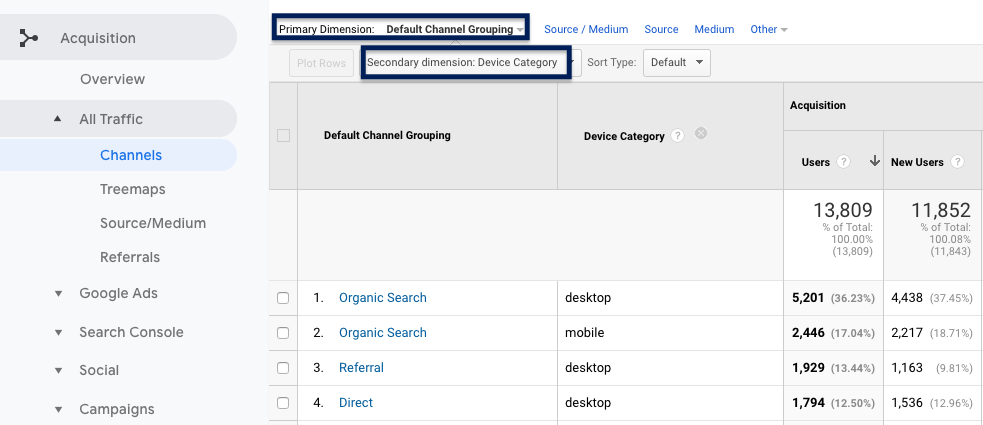
    Dimensions are attributes of your Google Analytics data. Some examples of dimensions are the source/medium, which we’ll discuss later, or location. There are several options, including device category, language, and campaign. Dimensions are helpful for making sense of the data generated by different reports.

    • Primary dimension

      • A primary dimension in Google Analytics is the first displayed attribute of your data, which differs depending on the report you’re looking at. For example, if you’re looking at Channel under Acquisition, the channels by which people used to visit your website is the primary dimension.
    • Secondary dimension

      • A secondary dimension in Google Analytics allows you to add another layer to parse through your data. So, let’s say you wanted to know how many people visited your site through each channel and the device they used to get there, you can add “Device Category” as a secondary dimension to see the data sorted by the device.

    Screenshot of a Google Ads campaign managed by Search Influence in New Orleans, La

    Reviewing Acquisition Reports

    If you’re curious about how people found your website, acquisition reports will tell you which sources visitors used to get there. The acquisition report shows the origin of the visit (like a search engine, a Facebook ad, or email marketing campaign) and the specific medium.

    • Channels

      • Channels in Google Analytics provide a broad idea of where your website visitors came from. Analytics has a default channel grouping. This grouping consists of channels like Direct, Organic Search, Social, and Referral.
    • Organic Search Traffic

      • An organic search visit is a visit that came from a search engine. If someone typed in your business name or keywords related to your business in Google and clicked on your website in the Search Engine results page, this counts as an organic website visit.
    • Direct Traffic

      • Direct traffic is a result of a user typing in your exact web address in the address bar or clicking a bookmark in their browser.
    • Referral Traffic

      • Referral traffic visits are a result of visitors getting to your site from another site on the web. If I were on Yelp browsing restaurants for dinner and came across a place I’d like to check out and then clicked a link to their website from their Yelp listing, this would show up in their Analytics as a referral visit. Reviewing referral traffic can be helpful for deciding if certain off-site tactics are worth the time and effort. For example, if you’re doing a lot of posting and promotion on Facebook and you see that your referral traffic has not increased, you may decide to spend less time on that strategy and focus elsewhere.
    • Source/Medium

      • Source/medium provides a closer look at where your website visitors are coming from. Source identifies the referrer of a site visit. A source can be a search engine, an ad, a newsletter, etc. while the medium is the channel used. Examples of source/medium include the following:
            • Google/organic – Google is the source, organic the medium.
            • Google/CPC – Google again is the source, but the medium is a paid search ad.
            • Yelp/Referral – Yelp is the source and a referral is the medium.

    Search Influence employee working on Google Ads campaign in New Orleans, LA

    For Understanding User Behavior & Measuring Conversions

    • Landing Page/Exit Page

      • A landing page is the page a user first sees when they visit your website, and an exit page is last one they browse before leaving.
    • Events

      • Events are actions that a user takes on a website. Ideally, these should be created around your key performance indicators. For example, if you have a button on your website that allows users to check the rates of your B&B for a night’s stay, you can set up an event to know how many people clicked that button.
    • New vs. Returning Visitors

      • Google Analytics allows you to divide your site traffic into new and returning visitors. New visitors are people who had not previously visited your website during the time period you’ve selected. Returning visitors have viewed your website more than once during that time frame.
    • Goals

      • Goals are similar to events but are more focused on conversions. An example of a conversion is someone making a purchase or requesting a proposal from your company. Google Analytics provides 20 slots to track these.

    Navigating Google Analytics and all of its reports can be difficult. Properly utilizing the tools within Google Analytics to inform your business decisions can be even more challenging, but we can help with that. At Search Influence, we love analytics and lead tracking. Give us a call at 504-881-1597 to learn how we can help you know where your customers are coming from.

    Images

    Google Ads on Laptop

    Person Working on Laptop