Category: Digital Advertising

  • How Medical Professionals Use Google Display Ads to Win New Patients

    Google Display Network Ads Image

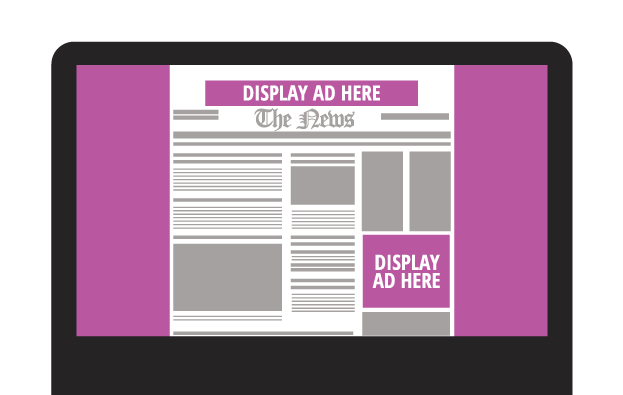
    By now, most professionals in the medical industry know that a robust Internet marketing campaign is necessary to achieve maximum exposure in the digital age. Doctors, practice managers, and other medical professionals may have an SEO plan that is designed to improve their search engine rankings with web crawlers such as Google. They may even have discovered AdWords, Google’s PPC (pay-per-click) advertising program. However, many aren’t aware of the visibility available to them via Google’s most powerful tool: Google Display Ads.

    GDN Banner Sizes: Get the Most for Your Money

    All ads come in various shapes and sizes and are measured in pixels. Depending on GDN banner size you opt for, the number of partner sites available to you may dwindle. Generally speaking, the options available are as follows:

    • 200×200 Small Square: Appears on the right-hand sidebar on a limited number of sites.
    • 250×250 Square: As above.
    • 300×250 Medium Rectangle: Appears within or toward the end of an article, with a good number of sites to choose from.
    • 336×280 Large Rectangle: As above.
    • 300×600 Half-Page Ad: Appears on the left or right hand of the site, with a growing number of participating websites.
    • 728×90 Leaderboard: Appears inside or at the top of an article, with a good number of sites to choose from.
    • 468×60 Banner: Appears in small spaces inside an article or to the left side, with few participating sites.
    • 234×60 Half Banner: As above.
    • 120×600 Skyscraper: Appears on the sidebars of sites, with few participating sites.
    • 160×600 Wide Skyscraper: As above, with a good number of sites available.
    • 970×90 Wide Skyscraper: This ad appears at the top of websites, with few participating sites.

    What Is the Google Display Network (GDN)?

    AdWords promotion will get your business and services noticed, as it bumps your site toward the top of SERPs (while simultaneously flagging it as an advertisement), but the GDN is slightly different. Google has said that the GDN reaches over 90% of Internet users worldwide, expanding across 2 million pages, including Google-owned sites like YouTube and Gmail, popular news outlets like The Huffington Post and, best of all, a large number of webpages devoted to the medical and healthcare industry. Not only do these ads display when a consumer is already searching for your services, but they also appear on related sites and target the lead while not in “shopping mode.” This unique ability to shape and direct the scope, reach, and target audience for your ad makes the GDN an invaluable tool in anyone’s digital marketing strategy.

    Donaldson Plastic Surgery Ad BannerWhere to Begin: Types, Formats, and Focus
    Though you can opt for a text ad, researchers have found that maximum impact occurs with image ads, which Google places into four categories; static, animated, interactive, and video.

    Static ads: These are just what you might imagine: banners of different sizes that occupy space (usually at the top, bottom, or sides) of a website. The GDN allows these in the most common image file formats: JPG, JPEG, PNG, and non-animated GIF. The example to the left is a static ad created for Donaldson Plastic Surgery.

    Animated ads: This type of ad often generates more interest, as the eye is drawn to movement on an otherwise still display. This type of image also has the benefit of including more information, as you can phase from one still image to the next without having to take up a large amount of page space. These can be uploaded as an SWF or GIF.

    Interactive ads: These encourage input from the user, whether it be by including a link to sign up for a newsletter or showing a photo gallery of products that requires the user to click to view more. These ads can only be uploaded in SWF format. Studies suggest that people are 2.5 times more likely to take action after viewing an interactive ad; however, it’s worth noting that opting for static ads gives you a greater number of sites to advertise on.

    Video ads: These ads can be particularly eye-catching, and they allow you to market on sites that display video content, like YouTube.


    Here is an infographic that will help you easily remember the sizes.
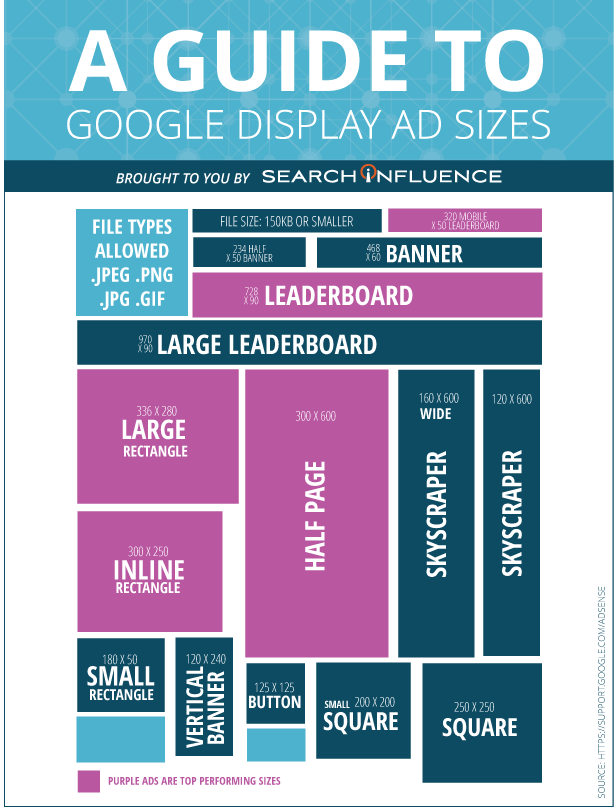
    Search Influence Ad Size Infographic

    When selecting a size for your Google Display Ads, it’s paramount to consider the both the click-through rates and the number of potential clients who will be exposed to your campaign.
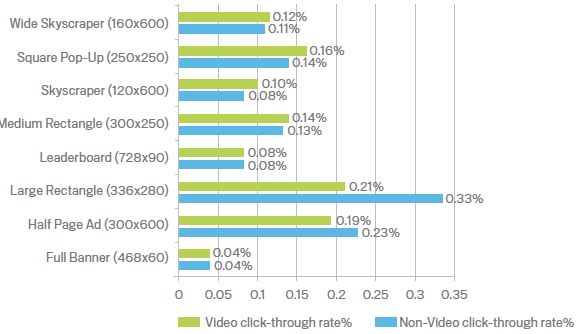
    A large interactive ad may seem like a good idea, but if it only appears on a handful of websites, it may not be worth the cost—or the effort.

    Technical & Content Requirements

    The GDN will not accept ads that are larger than 150KB. Reducing image size—particularly for animated or interactive files—without sacrificing quality can be difficult, which is why it’s always a good idea to consult with a professional design and marketing team. While animated ads can be looped (effectively playing forever), they cannot be more than 15 seconds long consecutively. Ads in GIF format must be 5 frames a second, whereas Flash ads (whether video or animated) can be considerably longer—up to 20 frames a second and sometimes slower.

    Google Display Ads also carries content guidelines that are particularly pertinent for those in the medical profession. Some of these rules are self-apparent, like not duplicating site content, not tricking users into clicking your ad by pretending to be a virus warning, and making it clear that the material is an advertisement. However, Google also has rules regarding adult-oriented content that can impact healthcare professionals, particularly in fields like OB/GYN and plastic surgery. For example, images containing exposed skin and nudity are not allowed, nor is content that is sexually suggestive. Again, consulting an Internet marketing specialist may be the best way to get your brand out there without inadvertently violating Google’s policies on restricted content.

    Tips for Successful Ads

    There’s no question about it: Google’s paid advertising options are powerful, but they’re complicated. Making the most of the GDM requires completely rethinking the way you market your services and products. You need to be intimately acquainted with your target audience, what sites they’re likely to visit, and what types of advertisements they’re most likely to respond to. Additionally, what works for a general practitioner isn’t going to work for an inpatient addictions clinic. Doctors who specialize in breast augmentation may encounter more problems than those who specialize in psychiatry and counseling—it all depends on your business and your prospective clientele.

    With years of experience in paid search and display advertising for medical practices, Search Influence is uniquely qualified to help you and your business harness the extraordinary power of Google Display Ads. Get in touch today, and we’ll be happy to come up with a plan to increase your visibility and enhance your bottom line.

    Image Credits:
    Ad Click-Through Rates

  • A Dentist’s Guide for Choosing Target Audiences on Facebook

    A Dentist's Guide For Choosing Target Audiences On Facebook Image

    The number one tool in any business’s online advertising arsenal is knowing your audience. In a field as wide-ranging and diverse as dentistry, such knowledge can mean the difference between a stagnant online presence and social media success. So we’ve put together a helpful guide to improving your understanding of Facebook’s targeting tools in the hopes that you can hit that sweet spot of audience-targeting potential!

    We’ve investigated the targeting strategies behind some of our most successful social media campaigns in the dental industry to bring you three distinct targeting groups: family dentistry, young adults and orthodontics, and cosmetic dentistry. We dug deep to provide you with result-generating, relevant targeting parameters that go beyond the typical dental hygiene-related interests of mediocre social media campaigns. For each of these three hypothetical campaigns, we’ve provided some of Facebook’s best options for reaching your intended audience.

    5684115572_55bc83414f_z

    Family Dentistry

    Although your first instinct may be to target users by selecting more obvious interests, such as pediatric dentistry, oral hygiene, or dental care, you can generate much more social engagement through streamlining your strategy and focusing on specific age groups, lifestyle choices, and purchase behavior.

    For a family or pediatric dentist group, we recommend targeting women between the ages of 25 and 55 who have children. This demo group comprises the family decision makers who are most likely to engage with your page. Exploring Facebook’s fantastic targeting tools within the “More Demographics” dropdown will allow you to target parents of children within a specific age range. For instance, you can target new parents all the way through parents with children aged 12. This will ensure that your bid for impressions is going to the right users and not parents with adult children who would be more likely to seek out a dentist on their own.

    Finally, investigating the options available under Facebook’s “Behaviors” section is most helpful in providing you with the best methods for reaching those most likely to engage with your social media presence. Here, you can ensure you are reaching parents who are willing to invest in health and wellness products for themselves and their children. We recommend exploring the “Purchase Behaviors” section and adding behaviors like spa enthusiasts, shoppers, and baby care.

    Young Adult & Orthodontics

    This group can be a little tricky to reach. The sticky situation, if you will, is developing a targeting strategy wide enough to include parents of teenagers as well as young adults and even older adults who require orthodontics. For best results, we recommend targeting both men and women between the ages of 18 and 45. Under “More Demographics,” we have found that the option to target by “Generation,” which includes Baby Boomers, Generation X, and Millennials, is most useful. We’ve discovered that targeting Generation X and Millennials, which encompasses those users born between 1961 and 2004, is quite effective for this subset of the dental field.

    The most useful behaviors for this targeting group are those related to technology. Facebook now allows for targeting by “Mobile Device User,” including tablet and smartphone owners. You can even get more focused by choosing to target only those who prioritize being up to date with their tech gadgets by selecting new smartphone and tablet owners. As common as orthodontics have become and as the stigma of adult orthodontics is reduced through innovations such as invisible braces, more and more of this targeting group’s social media audience will be young adults who are plugged in.

    Cosmetic Dentistry

    Our last targeting group presents the widest range of targeting options based on exactly who your cosmetic dentistry office intends to serve. Here, we have provided you with just a sample of what Facebook’s targeting parameters can allow you to do.

    For this specific targeting group, we recommend focusing on both women and men in the 30 to 65+ age range. Once again, we can look to the “More Demographics” dropdown to provide even more insight into the makeup of our audience. Take a look at Facebook’s “Work” and “Financial” targeting options to get the most out of your marketing budget. You can focus on specific job titles and industries, highlighting those occupations in which a winning smile is most beneficial, such as CEO, lawyer, broadcast journalist, and the entertainment, sports, and media industries. Targeting by financial parameters allows you to engage customers with enough expendable income to prioritize cosmetic procedures.

    Under “Behaviors,” we can select those users who are already investing in health and wellness, especially when it comes to dental care. Facebook provides options for targeting users whose purchase behaviors reflect investments in beauty products and accessories, cosmetics, and oral care. Lastly, Facebook’s “Behaviors” section provides our hypothetical campaign with one of my favorite targeting parameters: photo uploaders. This group includes those Facebook users who posted more than 50 photos in the last month. We all have one of those Facebook friends who is obsessed with selfies, and who wouldn’t want to make sure their perfect pearly whites are on point for all those photos?

    7910370882_39d180fb66_z

    The benefits of social media marketing campaigns are apparent. Every time you flip through your News Feed, you are greeted, hopefully, by well-targeted promotional campaigns that bring you the products and services you’re interested in. With the tips we’ve provided in this helpful guide to understanding your social media audience, you, too, can be on your way to increasing audience engagement and building your online presence!

    Image Sources:

    Facebook Like Button Image
    Smartphone Image

  • A War of Words: 4 Tips to Help Lawyers Win the Cost-Per-Click Bidding Wars

    1601-SI-Newsletter-0112-Big-KG-C-01

    Whether a veteran attorney or a recent law school graduate, legal professionals have likely noticed that the world of generating leads and winning new clients has changed drastically. While tried and true marketing methods such as word of mouth and putting your picture on a billboard still have their place, effectively using online resources can have a huge impact in establishing a solid client base. In particular, paid online advertising for attorneys has become so vital that competition for keywords has skyrocketed. Although it may seem daunting and difficult to know how to begin, these critical tips can help you win the cost-per-click (CPC) bidding war.

    1. Understanding the Competition

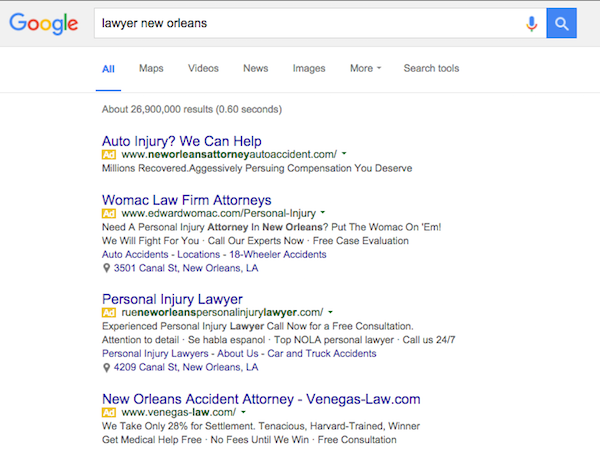
    Consumers who are searching for a lawyer often turn to the Internet to conduct their research. With that in mind, marketing online has become an integral part of building and sustaining a law practice. When it comes to paid online advertising, it’s important to first understand your competition. Legal keywords are typically among the most expensive in Google AdWords, with terms related to “attorney” and “lawyer” topping the cost charts. High levels of competition naturally follow expensive keywords, as lawyers constantly place bids on the exact same terms. Try conducting your own competitive research and search the keywords in your geographic area to see for yourself what ads are getting top placement. Simply run a search on the keywords you’re hoping to target and see which keywords your competition is already bidding on. Take a look at their ads and start crafting a plan to make yours even better.

    Screen Shot 2016-01-05 at 9.04.41 AM

    2. Target Specific Keywords

    So how do you overcome the highly competitive landscape and win the bidding war in your online ads campaign? First, you should create a list of specific and relevant three- to five-word keywords to explicitly target. This is a trial-and-error process, and it takes time to accumulate useful data. A simple way to start is to use the Google AdWords Keyword Planner, which will help you compile specific keyword ideas. This tool will also help you determine average traffic and CPC for your potential keywords, and it will make suggestions based on your site’s URL. In addition, it’s critical to focus on relevancy and make sure that your keywords, your ads, and your landing pages all match the searcher’s intent. For example, if the keyword in your ad is “DWI lawyer,” the click should take the consumer to a page with content for “DWI lawyer.”

    How Can I Fight A DWI Charge?

    3. Use Negative Keywords

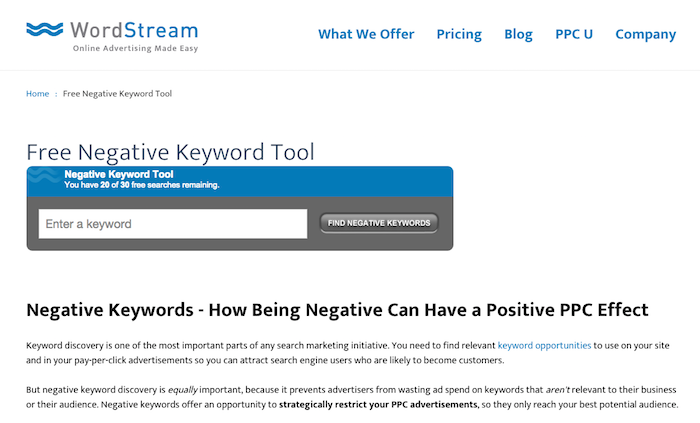
    Another crucial aspect of a successful paid online advertising campaign is the use of negative keywords. This allows you to stop your ad from appearing when you know that the consumer isn’t interested, which can help improve the click-through-rate of your ads. Using negative keywords informs Google that certain search queries are irrelevant to your practice, ensuring that you don’t pay for clicks that will not lead to conversions. You can start by using a free negative keyword tool like the one from Wordstream, which will return an extensive list of search terms that may not be related to your practice area. Using this tool is especially essential in the legal world, where you are bidding on expensive keywords that could result in unnecessary and costly clicks.

    Screen Shot 2016-01-05 at 9.25.01 AM

    4. Optimize Your Landing Pages

    Now that your paid online advertising campaign is set up with specific and relevant keywords and you’re getting clicks from consumers searching for your exact type of practice, it’s important not to derail all of your efforts with ineffective landing pages. Your landing pages should be directly on point to the ads that the consumer clicked on. They will likely need to be continuously tweaked with different types of offers to see how people respond to them. You might want to consider using videos on your landing pages with subject matter explanations directly from a lawyer, or customer testimonials from successful cases. In addition, having a chat function on legal landing pages can be particularly critical for consumers who are hoping to have immediate answers to case-specific questions.

    Keeping your paid online advertising strategy focused on these tips will help you capture leads that you would have normally missed, allowing you to conquer the competitive CPC bidding war for attorneys.

  • We Went to AdWords Bootcamp so You Don’t Have to: 5 Tips from the Experts

    We Went to AdWords Bootcamp so You Don’t Have to: 5 Tips from the Experts

    I had the pleasure of living and breathing AdWords for two full days on its home field—at Google Tech Corners in Sunnyvale, California.

    We had some very focused discussions that dove into some of the newer features and the best practices for long-standing features. I share some of my key takeaways below!

    1. Be present for your customers’ “micro-moments.”

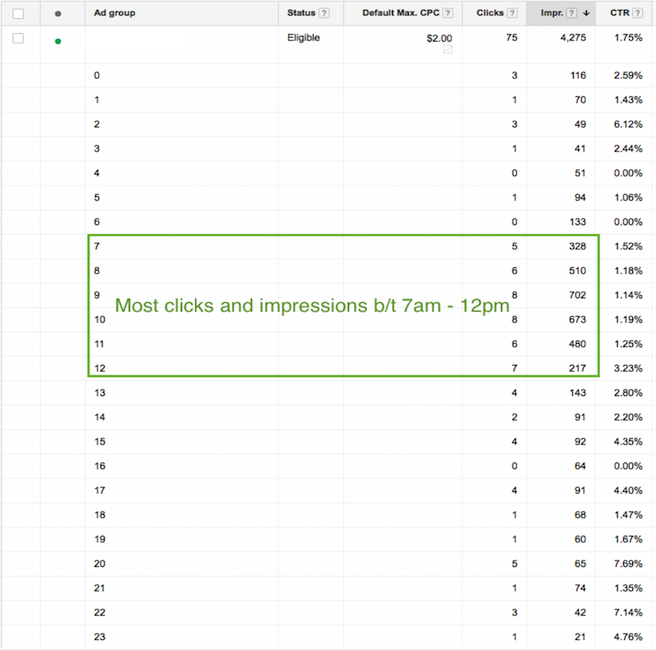
    These “micro-moments” are the key critical points in time in which your customers are searching for your products and services. You must be present when your customers’ micro-moments occur. You may want to increase your bids at certain times of day when more searches for your type of business are being done.

    Ex: restaurant upping bids leading up to and during mealtime.

    If your customer’s micro-moments aren’t as obvious as that of a restaurant, you can identify those high times by analyzing the following:

    • Google AdWords: impression & click reports by time of day
    • Google Analytics: visits by time of day

    Paula Blog 1

    2. We can trust cross-device conversions.

    If you work in AdWords, you’ve likely seen the column “Estimated Conversions.” Google has recently changed the name of this column from “Estimated” to “Cross-Device Conversions”

    Only conversions with a 95% certainty will be included in this number.

    Why do you care?

    Search sessions are segmented for the same purchase throughout the day and across devices. Gone are the days when a user sits at their desktop at nighttime and researches everything they want to know within 30 minutes.

    For example: instead, we’re talking two minutes at 7 a.m., five minutes at 9 a.m., ten minutes at noon, and maybe five minutes again at 6 p.m. to purchase.

    1511-SI-BlogImage-D-01

    3. You better not ignore cross-device conversions.

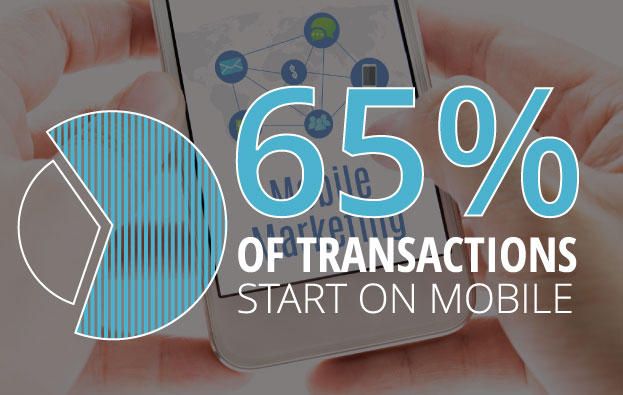
    Why? 65% of transactions start on mobile.

    I’ll be making it a priority to look at cross-device conversions in addition to the traditional conversion metrics (which only include users who search and convert on the same device). If you are looking at traditional conversions only, you are missing out.

    In order to see this metric, you must have one or more conversions set up in AdWords. Then, Google will do the rest.

    4. Leverage in-market segments and affinity segments.

    In both AdWords display targeting and Google Analytics, you can find “In-Market Segments” and “Affinity Segments.” Analytics allows you to see this info about your existing site visitors, and AdWords allows you to target potential customers using these two targeting options.

    This isn’t new knowledge, but I was given a fantastic example of what distinguishes the two, and I thought it was worth sharing:

    Affinity Segments:

    Users in this group have demonstrated (via the sites & pages they visit) what their lifestyle interests are.

    Example: A user in an affinity segment for “automobiles” would read car blogs and articles about future car releases, and they would also watch YouTube videos about cars.

    In-Market Segments:

    Users in this group are actually in the market for a given category of product or service.

    Example: A user in an in-market segment for “automobiles” would be looking at Kelly Blue Book, local dealership sites, Edmunds, TrueCar, etc.

    5. Allow new features to make your life easier.

    Last but not least, what I finally realized is that Google is constantly adding new features to AdWords to help us better spend our money. Given advertising is very much Google’s main source of revenue, this only makes sense.

    As new features roll out, learn their benefits and capabilities, and adjust your process accordingly.

    With consumer behavior changing faster than you can say “micro-moments & cross-device conversions,” there’s never an excuse to say “Well, we’ve always done it this way.”

  • Insta-Ads: Facebook Brings Instagram Ads to Life

    Good news for advertisers! It appears that Instagram Ads are now open for advertisers through Facebook’s Power Editor.

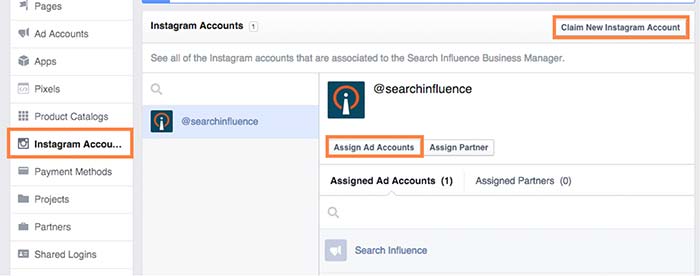
    While no official announcement has been made (and Instagram hasn’t even updated their site), I stumbled across these new features while poking around my Business Manager. What tipped me off was the ability to claim Instagram accounts under the Business Settings in Business Manager. From there, you can assign ad accounts to individual Instagram accounts. Interesting, right?

    instagramadscreenshot

    There is also a notification at the top of the page that states that “Instagram ads are gradually rolling out and might not be available to you right now. You can claim your Instagram account to have your setup ready. Read more here.”

    How Do They Work?

    After doing some digging and playing around with Power Editor, I was able to create an ad for Search Influence’s Instagram profile. However, the only ad objectives currently available on Instagram are “Clicks to Website” and “Mobile app installs.”

    Earlier this month, Instagram launched its Ads API Partners program. According to AdWeek, “Instagram Ads API Partners will be able to perform tasks including scheduling and publishing content to the Facebook-owned photo- and video-sharing network, monitoring audiences and sharing access to Instagram accounts across teams.”

    What Does This Mean For You?

    All of these updates come as very welcome news, as managing and advertising for businesses on Instagram was difficult in the past. Previously, Instagram advertising was only open to larger brands willing to spend $200,000 or more on brand awareness for a three-week campaign.

    Do you plan on using Instagram advertising? How do you think it can benefit your business?

  • Eggs & Beacon – Facebook Place Tips Help Businesses Digitally Advertise

    Imagine walking into your favorite local bar. One of the first things you’ll probably do is pull out your phone while you’re waiting for a drink or a friend. Now, imagine that as you open the Facebook app, you receive a notification that, unfortunately for your liver, there’s a great special on tequila shots tonight!

    That’s pretty much what Facebook is envisioning as it rolls out the Place Tips program, made possible by the Bluetooth beacon introduced earlier this year. After testing over the past few months, Facebook is bringing this service to more businesses in the U.S., and also making the beacon units available for free to businesses who are interested in using them in their stores.

    So before we get ahead of ourselves, let’s get a breakdown of exactly what this means.

    What is a Facebook Bluetooth Beacon?

    Facebook Bluetooth Beacon Image - SearchIn fluence

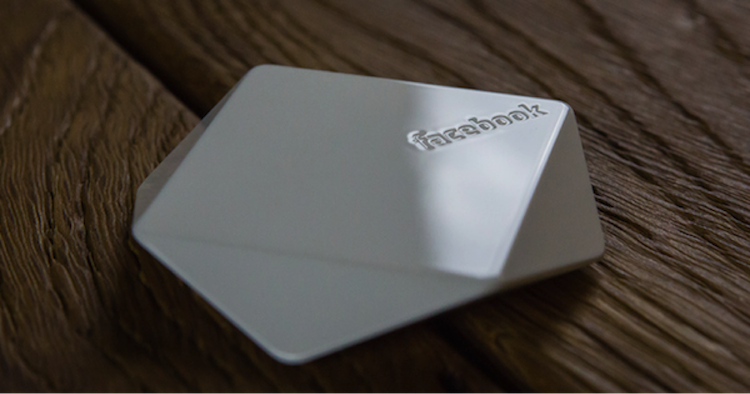
    Simply put, the beacons themselves are nifty little devices (about the size of a hockey puck) that are given to businesses from Facebook. Currently, you must request a beacon from Facebook in order to receive one (more on that later!). These devices use Bluetooth technology to send a signal to the Facebook app on a visitor’s phone to help show them “Place Tips.”

    OK, So What About Place Tips? How Do They Work?

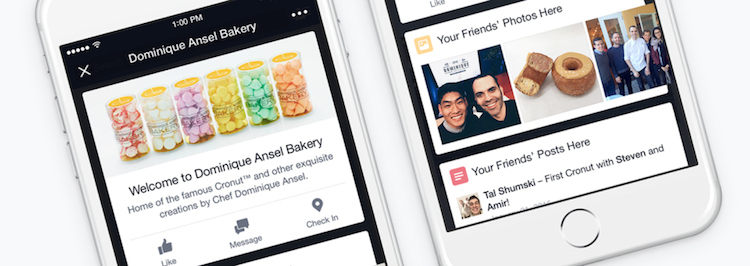
    Place Tips show a visitor useful and relevant information about their location, which is determined using cellular networks, Wi-Fi, GPS, and Facebook Bluetooth beacons. They can include friends’ photos, experiences, and moments from that place, as well as prompts to like the business’s page, check-in reminders, and posts or recommendations from the business.

    Everyone’s Place Tips are unique: at a restaurant, they can show a menu, reviews, and frequently mentioned information like a signature cocktail; at a retail store, they can help customers find business hours, learn about upcoming events, or see pictures of items currently for sale. Businesses are also encouraged to write a customizable welcome note that appears at the top of the Place Tips feed and use it to promote items or share facts and tips about their establishment.

    Facebook Place Tips Image - Search Influence

    For those who are worried about their privacy–don’t! Place Tips will not post anything to your profile, collect any information from you or your phone, or show people where you are (unless, of course, you upload a picture of yourself at this location), and they can be turned on or off within the Facebook iPhone app settings.

    How Has it Been Working? What are the Next Steps?

    Earlier this year, Facebook did a test run of the service at various New York City locations. According to Facebook, since it started piloting the service there, local businesses that have tried Place Tips have seen a “steady uptick in page traffic from in-store visitors.”

    After seeing the New York City program prove successful, Facebook is offering business pages across the U.S. a chance to participate, although quantities of the free beacons will be limited.

    In a statement put out earlier this week, Facebook announced: “We’re now providing free beacons to more businesses in the U.S. Because Place Tips are meant to offer people useful and interesting information about the places they visit, we’re prioritizing beacons for businesses with active Pages full of content—such as photos, check-ins, and status updates—from both the business and its customers. To help ensure your customers see Place Tips at your business, request a beacon today.”

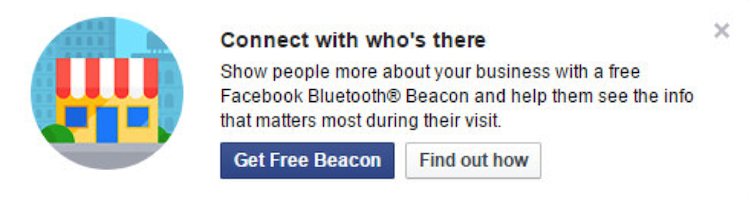
    Has this piqued your interest? Then get to requesting your beacon! If you’re an administrator of your business’s Facebook page, you’ll receive a post frozen atop the business’s news feed encouraging you to enter their shipping info to get one of the beacons:

    Facebook Get Free Beacon Image - Search Influence

    If that’s not showing up for you and you’re interested in setting up Place Tips and receiving a beacon for your business, you can request one from Facebook here.

    If you have any questions about the Facebook beacon, Place Tips, or how they could benefit your business, we’re here to help!

    Image sources:

    Facebook bluetooth beacon image

    Place Tips image

  • Taking Flight in 140 Characters or Less: Twitter Advertising 101

    Twitter advertising can be a great way to increase your follower base and drive traffic to both your social media pages and your website. It is relatively cost efficient, and it can help you drive the right traffic to your pages. There are three different types of Twitter ads all used for different purposes.

    Promoted Accounts

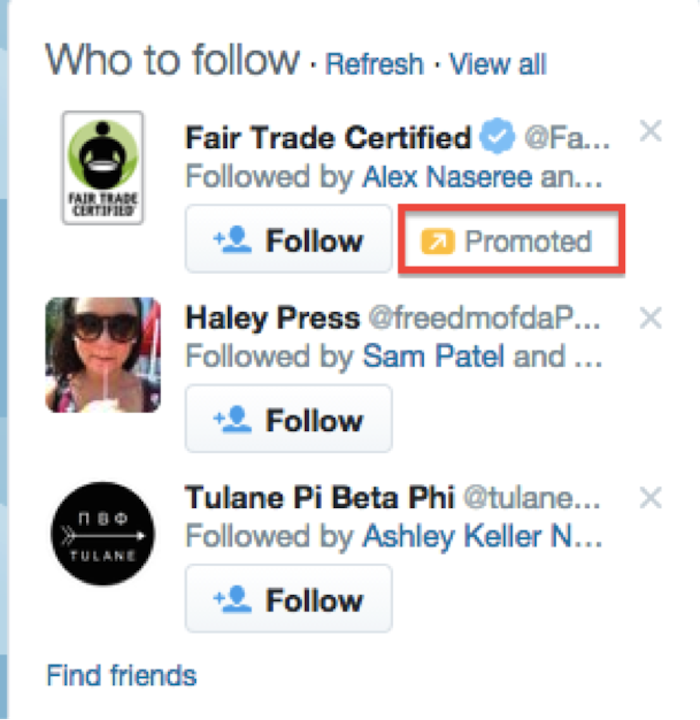
    For those of you who are familiar with Facebook advertising, this type of ad is very similar to Facebook fan-building ads. They are used to grow your follower base and draw more attention to your Twitter account. Promoted accounts typically range between $2-4 per follower. This price is dependent upon targeting: the more specifically targeted the ad is, the more it costs. The cost of these ads is subject to results, because you are charged when a user clicks on the ad and follows your account, but you do have the ability to set a maximum budget.

    Who to Follow Twitter Ads Image - Search Influence

    Promoted Tweets

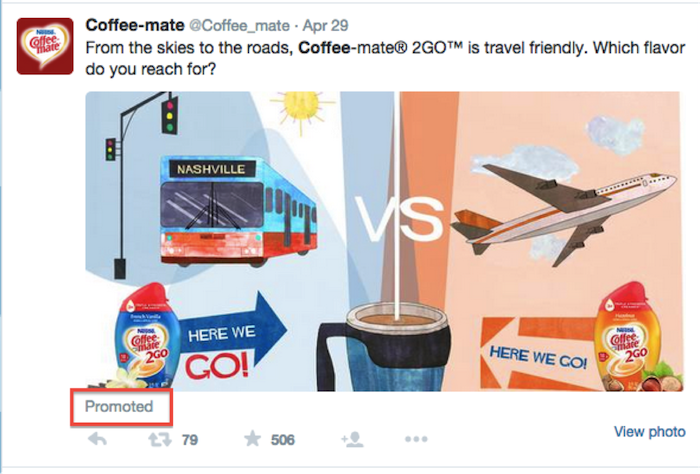
    Promoted tweets can be used to promote a specific product or service, and they can also be used to get more attention and exposure for your quality tweets. These ads help promote user engagement and show your content to people who are not necessarily following you on Twitter. These ads are also on a “pay per” basis, but instead of paying per follow, you pay per interaction. “Interacting” includes clicking, replying, retweeting, or favoriting your tweet. These interactions typically cost between $0.50-$2, depending on your targeting. Just like with the promoted accounts, you can set a budget so that you don’t end up spending more than you can afford (due to the awesome success of the campaign, of course).

    Twitter Advertising Promoted Tweet - Search Influence

    Promoted Trends

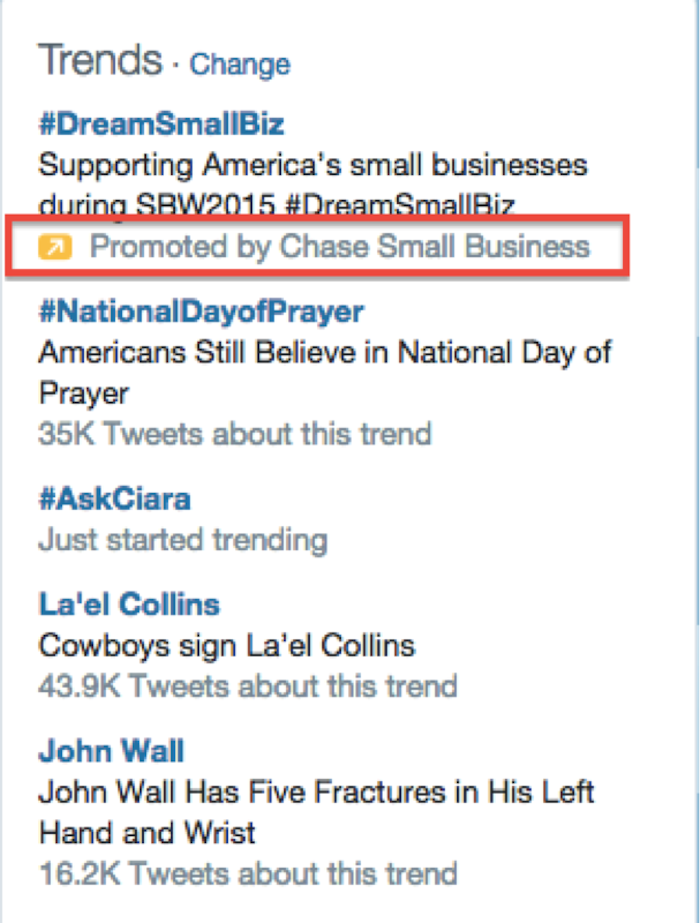
    This type of Twitter advertising is really meant for the iconic brands of the world. These will only work for you if you are looking for significant exposure in a short amount of time. Promoted trends are guaranteed placement in the “trends” section and are shown to everybody. The types of businesses that do this appeal to the masses (McDonald’s, Nike, Chase, etc.). Another reason that this type of ad only appeals to huge companies is the large price tag: it costs $200,000 to run a promoted trend for one day.

    Twitter Advertising Trends Image - Search Influence

    Targeting

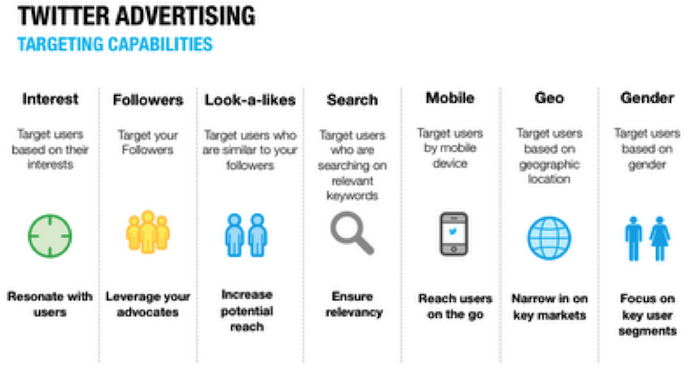
    For promoted accounts and tweets, you can get pretty granular with the targeting. Twitter allows you to target based on a multitude of different demographic and behavioral factors. Advertisers can target based on behaviors, gender, region, device (mobile, desktop, or tablet), and more. Social media targeting is a delicate balance because as you get more specific, the price per click or interaction goes up, but it is important to be specific enough that you are targeting people who are likely to convert.

    Twitter ads can be a really great way to drive more followers, engagement, and even traffic to your website. Using this ad platform also allows advertisers full access to Twitter analytics so they can see what types of tweets perform the best, which helps them choose which ones to promote in the future. Happy tweeting!

    Twitter Advertising Targeting Image - Search Influence

    Image sources:

    Twitter targeting image


  • Google AdWords Cram Session: Don’t Let Google Kick You in The Ads

    To start off this post: yes, we are a Google Partner. No, we do not do Google’s laundry or cook romantic meals for Google. And we try our best not to steal Google’s side of the bed. We are, however, certified and qualified to help you with all aspects of your online advertising campaigns by building an appropriately aggressive website marketing strategy. So what makes us certified and qualified? Well, let me bring your attention back to our lovely Partner: Google.

    The Perks of Partnership

    Being a Google Partner has lots of perks. From access to live trainings to beta testing opportunities to extra support and professional networking (the list goes on and on, but feel free to peruse here), you can bet we love being a Google Partner. However, along with the perks come some requirements, one of which is obtaining certifications in Google’s products and services.

    One of these certifications focuses on proficiency in using Google AdWords, Google’s online advertising platform. This platform allows users to market their products or services in the Google search engine and affiliated sites. Still following? Great! Now, in order to become a certified Google AdWords advertiser, you will need to pass a couple of tests. In the upcoming paragraphs, I’m going to give you (1) a quick overview of each AdWords exam, and (2) a few general test-taking tips. You’re welcome.

    Google AdWords Exams

    GoogleAdwordsLogoImage

    There are a total of four exams for AdWords certification: Advertising Fundamentals, Advanced Search, Advanced Display, and Video Advertising. Google requires you to pass the Fundamentals test along with at least one of the advanced tests in order to become certified.  However, here at SI, we like to take both advanced tests for good measure. We’re thorough like that. After getting certified in AdWords, you then have the option of taking the Video Advertising exam.

    1. Advertising Fundamentals – 2 Hours. 90 Questions.
    This is the exam that covers all the basic features of AdWords. Questions will pop up on topics like campaign and ad group management, ad formats, and budgeting and bidding options. In order to pass this exam, you’ll need to achieve an 85% or higher. The good news? If you achieve a passing score, it’s valid for two years!

    2. Advanced Search – 2 Hours. 98 Questions.
    This exam goes more into detail on best practices for managing campaigns on Google’s Search Network and Search Partners. Questions will be on topics like ad and site quality, AdWords API, understanding ad performance, and performance optimizations. In order to pass this exam, you’ll need to achieve an 80% or higher. The validity period for this exam is one year.

    3. Advanced Display – 2 hours. 88 Questions.
    This exam focuses on best practices for advertising on the Google Display Network and on YouTube. Questions on this exam test your ability to plan, design, implement, measure, and refine display and video advertising campaigns. In order to pass this exam, you’ll need a score of 70% or higher. The validity period for this exam is one year.

    4. Video Advertising – 1.5 Hours. 74 Questions.
    This exam focuses on video ad campaign creation and management on YouTube and the Display Network. In order to pass, you’ll need a score of 85% or higher. The validity period for this exam is one year.

    General Tips

    VisitorsImage

    If you’re hoping for more test-specific tips, don’t worry…more posts on AdWords certifications to come. However, to get you started on your studying, here are a couple of general test-taking tips!

    1. First and foremost: have a plan. (What is this? Standardized Testing 101?) Don’t cram all the studying into one day or even one week and then rush through the exam hoping you’ll pass. Do this instead:

    • Set a realistic test date for yourself. Might I recommend giving yourself a one-month study period?
    • Take a look at the study guides provided by Google and come up with a time frame that will allow you to go over and understand each section of the study guide thoroughly.

    Google provides you with a wealth of studying material for each exam because Google wants you to succeed. Use the materials provided. Stick to a timeline. And don’t panic!

    2. Which brings me to my second tip: don’t panic. Google is a very forgiving partner and is big on second chances! If you don’t pass on your first try, you can try again in seven days.

    3. Log into AdWords and play around on the platform a little. Not only will this help familiarize you with the many aspects of the AdWords platform, but it will also give you a point of reference when going over the Google study guides for each exam. Plus, haven’t you heard of the phrase “hands-on learning?” It very much applies here.

    On that note, I’m going to cut myself short so you can process all the information you just read. If you’re interested in becoming AdWords Certified, click here. If you’re interested in getting some professional help from an awesome team of AdWords Certified Individuals, click around. You’re in the right place. We’re a Google Partner, after all!

    Thanks to Search Engine Land for the Google AdWords Image, to Google for the cute Google cartoon, and Renee Jacques for the cute cat gif!

  • Un-blurring The Lines of The FTC and Native Advertising

    Un-blurring The Lines of The FTC and Native Advertising

    To those of us in SEO and other forms of web marketing, native advertisements may seem like a God-send, the perfect combination of advertising power and positive user experience. The content-driven marketing platform is under a great deal of scrutiny, however, as it becomes more and more commonplace on the web.

    While advertorials have been used for the greater part of the last century, native advertising is a more recent development that has capitalized on user experience in the digital age. In 2013, more than 70% of websites offered native advertising, and that number is likely to increase by around 10% this year (Mondaq). Due to their editorial nature, regulators—as well as members of the general public—are worried that native ads blend too seamlessly with unsponsored web content, and many are eager for the issue to be formally addressed.

    The SEO value of native advertising is obvious. It’s an excellent tool that not only allows for optimization, but also provides great content to the user. And as we all know, content is king. Native ad campaigns can be more successful than traditional online ads, and as marketers, we like to believe that’s because users enjoy the content we’re putting out.

    Critics, on the other hand, argue that the ad serves as a sneak attack, tricking users into clicking through. As Federal Trade Commission Chairwoman Edith Ramirez told Reuters, “By presenting ads that resemble editorial content, an advertiser risks implying, deceptively, that the information comes from a non-biased source.” The drama around native advertising recently culminated in an FTC workshop focused on the method. This idea of hiding advertising in content inspired the FTC workshop’s name, “Blurred Lines: Advertising or Content?”

    blurred-lines-logo
    http://www.ftc.gov/news-events/events-calendar/2013/12/blurred-lines-advertising-or-content-ftc-workshop-native

    Un-blurring the Lines

    The workshop’s panelists questioned standardization and responsibility, trying to keep all three parties—buyers, sellers, and consumers—in mind, with perhaps a little more favor to the consumers, who have the least agency in the situation. While everyone agreed that transparency is necessary, some argued that it wasn’t enough. Chris Jay Hoofnagle of Berkeley’s Law and Technology Center, for example, presented results from his research, showing that as many as 35% of consumers didn’t identify a native ad as an advertisement although it was marked. On the other hand, Chris Pedigo of the Online Publishers Association reported that more than 70% of websites that offer native advertising had not received complaints from users.

    These statistics are just two examples of the myriad of arguments that seem to complicate the issue rather than clarifying. If there was one thing everyone could agree upon at the end of the workshop, it was that more work still needs to be done before any definite regulation can be imposed. Even Jessica Rich, Director of the FTC’s Bureau of Consumer Protection, stated that native advertising may be too complex an issue for one-size-fits-all standardization.

    In the meantime, the responsibility remains on the publisher to use discretion and focus on un-blurring the lines with clear indications of sponsorship on native ads. That may not be an attractive idea to advertisers hoping to fool users, but those producing strong content know better. If a company is actually creating the content users want, it shouldn’t matter that it’s marked with their logo and a big “Sponsored” label.

    Publishers can look at the situation one of two ways: embrace the responsibility or abuse it. With freedom from regulation, publishers are free to respect users and clearly label native ads or take deals with eager corporations to disguise the content. We advertisers share in the opportunity, as we can always choose which publications we partner with.

    Running a Clean Campaign

    While partnering with a publication that sneaks in sponsored content may seem like a good tactic from a purely bottom-line-driven approach, some innovative companies have already proven to us that it’s really not necessary in the end. Several publications are working to show their dedication to corporate responsibility when it comes to native advertising, and it turns out native ads are successful no matter their labeling.

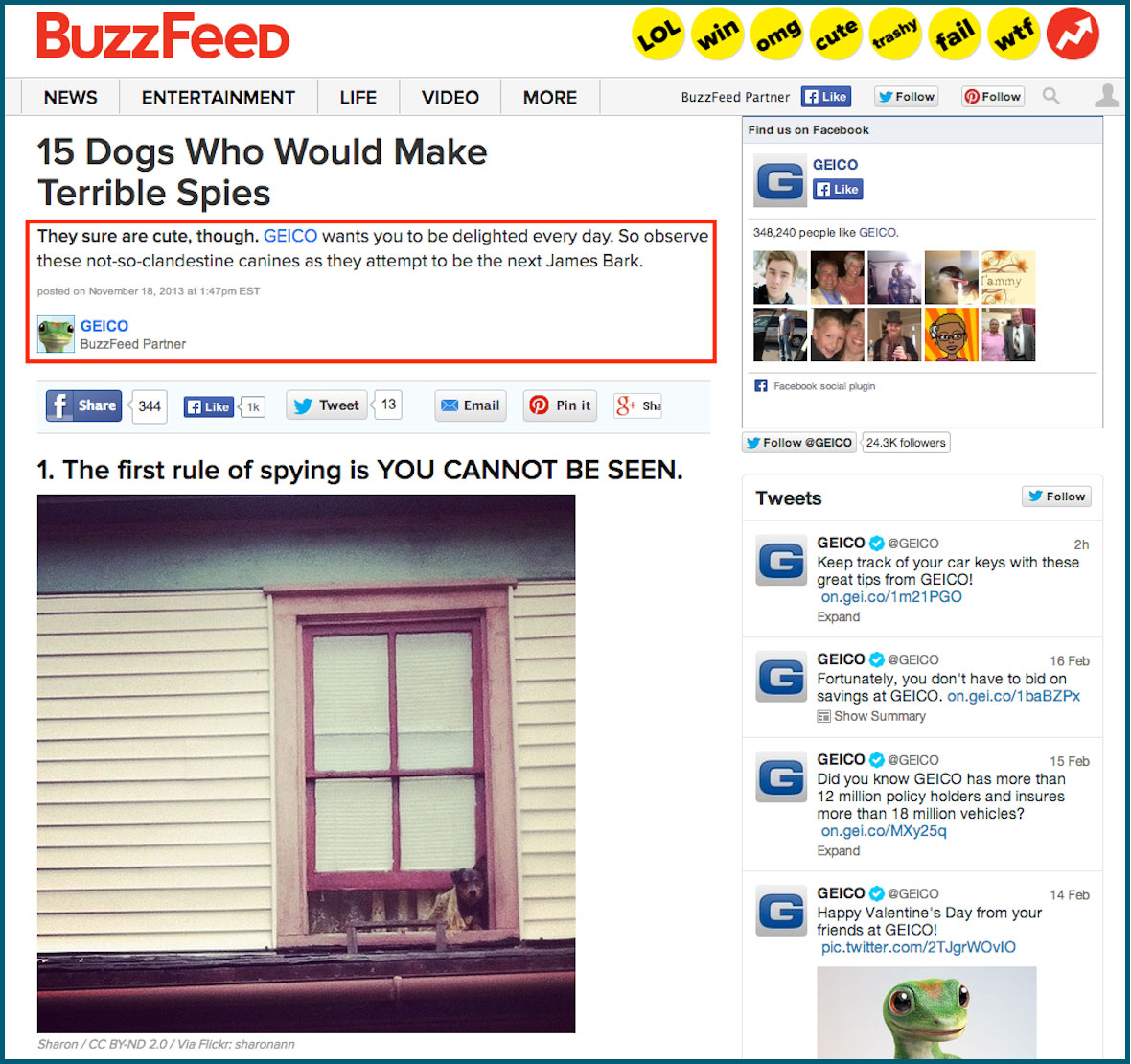
    BuzzFeed is a truly great example. The site rejects display ads entirely, relying on only native ads for advertising revenue. And it’s working out pretty well, according to Peter Kafka at All Things D, Buzzfeed planned to earn somewhere around $40 million in 2013, but the end number ended up being closer to $60 million. This sales boom comes in spite of the fact that advertisers’ contributions on the site are marked “Sponsored.” Buzzfeed’s pioneering efforts have obviously benefited the company greatly, and their sponsored content often drives more web traffic than traditional posts.

    infographic-pic
    http://www.buzzfeed.com/geico/15-dogs-who-would-make-terrible-spies

    Buzzfeed isn’t alone in their honest tactics. Many other companies acknowledge their native ads, including The New York Times, which announced in December that it would mark sponsored content with colored bars and “Paid Post.” According to the Times, publisher Arthur Sulzberger Jr. sent a letter to all employees emphasizing the “strict separation between the newsroom and the job of creating content for the new native ads.” The Times even published an article on their attitude toward native advertising, turning a policy into a great PR moment.

    IAB Playbook

    While no formal regulations are in place, the Interactive Advertising Bureau has set out to clarify the practice and set standards in the industry with the Native Advertising Playbook. By publishing the playbook, the IAB is acknowledging both the importance of native advertising and the danger it poses to unsuspecting consumers. Patrick Albano, the vice president of Social, Mobile and Innovation Sales at Yahoo and co-chair of the IAB Native Advertising Task Force explained that the organization set out with the goal of providing “guidance based on the state of the industry today while at the same time leaving room for flexibility to inspire innovation and growth.”

    The playbook goes over six different “core interactive ad formats” that are currently being used in native advertising: in-feed units, paid search units, recommendation widgets, promoted listings, IAB standard ads with native elements and custom ads. It also gives broader ethical principles advertisers can use to protect the consumer. With all native ads, the playbook suggests advertisers consider form, function, integration, buying & targeting, measurement and disclosure to “ensure that a unit will meet their brand objectives.”

    What This Means For Marketers

    To be completely honest, things are just as uncertain as before the FTC held its workshop. The workshop raised just as many questions as it answered and proved that no one has thought of a fair way to regulate native advertising. What the workshop really did is formally alert the industry to the FTC’s ever-growing interest into this marketing technique. As an industry I’m sure we’d hoped to avoid regulation altogether. We will now need to wait and see, and the good news is it’s not imminent given industry professionals and federal regulators still can’t seem to figure out what, in particular, should be regulated, much less in what way.

    In the meantime, Bureau Director Jessica Rich suggests that advertisers continue to rely on the FTC’s Dotcom Disclosure Guidelines when in doubt, while discussions continue. The IAB seems to be leading the discourse, with a series of native advertising workshops beginning in March 2014. Until then all we can do is focus on our own marketing efforts, working to keep consumers informed and clients successful. And native advertising is sure to be part of that process. In fact, with the advent of Penguin, native advertising seems to be our best hope. With each update, Google pushes even further back against search marketers, emphasizing the importance of well-thought-out and informative content. While I have always maintained that SEO is built on content, Google is regulating marketers in its own way by devaluing anchor text and deep links in favor of solid branding. So basically, if your native ads are giving users what they want, then Google’s happy, too.

    Has all of the recent hubbub around native advertising had an impact on your strategies? What do you see on the horizon? I’d love to hear your thoughts on the subject and on my theories. Please share below!


  • SEO vs. PPC: What’s The Difference Anyway?

    A while back, SEO guru David McBee wrote a post in his awesome blog about how he differentiates SEO tactics from PPC strategies. In David’s mind, it can all be related to the difference between dieting and plastic surgery. SEO is a diet, and PPC is plastic surgery.

    To illustrate his point, David created this awesome infographic which I think spells things out pretty well. In many ways, this categorization really gets to the root of the differences between what you would do to increase your site’s profile online using SEO tactics versus the much more immediate PPC strategies we all employ.

    The SEO Diet

    It is very true that SEO is like a diet for your online presence. You need to be in it for the long haul, and you really need to establish clearly defined goals before you start. In exactly the same way that a crash diet will not yield the long term results you are looking for, link baiting or deploying tons of spammy content will not help you reach your idea SEO weight.

    I really like the comparison of PPC to plastic surgery because I feel like you should be putting the same kind of thought to the planning stages of a PPC campaign that you would before a procedure like a face lift or tummy tuck.

    The PPC Procedure

    You need to figure out exactly what you want to focus on and a lot of thought has to go into what you want to look like on the other side. Nothing is worse than not being prepared for an onslaught of traffic hitting your site on the heels of a successful PPC campaign.

    What do you think of David McBee’s comparison? What would you say the SEO/PPC dichotomy resembles in your experience? Let us know in the comments! We would love to hear from you, even if you are on a juice cleanse SEO diet.

    Link for infographic: http://davidmcbee.com/seo-is-a-diet-ppc-is-plastic-surgery-infographic/