Tag: social media marketing

  • Will Camp Out for Marketing Tips: Your Black Friday Survival Guide

    1

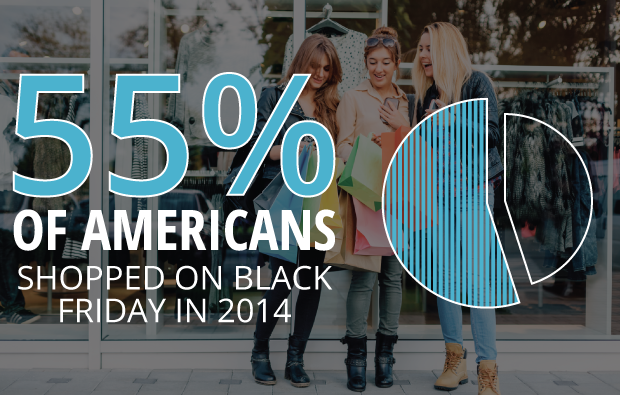
    November is here! A month full of falling leaves, dropping temperatures, giving thanks, and many people’s favorite shopping day: Black Friday. Last year, 133.7 million people shopped during the Black Friday weekend, according to a Fundivo.com study. As a local business, you may be trying to get a piece of the Black Friday pie this year, but you might not know where to start. Follow these tips to make the most of your online marketing efforts on one of the busiest the shopping days of the year.

    Plan Early

    The time to start thinking about marketing for Black Friday is now. If you traditionally experience a high volume of customers and sales during this time, like a retail store, you won’t necessarily be able to think about your marketing plan as you’re stocking extra inventory a few days before.

    One of the first things to decide is what your business is going to offer for Black Friday. Is it going to be a storewide sale? Will you sell a product you don’t typically offer? Consider your goals and determine what makes the most sense for your business.

    Get the Word Out

    Once you’ve chosen your Black Friday offer, you need to let people know about it. By promoting your offer online, you’ll be able to reach significantly more potential customers than by promoting it in-store alone.

    If you don’t have extra budget specifically for your Black Friday offer, use social media to connect with your fans. Stand out amongst competitors by posting images of products that will be available during your sale or offer an online-only incentive to entice shoppers to stop in on Black Friday.

    If you’re willing to put a bit of spend behind your efforts, Facebook advertising is an affordable alternative to a costly pay-per-click campaign. You can use their impressive targeting options to get your message in front of your specific demographic. Facebook targeting ranges from gender, age, and location to education, income level, interests, shopping habits, and more.

    Also, consider adding a page to your website with information specific to your Black Friday offer. That way, anyone scouting out sales in your area beforehand will know exactly what to expect from your business.

    Be Creative

    Black Friday isn’t just for retail. Although retail stores tend to see the majority of the action, it doesn’t mean other industries can’t jump on the bandwagon.

    Not everyone loves waiting in line overnight and battling crowds all day, but who doesn’t love a bargain? If you’re a service area business, reward your customers for being productive with home maintenance on Black Friday by offering discounted service or installation. Since many people take the day off work, it’s a great time to take advantage of gaining some extra business.

    Restaurant offers are also a great way to capitalize on Black Friday foot traffic. Let customers know ahead of time that appetizers are half off or you’re offering happy hour prices all day so they know where to go when they need a break from the shopping crowds.

    Make sure your business is taking full advantage of Black Friday this year by creating your marketing plan early, making your offer known, and utilizing creativity to gain more customers.

    Image Sources:
    Jingle All The Way
    Glee
    Gossip Girl
    Shopaholic

  • 4 Tips to Make Your Social Media Rock as Hard as Your Band Does

    Social media is vitally important to any musician group wishing to increase their recognition online. Facebook and Twitter both give way to expansive audiences and have become necessary in establishing an online presence. Band profiles have become a must-have for any local band wishing to increase its online presence. Amateur bands have been granted some great opportunities online, while the already-competitive industry has gained a new dynamic.

    Being in a band takes much more than talent and charisma. You also have to put in the time to gain recognition. There is no better way to do that than through social media. Here are some best practices for any band just starting out on Facebook and Twitter:

    1. Keep Connected

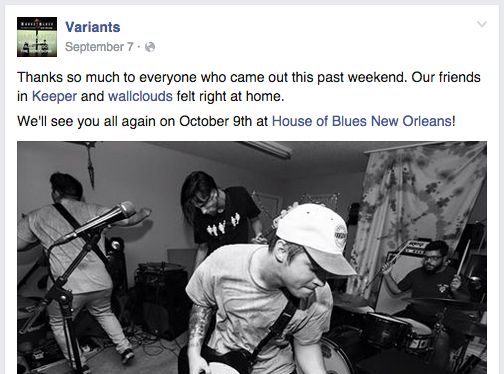
    Having a band profile on a social media channel isn’t just about promoting yourself. Of course you’re going to want to put your name out there to gain some attention, but no one wants to hear about your band every single time you post. One of the best ways to promote and actually develop solid relationships in the process is to connect with other local bands. If you’re familiar with a local band, you don’t have to be shy about it. Give them a shout out, tell your followers to check them out or even link to one of their videos. At the end of the day, they are trying to make it just like you, and they will no doubt appreciate the gesture. They might even return the favor.

    10:9 Anthony Armstrong

    2. Keep a Consistent Presence

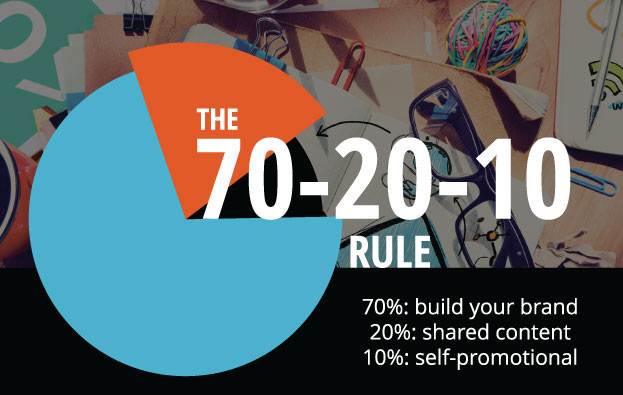
    Even if it’s just a simple post to engage your followers, posting consistently reminds people that the band is still around and still active. No, you shouldn’t post three times a day about your upcoming shows or that one single you just released, but giving your followers and friends a bi-weekly update on what the band has been up to is a great way to seem active. You will also want to devote some attention to updates in your specific music scene. Post some of the latest video releases from popular bands, or link to related articles. This shows that you are keeping up with the most recent developments and trends, giving your band a sense of professionalism. It also helps to follow the 70-20-10 rule.

    Social Media 70-20-10 Rule Image

    3. Keep It Lean

    Many times, local bands will approach their social media channels with a bit of overkill. This comes from the common belief that any social media activity is good activity. The simple fact is that no one wants to scroll through 800 pictures of your band’s last few shows, the reason being that those shows probably don’t seem very different, and a few good pictures of one show are a lot more digestible than a mass upload from your SD card. Another mistake bands often make is attaching an excessively long biography. Your followers are not going to commit to reading a lengthy bio about your rise from nothing in the mean streets of your hometown. This makes you sound delusional and self-absorbed. Let’s try for a little more humble!

    10:9 Anthony Armstrong 2

    4. Keep On Keeping On!

    Over-promoting your band isn’t the best way to develop an online presence, but that doesn’t mean you shouldn’t still promote. Consistently releasing material is crucial to the process. One of the hardest struggles of being in a local band is how quickly your band can fall under the radar. Your followers are only interested if you are interested. Releasing a song every few months and adding it to your band profile is a great way to show that your band is still prominent. If your band has developed merchandise (shirts, accessories, etc.), then post about this with visual representations. Your followers are more likely to pay attention to these types of posts, and it will continue to increase your credibility.

    10:9 Anthony Armstrong 3

    Social media offers some of the best outlets for local bands who want to become more than that. Properly utilizing these features can bring significant change to a band’s presence and overall recognition. So be consistent, be original, and have fun with it!

  • One Brand to Rule Them All: Unite Your Franchise Fellowship on Social Media

    Web

    So you want to be successful in online marketing? Well…your franchise needs to get social.

    More than 70 percent of franchise CEOs and marketing executives voted Facebook as the most effective social media channel for franchises, according to the 2015 Franchise Local Marketing Trends survey conducted by franchise software company FranConnect. In fact, franchises are giving their customers close attention and spending more time on social media compared to other small businesses overall. That’s according to this year’s report on franchises from market research firm BIA/Kelsey.

    But who is managing that social media voice? In 2013, 23 percent of franchisees said their franchisors were “somewhat involved” with their social media presence, BIA/Kelsey reports.

    “We encourage franchisees to take a role in community through clubs or sponsoring baseball teams, but we supplement that through posting activity on Facebook to communities near the restaurant. We localized that but from the central base,” Mark Hardison, vice president of marketing at El Pollo Loco told BIA/Kelsey at its national conference in March.

    One Search Influence client manages the overall brand voice on social media for its 10 locations while also allowing each location to supplement with additional localized social media posts. This not only ensures a consistent social media brand voice, but it also ensures that all locations have frequent social media posts with no gap in activity.

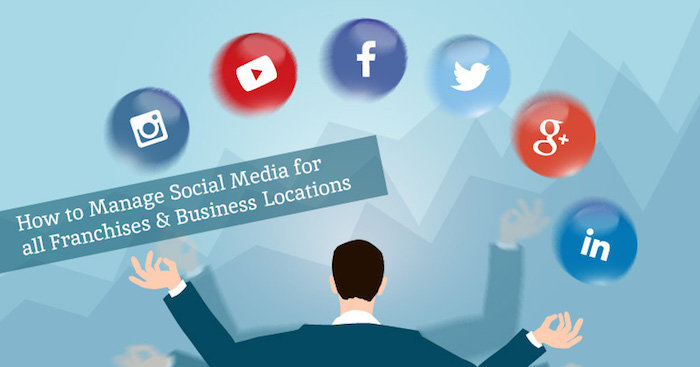
    So how can franchisors and multi-location businesses manage social media posts from a central base? What’s the best way to manage a consistent social media message across multiple business locations? Follow these four steps to take the headache out of managing a consistent social media message, no matter the number of business locations.

    Blog-Blog Graphic-KG-B-01

    Step 1 – Schedule Your Posts in Advance

    It can be hard to keep track of one social media account, much less a whole slew of franchised business accounts. Fortunately, there are a number of web tools available to help you out. Specifically, websites like HootSuite and Sprout Social allow for users to schedule posts across a number of profiles and platforms in advance. That way, you can easily craft and lay out the meat of your social media campaign in a single, unified stream without scrambling to make sure you post to every page.

    Step 2 – Track Your Brand Mentions

    First, let’s talk about what a brand mention is. Basically, whenever someone (with a public account) mentions either your company name or another one of your “brand keywords” (more on those later) on a social media platform, that’s a brand mention, and you should probably know about it. By keeping an ear to the wind, you can know what your fans do and don’t like about your business, which in turn gives you the opportunity to better cater to the needs of your customers.

    So how do you pick your brand keywords? We recommend selecting your brand keywords based on variations of your business name or specialized, branded products and services you offer. Some online services allow you to target these branded keywords to specific locations so that you can see what people are saying about you in certain areas. So, for example, if Search Influence were a franchise throughout Louisiana, we would want to include branded keywords for “Search Influence” that are targeted in New Orleans, Baton Rouge, Lafayette, etc. It’s worth noting that if the user has not updated their settings to allow for location services to locate them, this feature will not apply.

    Some online services, like Sprout Social, even allow you to monitor for the tone you’re interested in hearing. So if we only wanted to know the positive things people were saying about our company (which is not necessarily recommended), you could change your settings accordingly with the simple addition of a “:)” at the end of your brand keyword.

    Step 3 – Respond to Your Fans and Followers

    Your customers are bound to have questions, complaints, and praise for you. At times, this may feel like a lot to respond to, but the best way to garner a strong following is to build a relationship with your customers.

    In fact, a recent study found that customers who engage with companies via social media spend 20–40 percent more money with those companies, and that nearly one-third of customers turn to branded social media pages on Facebook to ask product questions. Further, 71% of people who have a positive customer service experience through social media recommend the brand to their peers.

    So what’s a franchise to do? Tracking mentions helps, but having all of your direct messages, wall posts, and Tweets in one unified stream can take the stress out of being a responsive company. Perhaps one of the best features of Sprout Social is their convenient Smart Inbox, which is found under the “Messages” tab of the website. Here, you can view all “messages” from your connected profiles on a single screen. Messages, in this case, can consist of Twitter mentions, Twitter direct messages, retweets, new Twitter followers, Facebook wall posts, Facebook comments, and Facebook private messages on any and all of your profiles. Their filtering options allow for you to adjust which profiles, brand keywords, and types of messages you want to see.

    Step 4 – Learn from Reports

    As with all aspects of business, it’s important to know your clientele. A number of online services offer ways for you to keep track of how your franchise’s social media pages are doing through monthly reports. Reports allow you to dig into profile and post-level insights, and they also let you see trends across messages and responsiveness to better understand your brand’s performance.

    There are a number of different reports out there, so you can choose to focus on the exact parts of your social media campaign that you’re most interested in. For instance, certain profile reports allow you to dive into some specific statistics on your specific platforms and pages. They can also provide information on your total likes/retweets, amount of new fans/followers, the breakdown of your impressions, fan demographics, how people are sharing your content, and a breakdown of each piece of content you post.

    Other reports focus more on the trends related to your Twitter accounts and offer insight into what’s being said to your brand on Twitter—and who’s saying it. See the topics and hashtags that are frequently mentioned with your brand, chart relationships between them, and keep an eye on the people and brands that frequently mention you—as well as those that are mentioned with you.

    Get Social

    Managing your brand’s voice on social media can seem overwhelming at first, but it only takes a few steps to ensure a more consistent voice—and the best part is that these steps can be taken right from your central base. If working through the complex process of multi-location and franchise marketing still seems overwhelming, contact Search Influence to streamline your marketing strategy.

  • Insta-Update: Direct Messages Just Got Easier on Instagram

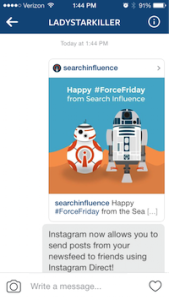
    Back in 2013, Instagram launched Instagram Direct, which gave users a way to share with one person or a smaller group of people. Last week, they announced the rollout of a couple of exciting improvements, including sending posts in your newsfeed as direct messages and threaded messages.

    Direct Messages Improved

    When you come across that perfect picture in your newsfeed that you want to share with a friend, your first thought is to tag that friend in a comment, right? Now, you’ll see an arrow next to the like and comment icons. Just tap that arrow and send the post to a friend or small group using Instagram Direct! You can also tap the image in your conversation to view the original post. If you have the account set to private, then only the people who follow that account will be able to see the post in the direct message.

    Image1 Image2 Image3

    What Are Threaded Messages?

    Threaded messages let you view your full conversation you’ve had with people you talk to the most. Instead of viewing individual conversations from each photo or video you’ve sent, your thread will include the respective people in the conversation and the posts in their natural order.

    Instagram also added the ability to name groups, a camera icon so you can take new photos while you’re in a conversation, and of course, emojis!

    And What Does This Mean For My Business?

    While this new update is exciting for users, as a business owner, you will not currently be able to track the number of times your post gets shared using Instagram Direct. For now, the only real sense of engagement that you can measure is via the comments on your post. I expect that this will be something Instagram considers in their next round of updates.

  • For Small Law Practices, Online Resources Can Be Judge & Jury

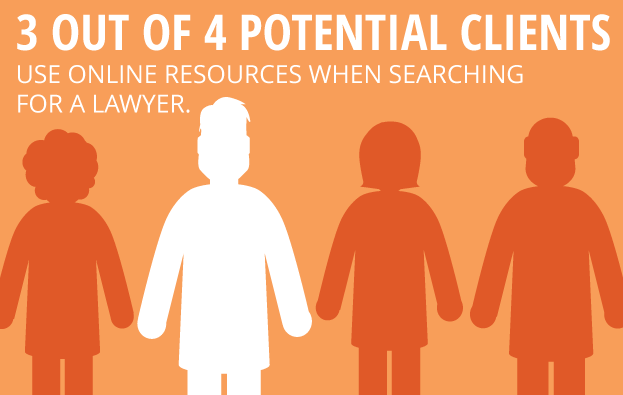
    For many solo practitioners and small law firms just starting out, establishing a consistent client base is the number one priority. In the increasingly competitive land of marketing your law practice, it’s imperative to look beyond the traditional methods such as putting your picture on a billboard, directly contacting potential clients, or simply hanging out your shingle. According to a survey conducted by the Research Intelligence Group, three out of four potential clients use online resources when searching for a lawyer. With that in mind, utilizing a few simple tips can make a huge difference in getting your new law practice found online.

    1511-SI-Newsletter-KG-E-02

    1. Develop and Promote High-Quality Content

    If you’re just in the initial stages of developing your website, it’s wise to keep things simple and focus on quality rather than quantity. For instance, create a few targeted website pages that are written with the potential client in mind, rather than cluttering up your site with an overload of information. Once you have high-quality content in your arsenal, make sure to utilize a social network to promote that content. Also, consider focusing on one social network that you expect will attract the most business, and write timely and substantive posts for that one network.

    LawyerFortunCookie

    2. Create a Blog

    One important way to increase your online visibility and improve your chances of getting to the top of Google’s organic search results is to create a relevant and authoritative blog on your website. A blog is a great way to establish your authority on subjects relevant to your practice while also allowing for the occasional posting of upcoming community events or helpful nonlegal articles. You can also set your blog to automatically post to social media platforms such as Facebook, Twitter, and LinkedIn.

    GavelAndGlobe

    3. Focus on Local

    Think of your potential client base and how you would traditionally market to that group. Getting involved with your community by speaking at regional networking events and participating in local organizations can help establish yourself as a local expert in your field. Internet marketing is another step in that process and can go a long way in bringing in new business. For example, creating consistent profiles across local directories can help you rank higher on Google. Also, consider developing a strategy for gaining local user reviews on websites such as Yelp.

    Starting your own law practice can be daunting, but utilizing these simple tools can make a big impact in helping potential clients find you online.

    Image Sources:

    Lawyer Fortune Cookie

    Gavel and Globe

  • Insta-Ads: Facebook Brings Instagram Ads to Life

    Good news for advertisers! It appears that Instagram Ads are now open for advertisers through Facebook’s Power Editor.

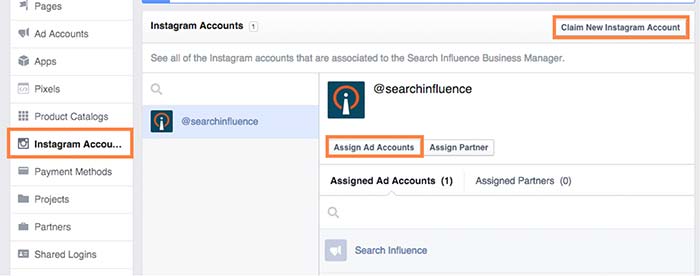
    While no official announcement has been made (and Instagram hasn’t even updated their site), I stumbled across these new features while poking around my Business Manager. What tipped me off was the ability to claim Instagram accounts under the Business Settings in Business Manager. From there, you can assign ad accounts to individual Instagram accounts. Interesting, right?

    instagramadscreenshot

    There is also a notification at the top of the page that states that “Instagram ads are gradually rolling out and might not be available to you right now. You can claim your Instagram account to have your setup ready. Read more here.”

    How Do They Work?

    After doing some digging and playing around with Power Editor, I was able to create an ad for Search Influence’s Instagram profile. However, the only ad objectives currently available on Instagram are “Clicks to Website” and “Mobile app installs.”

    Earlier this month, Instagram launched its Ads API Partners program. According to AdWeek, “Instagram Ads API Partners will be able to perform tasks including scheduling and publishing content to the Facebook-owned photo- and video-sharing network, monitoring audiences and sharing access to Instagram accounts across teams.”

    What Does This Mean For You?

    All of these updates come as very welcome news, as managing and advertising for businesses on Instagram was difficult in the past. Previously, Instagram advertising was only open to larger brands willing to spend $200,000 or more on brand awareness for a three-week campaign.

    Do you plan on using Instagram advertising? How do you think it can benefit your business?

  • A Tale of Two Google+ Updates: Shutting Down G+ Pages & Disconnecting YouTube From G+

    Shuttered Google Local Pages - Search Influence

    In the past week, two new Google Plus updates have come to light. First, we found out that as of July 28, Google has plans to shut down inactive and unverified Google My Business (aka Google Plus) listings. On Monday, July 27, Google’s Bradley Horowitz posted on Google’s official blog that in the coming months, it will be removing the requirement for users to have Google+ profiles to use various Google products such as YouTube and Google Photos.

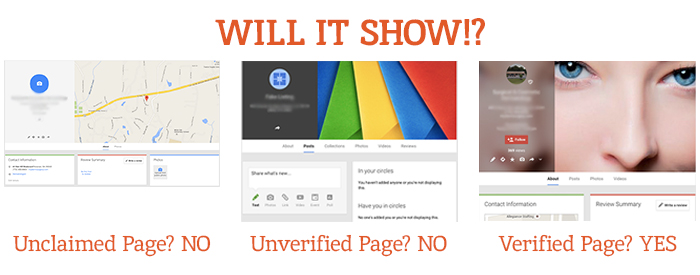
    The Update: Google My Business is Shutting Down Unclaimed, Unverified Listings & Unverifying Inactive Accounts’ Listings

    On July 23, a Local Search Forum user posted an email they received from Google as follows:

    UPDATE – Announcement from Google July 22, 2015

    Dear photographers and agencies,

    In the past few months, you may have seen some changes in the look of Google+ pages that have been associated with Google My Business (GMB) accounts. These changes, including how we treat business pages without owners, are part of Google’s ongoing effort to simplify people’s experience with our tools. We are constantly working to provide only valuable and rich content to our users.

    On July 28, Google will begin shutting down those GMB–associated Google+ pages that have not been associated with user accounts and are also not verified. You may find that some of your Business View tours also sit on such pages, but note that after this removal of unverified Google+ pages, the Business View tours will still remain available on Google Maps and Google Search.

    Here are a few recommendations for informing any business customers that may be impacted by this:

    Encourage your business customers to verify their listings if they wish to retain their Google My Business page …

    If a business owner decides later that they would like to have a Google My Business page, please advise them to create a new page and verify their listing. The Business View virtual tour can be then transferred to the new verified listing. Please log a case to our support teams to request that images for your business customer be forwarded to the new GMB page.

    Please point your business customer to their images in Google Maps.

    Best,

    The Google Maps | Business View team

    This was specifically geared towards photographers so they would know how to handle the effect on Business View tours. What this means for all Google My Business users is that unclaimed local pages will most likely no longer be visible (as Google has always said is the case for unverified Google Plus Local pages).

    Different Google Local Pages - Search Influence

    As always, this update is accompanied by Google’s explanation that all actions are in the best interest of users and geared towards improving the user experience. Thanks, Google!

    On June 4, via the Google Business Help forums, Jade Wang (come visit us in NOLA again soon 😉 ) of the GMB Maps team also announced: “If a user is unresponsive to our attempts to contact him or her and has not logged into Google My Business for a significant length of time, then we may unverify pages in the account.” Here’s the full update from Jade:

    In some cases, we may contact Google My Business users via email to confirm that they are still actively managing a business page. If a user is unresponsive to our attempts to contact him or her and has not logged into Google My Business for a significant length of time, then we may unverify pages in the account. We’re doing this in order to continue to provide users with the best experience when they’re looking for local businesses like yours. If you find that a page in your account has been incorrectly unverified, please contact support to get assistance restoring verification.

    It’s a good idea to keep an eye on the inbox associated with your Google My Business (Locations) account. It’s also a good idea to regularly log into Google My Business (Locations) to confirm that your business information is current and accurate.

    My Take On It

    Both of these updates could mean great news for businesses that have struggled with requesting ownership of listings that were verified in the past by a person or an account they no longer have access to. To fix this issue in the past, you’d have to submit an ownership request form to Google to gain access to these listings. Then, you’d have to wait 10 business days (as per Google’s rules) and reach out to support (they could check to see if the account never responded to the request). After this 10-day period, the support representative could determine that the account that owned the listing was inactive and release the listing to you for claiming and verification.

    Basically this means inactive accounts are no longer roadblocks to getting access to business listings in Google My Business!

    While some issues may be alleviated with the update, what’s harder for search engine optimization work is that now it’ll be more difficult for us to see unverified duplicate G+ pages, old or closed G+ pages, and practitioner G+ pages that could be hurting businesses’ local rankings. Map Maker should allow us to still see the data but not the pages themselves.

    But there are signs this hasn’t rolled out completely yet. I have some unverified, fake listings in my Plus account (shhh, I know) that I use for training purposes that haven’t been touched yet. This is likely a slow rollout that started July 28. I did notice some changes to Maps navigation recently that were probably in preparation for this, though. For example, you used to be able to click “Write a review” from the Maps results to get to the G+ local page for a business, but now that just opens a review dialogue in the Google search results for that business in another window. This makes sense, since unclaimed businesses will no longer have pages.

    The Update: Google+ Is Disconnecting From Unnecessary Services

    On Monday, July 27, Bradley Horowitz posted on Google’s official blog that Google+ would be moving towards a “more focused Google+ experience,” which basically means no longer forcing users of various other Google products to have a G+ profile to use said products.

    Specifically, Google wants to foster the natural sharing environment of G+ by adding new features such as Google+ Collections. This update means that all you need to share content, communicate, and have a YouTube channel (among other things) is a Google account and not necessarily a G+ profile. Also, it will continue to keep Google accounts private and unsearchable. For those who were forced to create G+ profiles to use YouTube and other Google products in the past, Google promises that it will “offer better options for managing and removing those public profiles.”

    My Take On It

    Congrats to everyone who was pissed when they couldn’t use YouTube without a Google+ profile!

    Mad Men Cheers Joan

    At first, it seemed that G+ pages that are already connected to YouTube channels might be disconnected. But, that last comment about offering ways to get rid of unwanted G+ profiles, points to the fact that this update will not actively affect anyone in this way.

    Since this update has not yet rolled out, however, it is important for users to realize that they should not delete their G+ yet! Doing so prior to roll out will force you to delete your entire YouTube presence!

    Let me know your thoughts on all of these new Google updates! I’d love to hear what other users think of these changes.

    Image source:

    Mad Men gif

  • Small Business, Big Difference: Social Media Use on the Rise

    Small Business Social Media Use Image Search Influence

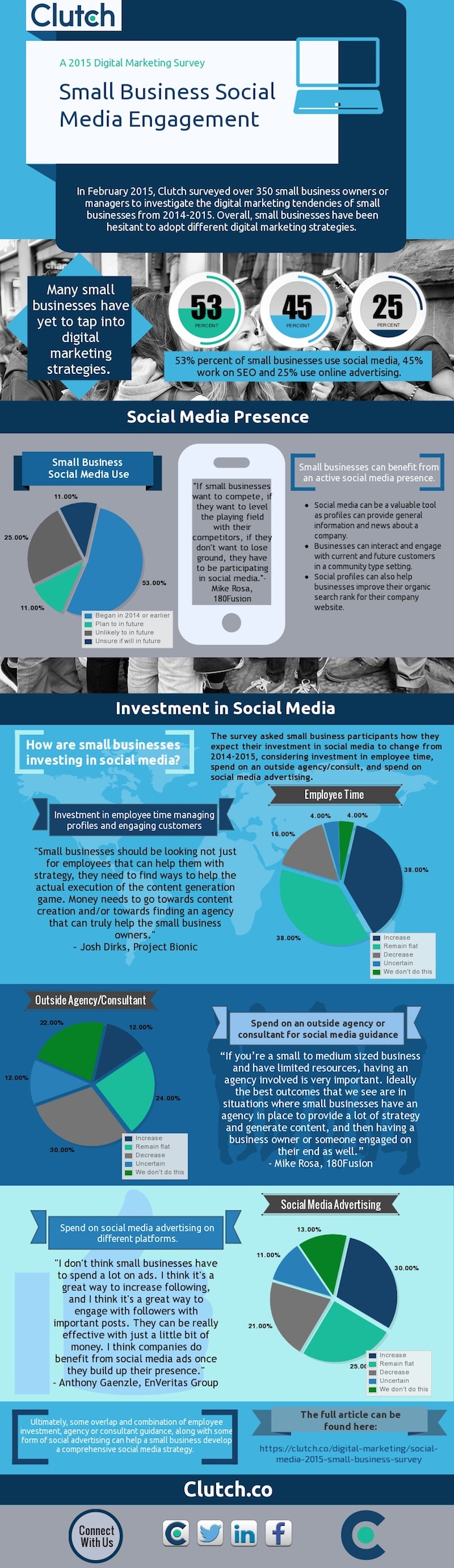
    Clutch, a B2B research firm, has released the results of its 2015 survey on small business practices in social media. The survey, which received more than 350 submissions, asked small business owners or managers to give insight into their social media and Internet marketing practices.

    The Findings

    Here are some highlights of the small businesses surveyed:

    Small business digital marketing strategies

    • 53% of small businesses use social media
    • 45% of small businesses work on SEO
    • 25% of small businesses use online advertising

    Company size

    • 60% of responding businesses have fewer than 10 employees
    • 14% have between 11 to 50 employees
    • 18% have between 51 and 250 employees
    • 8% have over 251 employees

    Investment (employee time, agency spend, ad spend)

    • 38% expect to increase their investment
    • 38% plan on keeping the same investment
    • 16% plan to decrease investment

    Clutch Infographic Small Business Survey Image Search Influence

    What Does This Mean?

    It’s weird to think back to 2006, when Facebook was essentially just for high school and college students to interact with each other through basic status updates. Nine years later, Facebook has around 1.44 billion monthly active users, yet only 53% of businesses surveyed indicated they use social media. In today’s social media age, having an active social presence is one of the easiest and most inexpensive options available to small businesses. It’s free to create a business page on Facebook, Twitter, and the other myriad of social media pages. Additionally, with the abundance of users on these sites, your customer base and target audience is already available to you; you just need to bring them to your page.

    Benefits of Social Media for Small Businesses

    When customers shop at small businesses, they tend to value the qualities of these stores versus their big-box competitors. Having a question answered on a local bike shop’s Facebook page is usually easier than reaching out to a large retailer’s customer service team. Allowing customers to post to your business’ page also gives other viewers the ability to see reviews, photos, and that the business cares about its customers by maintaining an active social presence. Maintaining a strong social presence can work as a way to “warm up” your potential customers and introduce them to your brand for a relatively low initial cost.

    Small Business Investment

    Besides simple statistics, the survey discusses the necessary investment of small businesses to ensure that their social media strategy has the best chance to be successful. While it may seem that just having a profile is enough to effectively market your business, there is additional effort that should be taken if you want to see your desired results. Employees should have a hand in the content strategy and the day-to-day operations. Various opinions can help diversify your strategy and give additional insight into your broader customer base. By spreading the responsibilities of managing the page across a few employees, each individual’s workload should not be greatly affected, while the overall product will be of high quality. Wondering how you can make time for social media and continue to run your small business? Check out these social media tips for time-starved entrepreneurs.

    Content Strategy

    In addition to diversifying where your content is coming from, it helps to vary the content you’re sharing with your followers. If you’re only talking to your current customers about products or direct business promotions, people new to your page may dismiss your content, as it doesn’t apply to them. Try to think outside of the box and delve into your potential customers’ other interests. By using this practice, your pages and posts can be beneficial in more ways than reminding customers of your weekly promotions. Writing about the best local bike trails may bring more people to your page through liking, sharing, and commenting, and it can help to organically get your store’s name into your community.

    Takeaway

    Seventy-six percent of the companies surveyed responded that they would either keep the same investment moving forward or increase it. Facebook and Twitter have shown over the past five to 10 years that the sites are not simply the most visited social media pages, but two of the most visited websites of any kind. When establishing your small business, it is important that your business could be found on Google. But in 2015, it is becoming important that your business be available on social media sites as well. Moving forward, each company should take the necessary time to see what resources can be used to begin a social media campaign. Start off by managing a page yourself, working your way up to reach an ideal social media campaign, and involving an overlap of employee involvement, agency guidance, and some use of social media advertising such as Facebook fan-building campaigns, for example, which have shown to have the best results for success with these small businesses.

    To view the complete report, visit Clutch.

    Image source:

    Clutch infographic

  • Eggs & Beacon – Facebook Place Tips Help Businesses Digitally Advertise

    Imagine walking into your favorite local bar. One of the first things you’ll probably do is pull out your phone while you’re waiting for a drink or a friend. Now, imagine that as you open the Facebook app, you receive a notification that, unfortunately for your liver, there’s a great special on tequila shots tonight!

    That’s pretty much what Facebook is envisioning as it rolls out the Place Tips program, made possible by the Bluetooth beacon introduced earlier this year. After testing over the past few months, Facebook is bringing this service to more businesses in the U.S., and also making the beacon units available for free to businesses who are interested in using them in their stores.

    So before we get ahead of ourselves, let’s get a breakdown of exactly what this means.

    What is a Facebook Bluetooth Beacon?

    Facebook Bluetooth Beacon Image - SearchIn fluence

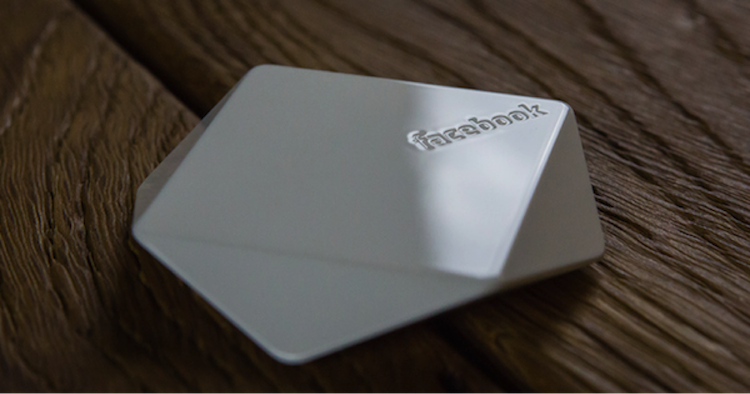
    Simply put, the beacons themselves are nifty little devices (about the size of a hockey puck) that are given to businesses from Facebook. Currently, you must request a beacon from Facebook in order to receive one (more on that later!). These devices use Bluetooth technology to send a signal to the Facebook app on a visitor’s phone to help show them “Place Tips.”

    OK, So What About Place Tips? How Do They Work?

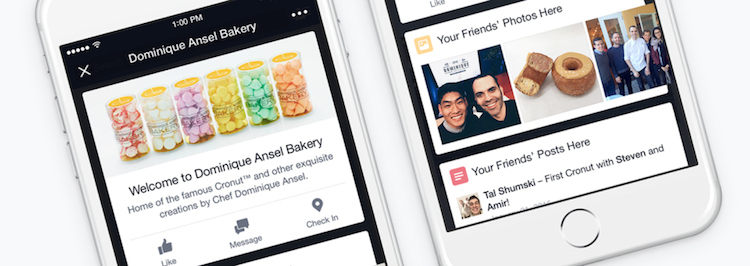
    Place Tips show a visitor useful and relevant information about their location, which is determined using cellular networks, Wi-Fi, GPS, and Facebook Bluetooth beacons. They can include friends’ photos, experiences, and moments from that place, as well as prompts to like the business’s page, check-in reminders, and posts or recommendations from the business.

    Everyone’s Place Tips are unique: at a restaurant, they can show a menu, reviews, and frequently mentioned information like a signature cocktail; at a retail store, they can help customers find business hours, learn about upcoming events, or see pictures of items currently for sale. Businesses are also encouraged to write a customizable welcome note that appears at the top of the Place Tips feed and use it to promote items or share facts and tips about their establishment.

    Facebook Place Tips Image - Search Influence

    For those who are worried about their privacy–don’t! Place Tips will not post anything to your profile, collect any information from you or your phone, or show people where you are (unless, of course, you upload a picture of yourself at this location), and they can be turned on or off within the Facebook iPhone app settings.

    How Has it Been Working? What are the Next Steps?

    Earlier this year, Facebook did a test run of the service at various New York City locations. According to Facebook, since it started piloting the service there, local businesses that have tried Place Tips have seen a “steady uptick in page traffic from in-store visitors.”

    After seeing the New York City program prove successful, Facebook is offering business pages across the U.S. a chance to participate, although quantities of the free beacons will be limited.

    In a statement put out earlier this week, Facebook announced: “We’re now providing free beacons to more businesses in the U.S. Because Place Tips are meant to offer people useful and interesting information about the places they visit, we’re prioritizing beacons for businesses with active Pages full of content—such as photos, check-ins, and status updates—from both the business and its customers. To help ensure your customers see Place Tips at your business, request a beacon today.”

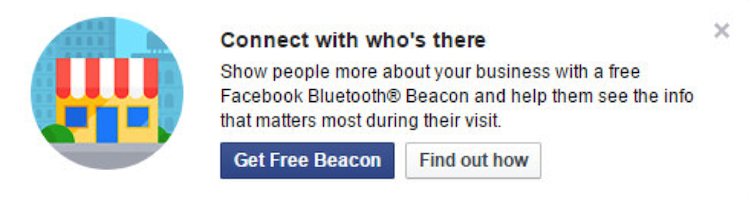
    Has this piqued your interest? Then get to requesting your beacon! If you’re an administrator of your business’s Facebook page, you’ll receive a post frozen atop the business’s news feed encouraging you to enter their shipping info to get one of the beacons:

    Facebook Get Free Beacon Image - Search Influence

    If that’s not showing up for you and you’re interested in setting up Place Tips and receiving a beacon for your business, you can request one from Facebook here.

    If you have any questions about the Facebook beacon, Place Tips, or how they could benefit your business, we’re here to help!

    Image sources:

    Facebook bluetooth beacon image

    Place Tips image

  • Five for Friday: Facebook Aims to Please, Amazon Goes the Way of Uber, & More!

    1. Facebook Update Takes Into Account Time Spent Reading Stories – Search Engine Journal  

    Facebook looks to be taking the next step forward in studying user behavior. The social networking giant is now directly measuring user activity and engagement, even when the user isn’t interacting with content. How important to us are news stories that we just want to skim? The next time you stop scrolling to look over a story, you are casting a silent vote for that type of content in comparison to other stories in your feed. Facebook has already rolled this update out, which means you no longer have to comment on or like a story for your feed to be modified. If you feel like you’ve been seeing more of what you want to see, well, you probably are. 

    2. Twitter Makes Your Conversations Easier to Follow – Mashable

    Having trouble following that long chain of tweets and retweets? Good news! Reading Twitter discussions will no longer test your mental sorting abilities. Dialogues are now conveniently grouped for maximum readability. If you have frequently wondered who is talking to whom, fret no more! Talks are joined by a single solid line.

    Following Tiwtter Conversations Image - Search Influence

    3. Google Uses Sitelinks Based on Significance – SEO by the Sea

    Google, acting as the undisputed market leader in search, is continually looking to improve the way their search performs. In a patent granted earlier last week, Google now seeks to identify the most “visually and/or functionally significant hyperlinks within the document.” This means that the location a link points to isn’t the only attribute considered when Google thinks about links, but where a link visually is on a page matters as well. 

    4. Amazon Debates Paying People for Deliveries – The Wall Street Journal

    Amazon Deliveries Image - Search Influence

    A big part of Amazon’s costs come from shipping, so it seems only natural they should be seeking to cut costs. Only, this time it isn’t drones: Amazon would like to turn every potential income-seeking individual into an Uber-like delivery driver.

    5. European Sites Are Declared Liable for User Comments – Techdirt

    On Tuesday, the European Court of Human Rights ruled that sites can be declared liable for what any random user posts on them. This has massive implications for sites that allow users to regularly post content. What lies in the future of censorship?

    Image sources:

    Cell phone image

    Delivery image