Tag: social media marketing

  • Top 5 Most Read Search Influence Blogs of August

    It’s back to school time, and you know what that means—time to catch up on your reading! Here are the top five most read Search Influence blog posts of August. Study up!

    1: What Happened to Facebook’s 20% Text Grid Tool?

    Ranking in the top five for yet another month, this updated blog post gives the ins and outs of Facebook’s latest text grid update. Peruse this popular post to learn what this update means for your advertising.

    2: Search Influence Jobs: What Does an Account Associate Do?

    Get a sneak peak into daily life at Search Influence! This upbeat post talks about three great aspects of working as an Account Associate: personal growth, great team members, and helping businesses.

    3: Local SEO: How to Clean up Citations for Better SERP Visibility

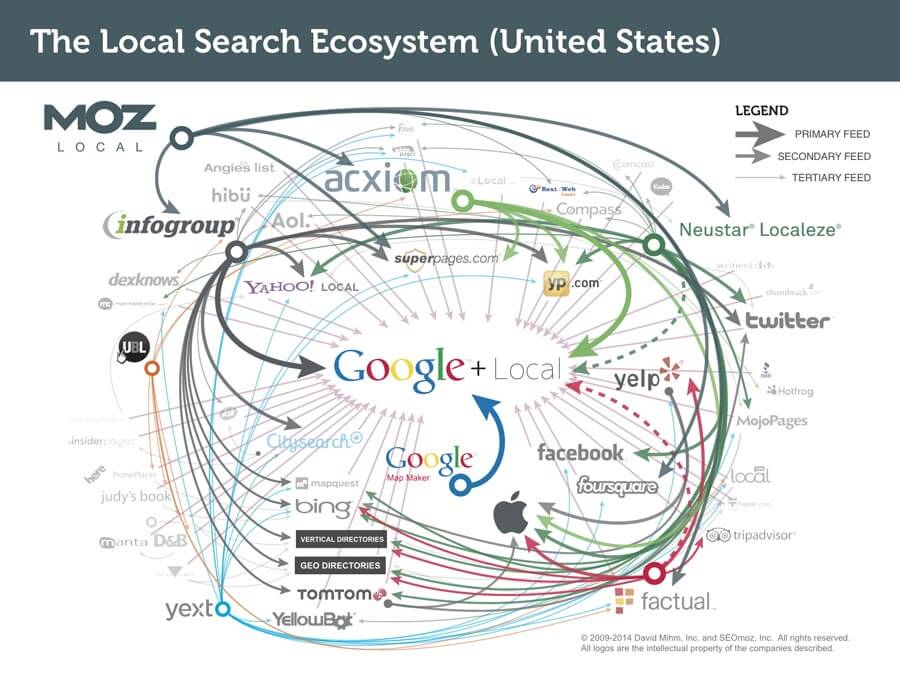
    Local_Search_Ecosystem_USIf the image above makes zero sense, then you should probably read this post. Learn all about how consistent citations can increase your website’s visibility to search engines.

    4: 5 Ways Technology Has Changed the Olympic Games

    There’s no better remedy for Olympic withdrawal. Instead of mourning the sudden lack of Michael Phelps and Simone Biles in your life, learn about technology’s impact on the Olympics.

    5: Two New Hires Join Search Influence

    Welcome Kayla and Mildred! Get to know the two newest members of the Search Influence team, complete with fun facts about cars, Google Android, and Wolverine 3.

    Image 1 Credit

  • Still Not on Twitter? Here are 10 Reasons You Should Be.


    24045211476_2f3cd414ea_z

    Still not sure about Twitter, eh? Maybe because it’s because conversation occurs way too rapidly on Twitter for you to keep up, or maybe it’s because you still don’t know the difference between a tweet and a hashtag. Regardless of what your reason is, it is time to rethink your business’s presence on this opportune social platform. Today, Twitter has transformed into a vital component of any integrated social media marketing strategy and you don’t want to miss out.

    Here are 10 reasons why your Facebook needs a Twitter account.

    44797790

    1: It’s Free

    There is no better bang for your buck than using free social platforms. With over 1.4 billion users, Twitter offers your business a tremendous opportunity to post live updates that can be found by any of its over 1.4 billion registered users. Can you imagine how much it would cost your business to pay for a tool like Twitter? For a business operating on a smaller marketing budget, utilizing a free yet valuable opportunity like Twitter is worth the investment.

    2: Go Where the People Are

    When it comes to online marketing (or any form of marketing), you need to invest your time in platforms where your marketing messages are being seen and heard. After all, if your marketing messages are not being seen and heard, then what’s the point? According to DMR, there are 100 million active Twitter users on a daily basis with 34% of these users logging into their account multiple times a day. If you’re trying to get the word out about a business update, sale, or promotion, it would be unwise to utilize a platform solely because of the platform’s expansive reach.

    3: Build Relationships

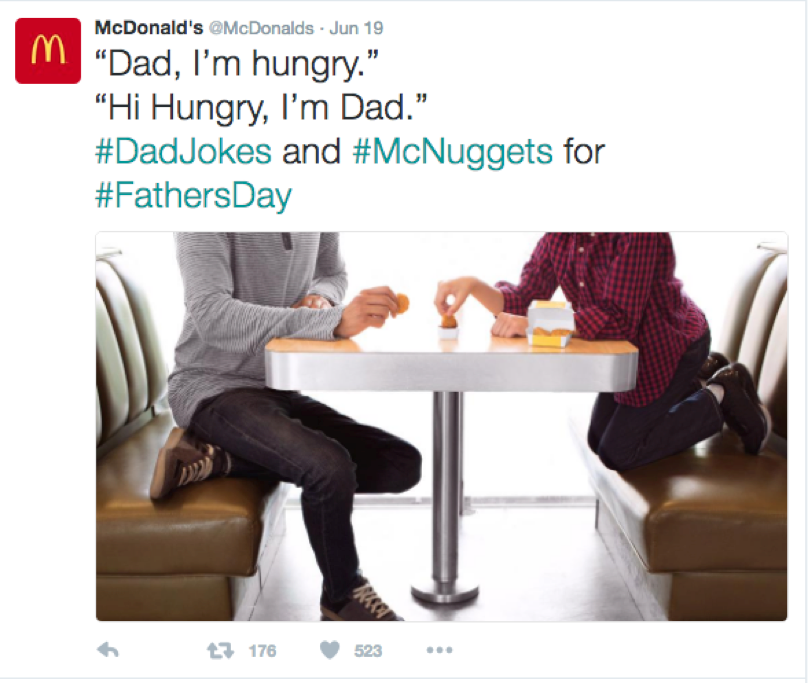
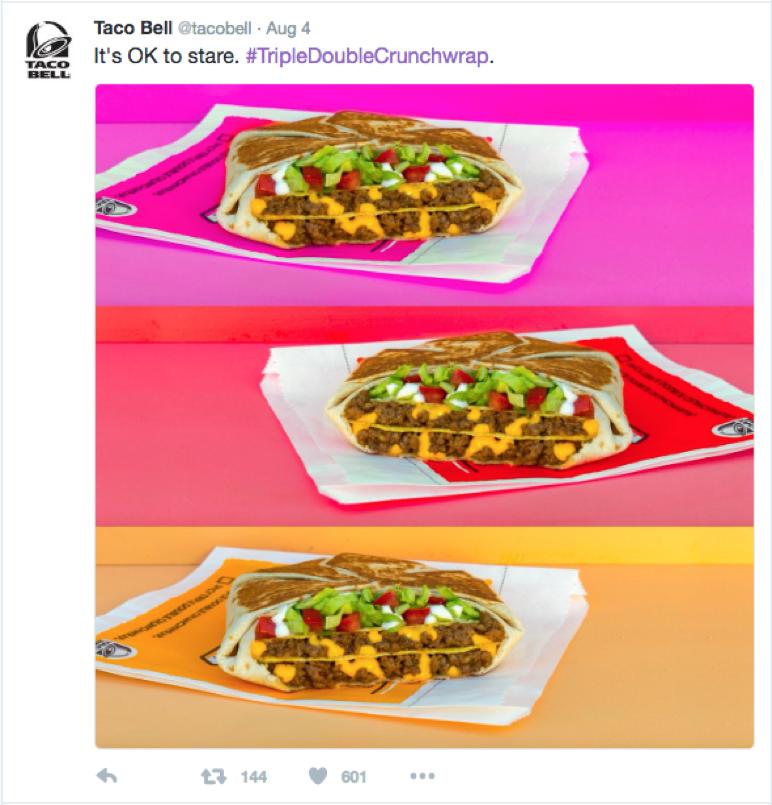
    Twitter has more active forms of communication than any other social media platform. The platform is meant to be conversational in a way that Facebook isn’t. On Twitter, you follow profiles instead of friends or making connections like on Facebook or LinkedIn, which makes profiles on Twitter more available to the public. This provides your business the opportunity to strengthen relationships with existing customers and reach out to potential customers (We’ll get to potential customers next!). Pro Tip: When building relationships on Twitter, be genuine. Ask your followers questions. Share some humor. Retweet any posts that your followers send to you. Taco Bell and McDonald’s are two excellent examples of leveraging Twitter to build relationships.

    43416622

    4: The Gift That Keeps on Giving

    Twitter allows users to retweet. If you post shareable and valuable Twitter information, your followers can engage with your post not only by liking and replying to it, but also by retweeting (aka sharing) it on his or her own profile. Retweeting will make the tweet visible on the Twitter feed of other followers. When consumers retweet, it expands the reach of your brand to potential customers. You can think of retweeting as an opportunity for your brand to gain exposure from potential customers via peer consumers. In this line of thinking, it can be seen as an authentic way for users to endorse your business.

    5: User Generated Content

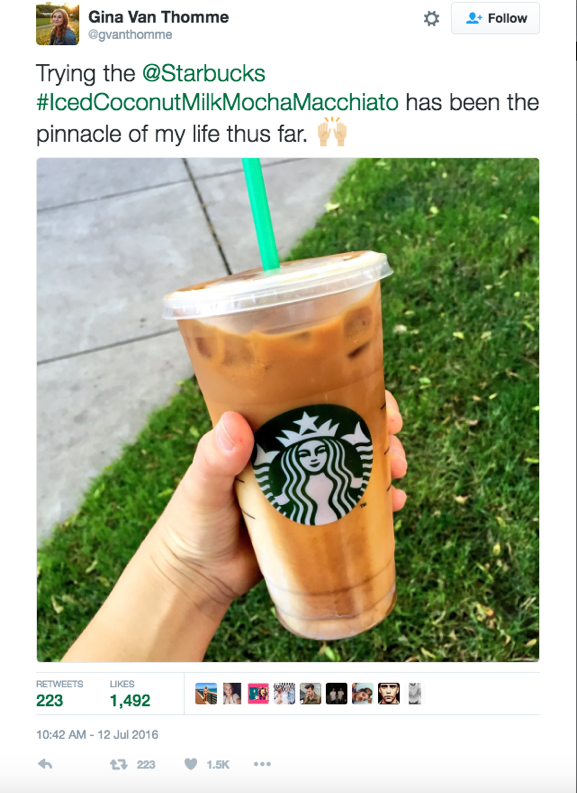
    There’s no better way to express how great your business is than to let customers do this for you. Just as followers can retweet your tweets, as a business on Twitter you have the opportunity to retweet user generated content pertaining to your brand. User generated content on Twitter promotes your brand in a way that content curation cannot. It’s also a way of showing your consumers that you appreciate the positive content and that you value them. Starbucks does a great job retweeting user generated content.

    57356898

    6: Hash Tagging Helps Your SEO

    A hashtag is a simple feature that allows Twitter to organize and categorize posts based on a topic or theme. When you click on a hashtag, you will be taken to every post that also has the same hashtag. Google has also started incorporating hashtags in search results. In other words, hashtagging a search term on Google will not only provide you with organic search results but Google now also provides you with the results from Twitter and Instagram. Learn more hashtag tips here.

    7: Online Reputation Management

    People will talk about your business whether you’re active on social media or not. Having a Twitter account for your business provides another avenue to put the ball in your court. Through Twitter, you can reply to disgruntled consumers. In addition, Twitter is also a great tool for public relations. In fact, businesses with an aggressive public relations strategy should use Twitter. Because of the nature of the live feeds, Twitter allows your business to be the first to share important news before a consumer, news agency, and the like.

    8: Industry Related Conversations

    It’s important for your business to stay attuned to industry conversations because businesses must evolve with the changes in its industry and market. Through hash tags, Twitter can connect your business to meaningful industry-related conversations. Twitter chats are a public Twitter conversation that focuses on a specific topic via the use of a common hashtag. Furthermore, not only can you gain insight on industry happenings, but you can also spy on what people have to say about your competition.

    9: Make Your Business Stand Out

    If you’re a business on Twitter, I can’t emphasize enough how important it is to create a custom hashtag for your business. Using a custom hashtag allows your business to become a trendsetter and extends the reach of your creative branding. It also facilitates a greater engagement with your Twitter followers. Additionally, using a custom hashtag can signal to your Twitter followers that the post containing the custom hashtag is extra special.

    77983706


    10: If You Don’t, Somebody Else Will

    Last but not least, if you’re not engaging your audience on Twitter, your competitors will be more than happy to do it for you. Consumers today have plenty of options in purchasing power. Marketing has stepped out of just a one-stop shop and has transformed into maintaining customer relationships before, during, and after a purchase. If your business is currently opting out of a Twitter profile, you are providing your competitors with the opportunity to engage your audience and potentially tap into your current consumer base.

    When you finally decide to set up your business’s twitter profile, check out these five businesses that are using Twitter the right way. And while you’re at it, don’t forget to follow @SearchInfluence on Twitter for valuable tips and tricks for enhancing your business’s online presence! Happy tweeting!

  • Top 5 Search Influence Blogs from July 2016

    If you are like many of us at Search Influence, you took a few days off last month to enjoy the summertime. Now that August is here, you may have a few minutes to catch up on your reading. Here are our top five most read blogs from July.

    Top 5 Search Influence Blogs from July 2016 Image 1

    1: Search Influence Reviews: Here Are 5 of the Best Bars We Visit After a Long Day at Work

    Our team members enjoy grabbing a nice cold one after a long day at work! Check out our top five list of local bars—each with a wide selection of beers and delicious bar food in venues only New Orleans can provide.

    2: What Happened to Facebook’s 20% Text Grid Tool?

    Facebook officially rolled out this new update to the 20% text rule in June. Read about it and how it affects Facebook ads in this updated blog.

    3: Learn How to Create a Snapchat On-Demand Geofilter to Boost Your Next Event

    Snapchat launched the ability for users to create On-Demand Geofilters for birthday parties, weddings, business events, or just for fun! Learn how easy it is to submit the filter along with some key metrics to gauge your filter’s success.

    4: 12 Things You May Not Know About Online Marketing

    New to online marketing? Here are 12 things that surprised some of our team members when they started working at Search Influence.

    5: 10 SEO Blogs You Should Be Following

    Every day, we see traditional marketing grow more obsolete. Learn about 10 of the most informative and essential SEO blogs you should be following.

  • How Can Facebook’s New Profile Layout Affect Your Business?

    1608-SI-TheInfluencer-KL-A-03Large

    Facebook recently rolled out a new layout for business pages and the marketing implications could be more than initially meet the eye.

    Profile Picture Positioning

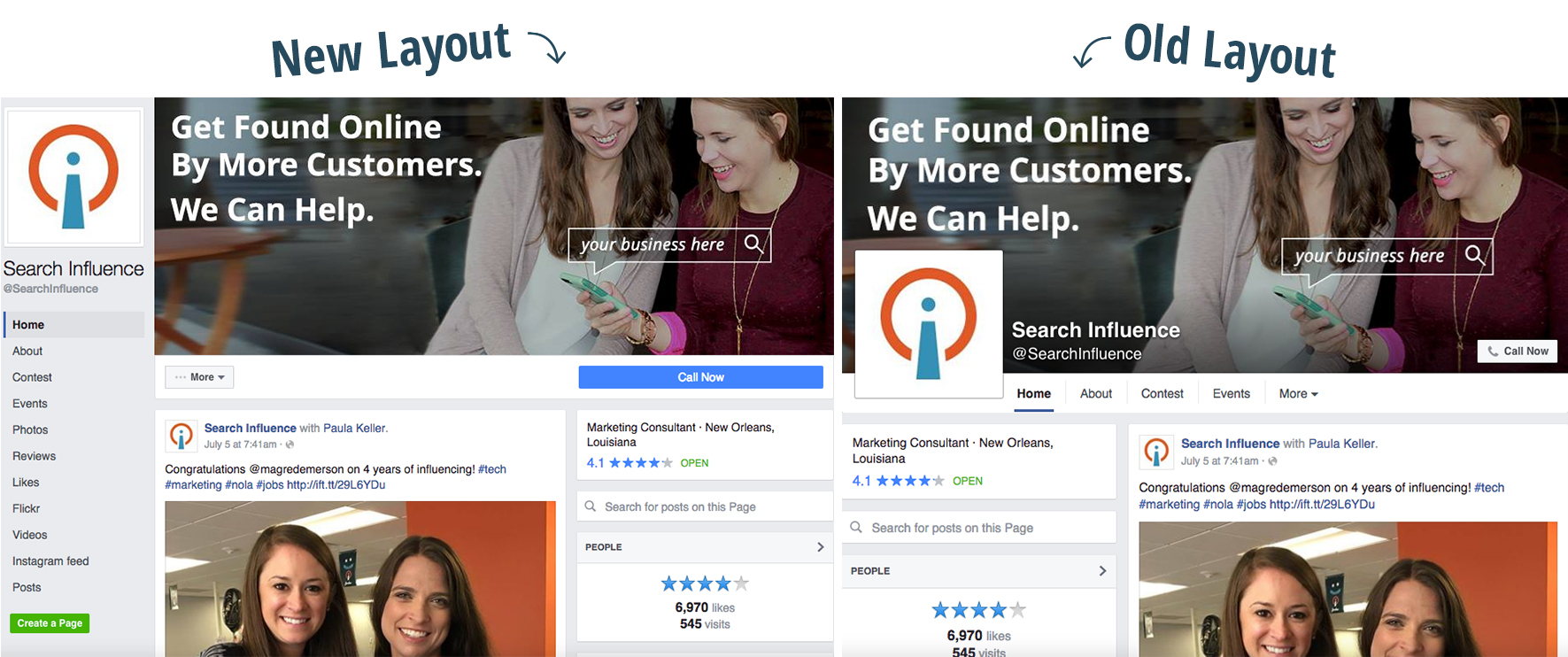
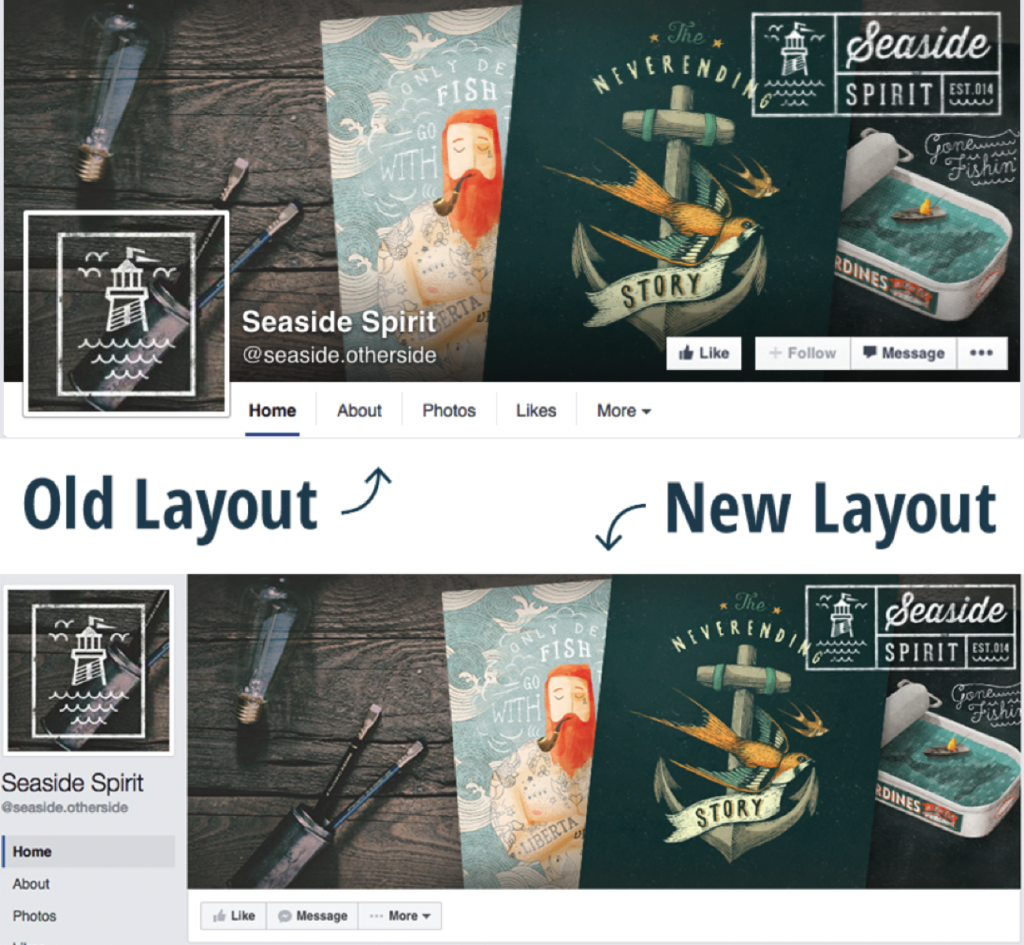
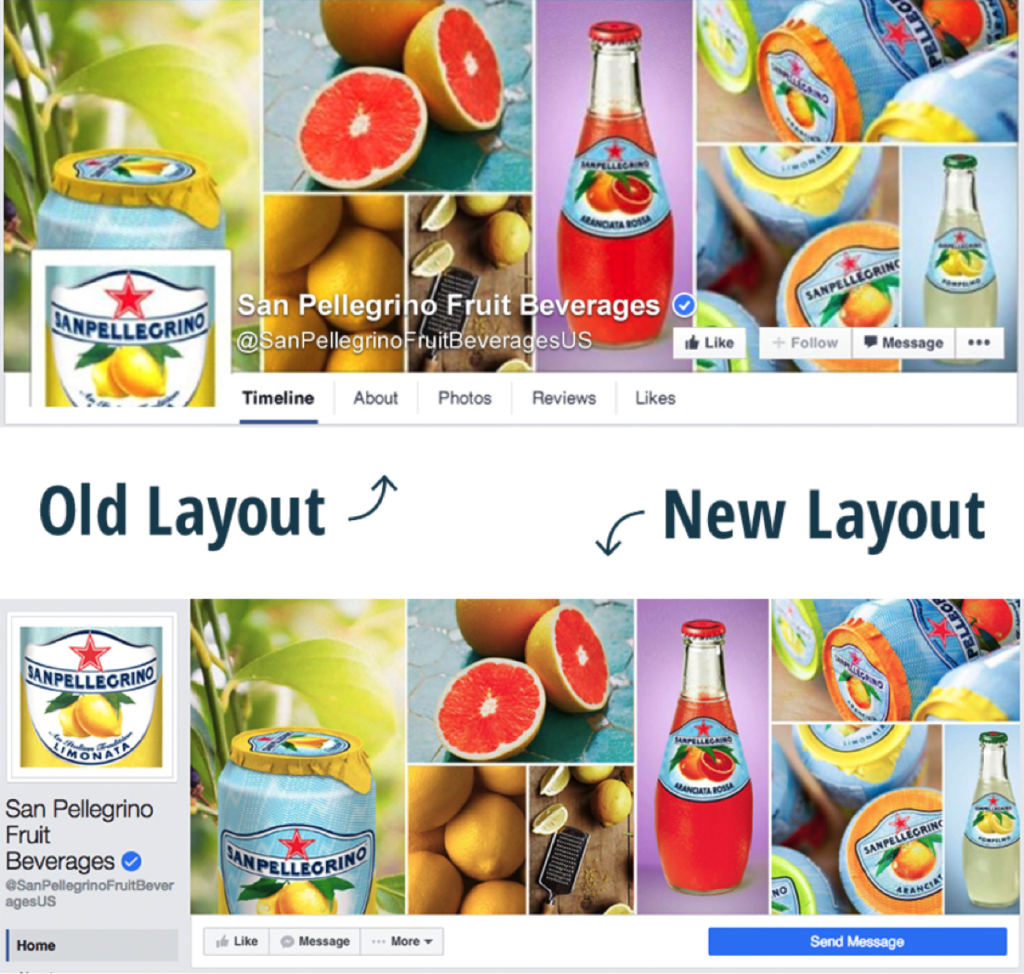
    We’ve all seen clever interactive cover photos with the overlapping square profile image on the standard desktop site. A drink from the cover photo is poured into a glass in the profile picture. A man in the profile picture passes a ball to a woman in the cover photo. A giant cat in the cover photo peers down on a tiny human in the profile picture. The square profile image also acts as quick and effective brand recognition when seen standalone in a newsfeed as well as when viewed on the mobile version of Facebook. But with the profile picture now located in the sidebar to the left of the cover photo, the playful effect of the overlapping images is null and void.

    Example 1:

    Facebook Profile 1

    Example 2:

    Facebook Profile 2

    How Does the Relocation Affect Your Business?

    Although businesses won’t be able to get creative with the overlapping interactive profile images, the relocation of the square profile picture actually frees up a lot of valuable visual real estate on the cover photo that was once covered up by the image, company name, and CTA buttons. Even if you didn’t have interactive profile images on your business page, there’s a lot of space—over 20% of the area of the cover photo to be exact—that was considered off limits for content and is now fair game. Even on the new mobile version of business profiles, the cover photo isn’t covered up by the profile picture or text.

    Additional Sidebar Elements

    Beneath the profile picture, you’ll also see tabs that were once accessible under the cover photo on desktop sites. In the old layout, only a few tabs were visible, with the additional tabs located in the dropdown “More” option. With the new sidebar, however, all of the tabs are now visible. The buttons that were located on the cover photo itself are also positioned right below it, with the main CTA button located on a more eye-catching blue background. This left-aligned navigation also stays in place while the user scrolls down the page.

  • Learn How to Create a Snapchat On-Demand Geofilter to Boost Your Next Event

    Who doesn’t love a good Snapchat? Whether you are the one trying to get the best shot or viewing your friend’s stories, Snapchat has become one of the most-used social media platforms by all ages and demographics today.

    Back in February, Snapchat announced that users could create On-Demand Geofilters for any event for a fee as low as $5. This could include creating a filter for a birthday party, wedding, business event, or just for fun! Before this update, Snapchat only allowed Community Geofilters, which were used for cities, landmarks, schools, etc. The Community filters were free to submit and dependent on Snapchat’s approval to push the filter live.

    Choose Your Filter Type

    Submitting On-Demand Geofilters is broken down between two categories. You can either mark the Geofilter as a personal or business filter. The difference between the two is that the business On-Demand Geofilters is a filter a user submits on behalf of a business. This is also used if the filter includes any branding, logos, or business marks/names. Basically, if it is promoting a business or a brand, it is safe to say you are submitting a business filter. Any other filters submitted would be considered a personal On-Demand Geofilter.

    The GeoFilter Process

    After noticing a few of my Snapchat friends’ custom filters used for graduation parties they attended, I began wondering how easy it was to create a custom filter. After doing some digging online, I discovered that the process looked relatively easy. There were only 3 steps to submit an On-Demand Geofilter.

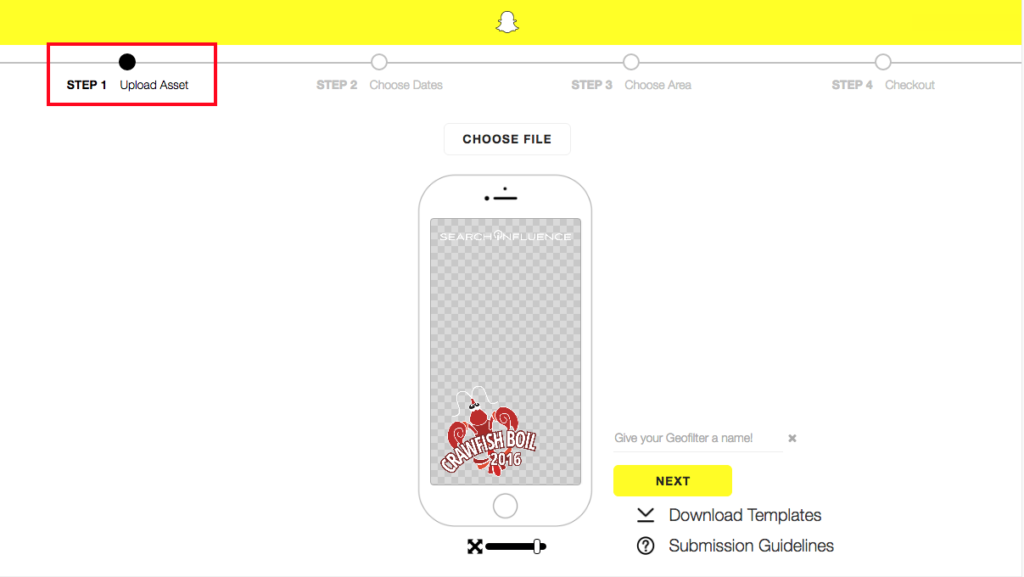
    1. Design – Snapchat does not create the graphics for Geofilters submitted for approval. They do provide a few templates that work with some image editing programs, but the submitter is free to be as creative as they want. There are a few guidelines to follow when designing the filter, but, overall, nothing too crazy in my opinion.
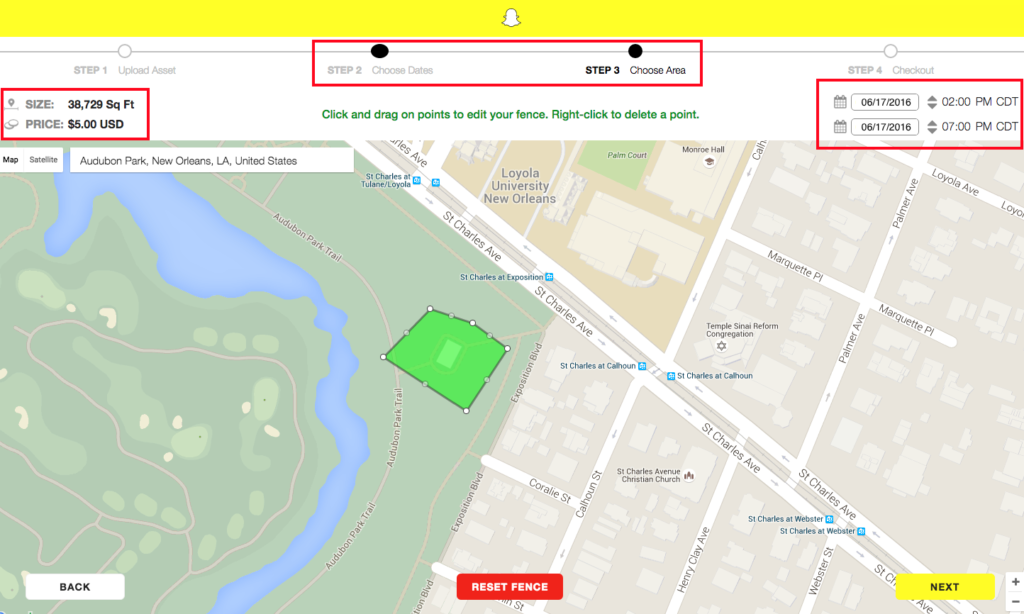
    2. Dates and area covered – Snapchat provides a map for you to mark off the area you would like your On-Demand Geofilter to cover. The larger the area and length of time the filter will run impacts the amount of money the filter will cost.
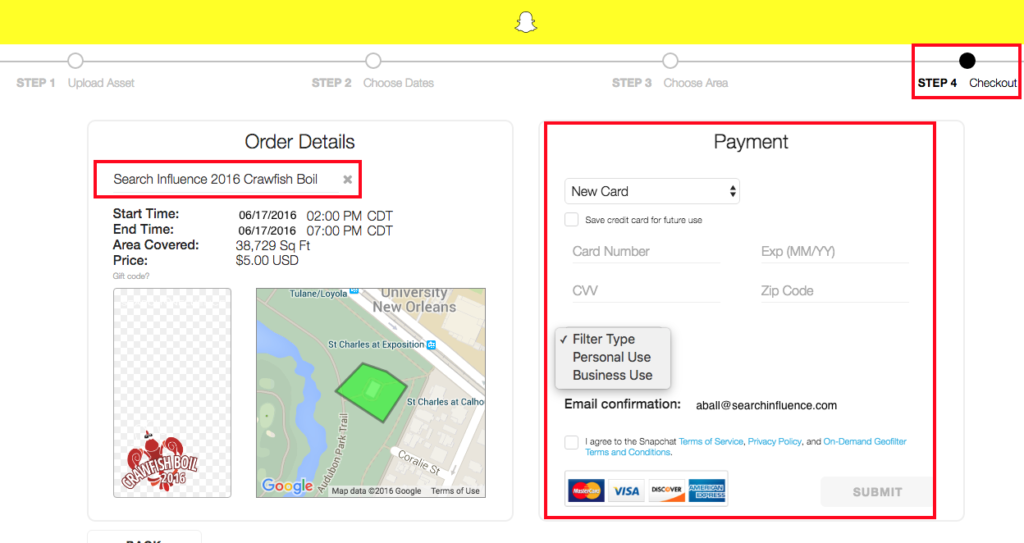
    3. Buy – Snapchat confirms with you the date(s) and area you would like the filter to run, along with the price and design you submitted. Enter in your payment information and agree to a few terms and conditions.

    Testing the Process

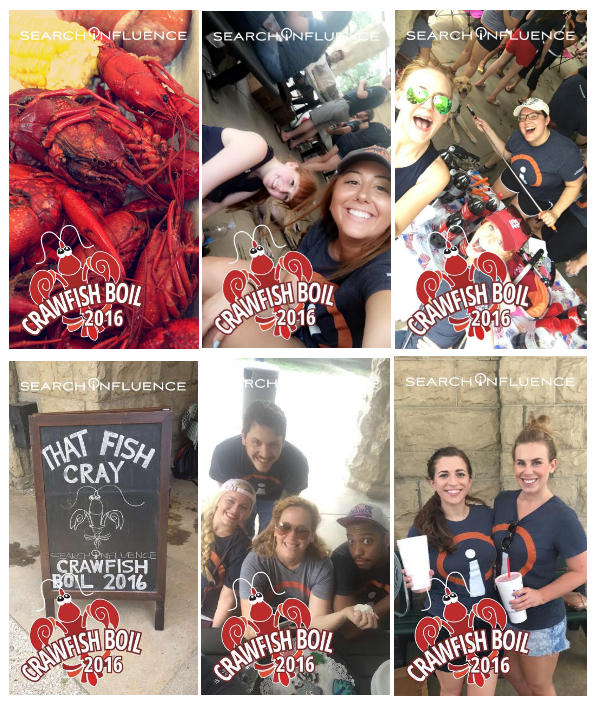
    I was recently part of a team that helped in planning Search Influence’s annual crawfish boil and thought a team building event in Audubon Park would be perfect to test the Snapchat On-Demand Geofilter submission process.

    I began with reaching out to our graphics team to create the On-Demand Geofilter that we all thought would look best for the event. Once the graphic was completed, I uploaded the file to the upload assets and followed the steps outlined below.

    Snapchat On-Demand Geofilter 1

    Once the image upload was completed, I moved on to selecting the date and duration of the event along with the area of Audubon Park the crawfish boil would be held. I added a few extra hours just in case the party lasted past 5 p.m. Once the area and duration was added, the price was given immediately.

    Snapchat On-Demand Geofilter 2

    Lastly, I was guided to the checkout screen. I was prompted to name the filter, add in payment information, select the filter type, and agree to all of the term and conditions.

    Snapchat On-Demand Geofilter 3

    Once submitted, I was emailed a confirmation that the Geofilter was waiting for approval, which can normally take up to 48 hours. I received approval within the next few days and patiently waited to see if it would generate the day of the event.

    The day of the team-building event, I received an email that the Snapchat On-Demand Geofilter had started running at the noted time I requested. From there, the team used the filter throughout the event.

    Snapchat On-Demand Geofilter 4

    Measuring Your Geofilter’s Popularity

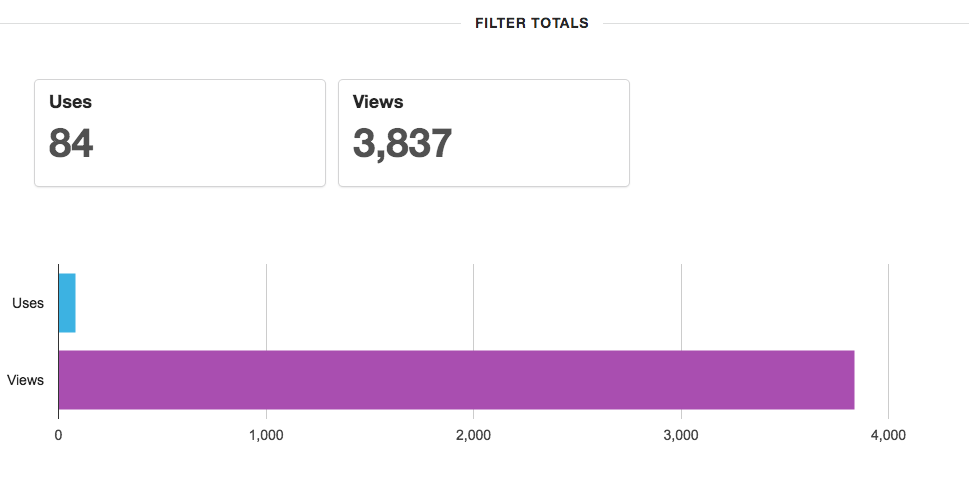
    Once the On-Demand Geofilter is finished running, you can log into your Snapchat account to see uses and views for the filter during its duration. For the few hours the filter ran, 84 Snapchat users used the filter and 3,837 Snapchat users saw the filter in their view. This includes a post in a user’s story and direct Snapchats.

    Snapchat On-Demand Geofilter 5Overall, the process was easy and seamless. I will definitely be creating another On-Demand Geofilter for the next event or party I throw or help plan.

    What event do you think you would like to create an On-Demand Geofilter for this year?

  • These 10 Expert Tips Will Drive Traffic to Your Business’s Website

    Grow Your Business Graphic

    It doesn’t take a web expert to know that more traffic to your website means more business. However, researching ways to improve your online traffic isn’t always easy. We asked our in-house experts for their thoughts and came up with these ten ways to drive traffic to your website.

    1: Implement Schema Markup and Rich Snippets on Your Site

    Schema Markup is structured data that labels existing elements on your website so search engines can better understand the content. Essentially, when Schema.org markup is implemented into your website’s HTML source (the only place where it should be visible), it clearly defines specific parts of your content, such as your business address and telephone number.

    Rich Snippets are a structured data markup only recognized by search engine algorithms. When used on appropriate content, Rich Snippets can show exact content from a website on Search Engine Result Pages (SERPs) of search engines like Google, Yahoo, and Bing. These snippets are the few lines of text under every search result. For example, if you run a medical practice that wants to advertise its high rate of patient satisfaction, you can markup content from patient testimonials so that your glowing reviews show up when people search for doctors in your area.

    Healthgrades Screenshot

    2: Improve Your Site Speed

    Site speed is the amount of time a page needs to completely load. This matters for both users and search engines, as users are less likely to stay on a website that takes a long time to load and search engines will penalize your website for being too slow. Google’s PageSpeed Insights Tool is a great way to analyze your site for ways to improve your site speed and will provide you with detailed information on how to fix each issue.

    3: Use Google Search Console

    Google Search Console (formerly Webmaster Tools) allows you to indicate to Google the various details of your site. A very important part of this process is submitting your sitemap so that search engines can better crawl and categorize your site—if you haven’t done this yet, you should! Search Console will give you a report on the average ranking of your website on SERPs for specific search queries. These reports will let you know what you should be improving on your site to gain a high position and click rate.

    4: Publish Press Releases

    Press Releases are great when you have an announcement to make or a story to tell. They’re also highly useful for helping you own your business name in SERPs. Sites like PRWeb and Cision will distribute your press releases for you and get them published on news sites and blogs. For a little extra money, they’ll also send your release to journalists and bloggers, in hopes that they’ll publish it on their sites as well.

    5: Perform On-Site Link Building

    Internal Linking is a link from one page to another on your website. This process fosters a great user experience, as anyone visiting your site will find themselves easily hopping from one page to another without having to really search for the information they’re looking for. Search engines like Google are very focused on user experience. Good internal link building helps googlebot understand the relationship between pages, among a set of content.

    6: Perform Off-Site Link Earning

    By submitting your website to online forums, specifically those that pertain to your business’ physical and professional communities, you’re naturally increasing the chances that someone will visit your website. Engaging on social platforms like StumbleUpon, Reddit, Digg, and Delicious can be more valuable than you think.

    7: Perform Off-Site Citation Building

    Similarly to off-site link earning, submitting business listings to niche directories (industry & categorical), data feeds, major directories like Google, Yelp, Bing, Foursquare, YP.com, and secondary directories like Merchant Circle, HotFrog is a great way to drive traffic to your website.

    8: Syndicate Your Videos

    It’s no secret that having a YouTube channel filled with optimized videos drives up web traffic. However, you should also syndicate your videos across other sustainable video channels, such as Vimeo and DailyMotion. Videos will earn links and citations on social sites because they’re highly shareable. These increase link source diversity.

    9: Post and Promote on Social Media

    This may seem like a no-brainer, but you would be surprised by how many businesses don’t actually do this. Paying for promoted posts on Facebook offers a relatively inexpensive way to get your business in front of target consumers. Facebook also offers radius-based targeting for ads, which lets you target people who are/were:

    • Living in your area
    • Located in your area
    • Recently visiting your area
    • Traveling to/in your area

    Posting and promoting isn’t limited to Facebook, though! LinkedIn and Pinterest are other examples of great social media sites that are perfect for driving traffic to your website.

    10: Be a Resource in Your Industry Through Sharable Content

    It’s one thing to be ahead of your competition, but it’s another thing entirely to be an industry thought leader. You can do this by creating shareable content. For example, you MUST have a blog. Your blog should be on site, not offsite. If your website is hosted on a CMS like WordPress, then you can easily integrate a blog within your existing site! Not only does blogging build authority for your brand and show off the human side of your company, but according to Hubspot, businesses who prioritize blogging experience 13 times increase in ROI.

    You should also start to create infographics. They combine easily digestible—but valuable—information with a visually appealing information, making them highly shareable across all social media websites. For example, this infographic, created for a medical directory, was shared more than 900 times, got more than 300 Facebook shares, and was pinned more than 150 times.

    Want more information? Watch our recent webinar for more information and tips.

  • Make Your Social Media Strategy Sizzle with Summer-Focused Content

    Summer Promotions

    How Is Summer Different than the Rest of the Year?

    Warmer temperatures make people more active in the summertime. With kids out of school now, many families will take at least one vacation over the next few months. And since 81% of Americans save money specifically for the summer season, there is more opportunity for your business to gain customers and grow.

    What Can a Small Business Do to Stand Out?

    Larger, national brands don’t have to work as hard to benefit from the seasonal surge, but small businesses can also succeed through social media campaigns. Using location-specific social media, optimized pages, and summer-focused content, you can take your business to the next level this summer.

    What’s the First Step?

    The first thing on your summer to-do list: claim and optimize your social media pages. Yelp, Facebook, Twitter, Google+, and Instagram will be the heavy hitters this summer. Google+ and Yelp both require verification, so you should start this process immediately. Facebook, Twitter, and Instagram don’t have lengthy verification procedures, but they should be optimized with branded images to familiarize users with your business. All of these sites also need to link to your main website and other social media profiles if applicable. Alternatively, you’ll also want your website to link to your social media profiles for quick and easy connections. Now that the website and social media interlinking of your business is setup, the real work starts.

    My Profiles Are Optimized, Now What?

    Now it’s time to get to work. The theme is summer, so your posts should reflect the season. Here are a few content creation tips:

    • High energy and fun
      • Summer is all about having a great time, so your posts should reflect the sweet summertime mood. There is no set formula for social media posts. You need to experiment a bit to find out what attracts the most engagement from your audience. Mix it up and show your employees having fun on top of working hard.
    • Holidays and events
      • Independence Day and Labor Day are two major federal holidays during the summertime. If your business is open on these days, make sure to post about your hours of operation. Social media is also a great, free way to notify your customers about holiday promotions.
      • Keep a close eye on your city’s calendar of events, and try to coordinate promotions and posts accordingly. Here in New Orleans, we have this handy calendar provided by New Orleans Online. A fashion boutique, for example, could take advantage of the upcoming outdoor festivals and offer a sale on tank tops, shorts, sunglasses, and other festival gear. Food vendors at the same festival can get a lot of social media interaction if they post pictures of their fan’s favorite dishes.
    • Deliberate engagement
      • In between selfies and status updates, social media users are constantly scrolling through their timelines. Make yourself not only appear but also encourage interaction by asking fans to like, share, or tag a friend. Users love to engage with their favorite brands, but make sure you have someone on deck to respond.
    • Encourage locals and tourists
      • Large brands or franchises may have the backings of national companies, but small businesses have the strength of the ever-growing “Go Local” trend that swept the nation this past decade. You should highlight your locality in your posts. Some locals prefer to patronize businesses that will stimulate the local economy, and many tourists are searching for the more “authentic” local experience.

    These tips will help make your social media outlets stand out instead of getting lost in the ever-growing sea of likes.

    Sounds Like a Lot of Work

    Nothing ventured, nothing gained. Take it from the pros: Social media optimization is a complicated and time-consuming undertaking. Research provides insights into your industry’s most successful social media approaches, and then the posts are written, edited, and published on a timeline that encourages engagement from your target audience. Search Influence offers a full range of social media optimization services including content creation, brand management, and graphics creation. Now is prime time to prepare your business for the upcoming season, and we’d be more than happy to help out.

  • 5 Medical Practices Effectively Using Instagram

    Instagram’s visual language is a great way to tell your brand and practice’s story. The layout is both straightforward and engaging. The platform is on the rise, and Instagram users are nearly 60 times more likely to share an image than those on Facebook. In a field that can be rather clinical, pun intended, Instagram provides medical professionals a means of showing their personality and building trust with their patients. Images spark engagement through follows, likes, and comments. A medical practice’s Instagram feed allows it connect with patients and customers through conversation, questions, and concerns. With the use of hashtags, you can find new audiences and grow your following.

    In this post, I highlight five medical practices that are effectively using Instagram to promote their practice.

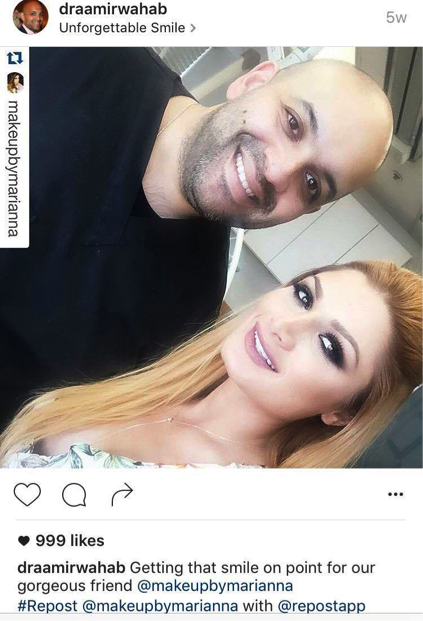
    #1: Dr. Aamir A Wahab – @draamirwahab

    Dr. Wahab’s dental practice Unforgettable Smile is located in Beverly Hills. He uses Instagram to promote the diverse dental and oral health care services he provides. Dr. Wahab counterbalances those more technical images, such as x rays, molds, and dental tools, with photos of himself with clients, both celebrity and unknown. Before and after images, with patient permission of course, are a great way to show client results. Not only do they demonstrate your skill, but it allows potential patients to see what’s possible. It’s also an ideal time to employ a hashtag like #transformationtuesday. Overall, Dr. Aamir’s Instagram is successful because it’s diverse in its content and constantly engaging—and it doesn’t hurt that he’s a “celebrity dentist.”

    Medical Practice Instagram Example #1

    #2: Dr. Chris Balgobin aka Dr. BBL – @ddr.bbl

    Dr. Balgobin is a cosmetic surgeon specializing in liposuction and Brazilian butt lifts, or bbl. He’s also a franchisee of Dr. Miami, also known as Dr. Salzhauer, whose Instagram is a little more eccentric than most medical practices. Dr. BBL’s Instagram feed is almost entirely before-and-after photos, and the majority of those are butt lifts. While some doctors on social media are more clinical and matter-of-fact, Dr. BBL’s Instagram takes very graphic results and portrays them lightheartedly. His use of emojis, selfies, and memes bring a more playful side to his medical practice. He’s done an expert job of displaying his niche in the larger field of cosmetic surgery while keeping his content engaging and tailored the platform on which it appears.

    #3: St. Charles Vision – @stcharlesvision

    St. Charles Vision is a doctor-owned facility providing comprehensive care. They have six locations serving the Greater New Orleans area. Their approach to Instagram is just as comprehensive. Their feed features new trends in eyewear, client portraits, celebrity spottings, and more! St. Charles Vision is also very active in the community, and their feed shows views around town. In a field all about the visual, it’s obvious that optometrists should be promoting themselves in graphic terms. Their feed features a lot of original images. Though they occasionally throw in an advertisement for a certain brand of glasses, the majority of the photos are unique to the business. They also connect their followers and encourage engagement with the hashtag #raiseyourglasses. St. Charles Vision’s new Distinctive series with artist Zack Smith features striking images of clients in fashionable glasses. This is a great way to promote your products and services, while also highlighting your wonderful customers!Medical Practice Instagram Example #2

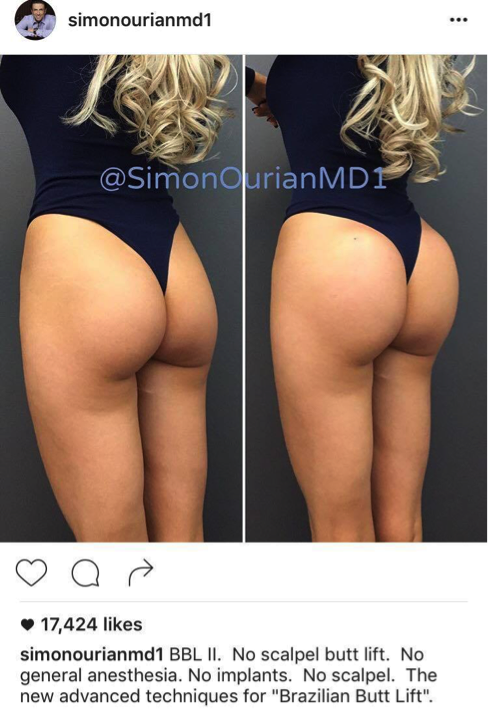
    #4: Dr. Simon Ourian – @simonourianmd1

    Dr. Simon Ourian is a cosmetic dermatologist based in Beverly Hills. He uses Instagram to establish his expertise in his field. Dr. Ourian’s posts educate his clients about the causes of different cosmetic concerns, the various treatments, and even describe his consultation process and pricing. The classic before and after images of non-surgical butt lifts, laser treatments, and botox injections are visual testimonies of his work. These images foster both interest in the practice and trust in the doctor’s results. Dr. Ourian posts nearly every day and features a variety of images, as well as videos. This ensures his feed is diverse. He’s active on the platform but does not overwhelm his followers with multiple posts a day or anything overly promotional.

    Medical Practice Instagram Example #3

    #5: Dr. Sandra Lee aka Dr. Pimple Popper – @drpimplepopper

    Dr. Sandra Lee is another dermatologist that’s keeping it “poppin” on Insta, but definitely in a different way from Dr. Ourian. Dr. Pimple Popper has become an internet sensation, and this account is the perfect example of a medical practice using Instagram successfully. Be warned—her account is not for the faint of heart! Before Instagram, Dr. Lee’s YouTube channel had few followers, but now her Instagram account boasts 1.3 million followers! You can watch short clips of cyst removals, popped pimples, never ending blackheads, and literally everything in between. Want more? Almost every Instagram video on her account prompts users to visit her YouTube channel for longer clips.

    Dr. Lee posts photos and videos daily. She’s consistently engaged with users, even building anticipation for full videos with sneak-peek clips and teaser images. Fans come together under her hashtags #DrPimplePopper and #popaholicsunite. Instagram users comment with their delight and disgust, and share these videos with friends and families for amusement and shock value. Dr. Lee has built a loyal fan base that keeps coming back. The Dr. Pimple Popper Instagram account has been featured in the Huffington Post, BuzzFeed, and more!

  • Did You Catch All of That? A Rundown of Our Top May Blogs

    It’s summertime! May was full of so many informative and fun Influencer blog posts, not to mention the laugh-out-loud-worthy gifs. If you haven’t caught up with all of our blogs yet, here’s a quick run-down of all the top blogs from May.

    Kitten Gif

    What Happened to Facebook’s 20% Text Grid Tool?

    The Cliff’s Notes version is that Facebook has 4 categories for the amount of text allowed on an ad: “OK”, “Low”, “Medium,” or “High.” A “High” amount may not reach your audience, but you may also have more room to be flexible with the ad. To every rule there is an exception: Movie posters, book covers, and product images don’t “count” as text.

    Why Social Media Is Critical for the Growth of Your Business

    We all know that social media is here to stay, but here’s the nitty gritty with the reasons why. Bottom Line: your customers are active on social media—a whopping 76%—and Facebook remains the real winner with the most users.

    13 Things We Wish We Could Tell Our Younger Selves: A Guide for Graduating Seniors

    As graduating seniors, there’s so much pressure to go out in the world and do great things. Fear not, 13 of our employees provided solid advice for those entering the workforce. From knowing it’s okay to ask for help, keeping your goals in mind, or reminding yourself that you shouldn’t just accomplish things just to check them off your list, these pieces of advice are bound to make an impact on a young graduate’s mind.

    Oh No! Where Did Medical Schema Go?

    For anyone in the medical field, or anyone interested, there’s a new version of medical Schema. The changes involved include a new extension, which have been moved to another subdomain and more extensions are most likely on their way.

    Seeing Colors? Google Expands Paid Ads

    Hopefully you didn’t miss a major Google update, which involved paid ads in two new areas, Local Finder ads and Maps ads. With the Local Finder, the reduction of five displays to three wasn’t enough for users, so Google integrated some paid ads. Regarding Maps ads, ads are now shown in purple font, positioned at the top of the results, and a purple icon is added directly in the map.

    Kramer Gif

  • Should Each Franchise Location Have a Separate Facebook Page?

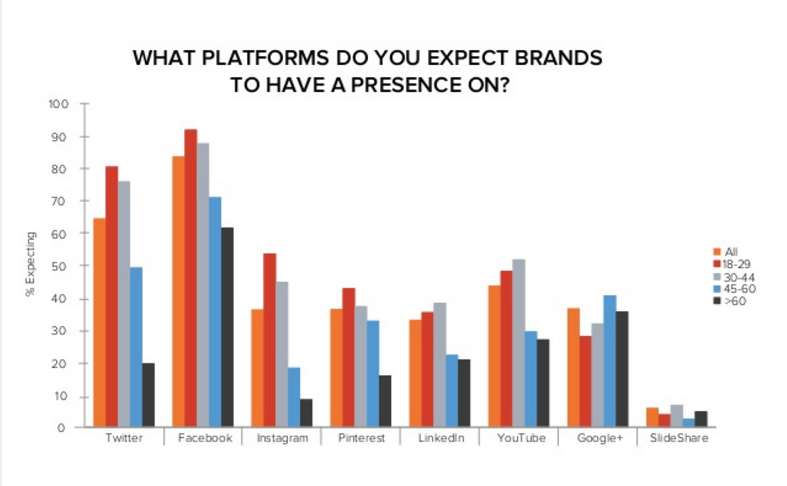
    It’s no secret that Facebook is a social media powerhouse. With an average 1.09 billion daily active users, the platform has transformed the way people interact with each other and the world around them, and has revolutionized the way and speed at which we can access information. As consumers turn to Facebook more and more for information and as a means to connect with people, it comes as no surprise that an increasing number of people expect companies to be active on Facebook. According to a study performed by Hubspot, 95% of Millennials expect brands to have a Facebook presence.

    Hubspot Facebook Survey

    Having an active presence on Facebook is no doubt a great way for brands to connect with their consumers on a more personal level, as well as a cost effective means to target new customers. However, what does this mean for franchises with multiple locations? Should each location have its own Facebook page, or should the franchise have one page that represents the brand but not necessarily each location?

    Dan the Man ??

    According to Mashable, there are several questions a franchise should answer before deciding upon its Facebook strategy.

    Does your business have components that vary based on the location?

    For example, does your business offer different promotions, products, pricing, decor, etc. based on the location? If so, your business may benefit from delegating Facebook management to individual locations. By allowing franchisees to post their own content, each location can have more personal interactions, something that is very important if your business varies slightly based on location. Take McDonald’s, for example. Their menu varies based on the culture of the location. Therefore, they take a decentralized approach—they have a corporate Facebook page but also allow each location to manage their own pages.

    Does your business benefit from a close relationship with its customers?

    Service businesses are the perfect example of businesses that benefit from a close relationship with its customers. These businesses rely on positive interactions with customers. Because so many people are on Facebook, this is a great way to reach and interact with consumers on a personal level. Allowing franchisees to post their own content allows the brand to take on a personality as well as establish themselves as an involved player in the local community. Having a positive and strong presence on social media can be very beneficial in building strong customer relationships.

    Are your industry’s consumers on Facebook?

    It’s important to analyze if your target demographic is active on Facebook. For example, while 90% of Millennials are active on social networking sites, only 46% of seniors use the platforms. It’s important to analyze this to ensure that your marketing efforts are not falling on deaf ears.

    Where are your locations?

    While all of the above data seems to point towards a decentralized approach, there are many businesses that benefit from a centralized Facebook strategy. For example, if all of your locations are within one city or region, one Facebook page makes sense. Instead of oversaturating the market with multiple pages, it’s better to have one page that represents all of the locations within that city or region.

    It’s also important to note that by allowing franchisees to post content, you forfeit complete control over your brand. By entrusting franchisees with managing their own Facebook presence, you are allowing them to represent your brand in every post, comment, or picture posted. However, in order to help guide your franchisees in post content and tone, a franchisor can provide them with Social Media Guides outlining their dos and don’ts for posting. Planet Fitness is a great example of this. While they do have a corporate Facebook page, they also empower each of their locations to manage their own Facebook page. The goal of the location pages is to drive local engagement and interaction within the community by posting about community events, special club promotions, and specific club information.

    Unfortunately, there is no hard and fast rule. However, by assessing your industry, customer demographics and company culture, you can choose the best Facebook strategy for your franchise.