Tag: local search

  • #FreelanceFriday: How to Remove Unnecessary Filler and Fluff From Your Writing

    In digital marketing, it used to be good enough just to write content—about anything and everything. But now, and rightfully so, it is not enough for you to just have a well-written website. It needs to be one filled with original and high-quality content. What you write is important, but how you write it is equally critical.

    So, with the ever-increasing demand for top quality content creation, how do you make your writing even better? How do you make your content stand out in the crowd of competitors?

    One of the best (and easiest) ways to make your content more valuable is to remove any and all unnecessary filler and fluff from your writing. In general, filler is part of a sentence, whereas fluff refers to whole sentences in a piece of content that exist just to pad the word count, which ultimately dilutes the nutritional value of the overall content.

    Image of character from Despicable Me with a toy unicorn - Search Influence

    By focusing more on substance, your content becomes richer and more beneficial to the reader. Don’t pad your content with the superfluous; it just isn’t necessary. Visitors to your site come for information about your business, don’t allow them to get lost or bogged down sifting through content that is redundant or pointless.

    Here are 6 ways to make your blogs better by removing unnecessary fluff and filler:

    1. Create a Plan and Outline First

    Your writing should always be clear and concise. When it comes to fluff, rambling is often one of the major culprits. Organization and planning (which can include creating an outline), will help you stay focused and avoid fluff even before it happens. It can also help to strategize any necessary research before writing.

    2. Avoid Redundancy

    Redundancy makes your writing dull and laborious to read. It can also reveal gaps in your knowledge of the subject. Required high word counts unnecessarily force many writers to say the same things over and over again instead of expanding on the topic. More content is worthless if it is redundant.

    Image of Sherlock Holmes character stating the obvious - Search Influence

    3. Nix the Common Knowledge

    Removing fluff is not just about having a succinct and smooth writing style, it’s also about creating content that adds real value. Trying to make all content accessible to everyone is not only nearly impossible, but it also increases the risk of fluff. You cannot explain everything to everyone. Know your target audience going in and gear the writing toward them.

    4. Remove the Unnecessary

    You might be surprised by how many words you can easily cut from your writing. Focus on word economy over exceedingly descriptive or unnecessary exposition–which includes excessive adjectives, most adverbs, and qualifiers that can weaken your writing. Unnecessary words and phrases are easy to find and remove because they don’t change the meaning of the sentence when deleted.

    Image of character from The Hangover calculating mathematics - Search Influence

    5. Eliminate Complexity and Density

    Unless you are writing content for a highly technical client or industry, overly complicated sentences with jargon should be avoided. If a reader has to reread a sentence to understand it, then it needs to be rewritten.

    The same goes for overtly flowery language—it may seem well written, but it will make it harder to comprehend the meaning. The goal of your content should be to make it easy-to-read so that you can get through to the reader. Don’t bury your point in decorative language.

    6. Don’t Be Afraid to Edit Yourself

    When editing, it is essential to detach yourself—and be merciless even. When giving your first draft a close second read, you will almost certainly find words and phrases that are completely unnecessary or misleading. Write, edit, repeat until your final draft reveals itself. Getting your point across should be your primary concern, while style remains secondary.

    Improving your writing this way takes practice. First, you have to learn how to identify fluff and filler, and then you have to force yourself to remove it. The better you get at recognizing the unnecessary from the start, they less you will have to edit later, thus making you a better and more efficient writer.

    Images:

    Fluffy Unicorn

    Holmes

    Alan

  • 6 Best Practices on LinkedIn for Your Company Page

    Did you know that only 17% of businesses have a company page on LinkedIn? With over 520 million users, LinkedIn has the right to refer to itself as the world’s largest business network. Connecting users with current and potential colleagues and even to future relationships with consumers, distributors, and manufacturers, LinkedIn is chock-full of opportunities to find whomever you need to grow your business.

    Whether your company is new to LinkedIn or has existed on the platform for years, make sure you’re staying active on LinkedIn in the right ways. Here are 6 best practices when it comes to your business’s LinkedIn page.

    1. Keep It Professional

    Every social media platform has its own tone and personality. The language you use to represent your business on LinkedIn needs to be more professional and polished than what would typically be used on Facebook and Twitter. Don’t make the rookie mistake of writing your LinkedIn posts the same way you would write your Facebook posts.

    2. Have a Company Logo and Implement a Cover Photo

    A company logo adds credibility to your page. According to LinkedIn, company pages with logo images get six times more traffic to their pages. It will also appear whenever a user searches for your company on LinkedIn as well as on employee profiles.

    Search Influence company logo LinkedIn header - Search Influence

    3. Optimize Your Page for Google Search

    Did you know that company pages on LinkedIn are SEO friendly? Google can preview the first 156 characters of your description in search results, so maximize that space with strong keywords and concise information. This helps readers who stumble onto your page on their own know exactly what it is you do, too.

    4. Create Slamming Status Updates

    If you create your company page but then never post anything, you’re missing out on possibly infinite opportunities for micro connections that can grow into real business opportunities. But posting sporadically, or posting things nobody wants to read, won’t help either. Share articles from leaders in your industry, post your thoughts on industry or company news, and promote your blog posts (you are writing a blog, aren’t you?). Focusing on the needs of your demographic will help guide your updates. What do they want to learn, and when are they online? Our social media guide can help you out with that.

    In addition to focusing on what to write about, keep an eye on how you’re crafting it. Shorter updates perform better than longer ones, and ones with links, large and pretty images, and videos all catch people’s attention and get them to share and comment on your updates.

    5. Sponsor Your Content

    It’s true across the board—sponsored and organic content need to work together to create an effective marketing strategy. By sponsoring some of the posts you publish on your Company Page, you can make sure all the right people see it, not just people who are already following you. LinkedIn has very advanced targeting capabilities (company size, seniority level, and even job title targeting is available), and it is easy to track conversions for each sponsored post. This means you can run A/B testing to see what your target audience really wants to see.

    6. Establish Yourself as a Thought Leader

    This is a bit of an extension on point four. You want to consistently publish content that shows you know what you’re talking about and are at the cutting edge of industry innovation. Weigh in on industry news, share your own rich knowledge by promoting blog posts and whitepapers, and even get a bit controversial by taking a stand on an important industry issue. At the end of the day, people don’t buy from you because of your products, they buy from you because of who you are. Show everyone who your company is and how they can present solutions to problems through your LinkedIn updates, and your expertise might just spread.

    Social interaction vector image - Search Influence

    LinkedIn is such a powerful tool for engaging with B2B customers. While it might take some work at first to figure out your strategy, following these tips for creating a strong LinkedIn presence will end up really paying off in the end.

    Check out how Search Influence can help with your social media.

  • AI and How It’s Affecting, and Enhancing, Voice Search

    If 2016 was the year of the Internet of Things, 2017 has become the year of AI, and, in particular, voice search. The way people search on their phone, tablet, or computer is changing thanks to devices like Amazon Echo, Siri, Cortana, and Google Home—as of May 2016, 20% of mobile queries are through voice. You can now search for a business, order pizza, turn on your home’s lights, ask for movie reviews, and more just by asking a question or stating an instruction. According to the 2016 Internet Trends Report, by 2020, at least 50% of searches are going to be through images or voice, whereas in 2015, only 1 in 10 search queries came through voice. Understanding how your content is optimized for voice search can help your business succeed in the near future.

    AI, RankBrain, Machine Learning, Deep Learning…What’s the Difference?

    With all of the talk about AI these days, it’s best to separate different terms that get tossed around, like RankBrain, Machine Learning, and Deep Learning. The easiest way to understand their relationship is to think of them as smaller parts of a larger whole. AI has been around since Alan Turing first started trying to decode the Nazi’s Enigma in WWII. In the 1980s, we started to see more advancement with machine learning, which provided computers with the ability to learn predictions and statistics without being explicitly programmed. In the current decade, we have begun to see large advancements in deep learning.

    Image Of A Formula - Search Influence

    Deep Learning

    Also known as deep structured learning or hierarchical learning, deep learning uses neural networks with many hidden layers of processing and information. It mirrors the way the human brain works, learning from mistakes to come up with the best, new solution to an input, not one that it was given with code. For instance, Marie Dollé from SocialMediaToday explains how it recognizes your face in a Facebook photo.

    “For a face, it will first correlate pixels on a photo, then group them and conceptualize its features (eyes, nose, mouth). Finally, it’ll group all these concepts to recognize the unique collection of features as a single face.”

    It’s also how the world’s best Go player, Lee Sedol, got beat by Google’s DeepMind AI dubbed AlphaGo. Go is an ancient game of immense complexity—there are more possible positions on the game board than there are atoms in the universe. This is precisely why we never thought a machine could master a human in this game; it’s more about intuition and instinct. Wired Magazine said that the pivotal play in the game was also the moment that “machines and humanity finally began to evolve together. While the move that set up the machine to win was puzzling to humans, it opened Lee Sedol’s eyes to strategies he hadn’t considered before.” We’ve come a long way since the first game mastered by AI in 1952—Tic Tac Toe.

    Image Of An Artificial Intelligence Brain Versus A Human's - Search Influence

    What About RankBrain?

    It’s best to think of RankBrain as a facilitator for deep learning. Unveiled by Google in 2015, RankBrain converts words and phrases into mathematical vectors that can then be used by deep learning. One of the more interesting things about RankBrain is that it searches for phrases that have never been used before on Google and then attempts to find similar words or phrases that may relate, i.e. your rich content that may not match up perfectly with a user’s search but is close. To put it simply, Greg Corrado, a senior research scientist at Google involved with RankBrain states, “If RankBrain sees a word or phrase it isn’t familiar with, the machine can make a guess as to what words or phrases might have a similar meaning and filter the result accordingly, making it more effective at handling never-before-seen search queries.”

    So, why are we getting these never-before-seen queries? Well, in some way or another, this will always happen. New products will be released, and people will want to find them. However, the introduction and evolution of voice search as a viable tool has transformed the way we talk to search engines.

    The Importance of Semantic Content Marketing in the Age of Voice Search

    Gone are the days of planning your content marketing strategy based on one or two keywords. Sherry Bonelli from SearchEngineLand posits, “Now keywords are no longer just keywords. Keywords in the voice search world are long-tail+. The ‘plus’ refers to the conversational phrases that you need to add when optimizing for conversational voice search.” Because people speak things differently than typing, we have to start adjusting marketing strategies accordingly. In comes long-tail+ keywords and semantic SEO.

    Long-tail+ keywords should mimic the way people actually talk. Think about what types of questions people ask when they call your business, and then think about any follow-up Q&A you have with them. Also, in addition to thinking about what people might be asking or searching, it’s time to start thinking about all of the synonymous and relative topics to that search. The age of the “best digital camera” keyword could likely fall away. Instead, consider the question, “Google, where can I find a digital camera that is waterproof and can also sync w/ and stream Facebook Live?” Look at everything that’s in that question. It mentions streaming and Facebook Live capabilities, it specifies waterproof, and the whole thing is rooted in a local question: the “where.”

    So, if you were to then take a hard look at your content, does it mention syncing devices with live streaming, have you written a blog about waterproof devices that you offer, are all of your physical location pages up to date, and have you claimed your Google My Business listing? Or, have you made the mistake of optimizing for “best digital camera” and called it a day? We’re starting to get to the point wherein Google’s AI technology is becoming as quick thinking, on-the-fly, and complex as us. So, we need to optimize accordingly.

    Image Of OK Google Icon - Search Influence

    Optimizing for Voice and Conversational Searches

    Using long+tail keywords is a good first step to optimizing your content for voice search. Try to understand and predict the user’s next intent or action after finding the answer to their first query. For alternate words or keywords, instead of trying to go for the “be all end all” keyword, think, “tell me how to get to the store,” alongside, “directions to the store.” Experiment with different versions of the same idea.

    Local is going to continue to be a big part of success for a business. Research what interests customers in a targeted area and optimize all of your physical location pages by making sure they’re marked up with schema. Structured data markup from schema.org is crucial because it makes it easier for search engines to parse your site and understand your content within context. Here’s a helpful list of additional best practices that can help with showing up in voice search:

    • Claim Your Google My Business Listing: A large part of voice search is based around local. By claiming your Google My Business Listing, you provide Google with more rich information about your business, giving its AI more tools to serve your potential customers with rich, accurate answers to their questions.
    • Use Conversational Keywords: This goes without saying, but if people are searching more naturally, then you should be writing more naturally in your content.
    • Make Sure Your Content Is Trustworthy: Just as AI can evolve to find us the best possible answers to our queries, it also has the ability to learn from and reject black hat SEO practices. Steer clear of link spamming, keyword stuffing, and untrue statements in your content.
    • Set Up a FAQ Page: This may seem like a minor addition to a website, but it’s a simple way to get a lot of good answers to questions, providing content for a vast amount of subjects about your business that could then make it easier for Google to find you.

    Because RankBrain plays a big part of voice search, finding never-before-used phrases and pairing them with trustworthy, on-topic content, it’s worth remembering some advice from a former Influencer: “If your content is written in accord with Panda and Hummingbird, meaning it is rich text, educational, and really on topic, RankBrain should not be a problem for you.”

    How Google’s Cloud Video Intelligence Is Changing Video Search

    Ever wish you could search for a video online or in your cloud library just by asking certain words? Like, “Hey, Google, show me videos with fun cartoon animals,” and getting a result of Zootopia from your library. With Google’s Video Analysis, we’re getting to do just that. This can have a large impact on more than just personal queries. Pretend you’re a Realtor in your local area. By using this tool, you can make your videos more discoverable for potential clients. It’s just another way AI is changing the way we search.

    Image Of Google Adwords Icon - Search Influence

    The Future of Google AdWords

    Google recently held their Google Marketing Next event. One of the features that they mentioned talks about Life Event Targeting. In the past, Google’s AI had been able to run basic “if, then” scenarios for target buyers. Now, they’re able to parse through multiple languages to predict a similar response for the same event. For instance, they gave the example of those recently engaged. They were able to recognize the different but similar terms and phrases that cultures use when people are in a wedding life stage and then provide them with solutions to queries.

    Also, Google is learning to adjust ads and tailor them to each user’s preference. Instead of three people doing the same search getting the same ad display, there will be advertising that suits each person’s preferences for style, graphics, tone, or display. They may have alternate text that is highlighted, one focusing on price and another on the value of a product or service.

    Where Have We Seen This Before?

    Whenever I used to think about artificial intelligence, I would typically conjure images of a Terminator landscape, or a young Haley Joel Osment sentient robot in A.I., or the philosophical complexities that Harrison Ford faces as a replicant (or not?!) in Blade Runner. There have always been predictions about future technology that we can find in pop culture, from space invaders to complete AI domination. However, I think one that best represents where we’re currently exploring and where we may end up being is seen in Spike Jonze’s film, Her.

    Photo From The Movie Her - Search Influence

    There’s no dominating technology that overtakes our lives, no artificial intelligence that turns evil. Instead, it’s a future in which technology is doing what we’re trying to teach it to do now. An operating system’s AI is learning from conversations and adapting and adjusting accordingly. The OS can also see people and judge their facial reactions, something we can already do with facial recognition. Mark Zuckerberg even implemented it in his home.

    To quote the film’s production designer, K.K. Barrett, “This is not a future of harshness, but of bespoke details.”

    What Does the Future Hold for Search and SEO in Its Relation to AI?

    Voice should continue to rise in use; there’s nothing to suggest otherwise. And while this is a bit of a“Wild Wild West” time of development, there’s one nice thing that should placate marketers’ worries—the relationship between the marketer and the client isn’t going to change in some cosmic or complicated way. In fact, it’s the opposite. It gets more personal. Ideally, we’re headed for a future in which our old anxieties about technology are gone—a future in which we no longer worry about technology ruling or destroying us.

    Instead, it may be like what we’ve seen in the movie Her. It’s getting more intuitive. More seamless. More subtle. More adaptive. More inseparable from who we are. It may not be too much longer before voice commands aren’t even necessary—Deep Learning may evolve to where simply walking into a room turns on the lights, and those lights then adjust to a brightness or dimness reflecting your facial features and mood…maybe.

    Instead of a future of wild advancements of technology, of jetpacks and holograms (well, kind of not those), it’s more a future of subtlety. One where we’ll hopefully be able to teach a program to learn from us so well and so naturally that it doesn’t even feel like teaching. To quote a reaction from those watching Google’s AlphaGo win its matches of Go over Lee Sedol, “The machine did a very human thing even better than a human. But in the process, it made those humans better at what they do.” So, instead of tech moving to the forefront of our lives, in front of our faces on the ride home from work, disrupting family dinners with scrolls and feeds, it could dissolve to be part of the background, one that not only knows when to talk to us but also when we can be left alone to be better at what we do.

    Images:

    Math

    Brain

    Ok, Google

    Google AdWords

    Her

  • Growing Your Practice on Facebook, Part 3: Advertising

    In our previous blogs, you’ve learned that Facebook is crucial for promoting your medical practice and that shareable content is the number one component of your social media strategy.

    As the next step in your journey to increase your social presence, Facebook ads are another highly effective way to promote your practice online. In this blog post, we’ll answer your questions about the importance of paid promotions on Facebook, the difference between promoted posts and ads, the primary advantages of Facebook ads, and whether your ad copy complies with HIPAA and other guidelines.

    Why Not Just Use Free Posts?

    With so many opportunities to post for free on Facebook, it might seem like paid promotions aren’t necessary. However, due to recent Facebook algorithm updates, overtly promotional posts are receiving less organic distribution on the platform. This is due to a Facebook survey in which users named highly promotional posts as the number one thing they would like to see less of in their news feeds. As a result, your followers will be unlikely to see any of your posts that push products, urge people to enter contests, or reuse advertising content. Below are some examples of highly promotional posts.

    Image of a highly promotional Facebook post - Search Influence

    Image of an overtly promotional post on Facebook - Search Influence

    However, in the same survey, Facebook users reported that they aren’t bothered by promotional content when it has been identified as advertising. This means that paid promotions are not only ways to get around Facebook’s algorithm updates and reach your target audience, but also ways to engage your followers without coming across as annoying or spammy.

    What’s the Difference Between Promoted Posts and Ads?

    The two main types of paid promotions on Facebook are promoted posts and advertisements. Understanding the difference can help you determine where each best fits into your social media strategy.

    Promoted posts are formatted like traditional free posts, but they are marked as sponsored content and appear higher in your followers’ news feeds. The main advantage of promoted posts is that you can test them out as free posts before investing in them. If one of your free posts is performing especially well, Facebook will often prompt you to “boost” or promote it. Promoted posts can also be easier to use because they follow the traditional Facebook post format.

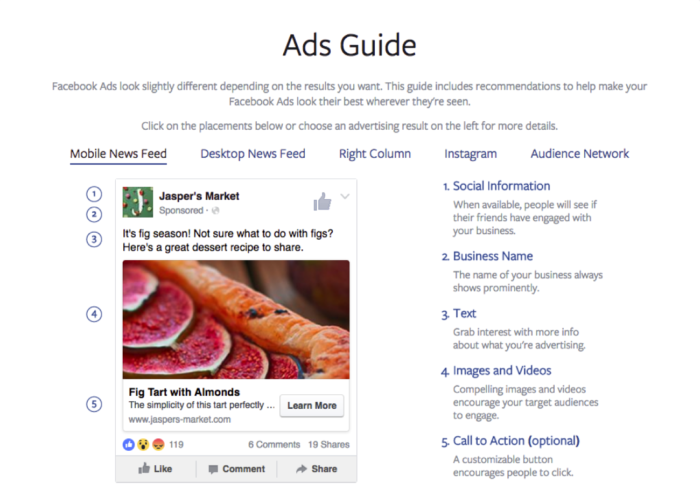
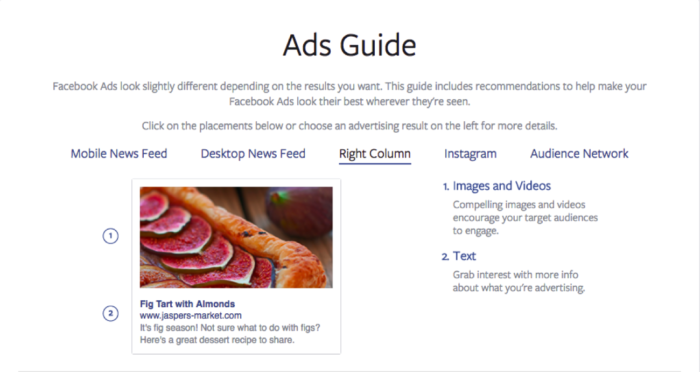
    Advertisements, on the other hand, can follow a wide range of formats. Facebook’s Ads Guide allows you to customize based on your campaign’s objective, be it brand awareness, lead generation, website traffic, or one of many others. The guide can also walk you through the different ad placements, focusing on which fields will be included in which type of ad. As shown in the images below, mobile and desktop news feed ads have space for social information, business name, text, images or videos, and a call to action.

    Image of Facebook's Ads Guide for mobile feeds - Search Influence

    Right column ads, on the other hand, only have space for text and images or videos:

    Image of Facebook's Ads Guide for right column information - Search Influence

    While all of these options make advertisements a bit more challenging than promoted posts, they also allow ads to achieve more diverse objectives. Promoted posts are great for growing brand awareness and driving engagement, but if you have goals outside of social media—for example, getting potential patients to fill out a consultation form on your website—then Facebook ads are the better way to go.

    What Are the Main Benefits of Facebook Ads?

    The reason why ads are more effective than promoted posts for driving off-Facebook conversions is the call to action (CTA) button. While exact numbers vary based on the industry, type of content, and action the reader is being called to do, statistics show that conversion rates increase dramatically when a CTA is present. While CTAs can be included in the text of a promoted post, the CTA button in ads allows your message to stand out even more. More importantly, it explicitly tells readers what action you want them to take, and allows them to accomplish it with just one simple click. Facebook also provides an easy drop down menu of popular CTAs for you to choose from, ranging from “Contact Us” to “Download” to “Watch More.”

    The second major benefit of Facebook ads is the platform’s detailed targeting options. These are available for promoted posts as well, and they can be set or altered within Facebook’s Ads Manager. While traditional advertising channels, like billboards or newspaper ads, can’t guarantee that your message reaches your goal demographic, Facebook ads can be carefully targeted to the people you want them to reach. For example, if you run a geriatrics practice in New Orleans, you can ensure that Facebook shows your ads to users aged 65+ in the Greater New Orleans area. Using Facebook’s targeting feature allows you to run a more efficient ad campaign. You can direct your time and money only toward the demographics that are most likely to become your patients, without wasting advertising resources on anyone else.

    What Legal and Ethical Guidelines Govern Medical Facebook Ads?

    As you’re certainly aware, the medical industry is heavily regulated. Everyone from the American College of Physicians to the Health Insurance Portability and Accountability Act (HIPAA) to Facebook itself has rules for medical advertisements. If you break them, your ads will likely be taken down, and in some cases, legal action may even ensue. While Facebook’s Advertising Policies provide a detailed list of prohibited and restricted content, the two biggest red flags for physicians are misleading content and patient confidentiality violations.

    Misleading content includes anything that could be considered deceptive or ambiguous to patients. The most obvious examples are photoshopped images or exaggerated guarantees; however, even subtle wording variations can lead to misleading content violations. For example, it’s generally okay for a physician to claim that Botox can contribute to a more youthful appearance. Yet, it could be considered misleading to claim that Botox will make patients look ten years younger or eliminate signs of aging. Although these statements are quite similar, only the first one is acceptable because it does not make any specific promises about the product’s outcomes. Some of the best precautions against misleading content include citing studies or journal articles whenever claims are made, and labeling all non-patient photos with the word “model.”

    While misleading content might get your practice in trouble with Facebook, violating HIPAA rules about patient confidentiality can get your practice in trouble with the law. As with misleading content, some precautions are obvious. For example, you should never post any identifying information about patients, such as names or faces. However, many HIPAA violations are less apparent. For example, it is prohibited to post images that do not clearly identify a patient, such as a rash on someone’s foot, unless you have clear legal permission to do so. Similarly, be careful that no pictures of the office have patients or medical records in the background. To avoid any issues, require patients to sign a consent form before using their images, or stick to model-labeled images and stock photos.

    Interested in learning more? Don’t forget to check back for the next post in our medical industry blog series, which will help you reach your target audience.

    For more information about getting started with Facebook Advertising for your hospital or practice, contact us here.

    Images:

    Ads Guide Mobile Feed

    Ads Guide Right Column

  • Gotta Go Fast! The Impact of Page Speed on Your Rankings

    “We have so much time and so little to do. Strike that, reverse it.”

    Roald Dahl, Charlie and the Chocolate Factory

    That may be a bit dramatic, but time is extremely important. In the digital age where a lot of people barely have the time to stop and say hello unless it was explicitly planned out in their schedule, a slow site can easily get lost in the abyss that is known as the internet. Though the forever relevant Bill Gates quote “content is king” should echo through anyone with a website, there are other factors that can make or break you as well. The best content in the world means nothing if no one sees it. If a tree falls in the woods and no one is around to hear, it does not make a sound; it makes vibrations that will never be converted into sound by ears. If a website has amazing content but a Page Speed as slow as molasses, does anyone ever read it? Probably not.

    How Optimized and Fast Page Speed can Bring in More Customers

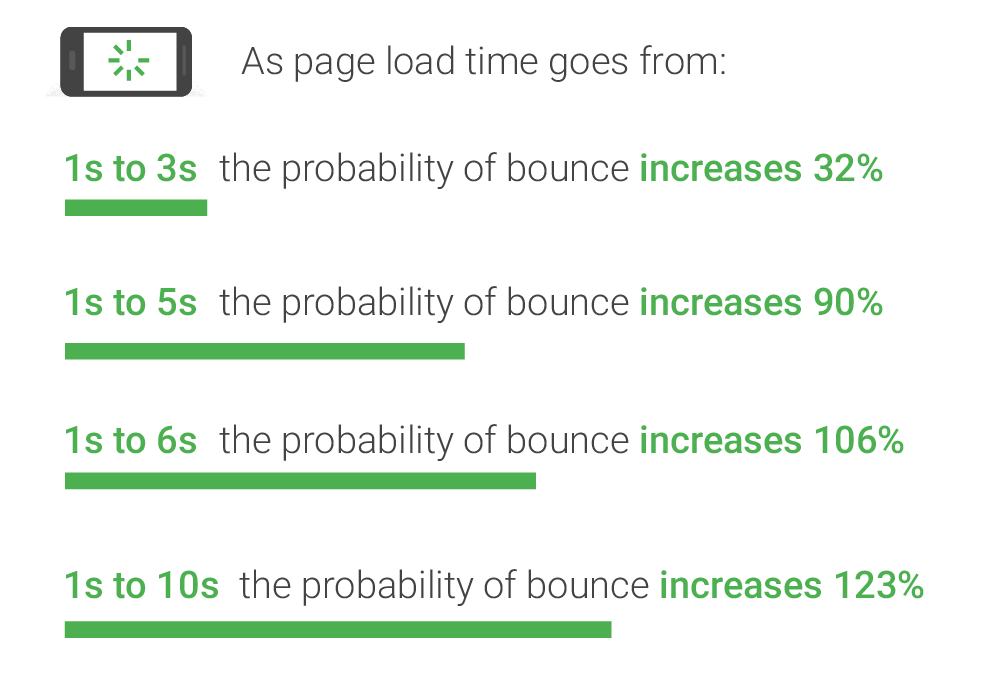
    As you may (or may not) have guessed, page speed is the amount of time it takes for your website to load. On the surface, slow page speed will turn visitors and potential conversions away from your site simply based on the fact that they can’t “use” it, per se. But surely someone would wait 7 seconds to view your homepage or interesting product, right? No. Straight from the source, Daniel An from Google provides this handy chart on the correlation of page speed and bounce rates:

    Image of bounce ratio percentages relative to page load time - Search Influence

    As you can see, if your page takes longer than one second to load, you may see a bounce, which is when a user leaves your site after viewing only one page. The bounce risk increases dramatically the longer it takes for your site to load. This stat doesn’t just apply to your home page either—these statistics will affect every single page on your website. Imagine running an online shop and having someone abandon an order because it takes their cart too long to load. Having engaging content is only half the battle; it has to be seen and digested for it to maximize its potential.

    Page Speed from the SEO Point of View

    From an SEO standpoint, Page Speed has a two-pronged effect on the ranking of your website. Back in 2010 (which is literally forever in internet time), Google spilled the beans on speed having a direct effect on the rankings of websites and encouraged everyone to analyze their page speed to ensure their pages were loading in a timely fashion. Looking at complex Content Management Systems that automatically add mountains of bloat to every single page you publish, it doesn’t seem like many people heeded the warning of Google.

    Image of a snail using a rocket to go fast - Search Influence

    From an indirect standpoint, Page Speed can have an impact on your website’s speed in relation to the crawl speed. Google’s web crawler has an allotted amount of time that it likes to spend crawling a website. Faster loading pages mean that Google’s web crawler can crawl the page faster and move on to the next one, which can lead to more of your pages being indexed. Mix that up with some spicy content and you’ve got a great stew going that can lead to increased Search Engine Rankings!

    Tips for What Website Owners Can Do to Improve

    I personally like to think of Google as the tough love parents that will always steer you in the correct direction, give you the tools to succeed, but punish you if you stray from the light. With that said, Google gives the entire internet a handy tool to test the speed of their website. My favorite online game, League of Legends, will be the topic of example for this go round. After running their URL through Google’s PageSpeed Insights tool, a score is given for both the desktop (61/100, Poor) and mobile (40/100, Poor) versions (it defaults to mobile speed, perhaps because mobile users are using the internet more than desktop users now) along with some details on how to fix the issues and exactly which files are causing the issues. An alternative to Google’s own tool (because we want to show our parents we can succeed our own way) is the Pingdom Website Speed Test. From my experience using both of these tools to compose Site Audits for our clients, Pingdom does give some more in depth information. For instance, the main reason for the League of Legends website taking so long to load is a video (listed below) that has to load twice before the website is considered to be loaded.

    Screenshot of video load time - Search Influence

    This video took over 17 seconds to load. Now for a website such as League of Legends that has the clout of millions of gamers fiending to see the details of the next character being released or an overview of the latest patch notes, these 17 seconds are no big deal. However, if your website was discovered by someone using the Google search “boutique new orleans,” that may be a different story, especially if they’re on the other end of our historic Magazine Street. They may have thought about venturing to your end of Magazine Street had they seen the flashy new “romphims” that your store was offering. Unfortunately for your shop, Magazine Street is loaded with boutiques, and potential customers may just tire themselves out on the other end instead of planning their Magazine Street romp around your boutique.

    Don’t fret, a lot of these fixes aren’t all that difficult to fix, so here are a few common fixes.

    1. Leverage Browser Caching: This fix allows some files on your site to be saved on a user’s local computer so that the next time they visit your site, they won’t have to be downloaded again. In addition to increasing Page Speed, it also lessens the stress on your server.
    2. Optimize Images: This fix involves formatting and compressing your images, which will drastically reduce their size.
    3. Minify CSS: Minifying your CSS is removing spaces, removing line breaks, and combining elements that have the exact styling to reduce the size of your CSS files (yes, even spaces increase the size of your files). You could do it yourself or use a tool such as CSS Minifier to do it for you, but make sure you test it before you completely remove your old CSS.
    4. Minify JavaScript: If you read the previous fix, you can guess what this section is about, just replace styling with functions and that’s the gist of it. JSCompress can take care of this for you.
    5. Enable compression: Using gzip to compress your resources allows them to transfer over the server quicker, which leads to faster page load speeds.

    These fixes are a great way to start pushing your Page Speed close to preferred industry benchmarks and are also among the easiest to implement. There are many more metrics that can be improved as well, but don’t fear—head to Google PageSpeed Insights and plug in your own URL to see how you fare and what you can do to improve. League of Legends has a team of web experts to make sure that even though their videos take close to 17 seconds to load, the rest of their site renders much faster. Here at Search Influence, we also have a team of web experts that are able to analyze and implement fixes to your website to improve its performance and rankings.

    The Importance of Mobile Page Speed Benchmarks

    As revealed in an article earlier in this blog, in November of 2016, the number of mobile and tablet internet users surpassed desktop internet users. This adds increased importance on your website’s mobile speed. With a society that is ever on the go, having a high level of accessibility and a mobile friendly website is considered a necessity for every business. A slow mobile site has a large chance of sending business elsewhere.

    An important addition to keep in mind is the impending rollout of Google’s “mobile-first index,” which should be rolled out soon according to Google and industry experts. This index will reportedly factor mobile content at a higher priority than desktop content. Though all details have not been made public as of yet since Google likes to release this info intermittently after the fact, mobile website speed will probably be one of the factors that are taken into account.

    With cell phones and tablets becoming more powerful and useful in everyday life, it is imperative that your website is optimized to be viewed on mobile if you want any hope of making a splash in the sea that we call the internet. No matter how powerful the receiving device is, there will always be the limiting factor of how quickly files can be transferred across the server. The simplest solution is to ensure that your website is optimized to make it as easy as possible to ford the data transfer river.

    If that sounds like a scary thought, feel free to reach out to the experts at Search Influence. We will gladly take the stress out of it and add you to the list of our many satisfied customers that continue to use our services year after year.

    Images:

    Bounce Rate Percentages

    Snail

    Screenshot

  • NEW ORLEANS, May 24, 2017 — The Plastic Surgeon’s Guide to Press Releases

    Search Influence has done a little blogging about press releases in the past, but now it’s time to kick things up a notch—or 16 billion notches. According to the American Society of Plastic Surgeons, Americans spent roughly $16 billion on plastic surgery in 2016, which is an all-time high. With thousands of plastic surgeons vying for a place in this lucrative industry, your practice should be using every tool at its disposal to keep up with the competition. One such tool is the press release.

    All About Press Releases

    The press release is THE classic public relations tool. It’s over 110 years old, but don’t worry—it’s still very relevant. The modern press release is published online and distributed through networks like PRWeb. A press release can inform media outlets about a newsworthy event related to your practice. Not only is this great for publicity, but it also helps with SEO. When reputable news sites run your press release or write a story about it, they provide authoritative backlinks to your website, which makes your website more authoritative in turn.

    Now, if you’re low-key panicking about what PRWeb, SEO, and backlinks even are, stop. Take a deep breath. Then, contact Search Influence to get all your questions answered.

    Image of a woman trying to decipher the workings of the internet - Search Influence

    If you’re already an SEO pro, great! Let’s move on to exactly what you should talk about in your practice’s press releases.

    Good, Newsworthy Topics

    Step one of writing a good a press release is choosing a newsworthy topic to write about. You should think of it as an announcement, not an advertisement. Press releases are not intended to hype your friendly customer service, compassionate care, or other unique selling propositions. They should not include a personal point of view, like “we” or “you,” and they should not include any promotional language. You probably are an exceptional surgeon who provides stunning, natural results, but PRWeb will probably reject your press release if you say as much. Instead, focus your press release on important recent events or developments.

    Here are some great ideas for topics to write about, courtesy of InboundMD:

    • Celebrating Milestones or Anniversaries
    • Participating in Community Events
    • Hiring New People
    • Acquiring New Equipment
    • Offering New Services or Treatments
    • Opening a New Location
    • Winning Awards or Honors
    • Speaking at a Conference
    • Publishing a Study

    All of these topics let you announce a new event or development that might capture readers’ attention. They also all provide the opportunity to frame your business as an objective leader in your field. A lot of practices could run ads claiming top-of-the-line equipment, but fewer practices could back up their claim with an objective and authoritative news story about acquiring new equipment. Press releases are a factual way to set yourself apart from other practices and stand out to potential patients.

    Sections of a Press Release

    Now that you have an idea of what to write about, let’s move on to some practical how-tos. Press releases follow a very specific format, and the sections are as follows:

    • Title
    • Summary
    • Body
    • Boilerplate

    The title should concisely announce your newsworthy topic. It should include your company name and an action verb.

    The summary should build on your announcement with engaging details to draw in the reader. For example, if the title announces that you published a study, the summary can explain how that study might impact surgical procedures or medical treatments in your field.

    The body is where the majority of the writing takes place. It should begin with a dateline, formatted like the image below:

    Image of a standard press release dateline example - Search Influence

    The dateline should be followed by a strong hook or lead to capture the reader’s attention. Then, the rest of the introduction paragraph should provide the reader with all the key details they need to know about your announcement. The following paragraphs should build upon these core details, until the final paragraph, which should briefly include your contact information.

    The body should be written in the third person, and language should remain objective, rather than promotional. However, you can include one or more quotations, from yourself or another knowledgeable figure, that can bend these rules a bit. A quotation can say, “I am proud of my practice’s dedication to technological advancements.” The rest of the body cannot. This is because the quotation is clearly attributed to an individual and framed as an opinion.

    The final section is the boilerplate, which is a brief, objective description of your practice.

    Pitfalls to Avoid

    Unfortunately, no list of things to do is complete without a list of things NOT to do. Press releases have fairly strict editorial guidelines, and as you know, the medical industry is heavily regulated. The following are some common mistakes made in plastic surgery press releases and how you can avoid them.

    It’s been mentioned several times already, but do not use promotional language or treat your press release like an ad. Objective language will not only get your press release accepted by PRWeb and news outlets, but it will also lead to more compelling writing. Again, tons of doctors claim that their practice offers experienced, well-trained care. You can prove that your practice offers such care by running a press release about the impressive experience and credentials a new hire brings to your practice.

    Don’t include general business information, except for your contact information and the boilerplate. It isn’t news that your practice offers Juvederm, Radiesse, and other injectable fillers. A lot of practices offer that. It is news, however, that your practice is the first in your area to offer a brand new line of injectable fillers. If you find yourself filling space with general business information, it might be a sign that you should choose a more in-depth topic.

    Don’t make any promises unless they are backed up by studies and statistics. This is not only because such promises can be too promotional for a press release, but also because everyone from Google to the American Medical Association has strict rules against misleading patients. Even seemingly innocuous claims about natural-looking or proportionate results can be flagged as misleading, as results can vary based on a large number of genetic and situational factors. To be safe, include reputable citations for all claims, and it doesn’t hurt to follow up with a disclaimer like “results may vary.”

    Ready to Start?

    This information should put you well on your way to writing the perfect press release for your plastic surgery practice. If you still have questions, or would rather leave the writing work to us, contact Search Influence! We’re happy to help.

    Images:

    Deciphering the Internet

  • Top 5 Ways to Bounce Back from a High Bounce Rate

    Growing up in New Orleans, hearing the word “bounce” means something completely different to most people. I hear the word “bounce” and immediately think of the music! After starting at Search Influence at the end of 2014, I learned that “bounce” also had a meaning in the digital marketing world.

    Artist Big Freedia at a parade - Search Influence

    Bounce rate is a value given to hits on a website from users that don’t stay on the site after viewing a page. This value indicates to Google that you might have uninteresting content or spammy content that users aren’t interested in.

    Though I’d like to take this blog in my usual direction (Beyoncé-themed), I will be paying homage to bounce music, the only bounce reference in my life until I was 29 years old. With the help of some local talent, here are the top five ways to help decrease bounce rate on your site.

    1: Interesting Content Updates

    Image of Rapper Juvenile at a basketball court in New Orleans - Search Influence

    Updating your website content to get Google to crawl your site is a great way to decrease your bounce rate. If you find yourself with a high bounce rate, try updating your content with industry news or new services you are providing. The best way to show Google, and your potential customers, that you are an expert in your field is to use fresh, up-to-date, informative content on your site.

    The way your content is displayed is also a part of this. Bulleted lists and paragraphs that are broken up into smaller “chunks” to display your information in a reader-friendly way are helpful in getting clients engaged and staying on your site.

    2: Navigation Updates

    Your navigation should be incredibly user-friendly so that users will be able to learn about you and your business. There should be a clear path a client can follow with your top level navigation, but not too packed where the user is overwhelmed. If there are too many options, then your user experience might need some work.

    This is also true for sidebars. If you have a sidebar on your site that is embedded in the template (i.e. it shows up on every page) make sure the links here are relevant for all the pages on your site. This  is usually a call to action button (learn more, get a quote, etc.) Having an attractive sidebar can help lead people further into your site and decrease bounce rate.

    3: Become a Google Analytics Wizard

    Image of Birdman rubbing his hands together - Search Influence

    Bounce rate is something that is documented in Google Analytics. Understanding where these numbers come from, what pages they are occurring on, what referral sites they are from, and almost 100 other factors are keys to decreasing your bounce rate. This step could be the trickiest, but that’s OK!

    Hiring a company like Search Influence is the easiest way to accomplish this step. Google has special training and certifications for their products so that people like me (and my fellow co-workers) can be masters at reading all of this amazing data so that you don’t have to.

    4: Enhance the User Experience

    There are a few things that you can add or take away from your site to enhance the user experience. If you currently have multiple pop-ups or widgets on your site to help push for sales, this may be an indicator of why your bounce rate is high. Users are less likely to click on these if they aren’t engaged in your site. Make sure that these aren’t bombarding the client during their natural reading of your content.

    Inversely, if you have a high bounce rate but no particular ad experience on your site, add some! Just be thoughtful about it. Adding catchy call-to-actions to get people to click further through your site is helpful in decreasing bounce rate.

    5: Update Metadata

    Image of Rapper Lil Wayne adjusting his glasses - Search Influence

    Making your site reader friendly for SERPs will not only decrease your bounce rate but also increase your organic ranking for Google. It’s a two-fer! If your landing pages have descriptive, catchy titles along with meta descriptions to entice the reader, you will be guiding Google and its users to the page they are looking for. Bounce rate commonly occurs when someone has landed on a page that they aren’t looking for. They quickly click off of the page because it’s not the information they need. If you have strong metadata, Google will know exactly which user you should be targeting and bring them to you.

    Bounce rate can affect your site’s performance as well as your business goals. Knowing what could be the culprit for your high bounce rate or preemptively updating your site to keep a low bounce rate is a marketing must for your strategy. It’s something that is manageable with the help of an expert digital marketing guru who also knows a thing or two about “bounce.”

    Images:

    Big Freedia

    Juvenile

    Mannie Fresh

    Birdman

    Lil Wayne

  • Google Paid Search vs. Facebook Paid Social: Team Players or Adversaries?

    When it comes to choosing between Facebook and Google advertising, it’s important to note what your business’s goals are. Both platforms are beneficial to business in their own ways and often work in conjunction to help businesses achieve maximum online visibility, gain more customers, and increase leads and sales. In order to best understand the opportunities with these two advertising channels, it’s important to know what each has to offer.

    Google Paid Search and Facebook Paid Social

    No one can deny that as far as search engines go, Google takes the cake. With more than 3.5 billion searches being conducted every day, Google is by far the world’s most popular and widely used search engine. Because of this, advertisers are able to reach a broad potential audience who may be seeking their products or services. Google AdWords, the PPC advertising platform for Google, allows advertisers to utilize the Search Network and the Display Network. Through the Search Network, advertisers can bid on keywords and phrases to trigger certain Google searches. The Display Network offers visual ads and can reach those who are not just searching on Google, but on other sites as well (i.e. a banner displaying your business’s logo on YouTube).

    Image Of Don Draper Discussing The Future Of Advertising - Search Influence

    Considered the pioneer of paid social advertising, Facebook has refined its process and has become an important part of many businesses’ marketing strategies. Like Google, Facebook is an extremely prominent website, with more than one-fifth of the entire world’s population active on the site monthly. Because Facebook users tend to share a lot of personal information—interests, relationship status, political views to name a few—Facebook advertising can target very specific demographics, showing Facebook users what they want to see.

    What Types of Ads Does Each Channel Offer?

    Both Facebook and Google include a variety of ad formats to appeal to a variety of audiences.

    Google Ads:

    • Text – These ads are only words, and can immediately reach customers as they search on Google.
    • Responsive – Size, appearance, and format can be adjusted depending on the ad spaces.
    • Image – Graphics that are static or interactive, and can be animated in .gif and Flash format. These can show on websites that partner with Google through the Display Network.
    • App Promotion Ads – As the name states, these ads can drive app downloads and engagement for your business. These will only show on devices that can support the app.
    • Video – These can stand alone or show in streaming video content on websites that partner with Google.
    • Product Shopping Ads – These show a photo, title, price, store name, and other details about a product you are selling.
    • Showcase Shopping Ads – This type of ad shows a product but expands when it’s clicked on to show related products and store information.
    • Call-only Ads – Ads that include your business’s phone number to drive phone calls. These types of ads only show on devices that support phone calls.

    Facebook Ads:

    • Domain Ads – With a simple format, this ad displays on the right column. This type of ad does not display on mobile.
    • Page Post Link – The most common of all Facebook ad types, this type of ad links to your external website and includes a large image for grabbing the attention of Facebook users.
    • Carousel Ads – A relatively recent development in Facebook advertising, these ads allow e-commerce advertisers to showcase up to five of their products, each with its own picture, link, and title.
    • Dynamic Product Ads – These ads target based on past actions on your website, also known as remarketing.
    • Lead Ads – Allows Facebook users to fill out a form on either desktop or mobile directly from Facebook.
    • Canvas – Only available on mobile, customers can interact with the ad by swiping through the carousel, zooming in and out or even tilting the images.
    • Page Like – This allows users to immediately like a Facebook page.
    • Page Post Photo and Video – Showcases pictures and videos from your business. Video advertising is especially engaging as Facebook video receives up to 8 billion video views per day!
    • Mobile and Desktop Apps – Similar to Google’s app promotion ads, these drive installs of a business’s app to mobile and desktop.
    • Event – Allows a business to promote their event to visitors.
    • Offer – This type of ad can only be created on a page with at least 50 likes, and it allows a user who clicks on the ad to redeem a special promotion.

    Google and Facebook: Friends or Foes?

    As previously stated, it’s highly common for Facebook and Google to be utilized together in a marketing campaign for their different advantages. Many marketers are drawn to Google because of the search volume and opportunity for exposure there. Google allows for targeting based on location, keywords, demographics, devices, and languages, as well as re-marketing, which can target users based on searches that have previously been conducted. While PPC ads are text-based, advertising opportunities are versatile. Extensions, user reviews, map data, and shopping ads are just a few examples of how Google advertising can be further optimized.

    Facebook advertising is not only extremely targeted but also highly visual, which many see as an advantage over Google. Facebook ads are essentially unavoidable, appearing in your target audience’s News Feed or the right column of their page. Because advertising on Facebook is based on specific insights and interests, chances are that the ad will be more engaging to the user.

    Image Of the Internet Being Friends - Search Influence

    Perhaps the biggest difference between each platform is the behavior of the users. When searching on Google for products or services, users have an idea of what they are looking for. Facebook, on the other hand, is not typically used to seek a product or service. However, the likelihood of a Facebook user to be exposed to a product or service that appeals to them is very high.

    While Google and Facebook are often seen as adversaries in the marketing world, the possibilities with each vary greatly. Try this team together for utmost potential in maximizing any campaign’s performance.

    Image Sources:

    Don Draper & The Future Of Advertising

    The Internet Shaking Hands

  • Grow Your LinkedIn Network With These 3 Optimizing Tips

    With over 400 million users, LinkedIn has become a social networking must for companies large and small. While other platforms like Facebook and Twitter are commonly used in marketing and SEO campaigns, LinkedIn can have a significant impact on online visibility and SEO opportunities. Instead of neglecting your LinkedIn account, utilize it to grow your business’ traffic and network.

    1. Be Consistent

    The Devil Wears Prada Who Are You - Search Influence

    For your traffic to increase, customers have to know it’s you. One of the biggest mistakes a company can make is not maintaining brand consistency across all marketing platforms. LinkedIn provides you with the opportunity to upload banners, background images, videos, and photos. Utilize all of these to tie back into your brand, logo, tagline, and color scheme.

    This also applies to the written content on your LinkedIn profile. If your business’ website uses a formal tone, don’t be overly casual on your social media. This creates brand confusion and can lead to customers not connecting with you because they think you’re someone else. Don’t lose out on growing roots with a client because someone can’t figure out if your profile is the right one.

    2. Engage Your Network

    Parks And Recreation Aziz Ansari On Social Media - Search Influence

    While you may have a lush profile, if it’s not active, no one is looking at it. It’s important to create, share, and like fresh and relevant content to your industry. Shower your followers with content at least twice a day and watch your network grow. This keeps your profile engaging as well as current. When creating or sharing content, make sure to add variety. For example, it can be good to post an interesting article in the morning and then ask an engaging question in the evening. This allows for different types of client interaction and can make a profile look more personable.

    As I’m sure you’re aware, blog posts are great when it comes to a site’s SEO. By posting your company’s blog posts on LinkedIn, you not only help your profile, but you also improve your website’s ratings, which can lead to more business.

    3. Let Your Keywords Shine

    SEO Friendly - Search Influence

    While your company can be searched on LinkedIn by name, it can also be found by keywords. The keywords used in your SEO campaign are the same words you should be using on your social media platforms. Your keywords should shine through your content from your posts, to your description, and to your headline. While it’s still important to stay natural, try to fit in a keyword or two in the first 156 characters of content on your profile. Google previews these first characters, and with the help of keywords, your profile can be more easily found.

    LinkedIn Superman - Search Influence

    By not growing your LinkedIn network, you’re leaving opportunities like referrals and website traffic in the dust. Social media platforms are crucial to interacting with current and potential clients. As LinkedIn’s numbers grow, so can yours. Make sure your profile is the cream of the crop and optimize.


    Image Sources:

    Devil Wears Prada Image

    Aziz Ansari On Social Media

    LinkedIn Superman


  • Grow Your Business With These 7 Digital Marketing Tactics

    Members of the Search Influence team gave their insight on tried and true digital marketing strategies. These strategies apply to every industry, from plastic surgeons to attorneys, and many can be implemented across different channels of marketing. Using a mix of or all of the 7 tactics below is a sure-fire way to optimize your business’ online potential.

    1. Mobile

    Before updating the aesthetics or adding content to your site, it’s of the utmost importance that you make sure your site is responsive and functions properly on both desktop and mobile. More than half of users say they wouldn’t recommend a business if they encountered a poorly designed mobile site.

    “To me, the biggest trend (and this is as much a wish as it is a prediction) is that small businesses begin to take mobile optimization more seriously. I’m still surprised by the number of businesses I see in my day-to-day life that haven’t reacted to the continuous uptick in mobile search by having their site optimized for mobile users.

    My main focus, in terms of a trend, is the expansion of mobile search as a primary source of information. The trend will be more companies utilizing tools like Google AMP in order to improve the mobile user experience. Currently, far too many don’t take the number of leads they can get from a mobile-optimized site.” – Cory Agular

    Later in this post, I’ll go over AMPs and some more specific mobile moves, but I really want to emphasize that mobile should be incorporated in every aspect of your online marketing campaign. Google has stated that not only are 60% of users unlikely to revisit a mobile site they had difficulty visiting, but also 40% will then go on to visit a competitor’s site. You’re not supposed to judge a book by its cover, but if you can’t open the book, you’re not even going to try reading it.

    Image Of A Cell Phone Searching - Search Influence

    2. Schema Markup

    Schema markup, coding that can be added to a page on your site, makes information more easily readable to search engines like Google. This code labels pieces of important information on the page. Search engines not only understand the information better but they can also provide richer search results to users.

    “As far as I’ve noticed, Schema’s been underutilized… however I’m seeing a lot more talk acknowledging it for its on-site SEO value and correlation with rich snippets and Google’s knowledge graph. And as we’ve seen, Google’s been working to improve its algorithm and knowledge graph to really ‘understand’ content to better predict user trends.” – Kiersten Kampschroeder

    “It’s been increasingly popular to integrate schema into your content. I think that providing meta information using schema markup not only helps SEO, but it also aids the programmer and contributes to making better semantic websites. 2017 will be the year where instead of thinking how we can ADD schema to existing sites, we instead shift toward creating websites with schema markup baked into their design and writing content with schema markup in mind. I’d compare thiscoming year with what happened with responsive design 3–4 years ago. That was the shift where everything became mobile first. 2017 will be the year schema is integrated into the general development workflow.” – Member of Web Development Team

    A search for “breast augmentation new orleans” shows how review schema implemented on Dr. Kinsley’s site appears in results:
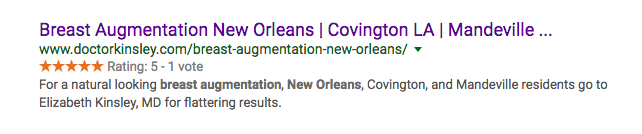
    Image Of Dr. Kinsley's Search Results - Search Influence

    3. GIFs

    While 2016 saw a rise in GIFs, an acronym for Graphics Interchange Format, they were first debuted by Steve Wilhite of Compuserve in 1987. They are the epitome of #thirtyflirtyandthriving. These dynamic, digestible pieces of content are easy to create and share and provide a more engaging user experience than a single static image.

    “GIFs are important to any brand aesthetic, be it personal or public, because they offer a truncated version of the desktop’s fluid experience (i.e. video).

    GIFs are a better option now since they’re more pervasive and different social media platforms accept them or give you a way to use them easily. Instagram, Twitter, Facebook, and Facebook Messenger are all compatible with GIFs now.

    Twitter actually integrated, similarly to Facebook, a GIF search within the post tool. [It has] allowed for a closer relationship between Facebook and Twitter, as well. You’ve always been able to link the two accounts, … [but] now, it looks like Twitter, when auto-posted to Facebook, is fully integrated into Facebook’s platform and presents the post as it would be presented on Twitter.” – Member of Graphics Team

    There are so many reasons you should incorporate GIFs into your marketing strategy this year. As mentioned, the fluidity of GIFs can make the creation of cross-platform content so much easier. They’re easy to create and even easier to share. Most of all, it’s a fun and unique way to reach your consumers!

    So, why not shake things up a bit?

    4. Social and Mobile Paid Advertising

    In 2016, we saw a rise in mobile advertising, but this year, with more than half of searches on mobile devices, it will be an essential component of an effective and well-rounded search engine marketing campaign. Expanded ads are now easily translatable between desktop and mobile, but it’s almost important to mobile users’ needs when determining the content, location, and timing of your paid ads.

    Social advertising like Facebook Paid Ads are showing increased popularity and effectiveness. The level of granularity continues to rise with Facebook audience targeting, and we have seen an increase in conversions even as CPCs remain low.

    “With the introduction of ‘new’ campaign objectives, such as lead generation and local awareness, Facebook really does seem to be a place for lots of growth. With Facebook trying to essentially phase out Fan Building campaigns, local awareness campaigns present an interesting opportunity for smaller budget clients who want to focus on a local market.” – London Fougerousse

    While Facebook ads are more cost-effective than traditional paid ads, that’s not a reason to rely on them solely. The decision to use Facebook vs. Google Adwords or a mixture of the two is truly dependent on a variety of factors, such as your location, industry, and goals. I recommend hopping on the mobile train sooner rather than later. Forecasters are predicting that by 2019, 72% of digital ad spend will be on mobile advertising!
    Image Of Smiley Face Emojis - Search Influence

    5. Google’s Accelerated Mobile Pages

    As I mentioned at the beginning of this post, mobile should be a consideration for all of your online marketing efforts. Google’s Accelerated Mobile Pages (AMPs) are a way to take that focus even further. AMPs are not a ranking factor in Google (for now) but they can positively impact impressions, clicks, and user experience.

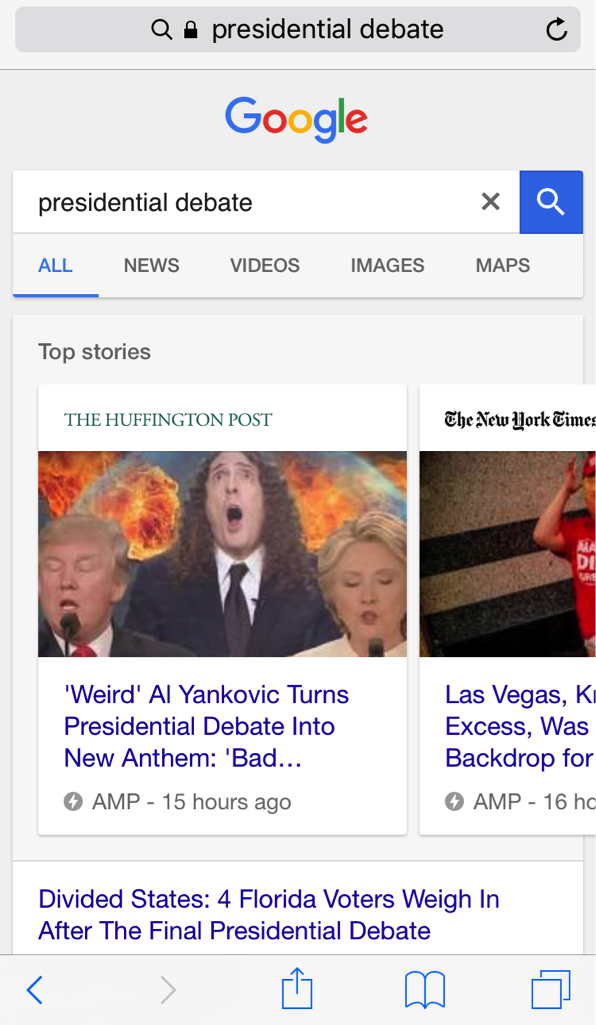
    “Since the rollout of AMPs in mobile SERPs this past spring, pages have typically only been found at the top of the results page in a carousel—which is still prime real estate—however, Google recently announced that AMPs will soon also begin showing in the organic results and supporting more content types. We’ve all heard the mobile-friendliness search stats, and adopting AMPs is another way to bring content to your consumers instantly and on the go.

    “Historically, AMPs have been utilized mainly by news publishers, but with the expansion to the organic results, I can see a future for almost every type of industry. Shopify, eBay, and Fandango recently announced their integration of AMPs, so this is a good trend for e-commerce clients especially to be conscious of. And Google also hinted that they will begin supporting more content types like live videos, galleries, etc., which can also open more doors for clients to take advantage of.” – Member of Account Management Team
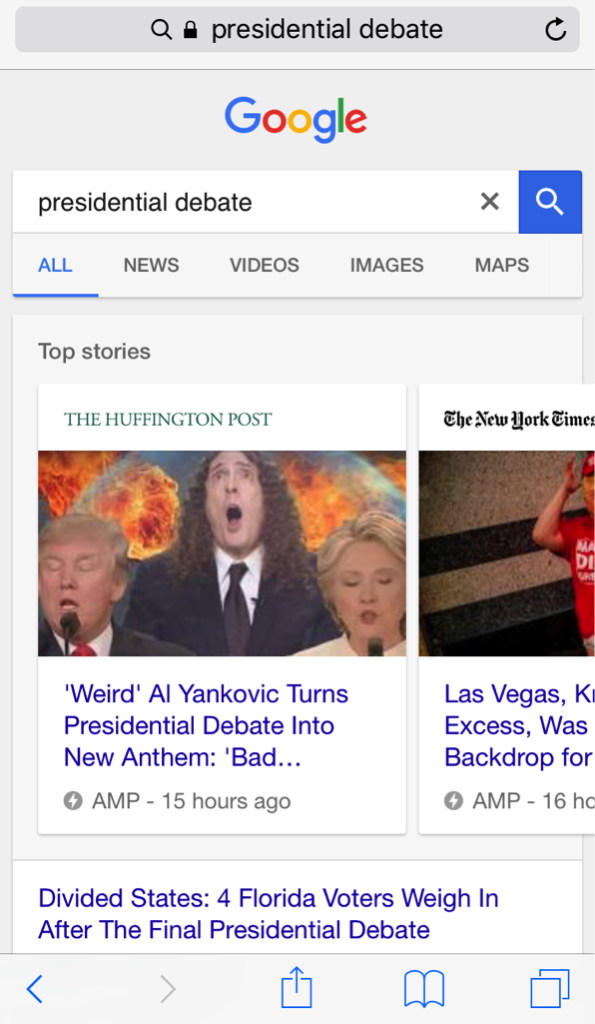
    Image Of Google Search Of Presidential Debate - Search Influence

    The increased speed of Accelerated Mobile Pages leads to a better user engagement, and those (potential) customers/clients are more likely to return to your site if it was able to quickly provide them the information they were looking for. A recent study shows that with AMPs, The Washington Post saw a 23% increase in mobile search users who return in 7 days. If you’re a business receiving the majority of your site traffic from mobile devices, AMPs could be a strategic way to boost your online presence above and beyond your competitors.

    6. Video

    Video is not just for YouTube. It should be incorporated into as many of your online marketing efforts as possible: product/procedure pages on your site, email marketing, display ads, social platforms, and everything in between!

    “For online marketing rich content could include native video content and paid video ads on both YouTube and Facebook Video Display ads. Also, I think brands will begin to utilize Facebook Live more for events and branded content to engage their fans.

    “I believe these videos will be prominent cross-device! Today, people are constantly moving between devices throughout the day and advertisers need to be innovative and streamline their message to engage users across all devices.

    “For Facebook Live, I would recommend this for brands and businesses that have a strong Facebook following. Facebook Live is a tool to engage your audience, not necessarily build an audience. These videos are best for events, conferences, speaking engagements, big company announcements, etc. There are so many options to deliver creative, curated content!” – Sophie Kirk

    Rich video content is content that keeps on giving. One video can apply organic, paid, and social campaigns across devices, and can be broken down and repurposed to create a number of assets. Videos are not only attention-grabbing, but are also a great way to establish your brand’s message and have lasting effects in terms of brand recall.

    7. Links

    Links might not be the most exciting item on this list, but they’re certainly one of the most important. Link building is an essential aspect of a well-rounded SEO strategy! When the search engines crawl pages on your site, links are used to identify how it relates to other internal pages and other sites. Links connecting one site to another can indicate that a particular page/site is the authority on a given topic. But, as you should know, not all links are created equal!

    Google first launched its Penguin Update in spring of 2012 and rolled out its final update, Penguin 4.0, this past fall. Penguin is Google’s effort to catch sites that are using “black-hat SEO” techniques like spammy link acquisition to affect search rankings.

    “In 2017, ‘link’ will no longer be a dirty 4-letter word. For far too long, bad link building has been lumped in with quality link earning. Everyone got freaked out by Penguin and the industries either shied away from “linkbuilding,” or, if they were doing it, were hush-hush about it.

    “Google’s initial differentiator was to focus on links as votes, which is at the core of PageRank. Google has, in the past, described their foundational algorithm by stating: PageRank works by counting the number and quality of links to a page to determine a rough estimate of how important the website is. The underlying assumption is that more important websites are likely to receive more links from other websites.” – Paula French

    Google truly is looking for quality over quantity when it comes to link building, but that’s just part of the SEO puzzle. If your site is suffering from technical issues or lacking rich, natural content, links will not save you. Make sure your online marketing strategy includes both on and off-site efforts.

    Image Depicting Online Marketing Tactics - Search Influence
    These 7 online marketing tactics are an inexpensive way to boost awareness of your practice and bring in new, revenue-generating patients. With a little strategy and effort, you can have a comprehensive SEO campaign that brings your practice’s website up to speed!

    Image Resources:
    Cell Phone Image
    Facebook Emojis Image

    Social Network Image