Tag: local search

  • Nine Brands Who Have Mastered Instagram

    Each social media has its distinct character, but Instagram is a beast that many small businesses aren’t familiar with. Twitter is quick and to the point, Facebook friendly, and Linkedin professional. But what about Insta? We can look at these nine companies that are effectively using Instagram to uncover the secrets to its members’ hearts.

    Beautiful Images Are the Core

    Instagram is an image based platform. It’s where hobby photographers, style setters, food artists, and more come together to show off their photos. If your business wants to get noticed, you have to have images that resonate.

    Boutique-style online fashion retailer ModCloth uses magazine quality photos that feature their staff members wearing some of the pieces they carry. Some are more glam and others silly, but they are all well lit and intentionally shot.

    ModCloth Instagram screenshot

    Let Your Hashtags Run Wild

    On Twitter, it is best practice to keep your hashtags to a minimum, and most people only use them on Facebook when they’re being glib. Nothing could be further from the way hashtags are used on Instagram. It’s not uncommon to have 10-20 hashtags on a single image, covering every different way you can describe the image.

    Inspirato uses multiple variations such as #luxuryhome and #luxuryvilla to widen the scope and make it more likely someone searching will find images of their vacation homes. They also use trendy hashtags like #travelgram to make sure they are part of the greater conversation.

    Inspirato Instagram screenshot

    In addition to using hashtags to be found by potential customers, hashtags can help you find your customers. Camp Brand Goods created the hashtag #keepitwild and encouraged their followers to use it when they took photos with their products. They then “regramed” those photos, showing off the testimonial while building a relationship with their customers. Customer spotlights are a creative way to build hype and fan loyalty, and they’re easy to leverage using hashtags.

    Campbrand Goods Instagram screenshot

    Build an #Aesthetic

    The most popular Instagram feeds have a coherent theme or aesthetic that appears in each of their photos. This doesn’t mean you need to have your logo in every single photo (but if you can find a creative way to do that, then go for it!). However, having a consistent color scheme, lighting, and subject matter will help to solidify your brand identity. While the three images below from Havenly all have different subjects, the color scheme ties them all together. They all invoke the same feelings and reveal what the brand is all about—decorating spaces with a sense of calm and modern femininity.


    The Havenly Instagram screenshot

    Screenshot of The Havenly Instagram post

    TheHavenly Instagram post screenshot

    Sell a Lifestyle

    Your brand identity is who you are as a company, but the lifestyle you depict in your images is who your customers are. If you’re a car dealership, what kinds of people buy from you, and what do they value? All things USA, the outdoors, family BBQs? Then show those things in your images.

    You don’t have to limit your posts to just pictures of your products. Four Barrel Coffee shows images from the coffee-creation process, as well as the final product. They also post images that appeal to their hipster demographic, such as this photo of their new record player.

    FourBarrelCoffee Instagram screenshot

    If you want to show your products, take a page out of Sphero’s book and showcase some of the features and unique selling points of your business. Their little toy robots roll around all sorts of obstacles, and their photos and videos actually catch them in action.

    Screenshot of Sphero's Instagram post

    ‘Gram in Real Time

    In addition to sharing staged and styled photos, Instagram can be great for showing off things that are happening at the moment. Testing a new prototype? Take a short video of it in action to use as a teaser. You can also share photos from events, like Dolphin Browser did. This is especially great if you’re hosting an open house, since it can show people how much fun they’ll miss if they don’t head over right away!

    Dolphinbrowser Instagram post screenshot

    You can also share photos of your office, a day in the life, or other images of your energetic, smiling employees! It’s something we do here, as well, so you know it’s got to be a great idea 😉  Make sure you follow us on Instagram for updates.

    Search Influence Instagram post screenshot

    Get Local With It

    Small businesses often have close connections with their local community. Take advantage of that by following other local businesses, Little League teams, and other community organizations you want to foster a relationship with.

    Kawaii NOLA is a New Orleans clothing and novelty store that specializes in Japanese imports. In addition to showing pictures of their products, they often share flyers and other information for small businesses, local artists, and Japanese cultural events throughout the city.

    Kawaiinola Instagram post screenshot

    By cross-promoting other nearby businesses, you can unlock a new potential audience.

    In this example, classic anime and film fans can learn more about Kawaii NOLA, and Kawaii NOLA customers may choose to see another film at this theatre after this event is over. Everybody wins!

    Instagram is a brave, beautiful new world for businesses. At the center of all of the examples above is one simple piece of advice: be authentically you. Whoever you are as a company and brand, show that off, and you’ll find the customers you’re looking for.

    If you want help managing your social media accounts, reach out to us to see how we can help!

    Images:

    All screenshots by Meaghan McCarthy. Taken September 2017.
  • Security! This Site Isn’t Safe! What Will Google Do About It?

    Business is booming, leads are pouring in from your homepage form, and it seems that the direction of your company couldn’t be brighter. Then your leads seem to stop in the tracks and business slows down considerably. What could’ve happened? Your landing pages and main site call to action are perfect for getting users to fill in forms. Then, as you peruse your site, you notice something new, and now one of your greatest assets is your greatest foe.

    Google and The Internet

    I’m sure everyone here is familiar with the fact that Google got its start as a search engine and is now the most popular. After conquering the way people search, Google decided that it was time to innovate how people browse the internet itself. In September of 2008, Google Chrome was released in its beta format. This new web browser boasted being integrated with Google technologies and quickly put a foothold into the internet browser market. Now that Google controls a majority of the internet browser market share, their next big move is about to launch—security.

    Internet and Privacy

    The internet has come a long way since my childhood days of signing into AIM over a 14.4K dial-up modem. Now, I play League of Legends (yes I am using them as my example) with my gaming rig linked directly to my cable modem with a T1 cable that provides download speeds of at least 150mbps. With this rapid transfer of information constantly happening, one has to worry about the downsides, right? Right? Most of us don’t think about the downsides, but Google has thought of this for us. Back in January of this year, Google released its first major security update from the scope of usability.

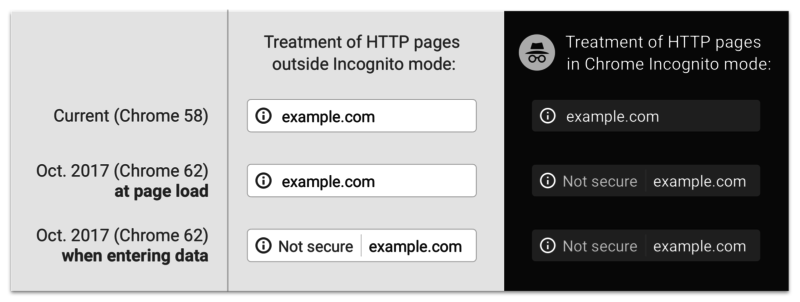
    Image Screenshot of Google's first security update - Search Influence

    Previously, a lowercase “i” was displayed in the address bar and could be clicked to display more information about the particular web page including the security of your connection, how many cookies the page uses, and a plethora of other tidbits of information. Now, whenever you enter a password or a credit card number on a site that isn’t secure, a handy message pops up to indicate that your connection to the website is not secure.

    So What Exactly Is a “Secure” Site?

    A website that doesn’t have an SSL Certificate installed transmits all data as plain text. Meaning, if I type my name “Jared” or my email address, or even “281-330-8004” into a field on an http website and send it to the server, it will be sent and saved on the server as plain text. What this means is that any vulnerability that is exploited in one of these sites would hold a nice, tasty database of personal information for would-be attackers to exploit. Sites with https servers work a bit differently. Your computer and the secure site initiate what is commonly referred to as the “SSL Handshake” to confirm that it is trustworthy. The https sends its SSL Certificate over to prove that it is a source that can be trusted. Any information shared over this connection is encrypted, which means that even if an attacker is able to procure a database of information that doesn’t belong to him, it will be encrypted and unable to be read.

    And This Has to Do With Google How?

    At Search Influence, it is our duty to know Google as well as we know ourselves. Through various means, we keep tabs on Google and exactly what this robot and its creators are really up to. In our findings, we’ve discovered that Google is about to shake up the internet. On October 1st, Google Chrome will receive a security update that will change how it displays sites that are not secure.

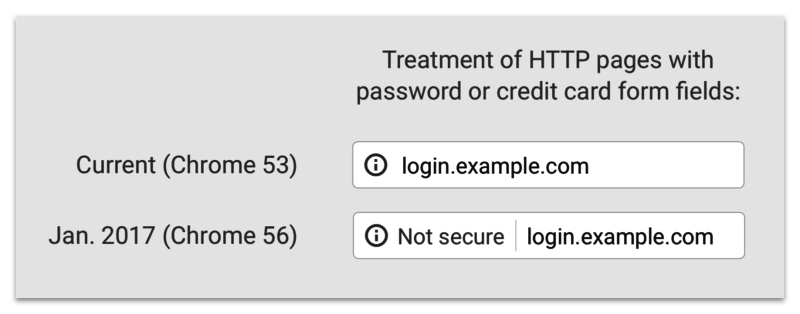
    Screenshot image of Google's past, present, and future "not secure" notifications - Search Influence

    The graphic above displays past, present, and future versions of Chrome. As you can see, the “not secure” notification in the address bar will not only display on password and credit card form fills, but on **ANY** form fill. Google is using its bots to track down any <input type=”x”> elements on your page and flagging them according to the notice that webmasters received in Google Search Console.

    That Doesn’t Seem THAT Bad

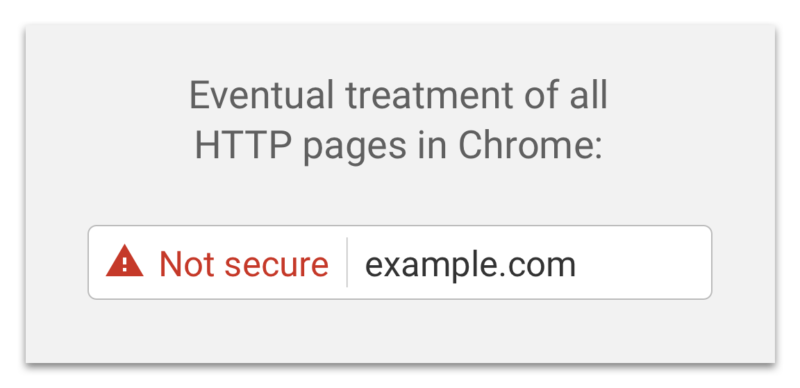
    If you feel this way, I’m personally inclined to agree with you. Most of my online purchases and passwords are already behind secure sites like Amazon and the like. If some hacker gets my email or my alternate email, why would I care? Well, if you think like me, there will be an eventual rude awakening. Google has already announced that it plans on marking all non-secure sites with a nasty red triangle and red text reading “not secure” in the address bar (see below).

    Screenshot of Google's "not secure" warning - Search Influence

    That tiny addition to the address bar may not cause a slowdown in form submissions on October 1st, but in the future, when that beautiful red triangle and glorious red text appear next to your web address, I’m sure people will think twice before submitting their personal information to your website. There’s no need to panic about this quite yet; Google hasn’t announced an official time of release for that update and, luckily, they’ve given us ample time to comply.

    Will This Slow My Site Down?

    Barely. Previously, this was an issue with https websites sometimes taking a half a second longer to load, but in this day and age, technological advances have reduced this slowdown time to a few milliseconds. If you do migrate your site to a secure server and notice significant slowdowns, it more than likely means that your site isn’t optimized for a secure server. Cloudflare has an in-depth article about bolstering your site’s configurations to improve speed after migration. The benefit of a visual that proves your site is secure is definitely worth the cost of a negligible increase in load time.

    In addition to migrating your website to a secure server, some auxiliary tasks must be completed to ensure your search rankings aren’t affected. Here at Search Influence, we know that your business is very important to you. Contact us for help ensuring your website is safe and secure for your visitors.

    If you want some more information about Google’s push for secure sites, check out the talk below by Emily Schechter, Google’s own Security Project Manager.

  • Rookie Website Mistakes, Part 3: Your Site Isn’t Mobile-Friendly

    Now that you have learned how to get your website found in Google searches, Part 3 of our Rookie Website Mistakes blog series will explore how to get mobile visitors to stay.

    It’s no secret that the current generation is keen on the combination of mobility and technology. We are a group who thrives off convenience and being able to get the information we need while on-the-go. It’s no wonder the level of frustration when a website we want to reach is not properly formatted for mobile use. Many of us quickly move on, searching until we find a site that is mobile-friendly and can also provide us with the information and services we need. According to Google, 58 percent of Americans use their smartphone (instead of a computer) to access a website. This means that over half of your potential audience—individuals who use the internet—are searching via cell phone. Visitors are also typically multitasking, leaving you with a limited amount of time to impress and engage them. You would be remiss to not format your website accordingly. Let’s dive a little deeper into what you lose and what you stand to gain with a website formatted for mobile visitors.

    Not Using Responsive Design

    One of the main differences between a site that’s built for mobile use and one that’s not is the responsiveness of the design. Consider the size of the interface or screen on a desktop computer or laptop versus a smartphone. Because mobile phones are smaller, websites cannot afford to have lofty navigation that hangs out in the margins—nor can they afford to have a surplus of text that hides below the fold. Often, the entire design of the website should be optimized for how visitors will need to navigate the page on a 5×3-inch device. Font size, typography, and single-column layout are also some items to consider.

    Optimizing for mobile does not mean that a business will have to create two different sites. Responsively designed websites are flexible and can detect screen size and orientation. The flow and readability of the design are crucial for a pleasant user experience that will keep visitors on your page, allowing them to receive the valuable information you are providing.

    Lack of a Touch-Friendly Interface

    Because visitors to your website are most likely accessing your page from their handheld device, it is imperative that the site can be easily navigated by touch. Visitors are frequently using touchscreens to find your business online, and once they arrive at your website, they need to be able to use their fingers to scroll, move between pages, click links and videos, and request more information.

    Man pointing his finger toward a smartphone's touchscreen - Search Influence

    Consider enlarging the font and adding more space between navigation buttons and links so that it’s easier to select items on the page. Unlike using a mouse on a desktop, fingers are less precise, so the use of buttons is vital to a friendly interface. Be sure to also have indicators on items that can be selected, such as adding a highlight or indentation marker to the button. This lets visitors know that their phone has recognized their selection. Another element is utilizing dropdown menus for navigation. They can be used on desktop screens and are ideal for mobile phones. Also, make sure the phone numbers are click-to-call and emails listed on your website are designed to open a compose window. This adds even more convenience for potential customers and visitors to your website.

    Images That Aren’t Optimized

    In previous blogs, we’ve made a case for the importance of having quality images on your page. But what happens if these images are slow to load? According to a study done by Equation Research, 60 percent of mobile users expect a site to load within 3 seconds, and 74 percent are willing to wait up to 5 seconds for it to load before abandoning the website entirely. Visuals that take too long to configure to the page also slow down the general responsiveness of your website. Scale images through code or optimize them by using new HTML markup that prevents the browser from downloading pictures that are larger than what is needed.

    Coworkers sitting at a table with different multimedia devices - Search Influence

    Content That Isn’t Mapped for Mobile

    Take inventory of each piece of content on your website and evaluate how effective it will read on a mobile phone. The size of the font and the typography style is something to consider, but the length and relevancy of the content are important, too. Trim down the fat. Use your analytics intel to determine which pieces of content your visitors are actually reading, and consider removing or optimizing content they are not. Review your website and be sure each piece of existing content is essential and can be easily digestible on all screen sizes.

    Having a mobile-friendly website is not something to be overlooked. With more and more of your potential customers using their phones to search for your business, mobile-friendly optimization is vital to the health of your business. If you have any questions or concerns about how to optimize your website and grow your business, our team is happy to help. Drop us a line!

    Stay tuned for the next blog in the series, Rookie Website Mistakes, Part 4: You have a Single Page Website.

  • Paid Search, SEO, and the Evolution of Google

    Paid Search, SEO, and the Evolution of Google

    No man ever steps in the same river twice, for it’s not the same river and he’s not the same man. –Heraclitus

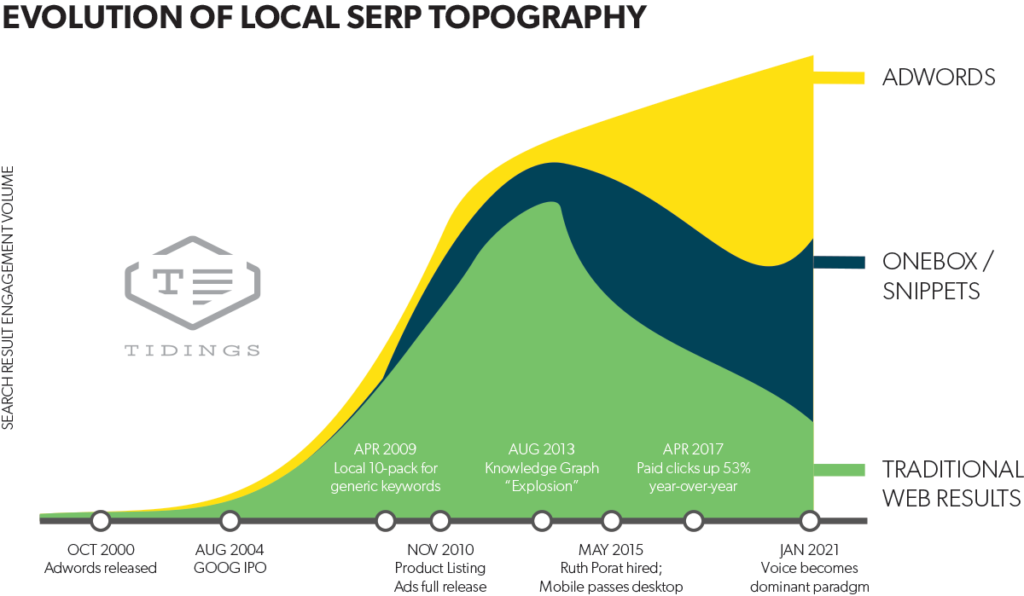
    One thing that’s certain in the world of search is that technology and user habits are always evolving. David Mihm recently wrote an excellent blog on the ever-changing landscape of search engines otherwise known as “SERP Topology.” We recently had the honor of hosting David as a guest speaker for a lunch & learn for the whole team. He provided us with some powerful insights about the evolution of Google. Here are some key takeaways.

    Local serp topography graph

    As you can see above, based on his predictions it is highly likely that Google search results will be more and more driven by paid advertising as opposed to traditional SEO in the next 5-10 years.

    Practically, this will impact your business in a few different ways. Some industries will continue to stay relevant with a traditional SEO approach, but for many, it will become a less effective strategy.

    If you’re a business owner, here are some things to keep in mind:

    1. What percentage of closed business is coming from digital marketing efforts?
    2. Where, specifically, are your leads coming from?
    3. How is your team converting those opportunities?

    Brand Awareness

    If you’re producing content, it will become increasingly important to promote that content using social platforms and other advertising options, such as Google Display Ads. Marketing your brand through ads will continue to be an important and useful strategy.

    Referrals

    The connection economy will continue to increase in importance. Who are the influencers in your industry online? Where are they? Find out what platforms the thought leaders are on and connect with them.

    Also, find out where your customers are hanging out. If it’s Facebook, then you should seriously consider developing a strong presence there.

    Lead Generation

    Organic SEO is very powerful, however, one of the downsides is that it can take a long time to grow results. Google ads are a great option to compliment SEO and content marketing strategies because you get instant feedback from your target audience. From there, you can take that feedback, find those great leads, and nurture them into customers.

    SEO

    Search engine optimization is not going away anytime soon. And, in the next 10 years, it will remain relevant for many industries. However, it won’t be quite as effective in the near future. As Google continues to generate the majority of its revenue from advertising expenditure, it inherently implies a push toward incentivizing businesses to use those tools.

    If you’d like to understand more about how to advertise your business online, or how you can best take advantage of SERP Topology, reach out here to chat with a strategist.

    Image:

    SERP Topology

  • Marketing Myths Small Business Owners Should Stop Believing

    When you’re running a small business, it’s often up to you or a member of a very small team to research and make all decisions for the business. And when you’re trying to allocate a marketing budget, being well informed is essential to the future of the business’ success. If you’re considering investing in SEO for your company but aren’t sure if it is going to pay off in the end, get the real facts about common SEO misconceptions.

    Myth 1: Only businesses of a certain size, in particular industries, or with certain audience demographics need a website.

    Some of you might be shaking your head at this one, but of the 500 small business marketers surveyed by highervisability.com, 20 percent said their company didn’t have a website. Having a website in today’s world is essential for getting found by customers, and everyone can benefit from one. SEO will help you get found by the right audience, no matter how niche your market may be, from HVAC companies and mom-and-pop shops to CNC engineers and doctors.

    Physician typing on a laptop keyboard

    Myth 2: Keyword stuffing and duplicate content are good SEO practices.

    While a majority of those surveyed believed copy-and-pasting content from other sites wasn’t ok, 12 percent didn’t see anything wrong with duplicating content from another site or page of your own site. When you copy from another person’s site, it’s plagiarism, and Google will penalize you for it. But even if it’s your own content repeating on different pages of the site, Google still flags it as duplicate content and therefore dings you for failing to provide new and useful information for your readers.

    Keyword stuffing was considered a good idea by 38 percent of responders, but this is another practice that will get you in trouble with Google. Keyword stuffing involves cramming a chosen keyword into your content as much as humanly possible, even if it makes the content sound stilted and unnatural. Not only will Google penalize your site for it, but it also makes things difficult for readers, and pleasing them is the most important thing at the end of the day.

    Myth 3: SEO is all about keyword rankings.

    Keyword rankings are obviously an important metric for gauging your site’s performance, but there’s more to SEO than sprinkling some keywords into your content and calling it a day. Content creation, link building, local search optimization, and technical aspects of your website, like page speed, are all necessary components of a well-rounded and robust SEO campaign.

    If you’re having trouble evaluating the technical side of your SEO, request a site audit from us.

    Myth 4: Social media is just for sharing pictures of my kids at the beach.

    19 percent of small businesses don’t have any social media presence. Of those 19 percent, only 35 percent are happy with their Google rankings. It then stands to reason that social media is a very important piece of the puzzle.

    Social media helps you promote your content, share industry news with your followers, show off a bit of your personality and your brand’s tone, and engage directly with your customers. It’s the personal touch that matters in today’s business world. Plus, social media lets you find your customers where they spend the most time.

    Myth 5: All of this should cost me less than $100 a month.

    SEO services are a marketing investment. And like all investments, you have to spend money to see money. According to Pigzilla, we’re in the middle of a pandemic where shady SEO companies are charging rock bottom prices and not delivering the kind of results their customers are hoping for. Positive results require consistent efforts in content creation and quality link building, not just a few tweaks to your site or a handful of spammy links. A reputable SEO company is charging you for their expertise in the industry coupled with a truly hands-on approach for your campaign. Even if your budget isn’t huge, a good company will tailor their work to give you the most bang for your buck.

    There’s a lot more to SEO than most small businesses realize. Whether you’re just starting to allocate some of your marketing budget to digital marketing or you’ve been burned by a bad SEO company in the past, talking to one of Search Influence’s sales executives can help you determine what your next best steps are for building an SEO campaign that will give you results.

  • Rookie Website Mistakes, Part 2: Not Allowing Google to See Your Website

    Congrats, you’ve finally created a website for your business! And in the last post in our Rookie Website Mistakes blog series, you even learned how to bring your site up to speed. Now’s the part where you pat yourself on the back and start thinking about how to work your way to the top of the first page in the search results.

    Well, hold your horses—Google’s really smart, but it’s not magic. Think of the search engine results pages (SERPs) as an insanely big library: if you’ve written a novel, the book doesn’t automatically appear in the correct place on the correct library shelf. You’d have to get someone to read it, decide what it’s about, and figure out how to catalog it somewhere in the existing shelves. In the same way, Google needs to actually “read” your website before it can make a decision about where it fits in in the SERPs.

    Main hall in Trinity College library - Search Influence

    And if you’ve accidentally prevented Google from reading your site at all, it has no way to fit it into its library. As a result, the “if you build it, they will come” mindset definitely doesn’t apply: potential customers won’t find you if your site isn’t showing up when they search for it. Failing to allow search engines to actually find your website is a very common rookie mistake when moving WordPress sites from staging to a live server, but a little knowledge of how Google works can help bring your site up to speed.

    How Does Google Find and “Read” Your Website?

    According to Verisign‘s Domain Name Industry Brief, there were approximately 330.6 million domain name registrations in the first quarter of this year alone. Google’s a huge company, but its employees don’t have time to read all of these new sites. Instead, they entrust that task to specialized bots, called “spiders,” “crawlers,” or “Googlebot,” that automatically discover your website and analyze its contents.

    These bots “crawl” websites by moving through one link to the next, bringing back information for the search engines. Google also uses these spiders to analyze updates to your site, but since you’re just starting out in the website ownership process, let’s focus on site discovery. “Indexing” is the process of discovering your site and deciding where it fits into Google’s library. A page has been indexed when Googlebot’s results have been recorded in Google’s index, or the massive database of the search engine, allowing the page to actually show up in the SERPs.

    One interesting thing to point out is that the terms “crawl” and “index” are related but not necessarily dependent on each other. In other words, just because a bot has visited a page doesn’t necessarily mean that the page has been indexed. Similarly, it’s possible for a page to be indexed without ever having been crawled (in rare cases).

    Door with bars and keep out sign - Search Influence

    What Happens When Googlebot Is Blocked?

    If Googlebot is unable to see what’s on your site, it means that no crawling and indexing is happening. This, in turn, might mean a loss of rankings in the SERPs.

    There are a few ways your site might be blocking Googlebot:

    • Firewalls – Using a firewall or DoS protection system is always best practice, but your systems might be recognizing Googlebot as a potential threat. Because Googlebot tends to make far more server requests than your average human user, the firewall on your site might flag this as threatening behavior, preventing the bots from crawling your website.
    • Intentional blocking – The webmaster of your site might intentionally block Googlebot in an attempt to control how the site is crawled and indexed.
    • DNS issues – Your DNS provider may be inadvertently blocking bots.

    Leave doormat - Search Influence

    How Do You Ensure That You Aren’t Telling Helpful Bots to “Get Lost”?

    Here are a few things to double check to be sure you’re putting out the welcome mat for your helpful crawlers.

    First things first: check for noindex meta tags, which basically tell bots “thanks, but no thanks.” It seems obvious, but removing a line of code may be all you need to do to get indexed.

    Next, check your robots.txt file. It’s not a mistake to use this file at the root of your site; when used effectively, it allows you to give bots exact direction as to which pages you want crawled and which bots you want to access your site. However, if you’re using it incorrectly, you might be blocking Googlebot from seeing your site at all. You can learn more about robots.txt here, and Google offers plenty of additional information to help you understand how to use robots.txt files effectively with Googlebot.

    You might also want to configure your URL parameters through Google Webmaster Tools to control Googlebot’s access without a loss of search ranking.

    Finally, if a firewall or any kind of bot blocking script is the culprit, you’ll need to manually remove the block. For DNS issues you can’t fix on your own, try contacting your DNS provider.

    How Long Does it Take Google to Crawl Your Site?

    Note that even after making these changes, you’ll need to give Google a few days (at least) to index your site—it won’t happen instantly. And once you’ve made sure Google is able to access your site for crawling and indexing, you can move forward by optimizing your website for spiders to make it easier to crawl. If you need help with that next step, our team would be happy to get you on the right track. Contact an expert from our team anytime.

    Stay tuned for our next entry in our blog series: Rookie Website Mistakes, Part 3: Your Site Isn’t Mobile Friendly.

    Images:

    Library

    Keep Out

    Doormat 

  • Rookie Website Mistakes, Part 1: Slow Loading Speed

    74 percent of customers will leave a website if it fails to load within 5 seconds. And the numbers don’t look too great even if your site is noticeably faster—according to Google engineers, anything slower than the blink of an eye, 400 milliseconds, can cause users to leave a page and search elsewhere. Google released their Caffeine update in 2010, placing importance on site speed for search ranking factors. With such a demand on site performance, it’s more important than ever that business owners and their partners understand not only why page speed is important but also what affects it and how to remedy a sluggish site.

    Snail crossing an asphalt road - Search Influence

    Why Is Speed Important for Search Factors?

    Overall site speed is based on a sample of different pages from the site. “Page speed” can be broken down either as “time to first byte” or “page load time.” The first of these, the time it takes for a browser to receive the first byte of information from the server, has been shown to correlate to search rankings. “Page load time” more noticeably affects the user experience, but it can also impact SEO.

    All of that hard work you’ve put into developing and designing your new site, implementing beautiful images, creating an intuitive navigation, and writing and implementing pages of content for users to scour—it can all mean nothing if your pages take longer to load than what has come to be expected. The longer someone waits for a page to load, the sooner he or she begins to look for other avenues to find a product, purchase a ticket, or make a reservation. And with the magnitude of resources available today, it’s only a matter of time until they leave your slow-loading site (bounce) and seek their information elsewhere via a new search.

    The average user doesn’t have time for your slow page to load, and rightly so. We shouldn’t be subjecting potential customers to a dull experience. We wait in traffic. We wait on elevators. We wait on our bread in the toaster. But when it comes to our web experience, we aren’t stuck in the ‘90s with pages that can’t possibly load any faster than 10 seconds. There are tools and practices at our fingerprints that can make your flashy new website lightning fast and more easily crawlable by search engines.

    Open exposure capture of cars driving on a road at night - Search Influence

    Page Performance Impacts User Experience

    Now, a slow loading page isn’t the be-all-end-all factor for search rankings. In fact, there are over 200 factors that go into search rankings. However, it can impact conversions and sales due to a poor user experience.

    When’s the last time you sat and waited for a page to load? How long until you gave up and tried a competitor that sells the same type of product or service? It’s worth repeating that users expect speed. Whether they’re searching on desktop or mobile (and most have been on mobile for close to two years), an inefficient website can frustrate users and result in lost business. So, what are some easy ways to make the user experience more friendly and eliminate high bounce rates that result from slow load times? Our developers can help diagnose more specific problems, but here are a few tips to get started:

    • Eliminate multiple pop-ups or spammy widgets used for sales on your site
    • Create smart site navigation to give users a clear path to a purchase
    • Implement direct calls to action with forms or buttons throughout your site

    There are other steps that can be made on the backend of your site that can help with load time, like limiting redirects, organizing your HTML, and compressing your images, but the above-mentioned tips are a step in right direction toward enhancing the way users will interact with your site.

    Co-workers sitting around a wooden table with electronic devices in hand - Search Influence

    Regain Potential Lost Conversions and Sales

    While load time might not be the biggest contributing factor to a poor search ranking, it can certainly contribute to a lower conversion rate. According to surveys done by Akamai and Gomez.com, 79 percent of web shoppers who have trouble with website performance say they won’t return to the site to buy again, and around 44 percent of them would tell a friend if they had a poor experience shopping online.

    In the same survey, they found that a 1-second delay in page response can result in a 7 percent reduction in conversions. To put that in a sales perspective, if an e-commerce site is making $100,000 per day, a 1-second page delay could potentially cost $2.5 million in lost sales every year. That’s a huge number for a 1-second delay. To give another example of a direct ROI, for every 1 second of speed improvement to Amazon’s website, their conversion rate went up 2 percent.

    For your landing pages to convert visitors into customers, you need to give them an enjoyable experience. The nice thing about doing technical work to decrease page load time is that it simultaneously benefits your bottom line. A faster, cleaner site means a higher likelihood that visitors will stay, peruse your content, fill out a form, and eventually convert into a customer.

    A Faster Site Helps You Serve Your Customers Better

    While there are many mistakes that rookies make when building a website, starting a marketing campaign, and attempting to grow their brand, not recognizing key SEO factors that slow down their pages’ load times is one of the more frequent culprits.

    Stay tuned for our next entry in our blog series: Rookie Mistakes, Part 2: Not Allowing Your Site to Be Found by Search Engines.

    Contact an expert from our team if page load time has been an issue for your business’s or institution’s website.

    Images:

    Snail

  • How to Use Google’s New Quality Score Columns to Drive Lower Costs Per Conversion

    If you’re a hands-on business owner using Google AdWords, you’ve no doubt come across the term “Quality Score.” You know it’s an important metric for the success of your account, but what does it mean? What factors contribute to this important number? And how does improving the overall quality of your account result in more leads? In this blog post, I’ll take you through a quick introduction to Google’s Quality Score and several strategies for monitoring, analyzing, and optimizing this metric.

    What Is Quality Score?

    According to Google, “Quality Score is intended to give you a general sense of the quality of your ads. The 1-10 Quality Score reported for each keyword in your account is an estimate of the quality of your ads and the landing pages triggered by them.” The main components of a keyword’s Quality Score are the Expected CTR for your account’s keywords and how your performance stacks up against that expectation, Landing Page Experience, and Ad Relevance. As your account runs and your keywords begin to receive impressions and clicks, Google ranks each keyword as Above Average, Average, or Below Average for the following criteria:

    • Ad Relevance – This component quantifies how closely related your keyword is to the ads in your ad group.
    • Landing Page Experience – Google rates your site based on the relevancy of your keywords to your landing page and the ease of navigation. Can the user find what they’re looking for on your landing page?
    • Expected CTR – AdWords knows the historical CTR of your ads. Using this information, the platform determines an Expected CTR for a given keyword and each keyword is then measured by how close actual performance is to that pre-determined expected performance.

    A keyword’s Quality Score used to be based on the keyword’s historical performance on Google until it achieved a significant number of impressions in your account. However, now Google reports a null score until that threshold has been reached. Once the keyword receives a significant number of impressions, its Quality Score will start to reflect how it performs in your account, and historical performance will be a lesser factor.

    Theoretically, your account level Quality Score is the cumulative result of the historical performance of all keywords in an account. It would be a painstaking process to capture this information on an individual keyword basis to determine the average Quality Score across the account. Luckily, there are wonderful geniuses who have developed scripts to do this for us. Google doesn’t confirm this Quality Score’s existence, but it’s generally accepted that there are different levels of Quality Score other than the visible keyword level Quality Score.

    Why Is Quality Score important?

    The components of Quality Score along with your set bid and the expected impact of your ad extensions are factors in the calculation of your Ad Rank. Your Ad Rank determines the position in which your ad will show as well as how much you pay for each click. Improvements in your Quality Score can lead directly to decreased Costs per Click. Without raising your monthly digital advertising budget, reduced CPCs allow you to generate more traffic to your site. The additional, cheaper traffic to your site creates more opportunities for Conversions at a reduced cost.

    Where Can I Find the Quality Score?

    Whether you’re using the new AdWords experience or the old interface, navigation is similar. However, there are a few additional functions currently only available in the old AdWords that we’ll explore in a later section.

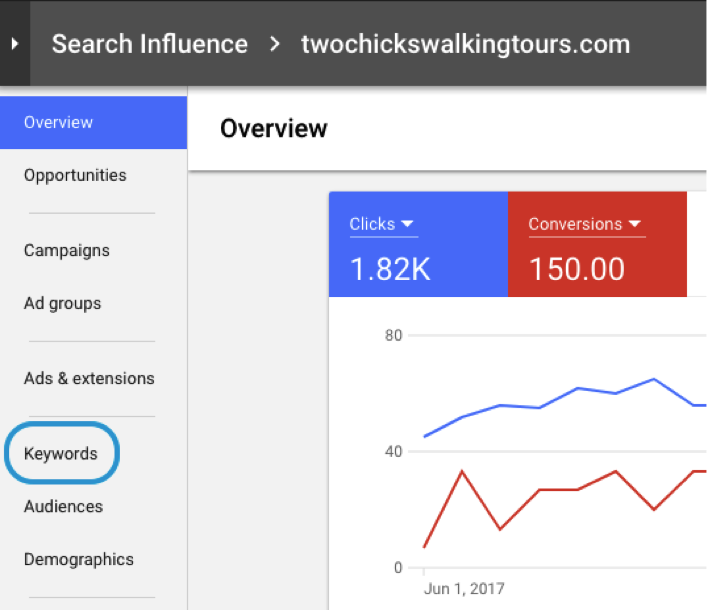
    1. Navigate to AdWords and select Keywords in the page menu.

    Screenshot of a keywords tab in Google AdWords - Search Influence

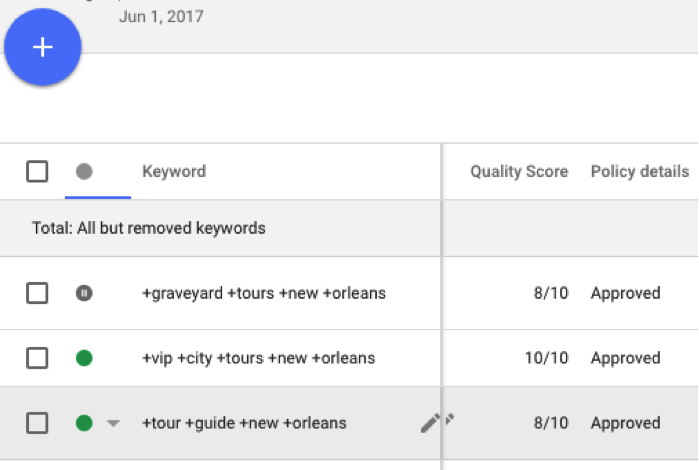
    1. If not already present, you may need to modify your columns to include the Quality Score column.
    2. Now you will be able to compare Quality Score across keywords.

    Screenshot of a Quality Score comparison in AdWords - Search Influence

    • You can sort by Quality Score or use the filter function to view only keywords with a specific Quality Score threshold.

    What Is a “Good” Quality Score?

    If a keyword’s Quality Score is 1-3, this is cause for concern. You’ll want to identify specific criteria needing improvement. If the score is 4-5, you can definitely make a couple of improvements, but you’ll want to focus on improving the areas that will have the biggest impact on your overall Quality Score. If the keyword’s Quality Score is 6 and above, the keyword is performing quite well, and you might only make minor adjustments.

    How Can I Diagnose My Quality Score?

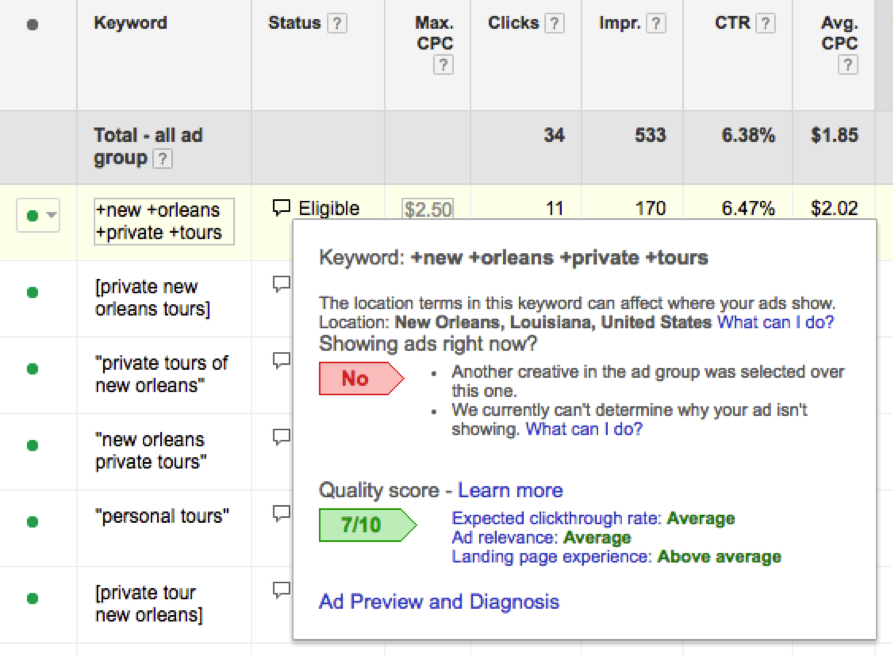
    You know that a Quality Score of 2 isn’t great, but how do you figure out where to start with improvements? In the old AdWords, you used to have to hover over the speech bubble next to the keyword to see Google’s rating of each of the three factors.

    Screenshot of keyword analysis in AdWords - Search Influence

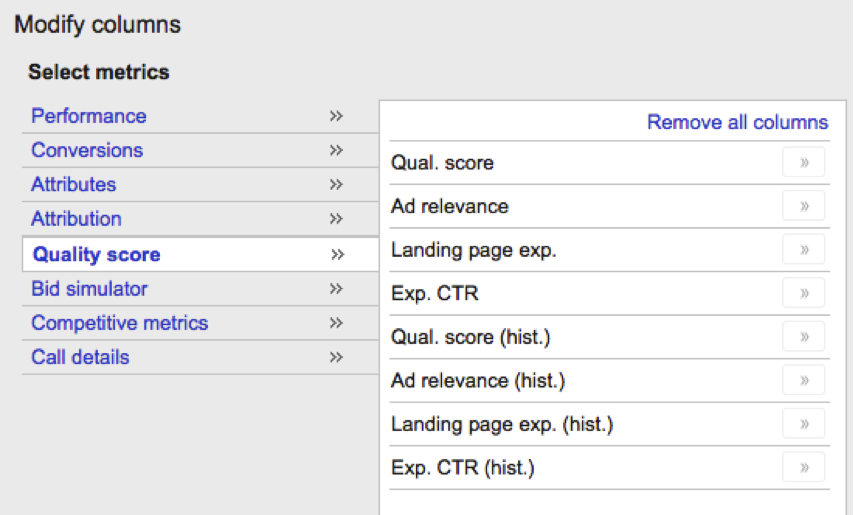
    This is extremely time-consuming. In the past, we’ve used a script to make this process a little more automated, but in early May of 2017, Google released brand new Quality Score columns to make the large-scale analysis of this data even easier. In the old AdWords, modify your columns and review the parameters available under the Quality Score heading. Unfortunately, these columns are not yet available in the new AdWords experience as of this posting.

    Screenshot of Quality Score columns - Search Influence

    Google now allows you to add columns to see your criteria rankings—Above Average, Average, or Below Average—within the platform. If a keyword has Above Average ratings for 2 out of 3 factors, you can easily identify which factor is having the greatest impact on the Quality Score for that keyword. There are also historical measurements of these metrics that can help you determine whether changes to your account positively or negatively affect the various components of Quality Score. For instance, reviewing historical Quality Score performance alongside current performance can help you determine if the new ads you implemented improved Ad Relevance or if the edits to your Landing Page contributed to improving the overall experience.

    How Can I Improve My Quality Score?

    So now that you’ve identified areas for improvement, what steps can you take to fix these issues? If your keyword has a Below Average Expected CTR, this is the easiest element of Quality Score to improve. Here are some strategies for improving this criterion:

    • Review the Search Term Report for this keyword for opportunities to implement more relevant keywords that users are searching and clicking in place of the keyword with a low expected CTR.
    • This could also mean that your ads are not compelling enough for people to click through. A quick way to give your account a natural CTR boost is including Dynamic Keyword Insertion (DKI) in your ads.

    If Ad Relevance is an issue in your account:

    • An ad is deemed relevant to a keyword when the keyword appears in the ad. Review your ads alongside your keyword to determine if the keyword in question is highly relevant to the ads for that ad group.
    • As I’ve already mentioned, account organization is key. Would the keyword be more relevant to another existing ad group? Is the keyword important enough to warrant the creation of a separate ad group?
    • You can also duplicate an existing ad and edit the copy to include a keyword with a low Quality Score to try and give that keyword a boost.
    • Ensure that your ads are answers to the queries the ad group most often receives. Reviewing your Search Term reports can help you figure out the information that users are most curious about.
    • Google also takes into account keyword density on the site, so improving your Landing Page could also be a factor to improving ad relevance.

    If your Landing Page Experience is subpar:

    • Don’t ignore the impact of your site’s mobile landing page experience!
    • Make sure that your keywords and ads are relevant to the content on the landing page.
    • Implement image optimizations like meta text, title tags, and alt text to include relevant keywords.
    • Brainstorm better CTAs for your buttons.
    • Improve your content.
    • Create more visible conversion points, like a highlighted click to call button on mobile, a click to call button at the top of the body content, and a corresponding form below.
    • Work to improve the navigation experience.
    • Forms or downloads on the landing page should clearly indicate what will happen if clicked by the user.

    You can’t have a “set it and forget it” mindset when it comes to Quality Score, especially considering the potential impact on your overall Cost per Conversion. I recommend performing a quarterly Quality Score analysis on your account and using insights from that analysis to drive the next quarter’s account optimizations, pacing out your changes, and using the historical Quality Score columns to judge the impact of your optimizations. If you have any other Quality Score tips, tricks or insights, please leave us a comment. If you’re new to AdWords and need some help setting up your account for success, please reach out to our team. We would love to help you optimize your potential!

  • Success Story: ALCC American Language

    Learn how we helped ALCC American Language new inquiries while delivering higher site traffic and more frequent engagement on social media.

    The Situation

    The client is a language school located in New York City whose mission is to help international and local students learn English in a supportive atmosphere. The client’s goal was to increase the number of enrolled students and increase their number of fans on Facebook.

    The Approach

    Our strategy included a mix of campaigns that would ultimately increase the volume of leads via forms, calls, and social media engagement by making the client more visible and accessible online.

    We did this using the following campaigns:

    The Outcome

    Paid Search:

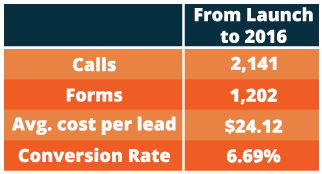
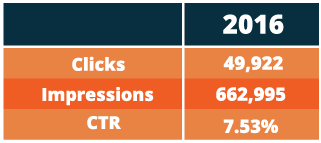
    When analyzing their paid ads campaign, even 2 years after initial launch, ALCC American Language saw continued growth in new student inquiries and conversion rate. During 2016, they averaged 279 new inquiries per month (179 calls and 100 website contact form submissions). Testing and tuning the campaign resulted in a conversion rate of 6.69%, which is an increase from the start of their campaign in 2013 at 2%. Additionally, in 2016 the paid ads averaged 55,250 impressions and 4,160 clicks per month.

    Graphic image of increased inquiries - Search Influence

    Graphic image of increased clicks, impressions, and CTR - Search Influence

    Facebook:

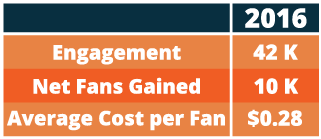
    Looking year over year from 2015 to 2016, the client saw a significant rise in Facebook engagement. Their fans increased from 10,000 to 18,000 fans and the engagement, which includes reactions, comments, and shares, increased from 34,000 to 42,000.

    Graphic image of social media engagement increase - Search Influence

    Search Engine Optimization:

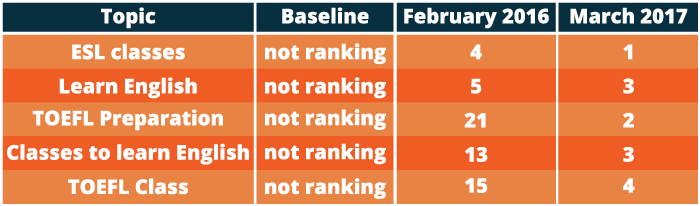
    Through methods such as monthly blogging, press releases, user experience improvements, authority building, and helpful website content, the client gained increased Google rankings for top key search terms and overall website traffic. At the start of ALCC American Language’s campaign, they weren’t ranking for industry relevant keywords and common search terms. As of this year, they are ranking in the top 5 positions of Google for the majority of their important keywords. Additionally, they saw a 57% increase in their goal conversion rate from their total website traffic and a 38% increase in web page visits per session from their organic website traffic when comparing 2015-2015 to 2016-2017.

    Graphic image of keyword ranking for ALCC - Search Influence

    By using a comprehensive, custom strategy, we were able to help ALCC American Language bring in more prospective students so that they can continue to do what they do best—help those striving to learn English. Interested in learning how we can help improve your online presence? Reach out to us at any time.

  • Google Attribution Allows Clear, Seamless Campaign Analysis for Marketers

    How do you know which of your interactions with a customer mattered the most? How do you measure an organic search that someone performed for a product on one device compared to an ad clicked right before the point of purchase on another? Well, Google set out to solve some of these and other problems that marketers face daily with their newest rollout from their Marketing Next event—Google Attribution. Now, marketers can finally begin to answer the age-old question that is typically at the forefront of their minds—is my marketing working?

    How Google Attribution Streamlines Data

    Google Attribution uses machine learning and data to help marketers measure the impact of each of their marketing touch points, across multiple channels, and across multiple devices. It uses data that’s already there from Adwords and Google Analytics; it just takes that data and shows you how each customer moved through their buyer’s journey and attributes those conversions respectively. It provides a single view of the path to purchase to help marketers learn what is actually working compared to what seems to be working.

    “The aim of Google Attribution is to simplify the complex problem of multichannel, multi-device attribution by leveraging data advertisers already have in Google Analytics, AdWords, or DoubleClick Search,” said Kishore Kanakamedela, director of product management at Google.

    To give an example of how a richer lens of an entire campaign was able to better benefit a business, Virgin Holidays utilized store sales measurement to look at store sales after users clicked on a search ad:

    “Virgin Holidays discovered that when it factors in store sales, its search campaigns generate double the profit compared to looking at online KPIs alone. A customer purchasing in-store after clicking on a search ad is also three times more profitable than an online conversion.”

    Google already rolled out a store visits measurement in 2014. They’ll be rolling out store sales measurements as yet another touch point that marketers can analyze through Google Attribution.

    And possibly the best part? Attribution is free for anyone to use. It’s in its beta version right now and will be more readily available this fall.

    A Shift Away From Last Click

    Until now, many marketers were left to use last-click attribution to measure the value of their efforts. With last click, the reward for the conversion often went to the last touch point that the user made, often with a sale after a click on an ad. This could lead to false impressions about the effectiveness of an ad campaign versus display ads, organic search, social, email affiliates, and many other interactions that a customer made with a business along the buyer’s journey. Maybe organic search is actually more important display ads or vice versa.

    With Attribution, users can see how effective each step of a campaign is instead of just pointing to the last click of an ad before purchase. There are so many micro-moments that happen on the path to purchase. Now, marketers can have a more accurate view of business, and in turn, can then update bids or move budgets between channels based on such results.

    Image Of Woman Typing On A Computer With Media App Logos Flying Around - Search Influence

    This move to a more holistic view of a campaign makes sense. Video ads, banner ads, carousel ads, emails, social campaigns, and all other types of digital materials work together to drive solid leads to become conversions, so why would it make sense for only the final ad to get all of the credit and influence a business’ campaign and budgeting decisions?

    There is already a slew of companies that have seen the benefit of implementing the data-driven results of Attribution. Check out the success stories that Google has touted so far.

    Eliminating Waste and Annoyance With Unique Reach

    Most people use multiple devices to access their multimedia channels, whether that be a phone, a tablet, a smart TV, or a computer. For example, let’s say you’re shopping for a new laptop. You may first see a search ad when searching on your phone and then find a display ad while on your tablet. Then, you’ll come across a shopping ad by the time you decide to purchase the laptop on your current computer that needs replacing. According to Bill Kee, Google’s Group Product Manager for Attribution presenting at Marketing Next, “30% of people use 5 or more devices today. If you reach each of those devices three times, you’ll reach that person 15 times.” It’s safe to say that’s a bit of an overkill.

    With Unique Reach reporting in AdWords and DoubleClick, marketers will be able to measure how many people were shown display and video ads. It will show unique users and their average impressions. This helps marketers better understand how many people they reached in their target audience and how many times they reached them. This will allow businesses to find any wasted budget in over-saturated placements and, more importantly, better please their potential customers by not wasting their time with endless ads.

    People are expecting a simple, frictionless user experience on their path to purchase. Unique Reach is, well, unique in that it puts the customer right at the heart of the journey. Unique Reach is available in AdWords now and will be available in DoubleClick in the coming months.

    Image Of Person Sitting Out By The Water At Sunset - Search Influence

    The Customer Is the New Channel

    Instead of the mindset of measuring your reports within online or offline channels, Google has highlighted the importance of recognizing the customer or user as the new channel. The line between being online and offline has disappeared.

    Consumer expectations are higher than ever. So, the best way to meet those expectations is to try our best to understand consumers’ intent. Google also shared their Surveys 360 product connected to AdWords and Google Optimize. It helps marketers deliver more relevant ads with targeted surveys that seek to understand a customer’s intent along with their buyer’s journey.

    Marketers are already working hard to develop a strategy that brings conversions for their potential and current clients; Google Attribution helps them work smarter with data. By using their machine learning to put context into the consumer journeys, this new tool should help marketers create a simple, more streamlined campaign that their users will love and respond to. To quote Sridhar Ramaswamy, Senior Vice President of Ads and Commerce at Google and opening speaker at the Marketing Next event: “To really assist people, we need to become smart in how we use data to assist them.”

    Interested in learning how we can better market your business? Reach out to us at any time.


    Image Sources:

    Google Marketing Next

    Woman Checking Her Phone At Sunset