Tag: local search

  • WordPress vs Google Sites: Why You Should Be Using WordPress

    WordPress is by far the most popular website management system in the world and shows no sign of slowing down at all. What started in 2003 as a PHP and MySQL based open source software has turned into a community of millions of users worldwide that all collaborate to make website management easier and more intuitive. What this means is that all of their site files are available for download at their website for free. Uploading the files to your web server allows you to connect a domain and start using WordPress for your own site. Just one look at this breakdown from Fresh Consulting shows the dominance of WordPress in the CMS market.
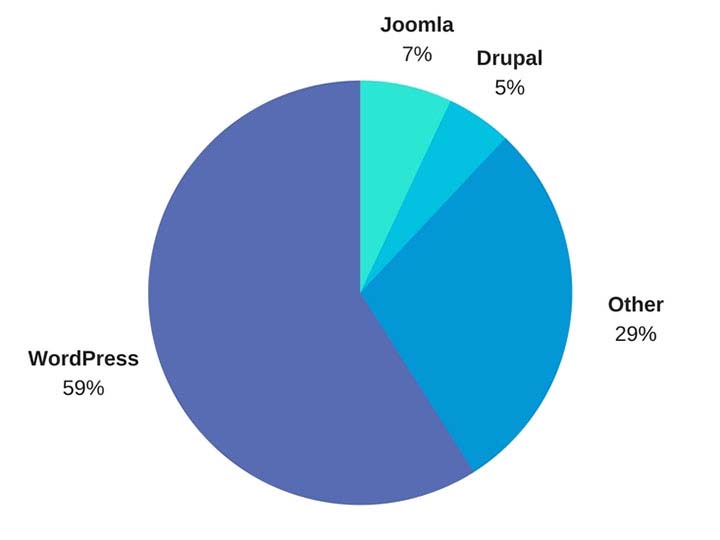
    WordPress Market Share represented in a pie graph - Search Influence

    So Why Should I Use WordPress?

    1. It’s Free

    Well, first and foremost, it’s free. As previously outlined, upload the files to a web server and you can work from there. Immediately cutting down on a business cost at the very beginning is always a bonus.

    1. Constantly Updated Options for Themes and Plug-ins

    In addition to that, it is also an insanely popular open source software, which means that millions of users are creating and updating new themes and plugins to help customize your website experience as both an administrator and for users visiting your website. Did I mention it was free?

    1. Easy to Use Editor

    The ease of use of WordPress is also another big selling point of using this platform. For the non-developers out there, WordPress offers a native “what you see is what you get” (WYSIWIG) editor that is easy to use and gives you complete control of the page.

    1. Media Storage & Access

    It also preserves the capability to all sorts of media such as videos, audio clips, and images and has a very convenient file uploader for non-developers who aren’t using an FTP GUI such as Filezilla. This is a convenient way for developers to upload small batches of files that might not necessarily require connecting directly to the server.

    1. For Developers: Open Source Customization

    For the developers, a completely open source code allows complete customization if desired, and easy access to the template files makes minor edits quick and easy. What this means is that if you do happen to have a developer or developers on your team, they won’t necessarily have to struggle and create workarounds in many situations—all of the code is available to them from the beginning. In addition to that, there is also a bustling community of users that create all sorts of templates and plugins that are all open source as well.

    1. WooCommerce for Ecommerce

    Sure, building and creating a website is one thing, but WordPress also offers the WooCommerce plugin, the world’s most popular E-Commerce platform that currently powers 30 percent of the world’s E-Commerce websites. So if your desire is more on the side of selling goods as opposed to brand awareness, then WordPress has you covered there. WooCommerce is free and comes ready to sell right out of the box with loads of free extensions, including one that provides full Google Analytics integration whether you’re using the standard or enhanced Google Analytics E-Commerce. When configured properly, this extension can show detailed data, such as drop off points in your sales funnel.

    woocommerce logo - Search Influence

    WordPress logo - Search Influence

    1. Search Engine Optimization

    Probably the most important feature of WordPress is the Search Engine Optimization (SEO) is a cinch. So easy that Matt Cutts gave them a shoutout in one of his presentations when he was the head of the Web Spam Team at Google. The easiest way to tackle this solution is by adding a free SEO plugin, such as Yoast SEO or All in One SEO, which gives you complete control over your title tags and meta descriptions. Your developer can also easily implement structured data (the code that creates the answers and fancy cards in Google search results) in JSON-LD, which is Google’s preferred format. It’s worth mentioning that some other CMSs don’t play nice with this code and will strip it from your pages. Optimizing your massive images that you may have taken of your business or product with your fancy DSLR camera is an easy task with a plugin like Smush Image Compression and Optimization to help your site maintain its speed, which is something Google definitely cares about dearly.

    How Does WordPress Compare to Other Content Management Systems?

    1. Flexibility

    The “ease of use” selling point for non-developers was originally one of the main selling points of WordPress, but a lot of other Content Management Systems (CMS) are beginning to catch up in that area. Comparatively speaking, a CMS at face value should have a high level of accessibility for people who don’t necessarily know HTML, CSS, JavaScript, PHP, or any other coding languages that are used online. CMSs such as Wix and SquareSpace have begun to gain a lot of steam in recent years, primarily due to large advertising budgets, but still have yet to catch up to the popularity of WordPress. A large part of the continued success of WordPress is the amount of flexibility it offers.

    1. Open Source Software

    As I stated before, WordPress and all of its code is open source, meaning that it is available to the general public. The platform itself is coded in PHP and MySQL, which allows developers to have a field day, creating beautiful templates and all sorts of cool effects that they want for websites. In addition to that, open source code helps create larger communities of users that can help with any sort of idea that you can think of, rather than having to simply rely on WordPress documentation. This community effort leads to a very expansive forum where WordPress users can oftentimes find the answer to any question they may have or join in and offer some unique solutions that they may have come up with.

    A lot of WordPress critics often parrot that a WordPress site isn’t much fresh out of the box, which I personally find to be very disingenuous. SquareSpace and Wix both have a strong selling point for making beautiful websites, while WordPress users see the Twenty Seventeen theme and more than likely cringe at its visage. However, anyone can navigate to the free themes that WordPress offers. After finding one that you like, implementation takes about 5 minutes and 3 clicks of your mouse. This makes it very easy to dispel the myth of all WordPress sites being ugly.

    How Can Other CMSs Be Problematic?

    Here at Search Influence, I’m on the Web Development team where, in coordination with our Account Management team, I implement our proprietary tracking system and on-site optimizations, in addition to the various other projects that may come along. Here are a few instances I’ve found in which other CMSs can present problems.

    1. No Access to Source Code

    Having access to the source code of a website is imperative for accurate implementation of anything on a website. So, it’s safe to say that I’ve come across quite a few issues with some of WordPress’ competitors, which creates abounding frustrations.

    1. Removal of Custom Coding

    One example that I see a lot involves CMSs that strip schema from their web pages, whether it’s coded in JSON-LD or in the microdata format. With Google being very mobile and local-focused, not being able to add structured data to your website means that you’re probably missing out on having your business showing up on the knowledge graph on the right-hand side of the search results. Another quick example would be CMSs that strip title tags and alt text from images. Google uses alt text to determine what an image is and then possibly add it to its image results. The title tags are used for accessibility purposes on the user end.

    Ron Swanson from Parks and Recreation throwing a computer into a dumpster - Search Influence

    1. Lack of a Community

    WordPress has a technically apt community that is generous with their knowledge. In addition to the 50,000+ plugins available, WordPress.com hosts a forum for users with 40,000+ topic threads. It’s hard to match that level of technically sophisticated users available as a resource.

    1. Faulty Built-in Integrations

    Just recently, I was setting up E-Commerce tracking on a SquareSpace site that was using the SquareSpace store. After some searching that took much longer than it would’ve taken to find the solution in the WordPress community, I found that SquareSpace has Google Analytics E-Commerce tracking integrated into their platform. Seems easy enough—drop in the tracking code and let the data flow like a river. After completing a test purchase, my data populated perfectly and I gave myself a pat on the back and wished the client a great campaign.

    Turns out, the integration was completely busted and stopped tracking. I ended up having to set everything up manually. Also, SquareSpace is a pretty poor platform to setup product data and all the other fancy bells and whistles that can be added via Google Analytics. To top that off, I found that the source of the problem is that their storefront uses the classic Google Analytics code, which was officially discontinued in 2012!

    To the contrary, with a WordPress installation, the WooCommerce plugin and the Google Analytics extension can be added to pull all sorts of fancy data, like product data, cart data, dropoff data, etc. The setup for WooCommerce is very clean, and I haven’t had any issues tracking all of the data or the data mysteriously disappearing on me. Even if you don’t have any experience with a particular plugin, the popular plugins have a slew of documentation written by the creators as well as large communities focused on making sure everything works as intended.

    So How Does One Take Advantage of This Powerful Tool?

    Self-Hosted vs. Hosted Through WordPress.com

    WordPress.com does offer its own hosting service, though I will say a business owner should spring for the “business” plan if they plan on hosting through WordPress.com. If not, I highly recommend self-hosting if there is a developer available. Self-hosting truly unlocks the full potential of WordPress, with the ability to completely customize every single aspect of your website. With server access, the possibilities are nearly limitless. Having an open source code that a developer can harness the power of, a community of millions of innovators to back it, and a level of ease that non-developers can take advantage of makes WordPress, in my opinion, the best CMS currently on the market.

    Choosing a CMS platform while either creating a site or updating your old site is very crucial to the success of the website. Getting looped into a poor CMS and linking your domain to it for a year or more may feel like you are stuck with it until your contract is over. But if it’s costing you business, it may be worth the switching cost!

    We’ve helped many businesses transition to WordPress, sometimes keeping the same general feel of their current site design. If this all seems daunting to you, reach out to us for support. We’ll work with you to figure out the best plan of action. Don’t risk missing out on valuable conversions or leads because of the limitations of a clunky CMS that doesn’t allow you to optimize the potential of your website.

    Images:

    WordPress Market Share

    WooCommerce

    WordPress

    Ron Swanson – Computer Trash

  • #FreelanceFriday: Freelancing Tips for College Students

    This blog is part of our Freelance Friday series, where we discuss everything and anything related to freelancers. For more freelance information, tips, and trends, follow us on Twitter.

    College is expensive. Tuition is sky high, textbooks cost an arm and a leg, and everyone needs a little extra income to go out and fully enjoy the college experience. Even with scholarships and saving accounts, it is nearly impossible to avoid some kind of financial strain during these years pursuing higher education.

    So, with time and experience typically at a premium for students, are there any legitimate ways to make some extra money on the side?

    Yes! Freelancing!

    Freelancers, digital nomads, work-at-home parents, and all independent workers currently comprise 33% of the U.S. workforce (approximately 53 million people). Freelancing is an umbrella term that encompasses writers, editors, graphic artists, designers, photographers, videographers, and many more people with specialized, in-demand skills. And, what’s great about freelancing is that it is open to anyone, including cash-strapped students.

    President Obama Asking You To Join The Movement - Search Influence

    Freelancing is a great way to get relevant work experience, which–whether through part-time jobs, internships, or freelancing–is incredibly important for a college student.

    Where freelancing offers a distinct advantage over a normal job is in its flexibility. Most jobs have a fixed schedule, whereas freelancing (in most cases) offers you the chance to work on your own schedule. It also allows you to work from anywhere–your dorm room, apartment, library, classroom, or when you go home for the holidays.

    If you decide to give freelancing a shot (and you totally should!), here are a few things you need to consider first, as well as a few things you need to do to position yourself for success.

    Figure out How Much Extra Time You Have

    Life as a college student is busy. You are already balancing classes, labs, papers, exams, presentations, and various extracurricular activities. Adding freelancing to the mix is only going to make you busier.

    A commitment to weekends and holidays will help you as a freelancer, but no matter when you work, prioritization and productivity are key. Because you are a student, schoolwork should also come first, but beyond that, you will need to figure out how to find more time in your schedule to freelance. You can prioritize your freelance work based on things like deadline, pay, research/planning/setup, estimated time to complete, and other markers.

    Determine What You’re Good At

    Your freelancing side gig does not need to relate to your major, but it can’t hurt. Freelancing opportunities can fall into all, one, or a combination of three things: something you are passionate about, something you are knowledgeable or skilled in, or something that is in high demand.

    Every topic with a web presence needs content creators. There are tons of niche markets you can work your way through, especially as a writer. If you really want to flourish, especially at first, stick to what you know best, but don’t be intimidated by exploring something new. College is the time when you should be exploring new things to help discover what you want to do in life.

    Identify Your Goals

    What do you want to gain by freelancing? More money? Of course. Experience? Always a plus. But what else are you looking to gain from this? Are you looking for a gateway to a full-time job? Do you just want to try out a field before committing to it? Will you continue freelancing after college?

    These are all great questions to ask yourself before and during your time as a freelancer. The answers should not dictate whether or not you do it, but they should provide guidance and purpose to what you are doing.

    Get the Right Tools

    What do you need to be successful as a freelancer? For most, a computer and reliable internet access should go without saying, but what else?

    Well, that depends on the field you are operating in. For some, that is all you need. The internet can help with the rest. Other more specialized skills will need more–graphic designers may need the latest software programs, while photographers will need a good camera, lighting, and other equipment.

    Know what you need upfront and familiarize yourself with these tools. Freelancing may be a side job for many, but that doesn’t make it any less important when it comes to planning, preparedness, professionalism, and time management.

    Understand You Will Have to Start From the Bottom

    This is a tough pill for many to swallow. Like most jobs, you have to start at the entry-level position. It’s a nearly unavoidable rite of passage. Accept it and work your way up. Thankfully, ascending the freelance food chain is typically easier and quicker than climbing the corporate ladder.

    It is important to build your skills and constantly improve your services and presentation. The more you freelance, the more you will learn how things are done, what you should and should never do, etc. Reaching out to other freelancers for advice and support is always a great idea.

    Betty White Informing Us That She's On The Twitter And On Facebook - Search Influence

    Self-Promote

    Once you have been working for a while, it is important to create a portfolio of your best work as an example of your skill and proficiency. This is a crucial tool for landing other gigs. You can even include some pertinent school assignments as well, especially when you are just starting out.

    Creating a personalized website or blog as well as engaging on social media are also great ways to showcase past projects and seek out new work. Many freelancers today use Twitter and Facebook to stay up to date on industry news and find relevant opportunities.

    You shouldn’t feel bad about this kind of self-promotion. It is a crucial part of freelancing. And speaking of the importance of self-promotion, check out our freelance Twitter account. We frequently share the latest freelancing trends, tips, and best practices.

    Build Your Professional & Adult Skills

    Freelancing can help you build valuable workplace skills. Just like school, deadlines are extremely important, as are promptness and efficiency. Similarly, freelancing often calls for collaboration with a wide variety of people. While you may already be using these skills in school, freelancing will allow you to put better hone them in a more professional setting.

    As an independent contractor, you will learn to deal directly with your clients and gain valuable experience handling a variety of situations as they arise. You will also learn more about contracts as well as taxes.

    Treat Freelancing Like a Real Job

    Many people have made this mistake, especially those who have never freelanced before. They contract for a little while before quickly realizing that it is a real job. You are getting paid to provide a skill or service. You have to consider deadlines and often collaborate with others. How is that not a real job?

    In essence, freelancing is even more than just a job. You are essentially starting your own microbusiness. If you go into it knowing this, you can somewhat avoid the learning curve and work through any missteps early on that could cause you to lose clients, doubt your own abilities, or even quit.

    Use Your Freelance Career to Jumpstart Your Post-College Career

    Because freelancing is a real job, don’t be hesitant to include it on your resume and discuss it a significant positive in job interviews after you graduate. The work you’ve done has given you experience in the workplace–use that to your advantage! Be confident about your transition into the job market. You will have more experience than your fellow graduates.

    Of course, you can also continue, and likely expand, your freelancing business after school. You have spent the time and effort to build these relationships and skills, why not continue utilizing them!


    Image Sources:

    President Obama

    School Supplies Animation

  • Meet & Greet : Your Buyer Personas and What You Should Know About Them

    When you ask a small business owner what kind of customers they want to attract, it’s not uncommon to get an answer like “everyone” or “anyone who can use our service.” When you’re creating marketing content, however, it’s not often possible to create something that will appeal to every single person on the planet—some people simply won’t be interested. For example, it doesn’t make a lot of sense to try and convince a college-age renter to install a new roof. It’s a more efficient use of your marketing resources to zero-in on people who are most likely going to be your customers. The best way to do this is to create buyer personas. Doing this will help you to define exactly who you are trying to reach.

    Zoolander Who Am I Image - Search Influence

    What is a buyer persona?

    A buyer persona is the Everyman of your customers. It combines all the characteristics your customers have in common and puts them into one fictionalized person who represents your average consumer. The buyer persona is based on real information about your clientele, and it defines their age range, gender, income, common pain-points, and what they’re hoping to get from your product. It also combines your demographics with psychographics to build a buying character that is pretty much human.

    Why are buyer personas important?

    Having a well put-together buyer persona helps two people: you and your potential customer. According to a survey by Rapt Media, 63% of consumers would think more positively about a brand that gave them content they found valuable, interesting, and relevant. Whether you’re reaching out via a direct mail campaign, emails, or Facebook, no one wants to be stalked by content they’re not interested in.

    Wedding Crashers Image Of Gloria Saying I'd Find You - Search Influence

    By focusing your marketing efforts on your buyer persona, you’re ensuring your message gets in front of people who are most likely interested, without alienating those who aren’t.

    At the same time, knowing your buyer persona means you can give your customers exactly what they’re looking for, ensuring they trust you when it’s time to make a decision. For example, if your buyer persona is an on-the-go business traveler who doesn’t want to waste time during the research stage, you can present them with content in an easy to digest infographic. The potential customer is now more likely to engage with your content and come back to you next time they need a problem solved.

    How can I build a persona for my business?

    Your buyer persona should be based on who your real customers actually are. You can do this by directly surveying your current or past customers. Ask them about their background and demographics, as well as more probing questions like how they heard about your product, why they bought it, how they’re using it, and what (if any) difficulties or reservations they’ve had since their purchase.

    Talking directly to your customers is the preferred method, but if you’re not getting enough information, supplement it with searches on sites like Quora and industry forums to see what kinds of information people are seeking. Content Marketing Institute recommends you ask these three questions when searching: 1) What is the first thing my customer thinks of in the morning; 2) What are their last thoughts at night; and 3) Why is this so. The first thoughts they think about will reflect their daily to-dos and frustrations.

    Image Of Titus Telling Kimmy That He Already Did Something Today - Search Influence

    By the end of the day, they’ll start considering the macro level of what they’re doing with their life. The ‘why’ gives context to the first two questions. If you end up getting a couple of different answers for some of the above questions, that’s totally okay. It just means you probably have more than one buyer persona.

    What does a great buyer persona look like?

    A strong buyer persona will read much like a character description from a play or TV show. Describe Olivia Pope from the TV show “Scandal.” What does she do for a living? How old is she? Does she live in a city, the country, or a suburb? East Coast, West Coast, the South, or Midwest? What kind of clothes does she wear and what is her favorite pastime? With her line of work and hobbies, what kind of products would she be most interested in and find to be most helpful? This is a short list, but you get the picture. Buyer personas completely flesh out your customer base, creating what may look like a complete person or personality. The more detailed, the better. The sharper your assessment of your client base, the better targeted your marketing and the more likely you will attract your most likely customer.

    Image Of Scandal's Olivia Pope Saying It's Handled - Search Influence

    Need an expert to help you build your buyer persona? We offer a variety of great services to target your customers and engage them online. For help creating a digital marketing campaign that speaks directly to your potential customers, contact our team!


    Images:

    Zoolander

    Wedding Crashers stalker

    Titus To-Do List

    Olivia Pope

  • Rookie Website Mistakes, Part 6: You Abandon Good Work When Replacing an Old Site

    So, you’re launching a new spiffy, user-friendly website? Or, maybe you’re migrating your site from an HTTP to HTTPS secure domain? To make the launch as successful as possible, there are a few important steps you (or more likely your web developer) should take on the backend to facilitate a seamless transition.

    Changing your URL requires a strategic plan. Without it, you could end up with lost links, dreaded 404 errors, and annoyed customers. If you’ve built some authority for your site, you also need to manage your page rankings during the process. No one wants to watch traffic plummet when they launch a new site.

    While it may not be as exciting as creating the design or building out new pages, here are four absolutely necessary administrative steps to take during the launch of your new site.

    Set Up 301 Redirects

    A 301 redirect will automatically transfer users from the old URL to the new page on the website that replaces it. So, when someone types in your old domain they will still end up on your beautiful, newly-designed (or newly-secure) website.

    While there are other options for redirecting links, 301 redirects are the safest and most trusted way to permanently redirect pages without diluting PageRank on Google. In fact, Moz estimates that 90–99 percent of ranking power will pass from the old page to the new one with the use of a 301 redirect. This is because Google bots recognize 301s as a permanent change, indicating that the original content from the old URL has found a new home on the redirected page.

    There is no limit to the number of 301s you can use per site, so you can (and should) redirect all of your old, viable content to new URLs for your new site in order to retain all of the rank power (also known as link juice) from your old site.

    To make this happen, extract all the URLs from your content management system or export the URLs from Google Analytics to create a list of the URLs on your existing site. Don’t forget to include landing pages from any paid search campaigns you’re running, as Google will lower your quality score for running ads with broken links.

    Once you have this list, you can proceed to the next item on our list, mapping out your new site.

    Image of Lost Duck With Map - Search Influence

    Update Site Maps

    As you learned in part four of this series, you’ll obviously want to have more than one page on your new site. An updated sitemap should be the foundation for your new site design. Start by creating a list of all the pages you know you want to include in your new site. Your old site’s URL list (see above) can provide a foundation for essential pages that you know you want to keep, especially the pages on the old site with inbound links that help improve rankings.

    Map out all planned pages that correspond to pages on your old site so you can set up redirects for all of those pages. You’ll also want to take note of key analytics on legacy pages to use for comparison once the new site is launched.

    The following are some ideas for what you should track for your benchmark:

    • Organic traffic and page visits
    • Bounce rate
    • Page loading speed
    • Conversions per page
    • Rankings for priority keywords

    From here, you’re ready to create a robots.txt file and an XML sitemap to give Google and other search engines the right information to crawl your new site. If any of the steps so far have left you scratching your head or frantically googling SEO jargon, one of our friendly tech gurus can help you out!

    Recycle Existing Content & Optimize for SEO

    Creating a new website from scratch is already a big undertaking—don’t recreate the circle. Be sure you bring over your existing title tags, meta descriptions, and page headings and ensure all new content includes these essential SEO elements. This is also the perfect time to audit your existing content to ensure that it meets the latest best practices. Are multiple pages using the same headline (h1) or meta descriptions? Do pages have broken internal or external links? Are images too big and slowing download time?

    Use what works, fix what doesn’t. Your content for each page should be unique, use keywords naturally (without stuffing), and include logical internal links.

    Don’t Forget About Google Analytics

    As you launch the new site, it will be more important than ever to track analytics and ensure that everything is functioning like it should. Migrating to a new domain is a huge, detailed undertaking, and little problems are likely to arise.

    Image of Graphs, Charts, and Analytics - Search Influence

    Make sure that the Google Analytics tracking code is properly installed on each page of the new site and collecting data. With your collected benchmark data, you can compare traffic and rankings for the new site and check and adjust as needed. Tools like Screaming Frog can also help you check for 404 errors on the new site and alert you to any issues with pages being indexed improperly via your robots.txt file.


    Images:

    Lost Duck

  • Rookie Website Mistakes, Part 5: Weak Content

    Welcome to Part 5 of our series on Rookie Website Mistakes. In Part 4, we learned about single page website design and how they often put form over function much to the detriment of your SEO and the user experience. While we all want a shiny new website with all the bows and whistles, it’s more important to focus on quality content that will give the users what they want. Having weak content can prevent search engines from exploring your site and leave visitors with more questions than answers. Avoid this mistake by following the tips below.

    Hit the Sweet Spot of Content Length

    Unfortunately, there’s no magic number for how long your content should be. Because I can’t tell you that precisely 253 words will make your page number one, I’ll instead give you the frustrating advice my high school English teacher gave me–your content should be as long as it needs to be. Obnoxious, right? But, what it comes down to is that your content should provide all of the related information on the given topic you’ve chosen for the page.

    Very broad topics, like ‘what is family law,’ are going to be longer, while very specific topics, such as ‘features of Victorian-style roofing,’ might not have as many relevant details. Generally, more technical content like a plastic surgery procedure outline will be 500–700 words, while an ‘About Us’ page will be more around 250.

    If you’re not sure how much you should write on a given topic, scope out your competitor’s pages to see how much they’ve written. If they’ve written 500 words, chances are you can build out your own content to be more competitive than theirs.

    That being said, you don’t want to over-inflate your content just to make it longer. The other half of ‘as long as it needs to be’ is that it shouldn’t be any more than necessary to make your point. At Search Influence, we’ve named this superfluous content ‘fluff”; it provides the same amount of nutrition to your content as fluffy cotton candy. Fluffy content makes you sound less authoritative on the subject and doesn’t actually provide the reader with important or new information.

    Focus on EAT Content

    Google uses the acronym EAT to describe the characteristics of high-quality content: Expertise, Authoritativeness, and Trustworthiness. The opposite of fluff is EAT content. Producing EAT content gives you a better reputation in the eyes of Google, and it can help you rank above competitors writing on the same topic who don’t meet the EAT requirements.

    Of all the EAT qualifications, expertise sounds the scariest. When you’re a marketer or a small business owner, you might not feel like an expert on everything you want to write about, and you may not have a degree or certificate that proves you’re an expert. For some topics, like medical and financial, Google expects that you have some sort of formal training to back up your knowledge on the subject. But for most industries, “everyday expertise” that you’ve acquired from working in the field or having a first-hand experience is sufficient. Google evaluates expertise by looking at how useful and detailed the content is, so the goal should be to write what you know, and your expertise will shine through.

    You can also increase your EAT levels by incorporating specific statistics, studies, and other information from reputable sources. Make sure to cite the source and explain the findings in your own words if you can. You don’t need to be overly formal about this, either; saying something like “According to the CDC, 43 percent of sudden, unexpected infant deaths are caused by SIDs” would be sufficient.

    Save Your Spam for Quick Lunches

    Keyword stuffing is an old SEO practice that involves using a keyphrase as many times as humanly possible in the content, even if it doesn’t make sense in context. Sometimes, the keyphrase would even be hidden in the page footers and the background of the page! Google has caught on to this and will penalize sites they think are providing a poor user experience by being spammy. Focus on writing clear content that is centered on a theme and answers the reader’s potential questions. Then you can go back and naturally incorporate a few keyphrases throughout the content.

    Image of SPAM on a conveyor belt - search influence

    Try to pick long-tail keywords that are more specific. For example, instead of using the broad keyphrase ‘botox,’ you could use variations of the long-tail keyphrase ‘does Botox work on crows feet.’ Google is clever enough to pick up on variations, so you can use the exact match long-tail keyword from the example above, and then use ‘Botox for crows feet,’ ‘crows feet Botox,’ ‘treating crows feet with Botox,’ and even ‘Botox around the eyes’ throughout the content to keep things natural.

    If you’re unsure what keyphrases you should be using and trying to rank for, Search Influence can build you build a keyword strategy, track your keyword rankings, and even write content for you. Call us to discuss your content goals!

    Put Some Words Behind the Scenes

    While putting keywords in all sorts of nooks and crannies of your site is considered spam, there are some parts of the backend of your website where you should optimize for keyphrases. Make sure you check out this previous blog for an explanation of what the backend of the site means if you’re unsure what I’m talking about.

    Readers can’t see the metadata of a page when they’re viewing your content, but search engines can see it. It works as a sort of behind the scenes shortcut to what your page is about. Your title tag, meta description, and image alt text should all have relevant keyphrases to solidify ‘this is what this page is about.’

    But metadata is useful for people, too. The title tag and meta description appear in the search results; they encourage the viewer to click through to the page by showing them what kind of information they should expect from your content. Alt text on images will appear in place of an image if for some reason the image won’t display. It is also used by screen readers to describe an image to visually-impaired users. Without alt text, users and search engines could be missing out on crucial information.

    Craft a Killer Call-to-Action

    The final piece of really strong content is a great call-to-action. Now that visitors have read your content, what do you want them to do? This should be a specific action and related to the content they’ve just read. If you’re a cobbler and I’ve just read your page on all the different styles of shoes you can cobble, I should have a pretty clear idea if my shoes can be cobbled. So now, I may want to learn more about the process, what it will cost, or how I can go about making an appointment to have my specific shoe assessed. The call-to-action will direct me to something I will find useful and that will still serve your business needs and entice me to eventually come in to the shop. The goal is to use the call-to-action to convert.

    Strong content will build trust with the reader, provide them with valuable information, and help drive them to buy your product or service. Putting words on the page just for the sake of it could actually drive them away. Download our whitepaper for more information, and tune in next time to learn about mistakes made when going to replace an old website.

    Image Of 6 Rookie Mistakes White Page Graphic For Search Influence - Search Influence


    Images:

    SPAM

  • How Patients Are Searching for Doctors Online: Make It Easier for Them to Find You

    The digital world has infiltrated every facet of our lives, including our health care. Yet, many physicians don’t know how to best compete in this online marketplace. The sheer amount of information on the internet has empowered patients to choose physicians with discretion and change care providers if they don’t have a good experience.

    By placing your clinic’s online presence in the same digital spaces that your potential patients occupy, you can increase the likelihood that they’ll choose you for their next appointment.

    Help Them Find Their Diagnosis

    Patients come into an appointment with a pretty robust working knowledge of all the possible rare tropical diseases they could have and a comprehensive list of all side effects of each potential treatment. How do they have all of this information? They Googled it.

    While some people still go straight to their mom, most first enter their symptoms into a search engine or medical-focused portal like WebMD. They investigate all the possible causes of the symptoms, available treatment options, and further advice on what kind of care they should seek. By creating content that answers these questions, you can position yourself as an authority on the subject and build trust with the readers.

    Claim Your Listings

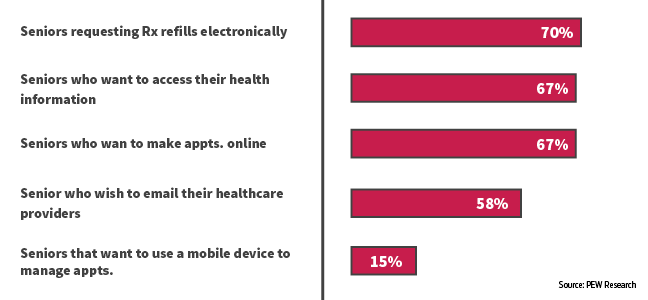
    Once people have a good idea of what could be wrong with them and what kind of medical care they need, they might not immediately make an appointment. Instead, they may return to search engines to do further research. They search facilities and doctors nearby, check to see which providers are in their insurance network, and read reviews. This chart from Gravitate shows some of the queries people are searching.

    Having information about specializations, board certifications, awards, presented papers, and other selling points on your website is useful, but often patients are looking at third-party sites like Healthgrades for reviews from other patients. You only have control over the content of your website, but if you claim your listings on some of these sites, you can update them to have an up-to-date address and phone number, a link to your website, a list of current physicians and specialties, and even responses to negative reviews.

    For help claiming your listings or other healthcare marketing services, contact Search Influence.

    Put a Face to Your Practice

    When you claim your listings, it’s a good idea to list all of your physicians and some of their basic information. You can also provide detailed bios of each doctor on your website. Yext conducted a study on how people search for physicians and found that 76.3% of patients search for individual providers, while only 29.9% research facilities.

    Patients want to feel like a partner in their own healthcare, so finding a physician who is personable, knowledgeable, a good listener, and willing to go out of their way to help the patient is important; a strong doctor-patient relationship may even be favored over a cutting-edge facility if the patient is seeing a different doctor every time or feels more like a lab rat than a person.

    By giving information about the people behind your practice, you’ll appear in front of a much wider audience and get conversions through your personality and expertise.

    Take Advantage of Social Media

    Americans, especially the younger generations, get the majority of their news and information from social media, for good or ill. But even older people use social media to share interesting articles and connect with people who share similar experiences and worldviews. By sharing important and relevant medical information, you can help educate patients and combat misinformation. 

    If you consistently share quality content, potential patients will trust you and see you as an authority within your field. While they may not run off and make an appointment immediately, you will be in their minds already the next time they get sick. Social media is also a great way to continue to engage with patients you’ve seen before by responding to comments and questions. This way, they will feel like you still care for them as a person, even after their treatment has ended. Just be sure to maintain patient privacy.

    By finding patients where they are on the internet and providing them with quality content that answers their questions, you can position yourself as a source for medical information and quality care. Contact our team for help building a digital marketing campaign suited to the unique needs of the medical industry.


    Images:

    Gravitate Graph

  • Turning Links Into Lemonade: Your Guide to Juicy Internal Linking

    You’ve likely heard of internal links. In terms of SEO jargon (which there’s a lot to sift through), they’re pretty straightforward. Internal links are just the hyperlinks on your site that point to other pages within the same domain. For example, your homepage content probably has internal links pointing readers to your primary service or product pages. While a blog post might incorporate internal links to other posts that elaborate on a similar topic—or better yet, a service page that helps users solve the problem focused on in the blog post.

    The navigation menu for your website is also a structure for internal linking to ensure that all of your pages are connected and easily crawlable by search engines. It’s important that all new pages you create are linked back to your homepage using this navigation. For the purpose of this post, however, we’re going to assume your navigation is set up and focus on the internal links you incorporate into the actual content of your pages and posts.

    Choose Internal Links for Users & Crawlers

    Internal links are easy to understand, but don’t underestimate their power—both in terms of SEO ranking and an improved user experience.

    A person's hand squeezing a lemon

    When you properly use internal links, you’re spreading ranking power (also known as “link juice”) and authority from your site to that specific page, which improves the chances that it will also rank in search results. Internal links act as road signs, telling search engines which pages to crawl next on your site. On top of that, when you use highly relevant content links that match users’ search queries you’re confirming your authority.

    Internal links also plot the course for users (humans) to navigate your website and find the most relevant content to meet their needs. This keeps them on your site longer and improves the user experience. Just imagine that a prospective customer finds your blog post about steps to take when you get a flat tire, then within the post, they find a strategically-placed link leading them to your tire company’s product page about how to find replacement tires. With the right internal linking, you’ve given that person the information they needed and even offered a solution.

    So what does it mean to properly use internal links? There’s not always a hard and fast rule for when to link, how much to link, where to link, and the like. But this guide can offer a primer for getting started.

    Choose Appropriate Anchor Text

    The anchor text for your internal link is simply the clickable words you select to turn into your hyperlink. You’ll want to think about your selection both in terms of the context of the sentence and how the anchor text reads on its own for skimmers. There’s no character count limitation for anchor text, but you should aim to keep it as concise as possible without sacrificing clarity. Your reader should know where they are headed before they click the link.

    Landing them on a confusing or off-topic page that does not align with your anchor text disrupts the user experience. While keywords or topics for the content are a great first choice for relevant anchor text, Moz recommends using a variety of words throughout the post that most naturally fit for your anchor text. That’s because Google’s algorithm will take note of pages with too many keywords in anchor text and flag them as spam.

    Instead, opt for descriptive, partial-match anchor text that contains part of the target topic within the text. For example, build a comprehensive SEO strategy with Search Influence. This link goes to our SEO services page, which you could probably guess based on the anchor text.

    When in doubt, double-check that your anchor text meets the following criteria:

    1. The anchor text fits naturally within the rest of the content on the page
    2. There is zero mystery about where the user will land when they click the link
    3. Anchor text selection is diverse across all the content on the page

     Opt for Relevancy Over Quantity

    We can’t overemphasize this enough: choose natural, relevant pages to link to within your content. Don’t force a link. Google and your users will catch on quick, end of story.

    You should also avoid linking to the homepage or contact page. Those pages already have plenty of link juice. If your reader is already on an internal page within your site, why would they want to backtrack to your homepage? Instead, do as Kissmetrics recommends and reach for a 1:1 ratio of deep internal links and main navigation links. If your page is content heavy, then you should link out to other content-rich pages that elaborate on your topic and keep your reader engaged.

    Animation of hand counting to five

    While there is no magic number for how many links you need on a page, you can aim for about 2-4 contextual, natural links that make sense and address topics that would interest your reader. Just like with writing calls-to-action, you should assess each linking opportunity from the perspective of your prospective buyer to see if the target page is a good fit.

    Audit Existing Content for Linking Best Practices

    Keeping your content fresh with new internal links is an important step because it notifies Google to crawl the page again, increasing your ranking opportunities. You can also make sure that your inventory of content remains up-to-date and relevant for readers. We recommend building a schedule for updating content on a regular basis, with priority given to posts that cover topics for which you’re most interested in ranking. If you’re a plastic surgeon, that might mean auditing all of your existing posts about breast augmentation and liposuction if those are your top two procedures.

    When you update a page, we recommend checking for necessary updates, adding fresh content in the opening paragraph, then naturally incorporating internal links to any new related content. If you recently added pages about breast augmentation FAQs and post-surgery healing, then you’ll want to ensure those pages have link juice from other breast augmentation pages and posts on your site.

    Tools like Moz’s Open Site Explorer allow you to see how many internal links are going back to each page on your site. This will give you a holistic view of your domain to see how you can move more link juice to specific pages that cover topics related to those top-priority ranking terms.

    Of course, sorting through these tools and creating a dynamic strategy for link building takes a dedicated effort. If you’re short on time but eager to improve your link profile, contact us to chat with an expert.


    Images:

    Lemon

    Counting

  • The Small(er) Screen: How Smart Businesses Attract Customers on YouTube

    Remember those cheesy local ads that used to be on TV all the time? Here’s a New Orleans classic. It’s memorable and fun to watch, but TV ads have their shortcomings, specifically cost and targeting. TV is also starting to lose its biggest advantage: the ability to reach a wide audience. According to research compiled by The Atlantic, streaming services have eaten away at the presence of traditional TV, causing a drop of 25% in viewership among adults aged 18-49 since 2010. As a result, more and more small businesses are choosing to advertise online. However, videos are still a great way to promote your business. On average, research suggests that videos are five times more engaging than text or image ads.

    Old TV sitting in weeds - Search Influence

    Basics of YouTube Advertising

    Over the past few weeks, many of us here at Search Influence have worked toward becoming certified or recertified in Google’s wide range of advertising platforms. Google constantly updates its advertising features and search algorithms, which is why we’re always educating ourselves on the most recent best practices and information. Part of maintaining our status as a Premier Google Partner is consistently demonstrating our expertise in all of its advertising networks.

    Most recently, we have been working on certifications in Google’s Video Advertising platform. Businesses can place their video ads on YouTube and Google’s Display network. Let’s focus specifically on YouTube’s Trueview in-stream ads. These are the ads that run before a video on YouTube. Viewers can choose to skip the ad after several seconds, which allows them to indicate their interest in the ads.

    YouTube reaches more people between the ages of 18-49 on their mobile phones than any TV network, even during the prime time slot of 8-11 p.m. Advertising on YouTube is available at a fraction of the cost of a 30-second TV ad. Plus, most smartphones have cameras that make shooting professional-quality videos much easier to do on your own.

    Benefits of YouTube Ads

    As I mentioned earlier, viewers can skip an in-stream ad after five seconds. YouTube only charges for an ad if someone watches it for at least 30 seconds. This prevents advertisers from wasting money on people who aren’t interested in their services. It also provides advertisers with quick feedback on the placement of their ads. No one will engage with an ad that isn’t relevant to them.

    About 60% of people watch YouTube on their phone, but they don’t just use their phones to watch videos. 91% of Americans turn to their phones when trying to solve a problem, which presents business owners with the perfect opportunity to advertise.

    Man using cell phone - Search Influence

    To give a concrete example, picture Jim. Jim is thirty years old and lives on the third floor of his building. His sink sprang a leak last weekend, and it’s only gotten worse since then. Jim uses his phone to search “how to fix a leaky sink” and watches the first YouTube video he sees. With the right keywords and location targeting, the ad for your plumbing company can be featured right before the video, prompting Jim to call you to schedule an appointment instead of spending all day trying to fix his leaky sink. Utilizing this feature is an easy way to convert your viewers into paying customers.

    Keeping that in mind, make sure your site is mobile-friendly. This blog post can help you ensure that your website is optimized for people browsing on their smartphones.

    What Does This Mean to You?

    Advertising on YouTube can be a powerful tool for any business, but an ad campaign’s results depend on its execution. Google provides numerous study guides to help people learn how to make the most of their advertising networks; but most business owners don’t have enough time to read through hours of material about negative keywords, bidding options, and ad rotations. Fortunately, we are here to help. Reach out to one of our experts to learn more about video ads.


    Images:

    Sad TV

    Man Using Phone

  • How to Spiel Like Spielberg: Using Videos to Showcase Your Business

    How to Spiel Like Spielberg - Search Influence

    YouTube changed history when it was created in 2005, allowing businesses and individuals to upload personal videos that had the potential to impact the world. Today, video dominates with four times as many customers preferring to watch a video about a business than reading content about it. If video has that much influence, businesses should consider the impact of having customized ads on YouTube. In addition to having a greater social media presence, an investment in online advertising increases your visibility, often consistently delivering qualified leads for your business. This combination is ultimately the best of both worlds.

    Grow Your Business With Our YouTube Ads Webinar

    The Search Influence team invites you to join us for a new webinar on how to showcase your small business through YouTube ads. With such a large audience at your fingertips, it is incredibly vital for your business to have a presence on this platform.

    In the webinar, you will learn:

    • Best practices and how to use video for your business
    • How to promote your business using video content
    • How video influences purchase behavior

    Grab the Attention of Your Most Ideal Client Base

    Our experts will discuss content diversity and techniques for offering a variety of educational, thought-provoking, and engaging visuals for current and potential clients. We will also share resources and tools for creating high quality videos that fit your budget. Feel like you don’t know much about professional videography? Our webinar will discuss best practices for making your video, from concept and production to branding and messaging. We will even share information on the best places to publish your video once it is complete.

    Finding your audience is just as important as creating the video itself. We’ll dive deep into the world of YouTube ads, providing you with details on how to target your client base, determine the stage of the customer journey they are in, and analyze and track leads. These tips will help you to generate buzz around your video content and capture your ideal audience across screens and devices.

    Contact one of our experts to learn how you can enhance your current marketing strategies.

    Image:

    Mobile Video

  • Rookie Website Mistakes, Part 4: You Have a Single Page Website

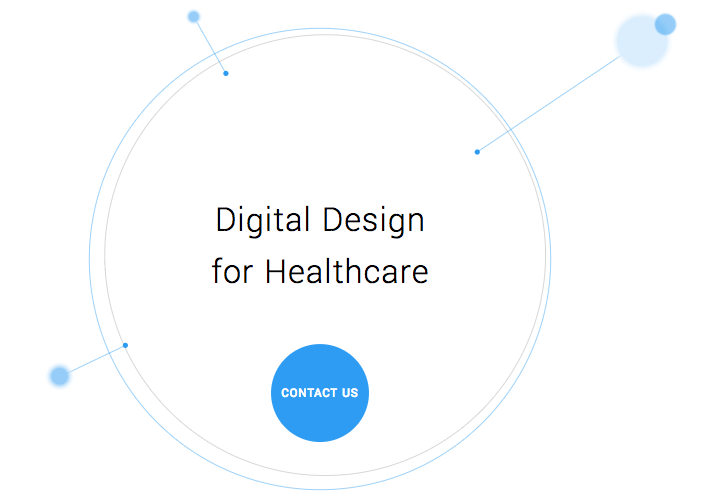
    Single page websites are very popular right now with web designers. With so many new ways to develop websites, they’ve become a unique and scroll-friendly way for users to interact with a company in a way that they’re used to (cue the token image of people scrolling through phones). And, to be fair, they can be quite beautiful. For example, take this design from 415-Agency, a San Francisco-based design firm that works with healthcare companies to make their digital products user-friendly, seamless, and as they put it, “awesomely good looking.”

    Image Of Screenshot of Digital Design for Healthcare One-Pager - Search Influence

    It’s an understatement to say that ton of work went into this site—it won them an honorable mention award from Awwwards, an organization that gives awards for the best designs, talent, and web dev agencies across the world. I’m a huge fan of exciting visual content, interactive graphics, and designs that enthrall. But, where some entrepreneurs get into trouble is when they try to manage a killer single page website while also optimizing it for SEO. They may come to discover that, for all its glitz and beauty, they’re the only ones actually finding it online.

    Photo Of Stock Of Boxes - Search Influence

    Form Must Follow Function

    Just as the customer is always the top priority, your website should follow that same line of logic. When thinking of how to design your website, think of not just how users will react to the visuals, but also how they will eventually interact with the site’s navigation. Give them clear avenues for finding more information, ordering products, or exploring your blog or testimonials. While a single-pager may seem simpler, it can often be easier to get lost and frustrated with trying to find a relevant page of content. To quote marketing guru Neil Patel, “website usefulness is more important than website beauty.”

    If a user comes to your site and thinks, “wow,” then give your web designer a bonus or yourself a pat on the back. But, the more important thing you should worry about is if their next word they is, “how?” Users should know how to interact with your site pretty easily. If they don’t know what to do or how to do it, then your site is harming you, not helping you. This can also lead to high bounce rates—users will eventually get frustrated and leave your site for one with better navigation.

    Another thing that can contribute to high bounce rates from your one-page design? Slow load times. I wrote about this in a previous blog in this series, but it’s worth mentioning here as well. Whether you’re using Flash (which, please don’t) or not, data-heavy load times due to unoptimized, large images that occupy your page’s whole screen can strangle your page load times.

    Single Page Websites Lack the Opportunity for Detail Laden Content

    Single page websites don’t have the space to allow for specific, rich content. From a user perspective, this limits the opportunity to provide a visitor with detailed, relevant content on topics they want to learn more about. Instead, they’re likely only able to view around a paragraph on specific topics. From an SEO perspective, this also gives search engines fewer opportunities to crawl your site for content that can help you move up in rankings while asserting yourself as an authority on your subject. It puts a great amount of pressure on a small amount of words. And, if you do manage to get a lot of content onto a single page, it ends up looking like it’s fighting for space.

    Image Of Post-It Notes - Search Influence

    Google likes to see that you’re updating your site with relevant content. If you have a single page site, you could make the argument that new content could be added to the bottom, creating an endless scroll of text and images. But, that method still doesn’t address the problem of not allowing search engines to crawl multiple pages of relevant content, and it also creates a headache of a user experience for visitors.

    By building out pages for your content to live, you give visitors designated, clean spaces with which they can explore your services, products, or ideas (blog posts) to their heart’s content. They don’t have to scroll for a minute or two to find your latest blog post, and search crawlers can find it easier, too.

    Forget About Performing Wide Keyword Targeting

    Since single page sites are generally designed around one main concept, the opportunity for using multiple keywords is very limited. With a multi-page site, every page has a chance to introduce a new topic or genre that can include different types of keywords that target different users and open up multiple avenues for ranking.

    With a single page site, it becomes extremely difficult to rank for varying keywords. For example, say you’re an owner of an HVAC company. You provide installations and repairs for furnaces, A/C systems, ductless A/C, water heaters, as well as air quality testing. By building separate pages for each of those services, you have an opportunity to move them each up in Google’s rankings, all while showing an increase in your authority. Putting all of your content in one page is like putting all of your keyword goals in one basket and hoping Google magically picks them up.

    Missed Opportunities for Quality Tracking

    Having multiple pages means multiple opportunities to track user behavior. You can track if someone spends 5 seconds or 5 minutes on a page about one of your services. With that valuable data, you can then focus your goals on what pages need work to bring in more visitors and convert them into customers. Obviously, this would be a difficult task for a single page site. The data showing time spent by your users will be very general, leaving you unable to tell what they love and what they dislike.

    Are There Examples of Single Page Designs That Work?

    There should and will always be design diversity on the internet. And sometimes, a single page site may work for you. For instance, take this site made by firm Gin Lane for GE that explores everything about the inside of volcanoes. Not only is the site visually satisfying, filled with video and interactive graphics, but the scroll feature of a single page makes sense because you’re literally venturing down into a volcano. Educational sites like this can have the luxury of not worrying about how SEO-friendly their content is because their main goal is to inform, not sell a product or service. Also, it doesn’t hurt that GE has the budget to build a site like this.

    Image of Screenshot of Volcanoes Single Page Website for GE - Search Influence

    Another example of a single page site working to your advantage can be when you’re utilizing it as a promotion. FBC Creative Tech Design created a site for FOX’s upcoming show, “The Gifted,” a show based on the X-men series of comics. The site, using the fictional “Sentinel Services” organization from the show, details the reasons why people should get tested for the “x-gene.” There have been numerous pre-launch sites built to create a buzz around upcoming movies or shows, and this is a fantastic way to build awareness. They’re almost like temporary landing pages. It’s worth noting again that it’s no coincidence that some of the better single-pagers are tied to large organizations—they simply have the budget to pull it off.

    Combining the Storytelling Approach of Single-Pagers Into Traditional Navigation Sites

    There’s no denying that some single page websites create curiosity. They can encourage the user to explore by simply scrolling instead of clicking, and they (ideally) tell a story about their company along the way. Businesses looking to wow users with a cool site while also being optimized for SEO should try to incorporate this same type of organic curiosity into a multiple-page, traditional navigation website. It’s completely possible. Take this blueprint of a popular WordPress design scheme from Undsgn—Uncode.
    Make each page a rewarding experience for users, where they can sit and really get comfortable with your content. If you design your multi-page site with the same goal of clean content without a lot of clutter and clear calls to action, then you’ll achieve a lot of the same aesthetic ideals of a single-pager, and with better SEO capabilities! Also, consider using visual content on your pages, like animation headers and background video. Just make sure they’re optimized so that they don’t slow down your load times.

    The ultimate decision on whether or not you choose a single page website for your business will be up to you. Every website is different; it may work for you. But, it will also be that much trickier to see your site move up in Google’s eyes and, inevitably, in rankings. If you decide that more than one page fits your business, you should learn more about SEO services which are imperative to the health of your website.

    Stay tuned for our next blog in the series, Rookie Website Mistakes, Part 5: The Content Is Weak.


    Images:

    Digital Design for Healthcare

    Volcanoes

    Blog Masonry