Tag: Facebook

  • How to React to Facebook Reactions: All Your Business Needs to Know

    Here is my take on what businesses and marketers need to know about Reactions and how the change will impact our data.

    How is Facebook tracking Reaction data?

    • Right now, Facebook is including all Reactions bundled together for the metrics on “Likes” in ads, and in the top level of Page Insights.
    • It’s also good to note that “Reactions are treated the same as Likes for ads delivery (ex: Loves carry no extra weight than Likes in the auction).”
    • Until Facebook (or a social media analytics software company) rolls out a more efficient way to look at the individual Reaction data, it’s going to need to be done manually.

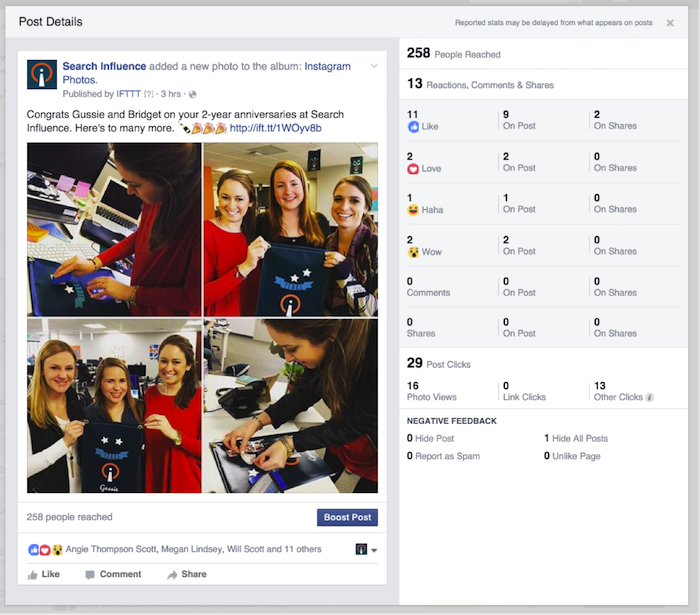
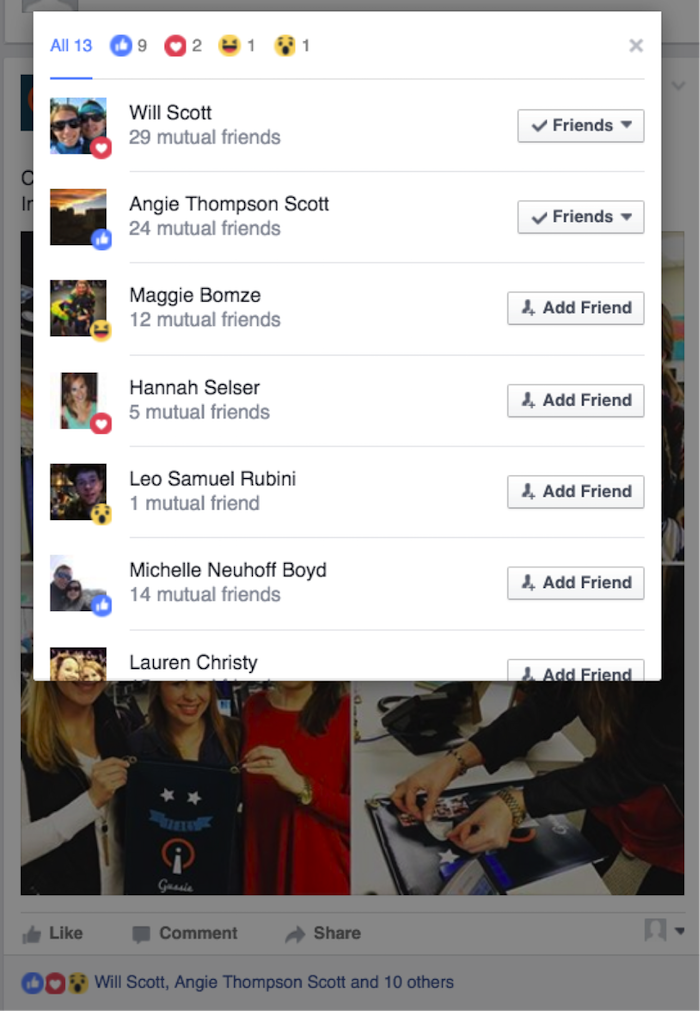
    Let’s check out the different ways we can view data in this example of a post with 13 total Reactions (9 Likes, 2 Loves, 1 Haha, and 1 Wow):

    • To see the Reactions from individual Facebook users, click on the liked row of names at the bottom of the post from your Page’s Timeline:
    MB 3

    • To see total reactions on the broadest level, check out the Posts section on your Page’s Insights tab:

    MB 2

    • View individual Reaction data by clicking on the post text on the Overview or Posts section of your Page’s Insights (this one is my personal favorite):
    MB 1

    • Note that this data is NOT currently included in exports.

    What can I learn from analyzing my customers’ Reactions?

    If you are willing to put in the manual labor, there’s a lot you can do!

    • [bctt tweet=”Marketers can create better content by examining trends in their #FB Reactions. “]If you are seeing lots of “Love,” it’s a good indicator that your customers will want to see more posts like that. Don’t forget to use the data to actually change the way you are writing posts in the future.
    • You may also want to test out different types of posts, with goals of evoking different emotions. For example, if The Center for Restorative Breast Surgery were to post about a heart-wrenching breast cancer story, they might expect to receive a higher number of “Sad” Reactions. On the flip side, if they post an inspiring survivor story, they may see more “Love” and “Wow” Reactions.

    What changes will this bring about in the future?

    As of now, we haven’t heard from big players in Social Media analytics, such as Sprout Social, Socialbakers, and Hootsuite. But I have no doubt they are working on it! It’s my hope that these companies can provide lots of easy-to-analyze data that will empower marketers and business owners to make the right decisions behind content creation and relationship building with customers online.

    • Facebook will be counting Reactions the same as Likes for News Feed influence…for now. Eventually, they do plan to use the data later for more targeted News Feeds.
    • Potentially, the use of more emotions could drive Reactions up, and comments down. If people are able to click “Haha,” they might be less likely to spend their time and energy commenting “LOL.”
    • There has been a constant shift to shorter attention spans, so we will have to monitor Reactions vs. Comments on similar posts from before and after the change.
    • Something I would love to see as a marketer is the ability to track conversions on your website with users who gave a certain individual Reaction. I’d also love to serve unique ads to users who emoted beyond the Like, but it might be a while until that’s a possibility.
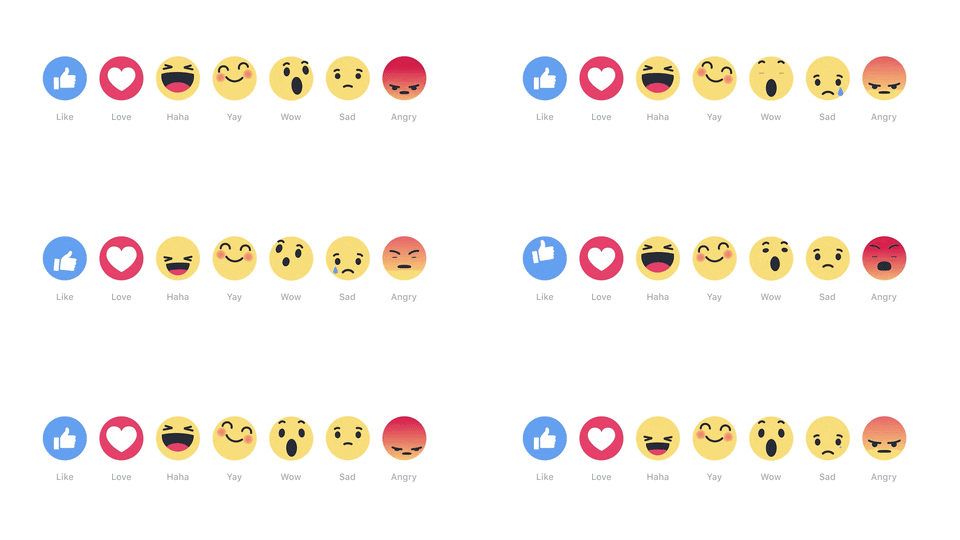
    I love the new Reactions because they are going to allow businesses to connect with customers on a much more personal level. I will love them more when I can get some cold, hard (and easier to access) data behind them, but for now, we are moving in the right direction!

    What is your take on Reactions for businesses and marketers? Let me guess: it’s either like, love, haha, wow, sad, or angry! ?

    Image Source:

    Facebook Reactions GIF

  • Earn More Facebook Friends for Your Business with These 4 Tips

    According to the National Day Calendar, what we all know as February 11 is actually observed as National Make A Friend Day, not to be confused with June 8, which is National Best Friends Day (though we celebrate that here, too!). As it is described on the National Day Calendar website, new friends can broaden our horizons by guiding us to see with fresh perspectives, challenging us to try something new, and connecting us to opportunities, all of which are common features of Facebook friends.

    Friends Are for More Than Just People

    For this reason, people aren’t the only ones adding more friends to their Facebook lists. In fact, businesses, brand names, and even franchises have joined the world of Facebook. The more friends your company can make on social media sites such as Facebook, the more your audience grows, as will your SEO, and from there, the success of your business.

    Facebook itself understands this great significance of friendship, as it just recently celebrated its 12th anniversary with a new goal of having five billion of the world’s seven billion humans connected to the social network by 2030.

    But first, you have to know how to make those friends, so we’ve gathered four main ways to grow a Facebook friends list for your franchise.

    1. Post More Videos – It’s All About the Movement

    In the same way that YouTube grew to be so popular, Facebook Live is allowing people to broadcast in real time to their audiences directly from their mobile devices. The movement of the video in the News Feed catches the attention of those who are watching, and they’re more likely to share such content with their own group of friends, which will result in more views on your page, and from there, more friends.

    2. The Message – Communication Is Key

    The recently enhanced communication tools on Facebook help businesses offer real-time customer support through messages in the form of an online chat type of private messaging system. With this advanced messaging ability, your franchise can respond to conversations in private, more quickly, and with greater sensitivity than ever before.

    3. Pass It On – The Ripple Effect of Shareability

    Organic reach via Facebook is increasingly becoming a thing of the past, but there is one way around it, and it is through shared content. When you craft your Facebook status in a way that will encourage or entice your friends to pass it on to their friends, this will increase your reach, which will therefore lead to an increase in your list of friends.

    4. Advertise with a Purpose – Give Them What They Want

    When creating paid Facebook ads for your franchise, try to think with regards to what your audience wants more than what you seek. If you create an attention-grabbing, thought-provoking advertisement in a unique way, such as the carousel format available on Facebook, then you will be more likely to succeed. Along with that, create content that requires or encourages an interactive response from those who will view it. The more that people respond to what you post, the more others will see it and visit your Facebook page as a result.

    When it comes to the nature of growing a Facebook friends list for your franchise, think in the same way that you would if you were trying to make friends yourself. With that, you will personify your franchise in a way that makes it relatable to those who see your content, encouraging them to engage with you and therefore continuously add more friends to your list!

  • 3 Tips to Help Law Firms Generate More Leads on Social Media

    In 2015, 35% of all lawyers obtained clients from their social networks, according to an ABA survey. Tech-savvy attorneys and digital marketing experts alike know that social media sites like LinkedIn, Google+, and Facebook are great business development tools. Engagement is an imperative. In fact, it is the new word-of-mouth for client referrals. Here are three tips to help any firm develop a strong social media strategy.

    1. Start Slow and Develop a Message

    To start, a firm or individual attorney should pick out one or two social media platforms and focus on posting quality, engaging posts. There are only 24 hours in a day, and legal professionals already have a lot on their plate. By focusing efforts on posting good content on a few outlets, a firm can develop its own individual image and message. Once a lawyer becomes comfortable on one or two platforms, they can open various social media accounts and integrate their message across all of them. In 2015, 96% of lawyers and 90% of law firms maintained a presence on LinkedIn, while 33% of lawyers and 52% of law firms maintained a presence on Facebook. As the most popular social media sites in the legal field, these are the best places to start networking. Legal professionals also use Twitter, Google+, blogs, and several other niche social media platforms.

    Lawyer Social Media Engagement Post Image

    2. Set a Policy: Reactionary Content

    Who is the target audience, and what will solicit a response from them? Because of the conservative nature of law, many attorneys may shy away from controversial topics. However, as long as the information is within the constraints of what an attorney is allowed to say in public, it can be posted on the Internet. The whole point of social media is to provoke a reaction. Effective legal social media means not only engaging with potential clients on industry-specific topics, but also provoking a share, like, +1, or comment. One tactic involves posting about real world events, changes to state or federal law, landmark rulings, or events the firm is hosting. These posts showcase the attorney as an expert who is aware of the most recent changes shaping the dynamic field. Up-to-date content appeals to potential clients who may respond with their own opinions, creating a conversation and potential leads.

    Lawyer Social Media News Post Image

    3. Build Relationships

    To maximize the reach of a firm’s social media message, make sure every attorney is involved. If one partner writes a blog or is featured in a local news story, make sure everyone in the office does what they can to promote the story. Through re-posts and shares, good news stories can reach a much larger audience. Each and every digital connection is a lead. To build professional relationships, use social media platforms at conferences, local business events, or any other professional event the firm is involved in. By connecting with other attendees or organizers, a lawyer can expand their social media outreach even further.

    As long as a firm approaches social media as part of a modern marketing campaign, it is easy to develop a successful strategy. Social media is not just for the young: the largest-growing demographic for Facebook is ages 30-50. A creative law firm can connect with social media users of all ages to generate leads and gain new clients.

  • A Dentist’s Guide for Choosing Target Audiences on Facebook

    A Dentist's Guide For Choosing Target Audiences On Facebook Image

    The number one tool in any business’s online advertising arsenal is knowing your audience. In a field as wide-ranging and diverse as dentistry, such knowledge can mean the difference between a stagnant online presence and social media success. So we’ve put together a helpful guide to improving your understanding of Facebook’s targeting tools in the hopes that you can hit that sweet spot of audience-targeting potential!

    We’ve investigated the targeting strategies behind some of our most successful social media campaigns in the dental industry to bring you three distinct targeting groups: family dentistry, young adults and orthodontics, and cosmetic dentistry. We dug deep to provide you with result-generating, relevant targeting parameters that go beyond the typical dental hygiene-related interests of mediocre social media campaigns. For each of these three hypothetical campaigns, we’ve provided some of Facebook’s best options for reaching your intended audience.

    5684115572_55bc83414f_z

    Family Dentistry

    Although your first instinct may be to target users by selecting more obvious interests, such as pediatric dentistry, oral hygiene, or dental care, you can generate much more social engagement through streamlining your strategy and focusing on specific age groups, lifestyle choices, and purchase behavior.

    For a family or pediatric dentist group, we recommend targeting women between the ages of 25 and 55 who have children. This demo group comprises the family decision makers who are most likely to engage with your page. Exploring Facebook’s fantastic targeting tools within the “More Demographics” dropdown will allow you to target parents of children within a specific age range. For instance, you can target new parents all the way through parents with children aged 12. This will ensure that your bid for impressions is going to the right users and not parents with adult children who would be more likely to seek out a dentist on their own.

    Finally, investigating the options available under Facebook’s “Behaviors” section is most helpful in providing you with the best methods for reaching those most likely to engage with your social media presence. Here, you can ensure you are reaching parents who are willing to invest in health and wellness products for themselves and their children. We recommend exploring the “Purchase Behaviors” section and adding behaviors like spa enthusiasts, shoppers, and baby care.

    Young Adult & Orthodontics

    This group can be a little tricky to reach. The sticky situation, if you will, is developing a targeting strategy wide enough to include parents of teenagers as well as young adults and even older adults who require orthodontics. For best results, we recommend targeting both men and women between the ages of 18 and 45. Under “More Demographics,” we have found that the option to target by “Generation,” which includes Baby Boomers, Generation X, and Millennials, is most useful. We’ve discovered that targeting Generation X and Millennials, which encompasses those users born between 1961 and 2004, is quite effective for this subset of the dental field.

    The most useful behaviors for this targeting group are those related to technology. Facebook now allows for targeting by “Mobile Device User,” including tablet and smartphone owners. You can even get more focused by choosing to target only those who prioritize being up to date with their tech gadgets by selecting new smartphone and tablet owners. As common as orthodontics have become and as the stigma of adult orthodontics is reduced through innovations such as invisible braces, more and more of this targeting group’s social media audience will be young adults who are plugged in.

    Cosmetic Dentistry

    Our last targeting group presents the widest range of targeting options based on exactly who your cosmetic dentistry office intends to serve. Here, we have provided you with just a sample of what Facebook’s targeting parameters can allow you to do.

    For this specific targeting group, we recommend focusing on both women and men in the 30 to 65+ age range. Once again, we can look to the “More Demographics” dropdown to provide even more insight into the makeup of our audience. Take a look at Facebook’s “Work” and “Financial” targeting options to get the most out of your marketing budget. You can focus on specific job titles and industries, highlighting those occupations in which a winning smile is most beneficial, such as CEO, lawyer, broadcast journalist, and the entertainment, sports, and media industries. Targeting by financial parameters allows you to engage customers with enough expendable income to prioritize cosmetic procedures.

    Under “Behaviors,” we can select those users who are already investing in health and wellness, especially when it comes to dental care. Facebook provides options for targeting users whose purchase behaviors reflect investments in beauty products and accessories, cosmetics, and oral care. Lastly, Facebook’s “Behaviors” section provides our hypothetical campaign with one of my favorite targeting parameters: photo uploaders. This group includes those Facebook users who posted more than 50 photos in the last month. We all have one of those Facebook friends who is obsessed with selfies, and who wouldn’t want to make sure their perfect pearly whites are on point for all those photos?

    7910370882_39d180fb66_z

    The benefits of social media marketing campaigns are apparent. Every time you flip through your News Feed, you are greeted, hopefully, by well-targeted promotional campaigns that bring you the products and services you’re interested in. With the tips we’ve provided in this helpful guide to understanding your social media audience, you, too, can be on your way to increasing audience engagement and building your online presence!

    Image Sources:

    Facebook Like Button Image
    Smartphone Image

  • For Small Law Practices, Online Resources Can Be Judge & Jury

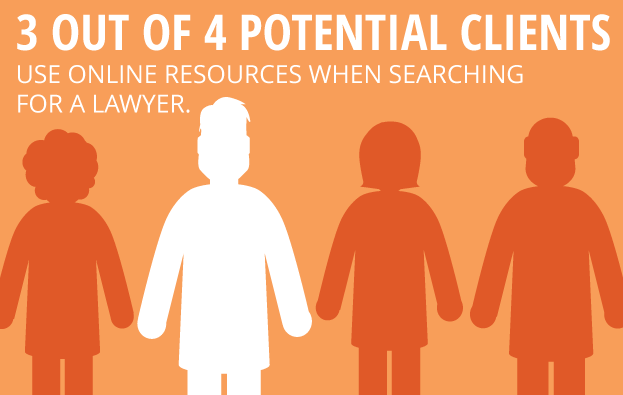
    For many solo practitioners and small law firms just starting out, establishing a consistent client base is the number one priority. In the increasingly competitive land of marketing your law practice, it’s imperative to look beyond the traditional methods such as putting your picture on a billboard, directly contacting potential clients, or simply hanging out your shingle. According to a survey conducted by the Research Intelligence Group, three out of four potential clients use online resources when searching for a lawyer. With that in mind, utilizing a few simple tips can make a huge difference in getting your new law practice found online.

    1511-SI-Newsletter-KG-E-02

    1. Develop and Promote High-Quality Content

    If you’re just in the initial stages of developing your website, it’s wise to keep things simple and focus on quality rather than quantity. For instance, create a few targeted website pages that are written with the potential client in mind, rather than cluttering up your site with an overload of information. Once you have high-quality content in your arsenal, make sure to utilize a social network to promote that content. Also, consider focusing on one social network that you expect will attract the most business, and write timely and substantive posts for that one network.

    LawyerFortunCookie

    2. Create a Blog

    One important way to increase your online visibility and improve your chances of getting to the top of Google’s organic search results is to create a relevant and authoritative blog on your website. A blog is a great way to establish your authority on subjects relevant to your practice while also allowing for the occasional posting of upcoming community events or helpful nonlegal articles. You can also set your blog to automatically post to social media platforms such as Facebook, Twitter, and LinkedIn.

    GavelAndGlobe

    3. Focus on Local

    Think of your potential client base and how you would traditionally market to that group. Getting involved with your community by speaking at regional networking events and participating in local organizations can help establish yourself as a local expert in your field. Internet marketing is another step in that process and can go a long way in bringing in new business. For example, creating consistent profiles across local directories can help you rank higher on Google. Also, consider developing a strategy for gaining local user reviews on websites such as Yelp.

    Starting your own law practice can be daunting, but utilizing these simple tools can make a big impact in helping potential clients find you online.

    Image Sources:

    Lawyer Fortune Cookie

    Gavel and Globe

  • Insta-Ads: Facebook Brings Instagram Ads to Life

    Good news for advertisers! It appears that Instagram Ads are now open for advertisers through Facebook’s Power Editor.

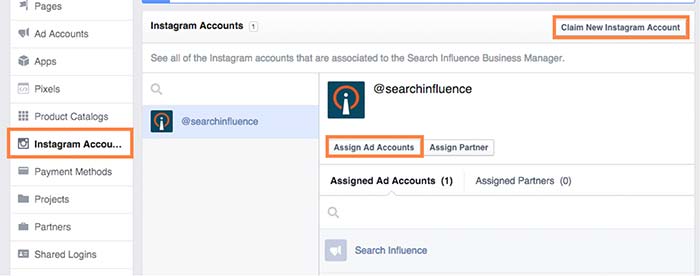
    While no official announcement has been made (and Instagram hasn’t even updated their site), I stumbled across these new features while poking around my Business Manager. What tipped me off was the ability to claim Instagram accounts under the Business Settings in Business Manager. From there, you can assign ad accounts to individual Instagram accounts. Interesting, right?

    instagramadscreenshot

    There is also a notification at the top of the page that states that “Instagram ads are gradually rolling out and might not be available to you right now. You can claim your Instagram account to have your setup ready. Read more here.”

    How Do They Work?

    After doing some digging and playing around with Power Editor, I was able to create an ad for Search Influence’s Instagram profile. However, the only ad objectives currently available on Instagram are “Clicks to Website” and “Mobile app installs.”

    Earlier this month, Instagram launched its Ads API Partners program. According to AdWeek, “Instagram Ads API Partners will be able to perform tasks including scheduling and publishing content to the Facebook-owned photo- and video-sharing network, monitoring audiences and sharing access to Instagram accounts across teams.”

    What Does This Mean For You?

    All of these updates come as very welcome news, as managing and advertising for businesses on Instagram was difficult in the past. Previously, Instagram advertising was only open to larger brands willing to spend $200,000 or more on brand awareness for a three-week campaign.

    Do you plan on using Instagram advertising? How do you think it can benefit your business?

  • Your Fortunes Are Written in the Stars (Your Facebook Star Reviews, That Is)

    In a time when smartphones can do everything from tracking down our car keys to acting as a 3D mobile scanner, the modern American consumer is more connected than ever. The Internet lets us share photos with people across the world or down the street, but in addition to sending Snapchats and Facebook messages, people are increasingly looking for opinions and suggestions from their community of savvy fellow consumers, who are often ready and willing to share their thoughts on everything from the best place to eat on date night to the new laptop they just bought on sale.

    Wading through this sea of advice and opinions can be intimidating for a small business—but it’s also necessary. If you’ve ever diligently scoured sites like Yelp or Amazon for information before making a major purchasing decision, you already know that reviews can be powerful. Not only do they give you great feedback about how well your business is doing, but they also share valuable information about the quality of your products and services. And today—now that we’re far from flipping through hard copies of Consumer Reports when researching a purchase—modern Internet users tend to rely on the insights and second opinions provided by their existing online network.

    While online reviews tend to hold more sway among younger generations, a June 2015 study found that 70% of Americans look to review sites before making a major purchase, and another 57% of respondents say that they also seek out recommendations on social media.

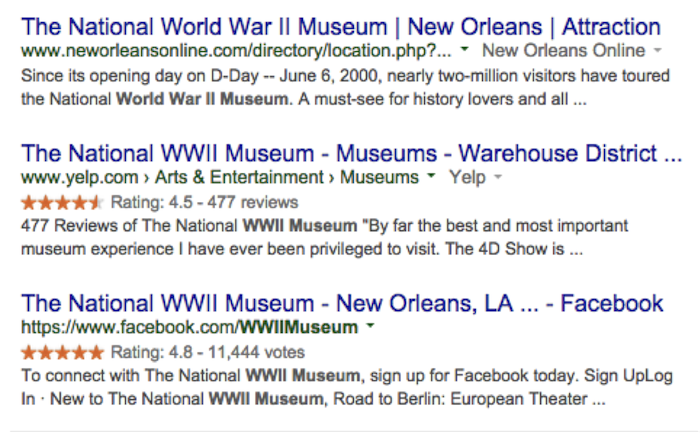
    To that end, it’s more important than ever for businesses to elicit positive reviews across the board. Google has always made it patently simple for Internet users to see the verdict of public opinion on any given product or service at a glance, thanks to a display of five-star reviews that act as a visual guide in the search engine results pages. Without even clicking on a link, searchers have the opportunity to learn how well a product or service has been received by the online community.

    In the past, major review sites like Google+, TripAdvisor, and Yelp have all been prominent sources for this type of information, and the most recent site to join their ranks is Facebook.

    Facebook Star Reviews Image Search Influence

    These five-star reviews show up near the top of the search engine results for brand-name searches, but they also occasionally turn up in broader searches as well.

    This is good news for businesses. Internet users tend to prefer leaving reviews on Facebook over other review sites, showing a preference for giving feedback on Google+, Facebook, and Yelp—in that order. Facebook has the added benefit of a strong user base, since most of your customers are likely to already have Facebook logins and reviews are quick and easy to post. In addition, Facebook reviews don’t get filtered like Yelp reviews do.

    In the past, we’ve recommended building up your business’s credibility by getting reviews in multiple places, and it’s worth restating: Google+, Yelp, Yahoo, Facebook, Twitter, and similar sites are all essential when it comes to showing off the quality of your products and services to as many potential customers as possible. And Google’s new update means that if you haven’t yet gotten a toehold in the Facebook review arena, it’s probably a good idea to work it into your long-term reviews strategy for a dose of extra visibility on search engine results pages.

    If your review game is not strong or you’re worried about your online reputation, don’t fret. Check out our tips for handling reviews, and let us know how we can help!

  • Five for Friday: Facebook’s Payment Feature, DuckDuck Go, & More!

    1. Facebook Messenger Payments Service Is Nationwide – Mashable

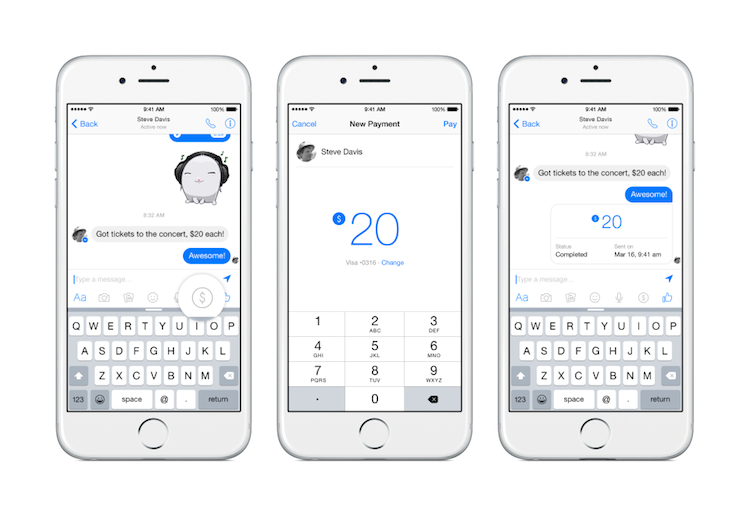
    Facebook’s vice president of messaging products, David Marcus, recently announced that Facebook Messenger has rolled out its payment feature. Users can add their debit card information in the Messenger’s settings. You can then send payments by starting a conversation with a friend and clicking the “$” icon followed by the “Pay” button. If you are on the receiving end of this transaction, you will be prompted to accept the payment at the appropriate time. Marcus has been quoted saying that the payment feature is “easy and safe.”

    Facebook Messenger Payments Image - Search Influence

    2. Google Earth Turns 10 – Google Blog

    Google Earth celebrated its 10th birthday on June 29, 2015. Google Earth allows users to see the world from a variety of viewpoints, from 3D versions of cities across the globe to striking photos of our planet shot from space. Happy belated birthday, Google Earth!

    3. Google: Panda Refresh Coming Soon – Search Engine Roundtable

    It looks like we’ve made it through the holiday weekend without seeing the newest Panda update, but the “refresh” is coming soon. During a recent Google Hangout session, John Mueller announced that he expected the Panda refresh to happen in a few weeks. (The Panda update was first introduced in 2011 with the goal of preventing sites with poor quality content from ranking in Google’s top search results.)

    4. DuckDuckGo Surpasses 10 Million Search Queries – Search Engine Land

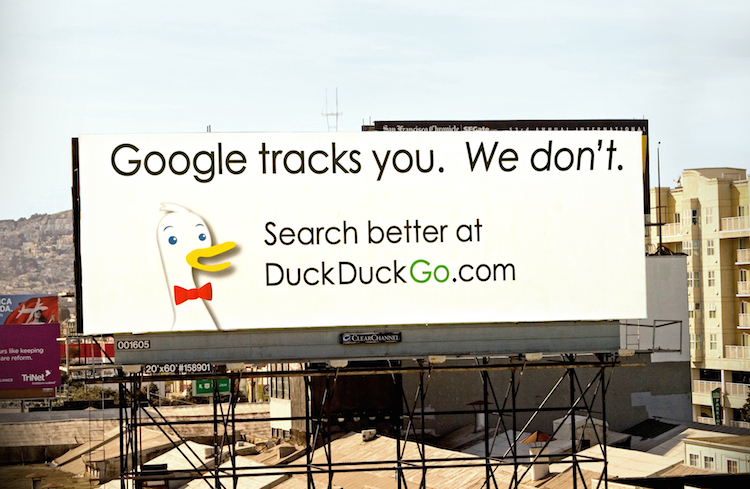
    DuckDuckGo, a search engine launched in 2008, hit the 10 million daily query mark on June 22. The company has promised not to collect or share your information while searching—a rare feature for any company in the search engine industry. DuckDuckGo has also announced that they will be giving out 10,000 t-shirts to users who promote their search engine to three additional users!

    Duck Duck Go Search Engine Image - Search Influence

    5. Instagram Makes Content More Accessible With Place Search – Search Engine Watch

    Instagram has granted users the ability to search by location, allowing them to access other users’ location-tagged photos from the Explore page. Now, anyone with an Instagram account can peer into the most interesting places in the world. This new search feature also allows users to search people, places, and tags simultaneously.

    Image sources:

    Facebook Messenger payments

    DuckDuckGo image


  • Eggs & Beacon – Facebook Place Tips Help Businesses Digitally Advertise

    Imagine walking into your favorite local bar. One of the first things you’ll probably do is pull out your phone while you’re waiting for a drink or a friend. Now, imagine that as you open the Facebook app, you receive a notification that, unfortunately for your liver, there’s a great special on tequila shots tonight!

    That’s pretty much what Facebook is envisioning as it rolls out the Place Tips program, made possible by the Bluetooth beacon introduced earlier this year. After testing over the past few months, Facebook is bringing this service to more businesses in the U.S., and also making the beacon units available for free to businesses who are interested in using them in their stores.

    So before we get ahead of ourselves, let’s get a breakdown of exactly what this means.

    What is a Facebook Bluetooth Beacon?

    Facebook Bluetooth Beacon Image - SearchIn fluence

    Simply put, the beacons themselves are nifty little devices (about the size of a hockey puck) that are given to businesses from Facebook. Currently, you must request a beacon from Facebook in order to receive one (more on that later!). These devices use Bluetooth technology to send a signal to the Facebook app on a visitor’s phone to help show them “Place Tips.”

    OK, So What About Place Tips? How Do They Work?

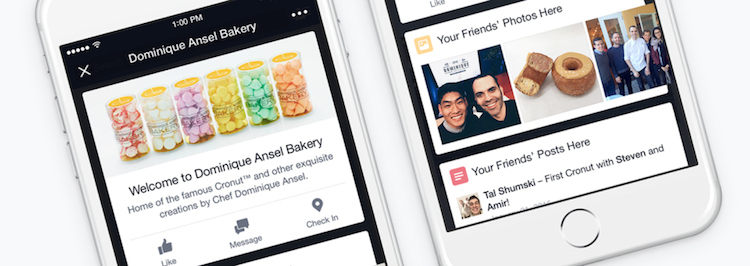
    Place Tips show a visitor useful and relevant information about their location, which is determined using cellular networks, Wi-Fi, GPS, and Facebook Bluetooth beacons. They can include friends’ photos, experiences, and moments from that place, as well as prompts to like the business’s page, check-in reminders, and posts or recommendations from the business.

    Everyone’s Place Tips are unique: at a restaurant, they can show a menu, reviews, and frequently mentioned information like a signature cocktail; at a retail store, they can help customers find business hours, learn about upcoming events, or see pictures of items currently for sale. Businesses are also encouraged to write a customizable welcome note that appears at the top of the Place Tips feed and use it to promote items or share facts and tips about their establishment.

    Facebook Place Tips Image - Search Influence

    For those who are worried about their privacy–don’t! Place Tips will not post anything to your profile, collect any information from you or your phone, or show people where you are (unless, of course, you upload a picture of yourself at this location), and they can be turned on or off within the Facebook iPhone app settings.

    How Has it Been Working? What are the Next Steps?

    Earlier this year, Facebook did a test run of the service at various New York City locations. According to Facebook, since it started piloting the service there, local businesses that have tried Place Tips have seen a “steady uptick in page traffic from in-store visitors.”

    After seeing the New York City program prove successful, Facebook is offering business pages across the U.S. a chance to participate, although quantities of the free beacons will be limited.

    In a statement put out earlier this week, Facebook announced: “We’re now providing free beacons to more businesses in the U.S. Because Place Tips are meant to offer people useful and interesting information about the places they visit, we’re prioritizing beacons for businesses with active Pages full of content—such as photos, check-ins, and status updates—from both the business and its customers. To help ensure your customers see Place Tips at your business, request a beacon today.”

    Has this piqued your interest? Then get to requesting your beacon! If you’re an administrator of your business’s Facebook page, you’ll receive a post frozen atop the business’s news feed encouraging you to enter their shipping info to get one of the beacons:

    Facebook Get Free Beacon Image - Search Influence

    If that’s not showing up for you and you’re interested in setting up Place Tips and receiving a beacon for your business, you can request one from Facebook here.

    If you have any questions about the Facebook beacon, Place Tips, or how they could benefit your business, we’re here to help!

    Image sources:

    Facebook bluetooth beacon image

    Place Tips image

  • Five for Friday: Facebook Aims to Please, Amazon Goes the Way of Uber, & More!

    1. Facebook Update Takes Into Account Time Spent Reading Stories – Search Engine Journal  

    Facebook looks to be taking the next step forward in studying user behavior. The social networking giant is now directly measuring user activity and engagement, even when the user isn’t interacting with content. How important to us are news stories that we just want to skim? The next time you stop scrolling to look over a story, you are casting a silent vote for that type of content in comparison to other stories in your feed. Facebook has already rolled this update out, which means you no longer have to comment on or like a story for your feed to be modified. If you feel like you’ve been seeing more of what you want to see, well, you probably are. 

    2. Twitter Makes Your Conversations Easier to Follow – Mashable

    Having trouble following that long chain of tweets and retweets? Good news! Reading Twitter discussions will no longer test your mental sorting abilities. Dialogues are now conveniently grouped for maximum readability. If you have frequently wondered who is talking to whom, fret no more! Talks are joined by a single solid line.

    Following Tiwtter Conversations Image - Search Influence

    3. Google Uses Sitelinks Based on Significance – SEO by the Sea

    Google, acting as the undisputed market leader in search, is continually looking to improve the way their search performs. In a patent granted earlier last week, Google now seeks to identify the most “visually and/or functionally significant hyperlinks within the document.” This means that the location a link points to isn’t the only attribute considered when Google thinks about links, but where a link visually is on a page matters as well. 

    4. Amazon Debates Paying People for Deliveries – The Wall Street Journal

    Amazon Deliveries Image - Search Influence

    A big part of Amazon’s costs come from shipping, so it seems only natural they should be seeking to cut costs. Only, this time it isn’t drones: Amazon would like to turn every potential income-seeking individual into an Uber-like delivery driver.

    5. European Sites Are Declared Liable for User Comments – Techdirt

    On Tuesday, the European Court of Human Rights ruled that sites can be declared liable for what any random user posts on them. This has massive implications for sites that allow users to regularly post content. What lies in the future of censorship?

    Image sources:

    Cell phone image

    Delivery image