Tag: Facebook

  • Facebook Live: How Small Businesses Can Drive Traffic to Their Website

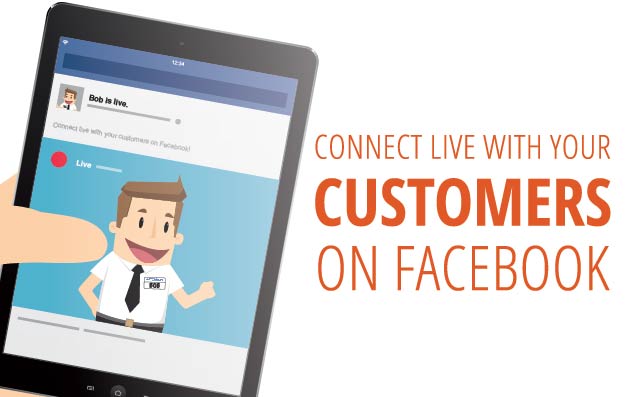
    Connect Live With Customers on Facebook Live

    Ahh, the age-old question. Similar to Periscope on rival social media company Twitter, Facebook Live is a free service that Facebook recently rolled out for their users, pages, and public figures to stream live video to their friends, followers, and fans. The feature first launched on Facebook’s Facebook Mentions app, which is used by celebrities such as actors, musicians, and athletes to engage with their fans. A year later, it was made public for all users who used the Facebook mobile app on their iPhone or Android device.

    Using Facebook Live for Your Business

    Facebook Live is a great tool that can be easily utilized by small, medium, and even large businesses. Live streaming is becoming larger and even more popular every day. This marketing technique is breaking down traditional marketing methods. There is nothing more authentic than live streaming, allowing companies to connect and interact with their audience in real time. No edits, cuts, or reshoots—just you and your fans. Opening a new location for your business? Go ahead and live stream the grand opening and show off the new pad. Own a restaurant? Give a behind-the-scenes look at the kitchen and how your chefs create a popular dish. Own a boutique? Show off new trends and looks. The possibilities are endless.

    How Can I Start Using It?

    First: If you are using your business page, go ahead and download the Facebook Pages Manager on your iPhone or Android device. If you are using your personal Facebook page, disregard this step.

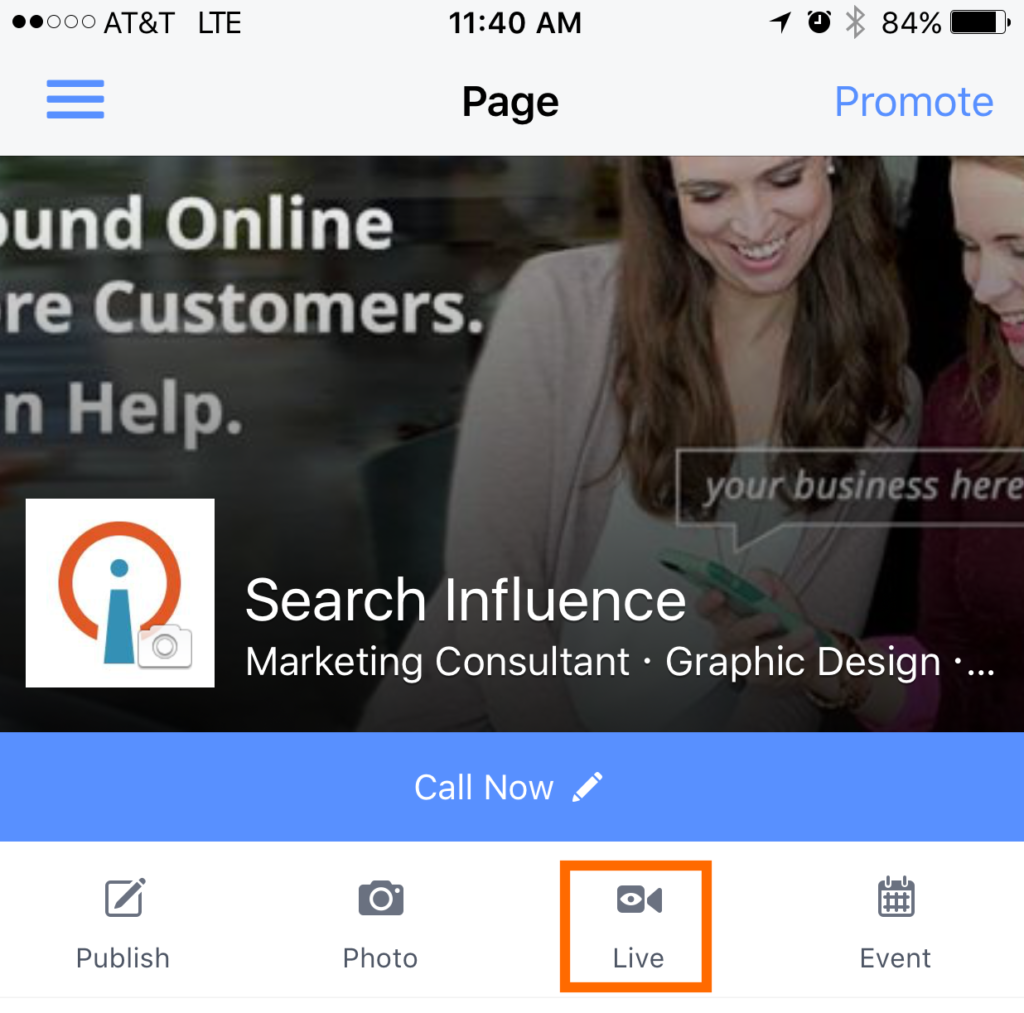
    Second: Tap on “Live” from the menu. The icon should look like this:

    Fourth: Add a description of what your live video will be about. Choose your audience before hitting “Go Live.”

    Fifth: Be sure to smile! You’ll see a three-second countdown before your broadcast begins.

    Happy live streaming!

  • Top 5 Search Influence Blogs from July 2016

    If you are like many of us at Search Influence, you took a few days off last month to enjoy the summertime. Now that August is here, you may have a few minutes to catch up on your reading. Here are our top five most read blogs from July.

    Top 5 Search Influence Blogs from July 2016 Image 1

    1: Search Influence Reviews: Here Are 5 of the Best Bars We Visit After a Long Day at Work

    Our team members enjoy grabbing a nice cold one after a long day at work! Check out our top five list of local bars—each with a wide selection of beers and delicious bar food in venues only New Orleans can provide.

    2: What Happened to Facebook’s 20% Text Grid Tool?

    Facebook officially rolled out this new update to the 20% text rule in June. Read about it and how it affects Facebook ads in this updated blog.

    3: Learn How to Create a Snapchat On-Demand Geofilter to Boost Your Next Event

    Snapchat launched the ability for users to create On-Demand Geofilters for birthday parties, weddings, business events, or just for fun! Learn how easy it is to submit the filter along with some key metrics to gauge your filter’s success.

    4: 12 Things You May Not Know About Online Marketing

    New to online marketing? Here are 12 things that surprised some of our team members when they started working at Search Influence.

    5: 10 SEO Blogs You Should Be Following

    Every day, we see traditional marketing grow more obsolete. Learn about 10 of the most informative and essential SEO blogs you should be following.

  • How Can Facebook’s New Profile Layout Affect Your Business?

    1608-SI-TheInfluencer-KL-A-03Large

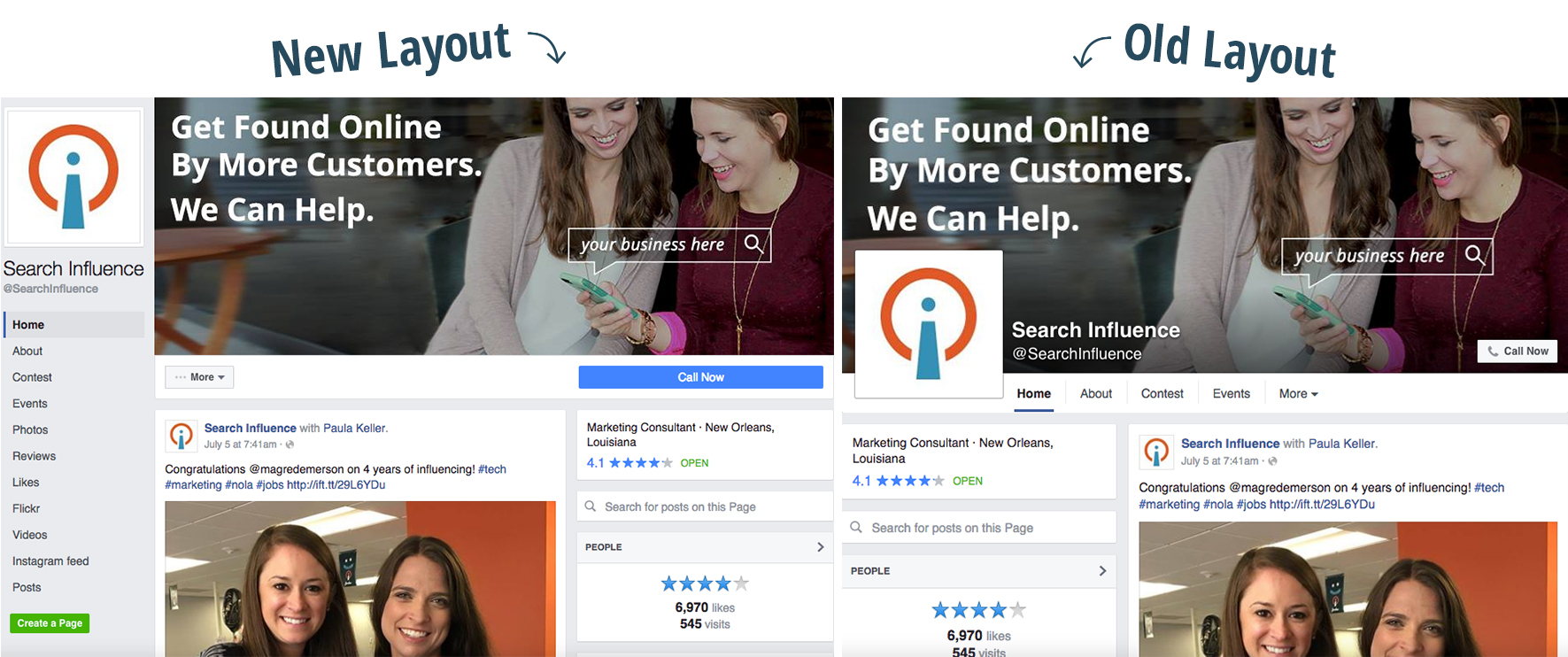
    Facebook recently rolled out a new layout for business pages and the marketing implications could be more than initially meet the eye.

    Profile Picture Positioning

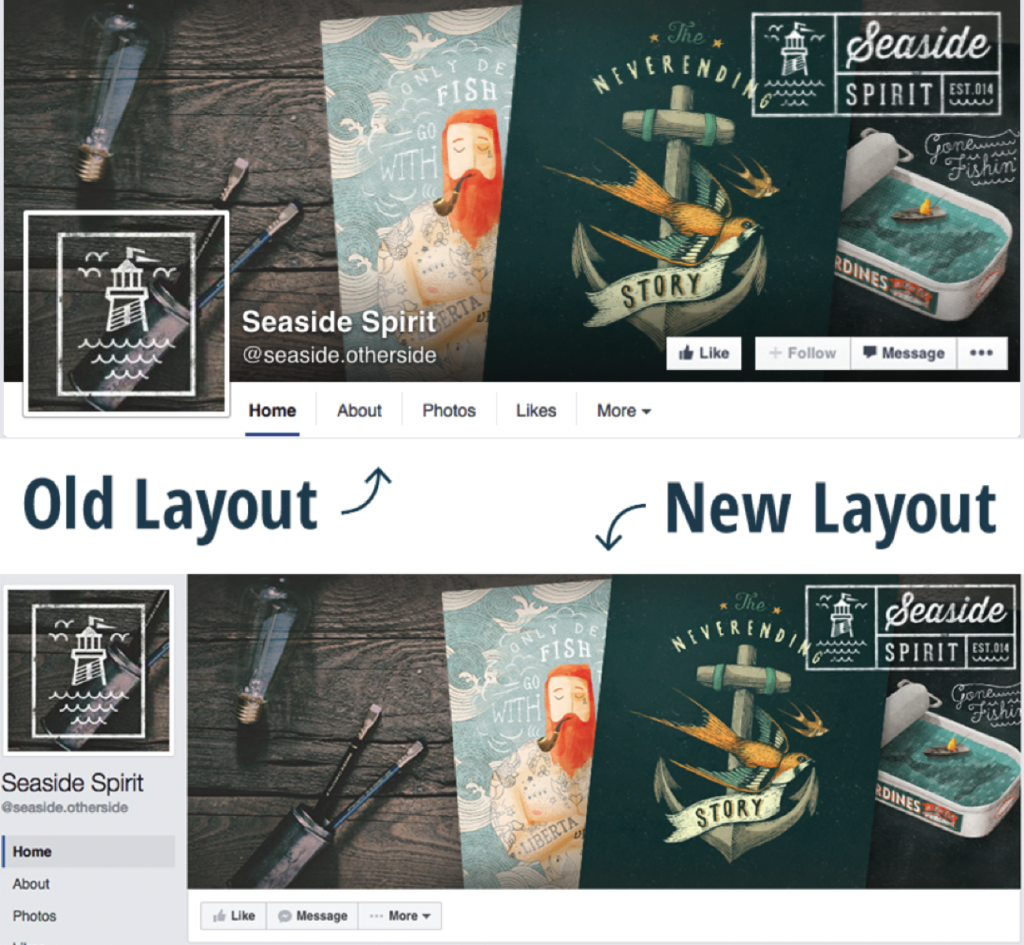
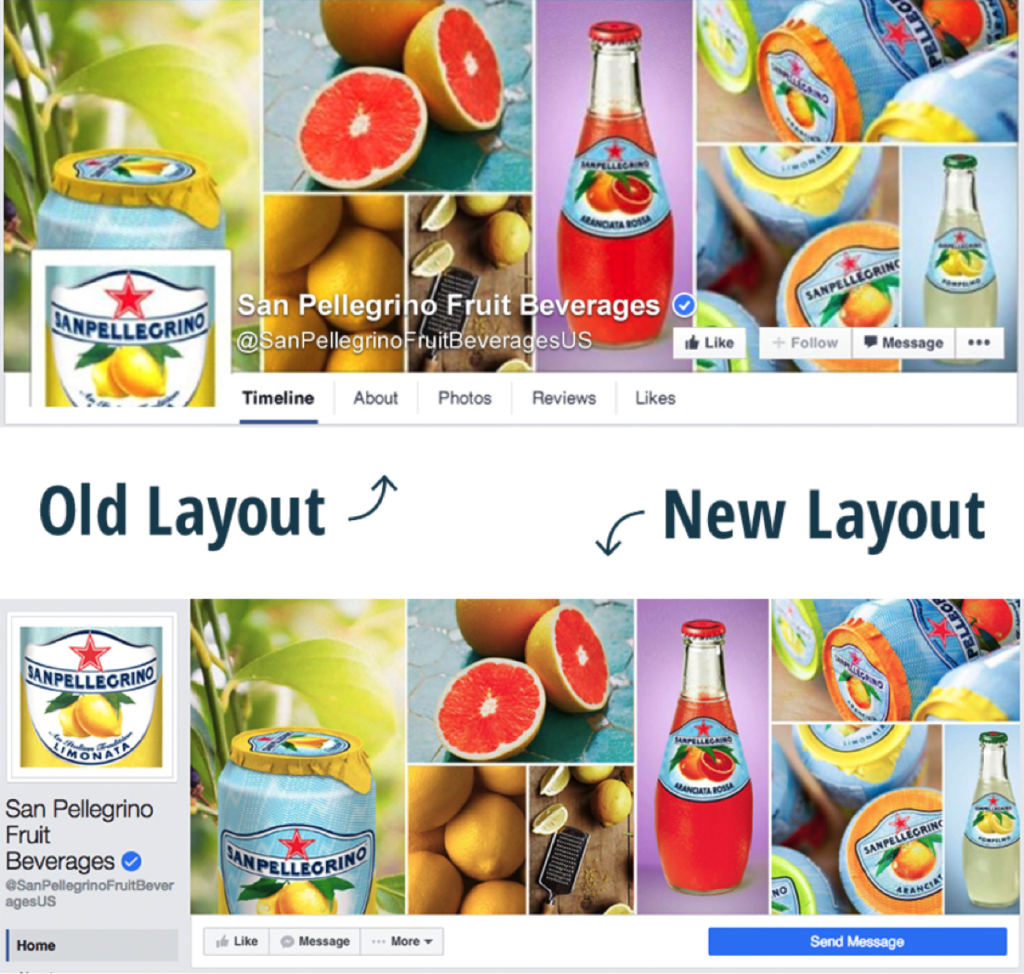
    We’ve all seen clever interactive cover photos with the overlapping square profile image on the standard desktop site. A drink from the cover photo is poured into a glass in the profile picture. A man in the profile picture passes a ball to a woman in the cover photo. A giant cat in the cover photo peers down on a tiny human in the profile picture. The square profile image also acts as quick and effective brand recognition when seen standalone in a newsfeed as well as when viewed on the mobile version of Facebook. But with the profile picture now located in the sidebar to the left of the cover photo, the playful effect of the overlapping images is null and void.

    Example 1:

    Facebook Profile 1

    Example 2:

    Facebook Profile 2

    How Does the Relocation Affect Your Business?

    Although businesses won’t be able to get creative with the overlapping interactive profile images, the relocation of the square profile picture actually frees up a lot of valuable visual real estate on the cover photo that was once covered up by the image, company name, and CTA buttons. Even if you didn’t have interactive profile images on your business page, there’s a lot of space—over 20% of the area of the cover photo to be exact—that was considered off limits for content and is now fair game. Even on the new mobile version of business profiles, the cover photo isn’t covered up by the profile picture or text.

    Additional Sidebar Elements

    Beneath the profile picture, you’ll also see tabs that were once accessible under the cover photo on desktop sites. In the old layout, only a few tabs were visible, with the additional tabs located in the dropdown “More” option. With the new sidebar, however, all of the tabs are now visible. The buttons that were located on the cover photo itself are also positioned right below it, with the main CTA button located on a more eye-catching blue background. This left-aligned navigation also stays in place while the user scrolls down the page.

  • Here Are Our Top 5 Blogs You May Have Missed Last Month

    Woah! Did June fly by for you, too? If you are on the beach this week and doing some summertime reading, here are our most popular five blogs from last month that you will want to check out.

    Knowledge is power gif

    What Happened to Facebook’s 20% Text Grid Tool?

    Michelle’s blog is coming in hot as Search Influence’s most-read blog of 2016! If you’re advertising on Facebook, you need to understand the rules and limitations of the images you include. Facebook’s allowance for text within ads has changed slightly over the past few months, so be sure to read up about the latest updates and what they mean for online advertisers.

    5 Medical Practices Effectively Using Instagram

    Calling all doctors: Is your social media strategy healthy? Are your social media channels helping you generate more traffic to your site and more qualified leads? Read how these five medical practices have been utilizing Instagram to further establish their brand, increase their online presence, and stimulate user engagement.

    Instagram gif

    These 10 Expert Tips Will Drive Traffic to Your Business’s Website

    Feel like you’re doing everything to strengthen your online presence but still not seeing the traffic numbers you’d like to see within Analytics? From schema markup to shareable content to video syndication, we provide ten valuable tips from industry experts to help you increase your site traffic with ease.

    Getting Hands On With the New Google My Business

    Though originally written in 2014, this June blog is still hyper-relevant to the industry. Quite a lot has changed within the Google landscape since 2014, but it can be JUST as confusing to navigate through business pages and local profiles. Let Mary guide you through what’s changed in the world of Google business and what these changes mean for your bottom line. Additionally, if you need help claiming your Google My Business page, check out this recently-completed Search Influence video to painlessly walk through the steps!

    5 Rookie Mistakes That Will Ruin Your New Website’s SEO

    Just launched a new site? Don’t let all of your efforts go to waste; make sure your site is optimized properly so search engines deem it “worthy!” Read on to learn about five big new-site mistakes, and ensure that your site is strong and ready to rank.

    Gif 1 Credit  |  Gif 2 Credit

  • These 10 Expert Tips Will Drive Traffic to Your Business’s Website

    Grow Your Business Graphic

    It doesn’t take a web expert to know that more traffic to your website means more business. However, researching ways to improve your online traffic isn’t always easy. We asked our in-house experts for their thoughts and came up with these ten ways to drive traffic to your website.

    1: Implement Schema Markup and Rich Snippets on Your Site

    Schema Markup is structured data that labels existing elements on your website so search engines can better understand the content. Essentially, when Schema.org markup is implemented into your website’s HTML source (the only place where it should be visible), it clearly defines specific parts of your content, such as your business address and telephone number.

    Rich Snippets are a structured data markup only recognized by search engine algorithms. When used on appropriate content, Rich Snippets can show exact content from a website on Search Engine Result Pages (SERPs) of search engines like Google, Yahoo, and Bing. These snippets are the few lines of text under every search result. For example, if you run a medical practice that wants to advertise its high rate of patient satisfaction, you can markup content from patient testimonials so that your glowing reviews show up when people search for doctors in your area.

    Healthgrades Screenshot

    2: Improve Your Site Speed

    Site speed is the amount of time a page needs to completely load. This matters for both users and search engines, as users are less likely to stay on a website that takes a long time to load and search engines will penalize your website for being too slow. Google’s PageSpeed Insights Tool is a great way to analyze your site for ways to improve your site speed and will provide you with detailed information on how to fix each issue.

    3: Use Google Search Console

    Google Search Console (formerly Webmaster Tools) allows you to indicate to Google the various details of your site. A very important part of this process is submitting your sitemap so that search engines can better crawl and categorize your site—if you haven’t done this yet, you should! Search Console will give you a report on the average ranking of your website on SERPs for specific search queries. These reports will let you know what you should be improving on your site to gain a high position and click rate.

    4: Publish Press Releases

    Press Releases are great when you have an announcement to make or a story to tell. They’re also highly useful for helping you own your business name in SERPs. Sites like PRWeb and Cision will distribute your press releases for you and get them published on news sites and blogs. For a little extra money, they’ll also send your release to journalists and bloggers, in hopes that they’ll publish it on their sites as well.

    5: Perform On-Site Link Building

    Internal Linking is a link from one page to another on your website. This process fosters a great user experience, as anyone visiting your site will find themselves easily hopping from one page to another without having to really search for the information they’re looking for. Search engines like Google are very focused on user experience. Good internal link building helps googlebot understand the relationship between pages, among a set of content.

    6: Perform Off-Site Link Earning

    By submitting your website to online forums, specifically those that pertain to your business’ physical and professional communities, you’re naturally increasing the chances that someone will visit your website. Engaging on social platforms like StumbleUpon, Reddit, Digg, and Delicious can be more valuable than you think.

    7: Perform Off-Site Citation Building

    Similarly to off-site link earning, submitting business listings to niche directories (industry & categorical), data feeds, major directories like Google, Yelp, Bing, Foursquare, YP.com, and secondary directories like Merchant Circle, HotFrog is a great way to drive traffic to your website.

    8: Syndicate Your Videos

    It’s no secret that having a YouTube channel filled with optimized videos drives up web traffic. However, you should also syndicate your videos across other sustainable video channels, such as Vimeo and DailyMotion. Videos will earn links and citations on social sites because they’re highly shareable. These increase link source diversity.

    9: Post and Promote on Social Media

    This may seem like a no-brainer, but you would be surprised by how many businesses don’t actually do this. Paying for promoted posts on Facebook offers a relatively inexpensive way to get your business in front of target consumers. Facebook also offers radius-based targeting for ads, which lets you target people who are/were:

    • Living in your area
    • Located in your area
    • Recently visiting your area
    • Traveling to/in your area

    Posting and promoting isn’t limited to Facebook, though! LinkedIn and Pinterest are other examples of great social media sites that are perfect for driving traffic to your website.

    10: Be a Resource in Your Industry Through Sharable Content

    It’s one thing to be ahead of your competition, but it’s another thing entirely to be an industry thought leader. You can do this by creating shareable content. For example, you MUST have a blog. Your blog should be on site, not offsite. If your website is hosted on a CMS like WordPress, then you can easily integrate a blog within your existing site! Not only does blogging build authority for your brand and show off the human side of your company, but according to Hubspot, businesses who prioritize blogging experience 13 times increase in ROI.

    You should also start to create infographics. They combine easily digestible—but valuable—information with a visually appealing information, making them highly shareable across all social media websites. For example, this infographic, created for a medical directory, was shared more than 900 times, got more than 300 Facebook shares, and was pinned more than 150 times.

    Want more information? Watch our recent webinar for more information and tips.

  • Make Your Social Media Strategy Sizzle with Summer-Focused Content

    Summer Promotions

    How Is Summer Different than the Rest of the Year?

    Warmer temperatures make people more active in the summertime. With kids out of school now, many families will take at least one vacation over the next few months. And since 81% of Americans save money specifically for the summer season, there is more opportunity for your business to gain customers and grow.

    What Can a Small Business Do to Stand Out?

    Larger, national brands don’t have to work as hard to benefit from the seasonal surge, but small businesses can also succeed through social media campaigns. Using location-specific social media, optimized pages, and summer-focused content, you can take your business to the next level this summer.

    What’s the First Step?

    The first thing on your summer to-do list: claim and optimize your social media pages. Yelp, Facebook, Twitter, Google+, and Instagram will be the heavy hitters this summer. Google+ and Yelp both require verification, so you should start this process immediately. Facebook, Twitter, and Instagram don’t have lengthy verification procedures, but they should be optimized with branded images to familiarize users with your business. All of these sites also need to link to your main website and other social media profiles if applicable. Alternatively, you’ll also want your website to link to your social media profiles for quick and easy connections. Now that the website and social media interlinking of your business is setup, the real work starts.

    My Profiles Are Optimized, Now What?

    Now it’s time to get to work. The theme is summer, so your posts should reflect the season. Here are a few content creation tips:

    • High energy and fun
      • Summer is all about having a great time, so your posts should reflect the sweet summertime mood. There is no set formula for social media posts. You need to experiment a bit to find out what attracts the most engagement from your audience. Mix it up and show your employees having fun on top of working hard.
    • Holidays and events
      • Independence Day and Labor Day are two major federal holidays during the summertime. If your business is open on these days, make sure to post about your hours of operation. Social media is also a great, free way to notify your customers about holiday promotions.
      • Keep a close eye on your city’s calendar of events, and try to coordinate promotions and posts accordingly. Here in New Orleans, we have this handy calendar provided by New Orleans Online. A fashion boutique, for example, could take advantage of the upcoming outdoor festivals and offer a sale on tank tops, shorts, sunglasses, and other festival gear. Food vendors at the same festival can get a lot of social media interaction if they post pictures of their fan’s favorite dishes.
    • Deliberate engagement
      • In between selfies and status updates, social media users are constantly scrolling through their timelines. Make yourself not only appear but also encourage interaction by asking fans to like, share, or tag a friend. Users love to engage with their favorite brands, but make sure you have someone on deck to respond.
    • Encourage locals and tourists
      • Large brands or franchises may have the backings of national companies, but small businesses have the strength of the ever-growing “Go Local” trend that swept the nation this past decade. You should highlight your locality in your posts. Some locals prefer to patronize businesses that will stimulate the local economy, and many tourists are searching for the more “authentic” local experience.

    These tips will help make your social media outlets stand out instead of getting lost in the ever-growing sea of likes.

    Sounds Like a Lot of Work

    Nothing ventured, nothing gained. Take it from the pros: Social media optimization is a complicated and time-consuming undertaking. Research provides insights into your industry’s most successful social media approaches, and then the posts are written, edited, and published on a timeline that encourages engagement from your target audience. Search Influence offers a full range of social media optimization services including content creation, brand management, and graphics creation. Now is prime time to prepare your business for the upcoming season, and we’d be more than happy to help out.

  • Did You Catch All of That? A Rundown of Our Top May Blogs

    It’s summertime! May was full of so many informative and fun Influencer blog posts, not to mention the laugh-out-loud-worthy gifs. If you haven’t caught up with all of our blogs yet, here’s a quick run-down of all the top blogs from May.

    Kitten Gif

    What Happened to Facebook’s 20% Text Grid Tool?

    The Cliff’s Notes version is that Facebook has 4 categories for the amount of text allowed on an ad: “OK”, “Low”, “Medium,” or “High.” A “High” amount may not reach your audience, but you may also have more room to be flexible with the ad. To every rule there is an exception: Movie posters, book covers, and product images don’t “count” as text.

    Why Social Media Is Critical for the Growth of Your Business

    We all know that social media is here to stay, but here’s the nitty gritty with the reasons why. Bottom Line: your customers are active on social media—a whopping 76%—and Facebook remains the real winner with the most users.

    13 Things We Wish We Could Tell Our Younger Selves: A Guide for Graduating Seniors

    As graduating seniors, there’s so much pressure to go out in the world and do great things. Fear not, 13 of our employees provided solid advice for those entering the workforce. From knowing it’s okay to ask for help, keeping your goals in mind, or reminding yourself that you shouldn’t just accomplish things just to check them off your list, these pieces of advice are bound to make an impact on a young graduate’s mind.

    Oh No! Where Did Medical Schema Go?

    For anyone in the medical field, or anyone interested, there’s a new version of medical Schema. The changes involved include a new extension, which have been moved to another subdomain and more extensions are most likely on their way.

    Seeing Colors? Google Expands Paid Ads

    Hopefully you didn’t miss a major Google update, which involved paid ads in two new areas, Local Finder ads and Maps ads. With the Local Finder, the reduction of five displays to three wasn’t enough for users, so Google integrated some paid ads. Regarding Maps ads, ads are now shown in purple font, positioned at the top of the results, and a purple icon is added directly in the map.

    Kramer Gif

  • Should Each Franchise Location Have a Separate Facebook Page?

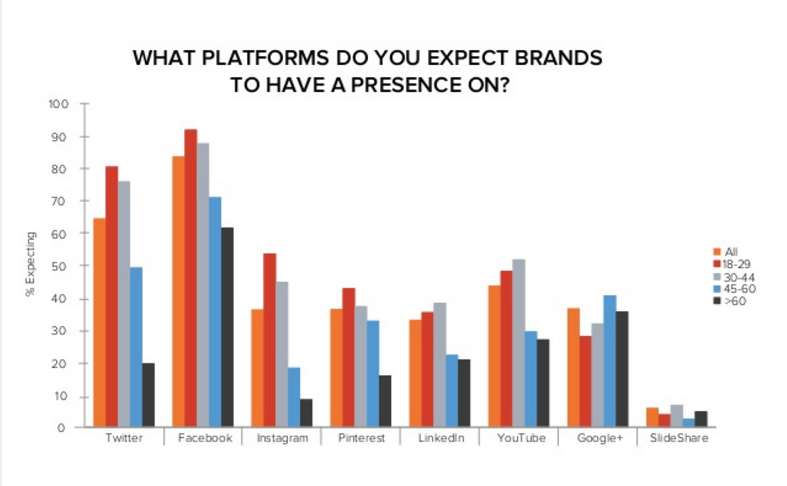
    It’s no secret that Facebook is a social media powerhouse. With an average 1.09 billion daily active users, the platform has transformed the way people interact with each other and the world around them, and has revolutionized the way and speed at which we can access information. As consumers turn to Facebook more and more for information and as a means to connect with people, it comes as no surprise that an increasing number of people expect companies to be active on Facebook. According to a study performed by Hubspot, 95% of Millennials expect brands to have a Facebook presence.

    Hubspot Facebook Survey

    Having an active presence on Facebook is no doubt a great way for brands to connect with their consumers on a more personal level, as well as a cost effective means to target new customers. However, what does this mean for franchises with multiple locations? Should each location have its own Facebook page, or should the franchise have one page that represents the brand but not necessarily each location?

    Dan the Man ??

    According to Mashable, there are several questions a franchise should answer before deciding upon its Facebook strategy.

    Does your business have components that vary based on the location?

    For example, does your business offer different promotions, products, pricing, decor, etc. based on the location? If so, your business may benefit from delegating Facebook management to individual locations. By allowing franchisees to post their own content, each location can have more personal interactions, something that is very important if your business varies slightly based on location. Take McDonald’s, for example. Their menu varies based on the culture of the location. Therefore, they take a decentralized approach—they have a corporate Facebook page but also allow each location to manage their own pages.

    Does your business benefit from a close relationship with its customers?

    Service businesses are the perfect example of businesses that benefit from a close relationship with its customers. These businesses rely on positive interactions with customers. Because so many people are on Facebook, this is a great way to reach and interact with consumers on a personal level. Allowing franchisees to post their own content allows the brand to take on a personality as well as establish themselves as an involved player in the local community. Having a positive and strong presence on social media can be very beneficial in building strong customer relationships.

    Are your industry’s consumers on Facebook?

    It’s important to analyze if your target demographic is active on Facebook. For example, while 90% of Millennials are active on social networking sites, only 46% of seniors use the platforms. It’s important to analyze this to ensure that your marketing efforts are not falling on deaf ears.

    Where are your locations?

    While all of the above data seems to point towards a decentralized approach, there are many businesses that benefit from a centralized Facebook strategy. For example, if all of your locations are within one city or region, one Facebook page makes sense. Instead of oversaturating the market with multiple pages, it’s better to have one page that represents all of the locations within that city or region.

    It’s also important to note that by allowing franchisees to post content, you forfeit complete control over your brand. By entrusting franchisees with managing their own Facebook presence, you are allowing them to represent your brand in every post, comment, or picture posted. However, in order to help guide your franchisees in post content and tone, a franchisor can provide them with Social Media Guides outlining their dos and don’ts for posting. Planet Fitness is a great example of this. While they do have a corporate Facebook page, they also empower each of their locations to manage their own Facebook page. The goal of the location pages is to drive local engagement and interaction within the community by posting about community events, special club promotions, and specific club information.

    Unfortunately, there is no hard and fast rule. However, by assessing your industry, customer demographics and company culture, you can choose the best Facebook strategy for your franchise.

  • 10 Things Your Medical Practice Should Be Doing on Facebook

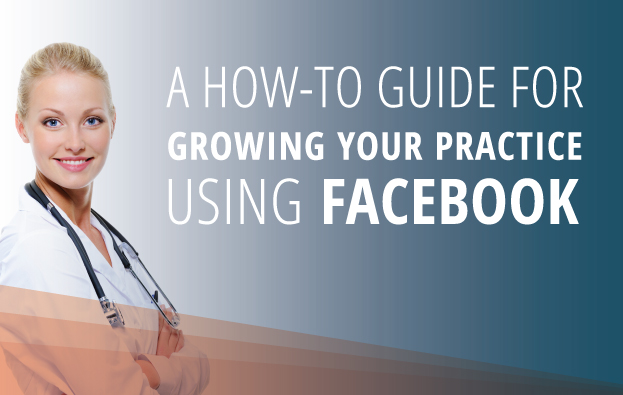
    A How-To Guide for Growing Your Practice Using Facebook

    We all like to think of ourselves as Facebook experts. This is 2016 after all, and Facebook has been around for over eight years. But the resting state of the online world in our internet age is continual flux, with updates and improvements becoming available quicker than you have the time or energy to research and evaluate. We know you’re busy, so let us give you the tl;dr (too long; didn’t read) version, with some easily employable tips and tricks that you should be using on Facebook.

    1. Engagement, Engagement, Engagement!

    Relationships can’t be one-sided, so make sure your Facebook fans see the benefit in keeping up with your page by responding to their comments, questions, and concerns. Just like your patients, your growing fan base wants to feel like they’re being heard. Taking just a few minutes to reach out to them and address their inquiries will keep your current fans happy and could even help you gain more interested Facebook followers. And, with Facebook providing users with an estimated response time right on your page, it’s more important than ever to quickly and thoroughly respond to your fans.
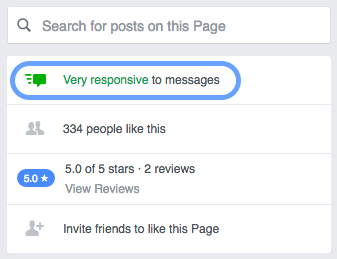
    Facebook screenshot: Very responsive to messages

    There’s a reason it’s called social media! For more tips on posting irresistibly engaging content, check out this post by a fellow influencer.

    2. Create Shareable Content

    The key to great Facebook messaging is shareability. Creating compelling, viral content that your fans can’t help but pass on increases your reach outside of your social network, earning you more fans and more influence. Consider curating a monthly list of debunked medical myths or posting an article detailing easy lifestyle changes that result in major prevention benefits.

    3. Show Me the Money!

    Facebook Y U No Keep Algorithm?

    With subsequent Facebook algorithm updates, overly promotional posts are receiving less and less organic distribution on the platform. Thus, it has become increasingly important to put some spend behind your posts in order to engage specific audiences, especially since gaining fans doesn’t necessarily mean your content will reach those fans. Appealing to your growing fan base and encouraging engagement and familiarity with your products, services, and industry through post promotion is an extremely cost-effective way to combat these updates.

    4. Practice Events

    Facebook events are a great way to get your business and services in front of the community. Create your own events around prevention, fundraisers, and community outreach. Is your practice offering free flu shots? Create an event and allow people to invite their friends. Watch your RSVP list grow!

    5. Community Events

    Events can also be a great way to express your involvement in your community. Do you have a team participating in Relay for Life or a March of Dimes event? Show your solidarity, and encourage your fan base to support your favorite cause by creating your own Facebook event or attending one!

    6. Know Your Audience

    Being familiar with your fan base can help you provide content and services tailored to your fans’ interests. The Audience Insights tool can provide you with an invaluable cache of information. You can analyze the times of day your fans are most active on Facebook, the makeup of the Reactions your posts receive, and even the demographic makeup of Facebook users near your place of business.
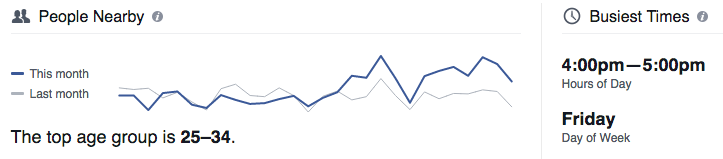
    Facebook screenshot: People nearby

    7. Analyze Your Reactions

    Also available through the Audience Insights tool, or by viewing individual posts on your page, are the myriad of Facebook Reactions users can now express. Taking a look at the various responses like Love, Haha, Yay, Wow, Sad or Angry can give your practice a good feel for the type of content your Facebook fans are interested in seeing more of as well as the content they’re definitely not interested in.
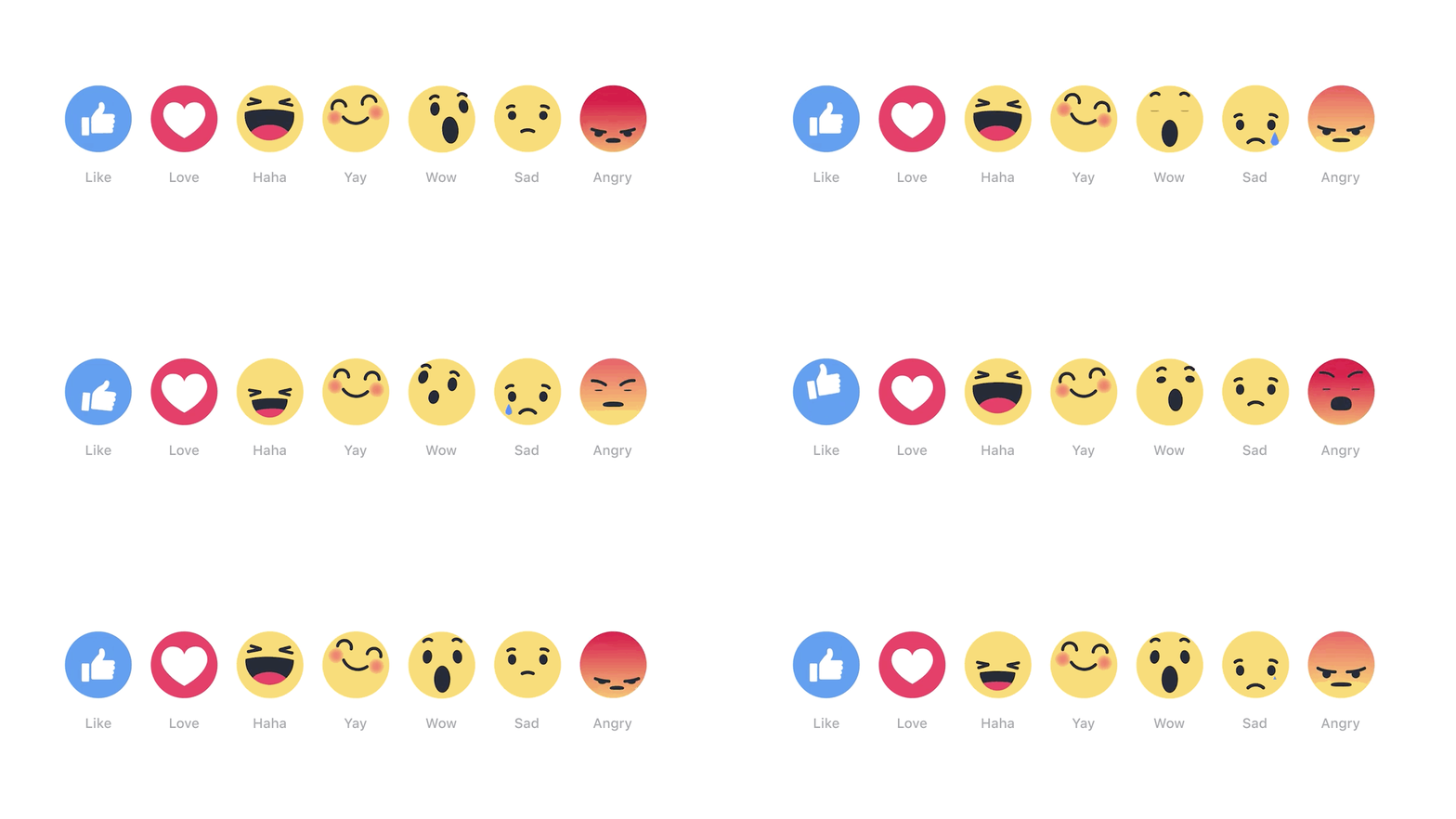
    Facebook Reactions Giphy

    8. Make Posting Easier with Scheduling

    Don’t have a dedicated social media team for your practice? If you rely on a few helpful individuals, and especially if you’re taking on the task of social media management yourself, you will definitely want to familiarize yourself with Facebook’s post scheduling tool. If you want your page and its content to be consistently at the forefront of your fans’ newsfeeds, and trust us, you do, the ability to “set it and forget it” is priceless.
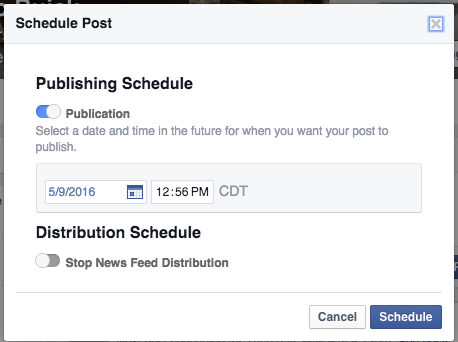
    Facebook Screenshot: Scheduling

    Check out this post for a step by step on how to get started with this feature.

    9. Update Your Page!

    Just as you stay up-to-date on the latest medical innovations and techniques, you must maintain currency in your social media efforts! Keep your contact information current and accurate, and post content with an eye towards the future (i.e. new developments in the field and what this means for the patient). This up-to-date and active approach will help make your practice’s page more likeable.

    10. Consistency Is Key

    In addition to keeping your post content current, maintaining branding consistency across different channels, such as your website, blog, and social media profiles, is a must for any practice wanting to build authority in the community. A user should be able to seamlessly navigate between your multiple online presences without a jarring change in the consistency of color and imagery, helping your brand to project a pervasive, qualified influence.
    Set of flat design concepts for online medical services

    As they say, practice makes perfect. So go, implement these tips and tricks to see what works for you and your practice, and keep checking back with us for the latest updates!
  • Facebook Remarketing Explained – 4 Steps to Increase Your ROI

    How Does Remarketing Work?

    Have you ever window shopped for a new pair of running sneakers online and noticed they followed you around the Internet? Advertisements for those sneakers in the same color and size appear on almost every website you browse! You might even be scrolling through your Facebook News Feed and the sneakers pop up again. You may be thinking, “This is fate!” But no, this is not fate or the magic of the Internet.

    I’m going to let you in on a little secret called remarketing. One of the hottest trends in remarketing right now is using Facebook to target a select group of ideal customers with tailored ads. Your company’s marketing team can use this powerful marketing tool to nurture relationships with qualified customers and increase sales.

    What Is Remarketing?

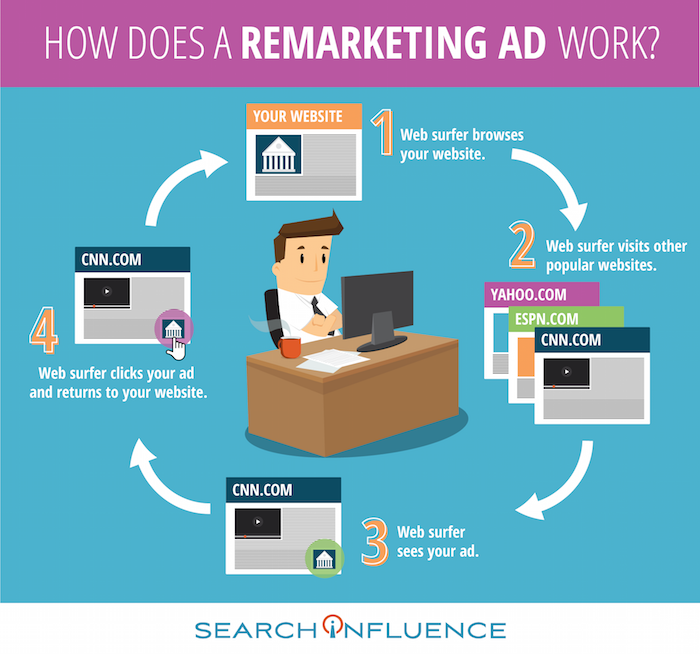
    Let’s say someone clicks on your brand’s Facebook ad. They’re instantly brought to your website, and they can browse your offerings. These people are generally qualified leads because they took the time to navigate away from their cluttered News Feed and click on your ad. However, they may not always complete an action like making a purchase, downloading an e-book, or providing their contact info. In fact, people rarely make a purchase the first time they visit a brand’s website or see an offer from the brand. These lost prospects are valuable, and you will want to continue your business experience with them.

    How Does a Remarketing Ad Work Infographic Image - Search Influence

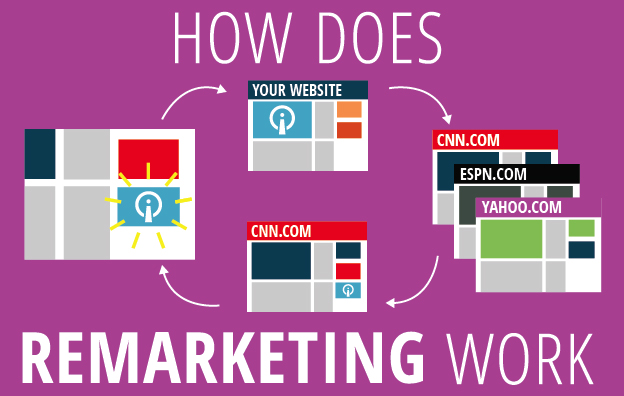
    The overarching goal of remarketing is to place your brand at the top of consumers’ minds. Remarketing allows you to reach people who have previously visited your website and may not have made a purchase.

    A great way to revive your relationship with them is by showing tailored ads to them again on Facebook. To do this, you can use your brand’s Facebook pixel to create a Custom Audiences for Website Traffic that builds an audience based on your brand’s website traffic. The opportunities to nurture and build relationships with current and prospective customers on Facebook are endless.

    Why Should I Remarket on Facebook?

    Facebook remarketing ads get three to four times the response rate of regular Facebook ads. With over 1 billion people using the social media platform daily, making sure that you’re reaching the right people is critical! The Custom Audiences for Website Traffic feature seamlessly reaches your ideal customers by creating a Facebook audience representing a group of prospective customers and current customers who have visited your website. This feature has a few benefits:

    • Reach people who are genuinely interested in your brand through targeted Facebook Ads
    • Bring people back to your website to complete an action
    • Find new people who have similar characteristics to your website

    By targeting your ideal customers, you will grow your brand’s fan base, drive website traffic, build a rock-solid email list, and increase ROI. You will also avoid burning a hole in your advertising budget by lowering cost-per-click, driving higher conversions, capitalizing on social proof, and expanding market reach.

    How Do I Use Facebook Custom Audiences for Remarketing?

    Now that you’re an expert in remarketing, let’s dive in and set up a Facebook remarketing campaign for your brand. I’ve created a 4-step guide that outlines the setup process.

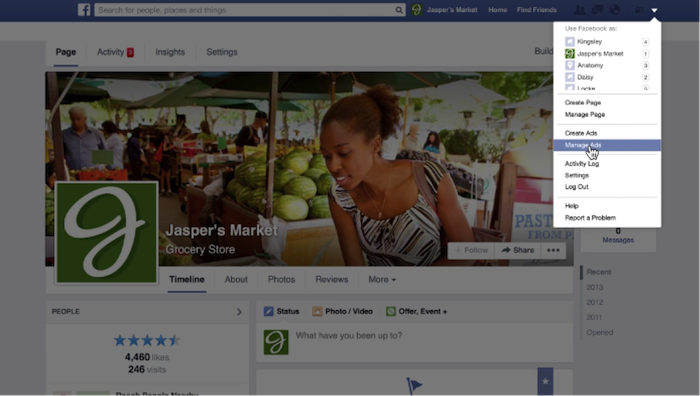
    1. Access Facebook Ads Manager. Log in to your Facebook account and navigate to the drop-down menu on the top left of your screen. Select “Manage Ads” from the drop-down menu.

    1 - Remarketing Drop Down

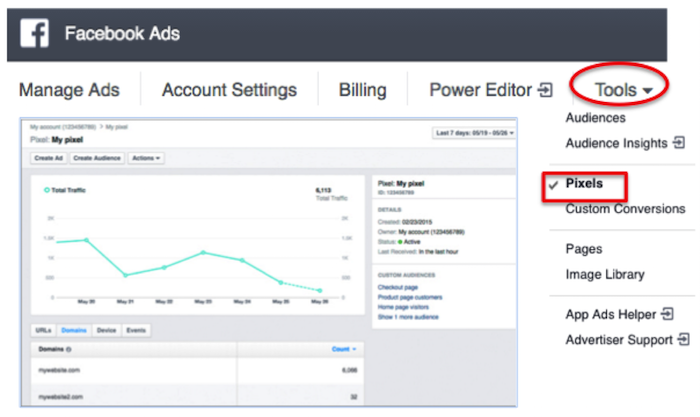
    2. Create a Facebook pixel. To pinpoint your website visitors so you can retarget them on Facebook, create a Facebook pixel and insert it on your site. Now that you are in Facebook Ads Manager, click on the “Tools” drop-down menu and select “Pixels.” Click “Create a Pixel” and give it a name. Then, copy and paste the pixel code into your website code.

    2 - Facebook Ads

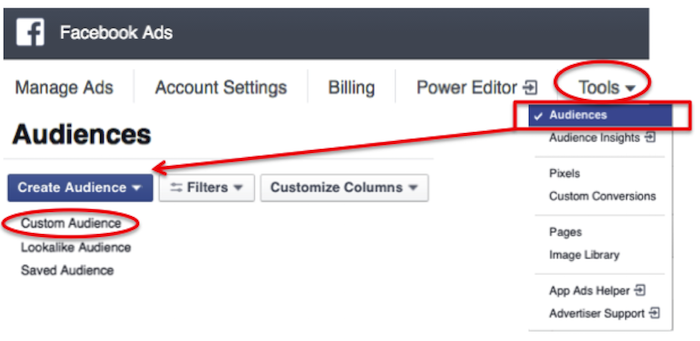
    3. Build a custom audience. Click on the “Tools” drop-down menu and select “Audiences.” You’ll see a blue button that says “Create Audience.” Click on that button and hit “Custom Audience” from the drop-down menu.

    3 - Audiences

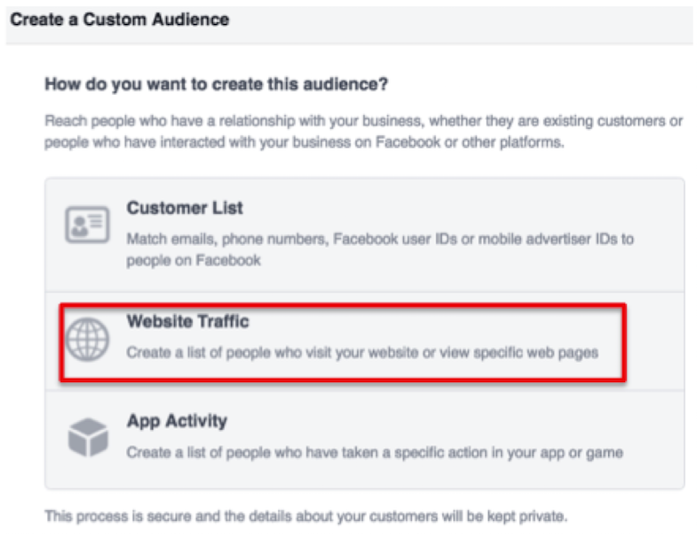
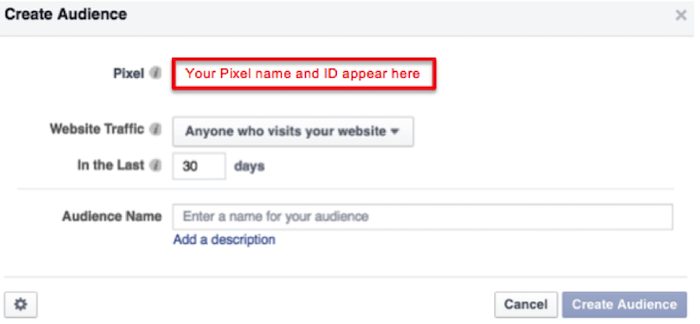
    Then, select “Website Traffic” and name your audience.

    4 - Website Traffic

    5 - Create Audience

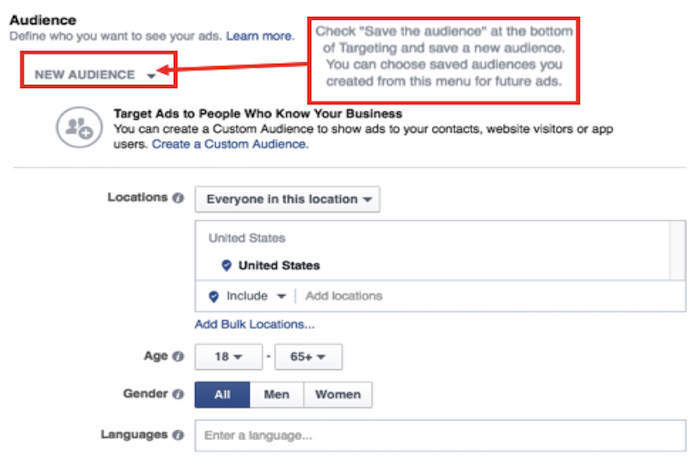
    4. Craft an Ad. In the ads create tool, you can access your custom audience when you choose who you want your ad to reach.

    6 - New Audience

    Voila! You’ve successfully created your remarketing campaign. If you have any more questions along your remarketing journey, you can reference Facebook’s simple remarketing guide.

    Image Credits:

    “Manage Ads” Menu Screenshot – from Video
    Pixel Graph Screenshot