Tag: Facebook

  • Growing Your Practice on Facebook, Part 2: Shareable Content

    Now that you’ve learned why Facebook is such a crucial tool for your practice, it’s time to master one of the most important aspects of Facebook: engagement. Facebook is all about conversation and interaction. If you aren’t creating compelling content and engaging with your followers on a regular basis, your social media campaign will fall flat—making the next steps in this series much harder for you. Here’s how to polish up your content and keep your followers invested on Facebook.

    1. Create Shareable Content

    At one point or another, we’ve all come across a Facebook post that just speaks to us; one we couldn’t help but share with a friend or add to our timeline. The act of sharing a Facebook post seems simple enough, but for your business, these shares are crucial to your social media campaign.

    According to Kissmetrics, more than 30 billion pieces of content are shared on Facebook each month. Facebook shares are powerful stuff for business because they help your message to grow exponentially. Friends share content with Facebook friends in a way you couldn’t have managed organically on your own. So, how do you help make this happen?

    Well, if your practice wants to be included in those 30 billion pieces of shared content, it’s essential that you start writing interesting and relevant posts your fans will really want to read. If you’ve followed our blog for a while, you’ve probably heard us quote the great Bill Gates saying “Content is king.” This saying holds true across websites and platforms, and Facebook is no exception. Compelling, authentic, and viral content is what earns you those valuable shares, which in turn means more fans and more social influence.

    Just one thing to clarify: we’re not saying Likes aren’t valuable in their own way. They can be a sign of popularity, a mark of agreement, or a note that “I agree,” or “I’m with you.” However, if your goal is to get your content in front of more potential patients, you should always be on the hunt for the ever-elusive Share. Got it? Let’s get started.

    How to Create Shareable Content

    The tricky thing for medical practices is that you’re busy, and your staff might not always have the time or expertise to sit down and brainstorm ideas for compelling content. But don’t worry—here’s a list of tips to get you on the road to those shareable posts.

    • Keep it short and sweet. The ideal length for Facebook is around 40 characters.
    • Don’t use too much industry jargon. The medical industry is notorious for its jargon. Just don’t forget to consider your audience when posting. Complex terms can be off-putting, and your busy readers will appreciate your effort to break things down.
    • Don’t make every post promotional. Patients will find it helpful to know your biggest and most relevant updates, including new staff members, upcoming events, and special deals. But keep in mind that no one wants to read a revolving door of the same products and services your practice offers. This type of repetitive content is unlikely to be shared.
    • Know when to post for best results.
    • Use images whenever possible. According to Hubspot, Facebook posts with images get 2.3x more engagement than those without images. Consider adding more personal images as well, such as photos of your office, your team, or your patients. This lets readers get a glimpse at the faces behind the computer, and it adds a personal, familiar touch to your posts that can’t be gained with stock images alone.
    • Consider creating a weekly themed post. This gives your fans something unique and interesting to look forward to on a regular basis. Maybe you want to highlight a recent article you read, inspirational images, or products your practice recommends.
    • Share or repost interesting updates from other businesses. Give your readers a range of information by sharing relevant information posted by other practices, industry leaders, or medical associations. This can also be a good way to help build a referral network.
    • Share something silly every now and then. It’s true that the medical industry has a reputation for being serious, but adding silly content to your page just for the sake of sharing the joy can make you more relatable. Funny yet relevant comics, relatable e-cards, cute videos, and even animated reaction GIFs might seem off-topic, but these types of posts are often widely liked and shared. These can be great for extending your reach if your practice’s name is attached to the content.
    • Come up with interesting topics. Don’t be afraid to change things up! If you need help with this, try one of our favorite tools, Answer The Public, which can help you get an idea of what your patients might be searching for or interested in.
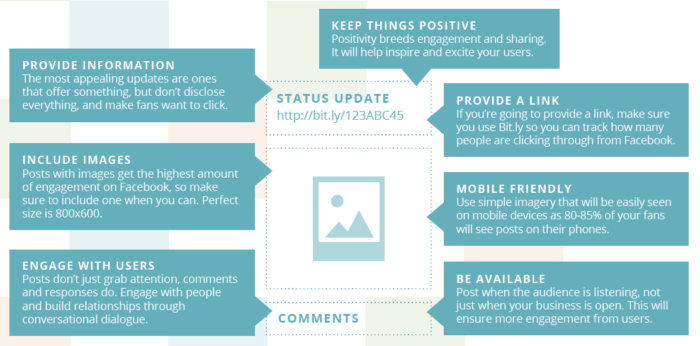
    Image Of The Ins And Outs Of Shareable Content - Search Influence

    These tips can go a long way in shaping your existing Facebook posts into something your fans will naturally be interested in. It can take time to master all of this, but even small steps can help increase your content’s shareability—and don’t forget that we’re always here to help!

    2. Engage With Your Audience

    Now that you’ve created your shareable posts, it’s time to sit back, relax, and watch the Shares and Likes roll in. Just kidding! The hidden “Part 2” to your shareable content journey is the engagement factor. Your audience will react and respond to your content, and they’ll also voice their own questions, comments, and concerns. Everyone wants to feel like they’re being heard, and responding to these inquiries shows your patients and potential patients that you’re invested in the discussion.

    One thing to keep in mind with Facebook is that if you’re in the habit of responding quickly, users will see your estimated response time right on the page. This estimate shows your attentiveness, which can be a great signal for potential patients on Facebook. So, don’t forget that taking even a few minutes to respond to your followers can go a long way.

    With the skills you’ve learned in this post, you’re already on your way to growing your medical practice on Facebook. Next time in our blog series, we’ll teach you how to enhance your Facebook campaign with promoted posts!
  • Growing Your Practice on Facebook, Part 1: Why Facebook Matters

    It’s no secret that Facebook isn’t going away anytime soon. Even with predictions a couple of years ago that the social media giant would lose a significant portion of its users to other contenders like Instagram, Twitter, WhatsApp, and Snapchat, they’ve managed to see steady growth. Since that prediction in 2015, they’ve gone from 1.2 billion monthly users to nearly 2 billion.

    So, let’s address the elephant in the digital room here. Is your practice on Facebook?

    In this series, we’ll break down the ins and outs of the best ways to reach your patients through Facebook, going over everything from advertising and shareable content to privacy rights and how to find the right images.

    Before we get into details of using Facebook to bring in more patients, let’s break down a broader question: Why is Facebook so important for your practice?

    Social Media Humanizes Medical Practices

    When’s the last time you talked with your patients outside of the office? In a report from the Health Research Institute, Ed Bennett, who oversees social media efforts at the University of Maryland Medical Center, notes, “If you want to connect with people and be part of their community, you need to go where the community is.”

    By using Facebook to interact with patients, physicians can create a dialogue that builds trust. Some patients may feel uncomfortable scheduling an appointment when all they wanted was to ask a personal medical question. Sometimes questions are just easier to ask through a direct message or comment rather than over the phone or in person.

    Medical Patient Sitting On Treatment Couch - Search Influence

    By commenting on, responding to, and answering questions directly through Facebook, unforeseen walls begin to break down. The best part? That starts to become what your practice is known for. Your medical office gets a reputation for being the place to go where people won’t feel afraid to ask about a diagnosis or procedure, how it affects them, or what their options are. It becomes the ideal venue for open communication. You’re no longer just a resource for patients when they come to your practice; you’re there for them at any time.

    Think about it this way. The average user checks their Facebook account daily. Will your practice be there to start a conversation when they log on?

    Expertise, Industry Experience, Specializations—Go Ahead and Tout It

    To go along the philosophical questioning of whether the falling tree in the forest makes any sound, are a physician’s best certifications and qualifications of value to patients if nobody knows about them?

    According to Search Engine Watch, nearly 90% of respondents aged 18–24 said they would trust medical information shared by others on their social media networks. This is also coming from a demographic that is more likely to share this information. Facebook gives physicians the tools to share their specific knowledge and expertise. Got a recent press release or blog post about a new technique offered exclusively at your practice? Put it on Facebook. It will demonstrate your expertise in your field while providing a great avenue for your patients to engage with and share this information.

    Also, in a time where anyone can share information and claim it as fact or scientifically true, physicians have the capability and responsibility to make sure accurate, helpful information is reaching their current and potential patients.

    Medical Patients Waiting In The Physician's Office On Facebook - Search Influence

    It’s All About Relevance

    Just as you shouldn’t make updating your Myspace page or LiveJournal your top priority anymore, you should be posting and staying up-to-date on Facebook to make your medical practice more relevant to what’s going on in your patients’ lives. It shows you’re a part of the online community, and ideally, it garners more traffic to your website and office.

    Ultimately, Facebook is more than just a place to share family pictures, an exciting recipe, or an awkward political conversation with an uncle. It’s a powerful resource for medical practices to reach their patients on a more personal level. Your patients are already there. We can show you how to utilize social media to find them and make them advocates for your practice. Reach out to us to learn how to implement a social media plan for your practice.

    For more information, stay tuned for our next blog post, which will teach you how to create and share content that moves your audience.

  • Google Paid Search vs. Facebook Paid Social: Team Players or Adversaries?

    When it comes to choosing between Facebook and Google advertising, it’s important to note what your business’s goals are. Both platforms are beneficial to business in their own ways and often work in conjunction to help businesses achieve maximum online visibility, gain more customers, and increase leads and sales. In order to best understand the opportunities with these two advertising channels, it’s important to know what each has to offer.

    Google Paid Search and Facebook Paid Social

    No one can deny that as far as search engines go, Google takes the cake. With more than 3.5 billion searches being conducted every day, Google is by far the world’s most popular and widely used search engine. Because of this, advertisers are able to reach a broad potential audience who may be seeking their products or services. Google AdWords, the PPC advertising platform for Google, allows advertisers to utilize the Search Network and the Display Network. Through the Search Network, advertisers can bid on keywords and phrases to trigger certain Google searches. The Display Network offers visual ads and can reach those who are not just searching on Google, but on other sites as well (i.e. a banner displaying your business’s logo on YouTube).

    Image Of Don Draper Discussing The Future Of Advertising - Search Influence

    Considered the pioneer of paid social advertising, Facebook has refined its process and has become an important part of many businesses’ marketing strategies. Like Google, Facebook is an extremely prominent website, with more than one-fifth of the entire world’s population active on the site monthly. Because Facebook users tend to share a lot of personal information—interests, relationship status, political views to name a few—Facebook advertising can target very specific demographics, showing Facebook users what they want to see.

    What Types of Ads Does Each Channel Offer?

    Both Facebook and Google include a variety of ad formats to appeal to a variety of audiences.

    Google Ads:

    • Text – These ads are only words, and can immediately reach customers as they search on Google.
    • Responsive – Size, appearance, and format can be adjusted depending on the ad spaces.
    • Image – Graphics that are static or interactive, and can be animated in .gif and Flash format. These can show on websites that partner with Google through the Display Network.
    • App Promotion Ads – As the name states, these ads can drive app downloads and engagement for your business. These will only show on devices that can support the app.
    • Video – These can stand alone or show in streaming video content on websites that partner with Google.
    • Product Shopping Ads – These show a photo, title, price, store name, and other details about a product you are selling.
    • Showcase Shopping Ads – This type of ad shows a product but expands when it’s clicked on to show related products and store information.
    • Call-only Ads – Ads that include your business’s phone number to drive phone calls. These types of ads only show on devices that support phone calls.

    Facebook Ads:

    • Domain Ads – With a simple format, this ad displays on the right column. This type of ad does not display on mobile.
    • Page Post Link – The most common of all Facebook ad types, this type of ad links to your external website and includes a large image for grabbing the attention of Facebook users.
    • Carousel Ads – A relatively recent development in Facebook advertising, these ads allow e-commerce advertisers to showcase up to five of their products, each with its own picture, link, and title.
    • Dynamic Product Ads – These ads target based on past actions on your website, also known as remarketing.
    • Lead Ads – Allows Facebook users to fill out a form on either desktop or mobile directly from Facebook.
    • Canvas – Only available on mobile, customers can interact with the ad by swiping through the carousel, zooming in and out or even tilting the images.
    • Page Like – This allows users to immediately like a Facebook page.
    • Page Post Photo and Video – Showcases pictures and videos from your business. Video advertising is especially engaging as Facebook video receives up to 8 billion video views per day!
    • Mobile and Desktop Apps – Similar to Google’s app promotion ads, these drive installs of a business’s app to mobile and desktop.
    • Event – Allows a business to promote their event to visitors.
    • Offer – This type of ad can only be created on a page with at least 50 likes, and it allows a user who clicks on the ad to redeem a special promotion.

    Google and Facebook: Friends or Foes?

    As previously stated, it’s highly common for Facebook and Google to be utilized together in a marketing campaign for their different advantages. Many marketers are drawn to Google because of the search volume and opportunity for exposure there. Google allows for targeting based on location, keywords, demographics, devices, and languages, as well as re-marketing, which can target users based on searches that have previously been conducted. While PPC ads are text-based, advertising opportunities are versatile. Extensions, user reviews, map data, and shopping ads are just a few examples of how Google advertising can be further optimized.

    Facebook advertising is not only extremely targeted but also highly visual, which many see as an advantage over Google. Facebook ads are essentially unavoidable, appearing in your target audience’s News Feed or the right column of their page. Because advertising on Facebook is based on specific insights and interests, chances are that the ad will be more engaging to the user.

    Image Of the Internet Being Friends - Search Influence

    Perhaps the biggest difference between each platform is the behavior of the users. When searching on Google for products or services, users have an idea of what they are looking for. Facebook, on the other hand, is not typically used to seek a product or service. However, the likelihood of a Facebook user to be exposed to a product or service that appeals to them is very high.

    While Google and Facebook are often seen as adversaries in the marketing world, the possibilities with each vary greatly. Try this team together for utmost potential in maximizing any campaign’s performance.

    Image Sources:

    Don Draper & The Future Of Advertising

    The Internet Shaking Hands

  • Grow Your LinkedIn Network With These 3 Optimizing Tips

    With over 400 million users, LinkedIn has become a social networking must for companies large and small. While other platforms like Facebook and Twitter are commonly used in marketing and SEO campaigns, LinkedIn can have a significant impact on online visibility and SEO opportunities. Instead of neglecting your LinkedIn account, utilize it to grow your business’ traffic and network.

    1. Be Consistent

    The Devil Wears Prada Who Are You - Search Influence

    For your traffic to increase, customers have to know it’s you. One of the biggest mistakes a company can make is not maintaining brand consistency across all marketing platforms. LinkedIn provides you with the opportunity to upload banners, background images, videos, and photos. Utilize all of these to tie back into your brand, logo, tagline, and color scheme.

    This also applies to the written content on your LinkedIn profile. If your business’ website uses a formal tone, don’t be overly casual on your social media. This creates brand confusion and can lead to customers not connecting with you because they think you’re someone else. Don’t lose out on growing roots with a client because someone can’t figure out if your profile is the right one.

    2. Engage Your Network

    Parks And Recreation Aziz Ansari On Social Media - Search Influence

    While you may have a lush profile, if it’s not active, no one is looking at it. It’s important to create, share, and like fresh and relevant content to your industry. Shower your followers with content at least twice a day and watch your network grow. This keeps your profile engaging as well as current. When creating or sharing content, make sure to add variety. For example, it can be good to post an interesting article in the morning and then ask an engaging question in the evening. This allows for different types of client interaction and can make a profile look more personable.

    As I’m sure you’re aware, blog posts are great when it comes to a site’s SEO. By posting your company’s blog posts on LinkedIn, you not only help your profile, but you also improve your website’s ratings, which can lead to more business.

    3. Let Your Keywords Shine

    SEO Friendly - Search Influence

    While your company can be searched on LinkedIn by name, it can also be found by keywords. The keywords used in your SEO campaign are the same words you should be using on your social media platforms. Your keywords should shine through your content from your posts, to your description, and to your headline. While it’s still important to stay natural, try to fit in a keyword or two in the first 156 characters of content on your profile. Google previews these first characters, and with the help of keywords, your profile can be more easily found.

    LinkedIn Superman - Search Influence

    By not growing your LinkedIn network, you’re leaving opportunities like referrals and website traffic in the dust. Social media platforms are crucial to interacting with current and potential clients. As LinkedIn’s numbers grow, so can yours. Make sure your profile is the cream of the crop and optimize.


    Image Sources:

    Devil Wears Prada Image

    Aziz Ansari On Social Media

    LinkedIn Superman


  • What You Can’t Do On LinkedIn: Hacking LinkedIn and Getting Results

    Hypertargeting. Automated bid management. Ad scheduling. We take for granted these social media advertising features available on platforms like Facebook. But, what do you do when these “advantages” are not available on other sites, like LinkedIn? Here at Search Influence, we decided to design some experiments to see if we could manually hack these features within the LinkedIn advertising platform.

    Targeting Options

    We all know how great Facebook’s targeting is with purchase behaviors and in-market audiences backed up by actual third-party data. There’s no way that LinkedIn can touch Facebook in this realm, right?

    According to Business Insider, LinkedIn is gradually increasing its user base, even as other platforms like Facebook and Twitter have seen decelerating growth. What LinkedIn has to offer is the opportunity to reach one of the fastest-growing groups of business-minded professionals when they are in “work-mode,” browsing for new career opportunities, exploring professional affiliation groups, and researching industry-specific content. In fact, Buffer reports that 60% of LinkedIn users are interested in seeing industry-related content with company news as a close second. So how can you capitalize on this information-hungry audience?

    LinkedIn offers the opportunity to target all levels of the professional hierarchy, from young company influencers, performing research and reporting on their findings, to higher-level corporate decision-makers looking for their next business partnership. The targeting opportunities on this platform are specifically geared towards a professional audience. With these options, you can:

    • Target specific Companies by name and narrow in your Job Titles to reach the exact people you want to hear your message,
    • Use specific Degrees or Skills to seek out only the users who meet your qualifications or
    • Sift through Member Groups to find people with similar or desirable professional or educational affiliations.

    With all of these occupation-oriented targeting options, LinkedIn offers advertisers the ability to closely align your social engagement goals with your company’s brand and mission to reach users who are demanding industry-relevant content.

    Ad Scheduling

    Facebook offers ad scheduling, and while it’s not as granular as other platforms, such as AdWords, which allows you to schedule your ads in 15-minute increments, it still provides a heightened level of control over when your ads are shown.

    Unfortunately, LinkedIn does not afford advertisers these same features, so we took it upon ourselves to apply manual ad scheduling to see if the benefit was worth the time. Research has shown that the best time to publish content on the LinkedIn platform is Mondays through Fridays, during business hours. Makes sense, right? Target working individuals with work-related content during work hours.

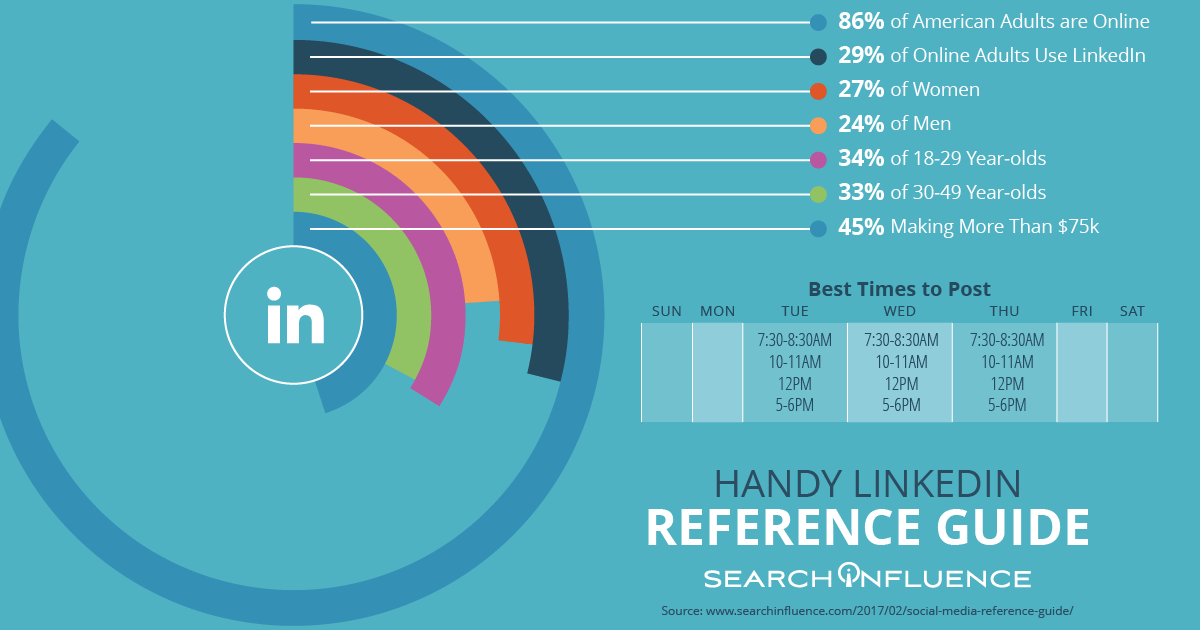
    Linked-In-Best-Times-to-post imge - Search Influence

    Our online advertising team put this premise to the test. Many of our clients suffer from budgets that are too small to run ads for the duration of the month. When you factor in LinkedIn’s $10 daily minimum and the fact that the platform allows you to spend up to 20% more than your daily budget on any given day, and you most often will, this effectively makes the minimum daily spend $12. If we extrapolate that figure across a 31-day month, an individual campaign needs AT LEAST $372 to run. To be most effective with our clients’ monthly spends, we wanted to capitalize on the users who are most likely to engage with the content, i.e. people who are on LinkedIn during the weekdays.

    We implemented a “Weekend Pausing” test for a few of our clients. This test included Sponsored Updates campaigns, and we ran our test from November of 2016 through December 2016, pausing on weekends and holidays when users are least likely to be browsing the platform with intent.

    We began by establishing baseline performance for each of the clients and decided that our main metrics for measurement would be engagement and cost per engagement.

    Image Of Engagement Metrics For Online Advertising LinkedIn - Search Influence

    So, what did we find? One client saw a 28% decrease in cost per social action and an 18% overall decrease in spend for a 14% overall social action increase. One client spent 23% less budget and received 63% more social actions for a cost per social action that was 53% less than the baseline. However, when we looked at overall engagement, which includes clicks as well as social actions, we saw an overall engagement decrease of 13% and a 39% decrease in engagement rate, refuting the idea that LinkedIn users are most active during weekdays. An extended period of testing would be required to investigate the full impact of weekend pausing on LinkedIn engagement rates.

    Bid Management

    Other platforms offer automatic bidding options to get you the lowest cost per result. Facebook does this across all of its placements, including Instagram and the Audience Network, to achieve the lowest average cost per result. There are also manual bidding options on the Facebook platform for those advertisers who want a little more control.

    Luckily, LinkedIn does provide some competitor bidding data so that you can make an informed decision when setting your manual bids, which is the only option available on this platform. Previously, the consensus for LinkedIn bidding best practices was to bid as high to the top of the bidding range provided by LinkedIn in the Bid & Budget tabs of the campaign manager as the client’s budget allows.

    Image Of Competitor Bidding Data For Online Advertising LinkedIn - Search Influence

    What we were curious to test was whether we could maximize clicks and decrease overall cost per click by strategically bidding down, towards the middle of the bidding range. Our online advertising team devised a test across multiple clients in various industries with different budgets. Since our goal was to maximize clicks and engagement, we chose clients with Sponsored Updates campaigns. We established baseline metrics for each of our client’s prior performance and began strategically lowering and raising our bids from the top of LinkedIn’s provided range to the bottom in predetermined increments each day.

    Once our bids were set towards the lower bound of the range, clicks and impressions significantly decreased. After moving up and down the range a couple of times, we hit a “sweet spot” right around the middle of LinkedIn’s bidding range where performance was optimized. We discovered that bidding around the middle of LinkedIn’s bidding range resulted in an average click increase of 39%, an average CTR increase of 14%, and an average CPC decrease of 30%. Through the manual manipulation of our bids, we were able to generate more engagement for our clients at a lower price!

    What Can You Do With LinkedIn?

    While many advertisers might suggest channeling efforts from LinkedIn to Facebook, I suggest rethinking the platform’s purpose. What our experiments have revealed is that if you can devise a strategy that considers the platform’s utility as a connector of business-minded individuals, and you’re willing to put in the effort to manually optimize your campaigns for the highest level of budget efficacy, you can churn out excellent results.

    If you have strategic questions about using Linkedin or need support getting started with Linkedin advertising, contact a member of our team.

  • Up Your Social Media Game With This Handy Reference Guide: The When, How, and Where of Social Posting

    Up-Your-Social-Media-Game-With-This-Handy-Reference-Guide - Search Influence
    Another year, another seemingly endless parade of social media posts gone by. If you haven’t jumped on the social marketing bandwagon yet, 2017 is the year to begin because things are continuing to go up and up. Here are some highlights.

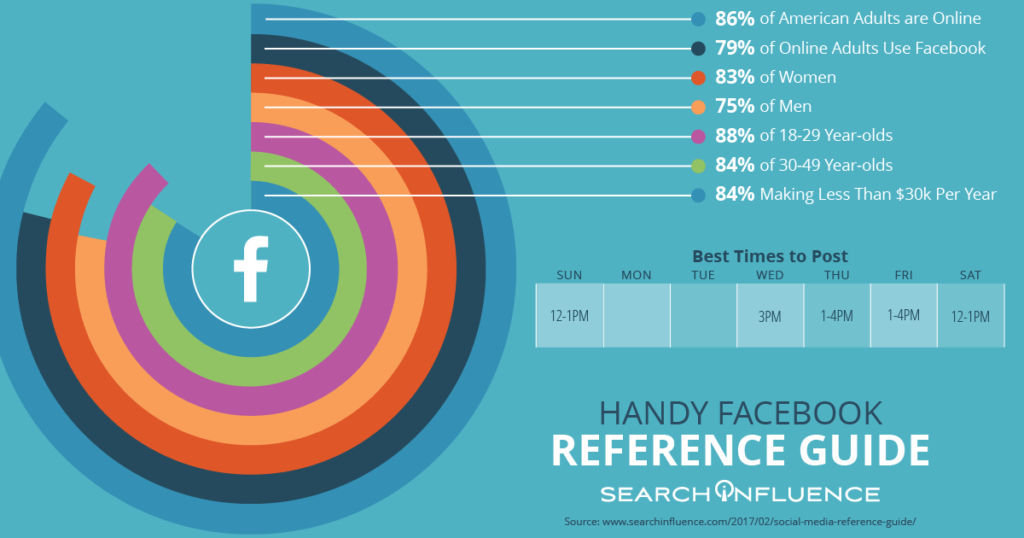
    79% of Online Adults Use Facebook

    The Pew Research Center has done a lot of work tracking the social media usage of American adults. Of all platforms, Facebook has a staggering reach among adults across demographics.

    Handy-Facebook-Reference-Guide - Search Influence

    Of these Facebook users, 76% check in every day and use Facebook as a way to learn about the news, local businesses, trending topics, and more. Facebook is truly on the way to becoming all pervasive, even among adults aged 65 and older.

    57% of Consumers Are Influenced by Online Information

    More than half of internet users surveyed said that they are influenced to think more positively of a business after reading positive reviews or comments about the business online. This means that creating a space for customers to give reviews and interacting with these reviews has tangible benefits and can convert potential customers that are lurking in the background of your social media.

    Social Media Ad Spending Has Hit $35.98 Billion – and Keeps Climbing

    Businesses are learning the advantages of using social media to market to their customers and using that knowledge to their advantage. Social media advertising is becoming the new normal, and we have abundant experience creating campaigns that convert. Contact us if you are ready to get started with paid ad campaigns for your institution or business.

    Sources:

    http://www.pewinternet.org/2016/11/11/social-media-update-2016/

    http://webbiquity.com/social-media-marketing/47-superb-social-media-marketing-stats-and-facts/

    http://www.pewinternet.org/2016/11/11/social-media-update-2016/

    http://coschedule.com/blog/best-times-to-post-on-social-media/

    https://www.emarketer.com/Article/Social-Network-Ad-Spending-Hit-2368-Billion-Worldwide-2015/1012357#sthash.eESedQLL.dpuf

    https://www.emarketer.com/Article/Facebook-Twitter-Will-Take-33-Share-of-US-Digital-Display-Market-by-2017/1012274#sthash.0WToy3rM.dpuf

  • Want to Grow Your Medical Practice? Here’s 4 Ways Facebook Ads Can Help

    A How-To Guide for Growing Your Practice Using Facebook Image - Search Influence

    The world is filled with many ways to advertise a product or service. Simply hoping that your message makes its way to the perfect target audience certainly isn’t the best practice to ensure that your medical advertising efforts are a success. For medical professionals, it may be particularly tricky to target those individuals in your practice’s geographic reach, specialty area, or even other physicians looking to refer their patients to another trusted healthcare provider. Though it can seem nearly impossible to reach the perfect audience through traditional mediums like television or radio, Facebook is continuing to provide proven results for advertisers in the medical realm. A rich and unique resource of user personal interests and behaviors, Facebook is truly a health care advertiser’s dream!

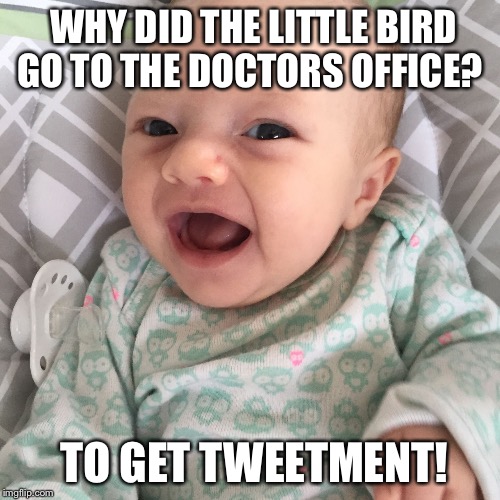
    Image Of Baby Making A Joke About Doctors - Search Influence

    Whether you’re a specialist or a general family doctor, Facebook has the right tools to not only narrow down your ideal patient but also present your service in a way that truly connects these individuals with the personalized healthcare you can provide them.

    Here are 4 ways to use Facebook ads to your advantage:

    1. Use Facebook Display Ads to portray real people and satisfied patients in your ads.

    Facebook Display Ads can be the perfect way to send your audience to important areas of your website using striking images and creative calls to action. When using these types of ads, appealing to more potential patients is key. Using photos of real people and happy patients not only shows the success of your practice but makes ads more relatable to the audience. Finally, Facebook allows you to utilize their call-to-action buttons to tell users exactly what you want them to do when they see your ad. Consider using “Contact Us” or “Learn More” to drive potential patients to convert to actual patients!

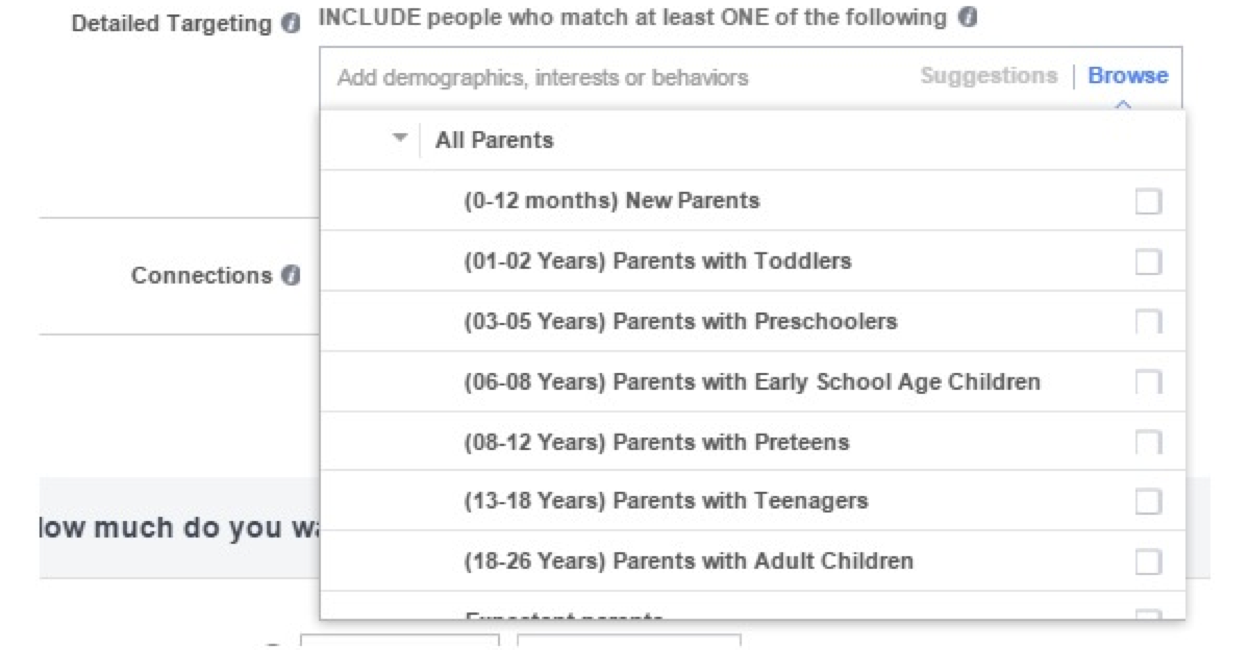
    2. Use Facebook’s ‘Detailed Targeting’ to your benefit.

    Facebook comes equipped with a number of targeting options that can be extremely helpful in identifying individuals that fit your target demographic. Everyone needs to see a doctor at some point, right? How about targeting people who have recently moved into your geographic area who might be looking for a new physician? You could also try targeting women who have recently become pregnant or seniors who might make more regular trips to the doctor.

    Picture Of Facebook Detailed Targeting Tool - Search Influence

    3. Referrals are your friend.

    Targeting other healthcare practitioners might not seem like the most effective idea at first, but using Facebook’s ‘Detailed Targeting’ to show your ads to other physicians or important referral sources always helps to keep your name at the tip of their tongue when talking to their staff and patients. Likewise, we all know that people seek advice on health care providers from their friends and family. It might be beneficial to target the connections of people who currently follow or Like your page. These tactics can only help drive more business!

    4. Don’t forget about HIPAA!

    It is always important to remember to follow HIPAA rules and regulations. When writing Facebook ad copy, never imply that you have knowledge about a sensitive health condition. Also, never collect or share personal information such as phone numbers or addresses. There are many successful ways to use Facebook ads to grow your practice that still align with HIPAA’s guidelines.

  • Three Simple Tips for Optimizing Your Facebook Page

    Facebook-for-business image - Search Influence

    For developing a meaningful online presence, proper management of your social media profiles is essential to any successful marketing effort. There are some very obvious, and important, actions to take: have a snazzy profile and cover photo, publish meaningful content, and engage with potential clients. However, beneath the surface, there are measures you should take to ensure your Facebook page is helping you reach your audience.

    Image Of Facebook Logo - Search Influence

    1. Ensure You Have Accurate Categories and Subcategories

    Often, businesses have neglected to fully flesh out this portion of their business page. This section is important because the category will indicate that you are, in fact, a local business trying to market a product or service while the subcategories will better define your products and services. In a crowded market, you want to make sure your page is helping guide potential customers directly to the goods and services they need. Facebook allows up to three subcategories, so if possible, find three that best fit the description of your business and the products or services you are marketing. This is editable in the “About” section of your page.

    2. Use a Custom URL and @Username

    Facebook allows businesses to edit their Facebook URL and use an @username to reflect their business name. First, this makes it much easier for new or repeat customers to find your information on Facebook. Additionally, it adds authority to your page because it reflects your business name rather than a random string of numbers and letters. Lastly, from a purely visual perspective, it just looks better. This is also editable in the “About” section of your page.

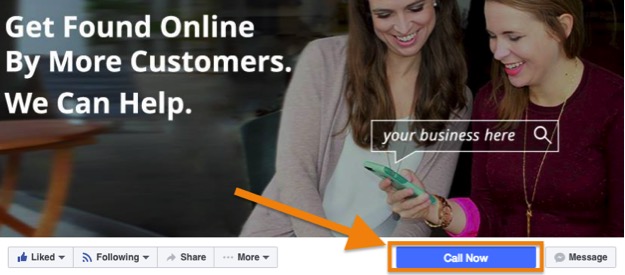
    Image of Call To Action Button On Facebook Page - Search Influence

    3. Add a Call to Action Button

    Facebook makes it easy for your potential customers to reach you by allowing you to have a Call to Action button right there on the cover photo. You want to ensure that you optimize this button so that customers can recognize it and that you get a response if it is used. Book Now, Contact Us, Use App, Play Game, Shop Now, Sign Up, and Watch Video are all options you can use to help boost a product, service, or special promotion your business may be running. You can easily find this where it says, “Add a Button.”

    While it’s easy to focus on the cosmetic and social aspects of your Facebook, it is important to remember that your Facebook can work for you without a great deal of effort from you. Creating accurate, well-written descriptions is another thing you can do to help with your page’s search value. In many cases, having a marketing business that understands how to make Facebook work for you can help you attract customers you would not have reached otherwise.

  • Don’t Feed the Trolls Part II: Facebook

    Search Influence’s resident troll has returned with the next installment of troll defense lessons. This edition will focus on the Facebook social media platform. Trolls inhabit every single corner of the infinitely expanded world wide web. Social media, forums, news articles, emails, Amazon reviews, and even online video games. The main strength that trolls have in most of these platforms is that they don’t have to expose their identity. But, what happens when someone trolls you on Facebook? Show me a person who trolls with their own identity, and I’ll show you a person who has nothing to lose. Though there is no surefire way to completely stop someone from trolling you into infinity, there are some pretty hard and fast rules that apply to all troll defense tactics.

    Image Of Trolls Dancing With Excitement - Search Influence

    Don’t Feed the Trolls

    Does this statement sound familiar? If it does, it means that you either read the previous entry into the troll stomping anthology, or you are a seasoned internet veteran. This is perhaps the easiest and simplest way to deter a troll from taking up residence on your business page. Though the easiest way to deal with a troll is to confront them face first, an excessive number of responses and back and forth will eventually cause you to devolve into the troll that you are trying to destroy.

    Don’t Assume Everyone Is a Troll

    The main reason that your business page exists is to connect with your customers and fans. It needs to be understood that a complaint is not always a troll setting up shop. Whether you have 50 followers or 50,000,000 followers, each and every one of them made the conscious decision to click the “like” button on your page because they like your product or service. Give users the benefit of the doubt and make an earnest attempt to make peace with them.

    Keep Your Cool

    When you’ve definitively identified that someone is actually trolling you, remember that you are a professional and a troll is a professional at making professionals profess professions unprofessionally. Your responses will be visible to everyone who follows your page and even some passersby as well. Those viewing your argument won’t necessarily feel the same rage that you do and may think you treat all customers in the same fashion. Not only that, but raging at a troll makes them seem like the victim, and the last thing that you want your fans and strangers to do is to sympathize with a troll living on your business page.

    Image Of SNL Being Slightly Angry - Search Influence

    Use All Provided Tools Available

    Similar to Twitter, Facebook has a few built-in tools to deal with users that attempt to interact with you in bad faith. First and foremost, you have the ability to delete comments. This should be used VERY carefully. A legitimate negative comment should not be deleted; that issue should be addressed directly and publicly. The only comments that should ever be deleted are deliberate and dishonest attacks made toward your business. Specific users can also be blocked on Facebook as well. If you do have to delete a user’s comment for legitimately trolling you, blocking them is probably a good idea as well. Facebook also has a direct messaging system that can be used to reach out to users in case they need to share private information.

    Sounds Tough

    With a whopping 1.79 billion users (that’s 25% of the entire world population) and not even plateauing quite yet, Facebook can be a challenge to navigate. Here at Search Influence, we offer a full suite of Social Media Management services to offer with a team of professionals to deal with the trolls for you.

  • Get More Views on Your Company’s #Facebook Page

    The term “pound sign” has become obsolete and even deserving of ironic quotes these days. The “#,” now the almighty hashtag, is generally associated with where it originated: Twitter. The hashtag’s aim was to unify groups of individuals discussing similar topics across the social media platform. However, hashtag usage has now expanded to Facebook, and using them properly can guide more traffic to your business’s page.

    How Do Hashtags Work?

    The popularity of hashtags is still on the rise, and more and more Facebook users are typing in “#[insert topic]” to seek common ground with others online. Want to promote your nonprofit organization? When typed into a Facebook search bar, hashtags such as #nonprofit and #donate will lead to news articles, Instagram posts, and more that discuss these topics. Used appropriately, your hashtag can generate engagement among social media users who are browsing for a service that your company offers.

    Image Of Schmidt From New Girl Being Excited #Excitement - Search Influence

    #Don’t #Get #Carried #Away

    When deciding what hashtag seems the most appropriate, using a trending topic just for the sake of site traffic is a bad idea. If you’re looking to promote your law firm, adding #KanyeWest to a post would probably generate views, but ultimately would make your page look spammy —and desperate. Plus, doing so could result in ruining your online reputation. It’s also important to keep it short and sweet. Will Facebook users be typing in “#IneedatriallawyerinNewJersey”? Probably not. But #NewJersey and #TrialLawyer could certainly yield some positive engagement while sounding natural.

    Image Of Jimmy Fallon And Justin Timberlake Singing The Hashtag Song - Search Influence

    Facebook as a Search Engine?

    With Facebook generating around 1.5 billion searches per day, it’s easy to say that the platform is getting used as a search engine. With the proper use, hashtags can be excellent in online promotions and business news. However, too many hashtags can generate less traffic, so choose no more than two relevant tags per post. Once you’ve gotten a couple of trial runs with your hashtags, watch your analytics and see where the strengths lie. If a post’s views are going down as a result of your tags, try different ones!

    Photo Of Spongebob And Patrick - Search Influence

    Being clever with Facebook hashtags can enhance your business’s discoverability. Try inserting them into posts and let the results speak for themselves.