Blog

  • Addressing Duplicate Listings In The New Google Places for Business

    Welcome back to the wonderful world of Google! Last week I explained in a post the email that Google Places for Business has been sending out to business owner accounts.

    Part of that email included a bit about your account containing listings that were identified by Google as being duplicates existing within your account. Now I’m here to explain to you the two most common ways in which we see duplicate Google listings and how they can be addressed.

    Internal Duplicates
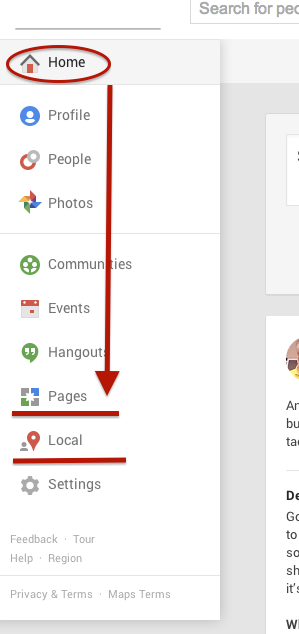
    Screen Shot 2014-03-14 at 1.00.44 PM (2)One way we tend to see duplicate listings in Google Places is from within your business owner account, in your own business dashboard. To see how your businesses are appearing in your account dashboard, go to the Places for Business dashboard, which can be found by going to plus.google.com. Then click “Local”(to see your  Location pages) and “Pages”(to see your Location, Brand, or other Google Plus Pages) in the drop-down on the left.

    The Local dashboard is where we generally identify internal listing duplicates. With the bulk dashboard updates performed by Google, we’ve seen this happening quite often. Since a lot of businesses have been force pulling their listings into the new dashboard by claiming them through the Places section of plus.google.com, there appears to be two listings in the dashboard of these accounts after Google’s mass update.

    Generally, one of these listings appears as verified (the one forced pulled into the new dash) and the other as unverified (the one Google pulled over). Sometimes they both lead to the same G+ page when you click through the “view this listing” link in each. This is just a weird hiccup, and if you wish to clean up the dashboard by deleting the unverified one, it will not affect your listing. As long as you have the verified listing in the new dashboard, you are the sole owner of said listing under this new update.

    In other cases, however, we’ve created a verified local social page through our force pull into the new dashboard that has all of our social content like G+ posting and YouTube videos. Then, when Google pulls in the location page from your old dashboard, that page is a “duplicate” with all your old reviews on it. In this case, both pages would have content that you wouldn’t want your business to lose through “deleting” a duplicate. So, you’d want to make sure the reviews from the location page are moved over to the newer, verified page before having it deleted. This will require a phone call to The Google Places Team support center.

    Obviously if one of these pages has content that you don’t mind losing or doesn’t have any content, that page can be deleted. If the one you want to delete is the verified one and you need the unverified page to be your primary, verified listing, you might be able to avoid having to reverify the listing through getting assistance from The Google Places Team.

    External Duplicates


    Another way in which we see duplicate Google business listings is on the front end through Maps search results. You’ll see below that Hedonism II has a couple of duplicates that come up in Maps results. Getting these kind of duplicates cleaned up is a bit easier than the situation explained above. What you’ll do to remove these duplicates is called making a “community edit” or “mapmaker edit.”
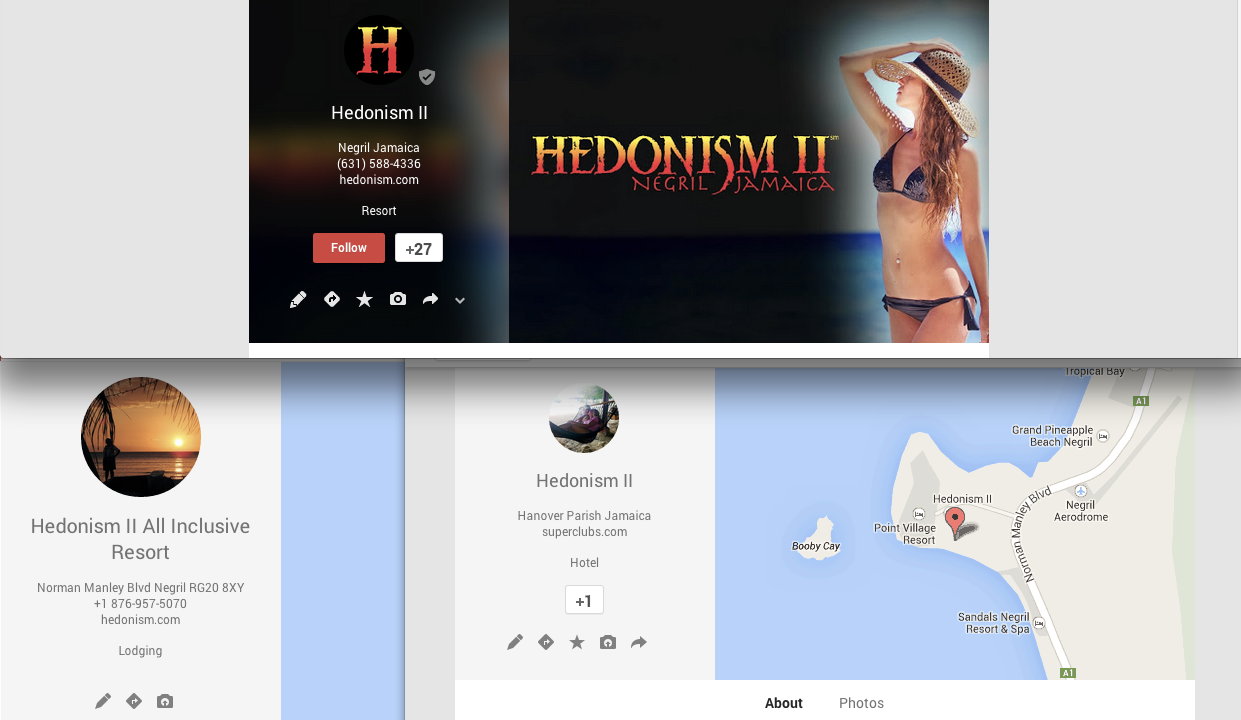
    Screen Shot 2014-03-13 at 1.18.56 PM

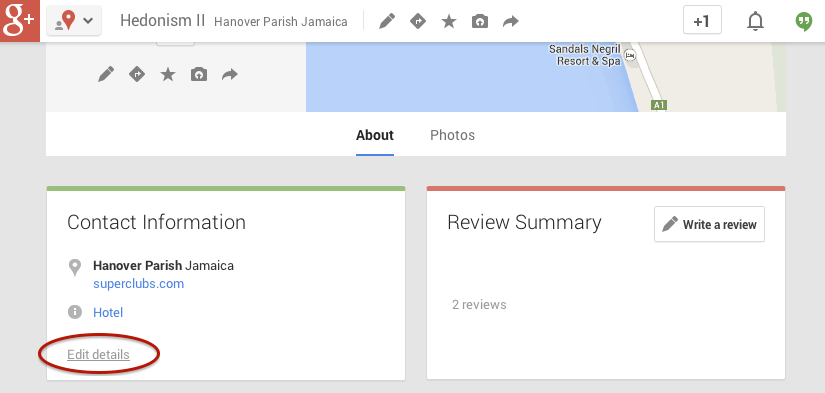
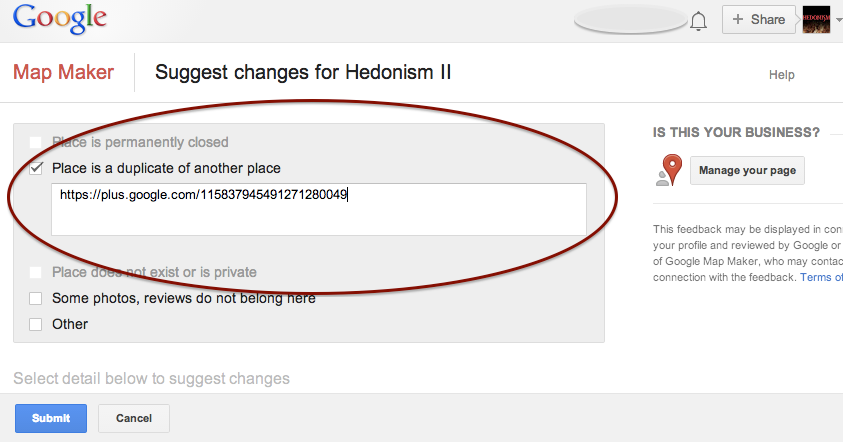
    Go to the duplicate listing you’d like Google to remove. Under the “About” section of the Plus page, then at the bottom of the “Contact Information”  you’ll see the option to “Edit details.” Once you click that, you’ll have to option click a check box to suggest to Google that this “Place is a duplicate of another place.” You’ll also have a box in which you can leave comments about the report. I suggest leaving a link to the correct/verified page in this field to help the duplicate identification process. See screenshots of this process below.

    In my experience, these changes will usually take affect within a week of reporting if Google deems it an accurate report. If no changes take affect in a week, I usually send the report again, wait a week, and repeat again as needed(I’ve never had to report more than 3 times, though).

    Understanding the many nuances of what’s going on here might seem fairly daunting, but the level of which you wish to understand these intricacies is dependent on how much control you wish to have on your business reputation/ presence in Google.
    Screen Shot 2014-03-13 at 1.20.25 PM Screen Shot 2014-03-13 at 1.21.06 PM

    If you have any questions, feel free to comment below!
  • Overview of Three Types of Google+ Pages

    Last week, I had the pleasure of presenting a webinar on Google+ to some of our partners. I shared information on the importance of Google+ for SEO, the work that we do on Google+ for our clients, and some common challenges we work through.The following is a breakdown I presented of the three types of Google+ pages that we work with for our clients.

    1) Google+ Local Page

    This is the type of page that many of our client come to us with. It’s a page that hasn’t been verified yet (through phone or postcard verification). It includes information such as location, hours, phone number, reviews, and categories.

    How do you know it’s a Local page, you ask? The easiest identifier is that the cover photo of the listing is a map. When a client comes to us with this type of page, we will convert it to the next type of page: a Local/Social page!

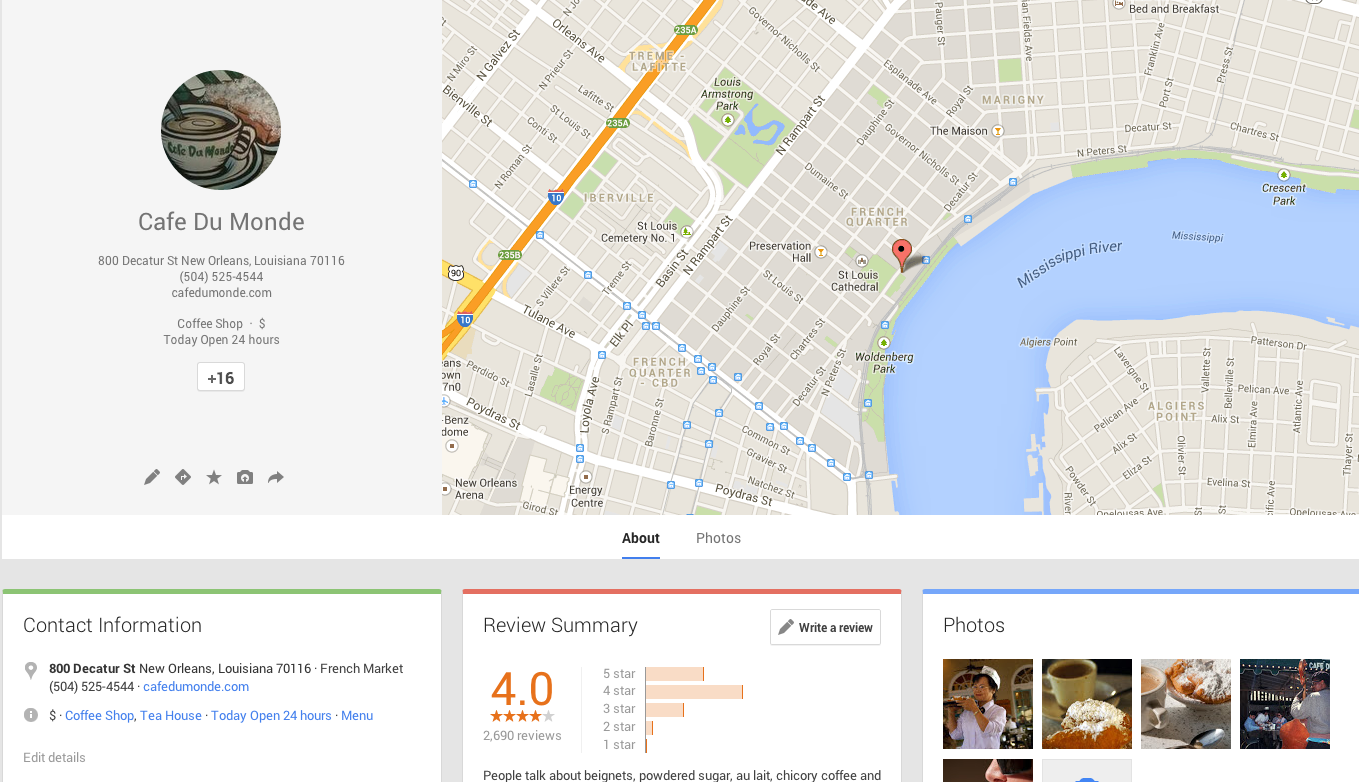
    An unverified local page looks like this:

    Cafe Du Monde, we love you, but you need to verify your Google+ page!

    Screen Shot 2014-03-13 at 9.13.21 AM

    2) Google+ Local/Social Page

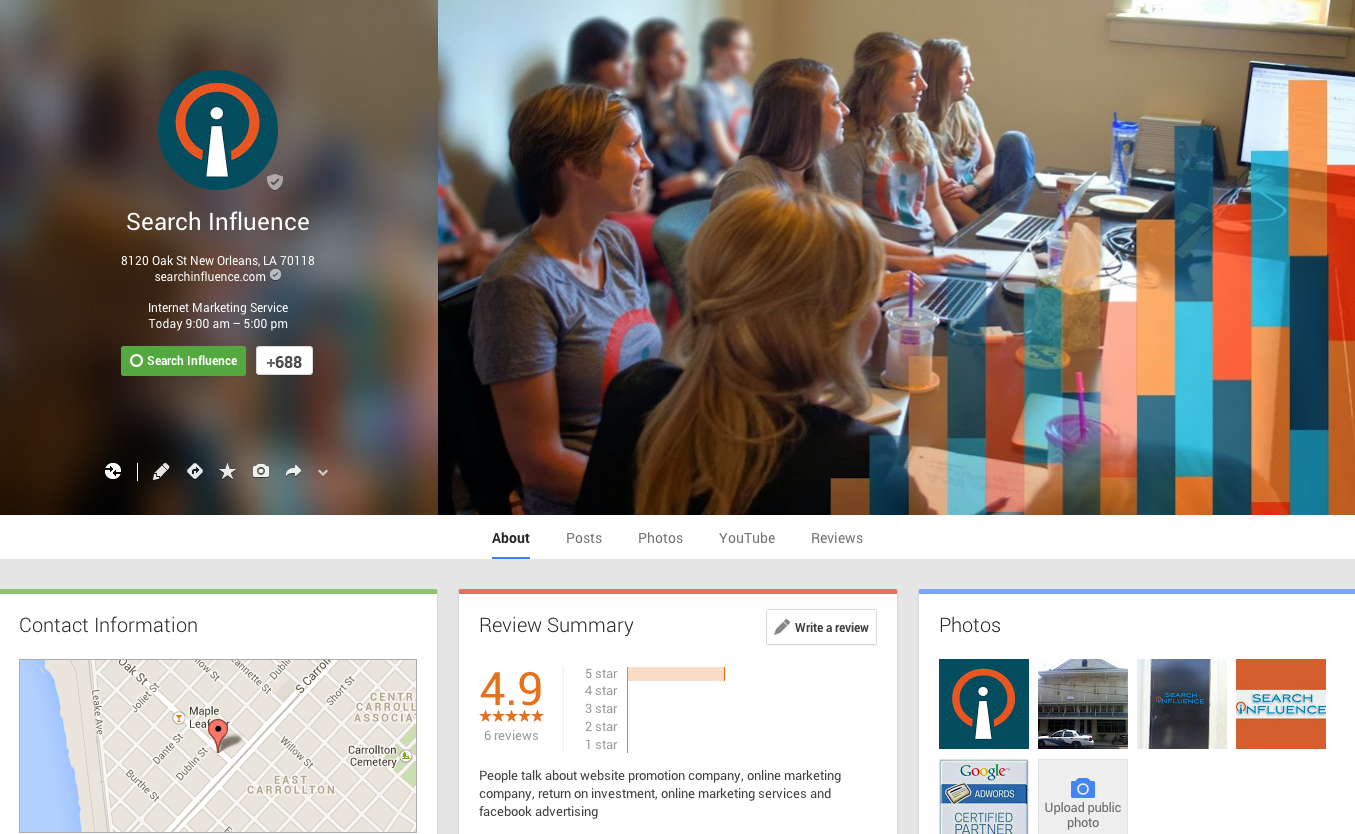
    This page has all the same information as the Local page, and more! When you complete the phone or postcard verification process, Google converts your Local page to a Local/Social page. It carries over all the great information you had on the Local page including your existing reviews and location information. You can tell it’s been converted because the cover photo is no longer a map. The default cover photo is an image with a rainbow of colors, but you can customize the cover photo, just like Search Influence has done with our page!

    This page also has tabs for Posts, YouTube, and Reviews. You can link your Youtube account to this page for a tab to show up on your page as well. This is how we want all of our clients’ Google+ pages to look like.

    Screen Shot 2014-03-13 at 9.13.55 AM

    3) Google+ Brand Page

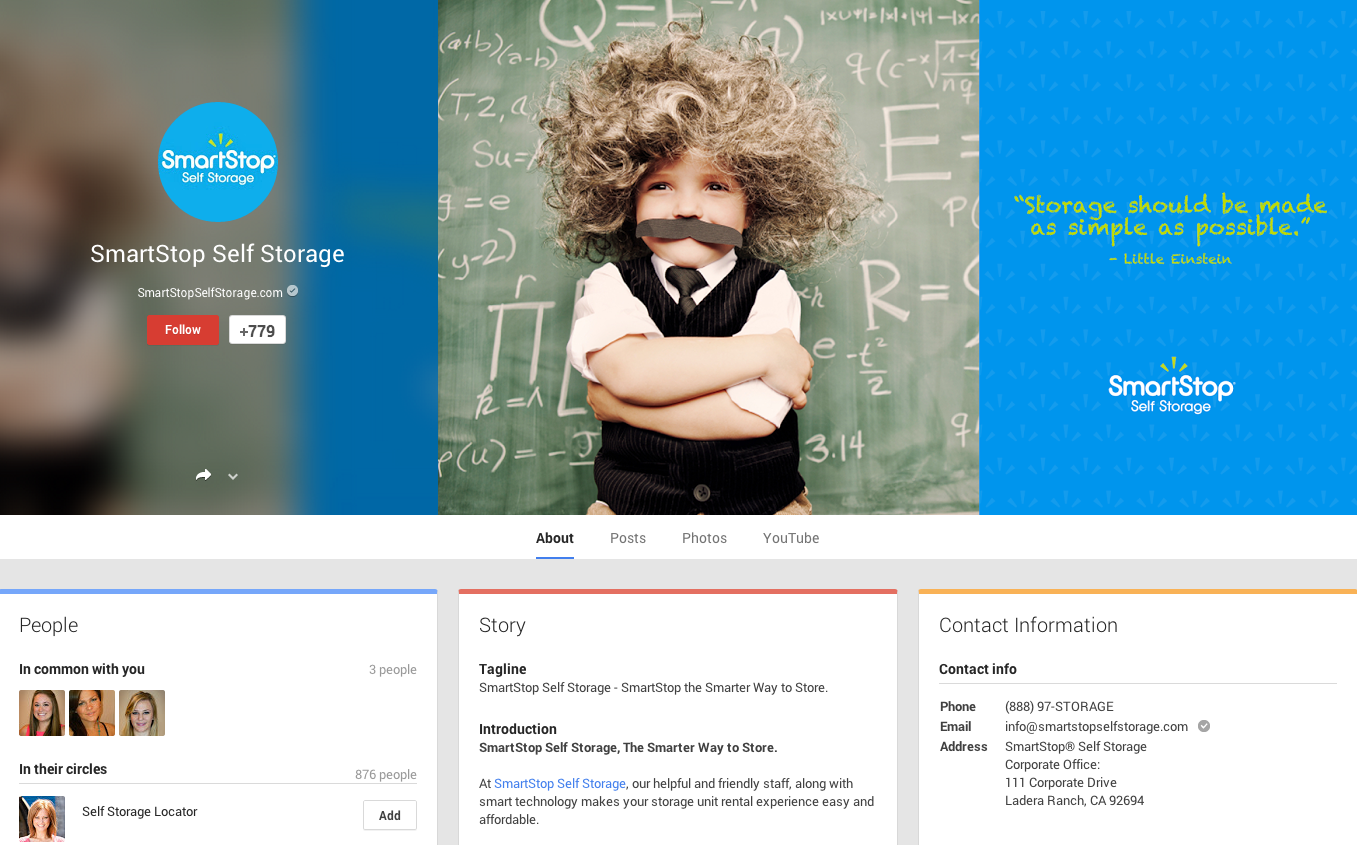
    For our clients that have more than one location, we create a Google+ Brand page. We have a Local/Social page for each location and create an overall Brand page. This page is the one we use for Google Publisher. On this page, we only list information that applies to the whole brand such as a 1-800 number, link to their Facebook page, website link, and company Youtube channel. This page represents the overall brand, as opposed to a particular location.

    Screen Shot 2014-03-13 at 9.14.27 AM


    Do you have questions about what type of Google+ page to create for your business? Feel free to comment below!

  • Instagram is “Ad” it Again!

    Screen Shot 2014-03-06 at 11.46.49 AM

    Does it seem like, eventually, everything turns into a platform for advertising? For social media, that seems to be the trend when comparing networks over the years. Everything from Facebook, Google, Twitter, Pinterest, and Pandora have all followed the same trend. Using a great business plan (and a lot of foresight), they open their online “doors,” create a massive following, and after a few years succumb to the massive potential profit that is advertising.

    Instagram Ads

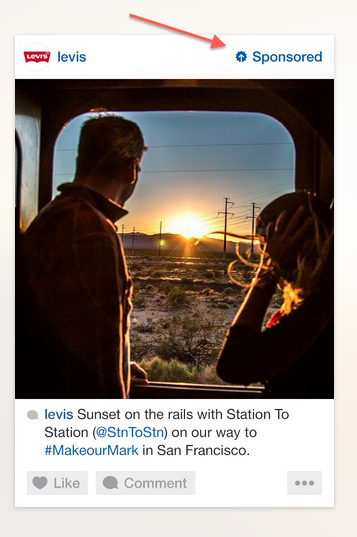
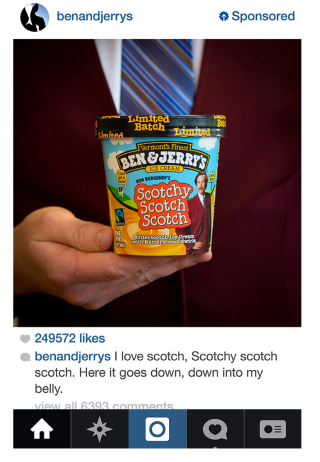
    Even though it took some time, it is clear that the mega success of our beloved Instagram has followed suit. After Facebook bought the ultra popular image sharing platform for a cool $1 billion, they didn’t waste time reaping a return on their investment. In late 2013, Instagram announced that they would start releasing “sponsored” posts that would look and feel like the other images users were already sharing. The Beta version of these sponsored posts were designed to “underwhelm” users so that they might not even know they were looking at an advertisement.

    Who Sponsors Posts?

    Screen Shot 2014-03-06 at 11.47.44 AM
    These sponsored posts were only given to a select number of brands like Ben & Jerry’s, Macy’s, Michael Kors, Lexus, and Levis, in order to test out consumer reactions. However, recent studies show that these advertisements were highly successful due to the limited number of competitors on the site, the quality of the advertisement, and the fact that it is an image instead of text. Many advertisers understand that images are far more powerful than words, which is why Instagram, along with its huge user base, is an ideal platform for marketing.

    Personalized Ads

    But how will Instagram know what brands you like or images you’re drawn to? The beauty and genius of the merger is that Facebook already knows everything about you! Between the information Facebook has already collected about you (likes, interests, hobbies, etc.) and the images that you like and follow on Instagram, advertisers are able to put more customized and targeted ads in front of you. The hope is that these ads will be so successful that companies will eventually pay more to advertise. So watch out, you might actually start seeing ads that you enjoy!

    Have you seen an ad on Instagram that grabbed your attention? Let us know in the comments!

  • Facebook Announces Design Changes and New Features for Pages

    Facebook Announces Design Changes and New Features for Pages

    Yesterday, Facebook For Business announced a new, more “streamlined” design for Pages, which will begin rolling out this week. In addition to the new look, a new feature called “Pages to Watch” will launch, allowing page admins to monitor and compare their page with that of other businesses.

    Ch-ch-changes!

    Overall, the layout changes to Pages are not terribly drastic, but as with any small change, there will likely come some backlash from the user base. Page administrators have a few new features to look forward to and some adjusting to do when it comes to navigating the platform, as Facebook has rearranged some key features with the design refresh.

    Facebook Changes Design Ecard
    Photo credit: http://www.someecards.com

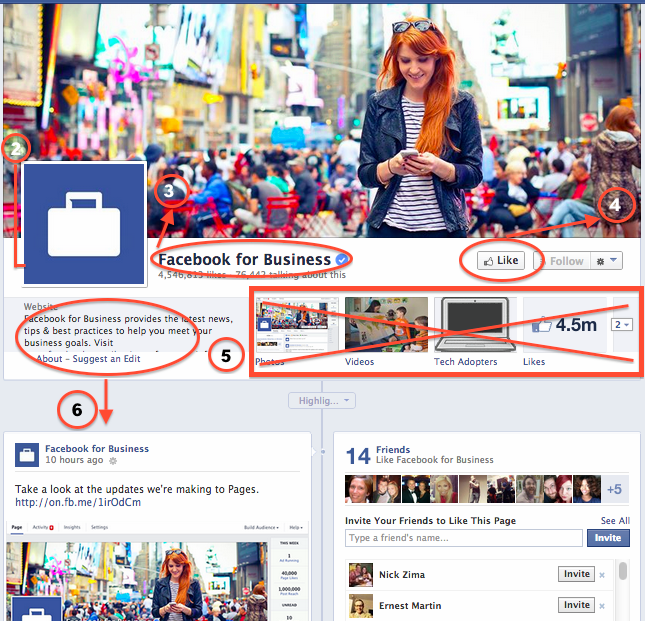
    Here are some of the notable changes to the design of Pages and how they might affect you:

    1. The cover photo and profile square dimensions do not appear to have changed, though Facebook’s announcement does not specifically list any dimensions.
    2. The position of the profile square has changed slightly, as the cover photo overlaps farther with the profile square than before. Some design changes may need to be made to pages with a design that integrated the cover photo and profile square together.
    3. Page name and website will appear in white typeface, overlaid on the cover photo. It appears that cover photos will automatically contain a darker gradient from the bottom up to accommodate this text, similar to what is in place on Twitter header photos.
    4. The “Like” button has been overlaid with the cover photo (as opposed to the current layout, where the Like button is below the cover photo), which may result in a change to design when the goal is to draw attention to the “Like” button. Some existing Facebook pages with cover photos drawing attention to this button will need to be updated.
    5. Tabs no longer have square icons appearing below the cover photo. Because the position of these has changed, cover photos drawing attention to specific tabs will need to be updated.
    6. The “About the Business” section has been relocated farther down the Page Timeline, below the total Likes.
    7. Other changes directly affect page administrators rather than users. These include:
      • Different placement of key metrics such as ads you’re running, page likes, post reach, and notifications from “This Week”
      • Direct access to your Ads Manager account from the top of the page when an admin is viewing the Timeline
      • Simplified navigation at the top of the page for activity, insights, and settings

    The Design As We Know It

    Facebook's current Page Timeline layout before March 2014 update

    What We Can Expect

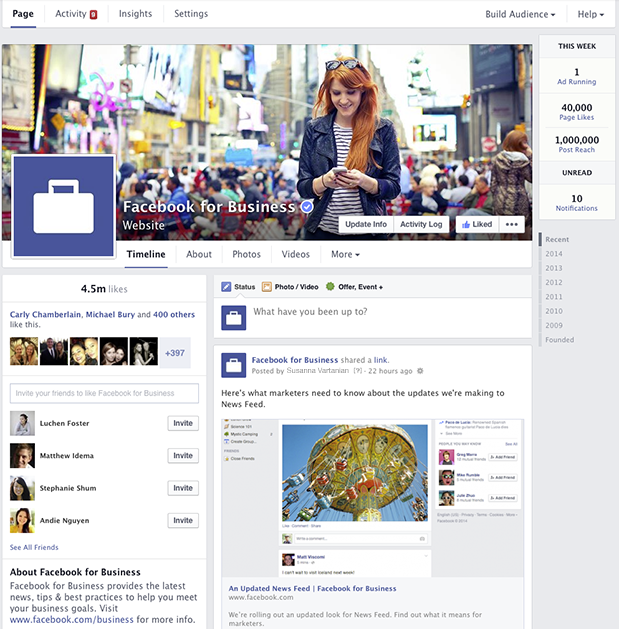
    In addition to the cover photo and general header changes, Pages will now feature a two column layout similar to the old version, but with some notable changes. Now, the right hand column features the Page’s timeline content and posts. Facebook for Business says in it’s post that this “means that all of your posts will appear consistently on your Page and in News Feed.” I’m curious about the latter half of that statement, as it’s currently unclear how the layout change will affect post visibility in the News Feed.

    Facebook's new design layout for Pages - March 2014

    The left column will now display information about your business, starting with the total number of likes. According to Facebook’s release, it will feature a map (though not visible in the images provided), business hours of operation, phone numbers, website URL, etc. This column will also feature photos and videos.

    Fancy New Features For Admins

    It seems like most of the changes will simply result in a few painful days as Page admins get used to clicking around the new layout, and finding what they need to manage their pages. A few things that will make our lives a bit easier are the relocation of Page insights and admin navigation to the top of the page. There’s now also a more prominent “Build Audience” button, allowing admins instant access to their Facebook Ads Manager account from the timeline.

    At the top right, Facebook has also added a “This Week” panel, showing you metrics about your page from the last week including the number of ads running, total page likes, post reach, unread messages, and notifications.

    Lastly, the newest and potentially most usable feature is the addition of “Pages to Watch.” This addition will enable Page administrators to keep up with the competition by monitoring Pages of businesses they care about. Other new features in Insights include the opportunity to view engaging posts from Pages you’re watching within the last week.

    Are you looking forward to the changes or dreading the adjustment period? Share your thoughts in the comments below!

  • New Search Influence Production Members

    Take a look at our newest Internet Marketing Associates!

    Alex Talbot

    AlexAlex is a native New Orleanian. He grew up in Gretna and went to Jesuit High school. Alex recently graduated from Loyola University with a degree in marketing and economics. Before joining us at Search Influence, he worked in sales and brand management at a cable and satellite company. In his spare time, Alex plays in a punk rock band called Pears, previously known as the Lollies.  One of Alex’s most recent performances was on Mardi Gras day at Siberia! Alex joins the technical Internet Marketing Associate side of the SI production team. His focus includes interpreting web marketing trends and search optimization plans for national SMBs in a variety of different industries. Alex also analyzes web traffic statistics to create detailed reports of link building campaigns and marketing initiatives.

    Nakia Thomas

    photoNakia grew up in Gonzales, Louisiana. She attended Louisiana State University, where she graduated with a degree in communications. Before becoming a part of the Search Influence team, Nakia was a Formal Wear Specialist (She helped pick out gowns and tuxedos!) at a wedding boutique, and did some freelance and ghost writing work.  Additionally, Nakia writes songs, and helps one of her good friends with his record label. Check out this single she helped write! NGWY (No Good Without You). Nakia adds to the growing content focused Internet Marketing Associates group of the production team here at SI. She focuses on writing and optimizing content for our client’s websites, video scripts, blog, social media, and more. Nakia also performs Internet research, website edits, quality assurance, and editorial review.
    We’re so excited to add these two multi-talented people to our growing team! If you’re interested in becoming an Internet Marketing Associate, or any part of the growing Search Influence team, check out our list of available careers!

  • Google Places For Business Email Update

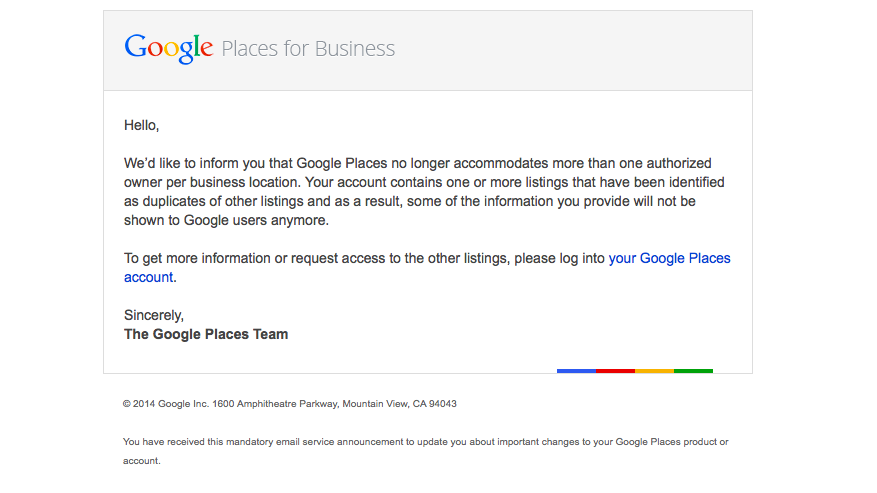
    We’re still not panicking about all of Google’s updates! As many of you already know, Google has been sending out a Google Places for Business email that reads as follows:

    The Message

    Hello,

    We’d like to inform you that Google Places no longer accommodates more than one authorized owner per business location. Your account contains one or more listings that have been identified as duplicates of other listings and as a result, some of the information you provide will not be shown to Google users anymore.

    To get more information or request access to the other listings, please log into your Google Places account.

    Sincerely,
    The Google Places Team

    As this message is kind of vague/ confusing, I called a Google rep to get clarification on exactly what’s going on here. Bear with me as I explain what this means exactly and how it’s affecting business listings.

    The Meaning

    PrintGoogle is finally pulling all listings into the new Places for Business dashboard. In the old dashboard there could be multiple owners of a listing, but in the new dashboard there can only be one.

    As Google performs these batch listing upgrades, the first owner whose account is upgraded gets grandfathered in, so to speak, and they will be the sole owner of the listing through the new dashboard. If someone has already claimed and verified a listing in the new dashboard, however, then no one will experience the “grandfather” situation in the batch upgrades as it is already verified in the new dashboard and has its one owner.

    The good news is that many of us have been force pulling businesses into the new dashboard by claiming them through the Places section of plus.google.com. So the latter situation will have already occurred for most, and we will be the current, sole owner of verified listings in the new dashboard. (If you lose ownership of your listing in the batch update by Google, you can still request it back, it will just take time through a two week request period and contact with Google.)

    We have seen cases, however, where after the batch update by Google there appears to be two listings in the dashboard of accounts who have already pulled their listing into the new dash on their own. Generally one appears as verified(the one we forced pulled into the new dash) and the other as unverified(the one Google pulled over), but they both lead to the same G+ page when you click through the “view this listing” link in each. This is just a weird hiccup, and if you wish to clean up the dashboard by deleting the unverified one, it will not affect your listing. As long as you have a verified listing in the new dashboard, you are the sole owner of said listing.

    Now What?

    Basically, anyone who has ever had a listing in the old dashboard is receiving this generic email, and it is not necessarily an indication as to whether or not the listing is owned/verified in the new dash in your account. So, as long as we’re keeping on top of our business listings’ dashboards, there is no cause for alarm! There’s also the note about duplicate listings in the email. Duplicate listing issues are not something that occur in every account which receives this email. More to come on addressing duplicates in the new dashboard next week! If you’d like to see what others are saying about the email, check out Search Engine Land’s post from earlier this morning or these forums where people have been discussing particular, individual issues encountered (Google Product Forums and Local Search Forum).

    Here’s a screenshot of the actual email for those of you who would like to see it:
    Screen Shot 2014-03-05 at 10.42.19 AM

    If you have any questions or comments about this situation, feel free to comment below! Stay tuned for how to handle duplicate listings!

  • Gram it up! 5 Tips to Expand Your Brand on Instagram

    Instagram LogoIf you‘re like me, Instagram is the place to be. I find myself spending a lot less time on Facebook and Twitter and a whole lot more on Instagram, or as I like to call it “Insta.”

    I tend to follow many businesses I enjoy and liking almost everything they post. I started thinking more about how businesses use Instagram to promote their brand and products. I did some digging and came across a video that Instagram for Business blog put together recently.

    What It’s All About

    The video was a short sample of pictures and short video clips. I mean duh, I should have known since that’s what Instagram is about. The video featured some of the best brands on Instagram, according to them. Nike (@nikerunning), Ben and Jerry’s (@benandjerrys), and General Electric (@generalelectric). It was a one minute and thirteen second reminder that pictures and videos can captivate anyone if displayed correctly. It also displays how the community can play a role in promoting your business by hash-tagging and tagging things related to your brand.

    Instagram has recently announced their book, The Instagram Handbook for Brands. But don’t get too excited just yet, the book is not currently out to the public. You can however expect to see some of its content on their blog soon. The book showcases eleven of the top brands on Instagram and their posts that captivate audiences, along with popular/successful hashtags.

    Even though the book isn’t available for the “human eye” just yet, they listed a few tips for brands modeled after the eleven top brands of Instagram.

    1. Be accurate to your brand

    Ensure that your imagery expresses a clearly defined personality and voice.

    2. Allocate your experience

    Offer a view into the world or lifestyle that your brand makes possible through the eyes of the people who use your products and services.

    3. Discover beauty in every nook and cranny

    Show how your company sees the world and make it meaningful to people.

    4. Encourage action

    Start a movement around your brand.

    5.  Be aware of your viewers

    Learn what people love about your brand, and explore how you can capture the imagination of new customers.

    SI instagram

    Search Influence (@searchinfluence) has recently joined the awesome world of Instagram! Follow us for a peek at what it’s like to work at this fast-paced and fun place!

    Is your business on Insta? Let us know what works for you in the comments section below.

  • Mardi Gras Season At Search Influence

    king cakeHere in New Orleans, we celebrate a few extra holidays. Mardi Gras, otherwise known as Carnival Season, began on January 6th this year with the Phunny Phorty Phellows parade. The season culminates tomorrow, with Mardi Gras Day itself, otherwise known as Fat Tuesday.
    Tradition

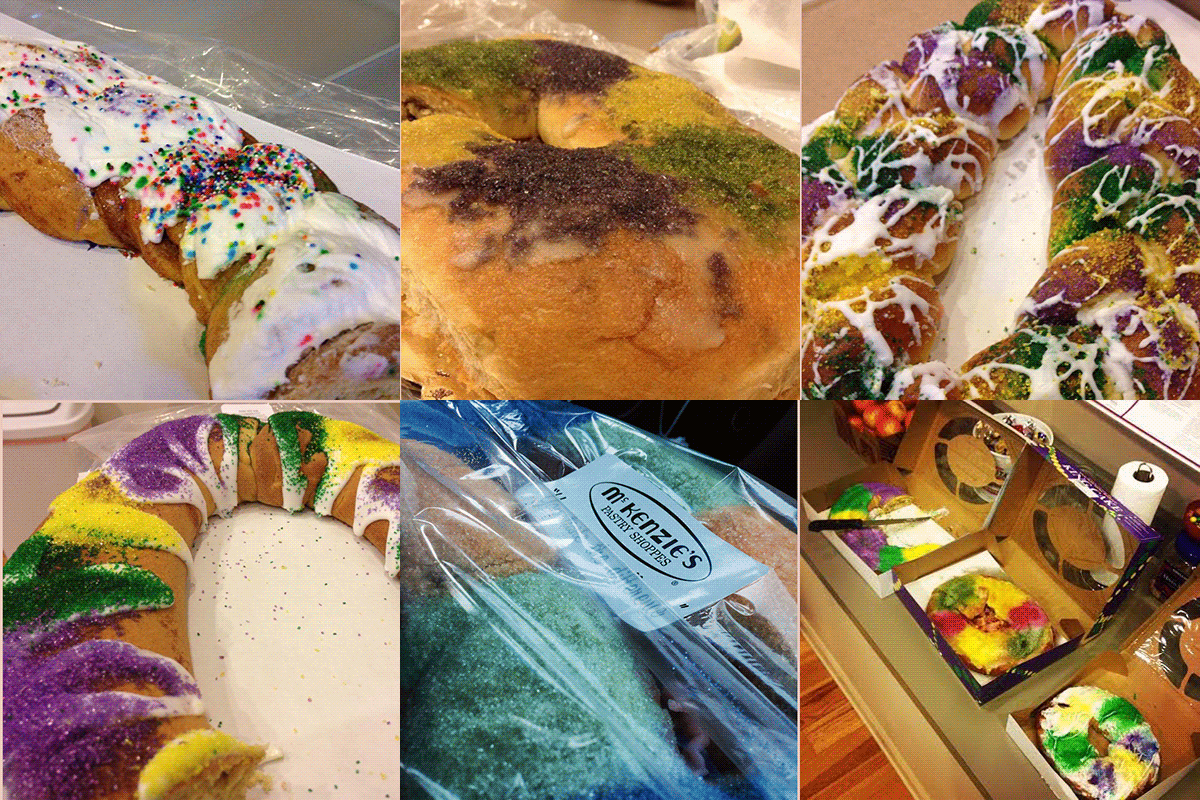
    In addition to the parades, drinking, parties, and mass amounts of tourists that make Mardi Gras special, we also eat a LOT of king cake. This cake, baked in honor of the three kings, is an oval shaped cinnamon cake decorated in the traditional Mardi Gras colors: purple, green, and gold. Each cake has a small plastic baby hidden inside, and tradition states that the person who finds the baby in their piece of king cake will have good luck (and they’ll have to supply the next king cake).

    King Cakes

    Obviously, we don’t want to mess with tradition at Search Influence, so king cakes have taken over the office for the past few weeks. Not only have we eaten traditional king cakes, Influencers have also gone above and beyond to provide the most decadent, most beautiful, most delicious variety of king cakes around! Almost every day of the week our team enjoys king cakes from any one of the following places:

    Rouses
    Haydel’s
    Meche’s
    Manny Randazzo
    Domenica
    Maple Street Patissierie
    Whole Foods
    Nonna Randazzo’s
    Tastee McKenzie’s
    Breads on Oak
    JCB Creations
    Gambino’s
    Hi-Do
    La Boulangerie
    Ye Olde College Bakery
    And More!

    kingcakegif

    As team building is an important part of the Search Influence community, bringing employees together with a new and exciting king cake every day has been a great part of Mardi Gras. Hopefully, as our team continues to grow, the number of king cakes we eat will too!

    Do you have a favorite king cake? Let us know in the comments!


  • Content Marketing: Doing It Right in 2014

    Feb14You might have heard the buzz: content marketing is not only here to stay, it’s critical for business success in 2014. The Internet noise is getting louder every day, and discoverability is becoming a greater challenge as the data streams expand with chatter from websites, blogs, and social media.
    If you’re looking to capture an audience online, you need an effective content marketing strategy in place.

    Why Content Marketing is Key

    Backlinks, keywords, and automated social tools just aren’t going to cut it anymore. Part of the reason is an increasingly Internet-savvy consumer base that can sort the authentic from the spammy at a glance—and the rest is due to major shifts in search engine algorithms, particularly Google.

    Google Hummingbird, the search engine giant’s most recent algorithm update, is all about promoting quality content and pushing it to the top of search engine results. In a definitive acknowledgment of the sharp increase in mobile search, Hummingbird aims to provide results that reflect the way people talk—delivering a conversational and contextual experience, rather than treating searches as keyword strings.

    In order to improve your search engine rankings, you need content that informs, answers questions, and adds value.

    Mistakes that Hold Your Content Marketing Back

    In order to get content marketing right, there are certain objectives you have to accomplish. Your content marketing should attract, engage, expand, and ultimately convert your audience.

    Some of the common mistakes that prevent content marketing from reaching those objectives include:

    • Producing in a vacuum. If your marketing department handles all of the content generation, from conception to execution, they’re eventually going to sound stale. Consider soliciting content ideas from other departments, working with a freelance copywriter, or seeking guest bloggers.
    • Publishing static content. To engage your audience, you need to win them over. This means providing something more than dry facts or market-speak—and giving readers a way to respond with thoughts of their own. Value quality over quantity, and produce content that informs, intrigues, and entertains. Make sure you’re always responding to comments and questions from readers.
    • Sharing on the wrong channels. When it comes to social media, a lot of companies have decided that more is more—and thinned out their efforts in order to reach as many social platforms as possible. This dilutes your brand and wastes your time. Most businesses can’t go wrong with Google+, Facebook, Twitter, and LinkedIn. As for the rest, experiment: keep what works, toss the rest.
    • Failing to analyze results. Content marketing is useless to your organization without analytics. You need to know what, where, and how your marketing efforts are working—where visitors are coming from, why they stay (or leave), and whether they come back.

    So What’s the Right Way?

    The real secret to effective content marketing in 2014 is quality. But what is “quality,” and how can you produce it?

    Quality content starts with defining your audience. Who are you creating this content for, and what do they want or need? What engages them? Find out as much as you can about your target audience—where they are online, what they respond to, even what they don’t like.

    When you move to the content creation phase, keep your target audience in mind. This includes the format of your content, whether your audience prefers text, images, video, interactive apps, or some combination of media. Finally, post your content on the channels your target market is most likely to frequent.

    The Internet changes, but content marketing remains one of the most effective strategies for online marketing success. Make 2014 the year you embrace content marketing done right.

    What’s working for you? Let us know in the comments!

    Image courtesy of Gerd Altmann

    Megan Totka is the Chief Editor for ChamberofCommerce.com. She specializes on the topic of small business tips and resources. ChamberofCommerce.com helps small businesses grow their business on the web and facilitates connectivity between local businesses and more than 7,000 Chambers of Commerce worldwide.

  • Part Time Influencer on Balancing Work and School

    Screen Shot 2014-02-24 at 10.14.48 AM

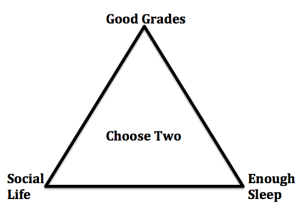
    It’s no secret that college students are busy. There is an old diagram that portrays this pretty well. Students want good grades, a social life and a good night’s sleep, but only have the time to choose two of those.

    These days, the pressure on students is higher than ever before. We have more than just grades and a social life to worry about. There are also jobs, extracurricular activities, housework, exercise, cooking, volunteer work, dating, hobbies, keeping in touch with family, and so much more that college students must handle.

    I am a senior marketing major at Tulane, but I also work 25-30 hours a week at Search Influence, in addition to several other activities and an attempt to maintain a social life and enjoy some free time. This can be stressful and it certainly keeps me busy, but maintaining all of your commitments while in college is very feasible. I am one of three influencers who work part time while also attending school.

    Keeping busy keeps me focused.

    When I have too much free time it is easy to procrastinate and get sidetracked from my obligations. A heavy load of classes and work forces students to adopt good time management habits. With limited free time, I make sure I get my work done efficiently so that I have an opportunity to spend time with friends, enjoy hobbies, or catch up on sleep. Learning how to focus and allocate your time also increases productivity and makes enjoying yourself much easier.

    Productive Procrastination

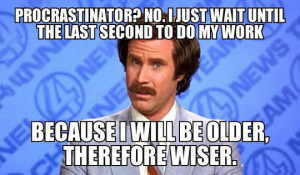
    procrastination memeI’ll admit it, I procrastinate all the time. It is so easy to get off task in college. There is always some social event or movie on Netflix calling your name. When I have a major assignment due that I just can’t wrap my head around yet, I try to procrastinate in a productive manner. This may sound like an oxymoron, but it is totally possible. Rather than browsing social media or watching TV, focus on smaller homework assignments or clean your room. These less stressful tasks can help turn your lazy mood into a productive one. Once you start on something productive, it is easier to move on to other tasks. When you finish that stressful assignment you will have a clean room, too!

    Got any other time management tips? Let us know in the comments!