Blog

  • Social Media Goes Sci-Fi

    Continuing the trend of the recent push towards wearable tech, Facebook recently announced that they have acquired the virtual reality company Oculus VR, for a price tag of around two billion dollars. If you have no idea what Oculus is, or does, their flagship product, the “Oculus Rift,” is depicted below:

    10166365646_9d9a2ea50c_z

    If you thought Google Glass was intense, the Oculus Rift will most likely not be for you. Unlike the Glass, the Rift headset is specialized for HD gaming and full submersion into virtual reality. If the headset looks familiar, this isn’t the first time this type of technology has hit the consumer markets. The company started as a Kickstarter in 2012 with the goal of reviving the type of gaming headsets depicted in the 1990s Sinbad classic “First Kid.”

    00000065

    Benefits

    Even though the technology came and went over a decade ago, this doesn’t mean that history is destined to repeat itself. Stanford University’s Virtual Human Interaction Lab has been conducting research on how virtual reality can improve education, help the environment, and teach altruism. Their findings on how we can utilize virtual reality simulators have drawn the attention of several social media companies, including Mark Zuckerberg.

    Integrating Oculus

    Whether or not the gaming technology will cross into the social media world is yet to be determined. As of now, Facebook has not announced any specific plans for integrating the Oculus technology into their platform. However, Chaotic Moon Studios produced a concept video of what a Facebook themed virtual reality experience may look like. The video depicts the headset’s possible ability to create a user friendly shopping experience, similar to the one Facebook already uses.

    Unfortunately, we probably won’t be seeing this kind of social media experience gain popularity for a while. Mark Zuckerberg called it a “long-term bet on the future of computing.” Until then, could you see yourself using the Rift instead of going to the mall?

  • 5 for Friday — Links, Stories, & Posts for Your Weekend

    five-5

    1. Google To Protect Paid Search Keyword Data, Making it ‘NotProvided’
    – Search Engine Journal

    This article discusses a report that Google will stop passing keyword data to analytics software, even for AdWords advertisers. The three main points of the article state that Google will likely stop providing referrer data for paid clicks on AdWords ads, Advertisers may see [not provided] in their Google Analytics reports or other analytics provider reports for paid search clicks, and Google AdWords reports will remain unaffected. How will this change effect you?

    2. The Art of Thinking Sideways: Content Marketing for “Boring” Businesses
    – MOZ

    Here the author speaks about different ways to create unique content for your clients. We have all had clients where we wondered if there was any way to promote their brand. As marketers it is our goal to raise brand awareness, improve search engine rankings, and increase sales for our clients.

    3. 73% Lose Trust in Brands Due to Inaccurate Local Business Listings [Survey]
    – Search Engine Watch

    If a business has incorrect information in an online listing will you lose trust in the business and look elsewhere? Have you ever looked up an address to a service or a business only to find yourself driving in circles because the info was incorrect? This happened to me personally a few weeks ago while looking for a restaurant. After I found myself lost for about 10 minutes I gave up and moved on to a new restaurant. This article has some interesting info about how potential customers will research your business information.

    4. How Brands Are Using Twitter’s Redesigned Profile Pages
    – Mashable

    This has some excellent examples of a few major brands who have recently updated their Twitter profiles. I agree that these new profiles provide the client the opportunity to add more content, but immediately thought they looked like a Facebook profile. Twitter is rolling this function out slowly to the general public. Check out the examples and let us know what you think!

    5. 80% of Local Searches on Mobile Phones Convert
    – Search Engine Watch

    Here is a study on local search on mobile devices. The stat that stood out to me was that four out of five local searches on a mobile device end in a purchase. Check out the infographic at the bottom of the article for more interesting data they found.

  • Why I Hate Your Website: A Guide to Good Web Content

    Hopefully you’ve read some of our other great blogs on sharable content and you’re sending out all those valuable signals that lead people back to your website. These leads are great and all, but what good are great signals and roadmaps if they lead you to something… disappointing?

    Imagine your favorite childhood adventure movie: A six-pack set of friends, perhaps accompanied by a talking animal of some sort, follow the strange, convoluted clues of an ancient map they found in someone’s grandfather’s attic. What if these young adventurers followed this map to the very end only to find a great big chest full of nothing?

    HeavilyGuardedContent

    That would be the worst movie ever.

    So, just to clarify, your website is that chest, and you’ll want to make sure that there’s some treasure up in there. How? Treasure = good content.

    Sidenote: I recently heard an interview on NPR with Pixar Animation Studio’s president Ed Catmull that relates to this topic. The interview was introduced with “content is king” so, you know I was tuned in. In the interview, Catmull downplayed the importance of technology in Pixar’s movies. “It’s not about the technology,” he says.  “We use the technology, we develop it, we love it, [but] it’s about the story.” So, if Pixar believes in content, you should too!

    So, what makes good web content?

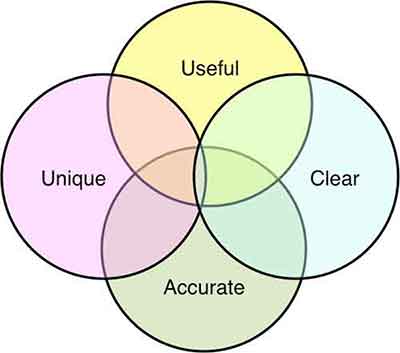
    From a broad perspective, here are four characteristics that can guide you to good content.

    Infographic

    Useful

    Your viewers have jumped down the rabbit hole in search for something. It’s your job to know what that something is. Have they arrived at this page looking for contact information? For pricing? To make a purchase? — Make sure you know why the viewer has made it to this point. Then, and only then, can you provide the solution.

    Be as detailed as possible, but also be concise. My number 1 rule: no fluff. Aaron Wall of SEOBook puts it perfectly, “Good writing does not add extra words for the sake of word count. Each word carries purpose and meaning.”

    Clear

    Make it easy for your visitors to find what it is they are looking for. Your site should not be iSpy, Contact Info Edition. Organization of your content is paramount. The longer your visitors have to search for information, the more likely they are to jump to another site. Make the information easy to skim.

    ispy-meme

    A major issue I see is vanity capitalization. If the intent is to highlight important information, the tactic has the opposite effect. With so many Capitalized words throughout the Content, it becomes Unclear why You are Capitalizing anything at all? See how difficult it was to read that one sentence? Capitalize words within your subheadings, headings, navigation bars, etc. all you like, but don’t go cap-crazy within your content. Sending too many signals to your reader that THIS or THIS or THIS or THIS and THAT are important throughout your page can become confusing. If everything is important, nothing is important.

    Pro Tip: Subheadings are a great way to point your site visitor in the right direction. But don’t go overboard.

    Unique

    Duplicate content is something I see a lot of. It’s not just a personal pet peeve; it’s bad for SEO. So, don’t fill out multiple pages with the same content just for the sake of having multiple pages. Not only is this confusing for your site visitors, but it is confusing for search engine crawlers as well. So, you’d think if it’s bad for your viewers and it’s bad for your ranking, people wouldn’t do it. However, you’d be surprised how many sites I see with duplicate content on top of duplicate content. Make sure each page has content unique to that section. If the two pages are too similar, find a way to combine them. Otherwise, reword things to show the unique purpose and perspective of that specific page.

    Accurate

    Make sure your hours of operation, your address, your pricing, promotional deals – any information that may fluctuate – is up-to-date. The more active you are on updating your site’s information, the more accurate your site will be. This is not only good for your visitors, but good for search engines. Being up-to-date on information makes you a more reliable source.

    I can’t count how many times I’ve wondered if a site was open on a particular day—whether it was due to an obscure holiday (Hey, it’s New Orleans, places close their doors for seemingly no reason whatsoever), or due to conflicting information—and their site was anything but helpful. Letting your site visitors know what’s what ultimately gives them the information they need to be customers. And that’s the point, isn’t it?

    Whether you’re adjusting old content or starting from scratch, think from the perspective of your site visitors. It’s also good practice to examine the sites you visit frequently. What are some frustrating aspects of navigating the site? What is some information you wish they displayed? The key aspects of good content are all around you, take note of them! Observing the successful (and less successful) aspects of other sites, whether they are related to your industry or not, can help you navigate your own site’s content.

    So, how about it? What are some examples of good content that you see on a regular basis?

    GoogleSearch

  • Determining and Leveraging Your Brand Advocates

    At Pubcon New Orleans, Rob Fuggetta of Zuberance led a seminar on “Activating Brand Advocates.” Rob wrote a book called Brand Advocates that I encourage you to read if you’re a business owner looking to learn more about this game-changing topic.

    Reviews

    Rob talked about how brand advocates are people who recommend your products or services without being paid. They are your best salespeople because they are free and other people trust their opinion greatly. In fact, 92% of customers trust word of mouth referrals, compared to 70% trusting reviews, and 33% trusting ads. Since they are a very trustworthy recommendation, businesses should leverage them to help their business grow.

    You may be wondering how you determine if one of your customers is a brand advocate. Rob offered three ways to figure this out. The first is to ask your customers a one question survey: “How likely are you to recommend us?” On a scale of one to ten, your brand advocates are those that give you a nine or a ten. Another way to find brand advocates is to invite your customers to recommend you. This can be done by asking them why they love your company. Lastly, listening and engaging with your customers is a great way to find your advocates. If someone is talking about how much they love you on social media, you can consider them a brand advocate.

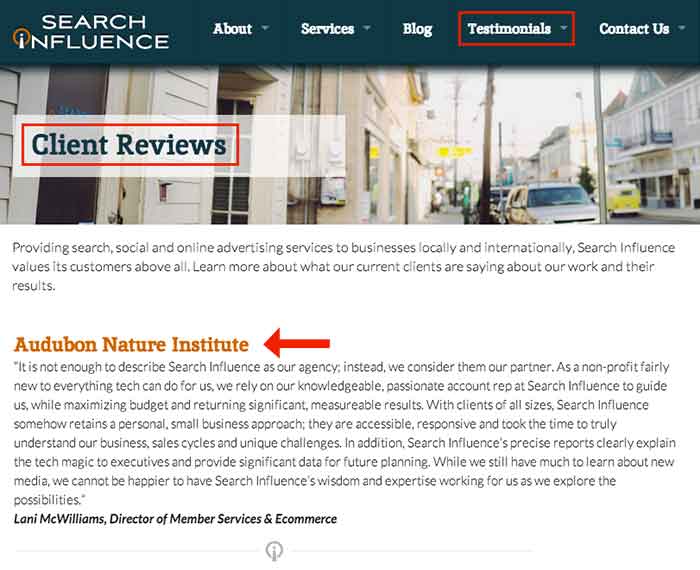
    Once you’ve determined who your brand advocates are, Rob offered three ways to leverage them to help your business. One way is to make it easy for your advocates to give you reviews. For example, ask customers to write you a review in your email correspondence, landing pages, newsletters, and on social media. Once you have several reviews, publish them wherever you can think of, including social media, your website, and email marketing.

    Testimonials

    The second way is to gather and publish stories from your customers about how they use your brand and why they love your brand. If sales increased by 50% because of your help, write a case study about it and get the customer involved with providing the statistics and quotes. Finally, ask your brand advocates for referrals! For those that are passionate about your brand, they should be excited to help others by recommending your company to their circle of influence. Think about it: if you enjoyed a restaurant or a hotel, wouldn’t you recommend it to your friends and family? Why should it be different for your business?

    Submit your comments below on how you will leverage your brand advocates!

  • 3 Tips for User-Friendly Navigation

    A few weeks ago, my future mother-in-law purchased her first iPad. While she has been the proud owner of an iPhone for a few months, there was something different, to her, about the navigation of an iPad. As we were walking through some of the different apps and functions on her new tablet, she found herself trapped in her browser window and unsure how to get back to her email.

    MaggieSmith-01

    Are you the type of person who can easily pick up on the newest technology trends? Or do you feel like you can never catch up with things changing so frequently? User-friendly navigation can take that worry away and make your experiences with technology easy and fun!

    Tip #1: Keep something familiar.

    We’ve all experienced that little moment of panic when we don’t know where to go next. For some people it happens when traveling to a new city or starting a job at a new company. We want to know that there’s a way out of any situation. For my future mother-in-law, that “way out” was the home button. After discussing the way she closes out of the Internet on her iPhone, she quickly realized she had that same “panic button” located at the bottom of her iPad.

    Tim Ash, CEO of SiteTuners and author of “Landing Page Optimization” was a keynote speaker at PubCon in New Orleans. During his keynote presentation he mentioned that as soon as we see someone walk into a room, we subconsciously decide how to kill them. He claimed it’s just a part of our natural instincts. I’m not sure if that’s the case for everyone, but I do think we at least look for an escape route.

    MaggieSmith-02

    Tip #2: Make it easy.

    Have you ever started navigating your way through site and then realized that you weren’t sure of the best way to get back without having to click the back button nine or ten times? What do you do? Do you simply close your browser window out of frustration? We crave easy navigation to avoid such frustration and make browsing simpler.

    To a certain degree we all enjoy updates to technology, but we still like to hold onto something familiar. For some social media sites, such as Facebook and Twitter, having a fixed navigation is the solution. How often do you find that you’ve logged into your social media account and then hours later, or for those with better self control, minutes later, you’ve scrolled so far down the page you’re looking at updates from days or weeks ago? Can you imagine what it would be like if you had to scroll all the way back up to the top of the page? If you were on Facebook before 2011, then you might remember.

    Tip #3: Know your audience.

    Is this something that all websites need? No, not necessarily. For many sites, scrolling is not quite as intuitive. The solution could be as simple as having “HOME” as an option in your navigation. Know your audience. Some users need an actual home button or link in the navigation, and some simply expect that your logo will link back to your homepage. If you’re unsure of the way your users interact with your page or how to make your page easier to get through, it may be best to do some testing.

    MaggieSmith-03

    Do you have any tips for easy navigation? If so, let us know in the comments! 

  • Heaps of SEO from Down Under

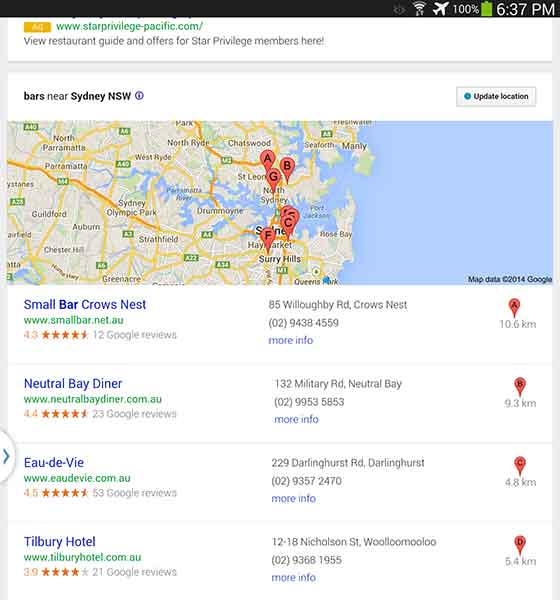
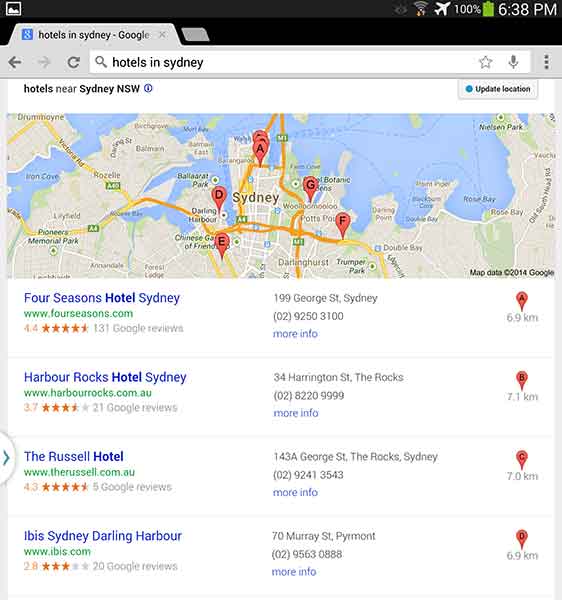
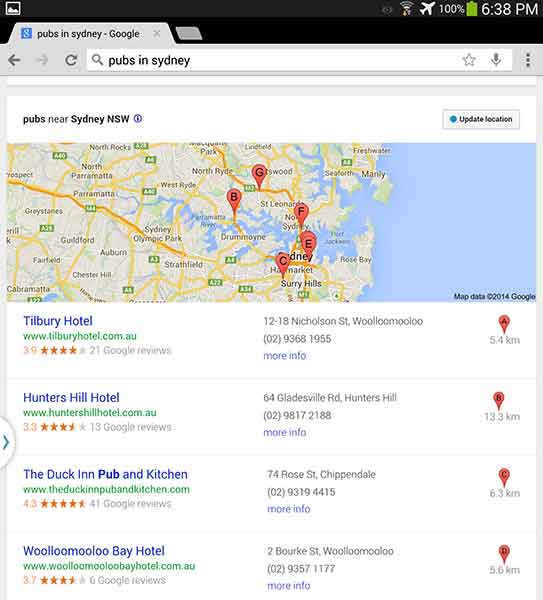
    While I was in Australia earlier this year, I used google.com.au to search for a good happy hour spot after a long day at Bondi beach (they have free beach wi-fi!!). No matter how hard I searched, the best watering holes weren’t showing up in my search results. Little to my knowledge, it was because I was searching for “bars in sydney,” while all the other blokes and sheilas in Aussie call them by a different name, “hotels.” The following are the search results from various keyword searches in Australia. Check out how they vary just by changing one word!

    “Bars in Sydney”

    AusSEO-Bars-01

    I found that the “bars” results were filled with restaurants that happened to serve classy drinks (not exactly what I was looking for). And I don’t mean to whine, but it’s mildly upsetting that results A, B, and G are located in North Sydney. SEO in Australia needs to step up its game.

    “Hotels in Sydney”

    AusSEO-Hotels-01

    Unfortunately, looking at “hotels” wasn’t helpful either. This keyword can get a little complicated because, while bars are called hotels, hotels are also called hotels. I think it would be really difficult for a bar to outrank an actual hotel, even on google.com.au.

    “Pubs in Sydney”

    AusSEO-Pubs-01


    The best results? Pubs. Each result was a bar with “hotel” in their business name and “pub” in the meta description. Pubs are a big part of Australian and English culture so it is fitting that this 7-Pack produced the best results.

    If you want to run a local campaign, pay attention to changes in culture and language in your area. You may be able to target locals and tourists differently by focusing on some keywords more than others. As Ja’mie King would say, SEO in Australia is, like, so random.

    PublicSchools

    Have you had any strange encounters with Google keywords in certain areas? Let us know in the comments!

  • Takeaways From Pubcon New Orleans Day Two

    Last week I had the amazing opportunity to attend Pubcon New Orleans for the first time. It was one of the most fruitful learning and networking experiences I’ve had the chance to be a part of. I felt like I could spend forever just absorbing everything I could from everyone I met. One of the major themes that I got from all the speakers I saw at PubCon was the importance of good content. So, now I’m here to tell you about some of the main takeaways I got from the particular sessions I attended.

    IMG_52111-1024x368-1

    Peter Shankman: Keynote

    The keynote by Peter Shankman focused primarily on the power of good customer service. His four main points were Transparency, Relevancy, Brevity, and Top of Mind. He said you don’t have to go crazy with customer service, just be “one level above crap.” On this note he mentioned the Morton’s Steakhouse story where he jokingly tweeted at them about wanting a porterhouse steak upon landing in New Orleans from a flight. They then sent someone to meet him with a steak when he got off the plane. This simple gesture(although not scalable for every brand) led to a lot of great publicity for Morton’s. It’s all about making your customer feel special.

    An audience you are more transparent and honest with that feels invested in is 78% more likely to buy. Peter also said that when(not if) you screw up, own it. People are 44% more likely to stick with you if you own it. He mentioned the stark difference between how Eliot Spitzer handled his prostitution scandal by admitting the fault and resigning versus how Anthony Weiner handled his sexting scandal by saying he got hacked and not owning up to it.

    Peter mentioned the importance of being relevant and listening to your audience as well. He mentioned a non-profit that saw a 37% increase in donations just by being engaging and active with their audience online.

    The third important facet Peter Shankman mentioned was brevity. He particularly said that brevity is the future of social media and not just in the way we think of it through Twitter now. He said jokingly that we’ve all become the dog from the movie Up, because recent studies show that we have a 2.7 second attention span. Shankman said that mobile messaging is the future and Twitter is just the pipe, so we must learn to write well and concisely.

    Finally, Peter talked about the importance of being top of mind. You want to be the first person someone thinks to go to for whatever they need. He also mentioned the idea of having “zombie loyalists,” or people who have you at the top of their mind for recommendations.

    IMG_5231-768x1024

    Will Scott: Barnacle SEO

    Next I had the opportunity to sit in on Will Scott’s talk about Barnacle SEO(a term he coined in a Local Search News post back in 2008). Barnacle SEO is all about leveraging authority for local search. Specifically, the idea is to attach oneself to a “large fixed object” and wait for customers to “float by in the current.” It’s not as simple as using someone else’s authority, because Will says the most important thing in business is sincerity. “If you can fake that, you’ve got it made,” he says.

    He also mentioned that Google’s weakness is sites they consider super authoritative like YouTube, Yelp, Pinterest, Facebook, YP.com, and such. This is making Barnacle SEO have a huge comeback. YouTube for example dominates universal search and according to a MarketingLand infographic, 8 out of 10 video results are from YouTube.

    Although using backlinks from these authoritative sites and directories like YP.com for local SEO efforts is important, it’s also super important to “keep it clean-ish” by using tools like Whitespark.

    Greg Gifford: Local SEO- It’s No Laughing Matter

    After Will Scott, Greg Gifford, Director of Search and Social at AutoRevo, took to the stage with his presentation about the complications of local search. His awesome presentation featuring punny references to 142 movies and also contained precise, actionable tips. He mentioned the changes in local search like the maps pack finally stabilizing at seven listings and how optimized vertical and local directories now rank very well. A huge opportunity for small businesses to rank well lies in simply adding city and state to title tags.

    Greg also mentioned how the goal of Google Plus Local(aka Google Places) seems to be like a drive through, a place for people to get what they need by getting in and out quickly. He also brought up the Google email about “duplicate listings” that rolled out with Google finally merging the old dashboard to the new. If you want to know more about this email, check out my blog post here.

    His optimization tips for G+ included writing long, “awesome” descriptions using formatting and links, uploading lots of photos, using as close to the max 10 categories as possible while keeping them relevant, engaging in the fairly few number of users on G+, and circling users as a business. As far as reviews on G+ go, he mentioned that you have to earn them and ask for them, you need at least five reviews to see the star average, you should shoot for 10 then diversify, one to two reviews a month is normal, and having them come in consistently rather than in bursts is important.

    IMG_5215

    Casey Markee: The “Big Easy” Guide to Google-Friendly Link Earning

    Casey Markee started his presentation with a quote from Matt Cutts saying, “The objective is not to make your links appear natural, the objective is that your links are natural.” He mentioned that the “four tenants of Google-friendly links” are those that provide clear value for the user, are niche-relevant, get clicked to send some measurable form of trackable analytics traffic, and are “earned” freely versus being given.

    He listed nine link “earning” classes that Google still loves which included:

    1. Link Bait Type Content- Sharable and Buzz-Worthy
    2. Evergreen Content- No Expiration Date
    3. Local Link Earning- Publish Local Resources
    4. Scholarship Link “Earning”- Ex: SilverCross.com Ability Achievement Scholarship
    5. Beneficial Link “Earning”- Participate in Online Forums
    6. Sponsorship/ Partner Building- Support Causes
    7. Profile Links- Social Profile Building
    8. Selective Guest Blogging- Quality not Quantity
    9. Brand Mentions- Get Regular Mentions Turned Into Live Links

    He ended with saying that link earning is a marathon not a sprint, and that quality content is key!

    Mike Stewart: Building a Future Proof Plan for Organic Local Search Rankings

    The biggest takeaway I got from Mike Stewart’s presentation was to think beyond Google search and about other places where people often search like Siri, Amazon, Facebook, and Bing. He also explained the difference between some white hat and black hat SEO tactics, and the importance of doing it right. Mike took us back to basics explaining that “SEO is about creating, editing, organizing, and delivering content and metadata to increase relevance to specific keywords on the web.”

    Finally he gave us “Seven Simple Content Ideas That Drive Shareability” which are as follows:

    1. GIVE: Offers, discounts, deals, and contests that everyone can benefit from
    2. ADVISE: Tips, especially about problems that everyone encounters; how to do something
    3. WARN: Warnings about dangers that could affect anyone
    4. AMUSE: Funny pictures and quotes, as long as they’re not offensive to any group
    5. INSPIRE: Inspirational quotes
    6. AMAZE: Amazing pictures or facts
    7. UNITE: A post that acts as a flag to carry and a way to brag to others about your membership in a group

    This is just a very small portion of the many helpful tips and tools I learned at PubCon this year! Let me know what you think about all the tactics you’ve learned here today.

  • What to Watch for on the Web: Tips From PubCon 2014

    There was a lot to learn at Pubcon New Orleans 2014! Read below for the inside scoop on some exciting web-related trends we can expect to see in the not-so-distant future.

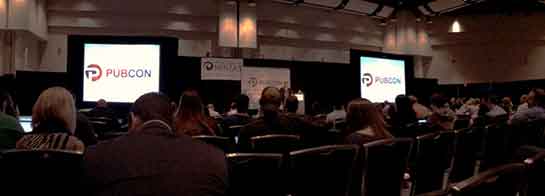
    Photo Of Influencers At Pubcon 2014

    A Trend Toward the Visual

    The belief is that the deeper into the future we go, the more visual-based our web experience will become. Pictures, and moving gifs, are increasingly at the heart of web developers’ designs. Just take a look at what amazon.com looks like today versus February 2000 or even compared to January 2008. And take a look at Disney World’s home page now versus what it looked like in 2000. It will be very interesting to see just how picture and gif-centric the web will become.

    Wearable Technology

    Image Of Google GlassOptimizing for Wearable Technology might also be a big part of the future. Google Glasses and Fit Bits are just the beginning when it comes to this trend; think watches that control your home, clothing-embedded phone chargers, (and even wearable couture in the form of solar-powered color-changing clothes!). Nobody knows exactly what the trajectory of wearable technology will be, or how in the world we would optimize for it (!), but it definitely makes sense to stay on top of the learning curve when it comes to these advances.

    And Google Says…

    Of course a blog about PubCon wouldn’t be complete without some interesting updates from Google! According to Danny Bernstein, Google’s Head of Product Partnerships, we can expect to see a lot of interesting expansions from Google coming our way; so, straight from the horse’s mouth, here are some interesting developments that we can be on the lookout for:

    App Indexing in Searches

    For one, Google is working to populate deep links to your relevant downloaded apps in searches, specifically on Android devices. So, for example, if you Google “Jurassic Park,” (because who wouldn’t want to do that?!) a hit that might populate in your search results could be a direct link to the Jurassic Park page in your IMDb app. Google is currently working on indexing all of these applications so that they can populate in an intuitive way in our searches.

    Photo Of Google Wallet LogoGoogle Wallet

    Google is also working to bring Google Wallet to the next level, which is an application that will make paying for various web services even easier than it is now. App developers can incorporate Google Wallet into their programming so that users can purchase their app’s related services with just a push of a button or tap of a finger. Additionally, businesses will be able to use Google Wallet to push various product promotions to their app’s users.

    I’m sure I am not alone in my excitement to observe these exciting developments as they come to life!

  • Mobile Optimization and WordPress Tips – Pubcon 3/20/2014

    Photo Of Influencers At PubconAlong with a number of other Influencers, I was fortunate enough to attend Pubcon New Orleans on Thursday, March 20th. Being a smarmy, cynical Developer, I was honestly a bit skeptical as to the amount of real, pertinent insights I would take away from the experience. I was even more skeptical of the quality of the seafood etouffee that would be provided at the lunch buffet. I am pleased to say that my skepticism was proven to be unfounded on both counts, and there was quite a bit of quality information shared at the Pubcon sessions I attended. And the seafood etouffee was legitimately really good, even to a New Orleans native. So great job all around!

    I thought I might in turn share some of the more significant information I took away from the speakers I heard. I’m going to start with what were actually the latter two sessions I attended (“Next Generation Catalysts: Trends Worth Watching” and “Mobile Conversion Optimization“), because these were similar thematically and a bit more “accessible” in terms of subject matter. Then I’ll cover the earlier session I attended on the nitty gritty of WordPress structure (“Optimizing the WordPress Content Machine“) for anyone whose eyes don’t glaze over upon encountering words like “server” or “database.”

    Mobile Strategy

    Photo Of Santa On A Smartphone

    In the two sessions I saw addressing mobile strategy, possibly the simplest but most surprising takeaway for me was how much actual commerce takes place on mobile devices now. As Ralph Schwoebel in the Next Generation Catalysts session enthusiastically emphasized, “mobile-friendly” optimization and responsive design are no longer just trends that are hip with the kids; they are now essential considerations for any business trying to expand its branding and customer reach on the internet. While more purchasers still use desktop devices to buy online, Schwoebel notes that mobile buyers actually spend about twice as much in their purchases. Also of significance is the fact that users of Apple devices thoroughly and decisively outnumber users of other mobile devices in terms of actual purchase rates. That’s not to say that designers and developers should just ignore Android users, but acknowledging the fact that iPhone and iPad purchases comprise a truly dominant majority of mobile purchases should help everyone prioritize a little bit.

    Key to leveraging this increased internet usage and spending among potential customers, however, is allowing our approach to design and user goals to evolve along with the technology. Poignantly, three different presenters across both sessions hammered on the same crucial point: mobile conversion goals should be approached differently than desktop conversion goals. Presenters William Leake and Chris Goward both emphasized that it is not necessarily productive to view form submissions or newsletter signups as a realistic user conversion goal, as it might be for desktop users. When optimizing a site for mobile users, they suggested making click-to-call buttons more of a focal point, since it is more realistic to expect a potential customer to call for more information versus filling out an entire form on a tiny phone keyboard. Ralf Schwoebel posited that rather than focusing on getting users to sign up for mailing lists, download apps or, again, awkwardly fill out a mobile form, efforts may be better directed toward encouraging users to bookmark a site or add it to a separate reader app or RSS feed.

    Along with adjusting goal expectations, mobile designers and developers were encouraged to adjust content-related expectations for mobile visitors. Where a site’s perceived topical authority and “SEO-friendliness” afforded by larger quantities of targeted content may benefit a business site viewed on a desktop browser, the same isn’t always true on mobile. It can be difficult to read content on smaller screens, and you don’t want to make users scroll forever to get to a conversion goal. “Trimming the fat” on mobile sites, be it content or excessive widgets, banners, etc. was a common theme throughout these presentations.

    So What’s The Point?

    In broader terms, just think like a real live mobile internet user (which most of us probably are). From a Development standpoint, I know it can be very easy to get bogged down in issues like “will this form display well in a mobile browser?” or “should all this content go above or below the form on Android devices?” and so forth. It’s essential, however, to take a step back and consider the actual user experience of someone browsing the internet on their phone while waiting in line or killing time at a coffee shop. The questions may well change to, “do we need the form or all that content in the first place?” or “what do people actually need to see in order to pique their interest enough to come back when they have more time to browse?” There are so many technical considerations when it comes to responsive site design and mobile-friendliness that it can be easy to forget its actual function for the majority of mobile users.

    Wonderful WordPress

    Moving on to the WordPress-centric session I saw earlier in the day, there were a great deal of really interesting points raised here about site security and maintenance. One over-arching point that presenters Carolyn Shelby and Brian Lafrance both emphasized is to avoid overuse of plugins in WordPress. There are numerous reasons for this, but one of the most pertinent is the ease with which a security breach in a plugin can facilitate hacks to a large quantity of disparate sites using that plugin. According to Shelby, this was exemplified during last year’s Pubcon, where it was revealed that there were major vulnerabilities in two of the most prominent WordPress caching plugins (W3 Total Cache and WP Super Cache).

    To help combat these sorts of problems, both speakers recommended compiling a master list of all plugins in use on any site you manage, with notes on when the plugins and the WordPress installation itself were last updated. This is one among many suggestions that would be more practical for developers afforded sole, proprietary management of a site and its content, of course. At Search Influence, we have many procedures in place to allow us to work on a site regularly while allowing clients and clients’ own developers to continue making updates of their own with minimal conflict. Still, tracking WordPress plugins and updates is an irrefutably sound approach.

    In essence, it should simply remain a policy to just not use plugins where plugins aren’t really necessary. There is no need to use plugins for site updates that would only require a couple lines of PHP or a quick line in the .htaccess file to accomplish on your own. Particular wrath was directed toward 301 redirect plugins, many of which have settings to automatically redirect broken URLs to places you might not want them to go, with very little customizable user control. And if a plugin is installed but not in use, it should definitely be deleted.

    Site Speed

    While the talk focused on the security aspects of WordPress, many of the principles in play also have direct impact on site speed. The fewer plugins with information being stored and sorted within the site’s database, the quicker the database can be accessed and loaded. More directly, a number of plugins function by adding extra JavaScript to a page, which can in turn make each page take longer to load in a browser. Another significant point raised by both speakers was to limit users within WordPress. More specifically, there is an option to force commenters to create an actual user account within your site in order to be able to comment. Some may see this as some form of deterring spam comments, but all it really accomplishes is to completely bloat a site’s database with user data. For anyone wishing for commenters to officially register in order to comment, Lafrance recommended using Facebook login as an alternative to avoid having to store all this information in the site’s database tables.

    All that said, it is still considered advisable to use certain plugins like anti-virus plugins, search and replace plugins and (now secure) caching plugins for site speed. Additionally, making effective use of the Custom Fields plugin for site functionality can save the need for many additional plugins, avoiding extra bloat within WordPress.
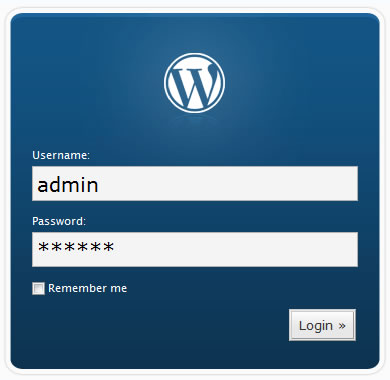
    Photo Of WordPress Login

    Logins

    I’m setting a special paragraph aside for one point that seemed almost embarrassingly obvious to the speakers and to me, but which comes up pretty much daily in our office. It’s shocking to have to say this in 2014, but PLEASE, do NOT make your WordPress user name “admin” or your password simply your business name, or worse, “temppass” or “password123.” Again, this seems like a statement that shouldn’t need to be made at this point in the evolution of internet usage, but it comes up all the time. Carolyn Shelby also pointed out that it is a really bad idea to name your WordPress database simply “wp,” which I’ve also seen on sites we’ve inherited in the past.

    Many of these points are in line with what we already practice – or at least preach, when access is limited – at Search Influence. It is always nice to be vindicated by other experts in the industry, however. Where we may not be overhauling any processes based on the points raised in the sessions I attended, I felt like I was definitely given better perspective on many issues we deal with regularly and better sense of priorities in terms of how we do our work.


  • Influencers Flock to the Pelicans Game

    Image Of Influencers At The Pelicans GameIt’s 4:30 PM on a Monday and where is Search Influence? On our way to the Pelicans vs. Nets game! It already did not feel like a typical Monday because Jack Black was filming a movie on the first floor of our building in Oak Bar, but our quarterly office team building event only added to the excitement.

    I have only been with Search Influence for a little over three months, and I have already gotten to experience two company bonding events that made me feel welcome and appreciated. Not only did we receive tickets to the Pelicans game, we also had the Party Perch in the Smoothie King Center rented out so we could mingle beforehand. Thank you Team Building Committee! (Yes, we have a group of Influencers that take extra time to make sure our events are special!)

    After a slow start, the Pelicans caught up with the Nets and went into overtime, which made our group go wild. We danced to the Wobble, Jump On It and other classic jams while we cheered for the Pelicans who shot multiple three-pointers and claimed their victory!

    picstitch-1

    All in all, it was a very eventful Monday night and I’m glad I got to spend with my co-workers in my favorite city. I can’t wait to see what our Team Building Committee comes up with next to help our ever growing number of Influencers have fun together!