Blog

  • Why You Should be Posting on Google My Business

    “Just Yahoo it,” said no one ever. It just doesn’t have the same ring as “Google it,” which was officially added to the Oxford English Dictionary and the Merriam-Webster Collegiate Dictionary in 2006. That’s because Google has practically monopolized internet searching. According to NetMarketShare, Google accounted for over 79 percent of all global desktop search traffic in 2017, followed by Bing at 7.27 percent, Baidu at 6.55 percent, and Yahoo at 5.06 percent. In addition, Google receives over 63,000 searches per second on any given day. In the U.S., more Google searches take place on mobile devices than on computers, and 30 percent of mobile searches are related to a location. It’s obvious that to succeed in the SEO world, you have to play by Google’s rules.

    So, Just How Do You Play By Google’s Rules?

    One way to do this is by creating a Google My Business (GMB) page for your company. This page allows your businesses to manage their online presence across Google, through a physical location. Within this company page, Google has a social posting platform that allows business to provide “up-to-date posts from verified people, places or things, directly in search results.” These public posts allow businesses to share company updates to feature what’s new, respond to customer reviews, and add photos to highlight what makes your business special, and build brand awareness.
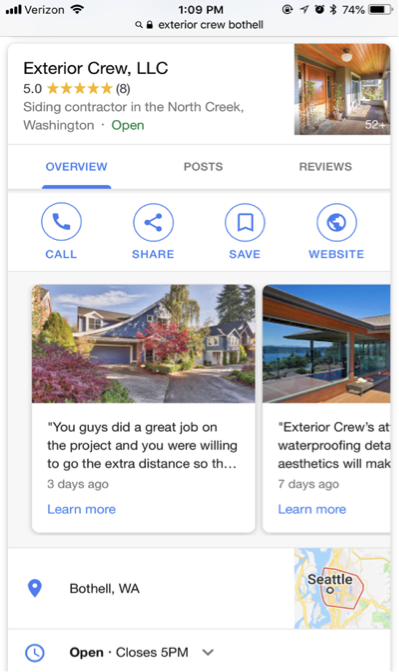
    Screenshot of a Google My Business post from Exterior Crew, LLC

    These posts are particularly captivating because, rather than appearing in the search results, they are displayed in the knowledge panel, which presents a more engaging visual aid. This is NOT to be confused with Google +, which was Google’s attempt to compete with Facebook as a social platform. And let’s be real; it was a major fail. Realizing this, Google reconstructed their platform and created GMB. Google + profiles and pages still exist, but they are now subpages of a GMB page.

    The Start of Google Posts With Candidate Cards

    Before July 2017, Google’s now-called “Google Posts” were only accessible to few. It all started with “Candidate Cards.” You may remember seeing these around the 2016 presidential election. Google described these as non-ad privileges, giving 2016 Republican and Democratic candidates a place in Google search.
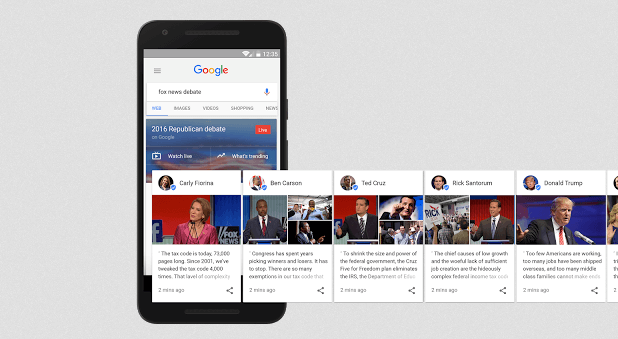
    Image of Google's candidate cards - Search Influence

    Proving to be both appealing and informative by viewers, Google allowed the expansion of these cards for celebrities and sports teams. As of June 2017, GMB brought these now-called “Google Posts” to local businesses as an easy way to help attract new customers and build relationships with the customers you already have. These posts have proven particularly effective in promoting flash sales or promotions, emergency updates, such as school closings, and sharing job openings. In addition, these posts contain a call to action (CTA) feature, which provides an easy and direct way for customers to book appointments or reservations.

    Benefits of Google Posts Over Traditional Social Media Posts

    You may be thinking, why would I need to use Google as a social platform when I already use Facebook, Twitter, Instagram, etc.? And you have a point. These social platforms are still great ways to post updates about your business. Although similar, Google Posts offer a few advantages that the typical social media platforms do not, including the following:

    They’re more searchable

    You can literally “Google it.” When searching for a business, these posts will appear directly on Google Search and Google Maps pages. When someone searches for your business, your location address and phone number will appear in the knowledge panel on the right-hand side of your search results. Your company’s address/location is the primary piece of information searched for by local customers. In regard to mobile, local searches lead 50 percent of viewers to visit stores within one day.
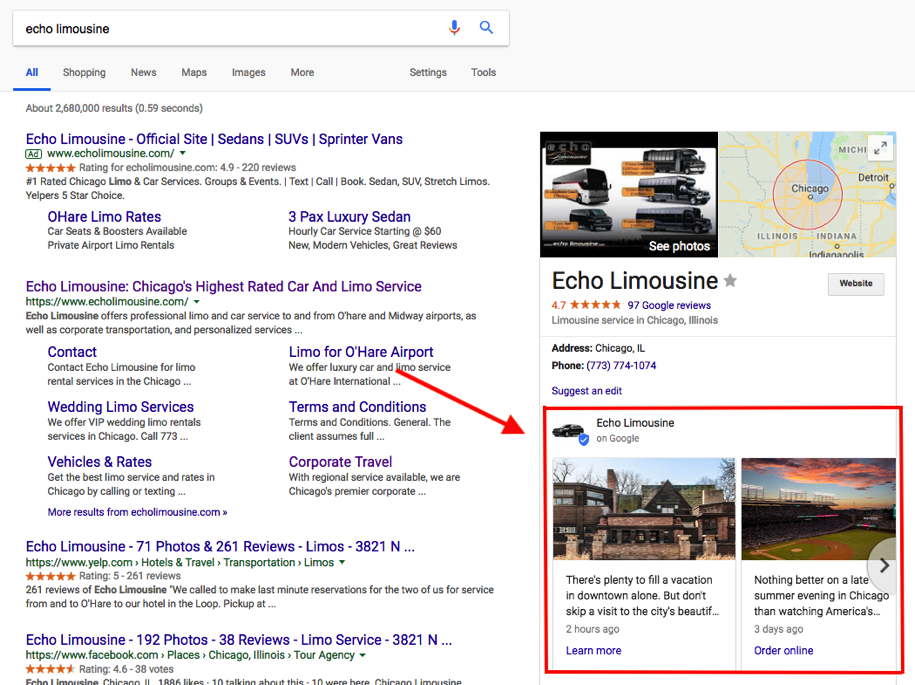
    Screenshot of a GMB post by Echo Limousine - Search Influence

    You will expand your reach

    Not only does Google lead the way in search engine results, but it also surpasses Facebook search queries. According to Adweek, Google averages 3.5 billion searches per day, compared to Facebook’s 2 billion per day. In addition, 82 percent of people turn to search engines to find local information.

    Keyword Searches

    On Google, you can use keywords to target certain audiences—specifically, people that are already looking for your services. Since these people already have an idea of what they are looking for, they are likely to be further along in the decision stage, meaning they are more likely to convert into a client or customer. By contrast, Facebook is geared more toward targeting specific interests and in-depth personal information to lure in a potential customer.

    Impact on your ranking

    Google’s goal is to provide you with the most relevant information based on a search query. When you post new content directly through your GMB listing, you are sharing relevant content and information about your local business, which contributes to building your location authority. This tells Google that your business is legit. The more you legitimize your business to Google, the higher ranking you will get. The higher ranking you have, the higher you will appear on Google search and gain more traffic to your site.
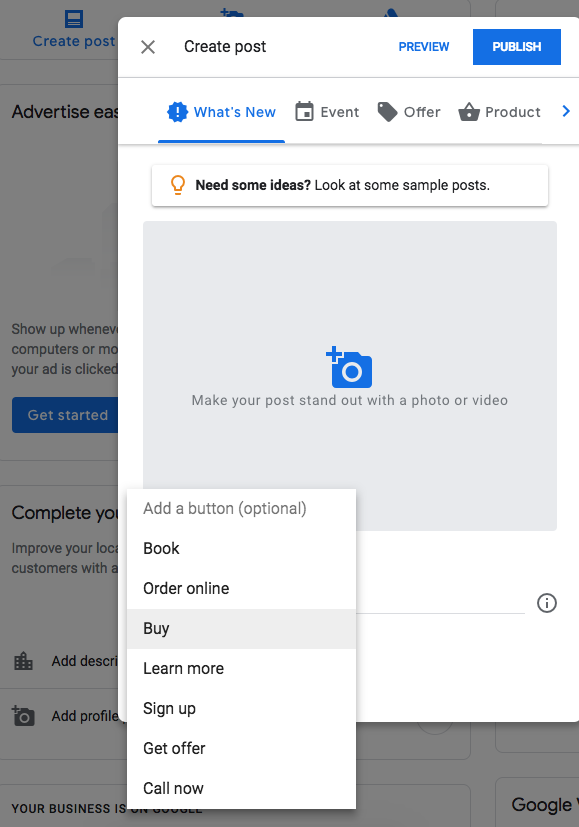
    Screenshot showing how to create a Google My Business post - Search Influence

    Connect with your customers directly

    You can include CTA buttons on all of your GMB posts. Call to action buttons have been proven priceless for converting customers. According to Everything You Need to Know About the Psychology of the Call to Action by Neil Patel, the human mind expects a call to action button. “Our minds are prepared for and are expecting an experience of being called to act and have already decided that there will be a CTA. We know that expectation affects behavior. That’s why people know to act on the CTA. They aren’t staring at the CTA button wondering what it is. They know its a button they are being asked to click.”

    Some examples of how a business can utilize these buttons include the following:

      1. Make a reservation
      2. Sign up for a newsletter
      3. Learn more about the latest offers
      4. Buy a specific product from your website
      5. Call now

    Get backlinks

    Everyone knows that backlinks have a huge effect on organic search results. By posting compelling content on your GMB posts, people are more likely to engage and reference information from your site. You can also link your site pages in a post, making it easier for researchers to find your pages.

    Start Posting!

    Although still green, GMB posting is projected to be incredibly valuable to local businesses. Facebook, Twitter, and Instagram are saturated with businesses looking to promote brand awareness. But since GMB posts are still in the early phases, it hasn’t been flooded by the masses just yet—which is why you should get in now! GMB is an excellent platform that allows your customers to stay in the know of what is going on with your businesses. Not to mention, it’s free! What do you have to lose?

    Here at Search Influence, we’re constantly staying on top of new ways in which we can help our clients be found online and thrive in their industry. If you’re interested in honing your local SEO strategy with rich, relevant Google My Business posts, then request your marketing analysis today to get started.

    Images:
    Candidate Cards

  • 8 Facebook & Instagram Features You Might Not Know About

    8 Facebook & Instagram Features You Might Not Know About

    Facebook is going cross-country with a free conference, bringing it to 30 cities, including New Orleans! This is part of Facebook’s mission to better educate businesses in using their platform. They state that… “By 2020, we’re committing to provide 1 million US workers and entrepreneurs the digital skills they need to compete in today’s workplace.”

    My evaluation is that their goal of this effort is to increase and improve business use of Facebook (and ultimately advertising dollars) and try to make up for their data privacy blunders earlier this year.

    Given that 2.07 billion people access FB monthly, and ¾  of those users come back daily, there’s an appropriate way for most businesses to engage with consumers.

    I really enjoyed seeing traditional advertising promoting this free event as I drove around New Orleans, from downtown digital billboards to suburban bus stop ads. While it may seem ironic that Facebook would use out-of-home media to promote their conference, it is not that surprising since part of their strategy is likely to reach NEW businesses in addition to improving the skills of those already on the platform.

    In case it’s not coming to a city near you, check out these tips from our team of Influencers who attended various sessions!

    Build Creative for Mobile

    Because 90% of time on Facebook is spent on mobile, businesses must get out their desktop-focused world and think about the screen size of their audience.

    One key media type for mobile optimization is video—your typical rectangle, landscape video (16:9 aspect ratio) videos are suboptimal for mobile. Square is better, but the best is to create vertical, full-screen videos—think Snapchat, Instagram Stories, and Facebook Live style.

    In addition to it being a more immersive and engaging experience, a key benefit is you aren’t sharing the screen with other content.

    If you use Instagram, you may not be surprised to hear that ⅓ of the content that people are engaging with on Instagram is BRAND content!

    Thanks to Alison Zeringue & Amanda Ball for this takeaway!

    Mobile Creative Doesn’t Have to Be Hard or Expensive

    All you need is a phone, lighting and a $20 Amazon tripod (for video) to make something look REALLY nice!

    These 10 apps can enable you to enhance your photos and videos on your mobile device, on the fly.

    Considering that by 2020, 75% of content on Facebook will be videos, it is time to put on your videographer hat!

    Photo Enhancing Apps

    1. Adobe Photoshop Express
    2. Adobe Spark Post
    3. PicLab
    4. Plotaverse
    5. RIPL

    Video Enhancing Apps

    1. Videoshop
    2. Quik
    3. Instagram Stories
    4. Boomerang
    5. Legend

    See here for direct links to these Top 10 Creative Apps.

    Remix

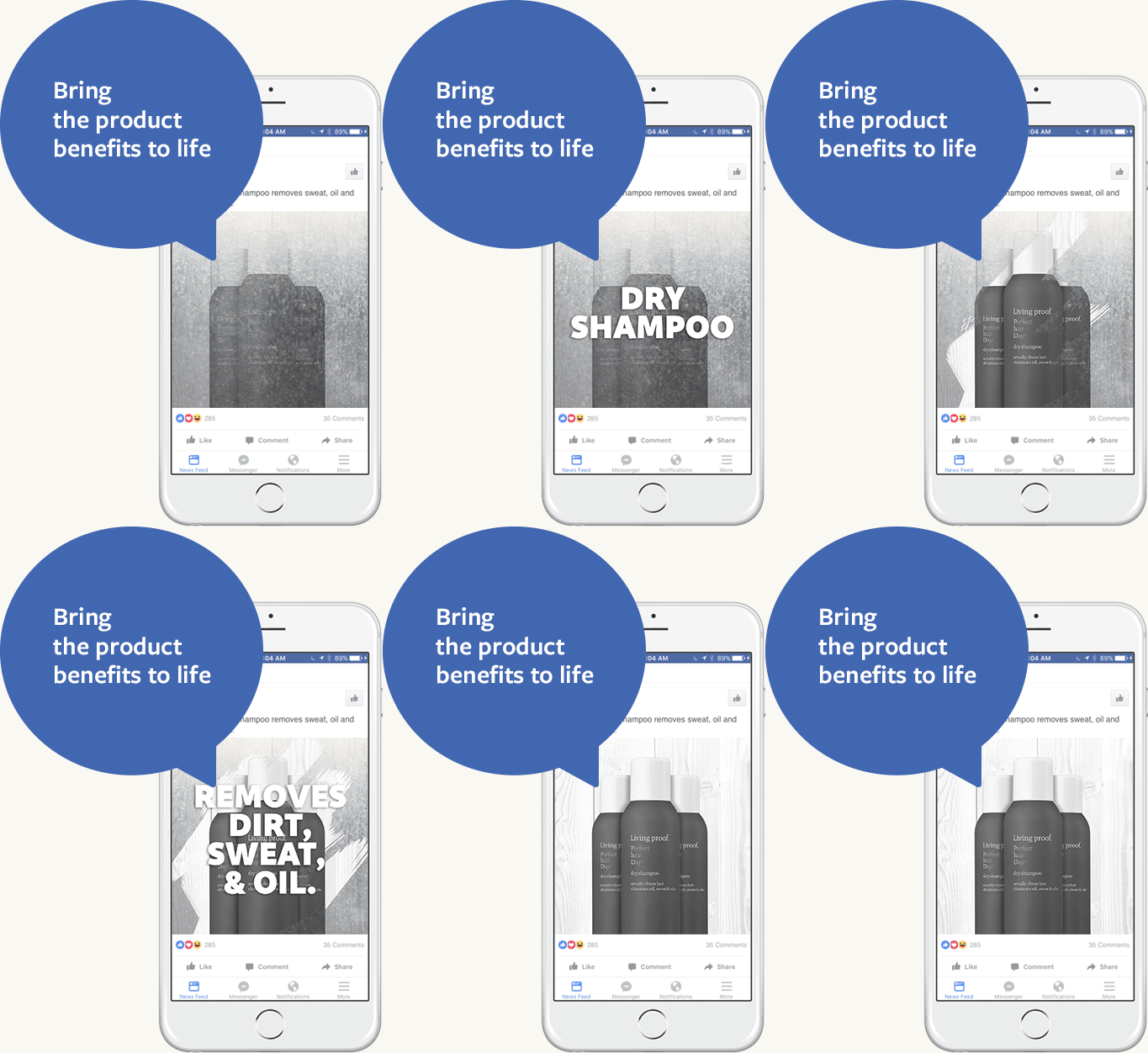
    The apps above and others allow you to “remix.” Easily take images you already have and create gifs and videos to better engage your audience, including overlaying text (love the Living Proof example… ask me how many bottles of Living Proof I have stocked—major “life hack” for professionals on the go!).

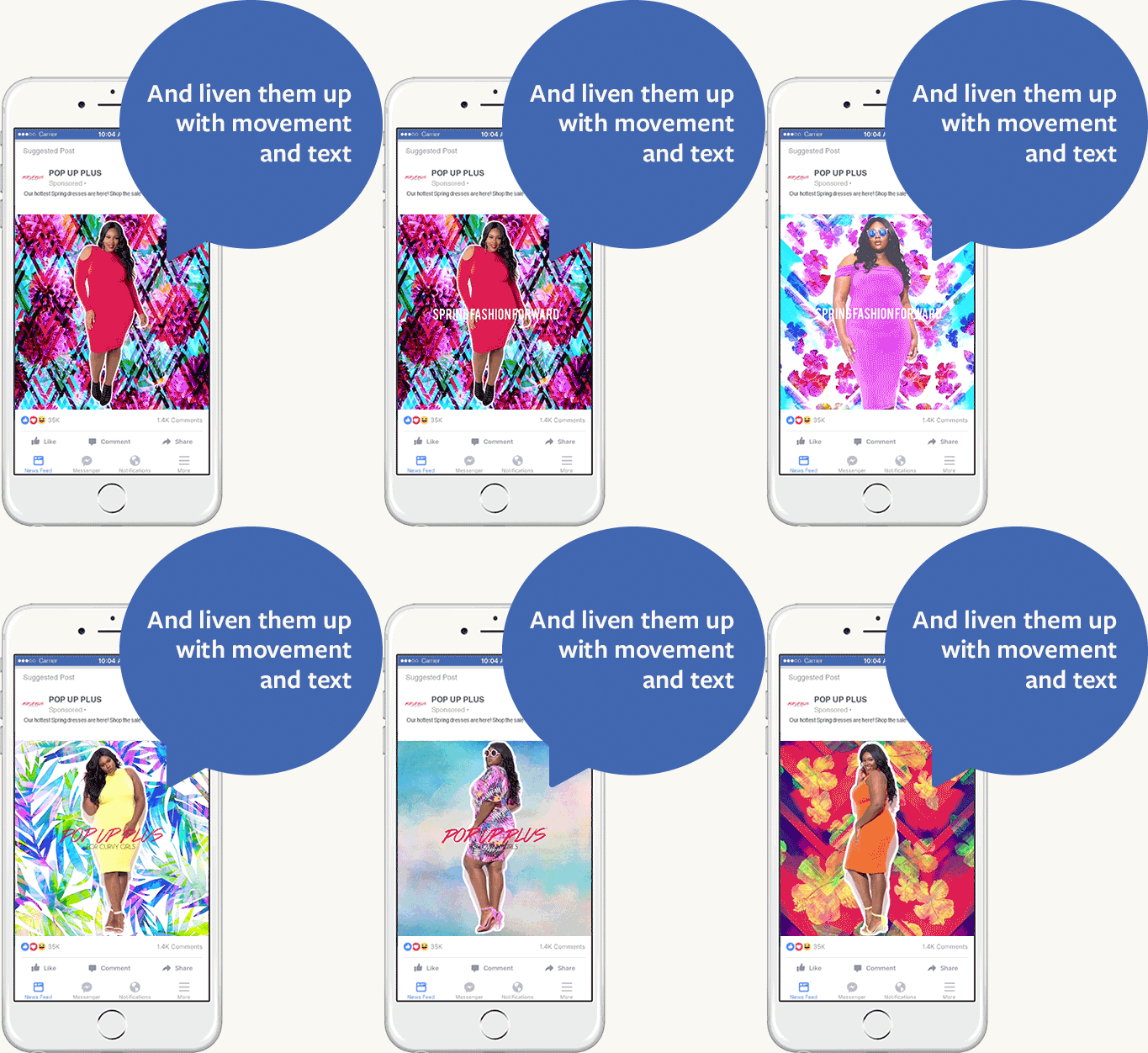
    Amanda Ball likes the Pop Up Plus example, which uses e-commerce product images and “remixes” them into fun videos with vibrant colors and movement. An app called Videoshop can help do this FOR FREE.

    Shooting from Scratch

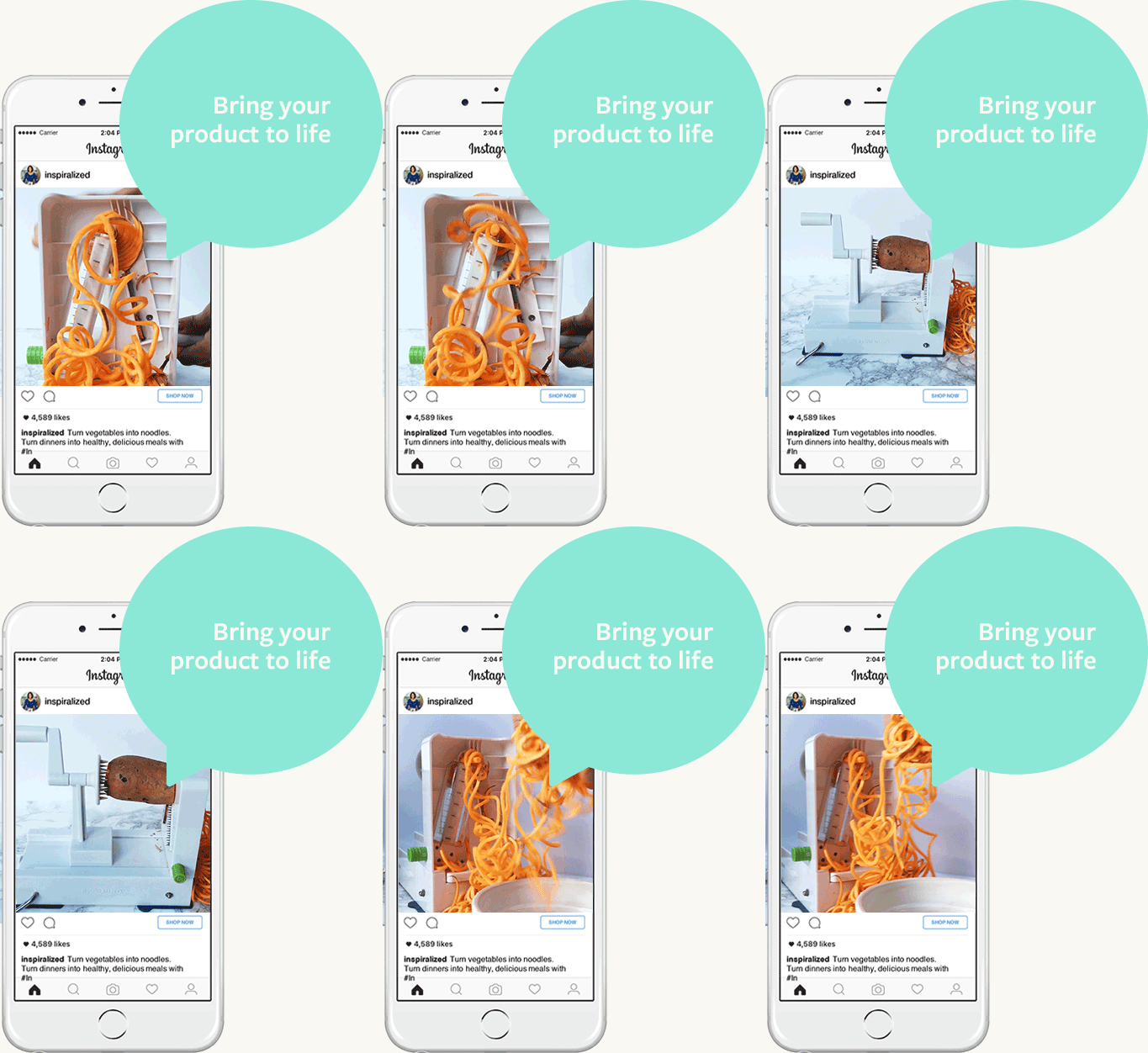
    Facebook also provides tips on making great videos from scratch for ads and posts. Check out this savvy use of Boomerang to show a spiralizer in action. As Amanda Ball describes it, “Potential buyers are prompted to feel like they know how the product works, making them more on board to dig deeper into your brand and products.“

    Thanks to Amanda Ball, Account Management Team Lead, for this tip!

    Secret Boomerang Menu

    Did you know Boomerang has a secret menu!? Learn how a four finger tap can bring up options on options to edit your video. You can smooth it out, speed it up, slow it down, and so much more.

    Thanks to Alison Zeringue, Director of Account Management, for this tip!

    Custom Contact Methods on Instagram Profile

    On a standard Instagram profile, call, email, and directions are standard calls to action that you can add.

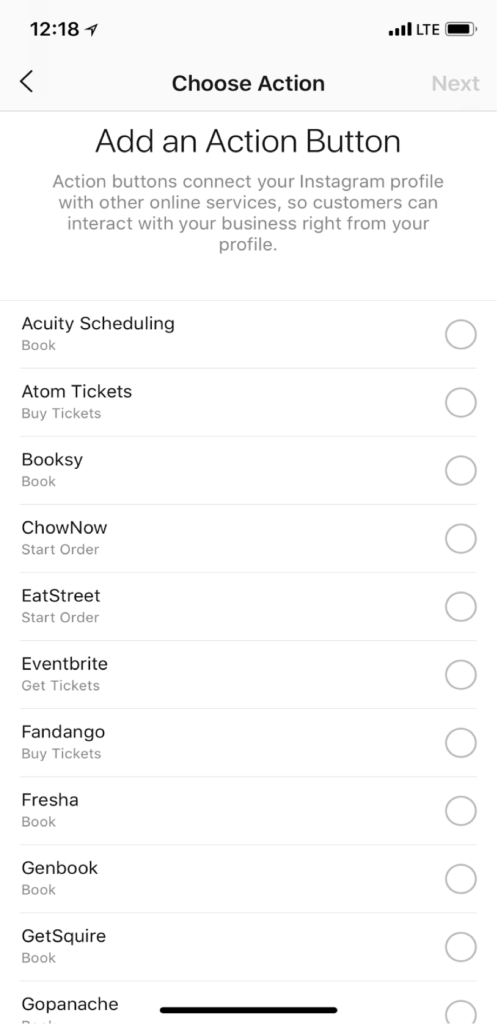
    Through settings, you can hook up third-party apps like Open Table and Eventbrite.

    1. Go to your profile
    2. Click “Edit Profile”
    3. Click “Contact Method”
    4. Choose from the ever-growing list of action buttons that correspond with other apps and services you may already be using

    Thanks to Alison Zeringue, Director of Account Management, for this tip!

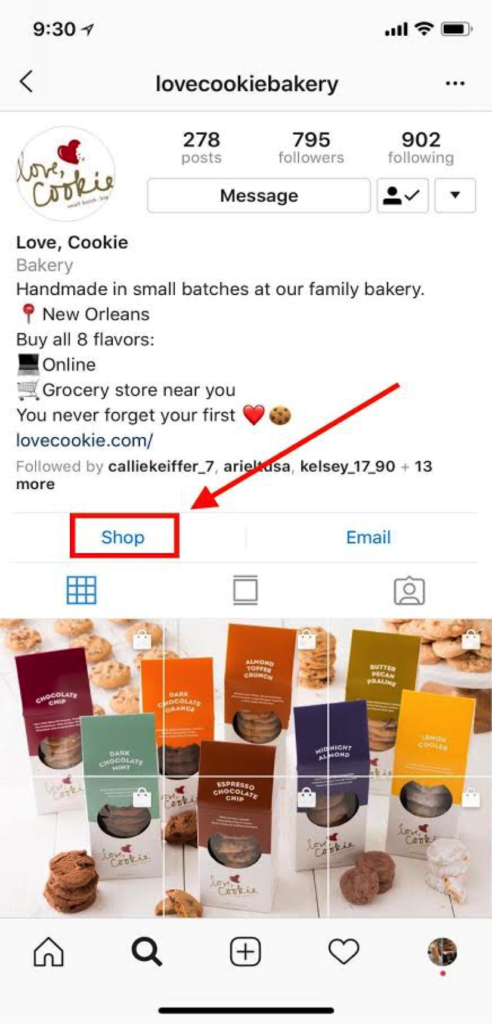
    Get a “Shop” Button on Your Instagram Profile

    Those who sell products may wonder how to activate the “Shop” button of their Instagram profile. After you’ve created nine “shoppable” Instagram posts, a “Shop” button will appear on your profile. It will direct users to all of your shoppable posts, making it that much easier for users to buy your product on their phone.

    Thanks to Ariel Tusa, Account Manager, for this takeaway!

    Vying for “Swipe Up for More”?—What to Do in the Meantime

    We're all vying for the "Swipe up for more" feature on Instastories, but, alas, you must have 10,000 followers for this feature to show up. In the meantime, use the "screen record" feature on your iPhone to create a video that guides users to important content. Then you can add that video to your Instastories.

    "https://townsend.bunksite.com/wp-content/uploads/2018/08/Screencast-of-Search-Influence-Blog-Post-for-Instagram-Story.mp4%22

    Thanks to Ariel Tusa, Account Manager, for this takeaway!

    Donate Button on Facebook Live

    Facebook has offered a selection of calls to action (CTAs) for your page and ads for some time. One way non-profits can use CTAs creatively is by using the “Donate” CTA button on a Facebook Live video. For example, you can “go live” at a fundraising event so those who aren’t in attendance can check out the action, and you can feature the “Donate” button on this post to capture their wallets while you are capturing their hearts. Bonus—giving a sneak peek into your event this year can create a buzz that translates to more attendees next year (as we talk about in our blog post with more tips to increase event attendance).

    Requirements for Fundraising on Facebook:

    In order to have access to features like the “Donate” button, you must be an approved non-profit.

    • 501c3
    • US-based
    • Verified page
    • Page meets community standards
    • Application approved

    Thanks to Ceallaigh Montgomery, Sales Executive & Digital Marketing Strategist, for this takeaway.

    Audience Network

    I find the Audience Network isn’t talked about nearly enough. By default, ads set up on Facebook will run on Instagram as well as the Audience Network, which is a collection of sites around the web. This idea is core to Google Display, which leverages the Google Content Network as the avenue for showing all ads. When people talk about Facebook ads, they take for granted this opportunity to be in front of people when they are “surfing the web”—not just browsing the “ ‘book.”

    Thanks to Shawn Kelly, Sales Manager, for this takeaway!

    Also, thanks to Shauntae Joseph, Account Manager, & Jenna Mire, Account Coordinator, for takeaways worked in throughout!

    If you need help implementing these tactics, let’s start a conversation about how we can help you.

  • What Are The Most Important Review Sites? Start With These Three

    In order to remain competitive in the local search space, it is essential to encourage your customers to provide feedback about your business. Reviews and interaction with your digital properties help search engines and users learn more about your business; in today’s environment, if you are neglecting these review sites, then there is a chance you are missing conversion opportunities as well as losing ground to your competitors. With the number of review sites out there, it is important to prioritize their management in order to expose your business to the largest amount of potential customers without spending all day managing different profiles.

    What Are The Most Important Review Sites?

    While there are endless options out there, these are the most important review sites:

    1. Google My Business

    2. Facebook 

    3. Yelp 

    This should not be a huge surprise, even to casual internet searchers. These sites dominate a lot of the search space when it comes to search queries about businesses or services. Here are the basic reasons why these are the most trusted review sites:

    1. Traffic

    2. Reputation

    3. Authenticity

    According to Alexa, a widely accepted measure of websites’ ranking metrics, Google My Business, Facebook, and Yelp are the first, second, and fourth most visited websites in the United States for Consumer and Business Review websites. Amazon currently holds the third spot, but Amazon is not an option if you are in a service-based industry. All of these sites have millions of unique visits a month, meaning, people are undoubtedly coming to these sites for more information. Since these are free to manage, it would be like passing up an opportunity to have a free billboard on one of the most traveled roads in the country. Furthermore, reviews can now populate on organic search for Facebook, Google, and Yelp, so users may or may not click through to your site based on your review situation.

    One of the reasons these sites generate so much traffic is because of their reputation as a reliable source of business information. The amalgamation of traffic, number of reviews, and day-to-day use have made all of these sites integrated into our digital diet. Much like people reflexively would use the Yellow Pages or White Pages in a pre-internet world, people will reflexively use these sites to get more information about a business.

    Lastly, people trust these sites because the reviews are user-generated and moderated by a third party rather than the business itself. While it’s good practice to have reviews and testimonials on your main site, the obvious issue there from a user perspective is that you will probably only promote the positive reviews. These sites allow the opportunity for customers to express a range of thoughts or emotions, allowing potential customers to better discern the pros and cons.

    So, Why Should I Manage Business Review Sites?

    According to Vendasta, 88 percent of online shoppers utilize reviews to inform their purchase decision. Furthermore, the amount of people who do not research a business online prior to a purchase has decreased from 22 percent to 9 percent. The trends are obvious; more people are looking for your business online and more people are using reviews to make a judgment. Let’s take this even a step further—44 percent of users say they need reviews to be younger than a month old in order for them to consider it relevant. This highlights an important point—it is not enough to just let your reviews aggregate on these sites, you need to engage your audience.

    Screenshot of a typical yelp listing - Search Influence

    Screenshot of a facebook review listing - Search Influence

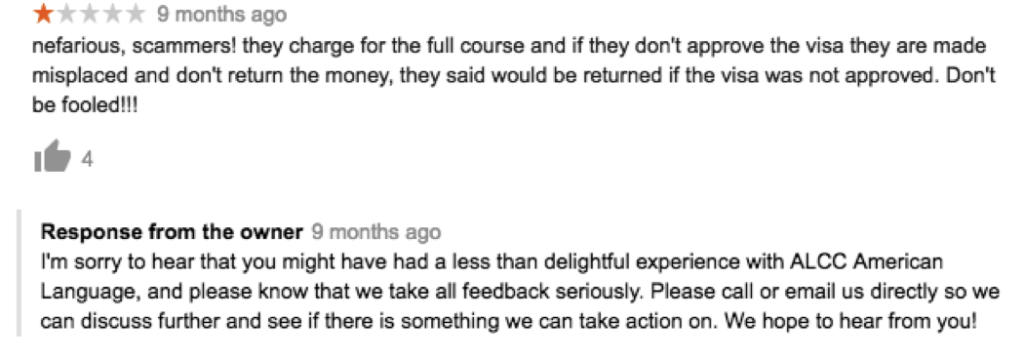
    One concern is that your business may aggregate a bunch of negative reviews. Without getting into the reasons for these negative reviews, it is important that you engage with customers who have had a negative experience. Other users looking at your business will see you engaging with customers who had a negative experience and see that you are making an effort to provide customer service.

    Screenshot of a typical negative business review with a response from an owner - Search Influence

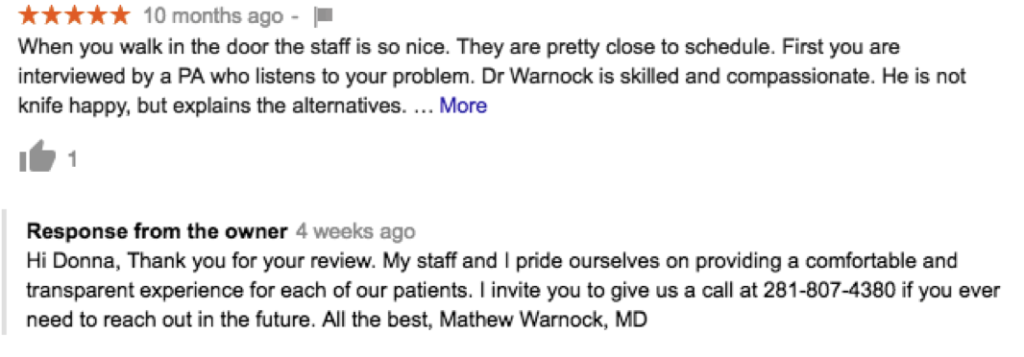
    You should also respond to the positive reviews. It is a simple gesture to show that you appreciate their business and that they took time out to engage further with your business online.

    Screenshot of a positive business review with a response from the owner - Search Influence

    Beyond the simple client facing, customer service reasons, these reviews are increasingly important to search ranking. It follows that Google will appreciate you using their Google My Business platform to gather and respond to reviews. It improves their product while also helping your business get in front of more people. Being active on your listing can have a positive impact on your local search rankings. When users visit Yelp or Facebook, having a robust review profile with engagement from the business could help you stand out in the crowded marketplace. Managing reviews is now a major factor in the realm of local SEO management.

    How Do I Get More Reviews?

    The simplest way? Just ask! There are numerous ways to interact with your clients and customers, whether it is through an email marketing campaign, adding a request to their receipts or billing, or asking them face-to-face when they are visiting your business. If they are delighted with their service, they may be inclined to help you out by spreading the gospel via Facebook, Yelp, and Google.

    Since running a business is time-consuming on its own, it is important to dedicate some time each week to ensure your digital presence is working for you. By auditing your review situation on Google, Yelp, and Facebook, you will be ensuring that you are monitoring three of the four most visited platforms in the United States among consumer and business review sites. Just a little effort in this area could lead to a surprising amount of new business for your location with the only expense being a bit of your time.

    If you need help getting your online reputation management off the ground, our team at Search Influence can streamline your local SEO strategy to better fit your business goals. Because we are dedicated to the needs of small and mid-sized local businesses, we offer pricing transparency. Request your marketing analysis today to get started.

    Images:
    Thumbs Up

  • Top 5 Google Analytics Metrics for E-commerce Tourism Companies

    Top 5 Google Analytics Metrics for E-commerce Tourism Companies

    With a growing number of travelers using mobile search to book their vacations, it’s a great time to be in the tourism industry, assuming you have an e-commerce option for your customers. Whether you’re offering hotel rooms, dinner reservations, or curated experiences, your customers are more likely than ever before to make their travel purchases online and on the go. But, how can you tell if the e-commerce side of your business is operating at peak performance? With a strong track record of successful marketing for zoos, museums, and other tourist attractions, Search Influence is here to help! We’ve compiled the top five Google Analytics metrics that your business should be tracking to make sure you’re optimizing your potential.

    1. E-commerce Conversion Rate

    Google divides the number of completed sales by the number of visitors to your website to provide your e-commerce conversion rate. This metric is one way to measure your business’ success in terms of online sales. While it does not measure how much revenue each sale brings in (that’s the average order value, and we’ll talk about it next!), your e-commerce conversion rate tells you how many visitors to your site have become paying customers. It’s an especially important metric to keep track of because converting current visitors into customers is much more cost effective than acquiring a new customer base.

    Of course, e-commerce isn’t the only conversion rate you can measure. Break down conversion points on your site into micro and macro. In the world of e-commerce, your macro conversion would be a purchased products/tickets. Micro conversions are smaller actions that lead up to the end goal of purchases. For tourism, this would likely include visits to key pages (like ticket pricing page), to adding something to a shopping cart, to email signups. You should watch your success of micro conversions and tune your campaigns to those as well, as each of these actions should be designed to drive customers toward macro conversions—increasing that e-commerce conversion rate of visitors turned into paying customers.

    2. Average Order Value

    Average order value tells you how much revenue online purchases generate for your business, on average. It is calculated by finding the total revenue generated from online orders and dividing it by the number of orders. According to some experts, like Databox, it could be the one most important metric for your e-commerce business to focus on.

    So, how do you improve your average order value? MonsterInsights provides some key suggestions.

    First, price your products with upselling in mind. For example, if you’re a photographer shooting on-site family vacation photos, you might offer a base package of 20 photos, with the option to add more at an increased price-per-photo rate.

    Second, offer product bundles at discounted prices. For example, if you’re running a walking tour company, you could bundle together a daytime and a nighttime tour. Customers will be enticed by the promise of extra touring for their dollars, and you’ll still gain more income than if they had just purchased a single tour.

    Finally, offer savings with a minimum order—something like, spend $100 and get $20 free. Customers may spend more than they ordinarily would just to access the discount. All three of these strategies can drive up your average order value, bringing in more revenue for your e-commerce tourism business.

    A close-up of a woman touching a screen - Search Influence

    3. Revenue Per Visitor

    Revenue per visitor is a crucial metric – increasing it can mean revenue growth for you without having to drive new visitors. You can increase this metric by both converting more visitors into customers and increasing your customers’ average order value. Revenue per visitor is calculated by dividing your total online revenue by the number of unique visitors.

    You can increase revenue per visitor by using any of the previously discussed methods, like upselling, bundling products, and offering discounts with a minimum spend. Keep in mind that a low revenue per visitor is not necessarily an indication that your business is struggling. For example, if you’re selling lower priced items, like postcards or other tourism souvenirs, your revenue per visitor will be much lower than for a company selling high-dollar items like cruise tickets or hotel suites. You’ll just need a larger number of unique visitors to boost your sales and drive revenue overall, and this should play heavily into your marketing goals and strategy.

    4. Customer Lifetime Value

    Customer lifetime value tells you the total value that an individual customer, acquired during a particular time period, has spent with your online business.

    This metric is best used for estimating appropriate marketing costs for your business, and for analyzing your customer acquisition strategy. For example, if your average customer will only spend $100 at your business over the course of their life, it isn’t worth paying hundreds of dollars to attract this customer. Maximize your return on investment (ROI) by keeping your marketing and advertising expenses reasonably lower than the income your average customer is likely to generate for your business. Most businesses are willing to spend 5-10% of revenue to acquire a new customer. (See more in our blog “What’s The Perfect Marketing Budget For Your Company?”)

    5. Return on Advertising Spend

    Speaking of ROI, let’s discuss return on advertising spend—or ROAS as it’s sometimes called—which is a key metric for determining the effectiveness of your digital advertising. It tells you how much income you earn for every dollar spent on advertising campaigns. If you’re running online ads and want them to be as effective as possible (who doesn’t?), you need to raise your return on advertising spend. Ideally, your ads should drive about three times as much income as you paid to advertise.

    A man viewing graphs and charts on a tablet - Search Influence

    So, how can you raise your return on advertising spend to this ideal 3x level? Conversion Fanatics Blog offers some great tips. First, do some testing to figure out what channels work best for your business. For example, if your Facebook ads tend to perform better than your Google ads, channel your dollars to Facebook, where your ads drive the most revenue. Similarly, test the times at which your ads have the best results. If you notice that holiday ads bring in more clients for you than summer ads do, it could be worth concentrating your ad dollars on that crucial time of year. Finally, you can dive into even more metrics. Monitor the user journey by tracking how many customers click on your ad, how long they stay on the resulting landing page, and so on. If you can pinpoint which stages of the user journey are working well for you, and which stages are losing potential customers, you can fine-tune your ads and landing pages for an improved user experience.

    These five metrics, all available through Google Analytics, are key components of e-commerce tracking for any online tourism company. For more information about how to optimize your travel business’ potential, contact Search Influence at 504-208-3900, or request a proposal today to hear opportunities from our strategists.

    Images:

    Camera and Phone

    Touchscreen

    Tablet

  • 5 Things American Businesses Need to Know About GDPR

    In the wake of the Cambridge Analytica scandal here in the U.S., the General Data Protection Regulation (GDPR) was established by the European Union in May to give users complete transparency on how their data is or will be used. Here’s everything you need to know about GDPR and how it will affect marketers not just in Europe but here at home as well.

    1. Why Did the EU Create GDPR?

    GDPR went into effect on May 25, 2018. It was initially approved by the EU in 2016, well before the news of the Cambridge Analytica data misuse broke. However, it’s hard not to associate one with the other because of the timing. To provide a bit of context, I will quickly outline the details of the Cambridge Analytica case. The data of an estimated 80 million Facebook users was sold and then used to create “psychographic” profiles of American voters. This data was collected through a seemingly harmless personality test called “thisisyourdigitallife.” The test filed away the data of participants and their Facebook friends. The participants unwittingly gave the app’s developers access to this data because by opting to take the test, they agreed to the test’s terms of service, which granted the test access to their information as well as their friends’.

    Though this example of misuse has brought personal data protection to the forefront of the world’s attention, this is not a new practice. The personality test in question was launched in 2014, and people have been using similar techniques to acquire user data for years. The difference is that we rarely questioned the terms of service we agreed to for things like apps, free wifi, and other services in the past.

    2. What Does GDPR do?

    GDPR aims to give users more information on how their data will be used. Its central goals are to keep users informed and to require their consent. The exchange of data for free services such as Facebook and Google can be a fair one. The text of the GDPR legislation is a decent read and is broken into chapters here. Any sites or services attempting to collect data must do so transparently, with “unambiguous” and “specific” purposes. “Data subjects” must be able to request logs of all of the data collected about them and then allowed to ask for the data to be corrected or deleted (appropriately named the “right to rectification” and the “right to be forgotten,” respectively). Also, businesses cannot deny or restrict services to users who opt out of data collection.

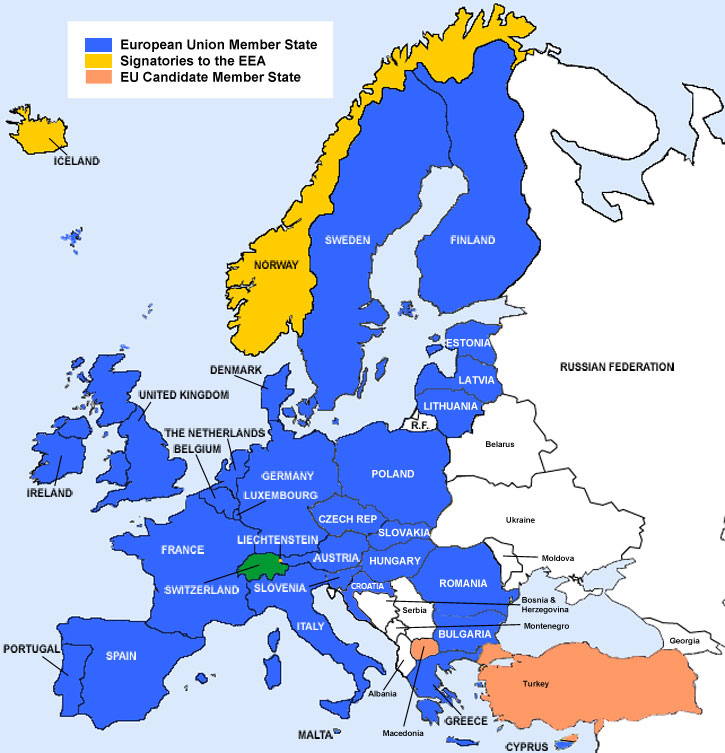
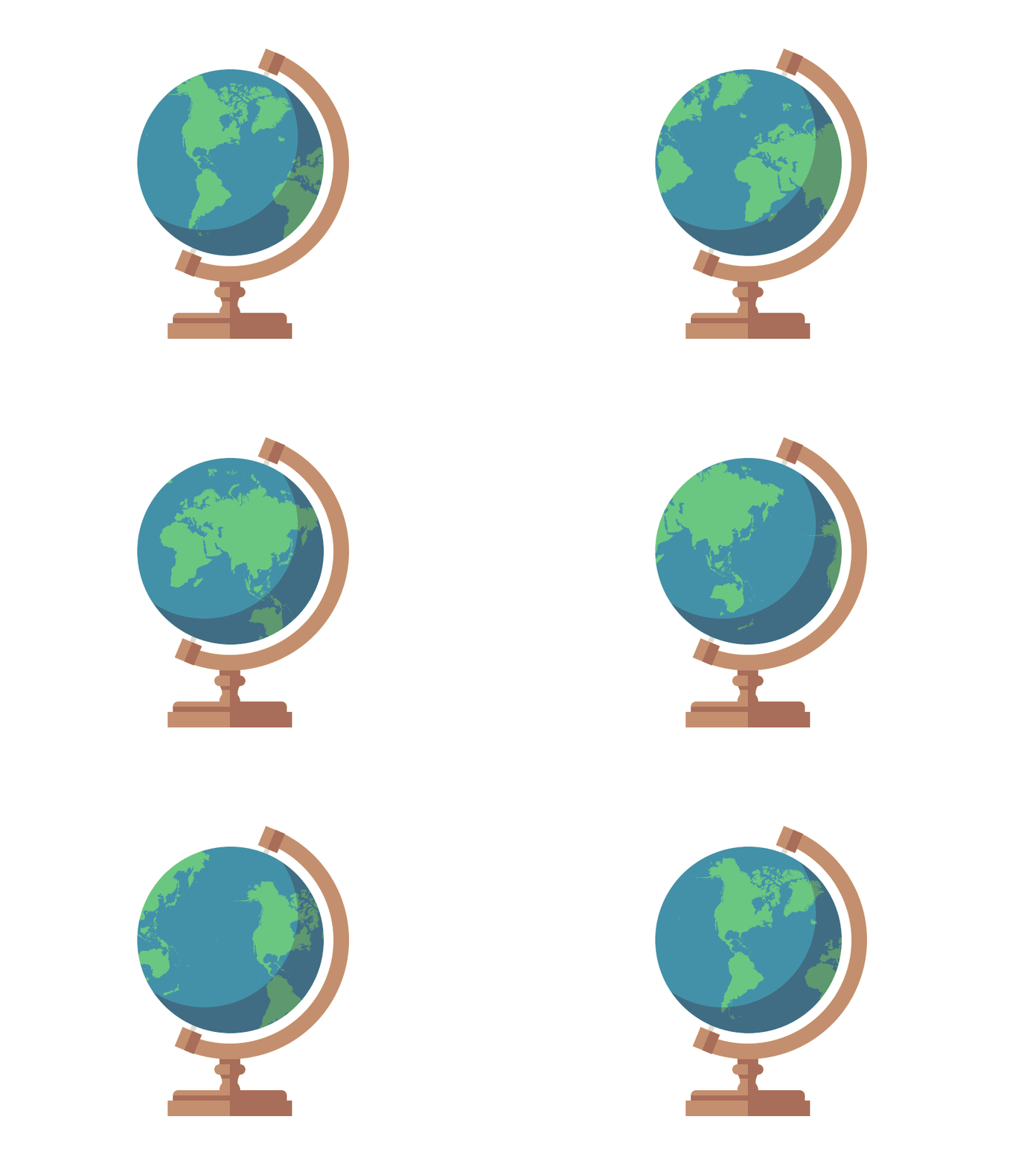
    EEA payment map - Search Influence

    3. Does GDPR Apply to US Businesses?

    Strictly speaking, GDPR applies only to EEA (European Economic Area, see image) citizens while they are in EEA countries, so one might expect that it won’t have a huge effect on American companies that only operate within the United States. However, because the internet is global in nature, it’s rarely that simple. Websites run by American businesses are frequently visited by people around the world.

    Tourism is one of the industries that will be most affected. 39.4 percent of the American tourism market is comprised of European travelers. Zoos, museums, aquariums, and other attractions should review their data and cookie collection methods.

    Also, American businesses must ensure that data they receive or purchase about EEA citizens were collected using techniques aligned with GDPR’s regulations.

    4. What Can You Do to Make Sure Your Business Is Compliant?

    GDPR isn’t intended to stop all data collection or to make targeted marketing less effective. On the front end, the main changes businesses would need to make to adhere to GDPR are stating that they are tracking user data and then how they plan to use the data, whether it’s cookies for remarketing, user session data for site analytics, or other reasons. Further down the line, companies would need to ensure that their records are well-maintained so that they can provide users with their data should there be a need to review or delete them. The key is transparency. As long as you let users know what you’re doing and why, there shouldn’t be any issues.

    Mark Zuckerberg sitting before Congress - Search Influence

    5. Will the U.S. Adopt Similar Policies?

    Anyone who watched Mark Zuckerberg’s testimony to Congress in April might not think there will be changes in US data privacy laws anytime soon. The questions some congressmen and women asked revealed a lack of technical knowledge, as noted by Vox. However, on May 22 Vermont passed the nation’s first data privacy law. Vermont’s legislation focuses on “data brokers,” companies that sell or license data about their consumers to third-party companies that do not have a direct relationship with the consumer whose data they are purchasing.

    A few weeks ago California passed a law that is more all-encompassing than Vermont’s. Similar to GDPR, the law requires businesses to state the type of data they are collecting and how they plan to use it. These changes will not go into effect until 2020, but the process was pushed along because Californian lawmakers were pressured by a grassroots ballot initiative with measures even more stringent than the bill the state passed.

    Due to public outcry and interest, other states are bound to follow suit, so there’s never been a better time to review your data collection practices and consider how easily they can be adjusted to fit the level of transparency that is becoming the new standard.

    Consult With Experts Who Are Up to Industry Standards

    At Search Influence, we consistently stay apprised of new industry standards and regulations regarding how our client’s information is disseminated, including GDPR. Our goal is to help your business grow and optimize your potential online, all while making sure your business is in compliance with data protection laws. If you’d like professional insight into how we can help your business thrive, call 504-336-3422 or request a proposal online today.

    Images:
    EEA Map

    Mark Zuckerberg

  • Everything You Need to Create an Effective Landing Page—and Everything You Don’t

    If you have run any type of digital marketing campaign for your business, you’ve probably come across the term “landing page.” But what exactly is a landing page, and what role does it play in helping to convert leads into customers? Simply put, landing pages are the pages where users “land” after clicking on an ad from Google, Facebook, or a similar platform. When done right, they feature persuasive and highly relevant content, focused on one specific conversion. By directing users to a landing page rather than simply the homepage of your website, you can ensure that you are able to attribute leads to a specific campaign while simultaneously providing a better answer to the search inquiry of the user. A landing page should be specifically focused on lead generation, and these tips will help you have the highest conversion rates once users make it to your page.

    Do Have a Compelling Call to Action

    A clear call-to-action(CTA) is the most important part of your landing page and should clearly communicate what you want your reader to do on the page. This could be to register for an event, download an eBook, or schedule a consultation. Whatever it is, it needs to stand out from the rest of your content and be one of the only, if not the only, actionable items on your landing page.

    If your CTA is a form instead of a button, the title of your form should be much more specific than a simple “Contact Us.” Entice your readers with simple, yet descriptive language like “Register to Get Your Free Marketing eBook” instead. For buttons on your form, avoid generic language like “Send” or “Submit” and instead use language like “Get My Analysis” or “Start My Free Trial.”

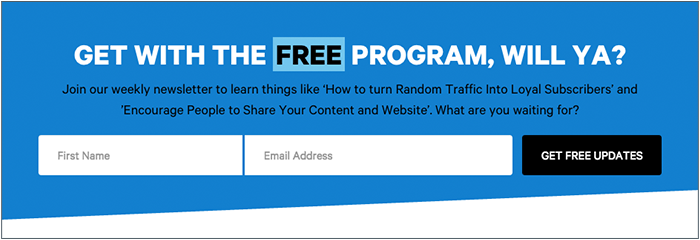
    Graphic of a form field on a landing page - Search Influence

    Users are also typically skeptical to give out more information than necessary, so you don’t need to ask for their full name, address, phone number, date of birth, where they went to high school, and their mother’s maiden name if all they’re doing is downloading an eBook. A user is much more likely to actually fill out the form if you keep it short and sweet. Sticking with essentials like their name and email may be all you need.

    For more tips on how to craft stellar CTAs that will convert, check out this blog post.

    Don’t Cram Everything Above the Fold

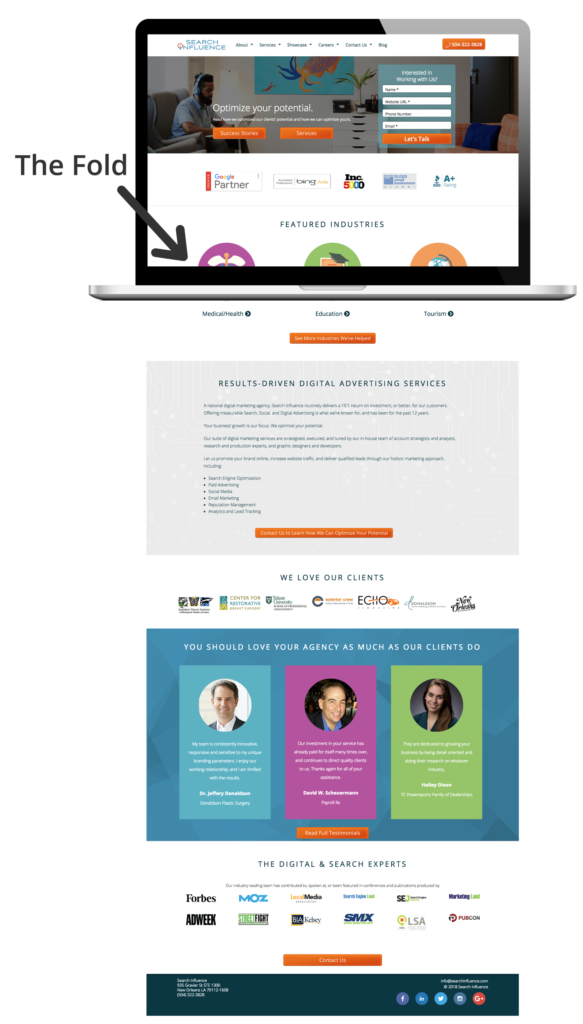
    We’ve all heard for decades that readers rarely make it below the fold (originally used in reference to traditional newspapers), and that we should try to cram everything important above the fold. This doesn’t hold as true today as it once did, and cluttering the top section of your page can actually hurt your conversions. While it is still true that some users won’t make it below the fold at all, if what you have above the fold is compelling enough to grab their attention, they will scroll down to read the rest of your content. So while, yes, you do still want your CTA and most important information above the fold, try to limit it to just that. No one wants to read anything that is a cluttered mess, and you’ll retain users’ attention much better by avoiding the clutter.

    Visual representation of above-the-fold content on a landing page - Search Influence

    Do Have Fast Loading Speed

    A fast page load time is absolutely essential for any web page. Users expect a page to load within seconds, and if it doesn’t, they often abandon the page entirely. In fact, a case study from Hubspot found that a 1-second delay in site speed resulted in a 7 percent reduction in conversions. Images and videos often slow down page load time, so be sure to optimize elements like these to avoid losing users. Luckily, you can test out the load speed of your page and address any concerns.

    Don’t Have Endless Content or Jargon

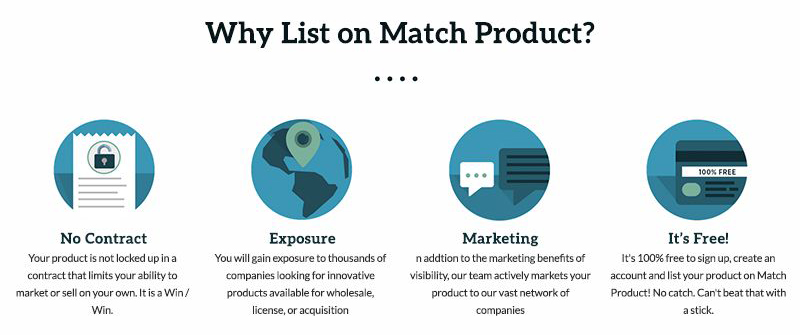
    You don’t want to confuse any potential leads with overly complicated, industry-specific jargon. You should be able to demonstrate your expertise in your field without intimidating or annoying any of your users. While you want to give enough information to draw a user in, you don’t want to overwhelm them with too much information up front. If you do have longer content, try breaking it up with bulleted lists or by using icons.

    Icons used in a landing page - Search Influence

    Do Include Images and Videos

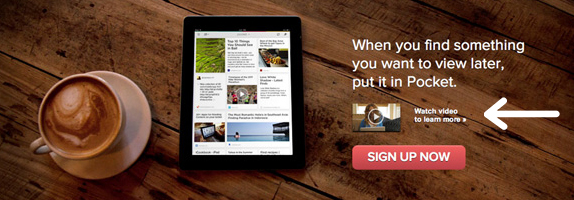
    According to Unbounce, videos can increase conversions by about 80 percent—making them a worthwhile investment for your page. Since videos are often quite big and the play buttons can distract from your CTA, consider making your video considerably smaller than the standard minimum of 960px by 720px, with the option to make the video bigger when it’s actually playing.

    Example of video used in a landing page - Search Influence

    If you don’t have a relevant video for your page, strong visuals are still extremely important. Avoid stock photography whenever possible, but it’s still better to have stock photography than no imagery at all. Users also respond better to images with faces in them than images without.

    Photos aren’t the only type of imagery you can utilize on your landing pages. Depending on the industry, your target audience might respond well to vectors or illustrations, which can also help explain complex subjects when photos aren’t available.

    Example of vector graphics used in a landing page - Search Influence

    Whatever imagery you do end up using on your page should be consistent with the display, Facebook, or any other type of ads that are driving users to the landing page in the first place. When a user clicks on an ad with vector images, for example, they would expect the following landing page they land on to have similar imagery. If the look and feel of the page is completely different than the ad they clicked on, the user could be confused and think they clicked on the wrong ad altogether.

    Don’t Include Navigation

    While it may seem counterintuitive to exclude typical site features like a navigation bar, for landing pages, you actually want to include as few opportunities to leave the page as possible. This includes navigation, which can also be distracting and take away from your main call-to-action.

    Do Conduct A/B Testing

    Once you’ve got your pages built, you should conduct A/B testing by changing out elements of your page to determine what performs best. While audiences typically respond more positively to people in images, for example, maybe yours responds better to objects or vector illustrations. You should also test out CTA placement, button colors, font choices, and content. Keep in mind what you learned in science class though, you only want to change one element at a time when performing these tests. If you change multiple variables at once, you won’t have accurate data on which elements are actually making the page perform better or worse.

    Creating landing pages that convert is no easy feat. Unbounce estimates that achieving a 12 percent conversion rate for your landing page will place you above 90 percent of the competition. With a comprehensive online advertising strategy, every step of the process will be clearly catered to your target demographic, making it as easy and risk-free as possible for users to take action. If you want help creating your online presence, reach out to Search Influence to receive your custom marketing analysis.

  • Impact Your Tourism Marketing With Instagram Stories

    If you’ve been keeping up with our blog, then you already know how to market your travel and tourism business during the off-season, and how to engage with vacationers using mobile search. But, do you know how to leverage Instagram Stories for impactful tourism marketing? Stories are temporary videos or photos strung together to form a slideshow gallery that, well, tells a story. Since Instagram rolled them out in 2016, over 25 million active business profiles and 300 million active daily users have flocked to this feature, according to ClickZ.com. This means that Stories could be a huge area of opportunity for your business—if you use them the right way. If you’re unfamiliar with Stories, Cnet.com offers in-depth instructions on how to use this feature. But once you have the basics down, dive into our pro tips for how to make Instagram Stories most effective for your company.

    A graphic of someone using Instagram - Search Influence

    Promote Yourself Creatively

    Here’s the great thing about Stories—you no longer have to worry about over-posting. You are free to share as much content as you want throughout the day without taking over anyone’s feed. Plus, since the rollout of Instagram’s latest algorithm update, your traditional posts may have even less chance to be seen by followers in their feed, but Stories will appear right in front of your users at the top of their screens. This gives you more potential screen time and more creative ways to showcase your brand. But remember, it’s not about just posting links and asking users to click them. It’s about creating an experience where following your links is a natural and enticing option. Maybe you’ll be inspired by The North Face, who designed their Story to look like a dating app and asked users to swipe up to match with the perfect sleeping bag. Or, maybe you’ll start a little smaller by moving your weekly newsletter onto Instagram Stories. Whether you’re promoting events, products, newsletters, or just trying to drive extra traffic to your website, keep it creative and enticing and you can’t go wrong.

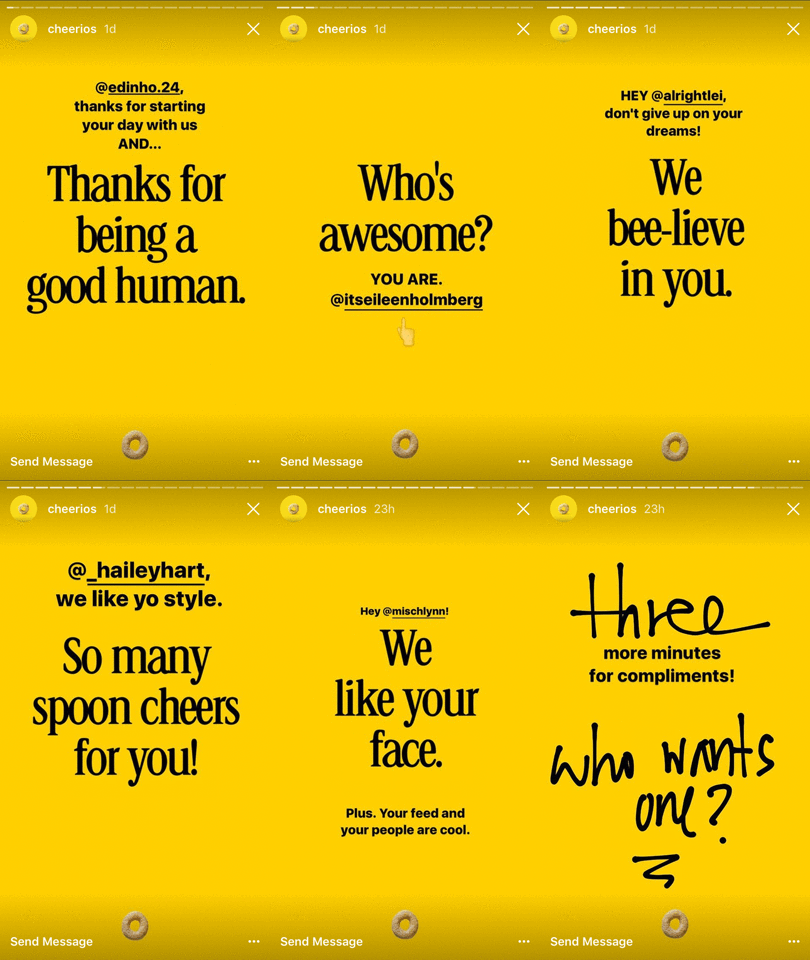
    A graphic of a stories page for Cheerios Instagram - Search Influence

    Actively Engage Followers

    Promoting your company is important, but the strongest marketing campaigns are customer-focused, not you-focused. Instagram Stories allow you to engage with your customers on a more personal level, while still reflecting your brand’s identity creatively. One great idea for customer engagement comes from Cheerios, who posted a Story that compliments their followers. When followers are tagged in a personalized compliment, they feel valued by the brand, which deepens their sense of connection with Cheerios and builds brand trust and loyalty.

    A more common approach is to leverage user-generated content—using your story to promote posts created by your followers. User-generated content is popular because it not only saves your company the time and energy of designing your own Story, but it also makes your customers feel like a valued part of your brand story, again building trust and loyalty.

    As a final engagement strategy, consider using an Instagram Story poll. Polls tend to be fun and entertaining, and most importantly they ask followers to take an action on your Story that feels far less pushy than clicking a link. They also provide the opportunity to get genuine customer feedback or opinions, which can inform your future marketing strategies. For example, you could post a poll asking followers to choose between an island cabana or a cozy ski lodge, and then use their results to determine whether your next campaign should be focused on the tropics or the mountains. Whether you opt for compliments, user-generated content, polls, or something even more creative, always keep your audience at the forefront of your mind and your engagement will likely be successful.

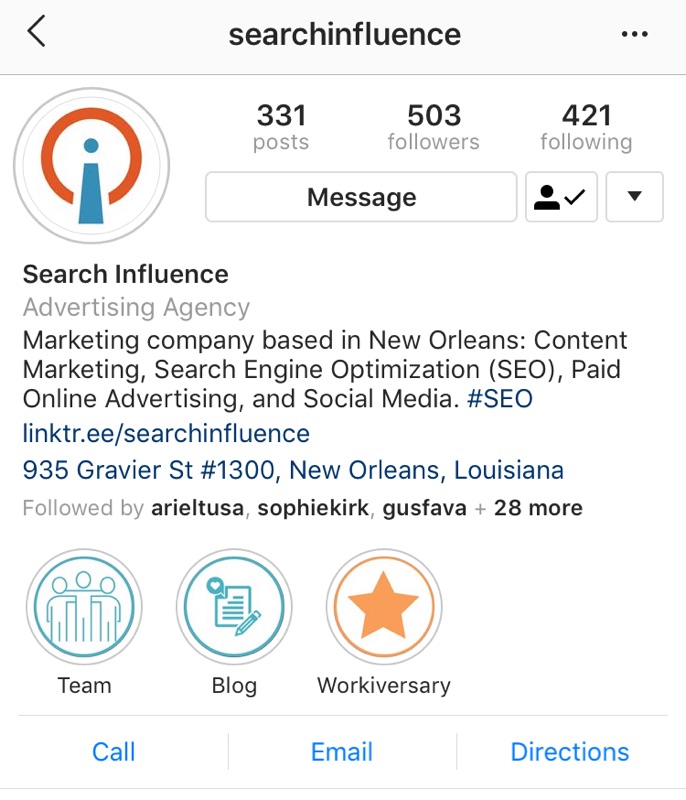
    A screenshot of Instagram highlights for Search Influence

    Customize Your Highlights

    Unlike regular Stories, which appear across the top of Instagram users’ home feeds, Stories Highlights are located on your company’s profile, between your bio and your photos. Highlights are kept for as long as you want—they will not automatically disappear after 24 hours like a regular Story. Because of this, Stories Highlights are a great way to share important brand information right on your profile, in an organized and aesthetically pleasing way. For an in-depth guide on how to customize your Stories Highlights, later.com walks you through the process of creating your own icons and covers in Canva. And, for an in-depth look at how to use Canva, our blog offers some friendly tips on what Canva can do for your business.

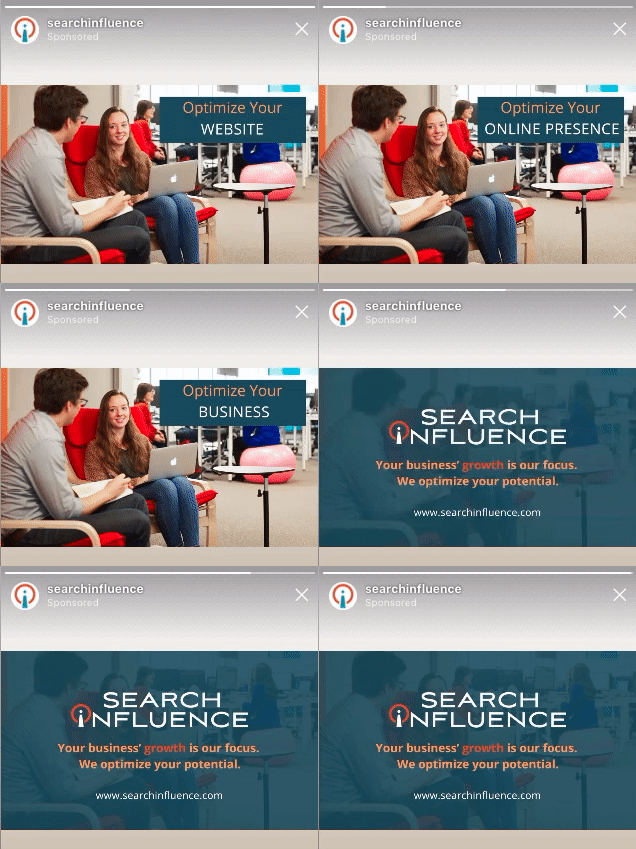
    An example of a sponsored Instagram ad from Search Influence

    Don’t Forget Advertising

    While authentically engaging with your followers is the ideal situation, sometimes it’s necessary to establish your brand or grow your network with paid advertising. On Instagram Stories, photo ads last 10 seconds, while video ads last for 15 seconds. It’s a very short window of time, but with the right approach, it can still be effective. Design your ads to catch your audience’s eyes quickly. Interest users with strong visuals, engage them with clear messaging, and then urge them into action. With this combination of tactics, you’ll have a good chance of achieving the goal of your ad campaign, whether it’s recruiting more followers, increasing sales, or gaining website traffic.

    Ask the Professionals

    If right now you feel confident and inspired to dive head first into creating exciting Instagram Stories, that’s awesome! But if you want more advice about managing your company’s social media, advertising online, or learning how to use additional Stories features like geotagging, the experts at Search Influence are here to help. Call 504-595-1623 with questions, or request a proposal online today.

    Images:

    Stories Demonstration

    Cheerios

  • What’s the Perfect Marketing Budget for Your Company?

    In our years of experience as a digital marketing agency, we’ve found that a typical marketing budget for a business is 5-10 percent of revenue, sometimes more when in growth mode. But don’t stop reading yet! Determining the exact budget for your business, and how to allocate it, depends on a wide range of factors, from goals to company age. Here are five questions that can help your business determine its ideal marketing budget.

    1. What Are Your Needs and Goals?

    Most effective marketing budgets start with a bottom-up approach. This means that your first step is to define your company’s quantifiable goals and objectives. This could be the number of new customers or accounts you’d like to see in the next year. It could also be how quickly you need to see results on your campaigns. The important thing is that the goal is well-defined. This way, you can come up with specific strategies to reach your target, and you can easily measure which strategies are working (and which ones aren’t!). Quantifying your business goals as much as possible will help you create a much stronger marketing budget and marketing campaigns.

    2. What Does Your Historical Data Look Like?

    So you need specific objectives…but how do you determine what those should be? One effective tool is historical data. For example, if you’re trying to figure out how many new leads you need per month, look at data from previous months. How many people typically contact you per month? How many of those people are qualified potential customers? How many typically convert into actual customers? And is this conversion rate providing you with enough customers to keep your company growing? Once you determine how your company has been performing, you’re in a much better position to decide if and how you’d like to change that performance. In other words, you’re in the perfect place to set measurable goals!

    For more information on how to track leads and determine the quality of those leads, visit our Analytics & Lead Tracking page!

    3. How Old Is Your Company?

    Historical data is great—if you have historical data. Brand new companies usually don’t, which can make determining a marketing budget especially challenging. Luckily, the experts are here to provide guidance! Both entrepreneur.com and websolutions.com recommend that new companies should allocate between 12 percent and 20 percent of their gross revenue to marketing costs. While this range might seem a bit high, there is logic behind it. New companies must be more aggressive with marketing spend because survival depends on building lasting brand recognition with an audience that’s never heard of them before. Once companies have established their brand and customer base, they can change their focus to maintaining the awareness and market position they’ve gained, while incrementally growing their business. And they can adjust their marketing budget to the 5-10 percent we recommended earlier.

    4. What Should Your Marketing Plan Include?

    So once you’ve established your goals and consulted your historical data if possible, what sort of marketing tactics should you use to achieve those goals? First, a typical marketing budget covers both public relations and advertising, in addition to the previously discussed branding. It’s a very wide range, but it can most easily be broken down into print and digital communication. Print communication includes traditional marketing efforts, like billboards, newsletters, brochures, and press releases—and don’t forget to budget for design, printing, and mailing costs. Digital communication, on the other hand, includes developing a website that’s both SEO friendly and user-friendly, using online advertising to your advantage, and maintaining active social media accounts. Depending on your industry, you might also want to budget for additional marketing efforts that don’t neatly fit into the print or digital category. This could include broadcast advertising, on radio or television, or special events like conferences and trade shows.

    To learn more about how digital marketing can help your company reach its goals, visit our pages about Content Marketing and Online Advertising!

    5. Where Is Your Target Demographic?

    With all those marketing options to choose from, how do you know which ones are right for your business? One key way to narrow down the list is to define your target demographic—not just who they are, but where they are. This question not only applies to the physical location but also to online behavior. What types of media does your target demographic use? Do they spend more time checking their emails or scrolling through Twitter? Whether you’re marketing in the print or digital arena, knowing the places your target demographic frequents can help you put your content in the best location to make the most efficient use of your marketing dollars. In fact, your target demographic can help you decide whether to use print or digital marketing in the first place. While traditional media can strongly contribute to brand awareness and complement your digital strategy, the right balance of print to digital marketing depends greatly on your industry and your customers. Know your target demographic, and you can feel confident you’re investing in the right media.

    At Search Influence, our goal is to help you grow your business and optimize your potential online. If you’d like professional insight into choosing the ideal marketing budget for your company, call 504-336-3422 or request a proposal online today.

    Images:

    Rihanna

  • Zoos, Aquariums, and Non-profits: Here Are Three Top Tips to Fundraise Like a Pro

    Based in a city known for its tourism and attractions, Search Influence is no stranger to digital marketing for zoos, museums, and other non-profits. We’re here today to pass on some of our knowledge to you! These three tips for fundraising through social media are sure to spark your creativity and help get donations flowing through the door.

    Two hands holding a ball of money - Search Influence

    1. Make Giving Easy

    Even the most dedicated patron can get turned off if they have to fill out confusing forms or trudge to your office in person. Streamline the donation process by taking advantage of easy online giving platforms. Some user-friendly platforms and campaigns include:

    FundRazr

    MuseoBlogger points to the Boston Museum of Science’s success with FundRazr. This app is free to download and offers patrons a number of custom giving options. For example, they can either choose to contribute anonymously or to identify themselves via their Facebook profiles. Similarly, they can choose to give either by credit, debit, or PayPal. MuseoBlogger writes that FundRazr is “intuitive, convenient, and provides both instant gratification and recognition.” Maybe that’s why Boston Museum of Science raised over $1,200 from Facebook users alone—likely all donors who were not contributing via the traditional channels.

    Text to Give

    Colleen Dilenschneider, Chief Market Engagement Officer for IMPACTS Research & Development, highlights Cameron Park Zoo’s mobile giving campaign and Rosamond Gifford Zoo’s Adopt an Animal program as two nontraditional fundraising campaigns. As part of their mobile giving campaign, the zoo encouraged guests to donate $5 or $10 through a simple text message, making it easy for patrons to show support from home or say thanks after a great day at the zoo.

    Adopt an Animal

    The Adopt an Animal program at Rosamond Gifford Zoo is available to animal-loving patrons throughout the year, but in honor of National Adoption Day, the zoo ran a two-day promotion to spread awareness of the program. To reach a wider audience, they lowered the minimum donation requirement and created a smaller, custom donation package. This promotion generated an extra $350 and gave incentive to those who may not normally donate to the program.

    It’s simple. The easier it is to give to your organization, the more likely people are to donate.

    2. Establish a Brand

    Having easy donation platforms is great—as long as people know about them! To make the most of any digital fundraising campaign, you first need a community of fans and followers. And the first step in building that community is establishing your own brand. This gives patrons a clear idea of who they’re engaging with and helps them feel a personal connection with your organization and its values. After all, no one wants to give away hard earned money to a stranger on the internet!

    Complete branding should be an in-depth endeavor. It requires cohesion between your physical location, website, and social media platforms. If you’re looking for a place to start, think about visual branding: assure your color scheme, logos, fonts, and overall visual aesthetic remain consistent across all your on- and off-line locations. Or, you could start with brand values. Post clear causes or ideals that your organization believes in, and then provide evidence of those values through success stories and patron or employee spotlights. For an at-home example of establishing brand values, check out our About Us page and see how we communicate our dedication to optimizing business’ potential and the New Orleans community. Then, pop over to our pages about Success Stories and Company Culture to see those values demonstrated in action.

    3. Get Inspired With Engagement Ideas

    With your brand established and clearly communicating exactly who patrons support when they donate to you, it’s time to engage with the community! There are tons of great ideas out there, but here are some of our personal favorites.

    First, make it very clear where donations will be going and how patrons will benefit by giving. Just like how people prefer to support trusted brands over internet strangers, patrons are more likely to donate if they know exactly what their money will achieve. Consider offering additional perks for high-dollar donors. For example, a newsletter with updates about their chosen animal or a plaque with their name by their sponsored exhibit.

    Another popular engagement idea is live-streaming certain exhibits. Offer a night-stream that shows patrons what nocturnal creatures are up to when the zoo or aquarium is closed. Keep a 24/7 feed going on monkeys or other active and entertaining animals. Or, if one of your animals is expecting, consider broadcasting her pregnancy and birth, as well as her baby’s early growth. While this isn’t as directly tied to fundraising as animal adoption programs, it will nonetheless warm viewers’ hearts and get them engaged with and excited about your organization, building the meaningful connections that could turn into donations down the road.

    Finally, appeal to photographers. Nothing gets people excited about zoos and aquariums like cute pictures of fuzzy animals, and encouraging visiting professionals to take photos means your organization gets all the exposure with a fraction of the cost and effort. Consider using your social media accounts to host fan photo contests, like the Shedd Aquarium, or repurpose the photos you already have with a caption contest. To go even further, consider hosting photographer-only after-hours events, like Aquarium of the Pacific. This offers amateurs and professionals alike the opportunity to take great pictures without the general public getting in the way. When they post their photos, it’s free advertising for your organization, and it’s a great opportunity to extend your network to include the photography communities.

    Consult the Experts

    We promised three fundraising tips, but here’s a bonus fourth! If you want to focus the majority of your time and energy on running your organization, Search Influence is here to help you with everything from content marketing to online advertising. Request your proposal online today.

    Images:
    Moneyball

    Zootopia

    Giraffe

  • 7 Tips for Eye-Catching Social Media Posts

    For years, social media has been the most cost-effective place to advertise your business, but it takes planning to stand out from the competition. In the up-to-the-minute marketplace of memes, it pays to use eye-catching colors, animated images, and consistent, compelling branding. Fortunately, once you develop a digital marketing strategy that reflects the strengths of your company, you’ll be able to create and share content with a minimal investment of time and effort.

    1. A “Social Media Strategy” is Key.

    Every month, 30 percent of millennials interact with a brand on social media platforms like Facebook. Consumers expect to find information about your business on social media, and they want to be able to reference your company’s page when bragging about their positive experience at your establishment. Pictures of meals have been some of the most popular content on Instagram, and a lot of those pictures are copied to other social media platforms. When the friends of your customers ask where they can get that ice cream fudge volcano, wouldn’t it be great if your business page was suggested as a hyperlink? Customers are already talking about your business online, but your business has to be on social media to join that conversation.

    Social media photographer holding up lens to nature scene

    2. Source High-Quality Images.

    We’ve all learned to spot them: bland stock photos show smiling employees or hands at a keyboard, but they don’t inspire trust in the business. Instead of using generic, one-size-fits-all images, consider hiring a photographer to take real photos of your business and products. Alternatively, grab your iPhone and take a few pictures yourself. DIY photos convey relatable authenticity, and they can work as short-term images on social media, but a professional photographer will take lighting and composition into account, digitally adjusting images as needed. Whenever you can afford the expense, make quality images a priority, especially for the long-term images that become profiles and header images on your social media pages.

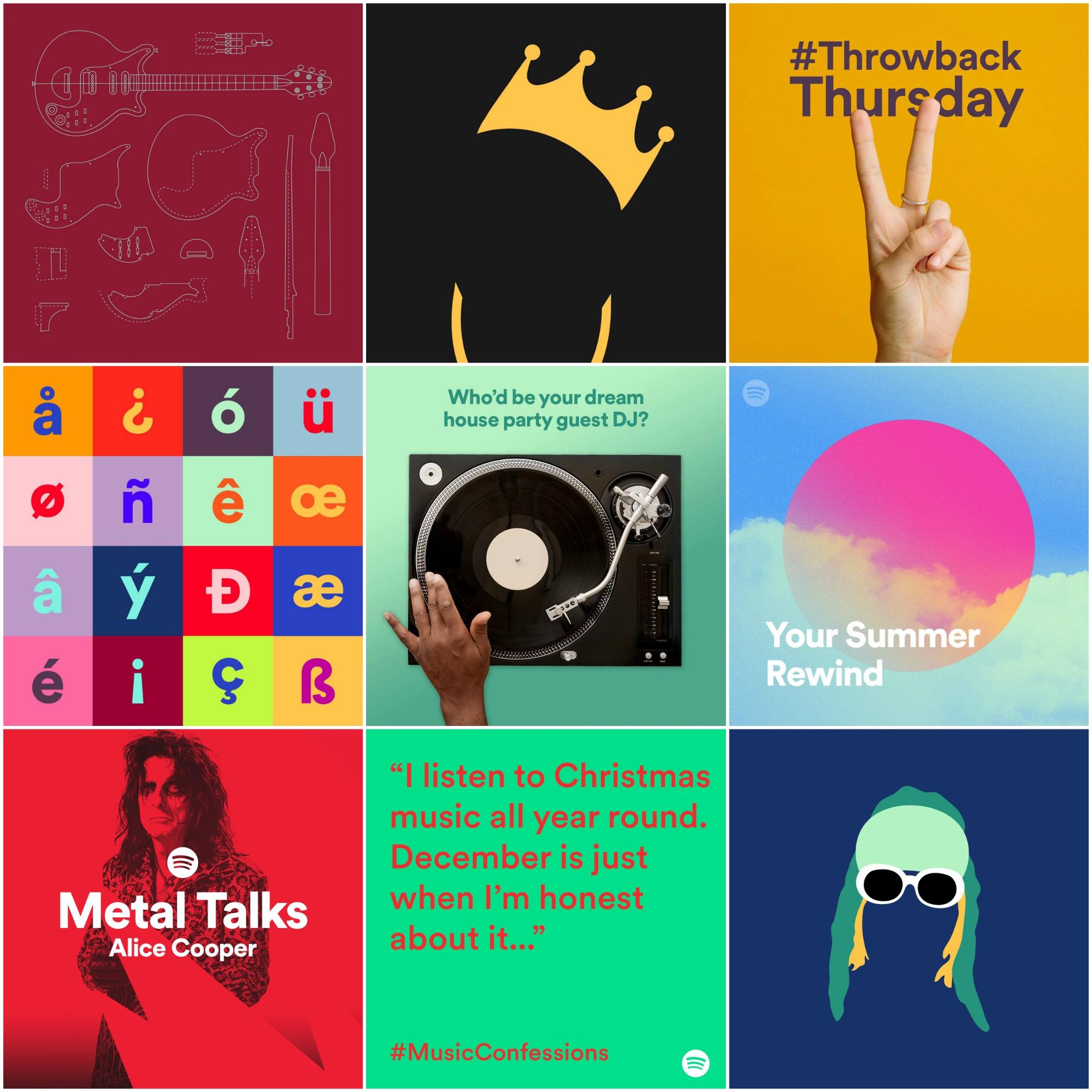
    Example of Spotify leveraging Instagram post

    3. Pay Attention to Color Schemes.

    Does your branding consistently utilize a couple of key colors? Great! But consider using slightly different (but still complementary) colors for different lines of products and services. Spotify is a great example of a brand that makes use of dynamic color schemes but still manages to keep it consistent. In the image from Venngage above, you can see how they’re easy to recognize but hard to forget.

    Colors convey a personality and warmth, and it’s worth a little time to evaluate whether to choose bright and bold colors or something more subdued and approachable. Rather than defaulting to flat reds and blues, use light and dark gradients to achieve something more unique than the local high school’s color scheme. Choose unconventional colors to make your posts more recognizable on social media. Spotify makes use of dynamic color schemes throughout all of their branding designs. This creates a stronger visual for their brand and allows visitors to instantly recognize their graphics and associate them with their company.

    Taylor Swift drinking a Diet Coke

    4. Make Your Own Custom Branded GIFs.

    A step beyond quality still images, GIFs are animated bitmap images. While its pronunciation is debatable, the acronym stands for graphics interchange format. Clips from TV shows and other videos are popular fodder for GIF images, where a gesture or a moment of action is captured and repeated in a short loop. Moving images naturally stand out in the newsfeeds of customers, and humorous GIFs inspire a lot of organic engagement. GIFs are recirculated for free online, but creating your own has distinct advantages. First, when you create your own content, it’s easier to avoid potential copyright issues. Second, when your custom GIFs are fun and compelling, those GIFs can lead people back to your website, helping you build authority online.

    Reeds blowing in the wind

    5. Leverage Cinemagraphs.

    Cinemagraphs can be made in video or GIF format, so there’s naturally some confusion and overlap. Still, GIFs tend to be loops of a video where the beginning and end are clear, not unlike an instant replay from a sporting event. Cinemagraphs, on the other hand, tend to be artistically made in a way in which it’s hard to tell when the image begins to repeat, giving the effect of a live picture or streaming video. A steaming cup of coffee, a waterfall, and a drink being poured are examples of subject matter for cinemagraphs. Naturally captivating, this type of media is harder to DIY, but it can make a crucial difference at the moment when users decide whether to stop or keep scrolling.

    Happy Father's Day custom graphic for Search Influence social media channels

    6. Keep It Consistent But Exciting!

    While experimenting with different types of media and formats, remember to keep your messaging on track. Don’t get bogged down with details, either in perfecting a single post or cramming as much information as possible. With the short attention spans on social media, clarity and brevity are essential.

    – Bullet points and clear headers are helpful with any text. If you haven’t hired a professional graphic designer, then avoid the temptation to use artistic (but hard to read) fonts.

    – Big, clear lettering is safest, especially when your target audience includes older demographics.

    – Numbers, percentages, and impressive statistics can help catch the reader’s eye.

    – Don’t be afraid to try different techniques and learn what works best for your audience, but stay close to home base while you develop your image as a reliable, professional authority.

    Alternatively, a broader presence in the community can make your business a topic of conversation, but that type of campaign can have a more gradual impact on walk-in clients and leads.

    Search Influence employees posing on Canal Street for social media channels

    7. Always Keep Your Marketing Goals in Mind

    Especially when you’re first getting started, it’s a good idea to check out the social media presence of others in the same industry. You may find businesses in the same industry that have a different service area, and therefore they aren’t direct competition. Take a look at how different types of posts inspire different amounts of engagement, and you may find ideas for developing content of your own. As with any type of marketing, it’s also important to clearly define your goals at the outset. Is your objective to build a following and make your brand more recognizable in the community? Or are you mainly looking to generate leads for potential clients? Depending on your industry, dominating local search may be the most effective way to get clients to call your company.

    If you don’t have the time to juggle business operations with digital marketing, then you can always outsource your social media management to professionals. The experienced team at Search Influence can provide a digital marketing and SEO consultation, identifying opportunities to strengthen your online presence. Follow our blog for the latest tips on GIFs and marketing trends.

    Images:

    Camera lens

    Spotify covers

    Taylor Swift

    Cinemagraph