Blog

  • How Clever Copywriting Can Improve Your SEO

    In the digital world, your marketing team can’t afford to lose track of SEO best practices. Google is smarter, attention spans are shorter, and the competition is fierce. To drive more traffic to your website, avoid copy that falls flat. In an online world full of skimmers and scanners, the best way to grab attention is by committing to an SEO copywriting strategy that’ll make you a VIP on the search engine results page. To do so, you’ll need to learn what sets quality SEO writing apart from copy that serves other promotional purposes.

    Specialized Copywriting Techniques

    Although colorful descriptions and flowery language can land you on The New York Times Best Sellers list, it’s unlikely that they’ll help you earn repeat customers. SEO copywriting serves to support sales and marketing goals, and the strategies used to do so make this writing technique a key player in marketing efforts. You want to effectively target prospects, drive them to your website, and earn plenty of conversions—in a perfect world, this would be a seamless process. Unfortunately, this isn’t the case for every buyer’s journey. If you’re keen on ramping up conversions in a world of digital hopscotch, the recipe for successful SEO copy includes these crucial ingredients:

    • Keywords and keyphrases
    • Clear calls to action (CTAs)
    • A skimmable format: H2s, we’re lookin’ at you!
    • Strong internal links

    Person scrolling on a glittery pink mouse

    SEO Copywriting in Action

    Now that you have the recipe, it’s time to get cooking.

    Keywords and Keyphrases

    So, what makes keywords “key” words? You want to identify words and phrases that are being used in search queries. For instance, if you’re a clothing retailer trying to promote and sell a product that you’ve listed on your website as a “winter long-sleeved top,” you’re likely to have better luck optimizing your content by using a more relevant search term or keyphrase: “checkered wool sweater.” If you’re still drawing blanks, there are tools on your side to boost your confidence in the keywords you choose. SEMrush allows you to research keywords and phrases and analyze various metrics, including search volume, competitive density, cost per click (the average price in USD that advertisers pay for keywords that trigger their ads), and much more! Be careful not to overdo it though, because stuffing too many keywords in your copy can run your readers away (and can bore Google, too.)

    CTAs

    Delicious copy is useless if you leave your leads hanging. You’ve got cute sweaters, so what? You have to direct your site’s visitors to the next step after they’ve read your blog post, browsed your service pages, or scrolled through your list of products. When it comes to calls to action that convert, let’s be clear about this: you need to provide easy-to-follow next steps. After reading your content, do you want users to sign up for a mailing list or purchase a ticket to an event? Nothing’s clunkier than “To learn more, contact us by filling out our form or calling 555-555 and register for our webinar!” Nail down one specific purpose for each piece of content and identify the clear next step for the site visitor. The last thing you want to do is conclude your beautifully written piece of content with a jumble of desperate pleas followed by a mess of tracking to sort through.

    H2s

    You have a very short time window to attract and delight your website’s visitors—in fact, you only have about 15 seconds. To beat the buzzer, you’ll have to ensure that the user can easily get the gist of your copy before deciding to read further. Wondering how to make the magic happen? Relevant, clever H2s. People are naturally drawn to lists and numbers, and you need to work these into your business’s SEO formula so that your content is not only pleasant to Google’s bots, but human readers as well.

    Internal Links

    Think about how you search for products or services online. If you click on something that isn’t helpful…adios! You wouldn’t waste your time digging deeper into a website that doesn’t seem relevant to your search from the start. Keep this in mind when you link to other pages within your copy. When writing user-facing anchor text, you should always make sure that it reads as a “sneak peek” of the landing page it leads to.

    Cat wearing glasses inspecting something on their laptop

    A Breakdown of the Do’s and Don’ts

    Do:

    • Sprinkle relevant keywords throughout the copy
    • Provide a clear call to action
    • Break up your copy with H2s
    • Include internal links

    Don’t:

    • Clutter your content with filler and fluffy language
    • Overwhelm the reader with never-ending, chunky paragraphs
    • Include links that aren’t related to the on-page content

    Ready to start writing? Great copy is just a piece of the puzzle when it comes to effective SEO strategies, and Search Influence knows how to bring it all together. We help businesses grow online by developing tailored SEO and digital marketing gameplans for each of our clients. Tell us what your business needs and let’s make it happen today.

    Images

    Mac

    Mouse

    Cat


  • Find the Best KPIs for Your Campaign in the Alphabet Soup of Google Ads Metrics

    Google Ads offers marketers an abundance of data, with countless metrics to track for every campaign. Some might consider this to be a gold mine of information, but it can be pretty overwhelming.

    Steve Urkel looking around confused gif

    How do you decide which metrics are the most important to track in your Google Ads campaign?

    Determine the Goals of Your Campaign

    There is no one-size-fits-all formula for optimizing and tracking the success of digital advertising campaigns. The most important step in determining the right metrics is to define what you want to achieve with a particular campaign. Depending on what you consider to be a successful campaign, some of the data will be relevant while other KPIs won’t be very helpful.

    No two ad campaigns are identical, but many fall under one of these broadly defined goals:

    • Driving traffic to your website
    • Increasing sales and conversions
    • Building brand awareness
    • Increasing your return on investment

    Goal 1: Drive Traffic to Your Website

    If the end result you are looking for is more website visitors, then the best course of action is focusing on metrics that involve clicks and keyword performance.

    Click-Through Rate (CTR)

    While you may be thinking clicks are king when indicating website traffic, your click-through rate is a better indicator of the performance of the campaign. CTR shows you the ratio of people who have clicked on your ad to the total number of people who have seen your ad (impressions). As DashThis’s Mark Christensen writes, this is an important KPI to track since it can show if your ads appeal to your targeted audience.

    A higher CTR can indicate better campaign performance and more site traffic. However, you want to keep in mind that if your ad copy weeds out unqualified clicks you might see a lower CTR. But don’t panic! Although the CTR may drop slightly, higher quality clicks result in more time spent on a landing page or website and can lead to another action taken by that user.

    Quality Score (QS)

    Improving your Quality Score is a great way to manage not only your keywords but also overall campaign performance. This KPI is a rating that ranges between 1-10; it measures the quality and relevance of your keywords and ads. Quality Score is one of various vital metrics and can affect where your ad ranks, as well as when or if it shows at all. Higher quality scores point to keywords and ads that are more compelling to your audience, increasing the number of clicks.

    Cost Per Click (CPC) is also determined by QS; higher QS leads to lower CPC. The goal should always be a low CPC since this allows for more clicks within your budget.

    Vince Vaughn The Internship gif

    Goal 2: Increase Sales and Conversions

    In a Google Ads campaign, a conversion could be one of several actions like a purchase, newsletter signup, app download, or a phone call. To measure the success of a campaign with a conversion goal, it’s crucial to first correctly set up conversion and lead tracking.

    Now you’ll be able to properly track the Cost Per Conversion and Conversion Rate.

    Cost Per Conversion/Acquisition (CPC/CPA)

    Cost per conversion measures the amount you spend per completed conversion or another desired action taken by a user. It’s the total cost of generating traffic (ad spend) divided by the total number of conversions. This is the best metric for understanding the financial effectiveness of your campaign, especially when the conversion goal does not lead to direct or immediate revenue.

    Conversion Rate

    This ratio compares the number of clicks and conversions. It’s the rate at which users take the desired campaign action after they click the ad. Conversion rate can provide major insightsx for optimizing your campaign. It should tell you which keywords, ad copy, and landing pages are performing best for your campaign goal.

    For a new campaign, don’t immediately jump the gun on a low conversion rate; give your ads time to acquire impressions and adjust keywords or bids as needed.

    Both conversion rate & CPA can be good indications of how to reallocate your budget to get the most bang for your buck. If you put more of your budget toward campaigns with higher conversion rates and lower CPAs, you should see a better return on your investment.

    Goal 3: Build Brand Awareness

    Whether you are marketing a product, service, or even a cause, the goal of brand awareness is to increase visibility and reach a larger audience. Impressions should be the focus here.

    Impression Share

    Impression share is calculated by dividing the total number of impressions you got by the number of opportunities that your ad could have shown. Working to lower your CPC, CPA, and increase your QS can go a long way to benefit your campaign’s Impression share.

    While the impression share is helpful, what might be even more helpful to know is why an ad isn’t showing to your audience. Lost impression share metrics can help you find that answer.

    Lost Impression Share

    This KPI is the percentage of time that your ad does not show because of budget restrictions or ad ranking. As Adam Proehl of Search Engine Journal writes, “The closer the number is to the difference between 100 and the “search impression share”, the more likely you are to find additional conversions simply by boosting the budget.”

    Sometimes your resources may just be too limited to increase spend. Instead, optimize your campaigns to drive traffic to the most valuable conversions.

    Goal 4: Increase Return on Investment

    Return on Investment (ROI) is the ratio of benefits to costs. In Google Ads, Return on Ad Spend (ROAS) is the return you generate for every $1 spent on ads. For example, a total ad spend of $600 with revenue from ads of $4200 would equal a ROAS of 7.

    ROI/ROAS is considered one of the most important metrics for advertisers because it’s based on your specific advertising goals and shows the financial impact of your advertising efforts. These ROI metrics are the ones you’ll want to highlight for the boss (or client) when the campaign performs well.

    Dwight Schrute 'We did an awesome job' meme

    If navigating Google Ads to scrounge up relevant KPIs makes your head spin, there’s no need to hit a wall. Search Influence can help you understand and track the metrics that matter so you can reach your digital advertising goals.

    Images:

    Steve Urkel

    Dwight Schrute

  • Search Influence Hosts Careers Open House December 10 and January 14

    Potential candidates are invited to meet the team, learn about open positions and company benefits.

    Search Influence Careers Open House Recruiting EventWe invite interested applicants to the office for an evening of networking, followed by presentations about the company, various departments, open positions, and company benefits.

    We are hiring for six open positions across four departments and experience levels, including director, mid, and entry-level. Open positions include:
    – Director of Operations
    – Account Manager
    – Account Coordinator
    – Product & Marketing Manager
    – Sales Executive

    Job postings can be found in our careers section.

    “We know that finding the right fit at work is key to professional growth,” says Angie Scott, COO & Co-Founder. “We are opening our doors to potential applicants and community members in hope of making it easier to find the right fit for both the company and employees. We know applying for a job is as much about interviewing our team as it is about us learning more about the candidate. We want to make sure candidates get to experience our genuine and collaborative environment of which we are so proud.”

    “We have been lucky to see growth in both new and existing clients over the last year. We are also lucky our clients drive us to grow and improve. Our success is defined by their success. We are looking for CHARGED individuals who are committed to both customer success and their own professional growth,” says Will Scott, CEO and Co-Founder.

    Attendees will get a preview of the new Search Influence offices which offer unique and personalized spaces to deliver the needs of each department. Search Influence offices provide the space in which the team excels. “This new office space allows us to create an environment that fosters creativity and sets us up for success,” added Scott.

    Careers Open House

    Tuesday, December 10, 2019 and Tuesday, January 14, 2020
    5:30 – 7:00 p.m.

    Schedule of events:
    5:30: Arrival and networking
    6:00: Brief presentations about Search Influence, values, benefits, and open positions, including the responsibilities of each department.

    1610 Oretha Castle Haley Blvd., New Orleans, LA 70113
    (504) 208-3900.

    Advance registration is recommended via EventBrite

    For any questions about the event, email [email protected].

    Hope to see you there!

  • Free Search Tools to Find the Best Deals for Black Friday and Cyber Monday

    Free Search Tools to Find the Best Deals for Black Friday and Cyber Monday

    Ariel Tusa, Account Supervisor at Search Influence, kicked off the holiday shopping season by sharing online shopping tips with WVUE. Make the most out of your Black Friday and Cyber Monday with these money-saving tools:

    Person shopping using mobile device during Black Friday

    SlickDeals: Find the best in-store or online prices for items on your list. Users can up-vote or down-vote items other people share on the site, so the best deal will be at the top! Push notifications even alert you about fast-selling items that are on sale.

    Honey: No more avid coupon-searching—this free Chrome Extension automatically finds and applies available promo codes when you shop online. On some websites, Honey even alerts you if there is a better deal out there. Get rewarded with cash back when you shop with the extension turned on.

    Camelizer: Download this extension for Mozilla Firefox or Google Chrome to track product price history on Amazon and other popular retailer sites to compare and find the best online deals.

    Rakuten: Shop your favorite brands and stores on this retail site with automatic promo codes applied to items, plus cash back. Getting paid to shop? Yes, please.

    And our favorite part about these tools? They’re all FREE! Search Influence not only wants to optimize your holiday shopping experience, we want to optimize your customers’ online experience. Our online advertising services can help your business get found by potential customers looking for the products and services you provide. Let’s start a conversation today.

    Images

    Shopper

  • Disavowing a Backlink: When Is It Okay to Say Bye Bye Bye to a Backlink?

    If the internet was high school, websites would be the students and Google would be a top of the line, elite institution. Think of Google’s search engine algorithm as their admission’s department because it decides which students (websites) are worthy of being apart of their academy (The Top Search Results).

    Keeping with this analogy, one of the ways The Top Search Results’ admissions department decides which students to let in is letters of recommendation, aka backlinks. Letters of recommendation from prominent, trust-worthy people put a nice polish on any application, right? On that same note, letters from sketchy people or from yourself can have a negative effect. No letters at all… Well, you get the point.

    Thinking of backlinks as letters of recommendation is an excellent way to simplify a multifaceted part of SEO because that’s how search engines treat them when deciding which websites are most authoritative. Backlinks from reputable, popular sites (e.g. CNN.com, Forbes.com, Rollingstone.com) can do wonders for your domain authority and keyword rankings.

    A backlink from a spammy site can have the opposite effect.

    Although you can’t control who/what links to your site, you can disavow an unwanted link. Disavowing a link lets Google and other search engines know that even though a site is linking to yours, you have no association with it.

    Disclaiming a backlink can do wonders for your SEO because it pulls out associations that could be hurting your rankings, and it makes backlinks from authoritative sites stand out even more. If you let link-building-professional Liam Cook tell it, “Link disavowing is almost as important as link-building for SEO.”

    The trick (because there’s always a trick) comes in deciding which backlinks are harmful enough to your domain authority that they need to be disavowed. To help you out, here are a few good reasons to think about disavowing a backlink.

    Gif from the film The Hangover

    1. The link is coming from a spammy site

    If you find that a link to your site has ended up on a spammy site, it is probably best to disavow the link right away. How can you tell that a site is spammy? According to Hamish Fitzhenry, three telltale signs are:

    • Having tons of links on one page
    • Taking a really long time to load
    • Having an abnormal amount of pages and links that 404

    Cameron Conaway, one of Klipfolio’s senior marketing managers, says that a red flag for him is if the anchor isn’t in English.

    However, if it is too hard to tell just by looking at a site, you can always check its Spam Score. As defined by Moz.com, a Spam Score is the portion of a site with attributes that are typically “penalized or banned by Google.” It is believed that a backlink from a site with a Spam Score that’s higher than 7 can raise the Spam Score of the receiving site.

    2. The Link Isn’t Relevant to Your Industry

    Let’s return to the analogy we started with.

    Imagine that your application to The Top Search Results is impeccable. And then… admissions goes to read your letters of recommendation. You have two superb letters from Barbara, who runs a flower shop in your hometown, and your cousin Joey, who you babysat one summer. But none from academic relationships like past teachers or principals.

    The two letters you have may be great, but they won’t be that helpful because they’re completely unrelated. The same thinking can be applied to a site’s backlink profile. If a website for used cars has a backlink from Foodnetwork.com, that could be a red flag that something isn’t right, so it’s worth checking out. Evaluate whether or not the backlink is organic and makes sense. It’s worthy to note, though, that an unrelated backlink probably won’t be from a recognizable website like Foodnetwork.com; it’ll likely be a domain that you’ve never heard of before.

    (On a similar note, you should also think about disavowing backlinks from sites that are linking to URLs that you’ve removed from your site.)

    3. The Link Isn’t Organic

    Google values authenticity. It likes to keep it real (in this case). If a link wasn’t honestly earned, you may want to think about disavowing it.

    Show us the real you gif

    If a large percentage of your backlink profile is comprised of inorganic links, tread carefully. You’d do well to remember these words by Justin Metros: “The long term gain for positive SEO isn’t the number of backlinks you have but the quality of backlinks. Get rid of anything questionable.”

    How Do You Keep a Handle on Your Backlink Profile?

    Once you clean up your backlink profile, implementing a plan that will keep it squeaky clean will save you time in the future. You can use one of these backlink monitoring tools.

    Majestic Bulk Backlink Checker

    Majestic.com’s Bulk Backlink Checker is a subscriber-only service that lets users check 400 to one million URLs (depending on how you upload them). The program offers metrics like “Trust flow,” “Citation Flow,” and the number of NoFollow links on a site.

    Ahrefs

    Ahrefs’ Backlink Checker “has the second most active web crawler after Google.” This platform offers URL metrics like the total number of backlinks, “Domain Rating” and “URL Rating.” It also offers a Backlinks report, which shows users every single site that links to theirs.

    SE Ranking

    SE Ranking uses Google Webmaster Tools data to show users their backlinks. You can use it to monitor your backlink profile and disavow links using a file the site will generate for you. This service comes with a small monthly fee, but the tool also allows you to track your site’s keyword rankings, do a website audit, and generate keywords.

    Deciding which backlinks to disavow is no easy feat. So, here’s one last piece of advice from Mike Kawula, the CEO of Social Quant who also was named as one of the Top 100 Marketing Influencers in 2017: “My biggest piece of advice on deciding whether to disavow a link pointing to your site is to be sure SEO is your area of expertise. If it isn’t, either hire someone to handle it for you or bring on a contractor who specializes in this area.”

    Luckily, Search Influence has a team of SEO experts who can help you develop a comprehensive backlink strategy. To learn more about our SEO services, call (504) 208-3900 or schedule a consultation.

    Images

    The Hangover

    The real you

    Workers

  • Three Lessons From the Fried Chicken Frenzy: Popeyes’ Brilliant Marketing Moment

    Three Lessons From the Fried Chicken Frenzy: Popeyes’ Brilliant Marketing Moment

    The drive-thru line on Sunday, Nov. 3 at a Popeyes Louisiana Kitchen in Metairie blocked traffic and almost caused an accident in the traffic lanes as I drove by. The highly anticipated fried chicken sandwich that had sold out just two weeks after its original release was back on the menu. Meanwhile, tumbleweeds blew through the local Chick-Fil-A parking lot because… they’re closed on Sundays.

    The Chicken Sandwich War: How It All Started

    With the launch of Popeyes’ first-ever chicken sandwich in August 2019 and the Popeyes marketing team’s quick reply to a tweet by their rival Chick-Fil-A, The Great Chicken Sandwich War began. In case you were wondering, Twitter is most definitely still relevant in today’s marketplace and can have a direct impact on consumer behavior when used well. And, people are still petty.

    Chick-Fil-A, while not without its own political controversy, remains one of the most popular fast-food chains in the nation and is known for its chicken sandwiches: bun, pickles, chicken. In the midst of Popeyes new product release on August 19, Chick-Fil-A touted their sandwich as “the original” on Twitter, seemingly throwing shade at Popeyes’ chicken sandwich:

    In a matter of 15 minutes, the marketing team at Popeyes decided to reply quite simply with “…y’all good?” and Twitter went bananas. Chick-Fil-A’s original tweet had ~3,000 retweets while Popeyes’ response earned ~86,000.

    From there, the Internet did its thing. Memes, gifs, homemade videos, and taste tests that compared the two chains’ sandwiches flooded social media feeds while the lines at Popeyes grew. Within two weeks, the 3,102 location restaurant chain ran out of its seven-week supply of chicken sandwiches.

    Positioning: A Limited Time Offer or Just the Best Dang Chicken Sandwich?

    Popeyes couldn’t have planned a better product release, and they really have social media to thank for its wild success. When they first announced the product (during Wendy’s campaign announcing the return of spicy nuggets), they made no mention of it being a limited time offer (LTO), which has become a frequently used tactic in the fast food industry. LTOs include things like Taco Bell’s nacho fries and the McRib at McDonald’s. Typically LTOs are launched with creative or gimmicky advertising messages making it known that the product is not a permanent menu item, creating a sense of urgency for the consumer to get it while it lasts.

    Popeyes didn’t take that stance. Instead, they added the sandwich to the menu specifically positioning it to compete for Chick-Fil-A’s top spot in the chicken sandwich standings. And they used their advertising to challenge their competitor rather than pressure the consumer.

    And well, people love a good competition. As the social media buzz grew, it caught the attention of news outlets, who are always looking for content the general public is interested in engaging with. And so began their coverage about Popeyes running out of product, celebrities joining in on the fun, and partaking in taste tests. This is when Popeyes experienced a huge jump in earned media value, according to Apex Marketing Group, who placed a $65 million media valuation on the national coverage Popeyes earned before, during, and immediately after the time the sandwich stock sold out.

    UGC: The Power of User Generated Content

    It’s the digital marketer’s dream: an idea, product, or creative approach that goes viral and sets the world on fire, creating more demand for the product than there is inventory. In today’s world of completely saturated and constantly flowing feeds, achieving that level of buzz can seem impossible. The key, as this case study shows, is to consider the opportunity for consumers to actively participate. Everyone’s a content producer (or “influencer” in their own right), so give the people something to talk about.

    The perfect recipe in Popeyes’ case was starting slow and kicking it up a notch by engaging in some banter with Chick-Fil-A. This ignited a fire of user-generated-content which is inherently more viral than any single advertising or marketing message published by a brand. Wendy’s has been engaging in similar hilarity on Twitter for quite some time with its competitors and customers, but given Chick-Fil-A’s political notoriety, this was just the right chicken fight to pick.

    Although the wave of UGC wasn’t even intentional on Popeyes’ part, their team did a great job of highlighting customers and showing social proof when announcing that the sandwich was returning (see: the first tweet embedded in this post).

    3 Key Lessons Learned From Popeyes Brilliant Marketing Moment

    • Twitter is still relevant and people are still petty. They love a good competition and will jump at the chance to back a brand they feel loyal to. This nationwide game of chicken sandwich thrones began because of two tweets between rival fast food chains.
    • Smart competitive positioning can make or break a new product launch. When launching its first ever chicken sandwich, Popeyes did NOT focus on gimmicky advertising pushing that the product was only available for a limited time, which is a common tactic in fast food marketing. Instead, they positioned it for what it was, a challenge to direct competitor Chick-Fil-A, and it paid off in droves.
    • To truly ignite a viral fire digitally, marketers must give customers the opportunity to actively participate and then leverage the power of user-generated content.
  • How to Optimize Existing Content for Your Holiday Marketing Campaign

    All of a sudden you realize that the holidays are here and you’re not ready. You have your holiday merchandise in stock, but you haven’t promoted it or even thought about updating your site to include it. It kind of feels like it’s Christmas Eve and you still haven’t gotten that gift on your kid’s wishlist. Are you too late? Will any store still have it in stock? Well, if you have outdated holiday content on your site already, you just might be in luck.

    Animated photo of a person on a laptop computer

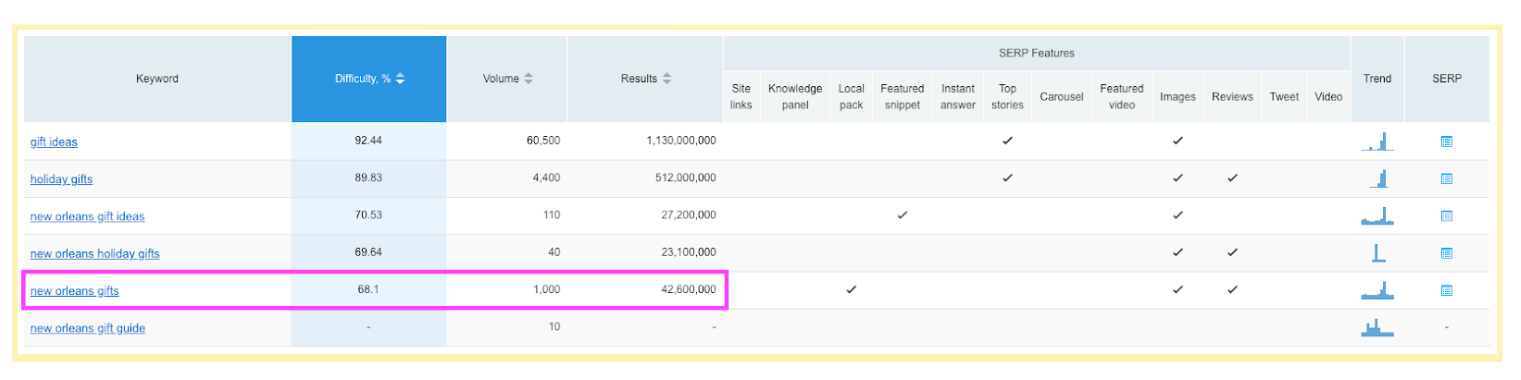
    Let’s take a look at a local t-shirt shop here in New Orleans, Dirty Coast, as an example. Dirty Coast offers a wide variety of beautiful t-shirts (and other swag) with clever, locally inspired designs. They’re one of my go-to places for that perfect gift for family members. While I may have a go-to place for New Orleans gifts, there are still about 1,000 people searching for “new orleans gifts” every month, according to a report pulled from SEMRush. Let’s take a look at how Dirty Coast can optimize their preexisting content for this year’s holiday marketing campaign.

    Make Your H1 Relevant and Competitive

    As you may or may not know, H1s are very important for SEO. You want to, ideally, have one relevant H1 on each page of your site. Dirty Coast’s 2018 Gift Guide page shows up as the 7th organic result for “New Orleans gifts”. Fleurty Girl, a local competitor of theirs, is showing up in the #1 spot, so let’s take a look at what they might be doing differently. For starters, the H1 on Fleurty Girl’s page is a little more relevant to the topic. While Dirty Coast has “THE 2018 GIFT GUIDE. GIFTS FROM NEW ORLEANS” for their H1, Fleurty Girl’s H1 is “The Best New Orleans Gifts: Your Ultimate Gift Guide From Fleurty Girl.” The topic “gift guide” actually doesn’t get much volume, so it would be a good idea to adjust the H1 to be more relevant to a topic with a higher search volume like “new orleans gifts.”

    Screenshot of an SEMrush report

    Structure Your Content

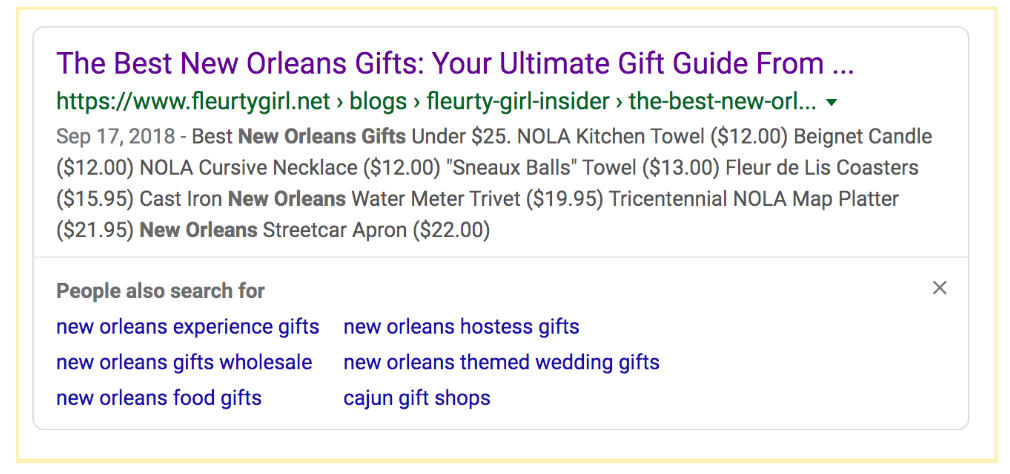
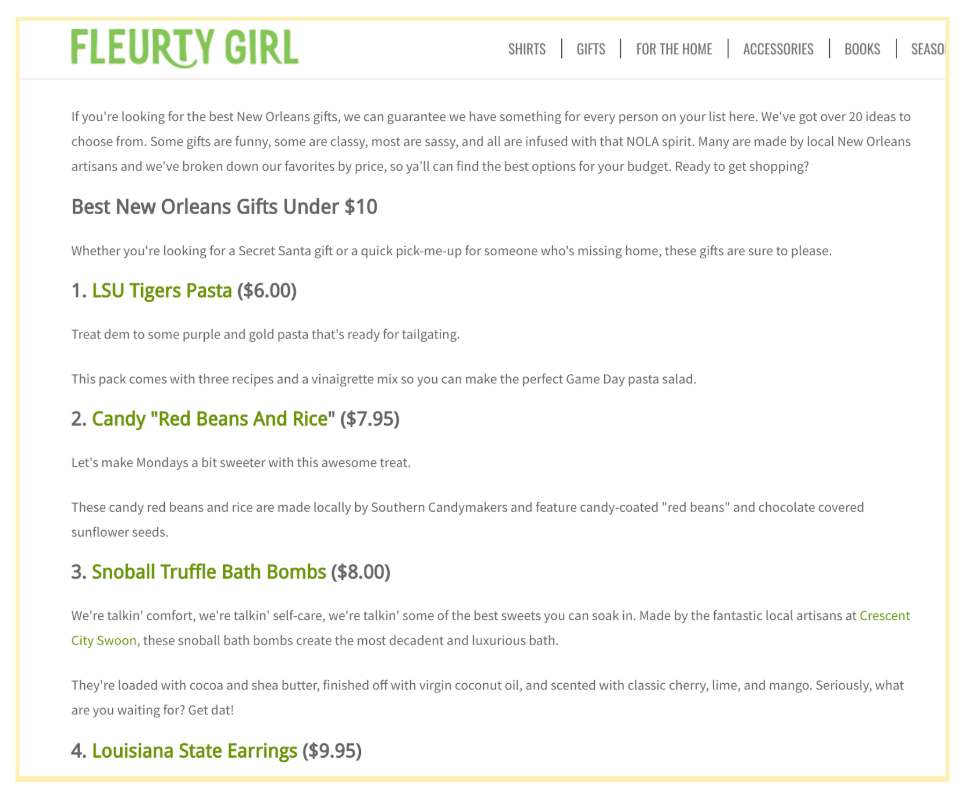
    Google loves lists. And on top of that, people like them too! As Matthew Bains discusses in this blog about Writing Tips to Create Web Content That Converts, skimming content is the new normal and bulleted lists help. Taking a look at our example, Fleurty Girl’s page has a numbered list wrapped in H2s and H3s, as well as being organized by different price points. You can see that Google is pulling this list into the description for this page.

    Screenshot of a Google search result

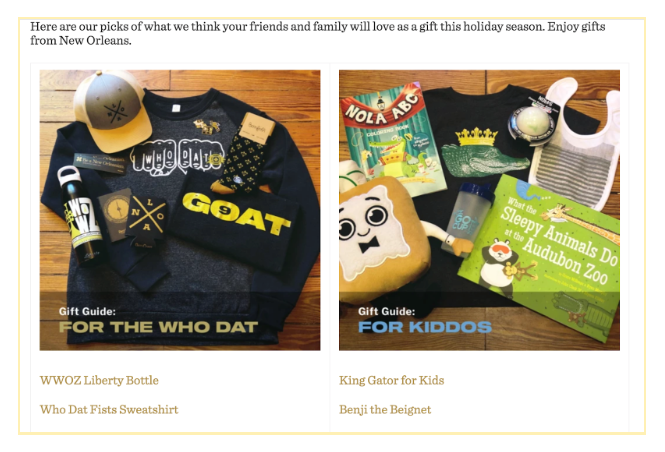
    While the images for each section on Dirty Coast’s site are nice to look at, Google can’t read the headers within these images. So it would actually be better to have the section headers as text wrapped in H2s on the page instead.

    Screenshot of dirty coast website showing recommended holiday gifts for customers' friends and family

    Make Your Content Relevant

    With so little content on the Dirty Coast page, there’s not much opportunity for Google to recognize the content’s relevance to the searched term. Product descriptions can help with that. In looking at the descriptions on the Fleurty Girl blog, there were a total of 11 natural opportunities for them to bring the topic of “new orleans gifts” back up within the content on the page, which ultimately helps Google further associate that page with the search terms. Additionally, it would be nice if users were able to read more about these products, including their prices, without having to click through to the individual product pages.

    Screenshot of Fleurty Girl's website showing best New Orleans gifts under $10

    Add and Optimize Images

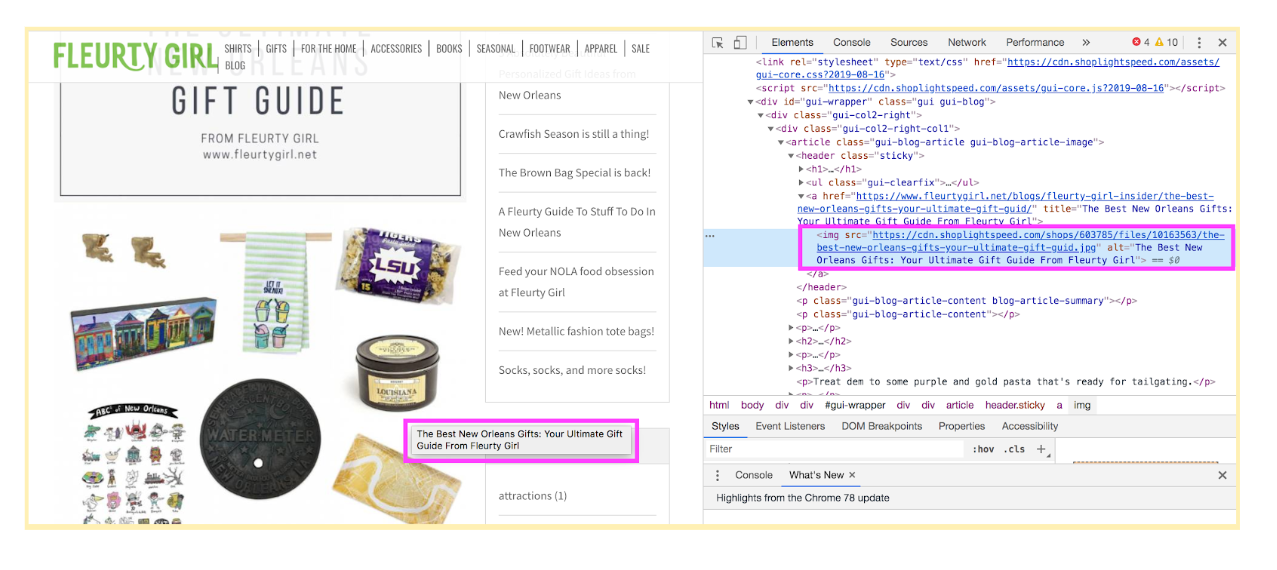
    If you don’t already have images, you should. Luckily, Dirty Coast has some, although they may want to update them along with their product lists to only include products that they’re offering this year. In addition to updating them, they’ll want to optimize their images and make sure they have title tags and descriptive alt text. (Side note: you can read more about how to optimize your images in this blog by Shane Kretzmann). Google reads the alt text and title tags to better understand which images to display in image searches. And remember, image searches can also be a great source of traffic to your site!

    Screenshot of Fleurty Girl's online gift guide and the corresponding code

    Always Include a Call to Action

    If you have an e-commerce site, you should be linking to your product pages so that users can easily make purchases. And if that’s still not enough to convert a potential customer, that additional call to action at the bottom of the page telling them to come on in and check out these holiday gifts in person is a nice, soft CTA to tie it all together.

    Need Help?

    As with most things, recommendations may vary on a case by case basis. And these are just some of the things to think about when optimizing your content. Search Influence specializes in optimizing content for a variety of marketing needs. Whether you’re preparing for the holiday season or if you’re just looking to achieve better organic results from the content that’s already on your site, we can help! Contact us today.

  • How Does Having an SSL Certificate Impact Your Site’s SEO?

    Site security and user privacy have been a hot topic in the technological community lately. With big names like Google pushing for tighter security, it leaves website owners wondering what they need to do to ensure that their site is compliant with the best practices that will ultimately lead to them being favored in search results. One of the security measures that’s being pushed is ensuring that a site is secure. But what is a secure site and why does it matter? Here’s what you need to know about SSL Certificates and the role they play in your site’s SEO.

    Graphic of lock laid over an map of the world

    What Is an SSL Certificate and How Do I Get One?

    A Secure Sockets Layer Certificate is a means of creating an encrypted connection between a web browser and server. By using an SSL Certificate, an encrypted key protects sensitive information that is submitted by site visitors. If you’ve really got internet security on your mind, you can dig deeper by taking a more technical look at SSL Certificates.

    There are paid and free versions of SSL certificates, and others may be included through your hosting service. Depending on your CMS and hosting provider, there are various ways to get your virtual hands on a certificate. For example, installing a WordPress plugin or rerouting your site through CloudFlare may be an easy and convenient option. If neither of these are possible or ideal, you can usually purchase one through your hosting provider or buy one somewhere else and install it manually.

    Once you have it installed, it’s equally important to ensure that you keep your certificate up to date by auto-renewing it or making sure to renew it before the expiration date.

    What Does an SSL Certificate Mean for Your Site and Its Visitors?

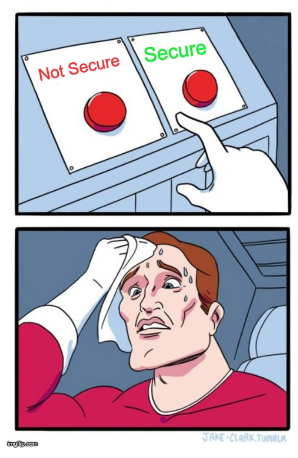
    Which site would you rather make a purchase on: One with a red “Not Secure” warning clearly visible, or one boasting a green padlock ensuring that all of your information stays secure?

    Super hero sweating whether to pick secure or non secure options

    It’s a no-brainer. Secure sites are more appealing to visitors because they are provided the comfort of knowing that any of their information that is passed onto the server will be encrypted. Enhancing user experience should be a top priority for your website. A site with a “Not Secure” warning may even scare off some visitors from completing any transactions or creating an account on your site. Installing an SSL certificate and having a fully secure site means that your site and its visitors can have peace of mind.

    Do You Have to Have an SSL Certificate?

    Technically, no—at least not yet. However, browsers are now making their users more and more aware of which sites are secure and which ones are not. For example, Google’s push for secure sites includes making the “Not Secure” warning more prominent on web pages, as well as favoring secure sites in search results. Some sites that aren’t secure even direct the user to a full warning page warning them not to continue before they can click through to the site. This definitely won’t help a site’s bounce rate.

    Additionally, if your site’s connection isn’t secure, it leaves your users’ information vulnerable to people looking to get their grubby hands on it. Personally, I wouldn’t want to be the person sending the email to users letting them know their information has been compromised should the worst happen. Why not make your site secure and provide your users with the assurance they need before willingly giving you their information? Overall, having a secure site greatly enhances user experience, confidence, and the overall trust of your brand. If that wasn’t enough, whether or not you have an SSL Certificate can impact your SEO and search engine rankings.

    What Does SSL Have to Do With SEO?

    Having an SSL Certificate on your site is becoming more important than ever for SEO and search result rankings, and its significance will only increase. Search engines are rewarding sites that are secure and penalizing those that are not. According to an article by Neil Patel, data shows that sites with an SSL Certificate are getting increased traffic over those that don’t. Plus, as Google continues to place an increased emphasis on the importance of SSL, it will likely have an even bigger impact on SEO rankings as the years progress.

    Much like Google’s push to require mobile-friendly sites for healthy SEO, a secure site is going to become the standard. If your site isn’t secure, then not only are you behind the times, but you are no longer following best practices. Many platforms that outline what your site does well and what needs to be improved will start to report that your site being not secure is an issue, if they don’t already.

    Graphic of SSL certificate being displayed in browser's URL field

    Making your site secure will let you take advantage of all of the current and future benefits that come with it. Now that you understand what an SSL Certificate is, how to get one, and why it’s crucial for your site, its visitors, and your SEO, contact Search Influence to make your site secure and enhance your SEO.

    Images

    Map Lock

    Secure vs. Non Secure

    Browser

  • Three Ways to Improve the Quality Score of Google Ads

    At first, Quality Score may seem like an arbitrary number attached to your keywords, but there is so much that goes into it. Once you learn how to improve and maintain a keyword’s Quality Score, you can feel confident that you’re also improving the overall health of your Google Ads account.

    Defining Quality Score

    Google states that “Quality Score is intended to give you a general sense of the quality of your ads.” Quality Scores are provided at the keyword level and meant to reflect how the keyword performs in your account with regards to ad and landing page quality.

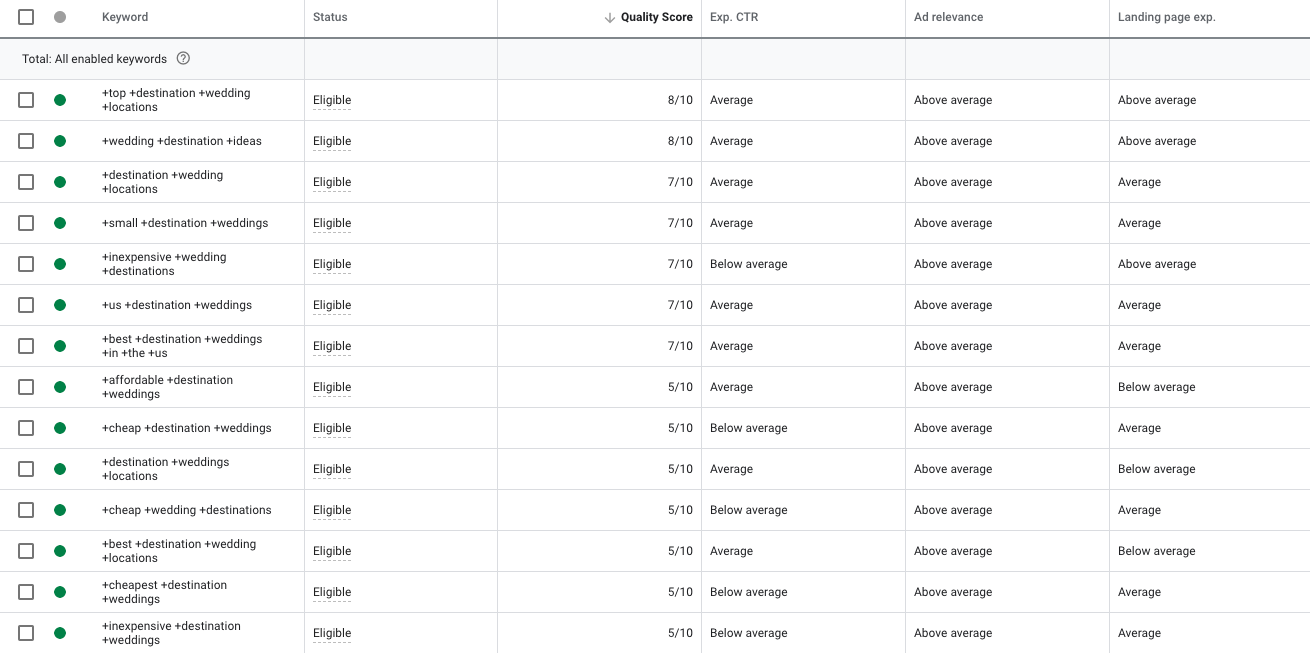
    Quality Score is reported on a scale of 1-10 and factors in expected click-through rate, ad relevance, and landing page experience. Overall, a healthy Quality Score averages around 6. Depending on how aggressively you want to improve Quality Score, start by reviewing keywords scored at a 3 or below for opportunities.

    It’s important to note that although it’s not used during auctions to determine Ad Rank, your historical Quality Score is a good indicator of how future ads will perform. Learn more about the ad auction in this video.

    Improving Quality Score

    Three factors can be optimized to enhance the Quality Scores of your keywords: expected CTR, ad relevance, and landing page experience. Each category can be rated as above average, average, or below average.

    Example of Google Ads campaign being managed by Search Influence in New Orleans, LA

    Let’s talk through each factor and recommendations on how to improve each one.

    1. Expected CTR: This is how likely it is that your ad will get clicked when shown for that keyword. Expected CTR is the easiest and most immediate element of Quality Score to improve.

    First, try reviewing the Search Term Report for keyword opportunities. This way, you can implement keywords more relevant for users. Once you add these keywords to your ad groups, pause the other keywords with low CTR.

    Another consideration is that your ads are not compelling enough for people to click. Test new ads with different messaging. A way to give your ad a natural CTR boost is by using Dynamic Keyword Insertion (DKI) in your ads. This trick is when you write {KeyWord:HeadlineText} in your headline, which then dynamically generates the headline as what the user searched.

    2. Ad Relevance: This measures “how closely related your keyword is to your ads.” An ad may be deemed relevant to a keyword when the keyword appears in the ad.

    If your keyword has a low QS because of ad relevance, instead of writing a brand new ad, try this. First, duplicate an existing ad that has high performance. Then, write in the low QS keyword as part of the ad.

    Also, ensure that your ads are answers for the queries the ad group most often receives. You can check queries using the Search Terms report. This is easier to accomplish when your ads and keywords are in specific ad groups consisting of tightly themed keywords.

    If you want to try something completely new, test Google’s Responsive Search Ads. This tool lets machine learning determine which of your ad headlines and descriptions will be the most relevant to the searcher. You can enter up to 15 headlines and four descriptions per ad!

    Something else to keep in mind is that Google looks at your site for relevance. Make sure you are landing every ad on the page that is most closely related to your keywords rather than only your homepage. Google takes into account keyword density on the site, so using relevant keywords on each landing page can also improve ad relevance.

    3. Landing Page Experience: This measures “how relevant and useful your website’s landing page will be to people who click your ad.” Landing pages that are not mobile responsive may take a hit in this factor. According to Statista.com, as of the second quarter of 2019, Google accounted for 95% of the mobile organic search engine visits in the U.S.

    Not all online advertisers can swiftly optimize landing pages as needed. If this is your case, start with making sure that your keywords and ads are relevant to the landing page’s current content.

    If that still doesn’t improve the Quality Score, you may want to consider the following for your landing page:

    • Making the page mobile responsive
    • Minimizing load time
    • Optimizing images with metatext, tags, title and alt text that include relevant keywords
    • Making conversion points clearly visible

    You should also consider improving your website’s content or testing new call-to-action buttons at each conversion point.

    Take Action Now

    As you can see, there are three factors that you can improve to increase Quality Score, yet there are only so many things you can do. If all of these possibilities seem overwhelming to you, start by making a list of optimizations you can tackle now, as well as some you may need to address later. Then, create an optimization schedule for yourself and revisit it each week.

    We are a Google Premier Partner, meaning we work on ad accounts daily to ensure clients maintain a strong Quality Score and campaign performance. If you find yourself unable to improve Quality Score, reach out to Search influence for specific recommendations and consulting services. Or let us work on your ad account directly with an online advertising package.

  • Website Cookies: Should You Be Concerned?

    Website Cookies: Should You Be Concerned?

    You’ve probably noticed that many sites notify you that they use cookies and ask you to save them. You may have also noticed that these notifications are more frequently appearing on sites. Why have cookies become so prevalent, and should you be worried?

    What Is a Cookie?

    A cookie is a small text file that stores a unique ID placed on your computer by an advertiser or publisher to help them keep track of your usage and behavior.

    Why Am I Suddenly Hearing so Much About Cookies?

    Recently, there has been a lot of legislation around privacy on the internet. The first example of this is the European Union General Data Protection Regulation (GDPR).

    More recently, California has gotten into the act with the California Consumer Privacy Act (CCPA).

    The impact of the CCPA is not as widely known, but the GDPR calls for disclosure and consumer control of tracking information placed on a user’s computer.

    In essence, a website owner or publisher has to give the user an opportunity to review and/or opt-out of tracking cookies.Expect this trend to grow as more governments express concern over the use of user data.

    What Are Cookies Used For?

    Cookies are used to keep track of your usage of websites and your interaction with advertising.

    Most people are familiar with the phenomenon where they look at a pair of shoes in an online store and then those shoes follow them around the internet. This is called “retargeting” or “remarketing.”

    Cookies are also used to store usernames, passwords, and other information for websites you visit frequently.

    And, cookies allow website managers to understand the way you are using their website so they can better tailor their content to you and future users. An example of this is the cookie that gets set by Google Analytics, the most popular analytics package on the internet.

    So, cookies are potentially really useful if you like to see ads tailored to your interests, or if you don’t like having to re-enter all your information on websites.

    Beyond targeted advertising, cookies can start to tell a lot about you as an internet user. Do you prefer Nike or Adidas; Ford or Volvo; Gucci or the Gap?

    Should I Be Worried About My Privacy?

    First, you should accept that privacy in this day and age is a comforting illusion. Just kidding. No really, I’m not kidding—there is no privacy on the internet.

    Most cookie usage is completely benign and, in many cases, helpful. Like any technology, cookies can be used for good and evil. And, most cookies are used in aggregate form such that your personally identifiable information is not available.

    Examples of negative cookie usage:

    • Excluding certain demographic groups from finance and housing offers—which is illegal.
    • Showing hateful political ads to groups known for a propensity to violence—which should be illegal if it’s not already.

    By your interactions with various websites and advertisers, you are sharing a lot of information. If used legally, it is not necessarily personally identifiable.

    If you are the type to take online surveys or play online sweepstakes, or even give up your email address for a 20% off coupon, you are now connecting the real you to the virtual you. You are giving up your privacy in exchange for some value.

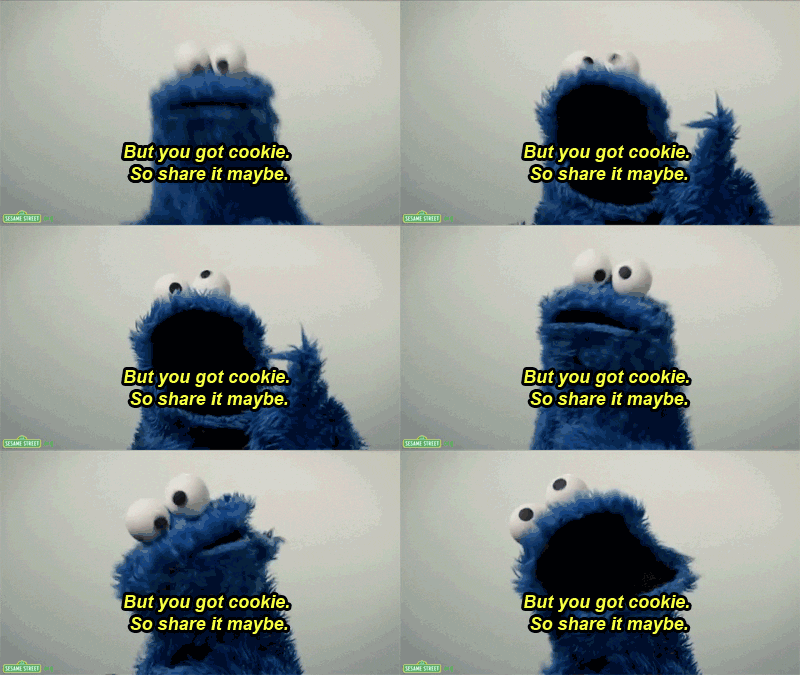
    But you got cookie, so share it maybe Cookie Monster quote

    Websites with access to particularly sensitive data, like doctors and hospitals, have very strict rules about personally identifiable information and its use, dictated by HIPAA (Health Insurance Portability and Accountability Act of 1996).

    With enough distinct data points, it’s possible to get pretty close to identifying you individually. And you can easily imagine how once credit card data gets into the mix, you can tie humans out in the world, driving around and buying stuff to website visitors.

    Credit card companies are already selling your data. One of the biggest data aggregators, Acxiom, maintains a website where you can see all they know about you. It’s currently down for revision, but when it’s back up you can go to https://aboutthedata.com to see all the details.

    They know what cars you drive, what you paid for your house, and how much debt you have. It’s a lot of potentially scary information.

    So if you’re prone to worrying about your privacy, yes, you should worry. In the general case, however, you don’t have much to fear.

    How Can I Keep Myself Safe?

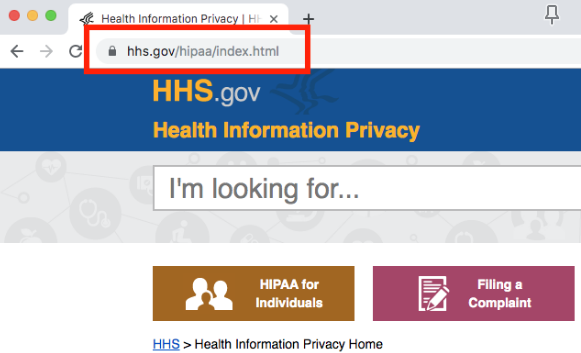
    If you are supplying private information like health or financial information, make sure the site you are using is secure. You can tell a website is secure because it will have a small lock in the address bar next to the website address.

    Example of an HTTPS secure site helping protect users data

    If you’re really browsing where you don’t want to be tracked, you can use the private browsing mode enabled by your web browser.

    In Google Chrome, this is called “incognito mode.” In the Safari browser from Apple, it’s called a “private window.”

    These modes are intended to not store any cookies beyond your current session and should provide a firewall between your existing cookies and the sites you visit.

    The Future of Online Tracking

    Today, an advertiser can buy ads that connect with you on computer, mobile phone, or even a billboard you drive by.

    The personalized billboards of the Tom Cruise movie “Minority Report” are not far off.

    Fortunately, governments the world over are starting to legislate data use. It is hard for governments to move as quickly as technology entrepreneurs, but GDPR and other similar regulations will keep the good actors in line.

    But listen, be smart! Just like you wouldn’t want to leave your wallet on a park bench, you don’t want to go giving up all sorts of private information to anyone who asks for it online.

    If you don’t trust a site or it is not secure, don’t give it personal or financial information. Think twice about whether that 20% discount is worth the information you have to give up.

    Advertisers and website publishers will continue to innovate to get closer to you as a customer This is a good thing if done appropriately.

    Some simple steps on your part can keep you as safe online as you are in the comfort of your own home.

    If you own a website and are concerned about the legality of cookies, the digital marketing experts at Search Influence can help. Start a conversation today.

    Images

    Cookie Monster