Blog

  • The New Orleans SEO Meetup Is Back

    Search Influence's SEO meetup recap graphicWas investing in your professional growth one of your resolutions for 2020? Just because January is over doesn’t mean it’s time to throw your resolution out the window. Search Influence has rebooted the local New Orleans SEO Meetup, which is a perfect opportunity to expand your knowledge about SEO while mingling with marketers in our community.

    If you missed the first SEO Meetup, don’t fret! We will be hosting this meetup quarterly. Plus, it’s free and open to people of every professional background. Whether you’re an SEO expert or don’t even know what SEO means, everyone is welcome to join.

    At January’s meetup, Cory Agular, Search Influence’s Digital Marketing Analyst & SEO Specialist, gave a presentation about trends in Local SEO for 2020 and beyond. For the full recap, check out this blog, but here’s a quick rundown of what you need to know from the SEO Meetup:

    Interested in search engine optimization and digital marketing strategies? Join us at the next New Orleans SEO Meetup this spring. Join the New Orleans SEO Meetup group on Meetup.com to be the first to hear about the next meetup and connect with other attendees.


  • The Rise of Intent Research and What it Means for Keyword Research in 2020

    Keyword research has long been thought of as one of the most impactful ways to gain prime real estate on SERPs. In the SEO world, if you’re not focusing a vast amount of your effort into keyword research, then you’re missing out on a great deal of SEO value. Finding and analyzing search terms by users and incorporating them into your website’s content is about as old as SEO itself. But as 2020 gets underway, a new kind of research is out to dethrone this age-old SEO practice. Intent research is quickly making its case as the new leader in SEO research. Take a look at these two types of research and where you should put your SEO effort in the coming months.

    Understanding the Basics: What is Keyword and Intent Research?

    Gif showing a Google search for Mardi Gras info

    Keyword research is, essentially, the process of identifying and analyzing a word or words users choose to include in search queries and then curating your content based on those specific words or phrases. These words or phrases can be categorized by things like popularity or relevance. Having a good understanding of specific topics is also important. Take, for example, searches done around a holiday—let’s look at Mardi Gras in this case. By understanding the topic, you can assume that users are likely searching for words or phrases like “mardi gras beads,” “mardi gras new orleans,” or “costume stores.” Incorporating those specific keywords into your content in the hopes of getting your content to show up in SERPs is the practice of keyword research.

    Intent research, on the other hand, is less specific and more concerned about what the user is trying to get out of their search. Rather than focusing on particular words and phrases, search engines spit out results based on what they think the user is looking for. Because intent can be hard to pinpoint, and keywords can have several different meanings behind them, how you interpret the keywords you are targeting is essential. Let’s say you’re researching the keyphrase “how to run a marathon.” The intent behind this could mean several different things. Is the user asking how to train for a marathon? How to sign up for a marathon? In understanding the user’s intent behind their search, you can better create content to drive users to your website.

    The Rise of Intent Research

    In a recent video where he discussed what to look forward to in 2020, Bing’s Frédéric Dubut claimed that search engines are quickly moving from keyword to intent research. One of the reasons for this, he believes, is in part due to Google announcing that they are now incorporating their BERT language model into search results. BERT, Bidirectional Encoder Representations from Transformers, is a technique for natural language processing. Google claims that BERT “helps better understand the nuances and context of words in searches” to produce more relevant results. The example they give is the importance of the word “to” in the search “2019 brazil traveler to usa need a visa.” In this example, you can see how the word “to” is what ties together the keyphrase in terms of understanding the user’s intent. By reading and understanding “to” in this context, Google is more likely to weed out content that mentions needing a visa from the USA by a Brazilian traveler, therefore providing them with more accurate search results.

    Is This the End for Keyword Research?

    John Meuller of Google says not so fast. Despite the rise of intent research recently, he believes there will always be room for keyword research. He admits that over time, search engines will become better at understanding a user’s intent, but that at its core, it is more of a balancing act between the two research practices. As he puts it, “even if search engines are trying to understand more than just those words, showing specific words to users can make it a little bit easier for them to understand what your pages are about and can sometimes drive a little bit of that conversion process.”

    So What Does That Mean for SEO in 2020?

    What does that mean gif

    In a nutshell, research practices will largely be a team effort in the coming year. As new language is created and refined and updates to search engines are made, search intent will be easier to understand and interpret. However, specific keywords will still be necessary when understanding that intent. Figuring out what type of research is best suited for your business will take a bit of trial and error. One way to get started is by trying to complete searches as if you were a user and see what sort of results populate. Depending on the types of results generated—and the research practice used—you can get an idea of how you should cater to your target audience. If this sounds overwhelming, don’t worry; we’ve got you covered. Our team of experts is ready to get you on the right path to a successful SEO campaign in the new year. Contact us today for a custom marketing analysis!

    Images

    What does that mean?

  • Digital Marketing vs. Traditional Marketing

    If you’re having trouble deciding where you should spend your marketing dollars in 2020, then you’ve come to the right place. As the world becomes more digital, the way we market will continue to evolve. While traditional marketing has its successes, digital marketing is changing the way businesses are marketing to their consumers. Continue reading to find out the top four reasons you should be taking advantage of the benefits of a digital marketing strategy.

    Tina Fey in 30 Rock saying lets do this

    What Is Digital Marketing?

    Digital marketing helps you promote your brand online, increase website traffic, and deliver high-quality leads through a holistic marketing approach. The average person spends 24 hours a week on the Internet, which tells you it’s likely that the internet is where the majority of your potential consumers are spending most of their time. If you want to market your company’s brand in the right place at the right time, then it’s important you are being found online.

    The top four reasons your business should be taking advantage of the benefits of digital marketing are:

    1. Target ideal buyers
    2. Trackable and measurable results
    3. Communication and engagement
    4. Cost-effective

    1. Target Ideal Buyers

    When you market to your potential customers, you want to make sure you’re marketing to the right person at the right time. Digital marketing consists of different tactics that work together to get your brand in front of your ideal buyer. One tactic, Search Engine Optimization, will help to ensure your business is seen when a person is searching for a product or service applicable to your company. Other tactics like Google and Facebook Display, Paid Search, and Social Media Advertising will allow you to market to people who are likely to be intrigued by what your business offers. Though traditional marketing can be successful and does allow you to reach certain audiences, it certainly does not have the advanced targeting proficiencies of digital marketing.

    Keith Urban saying that was a bullseye man

    2. Trackable and Measurable Results

    The only way to know if a marketing campaign is successful is to measure its success over time. Tracking the results of a traditional marketing campaign can be extremely challenging, and, at times, impossible, while every tactic used in a digital marketing campaign can be measured. Susan Bogle, the Associate Vice President of Product Marketing at Southern New Hampshire University writes, “Today, analytics allow marketers to track user behavior at a highly detailed level: how many times they click on a link, how much time they spend on a web page, how often they open emails, and much more.” Being able to track results in a digital marketing campaign gives you the opportunity to see which tactics are performing well and which tactics could be altered for better success.

    3. Communication and Engagement

    According to a Hubspot blog written by Kayla Carmichael, “recently, 50% of marketers said they believe digital marketing has an edge over traditional because of the interaction digital marketing opens with customers.” Digital marketing allows for continuous engagement with your audience through different digital media channels. You are able to interact with your customers to ensure you have met all of their desired needs. A marketing team is able to create, support, and withstand a two-way conversation with its customers in a digital marketing campaign, while traditional marketing has little to no interaction with consumers.

    4. Cost-Effective

    Using digital marketing tactics is one of the most profitable ways to market your business. Investing a large amount of dollars in marketing and advertising can be a financial burden that many businesses have to deal with. Traditional marketing makes it almost impossible for smaller companies to compete with larger companies for advertising space. In contrast, digital marketing allows businesses both big and small to market on the same platforms and get more for their marketing expend. According to LyfeMarketing, “Social media is cheaper than any form of advertising available today. Unlike traditional, digital marketing is one of the only forms of media that can expose your business to over 1,000 people for less than $3.”

    Little pageant girl counting lots of money

    Traditional Marketing Is Good, But Digital Marketing Is Better

    Traditional marketing has been an exceptional form of advertising over the years, but the world has become more digital, so it’s important for your business to do the same. There is a time and place for both marketing strategies, but if you’re looking for tactics that will allow you to target your ideal buyers, track results, and communicate with your customers all at a reasonable price, then it’s time to invest in digital marketing.

    Are you looking to get into the digital marketing landscape? Don’t worry, the experts at Search Influence can handle all of your company’s digital advertising needs. Request a digital marketing analysis today—it’s our gift to you.

    A person grabbing a present through a cardboard computer screen

    Images:

    Tina Fey

    Keith Urban

    Pageant Girl

    A Gift for You

  • Chatbots – Are They Right for You?

    On the internet, there are two kinds of bots, those designed to deliver content or promote a cause and others designed to be a virtual sales assistant or customer service representative. The latter is commonly called a chatbot, and they are popping up all over the web. Facebook added chatbots to their business pages a couple of years ago to help businesses automatically respond to inquiries even if they couldn’t have a human watching their page 24/7. Google also has a bot for their business page managers that works similarly.

    While chatbots aren’t new, the last few years have seen a lot of hype about chatbots being the next big thing in online conversions, and we have seen an increase in the use of chatbots all over the web. But is using these autonomous bots helping or hurting when it comes to online conversions? Are they really right for your business? To find out, let’s dig into the pros and cons of chatbots:

    The Value Chatbots Add

    • Reduced labor costs: Having a chatbot working on your website 24/7 to receive customer service requests or sales inquiries means you don’t have to pay one (or more) human employee to do this work all day and night. This can be a huge labor cost reduction even after you factor in the cost for the bot to be developed and implemented.
    • Faster customer service: The response time of a chatbot is virtually instant, and they never get sick or take time off for holidays! Giving customers the answers to their questions quickly will help move them further down your conversion funnel.
    • Customer satisfaction: They can be programmed to give answers to common customer questions, which can lead to higher customer satisfaction on your website. This can help improve your bounce rate as well.
    • Serve multiple customers simultaneously: A human can only serve a few customer inquiries at a time. This problem does not exist with chatbots as they can manage many customer questions at the same time with no issues.

    A robot teacher surrounded by robot students

    The Cons of Chatbots

    • Chatbots are “dumb”: Customers often expect these chatbots to act similarly to their Google Home or Siri, which are packed full of advanced AI that has been developed over several years. That isn’t the case with the chatbots that the average business is using. These bots can get stuck, and complex queries from a customer may be answered incorrectly or not at all. Sometimes, even simple questions may not have been thought of during the development of the chatbot. These issues can lead to customer dissatisfaction and a reduction in brand loyalty.
    • High setup cost: While these chatbots can save you a lot in labor costs over time, the initial cost to implement them is typically very high. To be truly useful to your customers, each chatbot needs to be programmed to answer dozens of questions correctly, as well as variations of the same question, which increases development costs. And for the chatbot to continue to be useful, it will need to be updated as questions and answers change for your business, which can lead to hidden ongoing maintenance costs that you haven’t budgeted for.
    • Chatbots have no memory: This means repeat customers that have a different question are often forced to write the same thing over and over to get to the point at which their new question can be answered. Much like automated telephone systems, this can be very frustrating for your customers and can ultimately lead them to look elsewhere for the answers they seek.
    • Chatbots aren’t always the right fit: Many businesses are just too complex for chatbots to be a viable customer service solution. In some cases, using a chatbot will add unnecessary complications. Some businesses are better off adding a frequently asked questions (FAQ) page on their site, which will draw in additional traffic to their website.

    As you can see, there are some good reasons to use a chatbot on your business’s website, but using a chatbot can also backfire and hurt your conversion funnel. If you decide that a chatbot is appropriate for your company, it should be designed, developed, and implemented by professionals with your specific needs in mind.

    Before you build and install a chatbot on your website, take a step back and really think about whether the information the chatbot would provide could also be presented on your website on an FAQ page. At Search Influence, our digital strategists can provide you with consulting about decisions like adding a chatbot to your site and social media accounts. For insightful digital marketing advice, request a proposal today.

    Images: Robot teacher

  • Trends in SEO: 2020 and Beyond

    The beginning of a new year marks a fresh start, new outlooks, and perhaps new approaches to a person’s conventional wisdom or habits. Digital marketing, though constantly evolving through the calendar year, is no different. As we begin to envision digital success in the new year, one important exercise is to evaluate where you have been and which trends you need to follow to stay ahead of the competition moving forward. Many of the topics we will discuss are not necessarily new information or revelations, but rather, the relative importance of them has increased and will continue to do so as search goes in a certain direction. With that out the way, let’s jump into the biggest trends that will impact SEO throughout 2020.

    Start Learning and Understanding Google’s BERT Update

    Announced in the latter half of last year, this announcement made waves in the search community due to the potential implications around how digital marketers perform keyword research and develop content. BERT, or Bidirectional Encoder Representations, originated as an open-source research project that aims to better understand the contextual relationship between words and how that tacit relationship may affect the meaning, or intent, of those words when used together. In plainer terms, it is a framework that tries to better understand natural language to deliver better search results rather than serving up more direct, literal word-for-word results.

    Bert from Sesame Street using a banana as a phone and saying hello?

    So, Why Does BERT Matter for Businesses?

    Google posted a blog on October 25th, 2019 announcing their reasoning behind introducing this new algorithmic feature. In his post Pandu Nayak, a Google Fellow and Vice President of Search at Google stated:

    “Particularly for longer, more conversational queries, or searches where prepositions like “for” and “to” matter a lot to the meaning, Search will be able to understand the context of the words in your query. You can search in a way that feels natural for you.”

    Essentially, Google is trying to deliver better results by understanding searcher intent rather than responding to an exact query. This has large implications for content because SEOs will now have to consider intent, or what customers are trying to find, rather than getting bogged down with the exact search value of a keyword string. That is not to say that keyword research does not serve a purpose; this type of research will be helpful to understand broad trends or high-level areas of the search funnel, but what businesses and digital marketers will need to better understand is what the searcher ultimately wants.

    The English language is chock-full of nuance, so this is really a move to try to get at the heart of that nuance. An example of that would be a query such as “how to play a stand up bass”—it is fairly apparent we are not talking about bipedal fish. Trying to better understand the relationship between words and why context matters when delivering search results is at the core of this BERT update. It bears mentioning that John Mueller from Google recently came out and reflected the idea that keyword research is not “dead,” but rather, diminishing in importance a bit:

    “There’s probably always gonna be a little bit of room for keyword research… And even if search engines are trying to understand more than just those words, showing specific words to users can make it a little bit easier for them to understand what your pages are about.”

    While it’s hard to trust Google when talking about these topics, it seems to me he’s implying there will still be value in optimizing towards general keywords with established search volume.

    This discussion leads nicely into another concern for digital marketers moving forward:

    Expansion of Voice Search

    This will be a much shorter section because, as it stands, most of the SEO recommendations made for voice search align with already established SEO trends applicable in normal search context. However, while there are not special SEO tactics needed for voice search, the level of adoption of this product is something to be mindful of because of—you guessed it—BERT!

    People tend to use more natural, longer-tail questions when using a voice-assistant device. A happy coincidence of generating content with BERT in mind is that it will inherently align with the intent of a lot of voice searches. This matters because, according to analytics firm Comscore, nearly half of the searches in 2020 will be done via a voice device.

    As we know, voice search typically serves up a single result that answers the query; in order for businesses to best position themselves for voice search, they will need to be mindful of both BERT and another large issue moving into 2020 and beyond:

    The Rise of Zero-Click Searches

    If you have used Google to find an answer to an inane question in the last few years, you have undoubtedly performed a zero-click search. It may be fairly obvious why these are called “zero-click searches,” but it’s important to understand why this is happening and the ways brands and businesses can work around a system that diminishes traffic to their website. The decline of clicks is likely the reality for the foreseeable future. As mobile and voice search grows, the need for Google to provide quick, relevant answers versus pushing you to a third-party site increases. The goal from there should be to figure out how to get your brand best positioned to be the answer that voice and mobile searchers are looking for.

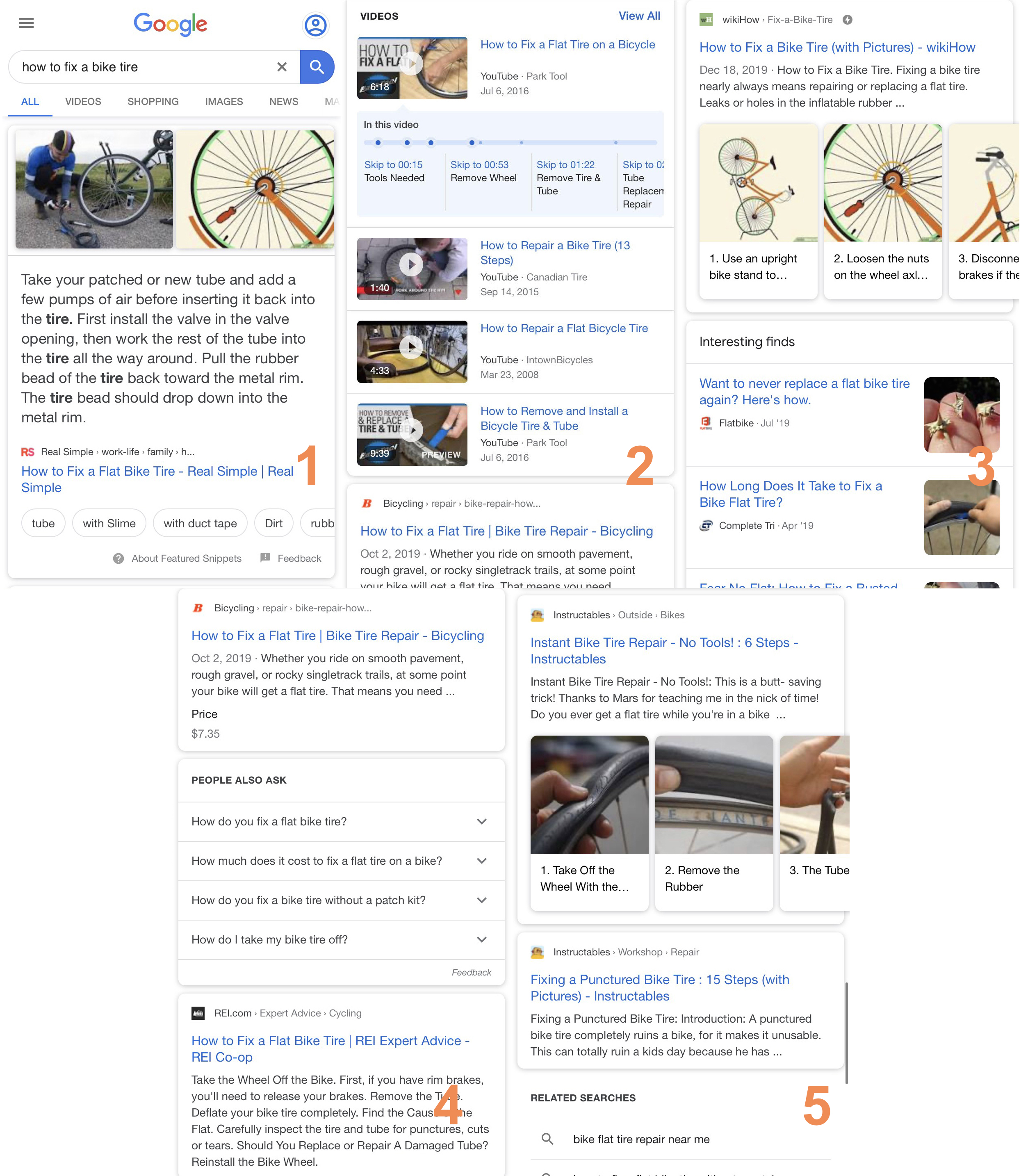
    As mobile search increasingly becomes the search method of choice for users, it’s helpful to visualize just how this impacts user behavior. Let’s take a basic question like “how to fix a bike tire.”
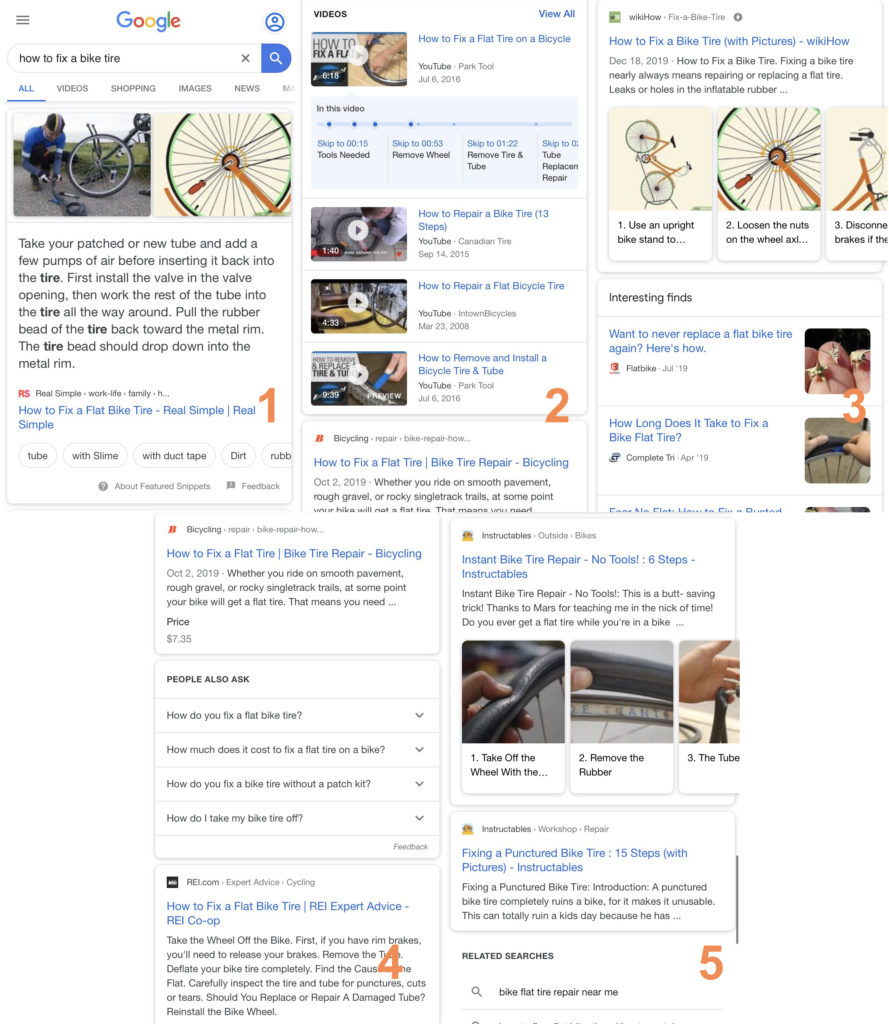
    Screenshot of mobile search on Google for Search Influence blog

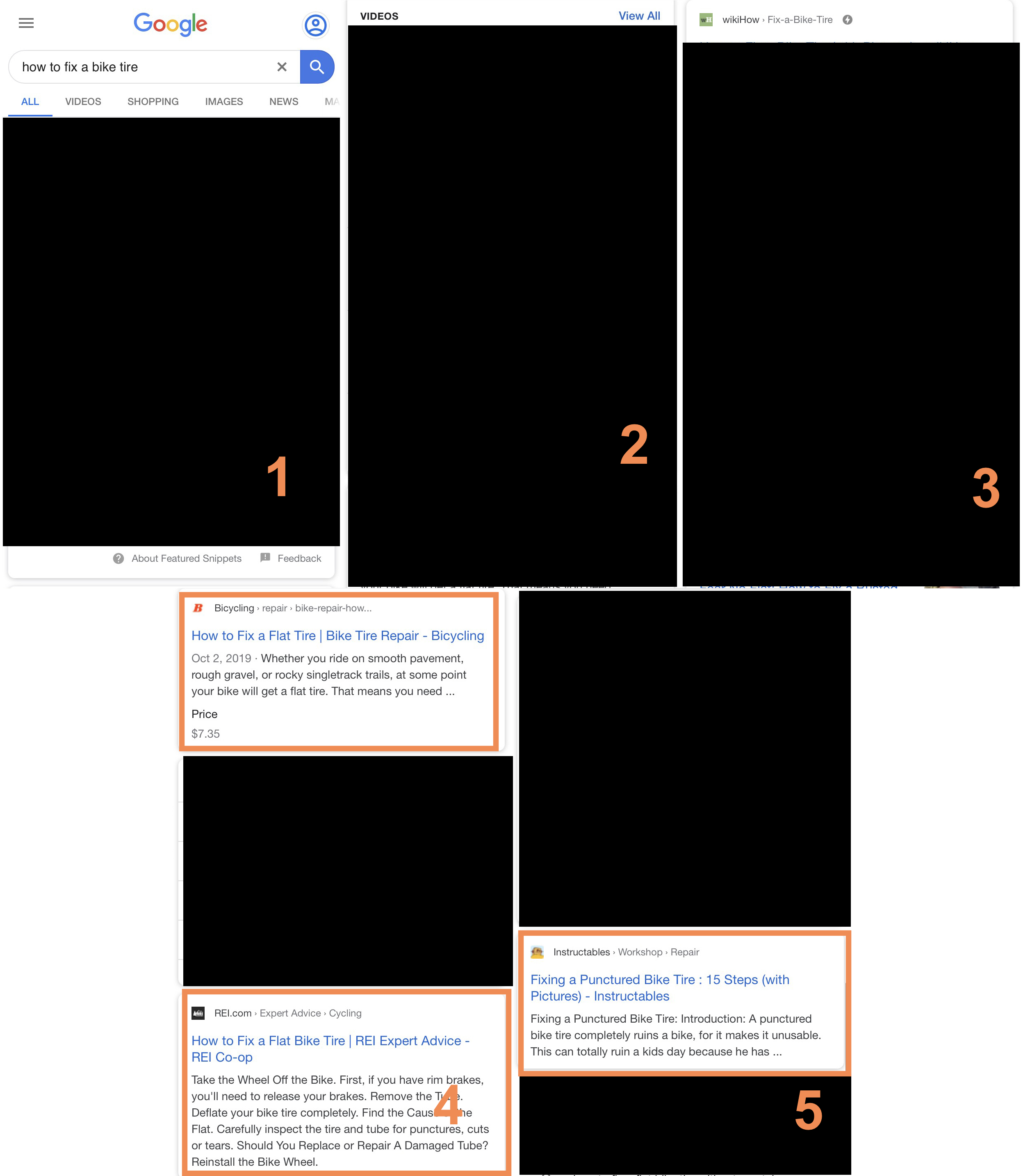
    As you can see, there is competition amongst featured snippets, video content, and embedded images. While discussing this very topic at Local U Advanced in Denver, CO, Cindy Crum from MobileMoxie offered a really interesting visual way to see why zero clicks are becoming more and more important to deal with. If we block out anything that is not a traditional “organic result” in the SERP, you will see that other types of results occupy most real estate.
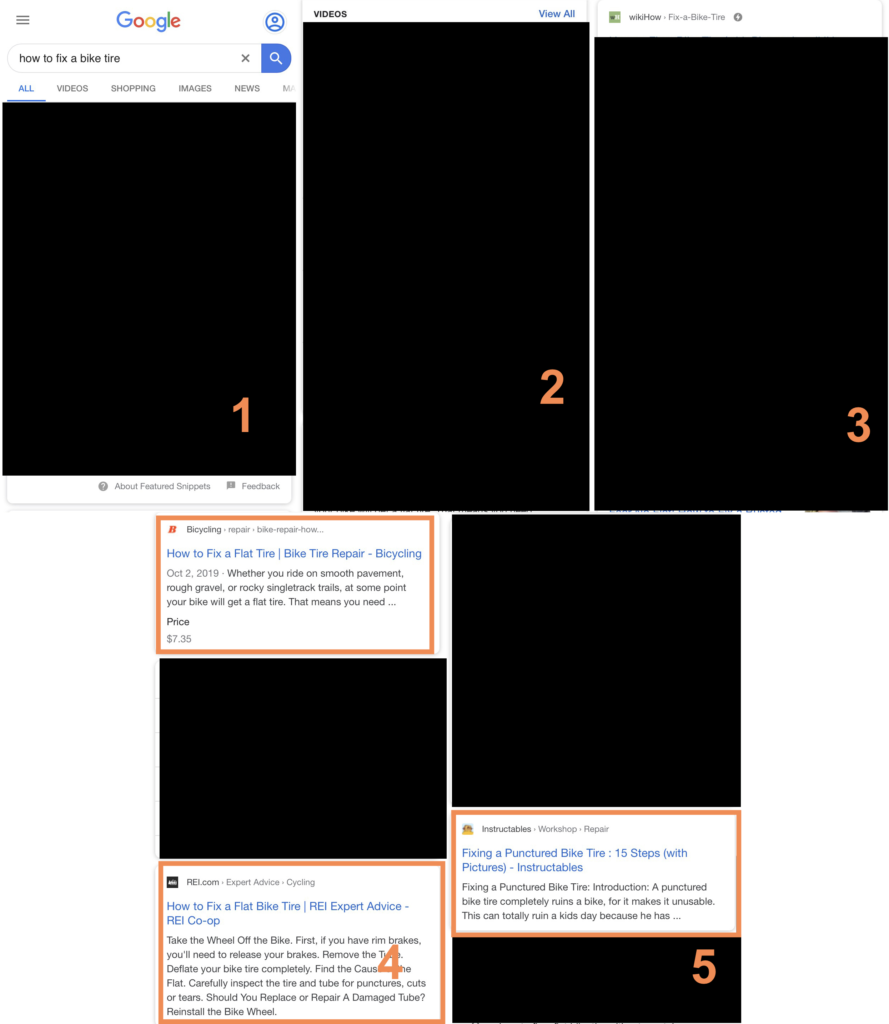
    Mobile search on Google with all non-organic results blacked out

    How to Combat Zero-Click Searches

    It may be time to stop thinking purely in terms of organic traffic. Much of SEO for businesses moving forward is about visibility. How can we position ourselves to be the brand that answers the questions our clients want to know? This is why content will continue to be the backbone of any SEO strategy. Doing proper research into the questions, queries, or searches that align with your business goals and striving to be the authority in your industry is the best way to ensure you remain competitive—and visible—in a landscape that does not necessarily reward good content with clicks.

    In shorter terms, you really want to try to be the featured snippet. This is an extremely difficult task as we know there is a high barrier to entry and it takes content tweaks, patience, and a strong will to see it through to grab snippets. Good content research includes finding the least competitive snippets and prioritizing those over a more competitive, higher level search. Doing simple keyword research is not enough nowadays. Moving forward, thinking about how these searches propagate results is equally as important.

    Google Maps: The New Home for Local Search?

    When people think of search, the Google homepage with the requisite search box is likely most people’s first mental image. However, for businesses moving forward, there should be an increased focus on how the Google My Business/Google Maps product is influencing and driving local search.

    Another big takeaway from the Local U Advanced conference is the volume at which users are going directly to Google Maps to find local businesses. According to the data from industry thought leader David Mihm’s presentation, from March of 2018 to August of 2019, 72% of all impressions on search were on Google Maps as opposed to Google Search (the traditional SERP). This is a huge discrepancy, and one of the big takeaways is that businesses are not leveraging Google My Business as much as they should.

    In order to be competitive in rankings in Maps, it is important to breathe as much life and information into your listing as possible. This includes driving reviews and optimizing descriptions, including appointment links, booking platforms, a healthy number of photos and videos, answering questions, and, finally, ensuring you are engaging with reviews. While proximity to a location plays a huge role in how the Maps listings are displayed, if you are actively managing your profile, the chances are that you will see some benefit.

    Also, consider how public-facing this listing is. If it looks sloppy, incomplete, or utilizes blurry images, users might be less engaged and less inclined to click through to your listing. While this seems relatively simple, many businesses fail to leverage this product—or even use it at all.

    Design Your Site for Mobile First. Always.

    This is not new for 2020, or even 2019 for that matter, but that does not minimize the importance of designing your site to perform well on mobile. Back in late 2018, the SEO community started talking about mobile-first indexing, and this was a major shift in the way search engine crawlers—and Google—understood and indexed your site.

    In response to Internet searches becoming an increasingly mobile experience, Google decided to push developers and business owners in that direction by making the mobile version of the site the version that is indexed in Google. In other words, Google crawls the mobile version of your site and makes determinations about its health on that basis. Web development is often thought about in terms of desktop computers, but it is becoming increasingly the case that your mobile version is at least, if not more, functional than the desktop experience.

    One of the biggest factors and problems searchers find with mobile sites is the overall speed. We know there is a direct correlation between load times and how many people will abandon your page. In the same way that users respond negatively to slow sites, the crawler will factor that in when crawling your site. A slow experience is not good for users, crawlers, or your business.

    This became increasingly visible to digital marketers when they rolled out site speed evaluation in Search Console. Google is essentially giving people feedback about their site speed in the hopes that flagging this will lead developers and businesses to try to create better mobile experiences for users. As seen below, this a report that is now standard in all Google Search Console reports.
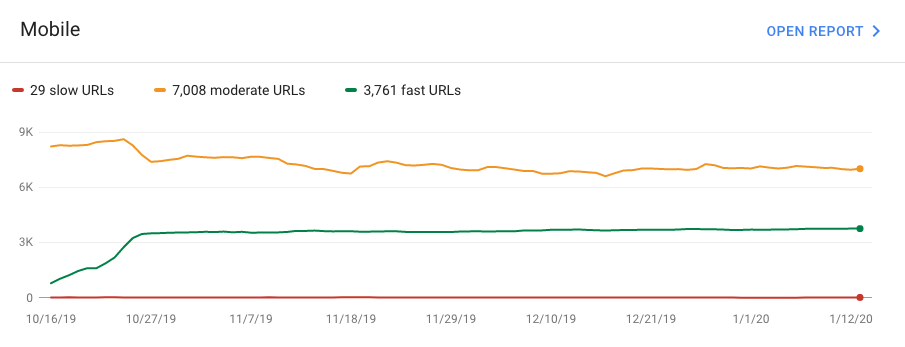
    Example of Google Search Console speed tests for Search Influence blog

    Google has been poking and prodding at digital marketers and developers for a while, indicating their sites are “relatively slow.” To the extent that this is accurate is questionable in my view—my belief is Google is inclined to tell you that your site is slow because they want you to go after improvements that ultimately make Google’s life easier. In that way, I do not see it as super nefarious because ultimately it helps everyone in the end, from users to large businesses.

    What’s Old Is New

    While we have pinpointed some newer aspects or changing directions, there are some old tenets of SEO that will remain very important moving forward. Backlinks are still relevant, you need to leverage structured data, video content will remain a huge differentiator in terms of content, leveraging E-A-T guidelines and content can help drive traffic, and, finally, write good content that serves the need of your users.

    SEO is constantly evolving. Many of these trends will change over the coming months, and different algorithms will impact different industries in unique ways. It will be next to impossible for businesses to develop the “perfect” site for ranking well—the best we can do is interpret what Google is asking for and do our best to align with their needs while also considering the needs of users. Ultimately, Google is incentivized to provide the user a good search experience, so by reading the tea leaves and (skeptically) following their guidance, your site should be in a good place to grow its audience.

    Do you have questions about how SEO could help your business? Need a consultation? The team at Search Influence has experience managing SEO campaigns of all shapes and sizes. Reach out to us today for more information.

    Images

    B.E.R.T.
  • Real World Considerations for Google Analytics E-commerce Tracking

    It’s 2020, and there’s no shortage of instructional guides to setting up Google Analytics Ecommerce Tracking on your website. If you’re looking for detailed technical information on setting it up yourself, there’s no way I would ever outdo Simo Ahava’s guide to setting up Google Analytics Enhanced Ecommerce Tracking in Google Tag Manager. And Google’s own support documentation naturally offers some pretty helpful guidelines and syntax itself.

    What I can hopefully shed some light on is why—despite all these brilliant and freely available resources on the subject—your developer is always making noise about all the problems with setting up Ecommerce Tracking for you. In addition, we’ll look at some recommendations for assessing platforms and plugins when considering options for your site. If your developer is whining about issues with Ecommerce Tracking, it’s probably not because they are being lazy or cranky! Or at least it’s probably not just that.

    Money falling around computer trying to set up e-commerce tracking

    So What’s the Big Hassle With Setting Up Ecommerce Tracking?

    I know, I know. When you set up your basic Google Analytics tracking code, it was so easy! All you had to do was copy and paste the code from Google into a script section in your website’s backend. It took like 5 minutes, and anyone can do it!

    Well, unlike most other aspects of Google Analytics tracking, the code and configuration for Ecommerce Tracking has to actually communicate with your website’s functionality in order to collect the actual e-commerce reporting data. That is to say basic pageview-oriented tracking code is adding reporting functionality to your website, so it doesn’t need to care how your website works as long as it loads. Once the tracking code is there, the reporting information flow is more between Google and the site user’s browser, not so much the site itself. But Ecommerce Tracking code has to get transaction data from your website’s backend e-commerce functionality.

    When an e-commerce customer completes a purchase, the user simply reaches a confirmation page and probably sees some kind of thank you message and general order info. Behind the scenes, though, the website is processing the items in the user’s cart, updating your site/shop’s inventory, processing a payment, sending confirmation emails, and all kinds of other things depending on what you sell and what your process is. The user doesn’t see all of that, and—crucially—neither does Google or the user’s browser unless you want them to. In the case of Ecommerce Tracking, we want Google to get some of that information that wouldn’t otherwise be readily available. That requires your developer to pull some elements of those backend processes and reformat them into frontend-accessible code that Google can read and transmit to its Ecommerce Tracking platform.

    OK Fine, So Our Developers Have to Write Some Code. That’s What We Pay Them For.

    Yes, that’s true. And we’re all generally very pleased with that arrangement. But with all the different options and possible combinations of CMSes and e-commerce platforms and plugins and modules and so on and so on, there’s no hard and fast rule for how or if pulling data from an e-commerce platform is possible in real-world configurations. And modifying someone else’s platform or plugin directly, even if you know exactly what you’re doing, can have major unexpected ramifications as other auxiliary platforms and plugins get updated and integrated by their original creators.

    The whole point of Ecommerce Tracking is to be able to track how the ultimate purchases actually got to the point of purchase. You already know what you sold and how much it cost the user by the very fact that you sold it. Google’s Ecommerce Tracking allows you to compartmentalize how many paying users or what percentage of your transactions come from organic search vs. ads vs. social media vs. emails and so forth. And in order to do that, Google needs to be able to follow the user from arrival to the site all the way to completion of purchase, at which point it needs additional, more granular information transferred from the backend payment processing system itself. And the more differently specialized cooks you have working in the same kitchen that is your user’s arrival-through-purchase experience, the more difficult it is to come out of it with a decent data feast. As a bonus to this blog post, you have full permission to borrow that tortured analogy, compliments of the chef.

    I’ll reference a specific recent example our team encountered to illustrate my point. One of our clients came to us regarding a campaign that was going to be very dependent on Google Analytics Ecommerce Tracking, arriving with a freshly built WordPress site, which used the MonsterInsights plugin for general Google Analytics tracking and the WooCommerce platform for their e-commerce online sales. Both of these are very solid, well-maintained, and extremely widely used platforms, and namechecking them here is not meant as criticism. Meanwhile, WooCommerce had a plugin extension installed to integrate the on-site e-commerce functionality with an external calendar booking platform, which manages attendance stats and served as a sort of CRM for the client internally. The calendar booking platform/CRM had its own internal configuration for Google Analytics, which was essentially a black box to me as an outside developer for completely understandable security and privacy reasons.

    Hey, That’s a Bunch of Different Things

    It sure is! If you’re mapping this out at home, we have MonsterInsights initially establishing tracking for the user. From there, when a user goes to pay for something, they arrive at WooCommerce, which then has to transmit data via an additional add-on plugin to an external booking platform. The booking platform then sends its information back to the WooCommerce add-on plugin, back to “WooCommerce proper” for processing, (which, of course, generally involves additional add-on plugins for specific payment options), and only THEN does a user arrive at the checkout confirmation page where the net results of that path are supposed to be sent to Google Analytics for reporting.

    The obvious way to approach Ecommerce Tracking for a WordPress site with WooCommerce is to add an WooCommerce plugin extension for Google Analytics integration. And that’s what we tried to do, except that it turns out that the WooCommerce Analytics extension’s tracking didn’t play nicely with the preexisting base analytics tracking set up through MonsterInsights. If this is already getting tiresome and technical speak makes you nauseated, just ignore this part, but MonsterInsights sets its own unique tracker name for its Analytics tracking. Since WooCommerce does not, the Analytics clientId that identifies users in their path through a website were getting effectively reset as soon as WooCommerce would fire its e-commerce data for reporting. For more on custom trackers, here’s Google’s breakdown.

    I could go through about 10 more steps of trial and error and frustration here, but I think the bigger point is probably clear enough: while many of those different plugins and extensions and booking platforms can absolutely make one piece of your website setup and maintenance much easier, they frequently do not care about each other. They do the thing they do very well, but they don’t always account for the bigger picture considerations of running an e-commerce website, much less a business with various other tentacles, where the e-commerce functionality is only a single, modest aspect of the services offered in full. So setting up a way to make all of these divergent elements successfully and accurately transfer user tracking information is often just a long game of tracking error whack-a-mole, depending on the preexisting configurations in question.

    E-commerce coding displayed on a computer monitor

    What Can We Do To Avoid E-commerce Problems?

    We can’t make all of these plugins and external modules do exactly what we want exactly when we want it. But we can think about what we ultimately want to accomplish with our websites and ask the right questions before going whole-hog tying all of our operations to something that may not support many of the things we may want to accomplish down the line:

    Do we really need a plugin for this?

    There are many very basic processes and configurations you can perform both without a plugin and without any real development knowledge. No disrespect to MonsterInsights or any other Analytics plugins, which offer plenty of advanced features and options that can be incredibly useful in specific situations, but if all you need from your initial Google Analytics setup is standard pageview tracking, you can probably install that yourself without a plugin. If you can copy and paste your Google Analytics tracking ID into a plugin, you can generally just as easily copy and paste the base Google Analytics tracking code. Google Analytics is an obvious example of this, but many other platforms have associated plugins they love to promote for ease of use, which are ultimately just allowing you to copy and paste one thing instead of another. The fewer plugins and extensions you are tied to, the easier it is to revise or expand your configuration in the future. As an added bonus, using fewer plugins will usually make your site faster and more secure as well.

    If we do need a plugin, what kind of external integrations are available?

    In the context of this post, obviously we’re primarily concerned with whether a platform would integrate with Google Analytics, which is generally simple enough to establish. But don’t just look for the specific things you need at this particular moment when investigating available integrations. Try to get a feel for how many and what types of outside integrations any new platform offers. Just because you’re not using something like Zapier or Automate.io or Mailchimp or whatever it is right now, doesn’t mean you won’t find a need for it down the road. If a new plugin or platform is proudly featuring a wide array of different external integrations, that can be a good indication that the platform will be flexible in accommodating a variety of different use cases and will limit you less as you expand your marketing efforts or your business as a whole.

    Be very wary of any platform assuring you that you don’t need those outside integrations because it gives you all the tracking analytics and other features you need right there in its own dashboard. That is an easy path to finding yourself trapped with limited functionality and unreliable data about your website and your business as a whole. I once logged into an unfamiliar external platform used by a client and was greeted with an enthusiastic congratulatory message highlighting the fact that according to their analytics, the client had received 3 times as many new site visitors as total site visitors in the previous reporting period. Unless this platform’s developers unearthed a magical transcendent code library that can report on website interactions with the hidden spirit world, that math does not work out and that analytics data point isn’t reliable. There’s a level of transparency to the way a platform on the scale of Google Analytics records and reports data that you’re unlikely to find in a random calendar widget’s dashboard screen.

    Is it really that important to use an e-commerce platform that works with Google Analytics Ecommerce Tracking anyway?

    Yes! It’s 2020. We’re disappointed that we don’t microchip brain implant video games and rocket boots. Google Analytics Ecommerce Tracking has been around for a long time and should be a baseline expectation for any ticketing or e-commerce platform to have fully integrated into its native functionality. If your e-commerce or ticketing provider doesn’t recognize the importance and ever-increasingly broad usage of Google Analytics Ecommerce Tracking, it probably isn’t going to be very attentive to other future needs as your business or marketing plans expand, either. Even if you can find ways around it, you shouldn’t be paying to use a platform that puts you in the position of having to do so.

    Conclusions

    If there’s one general principle to take away from this, it’s just to try to think through and plan your various platforms that need to work together online. When deciding on a new plugin or e-commerce/ticketing platform, try to think long term. Sometimes the cheap and easy immediate option can cost you way more in the long run as it requires wildly extravagant development gymnastics to integrate with the other items you may need running and functioning in concert with the new thing that seemed so simple at the time. Online marketing and e-commerce are always moving forward rapidly, so make sure you cast an eye toward the platforms and services that will allow you to keep up.

    Still trying to wrap your head around it all? Whether you’re a tech whiz or new to the game, Search Influence can beef up your analytics approach with qualified confidence. Get an expert opinion and start making smarter e-commerce decisions today.

    Images

    Laptop money

    Coding

  • Cross-Posting Mistakes You Should Never Make

    While you should be posting on social media, especially if you have a new piece of content you want to share, make sure you don’t cross-post on different platforms. Even if it’s easiest to figure out one social media post and call it a day, cross-posting can have negative effects.

    What Is Cross-Posting?Person using mobile device to cross post to social platforms

    Cross-posting is posting identical content across multiple social media channels. Posting the same exact content to multiple social platforms is like giving the same exact advice to multiple friends. You might give them the same type of advice, but the words you choose and tone you use will vary depending on the person. Like friends, different social platforms have different personalities, which is why crafting content for those platforms should involve a one-size-fits-all approach.

    Cross-Posting: Nope.

    Right about now you’re probably thinking, “creating content for social media is hard enough, and now you’re telling me I can’t just post the same content across multiple social networks?” Why, yes, that is exactly what I am telling you.

    The things your friends ‘like’ on one platform aren’t the same things your followers will retweet on another. The language, tone, visuals, and overall formatting best practices for Instagram aren’t the same for Twitter, Facebook, LinkedIn, etc. When crafting a social post, it’s important to be mindful of the following:

    • The audience on the platform you’re posting and talking to
      • You’ll want your tone and message to be more professional when crafting a LinkedIn post, whereas you’re encouraged to take a more casual approach on Instagram.
    • The formatting differences per platform
      • When it comes to Twitter, you’re limited to 280 characters per Tweet. Whereas on Instagram, you have 2,200 characters per post. Should you create content with a one-size-fits-all-platforms approach, you run the risk of your Tweet cutting off in the middle of your sentence due to character limitations, or a bad handle being included within your Tweet due to someone’s handle varying across platforms
    • The guidelines per platform to monitor and prevent spammy activity
      • Last year, Twitter announced new guidelines surrounding the use of automation and posting the same (or substantially similar) content over multiple accounts you control.

    Cross-Promotion: Yep.

    Cross-promotion, in addition to being your saving grace within the realm of creating unique social media content, is the idea of promoting the same overall topic across platforms but in a way that is suitable for the varying personalities, formatting requirements, and guidelines of each platform. And using them to your advantage!

    Having one topic about your business and/or brand that you want to share across multiple social media channels is not the “no-no” we’re discussing here. Instead, it’s sharing that topic in the same exact way across multiple platforms. Creating unique posts for each platform may sound overwhelming, but this idea of cross-promotion can help ease this process.

    1. Think of a topic you want to share on your channels
    2. Create a couple of sentences promoting this topic, providing the necessary information, etc.
    3. Take those sentences and apply tweaks for each platform you want to post to, being mindful of all of the considerations mentioned above
    4. Push out unique, engaging, and easy-to-create content that successfully caters to each social media platform

    Digital marketer using keyboard at computer

    Creating unique social media content that is specifically catered to each social media platform is a great way to keep users engaged with both your brand and your brand’s voice. At Search Influence, we’re always keeping the personalities, requirements, and best practices of individual platforms top-of-mind when creating social media content for our clients. To learn more about how we can help you and your marketing efforts, give us a call today at (504) 208-3900.

    Images

    On cell phone

    Keyboard

  • Does SEO Success Require Development Knowledge?

    The short and simple answer to this question is no. You won’t need to delve deep into writing code or earn a degree in computer science to improve your website’s search results. There are some more complex aspects to SEO, but a large number of important and impactful SEO tactics can be performed by any computer-savvy individual. A funny thing I’ve learned from years of working in digital marketing is that many people with advanced technical knowledge of programming and code are not informed on SEO best practices. Many of the insights and standards of search engine optimization have been devised by tenacious marketers and website owners without any technical training or coding ability.

    Getting Started With a CMS

    To effectively improve your website, you will need to know what type of website you’re working with. The available tools and accessibility to a website’s features can vary widely. A lot of sites are built using Content Management Systems (CMS) like WordPress, Squarespace, and Wix (along with many others) that are designed to give users without coding experience the ability to log into a dashboard and update a website. These CMSs also have features that support SEO updates as well, but they can differ and may require using add-ons that weren’t originally built into the CMS. If you don’t know if you’re using a CMS or which one it is, there are online tools available that can figure that out for you. Here’s one I’ve used that is fairly accurate.

    You can also investigate the CMS type with a simple search query. Something along the lines of “What CMS is this” or “web cms detector” will bring up a number of online tools that will analyze the code from your site to determine what CMS is in use. The answers you find may not be 100% reliable, so you may need to contact whoever set up or sold you your website if you still aren’t sure.

    A paper man sitting in front of HTML code reading 'Hello World'

    Optimization for Beginners

    Once you’ve established which CMS or code your website is built on, search engines are your best friend when it comes to learning how to edit and optimize your website. You can start searching for your website’s documentation and specific tasks you want to complete within your system. If you’re new to the game, you’ll be pleasantly surprised at the vast number of beginner-friendly articles written about specific implementations of technical SEO available on the web.

    As a starting point, you should research how to update title tags and meta descriptions. These components of a website impact the information displayed in search results. If you’re using Squarespace or Wix, you can access this via the page editor features and can look up how to do so in the site’s documentation. If you’re using WordPress and you want to implement these changes, your WordPress theme may or may not already have this feature. If not, it’s likely you’d need to download a plugin, which is a program that adds functionality to WordPress and installs it on your site. Pretty much any open source website (WordPress, Drupal, Joomla) will have their own version of a plugin. These programs are usually designed by developers, some of which are free!

    If you aren’t using a CMS, you will probably need to access site files and edit some code. There’s plenty of online resources that can walk you through the process. Be cautious, however. You should always back up your site before making any changes to code or adding plugins. Maintaining a backup or version control system is the safety net that allows you to switch things back to how they were if anything goes wrong.

    A Little Code Goes a Long Way

    I know many people describe code as gibberish or absurdly unapproachable; at first glance, code can look like an alien language. However, the most commonly used code to structure websites, HTML, is pretty simple and useful. HTML is pretty much the label system of the internet. You label paragraphs, headings and sidebar content, horizontal lines, bulleted lists, blocks of content, images, pretty much everything on the page. These labels, with a little help from style sheets, tell your browser how to treat content and images and present them on the screen. There are also labels built into HTML that give search engines other important information, like headings.

    Headings are implemented in HTML with H-tags. They range from h1 to h6 and are intended to organize your headings based on their importance. Search engines use these to determine keywords and the core concepts of the page’s content. To improve your SEO, use these to label your main content heading on the page with an h1, subheadings with h2s, and so on. You can start learning HTML by using online learning tools.

    The Mighty Pen

    Even if you absolutely hate technical stuff like code, you can still ramp up your site’s SEO. Ultimately, the content on your site is your main money maker. Even if you use a bunch of high-level SEO techniques to get into the top results for a search on a major search engine, if you can’t engage your audience by delivering topical and engaging written content, you won’t last long. A talented writer can be more impactful than a senior developer. In the world of digital marketing, you absolutely need both. We are the Yin and Yang of website creation.

    Make Information Easy to Find

    Here are some basic concepts for writing with SEO in mind. Make it easy to read. Easy to find key information. Title things effectively. Does your content answer a question? Then include the question most people are asking as a heading or title. Does a paragraph have details about something specific? Give it a subheading lets someone who’s skimming the page know, “Here it is! This is what you’ve been looking for.” Use lists and bullet points. Highlight key terms with links to more detailed information and bolded text. Link product names to pages where people can purchase them. Provide business hours, important addresses, and contact information on every page and make it easy to find. Make everything as easy as you can for your audience.

    SEO is all about delivering what people want. Google would quickly lose its status as the top search engine if the results people got for searches weren’t helpful. Search Influence helps businesses follow SEO best practices so that they can succeed online. Contact us today to learn more about how we can help you optimize your website.

    Images: Paper Man

  • A Look Back at 2019: Search Influence Style

    A Look Back at 2019: Search Influence Style

    I’m fairly certain that at some point in the first quarter of this year, I fell into a wormhole and recently emerged to discover that 2019 is coming to an end. How did this happen so fast?! And not just 2019, it’s the end of the DECADE, people!

    It’s like it happened in the blink of an eye, yet this year was jam-packed with exciting happenings.Happy 2020 New Year from Search Influence

    Whether you’re still suffering from the nationwide White Claw shortage or re-binge-watching the last season of Game of Thrones while eating Popeye’s new chicken sandwich, you probably agree that 2019 was a doozy. Lizzo rose to stardom, there was a new royal baby, and Stranger Things graced us with a third season.

    Clients and employees of Search Influence had an equally eventful year! This Year-in-Review post reflects on and celebrates the many exciting accomplishments of our team and our clients in 2019.

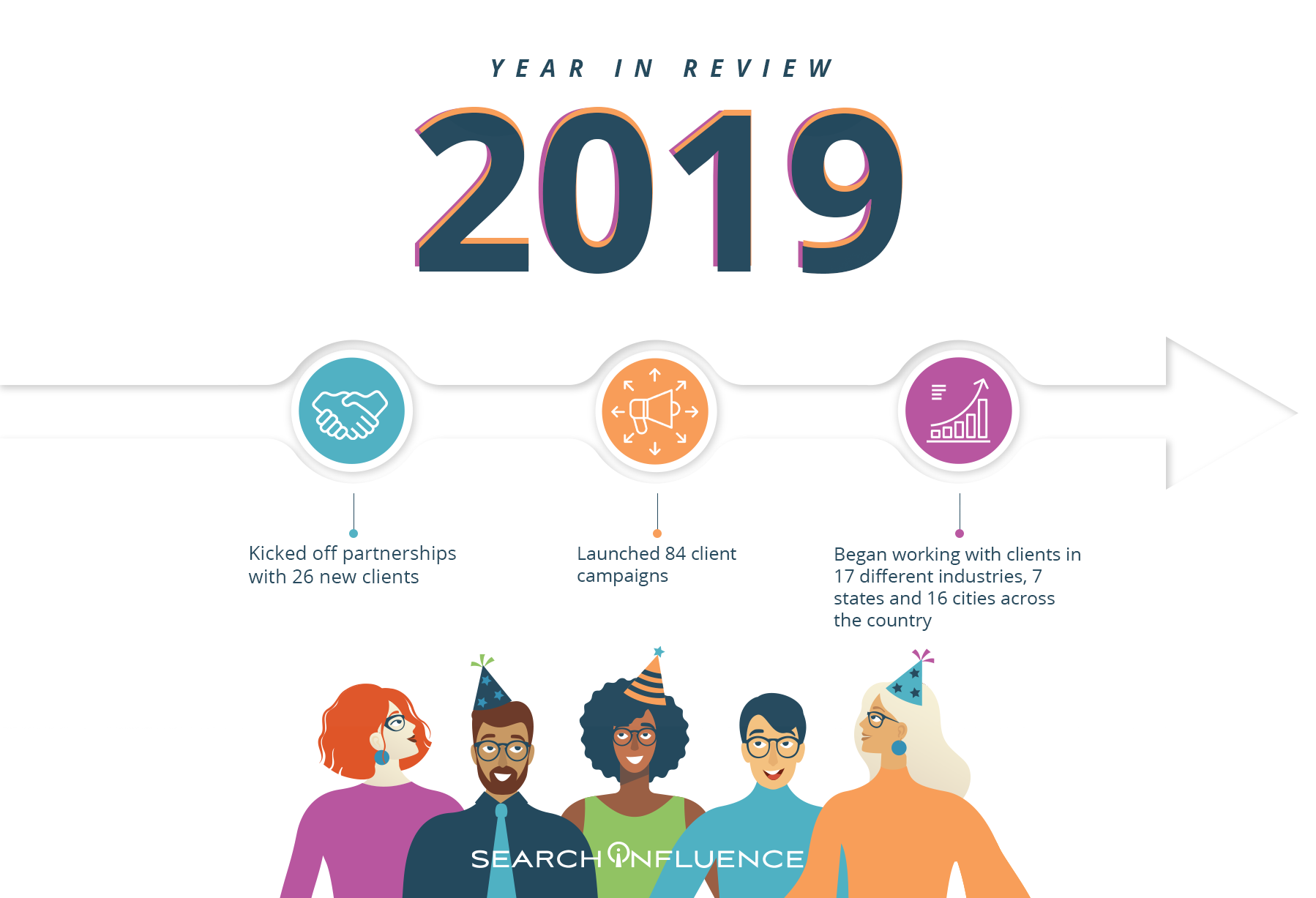
    Here’s the TL;DR version of our 2019. More on all of this below!

    In 2019, we…

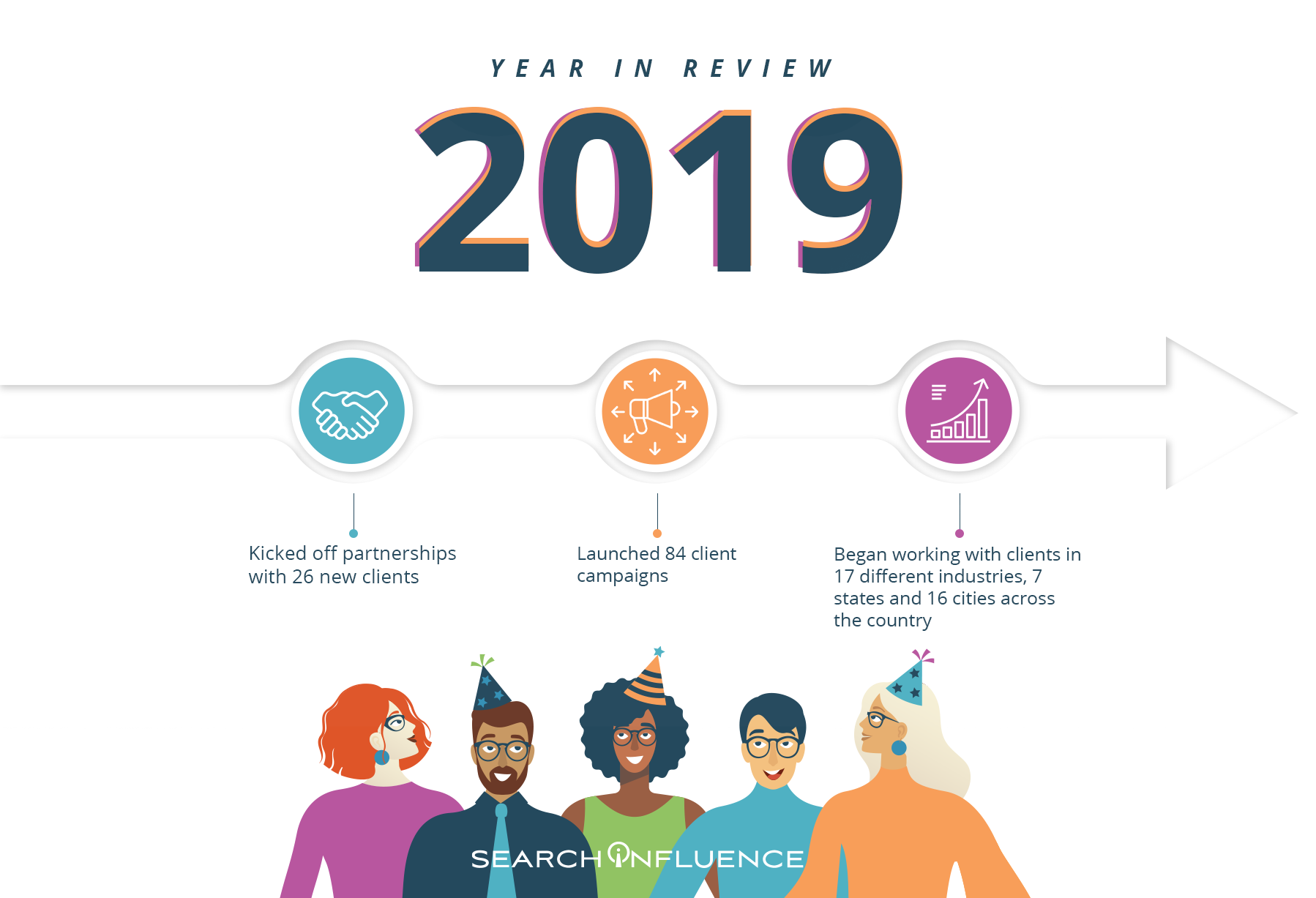
    • Kicked off partnerships with 26 new clients 👟
    • Launched 84 client campaigns 🚀
    • Congratulated 5 newly married Influencers
    • Welcomed back 2 more Influencers who “boomeranged” back to Search Influence after going to work elsewhere ♻️
    • Said “Happy birthday” to 5 new Influencer babies in the last 12 months
    • Moved from downtown NOLA into a historic three-story building in Central City with our own courtyard
    • Initiated SMART Goal setting for each of our clients, an effort to hold ourselves accountable while focusing on our clients’ marketing objectives
    • Won a PRAL Flambeaux award for our successful digital campaign to produce a favorable vote to evenly distribute taxes among NOLA’s parks and greenspaces
    • Traveled to 6 cities in 5 states (Austin, TX; St. Paul and Minneapolis, MN; Denver, CO; Nashville, TN; and Torrance, CA) to develop our expertise, share our knowledge, and visit with our clients
    • Began working with clients in 17 different industries, 7 states, and 16 cities across the country
    • Achieved a company-wide profit threshold as a unified team through a culture of transparency and collaboration
    • Achieved an above-industry standard client retention rate by focusing on client ROI and employee education
    • Shared our expertise with speaking engagements at MN Search, Zenith, New Orleans & Company’s Tourism University, 2019 UPCEA Marketing and Enrollment Management Seminar, Mississippi Alliance for Nonprofits, Public Relations Association of Louisiana, and Public Relations Society of America, New Orleans Chapter
    • Blushed when three of our leaders were nominated for Ada Lovelace Awards
    • Topped off our 14th year in business and marveled at the change from early days around Will & Angie’s dining room table to now

    Search Influence 2019 Year in Review

    A Happy & Prosperous 2019 for Our Clients

    This year our Account Management team put a focus on strategy and client ROI, spending significant time ensuring that our campaigns align with our clients’ ultimate goals. Leveraging the methodology of SMART Goal setting, we worked hard to ensure all aspects of our campaigns are connected to the greater purpose of achieving client goals. And we have made these goals transparent to every member of our agency so that each individual can understand how their work is connected to the big picture.

    We launched and ran successful campaigns for key clients, including New Orleans City Park, Creole Cuisine Restaurant Concepts, the Tulane School of Professional Advancement, New Orleans Wine & Food Experience, and many more.

    Through a newly-formatted quarterly feedback survey, we solicited valuable insights from our clients about their experience with us and gathered some amazing testimonials:

    On Data and Analytics Reporting:

    “One of the biggest advantages to using Search Influence is their transparency and collaboration in reporting on analytics. The SI team worked with the Tulane School of Professional Advancement (SoPA) to determine what analytics and benchmarks were most important to us and made sure to align them to our outcomes. Each month, the SI team presents these data and analytics to the SoPA team and we ask questions, discuss strategy, and make data-informed decisions. Search Influence works with us each month to refine both the gathering and reporting of data. As a result, not only do we have a better understanding of the impact of our digital strategy, we are part of a continuous improvement process.”
    From Christa Payne, Assistant Dean at the Tulane School of Professional Advancement

    On Expertise and Client Experience:

    “I tell pretty much anyone who will listen how much I love working with y’all. Jordan and Ariel are both amazing—they’ve done so much for our Editorial Team and our overall approach to content on the site. On top of being incredibly knowledgeable, they do a great job of explaining oftentimes complicated subject matter to our team in a way that’s approachable. 10/10—y’all are the best!”
    From Hartley Casbon Wasser, Director of Editorial & Content Marketing of New Orleans Tourism & Marketing Corporation

    On Holistic Marketing Strategy:

    “Search Influence has been an integral and essential part of the New Orleans Wine and Food Experience’s marketing. The team goes above and beyond to make sure we are happy and taken care of. At the beginning of each season for NOWFE, Search Influence sees our vision and then brings it to life, offering advice and suggestions along the way to help meet our goals. I know that when I give the Search Influence team a task that it will be done, and having that kind of trust and loyalty in this industry is everything to us.“
    From Aimee Brown, Executive Director of New Orleans Wine & Food Experience

    A Productive & Rewarding 2019 for Our Employees

    The biggest development in 2019 for our team was our move from downtown New Orleans to a historic building in Central City! Moving from the CBD resulted in savings for both the company and each individual employee thanks to FREE PARKING! We also gained several outdoor spaces for our team to enjoy and use for collaboration. We’ve already enjoyed using our new space to host clients for in-person meetings and lend meeting space to organizations in need. We hosted our first Careers Open House this December, welcoming 20+ prospective employees and others looking to network.

    Ribbon cutting at Search Influence's new office at 1610 Oretha Castle Haley Blvd, New Orleans, LA

    We’re proud to say that our team rallied around a collective goal to achieve a profit threshold this year, and we accomplished it months earlier than planned! Through a culture of transparency (we share financials in our company-wide meetings monthly) and collaboration, we worked together to exceed our own expectations. No doubt this is thanks to the hard work of each individual team member staying connected to client goals and delighting our clients with strong results.

    A Focus on Professional Development

    Members of our team traveled to Austin, Denver, and Nashville to further their education in key areas of our work, from Local SEO to Analytics and tracking. A key initiative for the year was a renewed commitment to our employees’ personal and professional growth. We kicked off a program enabling all employees access to a mentor from our leadership team (from any department) and empowered them to set SMART Goals for their personal and/or professional lives.

    A Focus on Fun

    When we worked together to achieve milestones set by our leadership team through quarterly planning, we celebrated with a Stranger Things themed party that featured Eggo waffles and just about any topping you can dream up. We mused. We boozed. We watched movies. We played Clue. We found fun ways to unwind together. Our work—and more importantly our clients—are better because of it!

    Can’t-Miss Content From 2019

    Our core purpose is to “optimize potential,” the potential of our clients, our employees, and the community in which we work. One way we live this is by constantly growing and sharing our knowledge with the larger community, whether within our industry or to small businesses or nonprofits in need.

    This year, our team produced presentations, blogs, and oodles of content to educate the larger community of which we are a part. We spoke at several conferences, luncheons, and community organizations. And we consistently kept our blog updated with useful information. Here are five of our most-read blogs in 2019:

    Cheers to 2020

    Writing this post has made it clear that capturing the happenings in a digital agency like ours over the course of a year is nearly impossible! With such a fast pace to our work and industry and a company goal of continuous improvement, it was a year packed with fun, exciting changes, and growth. We look forward to dialing up the fun and prosperity—here’s to seeing you in 2020!

  • How to Best Utilize Facebook’s 3D Photos for Your Brand

    Facebook introduced 3D photos in October 2018, and users have been posting these fun “window views” that give viewers a new perspective on once-flat photos in their newsfeed. Originally only available to those with an iPhone with Portrait Mode, 3D photos can now be uploaded by anyone with a dual-camera smartphone or by anyone who had manually created a depth map.

    This new format saw some traction right after its launch, but has slowly plateaued in popularity over the year. This could be due to it only being available to certain iPhone users at first, or maybe just a general lack of awareness of the feature, but, either way, this means brands that do utilize it will stand out in newsfeeds even more.

    Why Use 3D Images in the First Place?

    Any new feature that Facebook introduces is inherently attention-grabbing, and 3D images have the best of both the video and flat image worlds. The eye-catching movement is automatic as the user scrolls through their feed, but taking in a 3D image doesn’t take as long as watching a video. This immersive experience offers a self-guided glimpse into a “window.”

    The feature was released for users, not pages or brands, to share photos. However, users have found that if they can post 3D images from their personal accounts, they can post them from business accounts too. With this workaround, business pages are able to blend in more with their audiences’ newsfeeds, behaving and looking more like their friends and family.

    As older smartphones are phased out, 3D images will likely become even more common on newsfeeds. A brand that gets ahead of the trend before it really takes off will prove itself more innovative than its competitors and establish more authority with its followers.

    How to Use 3D Images

    More casual images will look the most natural when using this feature. Your audience will be scrolling through their newsfeeds expecting the 3D image to be posted by someone they actually know, so keeping this in mind will help your brand seamlessly blend. The post below, for example, was posted by the official Bud Light Ritas Facebook Page and looks like it could have been posted by anyone celebrating the weekend or watching some football.

    Facebook example for a brand using 3D images in advertising

    If you have creative that was created NOT using portrait mode on a smartphone, you can still manually create a depth map, too. This is a bit more challenging and time-consuming, but it’s completely possible to make a 3D photo in Adobe Photoshop or with other online tools. Get creative with your creative!

    Tips for Taking Great Portrait Mode Photos

    • Put a few feet in between the camera, the subject, and the background. To highlight the depth in the photo, there needs to actually be depth.
    • Make sure the subject of your photo contrasts with the background. Don’t have a woman wearing a green sweater against a green wall.
    • Transparent or shiny objects, like glass or windows, can confuse the depth sensors and might turn out distorted. This may also happen with hair. Combining these two, like a person standing in front of a wall of glass, may totally warp the photo.

    Making the most of recently released features is a great tactic for drawing users in on social media. At Search Influence, we’re always looking for new ways to make our clients’ marketing campaigns more effective. To learn more about using advertising to grow your business, start a conversation with our marketing strategists.