Blog

  • Applying Stephen King’s Writing Tips to Create Web Content That Converts

    All great ideas start with words—maybe even just an utterance. “What if… let’s try…” There’s the excitement about the idea, talking about it over scribbled notes and endless cups of coffee, and then putting those words down on the page and getting your business plan running. Years ago, once you conceived of your brand and wanted to advertise and market your company, traditional media was the only option. And there was often a great rift between short and cheap advertising options like yellow pages listings and extensive and expensive options like TV commercials, billboards, and local print or magazine ads.

    Now, with the exception of niche industries where images alone can represent a business, website content is the dominating force for 1) convincing a visitor to your site that you can help them solve their problems, and 2) reassuring Google that you’re an authoritative source in your industry. However, not all writing is transferable across different mediums. Sprawling lines from Faulkner would be lost on visitors to websites, and similarly, website content would make a horrible novel. But, we can still take some inspiration and writing advice from one of the most prolific and spooky writers of our time, Stephen King. Here’s an essential checklist for writing website content, alongside some quotes from the horror bard’s technical writing opus, On Writing.

    Know Your Audience

    “The scariest moment is always just before you start. After that, things can only get better.”

    Shawshank redemption gif

    It’s daunting to start a website from scratch, but that’s the perfect time to draft buyer personas before writing any copy. Buyer personas serve as a representation of a business’ ideal customer. They should be based on existing and prospective customer data, such as demographics and psychographics. Explore your ideal customer’s pain points, preferences, shopping habits, demographic information, etc. Once you’ve figured out who your ideal buyer is, you’ll be closer to understanding your brand’s tone. Is it more professional and reassuring, or playful and creative? Whatever you land on, the objective will be the same—welcome the reader with inviting copy, earn their trust by assuring them of your expertise and authority, and move them toward a sale with focused language that’s action-oriented.

    All the best copy in the world won’t help if your audience can’t find your website. Think about how your audience might be searching for you on Google. What questions do you hear from clients or patients? Gather these common questions before even starting to draft your copy, and think about how you can answer them. You should also do keyword research on how users are searching for your company and similar competitors. If you’ve never performed keyword research, Moz has a great breakdown with strategies and online tool suggestions. Once you’ve recognized trends in search terms, try to fit those terms into your copy naturally (bonus points if you can work them into your H1s and H2s).

    • Understand your customers’ worries
    • Establish buyer personas
    • Find your appropriate tone
    • Do your research

    Keep It Simple

    “One of the really bad things you can do to your writing is to dress up the vocabulary, looking for long words because you’re maybe a little bit ashamed of your short ones.”

    Gif from the movie "Misery"

    There’s a time and place for long, drawn-out sentences. For websites, follow King’s advice and keep it simple. Think short sentences (below 20 words) and short paragraphs (around five lines). Research suggests “the new norm is skimming.” One great way to help out the skimmers of the world? Bullet points and lots of H2s. Put some of your unique selling propositions (USPs) as bullet points. That way, if someone is skimming, they’ll catch your most marketable features. Large H2s with USPs also help deliver valuable info in a short amount of time and space. Considering the average user’s attention span is now eight seconds, the more skimmable, the better.

    Also, a quick note about jargon—it’s best to avoid it. While you might think it shows off your expertise, it will more than likely come off as exclusive and confusing. Odds are, someone visiting your site doesn’t know as much about your business or industry as you do; don’t constantly remind them of that by throwing around obtuse industry phrases and abbreviations. It’s all about connecting and building trust. The best way to achieve this is by sticking with the brand voice that you established from your target research.

    • Short sentences. Short paragraphs.
    • Use bullets when possible
    • Avoid jargon
    • Make it accessible

    Avoid Filler and Fluff

    “I believe the road to hell is paved with adverbs, and I will shout it from the rooftops. To put it another way, they’re like dandelions. If you have one on your lawn, it looks pretty and unique. If you fail to root it out, however, you find five the next day… fifty the day after that… and then, my brothers and sisters, your lawn is totally, completely, and profligately covered with dandelions. By then you see them for the weeds they really are, but by then it’s—GASP!!—too late.”

    Mouse pushing spool in the film The Green Mile

    King does an interesting job here of showing how not to use filler and fluff language by… using filler and fluff. “Totally, completely, and profligately.” We get it. It’s a bit much. So what exactly are filler and fluff?

    Filler language uses too many words to describe something when fewer will do. It can also be generic terms that don’t add value to your sentences. Think, I need to finish this term paper so I’ll keep adding some sentences that don’t really say much and hope the professor doesn’t notice, kind of sentences.

    Fluff language comes down to vocabulary, or, often, a writer’s love for a thesaurus. The goal is genuine, but the result is copy that ends up wasting the reader’s time. When going over first drafts of your website copy, comb through every sentence and ask yourself, “Is this adding value?”

    • When in doubt, cut, cut, cut
    • Watch out for unnecessary adverbs and adjectives

    Develop a Brand Lexicon

    “Amateurs sit and wait for inspiration, the rest of us just get up and go to work.”

    Typewriter scrolling from the movie The Shining

    So you’ve done keyword research to understand what people are searching and to what degree. You’ve created buyer personas. The next step should be to develop a brand lexicon with your team. How will you refer to your customers? As clients, patients, buyers? How do you refer to your team? Staff, crew, talent, personnel, employees? How do you talk about your services or products? Finalize your choices and make it consistent throughout your entire website. Once you’ve got a list going, make it accessible for your writers and editors, either in a digital or print format.

    This isn’t to say you shouldn’t have a variety of language in your writing. Mix up the way you write about your company and services. We don’t talk to each other in narrow language scopes. When we talk about a wedding, we don’t just mention repetitions of basic services that could be common keywords (weddings, wedding services, wedding DJ). We bring up the flower arrangements, lighting, cake, bridesmaid dresses, centerpieces, dance floor, photo booth, signature cocktails, first dance, flower girl, ring bearer. It’s this variety of language that sends positive SEO signals to Google. You’re not writing to a keyword (something Google hates). You’re writing to the experience.

    • Draft a lexicon that pairs with your brand’s tone, and stick to it
    • Use varying language, not just keywords

    Trust Your Editing Team

    “Write with the door closed, rewrite with the door open.”

    You're going to be a writer someday, Gordie from Stand By Me

    There’s almost always a team of support to make sure your website content is just right. For the first draft, don’t worry too much about hitting every mark. Get the important information down first, and then go back and revise. While writing is for exploring, editing should be for fine-tuning. When editing, get collaborative and make sure multiple team members oversee the drafts. There are often subtle details that even the keenest eye will overlook when editing alone.

    You may also find that there are just too many words at first. You wanted to make sure every.single.awesome.detail. about your company was included and, as a result, went a little overboard. That’s okay. It’s always easier to cut down than to try to beef up your sentences with additional information. The latter often leads to filler and fluff anyways, and you should know that’s a no-no at this point.

    • Set up a team dedicated to editing
    • Don’t be afraid to revise, revise, revise

    Finish Strong

    “Description begins in the writer’s imagination, but should finish in the reader’s.”

    Its the most important part of the story, the ending from Secret Window

    Hopefully, at this point you’ve started to write some copy. Hurray! But, are you making sure you’re giving your readers an actionable “next step” in their buyer’s journey? Focus on getting closer to a natural call to action at the end of your copy. You can start off more broad by talking about what you offer customers, but by the time you’re reaching the bottom of your copy, the focus should be heavily on the reader.

    One quick trick you can use while editing—search for how many times you’re referencing your business in the collective first person, e.g., we can better help… our team is skilled… we, we, we. If there’s a lot of them, then get the hypothetical red pen out and start marking. Make it more about who you’re talking to. What do they get from working with you? How will their frustrations be solved? Start with your capabilities and expertise, but end with the reader taking action into their own hands.

    • End with a natural call to action
    • Focus on the user

    Above all, good website content comes from authors that know their brand inside and out. You’ve got your elevator pitch down, and you can talk comfortably at networking events about what puts your business above the competition. This authenticity and confidence in your brand will shine in your writing. It’s about making a connection in a short amount of time, recognizing the worries of your readers, and assuring them their goals can be met by working with you. So don’t rush it—get to know your brand, do some research, plan accordingly, keep it simple, and focus on the end-user.

    Feel like you could use some assistance with your website content? The content marketing team at Search Influence can develop a content strategy that helps get the right visitors to your site at the right time. Reach out to our team at any time to get started.

    Images

    Misery

    The Shining

    Stand By Me

  • Are Wix Sites Bad for SEO?

    Wix is one of the most widely used website builders in the world, with over 150 million users as of 2019. Despite being so popular, it’s not exactly a secret that Wix sites have a bad reputation within the digital marketing community. It got so bad that Wix tried to prove a point by holding a contest to see if anyone could outrank them for the keyword “SEO hero.” Spoiler alert: they didn’t win. But does Wix deserve the flack it gets? And is it realistic for people to expect a (mostly) free website builder to outperform more robust platforms?

    Wix site being displayed on laptop

    Why are Wix sites bad for SEO?

    So what’s wrong with Wix sites? In short, there are several technical aspects of SEO that Wix sites don’t mesh with.

    • URL Structure: Free Wix sites have a URL structure of username.wixsite.com/siteaddress. As an address, that’s hard to remember, and it’s not exactly something you’d print on a business card. Wix users can have more control over their domain name by using the paid service, but if Wix’s entire shtick is being a free website builder, then it’s not a good look to charge people for something as basic as a regular-looking domain name.
    • Google Analytics: Google analytics can’t be implemented on free Wix sites because they technically don’t have unique URLs.
    • Site Crawl Issues: Wix sites don’t allow users to edit their robots.txt files, which can make it more difficult for search engine crawlers to index sites with dozens or hundreds of pages.
    • 301 Redirects: Free Wix sites do not support 301 redirects. If you take down a page for any reason, you can’t redirect users to another page, and you will lose the original page’s link equity.
    • Site Speed: Google has started to place more and more emphasis on site speed as a factor for keyword rankings. Wix sites tend to load slowly because they require hundreds of Javascript file requests before rendering a web page. This affects pages’ keywordrankings and offers a worse experience for users.
    • The Templates: Once you’ve selected a template for a Wix site, you’re stuck with it. You can’t pick a new one or make major edits to your current template without losing all of your content.

    It’s Not All Bad

    Despite their issues, Wix sites have some benefits. Users can still use fundamental site optimization tools, like title tags, meta descriptions, blogs, H1s, and H2s. Business owners can customize their site’s design (to an extent) with Wix’s templates. They also support e-commerce in their premium plans. So if you’re trying to establish a client base online, Wix isn’t the worst place to start, especially if you have a decent following on Instagram and just need a website so users can make purchases.

    To be fair, Wix’s premium plans are reasonably affordable. Their prices are comparable to what other providers, like Squarespace, offer. All of this makes Wix a somewhat decent starting point for small businesses and entrepreneurs who can’t, or don’t want to, invest money in a website. Wix doesn’t allow users to implement highly technical aspects of SEO, like editing their robots.txt file, because they don’t expect people who use a free website to know about them. That may be shortsighted, but that’s clearly the assumption they’re making.

    Most new businesses will outgrow a Wix site once they’ve reached a certain level of success. Attracting new customers, and keeping the ones you already have, will get increasingly competitive. At that point, you’ll need to have a well-defined SEO strategy. Moving on to a more robust CMS like WordPress should be a priority.

    If you have a Wix site and aren’t satisfied with its performance, Search Influence can help. Since 2006, we’ve provided hundreds of clients with digital marketing services like SEO, paid search campaigns, and more. Our team has handled a variety of site migrations, and we can help you build a new website. To learn more about what we can do for you, contact us at (504) 208-3900.

    Images
    Wix on Laptop

  • Facebook’s Pared-Down Targeting is the New Deal… But Is It a Big Deal?

    If you are as enthusiastic about Facebook advertising as the nerds at Search Influence, then 2019 was an exciting year for you. Among other developments, Facebook made some major changes to their targeting options, beginning in the Spring with new requirements for Special Ad Categories like housing, financial services, and employment. These new targeting restrictions were intended to prevent advertisers from doing what I call “creative discrimination,” for example, only targeting high-income people for real estate ads. Many resources explain these new Special Ad Categories and how to create effective audiences for them.

    Spiral staircase photographed from the top down

    However, in Summer 2019, Facebook announced another round of changes to targeting, including thousands of interest, behavior, and demographic criteria. This time, there was very little information available about the upcoming changes, and advertisers were understandably agitated. Facebook announced, “As of August 19, 2019, some targeting options may no longer be available for new campaigns.” Digital advertising discussion threads from Reddit to Quora lit up with discussions and speculation about the new changes. Advertisers feared they either wouldn’t be able to target their ideal customers anymore or that it would become more expensive to target them.

    I have great news, though: you probably have nothing to worry about. Three major factors should help mitigate your fears. First, although Facebook was not specific about which targeting features they removed, advertisers found that the criteria removed were outdated, redundant, or just not that useful. Second, creative advertisers could leverage other targeting criteria to make up gaps in audience coverage. Finally, cleaning up available targeting criteria falls in line with Facebook’s push for broader targeting in advertising campaigns.

    Facebook Taketh Away… But Also Giveth

    Before the changes took hold, Facebook helpfully highlighted affected audiences in Ads Manager so advertisers could get a head start on editing their targeting. The eliminated categories were largely irrelevant to all but the most targeted campaigns. For example, here at Search Influence, we found that some removed targeting options included song titles, foods, and streets in the French Quarter.

    Facebook suggested appropriate replacements for some of these targeting options (“Louisiana Creole Cuisine” instead of “shrimp and grits,” “French Quarter” instead of “Royal Street,” etc.). Some other criteria did not have a suggested replacement, but we found them easy to discard or replace with better targeting. Other removed categories included particular job titles, interests, and behaviors whose audience sizes were very small and not very useful. The result is that although thousands of categories were removed, there are still many ways to reach the exact audience you want with your Facebook ads.

    Introducing… The Replacements!

    Even advertisers who relied heavily on precise targeting could still find their ideal audiences with clever workarounds. As I noted above, Facebook offered alternatives for removed criteria right in Ads Manager. These alternatives seemed widely relevant and showed that Facebook had put some thought into the effects of their changes. Savvy advertisers immediately researched alternative criteria to replace the ones that had been removed.

    For example, we could replace the interest “Royal Street” (a shopping mecca in New Orleans’ French Quarter) with the interests “shopping” and “French Quarter.” This alternative could not only replace the “Royal Street” interest but could also help us reach other audience members who are likely to convert on our ads.

    Broaden Your Advertising Horizons

    Speaking of reaching more audience members, advertisers realized these changes fell in line with Facebook’s advice of broader targeting from advertisers. This advice seemed counterintuitive to many advertisers, who saw targeting changes as a ploy to force Facebook advertisers into paying more. However, Search Influence has found that broadened targeting has improved performance in many of our campaigns.

    Facebook explains broad targeting as “mostly relying on our delivery system to find the best people to show your ads to.” Essentially, you are leveraging a tool that Facebook has spent millions of dollars optimizing. As Facebook points out, “This approach can lead to us finding potential customers you never would’ve known about otherwise.”

    To help advertisers transition to this unfamiliar method of casting a wider net, Facebook bolstered some Ads Manager tools to help advertisers evaluate audience performance. The Audience Insights feature now shows advertisers detailed information about their audiences, allowing for better optimizations and planning.

    Along with new analytic tools, Facebook rolled out and encouraged advertisers to use the Detailed Targeting Expansion setting with somewhat broad audiences. This feature allows Facebook to find users who are similar to your audience for detailed targeting but can provide better results for your campaign at a lower price. Many advertisers have had success with broad targeting and Detailed Targeting Expansion and now advocate for simplified campaigns as a way to let Facebook do the work for your campaign.

    Target with arrows piercing the yellow center

    Stay on Target

    If you’ve made it this far since the targeting changes without any problems, you should be good to go. Because there are still thousands of options left to help you find those high-intent audience members, you may not even have noticed that thousands of options are suddenly gone. There are lots of ways to find your audience members, even if it means some creative combinations of interest, behavior, and demographic targeting.

    Finally, embrace broad targeting. Facebook has invested millions in technology that predicts user behavior, so do yourself a favor and use it. At the very least, testing your ideas against Facebook’s algorithm is a prudent way to optimize your campaigns. If you need help setting up a Facebook campaign or running tests in your current one, contact Search Influence to collaborate with one of our digital advertising experts!

    Images

    Stairs

    Target

  • How Will Safari’s ITP Cookie Policy Updates Impact Google Analytics Tracking?

    To browse the Internet in 2019 is to learn how to manage that nagging sense that someone is always watching. You casually look up the ingredients for a traditional eggplant curry while considering lunch options, and weeks later every website you visit is still force-feeding you offers on wholesale quantities of turmeric root. And of course, if you play it right, you can visit a few sites for things you already know you’re going to buy, then wait for the discount offer to populate somewhere else a few days later for a quality bargain.

    Well, if you use Safari as your web browser of choice, that last little vaguely dystopian life hack may not serve you particularly well anymore. This is because Apple decided a couple years ago that maybe it isn’t actually all that great for online advertisers to be able to follow you everywhere you go on the internet for extended periods of time, building an intricate consumer profile so that they can shoehorn you promotions for things they know you’ll be powerless not to click on and buy. Specifically, Apple decided to crack down on how Safari manages its users’ cookies, which are the little data containers you have to click an annoying popup to “allow” on the vast majority of websites you visit now.

    Pacman cookie

    In 2017, Safari debuted its Intelligent Tracking Prevention protocol (ITP), which was devised to add more rigid restrictions on the degree to which outside parties could track Safari users across the web without those users’ knowledge or consent. Since then, Safari has steadily ramped up its war on trackers as the less scrupulous among advertisers, using already questionable tracking techniques, began developing increasingly shady and manipulative workarounds to continue soaking up that sweet, sweet consumer data. This has all culminated in the release of ITP 2.2 in May of 2019, which now very aggressively and severely limits the kind of tracking options available not only to the more ignominious and exploitative of advertisers, but now also to the well-intentioned businesses and marketers simply trying to quantify and optimize the user experience on the websites they manage. As you might imagine, this has already led to a good bit of wailing and gnashing of teeth in nobler digital marketing circles, as the bad apples have effectively ruined data access and availability for the entire bunch.

    But let’s back up a bit. We need to understand a bit about the technical details here before we can understand the ramifications of what Apple/Safari has unleashed upon the marketing world.

    What Are Cookies Exactly?

    Cookies are ultimately just little chunks of data. When you visit most websites, the site will stash some set of cookie(s) in your web browser. As you continue to use your browser, the cookie essentially reports back to its source about what you’re doing in your browser.

    That already sounds a bit scary, given what we know about privacy issues in 2019, but the general use cases that led to the nearly universal use of cookies by websites weren’t really invasive or villainous in intent. Cookies keep track of whether you are logged into a website or not so that no one but you can order the 20-pound box of gummy bears you added to your Amazon cart in a moment of weakness. Likewise, cookies are the mechanism by which Amazon remembers that you added this—and other unspeakable things to your cart—so that you’re confronted with them in the unforgiving light of day the next time you visit their site.

    Now, just as a website can use cookies to remember that you logged in and added items to your cart, it can use them to see what else you’re doing on their site. One of the most widely used tools for webmasters and digital marketers is Google Analytics, which is a cookie-driven platform that offers a wealth of invaluable data about how users interact with a website. Importantly, Google Analytics does not provide specific identifying information about who a user is; it simply records the pathways that anonymous users employ to arrive at a website and how they engage with it once they are there. This information is then reported to the administrators of a site’s Google Analytics account, allowing those involved in maintaining and developing a site to assess what is or is not working in terms of marketing strategy and user experience. And at this point in the evolution of the internet, if you or someone in your employ isn’t using some on-site analytics platform to assess user engagement on your website, you probably don’t care enough about your online presence.

    Different Types of Cookies

    The cookies described in the previous section are referred to as “first-party cookies.” They are classified as such because they are only added by a site that a user has directly visited, and the information collected by the cookie only reports to that site (or an admin thereof) about users’ activity on that site. So while Google Analytics, for instance, is an external platform not built into a website, the only way for it to collect its data is for a site developer to add tracking code directly onto the site to establish the tracking cookie that users will only receive when visiting the site directly. And data is only collected for the Analytics account-holder when the user is on a site with that account’s tracking code.

    Meanwhile, out in the spooky online wilderness, there are more exploitative advertisers and marketers who employ what are known as “third-party cookies.” Third-party cookies are still set by a site but are not directly tied to that site. For example, a website serving ads from nefariousadvulture.spam will essentially allow nefariousadvulture.spam to set its own cookie. Since the cookie is tied to nefariousadvulture.spam and not the site the user actually visited, that cookie continues to collect data from the cookied user as he or she moves across any other website serving ads from nefariousadvulture.spam. That allows nefariousadvulture.spam to form fuller profiles of users based on their activity across multiple websites, any of which may be able to transmit actual identifying information to the vulture kings, depending on the nature of the sites being tracked.

    Ugh, that was all SO boring. Why did you make me read all that?

    I know, and I’m sorry. But a general understanding of cookies and their different types is essential to grasping the significance of what Safari and other browsers are starting to do in the name of user privacy. Here’s a cool dunk to break up the dull tech speak a bit. You deserve it.

    Giannis Antetokounmpo dunking gif off a great assist

    So What Does All That Have To Do With Safari’s ITP Protocol?

    Initially, with ITP version 1.0, Safari set out to limit the use of third-party cookies. ITP set a 24-hour window for third-party cookies to actively collect data if the user didn’t directly interact with the third-party website that set the cookie. So drawing from the previous third-party cookie example above, if a user directly visited nefariousadvulture.spam within 24 hours of receiving the third-party cookie, it could stay active and continue tracking. If not, the cookie effectively expired after 24 hours. Since the whole premise of this kind of advertising and tracking meant that users were pretty much never going to directly visit the sites serving the ads, this marked a doom and gloom moment for the nefarious ad vulture world. Meanwhile, users of first-party cookies remained generally unaffected. To this point, the general standard was that first-party cookies could remain in place for 30 days before being purged unless a user actively removed them before that point.

    But of course, the nefarious ad vultures weren’t just going to give up on a hitherto successful approach to marketing just because one browser got cranky about it. Many advertisers just rolled up their sleeves and figured out how to have partners or clients set their third-party cookies as if they were first-party cookies, which then proceeded to do exactly what they had done all along in terms of tracking users across numerous websites to build consumer profiles. This, as it turns out, was the tipping point where Safari started moving more in the direction of burning the entire house down to kill a spider on the window sill. The updates and increased aggression toward cookies have been steadily and quickly ramping up ever since.

    With ITP version 2.0 in 2018, Safari essentially blocked the use of third-party cookies altogether. Shortly thereafter in early 2019, to counteract and preempt the inevitably increased abuse of first-party cookies by nefarious vulture types, ITP version 2.1 reduced the 30-day gestation period for first-party cookies to 7 days. While webmasters and marketers were still reeling and trying to piece together the impact this dramatic change had on their analytics, Safari rolled out ITP version 2.2 in May of 2019 reducing the 7-day first-party cookie expiration to 24 hours. Basically, rather than play whack-a-mole with devious and irresponsible cookie manipulators, Safari just poisoned all the moles along with the grass, dirt, and any other less whack-worthy beings that happened to share their habitat.

    What Does This Mean For Webmasters and Marketers?

    It means that everyone has to recalibrate a bit with regard to web analytics. As mentioned earlier, Google Analytics is one of the most widely used platforms available to study website user statistics and behavior. And first-party cookies drive it. Until this year, Google Analytics would be able to track user activity on a particular site over 30 days. Now, for Safari users only, it only gets 24 hours.

    As an example, imagine that you have an eCommerce business selling novelty hot dog cannons for use at sporting events and other projectile-garbage-food-friendly occasions. Anonymous internet user we’ll call Yuzer reaches that familiar point in life where he or she definitely needs a novelty hot dog cannon (it happens to the best of us). So Yuzer opens up Safari and searches google for “novelty hot dog cannon.” Because your website is well optimized with clearly targeted content, Yuzer quickly finds and clicks on your website from atop the search results. With such well-organized content and such user-friendly layout, Yuzer pretty quickly settles on the fact that this is the place to buy the hot dog cannon of his or her dreams. But this is obviously a big decision, and Yuzer wants to talk over all the cannon options available with his or her significant other before just diving into the hot dog water. So Yuzer bookmarks the page, then leaves to scroll weepily through Craigslist Missed Connections, look up relish recipes, and ultimately binge-watch old Columbo episodes until falling asleep.

    To this point, Google Analytics would have reported to you that some anonymous user arrived at your novelty hot dog cannon website via organic search, clicked around a bit to check the specs on various cannon models, then left. You don’t know who the user is, what they like in their relish or how many seasons deep they’ve gotten in Columbo or any other series.

    3 days later, Yuzer and his or her partner excitedly plop down together in front of Yuzer’s laptop and return to your website and finally buy the hot dog cannon they know will be the first page in an important new chapter in their lives. They pull up the page Yuzer had bookmarked, complete a purchase, high five, and go out to dinner to celebrate. Everything is great for Yuzer and the enthused dog-loving revelers on the receiving end of Yuzer’s new cannon. But things are now a bit more complicated for you.

    Until May of 2019, regardless of browser, you would have seen an accurate representation of a path to purchase. This anonymous user reached your site via Google search, clicked around, left, then came back 3 days later and bought a mid-tier hot dog cannon (a solid starter cannon to be sure, but not exactly all-star material). But since Yuzer uses Safari, now you see that one anonymous user reached your site via Google search, clicked around a bit, and left. Then 3 days later another new and different anonymous user visited your site directly by typing the URL into his or her browser window and immediately bought a product. This isn’t what actually happened, but that’s how it is going to show up in Google Analytics reports.Crumbled up fortune cookie

    Tying This All Up, Finally

    To this point, Safari is the only major browser enacting these kinds of draconian restrictions on first-party cookies. According to StatCounter, Google Chrome is still the most widely used browser across all devices and platforms by a landslide. But Safari is a very comfortable, if somewhat distant second. And on tablets, Safari is the clear king of the realm, due to the dominance of the iPad within that device market and Apple’s propensity to bully users into Safari at any available opportunity. And while Safari’s move with ITP has already pressured Chrome, Firefox and (to some minor extent) Edge to roll out some of their own privacy and cookie-centered enhancements, they are all far less aggressive toward first-party cookies and ultimately optional, not integrally built into the software.

    So the impact of ITP 2.2 may not be immediately earth-shattering in terms of more generalized website statistics, but it’s going to matter on levels no one can fully understand just yet. The problem with data analysis of this sort is that—even if only a relatively small percentage of it is skewed—if it’s skewed in significant ways, you can very easily learn the wrong things from it. If Safari’s cookie restrictions start making it look like you’re suddenly awash in new unique tablet users, when you’re in fact just getting tons of return visits from loyal fans with iPads, you can very easily shift your focus in site enhancements or marketing strategy in the wrong direction. And of course, the whole goal of analytics-based tracking is trying to ensure that you’re focused on the right things for the right reasons.

    If there is any consolation in all this, however, it’s that everyone is dealing with the same issue together. Google Analytics and other cookie-driven web platforms will adjust, and many bright minds are already devising alternate methods for preserving more informative portions of responsibly collected user data. And on one hand, the cynic in me personally thinks that a lot of this may come down to sheer corporate sabotage on Apple’s part, since the fact that ITP 2.1 and 2.2 cut directly at the effectiveness of key Google and Facebook tracking platforms in major ways probably isn’t accidental. But if it forces major platforms into finding new ways to track users and websites that are less easily exploited by the nefarious vultures of the world, then maybe we all end up winning in the end.

    If you’re concerned about the changes to digital advertising, the experts at Search Influence are here to help. We create regulation-compliant online ads and track their performance as well. Start a conversation today to learn more about how we can help your business grow.

    Images

    Fortune Cookie

    Giannis Dunking

    Pacman Cookie

  • Why You Should Reply to Your Reviews—Especially The Negative Ones

    Whether we’re using social media to keep up with friends, watching videos on YouTube, or even searching the Web to find a doctor, most of our daily activities involve our phones and other devices with access to the internet. Many of us will turn to reviews, along with recommendations from our friends, to find restaurants to eat dinner at or even when choosing an apartment community to live in. Having positive reviews on your online listings as a business owner is important, but responding to them is even more important. Especially when it comes to negative reviews.

    Why Are Customer Reviews Important?

    Your reviews are a representation of your business. They usually say a lot about the company long before you’re able to speak for it yourself and tell your brand’s story. Potential customers or clients will use reviews to gauge if your products or services are worth the money. According to Vendasta:

    • 92% of consumers will read reviews to determine the quality of a local business
    • 72% of consumers say that positive reviews make them trust local businesses more
    • 80% of customers say they trust an online review or recommendation just as much as a personal recommendation from a friend

    Having enough positive reviews to prove your value is important for garnering new customers. Negative reviews are also important and have an impact on your brand perception. About 86% of people will hesitate to purchase from a business that has negative reviews. 

    The good news is, outside of providing exemplary products and services to your customers, there are ways to reach out before a customer leaves a negative review and thereby get more positive reviews over time. For our client, K. Mathew Warnock, we were able to get him 100 positive reviews in about five months.

    Why Is Responding to Reviews Important?

    You should absolutely be responding to every review you receive. Not only is there the benefit of building relationships with your customer base and having social proof for future customers, but there is also an SEO benefit as well. Responding to reviews shows prospective clients, as well as search engines, that you are committed to satisfying customers and maintaining an active presence on your listings. Google has confirmed via one of the Google My Business Help pages that responding to reviews shows them you value your customers and that high-quality, positive results can improve your business’s visibility in the Search Engine Results page.

    Experts in our field have long believed that in terms of local SEO, review signals were an important factor in Google’s ranking factors. In fact, in 2018 as a part of Moz’s yearly Local Search Ranking Factors, they listed Review Signals as 15.44% of the algorithm when your business is shown in the Maps pack, following closely behind having a well-optimized Google My Business profile with accurate categories, keywords, and being in proximity to your potential customers.

    Person using their smartphone to access local business information

    Google isn’t the only place your customers should be leaving reviews. Depending on your industry, you’ll also want them to leave reviews on other local directories like Yelp, social sites like Facebook, and niche sites like HealthGrades or Home Advisor. 

    How Do I Respond to My Reviews?

    There are some general rules of thumb for responding to reviews that should be followed, regardless of whether they’re good or bad:

    • Respond On Time
      • Some things, like negative reviews, may require you talk offline with your team to craft a response, and that’s okay. But you don’t want to leave reviews sitting for weeks without some sort of response.
    • Customize Your Response
      • Having templates or drafts of responses you use to respond to customers can save administrative time, but you don’t want your customers to feel like you’re giving them a cookie-cutter response.
    • Always Thank Your Customer
      • Good or bad, the reviewer did business with your company and took time out of their day to leave you a review. Reassure them that you are dedicated to providing the best customer service experience possible.

    How to Respond to Negative Reviews

    Bad reviews happen. Don’t fret and don’t overreact. There are some simple ways to make responding to negative reviews as breezy as possible. 

    • Apologize
      • This can be a hard one, but do it and keep it professional and not defensive. Apologize if the reviewer has expressed dissatisfaction with your product or service. Sympathize with them and show them that you can understand their frustration or disappointment. Don’t blame the customer or shift blame on to your staff. Accusing the customer of lying or exaggerating can be offensive as well. 
    • Connect
      • Offer the negative reviewer contact information, either yours as the business owner or a manager’s, so that you can ask more questions about their dissatisfaction. Keep it short and sweet. 
    • Offer Reassurance
      • If you know the customer and what their issue was with your product or service, offer a resolution like a refund or free products. If bad service was the issue, let the customer know that you are taking the necessary steps to ensure if they’d like to visit or purchase from you again, their experience will have improved.

    5 star review custom graphic for Search Influence blog

    How to Respond to Positive Reviews

    Responding to positive reviews is a bit easier, right? You’ve gotten a glowing review from a recent customer. They can’t help but gush about your service and the attention they received. They love your staff. They love your business. How do you respond to that?

    • Show Acknowledgement & Gratitude
      • Don’t forget to be polite and acknowledge the reviewer by their first name; this adds a bit of personalization over generic greetings. Thank them for patronizing your business. In the case of both positive and negative reviews, gratitude goes a long way.
    • Use Keywords 
      • Using keywords, your business name, and location specific information in your response can help improve the visibility of the positive review.
    • Market 
      • Invite the customer back to your business. A simple “we can’t wait to see you again” can work. You can also let them know about other products and services you offer. If a customer came to your restaurant and enjoyed your espresso, for example, maybe entice them to try it next time with your favorite pastry offering. 

    Coffee being served

    Do You Need Help Managing Your Online Reputation?

    Search Influence can help your local SEO efforts. We’re a digital marketing agency in the Gulf South dedicated to helping our clients optimize their potential through dynamic marketing strategies. Request your free marketing analysis to learn about how we can help drive qualified leads to your business.

    Images

    Smartphone

    Cappuccino

    5 stars

  • How Repurposing Your Content Can Extend Its Shelf Life

    You may have noticed the recent box office trend of classic movies coming out again as modern remakes. From fairy tale retellings to musical biopics, some fans are excited to see their favorite characters come back to life, while other viewers might wonder why these stories are being repeated. Clearly, there’s a value in repurposing well-known content—based on the success of these movies—and it’s a value that businesses can borrow and put to use in their content marketing.

    Scene from the 2019 version of The Lion King

    What Does Repurposing Mean, Anyway?

    When you see the word “repurpose,” you might be thinking of “revamping,” but there’s a very important difference between the two. Revamping is simply reusing old content for the same purpose that it was originally created. This tactic updates the timestamp on the content so it stays relevant, but it isn’t changing anything that would allow it to resonate with new audiences. Repurposing content means changing the format the content was originally presented, thereby reaching new audiences and enabling company growth.

    To repurpose content, you wouldn’t simply repost an old Facebook photo or retweet an old stat; you have to be adding new value to the original. The real advantage of repurposing comes when you’re able to reach new customers in previously untouched segments for your business. Think about all the recent Marvel blockbusters. These superhero movies have created a massive base of fans, many of whom might not have read the comics but still enjoy watching the movies. Turning a classic comic into a big-screen action flick is a great example of how Marvel was able to repurpose their storylines into a different style of content and gain new, loyal customers.

    I understand that reference

    Which Content Is Worth Repurposing?

    The effort of repurposing should only be used on your best performing content; after all, not every Avenger made the cut from page to screen. Because repurposing will breathe new life into your existing content, you don’t want to use something that’s too dated or low-quality.

    How can you tell which pieces of content are the best? Look for what Buffer classifies as evergreen content, or content that is both timeless and high-quality. When your content isn’t dependent on a certain timeframe—things like limited deals or promotions—you can feel confident that it will remain relevant no matter when you repurpose. And if you know your content is high-quality, then you also know it will continue to get traffic. Analytics and lead tracking are great ways to find out how your customers interact with your site and what your strongest marketing efforts are.

    How Can I Repurpose My Content?

    Once you know which content of yours performs the best, it’s time to get creative and get your content in front of some new eyes. Four easy ways to start repurposing include:

      • Create an Infographic: Chances are, your business already has some pretty impressive statistics. But what’s the point of all those numbers if nobody knows them? Infographics help customers process data visually and are an easy way to turn lots of text into an image that’s more shareable on social media.
      • “Roundup” Blog Posts: An easy way to fill out a blog is with a repeating “roundup” post that compiles all your top hits at the end of every week or month. These not only create a place for customers to quickly find your best content, but it can also encourage regular visitors to read something they might have otherwise missed.
      • Turn Testimonials Into Case Studies: Case studies let you share your own successes from the perspective of your client. This information is valuable to potential customers who want to know how you were able to help people like them, and a well-written case study gives your current client the benefit of being promoted.
      • Turn Blog Posts Into Videos or Podcasts: Customers might love your regular posts, but when your content is only available in a readable form, it means you’re competing with other tasks in their day. By utilizing videos or podcasts, regular readers have more ways to enjoy your content, and it might even draw in new listeners who only have time for audio.

    The ideas don’t have to stop there. With just a little brainstorming, you can come up with plenty of other ways to repurpose content.

    Winnie The Pooh trying to think

    Does Repurposing Content Even Work?

    While a solid piece of work should be able to stand on its own, repurposing content gives you the ability to bring new life to something old and put it in front of a brand-new audience. While you might remember the original Disney animated classic of a recent remake, think of how many young viewers will experience the new version as their first movie-going experience. And, more importantly, how many will become lifelong fans after that.

    Repurposing content meets some very important business needs, too. Marketer Neil Patel’s recommendation of “write less… promote more” allows companies to save time in their creation process while still getting their name out there. Repurposing content allows you to do less work while actually gaining more rewards.

    From those classic movie remakes to sitcom spinoff series to covers of songs that become more popular than the original, everyone has been exposed to repurposed content in some form or another. As Mark Twain said, “there is no such thing as a new idea,” but one good idea can inspire countless more. By keeping all your great content to yourself or leaving old blog posts to get dusty on the metaphorical shelves of your website, you’ll never know how many great ideas it could spawn.

    Starting with quality content is the best way to create new ideas you’ll want to repurpose again and again. From SEO services to social media management, Search Influence knows how to help businesses develop that content. Let’s chat about how we can help you.

    Images

    Lion King

    Reference

    Pooh

    Spongerobert


  • How Using Psychographics Can Shed Light on Your Buyer Personas

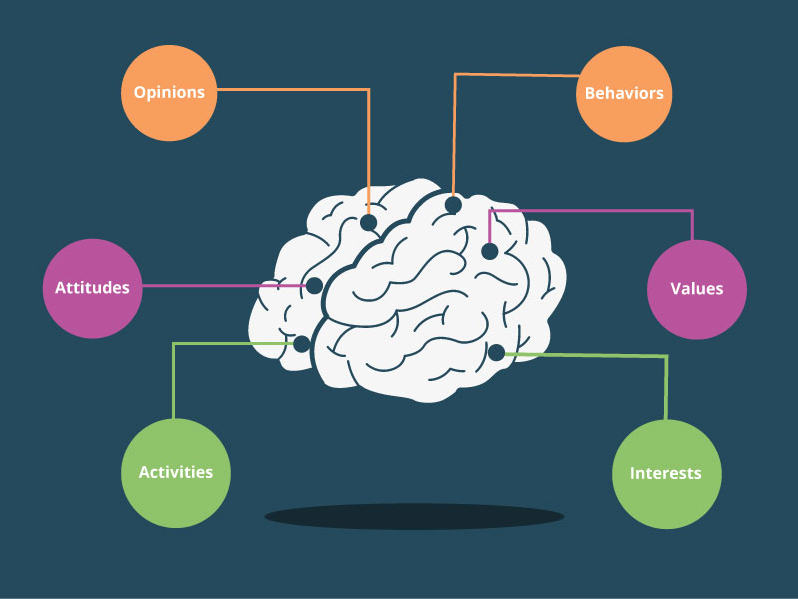
    Custom graphic displaying psychographic elements

    Looking at your buyer without understanding them as a whole is like ordering a hamburger without the toppings. Nobody wants a dry hamburger without cheese, bacon, tomatoes, pickles, or at least some sort of condiment. So why do some businesses only care that a buyer bought their product and not want to know why? This is where psychographics come into play. These provide insight on customers and why they do the things that they do.

    How Do Psychographics Complete A Buyer Persona?

    Psychographics are the toppings and the main flavor of your burger. If we are looking at it in terms of your customers, psychographics are the personality components that make your customers who they are as people.

    Psychographics help you dive further into a person’s feelings, thoughts, decisions, opinions, and attitudes. The whole idea behind psychographics is relating to your customers on a deeper level. It provides an opportunity for a business owner to truly understand who their customers are, what they like to do, who they’re friends with, what TV shows they love, or even what they dislike.

    Think about your closest friend or significant other and why you love and trust them. Is it because of what they do for you or is it because of how they make you feel? That feeling can be related to the psychographics of your friend or significant other. It shows you the heart and soul behind the person who is consistently doing nice things for you.

    Now let’s relate that to your business.

    Who do you think is more beneficial to your business: a one-time customer or a repeat customer? Obviously, repeat customers are more valuable because they drive your ROI and tell other people about your business. Their positive reviews help build a positive reputation that encourages other people to give you a try. But if you hadn’t truly connected with that first customer, they wouldn’t have vouched for you.

    As business owners, we need to understand that it’s more than just what a client can do for you, it’s about who they are as a person. Why do they trust you, come back to your business, and share their exciting news with you? It’s because you’ve built trust and spent time understanding who they are as a real person. You took the time to see them not just as a price tag but as a genuine hardworking and loyal person.

    You bought into who they are and in return, they bought into your business.

    How Do You Obtain Psychographic Information?

    It’s time to sit down and really dive deep into what is important to you about your customers.

    This is where you can gather your team and brainstorm. Maybe sit around and talk about some of their favorite customers. Have your team provide a memorable story, what they love about that customer, describe their relationship to the customer, and give personality details about who they are.

    After you’ve spent the afternoon bonding as a team and connecting over how great your customers are, it’s time to focus your efforts on making connections with future customers.

    So how do we do this?

    Simple, those customers that were spoken highly of can provide insight better than anyone else. Utilize this. Hold interviews with your customers where you can ask them all about how they feel about your company, what they like and dislike, and what keeps them coming back.

    Next, you can send out surveys to other customers via email asking them similar questions. As a business owner, you can go a step further by connecting with them on their social media accounts.

    Social media can be a useful resource for learning more about your customers. You can see which types of music they listen to, where they spend their free time, what their family life is like, and even their feelings on a plethora of topics.

    From here, you can enter all of this information into your own Customer Relationship Management (CRM) system. This will come in handy when you want to create look-a-likes for your Facebook Remarketing or Google Display Remarketing advertisements. Not only that, but it can provide concrete data that can pull similar interests that connect your customers to one another.

    So remember, a burger will always taste best fully dressed, and a buyer persona is better with a psychographic to support it. Not sure where to start creating your psychographics? From strategy to social media management, Search Influence is here to help. Get started by contacting us today.

    Images

    Tablet Payment

  • Does Pinterest Marketing Work for Tourism?

    In short—yes.

    Put yourself in the shoes of a tourist: you are sitting at home, gazing at your “Live, Love, Laugh” wall art, overflowing with wanderlust. You are itching to get out of your same-old-same-old routine. The idea strikes you—let’s get out of town! You enlist a travel buddy and the planning begins. But where do you go? You open up Pinterest for some ~travel inspo~. Finally, you and your pal pick a place to peruse. 

    Pinterest landing page

    You’ve always heard great things about *insert city,* but what do you actually do there? You simply must see all of the “must-sees,” but you also want the inside scoop from people who’ve actually been there—not TripAdvisor. You go back on Pinterest and start to plan your dream vacation.

    This might sound like a very specific example, but the fact of the matter is that Pinterest is growing as a platform for users to plan their travels. 25% of Pinterest activity relates to travel or tourism. With over 175 million users, this is a great space to immerse yourself in your audience’s planning process.

    Is Pinterest Effective for the Tourism Industry?

    Think about Pinterest as a mashup where search engine meets social media. Users search for specific topics, similar to how they would on Google, but the results are presented in a very visual manner. Users can then interact with those pins, as they would with the content on a different social platform, by repinning and sharing with followers. This searchable media is a highly effective format to promote something as visual as tourism. Through Pinterest, users are able to actually see (and plan) their dream vacation.

    Here are three tips to utilize Pinterest for tourism marketing:

    1. Create Timeless Pins

    Pinterest is different than other social platforms, like Facebook or Instagram, in that your content actually has a much longer lifespan. In fact, pins typically circulate for about 3 to 6 months. This means it is incredibly important to invest in content that is more “evergreen.” Make sure not to link to pages that may be temporary and try to incorporate content that is relevant year-round.  

    Does this mean you shouldn’t include seasonal pins? Not at all! Timely pins have their time and place; after all, people are planning trips year-round. However, you do not want all of your pins to be so timely that it limits their relevance. 

    2. Create Compelling Visuals

    It’s not rocket science that people are more likely to click on something that looks nice. Your pin’s photo takes up way more real estate on the results page than your pin’s title. But, a pretty picture isn’t always enough to get your pins the love they deserve. People don’t like wasting their time, and they’re less likely to click on a pin if they don’t know what it’s destination is. Overlay text on images tells the user what they can expect if they click through to your website. For instance, take this picture of New Orleans’ French Quarter. Yes—it’s pretty. But, where are you going if you click that pin? Having a title included is much more appealing because it takes out all of that guesswork. Including a defined purpose for the pin creates a better experience for the user, and can increase your click-through rate.

    Clarinet player playing live in the French QuarterSame photo of clarinet photo but spruced up with graphics for social media

    Don’t let the thought of creating a graphic scare you away from Pinterest. There are plenty of easy-to-use tools like Canva that make creating these images a breeze. And no—you don’t have to be an artist to make great pins. 

    3. Create SEO-Optimized Content

    I get it—we do SEO. This sounds like a plug. But, seriously, at the end of the day, Pinterest is a search engine, and having optimized pins that link to optimized content is important. You can create the most beautiful pin in the world, but if it isn’t optimized, it won’t get in front of the right people.  

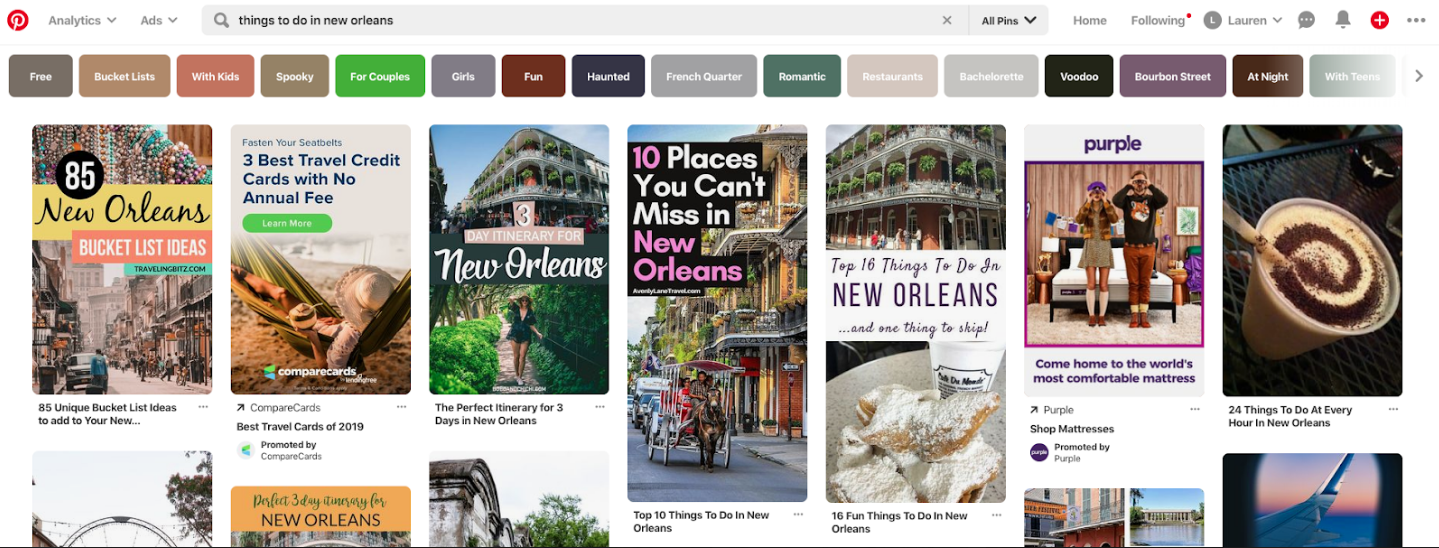
    Start by performing Pinterest keyword research. Type in a root term or phrase that you are trying to rank in, such as “things to do in NOLA.” From there, work through the guided search to see different ways people might be looking for this information. In this example, you can see that people might be searching for “things to do in New Orleans with kids” or “free things to do in New Orleans.”

    Screenshot of things to do in New Orleans search on Pinterest

    Once you define the keywords you’re trying to rank for, build your content around that. Make sure your pin’s title, description, and landing page are all optimized. You want to make your content compelling to users by making it readable for both humans and crawlers alike.

    Pinterest is a powerful platform and an important space to promote your tourism business. Even though it might seem like a large time investment on the front end, creating a Pinterest strategy will support your marketing efforts for months to come. Not sure where to start? Contact Search Influence for help developing a plan that is right for you.

    Images

    Pinterest

    Photo by Nathan Bingle on Unsplash


  • Influencers Take Part in Super Saturday at City Park

    Influencers emily borne and jenna mire holding up gardening tools while volunteering

    On July 6th, a group of Influencers took part in City Park’s Super Saturday. This is a community volunteer event that’s typically held on the first Saturday of the month. With the guidance of the volunteer coordinator, we ventured into the Couturie Forest to help re-mulch and clear a trail that had been blocked by a fallen tree.

    Building a Stronger Park

    We arrived at the volunteer center on Harrison Boulevard promptly at 9 a.m. Equipped with pitchforks and wheelbarrows, we got to work re-mulching one of the many trails in the Couturie Forest. The mulch used in the forest is actually made in the park. They recycle and break down broken tree limbs, utilizing any natural resources they can. Tyler, City Park’s volunteer coordinator efficiently organized the team into three groups that shoveled mulch, wheeled it to the trail, and dumped it. This was no easy feat, as this particular Saturday was close to breaking a historic temperature mark, tying the 1998 record of 99 degrees. All things considered, our team powered through and made a lot of headway on the trail in the three hours we volunteered.

    Our Partnership with City Park

    Approximately twice the size of Manhattan’s Central Park, City Park offers New Orleanians 1,300 acres of diverse greenery, recreational facilities, and outdoor fun. Historically, it has been maintained through self-generated funds and a small level of funding from the State.

    Earlier this year, we contributed to the success of the Support Parks and Recreation millage vote by running various digital advertising campaigns to spread awareness and building a temporary website that housed all of the information about the impact of the vote. Citizens of New Orleans voted on May 4, 2019, to decide if existing tax money should be reallocated fairly amongst all of the prominent parks and recreations organizations in the New Orleans (City Park, NORDC, Parks and Parkway, and Audubon). The vote was a success! For the first time in their 165-year history, City Park will receive city funding. Beginning in 2021, these parks and organizations will receive close to 2 million dollars annually that will contribute to infrastructure investment, security upgrades, forest management, stormwater management, and much more.

    Influencers working Super Saturday at City Park in New Orleans, LA

    In the coming months, we will also be helping to spread awareness about the Storyland Revitalization project. This new project will enhance existing attractions and also debut several new exhibits. Visit City Park’s website for more information about the revitalization of Storyland, which will reopen in Fall 2019.

    Our team was grateful for the opportunity to volunteer and give back to our city, and our client. Super Saturday is open to anyone who wants to volunteer and is of high school-aged or older. The events take place on the first Saturday of every month, with some exceptions. It’s a great way to meet people from all walks of life who share a common interest in the revitalization of the Park. Check out City Park’s Twitter, Facebook, or online calendar to confirm the date of this monthly volunteer event. Our team will be back at Super Saturday sometime soon.

    Search Influence is proud to help support local organizations and parks. To keep tabs on our team, follow us on Instagram.

  • Top Tier Free and Paid Social Scheduling Tools for Businesses

    With social media as the major port for business-to-customer (and customer-to-business) interactions, it’s more important now than ever for businesses to ensure their social pages and profiles are relevant, engaging, and most importantly… constantly updated. Inconsistent posting may lead to dedicated customers and followers hopping behind a more active business.

    Real Housewives of New Jersey Teresa Giudice saying tweet tweet tweet

    However, with running a business and all the daily to-dos that come with it, remembering to constantly post on Instagram, Twitter, Facebook, and LinkedIn—the Big 4—can be daunting. This is where social media scheduling tools come into play.

    A social scheduling tool is a one-stop-shop for scheduling posts on an array of social media platforms. But a good scheduling tool does more than that; allowing users to manage their social media presence as a whole, schedule posts in advance, and engage with customers. An even better tool will offer users unique features that are hard to find anywhere else.

    These social media savvy tools help save time and keep users organized so they can focus on wowing their customers in other ways.

    The Top Paid Platforms

    Sprout Social

    Sprout Social offers users a comprehensive social media management platform, meaning it allows you to post to social media, monitor your profile, and analyze social data gathered from follower-behavior and post-engagement. This tool hits the major social media platforms—Facebook, Instagram, Twitter and LinkedIn—plus Pinterest and Facebook Messenger.

    Sprout Social’s unique offering: It has customer relationship management (CRM) capability. So you can message and respond to customers on their respective platforms without leaving Sprout Social through their Smart Inbox feature.

    This tool is great for businesses with a team dedicated to running their social media, as it features filters that can turn a Facebook, Instagram, or Twitter message into a task and offers real-time updates of which team member is working on any specific task.

    All of this comes at a pretty hefty starting price of $99, making it one of the more expensive social media scheduling tools.

    PromoRepublic

    PromoRepublic allows users to post to several social media accounts all at once. Post to one or all of the Big 4 and then use this tool’s post-performance capability to learn how your content is doing while it’s in front of your customers.

    Fresh out of new and creative post ideas? Que PromoRepublic’s special feature! This tool offers users an idea library with over 6000 post templates. It also boasts an entire calendar dedicated to current trends, unique holidays (i.e. National Cat Month), history facts, sports events, and celebrity birthdays.

    PromoRepublic’s packages start at $9 a month.


    Apple laptop next to a notebook and a camera on a wooden surface


    CoSchedule

    CoSchedule is great for businesses that value hyper-organization, as this tool allows users to map out an entire social campaign in a timeline view. With drag and drop capabilities, CoSchedule makes scheduling for Twitter, Facebook, Instagram, and LinkedIn simple and quick.

    Use this tool’s Best Time Scheduling to schedule posts during peak traffic times for individual social platforms and create custom content promotion templates to reuse whenever new content is on the horizon.

    CoSchedule’s unique gift? It is way more than a social media scheduling tool. It works as a content organizer as well; it even has a WordPress plugin.

    This software’s starting price is $100 per month.

    The Top Free Platforms

    Buffer

    Buffer has something for teams of all sizes—whether you’re a business, an agency, or an individual.
    Users can create custom post templates for Facebook, Instagram, and Twitter or create fresh, new posts every time. It also gives a calendar view of all scheduled content.

    This interface has collaborative features, like the ability to assign specific social conversations to a specific person and to leave notes on particular conversations for later review. It even empowers teams to stay super organized with folders, keyboard shortcuts, and saved replies for FAQs.

    Aside from the future-publishing and analytical capabilities, Buffer allows users to see everything in one dashboard. This tool’s unique feature is that users can view scheduled content from all platforms on one screen. It also allows users to view Facebook and Instagram analytics on one screen.

    One user can manage three social accounts absolutely free.

    Hootsuite

    Not only is Hootsuite posting on the Big 4, but it’s also allowing businesses to reach customers on YouTube, Pinterest, and many more. This tool’s wide range of social media compatibility may be connected with a wide range of users. Millions of people use Hootsuite, including a slew of Fortune 1000 companies.


    A woman looking at graphs on her desk top computer


    It has all the bells and whistles of other social media scheduling tools, but it really shines when it comes to analytics. Hootsuite pulls from over 200 factors to determine how well your content is performing.

    While Hootsuite offers paid plans, users can start slow with the free plan, which allows one user to manage three social media profiles.

    Later

    Much like the Internet, Later favors and focuses on visuals. While it’s geared towards Instagram, this tool allows post scheduling for other photo-loving platforms like Facebook, Twitter, and Pinterest as well.

    Users can schedule posts with photos or videos to compatible platforms while simultaneously altering each caption based on the platform it’s headed. Later also makes it easy to post during business-specific high engagement times by monitoring when a business’s followers are online.

    Later’s unique trick? It has a visual drag and drop feature to easily schedule image-posts.

    With so many tools to choose from, you may need some help deciding which platform is best for your business. Search Influence can get you started with a strategy consultation. Contact our team today.

    Images