Blog

  • Search Influence Moves Headquarters to Central City, New Orleans

    Search Influence Moves Headquarters to Central City, New Orleans

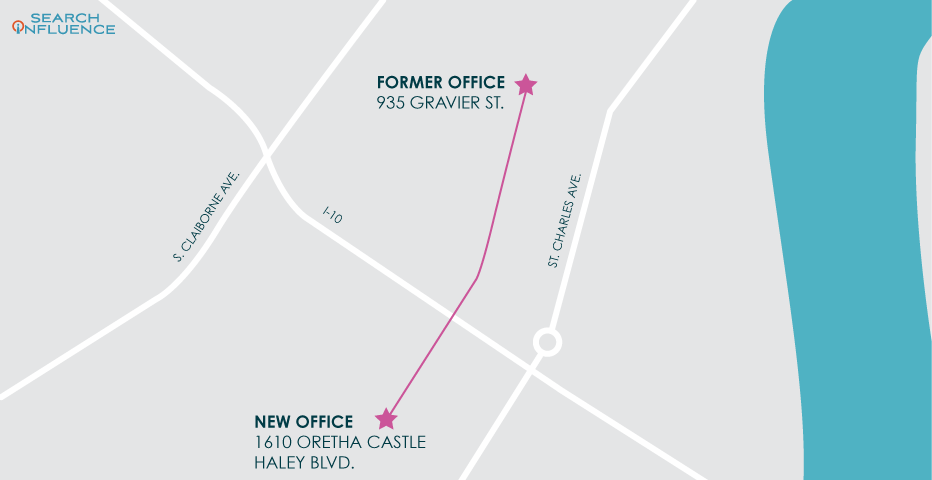
    We moved on UP-town! After 5 years in our downtown headquarters on Gravier Street, Search Influence has moved our world headquarters just over a mile uptown, where we’ve taken over a 3-story building on Oretha Castle Haley Blvd. We’ll be joining the Youth Empowerment Project (YEP), Café Reconcile, Southern Food & Beverage Museum (SoFAB), and the New Orleans Jazz Market in this recently revitalized area of Central City in New Orleans.

    The historic 19th-century building, made up of two townhouses, was once two “Main Street” style storefronts—Lane’s Shoe Store and Mill End Remnants. After many years of exposure to the elements, the building went through a significant rehabilitation in the last decade and was awarded a 2013 Merit Award for Adaptive Reuse by American Institute of Architects (AIA) New Orleans.

    1608-1610 dryades 1962 sept 27

    1610 och blvd present day

    Building history and historical photos courtesy CCWIV Architecture. Present-day photos courtesy of Will Crocker. View the full gallery of historic and present-day images on CCWIV Architecture’s website.

    Our new location is just five blocks outside of the Central Business District, so we’re still conveniently located to our downtown clients while making it even more convenient for all our clients and partners to visit our office, thanks to the plethora of free parking near Oretha Castle Haley Blvd.

    The new building offers a large courtyard and multiple balconies, where we plan to have outdoor collaboration sessions and space for individual work. The ease of access to the outdoors will be cherished with the beautiful fall weather coming up in New Orleans.

    “I’m glad Search Influence held out for a space that fits our company culture and workplace dynamics. Exploring our new location will be fun, but I’m most excited about the opportunity to work outside!” says Emily Breaux, Digital Copy Editor.

    Courtyard of present day 1610 och blvd

    We’ve been very agile in the way we approach our office space throughout our 14-year history. As our business changed over the years and our team size and dynamics have changed, so too did our office needs. The added bonus is that we have the chance to explore the offerings (in particular the restaurants!) of so many different neighborhoods of our city.

    Planting new roots in this part of town aligns with our core purpose: We Optimize Potential. We are investing in this developing area in hopes that more businesses will continue to be attracted to this part of town. This is much like our move to Oak Street in 2011 and to Gravier Street in 2015. Each location was early in their revitalization when we made them our home. Both areas are now bustling with new and now well-established businesses that our team was there to support in the early days.

    We look forward to welcoming our clients, prospects, and partners to our new space!

    Search Influence
    1610 Oretha Castle Haley Blvd.
    New Orleans, LA 70113

    Images:
    New office building

  • 10/10 Would Recommend: Leveraging Reviews and Testimonials in the Digital Age

    This post was updated by Anita Shah. It was originally written by a Search Influence alum on January 12th, 2016.

    Customer review comment boxes

    Before you book a room at a hotel or make a reservation at a new restaurant, do you read the online reviews? According to a study conducted by BrightLocal, “86% of consumers read reviews for local businesses (including 95% of people aged 18-34).” But don’t worry, this statistic is not limited just to businesses like restaurants and hotels; these numbers apply to businesses across industries.

    How You Can Use Feedback for Brand Awareness

    Reviews and testimonials have traditionally provided insights into how a business can better serve its customers. With the evolution of digital marketing, the role of reviews and testimonials has also evolved. Feedback about customer experiences is now critical for gaining new clients. With so many consumers turning to the internet before opening their wallets, reviews and testimonials are user-generated content that drives consumer decisions. A review and testimonial webpage showcases real customer experiences and creates a new, powerful platform for interaction between businesses and customers.

    Having a regularly updated review or testimonial page on a website is a great way to communicate the quality of your services and to get the individuality of your business across to potential customers. Authentic reviews throughout social media and review sites like Yelp or BBB will also promote your brand. In the digital age, consumer interaction via these platforms is an affordable and necessary method of gaining new leads.

    How Reviews and Testimonials Impact SEO

    SEO rankings are not just based on what you have to say about your business. As Google continually alters its algorithm for increased transparency, consumer content—or what other people have to say about your company—is impacting SEO.

    In fact, the 2018 Local Search Ranking Factors study by Moz states review signals are the third most important maps pack ranking factor. Some other examples of review signals include the following:

    • Review quantity
    • Review velocity
    • Review diversity

    Keyword-rich onsite content is one of Google’s most important ranking factors when it comes to organic search. Customer reviews are likely packed with those high-yield keywords for which you want to be ranking. Utilizing these reviews on your website allows you to put customers to work for you, so you can secretly shape your SEO structure without lifting a finger.

    The Importance of Authenticity

    Remember that reviews and testimonials are real-life recommendations. There may be some negative ones, and that’s okay. Econsultancy reports that 68% of consumers actually trust online reviews more when they can see a mixture of both positive and negative feedback. As long as the negative reviews make up a minority of the input, a business should expect beneficial outcomes.

    Since a review and testimonial page should be a space that helps reduce the risk of duplicate content, a quality review would not be a simple, bland statement. Comments such as “Great service!” or “Quick response time” may not help with an SEO campaign. These reviews also fail to highlight what makes your business unique, superior, and reliable. An effective review or testimonial does not necessarily have to be lengthy, but it should showcase what makes your business stand apart from the competition. Particularly good reviews can be placed in a spot of prominence on a website or even repurposed as a social media post.

    How to Garner Positive, Effective Reviews

    The idea of positive reviews is great, but what about those inevitable few detractors? To minimize negative input, there are three things to consider when asking for a review. You must ask for the review at the right time, with the right messaging, and through the right platform.

    If that sounds like a lot to think about, then let Search Influence take care of it for you. Our specialists can help put you a click ahead of the competition. Reach out today.

    Images:

    Comment Boxes
    Cartoon Customer

  • Drive Conversions With Instagram Shopping Product Tagging

    Ever have one of those “OMG I need it” moments when scrolling Instagram? What if I told you your customers can go from “Oh my God” to “It’s mine” in just a few taps? Instagram is making it even easier for you to give potential customers seamless shopping experiences with Instagram Shopping’s product tags. As all digital marketers know, it’s easier to convert shoppers if there are fewer steps between “I want it” and “It’s mine.”

    Product tagging makes it easier for users to view your products, and it also helps them get to your site without having to put ad spend behind the post to get that “Shop Now” CTA button or using the dreaded “Link in bio.” In fact, product tagging cannot be used on ads, so this can really help beef up your organic posts.

    See It, Like It, Want It, Tap It

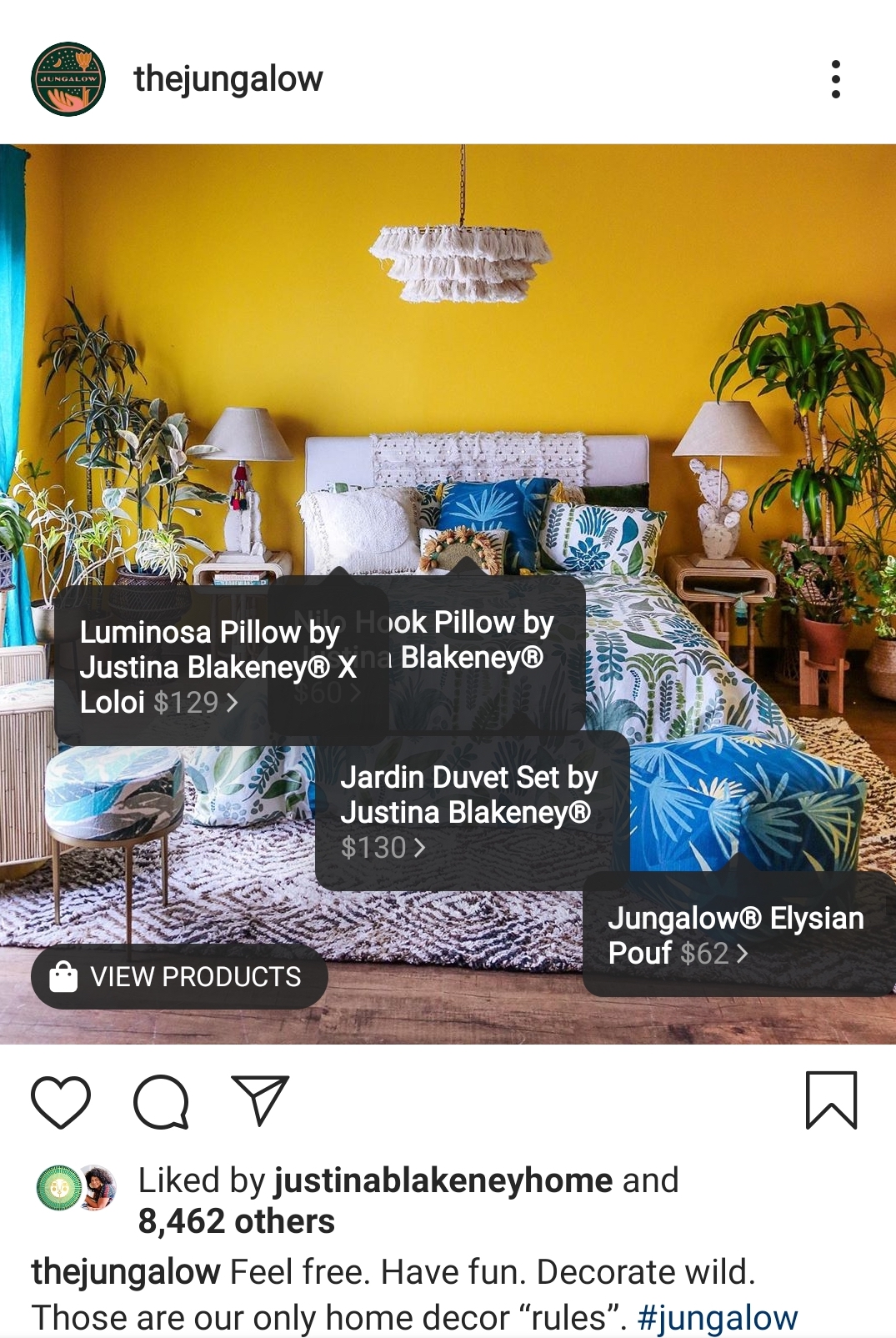
    After setting up your mobile storefront, any post can become shoppable.

    The Jungalow example Instagram post showing tagging features

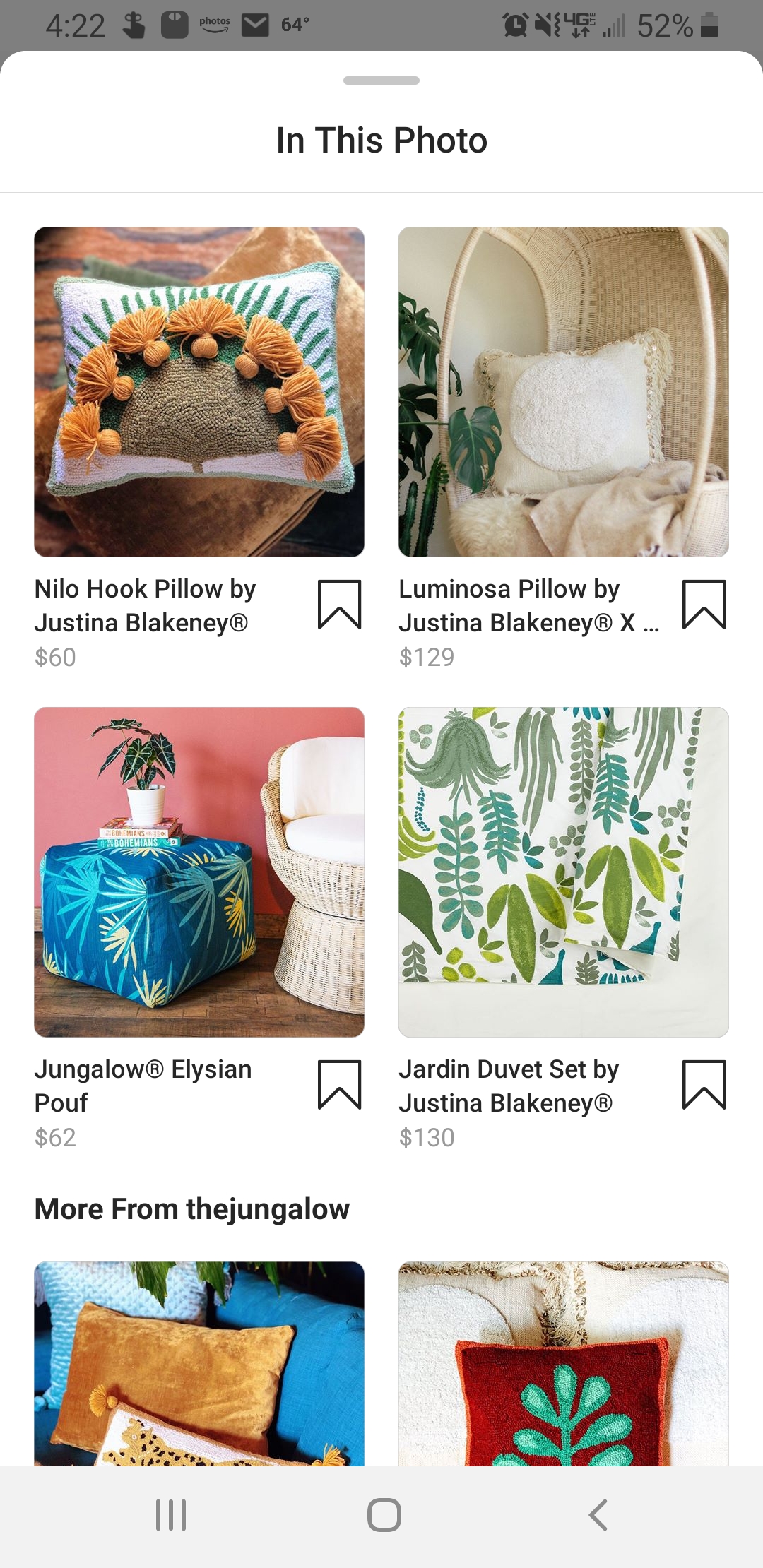
    Once a user taps to see your products, they’ll get a product image, a description, and even related items in your store.

    The Jungalow products show in the Instagram shopping platform

    Users can even save items to their Wish List—which is a private collection of saved products—so they can come back later to make a purchase.

    And though it’s still in beta and only available to select brands, Instagram Checkout will one day allow users to go from discovery to purchase without leaving the app.

    Drive Discovery

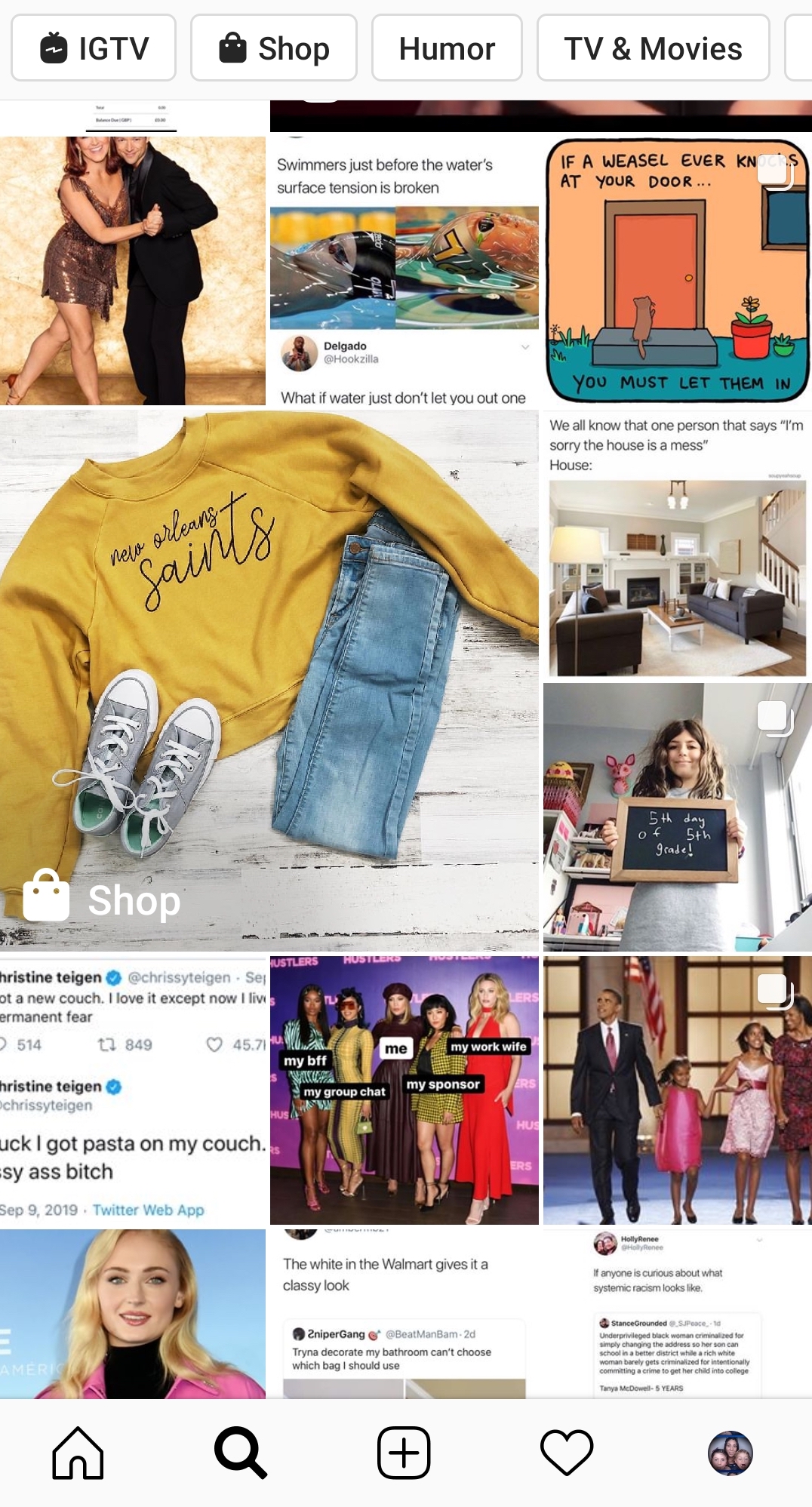
    One of the greatest benefits to using product tagging is that your posts can show up in the Discovery feed for users who like pages, businesses, or content that is similar to yours.

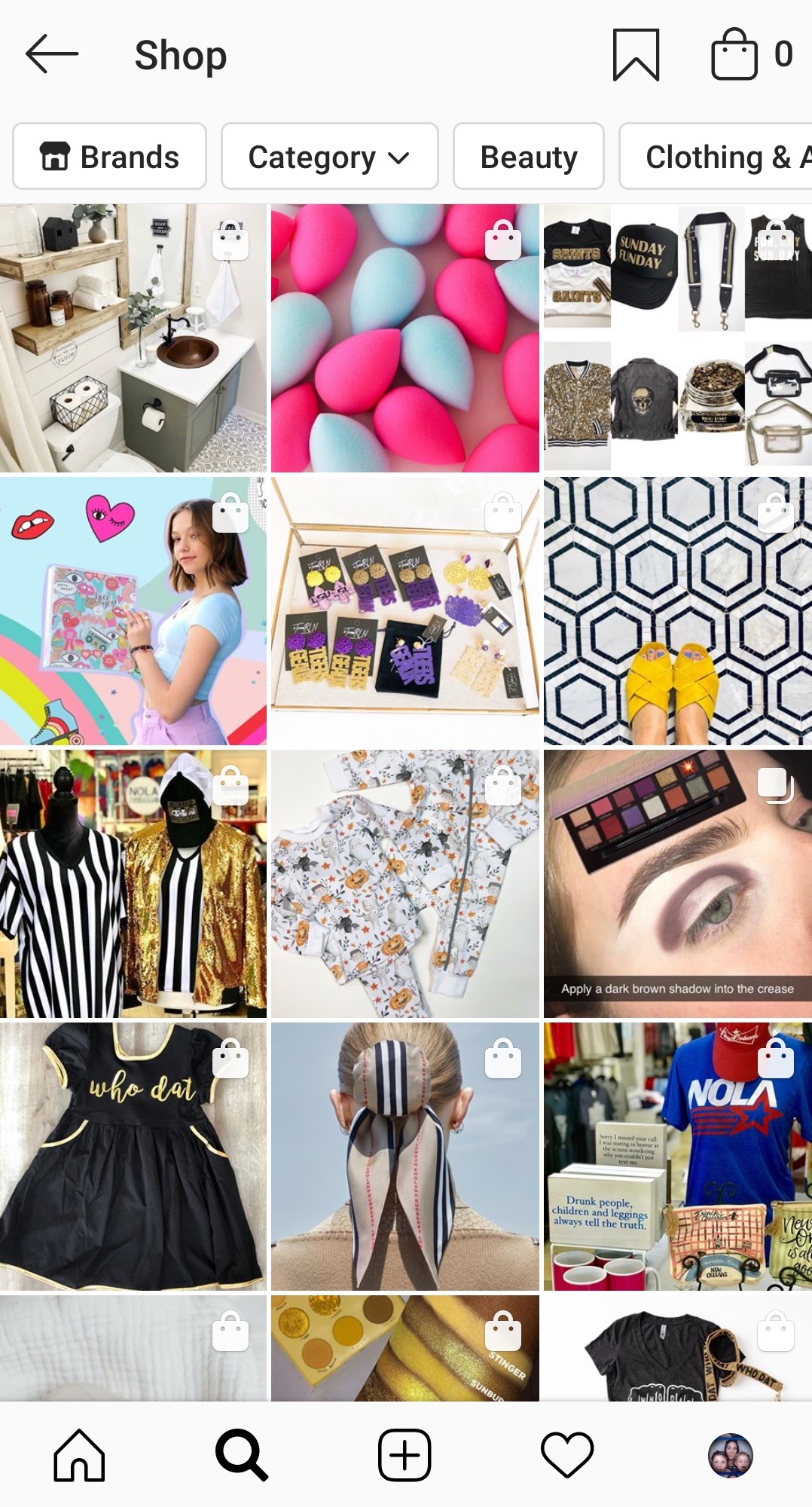
    Example of the Instagram discovery feed for products

    Users can also filter shopping results by category or by brand. This means that you could be reaching people who are actively looking for the type of product you offer.

    Instagram shopping page found from the discover feed

    But even when users aren’t necessarily looking to shop, these shopping posts blend seamlessly with the rest of the feed, giving you a chance to showcase your products “in the wild.” This is huge in the fight against ad fatigue and ad blindness. As most Instagram users (actually most Internet users) know, we end up tuning out those ads after a while and just keep on scrolling.

    How To Set Up A Mobile Storefront

    You might be asking, “How do I tag my products on Instagram?” Unfortunately, you can’t just set up a profile and go. There are a few steps you need to take before you can start using Instagram Shopping. First, you need to make sure you are eligible.

    1. You Have to Be in a Supported Market

    See the complete list of available markets here. There are several eligible countries.

    2. You Need to Sell Physical Goods

    Services, downloads, and subscriptions to digital services are not supported at this time.

    3. You Can’t Sell Prohibited Items

    Tobacco, supplements, weapons, animals, alcohol, and “adult products,” to name a few, are prohibited. If you think your product might be in a gray area, check the full list here.

    4. You Need an Instagram Business Account and Facebook Business Page

    Your Instagram Business Account must be connected to a Facebook Business Page.

    5. Connect to a Facebook Catalog

    This is going to need to be created and managed either on Facebook using Business Manager or Catalog Manager. You can also manage your catalog through BigCommerce or Shopify platforms.

    Once you have all the pieces in place and make sure you comply with the policies, you’ll have to submit your account for review. In your profile, go to Settings > Business > Shopping on Instagram. Follow all the steps, and in a few days, you should be good to go and ready to tag.

    Tips For Your Shopping Posts

    Now you’re ready to get to tagging. This is the easy part. Any image or video you would normally post to your Instagram Feed or Stories can now be tagged.

    • Get creative: This is your chance to move beyond boring still images of products against a white backdrop. Show us your fashions on real people out in the world. Let us get a peek behind the curtain to your factory floor or your drawing board. How is your product made? How is it used? The sky’s the limit.
    • Stay true to your brand: You want your posts to represent the overall image of your company.
    • Be visually compelling: Not only do you need to stand out in the Feed or on Stories, but you also want to stand out on the Discover Feed. Use bold colors and patterns; beautiful scenery or backdrops; and interesting angles or crops. You need to stop those thumbs from zooming by.
    • Showcase your whole collection: You can tag up to 5 products in a single image or video and up to 20 products in a post with multiple images.
    • Plan your tagged posts: Just because you can turn all posts shoppable doesn’t mean you should. Users might feel bombarded if suddenly you’re posting all your products at once. Use a scheduler to plan out your creative.
    • Feature your customers: When users tag you in images featuring their products, repost them with tags!

    If managing your company’s presence on social media is taking up too much of your time, Search Influence can help. We have years of experience using social media campaigns to drive more customers to businesses. Learn more about how we can help grow your business by contacting one of our digital marketing strategists at (504) 208-3900.

    Images

    Insta-prism

  • Map Spam, Review Stars and Google Winning: Learnings from Local U Advanced 2019

    Map Spam, Review Stars and Google Winning: Learnings from Local U Advanced 2019

    Local U Advanced, in Denver on September 19, 2019, was a great event. It was the biggest Local U Advanced yet and jam-packed with great learnings for the assembled marketers.

    Local U has a few different formats for conferences. There are industry-specific conferences on demand, locally focused SMB conferences under the Local U banner and the flagship, Local U Advanced where the Local U faculty share advanced knowledge with in-house and agency marketers.

    Mike , Joy Hawkins and D'Ron at Local U Advanced 2019 confrence

    I would be remiss if I didn’t start this post with the biggest bombshell of the day:

    Sterling Sky is buying Local U.

    For those that don’t know, Local U is a collaborative started around a decade ago.

    At formation, the ownership group included Mike Blumenthal, David Mihm, Mary Bowling, Ed Reese, Matt McGee, Aaron Weiche, Mike Ramsey, and myself (Will Scott). In the time since, we’ve had a number of guest faculty and a good number of steady contributors, including Joel Headley, Joy Hawkins, Darren Shaw, Cindy Krum, Carrie Hill, and Greg Gifford.

    With personal priorities and conflicts, the full-time faculty (a.k.a. owners) have had varying levels of commitment but have always brought knowledge from their respective professional areas.

    Special recognition is due to Carrie Hill for her more recent role as chief cat herder.

    There was too much knowledge dropped to share it all, but I’ll share a few of the takeaways I found most actionable.

    We Have Been Wrong All This Time about < Title > Length

    Joel Headley, a former Googler, now works with PatientPop, an online marketing platform for physicians. At PatientPop, Joel has access to thousands of websites on which he can test theories about ranking.

    Let’s stipulate that the HTML title tag is one of the most important pieces of text on any web page. Feel free to disagree, but you’re wrong. For the longest time, SEOs have believed that to include any more text than is displayed in Google’s blue links was redundant and potentially harmful to ranking.

    Through his testing, Joel shows unequivocally that this thinking is incorrect.
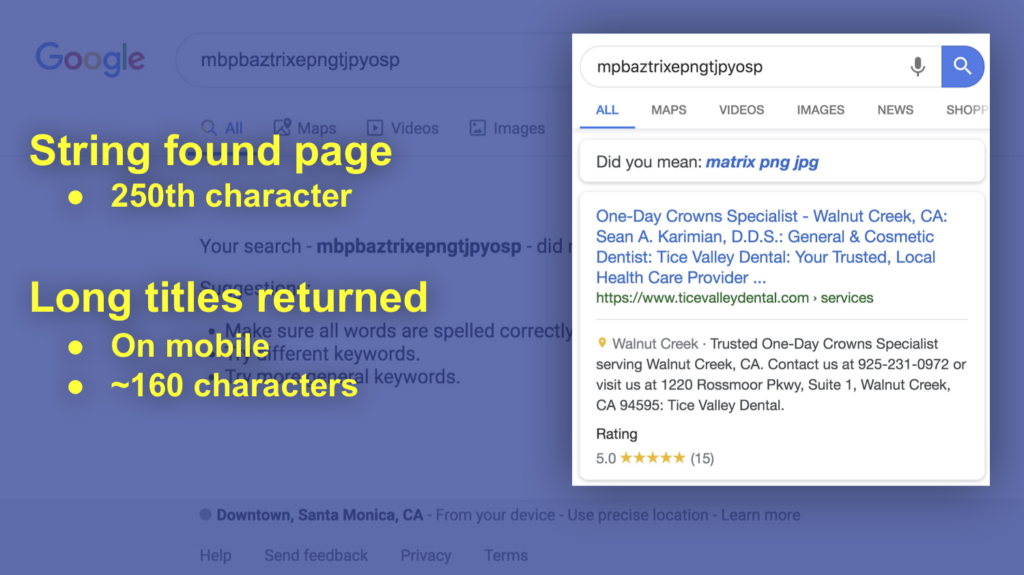
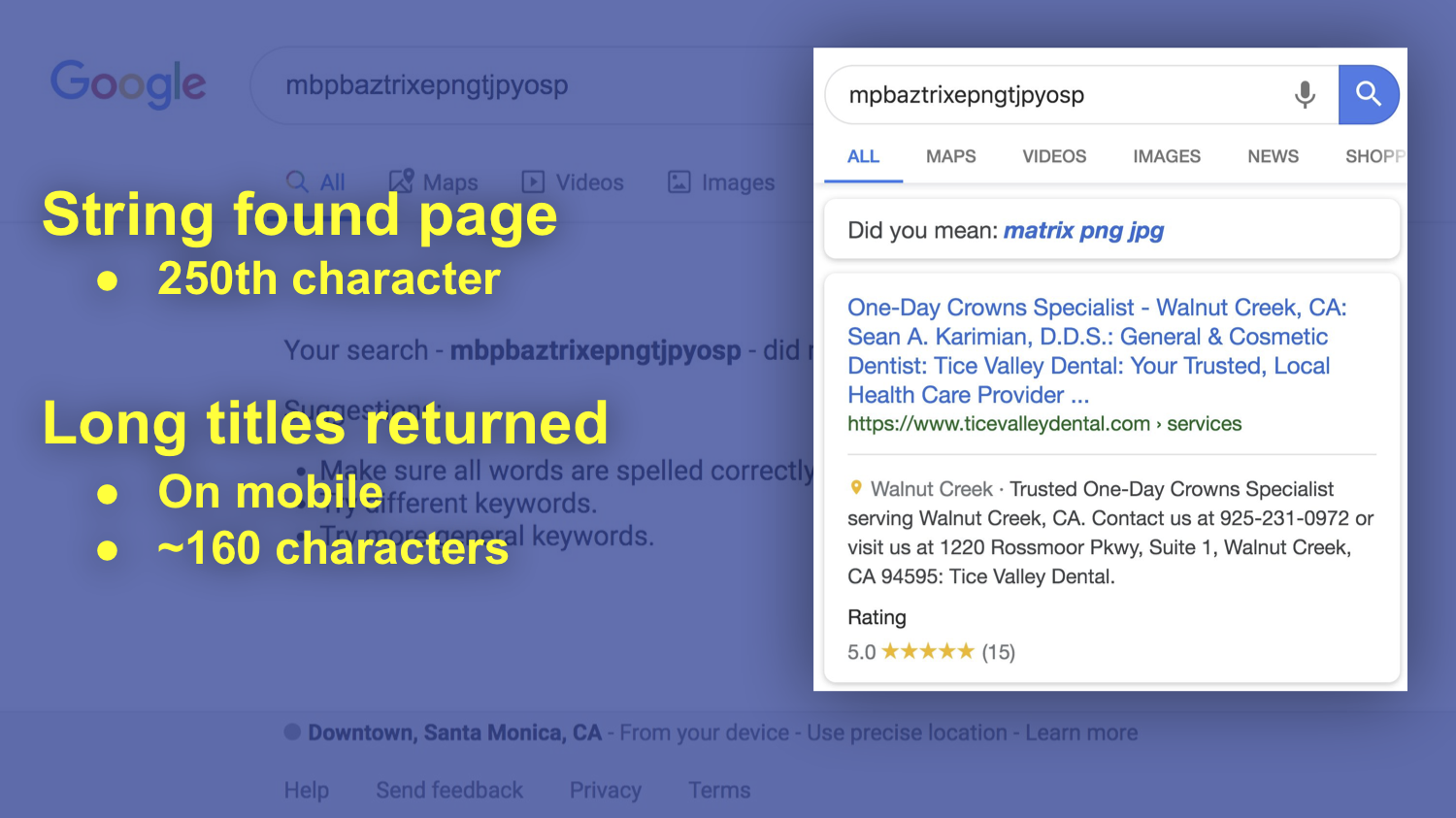
    Google search result showing high character count titles

    In his presentation, Joel demonstrates that it is absolutely possible to appear in searches for terms that are not displayed in Google’s desktop SERP (search engine results page). Additionally, and perhaps more interesting in the coming “mobile first” world, Joel shows us that including more information can be extremely helpful in mobile where more characters from the title tag are shown.

    Why does the mobile thing matter? There is less real estate available on screen, so any additional space you can grab increases your prominence.

    Google Is Eating Yelp’s Lunch (and Dinner and … ) in Review Volume

    Mike’s presentation showed us that our wish is finally coming true. Yelp is becoming irrelevant.
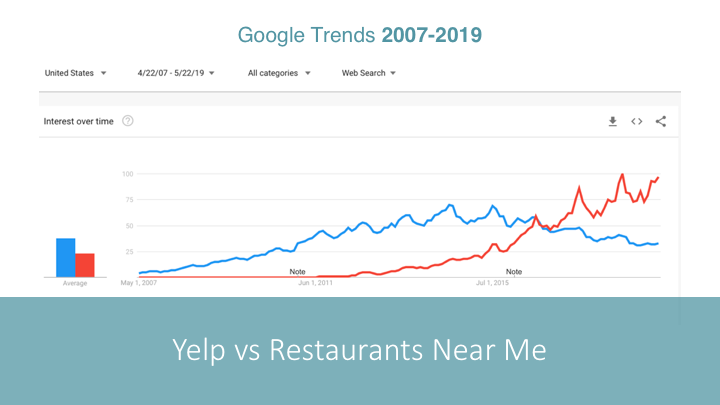
    Google Trends chart showing Yelp vs. Restaurants Near Me

    Given Yelp’s historical reputation with small businesses I’m sure this will be well received. Yes, Google is often too big to care, but at least they’re not perceived as predatory and capricious in their application of their own rules. Mike shares in his presentation a number of interesting facts about reviews then and now:

    • Consumer trust in reviews is leveling off over the last few years.
    • After increasing from 2014-17, the number of people who leave reviews appears to be leveling off as well.
    • Consumers don’t believe in perfection. A 5 star business is less trusted.
    • The magic number appears to be 4 – 4.5 stars for highest trust (and revenue).
    • There are a lot fewer review sites being used today.
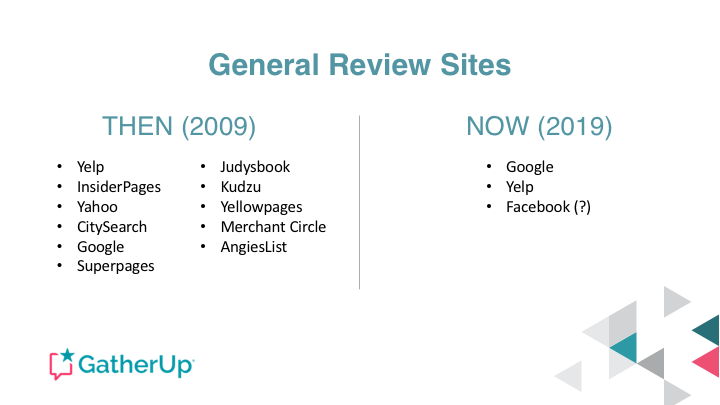
    List of General Review sites 2009 vs. 2019

    Yelp has historically had the greatest depth in restaurants and hospitality. Even in this area of historical strength, it appears Google is not just winning but crushing Yelp.
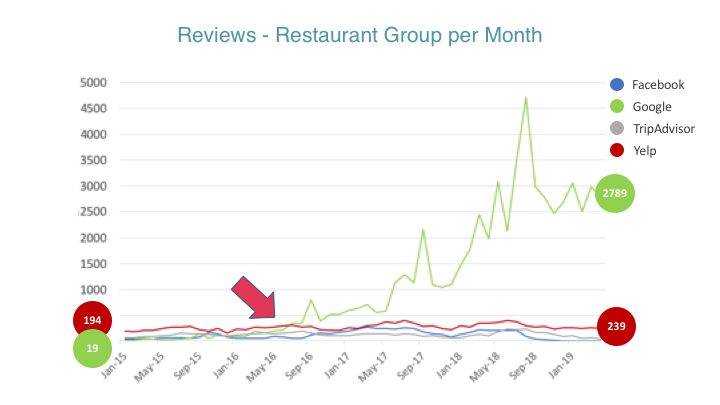
    Growth of Reviews over time chart

    Mike recently wrote about Yelp’s real-world impact on the GatherUp blog.

    You Probably Aren’t Taking Full Advantage of GMB (Google My Business)

    David presents some pretty amazing data. The team at ThriveHive created a GMB grader that provides them with great insight into a variety of businesses and their adoption of GMB services.

    David presents so much data it’s hard to pull highlights, but I’ll try.

    It appears that Q&A is not getting significant traction with business managers.
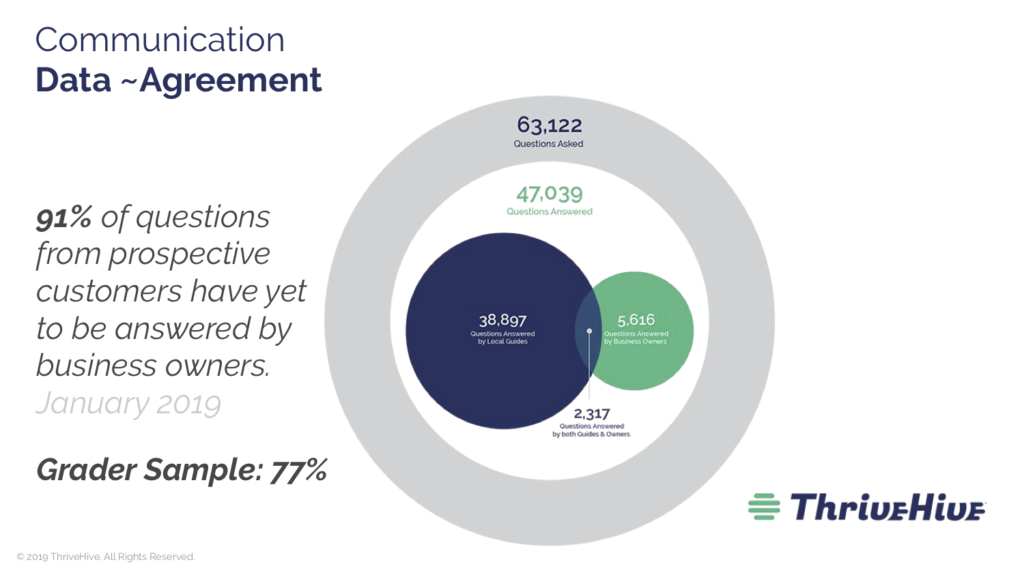
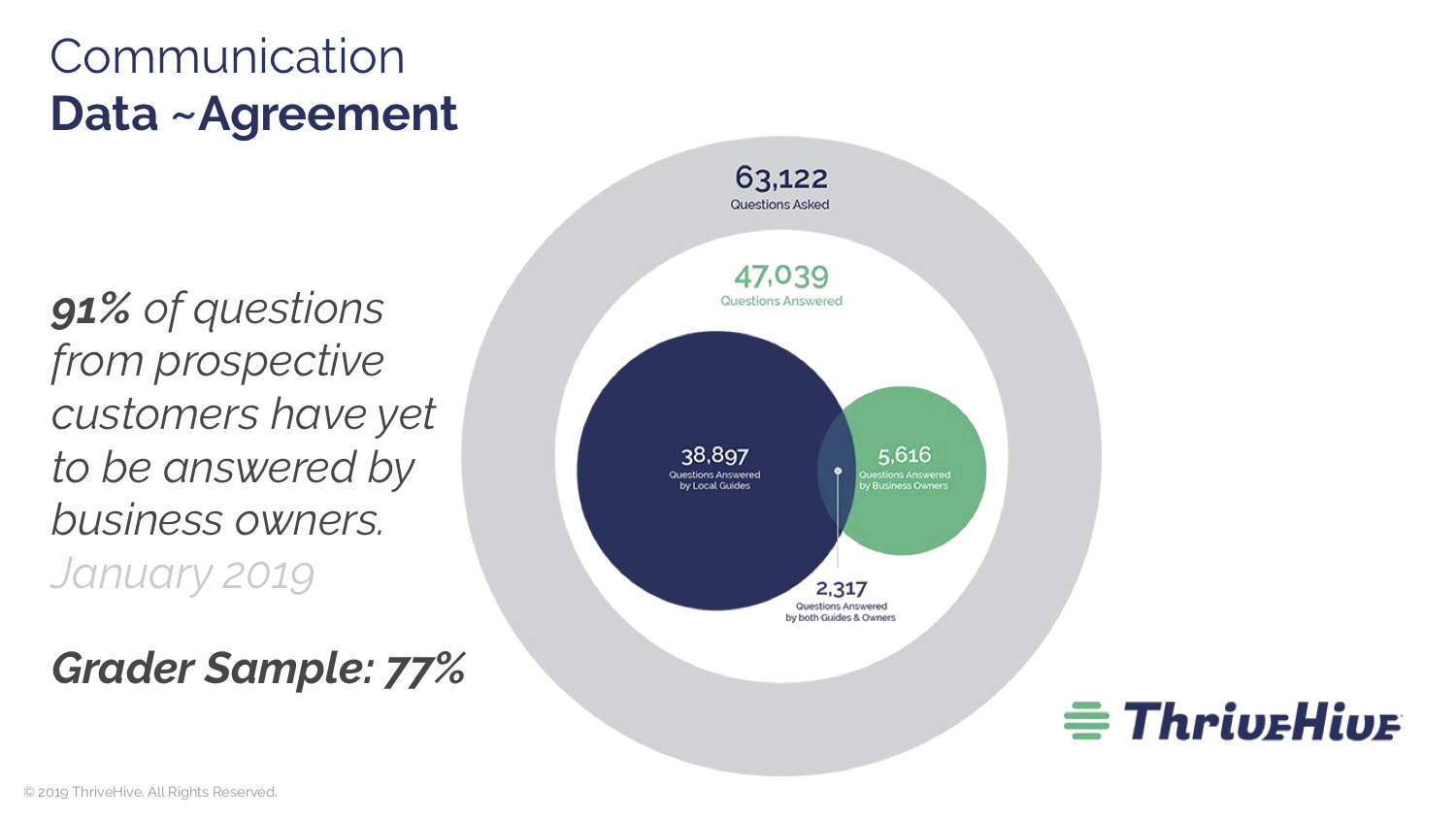
    Chart of percentage of unanswered questions from prospective customers to business owners

    As you can see, 91% of questions are going unanswered. Imagine if the proprietor of a business you were standing in just ignored your questions. It is absolutely critical for businesses to discover and engage with this feature.

    A great strategy that’s often talked about is seeding your Q&A. As a business manager, if you know there are common customer questions, you really ought to take advantage of your knowledge and have some friendly users ask a few of them so that you can provide an answer.

    There is a bunch of junk in Q&A from folks who want to answer but can’t quite add value.

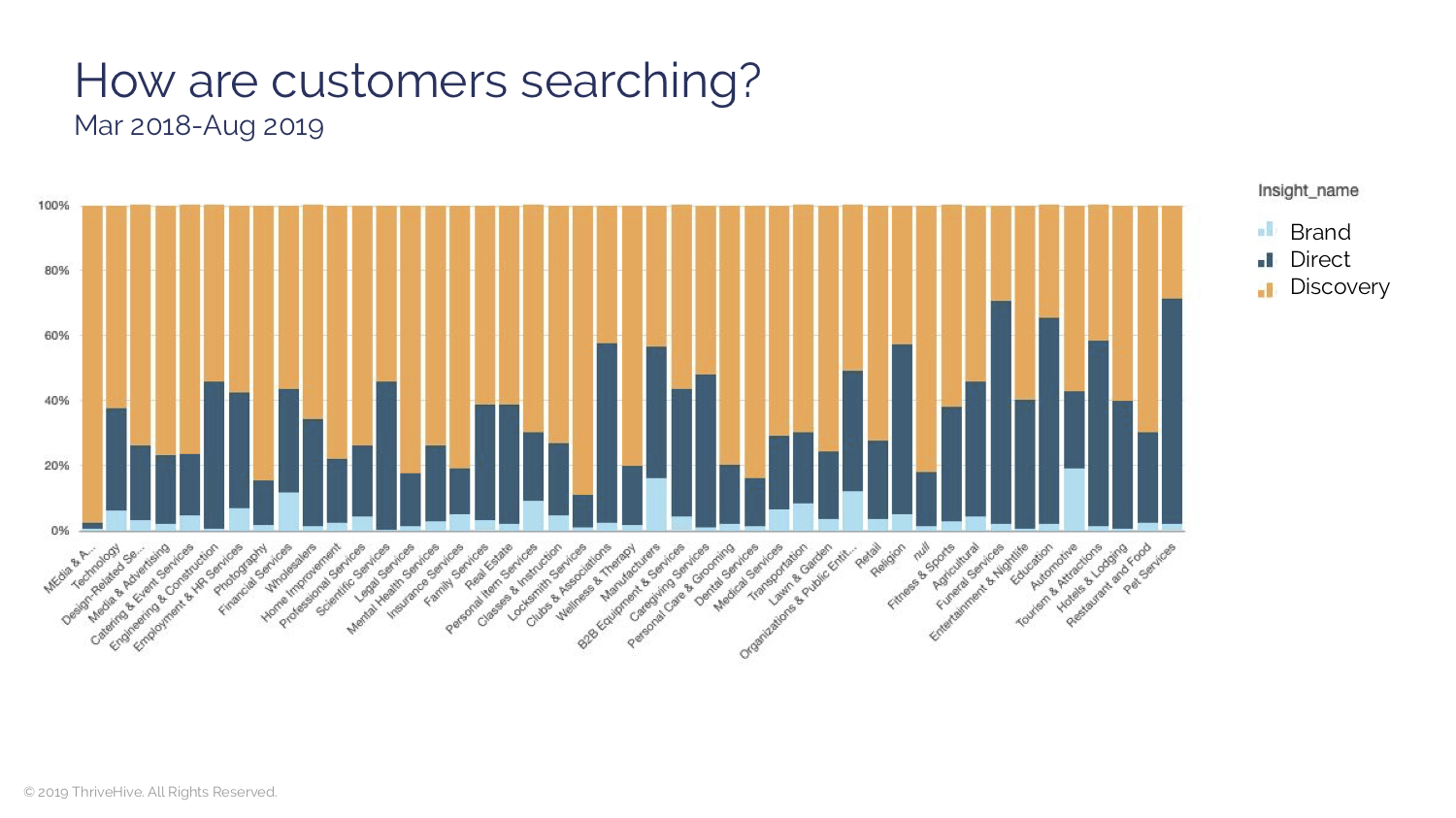
    David’s data also shows us that for many of the searches where GMB data is prominent, the searcher doesn’t necessarily have a business in mind. In other words, GMB is where discover searches are happening.
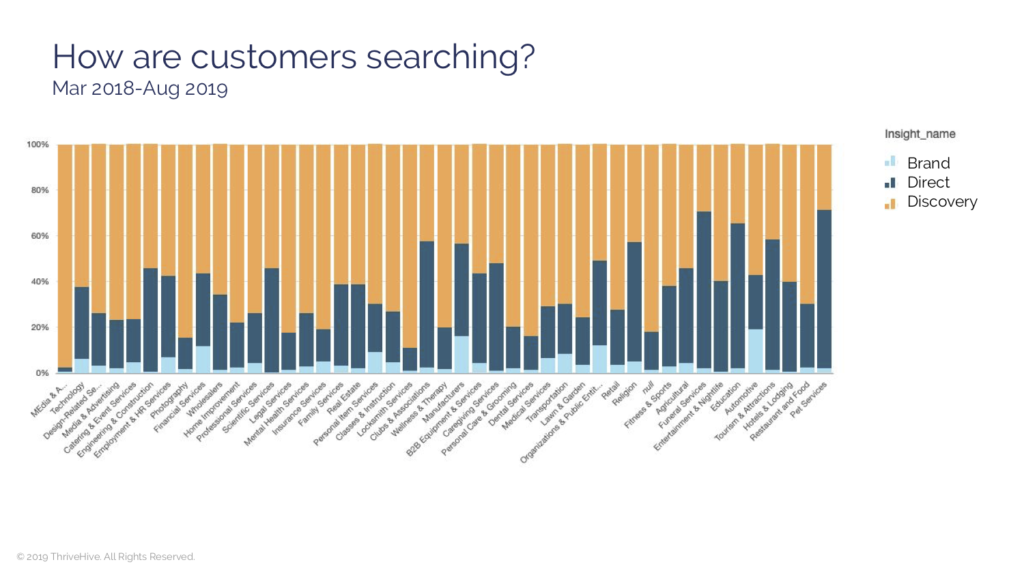
    how are customers searching chart

    And finally, reinforcing the importance of GMB as discovery search, David shares data from Rand Fishkin’s SparkToro which demonstrates the scarily high number of no-click searches. If searches are getting their final answer from the Google SERP it is critical that data reflects your business accurately.
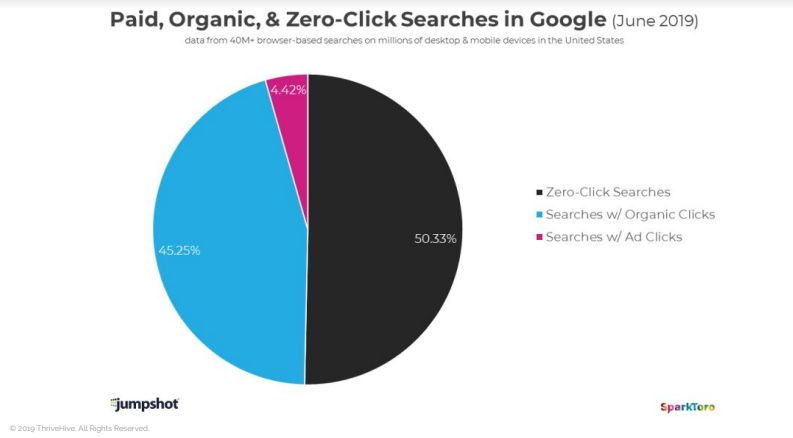
    paid organic zero click google search pie chart

    It’s time, folks. No more hoping it’s just a fad, we’ll need to integrate GMB into our marketing plans.

    Yes, Reviews Schema Is Dead, but It Probably Doesn’t Matter

    Marketers get really excited over small advantages—incremental gains. And historically, the data shows that those schema driven review stars in the SERPs do drive a higher click-through-rate.

    But guess what. They’re gone. Say goodbye. Will they come back? Who knows. If Google determines that users are suffering without them, perhaps. But, given they take attention away from the Google owned features, they’re probably not coming back.

    Mike B. says it best. If you want to have great reviews, don’t suck. Sucking is not a marketing issue. It’s an operations issue.

    Aaron points out that the best reason for making it easier for clients to give you reviews is to hear from them. If you are only asking for reviews to get five stars, you’re doing it wrong.

    Listening is Greater Than Reviews grandma meme

    And, in regard to Schema, they’re the sprinkles on the donut. They’re a perk at best and perhaps even a distraction from what really matters—hearing the voice of your customers.

    Donut with sprinkles and pink icing

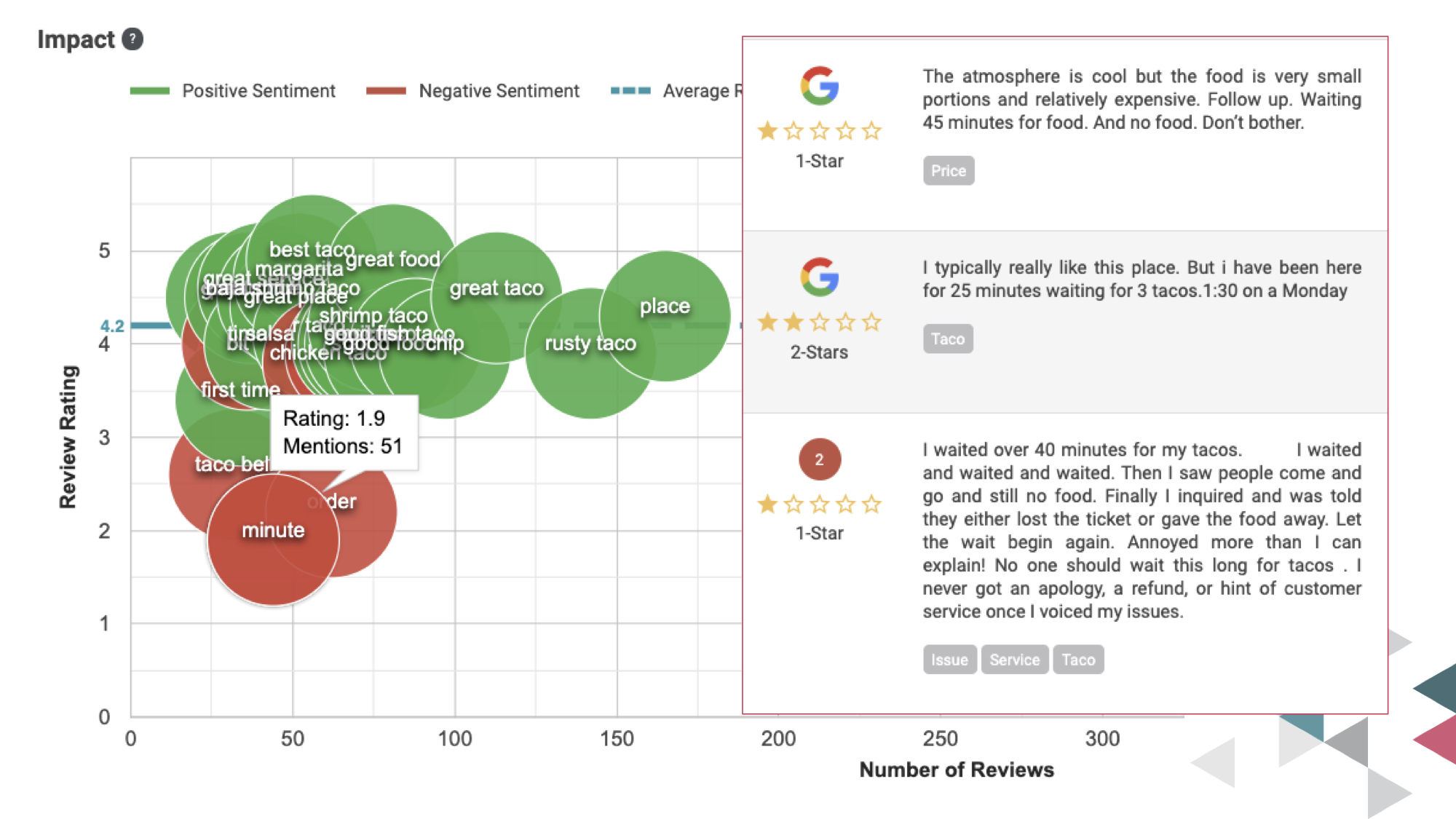
    In line with hearing the voice of your customers, GatherUp has recently added a feature that allows you to see the words used alongside sentiment analysis. So you can view the difference between the words happy and unhappy clients use.

    It’s a feature that’s early in its development, but you can see how it enables a bunch of good stuff. You get to know your customer even better, and you have an opportunity to sculpt the way you talk about your product. What if your team, your marketing, and everything else only used words that were associated with happy customers?
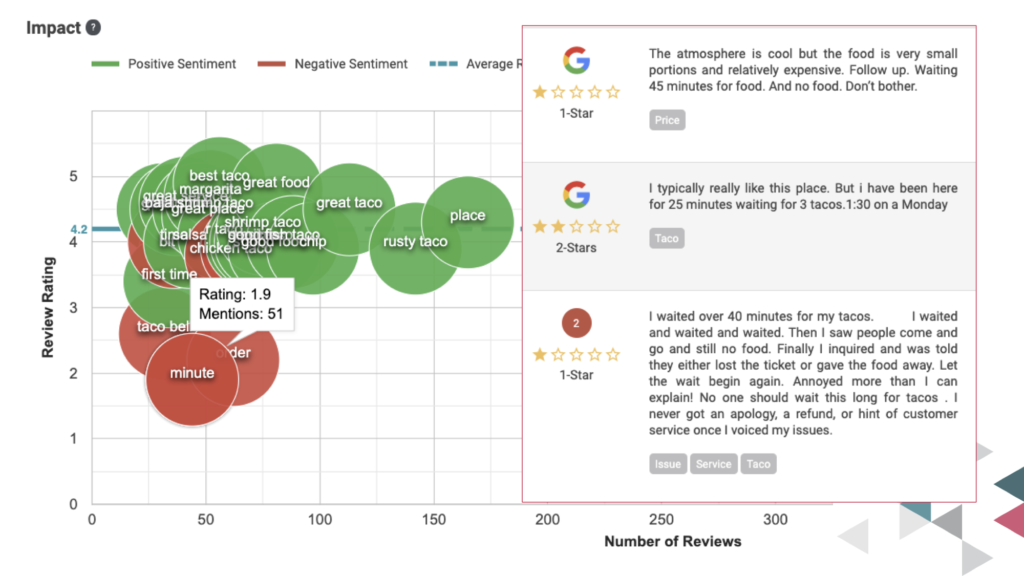
    GatherUp Sentiment Analysis chart

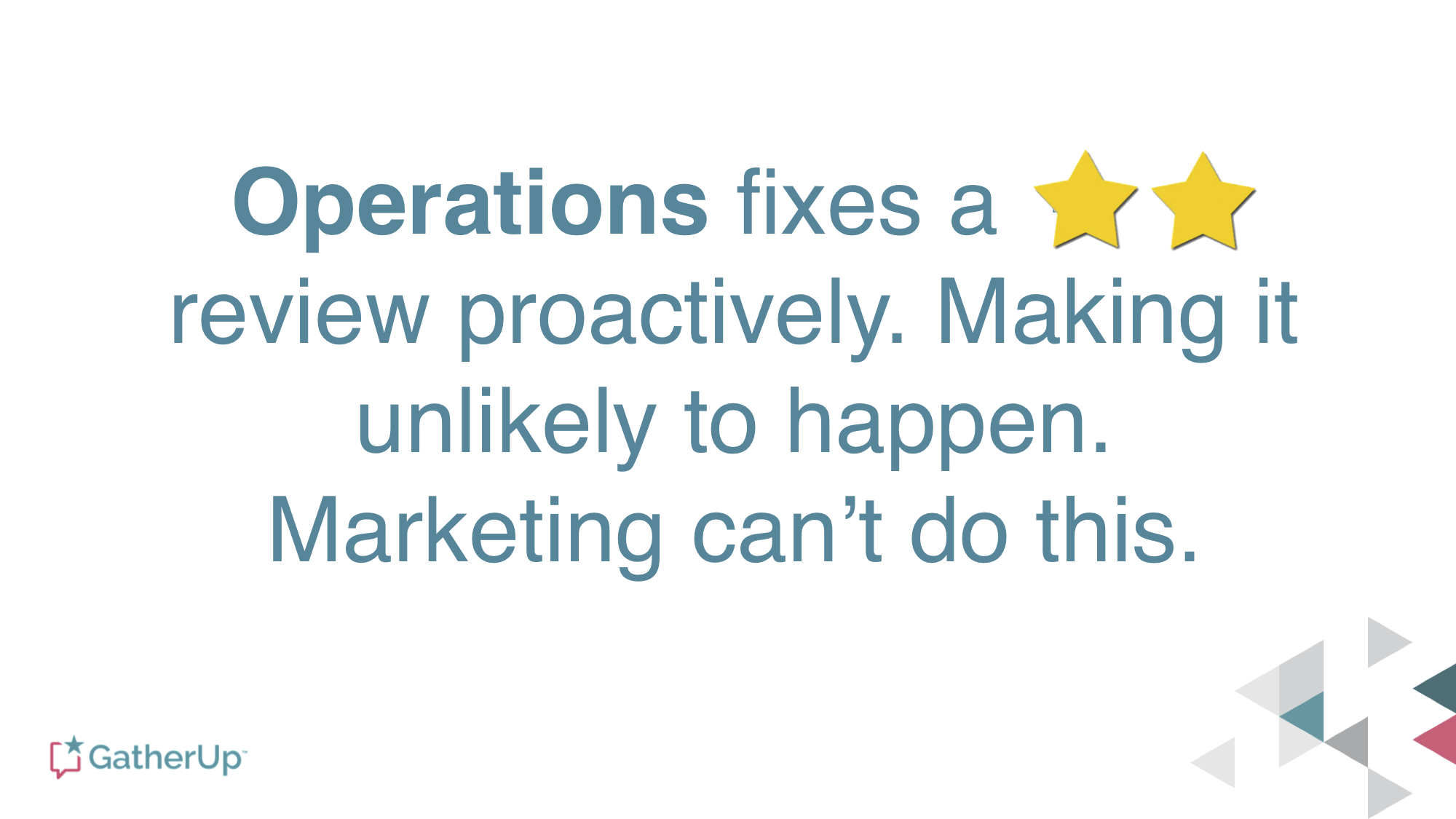
    One of Aaron’s really important points is that reviews don’t fix anything. They give guidance to operations on how to fix things.
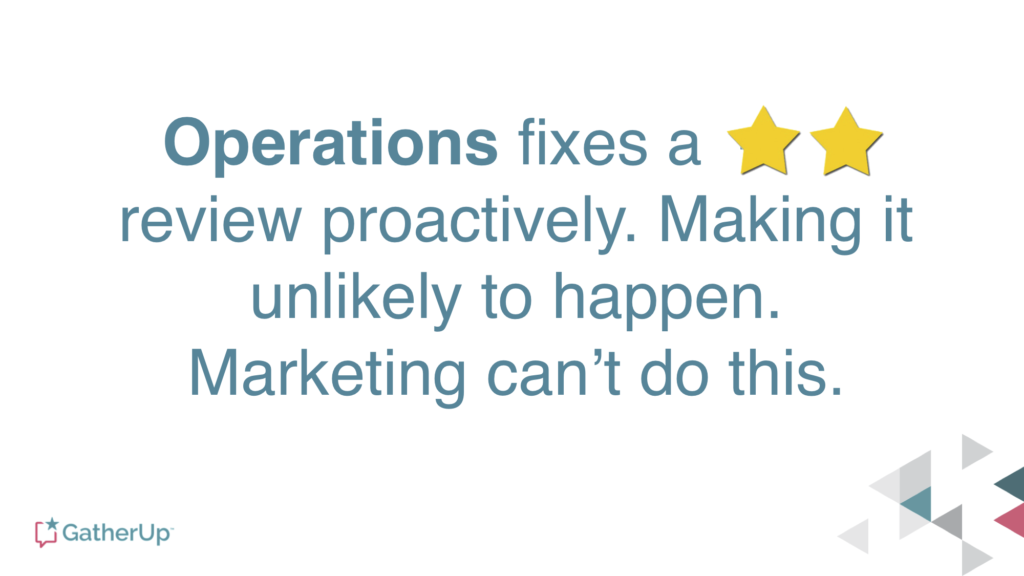
    Operations Fixes Reviews Report quote

    Cleaning Up Maps Spam Will Improve Your Ranking

    I’ve heard Joy talk about this a few times, but what made this session really stick for me was her examples of how to really get rid of spam and junk listings.

    As I’ve often said about duplicate content on the web, it’s not that you’re being penalized, per se, it’s that Google is confused. If you want good rankings, confusing Google is bad. It’s the same with junk and spam listings. Giving Google more data to choose from makes it more likely that the machines will choose the wrong data.

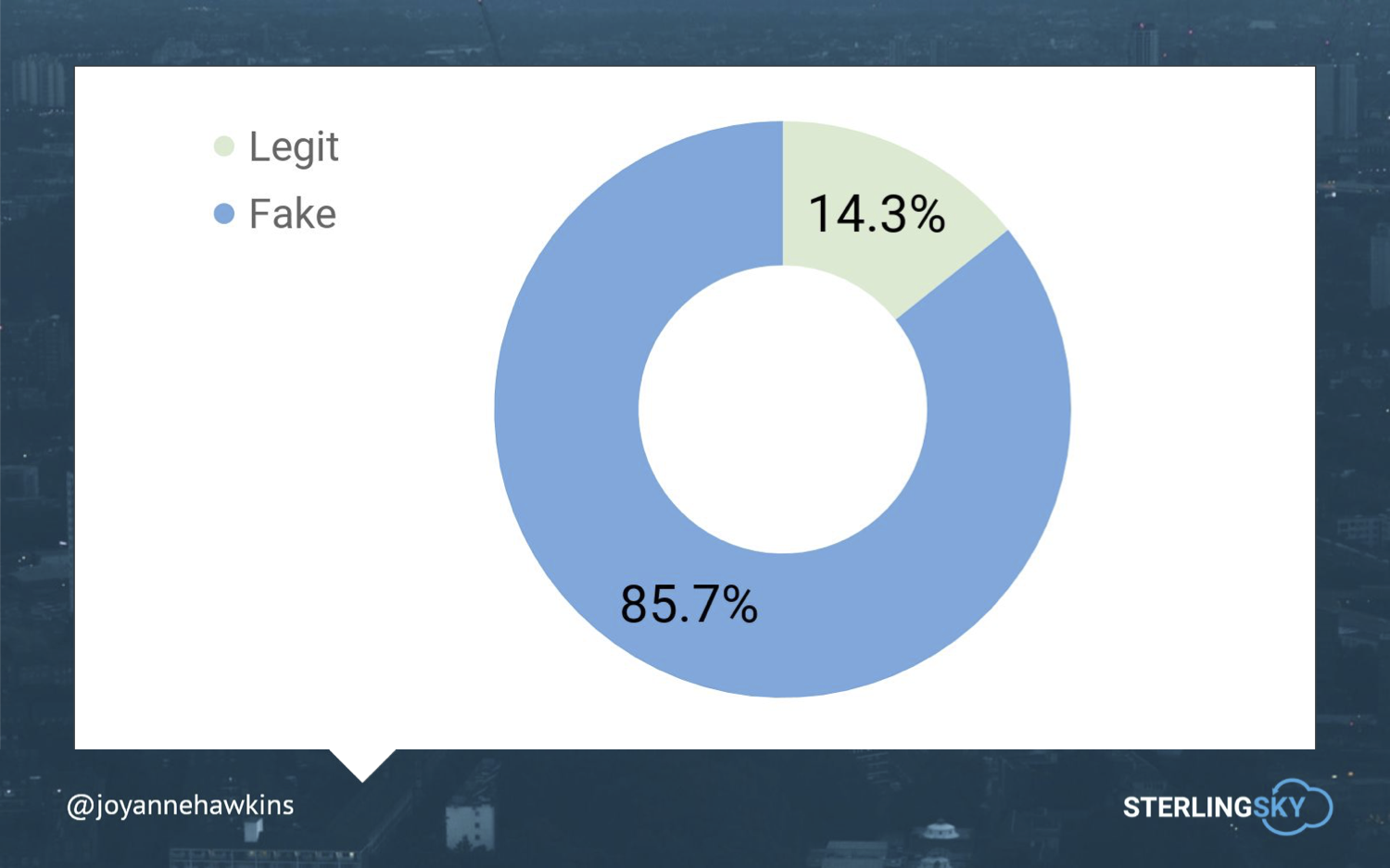
    And, there’s a crapton of “fake” listings in maps.
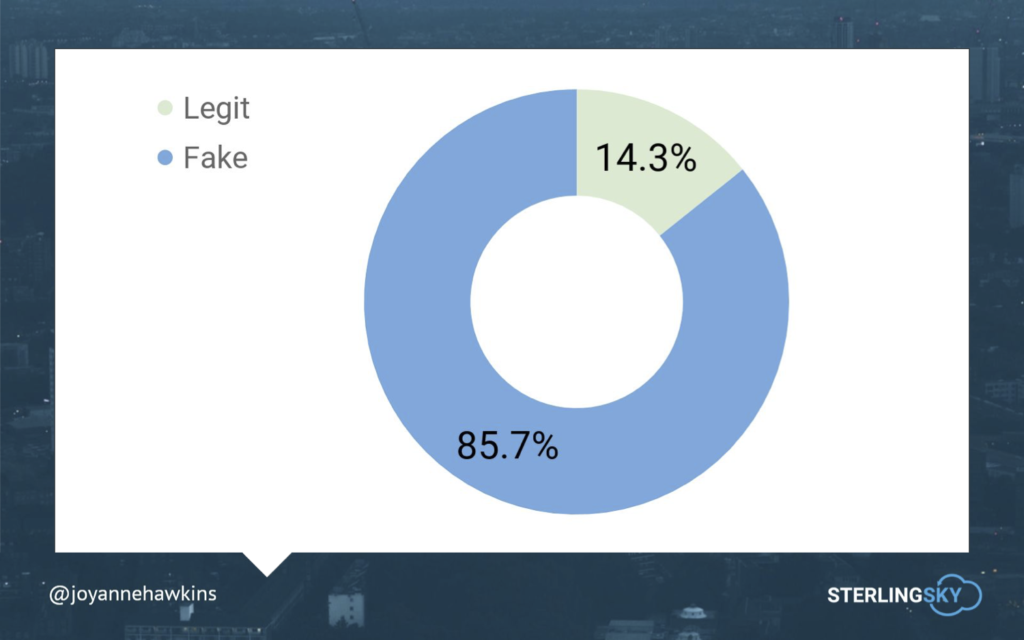
    Chart of fake vs legit listings

    A couple of really useful pieces of knowledge are:

    • Google doesn’t want to show a residential address on maps. If you identify these as residential listings, they’ll be removed.
    • Because of the way Google ingests data, there are lots of unverified listings with no address. Report that these businesses don’t exist, and they’ll be removed.
    • If it’s really spam, like a lead-gen listing, report it, and it will be removed.

    Imagine how much better your listings will look when 8 out of their 10 competitors for rankings are gone.

    Want more info? Check out Joy’s Ultimate Guide to Fighting Spam.

    Looking Forward to Local U, The Next Generation

    Working with this team has been one of the highlights of my career, and I’m a little melancholy thinking about the end of an era. The Local U faculty are among my best friends in Local Search, as well as being great educators and business partners.

    Joy is one of the smartest, hardest working folks in Local Search. She and her team at Sterling Sky are well respected and have a history of doing the right thing.

    I’m excited to see how Local U evolves, and I look forward to my continued involvement, in whatever form it takes.

    Do you have any thoughts on the Local U sale or the ideas presented above? Please share in the comments below.

    Edited 10/7 to correct omission of Mike Ramsey from initial founders list.

  • How Often Should You Revisit Your SEO Strategy?

    So you want to know how often you should revisit your SEO strategy. My recommendation? Go back to the basics! Google is constantly updating its algorithm, so your rankings can always be affected. That means you should constantly be on top of the strategy you set in place to ensure you’re being effective and generating results. When considering how often to revisit your strategy, it would be a good idea to consider the things that affect your rankings. The major players are keywords and content.

    The Key to Keywords

    The way people search for things is always changing. Where people used to Google the term “marketing company,” they may now Google “marketing company near me.” It’s one thing to rank well, it’s another thing for people to be able to find you based on what they’re searching for. If you aren’t ranking well for terms people are using, this won’t benefit you in achieving your marketing goals.

    If you keep a record of your original keyword research, you can always refer back to it to determine if those search volumes have increased or decreased over time. This will allow you to stay relevant on which keywords work best for you. Since it’s recommended that you revisit your keyword strategy every quarter for campaigns and promotions, it’s also a good bet to do this for SEO.

    A person highlighting notes on a desk

    Keeping Content Fresh

    Before you worry about keeping your content fresh, you need to ensure it fits the recommended guidelines set by Google. Title tags are important because they are often the first thing a visitor sees when they search for something and you pop up in their results. Meta descriptions also display in search engine results and should provide visitors some context about that page’s content. Even though that doesn’t directly affect your rankings, it affects people wanting to visit your website, which can affect rankings.

    Title tags and meta descriptions also need to fit within the length recommendations and include the keywords you chose for the campaign, if possible. If the keywords you chose and used throughout your content at the beginning of the campaign are no longer relevant, then it might be time to go back to the drawing board. When these two elements are concise and relevant, they can positively influence your rankings. Just make sure to keep an eye out for any updates made on recommended guidelines for content by Google.

    As far as content on your website, you can always tell if the website page has good and relevant content by how many visits it receives. Low webpage visits can be a good indicator that it may be time for a refresh. This does not exclude old content. While publishing new content is a great way to increase rankings, you can always revisit old content and give it a little TLC to see if the work you already put in can still work for you.

    Off-Page

    When it comes to off-page SEO, here is where it can get a little tricky. There are times where we aren’t in control of the things that happen off your site, like with backlinking, but there are tools and options to assist you in taking back as much control as possible. Let’s say you find a link to your website to be spammy; you can contact the webmaster and request it be removed. There’s no telling if or when this may happen, but you can always combat this by gaining new links from authoritative sites.

    When it comes to listings, you want to ensure your information is consistent across all platforms. Whenever an opportunity presents itself, you should make it a point to submit to as many listings as you can. A great tool you can use for this is Bright Local. It works to show you inconsistencies throughout the listings you currently have, as well as new opportunities you can submit to. It’s best to keep an eye on these and revisit them every month.

    An additional tool that is always accessible to you is social media. This is a great way to create awareness for your business and potentially gain more and new visitors to your website. Staying on top of your social media campaigns is a sure way to help your rankings. If you see a campaign is not performing well, then it may be time to reconsider what changes need to be made to make it better. While social media doesn’t increase your rankings, it can help gain new visitors and increase potential backlinking, which will.

    In the End

    There isn’t an exact recipe that will get you to rank number one. The key to running an effective strategy and campaign is to consistently revisit it. Remaining proactive when it comes to algorithm updates and keeping your website full of organic and fresh content will always be your best bet. If you consistently check and adjust, you’ll be on the right path! And if you need some expert assistance with your SEO or content marketing strategies, start a conversation with the New Orleans SEO pros at Search Influence.

    Images: Desk


  • How to Be More Than Content With Your Content

    It’s not a good idea to buy everything in bulk—veggies, bread, condiments are a big no-no—and content’s no exception. Just like that 2-week-old bag of spring mix in your fridge, your content can go bad (It can even have an expiration date!) and not yield the results you expected. To drive your website’s visitors to action, you’ll need to bring something fresh to the table. If you’re currently struggling to elevate the value of your content and prevent it from getting smelly and dated, maybe you should take a closer look at your strategy (if you have one) and identify where your team is missing the mark.

    The Big Secret

    That 70s Show gif

    Quality. Over. Quantity.

    Less isn’t always more, but it’s definitely a start when it comes to an overwhelming amount of lackluster content. Creating content for the sake of having it won’t impress your audience—it may even bog them down and send them down a rabbit hole rather than your marketing funnel. However, you shouldn’t ignore the significance of great content’s impact on your organization’s overall marketing success. Content marketing is extremely cost-effective and offers a great return on investment compared to traditional marketing techniques. Major ingredients in a quality content salad include keywords, internal links, and headlines to break up text.

    Your audience turns to your content for insight, entertainment, and to inform their purchase decisions; but they don’t want to spend ALL of their time navigating your content—they have to buy something eventually, right? While you shouldn’t bury your audience with a mass production of daily blogs, social posts, and digital downloads all at once, you still gotta give the people what they want. The content production sweet spot lies somewhere in the middle; to get there, you’ll need a game plan for your team. Follow these best practices to help you develop top-notch content that gets results:

    I mean, it's simple gif from That 70s Show

    1. Know Your Audience

    Understanding your audience personas will help you stay abreast of relevant topics to cover and leverage behavior on social platforms to deliver your content to the appropriate channels. Knowing your audience really comes down to researching and understanding their pain points, learning how these problems affect them, and tracking their progression through the marketing funnel so that you can deliver the right stuff at the right time. Awareness of their stage in the buyer’s journey will help you deliver content that is both better tailored to the users you want to reach and more likely to earn you more conversions, more frequently.

    Lightbulb going off about head that 70s show

    2. Develop A Strategy

    Content serves to help your audience solve problems big and small while reinforcing the strength and uniqueness of your company’s offerings. Developing a content strategy will better help you understand the best time, place, and content type to post. When developing your content strategy, Hubspot suggests focusing on these key points: content format, channels for posting, and a system for managing the creation and publishing of your content. A CMS, or content management system, can help create and organize your digital resources and enhance the user experience. In addition, you should be on top of your editorial calendar—will that blog be outdated if you wait to post it? How useful is Tuesday’s weather forecast while you’re getting dressed for work on Thursday morning? Vary how often you publish time-sensitive content so that you don’t have to deal with the stress of constantly churning out new material.

    Alright, kitty, kitty, don't panic, you know what to do gif

    3. Set Goals

    You post content for a reason, whether it’s solving problems for users, generating leads, or increasing brand awareness. If you align the content you produce with a S.M.A.R.T. goal or one of your company’s goals, you’ll buttress your strategy with a specific purpose in mind. In turn, you’ll know what you plan to measure when the time comes to start analyzing your content’s performance. Your goals can include increasing leads by a certain percentage or even driving more social engagement. By setting goals, you’ll create a plan for your content that can be checked and adjusted.

    Floating heads gif from That 70s Show

    4. Switch It Up (And Around!)

    If you really want to ramp up your content’s impact, get creative. Within the digital space, there’s plenty of wiggle room to do just that. That awesome client testimonial on your website has the potential to be a killer case study, or you can transform it into a stellar infographic. The stories you tell don’t have to live solely on your website. You can repurpose your content so that it can be posted on multiple platforms; you can introduce your stories to new audiences without having to do more legwork. How’s that for bang for your buck?

    When it comes to all of these best practices for creating awesome content, Search Influence has it down to a science. We have the tools and expertise to help you optimize your content’s potential, whether you aim to strengthen your social media presence or paint a better picture of your content’s performance with analytics. Share your goals with us, and we’ll help you get there.

    Images

    One

    Two

    Three

    Four

    Five

    Six

    Seven

  • Up Your Instagram Game With Effective (and Free) Hashtag Research Strategies

    #Winning. #Selfie. #Hashtag. While hashtags have crept into our vocabulary (whether sarcastically or not) and may seem like an afterthought, they’re actually effective marketing tools that need to be taken seriously when it comes to your Instagram strategy.

    I want you to walk away from this post with a newfound appreciation of hashtags and the confidence to perform hashtag research—trust me, it’s not as complicated as it sounds. And if you already have an Instagram account, you’ve got your most important tool!

    Let’s cover the basics before we get into the research steps.

    Why Are Hashtags Relevant to Instagram Posts?

    Remember, hashtags aren’t just for decoration—especially for business accounts looking to grow followers and create awareness about their brand and services. While you may have a little more fun with hashtags on your personal Instagram (#DoItForTheGram, anyone?), hashtags can help brands get in front of a wider audience and connect with potential customers.

    Animated photo of a hashtag and a heart in comment shapes

    So, how do these little hashtags work their magic?

    Even with the perfect combination of good lighting and an engaging caption, a large chunk of Instagram posts goes unseen. 70% of posts, to be exact. Let that sink in.

    There’s a big sea of content on Instagram; it’s easy to get lost—but using hashtags can boost your chances of engagement. Adding just one hashtag to a post can increase engagement by 12.6% (but don’t just slap on a hashtag to your post and call it a day)!

    Conduct Effective Hashtag Research On Your Own—No Tools Required!

    Hashtag research can be a little more fluid than other digital marketing research. Yes, there are steps to follow, but I enjoy this research because there’s room for creativity.

    As we walk through hashtag research basics, let’s pretend I’m a small, local catering company looking to expand my business and showcase my delicious work on Instagram. How would I begin my hashtag research?

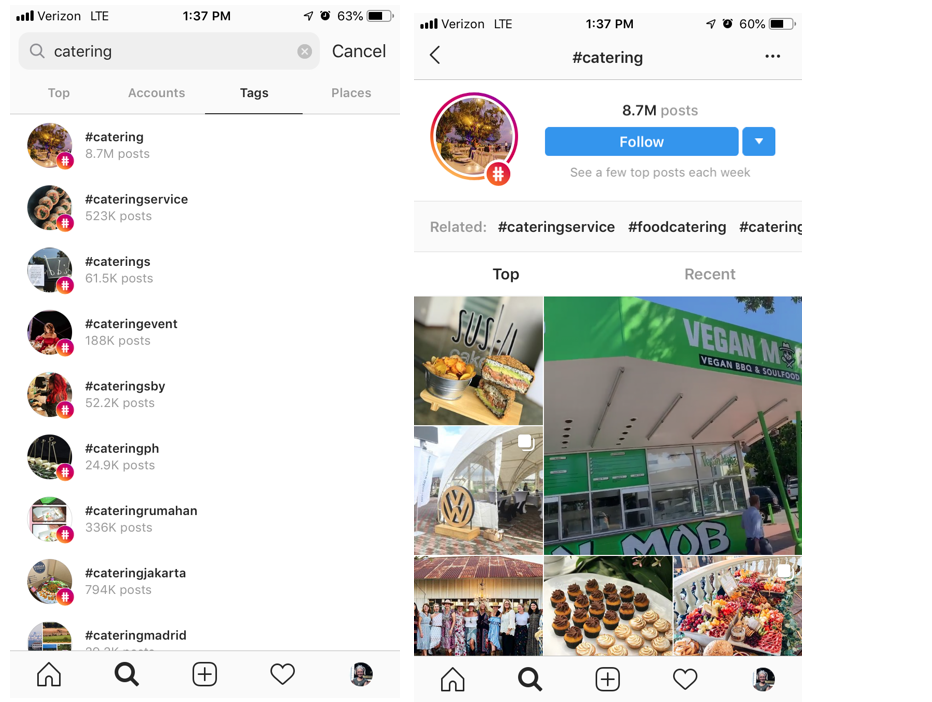
    Go to the search bar, press “Tags,” and type in a keyword related to your industry.

    Example of Instagram tag search and landing page from tag search

    “Catering” is a pretty general hashtag and probably won’t get my little catering company found in a sea of 8.5 million posts. But we’re not stopping there. To find more varied, interesting hashtags related to catering, I’m going to check out some of the top and recent posts that were pulled up in this search. Then I can dig deeper into their hashtags and engagement patterns.

    I can also click “Follow” if I want to keep up with the top posts using #Catering—they’ll appear in my Instagram feed.

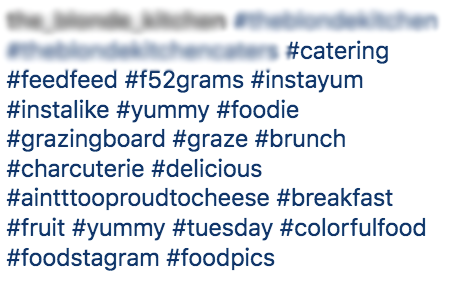
    Let’s dig into this post I found using #Catering and pull out some popular and not-so-popular hashtags that I can use in the future. Because when it comes to hashtag strategy, you want a mix of both!

    screenshot of hashtags relating to food

    High- and Low-Density Hashtags

    Some of the hashtags in this post are general and widely used on Instagram, such as #Foodie, #Catering, or #Yummy. These are known as “high-density hashtags,” meaning there are more than 500,000 posts on Instagram using that hashtag. While it’s good to use some high-density hashtags to gain new likes and follows, you want to mix them with more specific, targeted hashtags, known as low-density hashtags (used in less than 500,000 posts). There’s less competition for ranking in the top posts with low-density hashtags, helping your brand become more discoverable. Some examples of low-density hashtags in the above posts are #AintTooProudToCheese #GrazingBoard #ColorfulFood.

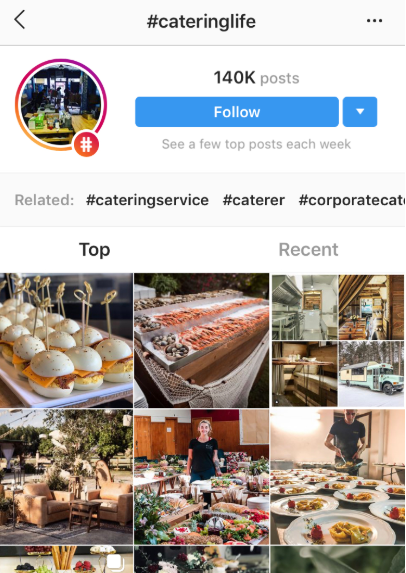
    Always use a mix of high- and low-density hashtags in your post to cast a wide net. To find out the number of posts that have used any given hashtag, simply click on the hashtag, and it’ll take you to a page like the #Catering example. You can also search hashtags if you want a quick number without going to the page.

    When compiling your list of hashtags during your research, don’t forget to indicate if it’s high-density or low-density. Your future self will thank you when it’s time to organize them!

    Here’s where the fun comes in.

    Once you find a few posts from your own initial search, click on hashtags that stand out and see who else is using them. Add those hashtags to your list, and keep going down the rabbit hole!

    Screenshot of #cateringlife hashtag results page

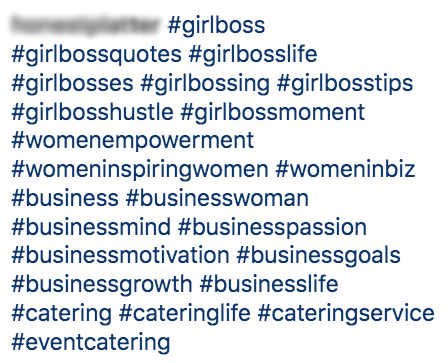
    Here’s a post I found searching through #CateringLife:

    Screenshot of #girlboss related hashtags

    Community Hashtags

    Notice the mix of hashtags here. We have some catering-related ones (#CateringLife, #EventCatering, #CateringService), and we also have low-density hashtags that speak to a more specific (smaller) audience or community: #GirlBossHustle and #BusinessMind. These are community hashtags that can be used to engage with specific users within a similar business or active community.

    It may take some time to find the right community hashtags for your business. Follow a few low-density themed hashtags and observe the other users and business accounts using them—do they align with your brand and goals? Are the accounts engaging with users or one another? Note the hashtags that seem like the best fit for your business. Once you begin experimenting with different community hashtags and engage with other accounts within that community, you may find your tribe and gain more visibility.

    Location Hashtags

    Location hashtags can help you target a very specific local audience and get in front of Instagram users already following that hashtag. Find location-specific hashtags that combine your targeted area, audience type, and industry. Try different variations of your location (e.g., “NOLAEats,” “NOLACatering,” “NewOrleansFoodie”).

    Follow a similar research process as outlined before; don’t be afraid to go down the rabbit hole of accounts by jumping from one hashtag to the next. You never know when hashtag gold will strike!

    As you research high-density, low-density, community, and location hashtags, observe (and record!) the number of hashtags, placement, and level of engagement in each post.

    Take the time to analyze the posts and accounts your hashtags are coming from:

    • Number of hashtags used?
    • Number of likes?
    • Engaging comments? Responses from the account? No comments?
    • Number of followers?
    • Hashtags in the comments or caption?

    The more you document hashtag use and patterns during your research, the more informed your strategy will be.

    Hashtag Categories

    I’ve pointed out different types of hashtags throughout the research process—low and high density, location, and community hashtags. While there are more out there, we’re just going to focus on these.

    By searching a variety of hashtags types, you can create subcategories for your hashtags.

    Now, back to my catering business.

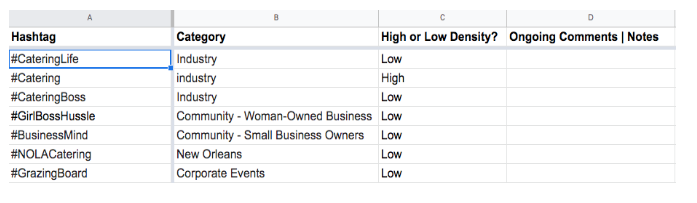
    After my research, let’s say I organize my hashtags into four main groups: “Woman-Owned/Small Business,” “Weddings/Corporate Events,” “New Orleans,” and “Industry.” When I plan future posts, I’ll have my hashtags organized and ready to be used according to my post topic.

    Remember: you can use multiple categories of hashtags for each post. Focus on hashtags relevant to your industry and post topic—the more relevant hashtags, the more likely your target audience will like, comment, or follow.

    Organize Your Research & Create an Ongoing Strategy

    No need to purchase special software to organize your research—a simple spreadsheet will do.

    An example speed sheet of hashtags and categories

    Make sure it’s thorough and organizes hashtags in a way that anyone using it will understand. This is especially helpful if more than one person is working on your Instagram posts and overall strategy.

    Even if you’re the only one using the spreadsheet, having it clean and organized will be handy when sharing research with others and helping them understand there’s a method to your Instagram-posting madness.

    Experiment With, Change Up, and Monitor Your Hashtags!

    So, you have your hashtags neatly organized in a spreadsheet. The hard part is over—now it’s time to copy and paste a few of them into your posts and call it a day, right? WRONG! Your hashtag strategy is not a one-and-done ordeal; it’s a strategy, after all.

    Strategies need to be ongoing. You need to experiment, observe, and readjust when using hashtags on Instagram. What do I mean by that?

    Experiment

    • Don’t use the same 5-10 hashtags in every post. I repeat: do not use the same 5-10 hashtags in every post.
    • Switch out your hashtags in each post to reach new audience members. You have the chance to cast a net that has the potential to get wider and wider with every post.

    Observe

    • Consider using an Instagram business account to help monitor post performance. You’ll be able to gain engagement insights for each post, including the number of impressions you received from hashtags alone!
    • Even with an Instagram business profile, record notes about your hashtag performance in your spreadsheet since Instagram limits how far back into your insights you can see.

    Readjust

    • Which hashtags seem to be attracting new followers and encouraging engagement? Any hashtags not performing well (or at all)? Readjust your hashtag use according to your observations.
    • Try pairing different hashtags together to see if that improves post performance.
    • Think of this step as more informed experimentation. You’re still trying out different hashtag groups and categories, but now you have some observations and notes to back it up.

    Repeat

    • Surprise! The process doesn’t ever truly end (unless you want less than impressive results). Hashtag use is ongoing for a reason.
    • Keep repeating this process with each post. Before you know it, you’ll have an arsenal of hashtags and hefty notes and insights to inform your hashtag strategy.

    Ready to Build Your Social Strategy?

    While hashtag research can be an easy DIY project, don’t try to balance social media management for your business on top of content creation and marketing. Focus on your business, and Search Influence can do the rest! To learn more about our digital marketing services, speak with a strategist today.

    Images:
    Hashtag and Heart

  • How to Make Sure Your Website Is Accessible for Everyone

    It’s safe to say that traffic—and gaining as much traffic flow as possible—is the major goal of anyone’s site. Unfortunately, a substantial amount of us forget about a few key demographics that depend on us to make sites, content, and social channels accessible. To put it into perspective, 360 million people have hearing disabilities and another 285 million people have visual impairments.

    Some have physical limitations that make it impossible to use a mouse, while some people are prone to photosensitive seizures.

    So how do we cater to as many people as possible and make our sites places of inclusion?
    The tips I’ve listed below are a great way to start.

    yall belong here gif

    How Can I Make My Content More Accessible?

    Most of these additions are minute things that we take for granted every day. Luckily, they’re also seamless and easy fixes that pack a huge punch of positive impact.

    Dynamic Content

    Dynamic content refers to pages, plug-ins, or other tidbits of your site that can change without forcing the page it’s on to reload. If someone is using a tool to navigate your website better, the tool may not inform the user of changes that happened on that page. This can lead to a confusing experience. Reader tools mostly scan a site as it naturally appears when it first loads, so if you use dynamic content, make sure it’s optimized.

    Audio

    Some visually-impaired users rely on transcribed blogs, articles, or web pages to digest your content through sound. Do some research on software that transcribes your blogs into audio clips to post to your website.

    Video Transcripts and Captions

    Users who are deaf or hard-of-hearing can use video captions to understand what’s going on in videos, and what dialogue is said. In this scrolling era, captions are also a best practice to get people sucked into watching your videos too! Sites like Amara offer free video captioning for small projects, so it’s a great tool to get started with.

    get the transcript obama gif

    Accessible PDFs

    To make a PDF accessible, the original document must have a solid foundation. Some other key attributes of an accessible document include searchable text and security features that allow for screen readers. Adobe goes in-depth on what you can do and how you can do it in this great resource.

    Descriptive Links and Button Text

    For users that need a screen reader to navigate a website, buttons and links that say “Click Here!” don’t give a clue as to why they’re clicking this link or button. Instead, opt for descriptive phrases such as “About The Team” or “Services Offered.” This makes for a clear understanding as to where you are taking a user.

    Color Choices

    A sizeable amount of users have photosensitivity that makes it difficult to view bright colors and may even cause seizures. The rest of us would like to err on the side of caution and preserve our eyesight for as long as possible. This is why choosing your color scheme is very important, as well as making text and backgrounds easy to view and read.

    Resizable Text

    Users with vision impairments benefit from text that can be zoomed in on to make it larger, and therefore easier to read. So make sure your mobile layout is capable of zoom!

    How Can I Make my Website More Accessible?

    Alt-Text

    Alt-Text is a screen reader’s best friend, allowing image descriptions to be read aloud to users with vision impairments. This is one reason why listing image descriptors is essential. I recently found out that you can even add these alt-texts on your Instagram and Facebook photos as well!

    Headers

    HTML headers should be clearly labeled to structure and organize the information, as well as instruct screen readers of that information. This assists not only users with vision impairments but also users with cognitive disabilities who may need well-structured information for extra clarity.

    Tables

    Tables may easily structure a page, but they also impede accessibility software from reading a page correctly. If you have information that needs to be laid out in table form, include an HTML markup that clearly defines headers and data cells so users can find the information.

    How Can I Make my Social Media More Accessible?

    Emojis and Emoticons

    A lot of programs can read emojis, but you will need to put a space in between each one for better readability. As for emoticons, they’re read the way they’re written. So a smiley face like this “:)” will be read as “semicolon parenthesis,” and shouldn’t be used too often.

    hear no evil, speak no evil, see no evil monkey gif

    #CamelCase

    It’s hashtag time! These are a pivotal part of any Instagram campaign, and should be written in what we call Camel Case for easy reading! So when you use hashtags, make sure you #UseCamelCase instead of #regularcase.

    Abbreviations

    The best practice is to refrain from abbreviating names of companies or organizations and instead spelling their name out in its entirety.

    More Resources

    W3C: World Wide Web Consortium on Accessibility
    WCAG: Web Content Accessibility Guidelines Checklist
    Section 508: Government standards on accessibility on the web
    Accessibility of State and Local Government Websites to People with Disabilities
    Color Contrast Checker
    Screen Reader Simulation
    Low Vision Simulation
    Dyslexia Simulation
    Distractibility Simulation

    Now, this is obviously not an exhaustive list of things to do, but it’s a good start in making the internet and your web content more accessible for a lot of users! There’s so much information available, and you can dig a little deeper with the list of resources above. If this is an initiative you’re looking to make a priority, reach out to one of our experts at Search Influence and we can help you make accessibility a reality.

    images:
    Y’all Belong Here Gif

    Obama Gif

    Monkey Gif

  • Prop Up Your SEO Strategy With Pillar Pages and Topic Clusters

    If you haven’t heard of pillar pages, don’t feel bad; they’re relatively new to the SEO scene, with the term coined by Hubspot in 2017. However, they’ve been taking over content marketing strategy discussions since their relatively recent inception, and this new system of structuring content is proving to be beneficial to both the user and the site’s SEO.

    What Is a Pillar Page?

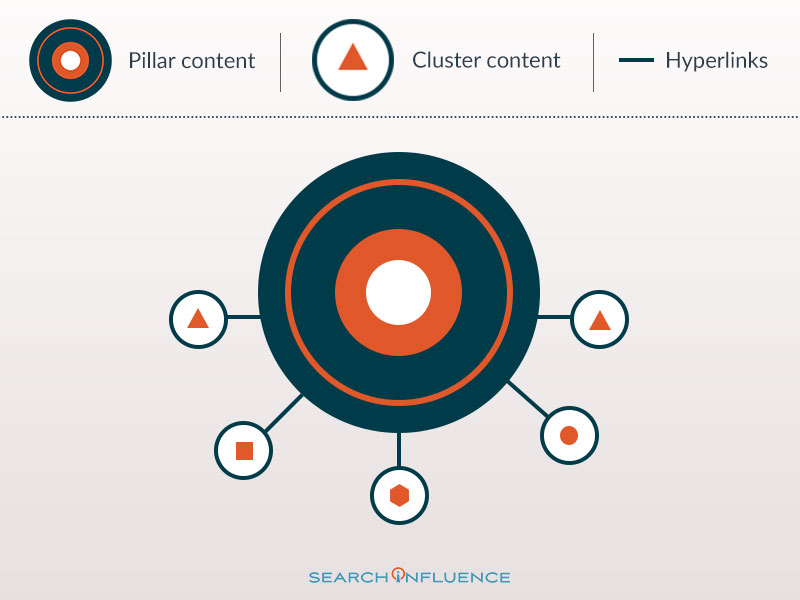
    A pillar page is a content-rich page on a website that broadly covers a topic. Hubspot created pillar pages as a technique for restructuring their blog, but they can apply to information pages and service pages, as well. Pillar pages divide your site’s content into “topic clusters,” which don’t focus on a specific keyword, but rather a general topic. The pillar page is the main body of content on the topic, linking to more specific pages. Think of pillar pages as “Topic 101,” and the links provide more in-depth information.

    Custom graphic showing the relationship between content clusters and pillar content in SEO

    How Do Pillar Pages Affect SEO?

    Pillar pages help improve user experience by making your site easier to navigate. In addition to increasing the likelihood of having repeat visitors or higher conversion rates, better user experience can also increase your site’s SEO rankings. Google tracks engagement metrics, such as dwell time, bounce rates, and click-through rates (CTR). Since pillar pages are long content pages with several internal links leading to relevant and highly detailed pages, readers are more likely to spend more time on your site and generate a high CTR. The reason Google tracks engagement metrics is because it signifies that the reader found your site to be helpful; the longer someone stays on your site and the more internal links they click, the better it looks in Google’s eyes—it shows that your site accurately reflects the information that the SERP gave and that people want to read your content. Having links to relevant pages also helps Google’s algorithm determine that the pillar page accurately reflects the search term.

    How Do You Create a Pillar Page?

    If you’re ready to revamp your content marketing strategy and create pillar pages, you first need to determine the topic clusters you want to organize your site around. For example, a cosmetic surgeon could have pillar pages about body contouring, breast augmentation, and facial procedures. The pillar page itself will likely be longer than your normal service page or blog page, giving a detailed overview of the topic.

    You should also conduct SEO semantic research to find the best keywords and anchor text for your topic clusters.

    The pillar page should also be easy to navigate; it should have several line breaks or even a table of contents to help readers navigate the subtopics. You don’t need to have the in-depth subtopic pages already written; you can add links to them on the pillar page as you build these secondary pages out.

    Because they are long, detailed, and content-heavy, pillar pages may seem intimidating. However, they’re really just a way to restructure your content to make it easier for both readers and search engines. If you’re looking to revamp your content marketing strategy, the experts at Search Influence are here to help. We have all the tools to help you create a phenomenal pillar page. Reach out to one of our strategists today.

  • Organic, Boosted, & Promoted Posts: What’s the Difference?

    Remember the good ‘ole days when “marketing” meant buying full-page ads in the Yellowpages? Everything was so simple then. TV commercials ruled the airwaves, and people couldn’t help but hum the jingles of Pepsi, Ringpops, and Doublemint Bubblegum commercials. Back then, a catchy jingle was all you needed to give your brand an edge over the competition. But with the dominance of social media, it isn’t as cut and dry as it used to be because marketing platforms are at our fingertips.

    At their peak, YellowPages and TV commercials were industry leaders because there were fewer advertising channels. But now, social media platforms have changed the game because, for the first time, they allow communication through many different avenues. Increasing the distribution of communication yields increased opinions. Put simply by the co-founder of Intuit, Scott Cook, “A brand is no longer what we tell the consumer it is—it is what consumers tell each other it is.” This is why posting on social media is critical to creating awareness and loyalty around your brand.

    Before you jump in and start posting like a maniac, you need to understand how to post, as well as knowing the different types of social posting options. Knowing which posts to use and the best ways to leverage them will help determine the best budgeting decisions for your business.

    Social posting as a business is an effective way to encourage user engagement and increase brand awareness. One way to get your followers to engage with your posts is by catering your content to their interests. Studies have shown that the best performing content elicits emotions from readers. Do this by posting astonishing facts or posing curious questions that a reader can’t help but acknowledge. Another way to keep your followers engaged with social posts is by using different formats. Anyone can create a text post, but adding an image to your post can more than double your engagement rate. Stories and video posts are also effective ways to captivate your audience. Lastly, you can also improve engagement rates by being engaging yourself. People will remember when you engage with their content and will be more likely to return the favor. Liking a follower’s post, acknowledging them with a quick reply, or sharing their post can go a long way.

    Now that you have a better idea about how to write your content, the next step is to decide what types of posts you should be using to deliver that content.

    There are three types of social posts: Organic Posts, Boosted Posts, and Promoted Posts

    The Organic Post

    The OG of posting. Organic posts are the basic posts you create on your page that do not have any spend behind them. These posts display directly on your profile’s page and will be seen only by your followers.

    The Boosted Post


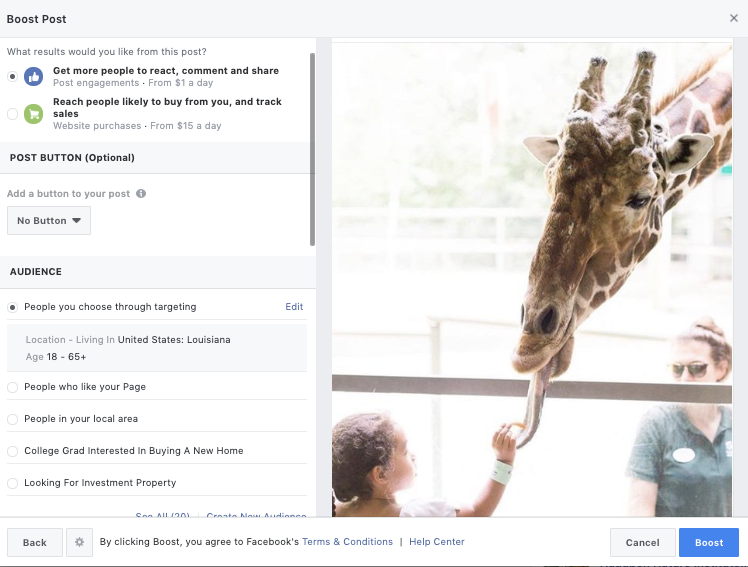
    Screenshot of a boost post form on Facebook

    A boosted post is an organic post to your profile that has been amplified to reach a larger audience outside of your current followers. With boosted posts, you set your budget and audience targeting. You can choose between two options of audience targeting for these posts: you can target “People who like your page and their friends” or “People you choose through targeting.” Keep in mind that with the first option, the “people who like your page and their friends” might not be interested in your business, so if you’re boosting something niche, it might be better to choose the second option.

    The Promoted Post

    The promoted post enables you to ensure that your post will appear in the News Feeds of more people. Typically, these posts are labeled as “sponsored,” so people know that it’s an ad, even though it looks like the other posts on their newsfeed. The benefit of promoting a post is that you have more options for targeting, pricing, and bidding. Promoted posts work well for giveaways, freebies, or coupon codes.

    All three of these types of posts provide valuable ways to build your brand’s identity. It’s important not to limit yourself to only one type. I would recommend testing your organic posts to see how your followers respond. Then, once you have a better idea of what works well with your audience, it makes sense to add some spend behind your best performing posts! Using different types of posts will get your content out to the most diverse users, so mix it up!

    If you’d like to improve your reach on social media, Search Influence can help. Since 2006, we’ve helped businesses reach their full potential with our digital marketing services. To learn more about how we can work with you, contact us online or call (504) 208-3900.

    Images:
    Smart Phone