Category: Social Media

  • “Today in” Facebook feed highlights local news and events

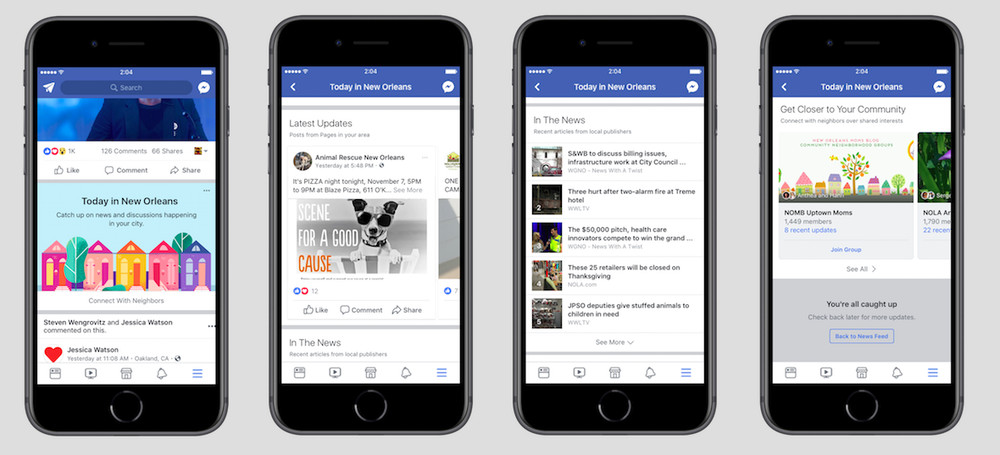
    An image of the new Today In feature that is being tested by Facebook
    Facebook has launched, in a small number of locations, a new “Today in [location]” feed.

    “Today in” will algorithmically identify news and events from the users specified location. For now, the feature is only available in: New Orleans, La.; Little Rock, Ark.; Billings, Mont.; Peoria, Ill.; Olympia, Wash.; and Binghamton, N.Y. It is expected Facebook will roll it out further on successful test of the features.

    Check out a roundup of the major articles I wrote on the LocalU blog.

  • ‘Tis the Season to Get Creative: Using Social Media for Holiday Marketing

    Many of your customers are gearing up for numerous holiday festivities that involve family, friends, and coworkers. This time of year also inspires lots of shopping. According to a study done by Deloitte, the average American will purchase 15 gifts during the holidays with the months of November and December generating 30 percent more revenue than non-holiday months. With all the gift giving and celebration, a stellar online presence, particularly on social media, is key to your business having a shining season. Keeping your customers engaged and informed of specials, events, and general happenings in the behind-the-scenes aspect of your business builds trust but also can build sales. In 2015, 75 percent of shoppers used the internet to research which gifts to purchase. So, don’t be afraid to get creative and light up your customers’ timelines with compelling copy. Need a little inspiration of your own? Here are some social media marketing tips that will get you in the holiday spirit.

    Christmas gift giving from 22 minutes - Search Influence

    Deck The Halls…With Lots Of Images

    Photos, videos, and other images are paramount to a healthy social media presence and they also present the perfect opportunity to engage potential shoppers on all levels. Create an Instagram video and show quick, behind-the-scenes clips of your store or showcase a new product or one of your lesser-known services. According to Wyzowl, 74 percent of shoppers who watched a demonstration video about a product or service subsequently bought it. So, show off your Spielberg skills and put together a product video to demonstrate how a featured item in your store is used. Remember, this doesn’t have to be a costly high-tech venture; just use a smartphone and tell a short and sweet story about how your shop is preparing for the holidays. Upload to your social media or even YouTube. If stills are more your thing, take some high-quality photos using your iPhone or a more professional camera and post images of employees who are in the holiday spirit. You can even include some shots of that huge order fulfillment you and your crew are working tirelessly on. Make the images personal and easy to share. If you are running low on your own photos, try incorporating user-generated photos from your customers.

    Tinsel Everything From Wall to Wall

    In other words, cover your bases when it comes to social media. Since your potential customers are more than likely shopping for other people, you are not necessarily trying to gain the attention of your traditional customer base. You may be trying to appeal to a mother buying a gift for her 20-year-old son, or a 30-something purchasing something for his niece. If dad is buying something for his daughter and your business has the perfect gift, let him know. Facebook has proven to be a wonderful resource that really does appeal to pretty much every demographic. With tools like Facebook ads, it’s becoming easier to target your potential shopper, so make sure the language that you’re using in your content speaks directly to your audience.

    Tinsel being placed on a tree in It's a Wonderful Life - Search Influence

    Spread the Joy of Your Business

    Today’s consumers want to know the ethics behind the companies they are shopping with. According to a 2015 Nielsen report, 66 percent of respondents were willing to pay more for products and services that came from companies who were committed to positively impacting social and environmental issues. So, tell your customers who you are and what you stand for. Are you doing any fundraising or charity events for the holidays? Share it! Are you participating in a food drive or giveaway? Tell us about it! Does your company’s mission align with the spirit of the season? Even better. These are positive events that can not only create a space for your company to give back but also encourage trust with your customers and impact sales, too.

    Give the Gift of Hashtags

    Added to the Oxford Dictionary in 2010, the hashtag is social media’s way of organizing ideas, keywords, and campaigns. Search some of the current trends and see if an existing hashtag fits your company’s voice or vision for the season. If not, jump start your own! Consider running a promotion based on your customers reposting or sharing a specific photo or post. Have them use a catchy hashtag you’ve created that is personal to your holiday messaging. To incentivize their repost or share, offer participants a small discount.

    Jimmy Fallon and Justin Timberlake using hashtags - Search Influence

    Embrace All the Holidays

    Facebook is a wonderfully diverse platform that will surely get you views from people of all walks of life, so don’t narrow your focus on just one holiday. Show love to each one of them and give them a shout out on your page. Let everyone know how inclusive you are across age groups, interests, and religious and cultural holidays alike. Take the time to wish your current and potential customers a happy holiday season and welcome them to your store.

    This time of year, after all, is about love, celebration, and gratitude. Let your customers know you care with a thoughtful social media campaign that will inspire them. If you need assistance with creating a holiday strategy and managing your social media, contact our team. We are happy to help you deck the halls with holiday content that will get your customers into the spirit of the season!

    Images:

    Gift Giver

    Tinsel

    #Hashtag

  • “Where You At?” 4 Attractions That Are Owning and Winning the Social Media Game

    If you’re anything like me, you’re likely to experience an immediate rush of nostalgia when you hear the phrase “where you at?” Probably because you can recall the early 2000’s when Boost Mobile coined the famous tagline. However, with updates to technology happening all around us, the popular tagline has never been more applicable. Thanks to social media, we’re no longer limited to experiencing some of the world’s greatest wonders and destinations through a fashion magazine or a dusty book at the neighborhood library. Now, with a finger scroll, you can experience live snaps from the Louvre in Paris by night and wake up to astounding images of Tokyo’s Imperial Palace by morning.

    Travel Glasses - Search Influence

    Although some attractions have found the path to social media enlightenment challenging, enticing content can generate the right kind of attention and turn your historic venue or neighborhood candy store into the next viral sensation. Here’s a look at four different attractions that have used social media to help skyrocket their brand’s popularity and engage audiences.

    The Tate Collective

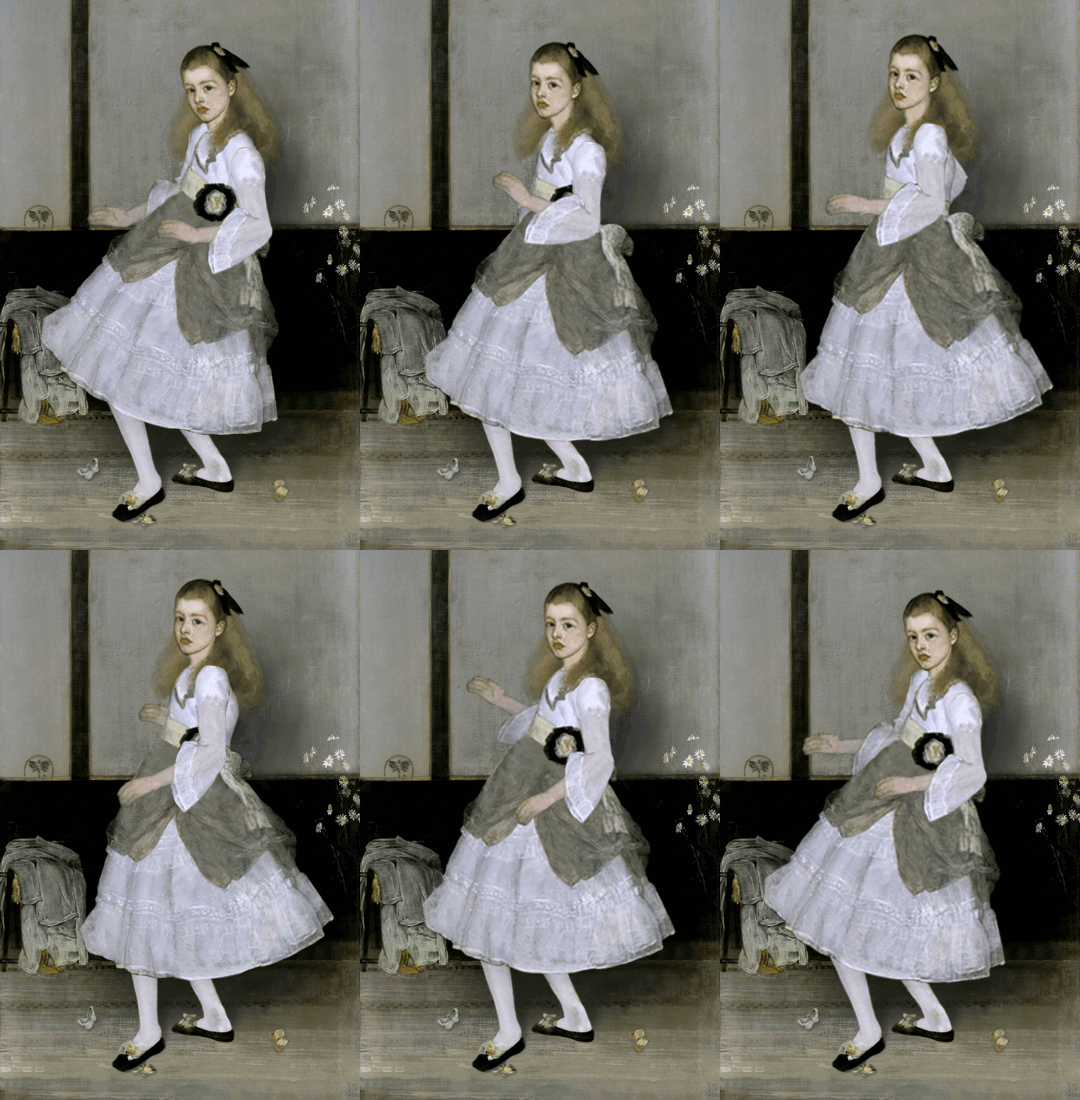
    It’s not every day that you see dancing art from the 1840s, but The Tate Collective, a collection of four UK art galleries, managed to change the way millennials saw classical art with their 1940s GIF party. Using their wide reach in the area and the innovation of a growing young population, their site saw one GIF re-blogged over 100,000 times, increasing the Tate Collective’s Tumblr followers by 25,000 users throughout the campaign.

    Grand Central Station

    While it’s not your typical attraction, Grand Central Station provides a great example of an entity whose making the most of social media. With 750,000 people trekking through the station every day, this travel hub has turned into a true social experience. Creating their own easy to remember hashtag (#ShareGCT), their Instagram, @GrandCentralNYC encourages visitors to share the sights and sounds of one of the world’s busiest travel stations. Not only does this provide visibility through user sharing but it also creates great content for them and an awesome way for travelers to occupy their time.

    The Metrograph

    Utilizing a cool backdrop to attract visitors, the Metrograph has made the most of their newly acquired foot traffic by also using it as a teaching experience. Metrograph’s designer accidentally created one of New York’s hottest new Instagram backdrops by “Sharing the magic of cinema beyond the rectangle of the movie frame.”

    New Orleans Tourism and Marketing Corporation

    Last but not least, we have the city of New Orleans. The city has perfected its social media campaigns just in time for its tricentennial celebration. With what’s slated to be one of the city’s largest celebrations, the New Orleans Tourism and Marketing Corporation (NOTMC) took to social media to coin the giant fête’s theme and slogan, “One Time In New Orleans.” Having had ample time, they’ve perfected the pitch using their captivating #FollowYourNOLA campaign across all social media platforms. NOTMC has set the precedent for how an entire city can showcase itself to the world!

    The Bachelorette Second Line - Search Influence

    Although you may lack the budget of an entire city, not to worry—you too can generate revenue simply by capturing engaging photos and videos from some of your city’s most unique landmarks and busiest hubs.

    How to Make Yourself #Instagrammable

    Becoming a viral sensation doesn’t require in-depth knowledge of string theory, but it does take some strategic planning in order to execute it effectively. So, how can you do it? We’ve gathered a few simple tips:

    Pay Attention!

    Make sure to pay close attention not just to the trends on social media, but also your customers’ behaviors. If you notice that your visitors are drawn to a particular window or centerpiece, then encourage them to share it on their social media! Whether it’s a cool Instagram frame prop or your own clever hashtag, encourage avid and amateur photographers to capture and share their vision with the world. Consistency is key here—the more engaging the content the better!

    Keep It Simple, Silly!

    Social media, while ever-changing, has always stayed true to one principle: Everyone can do it.

    Ease of access to social media has made networks like Twitter and Instagram catapult to the forefront of experience sharing. Don’t believe me? Try social listening to gauge just how many users are on board with Instagram’s change in chronology, or Twitter’s new testing feature that now allows users to tweet with a 280-character limit.

    #DontOverkillTheHashtagTitle

    When curating your hashtag, make sure it’s easy to remember. The last thing you want is for a spelling error to donate your hard earned traffic to another profile. Not only will your hashtags generate lots of attention, but also the constant onslaught of user-generated content will make for weeks of recyclable posts! You’ve filled your content calendar without even having to schedule a professional photo shoot. Keep it simple yet provocative, and you, too, can be #Instagrammable.

    Time to Empty Your Plate

    Got the creativity but don’t have the time? Or, have the time and not the creativity? There’s a professional for that! Let our team at Search Influence help you create a social media campaign that will engage your clients and potential customers.

    Here at Search Influence, we’ve established ourselves as leaders in digital marketing by executing social media strategies for the likes of The National WWII Museum and the Audubon Nature Institute. Learn more about how you can Up Your Social Media Game!


    Image:

    Sunglasses

    Bachelorette

  • The Small(er) Screen: How Smart Businesses Attract Customers on YouTube

    Remember those cheesy local ads that used to be on TV all the time? Here’s a New Orleans classic. It’s memorable and fun to watch, but TV ads have their shortcomings, specifically cost and targeting. TV is also starting to lose its biggest advantage: the ability to reach a wide audience. According to research compiled by The Atlantic, streaming services have eaten away at the presence of traditional TV, causing a drop of 25% in viewership among adults aged 18-49 since 2010. As a result, more and more small businesses are choosing to advertise online. However, videos are still a great way to promote your business. On average, research suggests that videos are five times more engaging than text or image ads.

    Old TV sitting in weeds - Search Influence

    Basics of YouTube Advertising

    Over the past few weeks, many of us here at Search Influence have worked toward becoming certified or recertified in Google’s wide range of advertising platforms. Google constantly updates its advertising features and search algorithms, which is why we’re always educating ourselves on the most recent best practices and information. Part of maintaining our status as a Premier Google Partner is consistently demonstrating our expertise in all of its advertising networks.

    Most recently, we have been working on certifications in Google’s Video Advertising platform. Businesses can place their video ads on YouTube and Google’s Display network. Let’s focus specifically on YouTube’s Trueview in-stream ads. These are the ads that run before a video on YouTube. Viewers can choose to skip the ad after several seconds, which allows them to indicate their interest in the ads.

    YouTube reaches more people between the ages of 18-49 on their mobile phones than any TV network, even during the prime time slot of 8-11 p.m. Advertising on YouTube is available at a fraction of the cost of a 30-second TV ad. Plus, most smartphones have cameras that make shooting professional-quality videos much easier to do on your own.

    Benefits of YouTube Ads

    As I mentioned earlier, viewers can skip an in-stream ad after five seconds. YouTube only charges for an ad if someone watches it for at least 30 seconds. This prevents advertisers from wasting money on people who aren’t interested in their services. It also provides advertisers with quick feedback on the placement of their ads. No one will engage with an ad that isn’t relevant to them.

    About 60% of people watch YouTube on their phone, but they don’t just use their phones to watch videos. 91% of Americans turn to their phones when trying to solve a problem, which presents business owners with the perfect opportunity to advertise.

    Man using cell phone - Search Influence

    To give a concrete example, picture Jim. Jim is thirty years old and lives on the third floor of his building. His sink sprang a leak last weekend, and it’s only gotten worse since then. Jim uses his phone to search “how to fix a leaky sink” and watches the first YouTube video he sees. With the right keywords and location targeting, the ad for your plumbing company can be featured right before the video, prompting Jim to call you to schedule an appointment instead of spending all day trying to fix his leaky sink. Utilizing this feature is an easy way to convert your viewers into paying customers.

    Keeping that in mind, make sure your site is mobile-friendly. This blog post can help you ensure that your website is optimized for people browsing on their smartphones.

    What Does This Mean to You?

    Advertising on YouTube can be a powerful tool for any business, but an ad campaign’s results depend on its execution. Google provides numerous study guides to help people learn how to make the most of their advertising networks; but most business owners don’t have enough time to read through hours of material about negative keywords, bidding options, and ad rotations. Fortunately, we are here to help. Reach out to one of our experts to learn more about video ads.


    Images:

    Sad TV

    Man Using Phone

  • Nine Brands Who Have Mastered Instagram

    Each social media has its distinct character, but Instagram is a beast that many small businesses aren’t familiar with. Twitter is quick and to the point, Facebook friendly, and Linkedin professional. But what about Insta? We can look at these nine companies that are effectively using Instagram to uncover the secrets to its members’ hearts.

    Beautiful Images Are the Core

    Instagram is an image based platform. It’s where hobby photographers, style setters, food artists, and more come together to show off their photos. If your business wants to get noticed, you have to have images that resonate.

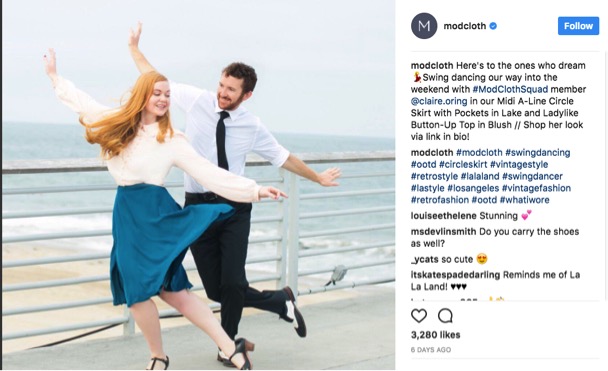
    Boutique-style online fashion retailer ModCloth uses magazine quality photos that feature their staff members wearing some of the pieces they carry. Some are more glam and others silly, but they are all well lit and intentionally shot.

    ModCloth Instagram screenshot

    Let Your Hashtags Run Wild

    On Twitter, it is best practice to keep your hashtags to a minimum, and most people only use them on Facebook when they’re being glib. Nothing could be further from the way hashtags are used on Instagram. It’s not uncommon to have 10-20 hashtags on a single image, covering every different way you can describe the image.

    Inspirato uses multiple variations such as #luxuryhome and #luxuryvilla to widen the scope and make it more likely someone searching will find images of their vacation homes. They also use trendy hashtags like #travelgram to make sure they are part of the greater conversation.

    Inspirato Instagram screenshot

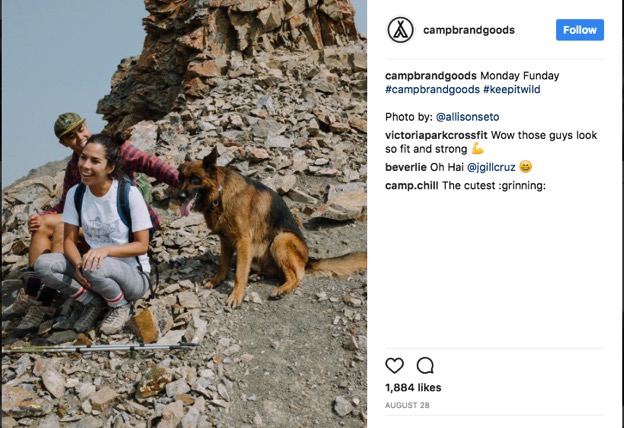
    In addition to using hashtags to be found by potential customers, hashtags can help you find your customers. Camp Brand Goods created the hashtag #keepitwild and encouraged their followers to use it when they took photos with their products. They then “regramed” those photos, showing off the testimonial while building a relationship with their customers. Customer spotlights are a creative way to build hype and fan loyalty, and they’re easy to leverage using hashtags.

    Campbrand Goods Instagram screenshot

    Build an #Aesthetic

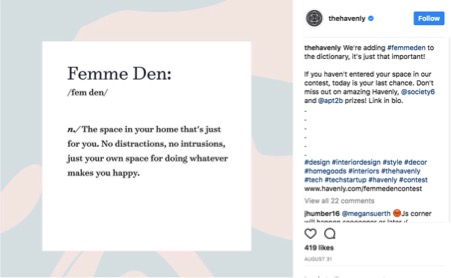
    The most popular Instagram feeds have a coherent theme or aesthetic that appears in each of their photos. This doesn’t mean you need to have your logo in every single photo (but if you can find a creative way to do that, then go for it!). However, having a consistent color scheme, lighting, and subject matter will help to solidify your brand identity. While the three images below from Havenly all have different subjects, the color scheme ties them all together. They all invoke the same feelings and reveal what the brand is all about—decorating spaces with a sense of calm and modern femininity.

    The Havenly Instagram screenshot

    Screenshot of The Havenly Instagram post

    TheHavenly Instagram post screenshot

    Sell a Lifestyle

    Your brand identity is who you are as a company, but the lifestyle you depict in your images is who your customers are. If you’re a car dealership, what kinds of people buy from you, and what do they value? All things USA, the outdoors, family BBQs? Then show those things in your images.

    You don’t have to limit your posts to just pictures of your products. Four Barrel Coffee shows images from the coffee-creation process, as well as the final product. They also post images that appeal to their hipster demographic, such as this photo of their new record player.

    FourBarrelCoffee Instagram screenshot

    If you want to show your products, take a page out of Sphero’s book and showcase some of the features and unique selling points of your business. Their little toy robots roll around all sorts of obstacles, and their photos and videos actually catch them in action.

    Screenshot of Sphero's Instagram post

    ‘Gram in Real Time

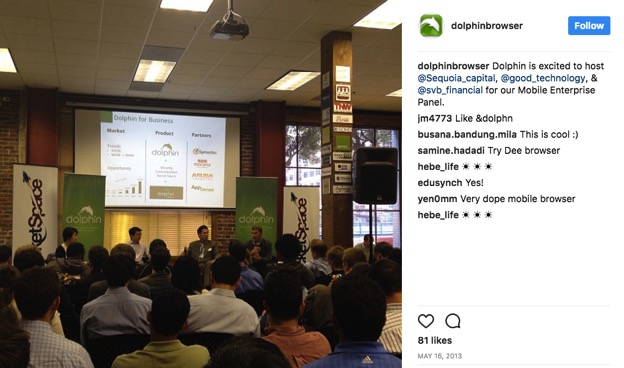
    In addition to sharing staged and styled photos, Instagram can be great for showing off things that are happening at the moment. Testing a new prototype? Take a short video of it in action to use as a teaser. You can also share photos from events, like Dolphin Browser did. This is especially great if you’re hosting an open house, since it can show people how much fun they’ll miss if they don’t head over right away!

    Dolphinbrowser Instagram post screenshot

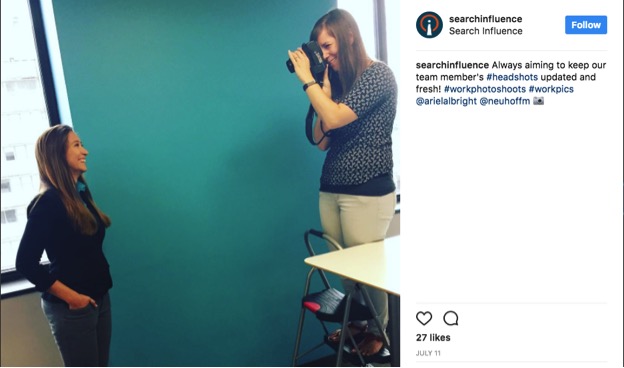
    You can also share photos of your office, a day in the life, or other images of your energetic, smiling employees! It’s something we do here, as well, so you know it’s got to be a great idea 😉  Make sure you follow us on Instagram for updates.

    Search Influence Instagram post screenshot

    Get Local With It

    Small businesses often have close connections with their local community. Take advantage of that by following other local businesses, Little League teams, and other community organizations you want to foster a relationship with.

    Kawaii NOLA is a New Orleans clothing and novelty store that specializes in Japanese imports. In addition to showing pictures of their products, they often share flyers and other information for small businesses, local artists, and Japanese cultural events throughout the city.

    Kawaiinola Instagram post screenshot

    By cross-promoting other nearby businesses, you can unlock a new potential audience.

    In this example, classic anime and film fans can learn more about Kawaii NOLA, and Kawaii NOLA customers may choose to see another film at this theatre after this event is over. Everybody wins!

    Instagram is a brave, beautiful new world for businesses. At the center of all of the examples above is one simple piece of advice: be authentically you. Whoever you are as a company and brand, show that off, and you’ll find the customers you’re looking for.

    If you want help managing your social media accounts, reach out to us to see how we can help!

    Images:

    All screenshots by Meaghan McCarthy. Taken September 2017.

  • 6 Best Practices on LinkedIn for Your Company Page

    Did you know that only 17% of businesses have a company page on LinkedIn? With over 520 million users, LinkedIn has the right to refer to itself as the world’s largest business network. Connecting users with current and potential colleagues and even to future relationships with consumers, distributors, and manufacturers, LinkedIn is chock-full of opportunities to find whomever you need to grow your business.

    Whether your company is new to LinkedIn or has existed on the platform for years, make sure you’re staying active on LinkedIn in the right ways. Here are 6 best practices when it comes to your business’s LinkedIn page.

    1. Keep It Professional

    Every social media platform has its own tone and personality. The language you use to represent your business on LinkedIn needs to be more professional and polished than what would typically be used on Facebook and Twitter. Don’t make the rookie mistake of writing your LinkedIn posts the same way you would write your Facebook posts.

    2. Have a Company Logo and Implement a Cover Photo

    A company logo adds credibility to your page. According to LinkedIn, company pages with logo images get six times more traffic to their pages. It will also appear whenever a user searches for your company on LinkedIn as well as on employee profiles.

    Search Influence company logo LinkedIn header - Search Influence

    3. Optimize Your Page for Google Search

    Did you know that company pages on LinkedIn are SEO friendly? Google can preview the first 156 characters of your description in search results, so maximize that space with strong keywords and concise information. This helps readers who stumble onto your page on their own know exactly what it is you do, too.

    4. Create Slamming Status Updates

    If you create your company page but then never post anything, you’re missing out on possibly infinite opportunities for micro connections that can grow into real business opportunities. But posting sporadically, or posting things nobody wants to read, won’t help either. Share articles from leaders in your industry, post your thoughts on industry or company news, and promote your blog posts (you are writing a blog, aren’t you?). Focusing on the needs of your demographic will help guide your updates. What do they want to learn, and when are they online? Our social media guide can help you out with that.

    In addition to focusing on what to write about, keep an eye on how you’re crafting it. Shorter updates perform better than longer ones, and ones with links, large and pretty images, and videos all catch people’s attention and get them to share and comment on your updates.

    5. Sponsor Your Content

    It’s true across the board—sponsored and organic content need to work together to create an effective marketing strategy. By sponsoring some of the posts you publish on your Company Page, you can make sure all the right people see it, not just people who are already following you. LinkedIn has very advanced targeting capabilities (company size, seniority level, and even job title targeting is available), and it is easy to track conversions for each sponsored post. This means you can run A/B testing to see what your target audience really wants to see.

    6. Establish Yourself as a Thought Leader

    This is a bit of an extension on point four. You want to consistently publish content that shows you know what you’re talking about and are at the cutting edge of industry innovation. Weigh in on industry news, share your own rich knowledge by promoting blog posts and whitepapers, and even get a bit controversial by taking a stand on an important industry issue. At the end of the day, people don’t buy from you because of your products, they buy from you because of who you are. Show everyone who your company is and how they can present solutions to problems through your LinkedIn updates, and your expertise might just spread.

    Social interaction vector image - Search Influence

    LinkedIn is such a powerful tool for engaging with B2B customers. While it might take some work at first to figure out your strategy, following these tips for creating a strong LinkedIn presence will end up really paying off in the end.

    Check out how Search Influence can help with your social media.

  • Growing Your Practice on Facebook, Part 6: A Facebook Success Story

    Part 6 of The Ultimate Guide for Growing Your Medical Practice Using Facebook

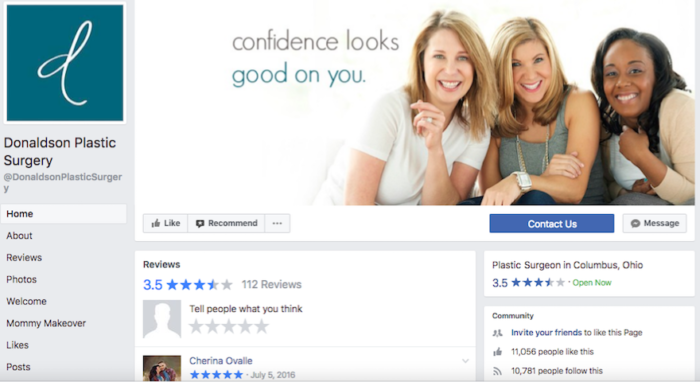
    Welcome to the final installment of our series on using Facebook to promote your medical practice. Now that we’ve covered best practices, we’ll show you how we put them in action using one of our own clients as a case study—Donaldson Plastic Surgery.

    Remember, if you want more information about using Facebook for your medical practice, make sure you download our e-book.

    But First, Let’s Recap

    Before we show you how to put everything together, here’s what we’ve learned so far:

    Part 1: Why Facebook Matters – The introduction to our blog series showed how Facebook can be used for medical practices in particular, and why it’s an important tool for engaging with patients and creating a personal connection with them.

    Part 2: Shareable Content – We gave easy-to-follow tips for creating shareable content as well as advice on the often forgotten second step of Facebook: engaging with your followers in response to their interest in you.

    Part 3: Advertising – Taking a slightly different approach, we went into detail about paid promotions, discussing the difference between promoted posts and ads, and laying out Facebook’s restrictions that govern medical advertising.

    Part 4: Reaching Your Audience – We explained how to leverage Audience Insights to target your ads to your ideal patient, making them more effective, and how to bridge the gap between your online audience and the real patients who walk through your door.

    Part 5: Patient Confidentiality Concerns – This blog brought it all home with clear examples of how to stay HIPAA-compliant while posting on social media.

    Now, it’s time to see how all of these elements work together with a real medical practice.

    Facebook Campaign in Action: Donaldson Plastic Surgery

    Dr. Donaldson has been our client since 2009, the year he opened his practice. Since he was just starting out, there was a lot of work that needed to be done in terms of digital marketing, including a new Facebook page that had a grand total of zero Likes. Since launching his Facebook campaign in 2011, Dr. Donaldson’s page Likes have increased to over 11,000. This was accomplished through a comprehensive Facebook marketing campaign.

    This campaign was comprised of Facebook management, fan building, and Facebook display ads. We created posts that established Dr. Donaldson’s professional brand and consistently published engaging, informational, and promotional posts that appealed to current and potential patients throughout the area. We also created ads that increased brand awareness, brought Dr. Donaldson’s practice to those who didn’t know him already, and promoted the full range of his services, all utilizing Facebook’s targeting abilities.

    Image Of Facebook Page Likes For Donaldson Plastic Surgery - Search Influence

    Combining paid ads with an increased frequency of organic posts expanded the practice’s fan base. A large chunk of Dr. Donaldson’s Facebook fans, totaling 11,000+ Likes, have come from annual fan building campaigns (over 6,400 of the Likes, in fact). Campaigns such as Likes for Lives encourage Facebook users to Like your page in exchange for a donation to a charity organization. These campaigns increase followers while also giving insight into your practice’s values and the importance of giving back to your community.

    Dr. Donaldson is proof that a well-managed Facebook page, full of engaging posts and targeted ads, can work to create a campaign strategy that gets patients through the door and establishes your practice as the medical resource in your area.

    Armed with the best practices we’ve covered in our blog series, you can accomplish results like this for your medical practice as well! If you have any strategic questions or need help growing your practice on Facebook, contact one of our experts here.

  • Growing Your Practice on Facebook, Part 5: Patient Confidentiality Considerations

    In our last blog, you learned how to capture your audience with engaging content and analyze the results. Now that you understand what it takes to connect with your patients, we’ll take a look at common obstacles medical practices face when posting on Facebook.

    Social media and the healthcare industry can seem in opposition at times. One is about sharing and transparency, while the other hinges on patient confidentiality and privacy. But the irony is that the medical industry is not immune from the benefits and trends of platforms like Facebook.

    Facebook is a wonderful resource for any industry looking to grow their business. Potential clients and patients desire access to the goings-on of a medical facility or hospital, and similar to peeking in on the page of a friend or associate, patients expect to see their doctor’s office online, too. Uploading staff happenings or posting about a new procedure is invaluable to the cause. But what happens when patient confidentiality is violated? In the era of “clicks,” the two opposing parties of health care and social media must become friends. Although there’s a fine line to walk when working within HIPAA rules, here are some helpful tips to consider when using Facebook for your medical office.

    Image of doctor using a tablet - Search Influence

    Get Written Permission Before Posting

    Nothing can replace the power of pictures on your Facebook page. According to a Hubspot survey, Facebook posts with images receive 53% more Likes than those without. Images serve as testimony to what your practice can do and how you can help other patients achieve their desired results. They are also a way for your patients to discuss and identify symptoms that may need a doctor’s immediate attention. However, posting photos without explicit consent from all parties can lead down a very hairy path—even if the image isn’t of someone’s face.

    According to Privacy Rule requirements, physicians must obtain a signature from the patient that specifically spells out the what, when, and where of the shared item. Some medical facilities have recently opted to send out a blanket consent statement, but this is not best practice. Be sure the statement includes details such as a full description of your purpose in using the image, an expiration date on the image consent, as well as a note describing the patient’s right to revoke consent. Send a copy of the signed document to the individual and keep one for your records as well. Working this into your protocol prior to posting photos will keep a clear line of communication between your practice and patients, and it will also create a streamlined process for your social media marketing needs.

    Avoid Talking About Specific Patients

    Posting about patients can be helpful to your practice. You can highlight testimonials, success stories, and interesting procedures that can be used to engage new and current patients alike. However, when posting on Facebook, even if given permission to use a patient’s medical situation, you’ll want to be explicit in not identifying the individual.

    Confidentiality and privacy are two sides of the same coin. Confidentiality limits the details of a patient’s health exclusively to the medical team unless given informed consent. Privacy, on the other hand, relates to the patient’s right to be treated with respect and dignity. HIPAA goes even further, stating that information given about a patient in a public forum should not disclose individually identifiable information. This information includes anything that could be used to hone in on a specific person, such as past, present, or future physical or mental health details. Understanding the difference between the two, and how they relate to the language and images used in Facebook posts, will help you and your staff to find that happy medium.

    Image of doctor's stethoscope on top of patient's records - Search Influence

    Don’t Take Pictures Around Sensitive Materials

    Where you take the picture can matter just as much as the picture you take. When capturing images to share with your patients, be aware of any medical records or other confidential materials laying around. With zoom features on devices, potentially threatening information can become more decipherable when viewed from apps on a cell, tablet, or another mobile device. Avoid this mistake by thoroughly surveying the area before snapping a shot around the office. Put away any files or paperwork containing information that is private or for medical office use only. It may also be a good idea to only take more candid photos in certain areas of the facility where sensitive items are least likely to be an issue. Also, be sure to avoid taking pictures that may have a patient in the background. Having a designated spot for photo ops can minimize the chances of mistakenly exposing information that would break patient confidentiality and put your office in a compromising position.

    Facebook doesn’t have to be a no man’s land for physicians and medical practices. Healthcare and social media can play on the same team. Building your brand online and strengthening relationships with your patient base is invaluable, especially with Facebook’s almost 2 billion monthly users. Don’t be intimidated by HIPAA; instead, embrace the rules, implement best practices for your staff, and walk the line to marketing and confidentiality success. The exposure you’ll get will be well worth it.

    Check back next week for the final installment of our medical industry blog series, which will walk you through one of our case studies and show you how to put everything together!

    If you are ready to chat about your digital marketing opportunities today, contact one of our experts.


    Images:

    Tablet

    Patient Records

  • Growing Your Practice on Facebook, Part 4: Reach Your Audience

    Now that you’ve gained valuable insights on the many uses of Facebook paid ads, the importance of engaging with your followers, and why all of this matters in the first place (spoiler alert: yes, social media is worth your time), we’re going to get into the specifics of understanding and capturing your audience. After all, if you don’t understand your users, how are you ever going to reach them?

    We’ll share how to use the Audience Insights tool on Facebook to analyze when your users are active and what’s catching their attention. Then, we’ll share some surprisingly easy ways to update your Facebook page and grow your followers—as well as your actual patients.

    Ready for the PhD-level course on using Facebook to grow your medical practice? Download our free e-book today.

    How Can You Use Audience Insights to Grow Your Reach on Facebook?

    With nearly 2 billion monthly users on Facebook, it’s important to narrow the scope and understand who is engaging with your practice, as well as what they are looking for from your page. That’s where the Audience Insights tool plays a vital role. Audience Insights allows page administrators to understand their users and target their reach according to demographics, purchase behaviors, geography, and activity on Facebook.

    By creating a custom audience using this tool, you can target your ads to a specific group of users on Facebook. Say you know that your typical patient is a female in greater New Orleans with an average household income of $150-250K and a bachelor’s degree or higher. You can create a new custom audience using these demographics and build an ad campaign on Facebook to target that audience. While that’s a pretty narrow scope for a medical practice that isn’t quite so sure of their ideal patient, experimenting with a few different test audiences to gather data on successes and misses is a great first step.

    On the other end of the spectrum, you can also use Facebook insights to gain more knowledge about your active users and cater your posts and ads to the types of demographics that are most engaged with your page. You can even learn the best times of the day and week to post and the type of content that achieves the highest engagement. Perhaps you see a spike in engagement when you post patient testimonial videos on your page and dedicate more marketing spend on creating videos. Or, maybe your analytics show that users are more engaged in the mornings, so you schedule your posts in advance for time slots between 8 a.m. and 11 a.m. to capitalize on your users’ behaviors.

    These insights can all inform your future social media marketing strategy to focus on what works and build on your successes.

    Picture Of A Medical Doctor's Desk - Search Influence

    How Can You Connect Your In-Person Audience With Your Social Presence?

    While tools like Audience Insights allow you to understand your online audience, it’s just as important to understand and connect to the people visiting your office and living in your community. The more you can bridge these two segments, the better your chances of building a loyal fan base and creating meaningful social media content.

    Events are a great option for bridging these two audiences. If you’re hosting an event at your office, like a drive for flu shots or a fundraiser for a local nonprofit, be sure to create a Facebook event so guests can RSVP, invite friends, and receive reminders as the date approaches. If your event is public on Facebook, the platform will also suggest it to other users based on friends who are attending. Now your online users also have a reason to visit your office and speak with you in person about a subject they are already interested in.

    Community events that focus on the values of your practice are also important for building trust and humanizing your online presence. By showcasing the causes that are important to your industry, work, or community, users can connect with your page through those similar interests. For example, if your company is participating in a community event like March of Dimes or you have a team participating in a local 5K, share updates on your fundraising efforts, highlight photos from the event, and link to informational articles about the cause. All of these strategies help create dynamic social media content while also connecting you to the broader community of users with shared interests and passions.

    How Can Fan-Building Campaigns Help Engage & Grow Your Audience?

    Now that you have a better understanding of who your target audience is and how to build a bridge between your online and IRL communities, it’s time to increase the number of actual fans connected with your page. The first step may seem obvious, but it can’t be overlooked. You have to have an active, established page with helpful content and consistent posts. Make sure you’re dedicating time to posting new content as well as responding to inquiries to build engagement.

    Image Of Stethoscope With Breast Cancer Ribbon At Medical Practice - Search Influence

    Another great tactic to generate new followers is through a fan-building initiative such as a “Like for Lives” campaign. Remember when we said that connecting your social media content to your values and industry is important? “Likes for Lives” does just that. The basic premise is that for each additional Like that your page receives for a set period of time, your medical practice will make a donation or take an action to help save a life. This could be a monetary donation to a charity, a volunteer commitment, or any other creative action your practice can take to help others.

    The goal is to generate excitement on your page and in your office, giving you plenty to post about in order to raise awareness about your campaign and encouraging your fans to share your initiative with their friends in support of a good cause. Be sure your staff is informed of the campaign, and encourage or incentivize them to share the information within their own networks on Facebook. If you work with a nonprofit to raise money, they may also want to share the content, further increasing your reach.

    With a combination of tactics like these and consistent posts on your Facebook page, you’ll start seeing your audience steadily grow. By targeting the right demographics, you can also see this growing audience translate to more patients. Remember, social media is here to stay, and leveraging its power and reach can have a big impact on your medical practice.

    Stay posted for the next update in our series where we’ll discuss the importance of patient confidentiality on Facebook.

    Eager for more tips and tricks to grow your social media IQ, or ready to get started with digital marketing campaigns for your business? Contact an expert from our team.

  • Growing Your Practice on Facebook, Part 3: Advertising

    In our previous blogs, you’ve learned that Facebook is crucial for promoting your medical practice and that shareable content is the number one component of your social media strategy.

    As the next step in your journey to increase your social presence, Facebook ads are another highly effective way to promote your practice online. In this blog post, we’ll answer your questions about the importance of paid promotions on Facebook, the difference between promoted posts and ads, the primary advantages of Facebook ads, and whether your ad copy complies with HIPAA and other guidelines.

    Why Not Just Use Free Posts?

    With so many opportunities to post for free on Facebook, it might seem like paid promotions aren’t necessary. However, due to recent Facebook algorithm updates, overtly promotional posts are receiving less organic distribution on the platform. This is due to a Facebook survey in which users named highly promotional posts as the number one thing they would like to see less of in their news feeds. As a result, your followers will be unlikely to see any of your posts that push products, urge people to enter contests, or reuse advertising content. Below are some examples of highly promotional posts.
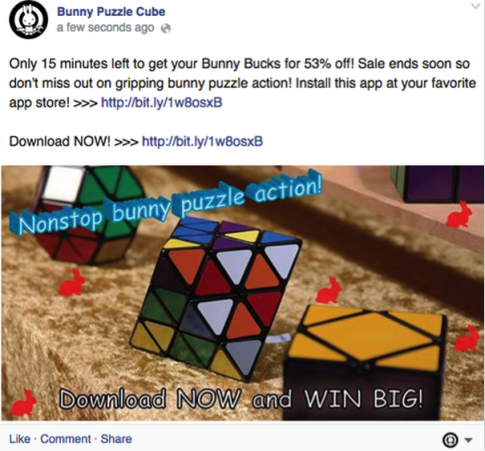
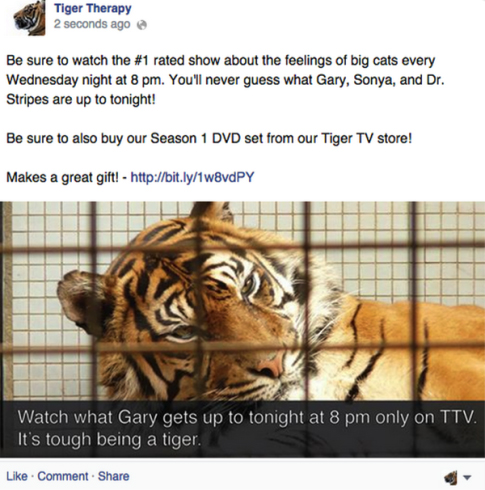
    Image of a highly promotional Facebook post - Search Influence

    Image of an overtly promotional post on Facebook - Search Influence

    However, in the same survey, Facebook users reported that they aren’t bothered by promotional content when it has been identified as advertising. This means that paid promotions are not only ways to get around Facebook’s algorithm updates and reach your target audience, but also ways to engage your followers without coming across as annoying or spammy.

    What’s the Difference Between Promoted Posts and Ads?

    The two main types of paid promotions on Facebook are promoted posts and advertisements. Understanding the difference can help you determine where each best fits into your social media strategy.

    Promoted posts are formatted like traditional free posts, but they are marked as sponsored content and appear higher in your followers’ news feeds. The main advantage of promoted posts is that you can test them out as free posts before investing in them. If one of your free posts is performing especially well, Facebook will often prompt you to “boost” or promote it. Promoted posts can also be easier to use because they follow the traditional Facebook post format.

    Advertisements, on the other hand, can follow a wide range of formats. Facebook’s Ads Guide allows you to customize based on your campaign’s objective, be it brand awareness, lead generation, website traffic, or one of many others. The guide can also walk you through the different ad placements, focusing on which fields will be included in which type of ad. As shown in the images below, mobile and desktop news feed ads have space for social information, business name, text, images or videos, and a call to action.
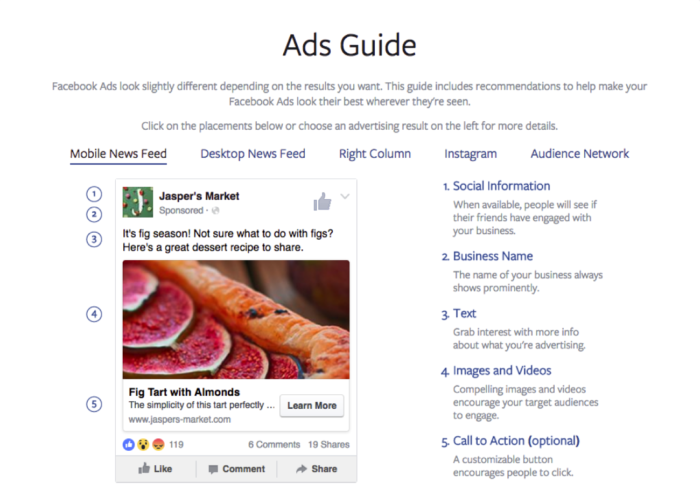
    Image of Facebook's Ads Guide for mobile feeds - Search Influence

    Right column ads, on the other hand, only have space for text and images or videos:
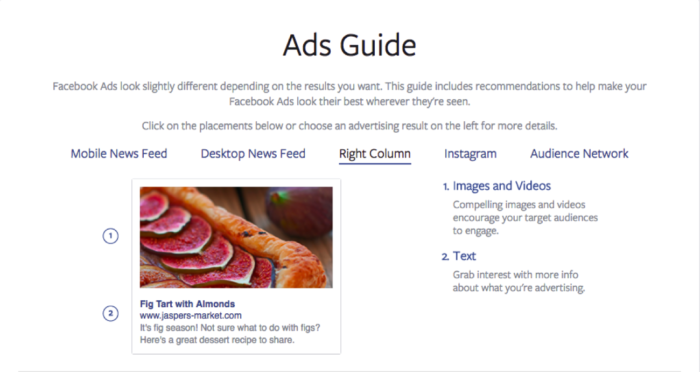
    Image of Facebook's Ads Guide for right column information - Search Influence

    While all of these options make advertisements a bit more challenging than promoted posts, they also allow ads to achieve more diverse objectives. Promoted posts are great for growing brand awareness and driving engagement, but if you have goals outside of social media—for example, getting potential patients to fill out a consultation form on your website—then Facebook ads are the better way to go.

    What Are the Main Benefits of Facebook Ads?

    The reason why ads are more effective than promoted posts for driving off-Facebook conversions is the call to action (CTA) button. While exact numbers vary based on the industry, type of content, and action the reader is being called to do, statistics show that conversion rates increase dramatically when a CTA is present. While CTAs can be included in the text of a promoted post, the CTA button in ads allows your message to stand out even more. More importantly, it explicitly tells readers what action you want them to take, and allows them to accomplish it with just one simple click. Facebook also provides an easy drop down menu of popular CTAs for you to choose from, ranging from “Contact Us” to “Download” to “Watch More.”

    The second major benefit of Facebook ads is the platform’s detailed targeting options. These are available for promoted posts as well, and they can be set or altered within Facebook’s Ads Manager. While traditional advertising channels, like billboards or newspaper ads, can’t guarantee that your message reaches your goal demographic, Facebook ads can be carefully targeted to the people you want them to reach. For example, if you run a geriatrics practice in New Orleans, you can ensure that Facebook shows your ads to users aged 65+ in the Greater New Orleans area. Using Facebook’s targeting feature allows you to run a more efficient ad campaign. You can direct your time and money only toward the demographics that are most likely to become your patients, without wasting advertising resources on anyone else.

    What Legal and Ethical Guidelines Govern Medical Facebook Ads?

    As you’re certainly aware, the medical industry is heavily regulated. Everyone from the American College of Physicians to the Health Insurance Portability and Accountability Act (HIPAA) to Facebook itself has rules for medical advertisements. If you break them, your ads will likely be taken down, and in some cases, legal action may even ensue. While Facebook’s Advertising Policies provide a detailed list of prohibited and restricted content, the two biggest red flags for physicians are misleading content and patient confidentiality violations.

    Misleading content includes anything that could be considered deceptive or ambiguous to patients. The most obvious examples are photoshopped images or exaggerated guarantees; however, even subtle wording variations can lead to misleading content violations. For example, it’s generally okay for a physician to claim that Botox can contribute to a more youthful appearance. Yet, it could be considered misleading to claim that Botox will make patients look ten years younger or eliminate signs of aging. Although these statements are quite similar, only the first one is acceptable because it does not make any specific promises about the product’s outcomes. Some of the best precautions against misleading content include citing studies or journal articles whenever claims are made, and labeling all non-patient photos with the word “model.”

    While misleading content might get your practice in trouble with Facebook, violating HIPAA rules about patient confidentiality can get your practice in trouble with the law. As with misleading content, some precautions are obvious. For example, you should never post any identifying information about patients, such as names or faces. However, many HIPAA violations are less apparent. For example, it is prohibited to post images that do not clearly identify a patient, such as a rash on someone’s foot, unless you have clear legal permission to do so. Similarly, be careful that no pictures of the office have patients or medical records in the background. To avoid any issues, require patients to sign a consent form before using their images, or stick to model-labeled images and stock photos.

    Interested in learning more? Don’t forget to check back for the next post in our medical industry blog series, which will help you reach your target audience.

    For more information about getting started with Facebook Advertising for your hospital or practice, contact us here.

    Images:

    Ads Guide Mobile Feed

    Ads Guide Right Column