Category: Social Media

  • Up Your Instagram Game With Effective (and Free) Hashtag Research Strategies

    #Winning. #Selfie. #Hashtag. While hashtags have crept into our vocabulary (whether sarcastically or not) and may seem like an afterthought, they’re actually effective marketing tools that need to be taken seriously when it comes to your Instagram strategy.

    I want you to walk away from this post with a newfound appreciation of hashtags and the confidence to perform hashtag research—trust me, it’s not as complicated as it sounds. And if you already have an Instagram account, you’ve got your most important tool!

    Let’s cover the basics before we get into the research steps.

    Why Are Hashtags Relevant to Instagram Posts?

    Remember, hashtags aren’t just for decoration—especially for business accounts looking to grow followers and create awareness about their brand and services. While you may have a little more fun with hashtags on your personal Instagram (#DoItForTheGram, anyone?), hashtags can help brands get in front of a wider audience and connect with potential customers.
    Animated photo of a hashtag and a heart in comment shapes

    So, how do these little hashtags work their magic?

    Even with the perfect combination of good lighting and an engaging caption, a large chunk of Instagram posts goes unseen. 70% of posts, to be exact. Let that sink in.

    There’s a big sea of content on Instagram; it’s easy to get lost—but using hashtags can boost your chances of engagement. Adding just one hashtag to a post can increase engagement by 12.6% (but don’t just slap on a hashtag to your post and call it a day)!

    Conduct Effective Hashtag Research On Your Own—No Tools Required!

    Hashtag research can be a little more fluid than other digital marketing research. Yes, there are steps to follow, but I enjoy this research because there’s room for creativity.

    As we walk through hashtag research basics, let’s pretend I’m a small, local catering company looking to expand my business and showcase my delicious work on Instagram. How would I begin my hashtag research?

    Go to the search bar, press “Tags,” and type in a keyword related to your industry.
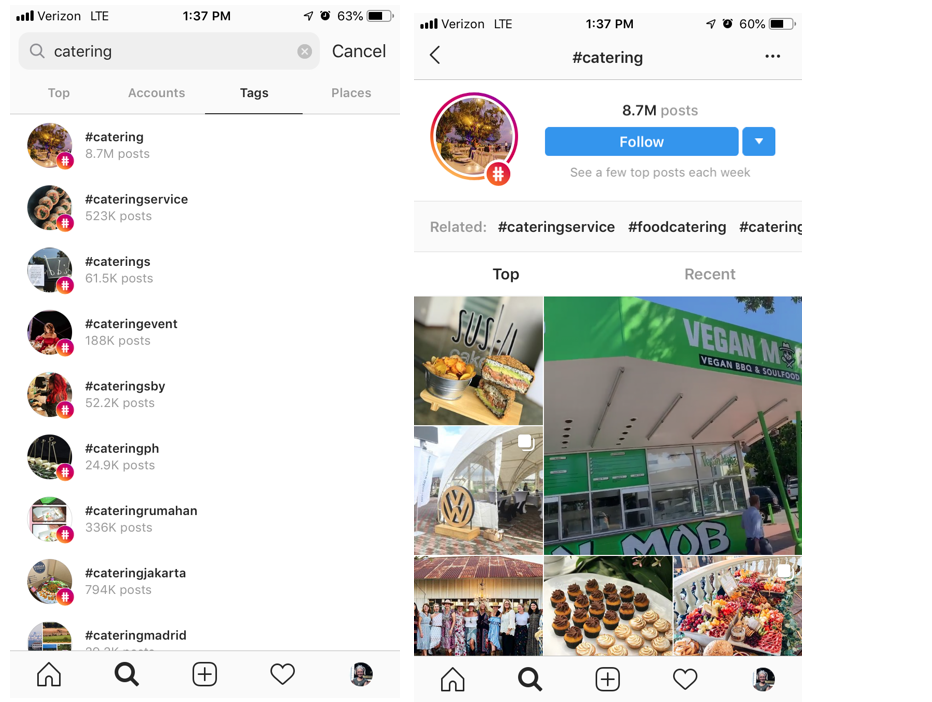
    Example of Instagram tag search and landing page from tag search

    “Catering” is a pretty general hashtag and probably won’t get my little catering company found in a sea of 8.5 million posts. But we’re not stopping there. To find more varied, interesting hashtags related to catering, I’m going to check out some of the top and recent posts that were pulled up in this search. Then I can dig deeper into their hashtags and engagement patterns.

    I can also click “Follow” if I want to keep up with the top posts using #Catering—they’ll appear in my Instagram feed.

    Let’s dig into this post I found using #Catering and pull out some popular and not-so-popular hashtags that I can use in the future. Because when it comes to hashtag strategy, you want a mix of both!
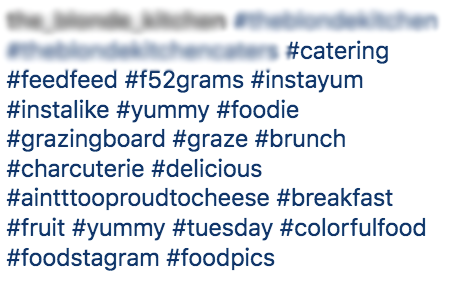
    screenshot of hashtags relating to food

    High- and Low-Density Hashtags

    Some of the hashtags in this post are general and widely used on Instagram, such as #Foodie, #Catering, or #Yummy. These are known as “high-density hashtags,” meaning there are more than 500,000 posts on Instagram using that hashtag. While it’s good to use some high-density hashtags to gain new likes and follows, you want to mix them with more specific, targeted hashtags, known as low-density hashtags (used in less than 500,000 posts). There’s less competition for ranking in the top posts with low-density hashtags, helping your brand become more discoverable. Some examples of low-density hashtags in the above posts are #AintTooProudToCheese #GrazingBoard #ColorfulFood.

    Always use a mix of high- and low-density hashtags in your post to cast a wide net. To find out the number of posts that have used any given hashtag, simply click on the hashtag, and it’ll take you to a page like the #Catering example. You can also search hashtags if you want a quick number without going to the page.

    When compiling your list of hashtags during your research, don’t forget to indicate if it’s high-density or low-density. Your future self will thank you when it’s time to organize them!

    Here’s where the fun comes in.

    Once you find a few posts from your own initial search, click on hashtags that stand out and see who else is using them. Add those hashtags to your list, and keep going down the rabbit hole!
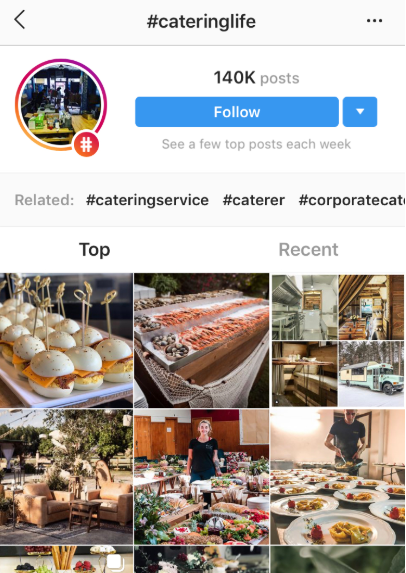
    Screenshot of #cateringlife hashtag results page

    Here’s a post I found searching through #CateringLife:
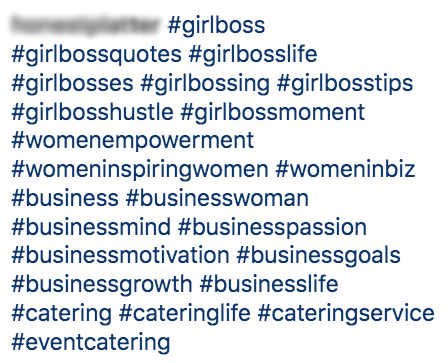
    Screenshot of #girlboss related hashtags

    Community Hashtags

    Notice the mix of hashtags here. We have some catering-related ones (#CateringLife, #EventCatering, #CateringService), and we also have low-density hashtags that speak to a more specific (smaller) audience or community: #GirlBossHustle and #BusinessMind. These are community hashtags that can be used to engage with specific users within a similar business or active community.

    It may take some time to find the right community hashtags for your business. Follow a few low-density themed hashtags and observe the other users and business accounts using them—do they align with your brand and goals? Are the accounts engaging with users or one another? Note the hashtags that seem like the best fit for your business. Once you begin experimenting with different community hashtags and engage with other accounts within that community, you may find your tribe and gain more visibility.

    Location Hashtags

    Location hashtags can help you target a very specific local audience and get in front of Instagram users already following that hashtag. Find location-specific hashtags that combine your targeted area, audience type, and industry. Try different variations of your location (e.g., “NOLAEats,” “NOLACatering,” “NewOrleansFoodie”).

    Follow a similar research process as outlined before; don’t be afraid to go down the rabbit hole of accounts by jumping from one hashtag to the next. You never know when hashtag gold will strike!

    As you research high-density, low-density, community, and location hashtags, observe (and record!) the number of hashtags, placement, and level of engagement in each post.

    Take the time to analyze the posts and accounts your hashtags are coming from:

    • Number of hashtags used?
    • Number of likes?
    • Engaging comments? Responses from the account? No comments?
    • Number of followers?
    • Hashtags in the comments or caption?

    The more you document hashtag use and patterns during your research, the more informed your strategy will be.

    Hashtag Categories

    I’ve pointed out different types of hashtags throughout the research process—low and high density, location, and community hashtags. While there are more out there, we’re just going to focus on these.

    By searching a variety of hashtags types, you can create subcategories for your hashtags.

    Now, back to my catering business.

    After my research, let’s say I organize my hashtags into four main groups: “Woman-Owned/Small Business,” “Weddings/Corporate Events,” “New Orleans,” and “Industry.” When I plan future posts, I’ll have my hashtags organized and ready to be used according to my post topic.

    Remember: you can use multiple categories of hashtags for each post. Focus on hashtags relevant to your industry and post topic—the more relevant hashtags, the more likely your target audience will like, comment, or follow.

    Organize Your Research & Create an Ongoing Strategy

    No need to purchase special software to organize your research—a simple spreadsheet will do.
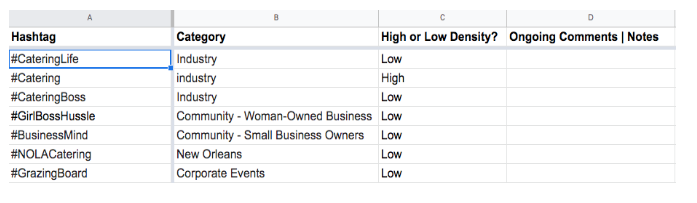
    An example speed sheet of hashtags and categories

    Make sure it’s thorough and organizes hashtags in a way that anyone using it will understand. This is especially helpful if more than one person is working on your Instagram posts and overall strategy.

    Even if you’re the only one using the spreadsheet, having it clean and organized will be handy when sharing research with others and helping them understand there’s a method to your Instagram-posting madness.

    Experiment With, Change Up, and Monitor Your Hashtags!

    So, you have your hashtags neatly organized in a spreadsheet. The hard part is over—now it’s time to copy and paste a few of them into your posts and call it a day, right? WRONG! Your hashtag strategy is not a one-and-done ordeal; it’s a strategy, after all.

    Strategies need to be ongoing. You need to experiment, observe, and readjust when using hashtags on Instagram. What do I mean by that?

    Experiment

    • Don’t use the same 5-10 hashtags in every post. I repeat: do not use the same 5-10 hashtags in every post.
    • Switch out your hashtags in each post to reach new audience members. You have the chance to cast a net that has the potential to get wider and wider with every post.

    Observe

    • Consider using an Instagram business account to help monitor post performance. You’ll be able to gain engagement insights for each post, including the number of impressions you received from hashtags alone!
    • Even with an Instagram business profile, record notes about your hashtag performance in your spreadsheet since Instagram limits how far back into your insights you can see.

    Readjust

    • Which hashtags seem to be attracting new followers and encouraging engagement? Any hashtags not performing well (or at all)? Readjust your hashtag use according to your observations.
    • Try pairing different hashtags together to see if that improves post performance.
    • Think of this step as more informed experimentation. You’re still trying out different hashtag groups and categories, but now you have some observations and notes to back it up.

    Repeat

    • Surprise! The process doesn’t ever truly end (unless you want less than impressive results). Hashtag use is ongoing for a reason.
    • Keep repeating this process with each post. Before you know it, you’ll have an arsenal of hashtags and hefty notes and insights to inform your hashtag strategy.

    Ready to Build Your Social Strategy?

    While hashtag research can be an easy DIY project, don’t try to balance social media management for your business on top of content creation and marketing. Focus on your business, and Search Influence can do the rest! To learn more about our digital marketing services, speak with a strategist today.

    Images:
    Hashtag and Heart
  • Organic, Boosted, & Promoted Posts: What’s the Difference?

    Remember the good ‘ole days when “marketing” meant buying full-page ads in the Yellowpages? Everything was so simple then. TV commercials ruled the airwaves, and people couldn’t help but hum the jingles of Pepsi, Ringpops, and Doublemint Bubblegum commercials. Back then, a catchy jingle was all you needed to give your brand an edge over the competition. But with the dominance of social media, it isn’t as cut and dry as it used to be because marketing platforms are at our fingertips.

    At their peak, YellowPages and TV commercials were industry leaders because there were fewer advertising channels. But now, social media platforms have changed the game because, for the first time, they allow communication through many different avenues. Increasing the distribution of communication yields increased opinions. Put simply by the co-founder of Intuit, Scott Cook, “A brand is no longer what we tell the consumer it is—it is what consumers tell each other it is.” This is why posting on social media is critical to creating awareness and loyalty around your brand.

    Before you jump in and start posting like a maniac, you need to understand how to post, as well as knowing the different types of social posting options. Knowing which posts to use and the best ways to leverage them will help determine the best budgeting decisions for your business.

    Social posting as a business is an effective way to encourage user engagement and increase brand awareness. One way to get your followers to engage with your posts is by catering your content to their interests. Studies have shown that the best performing content elicits emotions from readers. Do this by posting astonishing facts or posing curious questions that a reader can’t help but acknowledge. Another way to keep your followers engaged with social posts is by using different formats. Anyone can create a text post, but adding an image to your post can more than double your engagement rate. Stories and video posts are also effective ways to captivate your audience. Lastly, you can also improve engagement rates by being engaging yourself. People will remember when you engage with their content and will be more likely to return the favor. Liking a follower’s post, acknowledging them with a quick reply, or sharing their post can go a long way.

    Now that you have a better idea about how to write your content, the next step is to decide what types of posts you should be using to deliver that content.

    There are three types of social posts: Organic Posts, Boosted Posts, and Promoted Posts

    The Organic Post

    The OG of posting. Organic posts are the basic posts you create on your page that do not have any spend behind them. These posts display directly on your profile’s page and will be seen only by your followers.

    The Boosted Post


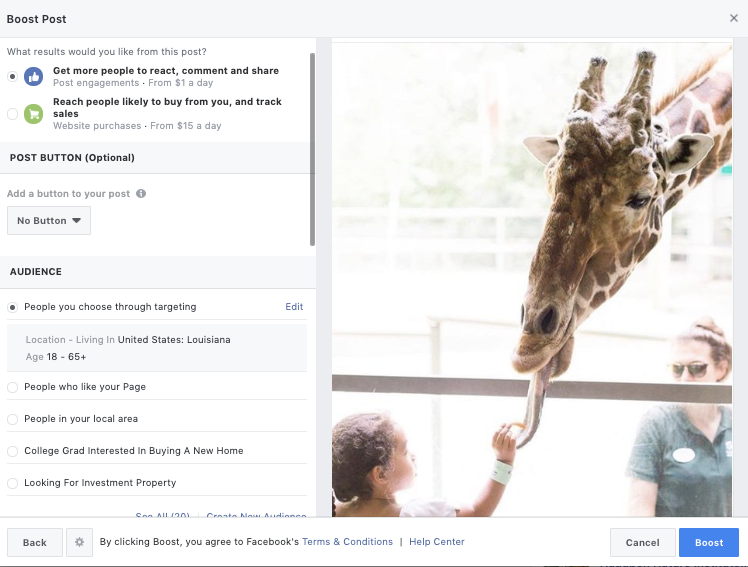
    Screenshot of a boost post form on Facebook

    A boosted post is an organic post to your profile that has been amplified to reach a larger audience outside of your current followers. With boosted posts, you set your budget and audience targeting. You can choose between two options of audience targeting for these posts: you can target “People who like your page and their friends” or “People you choose through targeting.” Keep in mind that with the first option, the “people who like your page and their friends” might not be interested in your business, so if you’re boosting something niche, it might be better to choose the second option.

    The Promoted Post

    The promoted post enables you to ensure that your post will appear in the News Feeds of more people. Typically, these posts are labeled as “sponsored,” so people know that it’s an ad, even though it looks like the other posts on their newsfeed. The benefit of promoting a post is that you have more options for targeting, pricing, and bidding. Promoted posts work well for giveaways, freebies, or coupon codes.

    All three of these types of posts provide valuable ways to build your brand’s identity. It’s important not to limit yourself to only one type. I would recommend testing your organic posts to see how your followers respond. Then, once you have a better idea of what works well with your audience, it makes sense to add some spend behind your best performing posts! Using different types of posts will get your content out to the most diverse users, so mix it up!

    If you’d like to improve your reach on social media, Search Influence can help. Since 2006, we’ve helped businesses reach their full potential with our digital marketing services. To learn more about how we can work with you, contact us online or call (504) 208-3900.

    Images:
    Smart Phone

  • Does Pinterest Marketing Work for Tourism?

    In short—yes.

    Put yourself in the shoes of a tourist: you are sitting at home, gazing at your “Live, Love, Laugh” wall art, overflowing with wanderlust. You are itching to get out of your same-old-same-old routine. The idea strikes you—let’s get out of town! You enlist a travel buddy and the planning begins. But where do you go? You open up Pinterest for some ~travel inspo~. Finally, you and your pal pick a place to peruse. 

    Pinterest landing page

    You’ve always heard great things about *insert city,* but what do you actually do there? You simply must see all of the “must-sees,” but you also want the inside scoop from people who’ve actually been there—not TripAdvisor. You go back on Pinterest and start to plan your dream vacation.

    This might sound like a very specific example, but the fact of the matter is that Pinterest is growing as a platform for users to plan their travels. 25% of Pinterest activity relates to travel or tourism. With over 175 million users, this is a great space to immerse yourself in your audience’s planning process.

    Is Pinterest Effective for the Tourism Industry?

    Think about Pinterest as a mashup where search engine meets social media. Users search for specific topics, similar to how they would on Google, but the results are presented in a very visual manner. Users can then interact with those pins, as they would with the content on a different social platform, by repinning and sharing with followers. This searchable media is a highly effective format to promote something as visual as tourism. Through Pinterest, users are able to actually see (and plan) their dream vacation.

    Here are three tips to utilize Pinterest for tourism marketing:

    1. Create Timeless Pins

    Pinterest is different than other social platforms, like Facebook or Instagram, in that your content actually has a much longer lifespan. In fact, pins typically circulate for about 3 to 6 months. This means it is incredibly important to invest in content that is more “evergreen.” Make sure not to link to pages that may be temporary and try to incorporate content that is relevant year-round.  

    Does this mean you shouldn’t include seasonal pins? Not at all! Timely pins have their time and place; after all, people are planning trips year-round. However, you do not want all of your pins to be so timely that it limits their relevance. 

    2. Create Compelling Visuals

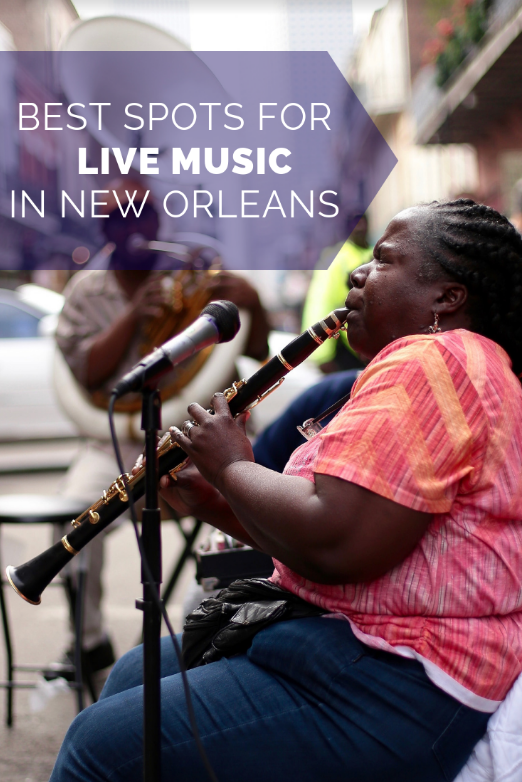
    It’s not rocket science that people are more likely to click on something that looks nice. Your pin’s photo takes up way more real estate on the results page than your pin’s title. But, a pretty picture isn’t always enough to get your pins the love they deserve. People don’t like wasting their time, and they’re less likely to click on a pin if they don’t know what it’s destination is. Overlay text on images tells the user what they can expect if they click through to your website. For instance, take this picture of New Orleans’ French Quarter. Yes—it’s pretty. But, where are you going if you click that pin? Having a title included is much more appealing because it takes out all of that guesswork. Including a defined purpose for the pin creates a better experience for the user, and can increase your click-through rate.

    Clarinet player playing live in the French QuarterSame photo of clarinet photo but spruced up with graphics for social media

    Don’t let the thought of creating a graphic scare you away from Pinterest. There are plenty of easy-to-use tools like Canva that make creating these images a breeze. And no—you don’t have to be an artist to make great pins. 

    3. Create SEO-Optimized Content

    I get it—we do SEO. This sounds like a plug. But, seriously, at the end of the day, Pinterest is a search engine, and having optimized pins that link to optimized content is important. You can create the most beautiful pin in the world, but if it isn’t optimized, it won’t get in front of the right people.  

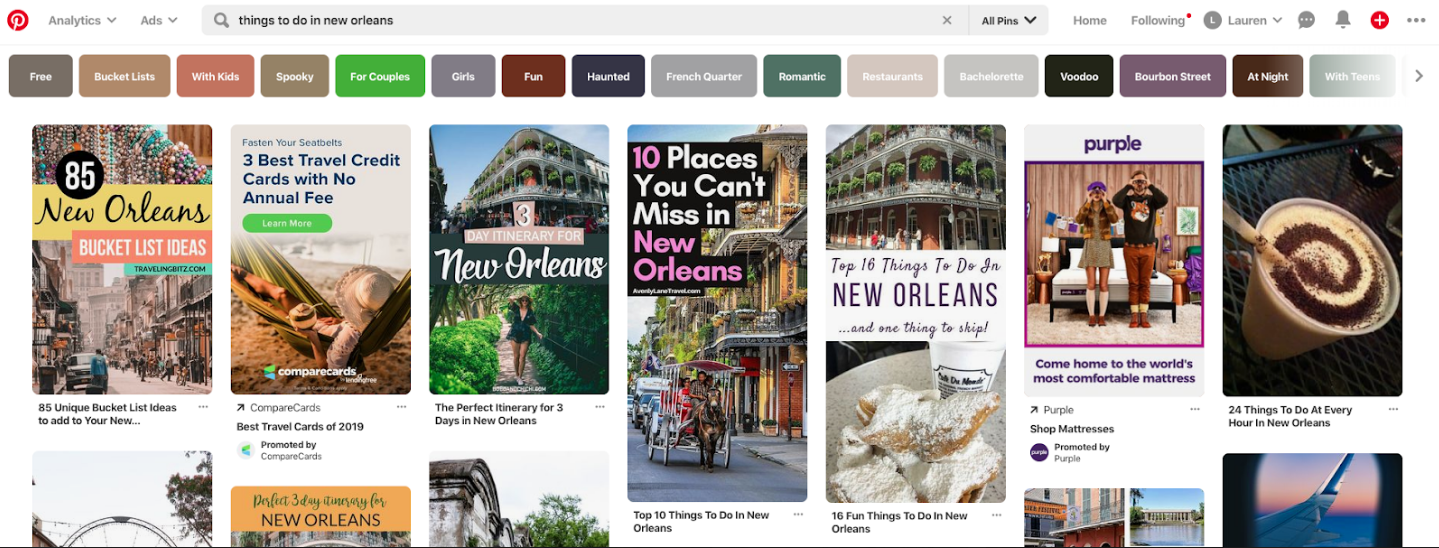
    Start by performing Pinterest keyword research. Type in a root term or phrase that you are trying to rank in, such as “things to do in NOLA.” From there, work through the guided search to see different ways people might be looking for this information. In this example, you can see that people might be searching for “things to do in New Orleans with kids” or “free things to do in New Orleans.”

    Screenshot of things to do in New Orleans search on Pinterest

    Once you define the keywords you’re trying to rank for, build your content around that. Make sure your pin’s title, description, and landing page are all optimized. You want to make your content compelling to users by making it readable for both humans and crawlers alike.

    Pinterest is a powerful platform and an important space to promote your tourism business. Even though it might seem like a large time investment on the front end, creating a Pinterest strategy will support your marketing efforts for months to come. Not sure where to start? Contact Search Influence for help developing a plan that is right for you.

    Images

    Pinterest

    Photo by Nathan Bingle on Unsplash


  • Top Tier Free and Paid Social Scheduling Tools for Businesses

    With social media as the major port for business-to-customer (and customer-to-business) interactions, it’s more important now than ever for businesses to ensure their social pages and profiles are relevant, engaging, and most importantly… constantly updated. Inconsistent posting may lead to dedicated customers and followers hopping behind a more active business.

    Real Housewives of New Jersey Teresa Giudice saying tweet tweet tweet

    However, with running a business and all the daily to-dos that come with it, remembering to constantly post on Instagram, Twitter, Facebook, and LinkedIn—the Big 4—can be daunting. This is where social media scheduling tools come into play.

    A social scheduling tool is a one-stop-shop for scheduling posts on an array of social media platforms. But a good scheduling tool does more than that; allowing users to manage their social media presence as a whole, schedule posts in advance, and engage with customers. An even better tool will offer users unique features that are hard to find anywhere else.

    These social media savvy tools help save time and keep users organized so they can focus on wowing their customers in other ways.

    The Top Paid Platforms

    Sprout Social

    Sprout Social offers users a comprehensive social media management platform, meaning it allows you to post to social media, monitor your profile, and analyze social data gathered from follower-behavior and post-engagement. This tool hits the major social media platforms—Facebook, Instagram, Twitter and LinkedIn—plus Pinterest and Facebook Messenger.

    Sprout Social’s unique offering: It has customer relationship management (CRM) capability. So you can message and respond to customers on their respective platforms without leaving Sprout Social through their Smart Inbox feature.

    This tool is great for businesses with a team dedicated to running their social media, as it features filters that can turn a Facebook, Instagram, or Twitter message into a task and offers real-time updates of which team member is working on any specific task.

    All of this comes at a pretty hefty starting price of $99, making it one of the more expensive social media scheduling tools.

    PromoRepublic

    PromoRepublic allows users to post to several social media accounts all at once. Post to one or all of the Big 4 and then use this tool’s post-performance capability to learn how your content is doing while it’s in front of your customers.

    Fresh out of new and creative post ideas? Que PromoRepublic’s special feature! This tool offers users an idea library with over 6000 post templates. It also boasts an entire calendar dedicated to current trends, unique holidays (i.e. National Cat Month), history facts, sports events, and celebrity birthdays.

    PromoRepublic’s packages start at $9 a month.


    Apple laptop next to a notebook and a camera on a wooden surface


    CoSchedule

    CoSchedule is great for businesses that value hyper-organization, as this tool allows users to map out an entire social campaign in a timeline view. With drag and drop capabilities, CoSchedule makes scheduling for Twitter, Facebook, Instagram, and LinkedIn simple and quick.

    Use this tool’s Best Time Scheduling to schedule posts during peak traffic times for individual social platforms and create custom content promotion templates to reuse whenever new content is on the horizon.

    CoSchedule’s unique gift? It is way more than a social media scheduling tool. It works as a content organizer as well; it even has a WordPress plugin.

    This software’s starting price is $100 per month.

    The Top Free Platforms

    Buffer

    Buffer has something for teams of all sizes—whether you’re a business, an agency, or an individual.
    Users can create custom post templates for Facebook, Instagram, and Twitter or create fresh, new posts every time. It also gives a calendar view of all scheduled content.

    This interface has collaborative features, like the ability to assign specific social conversations to a specific person and to leave notes on particular conversations for later review. It even empowers teams to stay super organized with folders, keyboard shortcuts, and saved replies for FAQs.

    Aside from the future-publishing and analytical capabilities, Buffer allows users to see everything in one dashboard. This tool’s unique feature is that users can view scheduled content from all platforms on one screen. It also allows users to view Facebook and Instagram analytics on one screen.

    One user can manage three social accounts absolutely free.

    Hootsuite

    Not only is Hootsuite posting on the Big 4, but it’s also allowing businesses to reach customers on YouTube, Pinterest, and many more. This tool’s wide range of social media compatibility may be connected with a wide range of users. Millions of people use Hootsuite, including a slew of Fortune 1000 companies.


    A woman looking at graphs on her desk top computer


    It has all the bells and whistles of other social media scheduling tools, but it really shines when it comes to analytics. Hootsuite pulls from over 200 factors to determine how well your content is performing.

    While Hootsuite offers paid plans, users can start slow with the free plan, which allows one user to manage three social media profiles.

    Later

    Much like the Internet, Later favors and focuses on visuals. While it’s geared towards Instagram, this tool allows post scheduling for other photo-loving platforms like Facebook, Twitter, and Pinterest as well.

    Users can schedule posts with photos or videos to compatible platforms while simultaneously altering each caption based on the platform it’s headed. Later also makes it easy to post during business-specific high engagement times by monitoring when a business’s followers are online.

    Later’s unique trick? It has a visual drag and drop feature to easily schedule image-posts.

    With so many tools to choose from, you may need some help deciding which platform is best for your business. Search Influence can get you started with a strategy consultation. Contact our team today.

    Images

  • Nine Reasons Facebook & Instagram Ads Are a Powerful Combo

    If you asked someone to name a social media network five years ago, their answer would probably have been “Facebook.” But in 2019, there’s an entire social media ecosystem with distinct content, styles, and user groups. Facebook continues to dominate, but with such a dynamic social media landscape, who knows how long that will last. For marketers, the uncertainty can be unnerving.

    The good news is that digital marketing spend is growing steadily. The great news is that just two of the major social media networks will give you incredible advertising coverage. As a bonus, you can create ads and manage campaigns on both networks with one ad platform. Of course, I’m talking about Facebook and Instagram. Let’s look at some statistics to see how powerful this combination can be.

    Map of the world

    Facebook: Older and More Experienced

    Facebook has been the world’s leading social media network since January 2009. The company announced that it had reached 500 million users in July 2010. As of March 2019, Facebook had 1.56 billion active users each day and 2.38 billion active users each month. Facebook has more daily users than the entire population of India.

    According to Statista, 214 million American adults used Facebook by the end of 2018. The most well-represented age range was 25 to 34, with 58.3 million users. Even though the bulk of its users are over 35, Facebook has 46 million American users under 25.

    By early 2019, about 69% of adults in the U.S. used Facebook. YouTube is the only major social media platform in the same range, with 73%. Facebook remains popular with all demographics but attracts certain groups at higher levels. About 75% of U.S. women use Facebook, compared to 63% of men. Users also differ by education level. Around 74% of adults with a college degree use Facebook, compared to 61% of those with a high school diploma or less.

    Facebook, like MySpace before it, was once considered a platform for younger users. About 79% of people aged 18 to 29 use Facebook, while only 46% of users are 65 and older. But users over 65 have more than doubled since 2012. This reflects Facebook’s diversification from mostly features for socializing to ones that include marketing, shopping, event management, news, and other aspects of business.

    Though Facebook has reached new global user records, its U.S. market share has been declining for a few years. Facebook once enjoyed 70% of the American market, but this has slipped to 36.6%. Data from 2019 revealed that about 15 million fewer Americans use Facebook compared to 2017. The losses have mainly been in the teen and millennial groups. Other networks like Instagram, Snapchat, Pinterest, Reddit, and WhatsApp have picked up the slack.

    Walking during a Pride Parade

    Instagram: Younger and Faster

    Instagram has become insanely popular since its 2010 launch. The photo-sharing app has bloomed into a news source, marketing tool, social influence platform, and meme-sharing community. About 500 million people use Instagram every day, and over 1 billion use it every month.

    Instagram’s largest market is the United States, with over 120 million active users. In February of 2019, about 67% of U.S. adults from 18 to 29 used the platform. Around 72% of U.S. teens and 35% of U.S. adults use Instagram.

    Unlike Facebook, Instagram has not become as popular with older age groups (yet). Facebook attracts about 79% of U.S. adults from 30 to 49, while Instagram attracts only 47% of the same group. People over 65 rarely use Instagram and only make up about 8% of its users.

    Although Instagram has a smaller user base than Facebook, Instagram users tend to use the app heavily. Over 76% of Instagram users 18 to 29 use the app daily, while 60% use it multiple times per day. Instagram users are also prone to use multiple social media networks: 95% of Instagram users also use YouTube, 91% use Facebook, and 60% use Snapchat.

    When Your Powers Combine…

    So, to recap: Facebook has been losing market share and its user base is getting older. Teens and millennials are moving towards Instagram and other networks. These factors make a compelling case for shifting your advertising focus to Instagram.

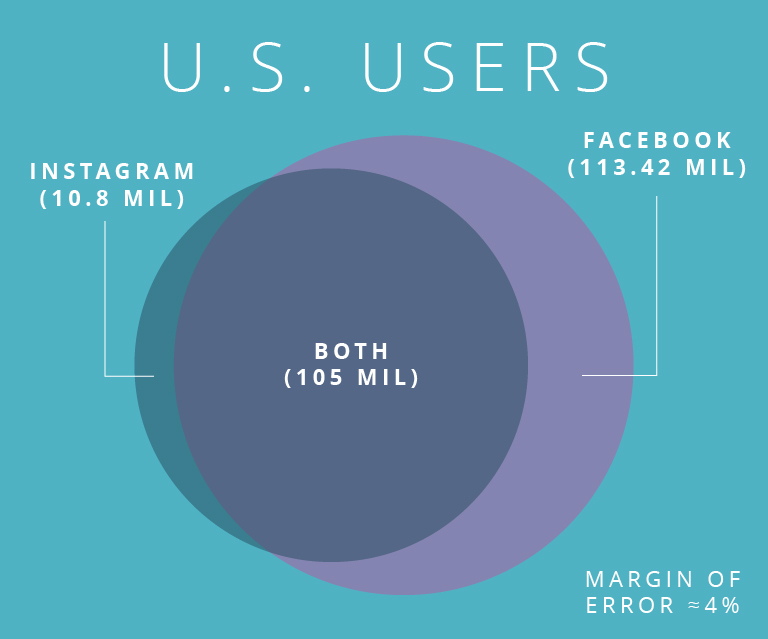
    Luckily, you don’t have to make that decision. Since Facebook has integrated advertising through Ads Manager, you can reach Instagram and Facebook users on one platform. Even better, about 91% of Instagram users use Facebook, so you can potentially reach 323 million Americans with only Facebook ads.

    However, with just a few tweaks of our ads, we can optimize them for both Facebook and Instagram. This is a level of direct access for marketers that hasn’t been available since the expensive days of mass mailing. Now, with a few clicks, you can deliver your message to millions of potential customers.

    Here are nine reasons marketers should be advertising on both Facebook and Instagram in 2019:

    • The combined U.S. audience of Facebook and Instagram is about 230 million users, who are all reachable with one ad platform.
    • 2 million brands are using Instagram Stories to tell their brand’s story.
    • 60% of Instagram users discover new products on the platform.
    • 78% of Facebook users discover new products on the platform.
    • 50% of Instagram users follow brands, the most of any social media network.
    • Instagram users are 70% more likely to buy on their mobile devices.
    • The average Facebook user clicks on 8 ads per month.
    • Facebook’s e-commerce click-through rates tripled between 2017 to 2019.
    • TV advertising costs 10x more than Facebook videos, for the same size audience.

    As you can see, there is huge potential for marketing on Facebook and Instagram, despite Facebook’s supposed “saturation” and Instagram’s less serious reputation. Facebook and Instagram have millions of users in the U.S. This audience includes 72% of teens, about 80% of millennials, and 46% of the elusive 65+ crowd.

    Facebook and Instagram’s large market shares, combined with the targeting features in Ads Manager, means marketers can find and reach potential customers more easily than on other platforms. The browsing behaviors of users on both platforms means that marketers have a higher likelihood of making a sale. All of this means a higher return on investment and happier marketing directors. If you’d like more information on leveraging social media to generate more business for your agency, contact our team at Search Influence for a digital marketing analysis.

    Images
    B & R
    Map
    Parade

  • Which Social Media Platforms Should Insurance Companies Use?

    In a world where a new social media platform gets launched every other week, it can be difficult to know which platforms to embrace and which ones to ignore. This can be particularly difficult when trying to identify the platforms your audience is already on. As a rule of thumb, you should try to be active on the platforms that matter to your clients. However, as I am sure you know, this is not realistic for everyone, especially a small team or a one-person operation. As an insurance provider, here are the top social media platforms you should be focusing on. A carefully crafted strategy for each platform can boost both brand awareness and lead generation.

    Facebook

    We’ll start with the big one, Facebook. According to Statista there are 2.32 billion active users on Facebook as of 2019, meaning your audience is probably on this platform. If you don’t already have a free Facebook Business page, this is where you should start. You want your Facebook Business page to be in line with the messaging that you’ve established with your current branding. Once your Facebook Business page is set up and optimized, you‘re ready to start sharing content with potential clients.

    When writing posts for Facebook, you should aim for a mix of promotional posts, informative posts, and engagement posts. You do not want your feed to be purely promotional posts where you’re constantly pushing your products or services. While this is an important aspect of posting on social media, it can get repetitive. Adding in informative posts, such as industry updates, breaking news, and fun facts, or engagement posts, such as polls and questions, can help break up your feed and encourage customer interactions and sharing. Engagement metrics are one factor Facebook considers when prioritizing your content within the newsfeed.

    While having a good organic presence is a great start, it’s not always enough. According to Hubspot, organic post reach has dropped to 6.5%, meaning that the majority of your audience (and even fans of your page) is not seeing your posts. To combat this, you need to have a strategic promotion schedule in which you methodically choose key posts to promote with ad spend behind them. This will help with brand awareness and will likely result in new fans of your Facebook Business page, as long as you’re targeting the right audience.

    YouTube

    Another giant in the field is YouTube. Statista reports there are 1.9 billion active users on the platform. Videos are the most engaging form of social media content, so YouTube is a great place to promote your agency.  

    Some might think of YouTube as a platform exclusively for hair and makeup tutorials; however, it’s a great platform for placing easy-to-digest content in front of potential customers. For example, if you are an insurance provider that provides coverage from multiple insurance companies, then a video that analyzes all of your insurance companies and their plans might be the best and most efficient way to get this information in front of your customer instead of making it a long page of website content. A video is more digestible and you can let your creative juices flow when it comes to the direction of the video.

    By being active on your YouTube channel and posting videos, you can share your content on different social media networks. Hosting videos on YouTube also lets you embed video content on your website or in newsletters. Content on YouTube can be shared easily, which is great for utilizing assets across platforms.

    Twitter

    There are 3.3 billion users on Twitter according to Statista. While Facebook prioritizes what users are seeing, Twitter does not. Newer or smaller business with less engagement might have a better chance of getting in front of their audience or a new audience on Twitter. Twitter is known for being a text-based medium, but don’t limit yourself to just 280 characters. Twitter is also a great space to share videos and infographics that are centered on your top products and services.

    If you’re wondering if Twitter is the right platform for your business, you should know that your target demographic is already there. The mascots of the major insurance providers, Flo (Progressive), the Gecko (Geico), and Mayhem (Allstate), all have their own Twitter accounts. They’re also on pretty much every other social media platform.

    You Have to Start Somewhere

    In a perfect world, you’d have a healthy presence on every social media network, but being active on Facebook, YouTube, and Twitter is a good jumping off point for building a productive social media strategy. As your business grows and you get a handle of the networks you know are suited to your audience, you should expand to other networks, like Instagram, LinkedIn, and Pinterest. However, be conscious of stretching yourself or your team too thin. Being consistently active on a few social media channels is better than having a sporadic, unplanned presence across every platform. If you’d like more information on leveraging social media to generate more business for your agency, contact our team at Search Influence for a digital marketing analysis.

    Images

    Social media users

  • Pinterest Rich Pins, a Complete Guide

    Google’s Rich Snippets changed the face of the search game for the better, and now Pinterest has done a very good impression of it—and it is pretty darn good. Pinterest’s Rich Pins are a new feature that allows Pinnable content to display better information to avid Pinners.

    Phoebe from friends stating "Oh my God, you're rich"

    What Is a Rich Pin?

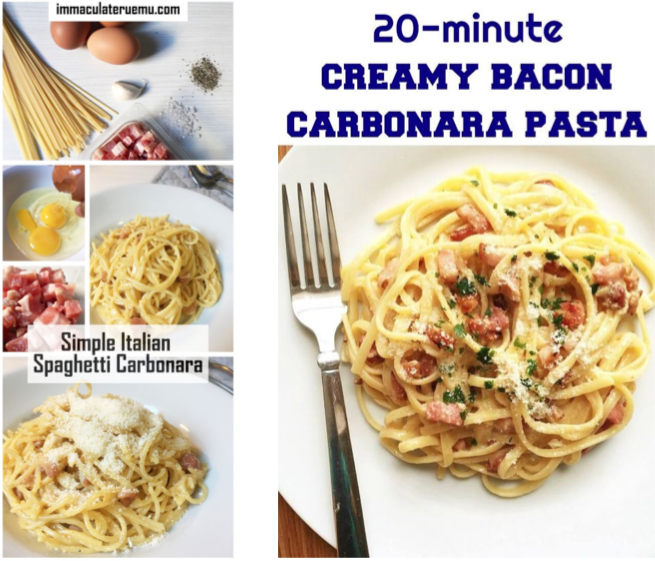
    A Rich Pin differs from normal pins by displaying additional information to users instead of only the pin title. Rich Pins use metadata in accordance with schema.org and the Open Graph Protocol to display this additional information on your pins. Open Graph may sound familiar because it’s what’s already used to display information on social media platforms such as Twitter and Facebook. Pinterest takes this principle a bit further by essentially combining the Open Graph Protocol with Article, Product, and Recipe schema types from schema.org to display detailed rich results on their websites. Below is a comparison of the Carbonara recipe from Immaculate Ruemu and My Gorgeous Recipes.

    Carbonara recipes used as rich pins on Pinterest

    As you’ll see, neither recipe uses guanciale, but I’m willing to forgive Ruemu because of the wealth of rich data that shows up in her Pinterest SERPs.

    How Do You Get a Rich Pin?

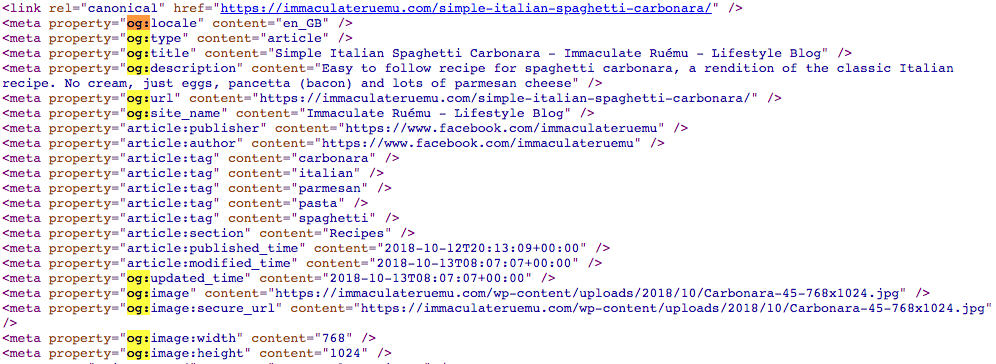
    Getting a Rich Pin is as simple as following Pinterest’s official Rich Pin Getting Started Guide, but is also as difficult as following Pinterest’s official Rich Pin Getting Started Guide. The two ways to add structured data to show up in Rich Pins is to use Open Graph Tags in the header of your web page or to use meta tags in the body of your web page. Ruemu opts to add some open graph tags to the head of her recipe pages so that she ends up with Rich Pins whenever she pins to Pinterest.

    Open graph markup example

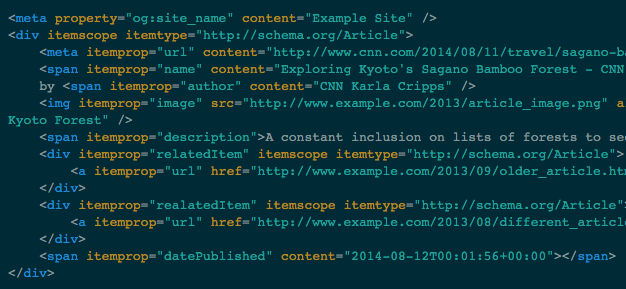
    The alternative to this method is to add meta and span tags to the portions of your content that you want to show up in Rich Pins.

    Example of span tags used for rich pins from Pinterest

    Once the tags are in place on your website, you’ll just need to apply for Rich Pins using Pinterest’s validator, then select what type of markup you used. Though Pinterest does support both methods of markup, one takeaway is that adding markup to the body of your articles, recipes, or pages, generally has to be completed manually and can be very cumbersome to constantly do every time you want to create a new post. A developer has the ability to add Open Graph Tags to the head element of your template files so that this information is served up dynamically and changes to the appropriate content, depending on what is actually being posted. If you don’t have a developer, Search Influence has a full development team capable of implementing detailed and difficult changes to existing websites.

    Another option is to use a WordPress plugin to take care of this for you (if your site uses the WordPress CMS). This does require some research, however; plugins can sometimes be a lot larger than they appear and bloat your site size or even slow it down, in some cases.

    Why Should I Markup My Site?

    Some users may be initially turned off from the idea of Rich Pins since it displays so much information from your site without the user having to visit your site, but as research has shown, Rich Results on Google have a higher CTR and lower bounce rates. While we don’t know exactly why users want to click rich results more, we can see the added authority from a visual standpoint at least. Ruemu’s Carbonara recipe lists all the ingredients, its 5 stars out of 10 review rating, and cook time, all on the Pin itself. So if you’re looking to whip up some Carbonara for dinner, her Pin gives you the high-level information before even clicking through. So when you actually click through, you know that the recipe itself is legit.

    Much like Google’s own Rich Results, Rich Pins don’t actually guarantee higher positional ranking or any of that other jazz. What it does offer is a tangible effect of some backend work on your website that you’ll be able to see on the front end of Pinterest, which has an already proven record of success with users. Keep in mind that Rich Pins are currently only available for recipes, articles, or products. If your website does feature any of these, feel free to enlist Search Influence to assist you in updating your website to efficiently use Pinterest’s Rich Pins.

    Images

    Carbonara

    Carbonaro Pt. 2

    Code 1

  • Seven Tactics to Maximize Your Restaurant’s Organic Reach On Instagram

    In the world of pay-to-play, restaurants are seeing their organic reach diminish across social media. Organic reach is the number of unique people who have seen your unpromoted post. When posting organically, you rely on the social platform’s algorithm to distribute your content to whoever it chooses to show your post to.

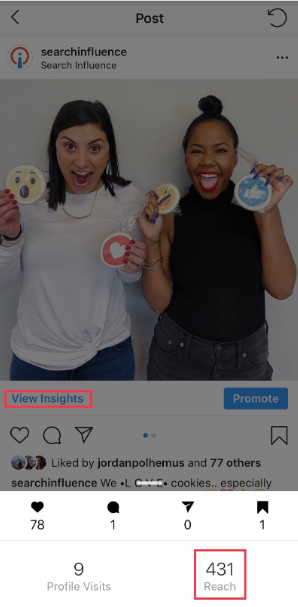
    In order to see your reach on Instagram, you need a business Instagram account. Click on the post you want to analyze and then click “View Insights” under the photo.

    Fortunately, Instagram still has best practices for maximizing reach organically. We’ll start with Instagram basics to lay some marketing groundwork and work our way to reach-increasing tactics. You’ll need a solid organic strategy in place in order to receive engagement and consistently grow your reach. Use these seven tactics to get started.

    1. Know Your Branding

    Checking a restaurant’s Instagram before deciding where to eat is becoming second nature to Millennials. They’ll probably already know what they’re ordering before they get to the restaurant too.

    To impress these Millennials, you’ll need a good Instagram aesthetic, or “theme.” This involves consistent branding, style, and voice—whether it’s an in-feed post, Story, caption, or comment.

    There are a few ways you can nail this, but the most important part is understanding your own brand. If you understand your restaurant’s branding, it will reflect in your posts.

    Tactic #4 will go into detail about how to create a cohesive Instagram theme.

    Dropping phone into food while trying to snap photo for Instagram

    2. Post Consistently

    Be consistent in time and frequency of posting. Your followers will start to expect your posts and even look out for them! It’s best to post daily if you can. One way restaurants can achieve this is by posting daily specials.

    Also, find the optimal time to post, then be consistent. Start by thinking about when your customers are getting hungry. This may be an hour before your restaurant’s typical peak times.

    If needed, you can test different posting times to find which will bring the most reach. You can click “View Insights” under your photo to find the photo’s reach and then compare your results for different times.

    3. Engage Back With Those Who Engage With Your Restaurant on Instagram

    According to the Maru/Matchbox Retail Vision Study, 69% of Millennials take a photo of their food before they’re about to eat. It’s no secret that many of those photos will wind up on Instagram.

    That said, if someone posts a photo at your restaurant and tags your restaurant’s Instagram, be sure to engage with that post. You could even ask to repost it on your account if it fits into your feed’s theme. The same goes for Instagram Stories since you can now share Stories that you’re mentioned in.

    Engaging with customer photos is another great touchpoint beyond table service. Once customers notice that you’re engaging back or even reposting their content, they’ll be more motivated to share food photos and tag your restaurant. #foodie

    4. Get Creative With Your Instagram Theme

    Don’t limit yourself to professional photos of your food. Those will get stale (no pun intended). Instead, fill your feed with drool-worthy food photos, social events, employees, and more.

    To start, choose three to five categories of posts to rotate through. For example, a trendy restaurant with a cocktail bar may rotate photos of appetizer close-ups, cocktails, social events, and interior photos. Knowing this will help you plan which content you need to capture in advance.

    Next, pick your Instagram feed’s aesthetic or tone. Will it be dark and moody? Bright and colorful? Monochromatic? Once you’ve decided this, stick with it and keep that in mind when taking or curating photos.

    Pro Tip: Don’t post blindly. Use any free Instagram planner like UNUM to plan out your feed. Rotate through your photo categories to ensure no two are next to each other. This will keep your content fresh and varied but still consistent.

    You can read more about getting the best photos for social media here.

    5. Reach Out to Local Food Bloggers

    The increased exposure from influencer marketing can make a big impact on your business. Once you have an understanding of who you want to reach, find local food bloggers with a similar following.

    Many food bloggers with a smaller following (under 15k) will be willing to exchange an Instagram post and Story for a meal on the house. For food bloggers with a large following, try offering them a high-value gift card in exchange for their time and discuss the possibility of a giveaway.

    Giveaways are often beneficial for both the influencer and restaurant in terms of brand awareness and follower growth. Make sure not to skimp out on the giveaway prize, and always keep giveaways fresh and unique.

    For example, giving away a gift card every time will get boring and won’t garner much excitement over time. Try giving away a romantic dinner for two in February and free cocktails for a group of friends in March. You’ll reach different audiences this way.

    6. Use Instagram’s Video Features

    According to Hubspot’s study on content trends globally, video content from brands is preferred by consumers. Instagram has three options for sharing video: Stories, IGTV, and an in-feed video post.

    First, use Stories to share videos that are on-the-whim and unedited. Make sure to tag locations, use hashtags, and tag accounts for maximum reach. When you tag other accounts, they have the ability to “mention” your Story in their Story. Essentially, it’s an earned repost.

    In addition to Stories, try IGTV for edited videos. You can share 15-second to 10-minute vertical videos, which are currently the preferred format on social. There are two features you should be using with IGTV:

    1. Show an IGTV preview in your Instagram feed by selecting this option when uploading.
    2. Link the IGTV in your Story so users can swipe up to watch the video.

    Last, you can share videos in your feed like you would share any other image post!

    7. Ensure Maximum Reach With Each Post

    Finally, all your effort comes full circle in this step, where you want to ensure you’re getting maximum organic reach. The key to high reach on Instagram is using most of Instagram’s available features. The more reach you get, the higher the chance you’ll capture the right user’s attention at the right time.

    There are two significant ways to maximize your post’s reach organically, including users who do not follow you: location tagging and hashtags.

    Always tag a location to your photos so that your photo will show in the “Places”’ feed. For example, if you type in “New Orleans” in the Places search bar, you’ll see the top and recent photos that have tagged a location within New Orleans.

    In addition to tagging locations, use all 30 hashtags allowed for each post. If you’re a locally owned restaurant, you should use around 20 local hashtags and the rest as branded hashtags or common food hashtags on Instagram.

    A good hashtag strategy requires you to check and adjust every few months to make sure your photos are appearing in the hashtag feeds. Keep the hashtags that for which you’re appearing at the top, and replace the others with new hashtags. The goal is to appear somewhere in the top of the feed for all 30 hashtags; however, since this is always changing, you’ll always be checking and adjusting.

    Bonus Step: Promote Your Posts

    This is a bonus step because this is not an organic tactic. However, organic strategy pairs very well with paid strategy. If there’s a specific promotional post you want everyone to see, you should pay to promote it. This is a great way to get the word out about weekly specials, and we’ve seen it work well for our own clients.

    To reiterate the importance of an organic strategy, you’ll stay top-of-mind for old customers and certainly reach new ones this way. Start building your organic strategy today! If you need assistance to make it happen, contact the team at Search Influence and utilize our social media expertise.

    Images

    Phone drop

    Wine glasses

    Dining outside

  • A Physician’s Guide to Choosing Target Audiences on Facebook

    One of the most important assets in any physician’s marketing strategy is knowing your potential patients. In a field as diverse as medicine, this can mean the difference between success and failure. Therefore, we’ve put together a helpful guide to Facebook’s targeting tools to help build and improve your online audiences.

    Define Your Patients

    The first step in any successful strategy is defining who you want to get in front of. Imagine the type of patient you’d like to attract and jot down every characteristic about them that you can think of. For example, if you’re a plastic surgeon who would like to do more tummy tucks, then what are some general attributes of a typical tummy tuck patient? Here are some questions to help you get started:

    • Are they women or men?
    • How old are they?
    • Are they married or single?
    • What is their household income?
    • How much disposable income do they have?
    • Do they have children? If so, how many and how old are they?
    • What kind of car do they drive?
    • What do they do for a living?
    • Which schools did they attend? What level of education did they reach?
    • What are their hobbies?
    • What types of clubs or organization are they typically involved in?
    • How do they spend their free time?
    • Have they ever had plastic surgery?
    • Have their friends had plastic surgery?

    Once your ideal patient has been defined, review Facebook’s guidelines to see which targeting options are available, or you can see all of Facebook’s Ad Targeting Options in one epic infographic.

    Locate Your Patients

    After your ideal patient has been profiled, the next step is to determine where they are. One of the biggest mistakes in marketing is casting your net too wide and spending advertising dollars on people who won’t turn into patients. Physicians must check their pride at the door and determine how far patients would realistically travel for their services. For example, a patient might travel 30 miles to see a specialist or surgeon but would likely never travel farther than 15 miles for primary care. Once you’ve determined how far a patient would be willing to travel to visit your practice, use Facebook’s tools to limit your targeting to these areas.

    Refine Audience Size

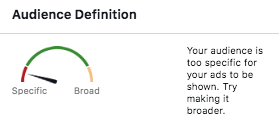
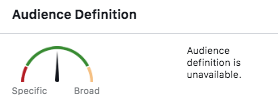
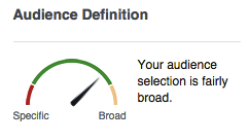
    Once your audience had been defined, take a step back to consider the size of the group. Review the  “Audience Definition” meter along with the “Potential Reach” number within Facebook’s campaign manager. The ideal audience has fairly specific targeting, but not so specific that the number of potential viewers is under 1,000. This ideal audience size is broad enough to be inclusive to anyone who shares the targeted interests but specific enough that the impressions aren’t wasted. You can tell that you’ve reached the ideal audience size once all of the necessary layers have been added and the numbers aren’t fluctuating as much.  

    Very specific Facebook audience targeting for Search Influence in New Orleans, LA

    Less specific, more general Facebook audience targeting for Search Influence in New Orleans, LA

    Very broad audience targeting for Facebook campaign done by Search Influence in New Orleans, LA

    Medical Industry Audience Limitations

    Due to ever-evolving privacy laws worldwide, specifically in the medical field, physicians must operate (pun intended) under more strict targeting regulations. This is especially true on Facebook. One of Facebook’s most useful features allows business to upload email addresses or phone numbers directly into the platform and create custom audiences from these lists. You can then create a wide variety of custom audiences based on those lists. However, businesses in the medical industry are not permitted to create such audiences through an upload or pixel users who have visited their site because it violates medical privacy laws. Therefore, medical practices must give their targeting even more thought to serve up ads to their ideal audience.

    With the tips outlined in this helpful guide to thoughtful audience creation, you, too, can be on your way to increasing engagement and building your online presence! At Search Influence, we have extensive experience working with clients in the medical industry. For more information about how we can help promote your practice on Facebook and other social media platforms, start a conversation with us today.

    Images

    Doctor

  • How to Market Your Business on LinkedIn

    Man sitting down typing on his laptop

    LinkedIn isn’t just for growing your personal network—it can be used to grow your business too! LinkedIn has over 560 million users, with 40 percent of active users using LinkedIn monthly. LinkedIn is a great tool to promote your brand and connect with business professionals in a very direct and effective manner.  

    Optimizing Your LinkedIn Company Page

    It’s important that your Company Page not only reflects the professional and personal side of your business, but also is optimized for maximum user engagement and conversions.

    • Business description and tagline – The company’s tagline is a short sentence that gives you an overview of the company and its purpose. The tagline is 120 characters or less, so be concise and specific when crafting it. The description is longer, and should be used to give a deeper dive into the business. You have 2,000 characters to convey your story, so let your fingers fly.
    • Logo profile pictureHaving a logo as the profile picture will make the company look more trustworthy to potential followers. LinkedIn states that companies with a logo as their profile picture get an average of six times more page traffic.
    • Company informationThis includes information like the company’s URL, industry, and number of employees. Having this section filled out completely shows that your profile is a reputable source of information.
    • Call to action buttonYou can choose from a variety of buttons to display on your Company Page, such as “Contact Us” or “Learn More,” which you can attach to any link of your choosing.
    • Consistent posts – It is not enough to just have an optimized Company Page. You need to create fresh and engaging content for your followers to interact with. Try to post at least once a week to keep your page active.

    What Makes a Good LinkedIn Post

    First and foremost, it’s best to keep your content professional, but that doesn’t mean you need to forego your company’s personality. Stay true to your brand when creating posts. Content should be curated with your audience in mind—what do they want to read? You can cater to this question by sharing articles, industry news, or company updates. Pair this with an image and relevant hashtags to increase engagement.

    Woman's hands typing on her laptop

    How to Advertise Through LinkedIn

    Before choosing the types of ads you want to run, you need to first define your goal for LinkedIn marketing. Are you trying to establish yourself as an industry leader to gain brand trust? Are you trying to promote your company’s work environment to attract new employees? Once this is determined, you can choose which ad types serve this goal the best.

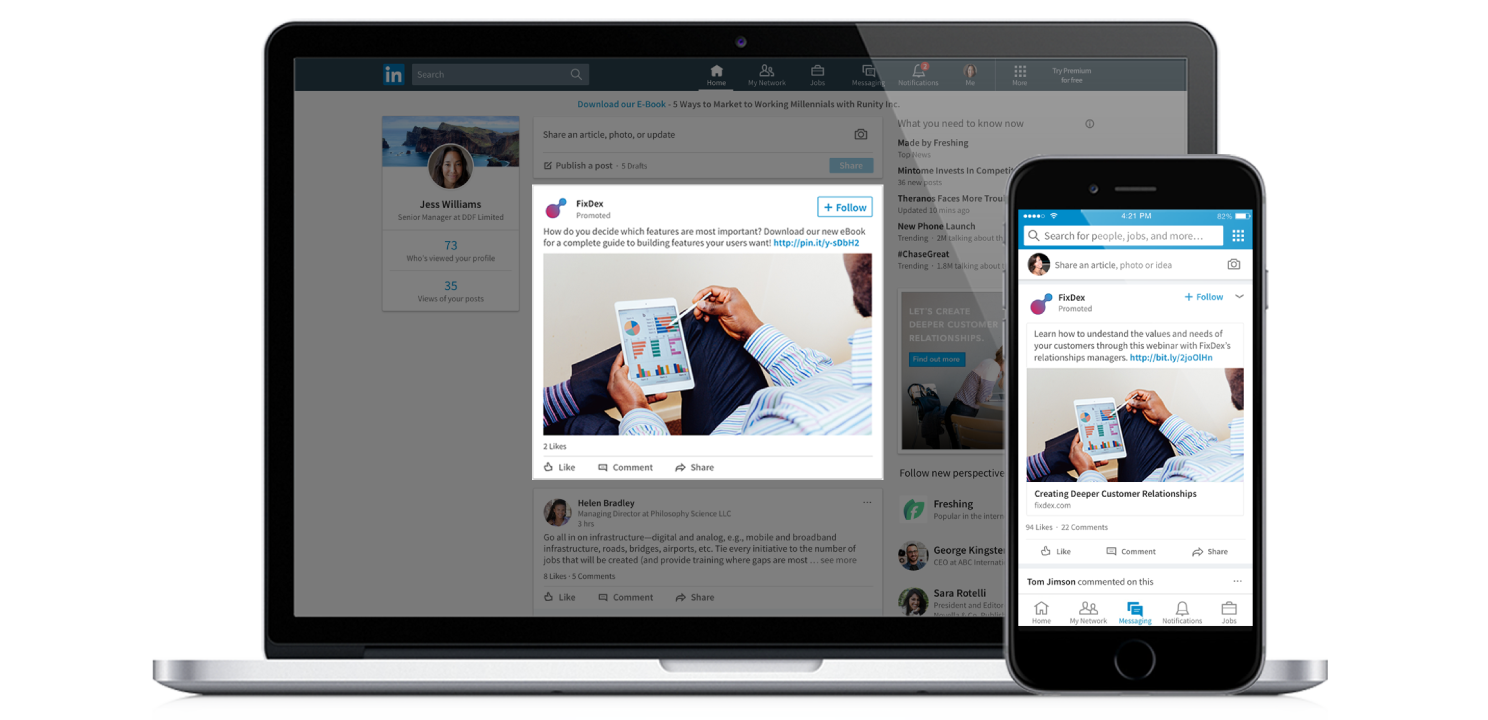
    • Sponsored content Sponsored content works similarly to promoted posts on Facebook. The post will live on your Company Page, as well as in the newsfeed of your specified target audience. This is a great way to gain new connections and spread your company’s message to a targeted audience. Computer screen displaying a man using an iPad
    • Sponsored InMail – Sponsored InMail allows businesses to send personalized messages to a wide audience. The message will appear in the person’s InMail, and will only send when the user is online and active. This is very effective both on mobile and desktop devices. However, the message will need to have a designated “sender” from your company. Whoever the “sender” is should have a relevant company title and an optimized profile.

    Leverage Personal LinkedIn Accounts for Your Business

    Marketing your business on LinkedIn doesn’t end with setting up your Company Page. Each and every one of your employees can market your business through LinkedIn in two ways: by having an updated, professional profile and by sharing content from the Company Page.  

    Each employee likely has hundreds of connections. Ensure they are presenting the company in the best possible light by encouraging team members to update their profile with their current job title with the company. You can also encourage team members to endorse each other’s skills. To take this one step further, you can provide your team an opportunity to take professional headshots and even make custom LinkedIn cover photos for your company for the team to utilize. These small details will help spread a clear, consistent message about your company and the quality of its employees across LinkedIn. Once your team’s profiles are optimized, encourage them to share posts from your Company Page. This will let your content reach a whole new set of connections in a free and organic fashion.

    LinkedIn is rated as the top social network for lead generation, and it is a great tool to connect with business leaders. With this taken into consideration, it is clear to see how this platform can be used to advance your business. Want to learn more? Check out our blog post about LinkedIn best practices.

    Whether you need assistance with lead generation or social media management, the digital marketing experts at Search Influence can help your business grow. Start a conversation with one of our marketers today to expand your online presence.

    Images:

    Woman typing on computer

    Computer screen