Category: Social Media

  • Instagram SEO Playbook: How to Win Over Google and AI Search

    Instagram SEO Playbook How to Win Over Google and AI Search

    This post was updated by Rebecca Michelet on 12/15/25 to reflect current best practices. It was originally published on 11/13/25.

    Key Insights

    • Instagram is now part of the search landscape. Google’s indexing update means public Instagram content can appear alongside websites, articles, and videos, expanding what visibility means for every brand.
    • Discovery depends on relevance, not reach. Algorithms now reward clear, consistent context that helps users find relevant content faster on both Instagram’s Explore page and in Google search.
    • Social and search now shape each other. The lines between platforms are disappearing, and visibility depends on how well your strategy connects storytelling with search intent.
    • Authority is earned through clarity and consistency. Profiles, captions, and visuals that reinforce who you are (and what you’re known for) help algorithms and audiences recognize your expertise.
    • AI is redefining what it means to be found. As generative tools reference social content in answers, brands that post with intention will lead the next wave of discoverability across search and AI.

    Search engines are getting extra social lately.

    Google’s been busy expanding its reach, and it’s now pulling public Instagram posts and profiles directly into search results.

    Your feed just became part of the search universe. For brands and creators, that means every post has the potential to rank, not just resonate. The problem? Most treat Instagram strategy like an art project, not a search tactic.

    That gap decides who shows up first and who never shows up at all.

    It’s time to post with purpose. This playbook teaches you how to treat your Instagram like SEO, built to rank, not just scroll.

    What Is Instagram SEO?

    Instagram SEO is the strategy behind making your content findable, both inside the app and beyond it. It’s how you craft profiles, captions, hashtags, and visuals so that they not only attract followers but also earn visibility in search results.

    The goal is simple: help people (and algorithms) understand what your content is about and why it matters.

    Instagram SEO has entered a new era

    Traditionally, Instagram SEO focused on the platform’s own search function, optimizing for in-app discovery through relevant keywords, hashtags, and engagement. But that world just got much, much bigger.

    In July 2025, Google began indexing public profiles, posts, and Reels, giving your content a direct line to the world’s largest search engine.

    And it doesn’t stop there. AI tools like ChatGPT, Gemini, and Google’s AI Overviews are beginning to pull Instagram content into their own generated answers, referencing social posts alongside articles and web pages.

    That means your captions, keywords, and hashtags now have a dual job:

    • Engage your audience (the scroll-worthy part)
    • Signal context to search and AI systems that decide what to surface (the rank-worthy part)

    Why Search and Social Can’t Be Separate Anymore

    Every post now speaks two languages: one for people and one for algorithms. The more those messages align, the easier it is for both to recognize your brand as relevant and trustworthy.

    Search and social are no longer parallel strategies. They’re parts of the same visibility engine. What earns engagement on Instagram can reinforce authority in search, and the clarity of your SEO can help social content reach new audiences.

    Together, they create a loop of discoverability that rewards consistency, clarity, and intent.
    image of an instagram logo

    How to Optimize Instagram for Search and AI Visibility

    Now that Instagram feeds into Google and AI results, optimization isn’t optional. Every detail on your profile and in your posts shapes how algorithms understand your brand and where you show up.

    Here’s how to make your Instagram work smarter for search.

    Optimize your profile for search context

    Your profile is where discoverability starts. It’s both a visual first impression and a key data point that search engines and AI tools use to understand your brand’s relevance and authority. A strong profile bridges your social identity with your search presence, giving users and algorithms the context they need to trust what they’re seeing.

    What to do:

    • Use a keyword-rich bio that includes your brand, industry, and (if relevant) your location. Write naturally, but make sure the words you’d want to rank for appear early.
    • Keep your name, handle, and profile image consistent across Meta platforms (and anywhere else your brand appears). Consistency builds recognition and reinforces entity alignment.
    • Add a link in bio that leads to a meaningful destination. Link to key internal pages such as services, program listings, or resource hubs that reinforce what you want to be known for.
    • Complete every profile field, including your category, contact details, and business information. These small details help confirm legitimacy and topical authority for both users and search crawlers.
    • Treat your highlights and pinned posts as secondary signals. Label them clearly with relevant keywords or phrases that reflect your expertise.

    An optimized profile becomes the anchor of your Instagram SEO strategy and the foundation for everything else to build upon.

    Write captions that reflect search and AI language

    Instagram captions carry their weight and more. They tell both your audience and search engines what your content means and why it matters. The right phrasing can help your post resonate with people while signaling relevance to AI tools that decide what to surface.

    What to do:

    • Speak like your audience. Use plain, direct phrasing that mirrors how people search. A caption like “what to do during a weekend in New Orleans” performs better than one filled with stiff, bleak terminology.
    • Use long-tail keywords with intent. People search in phrases, not single words. Using specific, natural keywords helps your posts surface in both Google and AI-driven results.
    • Add clarity through structure. Algorithms read relationships the way people do (who’s doing what, and for whom). Think in patterns like subject, action, object: “Search Influence helps universities improve SEO visibility.”
    • Answer real questions. Captions that solve problems or explain value are easier for both users and algorithms to understand: (ex, “what to do after a car accident”)
    • Match your on-screen text. Keep phrasing consistent across Reels, carousels, and captions so both people and machines connect the dots.
    • Lean on proven formats that teach or explain. AI tools favor content that answers questions directly, and people tend to share it more, too. Think FAQ or Q&A Reels, “how-to” carousels, and tip-based lists.

    Captions written with intention earn visibility in both the feed and search results, helping your audience find you faster and engage for longer.

    Use hashtags, alt text, and structure to reinforce meaning

    Relevant hashtags and alt text help algorithms understand the context behind your visuals. They give search engines, AI tools, and even screen readers clearer cues about what your content represents, which improves both accessibility and visibility.

    What to do:

    • Focus on relevance. Use up to three highly relevant hashtags that accurately describe your content and the community you want to reach.
    • Avoid hashtag stuffing. The practice of adding long lists of tags for reach is no longer effective. Instagram’s new hashtag limit signals the end of that trend. Hashtags will still help categorize content, but they won’t meaningfully drive reach. Precision and clarity now matter more than volume.
    • Prioritize a solid keyword strategy. Strengthen discovery by using clear, descriptive keywords in your captions, on-screen text, audio, and bio.
    • Write natural alt text that describes what’s on screen while subtly reinforcing your topic or entities. Think of it as another way to teach search engines what your post is about.
    • Keep a logical post structure. Use line breaks, spacing, and clear formatting so both users and algorithms can quickly identify key ideas. Clean captions signal clarity, which AI-powered search engines reward.

    Each of these small details adds up to stronger discoverability. When your visual, written, and structural cues all point in the same direction, search engines and AI tools know exactly how to classify your content and who should see it.

    Strengthen interlinking between platforms

    Search engines and AI tools use connections between your website and social profiles to verify identity and relevance. When your Instagram activity points back to your site (and your site points back to Instagram), it helps algorithms confirm that both belong to the same trusted entity. Those links also give users clear paths to learn, engage, and convert.

    What to do:

    • Link with purpose. Use bio links, Stories, and post CTAs to direct users to pages that expand on your content, such as articles, services, or case studies.
    • Embed with intent. Add Reels or posts to your website where they strengthen context, such as testimonials or event highlights.
    • Stay consistent. Keep the same handle, URLs, and naming conventions across platforms to help algorithms and users connect the dots.
    • Reference across channels. Mention your website in captions or Stories when relevant, and link to Instagram posts from your site when they add visual context.

    When those signals align, both users and search engines can follow a clear trail of relevance, one that reinforces authority across every platform.

    Monitor and test your visibility across search and AI tools

    Visibility is always shifting. Regular testing helps you see where your Instagram content appears across Explore pages, Google search results, and AI tools — plus, how those systems interpret it.

    What to do:

    • Search for yourself. Each month, test branded and topic-based prompts in Google. Note when your posts or profile appear.
    • Watch for mentions and citations. Check if AI summaries reference your brand, posts, or captions. These signals show your content is being recognized as a trusted source.
    • Identify what works. Look for patterns in visibility to see which formats, keywords, or topics consistently surface.
    • Refine and repeat. Use your findings to adjust your captions and hashtags.

    Treat this step as ongoing maintenance. The more you measure, the faster you can fine-tune what helps your content rank and resonate.

    Advanced Instagram SEO Strategies

    Once your Instagram profile and posts are optimized, the next phase is strengthening how your brand connects across the web. These advanced Instagram SEO tips focus on off-page and contextual signals, which act as the cues that help Google and AI systems verify your identity, recognize your authority, and include your content in richer search experiences.

    Use schema and structured data to strengthen Instagram visibility

    Schema markup doesn’t live inside Instagram, but it works behind the scenes to connect your social presence to your website’s authority. By adding structured data to your site, you’re giving Google and AI platforms the proof they need to confirm your Instagram account belongs to the same verified brand.

    What to do:

    Start with foundational schema types like Organization, Person, and Event to define who you are and what you do. Within that markup, use the sameAs property to list your verified social URLs, like Instagram, Facebook, LinkedIn, and others.

    Example:

    "sameAs": [
    
      "https://www.instagram.com/searchinfluence",
    
      "https://www.facebook.com/searchinfluence",
    
      "https://www.linkedin.com/company/search-influence/"
    
    ]
    

    This creates a direct line between your website and your social profiles, reinforcing brand trust and helping algorithms understand how your content fits into larger entity networks. It also supports accurate attribution in AI-generated search results, where structured data helps your content surface and be cited correctly.

    Build authority through mentions and tagging

    Mentions and tags strengthen your network of credibility. Every time you connect with another verified account, you’re giving algorithms extra context about your brand’s relevance and relationships.

    What to do:

    • Tag collaborators, partners, and organizations in posts, Reels, and Stories to build visible connections that reinforce trust and expertise.
    • Encourage reciprocal mentions through joint campaigns, shared content, or reposts to show consistent engagement between verified entities.
    • Focus on relevant tagging. Partner with accounts that reflect your niche, values, or audience to expand visibility in meaningful ways.

    These authentic connections give search engines and AI tools clearer signals of authority, helping your brand appear alongside other trusted names in search.

    Align content calendars with search trends

    Search and social trends shift fast. Aligning your Instagram schedule with real-time search demand helps your content stay visible when audiences are actively exploring related topics.

    What to do:

    • Study what’s trending. Use tools like Google Trends and TikTok Creative Center (TikTok and Instagram trends often go hand-in-hand) to identify keywords, questions, and topics gaining traction in your space.
    • Spot crossover moments. When a topic starts spiking in Google or TikTok, create a Reel or carousel that adds your brand’s take. This timing boosts your chance of appearing in both social feeds and search results.
    • Plan for peaks. Build posts around predictable cycles (seasonal interest, product launches, or industry events) to meet audience curiosity right as it grows.
    • Revisit quarterly. Review analytics and search trends every few months to refine your calendar and ensure content reflects current interest signals.

    By syncing your posts with how people search and engage, your Instagram feed becomes part of the larger discovery landscape, showing up where curiosity, relevance, and visibility meet.

    Applying Instagram SEO in Higher Education

    The same strategies that help brands stand out now shape how universities are discovered online. As Google and AI tools begin indexing Instagram content, higher education marketers have a new opportunity to influence visibility across both search and social.

    Findings from AI Search in Higher Education: How Prospects Search in 2025 by UPCEA and Search Influence show how search behavior is evolving:

    • Social media plays an expanding role in program discovery.
    • Nearly 7 in 10 respondents said regular social recommendations influence what they explore/purchase.
    • Among learners using social media to research continuing education, 35% said they would use Instagram.

    For colleges and universities, that means Instagram content now supports both storytelling and search visibility. Optimized posts can appear in Google results and AI-generated summaries, helping prospective students encounter your institution at the moment curiosity begins.

    Higher education applications

    To turn visibility into value, higher education marketers need to bring SEO precision to Instagram strategy. Applying search principles to social content helps universities connect what they share to how prospects search.

    Here’s how to put that strategy into action:

    • Showcase programs through Reels. Use short-form video to highlight classroom experiences, alumni achievements, and student life moments that illustrate your institution’s impact.
    • Tag with purpose. Include degree names, job titles, and institutional accounts to help search engines and AI tools recognize relationships between people, programs, and career paths.
    • Share faculty insights. Turn research, thought leadership, or current-event commentary into accessible posts written with context that supports search visibility.
    • Guide discovery with links. Direct users to program details, faculty bios, or admissions pages to capture intent and move prospective students toward the next step.

    Institutional benefits

    When used strategically, Instagram becomes part of the enrollment pipeline. Optimized content strengthens visibility at the awareness stage and builds the kind of credibility that influences applications and conversions.

    The impact shows up in three key ways:

    • Wider reach. Optimized Instagram content can surface in Google results and AI-generated summaries, expanding where prospective students encounter your institution.
    • Greater credibility. Consistent tagging, structured profiles, and cross-platform links help search engines recognize your university as a trusted source.
    • Quality engagement. Posts written with SEO awareness attract prospects already interested in your programs and lead them toward inquiry and enrollment.

    Common Mistakes to Avoid

    You’ve mastered the do’s. Time for the don’ts.

    Even small missteps can make your Instagram content harder to find. These are the habits that quietly weaken your visibility on and off the platform:

    • Keyword and hashtag overload. Overstuffing captions signals spam and makes it harder for algorithms to identify what matters. Keep hashtags intentional and tied to context.
    • Unclear or incomplete bios. Leaving out details like your industry, location (if relevant), or brand focus prevents search engines from understanding who you are.
    • Vague or missing alt text. Alt text helps algorithms interpret your visuals. Use it to describe what’s on screen in clear, specific language.
    • Trend chasing without strategy. Jumping on every viral sound or topic dilutes your relevance and confuses your audience.
    • No visibility tracking. Skipping regular tests in Instagram search bars, Google, and AI tools means missing out on what’s actually helping you rank.

    Attention to detail beats post volume every time. Keep your structure clean, your context strong, and your brand voice consistent across every update.

    someone using the instagram app on their phone

    FAQs About Instagram SEO

    Does Google index all Instagram posts?

    No, Google only indexes public Instagram profiles, posts, and Reels. Private accounts and Stories remain inaccessible to search engines. Indexing is determined by visibility settings and engagement signals, so consistent public activity increases your chances of appearing in search results.

    How long does it take for Instagram content to appear in Google results?

    Indexing can take anywhere from a few days to several weeks. Timing depends on how often Google crawls your account and the authority of your connected website or entity. Keeping your profile active, public, and properly linked through structured data can speed up discovery.

    What’s the difference between Instagram SEO and social media marketing?

    Instagram SEO sits at the intersection of social media marketing and search engine optimization. It focuses on improving visibility and discoverability within both the Instagram app and external search engines. In contrast, social media marketing encompasses broader goals like engagement, audience growth, and storytelling across social channels.

    How can I tell if my Instagram content appears in AI Overviews or ChatGPT responses?

    Search your brand or topic-related prompts directly in Google, ChatGPT, and Gemini. If your Instagram content or handle appears in summaries, citations, or linked examples, it’s being referenced. Regularly track visibility to identify which posts or keywords are driving the most inclusion.

    Can Search Influence assist with social media marketing?

    Yes. Search Influence advises on strategies to help you apply SEO principles to your social media presence. Our team provides recommendations that enhance visibility and connect what you post to how your target audience searches.

    Let’s Talk Your Instagram SEO Strategy

    Visibility is shifting fast. As Google indexes Instagram content, every post influences what people see, when, and where.

    Search Influence helps you stay ahead of the social search shift. Our experienced team advises on strategies that position your brand to capitalize on trends and lead in search, not lag behind it.

    Now’s the time to align your social strategy with search. Let’s chat about what proper Instagram SEO can do for you.
    Images:
    Unsplash
    Unsplash

  • Search Influence Honored as One of 2025’s Best Women-Owned Businesses by New Orleans CityBusiness

    Search Influence is proud to announce that New Orleans CityBusiness has named us one of the 2025 In the Lead: Best Women-Owned Businesses honorees.

    The special section, profiling recognized companies, will appear in the September 19, 2025, issue of New Orleans CityBusiness.

    This honor comes alongside our recognition as an honoree in the 2025 CityBusiness Empowering Women Award and adds to our ongoing distinction of being named five times to the publication’s Best Places to Work list.

    Together, these awards highlight our growth as a digital marketing agency and our commitment to creating a workplace where women lead, innovate, and thrive.

    What the Award Represents

    CityBusiness selects honorees based on business performance, innovation, workplace culture, and community impact.

    To qualify, companies must be owned in whole or majority by women and based in the Greater New Orleans area. Honorees are chosen for achievements such as:

    • Demonstrating strong growth in revenue or employees
    • Trailblazing in industries traditionally dominated by male-owned firms
    • Building a workplace that supports employees with programs that foster morale and growth
    • Showing consistent community engagement and mentorship

    At Search Influence, these values align directly with our mission. 75% of our leadership and 79% of our team are women, and our culture emphasizes mentorship, inclusion, and opportunity.

    A Women-Owned Digital Marketing Agency Making an Impact

    From our beginnings in a spare bedroom to becoming a nationally recognized digital marketing agency, our growth has always been rooted in people. Being a women-owned company means leading with empathy and strength while ensuring every team member has the tools to succeed. Flexible schedules, paid parental leave, and clear paths for professional development are just a few ways we support our team.

    We also give back by hosting YouthForce interns each year, helping mentor the next generation of women interested in business, technology, and marketing.

    Driving Innovation Through AI SEO and Digital Advertising

    This award also celebrates how we’ve helped clients succeed through innovation.

    Search Influence has been an early adopter of AI SEO strategies, ensuring our clients appear in AI-powered search results like Google’s AI Overviews and conversational assistants.

    Our dual approach, optimizing client visibility in AI search while using AI tools to improve SEO workflows, keeps our partners ahead of rapid industry changes.

    In addition to SEO, our expertise spans digital advertising and data-driven email marketing.

    For nearly 20 years, we’ve delivered measurable results through strategies that blend human creativity with advanced analytics.

    Looking Ahead

    Recognition as one of the Best Women-Owned Businesses underscores what we’ve always believed: When women lead, companies and communities grow stronger.

    We’re grateful to New Orleans CityBusiness for this honor and proud to stand alongside other local businesses that are making an impact.

    As AI, search, and digital advertising continue to evolve, Search Influence remains dedicated to helping our clients thrive in a competitive environment. Our story proves that innovation, inclusion, and community commitment are the foundation of lasting growth.

    Ready to maximize your success with a proven women-owned digital marketing agency?

    Contact Search Influence today to discuss how AI SEO and digital advertising can drive your next stage of growth.

  • Social Search: How Gen Z & Millennial Search Habits Are Changing

    Social Search: How Gen Z & Millennial Search Habits Are Changing

    Key Insights

    • Gen Z and Millennials increasingly favor social search over traditional search engines like Google.
    • As social search becomes more prominent, brands need to optimize their presence on social media platforms to capture the attention of younger, tech-savvy audiences.
    • Social search engines prioritize visual content, which resonates more with younger audiences. Platforms like Instagram and TikTok emphasize images and videos, making it crucial for brands to invest in high-quality visual media to capture attention and drive engagement.

    As has been true for countless generations, young people find their own unique way of doing things.

    From turning rhythm and blues into rock and roll to developing new ways to dress, youth always finds a way to adapt the norm.

    You can see this same trend in how this new generation searches the web.

    Gen Z and Millennials are moving away from traditional search engines like Google in favor of what they consider a more authentic experience — social search.

    Understanding and adapting to these changes is crucial for digital marketers trying to reach this ever-elusive demographic.

    As social SEO becomes increasingly important, brands need to optimize their presence on social media platforms to capture the attention of these younger, tech-savvy audiences.

    At Search Influence, we are committed to staying ahead of these trends and ensuring our strategies evolve to reach all audiences. Whether it’s optimizing for traditional search engines or harnessing the power of social media platforms, we dedicate ourselves to continual learning and adaptation.

    Just as previous generations adapted to Elvis and high-waisted jeans, today’s businesses must evolve with social search.

    What Is Social Search?

    A cloud of social media icons depicting popular platforms

    Social search refers to using social media channels to find information, discover products, and learn about services. This approach leverages social media platforms’ dynamic and interactive nature, where users can tap into a wealth of real-time, user-generated content (UGC).

    Traditional search engines like Google and Bing operate by crawling the web, indexing pages, and ranking them based on factors such as backlinks, page speed, keywords, and domain authority.

    Users input relevant keywords, and the search engine returns a list of websites and pages that best match the query while also considering the above ranking factors.

    Issues arise because the best answer to a searcher’s query can get overshadowed by big, trusted (by Google), websites’ desire to capitalize on the searches regardless of their relevance.

    And for generations obsessed with authenticity, it feels particularly shady that a search for “best hiking gear” yields results from The New York Times, CNN, and Forbes.

    These websites have the online authority and know-how to satisfy Google’s ranking factors, not necessarily the user’s query.

    In contrast, social search harnesses the power of social media channels and engagement to surface content that is often more current and contextually relevant.

    Reddit, for instance, enables users to find information through community discussions and “upvoted” posts, often providing more nuanced and diverse perspectives. Platforms like Instagram and TikTok allow users to search for content using hashtags, user profiles, and trending topics, providing results that are influenced by real-time interactions and community interests.

    Let’s contextualize this with a real-world example.

    Say you’ve had a long day at work and are on the hunt for an easy recipe.

    A simple search on TikTok for #quickrecipes will produce a bounty of popular, easy-to-follow, short-form videos based on past content you’ve interacted with, all from authentic sources in your community.

    This makes the search for dinner simple and satisfying.

    TikTok’s powerful algorithm has led to countless viral recipes, like Feel Good Foodie’s Baked Feta Pasta.

    @feelgoodfoodie If you love my Baked Feta Pasta recipe, you can now order it for pickup or delivery from the Creators Kitchen As Seen On TikTok! It’s a new brand that features my viral #bakedfetapasta ♬ original sound – Feel Good Foodie

    In contrast, a search for “quick recipes” on Google opens a floodgate of 3,000-word blogs from the likes of Food Network and Taste.

    While some might not mind this result, for many Gen Z and Millennials, all they see is hard-to-digest content from their parents’ favorite brands.

    Social media platforms show results based on what users engage with in their online communities, leading to a more personalized and trusted experience.

    This is an experience that Gen Z and Millennials can’t get enough of.

    Gen Z and Millennials Are Driving the Social Search Revolution

    There has been a significant cultural shift in how younger generations seek information. The phrase “Google it” is gradually being replaced with “Search it up” on social media.

    This change in language reflects a broader trend: Traditional search engines are no longer the default for discovering new products, services, and information for young people.

    Instead, Gen Z and Millennials are turning to social media search for visual content, peer reviews, and influencer recommendations.

    According to Persuasion Nation, 97.5% of Gen Z use social media as their primary source of shopping ideas, underscoring the dominance of these platforms in influencing purchasing decisions.

    Reasons behind the preference for social search

    • Visual content and peer reviews: Social media platforms offer rich visual content that resonates with Gen Z and Millennials. From Instagram stories to TikTok videos, visual media captures attention and conveys information quickly and effectively. Peer reviews and influencer recommendations add an extra layer of authenticity and trust, making it easier for users to make informed decisions based on real experiences.
    • Direct interaction and community engagement: Social media enables direct interaction with brands, influencers, and peers. Comment sections, likes, and shares facilitate community engagement and discussion, creating a sense of belonging and active participation. This interactive element is something traditional search engines cannot replicate, making social media search more appealing to younger users.
    • “Junk” in traditional search results: There is growing dissatisfaction with the commercialization and spam often found in traditional search results. Users are increasingly wary of ads and sponsored content that can clutter their search experience. While similar ads can be found on social media, they are often delivered by influencers users trust — not a pop-up while scrolling through a blog.

    Concerns about social media search

    While Hubspot reports that 29% of Gen Z and Millennials prefer to use social search engines, it’s not all sunshine and rainbows.

    There is an erosion of trust in social media platforms due to concerns about privacy, misinformation, and the authenticity of content.

    This duality highlights the complex relationship younger users have with social media as both a valuable resource and a potential source of mistrust.

    Impact of Social Search on Traditional SEO

    Traditional SEO involves optimizing a website’s content to improve its ranking on search engines. This includes:

    • Keyword research
    • On-page optimization
    • Building backlinks
    • Ensuring technical elements like site speed and mobile-friendliness are up to par

    The primary goal is to enhance visibility in search engine results pages and drive organic traffic to the website.

    On the other hand, social search SEO focuses on optimizing content for discovery on social media platforms. This involves creating engaging, shareable content that resonates with the target audience. Keywords still play a role, but the emphasis is more on user engagement, video content, and social sharing.

    A phone being held on a brick wall under a painting of a "Like" bubble commonly associated with Instagram

    The success of social search SEO is measured by the level of interaction and community engagement a post receives rather than just its ranking position. And, where those social posts might rank in Google and Bing.

    How social search is influencing changes in SEO strategies

    Social search is driving changes in SEO strategies by emphasizing the importance of creating content that is not only relevant but also highly engaging and shareable. Traditional SEO strategies are increasingly incorporating elements of social SEO, such as focusing on video content and community authenticity. This hybrid approach aims to enhance both search engine rankings and social media visibility.

    Brands now recognize that creating compelling visual content and leveraging influencers isn’t just for social media — it’s an integral part of SEO strategy as well.

    By mixing the powers of social media’s community-driven, user-generated content with the strengths of SEO, marketers can now grasp what has long eluded them… authenticity that ranks across all platforms.

    These strategies help increase brand identity and drive traffic from social platforms back to the website, enhancing overall SEO performance.

    Potential challenges and opportunities presented by social search

    The rise of social search presents several challenges for traditional SEO, particularly in adapting to the preferences of younger audiences.

    One significant challenge is creating content that Gen Z and Millennials trust and want to interact with.

    These generations prefer easily digestible, straightforward content that quickly satisfies their search queries.

    For example, short, informative videos or visually appealing infographics are more likely to engage these users compared to lengthy, text-heavy articles.

    Additionally, traditional SEOs must develop strategies for platforms outside of Google. While Google remains a dominant player, platforms like Instagram, TikTok, and Reddit are increasingly important for reaching younger audiences.

    This requires a shift in content marketing strategy to include the creation of shareable, engaging content tailored to these social media platforms.

    How to Adapt to This New Era of Search

    Optimize for social search

    To increase discoverability on social media sites, it is essential to conduct thorough research on relevant keywords and hashtags to include in your post captions and your profile bio.

    See? Some things never change.

    Utilizing keywords and hashtags can significantly enhance your social SEO performance.

    Ensure that your content descriptions and hashtags align with the latest search trends on social platforms.

    This strategic approach will help your brand appear in more search results on social media sites.

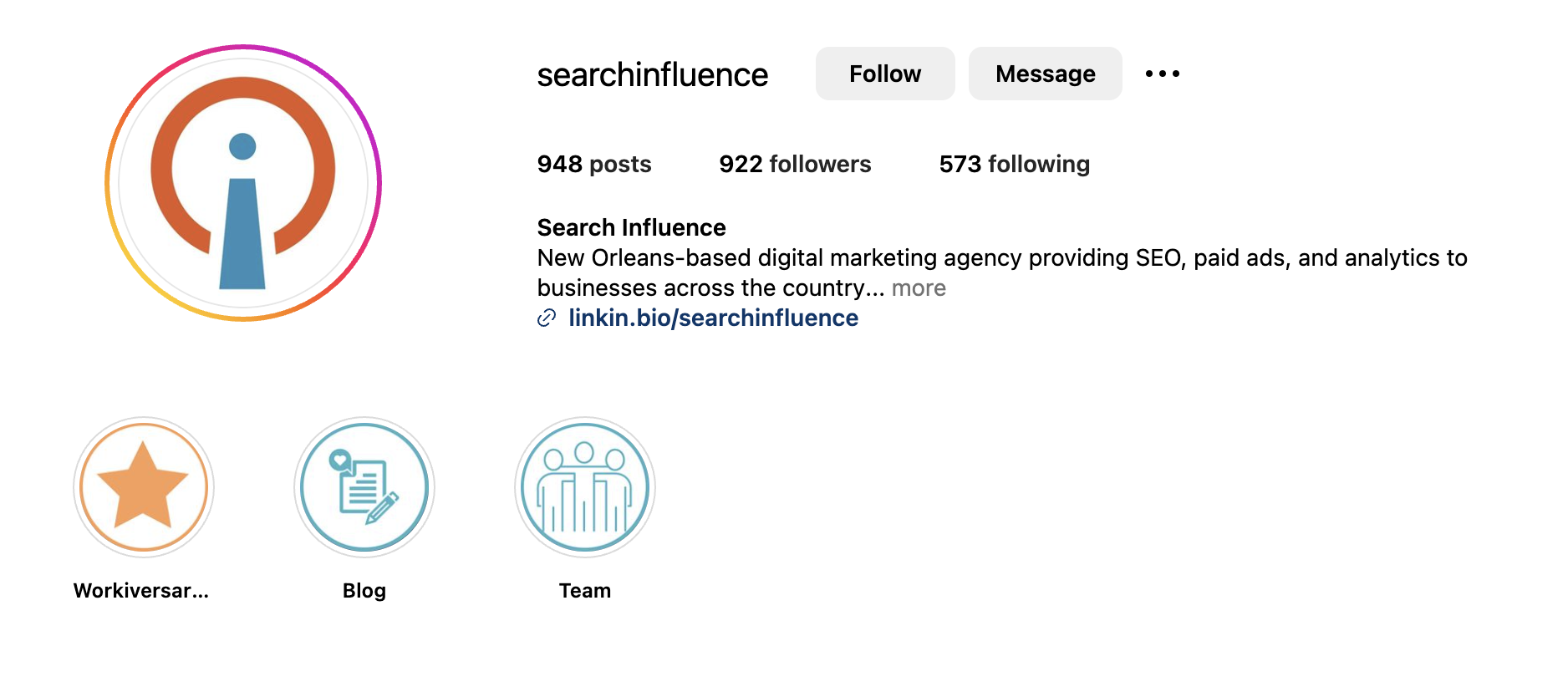
    Optimizing your social media profiles is crucial for strengthening your brand identity and enhancing your social media efforts. Use relevant keywords in your profile descriptions, and include clear, concise information about your brand.

    A screenshot of Search Influence's Instagram profile header, showing the importance of proper optimization

    Make sure to link back to your website from your social media pages to drive traffic and improve your overall SEO strategy. Consistency across all social media accounts is key to creating a cohesive and recognizable brand presence.

    Understand the platform

    Each social media platform has unique features and algorithms, requiring tailored strategies to maximize your reach and engagement.

    For example, Instagram and TikTok both rely heavily on visual content, such as short-form videos, while Reddit relies on community interaction and conversation engagement.

    Developing specific strategies for each platform will allow you to leverage their strengths and connect with your target audience effectively.

    Social media algorithms and features are constantly evolving.

    To keep your strategies relevant, stay informed about these changes by following digital marketing news and updates. Regularly updating your knowledge ensures that your social media efforts remain effective and aligned with the latest trends and best practices.

    Create engaging visuals

    Investing in high-quality images, videos, and graphics is crucial for capturing attention on social media.

    Professional and visually appealing content stands out and attracts more engagement. Platforms like TikTok and Instagram Reels have popularized short-form video content, making it a powerful tool for social discovery. Create short, engaging videos that are informative, entertaining, and easily shareable.


    View this post on Instagram


    A post shared by Search Influence (@searchinfluence)

    Keeping your feed active with fresh content, even if it seems repetitive, helps maintain visibility and keeps your audience engaged.

    Leverage influencers and user-generated content

    Collaborating with influencers who align with your brand values and target audience can significantly boost your social media interactions with Gen Z and Millenials.

    Influencers can create authentic content that resonates with their followers, enhancing your brand’s reach and credibility. Influencer partnerships can also drive more brand mentions and improve your social media signals, ultimately benefiting your SEO strategy.

    Promoting user-generated content is an effective way to increase engagement and build community around your brand.

    Encourage customers to share their experiences using branded hashtags, making it easier for others to discover and engage with your content. UGC not only provides authentic, relatable content but also boosts your brand’s visibility and trustworthiness.

    Trust the Search Engine Experts at Search Influence

    No matter the year or the platform, marketers will always have to adapt their sails to the winds of young people.

    Before SEO and digital marketing, brands spent millions on 30-second spots between music videos on MTV.

    Before that, the mad men of ad agencies bought entire pages in Rolling Stone, trying to grab the ever-fleeting attention of youth.

    Allow Search Influence to be your first mate as you navigate the seas of social search.

    Our knowledgeable team has years of experience getting results for brands just like yours.

    As SEO thought leaders, we take pride in leveraging the latest industry trends to build result-driven campaigns for our clients.

    Get in touch with us today to learn more about all the services we offer.

    Image Credits

    Group of Social Media Logos, Credit to Alexander Shatov

    Phone on Brick Wall, Credit to Karsten Wingeart

  • What Happened to Facebook’s 20% Text Grid Tool? (Updated 2020)

    Editor’s Note: This post was originally published on March 25th, 2016, and has been updated to provide you with the latest information.

    Update (October 1, 2020):

    Back in 2016, we were all so very excited to see the Facebook Grid Tool disappear. Unfortunately, it was replaced with similar restrictions of labeling ads with High, Medium, Low, or Ok amounts of text, and we found that ads were still being penalized for including large amounts of text. So is it true this time? Is it really gone?

    Facebook Grid Tool OFFICIALLY Removed

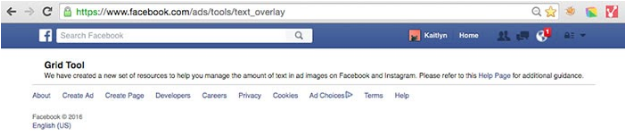
    See for yourself! The original Facebook Grid Tool (https://www.facebook.com/ads/tools/text_overlay) now redirects to the Business Help Center page on Best Practices For Image Ads on Facebook. These new guidelines strongly advise that testing is the best way to find out what works best for your audience, and we agree! Of course, Facebook still recommends that you should avoid excessive image text. Their new guidelines state “We’ve found that images with less than 20% text perform better,” so it’s clear that they still stand behind their 20% even if they are not enforcing it. As a designer, I agree that there is something to be said for that. Too much text, especially on smaller ads, can negatively impact readability. But what’s so great about the update is that you can now A/B test different types of creative and find what best meets your campaign goals without being limited by Facebook.

    Backend Warnings Removed

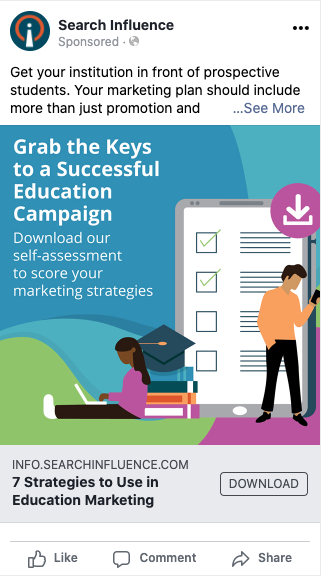
    On top of the removal of the actual grid tool itself, we also found that ads with large amounts of text, like this example below, are no longer being flagged by Facebook and campaign reach has not been affected.

    Example of effective Facebook ad with text

    What Does This Mean For You?

    As advertisers, we are thrilled to be more in control over testing creative and optimizing our campaigns. We live for it! For business owners running their own campaigns, this might be somewhat of a scary change. Optimizing campaigns for peak performance can take time and effort, which may be challenging to manage on top of other things. Let us help you! Schedule some time to meet with one of our strategists and discuss your goals as well as any questions you have.


    Wondering about the history of the 20% text grid tool? We’ve been monitoring this for years. Here’s our update from June 13, 2016:

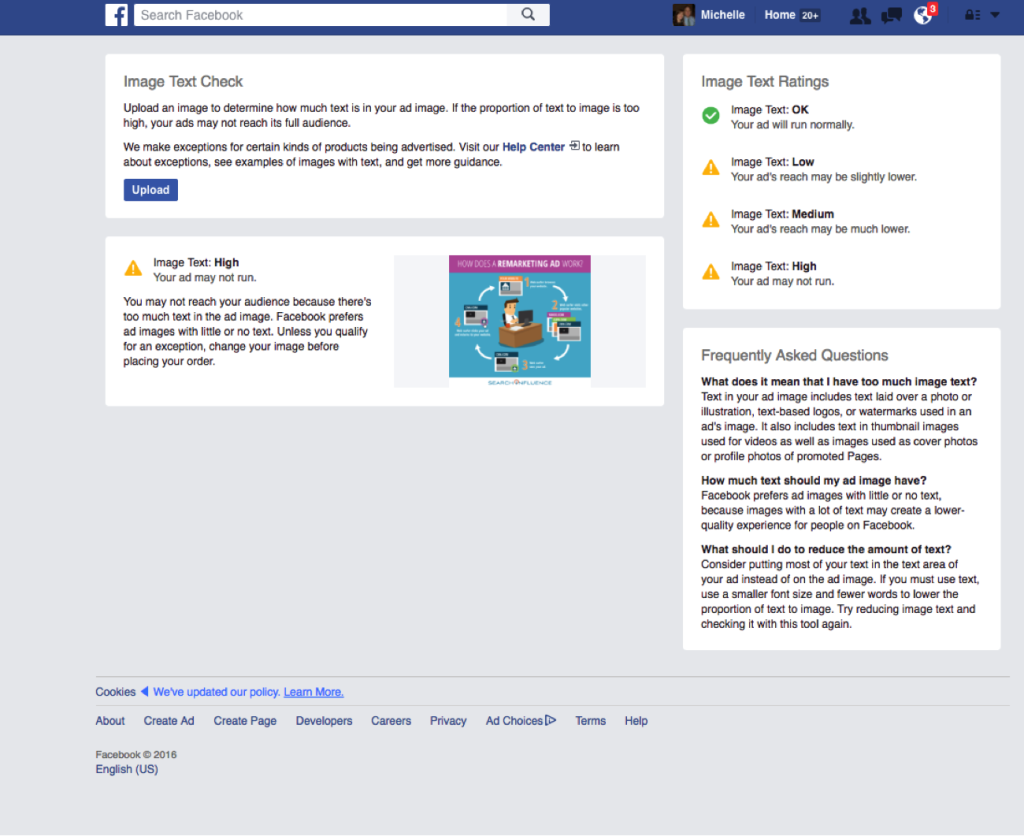
    It looks as though Facebook has officially rolled out this update to the 20% text rule! Here is the link to the new help page. When uploading your images to the new “Image Text Check” tool, you’ll automatically be notified of the likelihood of your ad reaching its intended audience (see our new screenshot below). If you’d like to better understand why your ad receiving less delivery, you can check the Ads Manager “Delivery” column.

    Facebook Screenshot

    Original Post (March 25th, 2016):

    Facebook seems to slowly be rolling up an update to their 20% text rule for Facebook Ads and Promoted Posts, which means some people are no longer able to access the Facebook Grid Tool. Our very own Kaitlyn Levy made this discovery when she was redirected to a Facebook Help Center page after trying to use the grid tool. But this new help page only seems to be accessible to a few, select users.

    So What’s Changed?

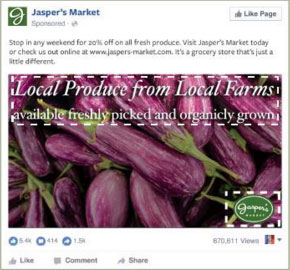
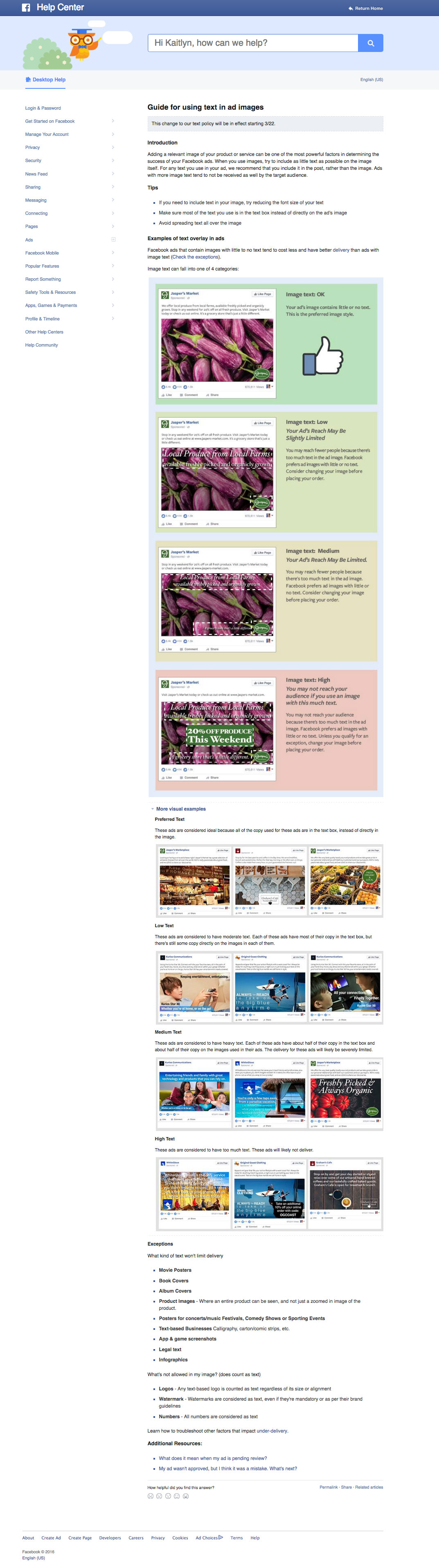
    There are four categories for the amount of text allowed on a Facebook ad. Your image text can be considered “OK”, “Low”, “Medium”, or “High.” The amount of text on your ad will determine the reach that it could potentially have. For example, an image that has the following text would be considered “Medium,” which may cause your ad to reach fewer people.

    MediumText

    What Does This Mean for You?

    While the strict 20% text rule seems to be falling by the wayside, the overall amount of text allowed on your ad can still have a huge impact on your ad’s reach. Your ad may not be rejected, but Facebook says that an ad with “High” amounts of image text may not reach your audience.

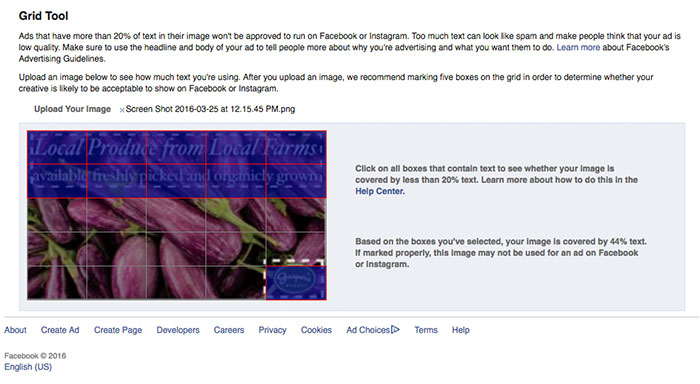
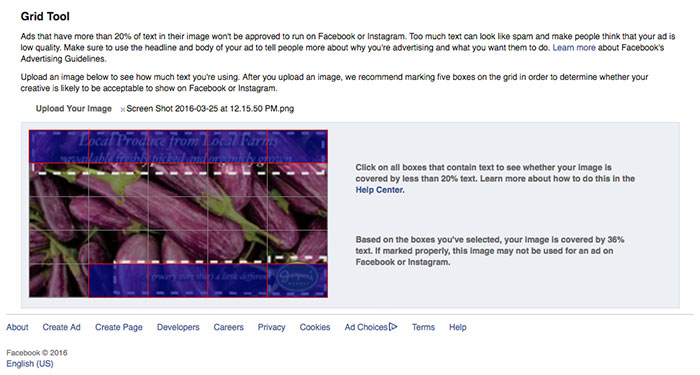
    Additionally, without a strict grid in place, you may have a bit more flexibility with the layout of your ad, but you still need to keep in mind the overall amount of copy in your message. When loading the examples provided on the help center page into the Facebook Grid Tool, you will see that the example in the “Low” category has 44% text, but the example in the “Medium” category has 36% text. The difference between the two examples is that the “Low” category, even with a larger font that takes up slightly more space on the ad, still has more copy than the “Medium” category example.

    The “Low” Category Example in the Grid Tool:

    NewTextRuleLowCategory

    The “Medium” Category Example in the Grid Tool:

    NewTextRuleMediumCategory

    Are There Any Perks to the New Guidelines?

    Yes! Along with the rollout of the new guidelines, they have also included some “exceptions” to the rule. There are some types of text that won’t limit your ad’s reach. Some of these exceptions include, movie posters, book covers, product images (only where the entire product is seen), legal text, and infographics. Some of the items that will still be counted as text are logos, watermarks, and numbers.

    Do You Have Access to the New Guidelines?

    Check here to find out and let us know by leaving a comment!

    Don’t Have Access? Here’s a Peek at the New Help Center Page:

    NewFBAdTextGuidelines


  • Facebook’s Leads Center Provides a Hub for Marketers to Manage Their Leads

    Key Insights

    • Facebook announced Leads Center, a new tool that provides a space for you to organize and maintain information from their prospects.
    • Your lead management process will become more efficient because you no longer have to go outside of Facebook or through a third party to manage or view your leads.
    • Leads Center is in the beta phase, so it is not available to all users.

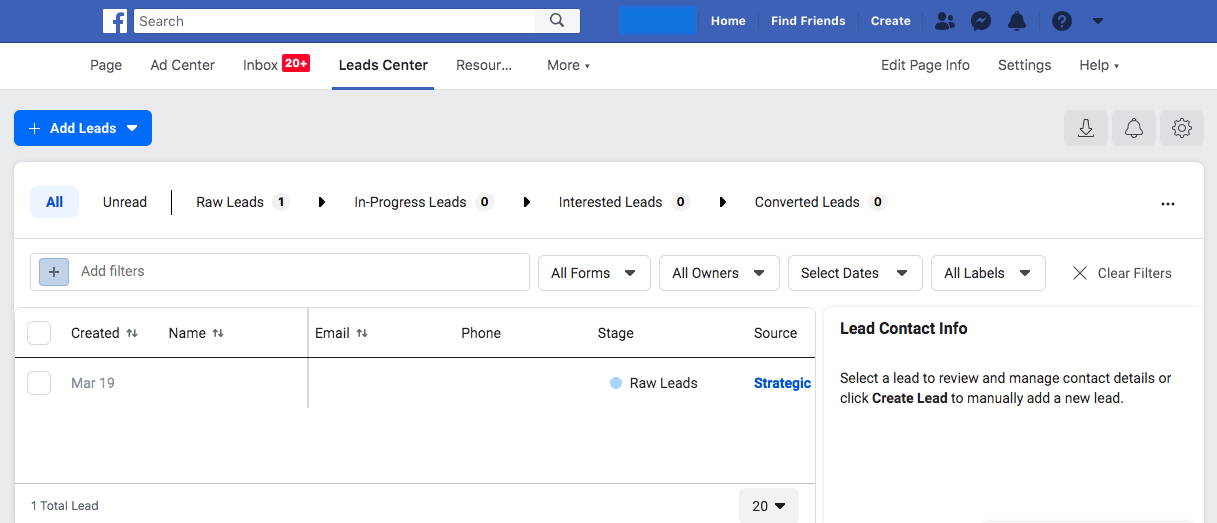
    Backend screenshot of new Facebook Leads platform

    Soon, you won’t have to save the leads you got from Facebook’s Lead Generation Ads in a spreadsheet on your desktop. Facebook is releasing a new feature called Leads Center. While this new tool is not available to everyone yet, it will provide users with the ability to organize and maintain information from their prospects. This tool will include the ability to:

    • Manage leads by setting reminders to follow up, assigning owners to leads, and adding notes to their contact information
    • Filter leads
    • CreateCustom or Lookalike audiences
    • Email leads from the Leads Center

    Now you may be asking yourself, why does this matter and how does this benefit my business? Facebook’s Lead Generation Ads produce lead forms that fit a specific purpose and provide prospective clients with efficient user experiences. Instead of filling out long, time-consuming forms, the forms are prefilled with the customer’s information. This process makes for a stress-free experience for potential clients and provides businesses with quality leads. In turn, this results in a higher conversion rate.

    Before Leads Center, you had two ways you to access your leads. The first was downloading a spreadsheet from the backend of Facebook. The second was setting up a “zap” through Zapier to get the leads into your own CRM.

    In this post, we’ll take an in-depth look into how Leads Center can benefit your business, some of its key features, and its availability.

    Will Leads Center Be Helpful for Your Business?

    Now to get to the good part—how Leads Center helps your business and make your Facebook lead management more efficient. You will no longer have to go outside of Facebook or through a third party to view or manage your leads. Search Influence has used lead forms for many years now, and this new offering is an excellent way to help business owners to manage their leads.

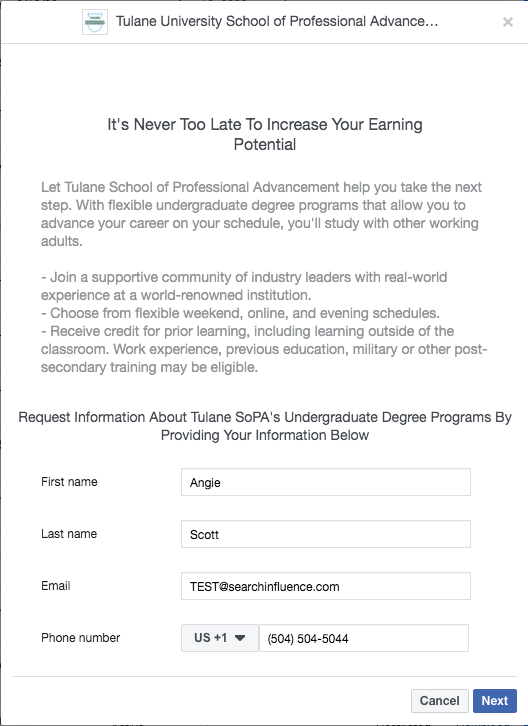
    Below are examples of a Lead Generation Ad and the form:

    Tulane School of Professional Advancement lead gen facebook post example

    Tulane Facebook conversion form example screenshot

    The Key Features of Facebook’s New Leads Center

    Leads Center has various functions that will simplify managing your leads. Let’s take a look at some of the key features:

    • Custom labels: If the lead is interested in a specific product or service, you can create a label to describe or organize your information.
    • Assigning owners: You can assign owners to specific leads so the right individuals on your team manage them.
      Mark prospects according to their lead stage: You can organize leads by where they are in the funnel to easily manage and process them.
    • Lookalike audiences: You can create lookalike audiences based on the information from your leads to optimize your ads’ audiences and obtain more qualified leads, resulting in higher conversion rates!
    • Create reminders: You can set reminders for each lead to assure none of them slip through the cracks.

    A Closer Look at Lead stages

    Facebook uses four different stages to categorize leads and represent where they are in the funnel:

    • Raw: New leads
    • Interested: Leads that have qualified for the service or product.
    • Contacted: Leads that have been contacted.
    • Converted Leads: Leads that have been converted into customers.

    Organizing these leads by their stage will help you target them more effectively because you’ll know where they are in the sales funnel.

    Facebook Leads Center Availability

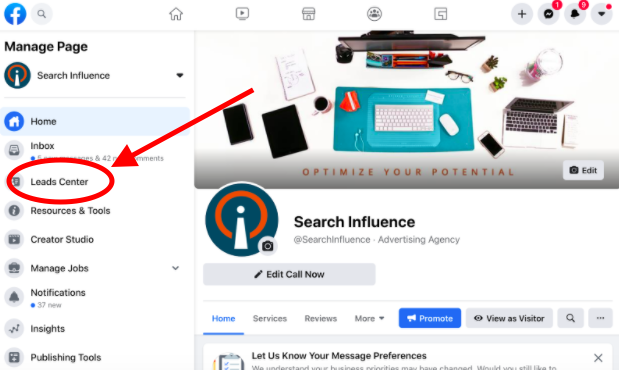
    Currently, Leads Center is in the beta phase, so it is not available to all users. Leads Center is open to businesses that have previously run ads with the Lead Generation objective. Leads that are generated in Messenger are not available yet.

    To view the Leads Center, go to your Facebook page. Then, look below “Inbox” in the left-hand tab to see if it is available to you!

    Leads Center link shown on Facebook profile page screenshot

    Facebook’s Lead Generation ads are just one of many ways to generate quality leads that result in a higher conversion rate. Through Facebook’s Leads Center, you can view leads, assign users to them, categorize them, create lookalike audiences, and so much more, all within Facebook.

    Search Influence is dedicated to helping businesses reach their goals. If you’re looking for a reliable way to generate leads and manage them efficiently, Facebook’s Leads Center will be a beneficial tool. Contact us today to see how we can help you!

  • The Top Five Ways to Optimize Instagram Accounts for SEO

    Nowadays, it isn’t enough to simply have great content, because to be honest… a ton of people have great content. Businesses have to be smarter and more competitive to get their content in front of the right people. With the ever-growing popularity of social media, accomplishing this has become easier but harder.

    On one hand, businesses have more platforms to share their content and reach potential buyers. Gone are the days where a website is stuffed with all of a company’s information and events. On the other hand, businesses have more platforms to manage and keep optimized. Your website has to be in tip top shape for search engines, but so do your social profiles.

    Take Instagram for example. According to research done by Hootsuite, one billion people use Instagram every single month, with 500 million people on Instagram every day. More importantly, “200 million Instagram users visit at least one business profile daily.”

    That’s 200 million reasons you can’t slack on Instagram.

    There is a silver lining though. Optimizing an Instagram account for search engines is very similar to optimizing a website for search engines. Here are five ways to get your bangin’ IG optimized for SEO.

    Have Your Top Keyword in Your Handle

    You may not be able to change your domain name or business name at this point, but your Instagram handle is just itching to be optimized. If your username doesn’t include your main keyword, you should reevaluate it.

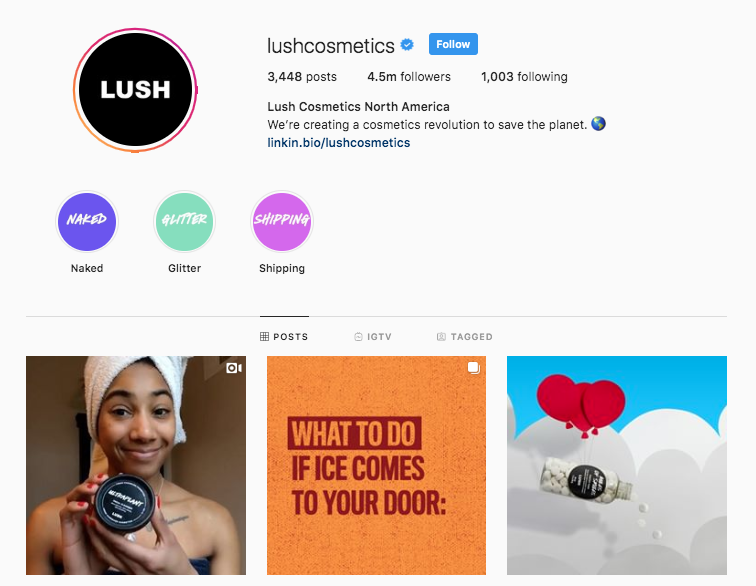
    Take Lush, a cosmetic company headquartered in the United Kingdom, for example. While the company’s name is simply Lush, it’s Instagram handle includes a very important keyword.

    Screenshot of Lush Cosmetics Instagram landing page

    “Cosmetics” is sitting pretty in their Instagram handle. Also notice that their business name isn’t the only part of their profile that has a keyword shining bright… which brings us to tip number two.

    Load Your Bio With Keywords… Naturally

    Why should your Instagram handle get all the keyword love? Well, it shouldn’t. Your business name and bio are great opportunities to get some more keywords on your profile. However, don’t be sloppy about it.

    Loading your bio with keywords should be done in a natural and clever way. After all, your potential buyers are watching.

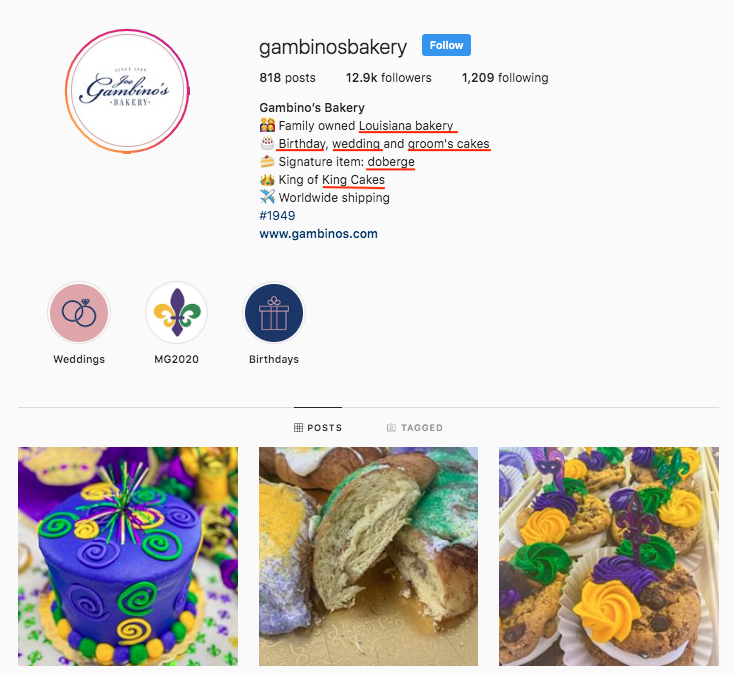
    Gambino’s Bakery does an excellent job of sneaking rich, top tier keywords into their bio.

    Screenshot of Gambino's Instagram landing page

    Utilize Instagram’s ALT Text Feature

    In late 2018, Instagram rolled out the ability to add ALT text to images in an effort to make the platform more enjoyable for visually impaired users. Don’t say Instagram has never done anything for companies, because this feature made business profiles accessible to more potential buyers and created another space to include keywords.

    When gearing up to share some great content on Instagram, keep your eyes peeled for the advanced settings option. The Advanced Settings are on the same screen as the caption, tagging, and location options way at the bottom in small print. After you press that, the accessibility section will be at the bottom.

    Load Your Captions and Hashtags With Keywords

    If it seems like optimizing your Instagram for search engines is all about keywords… then you’ve been paying attention. Congrats!

    Other perfect opportunities to get some nice, juicy, top-tier keywords on your profile are in the captions and hashtags. But again… this should be done naturally. Potential buyers don’t love several keywords thrown together.

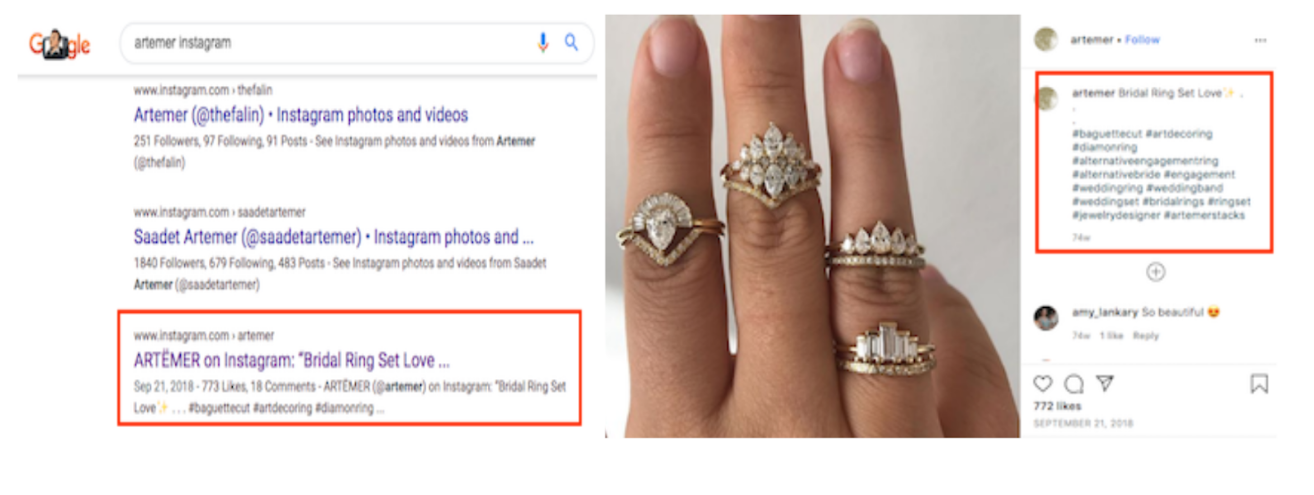
    Example of an ARTËMER Instagram post using keywords

    ARTËMER, a nine-year-old jewelry brand, does a great job of integrating keywords with a natural caption. Sitting in this post are two keywords in the caption and a slew of keywords in the hashtags. If writing the perfect caption gives you anxiety, think about them as title tags because they act the exact same way.

    Example of an ARTËMER Instagram post ranking

    Add Your Instagram to Your Google My Business Profile

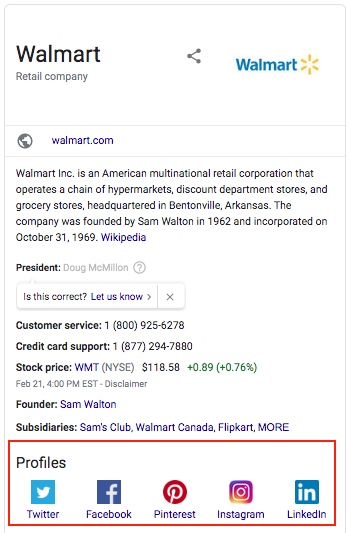
    This optimization tactic has nothing to do with keywords, but it is highly important. Having your Instagram profile linked on your Google My Business page will allow it to pop up on Google along with other pivotal need-to-knows, like your business address and phone number.

    Screenshot of Wal-Mart's Google knowledge panel

    While you cannot physically log in to GMB, link the profiles and watch them magically appear, Google will “automatically discover social profiles to include in Google knowledge panels.” To hurry the process along, Google recommends that the change is suggested by a verified representative.

    The last and final tip is sometimes easier said than done, but it is the most important: create great content. SEO will drive potential buyers to your social profiles, but great content will make the right buyers stay. If you need help, don’t sweat it! Our team is experienced in all things SEO. Contact us today!

    Images

    Instagram logo

    Phone on desk

  • How to Use Facebook’s Campaign Budget Optimization to Your Advantage

    Who’s ready to spend their Facebook campaign budget more effectively?!

    Chris Pratt giddily rubbing his hands together

    If you waited until the last hour to adopt Facebook’s new mandatory update, Campaign Budget Optimization, you may be slightly panicked. This could disrupt your internal processes and current campaign structure. However, you’ll be thanking Facebook for forcing this change once you adopt it.

    What Is Campaign Budget Optimization?

    Campaign Budget Optimization (CBO) is Facebook’s latest mandatory update that makes you set your campaign budget at the campaign level, without the option to set ad set level budgets. Ideally, Facebook’s algorithm will optimize your campaign for your chosen “result” by effectively spreading your budget across each ad set.

    With CBO, you must accept that not all ad sets will spend the same, and that’s in your campaign’s best interest because the budget will spend on the best-performing ad sets.

    Do’s & Don’ts for Setting Campaign Objectives

    It’s important to use the correct campaign objective and ad set “Optimization for Ad Delivery” when setting up your campaign. Choose the proper result option that aligns with your client’s goals; this will affect who sees your ads and will help you achieve the desired outcome more effectively.

    To get a better understanding of what this means, review the do’s and don’ts below explaining common errors that occur when choosing campaign objectives and optimizations for ad delivery.

    Campaign Objective

    DO: Choose the conversion objective if you want to see an increase in conversions at a lower cost.
    DON’T: Choose a traffic objective to increase traffic to your website in hopes of also increasing conversions at a lower cost.

    DO: Choose the brand awareness objective if serving many impressions at the lowest cost meets your client’s goals.
    DON’T: Choose a conversion objective if your audience is not brand aware, since you will be paying a premium to reach users who are likely to convert online and not achieve your brand awareness goal effectively.

    Optimization for Ad Delivery

    DO: Select “Landing Page Views” if it’s important that the Facebook user loaded the landing page.
    DON’T: Select “Link Clicks” if you’re looking for high-quality clicks from interested users.

    DO: Select “Reach” if you set your campaign objective as reach so that Facebook optimizes to serve ads to the maximum amount of users within your frequency cap.
    DON’T: Select “Impressions” if your goal is to make users brand aware by serving ads to users as many times as possible. Your campaign would be better off using the brand awareness objective instead.

    Facebook always gives you the option for more control, but that doesn’t mean that there aren’t best practices that should be followed. Facebook’s algorithm will only optimize for the results you select when setting up your campaign.

    Screenshot of Facebook landing page on a browser

    Maintaining Budget Control With Ad Set Spend Limits

    Sometimes you’ll need to maintain some control of spend at the ad set level. For this reason, Facebook allows ad set spend limits to be set as a minimum or maximum daily spend.

    • Here are five examples of why you may want to use ad set spend limits:
    • If you create a new ad set to test but it won’t spend, you can force a minimum daily spend until Facebook’s algorithm collects enough data about that ad set. This should only be set temporarily for 2-3 weeks.
    • If you want to control budget based on targeting, such as locals vs. tourists, you can set daily minimums/maximums to align with your desired budget allocation. However, this should only be a temporary solution until you can separate these into their own campaigns.
    • You may want to spend more on promoting a special or limited offer but only for a short period of time (less than 2-3 weeks).
    • You may need to promote an urgent message that requires more spend for a short period of time.
    • If one ad set is spending all of the budget on low-quality results, you should consider setting a daily maximum.

    Disclaimer: Facebook notes, “Use ad set spend limits sparingly, or not at all: The more budget that’s locked into specific ad sets, the less flexibility our delivery system has to optimize your campaign budget.”

    While there are valid reasons to control spend for a short period of time, ad set spend limits should not be a permanent solution if you want to maintain a healthy ad account. At the end of the day, marketers want to produce the most high-quality results at the lowest cost for their clients. It’s best to let Facebook’s algorithm spend the campaign’s budget in the most effective way for the results you chose to optimize for.

    Take Action Now

    As you can see, this mandatory update may require changes in your processes, but Campaign Budget Optimization benefits your Facebook ad account in the long run. If making this transition has been overwhelming, reach out to Search influence for specific recommendations and consulting services. Learn more about how we can also manage your ad account directly with an online advertising package.

    Images

    Mouse

    Hand rub

    Facebook

  • Cross-Posting Mistakes You Should Never Make

    While you should be posting on social media, especially if you have a new piece of content you want to share, make sure you don’t cross-post on different platforms. Even if it’s easiest to figure out one social media post and call it a day, cross-posting can have negative effects.

    What Is Cross-Posting?Person using mobile device to cross post to social platforms

    Cross-posting is posting identical content across multiple social media channels. Posting the same exact content to multiple social platforms is like giving the same exact advice to multiple friends. You might give them the same type of advice, but the words you choose and tone you use will vary depending on the person. Like friends, different social platforms have different personalities, which is why crafting content for those platforms should involve a one-size-fits-all approach.

    Cross-Posting: Nope.

    Right about now you’re probably thinking, “creating content for social media is hard enough, and now you’re telling me I can’t just post the same content across multiple social networks?” Why, yes, that is exactly what I am telling you.

    The things your friends ‘like’ on one platform aren’t the same things your followers will retweet on another. The language, tone, visuals, and overall formatting best practices for Instagram aren’t the same for Twitter, Facebook, LinkedIn, etc. When crafting a social post, it’s important to be mindful of the following:

    • The audience on the platform you’re posting and talking to
      • You’ll want your tone and message to be more professional when crafting a LinkedIn post, whereas you’re encouraged to take a more casual approach on Instagram.
    • The formatting differences per platform
      • When it comes to Twitter, you’re limited to 280 characters per Tweet. Whereas on Instagram, you have 2,200 characters per post. Should you create content with a one-size-fits-all-platforms approach, you run the risk of your Tweet cutting off in the middle of your sentence due to character limitations, or a bad handle being included within your Tweet due to someone’s handle varying across platforms
    • The guidelines per platform to monitor and prevent spammy activity
      • Last year, Twitter announced new guidelines surrounding the use of automation and posting the same (or substantially similar) content over multiple accounts you control.

    Cross-Promotion: Yep.

    Cross-promotion, in addition to being your saving grace within the realm of creating unique social media content, is the idea of promoting the same overall topic across platforms but in a way that is suitable for the varying personalities, formatting requirements, and guidelines of each platform. And using them to your advantage!

    Having one topic about your business and/or brand that you want to share across multiple social media channels is not the “no-no” we’re discussing here. Instead, it’s sharing that topic in the same exact way across multiple platforms. Creating unique posts for each platform may sound overwhelming, but this idea of cross-promotion can help ease this process.

    1. Think of a topic you want to share on your channels
    2. Create a couple of sentences promoting this topic, providing the necessary information, etc.
    3. Take those sentences and apply tweaks for each platform you want to post to, being mindful of all of the considerations mentioned above
    4. Push out unique, engaging, and easy-to-create content that successfully caters to each social media platform

    Digital marketer using keyboard at computer

    Creating unique social media content that is specifically catered to each social media platform is a great way to keep users engaged with both your brand and your brand’s voice. At Search Influence, we’re always keeping the personalities, requirements, and best practices of individual platforms top-of-mind when creating social media content for our clients. To learn more about how we can help you and your marketing efforts, give us a call today at (504) 208-3900.

    Images

    On cell phone

    Keyboard

  • How to Best Utilize Facebook’s 3D Photos for Your Brand

    Facebook introduced 3D photos in October 2018, and users have been posting these fun “window views” that give viewers a new perspective on once-flat photos in their newsfeed. Originally only available to those with an iPhone with Portrait Mode, 3D photos can now be uploaded by anyone with a dual-camera smartphone or by anyone who had manually created a depth map.

    This new format saw some traction right after its launch, but has slowly plateaued in popularity over the year. This could be due to it only being available to certain iPhone users at first, or maybe just a general lack of awareness of the feature, but, either way, this means brands that do utilize it will stand out in newsfeeds even more.

    Why Use 3D Images in the First Place?

    Any new feature that Facebook introduces is inherently attention-grabbing, and 3D images have the best of both the video and flat image worlds. The eye-catching movement is automatic as the user scrolls through their feed, but taking in a 3D image doesn’t take as long as watching a video. This immersive experience offers a self-guided glimpse into a “window.”

    The feature was released for users, not pages or brands, to share photos. However, users have found that if they can post 3D images from their personal accounts, they can post them from business accounts too. With this workaround, business pages are able to blend in more with their audiences’ newsfeeds, behaving and looking more like their friends and family.

    As older smartphones are phased out, 3D images will likely become even more common on newsfeeds. A brand that gets ahead of the trend before it really takes off will prove itself more innovative than its competitors and establish more authority with its followers.

    How to Use 3D Images

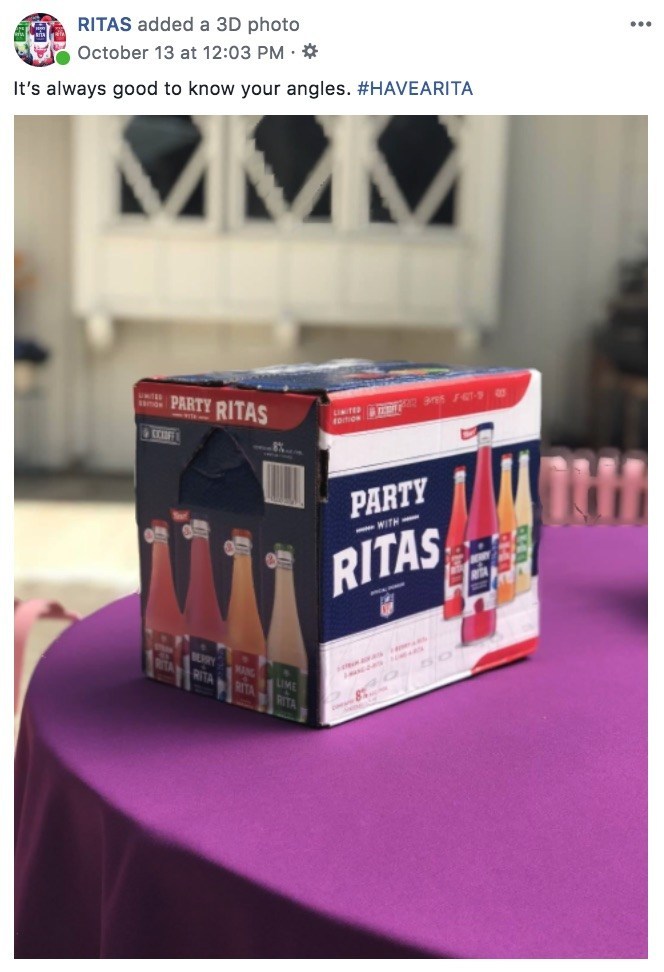
    More casual images will look the most natural when using this feature. Your audience will be scrolling through their newsfeeds expecting the 3D image to be posted by someone they actually know, so keeping this in mind will help your brand seamlessly blend. The post below, for example, was posted by the official Bud Light Ritas Facebook Page and looks like it could have been posted by anyone celebrating the weekend or watching some football.

    Facebook example for a brand using 3D images in advertising

    If you have creative that was created NOT using portrait mode on a smartphone, you can still manually create a depth map, too. This is a bit more challenging and time-consuming, but it’s completely possible to make a 3D photo in Adobe Photoshop or with other online tools. Get creative with your creative!

    Tips for Taking Great Portrait Mode Photos

    • Put a few feet in between the camera, the subject, and the background. To highlight the depth in the photo, there needs to actually be depth.
    • Make sure the subject of your photo contrasts with the background. Don’t have a woman wearing a green sweater against a green wall.
    • Transparent or shiny objects, like glass or windows, can confuse the depth sensors and might turn out distorted. This may also happen with hair. Combining these two, like a person standing in front of a wall of glass, may totally warp the photo.

    Making the most of recently released features is a great tactic for drawing users in on social media. At Search Influence, we’re always looking for new ways to make our clients’ marketing campaigns more effective. To learn more about using advertising to grow your business, start a conversation with our marketing strategists.

  • Drive Conversions With Instagram Shopping Product Tagging

    Ever have one of those “OMG I need it” moments when scrolling Instagram? What if I told you your customers can go from “Oh my God” to “It’s mine” in just a few taps? Instagram is making it even easier for you to give potential customers seamless shopping experiences with Instagram Shopping’s product tags. As all digital marketers know, it’s easier to convert shoppers if there are fewer steps between “I want it” and “It’s mine.”

    Product tagging makes it easier for users to view your products, and it also helps them get to your site without having to put ad spend behind the post to get that “Shop Now” CTA button or using the dreaded “Link in bio.” In fact, product tagging cannot be used on ads, so this can really help beef up your organic posts.

    See It, Like It, Want It, Tap It

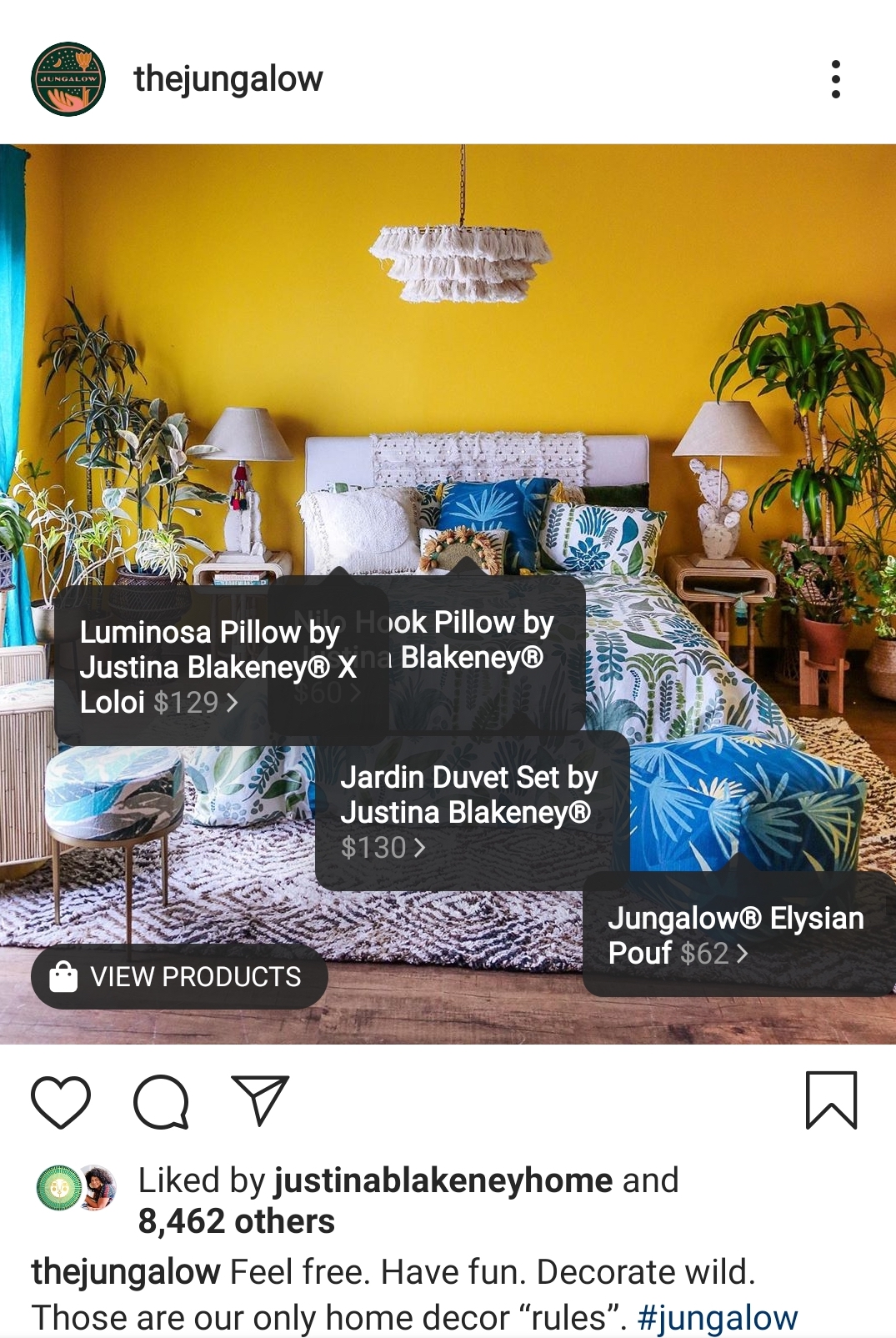
    After setting up your mobile storefront, any post can become shoppable.

    The Jungalow example Instagram post showing tagging features

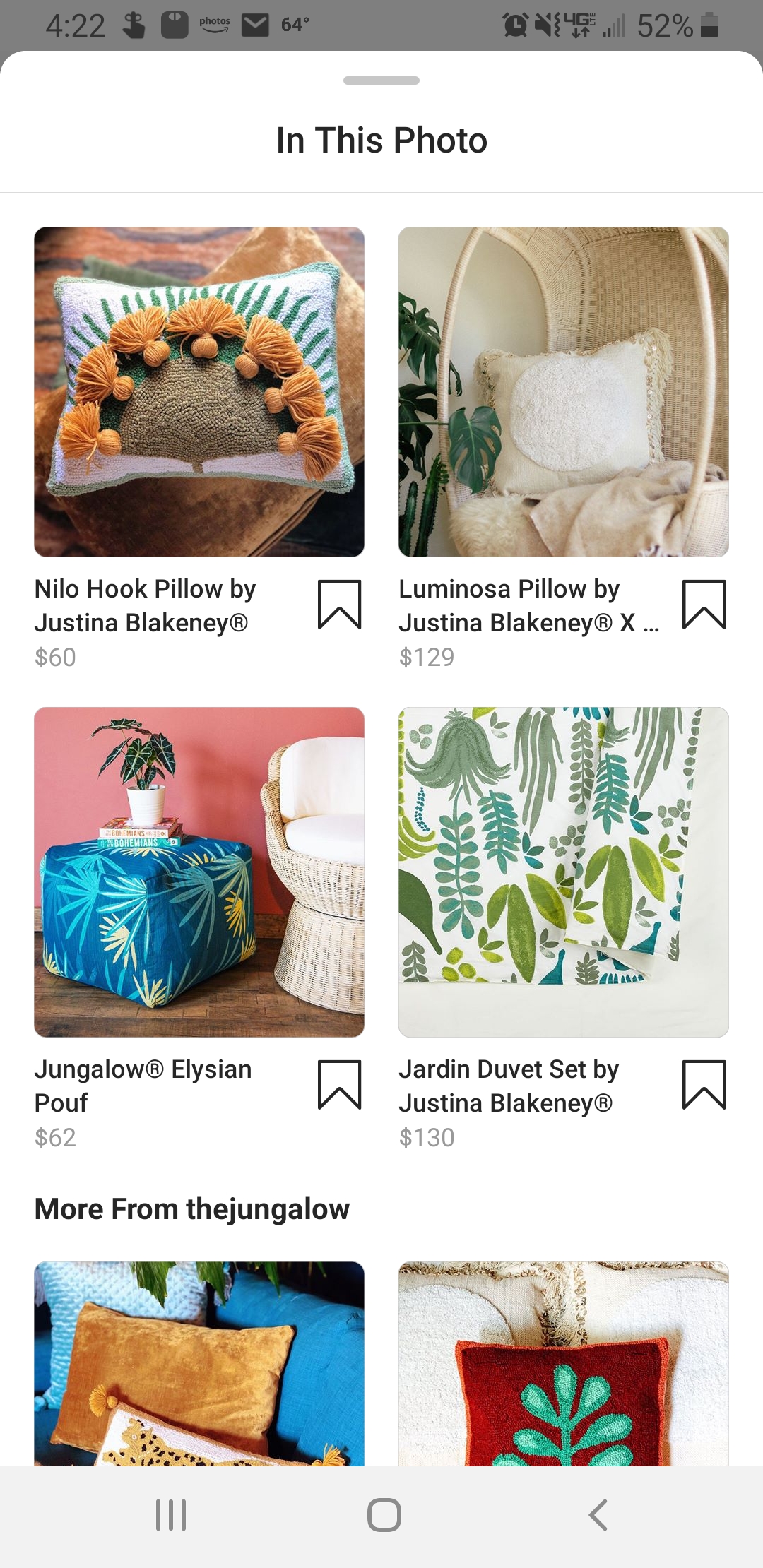
    Once a user taps to see your products, they’ll get a product image, a description, and even related items in your store.

    The Jungalow products show in the Instagram shopping platform

    Users can even save items to their Wish List—which is a private collection of saved products—so they can come back later to make a purchase.

    And though it’s still in beta and only available to select brands, Instagram Checkout will one day allow users to go from discovery to purchase without leaving the app.

    Drive Discovery

    One of the greatest benefits to using product tagging is that your posts can show up in the Discovery feed for users who like pages, businesses, or content that is similar to yours.

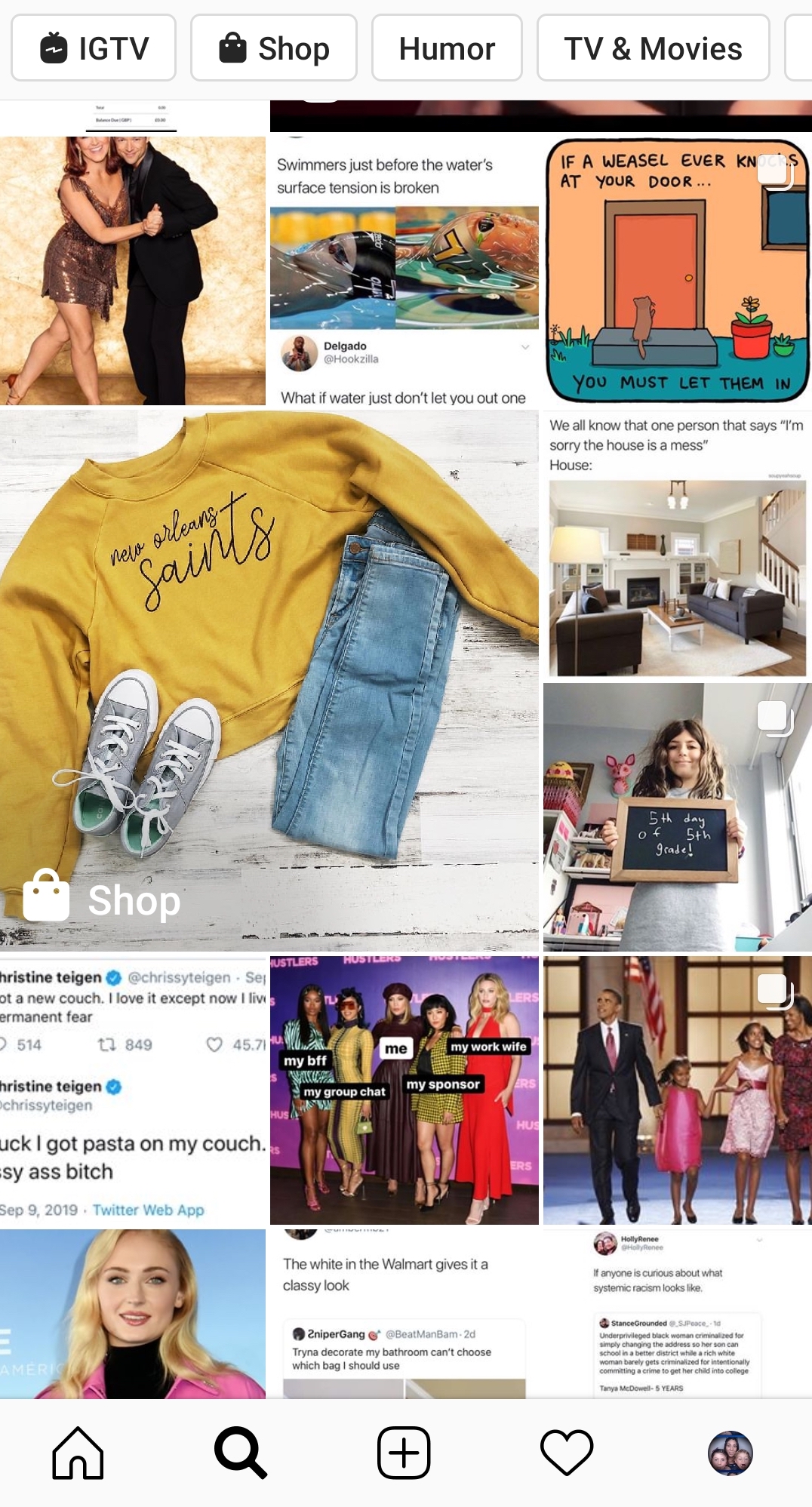
    Example of the Instagram discovery feed for products

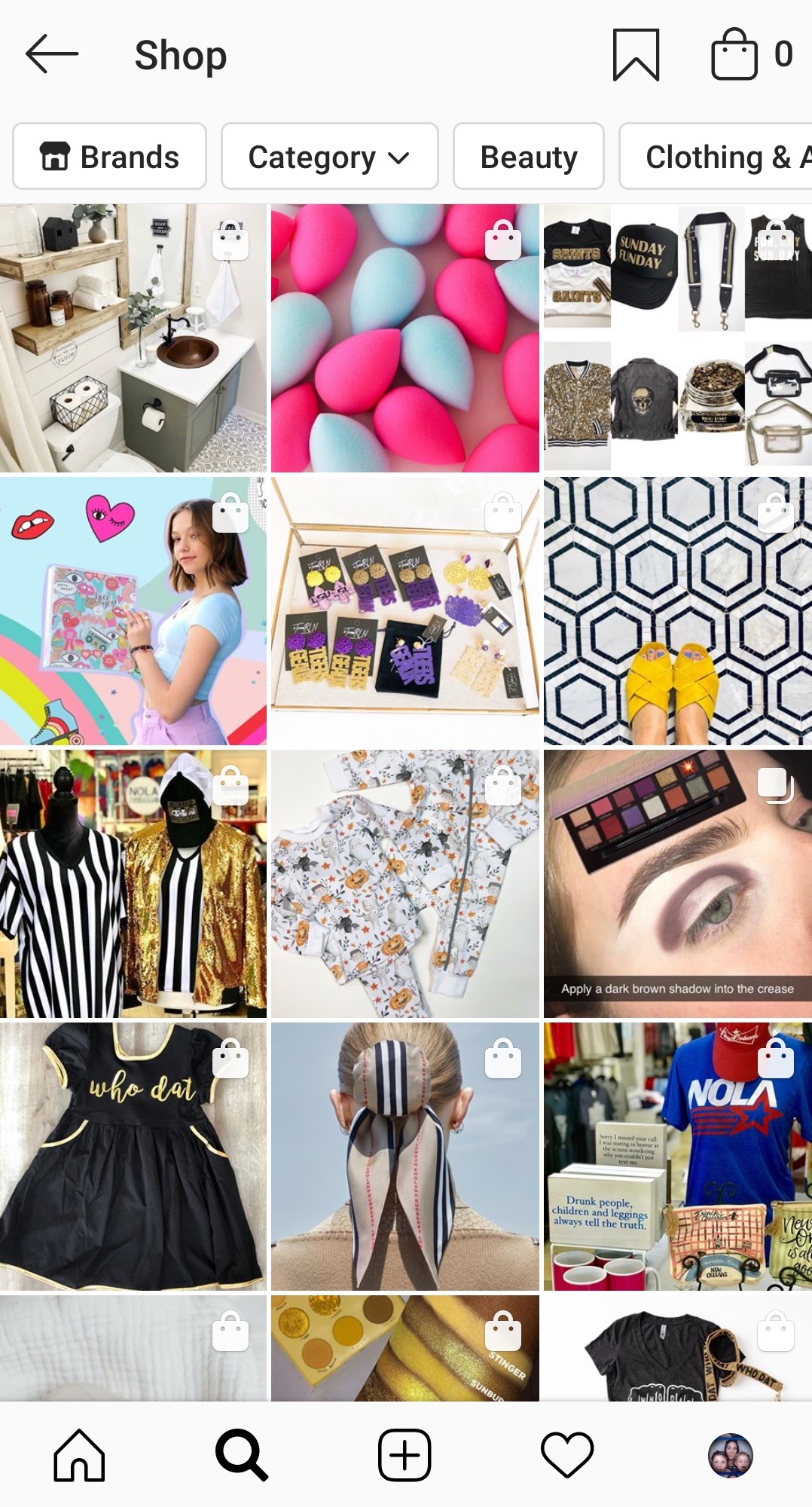
    Users can also filter shopping results by category or by brand. This means that you could be reaching people who are actively looking for the type of product you offer.

    Instagram shopping page found from the discover feed

    But even when users aren’t necessarily looking to shop, these shopping posts blend seamlessly with the rest of the feed, giving you a chance to showcase your products “in the wild.” This is huge in the fight against ad fatigue and ad blindness. As most Instagram users (actually most Internet users) know, we end up tuning out those ads after a while and just keep on scrolling.

    How To Set Up A Mobile Storefront

    You might be asking, “How do I tag my products on Instagram?” Unfortunately, you can’t just set up a profile and go. There are a few steps you need to take before you can start using Instagram Shopping. First, you need to make sure you are eligible.

    1. You Have to Be in a Supported Market

    See the complete list of available markets here. There are several eligible countries.

    2. You Need to Sell Physical Goods

    Services, downloads, and subscriptions to digital services are not supported at this time.

    3. You Can’t Sell Prohibited Items

    Tobacco, supplements, weapons, animals, alcohol, and “adult products,” to name a few, are prohibited. If you think your product might be in a gray area, check the full list here.

    4. You Need an Instagram Business Account and Facebook Business Page

    Your Instagram Business Account must be connected to a Facebook Business Page.

    5. Connect to a Facebook Catalog

    This is going to need to be created and managed either on Facebook using Business Manager or Catalog Manager. You can also manage your catalog through BigCommerce or Shopify platforms.

    Once you have all the pieces in place and make sure you comply with the policies, you’ll have to submit your account for review. In your profile, go to Settings > Business > Shopping on Instagram. Follow all the steps, and in a few days, you should be good to go and ready to tag.

    Tips For Your Shopping Posts

    Now you’re ready to get to tagging. This is the easy part. Any image or video you would normally post to your Instagram Feed or Stories can now be tagged.

    • Get creative: This is your chance to move beyond boring still images of products against a white backdrop. Show us your fashions on real people out in the world. Let us get a peek behind the curtain to your factory floor or your drawing board. How is your product made? How is it used? The sky’s the limit.
    • Stay true to your brand: You want your posts to represent the overall image of your company.
    • Be visually compelling: Not only do you need to stand out in the Feed or on Stories, but you also want to stand out on the Discover Feed. Use bold colors and patterns; beautiful scenery or backdrops; and interesting angles or crops. You need to stop those thumbs from zooming by.
    • Showcase your whole collection: You can tag up to 5 products in a single image or video and up to 20 products in a post with multiple images.
    • Plan your tagged posts: Just because you can turn all posts shoppable doesn’t mean you should. Users might feel bombarded if suddenly you’re posting all your products at once. Use a scheduler to plan out your creative.
    • Feature your customers: When users tag you in images featuring their products, repost them with tags!

    If managing your company’s presence on social media is taking up too much of your time, Search Influence can help. We have years of experience using social media campaigns to drive more customers to businesses. Learn more about how we can help grow your business by contacting one of our digital marketing strategists at (504) 208-3900.

    Images

    Insta-prism