Category: Industry Insights

  • Keywords: Now All-Natural and Gluten-Free

    Google has officially divulged that it rewards the mobile optimization of your website. Hooray! For most people, this doesn’t come as much of a surprise. There are studies dating back to last year claiming that up to 60% of consumers use mobile searches when making purchase decisions. The bottom line is that people are becoming increasingly hooked to their phones as each day passes.

    LookingAtPhonesImage

    How Has Search Intent Changed?

    Okay, so people love their phones—shocking. But what are the larger implications here? How might the mobile revolution affect the way you rank for specific keywords? Well, to answer that question, we need to delve into how search intent is evolving. With the mounting prevalence of semantic searches compared to conventional keyword-happy searches, users are now searching on the go and in an increasingly natural way. Gone are the days where using singular, valuable keywords are getting you exposure. In the ever-evolving search intent environment, content may be king, but nuance is noticed. One 2012 study estimated that “16 to 20% of queries that get asked every day have never been asked before.”

    What Does This Mean For Me?

    It’s officially time that we start thinking outside of the box when it comes to the keywords we are using in our content. Creating helpful, educational content for your users is about anticipating needs and answering questions. To keep up with the changing landscape of SEO, keyword brainstorming sessions need to become less about singular words and more about descriptive phrases.

    thinkoutsideimage

  • How A Little Nip And Tuck Can Improve Your SEO

    Makeovers aren’t just for mommies looking to restore and improve their post-pregnancy appearance through multiple, personalized plastic surgery procedures. Makeovers can also work wonders for websites in the cosmetic medicine industry. If your website isn’t bringing you a consistent stream of new patients, it may be time to give your site a much-needed SEO facelift. Learn how adding graphics to your website can help you get results!

    DoctorImageQuick—what do professional skin care, breast augmentations, and braces all have in common?

    Give up? Well, first of all, if you want any of these things, you’ll need to seek the help of an accredited medical professional—a dermatologist, cosmetic surgeon, or orthodontist, respectively. More importantly, however (at least for the sake of this blog post), is the fact that you can actually see the end results of these types of medicine. So how can medical professionals incorporate these visible results into their SEO strategy?

    If your medical specialty provides some sort of aesthetic benefit, there is a good chance you could (and should) be doing more to improve your rankings in organic search results. “More” in this context doesn’t mean “more keyword-rich text” or “more high-quality links to your site.” Instead, it means taking advantage of industry-specific SEO opportunities. Optimizing and adding images, educational infographics, or patient testimonial videos can have a significant impact on your site’s search visibility.

    Optimize Existing Images

    Optimizing image file names, alt text, and title text will give search engines information about the image and the content on your site. Any images can be optimized with keywords, but before and after images of your patients are an excellent industry-specific opportunity to naturally incorporate relevant keywords into your site’s content.

    One of our clients, a plastic surgeon, has a before and after image gallery on his site. We optimized each of the images in the gallery and saw some interesting results. Links to the gallery outperform the corresponding page on his site for the majority of his targeted keywords. The same client even has images that rank in organic search results!

    NoseJobSearchImageResults

    Add Relevant Images

    It’s important to note that Google can’t read or understand images without alt text or title text. But a page with relevant images that have no alt text or title text will most likely still rank better than a page without images! Why? The answer is simple—the ranking algorithm also pays attention to user behavior. If your site’s visitors are happy with what they see, search engines will recognize a pattern and reward your website for providing quality content.

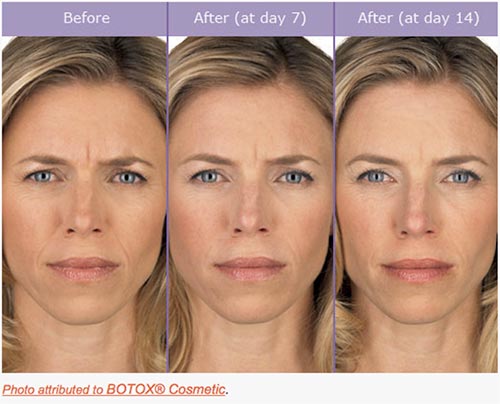
    Another one of our clients, a plastic surgeon in New York, didn’t have a before and after image on his BOTOX® page. As an authorized physician, our client was allowed to use some images provided by Allergan, the manufacturer of BOTOX® Cosmetic. We chose this relevant image and placed it on his site:

    BotoxBeforeAndAfterImage

    In the 30 days after we implemented this image, the average visitor spent 13% more time on the page compared to the previous 30 days. When visitors landed on the page from organic search, the bounce rate improved by 24%. Both of these stats demonstrate to Google that users are not only finding the information that they’re looking for on this page, but that it’s also engaging enough to keep them on the site.

    Create Custom Graphics

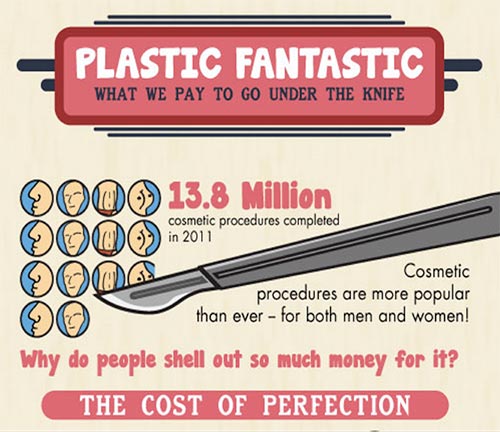
    Another behavioral signal that has become increasingly more important is social behavior. Adding custom graphics to your site is a great way to promote social media sharing and demonstrate positive social signals to search engines. And, like other images, custom graphics also give you the opportunity to create keyword-rich file names, alt text, and title text.

    PlasticFantasticInfographicImage

    The infographic above was shared more than 2,000 times on Facebook. The month it was published, the site saw a 25% increase in referral traffic compared to the previous year. It’s relevant, informative, and interesting for viewers. In other words, it’s exactly the kind of content that helps with SEO.

    Upload Testimonial Videos

    There are other options if you don’t want to use before and after images or infographics. Another one of our clients in the field of plastic surgery uploads patient testimonial videos to his site. Generating nearly 9,000 page views in 2014, these testimonials have certainly had a positive impact on his site’s search rankings. The fact that these patients were so happy with their results has also helped to bring in new business.

    TestimonialVideoGalleryImage

    *Note the keywords in the video titles.

    Get Results

    In the end, people considering a cosmetic procedure want to know that they’ll be satisfied with the results. Search engines want to see that your site is providing quality results for the people who are searching. Using images, graphics, and videos can help kill both of these birds with one stone. You’ll be rewarded with better organic rankings, website traffic — and, ultimately, more business.

  • Defibrillate Your Clinic’s Social Media Plan in Five Steps

    Over the past decade, there have been steady increases in the acceptance, usage, and number of social networks. With membership in the hundreds of millions and even billions, social media networks like Facebook, YouTube, and Twitter have become excellent platforms for businesses that want to reach and engage their audiences. Because they form part of a more niche industry, it is crucial for hospitals, healthcare practitioners, pharmaceutical companies, and others in the healthcare industry to have a detailed online strategy in place across various social media platforms. Below are five steps to designing a comprehensive social media plan that take into consideration the challenges and specific needs of the healthcare industry.

    Challenges

    Healthcare providers face a number of unique obstacles when entering the world of social media. Businesses in this industry typically have multiple stakeholders, from existing patients to future patients to other physicians. Each stakeholder has unique expectations regarding communication standards and topics, and a fully fleshed out plan that follows these steps should take these expectations into consideration.

    The healthcare industry is strongly regulated by organizations like the FDA. However, in the recent surge of social media outlets and usage, the healthcare industry has faced a unique challenge: the reigning regulatory offices have not cited clear guidelines regarding the use and management of these social media platforms. Seeing as some information on the topic has been released, it is important that you review these sources before creating a social media plan for a business in the healthcare industry.

    Creating Your Plan

    1. Define Your Personality

    As a business and as a brand, you will need to define your online social personality: how do you want your stakeholders and audience to perceive you? Thinking of your brand as an individual will allow you to adopt a more coherent voice across your chosen social media platforms. To help define your voice, ask yourself questions like the following:

    • What color would you associate with your brand?
    • If your brand was a person, what kind of clothes would they wear?
    • What type of car would this person drive?
    • How would his or her friends describe him?
    • Does this person have likes or dislikes?

    Although it may be difficult in the beginning to uncover the personality of your practice, carefully designing this aspect of your social media strategy will allow you to create a more concrete tone and voice.

    Along with defining your voice, take the time to study and understand your stakeholders. Decide which groups you would like to reach: existing patients, future patients, other healthcare professionals, insurance companies, or any combination of these. This decision will impact the tone and purpose of your social media campaign, as each of your audiences will react best to content that is specifically designed for them. By keeping your target audience in mind, you will enhance your ability to focus your social media updates, allowing you to promote audience engagement and build a stronger, more trusting relationship.

    2. Listen

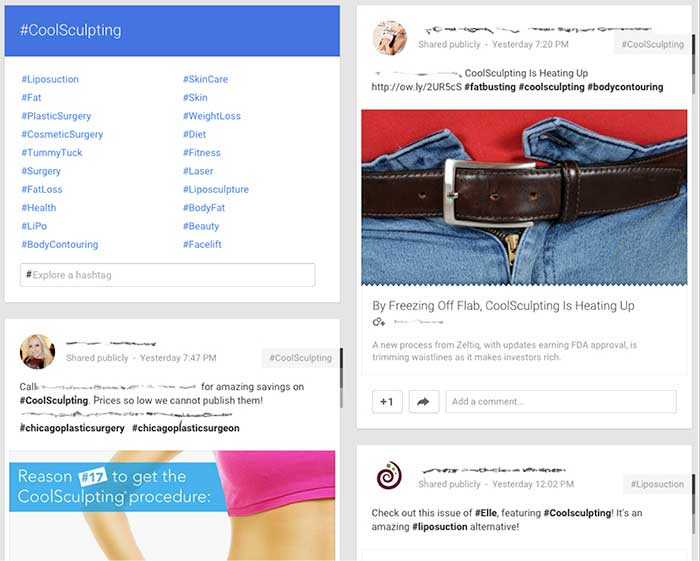
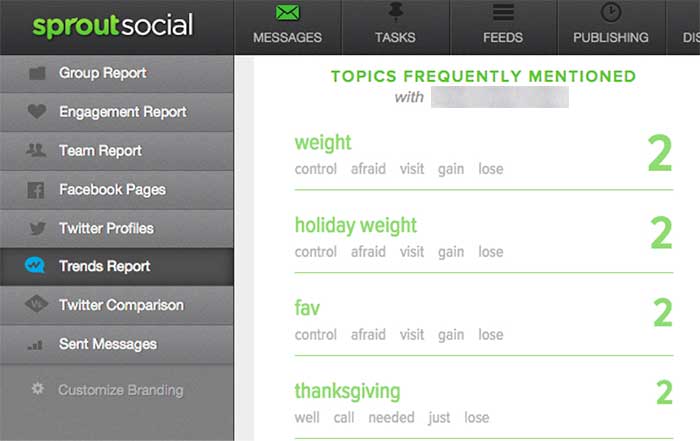
    After you have settled on the tone and audience of your social media strategy, pause to listen to the existing conversation. Determine how your audience and competitors interact within the social space, monitor conversations about your industry, and track the ways in which your brand is discussed online. Using tools like Google Alerts and hashtags, Sprout Social, monitoring forums and other online spaces to understand the existing conversations.

    Listening to the discussions that are in place across the spectrum of social media platforms will allow you to gain a sense of which healthcare topics are currently trending. It will also help you to identify the concerns, questions, and interests of your target audience, allowing you to build a strategy to address these topics during your social media campaign.

    GooglePlusIndustryHashtags

    Example using Google+ to review similar hashtags and industry competitors

    SproutSocialConsumerConversation

    Example of using Sprout Social to understand how consumers are talking about your brand.

    3. Find Your Voice

    Next, begin your own conversations! Look for areas in the industry that lack a strong voice. Use that space to make a name for your brand and to demonstrate your expertise. Also, provide topics and the secure space for conversations regarding the health industry and health issues. Help moderate conversations to keep the discussions moving and the connections building. Encourage your audience to converse with you and with each other to foster a sense of community.

    To make use of your influence on social media, you can use a number of strategies:

    • Add personal, authentic stories: Depending on your goal, these can consist of success stories, anecdotes of achievement, or triumphs over a disease or disability.
    • Facilitate conversations and actions: Give healthy-eating challenges or build a place to help raise awareness for widespread health issues.
    • Wow the crowd with numbers: Build credibility by showing your audience the bigger picture. Share statistics, infographics, and other information about your industry or practice.

    AmericanMedicalAssociationExample

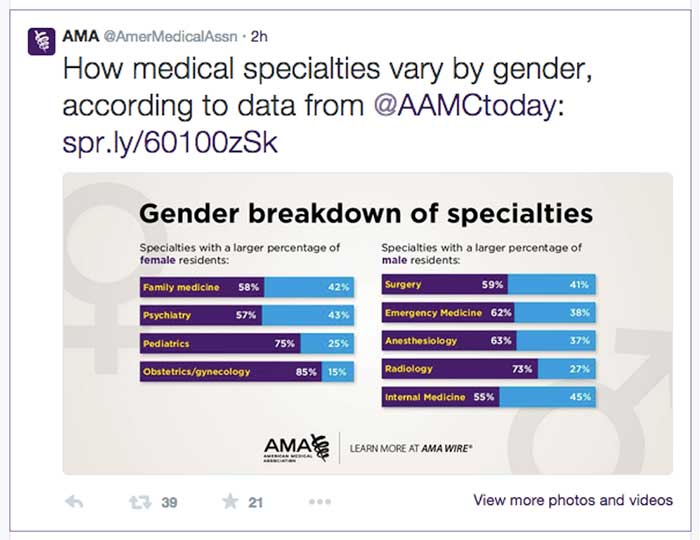
    Example from the American Medical Association using numbers to engage in a conversation. Only 2 hours after being tweeted this post received 39 retweets and 21 favorites.

    TwitterHealthcareDiscussion

    Example of Twitter healthcare community discussing heart health online via #heartmonthchat and how the American Medical Association was able to find their voice in the conversation giving advice and statistics. Both tweets were retweeted and favorited several times.

    4. Collaborate

    Social media has become a frequent place of feedback for companies, and you can take advantage of this fact by using the social space to collaborate with your audience and with others in your industry. Do not be afraid to talk to your audience about their experiences and how to improve them in the future.

    Use social media as a place to work with other practitioners and organizations to raise awareness regarding healthcare topics. By working with others, you can increase your audience reach and further your message.

    GailZahtzHealthcareTwitterAdvice

    Example of Gail Zahtz (expert in patient-doctor relationships, offers advice to healthcare industry) collaborating with others in the healthcare industry to make information more readily available.

    5. Measure Your Success

    Although the last step in this plan is to measure your success, it is important to review your achievements on a regular basis and throughout each step of the process. Measure growth and success in the online space by an increase in followers, consistent interaction, and rising mentions across social media platforms.

    ThePlasticSurgeryInstituteFacebookLikes

    Example of growth of likes on Facebook using these steps. Prior to this campaign beginning, The Plastic Surgery Institute of Southeast Texas ~500 page likes.

    Consider the steps above when designing your own social media strategy. For more inspiration, check out some of these healthcare companies that have successfully created an empowering online presence!

  • Art of War: Keyword Edition

    So you want to improve your online presence, crush your competitors, and rule the market with an iron fist from the coveted #1 spot on Google? Well, that’s all fine and good, but you may be getting a little ahead of yourself. Before you can dominate Google, you need to know which searches are worth dominating for your business.

    This is a simple question that often plagues those new to online marketing, keeps them awake at night, haunts their dreams, and, through perpetual second-guessing and overanalyzing, crushes the enthusiasm that began their quest for Internet marketing supremacy in the first place. What starts as a simple guessing game (“How would I look this up?”) often protracts itself over time into “What is every conceivable combination of words that could possibly describe my business?” Next thing you know, you’re soliciting family members, friends, and random strangers to participate in the game as you compile a list that more and more resembles a schizophrenic fit than viable keywords for site optimization. Let me save you the time, trouble, and expensive psychiatric treatment that is the inevitable result of the aforementioned method and let you in on how to sensibly go about this rudimentary phase of online marketing.

    Step One: Think Obvious

    ouijaboardforkeywordsimageThink of the most obvious way you would search for your business. This should be simple, to the point, and usually very general. Think, “If I sustained a life-altering injury that rendered me incapable of speech and left me with only a basic grasp of the English language, and I could only communicate through the use of my single working stump arm and a special stump-optimized typewriter, how would I search for my own business?” Great! You should probably have around ten simple and obvious ideas, and most often, these will be the most rife for traffic. In addition to these terms, you should also think, realistically, of where most of your clients reside. If you are a small business or storefront with services offered to those in your immediate area, keep focused on your local region or the nearest metropolitan area if you are in a suburb. If you overreach and try to optimize for every suburb and town within 1,000 miles, you’re not going to do well anywhere. Stay focused, and you will fare much better.

    Step Two: All Is Fair in Love and Marketing

    kingofgoogleimageTime for some good old-fashioned espionage! Use your simple search terms to pull up some results on Google. These will likely be your competitors showing up, the ones you will eventually need to dethrone in your quest for fame and fortune. Take a gander at their sites and see what key terms they’ve used to optimize their pages. What title shows in the Google results, and what do the headers on their pages say? These can give you some good ideas.

    Step Three: Teenage Mutant Ninja Keywords

    Gather the keywords you’ve thought up and the ones you have stolen from your enemies— ahem, I mean borrowed from your competitors—and consolidate them into a single list. Now, take your list of areas where your clients reside and combine each keyword with every location. Next, you will need to mutate these amalgamations into a number of different forms. Have one mutation listing keywords first and another reversing the order, add minor variations like using the word “in” before the location, use the plural version of your keywords, include the state in the location, take the state out, use the abbreviation of the state, and so on and so forth until your original list of obvious search terms is now an army of permutations of the originals. For instance, if you were a restaurant in New Orleans, you would take your keyword “restaurant” and geographic term “New Orleans” and end up with the following variations:

    • “restaurant New Orleans”
    • “New Orleans restaurant”
    • “restaurant in New Orleans”
    • “restaurant New Orleans LA”
    • “restaurants New Orleans”
    • “restaurants in New Orleans”
    • etc. etc.

    Step 4: The Meat

    Enough with the games—it’s time for some cold, hard facts to help guide us. For this, we turn to the invaluable resource provided by Google itself for this purpose: Google AdWords. To create a free account, just pop on over to adwords.google.com, and you will have the ability to sidestep random guesses and find out from the source whether your keyword ideas are actually being used. Within the AdWords dashboard is a Keyword Planner section. Within this section, you can select the option to “Get search volume for a list of keywords or group them into ad groups.” This allows you to take your precious list of keywords and all the variations created from the last step and see if anyone has searched for them in the last 12 months. The AdWords dashboard also has the ability to suggest keywords based on your industry. This is another good resource to consult for ideas, but try not to lose focus. It is important to get your initial keyword search completed, and you can always come back and do more research at a later date.

    Step 5: Survival of the Fittest

    So, you have your list of results, and now it’s just a matter of choosing the very best ones. Your choice will be based on the results from searches in the last year and which ones actually fit your business and service area the best. Finally! You now have the precious search terms to incorporate in your marketing strategy, and you’re ready for phase two of your plan to usurp the top seat of Google search results. You still have a long journey ahead before you can fully decimate the competition, but for the moment, at least you can stride forward knowing your key search terms are sound.

  • Let’s Get Medical: How To Manage Healthcare Listings On G+

    When it comes to adding healthcare listings in Google My Business (now the one-stop shop that includes Google Plus business management), there are many things to consider when managing multiple entities within one location. While building out multiple listings unnecessarily is not ideal, some instances may call for multiple listings in order to distinguish between unique departmental differences.

    If there are multiple departments within your hospital or practice that have unique information (for example, a different phone number from the main hospital or practice) and operate differently from the primary location (for example, unique hours are typically considered an operational difference), then it is best to build out separate location pages for each of the departments to provide this information to customers more clearly.

    Let us delve into an explicit example of this. If your general hospital houses a hospital pharmacy and an emergency department, then these departments serve different purposes and might have separate hours and phone numbers.

    IMPORTANT NOTE BEFORE PROCEEDING: The following examples are ENTIRELY FICTIONAL BUSINESSES.

    Creating Pages:

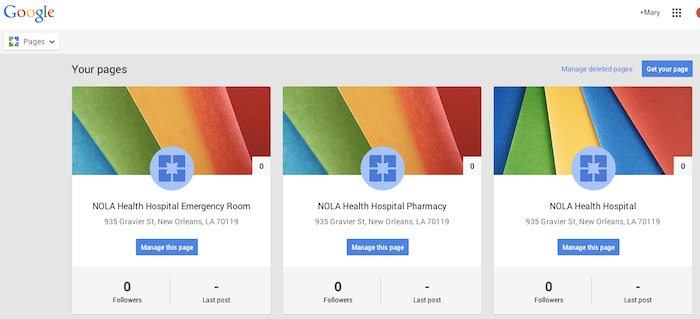
    Let’s say the aforementioned example is called NOLA Health Hospital. NOLA Health Hospital, in this instance, should have three Local (Storefront) Google Plus Pages. Note that these pages, while most likely using the same address, should have unique phone numbers. They should also have unique names; for example, “NOLA Health Hospital,” “NOLA Health Hospital Emergency Room,” and “NOLA Health Hospital Pharmacy” would be the proper names. These pages should also list their hours of operation according to their department-specific hours. If these pages were properly set up in the Google My Business dashboard, they would look like the following screenshot.

    Google My Business Dashboard - Search Influence

    Setting Categories:

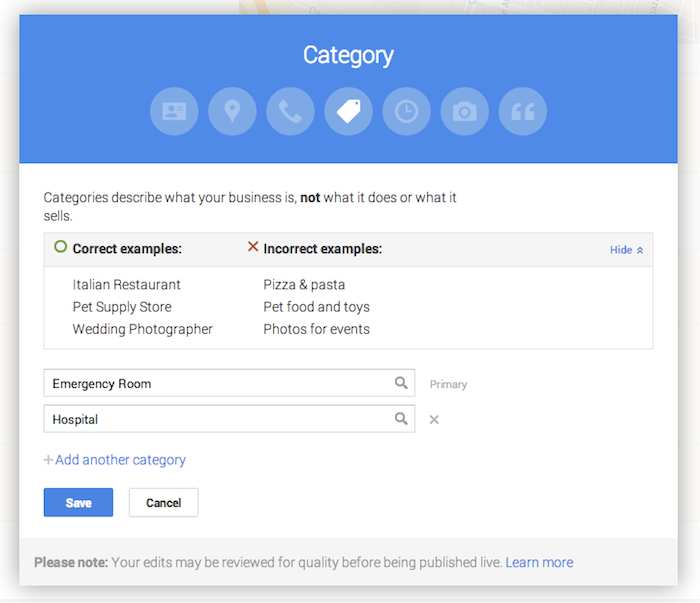
    Now that you have created the pages, it is important to use the categories to distinguish the differences between them. Google’s guidelines for businesses explicitly state that “For each department, the category that is the most representative of that department must be different from that of the main business and that of other departments.” This means that the primary category for each page should be different. In this example, NOLA Health Hospital Emergency Room will have the primary category “Emergency Room,” NOLA Health Hospital Pharmacy will have the primary category “Pharmacy,” and the general hospital of NOLA Health Hospital will have the primary category “Hospital.”

    Google Plus Page Editing - Search Influence

    While these settings are typically arranged during the page creation process, they can also be edited after the page is created. Click on “Manage this page” from the Pages dashboard, then click “Edit” in the top right-hand corner, and finally click into the “Category” section of the editing page to adjust the category. This is also where you can build out supplemental categories for the page. However, it may be wiser to use a few specific categories, as Google’s guidelines advise that it is best to “choose the fewest number of categories it takes to describe your overall core business.”

    As always, if you’re ever confused about how to proceed with your page, you can find the Google My Business “Guidelines for representing your business on Google” on the support site.

  • 6 Methods For Healthcare Providers To Turn Great Service Into Great Reviews

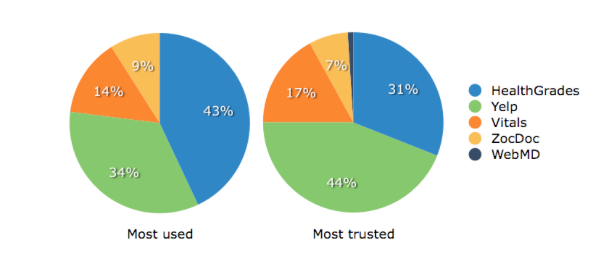
    As society continues to evolve into a highly mobile culture, we see how heavily online reviews influence the selection of a practice or practitioner. In fact, among patients who look for online reviews of doctors, an estimated one-third reported choosing a physician based on good ratings, according to a national survey published in the Journal of the American Medical Association. Most people trust an online review just as much as they trust a personal referral from a close friend or family member. Maintaining a positive online reputation is essential, because while your healthcare practice cannot control what patients write, you can control your response to their reviews.

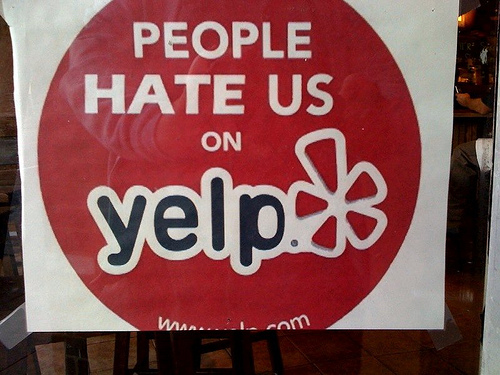
    People Hate Us On Yelp Image - Search Influence

    The medical industry is highly competitive, so the more positive reviews your business obtains, the more likely it is that your business will be found online. The success of your business heavily weighs on online reviews, so you’ll need to learn how to effectively ask for reviews from your customers. Here are six methods to encourage your customers to leave reviews.

    Make Writing Reviews Simple For Everyone

    Most people, unless they have a negative experience to share, will not make the extra effort to leave your practice a review. You need to make it as easy as possible for your patients to leave a review for your company, and you can do this by adding links to your review profiles in multiple places, such as in a follow-up email, on a thank-you page, etc.

    Get Listed On The Top Business Review Sites

    Everyone has their preferred review sites, so it is necessary to have a strong online presence across the most popular ones. All profiles and listings need to be consistent and include as much current information about the practice as you can squeeze in (photos, certifications, awards, degrees, etc.).

    Business Review Sites For Health Industry Pie Charts Image - Search Influence

    Healthcare providers should have a listing on the following directories:

    1. Yelp
    2. Healthgrades
    3. Google+ Local
    4. Vitals
    5. RealSelf
    6. RateMDs
    7. Facebook
    8. Twitter
    9. LinkedIn

    Ask customers to leave a review on their favorite site—never pressure them to write reviews on multiple sites.

    Be Genuine While Asking For Reviews

    Let your customers know that you would appreciate it if they could take a few moments of their time to share their experience on one of your company’s review sites, as their opinion matters not only to the company, but also to other customers. You can do this by saying something as simple as, “Do you read online reviews? We do, and so do other customers. That’s why we’d love it if you would take a few moments to review your experience.” Just be honest; the worst answer you will get is a “no.”

    Never Pressure A Patient For Reviews

    You should always request that patients rate their experiences, but never make them feel pressured to leave a review. Even if a customer is extremely satisfied with your services, writing an online review may be the last thing on their mind. However, if a client had a great experience with your business, they will probably be happy to share their thoughts when prompted. The best approach is to simply ask your most satisfied customers to add their positive feedback to one of your business review sites.

    Consider Your Customers

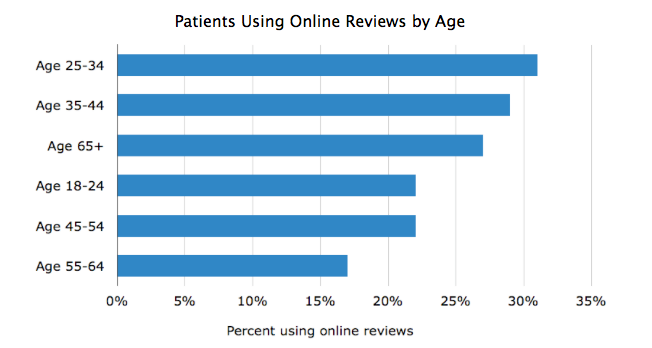
    If your customers are millennials, consider yourself lucky! Most millennials are already comfortable with sites that allow users to share experiences online, and they will likely be happy to share their thoughts on your business without much prompting. Bombarding customers under the age of 25 with requests to post a review will probably push them away. However, if you have older or less social media-savvy customers, they may require direct prompting.

    Software Advice, a company that reviews practice management software, conducted a study to better understand online reviews and the processes of researching and writing these reviews. This study found that the largest age group of patients using online reviews ranges from ages 25–34, with males being 25% more likely to leave a review than females.

    Alt Text - Percent Of Patients Using Online Reviews By Age Bar Graph Image - Search Influence

    Don’t Ignore Negative Reviews

    While your overall goal is to gather good reviews, unsatisfied reviewers will inevitably make their way online to air their bad experiences. Bad reviews aren’t necessarily a business-killer; it’s how you handle the negative review or situation that defines the impact it will have on your business.

    Take note of negative reviews and respond to the criticism in a non-defensive manner. This can be done with a standard, generic reply that thanks the reviewer for the comment. Always ask the complaining patient to contact you directly so that you can further resolve his or her dissatisfaction offline.

    Take a negative review as an opportunity to better your customer service and your facility. Many negative patient reviews involve simple issues that can easily be resolved: long waiting times, issues with billing practices, lack of parking spaces, etc. If your complaints are targeting things that can easily be fixed, take advantage of this useful feedback to better your practice.

    Provide And Deliver Top-Quality Customer Service

    At the end of the day, the best path to having great reviews is to offer a great product and customer experience. If you’re doing everything you can to create a remarkable experience for your customers, there’s no harm in reminding them about the importance of sharing reviews.

    Image Sources:

    Most Used and Most Trusted Reviews Chart and Patients Using Online Reviews By Age Graph

    People Hate Us on Yelp


  • You Talk Pretty Today: Drop Crutch Words To Improve Your Communication Skills

    You know, talking to clients and colleagues can be really, like, intimidating, right? That’s why, like, crutch words are sometimes used by, um, people who are nervous or, like, looking for the right words to use.

    Although the above sentence looks odd written out, almost everyone is guilty of using crutch words in everyday speaking. Whether you are caught up in your words when speaking to a client on the phone or nervous about speaking in front of a group, you’ve probably heard yourself using crutch words as you speak. Follow the tips below to break the habit!

    What are crutch words?

    Everyone has different words that they use in conversation when they need time to gather their thoughts. These words, called crutch words, include placeholders such as um, like, definitely, really, uh, etc. While you wouldn’t normally use these words in writing, people tend to rely on them more heavily when speaking.

    Crutch words are most commonly used when people are thinking of the best or most appropriate answer to a question. However, using these words can be distracting to your listener, and it can also make you seem less knowledgeable. Clients may not trust what you’re saying because the crutch words can make it seem as though you’re not confident about what you have to contribute. There are much better alternatives to using like, um, uh, etc. when pulling your thoughts together.

    Break the Habit

    What is our #1 tip for getting rid of your crutch word habit? Take a breath and pause before speaking! Quickly go over what you want to say in your head, take a breath, and then speak confidently. Your thoughts will come across much more clearly to your audience than they would if you stumble over your words and sound shaky or unsure.

    Practice this habit of pausing in your everyday life. Once it becomes a habit at home, you will be able to use it much more naturally at work in situations where you would normally use a crutch word while you gather your thoughts.

    Still stuck on a question? If the pause is a bit long, say something like, “That’s a great question…” before continuing. This tactic gives you a few more moments to think of an appropriate answer to the question at hand.

    More Useful Tips to Improve Your Spoken Communication

    • Use voice inflections. This conveys what is important in your message, and it also helps keep your listener more engaged. No one wants to hear a monotonous speaker who puts no inflection on the important aspects of what they have to say.
    • Avoid using casual language. Exclamations like “awesome!” or “totally!” can make you sound young and less authoritative to your audience. Although these words may be in your everyday vocabulary, work on limiting your use of them in a professional setting.
    • Avoid using ma’am or sir (to a client or colleague). This is a Southern staple (thanks, Louisiana!), but try to avoid using these words to address clients or coworkers. It can make you seem young and inexperienced, rather than an equal to your peers. Still use it when you go see grandma and grandpa, though!
    • Avoid over-explaining. We tend to try to explain things over and over again, continuing around the same circle while the question at hand has been long answered. Answer the question as best as you can without backtracking and wait for feedback from your listener. If they need more clarification, they will let you know.
    • Know your audience. Are you speaking with the decision-maker of the company, or are you speaking to a secretary? Your communication will differ based on the person you’re communicating with. The CEO of a company will want to hear about the bottom line, while a secretary might want more detailed information to pass along to whomever she’s reporting to.

    Effective communication is an important skill to learn, regardless of what industry you work in. We hope these tips help you improve your spoken communication and break the crutch word habit!

    Image Sources:

    Office Space Gif

  • TUTORIAL: A Google Gem That’s Trending Near You

    GoogleTrendsLogoMy clients frequently ask me how long it takes to rank higher on Google search page results. I explain that the process is gradual and not guaranteed due to a number of factors, such as the 200 plus “signals” that make up Google’s algorithm, the time it can take for Google to read our “signals,” creating a consistent online presence, etc. — the questions usually end there. I recently had a client challenge me beyond a basic explanation of SEO, digging into my keyword research, and inspiring me to explore the seasonal average search value.

    When the client asked me if I examined seasonal search value in my keyword research, I had to admit that I had not. It typically makes sense to look at average yearly search volume because, as stated above, the SEO process is gradual and we don’t want to target a term that will only help our clients in the short-term. This still left me wondering about seasonal search value, so I researched it. I was suspicious that seasonal search could help identify outside factors that affect the progress of SEO campaigns, and it may help lock-down industry standards that I wasn’t aware of.

    Google Ad Words’ Keyword Planner does allow you to select different date ranges to examine the monthly average value, but I wanted to find a tool that identified possible patterns in keywords. I should have known that Google already had a product for this: Google Trends.

    Google Trends’ Fun Facts:
    – Started in 2006
    – Remember “Google Insights for Search”? This tool put search data into graphs and merged with Google Trends in 2012
    Medical researchers have attempted to predict outbreaks with this tool over the past few years
    – You don’t need a Google account to use this tool

    Visit the site and follow along with my tutorial

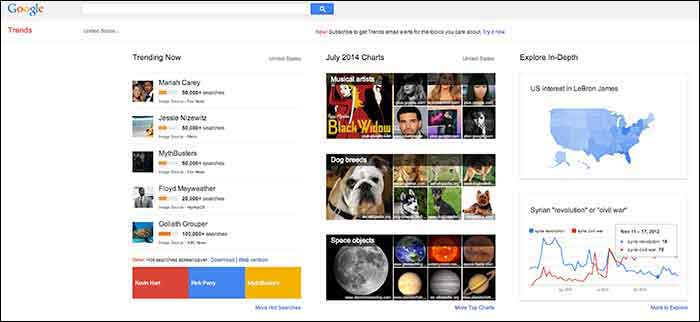
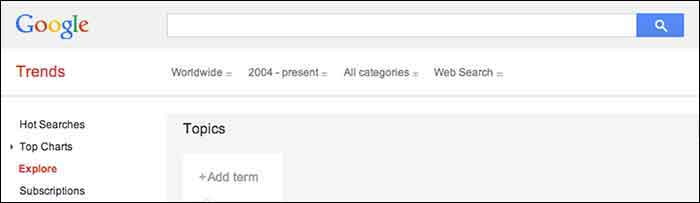
    When you visit Google Trends, you will see three columns of interesting data, so where should you start? The best place to start is with your goals in mind. Do you have specific keywords in mind that you would like to research and compare, or do you want keywords generated for you based around a topic? Either option is available here, along with many other unique features that make it a useful tool for SEO experts.
    GoogleTrends

    Here you will find 3 main categories: “Trending Now,” “July 2014 Charts” and “Explore in-Depth”. The first two categories could be used to brainstorm social media and blog ideas because you can see what’s being searched the most that day as well as a review of the past month’s top searches organized by topic.

    I am going to examine the third column on the page titled, “Explore in-Depth” because I find it most useful for SEO purposes. Still keep in mind the other two columns, however, because they relate to recent news and pop culture that’s also trending. The “Explore in-Depth” column shows two examples of ways you can examine topics and keywords. Click “More to Explore” at the bottom right-hand corner to see all of your search options.

    How to search by Keyword

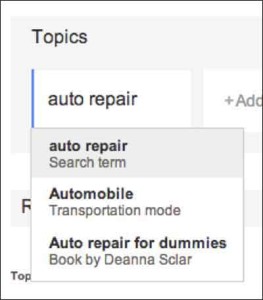
    When you start adding “Topics” that you are interested in gaining search value for, you will also see a drop-down box appear which gives you different types of searches to select. The example below shows “Search term,” which would be the keyword or query, “Transportation Mode,” which is a category. Google will find keywords that fall into that category, and “Book by Deanne Sclar” which indicates a branded search for that book. Once again, think about your goals. If you have specific terms in mind that you want to research, then select the “Search Term” option. If you want to explore a category and see what keywords were searched the most under that category, select the category.
    GoogleTrendsTopicsImage

    GoogleTrendsTopicsMenuImage

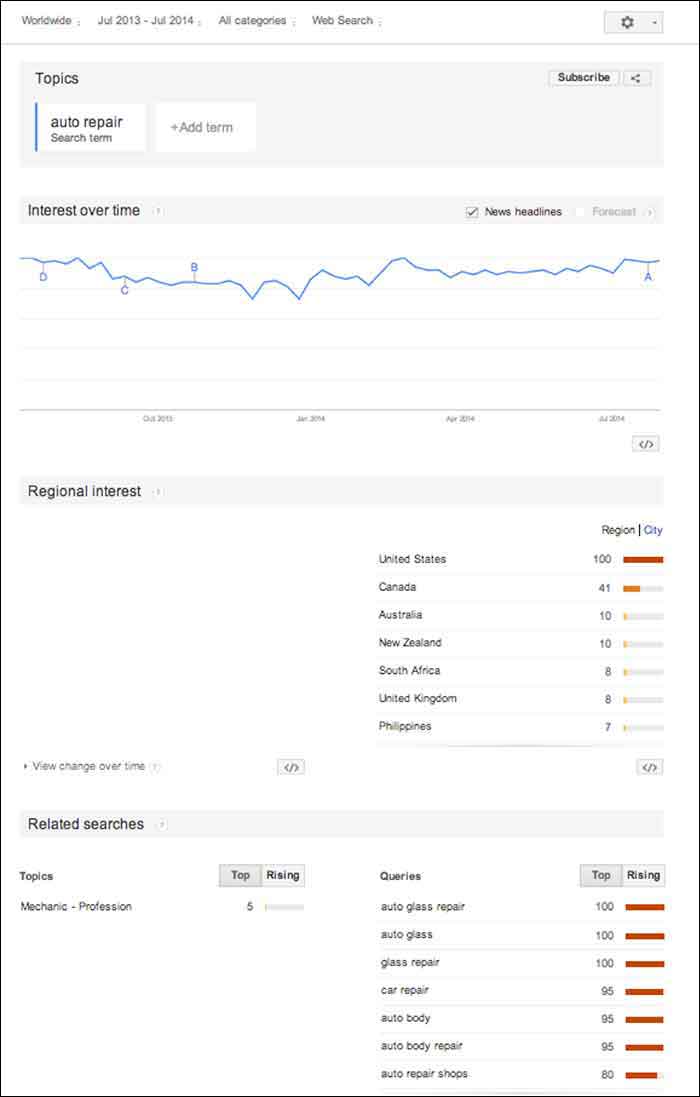
    I first selected “Search Term” and filtered the dates of our search to July 2013-July 2014. As you’ll see below, I receive an “Interest over time” graph, but I am also given a “Regional List” category of countries who have searched for “auto repair” the most. I have also been supplied with “Related Searches” at the bottom of the page. Let’s explore these resources.
    GoogleTrendsTopicsInterestsImage

    Note that the numbers on these graphs are not absolute numbers. They are relative to each other to reflect a trend.

    “Numbers represent search interest compared to the highest point on the chart. If at most 10% of searches for a given region and time were for ‘pizza’ we’d consider this 100. Each point on the graph is divided by the highest point and multiplied by 100. When we don’t have enough data, 0 is shown.” -Google Support

    1. Interest over Time

    GoogleTrendsTopicsInterestsForecastImage

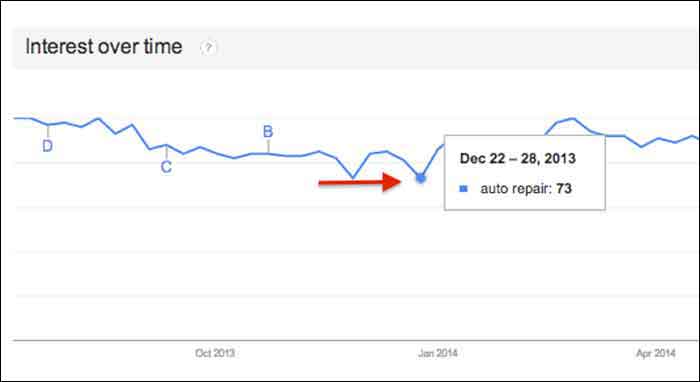
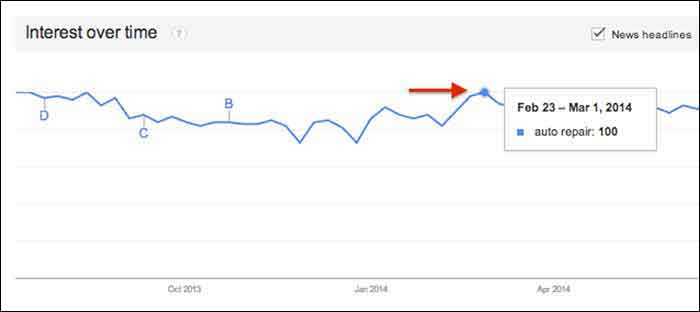
    This graph gives us a snapshot of the overall trend of searches for “auto repair” between July 2013 and July 2014. Hover over any point in the graph to see the exact score that Google Trends gave that time period of searches. After hovering over these points and comparing the highest score to the lowest, I realized that there was no dramatic change, but there was a slight decrease in late fall and early winter months.
    GoogleTrendsTopicsInterestsDecImage

    GoogleTrendsTopicsInterestsFebImage

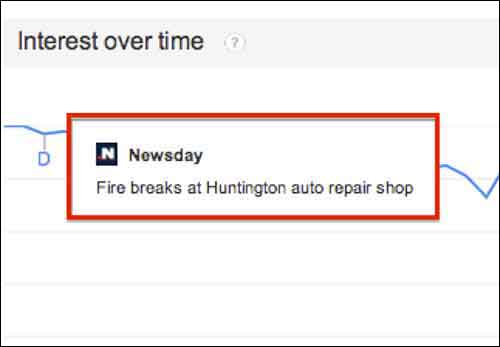
    You may notice the letters next to what seems like random points on the graph. These letters represent times when news headlines included that keyword. This is an interesting tidbit of knowledge to consider. Knowing if the trend increased dramatically is important because it could be due to an outlying factor.
    GoogleTrendsTopicsInterestsNewsdayImage

    Fun Fact: Look at how the trend for the keyword “hurricane” was affected by Hurricane Katrina in 2005.

    GoogleTrendsTopicsInterestsHurricaneImage

    You may notice the “Forecast” check box to the right of the “News Headlines” check box. This feature attempts to predict the upcoming trend of your search term. Note that you have to extend your start and end dates to make this option available. To yield the most accurate forecast, open the start and end dates to as wide as possible. This yielded the below results, showing the possibility of slight decreases in the fall and early winter months, with a continuous increase in the spring and summer months. Note that I had to hover over the graph points to figure out the dates because the graph does not let you zoom in.

    You could use this chart in conjunction with other keyword research tools such as Google Ad Words’ Keyword Planner to expect possible decreases or increases in certain keywords due to seasonal search value. For example, it’s not surprising that “ac repair” is not a particularly common search word during the winter months. Other keywords with seasonal value may not be as obvious, however, so resorting to Google Trends serve as one tool to help you crack the code when dealing with what seems to be seasonal increases or decreases in the search rankings.

    GoogleTrendsTopicsInterestsForecastImage

    2. Regional Interest

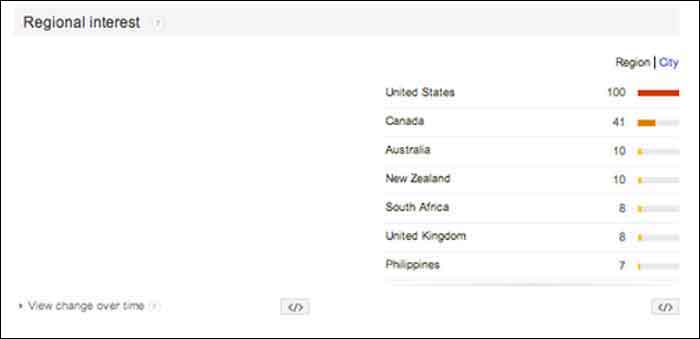
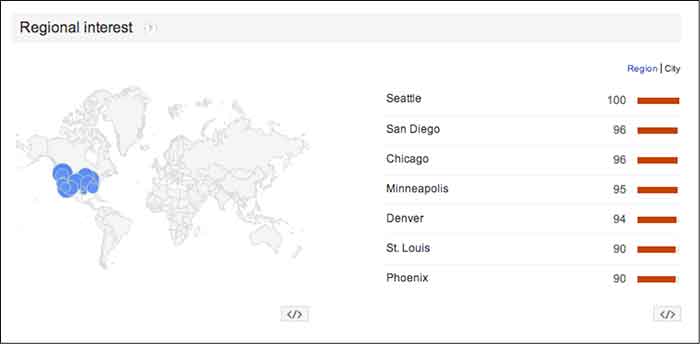
    “Regional Interest” displays larger areas that are searching for your keyword the most. While this is a useful tool for pinpointing countries and large cities, it does not typically show small cities or rural towns. In a global search (as shown below) the results help to narrow down the top countries searching for a keyword, and then the largest cities by clicking the “City” tab. The numbers represent the same calculated numbers as in the “Interest over time” section, so they are normalized and are the outcome of comparing the search volume to the area that searched for your keyword the most.

    For a business with a statewide, national or a global target audience, this map could help you pair the keyword with specific locations. It is possible that more people search “auto repair” in Detroit, while more people in Los Angeles search for “car repair”. This sounds like a slight difference, but the more precise you can be when choosing keywords, the higher your possible rate for success will be.

    In this case, the United States shows a dramatically higher interest in “auto repair” than any other country. You can click on each country to see a breakdown of interest within each one. You may also click the “City” link next to “Region” for the cities with the most interest in “auto repair” despite the country (demonstrated in the 2nd photo below).
    GoogleTrendsRegionalInterestsImage

    GoogleTrendsRegionalCityInterestsImage

    3. Related Searches

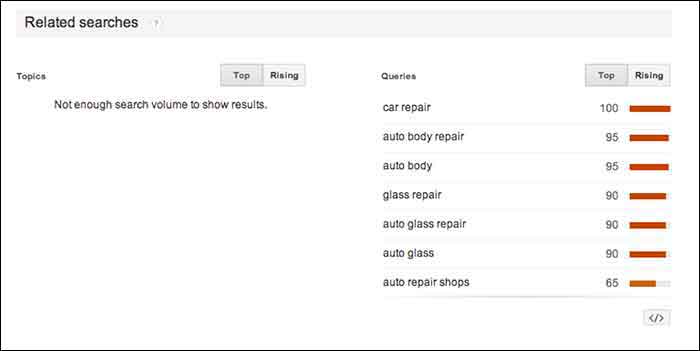
    If Google identifies your keyword with other similar terms that are being searched for, it will list them in the Related Searches section. This section is broken down by “Topics” and “Queries”.

    In this case, I received queries, but did not receive any topics. The message under “Topics” read, “not enough search volume to show results”. In keyword research, however, I would prefer to look at the queries because they are exact keywords. For example, “car repair” and “auto body repair” are the top two related queries listed for “auto repair” (shown below). You could use this list to find keywords that you may not have thought about researching, or to examine the similar keywords in relation to the keyword you are searching.
    GoogleTrendsRelatedSearches

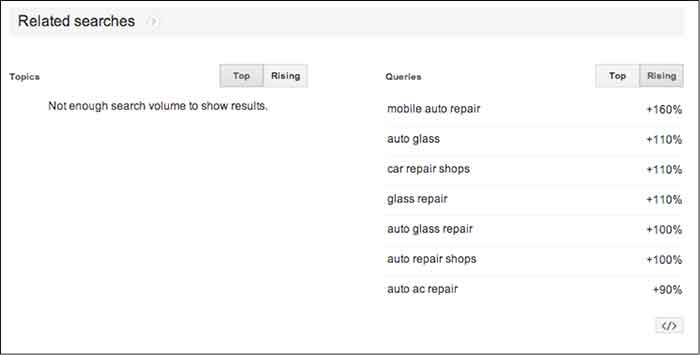
    The “Rising” tab under “Queries” shows terms that have had a significant increase in searches compared to the previous year. As shown below, “mobile auto repair” has risen 160%. This does not mean that “mobile auto repair” is one of the highest searched terms overall, but it may be worth monitoring throughout the campaign to see if it continues to rise and could be important to rank well for. With the rise of mobile Internet usage, it makes sense that this term could continue to increase in value.

    Resources:

    Google’s Algorithym: http://www.google.com/intl/en-US/insidesearch/howsearchworks/algorithms.html

    Google Trends data calculation: https://support.google.com/trends/answer/4355164?hl=en&rd=1

    Google Ad Words’ Keyword Planner Tool (must be logged into Google Ad Words):

    https://adwords.google.com/ko/KeywordPlanner
    GoogleTrendsRelatedSearchesRisingImage

    Finding a Pattern:

    I started researching more specific auto terms and found that there was a seasonal pattern for the service, “auto detailing”. I would not make this seasonal observation a factor in whether to choose the term as a targeted keyword or not because there is consistent search value. Although, it may help explain a decrease of site traffic in the winter months if that occurs.

    It is easy to get caught up in looking for a direct cause and effect between SEO practices and search engine rankings or site traffic, but expanding your research to recognize seasonal patterns can give you a larger idea of how your industry is searched for online.

    My next tutorial will examine search results by “Topic” instead of specific keywords. Stay tuned to learn more about how this can help your SEO practices!


    Image Source:

    Google Trends Logo

  • 6 Second Marketing: Using Vine for Your Business

    Jul14

    In today’s fast-paced society, your business doesn’t have much time to grab the attention of potential customers. Can you do it in six seconds? Millions of users are racking up views and attention for their six-second masterpieces on Vine, Twitter’s ultra-short video sharing app that fits in well with the social network’s theme of keeping things brief—and businesses are using Vine to amplify their social media marketing campaigns and boost visibility.

    What is Vine? A Brief History

    Launched in January 2013 by Twitter, Vine was originally a mobile app that capitalizes on smartphone cameras, allowing users to capture and share up to six seconds of looped video. The platform gathered steam quickly, becoming the fastest growing app of 2013 with millions of users and several viral clips.

    Today, Vine has more than 67 million users. Vine videos can be posted to other social networks like Facebook and Twitter, and earlier in 2014 the platform introduced a desktop interface similar to YouTube, with searches, playlists, popular users, and trending tags.

    The Benefits of Using Vine for Business

    Some companies view the Vine platform as too short to be useful—but many said the same about Twitter. There are several benefits to using Vine as part of your marketing strategy, and they extend beyond the platform itself.

    Here are just a few of the advantages Vine can give your business:

    • Video works. Several studies have shown that video consistently performs better as a marketing tool, with higher engagement and more click-throughs. Regardless of your business type, video can help you promote it: 90 percent of online shoppers find video helpful in buying decisions, and 75 percent of executives watch work-related video.
    • Shorter is better. Online viewers are often pressed for time, or multitasking and switching between several windows. Long videos tend to see fewer views—so at six seconds a pop, viewers are far more likely to watch a Vine video.
    • Boost social sharing. Vine videos don’t have to stay on Vine. They can be posted on multiple social sites, or your business website or blog, and including hashtags in your description can help you improve discoverability and encourage sharing.

    What Can You Do with Vine?

    Just how much marketing can you pack into six seconds? With the right mindset, you can deliver a powerful message through a Vine video. For example, Lowe’s home improvement store created a series of Vine videos called “Lowe’s Fix in Six,” with each video delivering an interesting home do-it-yourself (DIY) tip. UK fashion retailer ASOS engaged their followers with an “unboxing” video of their products that invited customers to upload their own unboxing, incorporated the hashtag #ASOSUnbox, and entered participants in a drawing for a goodie box.

    To create effective short videos, consider:

    • The types of videos you want to offer—you might have helpful tips, product showcases, customer contests, or even content that’s pure entertainment
    • How you’ll communicate your message briefly and visually
    • The best way to tie your short videos to your company brand or theme

    Remember that like all social media marketing, Vine should be used to share more than just your products or services. Consider offering quick behind-the-scenes video that shows your workplace culture, your employees in action, or where your products are made. Or get your followers to participate and invite six-second testimonial videos, which you can display on your website in addition to posting on Vine and other social platforms.

    Regardless of your social marketing strategy, the Vine platform can make a powerful, visual addition to your current efforts and help increase your business visibility and reach. All you need is a smartphone or digital camera, and six seconds.

    Image courtesy of Frank Gruber

    Megan Totka is the Chief Editor for ChamberofCommerce.com. She specializes on the topic of small business tips and resources. ChamberofCommerce.com helps small businesses grow their business on the web and facilitates connectivity between local businesses and more than 7,000 Chambers of Commerce worldwide.

  • De-stress and Prioritize: How to Keep Your Day-To-Day Organized

    ToDoListImage

    Everyone manages their time differently. With client meetings, calls, internal meetings, and day-to-day tasks, it sometimes gets hard to manage and prioritize what needs to get done.

    Since I’ve started working here in January, I have perfected my system of de-stressing and prioritizing my work so I can always be the efficient.

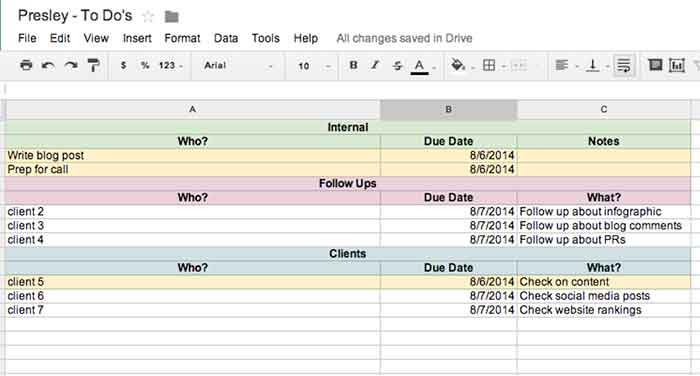
    I don’t know about you, but I work best off of lists. The to-do list that I use each day keeps me organized with internal to-dos, client to-dos, as well as follow ups that need to happen. From this one list, I keep my day-to-day organized!

    PresleysToDoListImage

    Step 1: Check Emails & Do Your Follow Ups

    The very first step of my day consists of checking all emails and replying as needed. Once you’re done with an email, file it away to keep your inbox organized. Also, doing your follow-ups at the same time is helpful because you can get everything out of the way at one time. My follow-up to-do list (see above) is where I go to see what clients I need to follow up on and what the follow up is regarding.

    Step 2: Check Your List & Prioritize

    Check your to-do lists (client and internal) to figure out what needs to get done that day. Give yourself due dates based on the priority of the project, even if the project doesn’t necessarily have a real due date. I highlight each project or follow up that needs to get done that day so it is easy for me to see.

    Step 3: Start On A Project

    Now you can actually start on a project! Pick the project that needs to get completed first based on the due dates you gave yourself. Although I like to finish projects before starting on another one, that is not always possible. Do as much as you can before you have to move on. If you must, set a time limit on each project to ensure you can get everything done that is needed.

    Step 4: Don’t Get Caught Up In Your Emails

    It can be tough seeing your inbox fill up while working on other important things that need to get done. However, don’t get caught up in your emails! Reply back to things that need immediate attention, but continue working on your priority project before starting another round of email replies. Once you’re done with what you are doing, then you can go back to your email if needed.

    Step 5: Re-Date Projects

    If you aren’t done with everything that you assigned for yourself to do that day, redate for the next day and start all over again!

    Of course everyone has their own ways of staying organized, but this system has helped me, and I hope it helps you too!