Category: Industry Insights

  • Marketing Must-Haves: What to Look for When Hiring an Online Marketing Firm

    Hire Online Marketing Firm Image - Search Influence

    You may be worried that outsourcing your online marketing efforts will mean losing control of your company’s voice.

    You are the expert when it comes to your company’s unique selling points, after all. However, a good online marketing firm will want to work hand-in-hand with you to make sure your story stays intact and works for you. Remember, they are also experts! A good marketing firm can help tell your story on multiple platforms and ensure it stands out above the competition, whether it is local or industry-driven. Here are some tips for hiring the right online marketing firm.

    Find a firm that provides a full arsenal of services.

    An effective marketing firm will offer a full range of services. To be competitive online, you need to reach your desired audience wherever they may be, and they may be on multiple platforms. Search engine optimization, social media, and advertising are all important elements to a successful marketing effort. Remember, it’s not enough to plop a website online or create a Facebook page and hope for the best. A marketing firm should be able to do keyword research, write compelling content, and handle your advertising investment.

    Check testimonials and read successful case studies.

    When you’re hiring an individual, you always ask for a resume, conduct an interview, and check their references. You should follow the same rules when hiring a marketing firm. Think of their website and online presence as their resume. What do they have to offer? How do they approach their job differently than others? Then start a dialogue with the company. Get on the phone with them. Ask questions, learn more about the company culture, and evaluate whether or not their team can help you achieve your goals. Finally, check references. You want to make sure their other customers are satisfied. Read their testimonials and case studies, such as the Success Stories showcased on the Search Influence website, to get an understanding of how they measure success.

    Make sure the firm utilizes analytics and lead tracking.

    One of the most important aspects of a marketing plan is analytics. Without solid and consistent analytics set up on the front end, you won’t be able to see the fruits of your marketing efforts—and most importantly, your return on investment. A good marketing firm will be results oriented and will be able to talk you through their analytics and lead tracking process. When hiring a marketing firm, make sure they are able to track how a visitor came to your site, whether it was through paid or organic search, a referring site, or an email marketing campaign; which search engines are being used to find your site; what keywords you’re ranking for (and what keywords you SHOULD be ranking for); what page of your site is generating leads and conversions; and your audience’s physical location.

    Follow these three helpful tips to hire the right online marketing firm for your company, and see your traffic increase and your leads turn to conversions.

  • Time Savers: 9 Tech Hacks to Improve Your Efficiency

    Search Influence Tech Hacks Image

    Trying to make your time working on the Internet more efficient? Looking for tools that could potentially save your life in case of an emergency? We here at Search Influence have gotten a good grasp on the types of tools that are effective in the workplace. Here are a few tech hacks you’ll be glad to discover.

    Google Tech Hacks

    As easy as Google is to navigate, there are more intricate systems at play in its algorithm that can be utilized when searching for something more specific.

    Set a Time Range

    In Google Search Tools, you can set Google to only display results within a certain time frame, with the range going down to as little as one hour.

    What we use it for: Referencing content that is the most up-to-date or relevant.

    Reverse Image Searching

    In Google Images, you can upload an image or copy and paste an image’s link from the web and ask Google to find images that match that one. Google will also display similar images.

    What we use it for: Determining whether an image is a stock photo; looking for the same image with different image dimensions.

    Specific Website Search

    Google allows its users to search for keywords on specific websites through a “site:keyword” search. For example, if looking for Bridget Juelich’s blog post “A Family Affair: Teaching Mom a Thing or Two About SEO,” entering “site:searchinfluence.com Mother’s Day” into the search bar will bring it up seamlessly.

    What we use it for: Easily navigating websites to find specific content.

    Gmail Tech Hacks

    Gmail has become one of the most used email clients in the world. With Google and other companies implementing a host of functions and features, there’s a reason for all the excitement.

    Boomerang

    Installing Boomerang allows you to schedule specific messages to be sent at certain times. It will also allow you to archive important messages and bring them back when you need them.

    What we use it for: Resending emails if there was no reply; streamlining inboxes.

    Sidekick

    Sidekick by HubSpot is an email tracker that allows you to see when emails you sent were opened. It can also be used with Microsoft Outlook or Apple Mail.

    What we use it for: Determining whether or not to resend an email; receiving social media or company info from senders.

    Undo Send

    Google has officially rolled out the undo send function for Gmail. After hitting send on an email, you have up to 30 seconds to undo it before it is received by the recipient.

    What we use it for: Attaching forgotten files; retracting emails that were accidentally sent using “Reply all.”

    Chrome Extensions

    Chrome allows its users to install extensions to increase the functionality of the browser.

    Pearls

    Pearls allows Chrome users to highlight specific keywords on specific web pages, whole websites, or even the entire Internet. All the user has to do it type what words Pearl should find and highlight.

    What we use it for: Drawing our eyes to special instructions; looking at specific phrases on web pages.

    Grammarly

    Grammarly is an online grammar and spell checker that will show you your errors in an instant. It also has a document function that saves projects to your account through cloud storage.

    What we use it for: Quickly checking emails for spelling or grammar issues; helping ensure the quality of our written content.

    The Great Suspender


    Does your computer ever start to run slowly because you have so many tabs open in your web browser? The Great Suspender will suspend your tabs until you are ready to use them again. You can even tell the extension which websites to never suspend.

    What we use it for: Saving tabs for later research.

    With these tech hacks, your Internet exploration is sure to be both fun and efficient.

    Image sources:

    Google search tools image

    Google reverse image search

    Pearls Extension image

    The Great Suspender image

  • Health Care on the Home Front: Recruit Mommy Bloggers

    Mommy Bloggers For Health Care Image - Search Influence

    When it comes to online influence, mommy bloggers are a huge force in social media and the blogosphere—something many major brands have noted in the past. Names like Pepsi, Wal-Mart, Home Depot, and Coach have all made space for these influential bloggers in their content marketing strategy, adding a dose of authenticity to their campaigns.

    Information exchange has always been a big part of raising children, whether parents are looking for advice on dealing with a behavior problem or trying to find new food options. You can call your friends or your own parents, but there’s always the network of experienced parents ready to give advice online—and with roughly 4.2 million mommy bloggers on the Web, 60 percent of whom say that they blog about brands they love, these influential resources can be a crucial part of a campaign. The bloggers with good advice and entertaining updates rise to become Internet celebrities. Not unlike professional athletes with sponsorship deals, an endorsement from popular mommy bloggers can boost your medical Internet marketing campaign to the next level.

    To tap into the reservoir of parental advice-givers online, keep these four tips in mind.

    Know Your Mommy

    Different bloggers have very different backgrounds and attitudes, and a look at the list of the top U.S. mom bloggers shows the diversity of their backgrounds, attitudes, and writing styles. Many have posted a lot of information about themselves, and you should be able to determine which bloggers would be more interested in your products or services. If you’re looking to raise awareness about new vaccination services at your hospital or practice, you might expect less enthusiastic support from a blogger who has been vocal against immunization in the past. On the other hand, a PTA leader active in community projects might be able to help with your next awareness campaign.

    Participate in the Conversation

    Once you see the kinds of subjects that capture the attention of online parents, look out for topics relevant to your industry. For medical Internet marketing, establish yourself as an authority by posting informative updates about subjects that matter to parents. When it comes to important issues like vaccinations, there will always be rumors and hearsay online, but presenting an informed medical perspective can give mommy bloggers a resource to reference or link in the discussion. However, because of legal complications, you’ll want to avoid offering specific medical advice online, especially in response to individual questions. The American Medical Association’s Code of Medical Ethics is a great resource for anyone who is uncertain about treading into the waters of ethical online content.

    Make Your Health Care Message Viral

    When you have an announcement that’s less interesting, consider the kinds of clever images and videos that get circulated online. To advertise a touchless flush system, KOHLER worked with WhatsUpMOMS, a YouTube channel and video blog produced by a trio of mothers, to create a video titled “How to Potty Train Your Kid in 5 Seconds!” You may not have the budget for a clever commercial as part of your medical Internet marketing, but you can show that you understand the stresses and concerns of parenthood.

    Kohler Potty Train Mommy Blog Image - Search Influence

    Stay Professional

    Ultimately, the parents in your area have a vested interest in health care for the sake of their children. The first priority is to make your website informative and then to improve your search result rankings to make your website more visible. Once the public is able to find your site, you can work on turning satisfied customers into positive reviews. If your practice is more focused on cosmetic services, then you may want to take a more active approach by advertising on social media.

    In the past, companies selling breast pumps or minivans have offered mommy bloggers free samples or test-drives in exchange for reviews, but free samples are less applicable in the arena of medical Internet marketing, and some women might take offense at being personally offered cosmetic procedures. The best approach is simply to make your business visible and available.

    Image source:

    How to Potty Train Your Kid in 5 Seconds!

  • Unlike Your Dad, These Guys Know How To Use The Internet

    internet dads father's day image - search influence

    The other day, I was trying to remember why I had posted a curious image on my friend’s Facebook wall in 2010. In a stroke of brilliance, my friend suggested we do a “reverse Google search” to see where the picture originated from, all while we were using Google Chromecast to watch this search unveil on my TV screen.

    In the middle of this (pretty standard) activity, I thought to myself about how incredibly bizarre this whole process would sound to someone just 10 years ago. Facebook walls? Reverse Google search? CHROMECASTING? We’ve all grown so blasé about these daily—yet bewildering—Internet tactics that we’ve lost sight of the magic and brilliance behind them.

    So this Father’s Day, I’m here to remind you about the extraordinary minds behind all this wizardry. The men whose ideas have allowed me (and probably you, too) to stream Game of Thrones while Facetiming friends across oceans and also maybe simultaneously perusing Instagram (because what are we if not all impressive “multitaskers” these days). I present to you the fathers of the Internet:

    Leonard Kleinrock

    Kleinrock Image - Search Influence

    Before the Internet, people had to gain an understanding of how computers could communicate (or network) with each other. That’s where Leonard Kleinrock, an American engineer hailing from Harlem, came into play. Kleinrock pioneered the mathematical theory of packet networks, which, essentially, is the technological backbone of the Internet. By figuring out how to send “packets” of information across networks, Kleinrock was able to develop the ARPANET, which is the bare bones seedling that grew into the Internet we all know and love today. In fact, on a historical day in early September 1969, a team at Kleinrock’s Network Measurement Center connected one of their computers to an “Interface Message Processor,” thereby becoming the very first node on the ARPANET, and, perhaps more importantly, the first computer ever on the Internet.

    Tim Berners-Lee

    Berners-LeeImageSearchInfluence

    These days, it seems like there’s a browser for every kind of taste or personality. Are you over the age of 50? Internet Explorer. Do you enjoy plain bagels and go with the flow? Safari’s got your name all over it. Back in the day, though, there was only one browser, and it was created by Tim Berners-Lee in 1989. The World Wide Web (sound familiar?) was the first web server and also marked the advent of HTML. Through the World Wide Web, Berners-Lee was able to bring together the concept of the Internet and hypertext, which now establishes web pages as you know them. Today, Berners-Lee remains the Director of the World Wide Web Consortium, a Web standards organization he founded in 1994.

    Steve Case

    Case Image - Search Influence

    You may not have heard of Steve Case, but you (and just about anyone living in the 1990s) most likely became acquainted with the Internet thanks to his brainchild: America Online. In February 1991, after a few trial and error test runs, AOL was launched, and with it came online games, chat rooms, AIM, and a whole new way for people everywhere to interact online. Its goal was to focus on making the Internet a part of everyday life. To say he succeeded would probably be a huge understatement.

    Mark Zuckerberg

    Zuckerberg Image - Search Influence

    Perhaps the first name you immediately knew on this list, Mark Zuckerberg is one of the most recognizable Internet names, surpassing even the infamous Tom of Myspace. Just in case you somehow have yet to hear, Zuckerberg and his college friends founded what was then known as The Facebook in June 2004. By the end of the year, the site had 1 million users. Today, the site has more than 1 billion monthly active users. You can thank Zuckerberg for turning social media into the cultural phenomenon and world changer that it is today.

    Larry Page

    Larry Page Image - Search Influence

    You’ve likely learned more from Larry Page’s creation than your own father. This guy revolutionized the way we use the Internet, and even our brains! In 1996, Page and his friend Sergrey Brin began collaborations on a search engine called BackRub. Fortunately, that name didn’t stick, and instead they decided to name their website Google, which they officially launched in 1998. Since then, the company has become the world’s most popular search engine, an everyday verb, and an overall technology powerhouse. In fact, today, Page is the CEO of Google, which now processes more than 40,000 searches every second (!) on average, more than 3.5 billion searches per day, and 1.2 trillion searches per year worldwide. Thanks, Larry Page, for giving us access to more information than we can even fathom.

    So this Father’s Day, take time to thank these men for all the ways they’ve made your life easier. No more flipping through encyclopedias to understand what the plural form of “beef” is, significantly fewer phone conversations, the beauty of Netflix?! Thank you, all you great fatherly geniuses. Without you, I wouldn’t even have a job.

    Image sources:

    Leonard Kleinrock

    Steve Case

    Mark Zuckerberg

    Larry Page


  • A Dream Job is Still Within Reach! Here Are 3 Ways to Find it

    2016 New Year's Resolution - Find A Job I Love Graphic Image

    We’ve all been asked at one time in our young lives: What do you want to be when you grow up? For most of us, the dream of being a cowboy or an astronaut (or for me, a taxi driver) are long gone, but the essence of the question still applies and is an important one. It’s also empowering. It implies that the decision is up to you, and all you need to do is pick something and go after it.

    Although it might not be as simple as that, you do have this kind of power when choosing the company that is right for you.

    As a new college graduate or a young adult looking for a job change, there are a lot of possibilities, and the job search might even seem overwhelming. Where do you begin? I am neither a young adult looking for a job change nor a new college graduate, but there are a lot of things I wish someone had told me when I was one. Primarily, that if you break down your interests and work habits, you’ll be much more equipped to recognize your dream job when you see the description.

    Hopefully you’ll find these tips helpful during your job search.

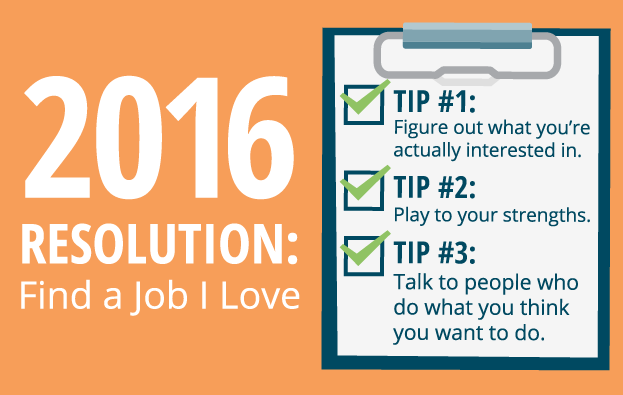
    Tip #1: Figure out what you’re actually interested in.

    You have probably thought about what you should do or the most popular jobs for your major or even what your family thinks you should do, but have you really thought about what you want to spend your time doing?

    For me, I’ve always been interested in tech. My favorite college class was “Communication in Technology.” I love being online and reading updates about best practices for online marketing, and I can set up a complex entertainment system like nobody’s business. When I was fresh out of college, I didn’t realize jobs existed where I could indulge these interests.

    So ask yourself: What classes did you enjoy in college? What articles attract you when you’re browsing the news? What online newsletters do you subscribe to? What kind of catalogs do you look forward to browsing? What magazines do you read?

    Let’s say you’re crazy about travel. You save all of your money for your next adventure, you have Wandertab installed on Chrome, your DVR is packed with Travel Channel shows, and your inbox is full of flight deals. You might want to start your job hunt with industries that incorporate travel, like a cruise line, travel agency, or tourism board.

    Tip #2: Play to your strengths.

    Now that you have an idea of the kind of work you want to do, it’s also important to consider the work environment and your own strengths. Think about previous projects where you’ve had success and were proud of the end product. Were you working in a group? Which skills were key to the result—organization, creativity, subject knowledge? By digging into your own skill set, you can be more particular about the types of jobs for which you apply.

    Company culture is important as well. You spend a lot of time at work, and by extension, with your coworkers. How you feel at the company and in the presence of your coworkers will affect your job satisfaction and ultimately your performance. Consider guidelines like dress code, benefits, time off, and willingness to train new employees. Would you mind being the youngest amongst future coworkers, or is it important that you work with peers? The answers to these questions can play a big role in shaping your job search.

    Search Influence Company Culture Image

    Personally, I loathe pantsuits. In previous positions, I was the youngest person in the room, and I prefer working with peers. I’m proud of my organizational skills, and I thrive in a collaborative, busy environment where there’s always something more to do; boredom is not my friend. When I started working at Search Influence, something just clicked. I loved learning from my intelligent, peer coworkers, and account management suits my skill set.

    You don’t always hit the jackpot while starting your career, but taking a critical look at your fit with a potential employer is a very important step to take before sending in your resume.

    Tip #3: Talk to people who do what you think you want to do.

    This was hands-down one of the biggest missed opportunities for me when I was looking for my first job. I was so nervous! I didn’t want to bother anyone, and I thought everyone would flat-out deny me if I asked to talk to them. Being on the other side of this now, it is so incredibly not true. It’s even the exact opposite—I love telling people about my job at Search Influence. Especially younger people who think they might want to work in my field of online marketing.

    Search Influence Company Culture Tech Jobs Image

    A current employee of a company you’re interested in or someone who holds a job title you aspire to hold one day is an invaluable resource if you’re willing to ask. They can tell you so much more than a job description: day-to-day tasks, work environment, team structure, key skills, and even tips for getting hired.

    If you don’t know someone who works in your field of interest, use your alumni group and/or any connections you might have. You’d be surprised who knows someone you might want to speak with. And when you do find the person to talk to, come to the meeting prepared with questions to discover information that would be most valuable to you.

    By taking the time to think about your interests and strengths, and by taking proactive steps to talk to someone in the field, you’ll be much better equipped for your job hunt. You’ll likely send out fewer resumes, but they’ll be for positions that are a home run for you instead of hoping something sticks, making them much more beneficial in the long term.

    If you’re like me and enjoy tech, search engine optimization, and online marketing, find out more information about open positions at Search Influence on our Careers page.

  • The Infectious Spread of New gTLDs: Good For Your .Business?

    Over the last year and a half, the Internet Corporation for Assigned Names and Numbers, or ICANN, has been releasing more than 1,300 new gTLDs, or generic top-level domains. During this time, there has been a growing conversation amongst business owners as to whether or not they should make the switch to an industry-relevant TLD or stick with their current .com.

    Remind me again … what exactly is a TLD?

    Though you may not realize it, every time you type in a URL in your browser, you are using a TLD. It is everything that follows the dot in a website address. The macdaddy of TLDs is, of course, .com (used by 51.6 percent of all websites), with a few hundred others taking up the rest of the market share. These little identifiers help give a piece of information about the website itself, such as its purpose or geographical area. Because of TLDs, we know that websites that end in .gov are government related and websites that end in .edu are education related.

    So why are they rolling out new TLDs?

    Before June 20, 2011, there were only 22 gTLDs available. But on that day, the board of directors at ICANN almost unanimously voted to stop restricting generic top-level domain names. The chairman of the board, Peter Dengate Thrush, explained it like this in The Guardian: “Today’s decision will usher in a new Internet age. We have provided a platform for the next generation of creativity and inspiration. Unless there is a good reason to restrain it, innovation should be allowed to run free.”

    icann-image-searchinfluence

    Alright, I understand now … but should I get one for my business?

    More than likely, no. In almost all cases, it is completely unnecessary, and switching over to one of these new top-level domains may actually hurt your company’s website more than help it. When the announcement of the rollout came in 2012, Matt Cutts, head of the Web spam team at Google, said on his Google+ page that, “Google has a lot of experience in returning relevant web pages, regardless of the top-level domain (TLD). Google will attempt to rank new TLDs appropriately, but I don’t expect a new TLD to get any kind of initial preference over .com, and I wouldn’t bet on that happening in the long-term either. If you want to register an entirely new TLD for other reasons, that’s your choice, but you shouldn’t register a TLD in the mistaken belief that you’ll get some sort of boost in search engine rankings.”

    So if you are a bank and think that registering for a .bank TLD will benefit your search engine optimization strategy, think again. As Cutts stated, a website will rank because of its relevancy for a search, not because of the letters after the “.” in its URL. In fact, because the age of your domain is an important ranking factor in Google’s algorithm, switching to that new .bank domain may actually hurt your website’s relevancy in the eyes of Google and other search engines.

    I have a new business and am just getting a website. What about me?

    In the case of new websites, it is totally up to your preference. One important thing to remember is that these new domains are extremely new, and most people are not used to seeing them. Because of this, you will want to consider registering for the more common versions (.com, .net, .org, etc.) of your domain in addition to the new gTLD before redirecting customers to your .bank website, for example. This way, if a consumer ever types in your website but makes the assumption that it is .com, they will be redirected to your actual site.

    Image sources:

    ICANN image

  • Social Giving Success: An Intro to Online Marketing for P2P Fundraisers

    P2P-Fundraising-Search-Influence

    Which do you trust more: an ad or a friend?

    The answer is pretty clear, right? At least that’s what many nonprofits think, and that’s why the face of fundraising has changed significantly over the past decade. Instead of just soliciting direct donations, we’re seeing more and more peer-to-peer, or P2P, fundraising campaigns.

    Peer-to-peer fundraising enlists a nonprofit’s supporters to fundraise on their behalf, rather than or in addition to soliciting direct donations.

    Having your supporters fundraise for you offers that extra level of trust and intimacy that ads can’t provide. P2P engages supporters so they feel more connected to a cause, resulting in greater long-term support. And with today’s technology, it’s easier than ever to connect with huge networks of people and resources.

    So let’s talk about ways to make an online P2P fundraising campaign successful. From search engine optimization and social media to website development, here are some important tips:

    Make Donating Easy

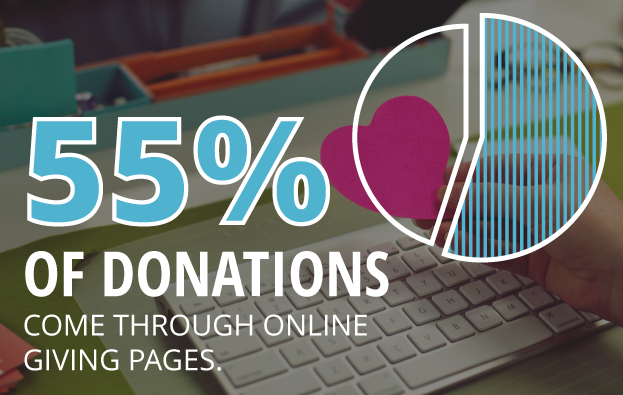
    First things first: You need a way to collect and differentiate donations. According to Network for Good’s annual Digital Giving Index, 55 percent of donations come through nonprofit, online giving pages, especially branded and personalized ones.

    A successful campaign has a user-friendly and effective system for making and processing donations that participants can share through social, mobile, email and every-which-way. This means also investing in either a mobile app or a responsive website. On DonorDrive’s platform, for example, donations have nearly doubled using responsive sites on mobile and tablets.

    The options out there are endless. Make sure your fundraisers have a link to share and trust your platform’s security and usability enough to want to share it.

    1511-SI-Newsletter-KG-D-02

    Engage your Followers

    More than half of those who engage on social media with a nonprofit take further action like donating or participating, according to Waggener-Edstrom’s Digital Persuasion Report.

    Fundraising as a whole is dependent on engaging and recruiting supporters. P2P requires not only engaging current followers to donate, but also inspiring them to fundraise and recruit for you. This means sharable content! Branded images, infographics and participant stories are just a few examples. Followers need to be able to see and share the effects of their donations, along with the whole experience along the way.

    Follow Basic SEO Guidelines

    SEO principles are universally applicable. Do some extra research on optimizing your website without stipulating that you’re a nonprofit or P2P campaign.

    That said, (1) make sure you’ve got relevant and easily accessible content on your website. Search engines are all about good content that naturally bridges the gap between what your organization does and what people are searching for. It’s no longer about stuffing exact-phrase keywords into every page of your site. (2) Submit and maintain consistent information for your organization to location- and industry-specific directories (and calendars if it’s an event). This way, you’re creating more links going to your website as well as solidifying your contact information with Google Maps and other mapping services. And (3) see if you qualify for a Google Ads Grant. Google gives out varying amounts of money each month to use for nonprofit AdWords campaigns, so take advantage of it! An AdWords campaign offers the opportunity to reach those who you might not be reaching with organic rankings alone.

    These are just a few tips to get you started. Even if you don’t have the budget to implement an intensive campaign, it’s important to cover your bases and make sure you’re tailoring your website and social media to work with P2P principles. The Internet is already THE social hub; use it to mobilize your followers for a successful campaign!

  • Return Of The YT Channel: Moving YouTube Channels Between G+ Pages In 2015

    Move YouTube Channels Between Google Plus Pages

    In the early ages of YouTube and Google Plus connections, disconnecting and reconnecting channels to the correct G+ page was not an easy feat. I once wrote a blog about this lengthy workaround for LocalU. Not long after that blog post, Google released a support form that allowed you to have a YouTube support specialist do the reconnection for you. While this support was amazing and usually reconnected channels within 24-48 hours, it required a middleman to get the work done and wasn’t immediate.

    Now, Google has released a way to reconnect your channel to another page within your account in the Advanced Settings section of YouTube! If everything is in one account, then this reconnection takes mere seconds. Often, however, we find ourselves in a situation where the channel is connected to a personal Google Plus page in one Google account, and we want it connected to a business page in another login.

    So I’m here to walk you through how to handle both of the aforementioned situations.

    Reconnecting A Channel Within One Account

    We’ll start with the simple one. You’ve got a YouTube channel connected to one page (probably a person page, maybe a random brand page), and you want it connected to your official business page on Google plus. Whatever shall you do!?

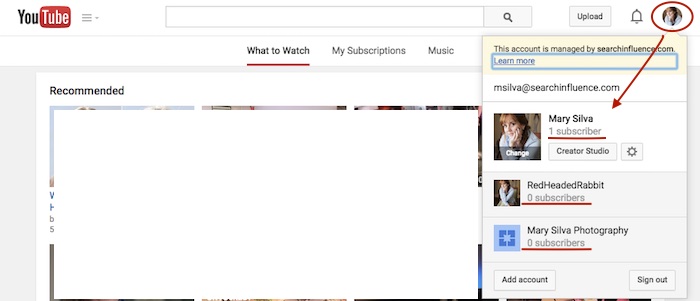
    Step 1: Go to YouTube.com and log in to your Google account. In the top-right corner of the page, click on the circle that shows your page icon to see a list of pages and their channels within this account.
    YouTube Users

    Usually, when you first log in to YouTube, you’re automatically managing or acting as your personal Google Plus page (the profile listed first in the dropdown is the one you’re currently acting as). To manage another page, which is what we’ll need to do to move channels, you’d just click the page you wish to manage from the dropdown.

    Deleting Unnecessary Channels Side Steps:

    Before we can proceed with moving channels, however, note that in the screenshot above, both of the extra pages have “subscribers” listed under their page names. This means that channels have been created for both of these pages already (otherwise we’d see “Create a Channel” below the page names). So if we want to move a channel to the page “Mary Silva Photography” in this account, then we’ll have to free it up for receiving a channel by deleting the unwanted channel that is currently connected to it.

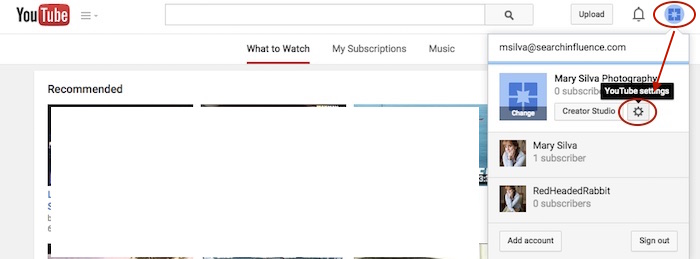
    This can be done fairly easily by clicking the “YouTube Settings” gear from that top-right dropdown while managing the page from which you want to delete the channel.
    Screenshot 2015-05-18 10.36

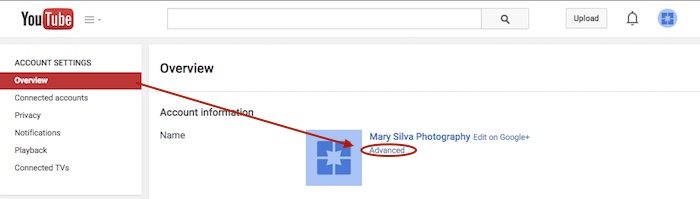
    Then click “Advanced” under the page name in the “Overview” tab.
    Screenshot 2015-05-18 10.37

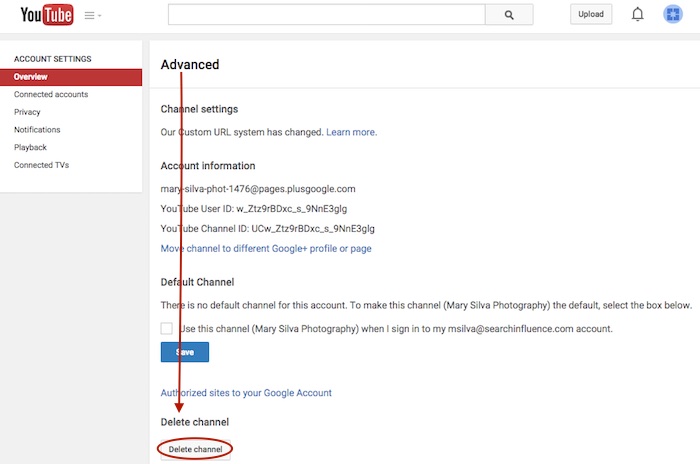
    At the very bottom of the page, you’ll see the “Delete channel” option. Once you click that, you’ll probably have to re-enter your password. Brace yourself.
    Screenshot 2015-05-18 10.38

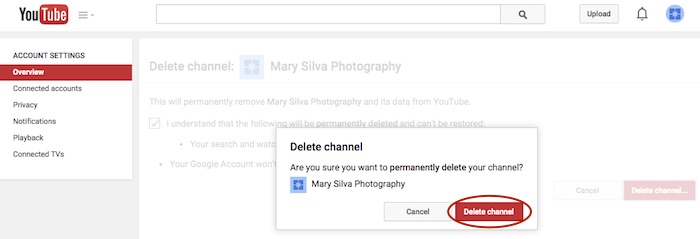
    You’ll see a verification page to confirm what you’re about to do. Check the box and click “Delete channel” to get one more verification dialogue, then click “Delete channel” one last time to complete the process.
    Screenshot 2015-05-18 10.41

    Now we can get back to moving the channel. In this example, we’ll pretend that the channel connected to “RedHeadedRabbit” needs to be moved over to “Mary Silva Photography.” As you can see in the next screenshot in Step 2, “Mary Silva Photography” now shows “Create a Channel” in the dropdown, so it’s free to take on the channel from the “RedHeadedRabbit” page.

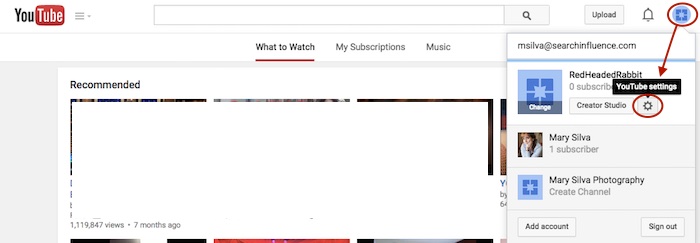
    Step 2: Click on the page that has the channel you want to move in the top-right dropdown to manage the page (in this case, “RedHeadedRabbit”), and then the aforementioned “YouTube Settings” gear should appear for that page. Navigate back to the “Advanced” settings page from the “Overview” tab just as you would have to delete the channel.
    Screenshot 2015-05-18 10.47

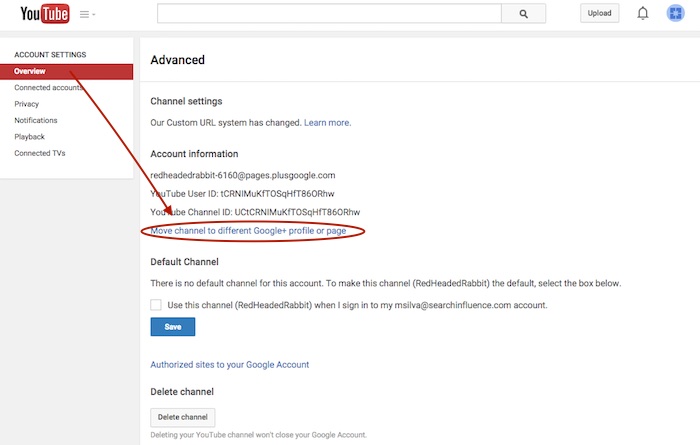
    Step 3: This time, however, you’ll want to click the “Move channel to different Google+ profile or page” option just above the “Default Channel” header. Google will probably make you enter your password again, so brace yourself.
    Screenshot 2015-05-18 10.48

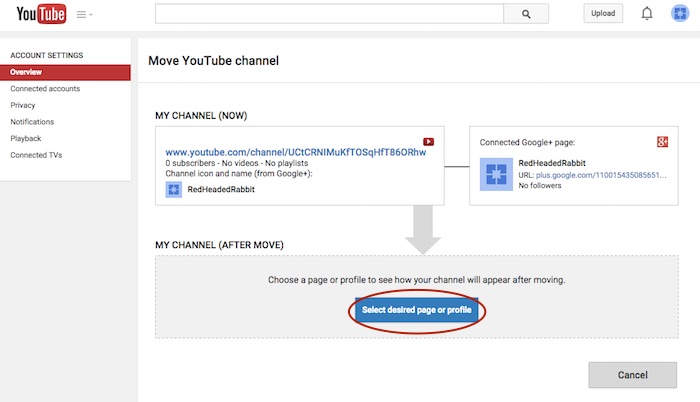
    Step 4: Now you’ll see the “Move YouTube channel” page. Under “MY CHANNEL (AFTER MOVE)” click the “Select desired page or profile” button.
    Screenshot 2015-05-18 10.49

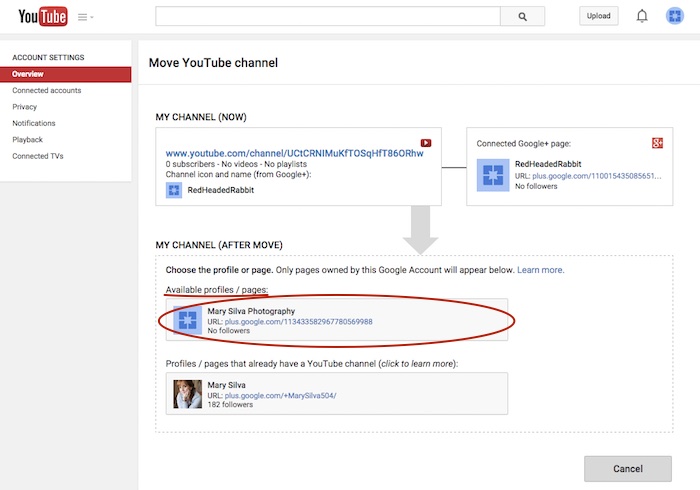
    Step 5: Choose the page you want to move the channel to from the “Available profiles / pages” section.
    Screenshot 2015-05-18 11.05

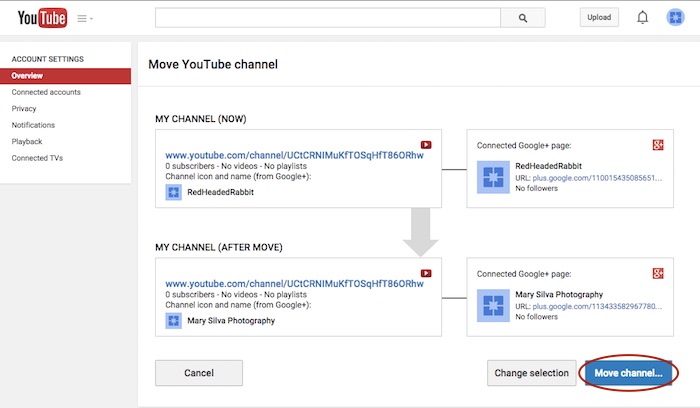
    Step 6: Confirm where you’re moving the channel (you can click links on this page to double-check that you’re moving the right channel to the right Plus pages) and click “Move channel…” to complete the transfer.
    Screenshot 2015-05-18 11.06

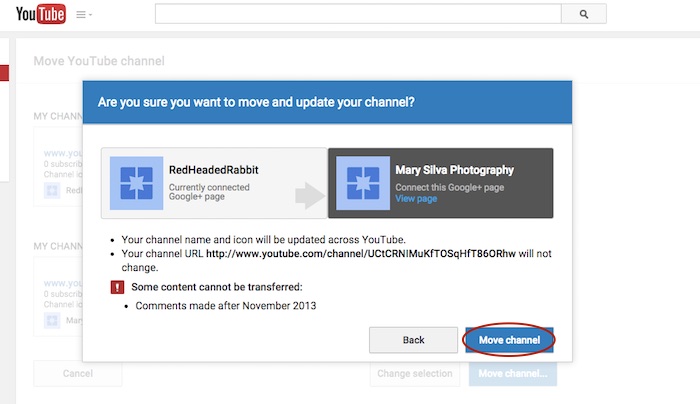
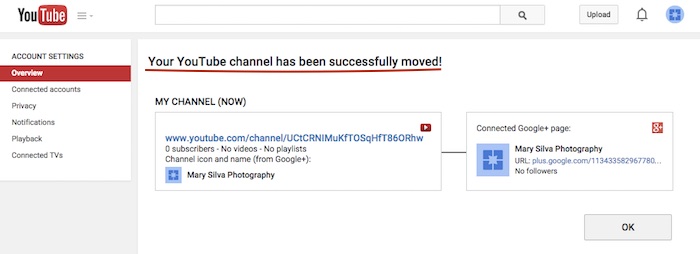
    Step 7: Click “Move channel” in one last confirmation dialogue box, and you’re done! You’ll see one last confirmation screen about the successful channel transfer.
    Screenshot 2015-05-18 11.13

    Screenshot 2015-05-18 11.09

    Reconnecting A Channel With Two Different Accounts

    As previously mentioned, we often find that we have a channel connected to a personal Google Plus page in one Google account, and we want it connected to a business page in another login. The steps for moving the channel will be the same as above, but first, we must get the pages all set up properly within one account.

    The account that has the channel has to be the OWNER of the page that we want to move the channel over to. So we need to go through adding the YouTube channel account as a manager of the business page within the other account first. Then we can go back and transfer ownership of the business page over to the channel account completely.

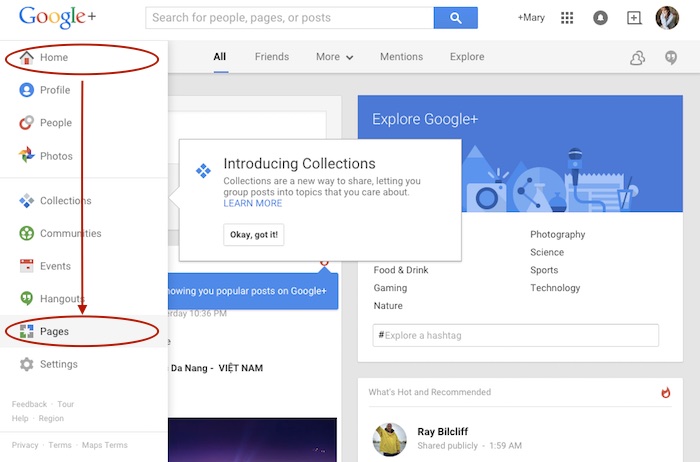
    Step 1: Log in to the account that the main business is claimed in and go into your Pages.
    Screenshot 2015-05-18 11.30

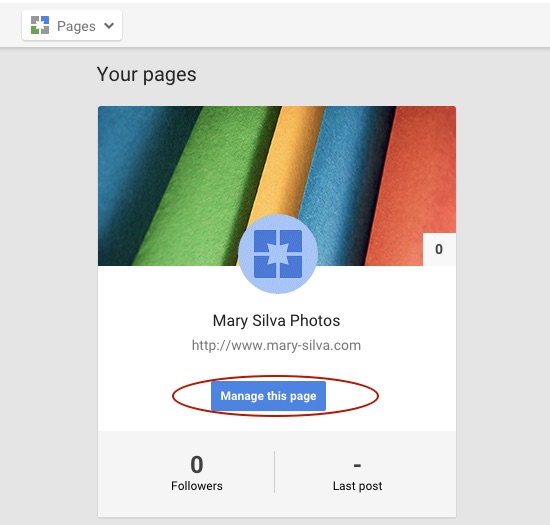
    Step 2: Choose “Manage this page” for the listing that you want to make the YouTube account a manager of.
    Screenshot 2015-05-18 11.31.30

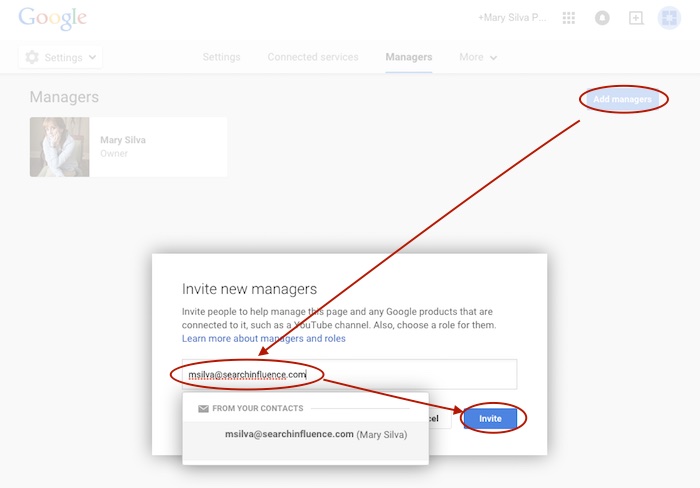
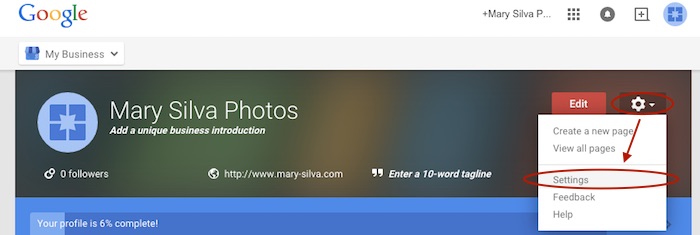
    Step 3: Go to “Settings” in the dropdown. Then, choose “Managers” under the “More” tab and add the email address for the YouTube account as a manager by clicking “Add managers.”

    Screenshot 2015-05-18 11.31.44

    Screenshot 2015-05-20 12.46.32

    Screenshot 2015-05-18 11.32

    Step 4: Log in to the email for the account with the YouTube in it. Look for the email that says “Person Name invited you to become a manager of the Business Name’s Google+ page” and click “Become a manager” within that email.
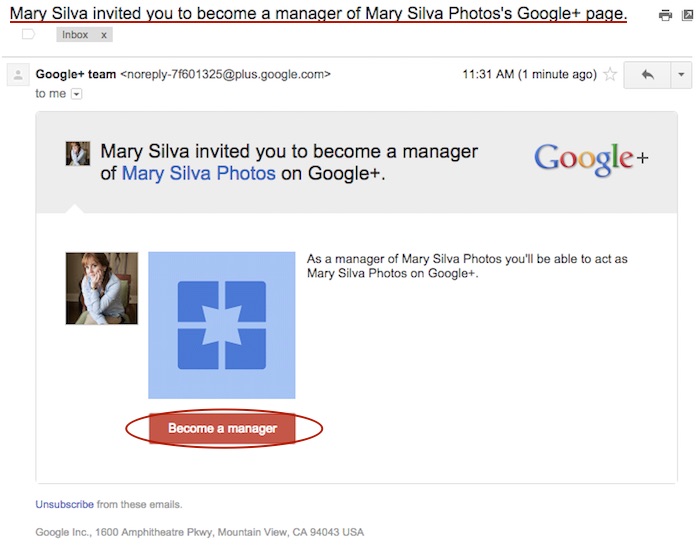
    Screenshot 2015-05-18 11.33.15

    Step 5: The link from the email will take you to the Google Plus page and automatically open a “Become a manager of Page Name” dialogue where you’ll click “Accept” to complete the managership setup.
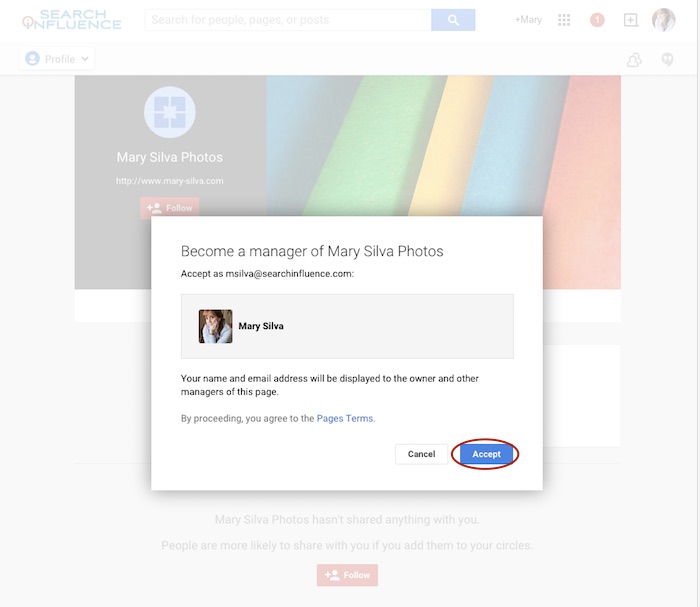
    Screenshot 2015-05-18 11.33

    Here’s where we wait…Unfortunately, for security reasons, Google requires an account to be a manager of a page for at least one day (as seen in screenshot below) before ownership of the page can be transferred over. So wait a day and come back to me when you’re ready to wrap this up. 😉
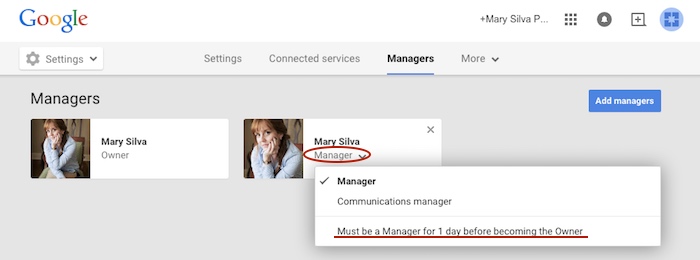
    Screenshot 2015-05-18 11.38.58

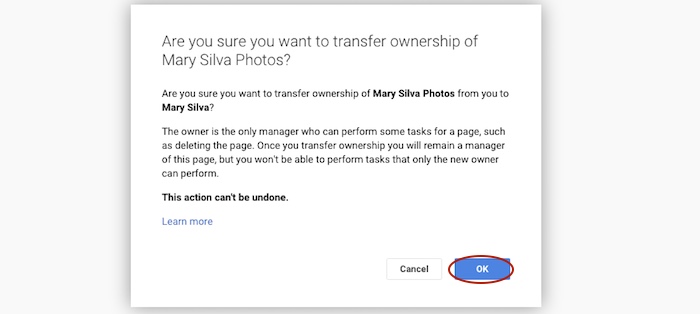
    Step 6 (One Day Later): Now log back in to the account that owns the page and follow steps 1-3 again to get back to your “Managers” settings page of your official business page. When you click “Manager” under the account name, you’ll see a dropdown with the option to “Transfer ownership to Person Name” where you previously saw “Must be a Manager for 1 day before becoming the Owner.” Once you click that, you’ll click “OK” to verify the transfer of ownership, and then the transfer is complete!
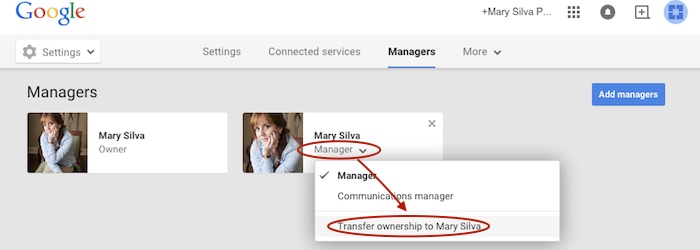
    Screenshot 2015-05-19 12.54.22

    Screenshot 2015-05-19 12.54.37

    You’ll get an email in that new owner account saying something like, “Person has made you the owner of the Page Name Google+ page.” Unlike the managership process, you don’t have to click anything in an email, so the ownership has been transferred completely, and you’re done!

    Now that you have everything set up properly, you can proceed with steps two to seven in the “Reconnecting A Channel Within One Account” section above.

    Hopefully this extensive tutorial helps you through all of your YouTube woes. To learn more about the ins and outs of Google Plus pages in Google My Business, you can read more on the blog here.


  • Don’t Give a Dang About a Bad Reputation: I’ve Got No Online Reputation

    Don’t Give a Dang About a Bad Reputation: I’ve Got No Online Reputation

    Reviews are essential to a successful business. Bad reviews can make or break a long-established business or a fledgling one. Companies have even sprung up to help combat bad online reputations. But what of the companies that have little or no online reputation at all? This scenario can be just as detrimental to a business. In fact, there are many websites that can help businesses drive customers to write online reviews:

    Reputation.com

    • PRO: Along with many other reputation management services, Reputation.com offers in-depth review-garnering solutions. Services range from very hands-off on the part of the business or very hands-on. The very hands-off approach offers the ability to send out emails that can be customized with customer names, employee names, and business logos. It also offers an in-store review option that customers can fill out immediately after a purchase or visit. The online management part of this site gives in-depth analytics of the reviews garnered through its services as well as pre-existing reviews.
    • CON: Review management is just part of Reputation.com’s many services. If you already have search engine optimization services for your business, you might be getting more than what you really need to pay for.

    Chatmeter

    • PRO: Chatmeter monitors any reviews a business may receive online on various websites, and it gives daily updates so business owners can quickly respond to both positive and negative reviews. With constant interaction, customers can see that the business is active and working positively to improve its customer service. This site also gives in-depth analysis of the reviews received so a business owner can see if the reviews are trending positive or negative. Chatmeter also offers the ability to monitor competitors’ reviews and gives insight on what competitors are doing right.
    • CON: Chatmeter does not offer the ability to reach out to customers directly from the tool. The business must work on garnering reviews through strictly organic means, which can be a slow-moving process.

    Get 5 Stars

    • PRO: Get 5 Stars is strictly a review management tool. The tool can be used to monitor existing reviews as well as send out requests for new reviews from customers. This creates a survey for customers to fill out with differing results depending on the type of review. Bad reviews can be managed before they hit any other websites. Good reviewers can be asked to review on any number of sites or to have their review published directly to the company’s website. This tool also offers in-depth analytics to see open rates, success rates, and any problem areas that might be initially overlooked.
    • CON: This tool requires a way to collect customer emails, which can be difficult if the business does not have a storefront that customers frequent.

    These are just a few of the many ways a business can monitor a fledgling online reputation. Online review management coincides closely with local SEO, since a business needs a presence online before it can build a reputation.

    Image sources:

    Haters Gonna Hate GIF


  • Amazon Has a House Party, and Your Local Business Needs an Invite

    Amazon Home Services Map Image - Search Influence

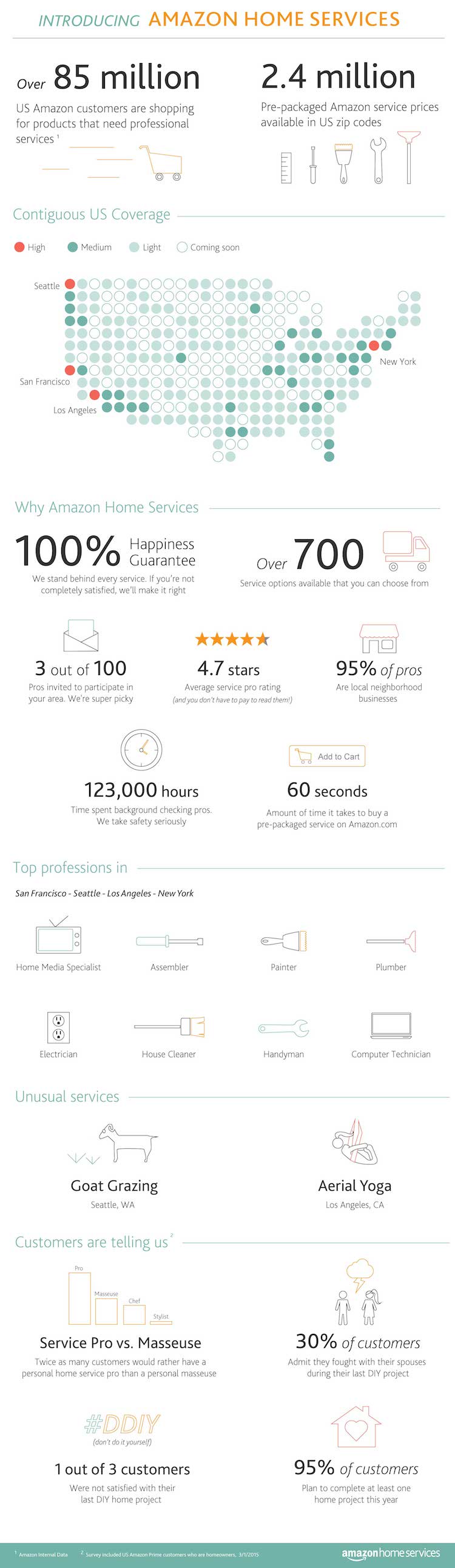
    To compete with Angie’s List, Craigslist, Yelp, Home Advisor and other marketplaces, Amazon has recently launched its own marketplace called Amazon Home Services.

    What makes this platform different from the others? How could it help you, as a local business, with an increase in leads and improved Google rankings?

    Amazon has its own ecosystem: loyal customers and Amazon Prime members. Being a part of this ecosystem means being exposed to 85 million potential customers. “In less than 60 seconds, customers can now browse, purchase and schedule hundreds of professional services from wall mounting a new TV to installing a new garbage disposal to house cleaning, directly on Amazon.com,” according to the company’s recent press release. And your business can be a part of it.

    In contrast to Google, which ranks services in terms of the most accurate answer to the searcher’s query, Amazon ranks services in terms of what product the searcher is most likely to buy. This functionality is easier for small businesses. Indeed, Amazon’s algorithm will automatically show the best service to match what the searcher is looking for. In other words, when a searcher is looking for a television on Google, the result will include everything in relation to televisions except a list of local services, while Amazon will include all the repairs/installation services related to a television based on the searcher’s geolocation. That is why it will potentially make it easier for small businesses to rank on Amazon. But there is a catch: to be part of that ecosystem, you need to be invited by Amazon.

    So how can you get invited? First, you need to have a strong Web presence, a good strategy for displaying information about your services, a good reputation and finally, great online reviews from your customers. (But really, you’d want all of these things anyway.) On top of that, you need to be licensed and insured.

    Are you ready to apply? Don’t jump to it too fast! Google just announced it is going to open its own marketplace for local businesses, which means more visibility for you as well as more leads, since most people search on Google.

    Amazon Home Services Image - Search Influence

    Image sources:

    Amazon Home Services infographic

    Amazon Home Services map