Category: Industry Insights

  • Are Your Keywords Sabotaging Your SEO Efforts?

    Choosing the right keywords to target is one of the most important aspects of a successful SEO campaign. The goal of SEO campaigns is to get more online visibility, more traffic to your site, and more sales and leads. Keyword selection is central to bringing these goals to life.

    MoreThanTheSumOfMyKeywordsImage

    Keyword Selection Must-Haves

    When choosing keywords, make sure they:

    1) Are RELEVANT to your business

    Keywords should answer the questions: What do I do? What products and services do I offer?

    2) Are SEARCHED often

    If the goal is to bring more users to your site, you need to make sure users are actually searching for the keywords you select. Hint: use Google’s Keyword Planner to help you decide what keywords have the greatest search value.

    3) Bring up the RIGHT SEARCH RESULTS that your business should appear in

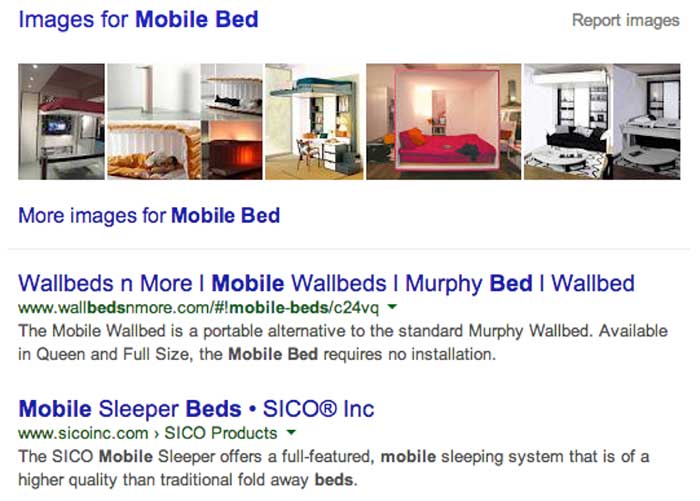
    You always want to do a Google search of the keywords you are considering. Make sure they represent a search that you have a realistic chance of ranking for and that your direct competitors are appearing in. For example, a bedding store in Mobile, AL might think “Mobile Bed” is a good keyword. In actuality, that keyword brings up national sites that carry movable beds.
    KeywordBadExampleImage

    Your Go-To Keyword Research Tips

    With those 3 items in mind, below are a few tips to use during your keyword research process. Take it from me, comprehensive and strategic keyword research and selection can make or break your SEO efforts.

    1) Be very thorough when brainstorming keyword variations. You’d be surprised how much search value differs for small variations such as “buy gold,” “gold buyer,” and “cash for gold.” The goal is to think of every possible way people are searching for your business and then narrow them down from there!

    2) If you are a local business, be realistic when choosing what geo-modifiers to target. If you are a dentist in Metairie, LA (a suburb of New Orleans), it will be very difficult for you to rank on the first page for “dentist new orleans.” Check out the search results for that keyword, and you’ll see why! It’s best to be practical and start your focus on where you have a reasonable chance of ranking on the first page.

    3) Try and try again! Sometimes you might target a keyword for 6 months to a year and don’t see the results you want. Don’t give up; Google is constantly changing its algorithm, so revisiting your keyword strategy and making changes is perfectly normal and to be expected.

    Do you have more keyword research tips and tricks to share? Leave them in the comments below!

  • Mobile, Mobile, Mobile: Why You Should Be Optimizing In The App Store

    marysilva1Who are we kidding? Mobile is already here and it is here to stay. With the shift from desktop to mobile for everything you can imagine, and the continued growth of app creation, it has become extremely important for creators to optimize their apps for in-app store rankings.


    App Store Optimization (or ASO, as it is known) is basically SEO for the app store search ecosystem. Much like major goals in SEO, the main goal of ASO is to drive more traffic to your app page in order to gain more downloads. In order to effectively optimize your app page, you must first understand your audience and what your target consumers would search for to find you.

    marysilva2

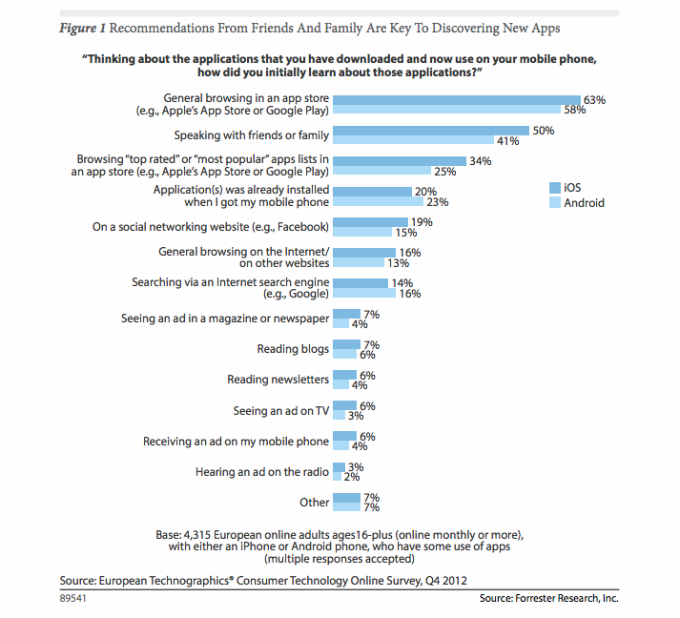
    Research firms, such as Forrester, have released studies in the past showing that most applications are discovered through general browsing and searching of the app store. From a user standpoint, when I am looking for a new app I first look for things that are relevant to my search terms and then weigh the options based on the number of downloads and ratings/reviews. This is much like the user experience when looking for local businesses online.

    This means that the best thing you can do for your app is provide relevant keywords in the title of your app. The other two determining factors (downloads and ratings) will come naturally once you improve your App Store Optimization. Keep in mind, however, that is not just the number of ratings, but the quality of ratings that really matters. Providing consumers with in-app support for encountered issues is a great way to help garner primarily positive reviews in the app store.

    Back in January 2013, Moz published the Top Three Inbound Marketing Strategies for Mobile Apps, a great resource for those looking to improve their ASO and app store rankings.

  • Finding the ‘meez’ – or How To Spend the First 10 Mins of Your Day

    If you’re like me and have a short attention span love a good list, you’ve probably read countless articles like this. Despite being a self-proclaimed efficiency expert, I’m always on the hunt for ways to be even more efficient, especially at the start of my day.

    A recent Harvard Business Review article showcases a tip from legendary chef Anthony Bourdain that is surprisingly as applicable in an office setting as it is in the kitchen. Mise-en-place – or the “meez,” as it is often called – is a French phrase that translates to “everything in its place.” In culinary practice, it involves studying a recipe, thinking through the tools and equipment you will need, and assembling the ingredients in the right proportion before you begin.

    Cooking Ingredients Image

    Despite the fact that I never remember to do this in the kitchen, it’s a great idea for professionals to follow as well. Begin your day with a brief planning session – an intellectual mise-en-place, if you will – by mentally mapping out your upcoming tasks and meetings (and don’t forget about lunch!)

    Also, rather than checking your email immediately upon sitting down in the morning, productivity guru David Allen (how do I get that title?) suggests starting each item on your to do list with a verb. Having a list of actionable items makes it easier to check things off your list. I don’t know about you, but I find few things more satisfying than a well-marked to-do list.

    To Do List Image

    Once you’re done planning, grab a second cup of coffee – because let’s be real, you’ve already finished your first – and now you can take on the day head first with a plan!

    Image Source:  https://flic.kr/p/3mthCn

  • Yelp Adds Videos — But Not Necessarily For Reviews

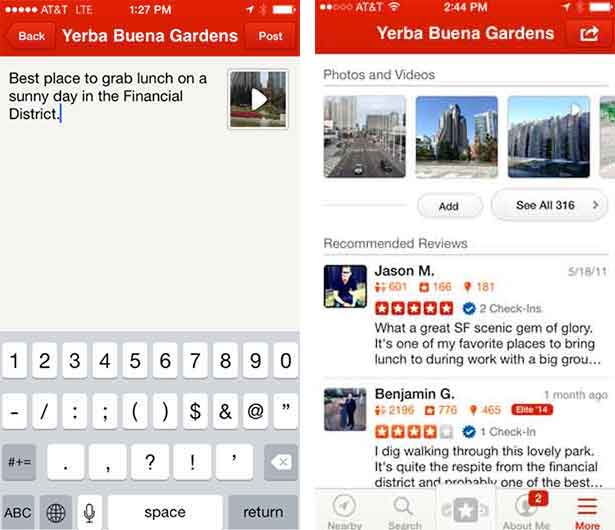
    A couple of weeks ago, Yelp leaked to Business Insider that they will soon allow users to add 3-12 second videos to their reviews. When I initially heard this, I was thrilled, because I have been waiting for this feature for some time now.

    However, when I learned that these videos are intended to simply to add more media to the reviews (in the photos section) and not actually stand as reviews themselves, my excitement waned.

    YelpReviewVideos

    Rather than video reviews, what we are getting is a way for Yelpers to capture the atmosphere of a venue or more likely, selfie videos of them stuffing their faces at their favorite eatery. Yelp’s mobile product manager Madhu Prabaker explained the purpose of adding the video as “a reward for businesses that go to great lengths to achieve a certain ambiance, whether by having a certain lighting or the music at just the right level.”

    Was anyone else as let down as I was when they heard this? I feel as if this new platform change is being wasted on the business aesthetics such as atmosphere and showcasing products, where pictures were doing just fine. The photo capability has been around for years—nothing new there.

    What I see as the future is a full video review platform where consumers can turn the camera on themselves and tell us how they feel about the businesses they interact with. There are plenty of platforms out there to help SMB’s solicit reviews such as DemandForce and Customer Lobby, but there are no pure play platforms dedicated to helping users generate video testimonials. However, this functionality could ultimately rid business owners of the demon that is the Yelp review filter. (Business owners with less than stellar Yelp reviews, you know what I am talking about.)

    What’s With The Filter Anyway?

    Yelp’s justification for not showing certain reviews has always been that they appeared to be less than trustworthy. What could legitimize a review better than a video of the person posting it?!  No more having your real user reviews taken down and your competitors’ employee-generated or otherwise fake reviews staying up. Real live video testimonials from your customers would become the gold standard for authenticity on Yelp.

    While this version of Yelp videos may help to drive new business by showing a scrumptious plate of food or even a clean car that just went through a car wash, I believe that Yelp is missing out on a huge opportunity. According to SO Media, Video has 400% higher engagement rate than static content. That means that a video testimonial will most likely bring on an action, whether that is a like, comment, or share leading to more significant actions like phone calls and getting directions.

    So, How will Adding Video Effect The Yelp Review Filter?

    One can only hope that allowing customers to add videos to their reviews will serve as positive reinforcement that their opinion of your establishment is a credible one. One can only hope…

    If Yelp factors the use of rich media (namely photos and videos) into review filtering, it hasn’t publicized this. Will they start giving these media reviews priority?

    Industry experts have consistently pointed to the importance of users having a profile picture, connections, and several reviews as the keys to success in building an optimized Yelp profile.

    I personally believe that video will soon become an important part of this conversation of what a truly optimized Yelp user profile is. While I understand that photos might not have been a large piece of the puzzle in the past, I would contend that the rich content in user videos will be of much greater influence in helping build authority and the perception of local business leadership.

    Why Are Your Reviews So Important?

    We’ve long known the importance of having a Yelp business profile. It’s so important, in fact, that according to the Boston Consulting Group in 2013, a business who even has a basic and free Yelp profile will make on average $8,000 more in annual revenue than a business without a Yelp profile. And this is where Yelp gets its leverage. It’s also a great reason to be so selective about which reviews they show.

    As the video feature rolls out only to Yelp Elite users this June, we will have to wait until it makes its way to new users to really see how it effects the review filter. The reason being, Yelp Elite user reviews always show up when posted. The filter’s most negative impact comes to those newer users, without perceived authority on Yelp.

  • The Mullet Model: Why Your Business Should Be On Thumbtack

    Thumbtack is making life a whole lot easier for consumers and for businesses. Unlike Yelp and Angie’s List, Thumbtack has found a way to connect businesses and their potential customers in order for them to make a deal. With their most recent round of funding, the tech company will have $30 million to help them become a leader in localized markets. Jonathan Swanson, one of the cofounders, describes the easy to use platform as a mullet business, “it’s very simple on the front, but very complicated on the backend.”

    BusinessInTheFront

    How Thumbtack Works

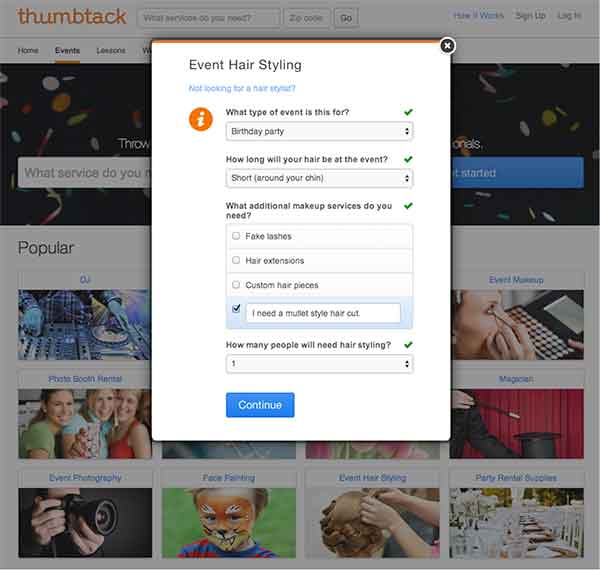
    Businesses can bid on, and acquire, new customers based on the specifics of a job, and consumers are able to hire professional service providers effectively by getting an “introduction” that includes a businesses’ custom quote, customer reviews, and profile. Consumers fill out a detailed form regarding what services they need done (see the mullet form below), and then, as a business, you can “bid” and contact the potential client based on the fit. One of these “introductions” can cost anywhere between $3 and $25, based on the size and cost of the job. From there, the customer can compare other local professionals and decide on the best pro to handle the job.

    Customer Form:

    CustomerForm

    How Thumbtack Can Help Your Business

    There are hundreds of services available for hire on Thumbtack, and you can find new customers that fit well with your business. The website’s reinvention of the Yellow Pages covers all types of services, from painters and tennis instructors to web development and Swahili translation. You can proactively find and acquire customers in your area, who already have a high intent to purchase. The local services market is worth over $6 billion, and Thumbtack provides a good platform for small business to earn their share. Thumbtack has lots of momentum behind it, and it’s free to sign up, so you can start discovering new customers now.

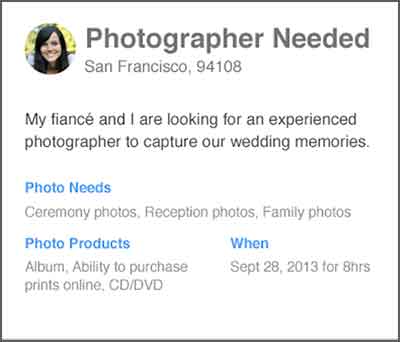
    Customer Request:

    PhotographerNeeded

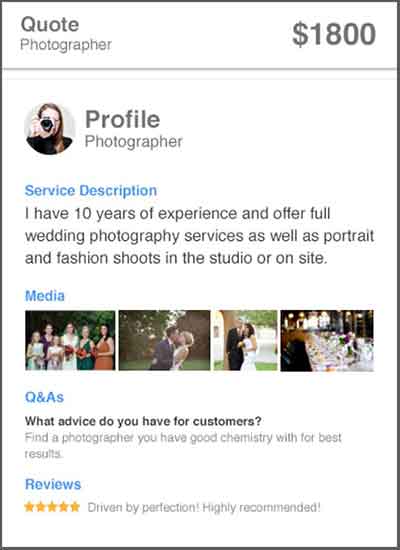
    Business Custom Quote:

    CustomQuote

  • Determining and Leveraging Your Brand Advocates

    At Pubcon New Orleans, Rob Fuggetta of Zuberance led a seminar on “Activating Brand Advocates.” Rob wrote a book called Brand Advocates that I encourage you to read if you’re a business owner looking to learn more about this game-changing topic.

    Reviews

    Rob talked about how brand advocates are people who recommend your products or services without being paid. They are your best salespeople because they are free and other people trust their opinion greatly. In fact, 92% of customers trust word of mouth referrals, compared to 70% trusting reviews, and 33% trusting ads. Since they are a very trustworthy recommendation, businesses should leverage them to help their business grow.

    You may be wondering how you determine if one of your customers is a brand advocate. Rob offered three ways to figure this out. The first is to ask your customers a one question survey: “How likely are you to recommend us?” On a scale of one to ten, your brand advocates are those that give you a nine or a ten. Another way to find brand advocates is to invite your customers to recommend you. This can be done by asking them why they love your company. Lastly, listening and engaging with your customers is a great way to find your advocates. If someone is talking about how much they love you on social media, you can consider them a brand advocate.

    Once you’ve determined who your brand advocates are, Rob offered three ways to leverage them to help your business. One way is to make it easy for your advocates to give you reviews. For example, ask customers to write you a review in your email correspondence, landing pages, newsletters, and on social media. Once you have several reviews, publish them wherever you can think of, including social media, your website, and email marketing.

    Testimonials

    The second way is to gather and publish stories from your customers about how they use your brand and why they love your brand. If sales increased by 50% because of your help, write a case study about it and get the customer involved with providing the statistics and quotes. Finally, ask your brand advocates for referrals! For those that are passionate about your brand, they should be excited to help others by recommending your company to their circle of influence. Think about it: if you enjoyed a restaurant or a hotel, wouldn’t you recommend it to your friends and family? Why should it be different for your business?

    Submit your comments below on how you will leverage your brand advocates!

  • Can’t Code #2: Binary Basics

    The most basic code in the world of digital technology is binary code, which employs the binary digit, or “bit” for short. This code consists of 1’s and 0’s. The 1 means that something is; the 0 means that something isn’t. There’s no room for ambiguity when using bits. We’ll explore just how computers process binary information to create a meaningful user experience in the next installment of this blog series, but in the present post, I’d like to first discuss how binary digits operate, and what it means to count in binary.

    There’s Nothing Special About the Number 10

    The number system that we commonly use today, the one that consists of 1’s and 2’s and 8’s and 9’s, came to us from India a very long time ago. It supplanted the more cumbersome Roman Numeral system of X’s, V’s, and M’s. The most important characteristic of this “Hindu-Arabic” number system, and the feature that ensured its primacy over Roman numerals, was its most lowly number: zero.

    Zero revolutionized counting by providing a placeholder for intervals of 10. When you count past 9, the 9 becomes a 0, the integer to the left becomes a 1, and you’ve got 10. Ten 10’s become 100, ten 100’s become 1000, etc. Ten, as a numeric concept, suggests completeness; a closed circle; the beginning of a new cycle. But in order to understand binary, it’s first necessary to understand that, despite all this, there’s nothing inherently special about the number 10.

    The Counting System

    We have adopted a “base-10” or “decimal” counting system for the simple reason that our species has 10 fingers. The Hindu-Arabic system, and it’s trademark number 0, allows us to essentially count sets of fingers with ease. 10 is one set of fingers. 20 is two sets of fingers. If we had 8 fingers, the way we count would be very different. We’d be using a “base-8” or “octal,” rather than a decimal, counting system. 10, however, would still represent one set of fingers.

    To illustrate this, let’s visualize the following scenario: E.T., the titular character from the 1982 Steven Spielberg film, is trying to count 20 penguins in a row. Let’s briefly evaluate E.T.’s anatomy: he’s got tiny little legs, which leaves him very low to the ground, a long neck, long arms, and most importantly, 4 fingers on each hand, 8 fingers total. And with those 8 fingers, he begins to count 20 penguins. Let’s listen as he counts:

    1, 2, 3, 4, 5, 6, 7, 10 little penguins!

    11, 12, 13, 14, 15, 16, 17, 20 little penguins!

    21, 22, 23, 24 little penguins all in a row!

    Do you see why E.T. counted 24 penguins whereas we, with our 10 terrestrial fingers, would have counted 20 penguins? The number 10, as we have established, is a symbol used to represent one set of fingers, no matter how many fingers are in the set; and 20 is used to represent two sets of fingers, no matter how many are in the set. While we would have counted the row of penguins on just two sets of our ten terrestrial fingers, E.T. required two and a half sets of his eight alien fingers. The reason that his above counting scheme might look odd to us is that he had no use for integers “8” and “9,” and therefore his count is “missing” four numbers that would be included in our own: 8, 9, 18, and 19.

    Counting Penguins With Just Two Fingers

    Here’s how this relates to computers: computers only have two fingers. The “binary” code that serves as the language of computers is a base-2 system, and thus only utilizes two integers: 0 and 1. It doesn’t involve integers 2 through 9. By the time your computer has counted to 2, it’s reached 10; much like by the time E.T. has counted to 8, he’s reached 10. Imagine a person with two fingers counting a line of 10 penguins in the same way that E.T. used his 8 fingers to count 20 penguins. It would look like this:

    1, 10, 11, 100, 101 little penguins!

    111, 1000, 1001, 1010, 1011 little penguins all in a row!

    This hypothetical two-fingered person would never get to twenty, or thirty, or forty, because she wouldn’t even know what “2,” “3,” or “4” were. The only numbers that would exist between 0 and 100 in her mind would be 1, 10, and 11. Any other numbers would involve integers higher than 1, and therefore would not be counted.

    Using binary might be a really awkward way of counting penguins, but as it turns out, it’s a pretty effective way of transmitting information over vast distances. In the next installment of Can’t Code, we’ll take a look at how computers use these binary numbers to create useful information and media. In the meantime, here’s a decimal to binary converter to play around with in order to reinforce your understanding of the ever-lovin’ bit!

  • 8 Tips for Handling Bad (and Good!) Online Reviews

    Have you ever had a bad experience at a business? How did it affect your opinions of that company? More often than not, one bad experience will hinder how someone views a business, even if the experience was handled in the best way possible by the business owner/manager. This can affect the online reputation of a business greatly if people decide to write an online review about you.

    Reviews

    While the thought of negative reviews may scare you, do not let these reviews discourage you! Remember that a dissatisfied customer is more likely to write a review after a bad experience than a satisfied customer writing about a positive experience. Negative reviews can even help you learn how to improve your business. Here are some tips for actively handling these reviews:

    1. Actively check your reviews on various platforms across the web.

    A good way to keep up is to assign one day per month (or bi-weekly) to check your online reputation on the different platforms. The list can be endless, but these are some important ones to consider:

    **Note that you will most likely have to create an account and verify that you are the owner / manager to be able to respond to the reviews as the business owner.

    2. Always be transparent with your customers. This includes:

    • NEVER posting (or having your staff post) fake reviews.

    • NEVER deleting reviews that are negative. This will just anger the person that posted the review, in turn causing a downward spiral effect. Most likely, the angry reviewer will continue to post reviews until they are acknowledged by the business. Instead, take the time to listen to your customer and their concerns.

    3. Make an effort to respond to every review – positive and negative.

    • For positive reviews: A quick, “Thank you for your feedback, NAME! We appreciate your business. We hope you continue to be a BUSINESS NAME supporter!” is sufficient for a positive review. Responding to positive reviews can reinforce the already positive opinion that the reviewer has of your business, and reinforce brand loyalty with that person (because who doesn’t like being responded to by a business?).

    • For negative reviews: The dissatisfied customer will appreciate being heard, and outsiders will appreciate that the business takes the time to respond when something isn’t right.

    4. Be personal in your responses.

    Use the customer’s name if provided, and bring in information from their original review. This will keep the customer from thinking you just have a generic response to all reviews.

    • For example, if a person leaves a bad review on a spa page and you notice in their review they had a massage that day, you could say something along the lines of: “Hi NAME, I’m sorry your massage was not up to par….”

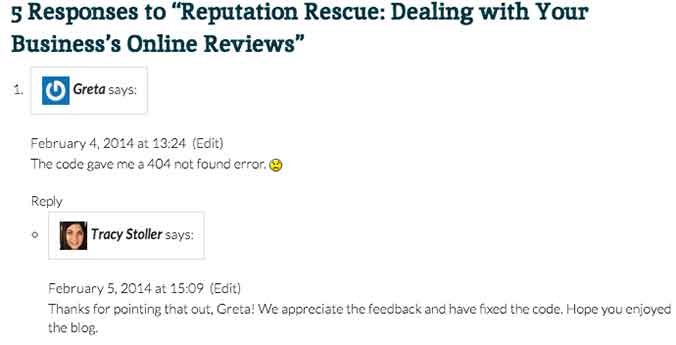
    • Another example comes from our blog! Check out how Tracy Stoller responded to a comment about an error in a code we provided in a previous blog.

    response

    5. Provide a business email that the reviewer can contact you on.

    Don’t try to make it all perfect on the review. You will be able to go more in depth with the customer through an email, depending on the severity of the review/situation. It’s up to you to decide when to try to go into more depth to resolve the issue.

    • You could say something along the lines of, “I truly apologize for XYZ. Please contact [email protected] to help us resolve this issue for you.”

    6. Remember that sometimes people have unrealistic expectations of a business.

    yelp-meme

    If something happened that is completely out of your control, explain yourself in the reply. However, do not have a negative tone toward the customer – simply explain the situation to the best of your ability.

    • For example, a customer leaves a horribly negative review after coming to your restaurant and you are all out of their favorite beer. You can apologize for the inconvenience, but explain that things like this happen occasionally. Explain when the product would be restocked and invite them back. This would be an example of when to NOT provide a contact email, because the situation is not that extreme.

    7. Do not offer gift cards or other repayment for a negative experience on the review site.

    If something is serious enough that you feel the need to refund the customer, provide your contact email and do so through email. Offering repayment or gift cards publicly can be seen as bribery by an outsider reading reviews.

    8. Invite your customers to leave reviews!

    Post a link to your Yelp! page (or other review site) to your social media accounts and invite your followers to talk about their experiences. This could lead to people leaving positive reviews that would not have normally done that on their own.

    It’s important to remember that you can’t please everyone, but continuously having timely responses to your reviews can only benefit your business.

  • Are You Being Productive Or Just Keeping Busy?

    Over two months have passed in 2014, and like most of you, I can honestly say that I have been very busy. I would be willing to bet that 50+ business days into the year, I, like a lot of you reading this have logged 150-200 hours of meetings, and have received and answered well over a over a thousand emails. Doesn’t that sound busy? This past weekend, as I was doing my weekly review, I found myself wondering, have I been productive as well? Have I been focusing on the projects that will make Search Influence a great place to work? What about the things that will allow us to serve our customers better?  How much time have I (and the teams I support) put into developing the Internet Marketing products that will help our customers succeed online tomorrow?

    4556099850_bcd9318b5b

    If you find yourself wondering the same thing, or worse, in an honest moment, answering no to that question, here are three things that you can do to avoid being busy, yet unproductive.

    1) Review your long-term initiatives or goals on a regular basis

    9331682959_2e179c31c6

    In the book Getting Things Done, the author David Allen challenges readers to undertake a weekly ritual wherein they will review and process everything in their inbox, their to-do lists (that’s right, lists), their previous and upcoming calendars, and their projects or “larger outcomes,” I find that this review of my long-term projects and initiatives, or “larger outcomes” allows me to ask myself if I gave each of these areas the attention they deserved, and to make sure that I have some actions or meetings teed up to assure that I keep moving toward success in the upcoming week. Think about it, if you move the needle on the 4-5 of the most important things every week, in 3-6 months, you will have made a significant impact on some areas that are important to you.

    2) Be ok with saying “no” occasionally

    Remember those thousand emails that you have processed so far this year? Or the over 150 hours of meetings? Chances are, in a few of those, someone has asked you to take on a small project or task. If you have a reputation for being someone who can get things done, you might get asked for help in more than a few. I completely get the urge to tell everyone “yes.” In fact, I think that you should be looking for ways to tell people “yes” whenever you can. Sometimes, the best way to support the people who are asking you for help is to tell them “no.” Two potential benefits immediately come to mind:

    • Hopefully the initiative you chose to prioritize over helping someone will have a positive impact on all parts of the organization you are working in, including theirs.
    • By telling them “no,” you may be empowering an employee to try to complete the task or solve the problem on their own.

    There are also other ways that you can say “no,” while offering to provide some support:

    • Offer someone else in your part of the organization as a resource. Who knows, the task or assignment may even be a good developmental opportunity for someone more junior.
    • Ask if your support or action is needed right now. If not, perhaps you won’t have to tell them “no,” just “maybe later.

    3) “Unplug” To Focus

    4447008001_9867947867

    How many potential communication inputs do you have to distract you during the workday? Here are mine:

    • Email
    • Chat
    • Text
    • Phone
    • Face to Face
    • Social Media

    Those are six ways that anyone who needs me can get in touch with me at any point throughout the day. Those are also five potential distractions if I am trying to work on something that needs my undivided attention.

    When was the last time that you set three hours aside to work on something extremely important, but three hours and six interruptions later, your three hour window was shut, and you had barely made a dent in your project? Now, I will be the first to admit that as a manager, it is hard to take actions that make it seem like I am not available to support my teams.

    Availability
    Concept smartphone tablet pc and laptop in hands Isolated on white backgroundOne thing that I have come to realize is that being available to others does not necessarily mean being available every moment of the day, or even workday for that matter.

    And how available are you in these meetings you are in anyway? I have found that there are times when I need to eliminate (ok, minimize) the potential distractions by unplugging from all communication devices (except my cell phone, of course).

    If anything is important, but not urgent, it will be waiting for me when I plug back in. And if anything is urgent, I let my teams (and my family) know that in an emergency, I can be reached via my cell phone.

    Then I turn to whatever it is that needs my undivided attention and try to knock it out. Again, hopefully, whatever it is I am working on will have a significant impact on those that I have chosen to unplug from for a few hours, so in the long-run they will benefit, too.

    In short, its very easy to stay busy these days. There is always a meeting to go to, a text we could respond to, emails to deal with, and unplanned, “urgent” work to be done. And all of that has to get done. The challenge is making sure that you are handling the things that are not extremely urgent, but are critically important.

    How do you make sure that you are getting to the things that matter most to your organization and the people who depend on you?


  • Google Places For Business Email Update

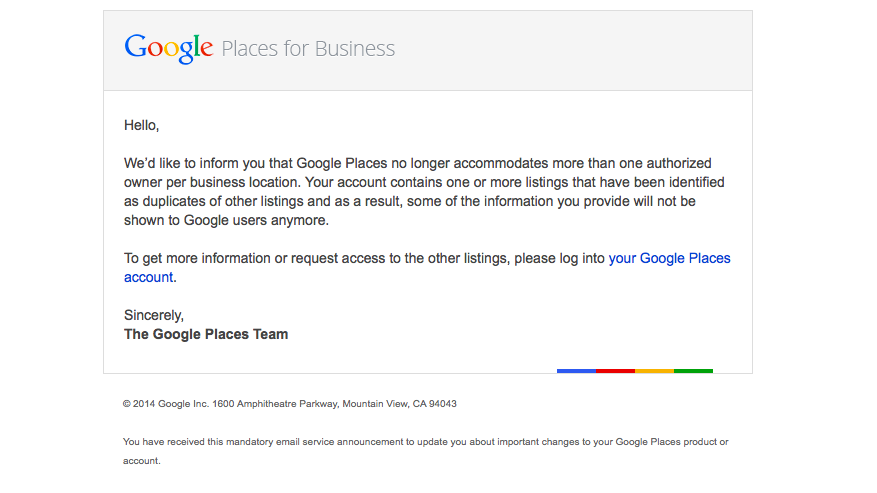
    We’re still not panicking about all of Google’s updates! As many of you already know, Google has been sending out a Google Places for Business email that reads as follows:

    The Message

    Hello,

    We’d like to inform you that Google Places no longer accommodates more than one authorized owner per business location. Your account contains one or more listings that have been identified as duplicates of other listings and as a result, some of the information you provide will not be shown to Google users anymore.

    To get more information or request access to the other listings, please log into your Google Places account.

    Sincerely,
    The Google Places Team

    As this message is kind of vague/ confusing, I called a Google rep to get clarification on exactly what’s going on here. Bear with me as I explain what this means exactly and how it’s affecting business listings.

    The Meaning

    PrintGoogle is finally pulling all listings into the new Places for Business dashboard. In the old dashboard there could be multiple owners of a listing, but in the new dashboard there can only be one.
    As Google performs these batch listing upgrades, the first owner whose account is upgraded gets grandfathered in, so to speak, and they will be the sole owner of the listing through the new dashboard. If someone has already claimed and verified a listing in the new dashboard, however, then no one will experience the “grandfather” situation in the batch upgrades as it is already verified in the new dashboard and has its one owner.

    The good news is that many of us have been force pulling businesses into the new dashboard by claiming them through the Places section of plus.google.com. So the latter situation will have already occurred for most, and we will be the current, sole owner of verified listings in the new dashboard. (If you lose ownership of your listing in the batch update by Google, you can still request it back, it will just take time through a two week request period and contact with Google.)

    We have seen cases, however, where after the batch update by Google there appears to be two listings in the dashboard of accounts who have already pulled their listing into the new dash on their own. Generally one appears as verified(the one we forced pulled into the new dash) and the other as unverified(the one Google pulled over), but they both lead to the same G+ page when you click through the “view this listing” link in each. This is just a weird hiccup, and if you wish to clean up the dashboard by deleting the unverified one, it will not affect your listing. As long as you have a verified listing in the new dashboard, you are the sole owner of said listing.

    Now What?

    Basically, anyone who has ever had a listing in the old dashboard is receiving this generic email, and it is not necessarily an indication as to whether or not the listing is owned/verified in the new dash in your account. So, as long as we’re keeping on top of our business listings’ dashboards, there is no cause for alarm! There’s also the note about duplicate listings in the email. Duplicate listing issues are not something that occur in every account which receives this email. More to come on addressing duplicates in the new dashboard next week! If you’d like to see what others are saying about the email, check out Search Engine Land’s post from earlier this morning or these forums where people have been discussing particular, individual issues encountered (Google Product Forums and Local Search Forum).

    Here’s a screenshot of the actual email for those of you who would like to see it:
    Screen Shot 2014-03-05 at 10.42.19 AM

    If you have any questions or comments about this situation, feel free to comment below! Stay tuned for how to handle duplicate listings!