Category: Industry Insights

  • 10/10 Would Recommend: Leveraging Reviews and Testimonials in the Digital Age

    This post was updated by Anita Shah. It was originally written by a Search Influence alum on January 12th, 2016.

    Customer review comment boxes

    Before you book a room at a hotel or make a reservation at a new restaurant, do you read the online reviews? According to a study conducted by BrightLocal, “86% of consumers read reviews for local businesses (including 95% of people aged 18-34).” But don’t worry, this statistic is not limited just to businesses like restaurants and hotels; these numbers apply to businesses across industries.

    How You Can Use Feedback for Brand Awareness

    Reviews and testimonials have traditionally provided insights into how a business can better serve its customers. With the evolution of digital marketing, the role of reviews and testimonials has also evolved. Feedback about customer experiences is now critical for gaining new clients. With so many consumers turning to the internet before opening their wallets, reviews and testimonials are user-generated content that drives consumer decisions. A review and testimonial webpage showcases real customer experiences and creates a new, powerful platform for interaction between businesses and customers.

    Having a regularly updated review or testimonial page on a website is a great way to communicate the quality of your services and to get the individuality of your business across to potential customers. Authentic reviews throughout social media and review sites like Yelp or BBB will also promote your brand. In the digital age, consumer interaction via these platforms is an affordable and necessary method of gaining new leads.

    How Reviews and Testimonials Impact SEO

    SEO rankings are not just based on what you have to say about your business. As Google continually alters its algorithm for increased transparency, consumer content—or what other people have to say about your company—is impacting SEO.

    In fact, the 2018 Local Search Ranking Factors study by Moz states review signals are the third most important maps pack ranking factor. Some other examples of review signals include the following:

    • Review quantity
    • Review velocity
    • Review diversity

    Keyword-rich onsite content is one of Google’s most important ranking factors when it comes to organic search. Customer reviews are likely packed with those high-yield keywords for which you want to be ranking. Utilizing these reviews on your website allows you to put customers to work for you, so you can secretly shape your SEO structure without lifting a finger.

    The Importance of Authenticity

    Remember that reviews and testimonials are real-life recommendations. There may be some negative ones, and that’s okay. Econsultancy reports that 68% of consumers actually trust online reviews more when they can see a mixture of both positive and negative feedback. As long as the negative reviews make up a minority of the input, a business should expect beneficial outcomes.

    Since a review and testimonial page should be a space that helps reduce the risk of duplicate content, a quality review would not be a simple, bland statement. Comments such as “Great service!” or “Quick response time” may not help with an SEO campaign. These reviews also fail to highlight what makes your business unique, superior, and reliable. An effective review or testimonial does not necessarily have to be lengthy, but it should showcase what makes your business stand apart from the competition. Particularly good reviews can be placed in a spot of prominence on a website or even repurposed as a social media post.

    How to Garner Positive, Effective Reviews

    The idea of positive reviews is great, but what about those inevitable few detractors? To minimize negative input, there are three things to consider when asking for a review. You must ask for the review at the right time, with the right messaging, and through the right platform.

    If that sounds like a lot to think about, then let Search Influence take care of it for you. Our specialists can help put you a click ahead of the competition. Reach out today.

    Images:

    Comment Boxes
    Cartoon Customer

  • Map Spam, Review Stars and Google Winning: Learnings from Local U Advanced 2019

    Map Spam, Review Stars and Google Winning: Learnings from Local U Advanced 2019

    Local U Advanced, in Denver on September 19, 2019, was a great event. It was the biggest Local U Advanced yet and jam-packed with great learnings for the assembled marketers.

    Local U has a few different formats for conferences. There are industry-specific conferences on demand, locally focused SMB conferences under the Local U banner and the flagship, Local U Advanced where the Local U faculty share advanced knowledge with in-house and agency marketers.

    Mike , Joy Hawkins and D'Ron at Local U Advanced 2019 confrence

    I would be remiss if I didn’t start this post with the biggest bombshell of the day:

    Sterling Sky is buying Local U.

    For those that don’t know, Local U is a collaborative started around a decade ago.

    At formation, the ownership group included Mike Blumenthal, David Mihm, Mary Bowling, Ed Reese, Matt McGee, Aaron Weiche, Mike Ramsey, and myself (Will Scott). In the time since, we’ve had a number of guest faculty and a good number of steady contributors, including Joel Headley, Joy Hawkins, Darren Shaw, Cindy Krum, Carrie Hill, and Greg Gifford.

    With personal priorities and conflicts, the full-time faculty (a.k.a. owners) have had varying levels of commitment but have always brought knowledge from their respective professional areas.

    Special recognition is due to Carrie Hill for her more recent role as chief cat herder.

    There was too much knowledge dropped to share it all, but I’ll share a few of the takeaways I found most actionable.

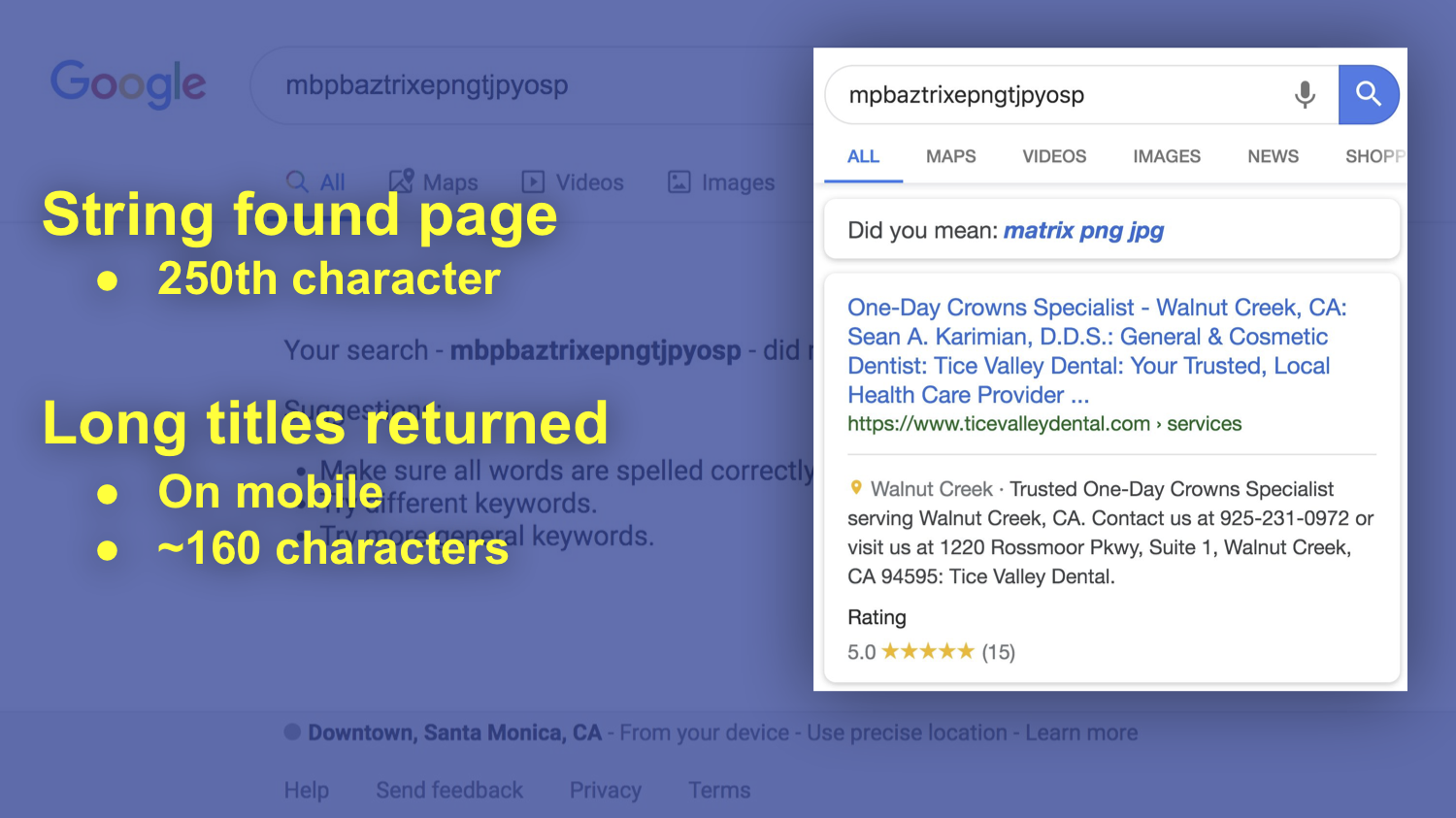
    We Have Been Wrong All This Time about < Title > Length

    Joel Headley, a former Googler, now works with PatientPop, an online marketing platform for physicians. At PatientPop, Joel has access to thousands of websites on which he can test theories about ranking.

    Let’s stipulate that the HTML title tag is one of the most important pieces of text on any web page. Feel free to disagree, but you’re wrong. For the longest time, SEOs have believed that to include any more text than is displayed in Google’s blue links was redundant and potentially harmful to ranking.

    Through his testing, Joel shows unequivocally that this thinking is incorrect.
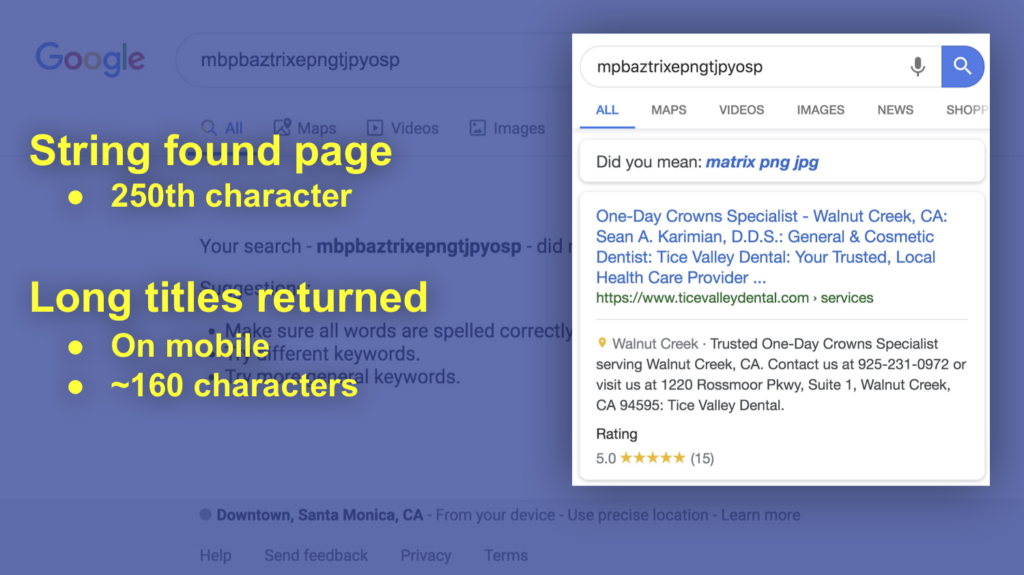
    Google search result showing high character count titles

    In his presentation, Joel demonstrates that it is absolutely possible to appear in searches for terms that are not displayed in Google’s desktop SERP (search engine results page). Additionally, and perhaps more interesting in the coming “mobile first” world, Joel shows us that including more information can be extremely helpful in mobile where more characters from the title tag are shown.

    Why does the mobile thing matter? There is less real estate available on screen, so any additional space you can grab increases your prominence.

    Google Is Eating Yelp’s Lunch (and Dinner and … ) in Review Volume

    Mike’s presentation showed us that our wish is finally coming true. Yelp is becoming irrelevant.
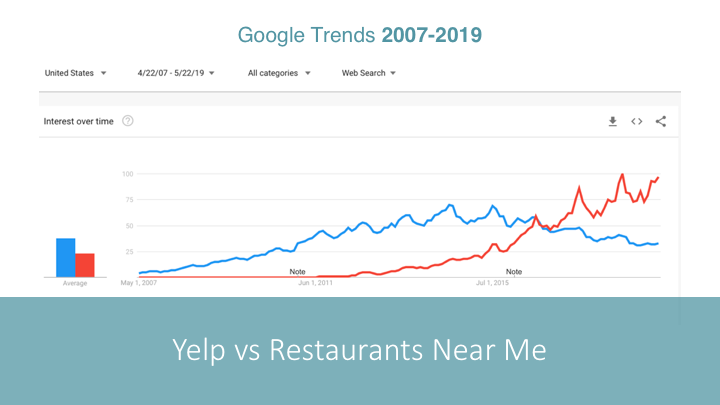
    Google Trends chart showing Yelp vs. Restaurants Near Me

    Given Yelp’s historical reputation with small businesses I’m sure this will be well received. Yes, Google is often too big to care, but at least they’re not perceived as predatory and capricious in their application of their own rules. Mike shares in his presentation a number of interesting facts about reviews then and now:

    • Consumer trust in reviews is leveling off over the last few years.
    • After increasing from 2014-17, the number of people who leave reviews appears to be leveling off as well.
    • Consumers don’t believe in perfection. A 5 star business is less trusted.
    • The magic number appears to be 4 – 4.5 stars for highest trust (and revenue).
    • There are a lot fewer review sites being used today.
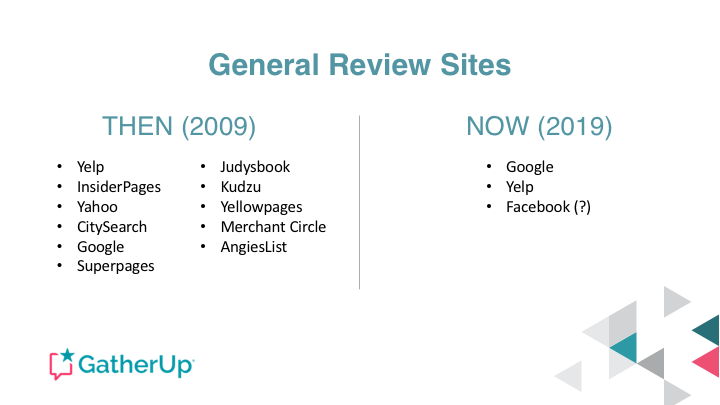
    List of General Review sites 2009 vs. 2019

    Yelp has historically had the greatest depth in restaurants and hospitality. Even in this area of historical strength, it appears Google is not just winning but crushing Yelp.
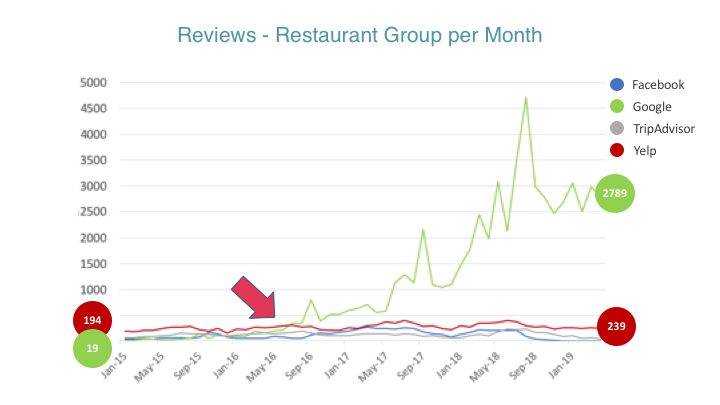
    Growth of Reviews over time chart

    Mike recently wrote about Yelp’s real-world impact on the GatherUp blog.

    You Probably Aren’t Taking Full Advantage of GMB (Google My Business)

    David presents some pretty amazing data. The team at ThriveHive created a GMB grader that provides them with great insight into a variety of businesses and their adoption of GMB services.

    David presents so much data it’s hard to pull highlights, but I’ll try.

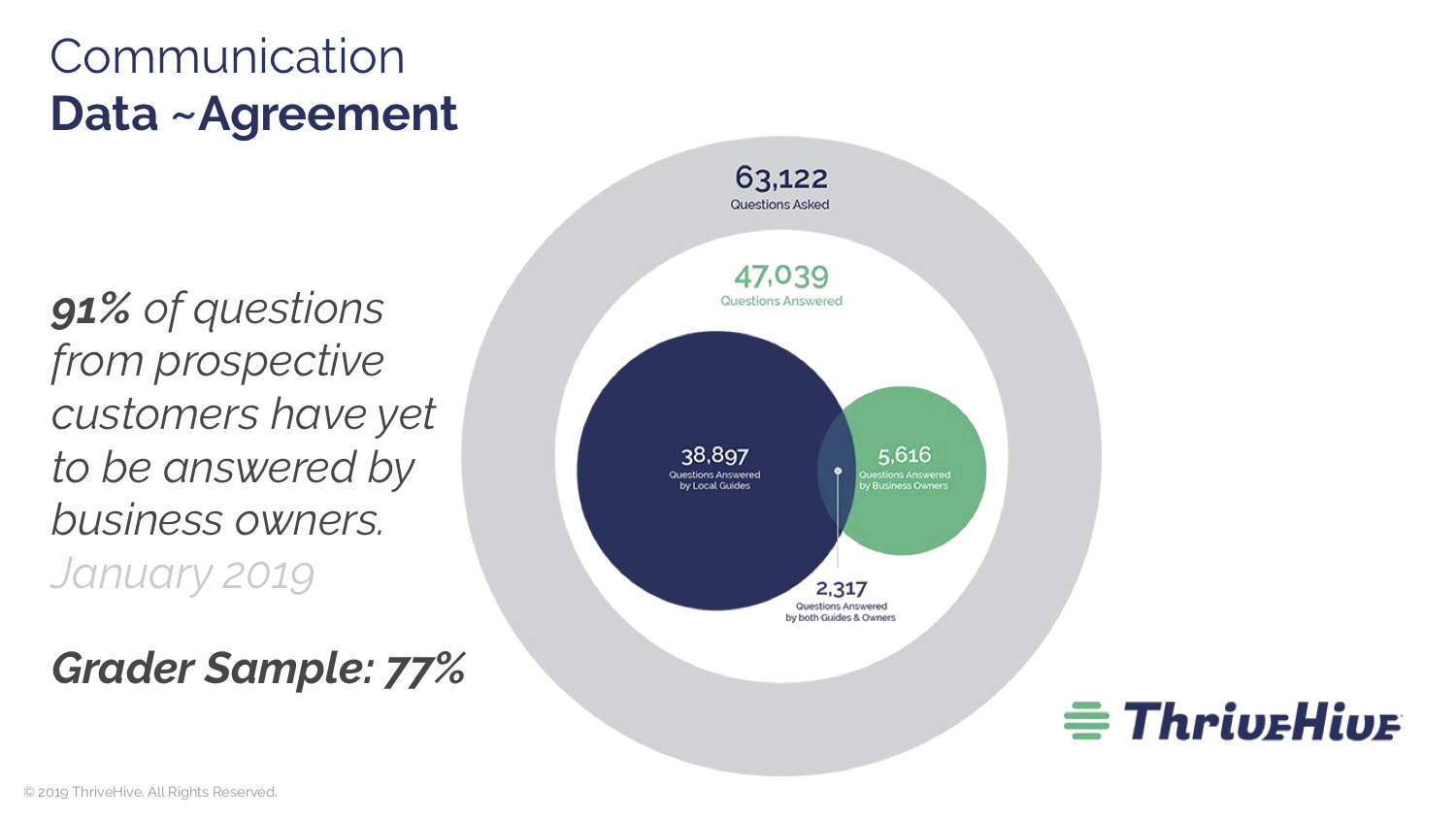
    It appears that Q&A is not getting significant traction with business managers.
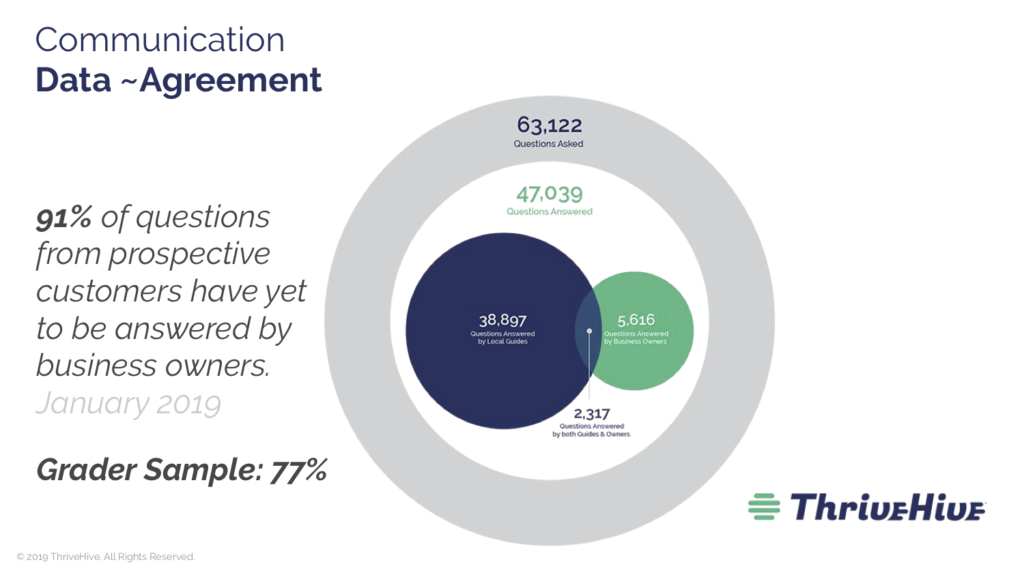
    Chart of percentage of unanswered questions from prospective customers to business owners

    As you can see, 91% of questions are going unanswered. Imagine if the proprietor of a business you were standing in just ignored your questions. It is absolutely critical for businesses to discover and engage with this feature.

    A great strategy that’s often talked about is seeding your Q&A. As a business manager, if you know there are common customer questions, you really ought to take advantage of your knowledge and have some friendly users ask a few of them so that you can provide an answer.

    There is a bunch of junk in Q&A from folks who want to answer but can’t quite add value.

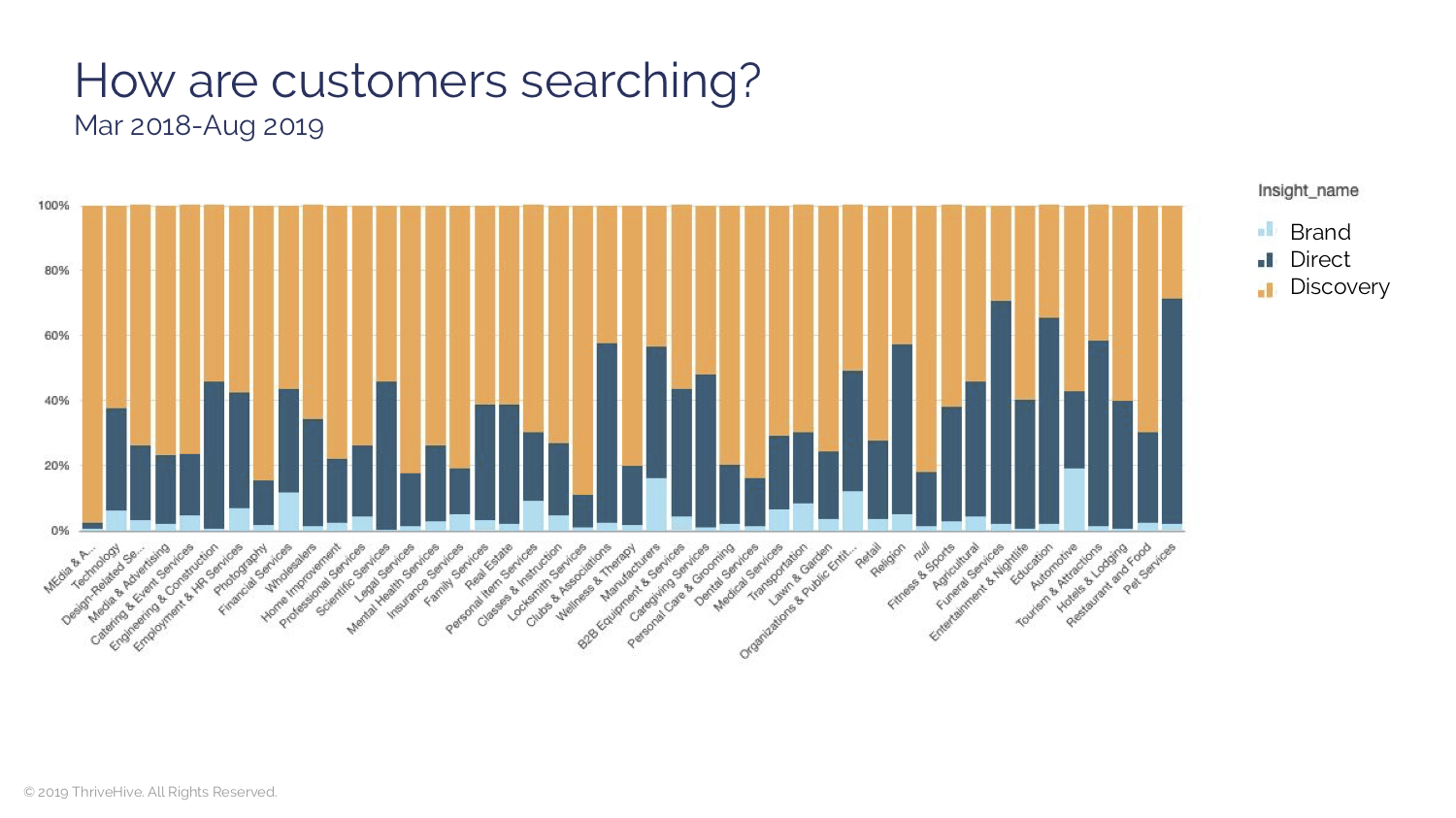
    David’s data also shows us that for many of the searches where GMB data is prominent, the searcher doesn’t necessarily have a business in mind. In other words, GMB is where discover searches are happening.
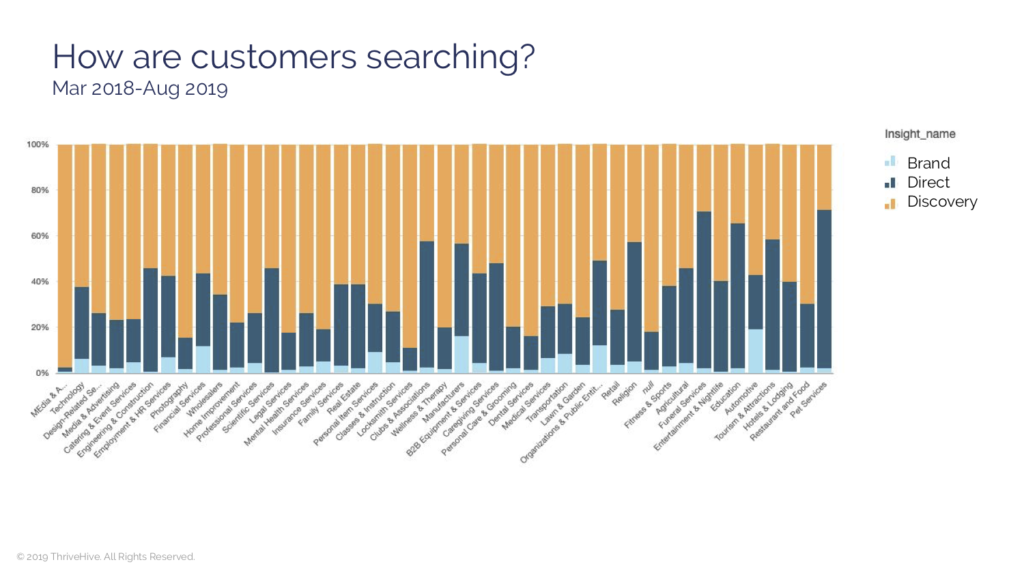
    how are customers searching chart

    And finally, reinforcing the importance of GMB as discovery search, David shares data from Rand Fishkin’s SparkToro which demonstrates the scarily high number of no-click searches. If searches are getting their final answer from the Google SERP it is critical that data reflects your business accurately.
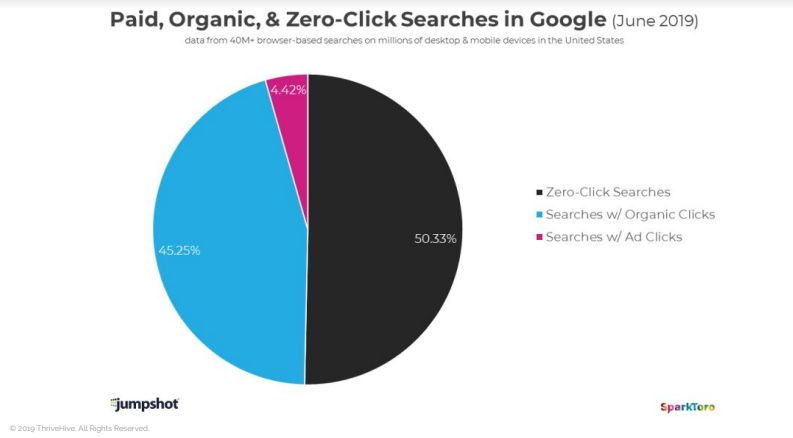
    paid organic zero click google search pie chart

    It’s time, folks. No more hoping it’s just a fad, we’ll need to integrate GMB into our marketing plans.

    Yes, Reviews Schema Is Dead, but It Probably Doesn’t Matter

    Marketers get really excited over small advantages—incremental gains. And historically, the data shows that those schema driven review stars in the SERPs do drive a higher click-through-rate.

    But guess what. They’re gone. Say goodbye. Will they come back? Who knows. If Google determines that users are suffering without them, perhaps. But, given they take attention away from the Google owned features, they’re probably not coming back.

    Mike B. says it best. If you want to have great reviews, don’t suck. Sucking is not a marketing issue. It’s an operations issue.

    Aaron points out that the best reason for making it easier for clients to give you reviews is to hear from them. If you are only asking for reviews to get five stars, you’re doing it wrong.

    Listening is Greater Than Reviews grandma meme

    And, in regard to Schema, they’re the sprinkles on the donut. They’re a perk at best and perhaps even a distraction from what really matters—hearing the voice of your customers.

    Donut with sprinkles and pink icing

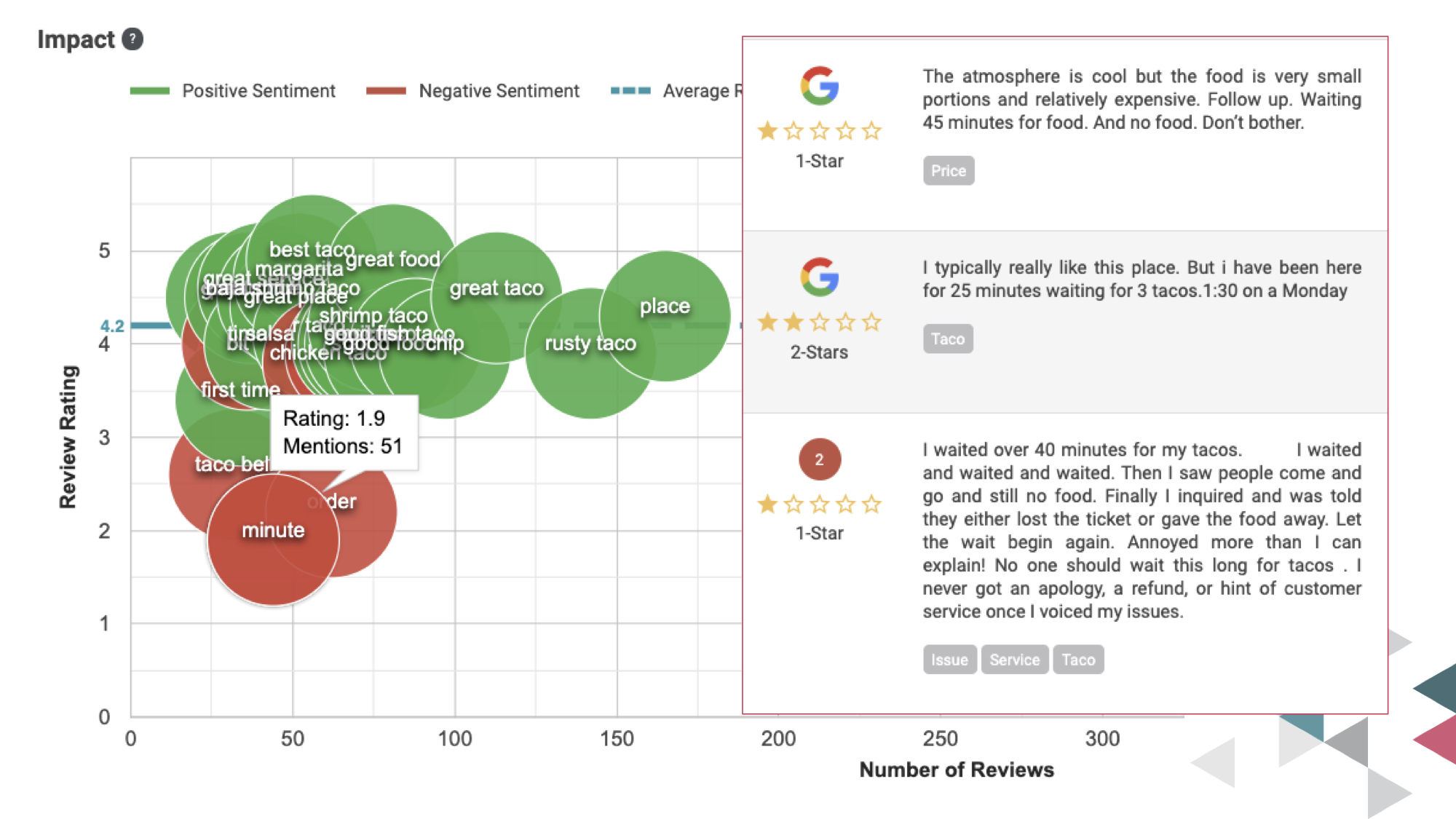
    In line with hearing the voice of your customers, GatherUp has recently added a feature that allows you to see the words used alongside sentiment analysis. So you can view the difference between the words happy and unhappy clients use.

    It’s a feature that’s early in its development, but you can see how it enables a bunch of good stuff. You get to know your customer even better, and you have an opportunity to sculpt the way you talk about your product. What if your team, your marketing, and everything else only used words that were associated with happy customers?
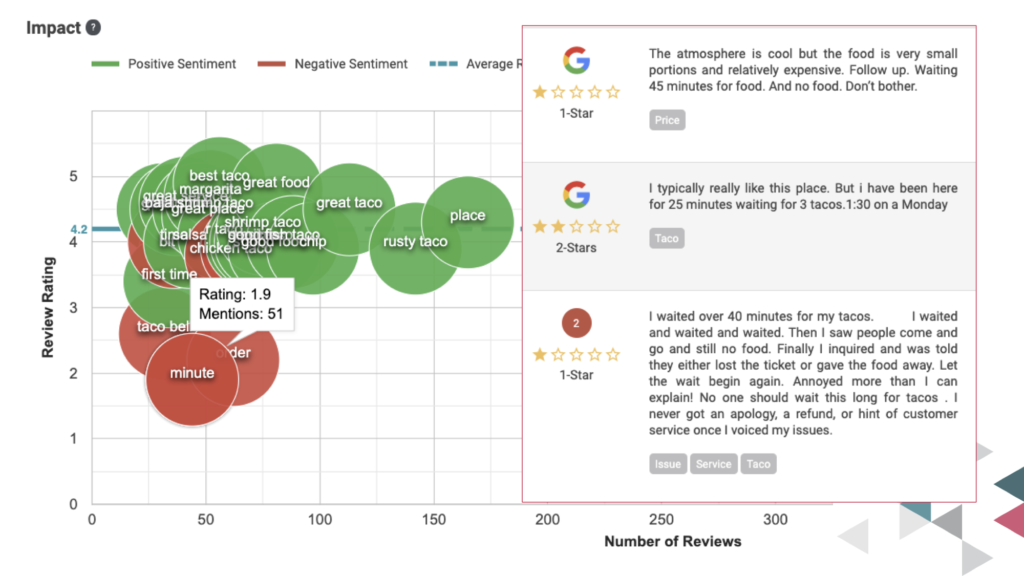
    GatherUp Sentiment Analysis chart

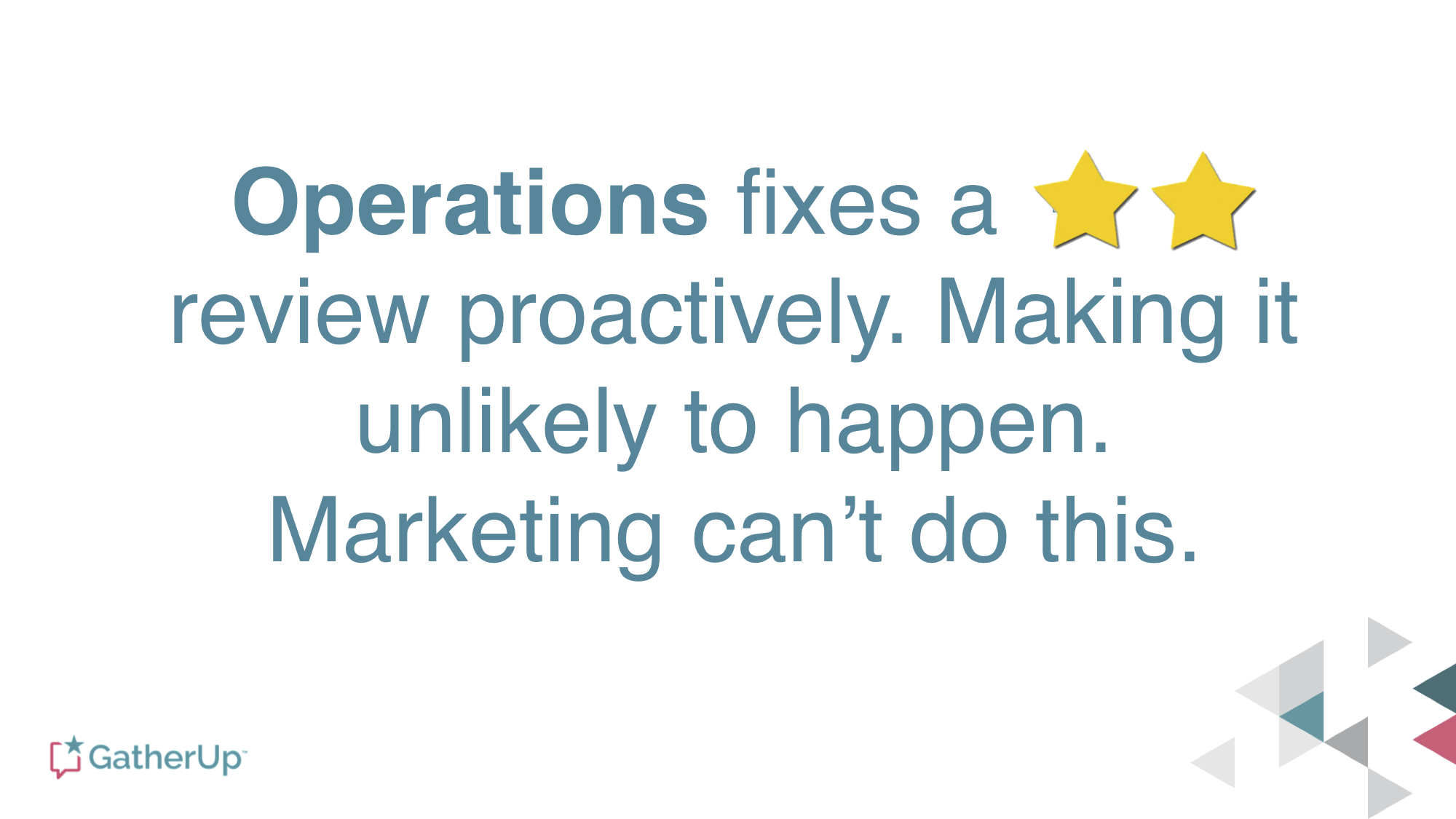
    One of Aaron’s really important points is that reviews don’t fix anything. They give guidance to operations on how to fix things.
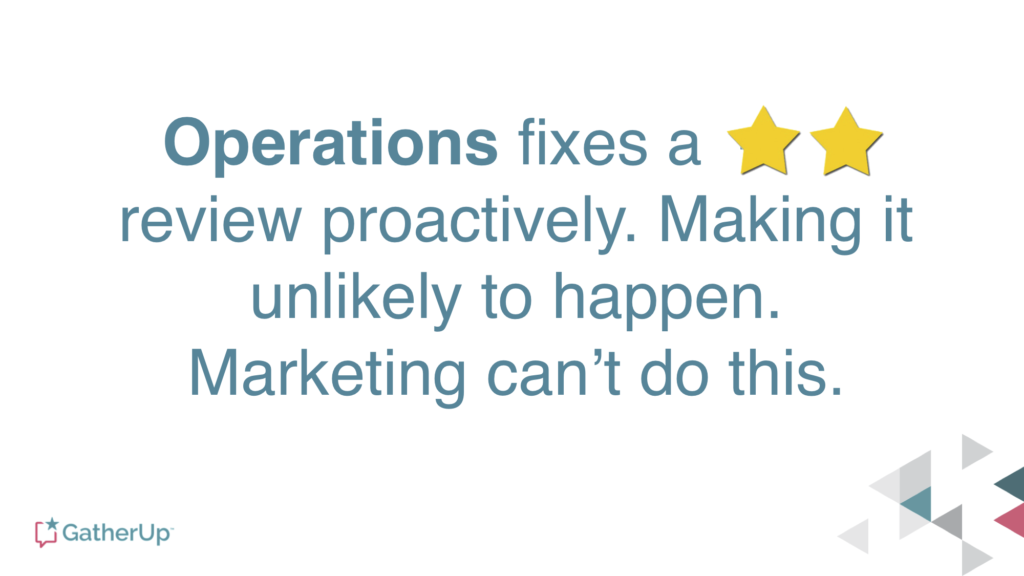
    Operations Fixes Reviews Report quote

    Cleaning Up Maps Spam Will Improve Your Ranking

    I’ve heard Joy talk about this a few times, but what made this session really stick for me was her examples of how to really get rid of spam and junk listings.

    As I’ve often said about duplicate content on the web, it’s not that you’re being penalized, per se, it’s that Google is confused. If you want good rankings, confusing Google is bad. It’s the same with junk and spam listings. Giving Google more data to choose from makes it more likely that the machines will choose the wrong data.

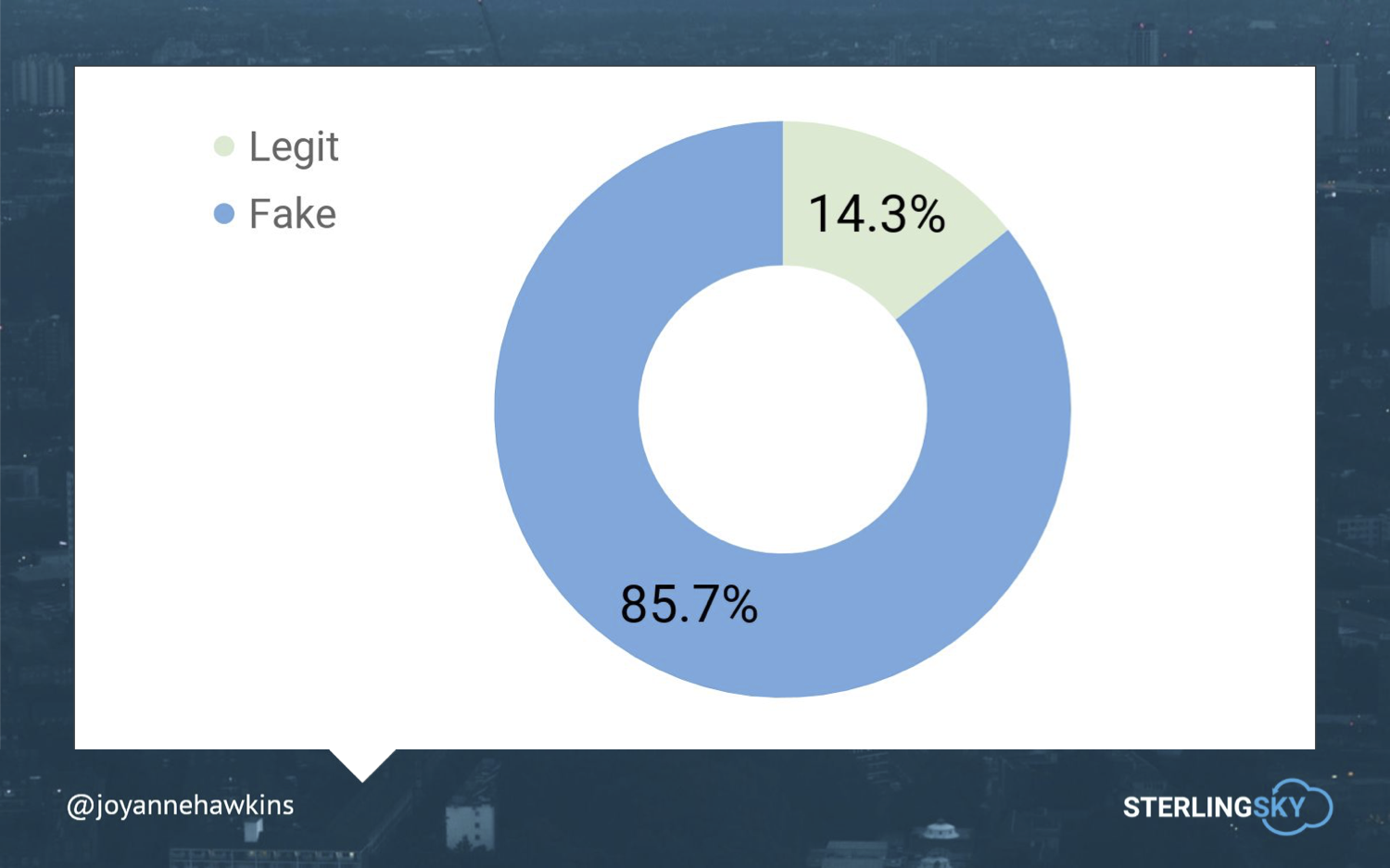
    And, there’s a crapton of “fake” listings in maps.
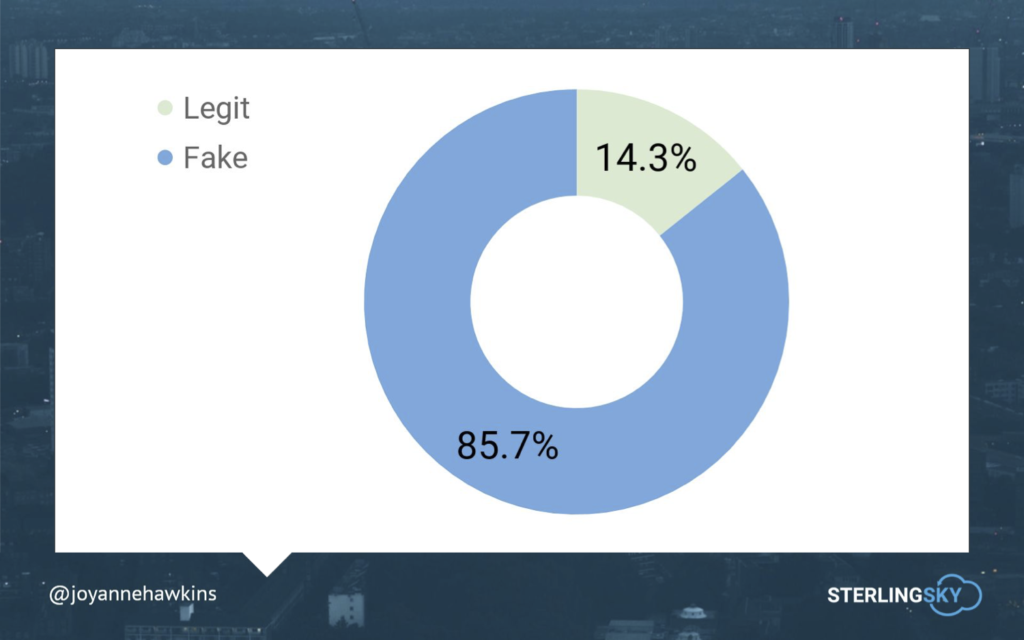
    Chart of fake vs legit listings

    A couple of really useful pieces of knowledge are:

    • Google doesn’t want to show a residential address on maps. If you identify these as residential listings, they’ll be removed.
    • Because of the way Google ingests data, there are lots of unverified listings with no address. Report that these businesses don’t exist, and they’ll be removed.
    • If it’s really spam, like a lead-gen listing, report it, and it will be removed.

    Imagine how much better your listings will look when 8 out of their 10 competitors for rankings are gone.

    Want more info? Check out Joy’s Ultimate Guide to Fighting Spam.

    Looking Forward to Local U, The Next Generation

    Working with this team has been one of the highlights of my career, and I’m a little melancholy thinking about the end of an era. The Local U faculty are among my best friends in Local Search, as well as being great educators and business partners.

    Joy is one of the smartest, hardest working folks in Local Search. She and her team at Sterling Sky are well respected and have a history of doing the right thing.

    I’m excited to see how Local U evolves, and I look forward to my continued involvement, in whatever form it takes.

    Do you have any thoughts on the Local U sale or the ideas presented above? Please share in the comments below.

    Edited 10/7 to correct omission of Mike Ramsey from initial founders list.

  • How to Make Sure Your Website Is Accessible for Everyone

    It’s safe to say that traffic—and gaining as much traffic flow as possible—is the major goal of anyone’s site. Unfortunately, a substantial amount of us forget about a few key demographics that depend on us to make sites, content, and social channels accessible. To put it into perspective, 360 million people have hearing disabilities and another 285 million people have visual impairments.

    Some have physical limitations that make it impossible to use a mouse, while some people are prone to photosensitive seizures.

    So how do we cater to as many people as possible and make our sites places of inclusion?
    The tips I’ve listed below are a great way to start.

    yall belong here gif

    How Can I Make My Content More Accessible?

    Most of these additions are minute things that we take for granted every day. Luckily, they’re also seamless and easy fixes that pack a huge punch of positive impact.

    Dynamic Content

    Dynamic content refers to pages, plug-ins, or other tidbits of your site that can change without forcing the page it’s on to reload. If someone is using a tool to navigate your website better, the tool may not inform the user of changes that happened on that page. This can lead to a confusing experience. Reader tools mostly scan a site as it naturally appears when it first loads, so if you use dynamic content, make sure it’s optimized.

    Audio

    Some visually-impaired users rely on transcribed blogs, articles, or web pages to digest your content through sound. Do some research on software that transcribes your blogs into audio clips to post to your website.

    Video Transcripts and Captions

    Users who are deaf or hard-of-hearing can use video captions to understand what’s going on in videos, and what dialogue is said. In this scrolling era, captions are also a best practice to get people sucked into watching your videos too! Sites like Amara offer free video captioning for small projects, so it’s a great tool to get started with.

    get the transcript obama gif

    Accessible PDFs

    To make a PDF accessible, the original document must have a solid foundation. Some other key attributes of an accessible document include searchable text and security features that allow for screen readers. Adobe goes in-depth on what you can do and how you can do it in this great resource.

    Descriptive Links and Button Text

    For users that need a screen reader to navigate a website, buttons and links that say “Click Here!” don’t give a clue as to why they’re clicking this link or button. Instead, opt for descriptive phrases such as “About The Team” or “Services Offered.” This makes for a clear understanding as to where you are taking a user.

    Color Choices

    A sizeable amount of users have photosensitivity that makes it difficult to view bright colors and may even cause seizures. The rest of us would like to err on the side of caution and preserve our eyesight for as long as possible. This is why choosing your color scheme is very important, as well as making text and backgrounds easy to view and read.

    Resizable Text

    Users with vision impairments benefit from text that can be zoomed in on to make it larger, and therefore easier to read. So make sure your mobile layout is capable of zoom!

    How Can I Make my Website More Accessible?

    Alt-Text

    Alt-Text is a screen reader’s best friend, allowing image descriptions to be read aloud to users with vision impairments. This is one reason why listing image descriptors is essential. I recently found out that you can even add these alt-texts on your Instagram and Facebook photos as well!

    Headers

    HTML headers should be clearly labeled to structure and organize the information, as well as instruct screen readers of that information. This assists not only users with vision impairments but also users with cognitive disabilities who may need well-structured information for extra clarity.

    Tables

    Tables may easily structure a page, but they also impede accessibility software from reading a page correctly. If you have information that needs to be laid out in table form, include an HTML markup that clearly defines headers and data cells so users can find the information.

    How Can I Make my Social Media More Accessible?

    Emojis and Emoticons

    A lot of programs can read emojis, but you will need to put a space in between each one for better readability. As for emoticons, they’re read the way they’re written. So a smiley face like this “:)” will be read as “semicolon parenthesis,” and shouldn’t be used too often.

    hear no evil, speak no evil, see no evil monkey gif

    #CamelCase

    It’s hashtag time! These are a pivotal part of any Instagram campaign, and should be written in what we call Camel Case for easy reading! So when you use hashtags, make sure you #UseCamelCase instead of #regularcase.

    Abbreviations

    The best practice is to refrain from abbreviating names of companies or organizations and instead spelling their name out in its entirety.

    More Resources

    W3C: World Wide Web Consortium on Accessibility
    WCAG: Web Content Accessibility Guidelines Checklist
    Section 508: Government standards on accessibility on the web
    Accessibility of State and Local Government Websites to People with Disabilities
    Color Contrast Checker
    Screen Reader Simulation
    Low Vision Simulation
    Dyslexia Simulation
    Distractibility Simulation

    Now, this is obviously not an exhaustive list of things to do, but it’s a good start in making the internet and your web content more accessible for a lot of users! There’s so much information available, and you can dig a little deeper with the list of resources above. If this is an initiative you’re looking to make a priority, reach out to one of our experts at Search Influence and we can help you make accessibility a reality.

    images:
    Y’all Belong Here Gif

    Obama Gif

    Monkey Gif

  • Are Wix Sites Bad for SEO?

    Wix is one of the most widely used website builders in the world, with over 150 million users as of 2019. Despite being so popular, it’s not exactly a secret that Wix sites have a bad reputation within the digital marketing community. It got so bad that Wix tried to prove a point by holding a contest to see if anyone could outrank them for the keyword “SEO hero.” Spoiler alert: they didn’t win. But does Wix deserve the flack it gets? And is it realistic for people to expect a (mostly) free website builder to outperform more robust platforms?

    Wix site being displayed on laptop

    Why are Wix sites bad for SEO?

    So what’s wrong with Wix sites? In short, there are several technical aspects of SEO that Wix sites don’t mesh with.

    • URL Structure: Free Wix sites have a URL structure of username.wixsite.com/siteaddress. As an address, that’s hard to remember, and it’s not exactly something you’d print on a business card. Wix users can have more control over their domain name by using the paid service, but if Wix’s entire shtick is being a free website builder, then it’s not a good look to charge people for something as basic as a regular-looking domain name.
    • Google Analytics: Google analytics can’t be implemented on free Wix sites because they technically don’t have unique URLs.
    • Site Crawl Issues: Wix sites don’t allow users to edit their robots.txt files, which can make it more difficult for search engine crawlers to index sites with dozens or hundreds of pages.
    • 301 Redirects: Free Wix sites do not support 301 redirects. If you take down a page for any reason, you can’t redirect users to another page, and you will lose the original page’s link equity.
    • Site Speed: Google has started to place more and more emphasis on site speed as a factor for keyword rankings. Wix sites tend to load slowly because they require hundreds of Javascript file requests before rendering a web page. This affects pages’ keywordrankings and offers a worse experience for users.
    • The Templates: Once you’ve selected a template for a Wix site, you’re stuck with it. You can’t pick a new one or make major edits to your current template without losing all of your content.

    It’s Not All Bad

    Despite their issues, Wix sites have some benefits. Users can still use fundamental site optimization tools, like title tags, meta descriptions, blogs, H1s, and H2s. Business owners can customize their site’s design (to an extent) with Wix’s templates. They also support e-commerce in their premium plans. So if you’re trying to establish a client base online, Wix isn’t the worst place to start, especially if you have a decent following on Instagram and just need a website so users can make purchases.

    To be fair, Wix’s premium plans are reasonably affordable. Their prices are comparable to what other providers, like Squarespace, offer. All of this makes Wix a somewhat decent starting point for small businesses and entrepreneurs who can’t, or don’t want to, invest money in a website. Wix doesn’t allow users to implement highly technical aspects of SEO, like editing their robots.txt file, because they don’t expect people who use a free website to know about them. That may be shortsighted, but that’s clearly the assumption they’re making.

    Most new businesses will outgrow a Wix site once they’ve reached a certain level of success. Attracting new customers, and keeping the ones you already have, will get increasingly competitive. At that point, you’ll need to have a well-defined SEO strategy. Moving on to a more robust CMS like WordPress should be a priority.

    If you have a Wix site and aren’t satisfied with its performance, Search Influence can help. Since 2006, we’ve provided hundreds of clients with digital marketing services like SEO, paid search campaigns, and more. Our team has handled a variety of site migrations, and we can help you build a new website. To learn more about what we can do for you, contact us at (504) 208-3900.

    Images
    Wix on Laptop

  • How Will Safari’s ITP Cookie Policy Updates Impact Google Analytics Tracking?

    To browse the Internet in 2019 is to learn how to manage that nagging sense that someone is always watching. You casually look up the ingredients for a traditional eggplant curry while considering lunch options, and weeks later every website you visit is still force-feeding you offers on wholesale quantities of turmeric root. And of course, if you play it right, you can visit a few sites for things you already know you’re going to buy, then wait for the discount offer to populate somewhere else a few days later for a quality bargain.

    Well, if you use Safari as your web browser of choice, that last little vaguely dystopian life hack may not serve you particularly well anymore. This is because Apple decided a couple years ago that maybe it isn’t actually all that great for online advertisers to be able to follow you everywhere you go on the internet for extended periods of time, building an intricate consumer profile so that they can shoehorn you promotions for things they know you’ll be powerless not to click on and buy. Specifically, Apple decided to crack down on how Safari manages its users’ cookies, which are the little data containers you have to click an annoying popup to “allow” on the vast majority of websites you visit now.

    Pacman cookie

    In 2017, Safari debuted its Intelligent Tracking Prevention protocol (ITP), which was devised to add more rigid restrictions on the degree to which outside parties could track Safari users across the web without those users’ knowledge or consent. Since then, Safari has steadily ramped up its war on trackers as the less scrupulous among advertisers, using already questionable tracking techniques, began developing increasingly shady and manipulative workarounds to continue soaking up that sweet, sweet consumer data. This has all culminated in the release of ITP 2.2 in May of 2019, which now very aggressively and severely limits the kind of tracking options available not only to the more ignominious and exploitative of advertisers, but now also to the well-intentioned businesses and marketers simply trying to quantify and optimize the user experience on the websites they manage. As you might imagine, this has already led to a good bit of wailing and gnashing of teeth in nobler digital marketing circles, as the bad apples have effectively ruined data access and availability for the entire bunch.

    But let’s back up a bit. We need to understand a bit about the technical details here before we can understand the ramifications of what Apple/Safari has unleashed upon the marketing world.

    What Are Cookies Exactly?

    Cookies are ultimately just little chunks of data. When you visit most websites, the site will stash some set of cookie(s) in your web browser. As you continue to use your browser, the cookie essentially reports back to its source about what you’re doing in your browser.

    That already sounds a bit scary, given what we know about privacy issues in 2019, but the general use cases that led to the nearly universal use of cookies by websites weren’t really invasive or villainous in intent. Cookies keep track of whether you are logged into a website or not so that no one but you can order the 20-pound box of gummy bears you added to your Amazon cart in a moment of weakness. Likewise, cookies are the mechanism by which Amazon remembers that you added this—and other unspeakable things to your cart—so that you’re confronted with them in the unforgiving light of day the next time you visit their site.

    Now, just as a website can use cookies to remember that you logged in and added items to your cart, it can use them to see what else you’re doing on their site. One of the most widely used tools for webmasters and digital marketers is Google Analytics, which is a cookie-driven platform that offers a wealth of invaluable data about how users interact with a website. Importantly, Google Analytics does not provide specific identifying information about who a user is; it simply records the pathways that anonymous users employ to arrive at a website and how they engage with it once they are there. This information is then reported to the administrators of a site’s Google Analytics account, allowing those involved in maintaining and developing a site to assess what is or is not working in terms of marketing strategy and user experience. And at this point in the evolution of the internet, if you or someone in your employ isn’t using some on-site analytics platform to assess user engagement on your website, you probably don’t care enough about your online presence.

    Different Types of Cookies

    The cookies described in the previous section are referred to as “first-party cookies.” They are classified as such because they are only added by a site that a user has directly visited, and the information collected by the cookie only reports to that site (or an admin thereof) about users’ activity on that site. So while Google Analytics, for instance, is an external platform not built into a website, the only way for it to collect its data is for a site developer to add tracking code directly onto the site to establish the tracking cookie that users will only receive when visiting the site directly. And data is only collected for the Analytics account-holder when the user is on a site with that account’s tracking code.

    Meanwhile, out in the spooky online wilderness, there are more exploitative advertisers and marketers who employ what are known as “third-party cookies.” Third-party cookies are still set by a site but are not directly tied to that site. For example, a website serving ads from nefariousadvulture.spam will essentially allow nefariousadvulture.spam to set its own cookie. Since the cookie is tied to nefariousadvulture.spam and not the site the user actually visited, that cookie continues to collect data from the cookied user as he or she moves across any other website serving ads from nefariousadvulture.spam. That allows nefariousadvulture.spam to form fuller profiles of users based on their activity across multiple websites, any of which may be able to transmit actual identifying information to the vulture kings, depending on the nature of the sites being tracked.

    Ugh, that was all SO boring. Why did you make me read all that?

    I know, and I’m sorry. But a general understanding of cookies and their different types is essential to grasping the significance of what Safari and other browsers are starting to do in the name of user privacy. Here’s a cool dunk to break up the dull tech speak a bit. You deserve it.

    Giannis Antetokounmpo dunking gif off a great assist

    So What Does All That Have To Do With Safari’s ITP Protocol?

    Initially, with ITP version 1.0, Safari set out to limit the use of third-party cookies. ITP set a 24-hour window for third-party cookies to actively collect data if the user didn’t directly interact with the third-party website that set the cookie. So drawing from the previous third-party cookie example above, if a user directly visited nefariousadvulture.spam within 24 hours of receiving the third-party cookie, it could stay active and continue tracking. If not, the cookie effectively expired after 24 hours. Since the whole premise of this kind of advertising and tracking meant that users were pretty much never going to directly visit the sites serving the ads, this marked a doom and gloom moment for the nefarious ad vulture world. Meanwhile, users of first-party cookies remained generally unaffected. To this point, the general standard was that first-party cookies could remain in place for 30 days before being purged unless a user actively removed them before that point.

    But of course, the nefarious ad vultures weren’t just going to give up on a hitherto successful approach to marketing just because one browser got cranky about it. Many advertisers just rolled up their sleeves and figured out how to have partners or clients set their third-party cookies as if they were first-party cookies, which then proceeded to do exactly what they had done all along in terms of tracking users across numerous websites to build consumer profiles. This, as it turns out, was the tipping point where Safari started moving more in the direction of burning the entire house down to kill a spider on the window sill. The updates and increased aggression toward cookies have been steadily and quickly ramping up ever since.

    With ITP version 2.0 in 2018, Safari essentially blocked the use of third-party cookies altogether. Shortly thereafter in early 2019, to counteract and preempt the inevitably increased abuse of first-party cookies by nefarious vulture types, ITP version 2.1 reduced the 30-day gestation period for first-party cookies to 7 days. While webmasters and marketers were still reeling and trying to piece together the impact this dramatic change had on their analytics, Safari rolled out ITP version 2.2 in May of 2019 reducing the 7-day first-party cookie expiration to 24 hours. Basically, rather than play whack-a-mole with devious and irresponsible cookie manipulators, Safari just poisoned all the moles along with the grass, dirt, and any other less whack-worthy beings that happened to share their habitat.

    What Does This Mean For Webmasters and Marketers?

    It means that everyone has to recalibrate a bit with regard to web analytics. As mentioned earlier, Google Analytics is one of the most widely used platforms available to study website user statistics and behavior. And first-party cookies drive it. Until this year, Google Analytics would be able to track user activity on a particular site over 30 days. Now, for Safari users only, it only gets 24 hours.

    As an example, imagine that you have an eCommerce business selling novelty hot dog cannons for use at sporting events and other projectile-garbage-food-friendly occasions. Anonymous internet user we’ll call Yuzer reaches that familiar point in life where he or she definitely needs a novelty hot dog cannon (it happens to the best of us). So Yuzer opens up Safari and searches google for “novelty hot dog cannon.” Because your website is well optimized with clearly targeted content, Yuzer quickly finds and clicks on your website from atop the search results. With such well-organized content and such user-friendly layout, Yuzer pretty quickly settles on the fact that this is the place to buy the hot dog cannon of his or her dreams. But this is obviously a big decision, and Yuzer wants to talk over all the cannon options available with his or her significant other before just diving into the hot dog water. So Yuzer bookmarks the page, then leaves to scroll weepily through Craigslist Missed Connections, look up relish recipes, and ultimately binge-watch old Columbo episodes until falling asleep.

    To this point, Google Analytics would have reported to you that some anonymous user arrived at your novelty hot dog cannon website via organic search, clicked around a bit to check the specs on various cannon models, then left. You don’t know who the user is, what they like in their relish or how many seasons deep they’ve gotten in Columbo or any other series.

    3 days later, Yuzer and his or her partner excitedly plop down together in front of Yuzer’s laptop and return to your website and finally buy the hot dog cannon they know will be the first page in an important new chapter in their lives. They pull up the page Yuzer had bookmarked, complete a purchase, high five, and go out to dinner to celebrate. Everything is great for Yuzer and the enthused dog-loving revelers on the receiving end of Yuzer’s new cannon. But things are now a bit more complicated for you.

    Until May of 2019, regardless of browser, you would have seen an accurate representation of a path to purchase. This anonymous user reached your site via Google search, clicked around, left, then came back 3 days later and bought a mid-tier hot dog cannon (a solid starter cannon to be sure, but not exactly all-star material). But since Yuzer uses Safari, now you see that one anonymous user reached your site via Google search, clicked around a bit, and left. Then 3 days later another new and different anonymous user visited your site directly by typing the URL into his or her browser window and immediately bought a product. This isn’t what actually happened, but that’s how it is going to show up in Google Analytics reports.Crumbled up fortune cookie

    Tying This All Up, Finally

    To this point, Safari is the only major browser enacting these kinds of draconian restrictions on first-party cookies. According to StatCounter, Google Chrome is still the most widely used browser across all devices and platforms by a landslide. But Safari is a very comfortable, if somewhat distant second. And on tablets, Safari is the clear king of the realm, due to the dominance of the iPad within that device market and Apple’s propensity to bully users into Safari at any available opportunity. And while Safari’s move with ITP has already pressured Chrome, Firefox and (to some minor extent) Edge to roll out some of their own privacy and cookie-centered enhancements, they are all far less aggressive toward first-party cookies and ultimately optional, not integrally built into the software.

    So the impact of ITP 2.2 may not be immediately earth-shattering in terms of more generalized website statistics, but it’s going to matter on levels no one can fully understand just yet. The problem with data analysis of this sort is that—even if only a relatively small percentage of it is skewed—if it’s skewed in significant ways, you can very easily learn the wrong things from it. If Safari’s cookie restrictions start making it look like you’re suddenly awash in new unique tablet users, when you’re in fact just getting tons of return visits from loyal fans with iPads, you can very easily shift your focus in site enhancements or marketing strategy in the wrong direction. And of course, the whole goal of analytics-based tracking is trying to ensure that you’re focused on the right things for the right reasons.

    If there is any consolation in all this, however, it’s that everyone is dealing with the same issue together. Google Analytics and other cookie-driven web platforms will adjust, and many bright minds are already devising alternate methods for preserving more informative portions of responsibly collected user data. And on one hand, the cynic in me personally thinks that a lot of this may come down to sheer corporate sabotage on Apple’s part, since the fact that ITP 2.1 and 2.2 cut directly at the effectiveness of key Google and Facebook tracking platforms in major ways probably isn’t accidental. But if it forces major platforms into finding new ways to track users and websites that are less easily exploited by the nefarious vultures of the world, then maybe we all end up winning in the end.

    If you’re concerned about the changes to digital advertising, the experts at Search Influence are here to help. We create regulation-compliant online ads and track their performance as well. Start a conversation today to learn more about how we can help your business grow.

    Images

    Fortune Cookie

    Giannis Dunking

    Pacman Cookie

  • Why You Should Reply to Your Reviews—Especially The Negative Ones

    Whether we’re using social media to keep up with friends, watching videos on YouTube, or even searching the Web to find a doctor, most of our daily activities involve our phones and other devices with access to the internet. Many of us will turn to reviews, along with recommendations from our friends, to find restaurants to eat dinner at or even when choosing an apartment community to live in. Having positive reviews on your online listings as a business owner is important, but responding to them is even more important. Especially when it comes to negative reviews.

    Why Are Customer Reviews Important?

    Your reviews are a representation of your business. They usually say a lot about the company long before you’re able to speak for it yourself and tell your brand’s story. Potential customers or clients will use reviews to gauge if your products or services are worth the money. According to Vendasta:

    • 92% of consumers will read reviews to determine the quality of a local business
    • 72% of consumers say that positive reviews make them trust local businesses more
    • 80% of customers say they trust an online review or recommendation just as much as a personal recommendation from a friend

    Having enough positive reviews to prove your value is important for garnering new customers. Negative reviews are also important and have an impact on your brand perception. About 86% of people will hesitate to purchase from a business that has negative reviews. 

    The good news is, outside of providing exemplary products and services to your customers, there are ways to reach out before a customer leaves a negative review and thereby get more positive reviews over time. For our client, K. Mathew Warnock, we were able to get him 100 positive reviews in about five months.

    Why Is Responding to Reviews Important?

    You should absolutely be responding to every review you receive. Not only is there the benefit of building relationships with your customer base and having social proof for future customers, but there is also an SEO benefit as well. Responding to reviews shows prospective clients, as well as search engines, that you are committed to satisfying customers and maintaining an active presence on your listings. Google has confirmed via one of the Google My Business Help pages that responding to reviews shows them you value your customers and that high-quality, positive results can improve your business’s visibility in the Search Engine Results page.

    Experts in our field have long believed that in terms of local SEO, review signals were an important factor in Google’s ranking factors. In fact, in 2018 as a part of Moz’s yearly Local Search Ranking Factors, they listed Review Signals as 15.44% of the algorithm when your business is shown in the Maps pack, following closely behind having a well-optimized Google My Business profile with accurate categories, keywords, and being in proximity to your potential customers.

    Person using their smartphone to access local business information

    Google isn’t the only place your customers should be leaving reviews. Depending on your industry, you’ll also want them to leave reviews on other local directories like Yelp, social sites like Facebook, and niche sites like HealthGrades or Home Advisor. 

    How Do I Respond to My Reviews?

    There are some general rules of thumb for responding to reviews that should be followed, regardless of whether they’re good or bad:

    • Respond On Time
      • Some things, like negative reviews, may require you talk offline with your team to craft a response, and that’s okay. But you don’t want to leave reviews sitting for weeks without some sort of response.
    • Customize Your Response
      • Having templates or drafts of responses you use to respond to customers can save administrative time, but you don’t want your customers to feel like you’re giving them a cookie-cutter response.
    • Always Thank Your Customer
      • Good or bad, the reviewer did business with your company and took time out of their day to leave you a review. Reassure them that you are dedicated to providing the best customer service experience possible.

    How to Respond to Negative Reviews

    Bad reviews happen. Don’t fret and don’t overreact. There are some simple ways to make responding to negative reviews as breezy as possible. 

    • Apologize
      • This can be a hard one, but do it and keep it professional and not defensive. Apologize if the reviewer has expressed dissatisfaction with your product or service. Sympathize with them and show them that you can understand their frustration or disappointment. Don’t blame the customer or shift blame on to your staff. Accusing the customer of lying or exaggerating can be offensive as well. 
    • Connect
      • Offer the negative reviewer contact information, either yours as the business owner or a manager’s, so that you can ask more questions about their dissatisfaction. Keep it short and sweet. 
    • Offer Reassurance
      • If you know the customer and what their issue was with your product or service, offer a resolution like a refund or free products. If bad service was the issue, let the customer know that you are taking the necessary steps to ensure if they’d like to visit or purchase from you again, their experience will have improved.

    5 star review custom graphic for Search Influence blog

    How to Respond to Positive Reviews

    Responding to positive reviews is a bit easier, right? You’ve gotten a glowing review from a recent customer. They can’t help but gush about your service and the attention they received. They love your staff. They love your business. How do you respond to that?

    • Show Acknowledgement & Gratitude
      • Don’t forget to be polite and acknowledge the reviewer by their first name; this adds a bit of personalization over generic greetings. Thank them for patronizing your business. In the case of both positive and negative reviews, gratitude goes a long way.
    • Use Keywords 
      • Using keywords, your business name, and location specific information in your response can help improve the visibility of the positive review.
    • Market 
      • Invite the customer back to your business. A simple “we can’t wait to see you again” can work. You can also let them know about other products and services you offer. If a customer came to your restaurant and enjoyed your espresso, for example, maybe entice them to try it next time with your favorite pastry offering. 

    Coffee being served

    Do You Need Help Managing Your Online Reputation?

    Search Influence can help your local SEO efforts. We’re a digital marketing agency in the Gulf South dedicated to helping our clients optimize their potential through dynamic marketing strategies. Request your free marketing analysis to learn about how we can help drive qualified leads to your business.

    Images

    Smartphone

    Cappuccino

    5 stars

  • How Using Psychographics Can Shed Light on Your Buyer Personas

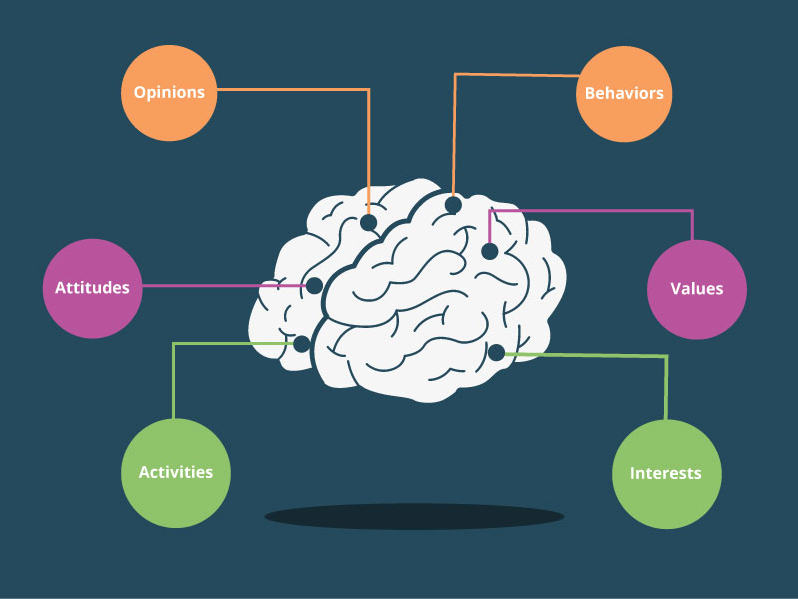
    Custom graphic displaying psychographic elements

    Looking at your buyer without understanding them as a whole is like ordering a hamburger without the toppings. Nobody wants a dry hamburger without cheese, bacon, tomatoes, pickles, or at least some sort of condiment. So why do some businesses only care that a buyer bought their product and not want to know why? This is where psychographics come into play. These provide insight on customers and why they do the things that they do.

    How Do Psychographics Complete A Buyer Persona?

    Psychographics are the toppings and the main flavor of your burger. If we are looking at it in terms of your customers, psychographics are the personality components that make your customers who they are as people.

    Psychographics help you dive further into a person’s feelings, thoughts, decisions, opinions, and attitudes. The whole idea behind psychographics is relating to your customers on a deeper level. It provides an opportunity for a business owner to truly understand who their customers are, what they like to do, who they’re friends with, what TV shows they love, or even what they dislike.

    Think about your closest friend or significant other and why you love and trust them. Is it because of what they do for you or is it because of how they make you feel? That feeling can be related to the psychographics of your friend or significant other. It shows you the heart and soul behind the person who is consistently doing nice things for you.

    Now let’s relate that to your business.

    Who do you think is more beneficial to your business: a one-time customer or a repeat customer? Obviously, repeat customers are more valuable because they drive your ROI and tell other people about your business. Their positive reviews help build a positive reputation that encourages other people to give you a try. But if you hadn’t truly connected with that first customer, they wouldn’t have vouched for you.

    As business owners, we need to understand that it’s more than just what a client can do for you, it’s about who they are as a person. Why do they trust you, come back to your business, and share their exciting news with you? It’s because you’ve built trust and spent time understanding who they are as a real person. You took the time to see them not just as a price tag but as a genuine hardworking and loyal person.

    You bought into who they are and in return, they bought into your business.

    How Do You Obtain Psychographic Information?

    It’s time to sit down and really dive deep into what is important to you about your customers.

    This is where you can gather your team and brainstorm. Maybe sit around and talk about some of their favorite customers. Have your team provide a memorable story, what they love about that customer, describe their relationship to the customer, and give personality details about who they are.

    After you’ve spent the afternoon bonding as a team and connecting over how great your customers are, it’s time to focus your efforts on making connections with future customers.

    So how do we do this?

    Simple, those customers that were spoken highly of can provide insight better than anyone else. Utilize this. Hold interviews with your customers where you can ask them all about how they feel about your company, what they like and dislike, and what keeps them coming back.

    Next, you can send out surveys to other customers via email asking them similar questions. As a business owner, you can go a step further by connecting with them on their social media accounts.

    Social media can be a useful resource for learning more about your customers. You can see which types of music they listen to, where they spend their free time, what their family life is like, and even their feelings on a plethora of topics.

    From here, you can enter all of this information into your own Customer Relationship Management (CRM) system. This will come in handy when you want to create look-a-likes for your Facebook Remarketing or Google Display Remarketing advertisements. Not only that, but it can provide concrete data that can pull similar interests that connect your customers to one another.

    So remember, a burger will always taste best fully dressed, and a buyer persona is better with a psychographic to support it. Not sure where to start creating your psychographics? From strategy to social media management, Search Influence is here to help. Get started by contacting us today.

    Images

    Tablet Payment

  • Is Your Website Running Slowly? Image Optimization Could Help Speed Things Up

    Image optimization is a process of manipulating an image’s size, dimensions, and format to reduce it to the smallest possible size while still ensuring the highest possible quality is delivered to the browser. It sounds like a dark art, I know, but it really isn’t, and if your business relies on being able to show your products or the results of your services, image optimization must be a regular part of your ongoing website maintenance. Every single time you upload that new photograph highlighting your most prestigious project, image optimization should be considered and acted upon. It not only helps keep your website fast for your visitors, it also helps with your SEO!

    Mobile loading gif

    So My Website Is a Little Slow, What’s the Problem?

    In today’s world of instant gratification, website speed is extremely important. If your website takes longer than 2 seconds to load, you are losing potential customers. Websites that load within 2 seconds see an average of a 9.6% bounce rate. That figure jumps to 32.3% for websites that take 7 seconds to load, and it only gets worse from there. This ultimately can hurt your brand as people come to know your website as “too slow to be worth the time.”

    As more and more website surfers are using their mobile devices instead of their desktop devices, page speed has only become more and more important. Google announced back in January of 2018 site page speed would become a ranking factor for mobile searches—and they meant it, forcing SEO experts to respond by finding ways to speed up their clients’ websites. And it worked! As Search Engine Land noted, Google’s data shows this speed enforcement resulted in a 15-20% increase in page load times amongst the slowest sites on the web.

    How do images come into play? You may have noticed that a site with a large gallery takes a long time to load. That’s because large images can add weight to your website, slowing downloading time.

    I See Site Speed Is Important, but How Do I Optimize My Images?

    To address image weight, you can use image processing software such as Photoshop, (or the free alternative GIMP) to set the height and width to be exactly what you need it to be. Set your dpi (dots per inch) to 72, considered the web standard. You can also use this software to change the file format and compress the image even further, but be careful not to compress the image so much you lose quality. Remember, the goal is to have the highest quality image with the smallest weight. The most common image formats used on the web are:

    • PNG—good for screenshots and images with graphics or text
    • JPEG—best for photographs
    • GIF—if you really need an animated element on your site

    If you use a content management system, there are likely add-ons to the CMS that can help automate this for you. For WordPress websites, I recommend the reSmush.it plugin. You can dial in your optimization level and configure it to automatically optimize the image when you upload it. The plugin is absolutely free with the only restriction being the original images must already be below 5 MB.

    Woman working at her computer with mobile device and tablet

    Image Weight Isn’t the Only Important Image Optimization

    While reducing your image weight is an important practice to keep your website running fast and avoid negative rankings from Google, there is more you must do to truly be able to say your website images are optimized and SEO friendly. You should name your images descriptively; the name should indicate what you see in the image. In addition, make full use of the ALT and TITLE tags offered in HTML to further describe in more detail the key things that are visible in the photo. Google uses the name, ALT, and TITLE tags to help them return the best results possible in their image search. You can’t go wrong if you are following the image best practices Google has laid out, and please, please, only use images that are actually relevant to your website.

    Image search can be a major source of organic traffic to your website and you should be taking full advantage of it. Keeping your images and decorative elements of your website with an optimized quality-to-weight ratio, as well as using the other best practices mentioned here, will help ensure you are using the image search results to drive organic traffic at its full potential.

    If you’ve noticed that your website runs slowly, or you’re trying to increase your SEO rankings, the experts at Search Influence can help make your site more accessible to both Google and site visitors. Contact one of our digital marketing specialists today to start taking your site to the next level.

    Images

    Loading

  • Top 10 Truly FREE Tools for Nonprofits + Even More Resources

    Nonprofit organizations are what I like to call “ballin’ on a budget,” which means strategically selecting resources that won’t break the bank. But where do you start?

    Here are our top 10 picks for the best free resources for nonprofits you should utilize to get your organization… organized.

    Make this world better with non-profit marketing tips from Search Influence

    [wp_express_checkout product_id=”24730″]

    Free Tools for Nonprofits

    1. G-Suite

    The mecca of high-powered email and productivity tools is free for nonprofits through its basic plan, and it includes the usage of your domain name for your team’s email addresses. Beyond your domain, you have access to G-Docs, Calendar, Drive, and so much more.

    2. Canva PRO

    Photoshop out of your skill range? No worries, Canva is here to make your social graphics POP! With tons of templates available, you’ll be able to create anything from a quick Facebook post to an entire presentation. Features include saving preset branding color palettes as well as premium fonts and graphics, with the ability to save your work in a variety of formats.

    3. Social Good by Facebook

    Social Good is Facebook’s hub for all of the tools offered to nonprofits, such as Charitable Giving (Facebook’s fundraising/donation tool), Crisis Response, Health (Blood Donation, Suicide Hotline, and more), and Mentorship (connecting people in need of support with people who have the expertise to help!)

    4. HotJar

    Want to know how your users are behaving on your website? HotJar has the hookup with “heatmaps” that help you visualize user behavior and see where they are getting stuck or what is really motivating them. With this knowledge, you can better optimize for a great user experience. Their more advanced tracking tools are also 100% free for select nonprofits.

    PSA: This is available to nonprofits who are nongovernmental, nonacademic, noncommercial, and nonpolitical in nature, with no religious affiliation. Their goal is to assist organizations working to “further charitable causes.”

    5. Follow Facebook’s @nonprofits

    Stay updated with all of Facebook’s nonprofit free resources and tools! They periodically announce fundraising events that your organization can participate in. For the last two years of #GivingTuesday, Facebook has secured a partner to match donations through Facebook’s Charitable Giving tool, first with the Bill & Melinda Gates Foundation and then with PayPal. #FreeMoney

    6. YouTube Nonprofit Program

    Video content is king, and YouTube wants to help your organization with creating inspiring content. If you have over 1,000 followers, they’ll give you access to all of their production studios countrywide, as well as their powerful editing tools. Click here to find the closest studio near you!

    7. Action Sprout

    Grow your following by seeing actionable insights to your posts, and optimize them to further engage your followers for the most reach. You no longer have to wonder why a post performed well… or didn’t. Action Sprout is now free for nonprofits everywhere!

    8. Hootsuite

    For smaller organizations with less than two channels to manage, Hootsuite offers a “free-limited” plan with a 50% discount on the unlimited set-up, which lets you manage more than two social channels. With this software, you can schedule and manage your social media posts all in one place with built-in analytics.

    9. Google Ad Grants

    We’re back again with #FreeMoney! Google Ad Grants gives your organization $10,000 to create and deploy text-based ads, and up to $40,000 for organizations that participate in Grantspro. There are a few limitations, but all are easy to work within.

    PSA: “Governmental entities and organizations, hospitals and medical groups, schools, academic institutions, and universities are not eligible for Google for Nonprofits, but philanthropic arms of educational institutions are eligible.”

    10. CallHub

    For smaller organizations, you can sign up for free and have 5,000 calls on CallHub’s tab for their “Collective Calling Campaign.” This free-for-nonprofit software helps organize and track your fundraising outreach via call and text, and it’s all capable of automation for ultimate efficiency.

    Graphic of hands being raised for nonprofit volunteering

    [wp_express_checkout product_id=”24730″]

    BONUS: 5 Heavily Discounted Tools

    Communicate effectively with your team with an 85% discount, plus a free plan for organizations with under 250 employees.

    Find volunteers, employees, and so much more with a LinkedIn nonprofit account. Discounts are available upon request for nonprofits at [email protected]

    Analyze what content works best with your demographic, or what’s working best for similar organizations to optimize your marketing campaigns. For discounted pricing for nonprofits, email [email protected]

    A work and project management platform that offers a 50% discount for all nonprofits that qualify, which will assist your employees in keeping track of their to-do lists and projects.

    Big workload that can use some automation? Zapier offers a 15% discount on thousands of automation “triggers” that integrate with most of the apps and programs you use daily, including the many listed above.

    Learn More About Free Things for Nonprofits

    Nonprofits can have access to robust marketing tools and spare their wallets at the same time!

    Though some of these are limited by the size of your nonprofit, many aren’t. If you’re in healthcare marketing, higher education marketing, or any other sector, these discounts can be a great way to get the most out of your budget.

    Don’t forget to take advantage of the free trials and discounts available! With a little research, you can find plenty of software that fits your needs — and your budget.

    Check out some of our educational resources and our blog for more great marketing and SEO advice.

    Ready to break new ground in marketing your nonprofit?

    Allow us to present you the latest in pick axe technology — Search Influence’s new eBook, Unlocking Free Resources for Nonprofits: Your Roadmap to Using Ad Grants and Free Marketing Tools.

    This eBook is your key to unlocking countless nonprofit marketing capabilities without breaking the bank.

    Our team compiled a list of over 15 free services for nonprofits that encompass every aspect of marketing, including:

    • Copywriting
    • Graphic design
    • Email marketing
    • Analytics & lead tracking
    • Social media marketing
    • Search engine optimization
    • Project management
    • Online advertising (Google Ad Grants & Microsoft Ads for Social Impact)

    As you read along, you’ll learn how to access these tools and the best ways to use them to boost your marketing ROI.

    From Hemingway Editor and Canva to Google Analytics and Ahrefs, gain access to a whole new world of marketing capabilities for your nonprofit for just $9.95 when you purchase Unlocking Free Resources for Nonprofits: Your Roadmap to Using Ad Grants and Free Marketing Tools.

    [wp_express_checkout product_id=”24730″]

    Images:

    Hands

    Signage


  • Which Social Media Platforms Should Insurance Companies Use?

    In a world where a new social media platform gets launched every other week, it can be difficult to know which platforms to embrace and which ones to ignore. This can be particularly difficult when trying to identify the platforms your audience is already on. As a rule of thumb, you should try to be active on the platforms that matter to your clients. However, as I am sure you know, this is not realistic for everyone, especially a small team or a one-person operation. As an insurance provider, here are the top social media platforms you should be focusing on. A carefully crafted strategy for each platform can boost both brand awareness and lead generation.

    Facebook

    We’ll start with the big one, Facebook. According to Statista there are 2.32 billion active users on Facebook as of 2019, meaning your audience is probably on this platform. If you don’t already have a free Facebook Business page, this is where you should start. You want your Facebook Business page to be in line with the messaging that you’ve established with your current branding. Once your Facebook Business page is set up and optimized, you‘re ready to start sharing content with potential clients.

    When writing posts for Facebook, you should aim for a mix of promotional posts, informative posts, and engagement posts. You do not want your feed to be purely promotional posts where you’re constantly pushing your products or services. While this is an important aspect of posting on social media, it can get repetitive. Adding in informative posts, such as industry updates, breaking news, and fun facts, or engagement posts, such as polls and questions, can help break up your feed and encourage customer interactions and sharing. Engagement metrics are one factor Facebook considers when prioritizing your content within the newsfeed.

    While having a good organic presence is a great start, it’s not always enough. According to Hubspot, organic post reach has dropped to 6.5%, meaning that the majority of your audience (and even fans of your page) is not seeing your posts. To combat this, you need to have a strategic promotion schedule in which you methodically choose key posts to promote with ad spend behind them. This will help with brand awareness and will likely result in new fans of your Facebook Business page, as long as you’re targeting the right audience.

    YouTube

    Another giant in the field is YouTube. Statista reports there are 1.9 billion active users on the platform. Videos are the most engaging form of social media content, so YouTube is a great place to promote your agency.  

    Some might think of YouTube as a platform exclusively for hair and makeup tutorials; however, it’s a great platform for placing easy-to-digest content in front of potential customers. For example, if you are an insurance provider that provides coverage from multiple insurance companies, then a video that analyzes all of your insurance companies and their plans might be the best and most efficient way to get this information in front of your customer instead of making it a long page of website content. A video is more digestible and you can let your creative juices flow when it comes to the direction of the video.

    By being active on your YouTube channel and posting videos, you can share your content on different social media networks. Hosting videos on YouTube also lets you embed video content on your website or in newsletters. Content on YouTube can be shared easily, which is great for utilizing assets across platforms.

    Twitter

    There are 3.3 billion users on Twitter according to Statista. While Facebook prioritizes what users are seeing, Twitter does not. Newer or smaller business with less engagement might have a better chance of getting in front of their audience or a new audience on Twitter. Twitter is known for being a text-based medium, but don’t limit yourself to just 280 characters. Twitter is also a great space to share videos and infographics that are centered on your top products and services.

    If you’re wondering if Twitter is the right platform for your business, you should know that your target demographic is already there. The mascots of the major insurance providers, Flo (Progressive), the Gecko (Geico), and Mayhem (Allstate), all have their own Twitter accounts. They’re also on pretty much every other social media platform.

    You Have to Start Somewhere

    In a perfect world, you’d have a healthy presence on every social media network, but being active on Facebook, YouTube, and Twitter is a good jumping off point for building a productive social media strategy. As your business grows and you get a handle of the networks you know are suited to your audience, you should expand to other networks, like Instagram, LinkedIn, and Pinterest. However, be conscious of stretching yourself or your team too thin. Being consistently active on a few social media channels is better than having a sporadic, unplanned presence across every platform. If you’d like more information on leveraging social media to generate more business for your agency, contact our team at Search Influence for a digital marketing analysis.

    Images

    Social media users