Category: Industry Insights

  • Should You Switch to Google Analytics 4?

    Key Insights:

    • A new version of Analytics is available and comes with some major changes.
    • Google Analytics 4 (GA4) is more beneficial to those with both website and app properties to track together than for website-only users.
    • We recommend setting up both old (Universal) and new (GA4) properties to run concurrently and change over fully only when that seems comfortable for the user and situation.

    In October 2020, Google officially launched its new form of Google Analytics properties known as GA4. GA4 originates from the integrated “App + Web” properties, which Google rolled out as an option for Universal Analytics properties years ago, but GA4 makes App + Web configuration the standard for all online properties. If the prior iterations of Google Analytics were variations on a theme, then GA4 is a completely different song.

    Since many businesses depend on Google Analytics data to assess their success and address the user experience of their online properties, any major change to the platform will have a significant impact. In this post, we’ll look at the details behind some of those changes and help you determine if the transition to GA4 is immediately beneficial to you.
    A person typing on the computer

    What Makes GA4 Such a Major Change?

    The major, fundamental difference between GA4 and prior Google Analytics versions comes down to reporting mechanisms.

    Prior versions of Google Analytics treated Pageviews as the primary metric for web property activity reporting, with a Session as the primary identifier for an individual user’s path. This measurement and reporting was based entirely on data stored in browser cookies. There are many, many resources for a thorough technical breakdown of how Universal Analytics and prior Analytics versions define and utilize Sessions and Pageviews and how they used cookies to collect that data.

    For our purposes here, we need to know that Google defined Sessions as an activity reported via a browser cookie from one browser (interpreted as a “user”) before either removal of the Analytics tracking cookie or 30 minutes of inactivity on the reporting website. Within that basic Session framework, the reporting on that user’s activity centered on Pageviews, with user-defined Events as an auxiliary means to target and measure specific user actions. You could find plenty of data about your users’ paths to and across your web properties without using Event measurement at all.

    The key conceptual change with GA4 is that Google made Events the foundational metric of reporting, with a Pageview treated as a specific type of Event rather than a separate entity. While GA4 still measures Sessions (and still utilizes browser cookies to do so), the identification of distinct users and their activity is no longer as dependent on cookies or Sessions to organize web activity. Instead, GA4 primarily uses data pulled from device identifiers and contextual Event analysis to identify distinct users and align them with their measured activity on a website or app.

    If you are using Analytics for reporting on a single website with no connected applications or alternate platforms, this change is likely only relevant to your developers. But if you are using Analytics to track app activity, you’ll have cleaner data that’s more representative of how users interact with applications without that data tracking being reverse engineered to fit the way users interact with a standard website in a browser.

    There are many other changes to reporting and measurement, and the most significant changes are broken down thoroughly by Bounteous. Likewise, the structure and nature of Event and Conversion reporting have changed a great deal, which earned the full Simo Ahava treatment shortly after launch last year.

    Why Make This Major Change Now?

    The biggest reason for these changes is to unify and consolidate Analytics tracking across multiple distinct web properties. The most obvious and direct use case is the fact that GA4 was directly born out of the App + Web property versions.

    Important background for the GA4 changes from the website tracking perspective goes back to the ongoing browser wars against cookies and cross-site tracking. Browsers’ evolving approaches toward user privacy and cookie policies constitute an entirely separate can of worms, but relying less on browser cookies is definitely a solid future-facing plan given the way browsers, internet software, and devices have trended toward greater privacy considerations. We have gone into great depth previously about how changing cookie and privacy policies impact cookie-based Google Analytics tracking.

    Google’s continued use of cookies for Analytics tracking in GA4—combined with the fact that, in most cases, the Google Analytics cookie is not being set as a dreaded third-party cookie—means that the actual difference in tracking capabilities for traditional websites is insignificant.

    Concepts like Sessions and Pageviews don’t apply to apps the same way they do to websites because of how these online properties are built and used. GA4’s biggest and most impactful immediate step forward is establishing a unified measurement system across these contrasting user platforms.

    While we’re still learning the capabilities and possibilities with the new GA4 properties, it’s difficult to point to any clear advantage of using the new GA4 properties for website-only organizations at this stage.

    Change Is Good Though, Right?

    There are a few specific changes that are causing significant adjustments for working with our clients’ tracking and reporting at Search Influence so far:

    User Explorer takes a full 24 hours to populate with user data.

    User Explorer has been a huge piece of our testing and QA process for our clients when testing ad campaigns, especially E-commerce Tracking. It lists site users by an anonymized identifier known as a “client ID,” showing the full activity history of each user, including:

    • Session breaks
    • Goal completions
    • E-commerce transactions via E-commerce Tracking

    There’s no way to identify a specific user just by looking at the client ID in your reports. But if you are the user and note your own client ID as you’re using the website, you can see what Google sees, which is extremely helpful in ensuring Goals and transactions are reporting properly.

    In the past, this User Explorer data was usually available to view within 10-20 minutes of performing the activity. If we had to test E-commerce Tracking reporting for a test purchase on a client’s website, we could complete the transaction and expect to see whether or not it tracked correctly pretty quickly. If it did, great! If it didn’t, we could investigate, adjust, and try again almost immediately.

    Currently, in GA4, it takes a full 24 hours for User Explorer data to populate. The results of this can dramatically slow down the process of setting up complex tracking configurations. With GA4, we cannot verify if anything is working until a full day after our tests. If something is not reporting as expected, the best-case scenario is making quick updates and performing another test…and then waiting another 24 hours to see if our adjustments solved the problem. What previously could have been 30 minutes to an hour of work now is spread across at least two full days.

    Many previously standard dashboard reporting sections need to be manually configured.

    For detailed breakdowns of specific dashboard and reporting changes in GA4 vs. Universal Analytics, Krista Seiden has already broken it down more thoroughly than I could. A general takeaway from what we’ve experienced so far is that many reports and metrics combinations that were accessible options straight from the dashboard menu now need to be set up directly by the user. I think in the long term, this will end up being a good thing since the Universal Analytics dashboard had gotten a bit bloated and overwhelming. But we could access several important reports for client reporting purposes “out of the box” that now need to be “manually” generated by modifying options and dimensions for other more general reports.

    Eventually, this will be beneficial, as it’ll allow users to have more control over what they can see and help them understand what data they see.
    A screen showing the pages views of a site

    So, Should I Use GA4 or Not?

    The short answer here is a clear and resounding, “Probably, but don’t completely flip out about it just yet.” There is little doubt that GA4 will eventually replace Universal Analytics as the standard, and as such, it’s appropriate to start considering a transition to the new property type. For organizations trying to unify reporting across websites and apps, some immediate benefits might accelerate the payoff of using the newer version.

    But for website-only businesses and content creators, the immediate benefits of transitioning to the new properties seem pretty marginal, with a lot of organizational strain engrained in adjusting to the new configurations and reporting structure. All Analytics users were forcibly transitioned from Classic Analytics to Universal Analytics in 2016, but as of now, Classic Analytics tracking code and syntax still fundamentally work and report effectively. The situations are not directly analogous, but it’s highly unlikely that Universal Analytics will be deprecated to any meaningful extent any time soon.

    In my opinion, the better immediate option (and what we’re beginning to employ for new clients and strategize for existing clients at Search Influence) is to track Universal Analytics properties and GA4 properties concurrently.

    One of the benefits of GA4 and Universal Analytics being entirely separate properties that don’t acknowledge or interfere with each other is that we can set up both to report simultaneously without any conflicts. This allows us to monitor and learn about the differences between the properties without any major irreversible overhaul to what we already have set up for our clients.

    Once we’re confident that we’re getting everything we need from GA4 so that Universal Analytics is truly redundant, we can then pull the trigger on switching fully. By that point, we’ll already have accumulated some reporting data to avoid any unfillable gaps in comparative historical data.

    To see our most recent thoughts on how to handle the release of GA4, check out this blog post written by our CEO Will Scott.

    Whether you’re trying to decide if your business should make the move to GA4 or want to brush up on your analytics and lead tracking, Search Influence is ready to help! Reach out to one of our digital marketing consultants for a free strategy session.

    Image Sources:
    Person on a laptop

    Computer screen

  • Google Maps: Ongoing List of COVID-19 Updates (June 2021 Update)

    Note: this post was updated on June 9th, 2021.

    Many of the changes that Google made to Google My Business for COVID-19 will likely stick around after the pandemic. Consumer behavior changed and Google adapted to help businesses meet those needs.

    On the other hand, a lot of functionality was limited in the immediate aftermath of COVID-19. Currently, listings more or less have the same functionality as they did prior to the pandemic. A lot of these limitations, such as removing the reviews option, were to prevent overreactions on things like hospital listings in the immediate aftermath of the pandemic. As things settled down, these features returned.

    COVID-19 Google Maps Updates

    • Google removed the option to leave reviews and ask questions in the Q&A section. They now have returned the ability to leave reviews for all business categories besides drug rehab and narrow sets of medical categories like hospitals.
      • UPDATE: Both reviews and questions and answers are back to the pre-pandemic functionality, regardless of category. The changes Google made resulted from uncertainty and potential harm done to certain listings, but as “normalcy” returns, so have these sections.

    Screenshot of Google My Business reviews live on SERP

    • As of today, Google does not permit video uploads to the channel. Previously, businesses could include videos in the overall Photos section. Google has not said when they will update this feature.
      • UPDATE: Videos are now viable and usable on all listings.
    • The company has slowly rolled back out the Q&A section, with service industries seemingly being the first to get these back. There is no clear timetable for the full rollout.
    • Google removed the ability to use their previously supported Chat feature for help. This is likely due to staffing issues related to COVID-19, so the only method to reach Google is through this form.
      • UPDATE: This form remains functional, but the response times vary depending on numerous factors.
    • Google rolled out the ability for chains to use Google Posts.
    • Google is working on features that will help users in the post-COVID-19 world. According to Ramesh Nagarajan, Product Management Director of Google Maps,

    “When you look up public transit directions for a trip that is likely to be affected by COVID-19 restrictions, we’ll show relevant alerts from local transit agencies. These alerts can help you prepare accordingly if government mandates impact transit services or require you to wear a mask on public transportation.

    When navigating to medical facilities or COVID-19 testing centers, we’ll display an alert reminding you to verify eligibility and facility guidelines to avoid being turned away or causing additional strain on the local healthcare system.”

    • It is unclear how this impacts businesses, but it is a sign that businesses should communicate their status around these issues on their profile using the numerous features Google introduced.
    • The “Temporarily Closed” option for listings will remain for as long as needed. It is important to note that Google insists marking business locations as temporarily closed will not impact your ranking.

    Ongoing COVID-19 Google Maps Updates

    • Temporarily Closed option added for listings.
      • UPDATE: This option remains available for businesses.
    • Google added Takeout, Delivery, and Dine-In badges for restaurants and bars to show which options they currently offer.
      • UPDATE: These options remain available and will likely stay for the near future. The relevance of having information about “no-contact“ options will depend on the length of the pandemic, but that may be a consumer behavior that remains.

    Screenshot of dine-in, takeout, no contact delivery attributes on Google My Business listing

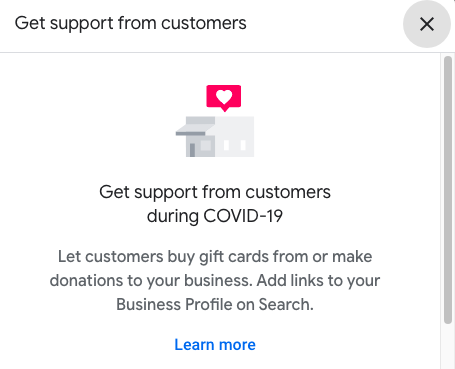
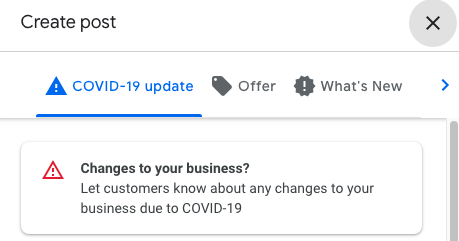
    • There are two COVID-specific post options right now. Both of these are great ways to update users about the status of your business.
      • UPDATE: These post features remain available to businesses.
        • Ways to support your business
        • General update about your status

    Screenshot of get support from customers option offered by Google My Business


    Screenshot of options related to COVID-19 in Google My Business Posts

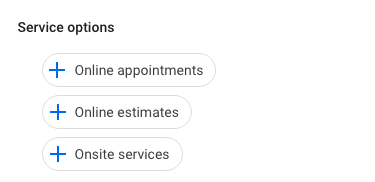
    • Google added backend attributes that help inform both Google and potential customers about what type of online and on-site services you provide.

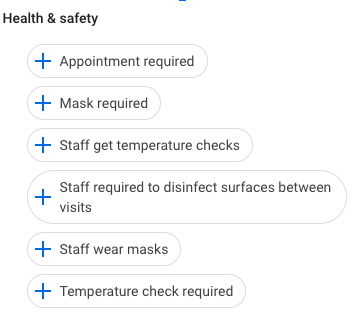
    • Google is now allowing businesses to display COVID-19 safety measures including mask requirements, staff requirements, and temperature checks.
      • UPDATE: Google has added more details around the safety measures taken by businesses.

    Screenshot of Google My Business safety options

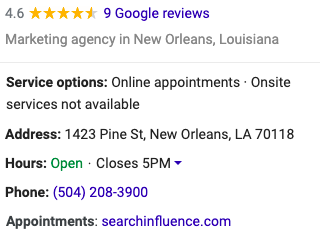
    • UPDATE: During the course of COVID-19, numerous businesses pivoted to offering online services. As a result, Google rolled out features to help businesses connect with users looking for virtual experiences. Some of these include online care, online classes, and online appointments.

    Screenshot of main business information on google my business listing

    Today, Google has essentially returned their listings to their pre-COVID functionality with the added benefits of having service and safety information more present on the listings. These are features that are likely to stay and help increase engagement with listings and provide more user-centric information beyond the business address and phone number.

    If you’re interested in discussing how Search Influence can help you navigate the post-COVID business landscape and your ongoing marketing efforts, please reach out to talk to a strategist about your digital marketing goals.

    Here are some additional resources to help your business run as smoothly as possible during this period.

    Images

    Mobile device

  • 3 Actionable Ways to Make Your Creative More Diverse

    Example of diverse photo assets for ad campaigns

    Key Insights

    • Diverse creative does not stop at just photography—companies should diversify their videos, illustrations, and voiceovers.
    • Companies who do not have the resources to create their own assets can purchase existing diverse photos and videos and edit existing illustrations to be more representative of diverse audiences.
    • The presence of POC in creative is not enough; designers and marketers must be thoughtful of how minorities and POC are portrayed across all mediums.

    In a perfect world with a bottomless budget and endless hours, companies would always be able to hire skilled photographers, illustrators, videographers, and actors to acquire custom creative assets that represent the company and their target and aspirational demographics for every marketing campaign. A lot of companies, however, must rely on existing stock assets due to varying limitations. The problem with stock photography, illustrations, videos, and audio, however, is that most of what is available depicts white men and women. Does this even matter? Maybe not as much to people who look like the subjects of these photos.

    By excluding people of different races, genders, body types, ages, and abilities, marketers are ignoring and erasing members of these communities. If that isn’t reason enough to prioritize the inclusion of diverse assets in marketing campaigns, Google and The Female Quotient conducted a survey in 2019 concluding “that people are more likely to consider, or even purchase, a product after seeing an ad they think is diverse or inclusive.” Specifically, “64% of those surveyed said they took some sort of action after seeing an ad that they consider to be diverse or inclusive. 69% of black consumers say they are more likely to purchase from a brand whose advertising positively reflects their race/ethnicity.”

    The study also states that “71% of LGBTQ consumers said they are more likely to interact with an online ad that authentically represents their sexual orientation,” and data shows that LGBTQ households spend 35% more on online purchases each year than non-LGBTQ households.

    #1 Use Diverse Stock Photography and Video Resources

    As marketers, we should strive to not only include minority groups and POC in our creative, but we should also be thoughtful about how these communities are portrayed in photos and videos. Who is leading the meeting? Who is teaching the class? Who is in handcuffs? If the answer to these questions could perpetuate any stereotypes—no matter how subtle—consider skipping those assets and continuing your search.

    The mere presence of underrepresented communities is not enough; we must make sure they are represented positively and in a way that would make members of said communities proud. Nappy.co is an excellent free resource for photos of Black and Brown people and a great jumping off point for diversifying your photo library.

    Example of diverse vector art for a marketing campaign

    #2 Adapt Vector Art

    Illustrations may seem more straightforward, but will actually require the designer to be just as, if not more, thoughtful as when selecting stock photos. Whether starting from scratch with an illustration or purchasing stock vector art, the considerations are the same. Just as with stock photography, we want to:

    • Avoid perpetuating any stereotypes, not only in subject matter, but also in more subtle ways.
    • Pay extra attention to how facial features, hair, or skin tones are depicted.

    Even in anthropomorphized objects, these considerations need to be prioritized. A design choice may be unintentional or innocuous, but they can have serious implications and reveal damaging subconscious biases. In 2017, a Kellogg’s Corn Pops box depicted a community of corn pops, and the one brown corn pop in the entire group was depicted as a janitor. Kellogg’s understandably faced serious backlash for the illustration and quickly corrected and reprinted the box.

    Luckily, illustrations (unlike photography) are adaptable. Obviously creating vector illustrations from scratch allows the designer to create any scene they want, but stock vectors are also fully customizable, too.

    • These file types usually include .ai, .eps, or .svg files that can be edited in graphics editing software like Adobe Illustrator.
    • Body types, skin tones, facial features, clothing, positioning, and so much more can be edited to represent people of all races, genders, body types, ages, and abilities in various settings.

    #3 Expand Audio Talent Search

    Marketers can’t deny the prevalence and effectiveness of video in marketing and advertising, so a company’s journey to diversifying their creative should not stop at visual assets. In recent years, there has been a push in Hollywood to cast POC voice actors to play non-white characters. While this is a move in the right direction, diversity in voice acting for marketing can be taken a step further.

    Traditionally, women were hired for voice-overs about fashion and beauty, and men were hired for voice-overs about beer and cheeseburgers. We are seeing a cultural shift in household dynamics, where men and women are making important decisions together.

    Adweek estimates that today, 85-90% of voice-overs are done by women across categories, reinforcing that women have more power over the wallet and decision making than originally thought. No matter the industry, marketers should seek out POC voice actors if their videos contain POC characters, and should keep in mind that actors of any gender can be persuasive and appropriate for their videos.

    Purchasing existing diverse creative assets can seem like a daunting task for companies on a budget, but becoming aware of what resources are out there and leveraging additional options for inclusivity is key.

    Stock assets are often thought of as cheesy, unnatural, and overwhelmingly white, but this is not always the case! Marketers must explore diverse stock photo and video options, edit purchased or custom illustrations to be more diverse, and hire diverse voice actors if they want their campaigns to be more effective and reach a wider audience.

    Every organization is different, and not everyone has a dedicated marketing team with the expertise needed to source or create diverse assets. When you work with Search Influence, you’ll leverage our team’s expertise to create diverse and inclusive content for your marketing campaign. Connect with our experts today to discuss your digital marketing goals.

    Sources

    nappy.co

  • Graphics Checklist: High-Quality Assets You Need to Promote Your Business

    Key Insights

    • Businesses need current and high-quality location, team, event, product, and service photographs and logos to establish trust and authority on their websites and across digital and print campaigns.
    • With a well-thought-out plan of action, building out a high-quality asset library does not have to be expensive, time consuming, or intimidating.
    • You cannot use low-resolution photos across all platforms. Marketers need original, high-quality photo, video, and logo files.

    Person behind a video camera gathering assets for a business

    One of the biggest challenges businesses face when developing marketing campaigns is not having enough high-quality photography and video assets for the products, services, or events they want to promote.

    It might be tempting for a company to use whatever photos or videos they have on hand, but low-quality assets are unlikely to attract a steady stream of qualified leads. Using consistent, quality visual assets across all platforms and social channels communicates authority, trust, and professionalism to customers and prospects.

    This post will help businesses understand what visual elements are required in order to create an effective online presence, and how to use those assets effectively in a variety of campaigns. Use our checklist to audit your visual library and understand where and how to make improvements.

    What Are the Minimum Requirements for High-Quality Assets?

    Businesses should use their logos, videos, and photos throughout their websites and across all digital and print campaigns. This includes social media profiles, directories, and ads.

    As a general rule of thumb, it’s always better to have images and videos that are as large and high-resolution as possible! Assets can always be scaled down, but enlarging a photo or video that’s too small isn’t possible without pixelation or distortion. Contrary to popular procedural dramas, if a photo is low-resolution, there is no way to magically “enhance” this photo and render it usable across all platforms.

    1. For any digital campaigns, photos, and videos should be at least 1,080X1,080 px (pixel) with a 72 ppi (pixels per inch) resolution.

    • We recommend 1,080 pixels since we often run Facebook ads, and this size aligns with their minimum image size requirements.
    • Facebook ads have the largest minimum size requirements of any ad platform. By meeting these minimum requirements, businesses can cover their bases everywhere.

    2. Your website should have a hero image—a large visual element (either photography or video) that a visitor sees on your homepage. It should represent the site’s most important content.

    • The hero image can be static or dynamic, such a set of rotating images.
    • Your website’s video or photo hero image should be a minimum width of 1,600 pixels, but ideally 2,000+.

    3. For print assets, photos need to be 300 dpi (dots per inch).

    • Since images displayed on the web are 72 ppi, the only way to print them at full resolution is to print them very small.
    • A 600×300 px image from the web at 72 ppi, for example, can only be printed at 2×1 inches.

    4. Logos are an exception to the rules above.

    • The largest that a logo will appear in a campaign is 1200×1200 px, so we recommend a logo that will be easily viewed at this size without having to scale it up to avoid distortion.
    • Logos with transparent backgrounds are more versatile; plus, Google Responsive Display Ads specifically recommend logos in this format.
    • GIF, PNG, and SVG file formats support transparency.

    What Makes an Asset Relevant for Your Business?

    1. Photos should cater to a business’s target audience. Photos of products on plain backgrounds are great for an online shop, but photos and videos of people actually using the promoted products or services make for much better ads.

    2. Interior and exterior shots of the business’s physical location are ideal for search engine listings, directories, ads, and websites.

    • These photos can also help users find a storefront while using Google Maps, especially if the default street view is somehow obstructed or inaccurate.
    • 360 photos allow potential customers to interact with Google Maps listings, and they can be taken professionally or with a special camera.

    3. Having photos of the current staff as a group and individually with the same background is necessary for “About Me” pages and helps potential customers connect with your business on a more personal level.

    Keep in mind that most campaigns will need fresh images rotated over time, so depending on the goals of the campaign and what’s being promoted, more photos or videos may be needed every three to six months.

    Cartoon of person checking off giant list with a giant pencil

    Checklist

    Determine the assets needed by campaign:

    1. All campaigns need a logo file.

    • Ideal file formats are AI, EPS, SVG, PSD.
    • A PNG with transparent background is acceptable, and JPG/JPEG files are OK.
    • The minimum size should be 1,200 x 1,200 pixels.

    2. SEO campaigns require external and internal photos/videos of your location(s), as well as photos of your team.

    • The minimum size required in an SEO campaign will vary, but the bigger, the better!

    3. Facebook Display, Google Display, social media management, email, and blog campaigns require photos/videos related to the products, services, or events being promoted and photos/videos that are applicable to the audience being targeted.

    • Product photos are best when taken on a plain background at the same angle.
    • Team photos are best when taken with the same background.
    • Larger photos are always preferred, and these campaigns typically require a minimum size of 1,080 by 1,080 pixels.

    4. Print campaigns require any relevant product, location, event, service, or team photos with at least 300 dpi resolution.

    Gather existing assets:

    1. Have you worked with a photographer or videographer in the past? Make sure all of these assets are easily accessible and organized.

    2. What types of assets do you have?

    • Take inventory of your assets by organizing them into categories.

    Make arrangements to acquire additional assets if your current assets do not meet the above criteria:

    1. Logo files can usually be recreated in a more scalable or higher resolution file format, but this is harder with more complex logos.

    2. Thumbtack is a great resource for affordable professional portrait, location, 360, event, and product photography.

    3. If professional photography is still not within scope, head to free stock photography sites like Pixabay or Pexels.

    High-quality visual assets elevate not only your digital and traditional marketing campaigns, but also your overall online presence. You can easily arrange for professional photography and videography, or contact Search Influence to discuss asset creation and developing your asset library.

    Images

    Camera

  • How to Prompt Customers to Leave High-Quality Reviews That Influence SEO

    Key Insights

    • Businesses can prompt reviews and testimonials that include beneficial keywords to support ranking in the Search Engine Results Pages (SERPS).
    • Three benefits to providing review prompts:
      • Encourages high-quality, specific reviews
      • Influences more people to find you when searching for degrees, products, services, and experiences you offer
      • Themes in reviews help those who skim search results understand your value
    • Creating a list of prompts your customers can use when crafting their review helps make sure their reviews benefit both prospective customers and your search rankings!

    Customer reviews and testimonials are crucial to your business. They provide you with feedback on your products and services and help potential customers gain insights from your current ones. Additionally, reviews and testimonials that include beneficial keywords can support ranking in the Search Engine Results Pages (SERPS).

    Graphic of a hand using a tablet to read online reviews of a business

    When your business has reviews on important sites, like Google My Business (GMB), Google sees your business as authoritative and is likely to reward you for this. Greg Gifford, an experienced SEO consultant, created a video for LinkedIn with a suggestion that inspired this post: provide prompts so customers leave reviews with keywords that benefit your rankings.

    In this post, we’ll walk through the steps you should take to prompt your customers (without specifically asking them) to leave beneficial keywords in their reviews and testimonials. Not only can you prompt them to leave a review, but you can also give them some questions they can use to get started. This helps customers leave high-quality reviews with details that will benefit your rankings and also gives them a baseline to get started in writing their review.

    Benefits to Providing Review Prompts

    #1 – Encourages high-quality, specific reviews

    • When you request a review after a customer has experienced your services, it can be intimidating for them to start off with a blank screen. When you prompt your customers with questions about their experience, it helps them feel more comfortable and helps you earn more detailed reviews.

    #2 – Influences more people to find you when they search for the degrees, products, services, and experiences you offer

    • Reviews help influence rankings in the SERPs. If you use prompts that include the keywords you’re targeting, your customers are more likely to use those terms in their reviews, which makes you more likely to rank for them.

    #3 – Themes in reviews help those who skim search results understand your value

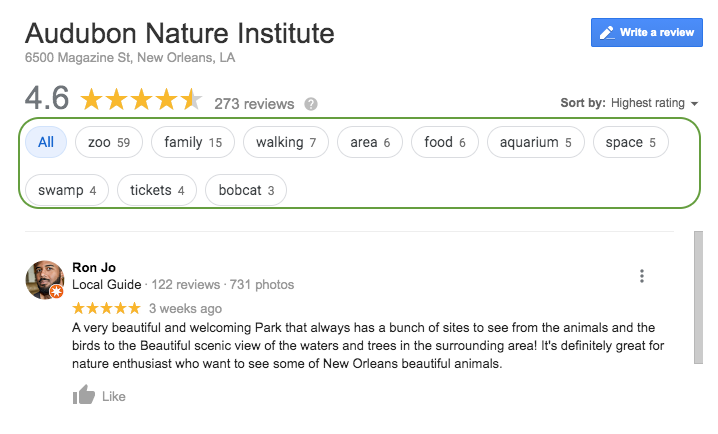
    •  Google aggregates common themes in reviews. This helps if someone searches for something in the immediate area of your business.
      • Example: Here you can see that Google has aggregated keywords and phrases throughout the reviews to make it easier for a potential customer to see reviews that include venues they may want to visit. If a consumer wanted to see all the reviews that included the keyword “zoo,” they could select it and read up on the experiences others have had.

    Screenshot of reviews from Google My Busiess for Audubon Nature Institute in New Orleans, LA

    • Also, when searchers see the themes of your reviews called out, they can more quickly understand what your business offers. In the example above, it’s helpful to know that the business has a zoo, aquarium, and swamp attraction they could visit while in town.

    Questions to Prompt Reviews

    Sample questions you can use to foster specific, high-quality reviews:

    Medical / Healthcare Questions to Prompt Detailed Customer Reviews

    • Which treatment did you receive?
    • What brought you into the practice?
    • Why did you choose our practice or a specific doctor?
    • Which location did you visit?

    Tourism & Attractions: Questions to Prompt Detailed Customer Reviews

    • Which attractions did you visit?
    • How were your interactions with the staff?
    • What were the amenities like?
    • What did you enjoy most about your experience?

    Restaurants: Questions to Prompt Detailed Customer Reviews

    • Which food and drink items did you have?
    • Which restaurant location did you visit?
    • How do we compare to other restaurants you’ve been to in the past?
    • How were your interactions with the staff?
    • How was the ambiance?

    Education: Questions to Prompt Detailed Customer Reviews

    • Which campus did you visit/attend?
    • Which degree or program are/were you interested in?
    • Do you have any tips for future prospects?
    • How did this experience prepare you for life after graduation?

    Bonus Tip for Bringing Reviews Into Other Marketing Efforts:

    • Feature the most called out benefits of your business in your website copy, imagery, and social media posts and ads

    How Can You Get Started?

    • Gather any email addresses you have of past and present customers.
    • Write an email that prompts them to leave a review for your business.
    • Within the email, include prompting questions that will get them thinking about their experience and ultimately help them produce a thoughtful review that will benefit everyone!

    Now that you’ve got a leg up on your reviews and testimonials, it’s time to start thinking about improving other aspects of your SEO. If you’re not sure where to start, ask for a digital marketing analysis of your website from our team of experts at Search Influence.

    Images

    Tablet

  • Hot or Not: Content Trends Pre- and Post-COVID-19

    Key Insights

    • Business owners shouldn’t let the uncertainty of COVID-19 discourage them from marketing.
    • An empathetic brand tone is important.
    • As people stay at home, online user engagement has increased and brands are being more heavily scrutinized for mistakes than ever before. This creates an opportunity to reach users more effectively, but with a lower margin of error.

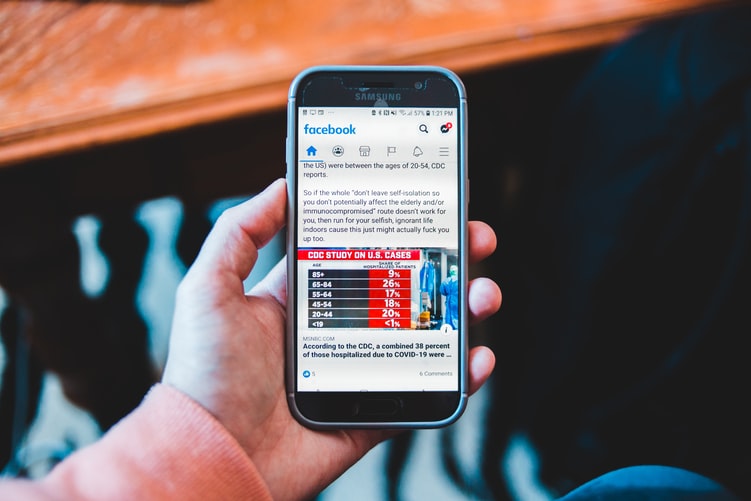
    Person holding mobile device looking at Facebook news feed

    Introduction

    Navigating the harsh reality of changing phases, mandatory closures, and reduced capacity during COVID-19 has left many business owners feeling overwhelmed and uncertain about the future. With frequent changes affecting businesses everywhere, customer communication is more important than ever.

    In this blog, I will unpack four evergreen content trends to determine if they’re ideal for communicating messages in a post-COVID-19 world. Some of this insight was derived from a SEMPDX presentation by Search Influence CEO Will Scott.

    Conversational Content: HOT

    Conversational content is—without a doubt—HOT. With the constant change of information since mid-March of this year, you should keep open communication with target audiences.

    Conversational content is informal and encourages the user to initiate communication directly with a brand or company. Examples of this include a live chat on your website or hosting a webinar with live Q&A. Even before COVID-19, users looked for more human engagement; but months of isolation have created a greater yearning for connections of any kind. In regard to marketing, this need is evident in the increase in the number of B2B webinars during the early months of isolation. Comparing March to January 2020, the number of B2B Webinars increased by almost 50%.

    In the Guide to Conversational Marketing, CEO Jitendra Gidwani explains: “The idea that you can build lasting customer relationships through quality conversation over time isn’t just anecdotal conjecture. Feeling as if they are genuinely heard is the single most likely thing to keep customers devoted to a brand.” Learn more about how to communicate with your customers by reviewing our guide to business continuity messaging during COVID-19.

    Influencer Marketing: HOT

    Influencer marketing is HOT. A post-COVID-19 world doesn’t seem like the ideal market for a social media influencer…or is it? Increased engagement combined with lower prices will result in maximum return in your marketing investment.

    Influencer marketers have large social media followings and are able to effectively convey their experience to followers and promote different products or services by simply using them and posting about it. The brand or company featured typically pays a fee, which varies depending on the size of the Influencer’s following.

    Engagement with Influencer content has surged because of increased screen time in 2020. Research from Later.com shows that the average screen time is up to 5h40m per day, an 18% increase from weeks prior to COVID-19 stay-at-home orders. Followers are paying attention in this new era of content creation, with nearly 80% of influencers reporting higher engagement from their followers.

    In addition to increased user engagement, another perk of Influencer marketing in the current climate is reduced prices. According to Business Insider, sponsored deal drop-offs have devastated travel, dining, and event-based creators whose content depends on the ability to leave their homes. Some have responded by lowering their rates. In a survey sent to over 500 Influencers, it showed that over 40% are currently reducing their normal rates, and the reductions average at 30%.

    Your business could collaborate with an Influencer by asking them to promote the re-opening of a business, and if applicable, demonstrate their individual social distancing and COVID-19 procedures!

    User Generated Content: HOT

    Content created by users is always HOT, not only because it’s free, but also because it’s honest. Why not let your users kick-start your content process?

    User generated content (UGC) is indicative of its name; it’s content created by customers that features and/or promotes a brand/product. Keep in mind: it’s not all about ratings and reviews. If you’re on the lookout for brand mentions, even of adjacent topics, UGC can be a great source for your own content machine.

    Oysters XO has the ultimate UGC success story. Oysters XO provides an innovative oyster-shucking experience that adds a lively, interactive touch to luxury events of all kinds. As events everywhere were cancelled, they adapted to the new restrictions and started to offer a virtual experience, teaching users how to shuck fresh oysters in the comfort of their own homes. One satisfied customer decided to create a video testimonial to tell his followers about his amazing experience. The customer was Neil Patrick Harris…yeah, you read that correctly. The video he created, on his cell phone, will now help elevate the Oysters XO brand in a way that a high production advertisement never could because it is raw (no pun intended) and sincere. Check out the video below.

    High-Production Content: NOT

    High-production content is NOT HOT. Pre-pandemic, it was valuable for certain industries; however, now there’s less budgeted for bells and whistles, and more demand for empathetic content.

    High-production content includes any content created with a large production value, such as professionally produced videos or podcasts. As the world has adjusted to COVID-19 protocols, there has been a large increase in content created at home. Examples include television interviews on talk shows like “Live With Kelly and Ryan” being conducted virtually and musicians hosting concerts from their homes on Instagram and Facebook Live.

    Businesses everywhere have been affected financially by the mandatory closings and other COVID-19 restrictions. According to Ad Exchanger, brands leaning into faster, cheaper production may not return to the old way of doing things post-pandemic.

    For more information about adapting to the “new normal” of marketing, check out our “6 Messaging Adjustments to Remain Relevant During COVID-19.”

    Want to keep your business hot? One of our strategists can help adapt your marketing plan to keep in line with best practices during this ever-changing time. Contact a member of our team today.

    Images

    Mobile device

  • What You Need to Know About Website Accessibility

    Key Insights

    • Every business is required to implement certain accessibility standards on their websites, not just major corporations
    • An accessible website ensures that people with disabilities can seamlessly use it
    • Many SEO best practices are also a part of website accessibility guidelines

    Introduction

    Having a website that follows accessibility guidelines is increasingly important for businesses. It’s imperative to have a website that is functional for people with disabilities to service that demographic of consumers; it’s also the law. Every business is required to implement certain accessibility standards on their websites, not just major corporations. In 2019, there were over 2,000 lawsuits over website accessibility compliance.

    An accessible website ensures that people with disabilities can seamlessly use your website to browse and buy your goods and services. In this post, we’ll define what it means for your site to be accessible, how it impacts your business, and provide you with examples and best practices.

    Person using a screen reader to browse internet

    What Does It Mean to Have an “Accessible” Website?

    Having an accessible website means implementing usability features to support the 110 million to 190 million adults who have significant disabilities. Disabilities vary widely, and it can feel overwhelming to consider how to serve this entire audience. You can start by viewing the Americans With Disabilities Act (ADA) and Web Content Accessibility Guidelines (WCAG).

    Why Should You Have an Accessible Website?

    Making your website accessible is a win-win situation for users and businesses. Consumers can find the services they need, and you can provide them the services they want.

    Requiring website accessibility is a huge step in limiting frustration and difficulty for people with disabilities. Imagine all of the different ways that you use the Internet on a daily basis. Now imagine it again, but this time being unable to use many of the websites you want.

    Businesses of all sizes run the risk of encountering lawsuits if they do not have an accessible website. Large corporations such as Domino’s have been sued for not following accessibility standards. Common industries most impacted by web accessibility lawsuits:

    • eCommerce sites that host transactions
    • Organizations that offer services:
      • Law firms
      • Medical facilities
      • Schools

    What Are the Key Points of the Web Content Accessibility Guidelines (WCAG)?

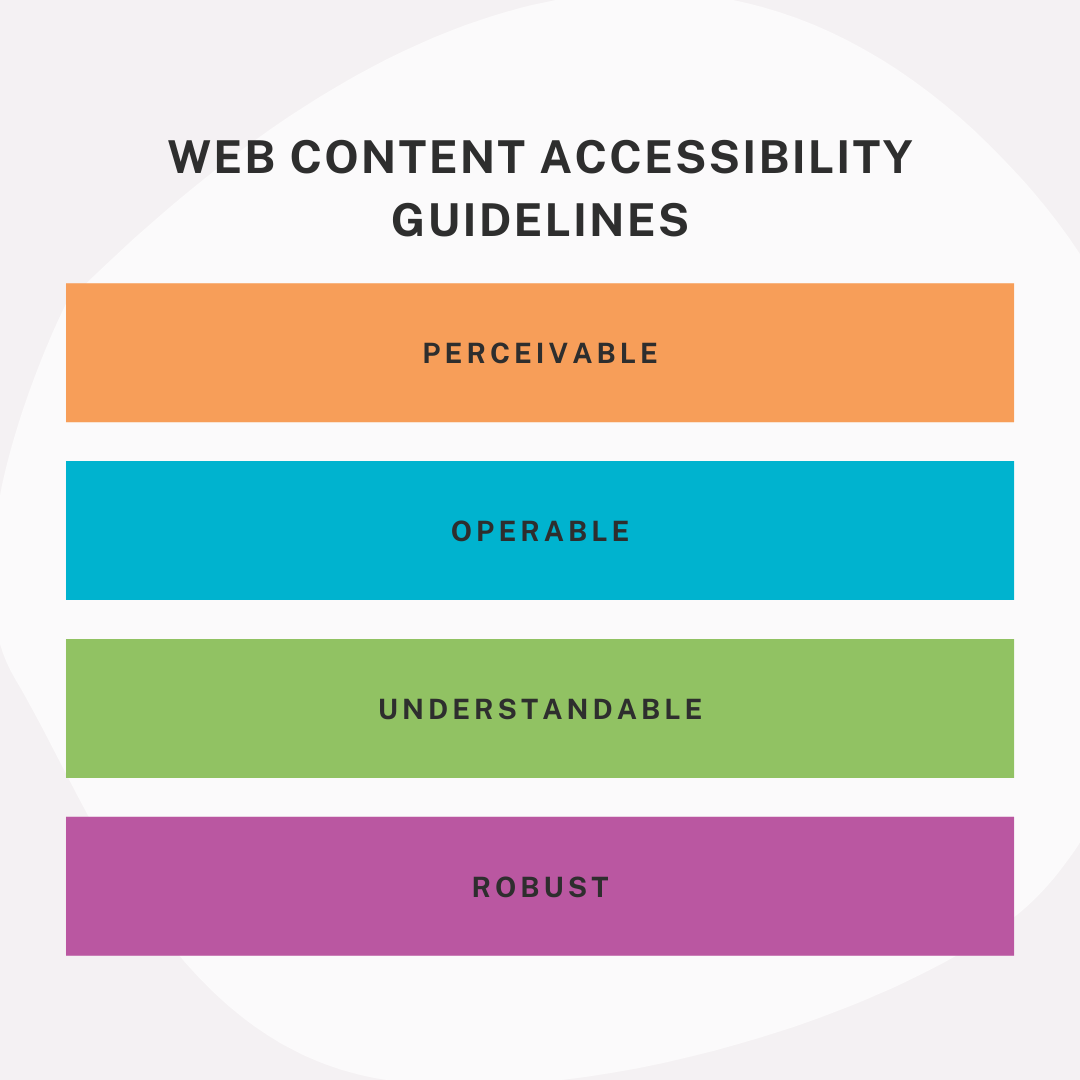
    Web content accessbility guidelines, perceivable, operable, understandable, robust

    The WCAG covers a wide range of ways to make your website accessible to individuals with disabilities. Use their checklist to start making your website accessible to all types of users who seek your services.

    Guideline categories:

    • Perceivable: Information and user interface components must able to be perceived by users
    • Operable: Users must be able to operate user components and navigate the website
    • Understandable: Information and user components must be able to be understood
    • Robust: Content must able to be interpreted by a variety of users, including assistive technologies

    Each section further outlines how you can accomplish these goals. For example, under the Perceivable category, sites are required to have alternative text for their images so that a person with a visual impairment who uses a screen reader could have the image described to them.

    What Are the Levels of “ADA Compliance”?

    The WCAG has varying levels of compliance for websites. Here’s a brief rundown:

    • A: Lowest level—Includes some accessibility features, but often doesn’t have enough to satisfy all users and situations.
    • AA: Mid-range level—Recommended because it satisfies many requirements and makes sites accessible in most situations. The goal should be to make your website AA compliant at the minimum.
    • AAA: Highest level—Requires many specific features that may not be possible to set up in some scenarios, which is why it isn’t used as the standard. Implementing the AAA features may even require a dedicated staff member to keep up with the latest guidelines and maintain AAA compliance.

    How to Make Your Website Accessible

    It’s important to start from the beginning. How complicated will it be to make your website accessible will come down to how your website was built. Things as simple as whether your website was built to support alternative text on images can be make or break. If you’re looking to upgrade your website sometime soon, make sure to use best practices for website accessibility right from the start.

    If that’s not the case, there are many things you can do to make your website accessible. Even paying close attention to your site’s SEO can make a huge difference. Alternative text, for example. Alternative text is recommended for SEO for multiple reasons one being that images show up in image search results. But, it’s also recommended for website accessibility. Many SEO best practices are also a part of website accessibility guidelines, so it’s a great place to start.

    There are lots of great tools you can use as a quick, easy solution to automate the process of making your website. However, it is important to research the tools you pick and make sure that they will make your site at least AA compliant. If not, consider what additional work you may need to do once the tool has done some of the work.

    Website accessibility should be a priority for your business because it benefits you and the users visiting your site. Your business benefits from clients who may have been lost if your website was not compliant, and it limits your exposure to accessibility lawsuits. Users with disabilities benefit because they can find and use your services more comfortably. You can start by reviewing accessibility guidelines. Here’s an introductory tool we created.

    Reach out to one of the experts here at Search Influence today to see what we can do to help you get started on your path to accessibility! Contact us today to learn more.

    Images

    Screen reader


  • Search Influence to Host Education Marketing Webinar, “Top 7 Ways to Drive Prospects Into and Down the Funnel”

    Sign Up for Higher Education Marketing WebinarProspective students are showing growing interest in online learning.
    Many wonder if now is the time to continue their education rather than competing for opportunities in a shrinking job market. Those once resistant to the idea of online learning now feel comfortable pursuing experiences remotely. 

    Take advantage of these changing sentiments to drive enrollment! Join Search Influence Director of Sales and Marketing, Paula French, and Account Supervisor, Ariel Tusa, for the free webinar, Top 7 Ways to Drive Prospects Into and Down the Funnel.

    Paula and Ariel will share knowledge from real-world examples and first-hand experiences to demonstrate how to nurture prospects from awareness to application using website optimization, content, targeted advertising, and email marketing. The webinar will also include dedicated time to address your questions.

    You will learn:

    • How COVID-19 impacted education search trends
    • Tactics to get your programs in front of career changers
    • Ideal formula and structure for program and degree page content that converts
    • Opportunities to create innovative conversion points on your website that help you qualify leads

    If you can’t make the live session, be sure to still register and we will send you a recording of the webinar.

  • #ShowYourPride: Engaging the LGBTQ+ Community Online

    This post was updated by Crysten Price on June 30, 2020. It was originally written by a Search Influence alumnus on June 16, 2016.

    The LGBTQ+ community is a tech-savvy group with a proclivity towards online shopping. This community is a great audience to consider for ad spend targeting. They have always been early adopters of technology and online trends, with the internet functioning as a safe place to form communities and access resources that might not have been easily or readily available.

    Online Engagement LGBTQ Statistics Mini Infographic - Search Influence

    How to Make Your Biz LGBTQ+ Friendly with GMB

    Google My Business (GMB) listings offer business owners a free platform to engage with their customers. Your business profile is easily accessible to users on Google Search and Maps. Join over 190,000 other businesses across the globe that enabled the LGBTQ-friendly attributes to their listing by following Google’s quick and easy instructions.

    Keep in mind, to manage your business information in Search, Maps, and other Google properties, you must first verify your business listing. After your GMB listing is set up, you can explore other ways to welcome prospective LGBTQ+ customers:

    • Request/encourage patrons to leave Google reviews highlighting your business as a LGBTQ+ friendly space.
    • Add images of LGBTQ+ customers and travelers to your GMB profile.
    • Use Google Q&A and Posts to let travelers know your business is inclusive.

    If you’re new to GMB, use the following guide to claim your business online:

    • Add or claim your business online or via the GMB app
    • Verify your listing with the following:
      • Requesting a postcard (most common)
      • By phone call or text
      • Email
      • Instant verification (rare)
    • After Google verifies your listing, your business information will be eligible to appear live in Search, Maps, and other Google services

    LGBTQ+ Community and Social Media Platforms

    When it comes to outreach, you can’t rely on a single, catch-all approach. Tailor your campaigns and messaging to subcommunities and audiences across different social media platforms to garner better reach and impressions. To be more specific, Black Twitter is an online subcommunity of Black users on Twitter focused on issues of interest to the their community. As you craft messaging to subcommunities, keep their online subculture in mind.

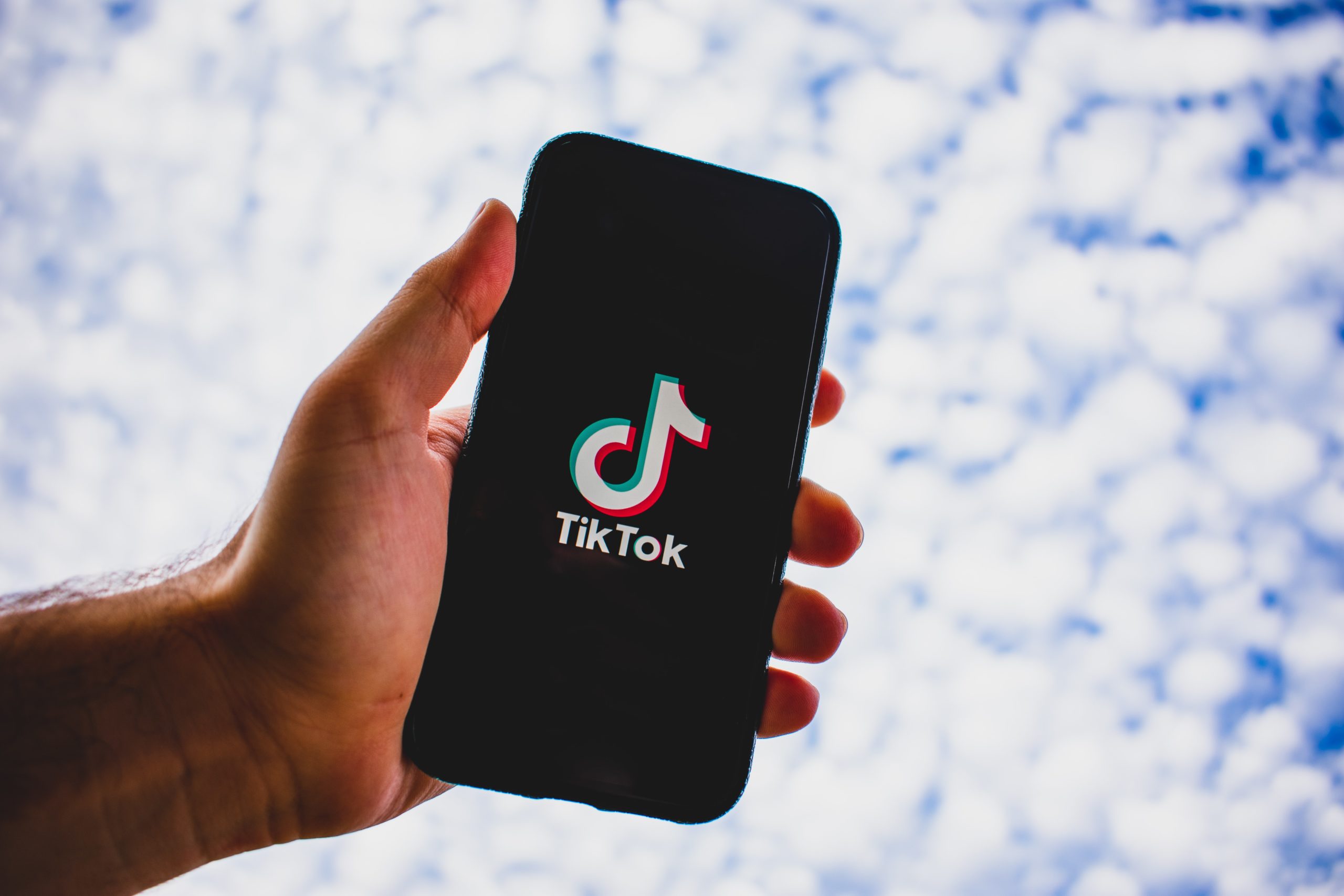
    Similarly, on TikTok—a social platform widely known for viral dances—content is algorithmically recommended based on user preferences. “Gay TikTok,” or “Alt TikTok” is a subset of content geared toward LGBTQ+ users and their favorite queer culture trends and aesthetics.

    Person holding phone cell phone in the sky with TikTok load screen visible

    Interacting with these users requires taking a step back from the mainstream. References to Gay TikTok culture can help you create more relevant, exciting content, that users will want to engage with.

    Ensuring Authenticity Within LGBTQ+ Targeted Content

    When posting to social media, consider whether your content fits within the interests of the LGBTQ+ community. If it does, use relevant hashtags or try engaging with influencers in the community. However, do your research to ensure that your messaging isn’t missing the mark or reads as inauthentic.

    Users can quickly pick up on Pride-themed content that seems like a marketing gimmick. A 2019 eMarketer survey revealed that gay and lesbian respondents were more likely to patronize a company known for its LGBTQ+ friendliness; however, although subgroups of the LGBTQ+ community expressed that they were more willing to support businesses that promote inclusive ad content, roughly half of the respondents reported that they were “much more” likely to support these businesses. This could be attributed to the fact that ads featuring same-sex couples and relationships are sometimes perceived as marketing ploys rather than a genuine commitment to inclusivity.

    When creating content, consider the aforementioned subcommunities and how to connect with them organically with authentic messaging that is inviting and kind.

    LGBTQ+ Community and Mobile Usage

    Members of the LGBTQ+ community are said to be mobile leaders, and when compared with their heterosexual counterparts, they are more likely to be considered technology “wizards.” Wizards are the consumers Experian Marketing Services has identified as those for whom technology is central to their way of life. This consumer segment, with high mobile technology adoption and usage rates, is an important target for mobile campaigns.

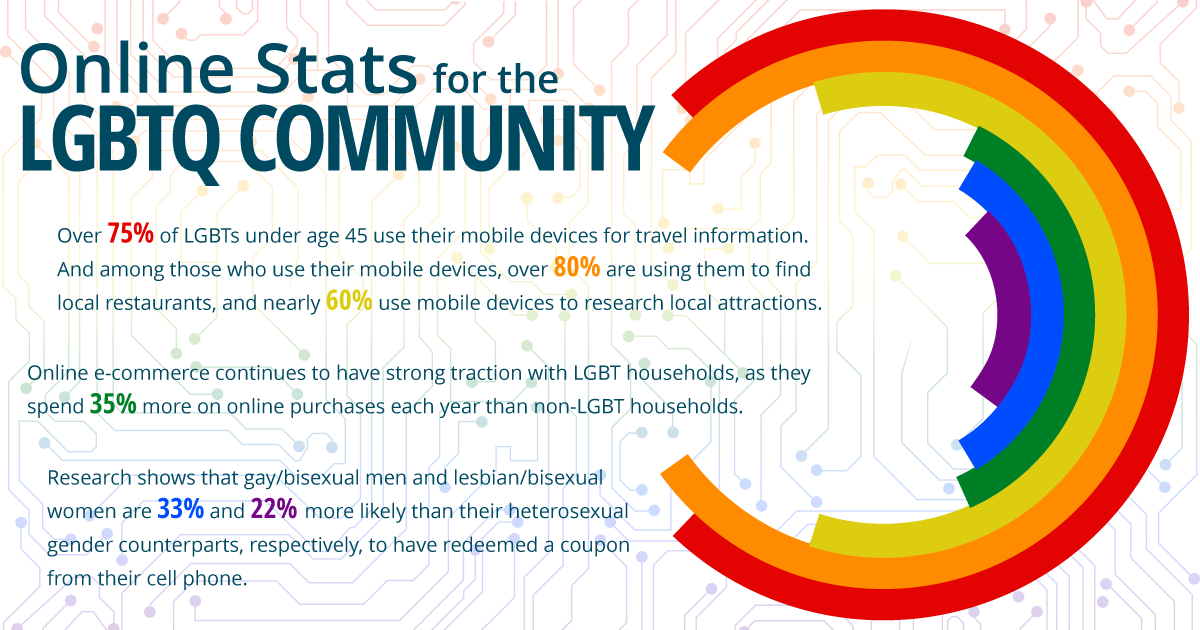
    • Over 75% of the LGBTQ+ community under age 45 use their mobile devices for travel information.
    • Among those who use their mobile devices, over 80% use their devices to find local restaurants, and nearly 60% use mobile devices to research local attractions.
    • Online e-commerce continues to have strong traction with LGBTQ+ households, as they spend 35% more on online purchases each year than non-LGBTQ+ households.
    • Research shows that gay/bisexual men and lesbian/bisexual women are 33% and 22% more likely than their heterosexual gender counterparts, respectively, to have redeemed a coupon on their cell phone.

    Laptop in front of window on desk with love in rainbow color

    Get Digital Marketing Help from the Experts

    Identifying and targeting user groups of interest involves a robust digital marketing strategy, but you don’t have to start from square one all on your own. The experts at Search Influence can help you craft inclusive messaging that resonates with various target audiences so you’ll get the most out of any campaign. Schedule a free consulting session to learn how you can enhance your online marketing efforts with our recommendations.

    Source Content:
    https://www.experian.com/assets/simmons-research/white-papers/2013-lgbt-demographic-report.pdf http://communitymarketinginc.com/year-end-research-report-top-ten-2013-trends-seen-in-lgbt-travel/
    http://www.nielsen.com/us/en/insights/news/2015/us-lgbt-shoppers-make-more-trips-spend-more-than-average.html

    Images

    LOVE

  • Don’t Miss Out on the Recession Boom in Graduate School Applications

    Research by The New York Times, Stanford, and other sources suggests that interest in graduate school will hit new highs in the coming months and years due to the global recession. Instead of looking at how your organization can cut costs by reducing its marketing budget, you should make the most of this opportunity by allocating marketing dollars to get in front of audiences receptive to your messaging.

    Graduate student smiling wearing a cap and gown at graduation

    Now is the time to make a push to drive more applications to your programs. You need to ramp up your efforts to ensure that your advertisements are being seen by prospective students who are wondering if they should apply to business school, law school, or another graduate program.

    Increased Online Activity Enhances Targeting Efforts

    Online activity has surged in the past few months due to stay-at-home orders. With more active users browsing online, it’s clear that budget allocations and targeting should shift to align with this change. Advertisers can adjust their marketing strategies and find more cost-effective ways to use their marketing dollars.

    Now is the perfect time to push your messaging on Facebook because costs have dropped. Like any marketplace, supply and demand drives Facebook ad pricing. As the platform’s ad inventory has increased due to more activity, the amount it can charge advertisers has decreased. Facebook saw a 50% surge in the use of their messaging apps, as well as a similar increase in the time people spend on Facebook and Instagram.

    Right now, it costs a lot less to reach potential students on social media and on mobile apps. From March 1 to May 20, 2019 it cost an average of $3 for 1,000 impressions (CPM) on Facebook and Instagram. Due to increased online activity in 2020, the CPM fell to an average of $1.22. The first three months of 2020 also saw unprecedented spending ($23.4 billion) and activity (a 20% increase year-over-year) on mobile apps, which grad schools can take advantage of by running ads on Google’s Display Network.

    Graduate student sitting at a desk working on a laptop

    How to Market Your Graduate School Programs: Proven Industry Results

    Our higher education clients have seen a sharp increase in inquiries during the past few months. Several factors drove this spike, including a 20% surge in searches for online degree programs and an increased appetite for applying to grad school. However, increased consumer interest doesn’t mean much if you can’t capitalize on it.

    In March, most states issued shelter-in-place orders. Data from one of our clients, a professional and continuing education school at a private university, shows a record-breaking number of inquiries since this time. Although this organization has a competitive advantage because they already offered many of their programs online, online programs will increasingly become the industry standard.

    Here’s a checklist of tactics our clients utilized to pivot their strategies, which you can use to benefit your institution:

    • Make every course available online
    • Emphasize messaging that provides details about policies regarding transfers, financial aid, and credit for life/work experiences
    • Maintain a digital advertising budget
    • Leverage Facebook Live to increase awareness
    • Shift blog post topics to address the current climate

    Implementing these adjustments yielded significant improvements in digital campaign performance: In March, one higher education client received more Facebook inquiries than they have in any other month since we began working with them. During Q1 2020, they achieved 47% of the total inquiries that they received during all of 2019.

    Marketing Strategy Changes For Your Institution: What You Need to Do Right Now

    The cost of advertising on Google, Facebook, and other platforms are lower than they have been for years; now is the perfect time to get in front of new audiences and build a student pipeline for upcoming semesters.

    Take the next steps:

    • Adjust your marketing budget to accommodate the surge in online activity
    • Leverage video content and mobile platforms
    • Update your messaging to communicate any changes to your services relevant to the current climate

    Millions of Adults Will Consider Graduate School

    In times of a strong economy, individuals interested in graduate school have to balance the
    the impact of two or more years away from their full-time jobs to attend graduate school with the potential of career advancement (or a career change) a graduate degree provides.

    • Loss of full-time salary
    • Forgoing chance of promotion
    • Taking on tuition debt

    Wondering how to ensure your website reaches these expanding audiences? Download our self-assessment to score your marketing strategies and uncover the opportunities you have to drive leads into and down the funnel!