Author: Search Influence

  • Hello Bing, Goodbye Yahoo Local: Moz Local Makes Moves

    Moz Local made some small changes to its reporting dashboard over the past week or so. These small layout differences indicted a large change in the capabilities of the tool.

    Only announced on August 18th (though acknowledging that updates slowly rolled out over the previous week), Moz has added City Grid (City Search), Insider Pages (not fully rolled out yet), and Bing to the growing list of sites that they can submit information directly to. The tool also removed Yahoo from listings that they find and evaluate for you.

    What does this mean for you, a business owner?

    City Search and Bing were already available for Moz Local users to find and address, but they have now made the move over to their “Direct Network.” Since both require verification to edit business information, this change could make it even easier to send out your correct business information out into the wild, wild web for customers and search engines to see.

    Since Moz Local offers an easily navigated and editable interface, when an address, website, or even hours change, you can modify it in just one place and watch it change throughout the high-authority directories and data aggregators.

    What does this mean for you, a marketing professional?

    Moz’s removal of Yahoo Local listings in an strong indication that Yahoo is moving away from being a source for native, unique listing information. As it stands now, native Yahoo listings are being replaced/overpowered with Yelp listings with reviews. By not even caring to show a client’s information on the site, Moz is acknowledging that Yahoo is no longer an independent listing source.

    By adding Bing to their direct network, Moz could change the amount of sites that require client confirmation. With every client, there is a varying amount of difficulty that can happen with verifying listings. Postcards can get lost. Phone calls can get missed. Moz seems now to give a way to circumvent those problems. However, completely dropping the process of claiming Bing would not be wise. Claiming the listing gives you the power to change information immediately and to see how often the listing is seen.

    Moz is showing that it has a great ear to the ground for changes that may be rumbling in the local citation world, and I know that I will be keeping an eye out for any of the new changes that it says should be rolling out soon.

  • A Tale of Two Google+ Updates: Shutting Down G+ Pages & Disconnecting YouTube From G+

    Shuttered Google Local Pages - Search Influence

    In the past week, two new Google Plus updates have come to light. First, we found out that as of July 28, Google has plans to shut down inactive and unverified Google My Business (aka Google Plus) listings. On Monday, July 27, Google’s Bradley Horowitz posted on Google’s official blog that in the coming months, it will be removing the requirement for users to have Google+ profiles to use various Google products such as YouTube and Google Photos.

    The Update: Google My Business is Shutting Down Unclaimed, Unverified Listings & Unverifying Inactive Accounts’ Listings

    On July 23, a Local Search Forum user posted an email they received from Google as follows:

    UPDATE – Announcement from Google July 22, 2015

    Dear photographers and agencies,

    In the past few months, you may have seen some changes in the look of Google+ pages that have been associated with Google My Business (GMB) accounts. These changes, including how we treat business pages without owners, are part of Google’s ongoing effort to simplify people’s experience with our tools. We are constantly working to provide only valuable and rich content to our users.

    On July 28, Google will begin shutting down those GMB–associated Google+ pages that have not been associated with user accounts and are also not verified. You may find that some of your Business View tours also sit on such pages, but note that after this removal of unverified Google+ pages, the Business View tours will still remain available on Google Maps and Google Search.

    Here are a few recommendations for informing any business customers that may be impacted by this:

    Encourage your business customers to verify their listings if they wish to retain their Google My Business page …

    If a business owner decides later that they would like to have a Google My Business page, please advise them to create a new page and verify their listing. The Business View virtual tour can be then transferred to the new verified listing. Please log a case to our support teams to request that images for your business customer be forwarded to the new GMB page.

    Please point your business customer to their images in Google Maps.

    Best,

    The Google Maps | Business View team

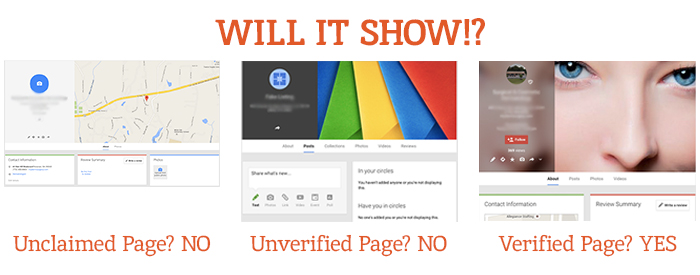
    This was specifically geared towards photographers so they would know how to handle the effect on Business View tours. What this means for all Google My Business users is that unclaimed local pages will most likely no longer be visible (as Google has always said is the case for unverified Google Plus Local pages).

    Different Google Local Pages - Search Influence

    As always, this update is accompanied by Google’s explanation that all actions are in the best interest of users and geared towards improving the user experience. Thanks, Google!

    On June 4, via the Google Business Help forums, Jade Wang (come visit us in NOLA again soon 😉 ) of the GMB Maps team also announced: “If a user is unresponsive to our attempts to contact him or her and has not logged into Google My Business for a significant length of time, then we may unverify pages in the account.” Here’s the full update from Jade:

    In some cases, we may contact Google My Business users via email to confirm that they are still actively managing a business page. If a user is unresponsive to our attempts to contact him or her and has not logged into Google My Business for a significant length of time, then we may unverify pages in the account. We’re doing this in order to continue to provide users with the best experience when they’re looking for local businesses like yours. If you find that a page in your account has been incorrectly unverified, please contact support to get assistance restoring verification.

    It’s a good idea to keep an eye on the inbox associated with your Google My Business (Locations) account. It’s also a good idea to regularly log into Google My Business (Locations) to confirm that your business information is current and accurate.

    My Take On It

    Both of these updates could mean great news for businesses that have struggled with requesting ownership of listings that were verified in the past by a person or an account they no longer have access to. To fix this issue in the past, you’d have to submit an ownership request form to Google to gain access to these listings. Then, you’d have to wait 10 business days (as per Google’s rules) and reach out to support (they could check to see if the account never responded to the request). After this 10-day period, the support representative could determine that the account that owned the listing was inactive and release the listing to you for claiming and verification.

    Basically this means inactive accounts are no longer roadblocks to getting access to business listings in Google My Business!

    While some issues may be alleviated with the update, what’s harder for search engine optimization work is that now it’ll be more difficult for us to see unverified duplicate G+ pages, old or closed G+ pages, and practitioner G+ pages that could be hurting businesses’ local rankings. Map Maker should allow us to still see the data but not the pages themselves.

    But there are signs this hasn’t rolled out completely yet. I have some unverified, fake listings in my Plus account (shhh, I know) that I use for training purposes that haven’t been touched yet. This is likely a slow rollout that started July 28. I did notice some changes to Maps navigation recently that were probably in preparation for this, though. For example, you used to be able to click “Write a review” from the Maps results to get to the G+ local page for a business, but now that just opens a review dialogue in the Google search results for that business in another window. This makes sense, since unclaimed businesses will no longer have pages.

    The Update: Google+ Is Disconnecting From Unnecessary Services

    On Monday, July 27, Bradley Horowitz posted on Google’s official blog that Google+ would be moving towards a “more focused Google+ experience,” which basically means no longer forcing users of various other Google products to have a G+ profile to use said products.

    Specifically, Google wants to foster the natural sharing environment of G+ by adding new features such as Google+ Collections. This update means that all you need to share content, communicate, and have a YouTube channel (among other things) is a Google account and not necessarily a G+ profile. Also, it will continue to keep Google accounts private and unsearchable. For those who were forced to create G+ profiles to use YouTube and other Google products in the past, Google promises that it will “offer better options for managing and removing those public profiles.”

    My Take On It

    Congrats to everyone who was pissed when they couldn’t use YouTube without a Google+ profile!

    Mad Men Cheers Joan

    At first, it seemed that G+ pages that are already connected to YouTube channels might be disconnected. But, that last comment about offering ways to get rid of unwanted G+ profiles, points to the fact that this update will not actively affect anyone in this way.

    Since this update has not yet rolled out, however, it is important for users to realize that they should not delete their G+ yet! Doing so prior to roll out will force you to delete your entire YouTube presence!

    Let me know your thoughts on all of these new Google updates! I’d love to hear what other users think of these changes.

    Image source:

    Mad Men gif

  • Facebook Enters The Game of GIFs: A Feast For People, Not Pages

    Search Influence Game of Gifs Blog

    tyrion dancing

    On May 29, Facebook confirmed that it would begin supporting animated GIFs! Up until this point, only Giphy GIFs could be used on Facebook, but they appeared like videos where you’d have to click a play button for the animation to start. For now, however, this new, universal GIF support only extends to personal profiles and not Pages.

    In the past, I’ve jokingly (sort of) said that Google Plus would always be better than Facebook because it supported GIFs. As a freelance photographer and creator/curator of cinemagraphs (animations that consist of seemingly still photographs with subtle repeated movement in them—example below), I’ve always been annoyed that I could only share my art on Tumblr and G+. So I was really excited when I learned about the addition of GIF support to Facebook late last week. Sadly, I realized very soon after this announcement that Facebook had not extended this support to Pages.

    Cat Tail Animation Cinemagraph Gif

    So What GIFs CAN Pages Use And See?

    People can share GIFs in the comments of posts by Pages but not on the walls of Pages. Also, Pages cannot share, reshare or comment using GIFs. So Pages can see when people post GIFs, but if they try to reshare a person’s GIF status or post their own, it will have to be opened in a new window for the GIF to play. A statement from a Facebook spokesperson on Business Insider said “Like many features that we release on Facebook, we want to ensure that this drives a great experience for people first before rolling it out more widely. While Pages cannot currently post GIFs, we are exploring ways to enable this in the future.” This also means that GIFs cannot currently be used in ads. Here’s to hoping they mean to roll this out for Pages in the very near future.

    Here’s a GIF of the previously shown cat GIF moving in the comments of a post on a Page:

    Search Influence Gif on Facebook Page

    There are also other stipulations to using this new feature even on your personal Page. You cannot upload a GIF; it must be hosted elsewhere. So I suspect we’ll see a lot of sharing from sites like Tumblr (who just rolled out a GIF search—perfect timing) and Imgur.

    For now, I’ll just be happy that I can at least share my cinemagraphs that are already on my blog on my personal Facebook Page now.

    Thanks to HuffpostTV for the dancing Tyrion GIF!

  • Return Of The YT Channel: Moving YouTube Channels Between G+ Pages In 2015

    Move YouTube Channels Between Google Plus Pages

    In the early ages of YouTube and Google Plus connections, disconnecting and reconnecting channels to the correct G+ page was not an easy feat. I once wrote a blog about this lengthy workaround for LocalU. Not long after that blog post, Google released a support form that allowed you to have a YouTube support specialist do the reconnection for you. While this support was amazing and usually reconnected channels within 24-48 hours, it required a middleman to get the work done and wasn’t immediate.

    Now, Google has released a way to reconnect your channel to another page within your account in the Advanced Settings section of YouTube! If everything is in one account, then this reconnection takes mere seconds. Often, however, we find ourselves in a situation where the channel is connected to a personal Google Plus page in one Google account, and we want it connected to a business page in another login.

    So I’m here to walk you through how to handle both of the aforementioned situations.

    Reconnecting A Channel Within One Account

    We’ll start with the simple one. You’ve got a YouTube channel connected to one page (probably a person page, maybe a random brand page), and you want it connected to your official business page on Google plus. Whatever shall you do!?

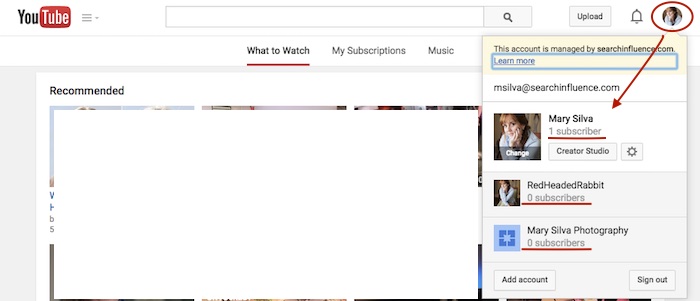
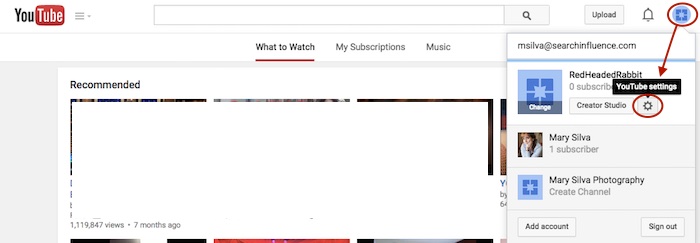
    Step 1: Go to YouTube.com and log in to your Google account. In the top-right corner of the page, click on the circle that shows your page icon to see a list of pages and their channels within this account.

    YouTube Users

    Usually, when you first log in to YouTube, you’re automatically managing or acting as your personal Google Plus page (the profile listed first in the dropdown is the one you’re currently acting as). To manage another page, which is what we’ll need to do to move channels, you’d just click the page you wish to manage from the dropdown.

    Deleting Unnecessary Channels Side Steps:

    Before we can proceed with moving channels, however, note that in the screenshot above, both of the extra pages have “subscribers” listed under their page names. This means that channels have been created for both of these pages already (otherwise we’d see “Create a Channel” below the page names). So if we want to move a channel to the page “Mary Silva Photography” in this account, then we’ll have to free it up for receiving a channel by deleting the unwanted channel that is currently connected to it.

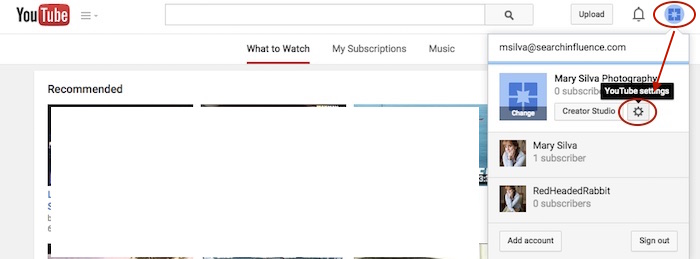
    This can be done fairly easily by clicking the “YouTube Settings” gear from that top-right dropdown while managing the page from which you want to delete the channel.

    Screenshot 2015-05-18 10.36

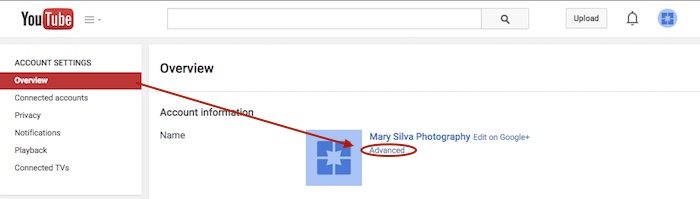
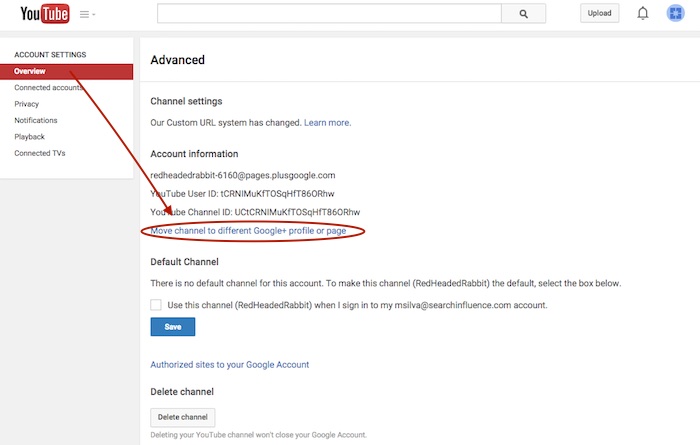
    Then click “Advanced” under the page name in the “Overview” tab.

    Screenshot 2015-05-18 10.37

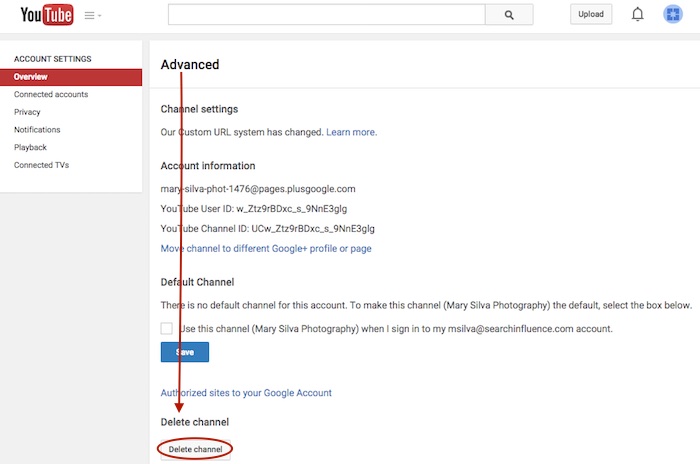
    At the very bottom of the page, you’ll see the “Delete channel” option. Once you click that, you’ll probably have to re-enter your password. Brace yourself.

    Screenshot 2015-05-18 10.38

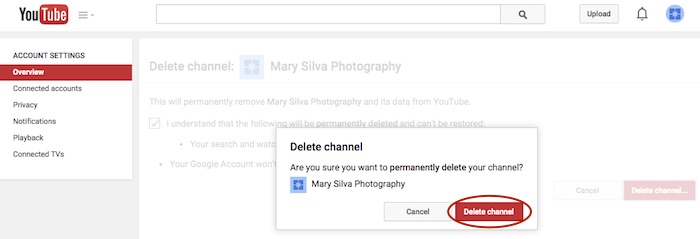
    You’ll see a verification page to confirm what you’re about to do. Check the box and click “Delete channel” to get one more verification dialogue, then click “Delete channel” one last time to complete the process.

    Screenshot 2015-05-18 10.41

    Now we can get back to moving the channel. In this example, we’ll pretend that the channel connected to “RedHeadedRabbit” needs to be moved over to “Mary Silva Photography.” As you can see in the next screenshot in Step 2, “Mary Silva Photography” now shows “Create a Channel” in the dropdown, so it’s free to take on the channel from the “RedHeadedRabbit” page.

    Step 2: Click on the page that has the channel you want to move in the top-right dropdown to manage the page (in this case, “RedHeadedRabbit”), and then the aforementioned “YouTube Settings” gear should appear for that page. Navigate back to the “Advanced” settings page from the “Overview” tab just as you would have to delete the channel.

    Screenshot 2015-05-18 10.47

    Step 3: This time, however, you’ll want to click the “Move channel to different Google+ profile or page” option just above the “Default Channel” header. Google will probably make you enter your password again, so brace yourself.

    Screenshot 2015-05-18 10.48

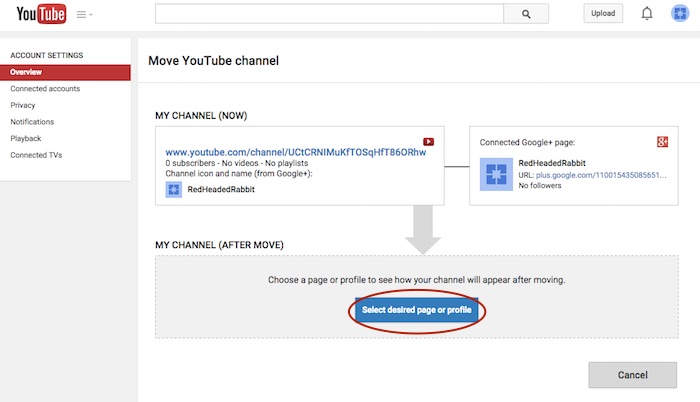
    Step 4: Now you’ll see the “Move YouTube channel” page. Under “MY CHANNEL (AFTER MOVE)” click the “Select desired page or profile” button.

    Screenshot 2015-05-18 10.49

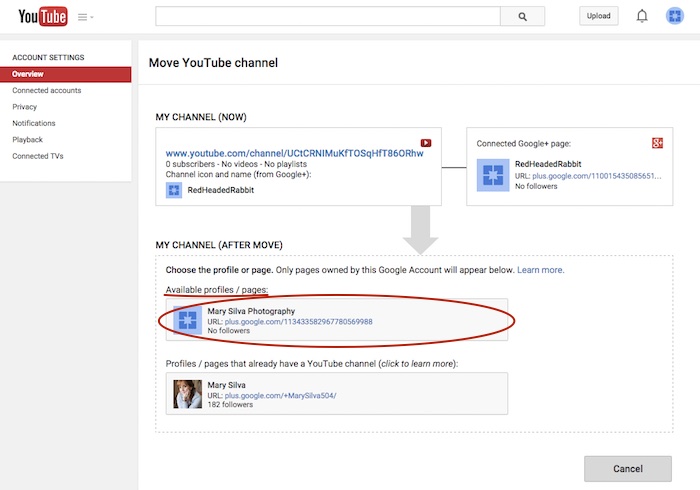
    Step 5: Choose the page you want to move the channel to from the “Available profiles / pages” section.

    Screenshot 2015-05-18 11.05

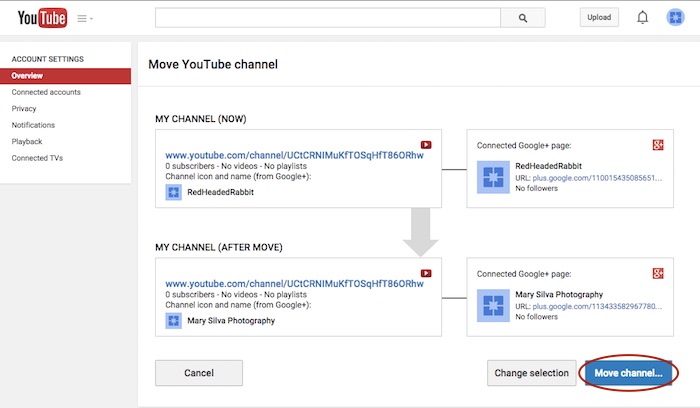
    Step 6: Confirm where you’re moving the channel (you can click links on this page to double-check that you’re moving the right channel to the right Plus pages) and click “Move channel…” to complete the transfer.

    Screenshot 2015-05-18 11.06

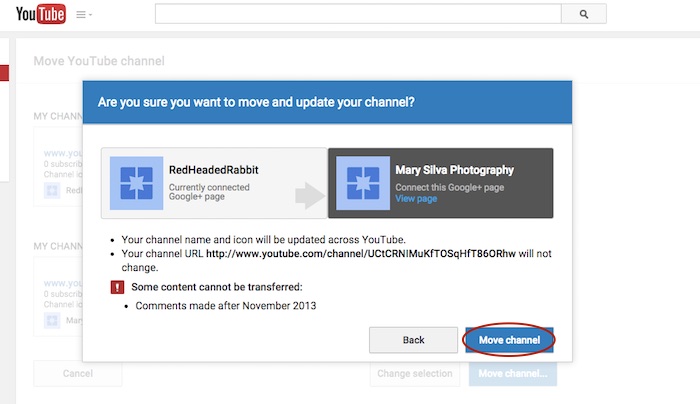
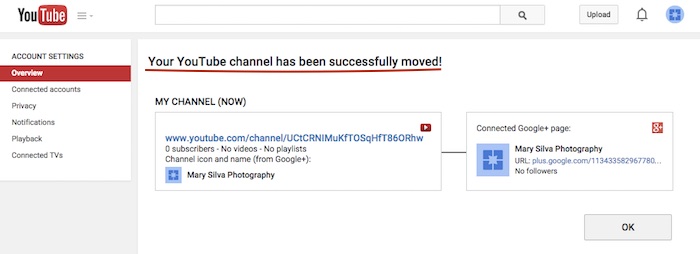
    Step 7: Click “Move channel” in one last confirmation dialogue box, and you’re done! You’ll see one last confirmation screen about the successful channel transfer.

    Screenshot 2015-05-18 11.13

    Screenshot 2015-05-18 11.09

    Reconnecting A Channel With Two Different Accounts

    As previously mentioned, we often find that we have a channel connected to a personal Google Plus page in one Google account, and we want it connected to a business page in another login. The steps for moving the channel will be the same as above, but first, we must get the pages all set up properly within one account.

    The account that has the channel has to be the OWNER of the page that we want to move the channel over to. So we need to go through adding the YouTube channel account as a manager of the business page within the other account first. Then we can go back and transfer ownership of the business page over to the channel account completely.

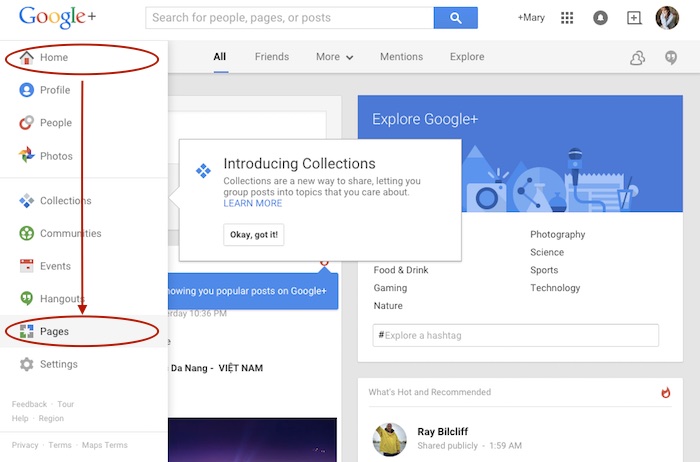
    Step 1: Log in to the account that the main business is claimed in and go into your Pages.

    Screenshot 2015-05-18 11.30

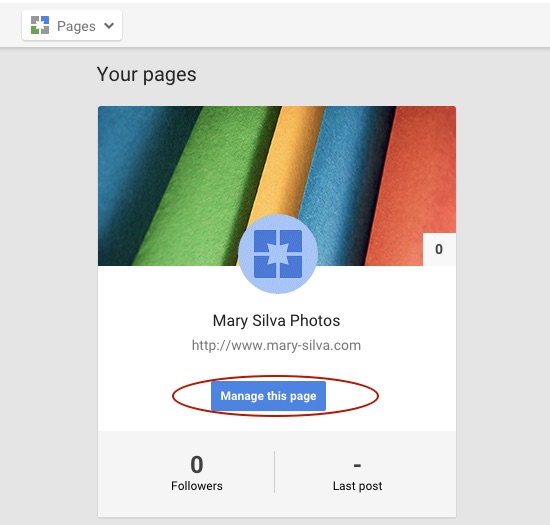
    Step 2: Choose “Manage this page” for the listing that you want to make the YouTube account a manager of.

    Screenshot 2015-05-18 11.31.30

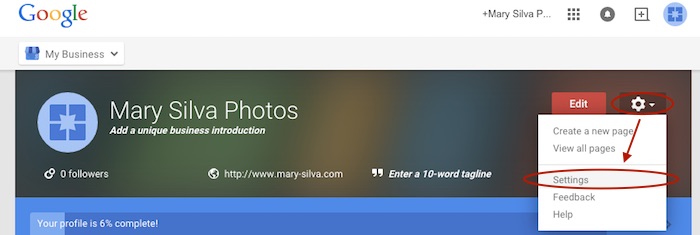
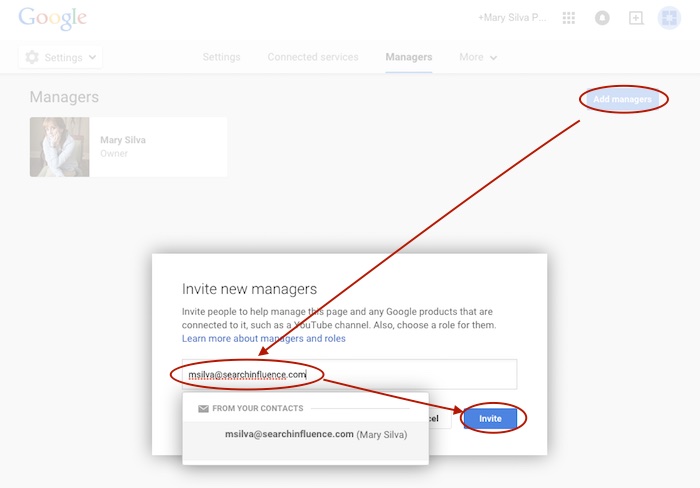
    Step 3: Go to “Settings” in the dropdown. Then, choose “Managers” under the “More” tab and add the email address for the YouTube account as a manager by clicking “Add managers.”

    Screenshot 2015-05-18 11.31.44

    Screenshot 2015-05-20 12.46.32

    Screenshot 2015-05-18 11.32

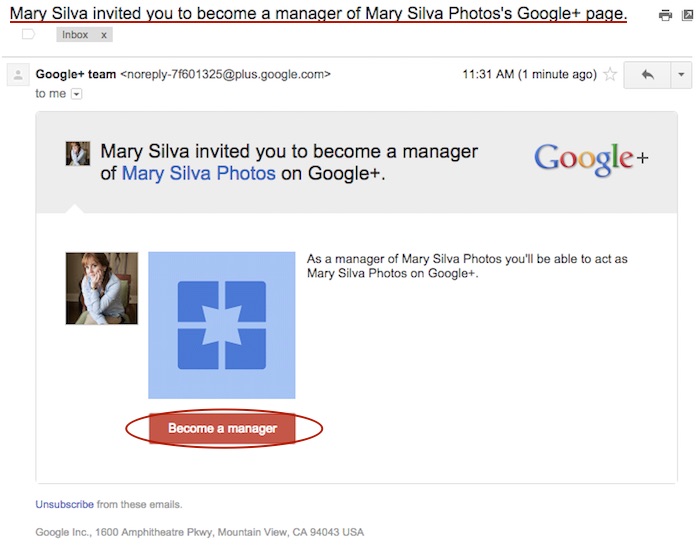
    Step 4: Log in to the email for the account with the YouTube in it. Look for the email that says “Person Name invited you to become a manager of the Business Name’s Google+ page” and click “Become a manager” within that email.

    Screenshot 2015-05-18 11.33.15

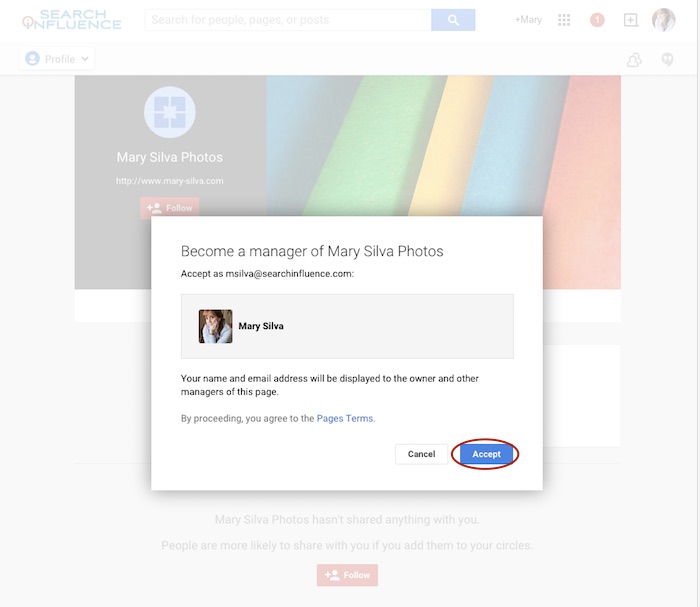
    Step 5: The link from the email will take you to the Google Plus page and automatically open a “Become a manager of Page Name” dialogue where you’ll click “Accept” to complete the managership setup.

    Screenshot 2015-05-18 11.33

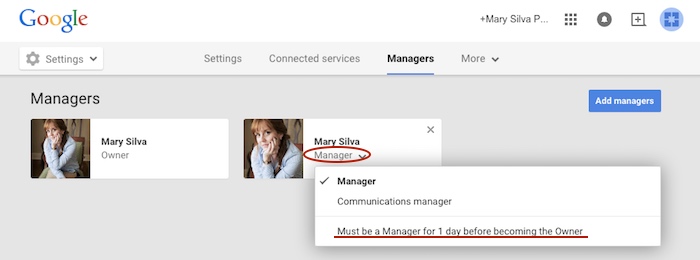
    Here’s where we wait…Unfortunately, for security reasons, Google requires an account to be a manager of a page for at least one day (as seen in screenshot below) before ownership of the page can be transferred over. So wait a day and come back to me when you’re ready to wrap this up. 😉

    Screenshot 2015-05-18 11.38.58

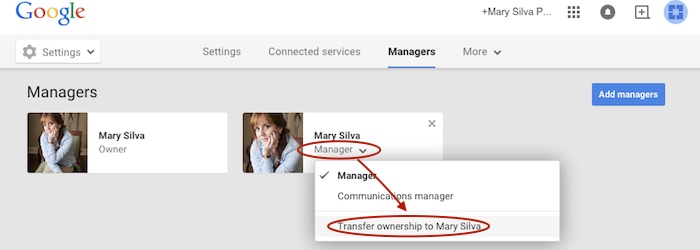
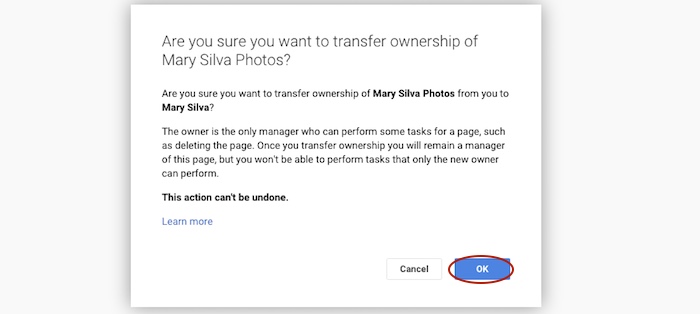
    Step 6 (One Day Later): Now log back in to the account that owns the page and follow steps 1-3 again to get back to your “Managers” settings page of your official business page. When you click “Manager” under the account name, you’ll see a dropdown with the option to “Transfer ownership to Person Name” where you previously saw “Must be a Manager for 1 day before becoming the Owner.” Once you click that, you’ll click “OK” to verify the transfer of ownership, and then the transfer is complete!

    Screenshot 2015-05-19 12.54.22

    Screenshot 2015-05-19 12.54.37

    You’ll get an email in that new owner account saying something like, “Person has made you the owner of the Page Name Google+ page.” Unlike the managership process, you don’t have to click anything in an email, so the ownership has been transferred completely, and you’re done!

    Now that you have everything set up properly, you can proceed with steps two to seven in the “Reconnecting A Channel Within One Account” section above.

    Hopefully this extensive tutorial helps you through all of your YouTube woes. To learn more about the ins and outs of Google Plus pages in Google My Business, you can read more on the blog here.

  • Don’t Give a Dang About a Bad Reputation: I’ve Got No Online Reputation

    Don’t Give a Dang About a Bad Reputation: I’ve Got No Online Reputation

    Reviews are essential to a successful business. Bad reviews can make or break a long-established business or a fledgling one. Companies have even sprung up to help combat bad online reputations. But what of the companies that have little or no online reputation at all? This scenario can be just as detrimental to a business. In fact, there are many websites that can help businesses drive customers to write online reviews:

    Reputation.com

    • PRO: Along with many other reputation management services, Reputation.com offers in-depth review-garnering solutions. Services range from very hands-off on the part of the business or very hands-on. The very hands-off approach offers the ability to send out emails that can be customized with customer names, employee names, and business logos. It also offers an in-store review option that customers can fill out immediately after a purchase or visit. The online management part of this site gives in-depth analytics of the reviews garnered through its services as well as pre-existing reviews.
    • CON: Review management is just part of Reputation.com’s many services. If you already have search engine optimization services for your business, you might be getting more than what you really need to pay for.

    Chatmeter

    • PRO: Chatmeter monitors any reviews a business may receive online on various websites, and it gives daily updates so business owners can quickly respond to both positive and negative reviews. With constant interaction, customers can see that the business is active and working positively to improve its customer service. This site also gives in-depth analysis of the reviews received so a business owner can see if the reviews are trending positive or negative. Chatmeter also offers the ability to monitor competitors’ reviews and gives insight on what competitors are doing right.
    • CON: Chatmeter does not offer the ability to reach out to customers directly from the tool. The business must work on garnering reviews through strictly organic means, which can be a slow-moving process.

    Get 5 Stars

    • PRO: Get 5 Stars is strictly a review management tool. The tool can be used to monitor existing reviews as well as send out requests for new reviews from customers. This creates a survey for customers to fill out with differing results depending on the type of review. Bad reviews can be managed before they hit any other websites. Good reviewers can be asked to review on any number of sites or to have their review published directly to the company’s website. This tool also offers in-depth analytics to see open rates, success rates, and any problem areas that might be initially overlooked.
    • CON: This tool requires a way to collect customer emails, which can be difficult if the business does not have a storefront that customers frequent.

    These are just a few of the many ways a business can monitor a fledgling online reputation. Online review management coincides closely with local SEO, since a business needs a presence online before it can build a reputation.

    Image sources:

    Haters Gonna Hate GIF


  • Googleplasty: How to Reshape Your Search Results (Part 2)

    As more businesses begin to take efforts to improve their online presence, standing out in search results of highly competitive markets and areas becomes even more difficult—and nowhere is this perhaps more true than in the cosmetic medicine industry.

    In order to reshape your search results through the art of “Googleplasty,” you must know what factors make your business rank high in a Google search. Since we now know all about the different types of search results from part one of this two-part blog series, let’s talk about the most important factors that play a role in how high your practice ranks.

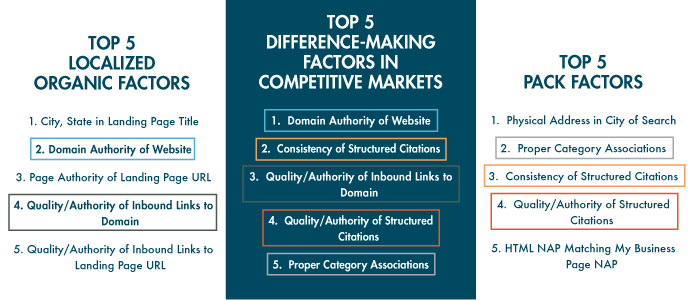
    The following three “Top 5” lists of factors are from from Moz’s 2014 Local Search Ranking Factors survey. The information came as a result of surveying 40 industry experts to determine what had the most influence on ranking in Google search results.

    top 5 search ranking factors

    As you can see, all of the factors that are integral in competitive markets also play a part in either localized organic or maps pack results. Due to their repeat importance, I think they’re the five factors most worthy of discussing in detail.

    1. Domain Authority of Website

    domain authority

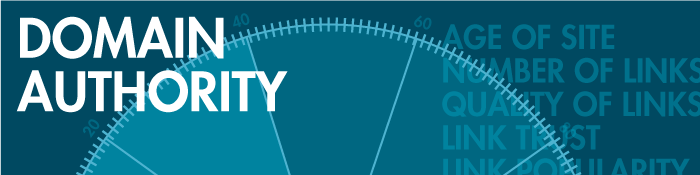
    First up on our list as the most important factor in competitive markets is Domain Authority, which isn’t much of a shocker. Domain Authority is a proprietary measurement (created by Moz geniuses) of a domain’s power within a 100-point scale. This score can be used to predict if a site is likely to rank in Google’s search results and can also be used to track a site’s growth and increase in strength.

    It is a metric that combines other metrics such as age, number of links, and quality of links, so it’s not easy to manipulate through singular or direct efforts. As it is directly put on Moz’s site, “The best way to influence this metric is to improve your overall SEO.”

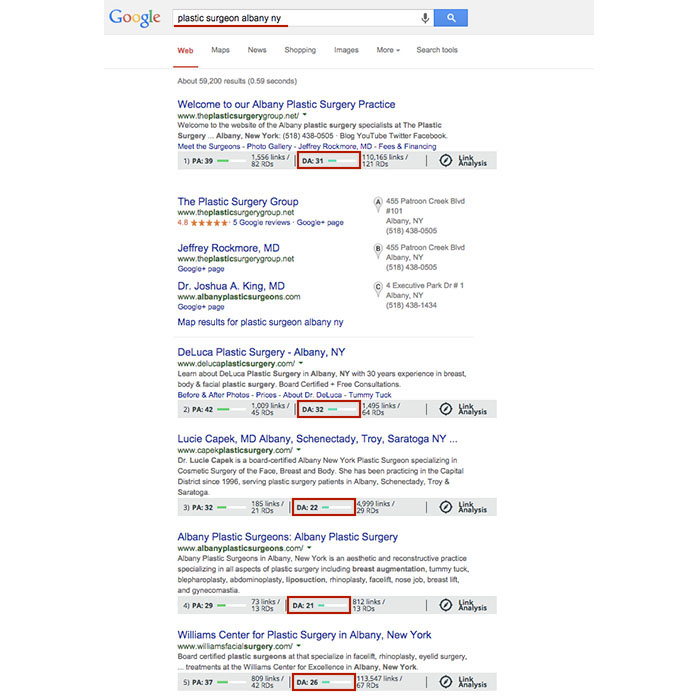
    Using Moz’s MozBar to see domain authority of pages in search results, you’ll see that the top five business sites in the localized organic results for “plastic surgeon albany ny” have Domain Authorities of 31, 32, 22, 21, and 26, respectively. As you can see here, having a score that is higher by a single point won’t guarantee that you rank above your competitor, but in this search example, business sites past the first page of results tended to have Domain Authorities lower than 20.

    Domain Authority Search Results

    2. Consistency of Structured Citations

    structured citation consistency

    While this factor isn’t as high ranking for localized organic results, it is third for the top maps pack factors and second here in the top factors for competitive markets. One reason for this is that in many competitive markets, such as plastic surgery or cosmetic dermatology, you’ll find maps packs in search results.

    To start, a citation is a place on the Web where a business’ name, address, phone number, and often website can be listed (sometimes referred to as the NAP of a business – name, address, phone). Any combination of the NAP, with or without all parts, listed on a site is considered a citation. A structured citation in particular is a listing of business information found on a directory website (e.g. YellowPages.com and Yelp.com). On the other hand, an unstructured citation can be business information on non-directory sites like newspaper sites, press release sites, and blogs, to name a few.

    By increasing the number of matching information sources (and therefore matching signals) to Google, you also increase your chances in having Google match this information to search queries, according to a recent webinar with Google’s Heather Wilburn. So if you want to be matched with potential patients searching for businesses like yours in your area, consistent business information across the Web is one of your best bets, especially in competitive industries like cosmetic surgery.

    3. Quality/Authority of Inbound Links to Domain

    inbound links to domain

    An inbound link to your domain (aka inlink or backlink) is exactly what it sounds like, a link leading to your website. The relevance to your industry or location and the authority of a website linking to yours in and of itself are the two best traits for quality links. Buying links or having links from random, spammy sites will hurt, not help you. Links from local sites and popular sites are a pretty safe bet. You can seek out local sponsorship opportunities as a good link-building effort or help other sites clean up their broken backlinks by using your working ones.

    To differentiate between natural link building versus spammy link building, remember that it’s all about user experience and what makes sense to the user. If your efforts don’t uphold the ideal of providing the best user experience possible, then they’re probably not good.

    4. Quality/Authority of Structured Citations

    structured citation quality

    As mentioned above, a structured citation can be any directory site that lists any variation of your business’ NAP or website. While consistency is most important, you also want to make efforts to build high-quality, authoritative citations in directories.

    Just like there are many factors to improve your own site’s authority, there are also many factors to determine the quality of a directory. You can delve into Whitespark’s blog on how to identify quality citation sources for a detailed breakdown, but basically a good rule of thumb is to look for high domain authority and human moderation in directory sites. Examples of human moderation include how DMOZ requires submission review by its team before a link goes live or how Google Plus, Yelp, and Bing listings all require verification via phone call or a postcard sent to the business.

    Google also considers niche directories highly authoritative. A niche directory is an industry-specific or location-specific directory. Since the Pigeon algorithm update, this kind of citation building has become especially important, and searching for your industry’s keywords will often help you identify these niche directories. If you search for “plastic surgeon columbus oh,” you’ll see that the directories healthgrades.com, vitals.com, and smartplasticsurgery.com appear on the second page of search results. Often, these types of directories require either verification or payment for those seeking to be listed on their site. If you understand the concept of barnacle SEO, you know that being listed on these types of big, authoritative sites is a great way to improve your own visibility to potential customers. Use your discretion to decide if the opportunity cost of getting on a directory isn’t too high to be worth the effort.

    Warning: If a site ever requests a “reciprocal link” to its site on your site in order to be listed, this is NOT A GOOD practice, and they are not worth your time.

    5. Proper Category Associations

    category associations

    Having proper category associations is another important factor for ranking in the maps pack that can set you apart from the rest in a competitive market. It’s a pretty simple concept, and it basically boils down to the part of the guidelines for representing your business on Google that tells businesses to “Choose categories that are as specific as possible, but representative of your main business.” A cosmetic surgeon with the primary category on the Google Plus local listing set to “surgeon” is less likely to rank above one with a primary category set as “plastic surgeon” in the maps pack, for example.

    Though this is a lot to grasp and take action on all at once, having the foundation and understanding of best practices to improve user experience and to better your business online will greatly improve your successes online in the long run.

  • Googleplasty: How to Reshape Your Search Results (Part 1)

    As businesses grow more in touch with their online presence, it becomes more and more challenging to stand out in the search results of highly competitive markets and areas—and nowhere is this perhaps more true than in the cosmetic medicine industry.

    Search Influence - Plastic Surgeon Local Google Search Results

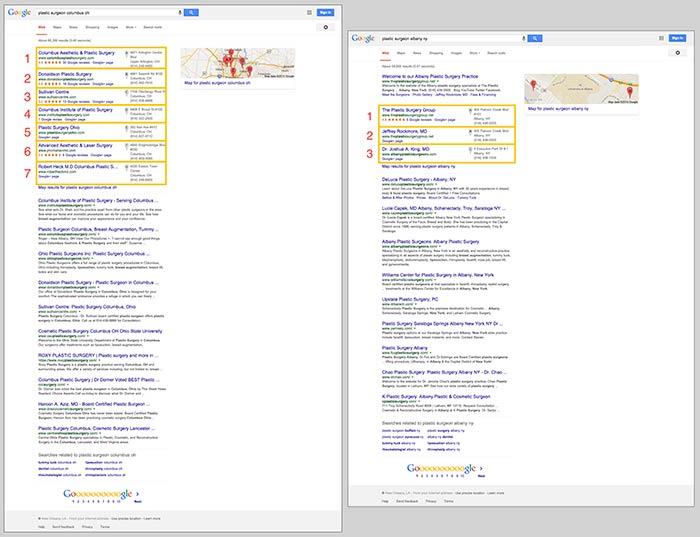
    First things first, let’s make sure we’re on the same page about the two major kinds of results that we see in desktop results for plastic surgeons. “Localized organic” search results and “maps pack” results typically appear together in what is referred to as “combined” search results. The factors that determine what appears in these two areas are not the same, as you can tell by the the difference in results and by the appearance of a site more than once between the two. Maps packs can come in a variety of forms and don’t show up for all search queries, which is also important to note.

    In the screenshot below on the left for the search “plastic surgeon columbus oh,” you’ll see 10 localized organic results below a 7-count maps pack. In the screenshot on the right for “plastic surgeon albany ny,” you’ll see 10 localized organic results, but the 3-count maps pack appears below the first organic result.

    Search Influence - Google Maps Pack Plastic Surgeon

    Stand Out in the Maps Pack

    In the maps pack itself, the most striking features are the review stars and rating display. The data in the maps pack area is pulled directly from Google Plus local listings in Google Maps. So, to make your practice stand out in the maps pack, you should claim and verify your Google Plus listing via Google My Business.

    Once you’ve claimed and verified your listing, you’ll want to get reviews from your patients. It’s important to understand that one or two reviews a month over a few months is better than 15 reviews in one week. As with most online marketing strategies, natural behavior is the best behavior.

    Stand Out in Localized Organic

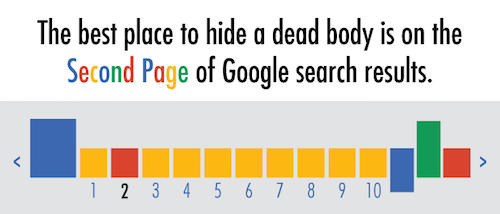
    The most obvious way to stand out in the localized organic results is to be ranking as high as possible and to AT LEAST be in the top 10 so that you’re on the first page. As the age-old SEO joke goes, “The best place to hide a dead body is on the second page of Google search results.” Hardly anyone looks past the first page, and—according to eye-tracking data—not many look past the top half of the search results page.

    Search Influence - dead body Google Search Results meme

    The Google PageRank algorithm that determines these rankings takes into account somewhere around 200 factors, so it’s not as simple as pinpointing one or two efforts to be made.

    Now that we’ve got a better understanding of what we’re looking at in search results, we can start to understand the major factors that affect ranking in each of these sections. Stay tuned for my next blog, where we’ll talk about the top five ranking factors in the maps pack, in the localized organic results, and in competitive markets!

  • Sweep Away The Competition By Spring Cleaning Your Backlinks

    So you want to do link building the white-hat way, but it seems these days most link building practices are pretty sketchy. One Google-friendly way to do link building is through identifying and fixing broken backlinks to redirect to pages on your site. Spring backlink cleaning, here we come!

    While there are many ways to approach broken link building, the method I find most doable is scanning relevant, authoritative sites for broken backlinks to pages for more info. Once you find a broken link and determine that a page on your site will adequately replace it, you’ll want to reach out to the owner of the site with the broken link to help them recognize the issue and take your opportunity.

    This practice is best for businesses with sites that already serve as a resource and that have many informational pages regarding various aspects of their industry. It is, however, totally doable for businesses that don’t meet these ideals, but said businesses will have to build out resource pages on the identified subject areas as they identify broken link opportunities.
    Throwing Away Broken Links

    Finding Sites

    So first, you’re going to have to find the best and most authoritative sites in your industry. Moz’s MozBar extension allows you to easily see Domain Authority and Page Authority of sites you’re on and sites in search results, which can be helpful in the hunt for good sites. Think of products and services that complement what your business offers to find more opportunities. For example, if I were trying to find a complementary business or service to Search Influence, the first type of business that comes to mind is a social reputation management service.

    Once you find one or more authoritative reputation management sites, you could use them to find MORE opportunities! To do this, you could use Moz’s Open Site Explorer and find backlinks to the sites you’ve already found that are also authoritative and relevant to your industry. You can use any backlink-finding tools you prefer, though. Other tools that can do this include LinkResearchTools’ Quick Backlink Tool and Majestic’s Site Explorer.
    liam neeson seo meme backlink

    Finding Broken Links

    Once you’ve got the list of sites you’d like to scan for broken links (I’d suggest at least 20 to 30, but it’s up to you), you’ll need to find said broken links. Internally, we use a tool (Screaming Frog’s SEO Spider) to find broken links for all of your sites, but any tool you find will probably do the job just fine.

    If you’re using Screaming Frog, you’d go to “Configuration,” then “Spider” to make sure your settings are set for an internal crawl. Enter the domain you want to crawl, and then click start. Once the crawl is complete, go to “Bulk Export,” then “All In Links.” Open the file, and we’re ready to get organized!

    Since we only want links, the first header you’ll want to filter is “Type” to only show HREF. Then filter “Status Code” to show everything but 200s, since 200 links are O.K. Finally, sort the “Destination” column alphabetically so that you can easily see and prioritize rows with off-site destinations. The site owners are most likely to be willing to replace broken off-site links. They might prefer to fix rather than replace broken internally directing links.

    Once you’ve followed the above steps for finding broken links on your chosen sites, we’re ready to take action.

    Finding Opportunities

    Here’s the tedious (but worth it) part of the whole process. Now that you’ve got lists of broken links, you’ll have to look through them and see if you can find the new page on that site that it should link to. If you can’t find the page and your site has links that will fulfill the objective of the original links, note that replacement link as one of yours instead of one on the original site. Sometimes this means looking at the “Source” column and checking out the context of the broken link. It also might mean creating content on your site, if it’s relevant to your business, to fulfill the needs of the broken link objective before moving forward.

    The last thing you’ll need is a list for each site you’ve investigated that includes the page that has the broken link (“Source”), the broken external link (“Destination”), the fixed URL, and the corresponding page on your site that could replace the broken link or be added to that page.

    Reaching Out

    Once you’ve got your lists of opportunities organized, you can reach out to the site administrator to have the broken link(s) replaced with your good one(s). You can find contacts to sites in multiple ways. The obvious way would be by finding a contact email or form in their “About” or “Contact” pages. I like this option because most times, if a site has created a way for users to contact them on-site, they’re responding to outreach through these mediums. If you’re unable to find any obvious way to contact a site, you can also use a whois lookup. I use the terminal emulator iTerm2 to do whois lookups, but you can also just use a web hosted whois lookup like whois.domaintools.com to find an email for the site Admin or Registrar.

    Here’s an example of a whois lookup for Wikipedia (You probably don’t even want to try to communicate with them, by the way. Possibly too big of a fish to fry.):
    WhoIS Lookup WIkipedia

    For time-saving purposes, I’d suggest creating a template you can use to email all of these prospects. In doing manual link removal requests in the past, I found some bits of information to be more fruitful to provide than others. You want to seem natural and authoritative (not spammy) while providing clear information, but you also want to be as concise as possible to avoid losing the attention of the receiver.

    You’ll want to include a short intro to introduce your authority and what you do, say that your message is intended for the site’s webmaster (as they would be the one implementing your suggested fixes), and note the Source page, the broken Destination URL, and the recommended replacement URL. If the replacement URL is just one you found originally linked to the site, now is your opportunity to share that you might have some additional information on your site that their readers might benefit from. Send all your messages, and then wait!

    While I’d say to make your own templates to sound more natural and fit your needs, here are two of mine for both use cases.

    Replacing URL With Same-Site URL

    Hi,

    My name’s (insert name here), and I am an industry specialist and was doing some research when I landed on your site…

    I was hoping to pass on some information to your webmaster or web developer, as I found a broken link on your site that your readers might need.

    While looking at this page on your site (source URL), I clicked on the link to this site (broken destination URL) and found that it didn’t work.

    Once on the site, I found that they must have moved that information here (replacement URL).

    While you’re working on updating this page, I was wondering if you’d be interested in including my page about (insert summary of page here) as a resource that might also be beneficial to your readers: (insert link to your site’s relevant URL here).

    Replacing URL With Your-Site URL

    Hi,

    My name’s (insert name here), and I am an industry specialist and was doing some research when I landed on your site…

    I was hoping to pass on some information to your webmaster or web developer, as I found a broken link on your site that your readers might need.

    While looking at this page on your site (source URL), I clicked on the link to this site (broken destination URL) and found that it didn’t work.

    I tried finding the correct page on their site for this info, but it seems that it might be gone altogether.

    My site happens to have some similar information, so I was wondering if you’d be interested in including my page about (insert summary of page here) as a resource that might also be beneficial to your readers: (insert link to your site’s relevant URL here).

    Hopefully, this helpful, good link building practice will aid in your efforts. Let us know your favorite, white-hat link building practice in the comments!


  • Started From The Bottom Now You’re Hired: Tips For The Tech Job Interview

    In the ever-growing tech industry, more and more jobs are becoming available. Sadly, this also means a lot of positions aren’t being filled due to bad interviews. Having interviewed hundreds of prospective employees in the past few months, I’ve learned that many people seem to struggle when considering what employers are looking for in candidates. You practice and prepare for interviews in advance thinking, “How can I show them how great I am?” when you really should be practicing to fulfill the question, “How can I show them I’m what they want?”

    So here are some tips for acing the interview! A lot of these can apply to more than the tech world, so read on and take mental notes for your future!
    Search Influence - New Orleans Tech Industry Interview DOs and DON'Ts

    Do: Talk About What You Have To Offer A Company
    If you’re applying for a position that requires any sort of client-facing or largely communicative capacities, talk about ways in which you’ve exhibited those abilities in the past. If you’re applying to work in a fast-paced, growing industry, talk about how you’ve been adaptive and proactive with change in your past experiences. Also, make it clear that the industry they’re in is the industry you want to work for. You should ALWAYS research what a company does before you attend an interview with them. Being completely clueless about the work they do shows a lack of sincere interest in the job.

    Basically, find any way to show your interviewer that you have what they need and want to be there.

    Don’t: Talk About What A Company Has To Offer You
    One of the biggest mistakes you can make in an interview is saying something like, “I want to work here because I don’t know about insert industry here and want to learn everything I can from working here.” You’d be surprised how often we hear that people want to start their own online marketing companies and just want to work for us to learn how to do what we do. That kind of response is a huge red flag for companies.

    Talking about your capacity and willingness to learn is a GREAT idea, but it needs to be done tastefully. A better way to express that would be something like, “I’d enjoy working in an environment where I’m constantly learning something new and improving.”

     Search Influence Spacer

    Do: Talk About Any Relevant Online / Tech Experience
    If you’re applying for a job in the tech industry, talk about any and all tech experience you have. Even if the job you’re applying for doesn’t require HTML experience, letting your interviewer know that you’ve got that experience shows that you’re well rounded and will be able to communicate effectively in that subject area if you need to (which can be helpful for interdepartmental work within a company). If you’ve got a professional website or blog for yourself, don’t be afraid to share it!

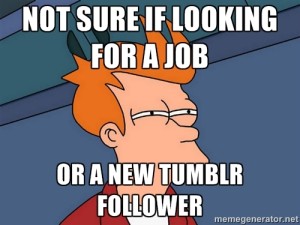
    search influence new orleans - interview meme fry futurama tumblr

    Don’t: Talk About Your Tumblr
    Unless you’ve got a blog or website suitable for the eyes of an employer, refrain from specifics when talking about any blogging, HTML experience, or other relevant experience. Most people who know what Tumblr is know that it is rarely used in a professional capacity, and the last thing you want to do in an interview is to get your employer imagining your possibly-emotional, probably-personal presence. You can still talk about how having a Tumblr or any other non-professional online experience plays into your abilities, but approach it carefully. Instead of “I use Tumblr a lot, so I get HTML,” say something like “Through a few blogging platforms, I’ve had some experience with basic HTML.”

     Search Influence Spacer

    Do: Talk About Your Interests Outside Of Work
    Usually, mentioning that you’ve balanced side projects in life while still working or going to school full time is an indication to future employers that you’re capable of balancing multiple tasks and prioritizing what needs to be done. It also helps to show you’re well-rounded and provides something unique that could make you stand out in the interviewer’s memory. If an employer is trying to weed out top candidates from a recent round of interviews, the good interviewee who played guitar in some band might stand out more than just the good interviewee.

    Don’t: Talk About Starting Your Own Business, Going Back To School, Or Trying To Become An Actor
    Unless you’re applying for a temporary position, most companies are looking for someone who’s in it for the long haul and wants to grow with the company. If you’re indicating to your interviewer that your main interests don’t align with being dedicated to your job, they might not consider you to be an ideal candidate for the position.

     Search Influence Spacer

    Do: Elaborate And Give Examples
    Even when given a general question, never give a general answer. Often, employers ask something about discussing a time when you exhibited a certain characteristic. For example, an employer might ask, “Can you tell us about a time when you had to deliver great customer service?” If you’ve had any service industry experience (which so many of us have), your initial thought is probably, “ALL. THE. TIME.” While it’s great that you’ve got a lot of experience with this, you want to give clear examples that exhibit it. So saying something more explicit gives the employer a clearer picture of what you define as “good customer service.”

    Don’t: EVER Give A Yes Or No Answer
    Along the lines of the suggestion above, even when you’re asked a “yes or no” or “either/or” question, make sure to explain the reasoning behind your answer and never ride the fence. The most common example of this that I see is when candidates are asked if they prefer working individually or on a team, as people often respond that they’re comfortable doing both. While this is seemingly an admirable trait, realistically everyone has a preference, and neither answer is wrong. If an employer chooses to hire you, they’ll want to know if you’re predisposed to work in the type of environment that their company has and be ready to work with you on it if you aren’t.

     Search Influence Spacer

    Do: Prepare Your Online Presence Accordingly
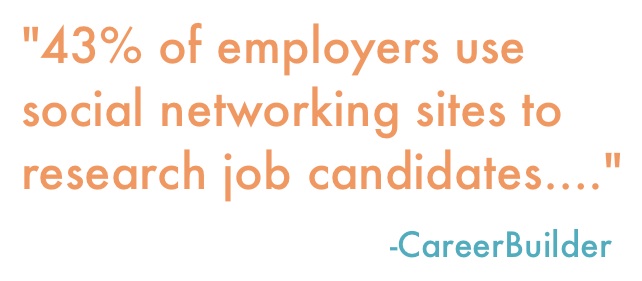
    According to a June 2014 study by CareerBuilder, 43 percent of employers use social networking sites to research job candidates, and 51 percent of employers researching candidates online found content that caused them to not hire the candidate. Even at a laid-back, young office like ours, a profile picture of you doing a shirtless keg stand is probably not going to get you invited to an interview. One safe move you should probably make is to switch your Facebook profile features to private when applying for jobs.

    You should also have a well-built-out LinkedIn profile with references. Though most employers will do reference checks as you move along in the later stages of the hiring process, having good, easy-to-access references from the get-go could improve your chances of moving forward.

    Search Influence New Orleans - Employers Use Social Media Career Builder Quote

    Don’t: Delete Your Entire Online Presence
    Having profiles online, whether it’s Facebook, Twitter, LinkedIn, or your own site, puts you in control of what future employers see when they look for you. Also, if you’re trying to remove incriminating photos of yourself, deleting your profiles will only delete pictures you posted (not ones your friends posted of you). So you’re better off changing your privacy settings and managing your online presence. There are also sites like SimpleWash that connect to your Facebook and Twitter accounts in order to help you identify possibly inappropriate statuses, likes, and pictures.

    Another reason why you should be keeping your social profiles around is that, in the tech industry in particular, employers are typically looking for people with a proclivity for all things techy, and having an online presence is another opportunity to exhibit that inclination.

    Search Influence Spacer

    Use these tips, and good luck in your job searching! Feel free to share your interview experiences below. We’re often looking to fill positions here at Search Influence, so if you’re interested in working with a hard-working, fun bunch, check out our various tech industry job postings.

  • Let’s Get Medical: How To Manage Healthcare Listings On G+

    When it comes to adding healthcare listings in Google My Business (now the one-stop shop that includes Google Plus business management), there are many things to consider when managing multiple entities within one location. While building out multiple listings unnecessarily is not ideal, some instances may call for multiple listings in order to distinguish between unique departmental differences.

    If there are multiple departments within your hospital or practice that have unique information (for example, a different phone number from the main hospital or practice) and operate differently from the primary location (for example, unique hours are typically considered an operational difference), then it is best to build out separate location pages for each of the departments to provide this information to customers more clearly.

    Let us delve into an explicit example of this. If your general hospital houses a hospital pharmacy and an emergency department, then these departments serve different purposes and might have separate hours and phone numbers.

    IMPORTANT NOTE BEFORE PROCEEDING: The following examples are ENTIRELY FICTIONAL BUSINESSES.

    Creating Pages:

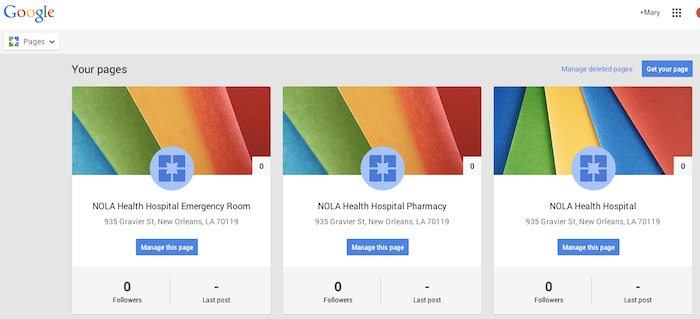
    Let’s say the aforementioned example is called NOLA Health Hospital. NOLA Health Hospital, in this instance, should have three Local (Storefront) Google Plus Pages. Note that these pages, while most likely using the same address, should have unique phone numbers. They should also have unique names; for example, “NOLA Health Hospital,” “NOLA Health Hospital Emergency Room,” and “NOLA Health Hospital Pharmacy” would be the proper names. These pages should also list their hours of operation according to their department-specific hours. If these pages were properly set up in the Google My Business dashboard, they would look like the following screenshot.

    Google My Business Dashboard - Search Influence

    Setting Categories:

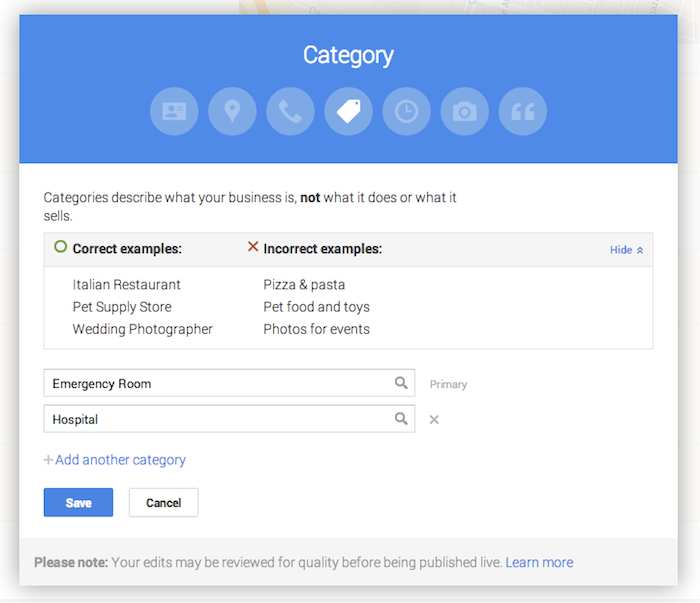
    Now that you have created the pages, it is important to use the categories to distinguish the differences between them. Google’s guidelines for businesses explicitly state that “For each department, the category that is the most representative of that department must be different from that of the main business and that of other departments.” This means that the primary category for each page should be different. In this example, NOLA Health Hospital Emergency Room will have the primary category “Emergency Room,” NOLA Health Hospital Pharmacy will have the primary category “Pharmacy,” and the general hospital of NOLA Health Hospital will have the primary category “Hospital.”

    Google Plus Page Editing - Search Influence

    While these settings are typically arranged during the page creation process, they can also be edited after the page is created. Click on “Manage this page” from the Pages dashboard, then click “Edit” in the top right-hand corner, and finally click into the “Category” section of the editing page to adjust the category. This is also where you can build out supplemental categories for the page. However, it may be wiser to use a few specific categories, as Google’s guidelines advise that it is best to “choose the fewest number of categories it takes to describe your overall core business.”

    As always, if you’re ever confused about how to proceed with your page, you can find the Google My Business “Guidelines for representing your business on Google” on the support site.