Author: Search Influence

  • Mobile, Mobile, Mobile: Why You Should Be Optimizing In The App Store

    marysilva1Who are we kidding? Mobile is already here and it is here to stay. With the shift from desktop to mobile for everything you can imagine, and the continued growth of app creation, it has become extremely important for creators to optimize their apps for in-app store rankings.

    App Store Optimization (or ASO, as it is known) is basically SEO for the app store search ecosystem. Much like major goals in SEO, the main goal of ASO is to drive more traffic to your app page in order to gain more downloads. In order to effectively optimize your app page, you must first understand your audience and what your target consumers would search for to find you.

    marysilva2

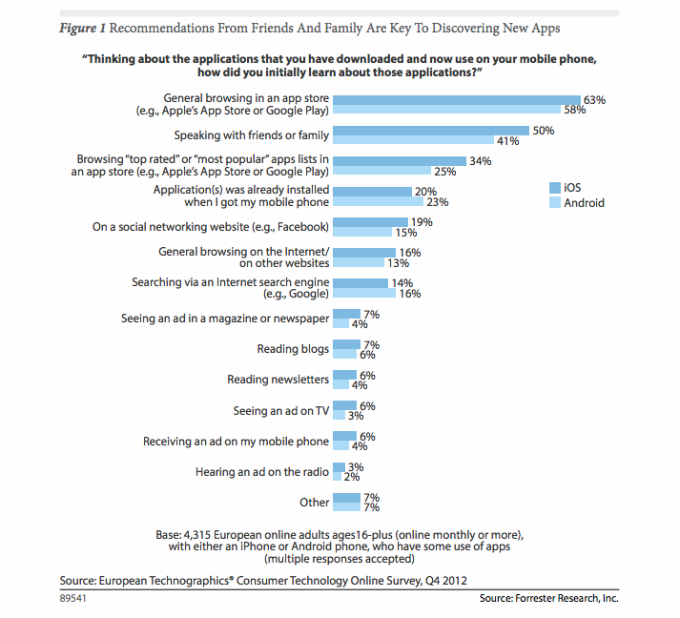
    Research firms, such as Forrester, have released studies in the past showing that most applications are discovered through general browsing and searching of the app store. From a user standpoint, when I am looking for a new app I first look for things that are relevant to my search terms and then weigh the options based on the number of downloads and ratings/reviews. This is much like the user experience when looking for local businesses online.

    This means that the best thing you can do for your app is provide relevant keywords in the title of your app. The other two determining factors (downloads and ratings) will come naturally once you improve your App Store Optimization. Keep in mind, however, that is not just the number of ratings, but the quality of ratings that really matters. Providing consumers with in-app support for encountered issues is a great way to help garner primarily positive reviews in the app store.

    Back in January 2013, Moz published the Top Three Inbound Marketing Strategies for Mobile Apps, a great resource for those looking to improve their ASO and app store rankings.

  • Google Changes The Way Authorship Shows In Search Results

    John Mueller Post - Update To Google Search Image - Search Influence

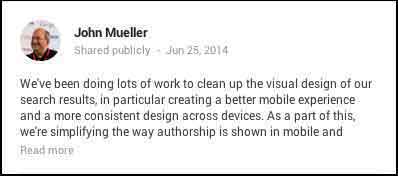
    Last Wednesday, June 25, John Muller, Webmaster Trends Analyst at Google, made a pretty big announcement on his Google plus page. In the ongoing effort for a better and more consistent mobile experience, Google has decided to remove authorship circle count and profile photos from search results. Muller said, “Our experiments indicate that click-through behavior on this new less-cluttered design is similar to the previous one.”

    So, essentially the pretty but cluttered results weren’t positively influencing clicks.

    What Does This Update Look Like?

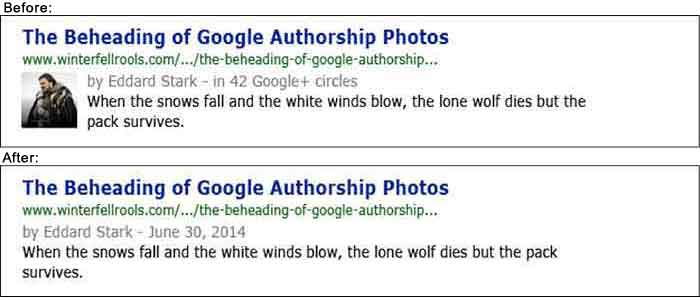
    Basically, the only change is that the author’s photo and circle count is gone.

    Google Search Results Update - Example Image - Search Influence

    So Why Bother With A Photo?

    You might be thinking that this update means you’re now saved a step in optimizing your profile and content to appear in search results. In Google’s News section, however, your photo associated with your author Google+ will still appear. In fact, Google’s support page on “Author information in search results” still currently says that if “you want your authorship information to appear in search results for the content you create, you’ll need a Google+ Profile with a good, recognizable headshot as your profile photo.” You can also follow that link to find steps on how to get it set up properly.

    I’m continually impressed by Google’s consistent updates to improve user experience. Many businesses could benefit from this kind of consumer-centric behavior.

  • Getting Hands On With The New Google My Business

    Today, Google launched Google My Business. This new, more intuitive Google Places serves as a one stop shop for small businesses to do the normal Google Places work like updating business info, adding photos, connecting with customers through Google Plus posting, and staying on top of reviews. They also launched an Android app for managing Business Tools on the go (with the promise of an iOS app launching soon). Watch Google’s introductory video to Google My Business here.

    Changes For Users New and Old

    All new businesses to Google will start in Google My Business. As for current Google Places users, a blog post from Google earlier today said, “We’re also upgrading current users of Places for Business and the Google+ Dashboard to this new experience.” For those who just sat through and are still cleaning up the mess that was the upgrade to the new Google Places, don’t worry! You won’t have to go searching for which dashboard your listings are in or anything like that. It seems that Google My Business is a mostly superficial change that has already happened and just means a newer looking dashboard and a few extra features and controls (like easy access to Youtube, AdWords, and Analytics).

    Google My Business, Game Of Thrones Gif - Search Influence

    Quick & Easy Editing

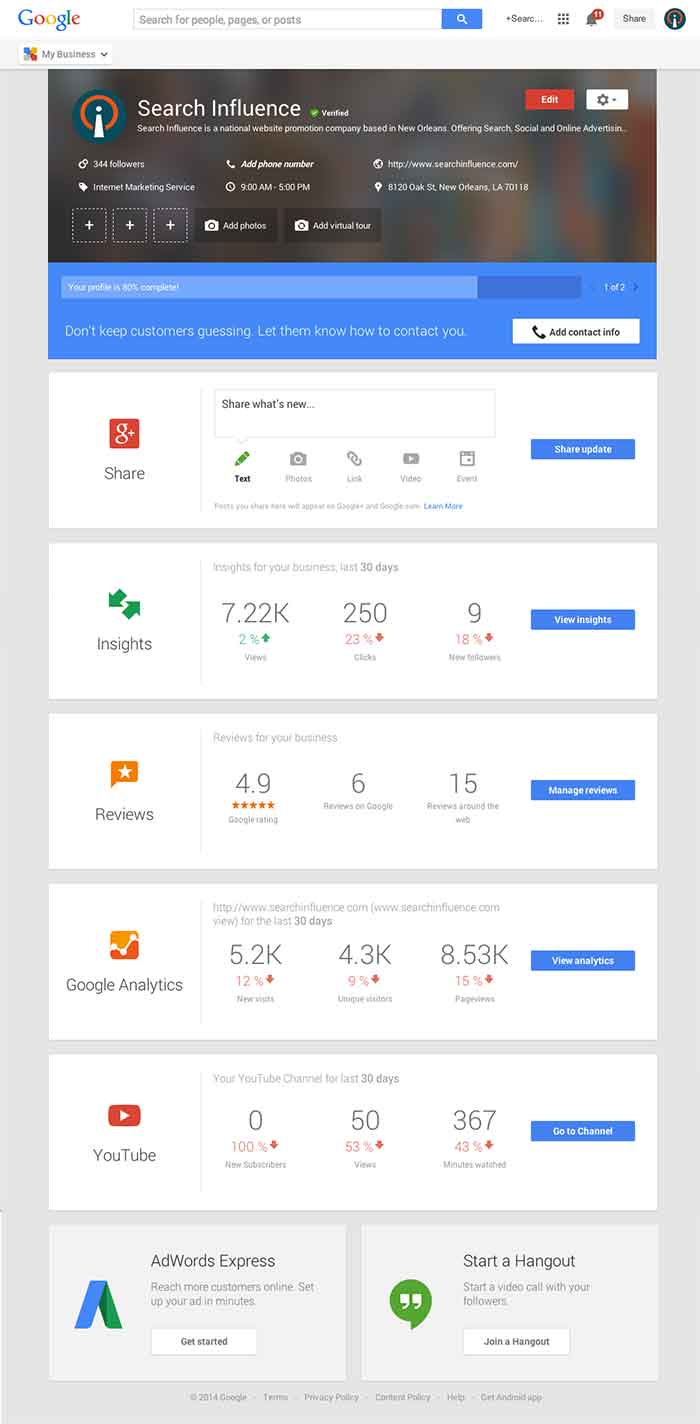
    These new features are pretty awesome. From your dashboard, first you’ll see the area for easily managing the individual aspects of your primary business information where previously you would have navigated through an “Edit Business Details” button. Connected to the bottom of this dialogue, there will be a blue box that allows you to edit the business information needed to get your profile to 100% complete. Google My Business has succeeded in using minor dashboard edits to make major usability improvements.

    Google My Business Dashboard Image - Search Influence

    Streamlined Sharing

    The next box is a basic G+ Share box for social posting to your business page. Share texts, photos, links, videos, and events easily all from one location. Side note: I recently found out, thanks to a post from Mike Blumenthal, that there is now an easy way to connect your business’ brand page to a location. So, if you have been posting socially from a Google Plus brand page for your business, you can now easily transfer that engagement into your verified local page.

    Google My Business Insights Tool Image - Search Influence  Google My Business Insights Followers Image - Search Influence

    New Data & Graphs

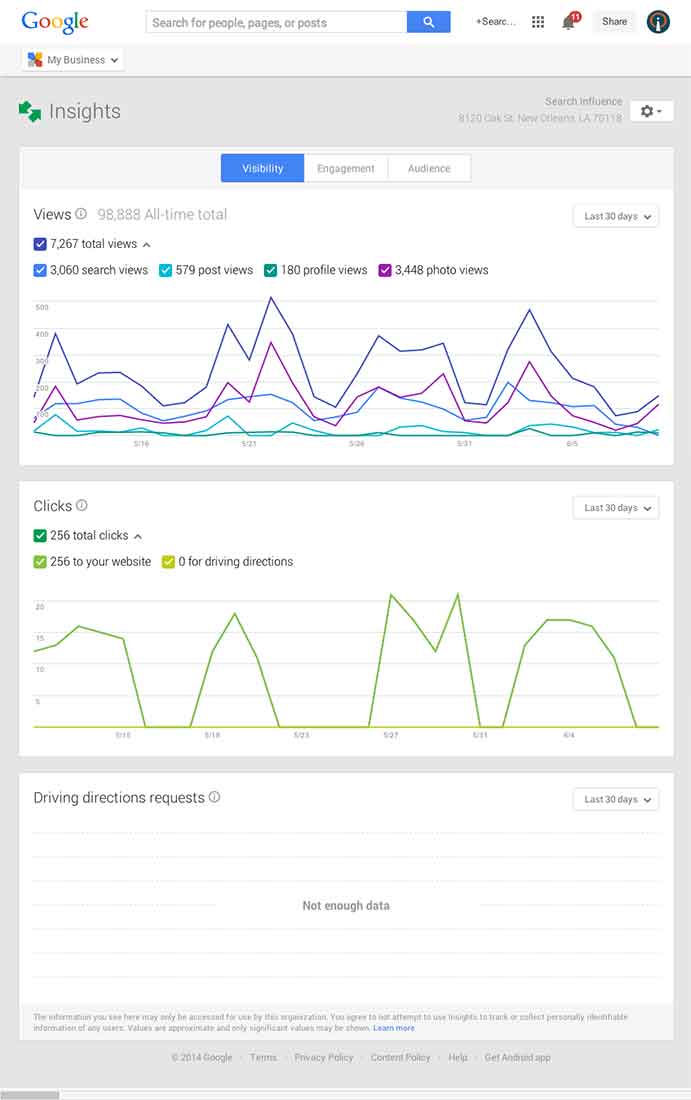
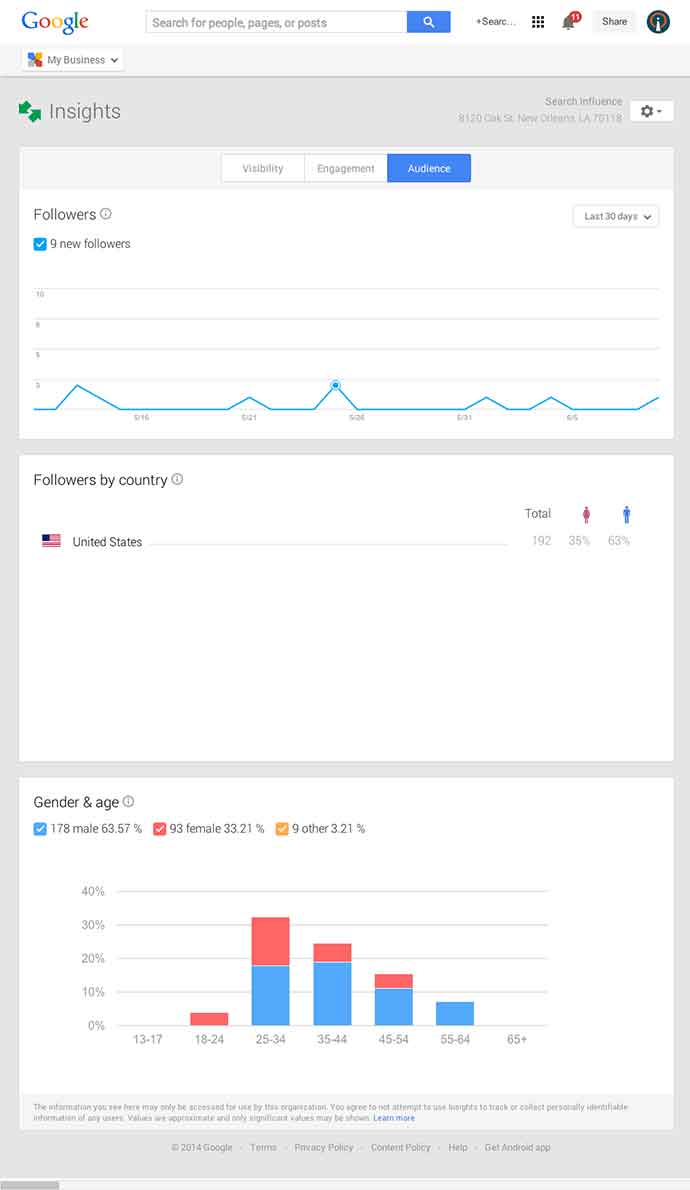
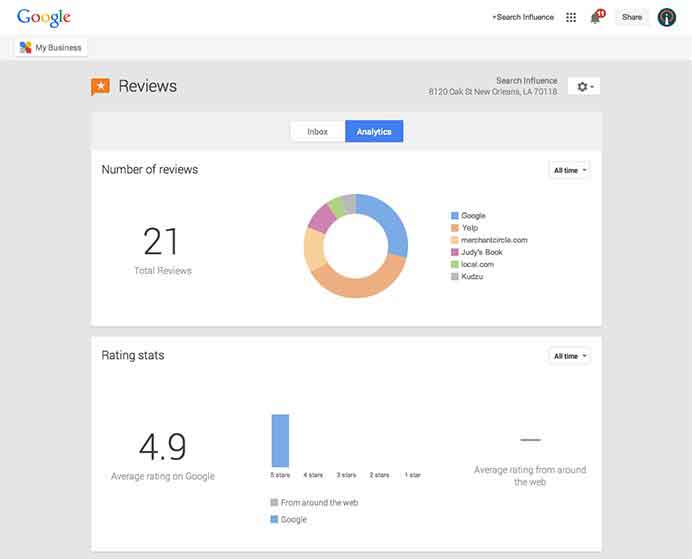
    Next, you’ll find the Insights Tool. Here, you can see how many views your G+ page has gotten over a period of time, how many clicks occurred, and where they went (either looking for Google Maps driving directions or directly to your website). The next feature (and my favorite addition to the Google My Business dashboard) is the reviews section. When you click into “Manage Reviews,” you’ll see your Google reviews as well as other business reviews from around the web. If you click “Analytics” at the top of this page, you can see a really streamlined graphical representation your review information or “Rating Stats” and where your business’ reviews come from.

    Google My Business Reviews Tool Image - Search Influence

    Additional Tools

    You will be able to see other tools like Google Analytics (if you have it installed on your site), YouTube (if you have a channel connected), and AdWords Express (again, if you use it). If you don’t use the above tools, they will still appear at the bottom of your dashboard with the option to “Get Started” if you want to use them! You’ll also see a place to “Join a Google Hangout” at the very bottom of your dashboard. All in all, the new Google My Business looks looks both beautiful and user friendly, presenting a new way to manage businesses’ online reputations through Google.

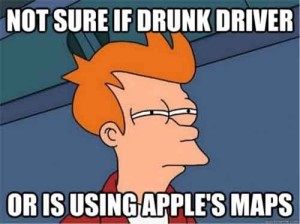
  • In The Game Of Maps, You Either Get There, Or You’re Using Apple Maps

    NotSureIfWhen you think of Apple Maps, you probably think of the disaster that was the iOS 6 Apple Maps update.

    Apple Maps is infamous for directional errors like having turn-by-turn directions that instruct users to drive across an airport runway to get to an airport. We’ve also experienced client business issues with Apple Maps.

    For example, Apple Maps users were being taken to a location 50 miles away from our client’s actual listed business location when using turn-by-turn navigation in the app. We had to then figure out how to edit business information in Apple Maps, as there is no desktop way to access Apple Maps, and you can only access it through the mobile app.

    The data in Apple Maps is mostly powered by data from Yelp, TomTom, Factual, Localeze, and Acxiom as you can see in Moz’s local search ecosystem. By making sure your business information is as accurate as possible on these sources, you could help avoid errors on the sites that they feed to. Often, however, when it comes to issues with Apple Maps, it’s best to figure out how to fix them at the source.

    YeahItUsesAppleMaps

    So here I’m going to walk you through how to edit information in Apple Maps via your mobile device.

    Step 1:

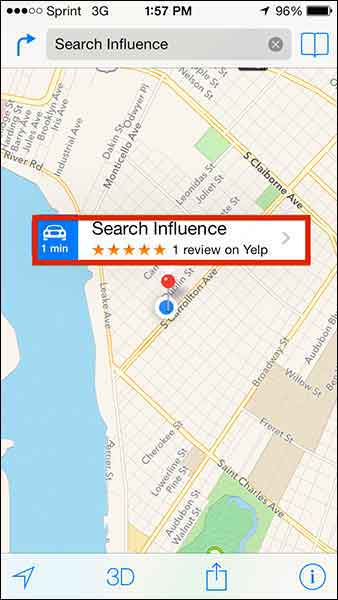
    Search for the business that you’re looking to update.

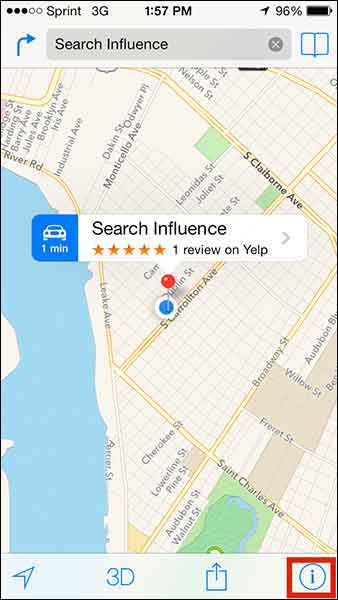
    Step 2:

    If you’re looking to add a business that is not appearing in search or to update directions that aren’t appearing properly, click on the ‘i’ (for information) icon in the bottom righthand corner. If you’re trying to edit particular business information like name or address, skip to Step 5.

    Step1

    Step 3:

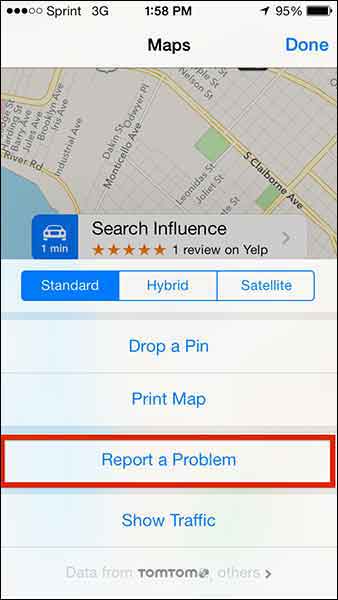
    From this popup dialog you will choose “Report a Problem”.

    Step2

    Step 4:

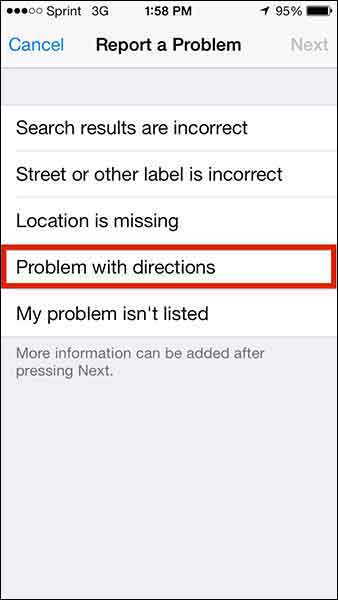
    This “Report a Problem” page will allow you to choose to report that

    • Search results are incorrect
    • Street or other label is incorrect
    • Location is missing
    • Problem with directions
    • My problem isn’t listed

    Select your issue (in our client’s case, we chose “Problem with directions” to indicate that the map was taking people somewhere it shouldn’t in turn-by-turn directions) and submit your problem!

    Step3

    Step 5:

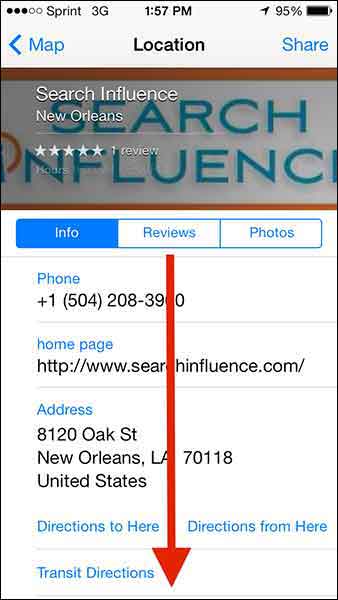
    To make more specific Apple Maps updates about a particular business, click on the business name in the search results.

    Step4

    Step 6:

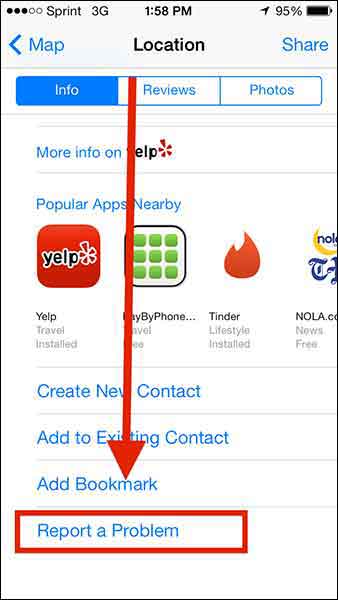
    Then scroll down “Report a Problem” on the “Location” dialog box, and CLICK IT!

    Step5

    Step6

    Step 7:

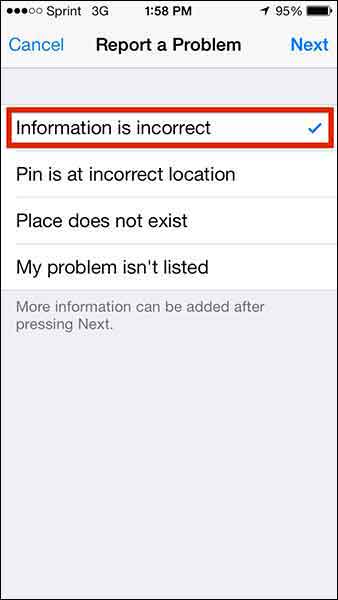
    Choose from the list of issues (most likely you’ll want to report that “Information is incorrect”) and click “Next” in the top right corner.

    Step7

    Step 8:

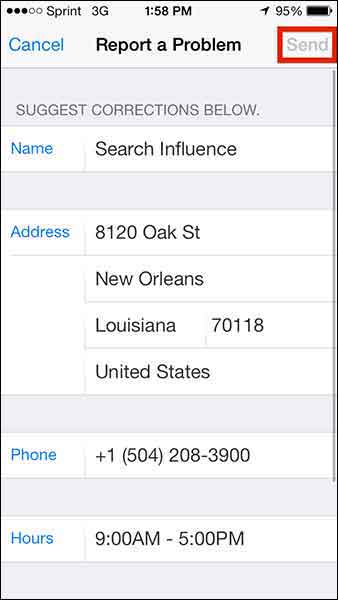
    Edit whatever details you need (obviously this page will differ depending on what problem you’re reporting) and click “Send” to send the report.

    Step8

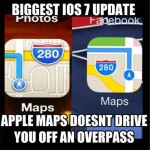
    1O7UpdateApple maps has been gaining momentum in user numbers as it is the default app on all iPhones. Apple crushes all. It is known.

    With this in mind, one can only hope that Apple Maps’ future will have a formal business portal for claiming and managing your business information, but until then, we’ll have to live with this limited access process.

  • 5 Google+ Page and YouTube Tips Your Boss Wants To Know

    In the office I am often asked to help with doing things in Google that turn out to be fairly simple tasks but are often hard to figure out. For example, creating a custom YouTube channel URL is fairly simple to do, but the place you make this edit is not the most obvious to find. So, I’m going to walk you through 5 Google tasks I am most commonly asked to help with.

    1. Change the Name of a G+ page

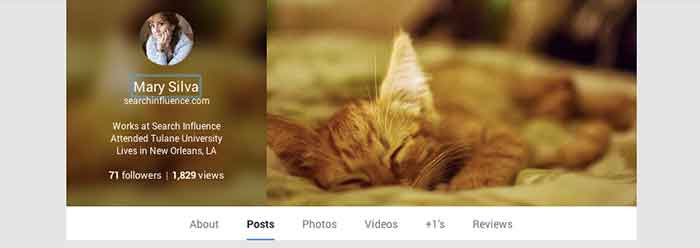
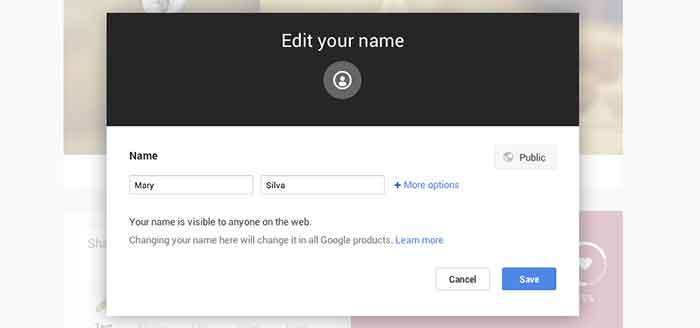
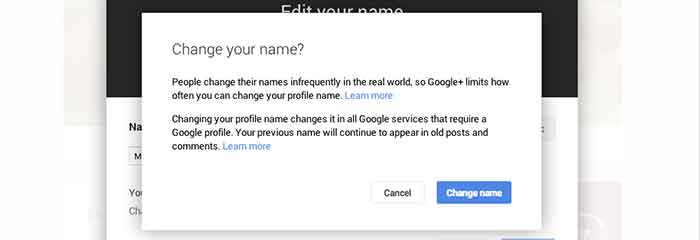
    Sometimes we’ll bounce around for several minutes looking for where the settings tab or options part of a page is just to change one tiny detail. In the case of changing the visible name of your personal G+ page or the the listed name of your business, a quick and easy way to make the edit is through the front end of your Plus Page while logged into your account. All you have to do is click your name! From there a popup will appear allowing you to edit this field. It’s important to note that you’re not allowed to do this as many times as you’d like with your personal profile page though. You can change your profile name only up to 3 times in two years.

    When changing your personal profile name you’ll see this warning about frequency:
    “People change their names infrequently in the real world, so Google+ limits how often you can change your profile name.”

    GooglePlusProfilePage

    GooglePlusEditName


    GooglePlusConfirmNameChange

    2. Make Community/MapMaker Edits to G+ Local Pages

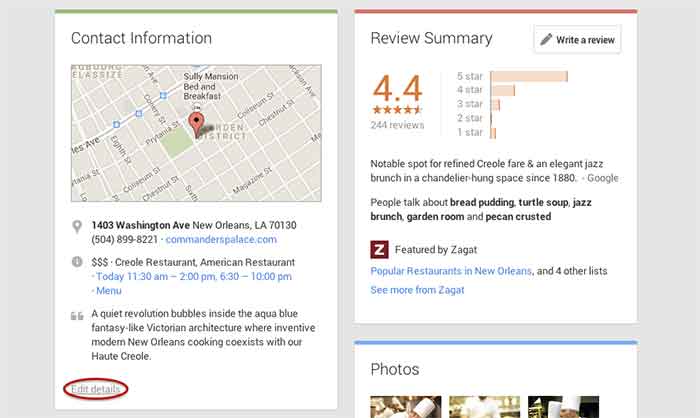
    The most common community edits we need to make to a listing happen when we’re just starting out and the listing we want to claim is owned and/or verified by someone else. The process for requesting ownership of a listing can be a lengthy one, and in the meantime you may want to update your business information from the front end. To do so, simply navigate to the Contact Information section of the businesses Plus Page under the About tab.  Then click “edit details” in the bottom left corner of the Contact Information box. The next page is the Map Maker editing screen that allows you to not only submit edits about the contents of the listing, but to also report a listing as a duplicate or closed location and report reviews that don’t belong.

    GooglePlusDuplicateListing

    3. Link/Verify A Website

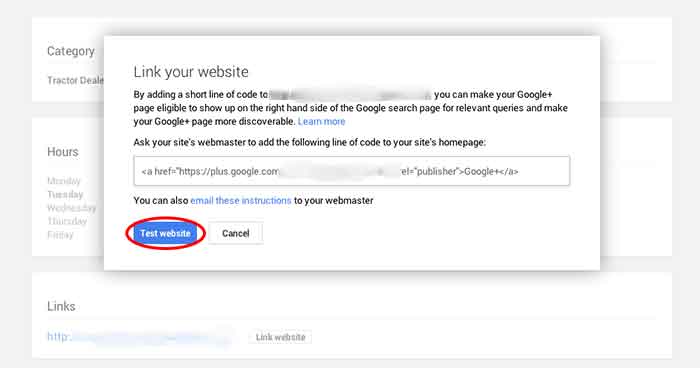
    We’ve recently discovered an issue when linking a business’s site to a Plus Page. After having the code added to a business’s website for linking to the Plus Page, you have to go back into G+ to make Google search for and verify that the code is on the site. You probably wouldn’t have encountered this had you done the entire process of adding the code to the site after getting it from Google, but often it’s a matter of getting the code and giving it to your developer to put on site. So in this case, you’d want to make sure to go back to where you got the code and click “Test website” in order to tell Google to check for the code. This can all be accessed from the front end of your Plus Page by clicking “Link website” under the Links section of the About page.

    GooglePlusLinkYourWebsite

    4. Add or Edit Managers of a G+ Page

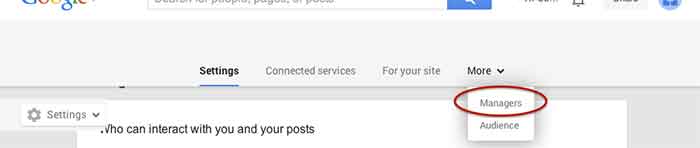
    Adding a manger to a Google Plus Page can be helpful for many situations. Businesses often want to have someone help with social media posting but don’t want to just give that person all of their login information since that is often linked to personal Gmail inboxes and the like. As with editing the name of a page, adding a manager can be done more than one way from within the account. I, however, find that the easiest and quickest way to do it is by going to settings from the home drop down in the top left corner when logged into Google Plus. Then, simply navigate to the Managers tab on the top left to access the manager permissions editing page.

    GooglePlusManager

    5. Create a Custom YouTube Channel URL

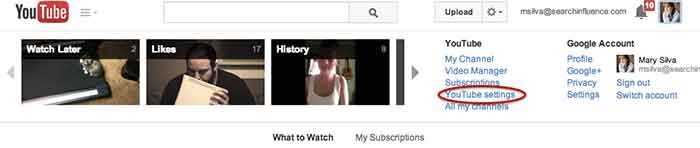
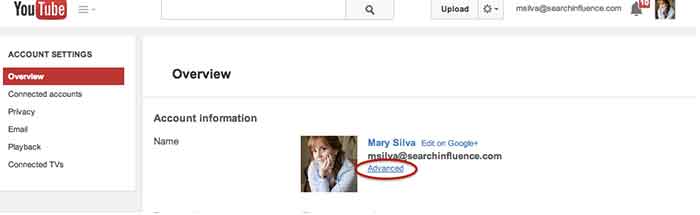
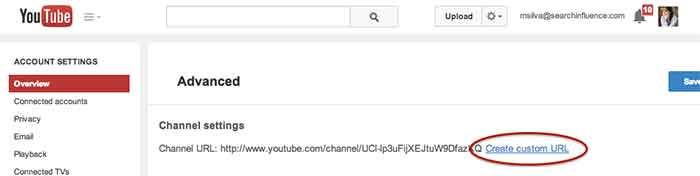
    You knew this one was coming based off of that intro, didn’t you? So, from the top right drop down menu of YouTube, click “YouTube settings,” then “Advanced,” and finally “Create custom URL.” It’s that simple but not exactly the most intuitive place to look for it, given the many other options in YouTube.

    YouTubeSettings

    YouTubeAdvanced

    YouTubeCustomURL

    I hope at least one of these steps was helpful for you, if not all of them. Let me know in the comments below what you think!

  • Takeaways From Pubcon New Orleans Day Two

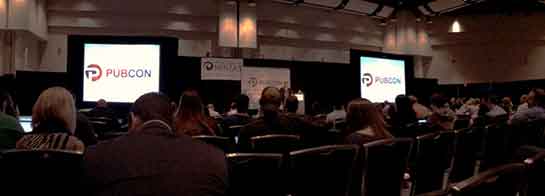
    Last week I had the amazing opportunity to attend Pubcon New Orleans for the first time. It was one of the most fruitful learning and networking experiences I’ve had the chance to be a part of. I felt like I could spend forever just absorbing everything I could from everyone I met. One of the major themes that I got from all the speakers I saw at PubCon was the importance of good content. So, now I’m here to tell you about some of the main takeaways I got from the particular sessions I attended.
    IMG_52111-1024x368-1

    Peter Shankman: Keynote

    The keynote by Peter Shankman focused primarily on the power of good customer service. His four main points were Transparency, Relevancy, Brevity, and Top of Mind. He said you don’t have to go crazy with customer service, just be “one level above crap.” On this note he mentioned the Morton’s Steakhouse story where he jokingly tweeted at them about wanting a porterhouse steak upon landing in New Orleans from a flight. They then sent someone to meet him with a steak when he got off the plane. This simple gesture(although not scalable for every brand) led to a lot of great publicity for Morton’s. It’s all about making your customer feel special.

    An audience you are more transparent and honest with that feels invested in is 78% more likely to buy. Peter also said that when(not if) you screw up, own it. People are 44% more likely to stick with you if you own it. He mentioned the stark difference between how Eliot Spitzer handled his prostitution scandal by admitting the fault and resigning versus how Anthony Weiner handled his sexting scandal by saying he got hacked and not owning up to it.

    Peter mentioned the importance of being relevant and listening to your audience as well. He mentioned a non-profit that saw a 37% increase in donations just by being engaging and active with their audience online.

    The third important facet Peter Shankman mentioned was brevity. He particularly said that brevity is the future of social media and not just in the way we think of it through Twitter now. He said jokingly that we’ve all become the dog from the movie Up, because recent studies show that we have a 2.7 second attention span. Shankman said that mobile messaging is the future and Twitter is just the pipe, so we must learn to write well and concisely.

    Finally, Peter talked about the importance of being top of mind. You want to be the first person someone thinks to go to for whatever they need. He also mentioned the idea of having “zombie loyalists,” or people who have you at the top of their mind for recommendations.

    IMG_5231-768x1024

    Will Scott: Barnacle SEO

    Next I had the opportunity to sit in on Will Scott’s talk about Barnacle SEO(a term he coined in a Local Search News post back in 2008). Barnacle SEO is all about leveraging authority for local search. Specifically, the idea is to attach oneself to a “large fixed object” and wait for customers to “float by in the current.” It’s not as simple as using someone else’s authority, because Will says the most important thing in business is sincerity. “If you can fake that, you’ve got it made,” he says.

    He also mentioned that Google’s weakness is sites they consider super authoritative like YouTube, Yelp, Pinterest, Facebook, YP.com, and such. This is making Barnacle SEO have a huge comeback. YouTube for example dominates universal search and according to a MarketingLand infographic, 8 out of 10 video results are from YouTube.

    Although using backlinks from these authoritative sites and directories like YP.com for local SEO efforts is important, it’s also super important to “keep it clean-ish” by using tools like Whitespark.

    Greg Gifford: Local SEO- It’s No Laughing Matter

    After Will Scott, Greg Gifford, Director of Search and Social at AutoRevo, took to the stage with his presentation about the complications of local search. His awesome presentation featuring punny references to 142 movies and also contained precise, actionable tips. He mentioned the changes in local search like the maps pack finally stabilizing at seven listings and how optimized vertical and local directories now rank very well. A huge opportunity for small businesses to rank well lies in simply adding city and state to title tags.

    Greg also mentioned how the goal of Google Plus Local(aka Google Places) seems to be like a drive through, a place for people to get what they need by getting in and out quickly. He also brought up the Google email about “duplicate listings” that rolled out with Google finally merging the old dashboard to the new. If you want to know more about this email, check out my blog post here.

    His optimization tips for G+ included writing long, “awesome” descriptions using formatting and links, uploading lots of photos, using as close to the max 10 categories as possible while keeping them relevant, engaging in the fairly few number of users on G+, and circling users as a business. As far as reviews on G+ go, he mentioned that you have to earn them and ask for them, you need at least five reviews to see the star average, you should shoot for 10 then diversify, one to two reviews a month is normal, and having them come in consistently rather than in bursts is important.

    IMG_5215

    Casey Markee: The “Big Easy” Guide to Google-Friendly Link Earning

    Casey Markee started his presentation with a quote from Matt Cutts saying, “The objective is not to make your links appear natural, the objective is that your links are natural.” He mentioned that the “four tenants of Google-friendly links” are those that provide clear value for the user, are niche-relevant, get clicked to send some measurable form of trackable analytics traffic, and are “earned” freely versus being given.

    He listed nine link “earning” classes that Google still loves which included:

    1. Link Bait Type Content- Sharable and Buzz-Worthy
    2. Evergreen Content- No Expiration Date
    3. Local Link Earning- Publish Local Resources
    4. Scholarship Link “Earning”- Ex: SilverCross.com Ability Achievement Scholarship
    5. Beneficial Link “Earning”- Participate in Online Forums
    6. Sponsorship/ Partner Building- Support Causes
    7. Profile Links- Social Profile Building
    8. Selective Guest Blogging- Quality not Quantity
    9. Brand Mentions- Get Regular Mentions Turned Into Live Links

    He ended with saying that link earning is a marathon not a sprint, and that quality content is key!

    Mike Stewart: Building a Future Proof Plan for Organic Local Search Rankings

    The biggest takeaway I got from Mike Stewart’s presentation was to think beyond Google search and about other places where people often search like Siri, Amazon, Facebook, and Bing. He also explained the difference between some white hat and black hat SEO tactics, and the importance of doing it right. Mike took us back to basics explaining that “SEO is about creating, editing, organizing, and delivering content and metadata to increase relevance to specific keywords on the web.”

    Finally he gave us “Seven Simple Content Ideas That Drive Shareability” which are as follows:

    1. GIVE: Offers, discounts, deals, and contests that everyone can benefit from
    2. ADVISE: Tips, especially about problems that everyone encounters; how to do something
    3. WARN: Warnings about dangers that could affect anyone
    4. AMUSE: Funny pictures and quotes, as long as they’re not offensive to any group
    5. INSPIRE: Inspirational quotes
    6. AMAZE: Amazing pictures or facts
    7. UNITE: A post that acts as a flag to carry and a way to brag to others about your membership in a group

    This is just a very small portion of the many helpful tips and tools I learned at PubCon this year! Let me know what you think about all the tactics you’ve learned here today.

  • What Happened To GetListed.org?! Check Out The New Moz Local!

    If you’re a local SEO geek like me, you were probably super excited to learn that this past Tuesday Moz Local was officially released. If you go to GetListed.org, you’re now redirected to Moz Local, which can also be accessed directly at moz.com/local.

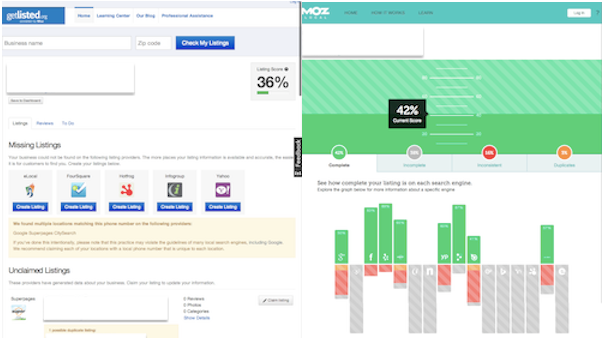
    So, you might be asking yourself what exactly has changed and what is Moz Local. You can still do the same free reputation lookup that you used to be able to do with GetListed by clicking “Check my Listing Score.” Now, however, the results are very stylized, as is Moz’s style, and much more visual in nature.

    Here’s a comparison view:

    Screen Shot 2014-03-21 at 11.58.27 AM

    Understanding Moz Services

    So, outside of the free reputation monitoring tool, Moz Local offers the paid service of being a “self-service location data management software that syndicates listings to all five major U.S. data aggregators,” at a cost lower than services like Yext and UBL. One of the 5 major data aggregators that they submit to is Factual, which if you’ve ever tried to clean up your listings in, you know it can be fairly impossible because you basically need to be a developer to do so.  For $49 per year per location, they feed your listing informations to major directories and help you stay on top of how your business is appearing on those sites with a beautiful and easy to read visual report. The time you would have spent locating and figuring out what’s going on in these sites, is greatly reduces by using a helpful and comprehensive service like this. Using efficient tools like this is a great way to make sure you’re being productive and not just keeping busy.

    Moz Local is definitely geared towards businesses and agencies who manage multiple locations and/or businesses online. If you want to add multiple listings and locations to the tool at once, you can do it all in one spreadsheet with formatting similar to that of the UBL  and Neustar/Localeze upload spreadsheets and exactly the same as Google’s multiple location spreadsheet. So, if you’re familiar with any of those, it’s super easy. If you’re not familiar with those, they’ve got a super helpful page to ensure that you’re filling out the fields properly!

    Answering Questions

    You might be thinking, “But what about the directory partners that require listing verifications?” Well you don’t have to worry about that! Here’s the direct response to that question from Moz:

    When you submit a listing on Moz Local, it must match an existing Google Places or Facebook listing across all of the following attributes: Business Name, Address, Phone Number, and Website. Because you’ve already gone through the phone or postcard verification process with Google and/or Facebook, your Moz Local listings will be validated if they exactly match Google and Facebook.

    Thinking Forward

    Much like other services such as Yext, if you cancel your Moz Local subscription, many of your listings with Acxiom and Localeze will be reverted back to their status prior to your subscription.

    Your best bet to prevent something like that from ever happening would be to use Moz Local as a tool to get your information to those sources correctly, but also take the action of still claiming and owning your listings. This is especially important to do on major sites like Google, Yahoo, Bing, Facebook, Yelp, and Foursquare.

    I hope you’re all as excited about Moz Local as I am! If you’ve got other questions about Moz Local, see their FAQ section here.

    tumblr_mc3hg5VpQP1qcy0p7o1_500

    Feel free to comment below if you’ve got any input or feedback on your experience with this beautiful new upgrade.

  • Addressing Duplicate Listings In The New Google Places for Business

    Welcome back to the wonderful world of Google! Last week I explained in a post the email that Google Places for Business has been sending out to business owner accounts.

    Part of that email included a bit about your account containing listings that were identified by Google as being duplicates existing within your account. Now I’m here to explain to you the two most common ways in which we see duplicate Google listings and how they can be addressed.

    Internal Duplicates

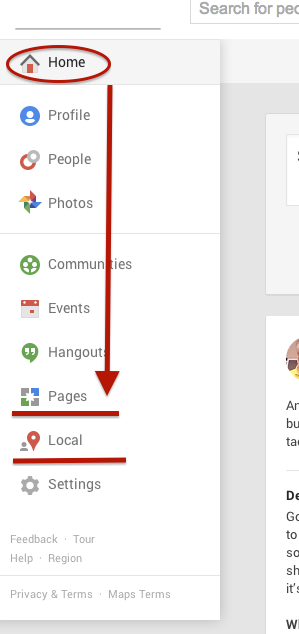
    Screen Shot 2014-03-14 at 1.00.44 PM (2)One way we tend to see duplicate listings in Google Places is from within your business owner account, in your own business dashboard. To see how your businesses are appearing in your account dashboard, go to the Places for Business dashboard, which can be found by going to plus.google.com. Then click “Local”(to see your  Location pages) and “Pages”(to see your Location, Brand, or other Google Plus Pages) in the drop-down on the left.
    The Local dashboard is where we generally identify internal listing duplicates. With the bulk dashboard updates performed by Google, we’ve seen this happening quite often. Since a lot of businesses have been force pulling their listings into the new dashboard by claiming them through the Places section of plus.google.com, there appears to be two listings in the dashboard of these accounts after Google’s mass update.

    Generally, one of these listings appears as verified (the one forced pulled into the new dash) and the other as unverified (the one Google pulled over). Sometimes they both lead to the same G+ page when you click through the “view this listing” link in each. This is just a weird hiccup, and if you wish to clean up the dashboard by deleting the unverified one, it will not affect your listing. As long as you have the verified listing in the new dashboard, you are the sole owner of said listing under this new update.

    In other cases, however, we’ve created a verified local social page through our force pull into the new dashboard that has all of our social content like G+ posting and YouTube videos. Then, when Google pulls in the location page from your old dashboard, that page is a “duplicate” with all your old reviews on it. In this case, both pages would have content that you wouldn’t want your business to lose through “deleting” a duplicate. So, you’d want to make sure the reviews from the location page are moved over to the newer, verified page before having it deleted. This will require a phone call to The Google Places Team support center.

    Obviously if one of these pages has content that you don’t mind losing or doesn’t have any content, that page can be deleted. If the one you want to delete is the verified one and you need the unverified page to be your primary, verified listing, you might be able to avoid having to reverify the listing through getting assistance from The Google Places Team.

    External Duplicates


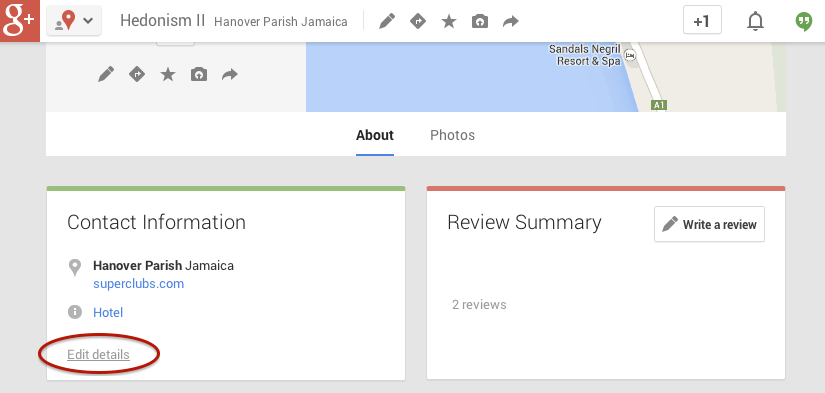
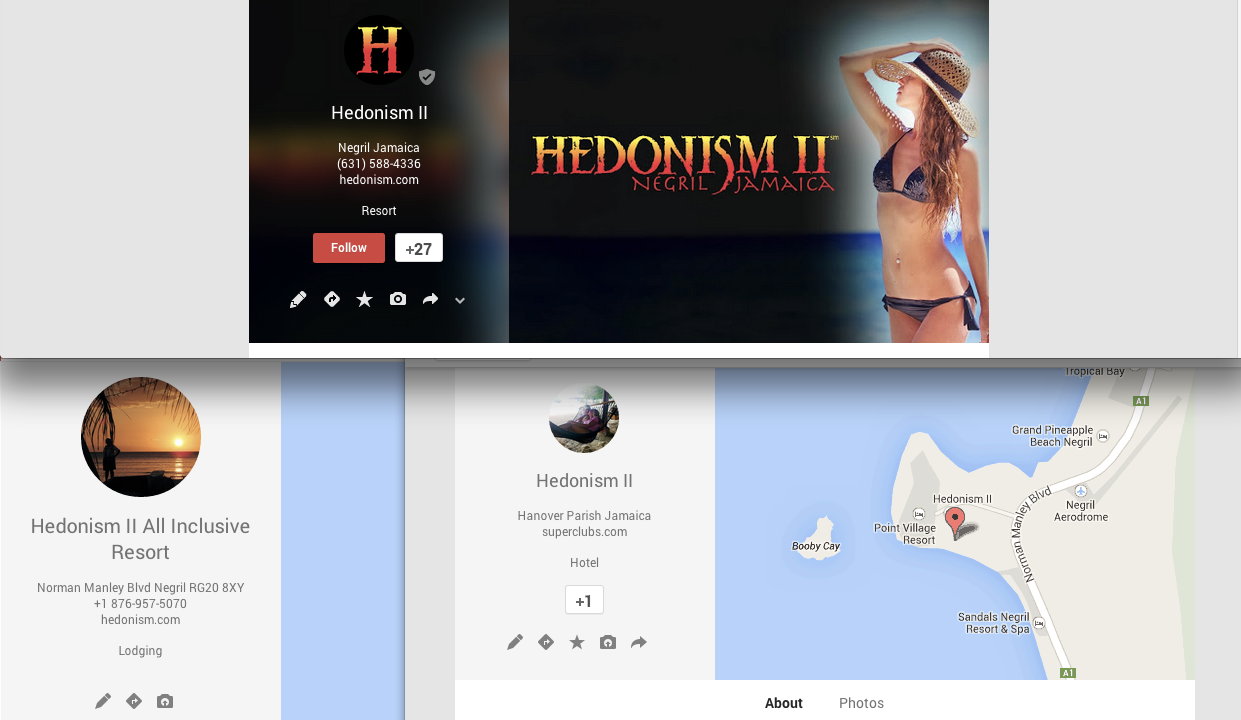
    Another way in which we see duplicate Google business listings is on the front end through Maps search results. You’ll see below that Hedonism II has a couple of duplicates that come up in Maps results. Getting these kind of duplicates cleaned up is a bit easier than the situation explained above. What you’ll do to remove these duplicates is called making a “community edit” or “mapmaker edit.”

    Screen Shot 2014-03-13 at 1.18.56 PM

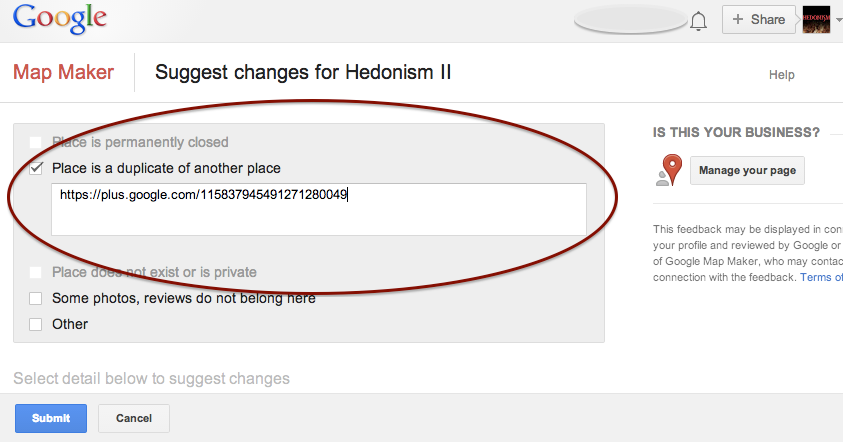
    Go to the duplicate listing you’d like Google to remove. Under the “About” section of the Plus page, then at the bottom of the “Contact Information”  you’ll see the option to “Edit details.” Once you click that, you’ll have to option click a check box to suggest to Google that this “Place is a duplicate of another place.” You’ll also have a box in which you can leave comments about the report. I suggest leaving a link to the correct/verified page in this field to help the duplicate identification process. See screenshots of this process below.

    In my experience, these changes will usually take affect within a week of reporting if Google deems it an accurate report. If no changes take affect in a week, I usually send the report again, wait a week, and repeat again as needed(I’ve never had to report more than 3 times, though).

    Understanding the many nuances of what’s going on here might seem fairly daunting, but the level of which you wish to understand these intricacies is dependent on how much control you wish to have on your business reputation/ presence in Google.

    Screen Shot 2014-03-13 at 1.20.25 PM Screen Shot 2014-03-13 at 1.21.06 PM

    If you have any questions, feel free to comment below!

  • Google Places For Business Email Update

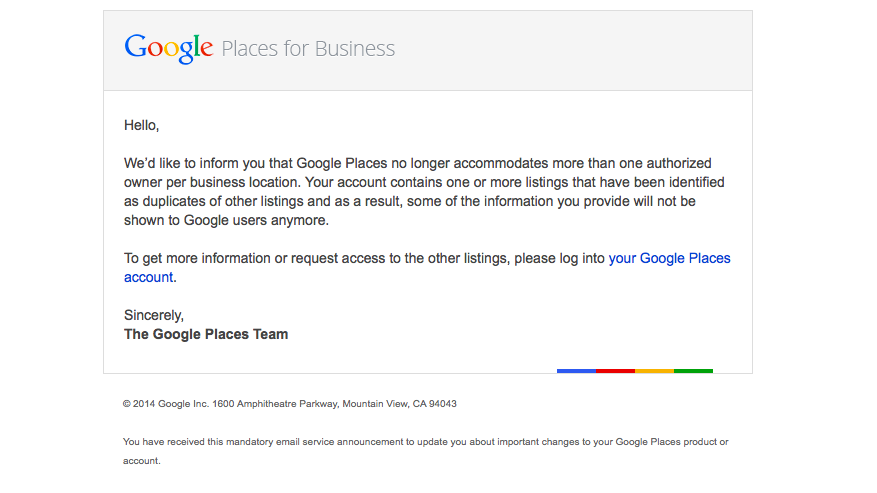
    We’re still not panicking about all of Google’s updates! As many of you already know, Google has been sending out a Google Places for Business email that reads as follows:

    The Message

    Hello,

    We’d like to inform you that Google Places no longer accommodates more than one authorized owner per business location. Your account contains one or more listings that have been identified as duplicates of other listings and as a result, some of the information you provide will not be shown to Google users anymore.

    To get more information or request access to the other listings, please log into your Google Places account.

    Sincerely,
    The Google Places Team

    As this message is kind of vague/ confusing, I called a Google rep to get clarification on exactly what’s going on here. Bear with me as I explain what this means exactly and how it’s affecting business listings.

    The Meaning

    PrintGoogle is finally pulling all listings into the new Places for Business dashboard. In the old dashboard there could be multiple owners of a listing, but in the new dashboard there can only be one.

    As Google performs these batch listing upgrades, the first owner whose account is upgraded gets grandfathered in, so to speak, and they will be the sole owner of the listing through the new dashboard. If someone has already claimed and verified a listing in the new dashboard, however, then no one will experience the “grandfather” situation in the batch upgrades as it is already verified in the new dashboard and has its one owner.

    The good news is that many of us have been force pulling businesses into the new dashboard by claiming them through the Places section of plus.google.com. So the latter situation will have already occurred for most, and we will be the current, sole owner of verified listings in the new dashboard. (If you lose ownership of your listing in the batch update by Google, you can still request it back, it will just take time through a two week request period and contact with Google.)

    We have seen cases, however, where after the batch update by Google there appears to be two listings in the dashboard of accounts who have already pulled their listing into the new dash on their own. Generally one appears as verified(the one we forced pulled into the new dash) and the other as unverified(the one Google pulled over), but they both lead to the same G+ page when you click through the “view this listing” link in each. This is just a weird hiccup, and if you wish to clean up the dashboard by deleting the unverified one, it will not affect your listing. As long as you have a verified listing in the new dashboard, you are the sole owner of said listing.

    Now What?

    Basically, anyone who has ever had a listing in the old dashboard is receiving this generic email, and it is not necessarily an indication as to whether or not the listing is owned/verified in the new dash in your account. So, as long as we’re keeping on top of our business listings’ dashboards, there is no cause for alarm! There’s also the note about duplicate listings in the email. Duplicate listing issues are not something that occur in every account which receives this email. More to come on addressing duplicates in the new dashboard next week! If you’d like to see what others are saying about the email, check out Search Engine Land’s post from earlier this morning or these forums where people have been discussing particular, individual issues encountered (Google Product Forums and Local Search Forum).

    Here’s a screenshot of the actual email for those of you who would like to see it:
    Screen Shot 2014-03-05 at 10.42.19 AM

    If you have any questions or comments about this situation, feel free to comment below! Stay tuned for how to handle duplicate listings!

  • Don’t Panic! The Google 3 Weeks Places Update Isn’t Worldwide!

    Now that we’re done making sure your Google business account doesn’t get suspended for a name violation, we’re on the the next Google worry.

    HomeAlone
    http://www.flickr.com/photos/the_napkin/6469892859/

    You may have heard the buzz lately about an email going out to business owners in Google Places telling them that they have three weeks to update their listing. If the listing isn’t updated,  it will no longer be visible to Google users. The good news is that this is actually something that is only occurring for Australian businesses. Basically, you don’t have to worry!

    When we first heard about this issue at Search Influence, we were alarmed because an update like this could potentially affect many of our clients’ accounts. So, I decided to delve deep into the web and find out as much as I could from various online sources, and what I found was even more worrisome and ambiguous. Search Engine Watch’s post was the first that brought this issue to my attention. The post provided great information on what needed to be done by those receiving the email, but nothing about the scale of the email rollout and who was being contacted and why.

    The Word From Google

    Search Engine Journal’s post was awesome enough to give us the exact email google sent out, which reads as follows:

    Hello,
    Due to changes in Google Maps, we’d like to inform you that unless you review and confirm the information in your Google Places account, we will no longer be able to keep and show it to Google users after February 21, 2014.

    If you wish to keep your listing active, follow these three easy steps:

    1. Log in to your Google Places account
    2. Review and update your information
    3. Click the “Submit” button

    Sincerely,
    The Google Places Team

    The fact that the email instructed businesses to click a “Submit” button when updating indicated to me that these were businesses in the old dashboard. So, I thought I had a clue as to who was being contacted at this point.

    Next, I went to discussions on MOZ and Google Product Forums where I started seeing comments that maybe this was only something happening in Australia.

    Calling The Google Places Team

    Google-Plus-Logo

    After seeing both of these slightly alarming, but informative posts I decided to go straight to the source and call The Google Places Team. They were super helpful in taking the time to get to the bottom of the email and were forthcoming about the issue at hand. They also understood that something like this could affect a company like ours on a pretty large scale. The rep on The Google Places Team reached out directly to Google and was able to confirm with me that this is indeed something only happening to Australia Maps.

    There have been speculations as to whether or not this is something that could start happening outside of Australia, because Google has a tendency to do things in a test market before rolling them out worldwide. From what the Google rep told me, however, it seems like this is only happening because of an issue that was occurring specifically with Australia Maps.

    So, DON’T WORRY! United States Places Businesses are NOT at risk!!

    If you’re interested in reaching out to The Google Places Team, log in to your Google places account that has your business listing and click here:  https://support.google.com/business/contact/business_c2c