Tag: reviews

  • 5 For Friday – Facebook Privacy, Google With Your Voice, and Yelp Videos!

    5-sand1. Facebook Defaults Posts From “Public” to “Friends” & Introduces Comprehensive Privacy Checkup
    – Marketing Land

    Facebook has finally launched a major change that may have an impact on their real-time efforts. With the privacy updates, users’ posts will now default to only be visible by friends, and all users will be encouraged to check on their privacy settings if they have not been updated recently. Greg Finn says he expects that this update may cause hashtags and real-time conversations to continue on their decline.

    2.Yelp Will Allow 12-Second Video Reviews Starting Next Month
    – Marketing Land

    Beginning in June, “Elite” users will be allowed to share their review of local businesses via a short video. These videos will first appear inline with the photos, but will eventually also appear along with the reviews like photos currently do.

    3.Google+ Introduces New Features That Automatically Generate Movies and Travelogues
    – Search Engine Journal

    Google+ launches Stories and Movies that will bring together your photos and videos to highlight your favorite moments from your travel or an event. Google’s Story will arrive within 24 hours after you return from your vacation. After you receive your story, you will be able to customize it and share it. Google+ Movies will include related photos and videos along with a soundtrack and special effects.

    4. Google Adds “Okay Google” Voice Search For All Chrome Users
    – Tech Crunch

    Users will first need to give Chrome permission to use the mic on their computer. Then you can simply go to Google.com and say “Okay Google” to trigger the voice search followed by your search request.
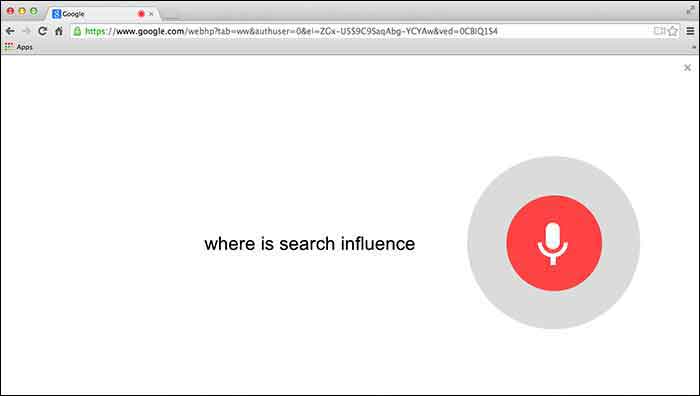
    GoogleChromeVoiceSearch

    5. Google Paid “Dealers Nearby” Appears To Have Gone Live
    – Mike Blumenthal

    Mike Blumenthal noticed that Google’s new paid ads (now appearing within the knowledge graph) are live. This seems to be only the case in the US according to the comments thread on Dr. Pete’s tweet regarding this update. Mike Blumenthal suggests that we may one day see Google selling competitors space in branded knowledge panels.
  • Determining and Leveraging Your Brand Advocates

    At Pubcon New Orleans, Rob Fuggetta of Zuberance led a seminar on “Activating Brand Advocates.” Rob wrote a book called Brand Advocates that I encourage you to read if you’re a business owner looking to learn more about this game-changing topic.

    Reviews

    Rob talked about how brand advocates are people who recommend your products or services without being paid. They are your best salespeople because they are free and other people trust their opinion greatly. In fact, 92% of customers trust word of mouth referrals, compared to 70% trusting reviews, and 33% trusting ads. Since they are a very trustworthy recommendation, businesses should leverage them to help their business grow.

    You may be wondering how you determine if one of your customers is a brand advocate. Rob offered three ways to figure this out. The first is to ask your customers a one question survey: “How likely are you to recommend us?” On a scale of one to ten, your brand advocates are those that give you a nine or a ten. Another way to find brand advocates is to invite your customers to recommend you. This can be done by asking them why they love your company. Lastly, listening and engaging with your customers is a great way to find your advocates. If someone is talking about how much they love you on social media, you can consider them a brand advocate.

    Once you’ve determined who your brand advocates are, Rob offered three ways to leverage them to help your business. One way is to make it easy for your advocates to give you reviews. For example, ask customers to write you a review in your email correspondence, landing pages, newsletters, and on social media. Once you have several reviews, publish them wherever you can think of, including social media, your website, and email marketing.

    Testimonials

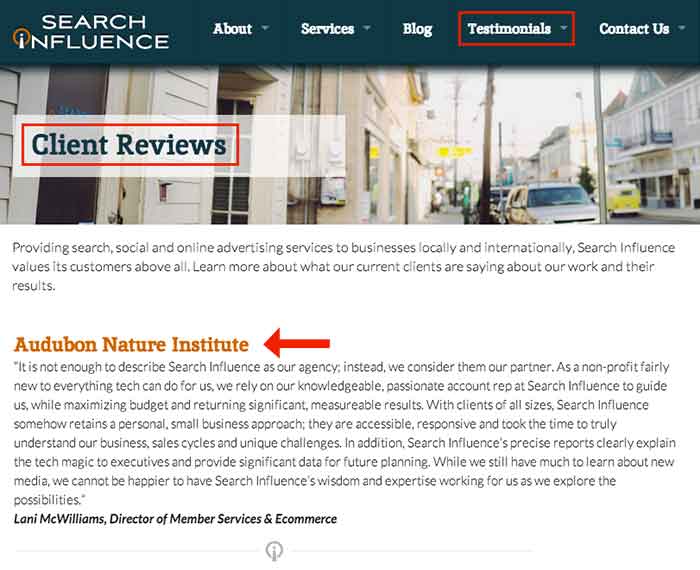
    The second way is to gather and publish stories from your customers about how they use your brand and why they love your brand. If sales increased by 50% because of your help, write a case study about it and get the customer involved with providing the statistics and quotes. Finally, ask your brand advocates for referrals! For those that are passionate about your brand, they should be excited to help others by recommending your company to their circle of influence. Think about it: if you enjoyed a restaurant or a hotel, wouldn’t you recommend it to your friends and family? Why should it be different for your business?

    Submit your comments below on how you will leverage your brand advocates!

  • 8 Tips for Handling Bad (and Good!) Online Reviews

    Have you ever had a bad experience at a business? How did it affect your opinions of that company? More often than not, one bad experience will hinder how someone views a business, even if the experience was handled in the best way possible by the business owner/manager. This can affect the online reputation of a business greatly if people decide to write an online review about you.

    Reviews

    While the thought of negative reviews may scare you, do not let these reviews discourage you! Remember that a dissatisfied customer is more likely to write a review after a bad experience than a satisfied customer writing about a positive experience. Negative reviews can even help you learn how to improve your business. Here are some tips for actively handling these reviews:

    1. Actively check your reviews on various platforms across the web.

    A good way to keep up is to assign one day per month (or bi-weekly) to check your online reputation on the different platforms. The list can be endless, but these are some important ones to consider:

    **Note that you will most likely have to create an account and verify that you are the owner / manager to be able to respond to the reviews as the business owner.

    2. Always be transparent with your customers. This includes:

    • NEVER posting (or having your staff post) fake reviews.

    • NEVER deleting reviews that are negative. This will just anger the person that posted the review, in turn causing a downward spiral effect. Most likely, the angry reviewer will continue to post reviews until they are acknowledged by the business. Instead, take the time to listen to your customer and their concerns.

    3. Make an effort to respond to every review – positive and negative.

    • For positive reviews: A quick, “Thank you for your feedback, NAME! We appreciate your business. We hope you continue to be a BUSINESS NAME supporter!” is sufficient for a positive review. Responding to positive reviews can reinforce the already positive opinion that the reviewer has of your business, and reinforce brand loyalty with that person (because who doesn’t like being responded to by a business?).

    • For negative reviews: The dissatisfied customer will appreciate being heard, and outsiders will appreciate that the business takes the time to respond when something isn’t right.

    4. Be personal in your responses.

    Use the customer’s name if provided, and bring in information from their original review. This will keep the customer from thinking you just have a generic response to all reviews.

    • For example, if a person leaves a bad review on a spa page and you notice in their review they had a massage that day, you could say something along the lines of: “Hi NAME, I’m sorry your massage was not up to par….”

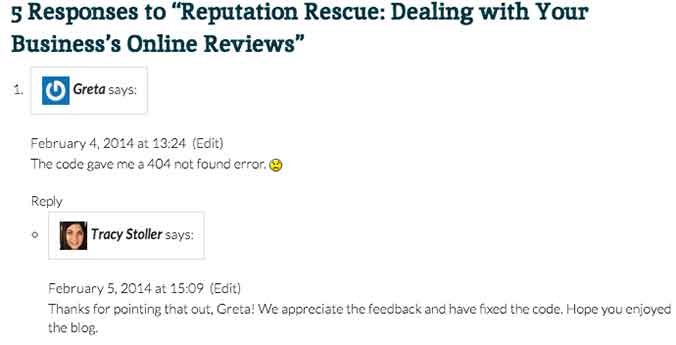
    • Another example comes from our blog! Check out how Tracy Stoller responded to a comment about an error in a code we provided in a previous blog.

    response

    5. Provide a business email that the reviewer can contact you on.

    Don’t try to make it all perfect on the review. You will be able to go more in depth with the customer through an email, depending on the severity of the review/situation. It’s up to you to decide when to try to go into more depth to resolve the issue.

    • You could say something along the lines of, “I truly apologize for XYZ. Please contact [email protected] to help us resolve this issue for you.”

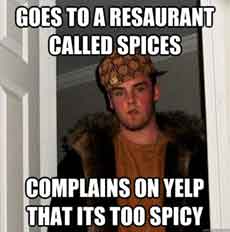
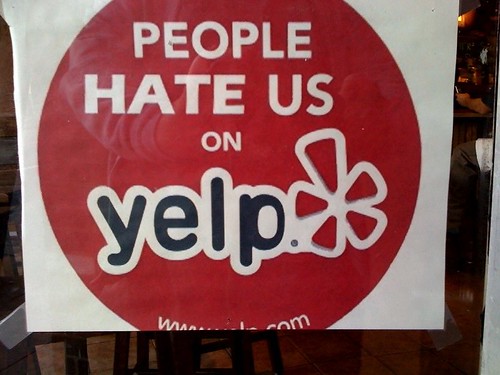
    6. Remember that sometimes people have unrealistic expectations of a business.

    yelp-meme

    If something happened that is completely out of your control, explain yourself in the reply. However, do not have a negative tone toward the customer – simply explain the situation to the best of your ability.

    • For example, a customer leaves a horribly negative review after coming to your restaurant and you are all out of their favorite beer. You can apologize for the inconvenience, but explain that things like this happen occasionally. Explain when the product would be restocked and invite them back. This would be an example of when to NOT provide a contact email, because the situation is not that extreme.

    7. Do not offer gift cards or other repayment for a negative experience on the review site.

    If something is serious enough that you feel the need to refund the customer, provide your contact email and do so through email. Offering repayment or gift cards publicly can be seen as bribery by an outsider reading reviews.

    8. Invite your customers to leave reviews!

    Post a link to your Yelp! page (or other review site) to your social media accounts and invite your followers to talk about their experiences. This could lead to people leaving positive reviews that would not have normally done that on their own.

    It’s important to remember that you can’t please everyone, but continuously having timely responses to your reviews can only benefit your business.

  • Reputation Rescue: Dealing with Your Business’s Online Reviews

    Reputation Rescue: Dealing with Your Business’s Online Reviews

    These days more customers are turning to their social networks and online review sites before making purchases. While local directories and review sites are important for your business’s online presence and SEO, it also opens up the door to both positive and negative reviews from customers.

    Reputation Rescue Infographic

    Copy and paste the code in the area below to place “Reputation Rescue: Dealing with Your Business’s Online Reviews” image on your site for free.

    Yes, People are Actually Looking at Them

    It’s been estimated that about half of American consumers have written at least one online review. Even those not writing reviews are reading them, with 70% of consumers saying they read reviews before making a purchase decision. The same number, seven out of ten, share the reviews they read with friends and family, meaning that these reviews are reaching even more people.

    And Making Decisions Based Off of Them

    For positive reviews, this is great! In fact, 87% of consumers say a positive review confirmed their decision to make a purchase. As one might expect, a similar yet opposite effect comes from negative reviews. Four out of five consumers report having reversed a purchase decision based on negative reviews. Yep. That’s 80%.

    But You Can Take Action

    Luckily, for businesses, there is a positive way to handle negative reviews. Respond quickly and publicly, keeping your response polite yet personal. Own the issue without being defensive and try to rectify the situation while still keeping your response simple. A whopping 97% of people found the reviews of a product they purchased to be accurate. This confirms that no one should be brushing off negative reviews. Responding correctly will give future customers confidence that they will not have the same experience.

    You know the saying about the best defense, right? Give your business a good offense by encouraging reviews from loyal customers. Reach out to customers via Facebook, Twitter, and email. Make reviewing your business as easy as possible and send those that do review a thank you.

    Real Reviews = Real Revenue

    Getting a considerable volume of real, accurate reviews will lead to real revenue. Positive online reviews have been shown to increase sales by 74%, and on a related note, consumers who conduct research online spend 18-36% more than those who do not.

    Don’t be scared to put your business out there! Transform your online review portals into revenue-making tools by garnering your existing customer relationships, addressing negative experiences, and improving your online presence. Reviews also create 21% higher purchase satisfaction and 18% higher customer loyalty. These are huge numbers for something that you aren’t even spending money on.

  • LocalU Is Coming To Dallas!

    8891398231_4fe04d69b9

    Local businesses and small business marketers in the Dallas / Fort Worth area are in for a treat! The traveling road show of local online marketing, LocalU, is making its way to Dallas, TX on Thursday, January 23. I had the opportunity to attend LocalU when they came to New Orleans, and we even invited some of our clients to attend.

    Audubon Nature Institute’s Lani McWilliams even provided us her key takeaways from the event – there’s so much info presented at these events that she couldn’t even narrow it down to just 10. These top 14 takeaways are just a small sampling of the info that you will learn at LocalU to help market small businesses online.

    What You’ll Learn:

    LocalU, my friends, is a must see seminar if you want to learn all things related to local business marketing online, including:

    • local search engine optimization
    • social media
    • review management
    • paid online advertising

    … and, at $89 with the discount code LocalU, it’s a steal-of-a-deal!

    Who You’ll See:

    At the half day / four hour event, you will hear from the brightest minds in local online marketing including:

    • Search Influence’s own CEO, Will Scott
    • Mike Blumenthal
    • Mary Bowling
    • David Mihm
    • Mike Ramsey
    • Ed Reese
    • Aaron Weiche

    When and Where:

    LocalU Dallas
    Thursday, January 23
    Pegasus Ballroom/Magnolia Hotel on Commerce St.
    Check-in: 8:00 am
    Sessions: 8:30 am – 12:30 pm

    The faculty hopes to see you there!

    Buy tickets here!


  • Found: Yelp Reviews Copied and Published as Google Reviews

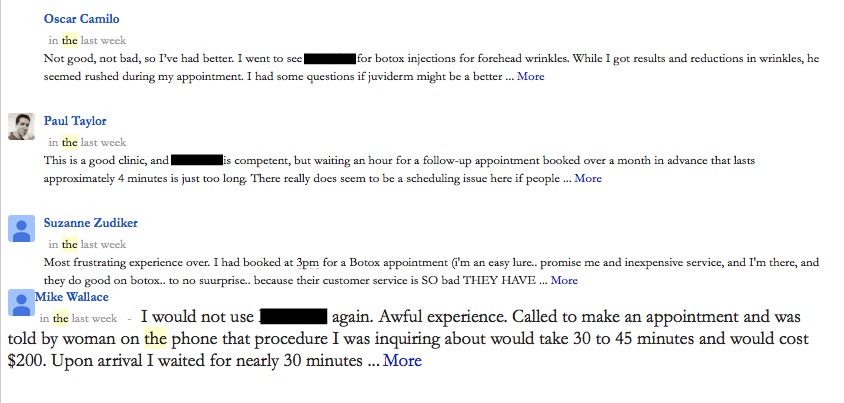
    In the last week, one very alert client saw saw some very recent reviews on his Google Plus Local listing that looked pretty suspicious.  All 4 of these reviews were published within the week:

    Google reviews are copies of Yelp reviews

    The client immediately flagged “Oscar” as a spam review on Friday, November 29th.  By Tuesday, December 3rd, we saw that the review was gone.  Removed from the client’s G+ Local.  That was super fast response by Google, which was a pleasant surprise.

    When we looked at the Google+ profiles for Paul, Suzanne, and Mike,

    • none of the 3 had information on their G+ Profiles except where they lived.  No posts.  No videos.
    • none of the 3 lived within 1,200 miles of our client.
    • 2 of the 3 had 100-200 people in their Circle, despite having no account activity.

    With the fast success of the first spam review removal, we immediately flagged the other 3 as spam reviews. Within 1 day, 2 of the 3 remaining spam reviews were removed.   The only one that’s left is “Paul.”  We’re watching Paul, and hopefully, that one will come down fast too.

    Plagiarizing Yelp Reviews

    These Google reviewers were pretty easy to mark as spam based on their Google+ profiles being so bare and their slim reviews profiles — only 1 review each — but I think the real reason they were taken down was because they are not original review text. They are all copy and pasted from Yelp reviews.

    And stating the obvious, the copied reviews are for different businesses and from different reviewers, so there is nothing legitimate about the Google reviews published on our client’s Google listing.

    Suzanne’s Google review…

    Yelp review copied for Google review

    appears to be a close copy of “Cecile Mighty Mouse M.” May 2013 review on Yelp.

    Plagiarized Yelp review used on Google

    Mike’s Google review:

    Google eview copied from Yelp review

    appears to be a close copy of “Ben S.” July 2013 review on Yelp.

    Yelp review plagiarized for use by Google reviewer

    Paul whose review is still on our client’s G+ Local as of this moment,

    Google review copied and used by Google reviewer

    is a close copy of  “Grainne sounds like Grawn-ya…not Grainy M” May 2012 review on Yelp

    plagiarized reviews on Google

    If you’re curious to see if a review is spam, try dropping a chunk of it into Google to see if a Yelp review shows up as a close copy. If so, then definitely flag as spam to Google. Has this happened to you? Share your tips and stories of spam comments below.

  • Search Influence Wins Inc. Magazine’s Hire Power Award

    hire power

    We’re excited to announce that Search Influence was recognized as one of Inc. Magazine’s 2013 Hire Power Award winners. The award recognizes private American businesses that have generated the most jobs in the past three years. The Hire Power Awards are a “salute to the job creators who are restoring the lives and rebuilding the economy by putting Americans back to work.” The entire Search Influence team is incredibly proud to be recognized as a contributor to Louisiana’s job growth and economy.

    Search Influence generated 20 jobs from January 1, 2012 to June 30, 2013, placing us among the top four private business job creators within the state of Louisiana. Search Influence is among 437 private growth companies Hire Power Award honorees, leading the way in creating more American jobs. Search Influence founders Will and Angie Scott started Search Influence with just three employees shortly after Hurricane Katrina devastated New Orleans. Today, Search Influence has 55 full-time New Orleans-area employees in addition to our 25+ contract workers.

    “We’re really honored to be on this prestigious list,” Will Scott said. “We’ve focused on providing the products our customers need, and they’ve rewarded us with more business. Our growth in staff is an indication that we’re putting the right products in the market and putting our customers’ needs first.”

    To view the entire Inc. Hire Power list, click here.

  • SI Around The Web — Mentions & Quotables!

    Search Influence has been getting a lot of love in the press lately, and we’re here to share the good news with you! Our CEO Will Scott lends his expertise to several publications, Olympic frenzy takes the Internet by storm and more, right after the jump!

    A New Social Media Strategy for the Olympics, Future Sporting Events — Forbes

    The Olympics have been touted as the first “social media games,” and it’s inarguable that the feverish pitch of the competition has been mirrored in the frantic tweeting, sharing and pinning of thousands. But is the Olympics Committee itself doing as good of a job as it could be with their official efforts? Their attempts to place restrictions on nearly every aspect of the games has drawn heavy criticism. Will talks with Forbes about the IOC’s pitfalls, saying “The moment the IOC set restrictions that limited the voice of the athletes, they made the Olympics less relevant to the Millennials.” These restrictions mean stifling good speech as well as bad, and have hurt athletes’ ability to help the Olympic brand.

    • Marketers: No Brand Deserves Gold Digital Olympics — AdWeek

    Speaking of the Olympics, Will was also quoted in this article about the Olympic advertisers’ social media shortfalls. Given its ubiquity in modern-day communication, social media offers a longer-lasting and intense value from endorsements than with traditional forms of advertising, and athletes’ ability to do so is a crucial part of the process. Click through to AdWeek to see his thoughts!

    • Why Online Marketers Are Rethinking Their Yelp Strategy — Street Fight

    Finally, Will wrote this article for Street Fight about the changing face of Yelp and how changes to the system will make it easier, more useful and more profitable for consumers and businesses alike. The increasingly mobile online world, smart search apps such as Siri, and the importance of reviews in buying decisions (among other factors) all drive home the importance of actively managing your business’s online presence. Whether you’re a restaurant, retailer or service, get out there and own your name! Participating in deals and ad campaigns is a great way to get folks in the door, but don’t make the mistake of buying or soliciting reviews — it’s almost sure to backfire. The best way is the old-fashioned one: wow them with your quality and the positive reviews will roll in!

  • Review: Pinterest Users and Marketers Enjoy Redesigned Profiles and Added Features

    Maybe I’m a little late since Pinterest rolled out its redesigned profile pages two weeks ago, but being fashionably late is kind of my ‘thing.’ Users and businesses using Pinterest for marketing can now enjoy the benefit of more beautiful profile pages and an easier-to-use Recent Activity feature.

    Pinterest Profile Redesign
    The redesign of Pinterest Profiles is more social, displaying influencers and a description. The profile page and its boards are more aesthetically pleasing and image-focused.

    Before passing judgment on the latest updates, I wanted to take some time to actually use them first. While the profile page redesign was what dominated the news a couple weeks ago, I honestly think this change is of the least consequence to Pinterest users.

    For starters, it’s a rare occurrence that I find myself actually looking at someone’s Pinterest profile. By its very nature the site can keep a curious browser occupied for hours at a time, thanks to the constantly updating feeds of pins. A user can explore pins by category (Art, Humor, Photography, Food & Drink, etc), or by looking at everything pinned by those they choose to follow. Its on these feeds that it’s easy to get lost and suddenly realize you’ve been flipping through delicious-looking photos of desserts you probably shouldn’t eat for over an hour (guilty).

    But don’t get me wrong — I really like the new profile design.  Borrowing from the social networks we all know and love, Pinterest profile pages are now more informative, displaying who influences you as well as who you influence. The top portion of the profile is reminiscent of Twitter, offering a 200 character description field and the user’s designated profile image.

    Old Pinterest Profile Design
    BEFORE: Before the redesign, Pinterest profiles were blocky and uninspiring.

    The user’s boards are displayed in a much more aesthetically pleasing way, showing the most recent pin on that board with thumbnails of several others below it. Like I said, I like it, I really like it! Much improved over the former profile pages which were very square and uninspired.

    One new feature I haven’t heard much mention of is the added “Friends to Follow” feature above Recent Activity on the home screen.  Improvements to the Recent Activity feed were enough to have me jumping for joy (finally, the stories are clickable!), but the Friends feature put the icing on the cake.  While Pinterest already offered a Find Friends feature, it was not the most user-friendly. Now, I can follow friends without even leaving my homepage.

    Friends to Follow Feature Added to Pinterest Homepage
    Pinterest users can now follow others without ever leaving their homepage.

    According to Pinterest co-founder and CEO Ben Silbermann, who recently spoke at SXSW, the redesigned profile pages are just the beginning of big things in the works for the increasingly-popular social bookmarking site.

    Word is that we will finally get an iPad app, and all I can think is “it’s about time, Ben!” In addition to the upcoming app release, the API will also be made public, much to the delight of developers. In January, Pinterest drove more referral traffic than Google+ and YouTube combined, which is all the more reason marketers should not ignore it as a tool for online promotion.

    I’ll certainly be on the lookout for the iPad App and other new features to be rolled out soon. What would you change about Pinterest if you had the chance?

  • Online Reviews and Reviewers: Using Yelp’s Messaging Features

    I discussed the value of online reviews in my previous blog post — check it out here: The Importance of Online Reviews: What Your Customers Really Think.

    I’d like to delve more deeply into the subject to discuss the ways in which a business owner can use reviews in a proactive manner. Since you’re obviously already following the best practices I described in my last post, I won’t go into depth about them here.

    If you are actively involved in your online presence, it’s likely you have heard of Yelp! If not, see below for an introduction to the variety of tools that are available to business owners. It’s brief and very informative!

    Now that you have been formally introduced to the wonderful world of Yelp! I’d like to talk about using the messaging feature discussed in the video.

    We will dive a bit deeper into the advantages briefly discussed in step 3 & 4 and 7 & 8.

    Take some time to read all of the reviews that are on your Yelp! business page. When reading comments:
    • Be patient and diplomatic
    • Do not take complaints personally
    • Treat each review as a valuable source of feedback and a way to improve your businesses success

    Once you have taken the time to read the comments, decide which Yelpers you wish to reach out to. If there is a trend that you are able to pick up on while reading the reviews, you can bet potential customers will do the same. For example, examining a restaurant’s page with multiple reviews commenting that the ambiance is loud or the service is slow, readers might come to the (quite reasonable) conclusion that your restaurant is, in fact, noisy and badly-staffed. Now you know what you need to address and get to work.

    There are two different types of messaging options; Send a Private Message or Post a Public Comment.

    Yelp Online Reviews

    Yelp! allows Biz.Yelp Accounts to contact up to 5 people per day. Use these to either post public comment responding to reviews or send private messages to individual reviewers. Below are the top 3 things you can do on Yelp!

    1. Respond Publicly to Negative Reviews – For reviews that speak to issues that may have existed and been corrected since the review was placed. Thank the reviewer for their feedback and inform them of the changes that you or your staff took to address and fix the problem mentioned. Invite the guest back to experience the positive changes first hand. Do this publicly so that everyone that reads the reviews sees an active business owner that is concerned about customers’ experience with them.

    2. Respond Privately to Individual Guest Issues – For those reviewers that had issues associated with their individual experience respond via private message. If a guest complained that their meal was cold, send a private message apologizing for the cold food and invite them to come back to have a free sample of your wares. Be mindful that you are not allowed to solicit reviews on Yelp!, though. Obviously you can hope the reviewer has a better second experience and updates their original review; however, you can not directly request that they do so. I recommend that you use the private message feature for this type of complaint. You do not want to give the impression that everyone that goes to your business and makes a complaint will get something for free.

    3. Be active – Offer promotions, sales, or information on your Yelp! business page to encourage people to come back on a regular basis. An active business owner will go a long way to create engagement and interaction with their reviewers.

    These are just some of the main ways to reach out to Yelp! users. The simplest way to think about how to interact with these reviews is how you would respond if they had directed the review in person. How would you respond? What would you say? What would you do? Think about it and respond in the manner you deem appropriate; keep it professional and positive. The tools are free, so why not?