Facebook has finally launched a major change that may have an impact on their real-time efforts. With the privacy updates, users’ posts will now default to only be visible by friends, and all users will be encouraged to check on their privacy settings if they have not been updated recently. Greg Finn says he expects that this update may cause hashtags and real-time conversations to continue on their decline.
Beginning in June, “Elite” users will be allowed to share their review of local businesses via a short video. These videos will first appear inline with the photos, but will eventually also appear along with the reviews like photos currently do.
Google+ launches Stories and Movies that will bring together your photos and videos to highlight your favorite moments from your travel or an event. Google’s Story will arrive within 24 hours after you return from your vacation. After you receive your story, you will be able to customize it and share it. Google+ Movies will include related photos and videos along with a soundtrack and special effects.
Users will first need to give Chrome permission to use the mic on their computer. Then you can simply go to Google.com and say “Okay Google” to trigger the voice search followed by your search request.
5. Google Paid “Dealers Nearby” Appears To Have Gone Live
– Mike Blumenthal
Mike Blumenthal noticed that Google’s new paid ads (now appearing within the knowledge graph) are live. This seems to be only the case in the US according to the comments thread on Dr. Pete’s tweet regarding this update. Mike Blumenthal suggests that we may one day see Google selling competitors space in branded knowledge panels.
Within the past decade or so, it’s no surprise that everyone is hopping onto the data bandwagon. To businesses big and small, across all industries, it’s all about collecting data, data, data. However, while we focus endless efforts on collecting and analyzing data, we often lose sight of the reason why.
This is especially true in the world of online marketing, and in this case, online marketing through Google AdWords. If you’re running a PPC campaign, you know that AdWords provides a plethora of data and reports from all the typical metrics. From impressions, clicks, cost per click etc. to where your clicks are coming from, the day of week, the time of day—the list of metrics goes on. That’s why finding actionable data is like finding a needle in a haystack.
However, there are three simple data reports that can provide instantly actionable insights.
1) Search Term Report
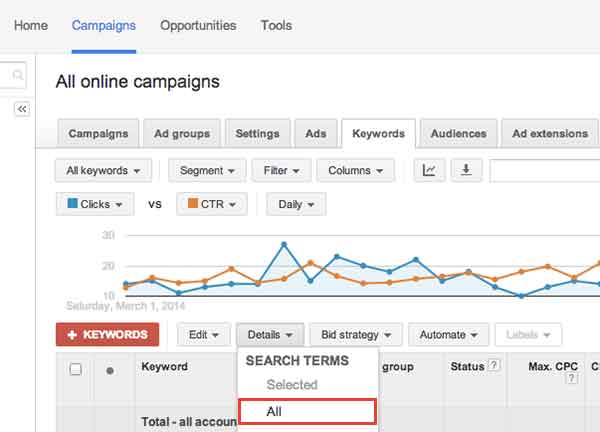
The first report is the Search Term Report/Search Query Report. This report can be found under the “Keywords” tab. Select “Details.” Then select “All.”
This report is useful because it shows the search terms that people are actually typing in and searching for. This data can inform your decisions in creating new campaigns, new ad groups, finding negative keywords (keyword searches you don’t want your ad to show up for), and even give you ideas for your content creation strategy.
2) Auction Insights Report
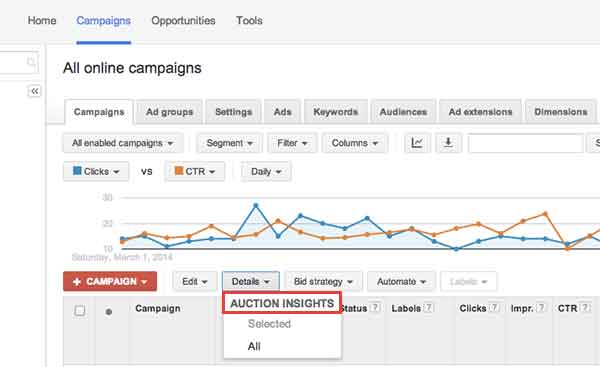
The second report that’s useful is the Auction Insights Report. This report can be found under the “Campaigns” tab, under the “Details” section. Select “All.”
This report is useful because it shows how your campaigns, ad groups, and keywords are performing compared to your competitors’. It compares your impression share (how often your ads show up), your average position etc. with that of competing campaigns. Understanding what your competitors are doing, can better inform your bid decisions, how you design landing pages, and more. Remember, your competitors in the physical world may not necessarily be your competitors in the digital world.
3) Conversion Time Lag
The third report that’s useful is the Conversion Time Lag Report. This report can be found under
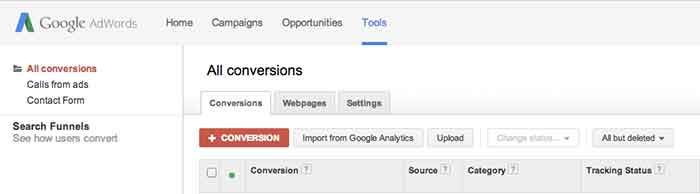
“Tools” (at the very top navigation bar). Click “Conversions,” then “Search Funnels” (on the left side of the page), then “Time lag.”
This report shows how long it takes for people who’ve clicked on your ad to convert. Based on your sales cycles, this can inform the number of touchpoints you need with your customers in order to drive them down the sales funnel. Depending on the time lag, you can then decide whether or not to reach out to your customers through a remarketing campaign, a content marketing campaign, an email marketing campaign, or through social media and how often you should do so.
In an online marketing environment where there’s a lot of hay, hopefully these three reports give you three useful needles in your haystack.
A while back, SEO guru David McBee wrote a post in his awesome blog about how he differentiates SEO tactics from PPC strategies. In David’s mind, it can all be related to the difference between dieting and plastic surgery. SEO is a diet, and PPC is plastic surgery.
To illustrate his point, David created this awesome infographic which I think spells things out pretty well. In many ways, this categorization really gets to the root of the differences between what you would do to increase your site’s profile online using SEO tactics versus the much more immediate PPC strategies we all employ.
The SEO Diet
It is very true that SEO is like a diet for your online presence. You need to be in it for the long haul, and you really need to establish clearly defined goals before you start. In exactly the same way that a crash diet will not yield the long term results you are looking for, link baiting or deploying tons of spammy content will not help you reach your idea SEO weight.
I really like the comparison of PPC to plastic surgery because I feel like you should be putting the same kind of thought to the planning stages of a PPC campaign that you would before a procedure like a face lift or tummy tuck.
The PPC Procedure
You need to figure out exactly what you want to focus on and a lot of thought has to go into what you want to look like on the other side. Nothing is worse than not being prepared for an onslaught of traffic hitting your site on the heels of a successful PPC campaign.
What do you think of David McBee’s comparison? What would you say the SEO/PPC dichotomy resembles in your experience? Let us know in the comments! We would love to hear from you, even if you are on a juice cleanse SEO diet.
The Dimensions tab in AdWords is a very useful area. You can really dig into a variety of different data sets to analyze your PPC performance. This data can give you valuable information on how best to optimize your campaign to maximize your budget, especially if you are limited by budget. There are a TON of things you can see and analyze in the Dimensions tab, but below are my three favorites.
1. Paid & Organic
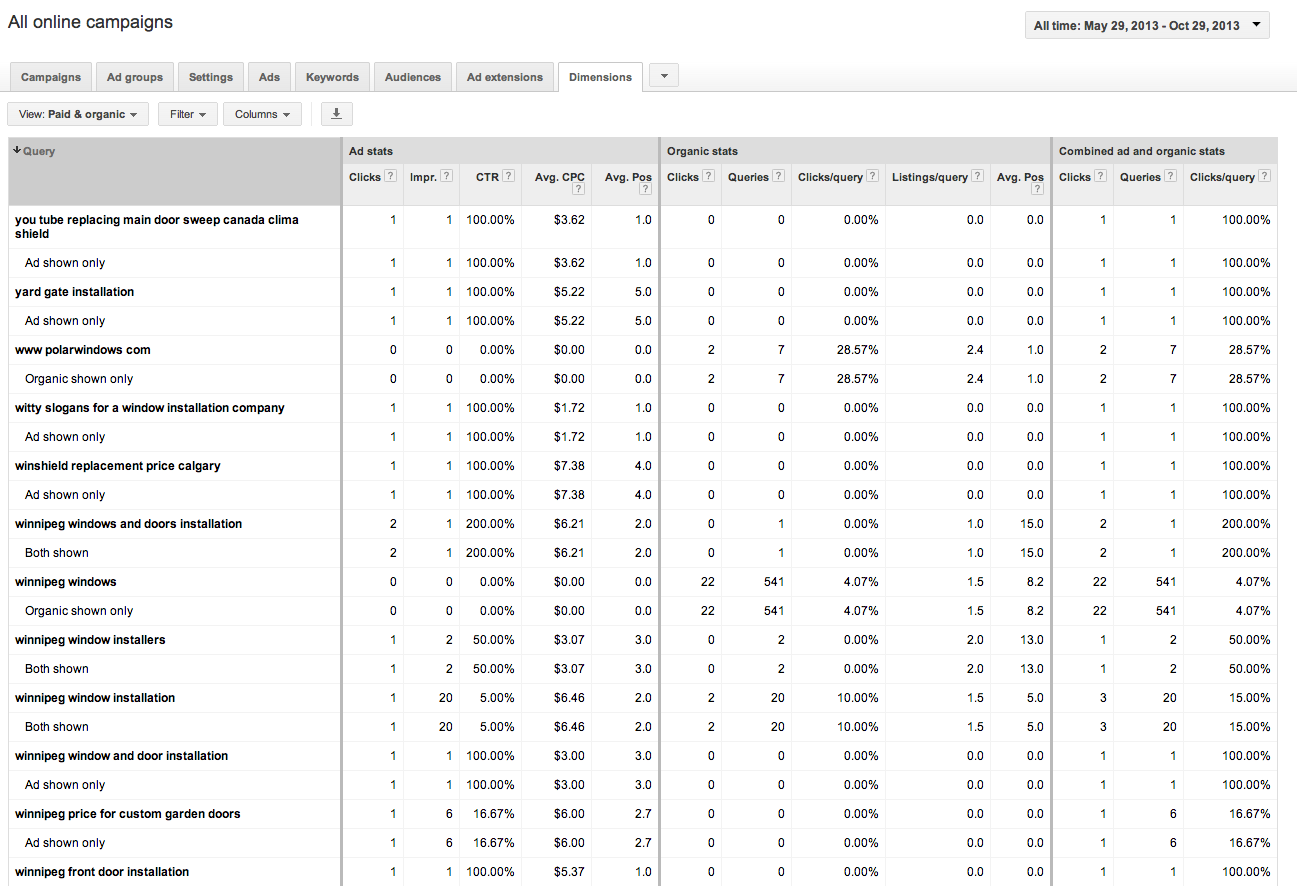
A recently added feature, this table shows how your paid and organic results performed for every search that triggered an ad or organic listing. You can view your click through rates (CTR) for both paid and organic searches individually, but also the CTR for when you have both an ad and an organic listing displaying in the SERPs. This tool can be great to convince clients the value of paid search (even if they have great organic results!). You can also use this to gather some keyword data for making decisions for your SEO campaign given that Google’s decision to make all organic searches (not provided).
Best Use: Gather information on how your ads perform when they are shown with your organic results.
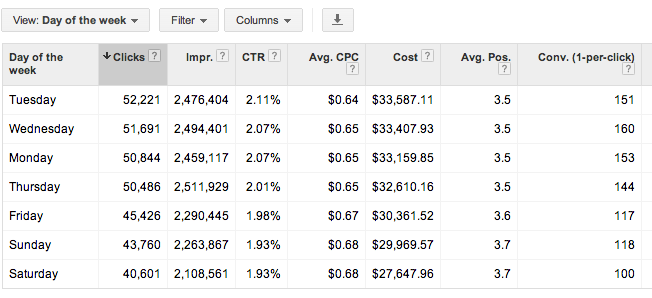
This report shows you all stats for each day of the week over your selected date range. You can determine which day performs the best by meeting your defined KPIs. You can then adjust your bids based on the performance you see. Are Tuesdays and Wednesdays higher converting than Saturdays? Focus on those days!
Best Use: Determine which day of the week is highest converting, and spend budget there.
3. Time > Hour of day
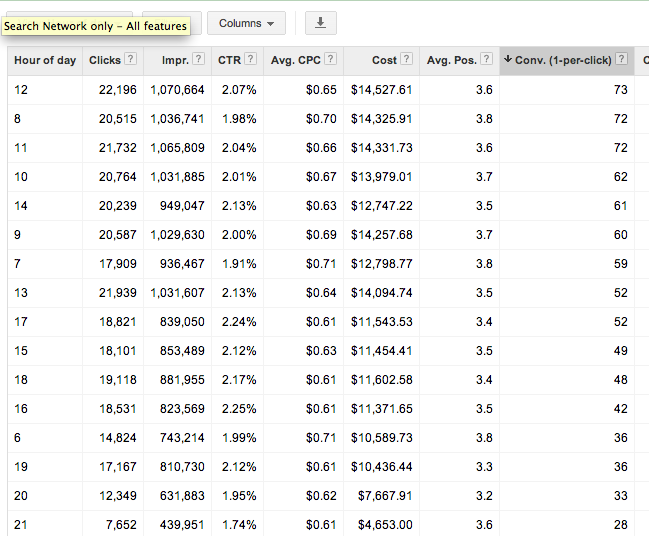
Shows you cummulative stats for hours of the day for the selected date range. As with the above, you can determine which hours of the day best meet your goals (impressions, clicks, conversions) and adjust your bids accordingly. Be mindful that if you are limited by budget, the hours later in the day may have lower performance due to the budget constraints. You may want to test day parting for hours later in the day if you cannot adjust your daily or monthly budget to determine if those later hours are actually more successful.
Best Use: Determine which hours of the day convert best and set up dayparting to spend more budget during these times.
Check out the dimensions tab for yourself and get familiar with the data that is available. There are many more reports available that give you actionable information to better optimize your campaigns. Which are your favorites? Let us know in the comments!
Google recently announced a new feature in the “Dimensions Tab” of Google AdWords. Once you link your AdWords account to your Webmaster Tools account, you will be able to view the “Paid and Organic” data. This report shows you a variety of valuable information, including the organic keywords that are delivering your website as a result and the clicks on those results. This is extremely valuable information given that Google is now masking all keyword data as “(not provided).” Below are the steps for linking your AdWords and Webmaster Tools Accounts.
First, make sure to verify your website in Google Webmaster Tools. Then follow the steps below.
1) Go to the gear icon at the top right. 2) Select “Account Settings” from the drop down. 3) Select “Linked Accounts” from the left sidebar. 4) Select “View Details” under Webmaster Tools.
Side Note: It’s a good idea to link your Google Analytics account, but for these purposes, you only need to link your Webmaster Tools account.
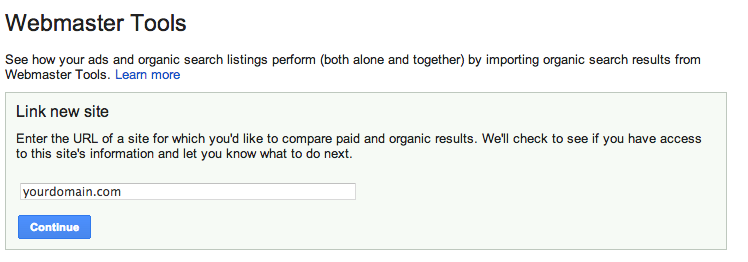
5) Type in your domain and select “Continue.”
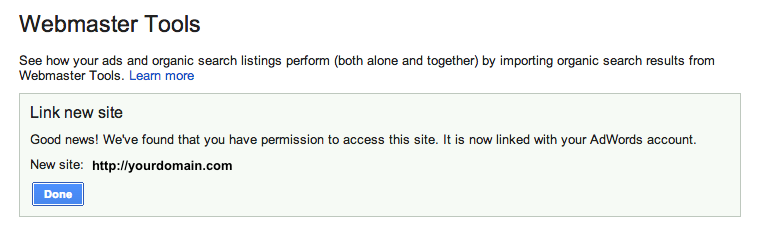
6) If you did it correctly, you will get the following message:
Now you can view all of the great data in the “Paid & Organic” report! You will find some interesting info here, especially how the combination of paid and organic play into each other. It will take some time for the data to accumulate, but once it does, you can gain valuable information.
So What am I looking at?
Query: The search query that delivered your website as a result. This will show the exact term that was searched, and whether you had an organic-only result, an ad-only result or both shown.
Ad Stats
Clicks: The number of times a person clicked on your ad for a given query Impressions: The number of times your ad was shown on the search engine results page for a given search term CTR: The number of clicks your ad received divided by the total number of impressions Avg CPC: The average amount you were charged for clicks on your ad Avg Pos: The average position your ad appears on the search result page
Organic Stats
Clicks: The number of times your organic listing was clicked on for a given query Queries: The total number of searches that returned your organic listings over the given period Clicks/query: The number of clicks your organic listing received divided by the total number of queries Listings/query: The average number of times a page from your site was listed in the organic results per query Avg. Pos: The average organic rank of your organic listing compared to other sites
Combined ad and organic stats
Clicks: The number of times a person clicked your ad or organic listing for a given query Queries: The total number of searches that returned your ad or organic listings over the given period Clicks/query: The number of clicks your ad or organic listing received divided by the total number of queries that returned one of your ads or organic listings
What do you think is the most valuable thing to learn from this new data that is provided by Google (if you have an AdWords account)?
Lately I’m finding more and more clients focused on increasing site traffic. Some are setting goals to double, triple, or even quadruple their current site traffic in as little as 3 months with an SEO campaign. I’m all for a challenge, but there are other metrics to measure the success of an SEO campaign than just site traffic. Here are 3 helpful tips to running a successful and fulfilling online campaign!
Focus on conversion traffic
Having 2 million site visits a month is phenomenal! But when these 2 million visitors come to a site, how are they engaging or interacting? Do they click on one of your display ads or make a purchase? Are they filling out a form or calling for more information? A site can generate 2 million visits a month, but if your phone isn’t ringing or if products aren’t being sold, those visits aren’t very valuable. I’ll take less site traffic and a higher conversion rate any day.
I worked in a retail boutique for 7 years, and as anyone who has ever worked in retail knows, there is nothing worse than a busy day with no sales. You are constantly catering to a customer’s every need with the hope that they might buy something, only to have them say, “I’ll think about it and come back later,” and walk out the door. It gets tiring after a while. Now, try doing that 2 million times a month.
Traffic coming to your site and not converting is the same as having a full retail store with no sales. You not only want to drive traffic to your site; you want to drive the traffic that is most likely to convert into sales, leads, or better yet, repeat customers.
Market your business through other online marketing avenues
In addition to SEO, a great way to increase your site traffic is to make sure you have a presence on other social platforms and engage potential customers through other online marketing campaigns. Launching a paid search campaign is a great way to increase your site traffic immediately if you just can’t wait the 6 – 12 months it will take to organically grow your visibility with SEO.
A strong social presence can potentially impact your organic search rankings as well. Having optimized and branded social networks throughout the web not only helps your SEO but also allows for another branding opportunity. Different market segments interact and connect differently. Having a presence on Facebook, LinkedIn, and Google+ and running a paid search campaign gives you the opportunity to expand your reach and potentially increase conversion traffic.
Look at other metrics to track success
When analyzing the success of any online marketing campaign, a great way to see how your audience is interacting when they come to your site is to look at bounce rate, pageviews, and the average time spent on site. Having a low bounce rate indicates that visitors are coming to your site and finding the information or products they are looking for. A high bounce rate suggests that a visitor came to your site and wasn’t pleased with your content, couldn’t find a form or contact number, or had difficulty finding your products or services and left your site feeling frustrated.
Another metric to look at is pageviews. A high number of average pageviews shows visitors are staying on your site and engaging with your content. The more pageviews, the more engaged your visitors are on your site. Paying attention to the average time spent on site is another indicator to show that visitors are spending time reading content, looking at products, learning about services, or viewing before and after photos. Keeping visitors engaged on your site is key. The longer they are on your site, the lesser chances are that they will leave and go to another competitor.
Lastly, consider calculating and tracking your total site conversion rate. Of all the visits to your site in a given time period, how many of them “converted,” or performed the desired action? If you’re interested in monitoring this metric, the ultimate tracking would include organic and paid call tracking, form inquiry tracking that captures the source and medium of the visitor and strategic event tracking in Google Analytics.
There’s more to online success than a high number of website visitors. Even with a slight decrease in traffic, if metrics such as bounce rate, pageviews and conversion rate are up you will know that you are targeting (and capturing) the right audience!
I’ve been in online advertising for about 8 years now. In that time, I’ve launched hundreds of accounts and thousands of search campaigns. Not all of them have gone as smoothly as I would like to believe. Instead of relying on my years of knowledge, I have a blueprint that I follow to ensure there is a successful launch.
Here’s an easy 3-step beginner guide to to launching a successful campaign that your clients (and boss) will be proud of.
Step 1. Check You Campaigns Settings
One of the most important parts of setting up a paid search account is checking all of your campaign settings. This is especially important when using something like the Bing Ads’ import feature or creating new campaigns in AdWords Editor.
Location
Make sure your location is targeting where you or the client have specified. While you could use geo-modified keywords for a state or region, you are likely to see a lower CTR due to poor ad relevancy and low conversion rates.
Language
Make sure the language you are targeting matches your location targeting and your ad content. If you are targeting a bilingual region such as Quebec, it is best practice to create a French and an English campaign with ad content in the appropriate language. Serve French ads to French speakers and English ads to…you get the point. 🙂
Ad Networks
This is a big mistake for a lot of new advertisers — your campaigns should never target more than one network at a time. While it is perfectly fine to advertise text ads on the display network, you do not want your low CTR from the display network negatively impacting your search text ads.
Device Targeting
On July 22nd, this setting will be non-existent, but you must be sure to check you bid adjustments for mobile devices. Not all businesses or websites lend themselves to mobile devices, and despite Google’s certainty that mobile is the future, there is no reason to overbid on a low-performing segment.
Step 2. Assembled the Ad Groups
Keyword Themes
How your keywords relate to your ad content, the search query, and the landing page really matter. While it isn’t the biggest factor in quality score (CTR is still 70% of the a good QS), keyword theming it majorly important to relate your service/product/whatever to the searcher. Over- and under-simplifying themes is a common mistake that even a lot of veteran PPC advertisers make, so don’t be discourage if you aren’t sure where to start. The best way to determine how keywords should be grouped is by figuring out what they mean to the searcher and what the searcher is expecting to see.
Keywords Match Types
Like keyword theming, this has a lot to do with anticipating what question a user is going to ask a search engine and how. I am a huge fan of exact and phrase match because if gives you the best CTR and limits the amount of negative keyword research you’ll have to do. However, for the PPC noob I would recommend using modified broad match with a hefty list of negatives to eliminate search noise. If you follow this advice your quality score and wallet will thank you.
Ad Content
One of the most important elements of a good launch is good ad content. When writing ad content, the most important things is answering the search query’s question. It is equally important to show why you answer the question better than your competition. Including value props, calls-to-action, and relevant ad extensions will help you get the click.
Step 3. Set Up Conversion Tracking and Analytics Integration
Conversion Trackers
This is probably the most overlooked and financially dangerous thing to forget when setting up a PPC campaign. Whether you consider a conversion a click-to-call, a form submission, or even view of keypage, you have to set up conversion tracking. With both AdWords and Bing Ads this is a simple process — you just insert a snippet of code onto your determined conversion page. This is typically the last action you want a visitor to do on your site before leaving your site.
Google Analytics
Undeniably the most powerful free analytics tool available. Google Analytics allows you to see what your PPC visitors are doing on your site. Having this knowledge will allow you make data driven decision about on-page factors such as images, content, or layout. One of my personal favorite reports is Visitor Flow. This report shows the path a visitor takes on your site and what information you should include on your landing pages.
That’s it!
Setting up a new PPC campaign can become daunting and confusing. Using these three steps will help you stay on track and not waste time or money. A properly set up campaign will ensure you can make better ROI decisions without backtracking and guesswork.
Pro-Tip:If you have a hard monthly cost and want to effectively manage your spend use the shared library’s Budget feature. It will allow you to assign a set daily spend to multiple campaigns. It will alleviate the stress of manually adjusting each campaigns’ daily spend. Be sure to check your performance though. If you start seeing more opportunity in a particular account you may want to separate it from the others and assign an individual budget.
Yesterday, Google announced what might be the largest restructuring of the AdWords platform to date: Enhanced Campaigns. Building on (and some say attempting to boost) the influx of mobile advertisements on AdWords, Enhanced Campaigns are an attempt to simplify the mobile pay-per-click management process by removing barriers to ROI calculation for SMB advertisers. While many advertisers are less than enthused about the changes, Search Influence welcomes the new features, streamlined campaign creation process, and simpler campaign management and assessment that Enhanced Campaigns brings to the table.
The official blog post on Inside AdWords is clear about the goals of Enhanced Campaigns: simplify mobile and multi-touch marketing for the part-time advertiser. Citing a study on the new world of multi-screen browsing, Google claims 90% of consumers “move sequentially” between several devices during the conversion funnel.
Google highlights three refinements to existing AdWords features that will be live for everyone starting in June: (1) laser-targeted bid adjustment based on location, device, time of day, “and more” within a single campaign; (2) easy management of one campaign across multiple devices, which is in contrast to the previous recommended best practice of duplicating identical campaigns for different device targeting; and (3) more accurate click-to-call data and conversion measurement across devices. These changes allow advertisers to more easily set up mobile campaigns, a strategy Wordstream founder and CTO Larry Kim says only 4% of advertisers participated in despite lower costs-per-click and, in our experience, high conversion rates from calls.
The new bidding system is based on a percentage of a basic bid which covers the equivalent of today’s national desktop campaigns. This bid can be multiplied by -100% to 300% depending on device targeted and -90% to 900% depending on geographic area or time targeted. This allows advertisers to avoid tedious duplication of campaigns simply for different targeting, while making it much easier on “part-timers” and campaigns with limited budgets to run on multiple devices and control who sees their ads.
Combined with the recently-simplified Remarketing Lists in Analytics, the upcoming Universal Analytics, and the storyline offered in a post on SEER Interactive, it becomes clear that the other shoe dropping with Enhanced Campaigns is the continued march toward multi-touch lead attribution.
AdWords is also dropping the direct fee for Google-offered click-to-call numbers in mobile search ads, tracking only calls over one minute as a conversion. This has been a point of contention for marketers who know that a click on a phone number and a call connected are very different things.
Not everyone is excited about the changes brought by Enhanced Campaigns. Many advertisers are concerned about the cost-per-click increase that will come with a variety of new advertisers not effectively managing their bids using combined campaigns. According to an Adobe study, the gap between mobile and desktop costs-per-click dropped by 15% between the 3rd and 4th quarters 2012, meaning that there’s already less of an advantage to advertising on mobile. Automatically setting advertisers to run on mobile means that despite the availability of new bidding tactics, less savvy advertisers will inflate the ad auction and lead the platform to be less profitable for everyone.
Others are concerned that Google won’t be able to effectively manage the preferences expressed in the myriad targeting options provided by Enhanced Campaigns. Per Google’s Guide to Upgrading to Enhanced Campaigns, Quality Scores in upgraded campaigns are reported at a bird’s-eye view, making it difficult to see what targeting is driving increases or decreases of an already-opaque metric. Similarly, the inability to separate out tablets from desktop searchers makes some wary; there are some markets that would be highly affected by this, such as downloads of a desktop program. While this is concerning to some, it may also outline an overarching corporate goal of Google: to make the world fast and universally accessible — contrary to ideas like single-platform apps and solutions off the cloud.
Misconceptions: Looks Naughty, but Is Nice!
But some, seeing the change as a step backward for targeting, have unfairly found fault with the update. Enhanced Campaigns eliminates confusion by changing locations of settings. Many have said that the “mobile-only campaign” has disappeared from AdWords. On the contrary, AdWords provides a checkbox to help Google figure out what device an ad should be shown. Furthermore, ads with extensions such as App Store downloads that only make sense on certain mobile carriers and operating systems will be automatically targeted to those devices.
There’s also some worry about other platforms following suit. As BingAds has matured as a platform and international search engines have found monetization easier with cost-per-click ad auctions, it might follow that this grand experiment by Google will shape the industry. Yet BingAds has tried to forge its own path in the paid search realm; I can’t see them blindly following Google with its targeting any more than it already has — to wit, only slightly. But while the industry as a whole might not change, it is important to note the Google has over search ads, especially on mobile devices.
How to Win with AdWords Enhanced Campaigns
Best practices can already be parsed out from what has been released about AdWords Enhanced Campaigns, but they aren’t necessarily far divorced from current ones.
Follow Google’s guide to transitioning your account to Enhanced Campaigns
Be sure to take advantage of all appropriate ad extensions, which allow you to target you ads appropriately to device and location
Ensure you’re using the most up-to-date version of AdWords Editor to effectively Enhance your Campaigns.
Anticipate a variety of devices coming to your site by providing dynamic content and alternate conversion paths based on device
Provide natural redirection to and from your mobile site if it’s required for your business to avoid issues when desktop ads show on mobile or vice versa
Now more than ever, bid appropriately for your location, device, and time of day — the best strategy in a second-price auction like AdWords is to bid what that website visit is actually worth to you
We’re looking forward to learning more as marketers start experimenting with these new tools. What do you think? Will this change the way you’re doing PPC?
While some may view the right-hand side of their Facebook stalking experience as an uninteresting blob of text, Facebook was once the world’s largest display advertising network, pulling in over $2.2 billion in annual revenues. Even now, Facebook ads are an invaluable tool for any social media campaign. Industry standard click-through rates, the percentage of the time an impression leads to a user clicking on an ad, hover around .05%, but we’ve recently seen CTRs as high as 1.5% for well-targeted sponsored stories and over 7% for post like ads!
But this glowing opportunity can be hard to grasp if you work in less family-friendly fields. The reader can easily imagine business models that may be be considered prima facie inconsistent “with the overall user experience” of Facebook. For those businesses, it’s important to understand the value of “black hat” advanced Facebook PPC: bending editorial guidelines to best advertise your product.
Some folks may cringe at the term “black hat.” While hacking for links is loathsome, most spam is only annoying to the end user: the act of creatively interpreting best practice guidelines is hardly the cold-hearted evil that fits into the wide swath of questionable techniques available to an advanced marketer. In this post, we’re focusing on the last (and probably least applicable) definition of “black hat:” bending poorly-policed rules to make sure we do our best for our clients.
To boot, Facebook actively goads advanced advertisers to bend their rules. Regardless of your page’s subject matter, Facebook still beseeches marketers to “See Your Ad Here,” often showing a recent post. For a page that is already posting inappropriate content, this enticement throws down the gauntlet to get the ad to pass content review. Sometimes, it’s easier than you think.
Despite the challenge, all ads are subject to review under the guidelines, even if they’ll show in the preview. The rules themselves are reasonable, protecting users from malicious software and malicious badthink such as hate, prurience, and tobacco. These rules are not dissimilar from other networks like Google’s, but advertisers must more intimately understand the review process to best handle the occasional ad review oddity.
Skirting the Line & Errors of Commission
Facebook prohibits directly asking users about demographic information, preferring to have ads show the value to the demographic. From a marketing perspective, this makes sense: you’re targeting interests already, so why ask if you’re hitting your target? However, it’s clear that this guideline is inconsistently applied.
The approved ad (right) directly asks “Have you been Fired, Laid Off, or Quit?” There’s no guideline prohibiting asking about employment status, skirting the spirit of the rule while both the message and visuals remain striking. In contrast, the disapproved ad (left) does not “assert or imply… a user’s personal characteristics” and offers a more subtle image. In this case, Facebook’s reviewers didn’t miss a minor error, but seemed to fabricate or transfer an error.
As this is bound to happen with the scores of ads these reviewers must see, this problem is easy to fix: just resubmit the ad. If there isn’t a real underlying problem, it’ll be reviewed and approved. Two different reviewers will be unlikely to make the same mistake, but if you’re hard-pressed to find something wrong with your ad, contact support at your direct email or here — this won’t necessarily get it approved, but will likely give an answer as to what triggered the disapproval.
Errors of Omission & Retroactive Disapproval
Even with safeguards, sometimes ads get through that shouldn’t have. We serve a variety of niches that often trigger violations of image guidelines, yet are always surprised at what is allowed to be approved. Below is a collection of test ads we ran to see what did and didn’t get approved. These ads were intentionally at least borderline, skirting the edges of the ad guidelines.
Often, it’s not the image or ad copy, but the content of the Facebook page that causes ad approvers to hit the reject button. In these cases, a marketer has two options. The first is to use a white-labeled Facebook page for the landing tab, guiding users to a Like button on the tab that likes the actual page. This introduces blackhat Facebook tactics by offering a possible dark pattern by not telling what the user is actually liking. We didn’t test this to maintain the strength of the brand we advertised, but the temptation was there. Facebook again tempts the darker side of advertisers.
How to Beat the Approval Process: Don’t Connect to Facebook!
The second trick that we found much more effective is to use the full URL of the landing tab instead of “Advertising a Page” in Facebook’s ad editor. Due to the lack of an API hookup, this does not pull in the content of the Facebook page, thus letting an advertiser send traffic to a page that would otherwise be speedily disapproved. This also works with individual posts, letting an advertiser run ersatz sponsored stories to their post. Using an acceptable image and what could be questionable text, the ad would have landed users on a image post that was undoubtedly obscene. Surprisingly, the ad was approved shortly after creating it.
This approved ad linked to a pornographic picture hosted on Facebook.By simply pasting the URL, the advertiser is now heading to a landing page that only just happens to be on Facebook; thus, the content reviewers can only look at what’s on that web page, as opposed to the edges created and shared on the page. Furthermore, the rampant use of iframes and javascript on Facebook may not allow the approval team to see what’s actually on the landing page, as they may be unable to follow the labyrinth of code to the questionable content.
This might mean that much of the approval process is automated, but running at a lower level than Google spiders are. Unlike Googlebot, which is likely running a headless browser, Facebook is running something similar to older versions of Googlebot. This means quite a bit for advertisers who are used to the review process of AdWords, which often looks at landing pages. In all likelihood, medical images that may show nudity and other useful but “not family-safe” imagery will be permitted on Facebook landing tabs. This opens the door for a variety of verticals that otherwise wouldn’t be able to best show their competitive advantage.
You Can… But Should You?
Regardless of what tricks are used and what CTRs are produced, Facebook isn’t lying when it says that users prefer not to have certain subjects in their faces when they check Facebook at work to find out what their daughter is up to. Often, users will hide ads they’d rather not see, prompting a set of reasons for blocking the ad. If enough users hide your ad because of inappropriate content, Facebook will disapprove your ad retroactively.
This causes a familiar sight to seasoned Facebook advertisers: disapproved ads with qualified traffic. There are two options for a marketer, much like with accidentally disapproved ads: resubmit or leave it and create new ads.
In most cases, a resubmitted ad will have similar performance, but still eventually be disapproved; thus, it’s probably best for even experienced Facebook advertisers to bite the bullet and leave any retroactive disapprovals on the table. While frustrating, these ads are disapproved based on the feelings of your targeted group, who may not like what you’re using as copy. If your target isn’t connecting with your ad content, it might be time to change tactics, lest your brand be damaged by backlash and social media outcry.
A Game Plan for Being (Only a Little) Evil
The lesson in these examples isn’t that Facebook’s unfair and inconsistent: it’s that the rules are fluid and hard to pin down exactly. Similar to regular Facebook content, ad reviewers are only human, and inundated with split-second decisions. For a savvy fedora-sporting Facebook advertiser, there are three steps to solving a disapproval:
Simply resubmit the ad
Test different times of day for submitting ads. Some people feel certain hours take advantage of the human element and are therefore best for borderline ads.
Test the landing page
Try sending the ad to the URL of the landing tab or to your homepage. This should eliminate ad copy problems.
Make small, incremental changes to the ad content
Make sure to keep an eye on what does and doesn’t work to sneak by the reviewers next time without issue.
With these three steps, most advertisers will be able to handle even the most controversial of Facebook clients and successfully get traffic on one of the biggest display ad networks.
I get a lot of questions from clients about starting or maintaining a paid search or Pay Per Click (PPC) campaign. While we at SI are undoubtedly convinced of the positive impact a paid search campaign can have on a small business, others need more information before committing. Some of the most frequently asked questions about a paid search campaign include:
“What are the advantages and disadvantages of a PPC campaign?”
“Why should I do PPC if I rank in the first position organically?” in the same sense, “Should I start a PPC campaign until I start ranking organically?”
“Why should I pay for people to click on my website when they are already looking for my brand?”
“How will this help my business, and what should I expect for an ROI?”
So, what are the answers to these important questions facing small businesses? Here’s my take:
What are the advantages and disadvantages of a PPC campaign?
Starting a PPC campaign allows you to show up in the Google search results for search terms that you may not rank for organically.
A PPC campaign allows you to set daily and monthly budgets for the keywords and areas you want to target. If you are selling a product or service that is sold out or fully booked, you can allocate your budget to a different product or service with a simple click.
You also have more control over the locations where your ads show. With SEO, you are building overall site authority, and while you may be targeting specific geo-modified keywords, you could potentially rank in other locations. With paid search, you can set your preferred locations as well as the exact geo-modified keywords you want to target.
One of the main benefits of a paid search campaign is that results can be instantaneous. While it typically takes 30-60 days to fully optimize a campaign to see optimal results, you can begin receiving leads or making sales the first day your ads are live.
Will paid search marketing ads still help me if I rank in the first position organically?
The answer to this is, of course, “YES!” — but let me tell you why.
For terms that you do rank for organically, having a paid ad allows you to claim more “real estate” on the search engine results page and increases the likelihood that people will come to your site. People tend to believe your site is more authoritative because Google allows you to show up more than once on the page. According to Search Engine Watch, 34 percent of paid search clicks occur when the same website ranks organically on the page. If the paid search ad is paused, only 11 percent of the traffic generated by the ads will be replaced by the organic clicks.
Having a paid search campaign gives you the ability to control your message through your ad copy and change it easily and often if necessary. You can create unique ads for specials and seasonal offerings and have them rank in top positions quickly. This allows your ads to always be relevant.
PPC also gives you the ability to control the message and content of the landing page to which you send your visitors. You can optimize this landing page for conversions and sales, with less focus on keyword-related content.
Finally, you have the ability to test ad content, landing pages and keywords on a larger scale. You can determine which calls to action are driving traffic and which keywords convert the best in a shorter time frame. Then, you can apply this knowledge to your SEO campaign.
Side Note: Running a paid search campaign will NOT improve your organic rankings.
Should I start a PPC campaign until I start ranking organically?
You should most certainly start a PPC campaign immediately. However, see the question above for why you should continue the campaign even if you rank in the first position organically.
Why should I pay for people to click on my website when they are looking for my brand?
Besides the points mentioned above, there are many reasons to bid on branded keywords.
Competitors may be bidding on your branded terms and you will want to ensure you are showing in the top position for your brand.
Branded clicks are very inexpensive, as you are going to be the most relevant result for your brand, and Google will “reward” you for that.
People searching for your brand are more likely to convert, and you want to be where they are searching.
How will this help my business, and what should I expect for an ROI?
Search Influence tracks all aspects of a paid search campaign, similar to how we track success for SEO. We provide call tracking numbers for campaigns and set up form tracking to attribute leads directly to paid search campaigns. Our monthly reports include a list of leads, cost per lead, clicks, click through rates, and average cost per click (among other factors). This helps our clients determine if the leads we provide are valuable and what leads are becoming actual customers. ROI will vary depending on industry, but we strive to provide a positive ROI for every client.
So if you are wondering if you should start a paid search campaign, the answer is almost certainly “Yes!” With effective research, targeting and analysis, you can have a successful campaign that will generate leads and sales for your business.
I’d love to hear your opinions on PPC, so leave a comment below!
 1. Facebook Defaults Posts From “Public” to “Friends” & Introduces Comprehensive Privacy Checkup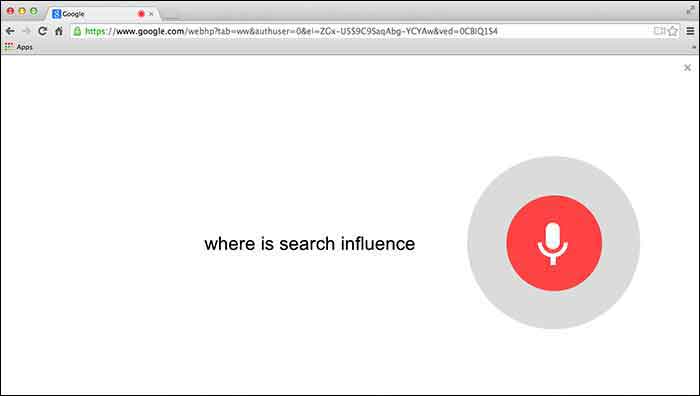






 While some may view the right-hand side of their Facebook stalking experience as an uninteresting blob of text, Facebook was once the
 To boot, Facebook actively goads advanced advertisers to bend their rules. Regardless of your page’s subject matter, Facebook still beseeches marketers to “See Your Ad Here,” often showing a recent post. For a page that is already posting inappropriate content, this enticement throws down the gauntlet to get the ad to pass content review. Sometimes, it’s easier than you think.