Tag: local search

  • 5 Things American Businesses Need to Know About GDPR

    In the wake of the Cambridge Analytica scandal here in the U.S., the General Data Protection Regulation (GDPR) was established by the European Union in May to give users complete transparency on how their data is or will be used. Here’s everything you need to know about GDPR and how it will affect marketers not just in Europe but here at home as well.

    1. Why Did the EU Create GDPR?

    GDPR went into effect on May 25, 2018. It was initially approved by the EU in 2016, well before the news of the Cambridge Analytica data misuse broke. However, it’s hard not to associate one with the other because of the timing. To provide a bit of context, I will quickly outline the details of the Cambridge Analytica case. The data of an estimated 80 million Facebook users was sold and then used to create “psychographic” profiles of American voters. This data was collected through a seemingly harmless personality test called “thisisyourdigitallife.” The test filed away the data of participants and their Facebook friends. The participants unwittingly gave the app’s developers access to this data because by opting to take the test, they agreed to the test’s terms of service, which granted the test access to their information as well as their friends’.

    Though this example of misuse has brought personal data protection to the forefront of the world’s attention, this is not a new practice. The personality test in question was launched in 2014, and people have been using similar techniques to acquire user data for years. The difference is that we rarely questioned the terms of service we agreed to for things like apps, free wifi, and other services in the past.

    2. What Does GDPR do?

    GDPR aims to give users more information on how their data will be used. Its central goals are to keep users informed and to require their consent. The exchange of data for free services such as Facebook and Google can be a fair one. The text of the GDPR legislation is a decent read and is broken into chapters here. Any sites or services attempting to collect data must do so transparently, with “unambiguous” and “specific” purposes. “Data subjects” must be able to request logs of all of the data collected about them and then allowed to ask for the data to be corrected or deleted (appropriately named the “right to rectification” and the “right to be forgotten,” respectively). Also, businesses cannot deny or restrict services to users who opt out of data collection.
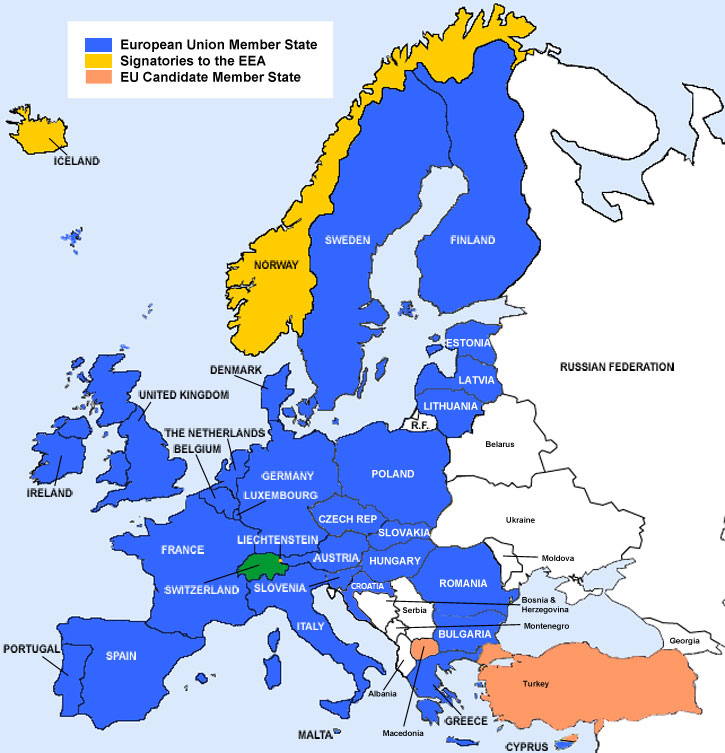
    EEA payment map - Search Influence

    3. Does GDPR Apply to US Businesses?

    Strictly speaking, GDPR applies only to EEA (European Economic Area, see image) citizens while they are in EEA countries, so one might expect that it won’t have a huge effect on American companies that only operate within the United States. However, because the internet is global in nature, it’s rarely that simple. Websites run by American businesses are frequently visited by people around the world.

    Tourism is one of the industries that will be most affected. 39.4 percent of the American tourism market is comprised of European travelers. Zoos, museums, aquariums, and other attractions should review their data and cookie collection methods.

    Also, American businesses must ensure that data they receive or purchase about EEA citizens were collected using techniques aligned with GDPR’s regulations.

    4. What Can You Do to Make Sure Your Business Is Compliant?

    GDPR isn’t intended to stop all data collection or to make targeted marketing less effective. On the front end, the main changes businesses would need to make to adhere to GDPR are stating that they are tracking user data and then how they plan to use the data, whether it’s cookies for remarketing, user session data for site analytics, or other reasons. Further down the line, companies would need to ensure that their records are well-maintained so that they can provide users with their data should there be a need to review or delete them. The key is transparency. As long as you let users know what you’re doing and why, there shouldn’t be any issues.

    Mark Zuckerberg sitting before Congress - Search Influence

    5. Will the U.S. Adopt Similar Policies?

    Anyone who watched Mark Zuckerberg’s testimony to Congress in April might not think there will be changes in US data privacy laws anytime soon. The questions some congressmen and women asked revealed a lack of technical knowledge, as noted by Vox. However, on May 22 Vermont passed the nation’s first data privacy law. Vermont’s legislation focuses on “data brokers,” companies that sell or license data about their consumers to third-party companies that do not have a direct relationship with the consumer whose data they are purchasing.

    A few weeks ago California passed a law that is more all-encompassing than Vermont’s. Similar to GDPR, the law requires businesses to state the type of data they are collecting and how they plan to use it. These changes will not go into effect until 2020, but the process was pushed along because Californian lawmakers were pressured by a grassroots ballot initiative with measures even more stringent than the bill the state passed.

    Due to public outcry and interest, other states are bound to follow suit, so there’s never been a better time to review your data collection practices and consider how easily they can be adjusted to fit the level of transparency that is becoming the new standard.

    Consult With Experts Who Are Up to Industry Standards

    At Search Influence, we consistently stay apprised of new industry standards and regulations regarding how our client’s information is disseminated, including GDPR. Our goal is to help your business grow and optimize your potential online, all while making sure your business is in compliance with data protection laws. If you’d like professional insight into how we can help your business thrive, call 504-336-3422 or request a proposal online today.

    Images:
    EEA Map

    Mark Zuckerberg

  • Everything You Need to Create an Effective Landing Page—and Everything You Don’t

    If you have run any type of digital marketing campaign for your business, you’ve probably come across the term “landing page.” But what exactly is a landing page, and what role does it play in helping to convert leads into customers? Simply put, landing pages are the pages where users “land” after clicking on an ad from Google, Facebook, or a similar platform. When done right, they feature persuasive and highly relevant content, focused on one specific conversion. By directing users to a landing page rather than simply the homepage of your website, you can ensure that you are able to attribute leads to a specific campaign while simultaneously providing a better answer to the search inquiry of the user. A landing page should be specifically focused on lead generation, and these tips will help you have the highest conversion rates once users make it to your page.

    Do Have a Compelling Call to Action

    A clear call-to-action(CTA) is the most important part of your landing page and should clearly communicate what you want your reader to do on the page. This could be to register for an event, download an eBook, or schedule a consultation. Whatever it is, it needs to stand out from the rest of your content and be one of the only, if not the only, actionable items on your landing page.

    If your CTA is a form instead of a button, the title of your form should be much more specific than a simple “Contact Us.” Entice your readers with simple, yet descriptive language like “Register to Get Your Free Marketing eBook” instead. For buttons on your form, avoid generic language like “Send” or “Submit” and instead use language like “Get My Analysis” or “Start My Free Trial.”

    Graphic of a form field on a landing page - Search Influence

    Users are also typically skeptical to give out more information than necessary, so you don’t need to ask for their full name, address, phone number, date of birth, where they went to high school, and their mother’s maiden name if all they’re doing is downloading an eBook. A user is much more likely to actually fill out the form if you keep it short and sweet. Sticking with essentials like their name and email may be all you need.

    For more tips on how to craft stellar CTAs that will convert, check out this blog post.

    Don’t Cram Everything Above the Fold

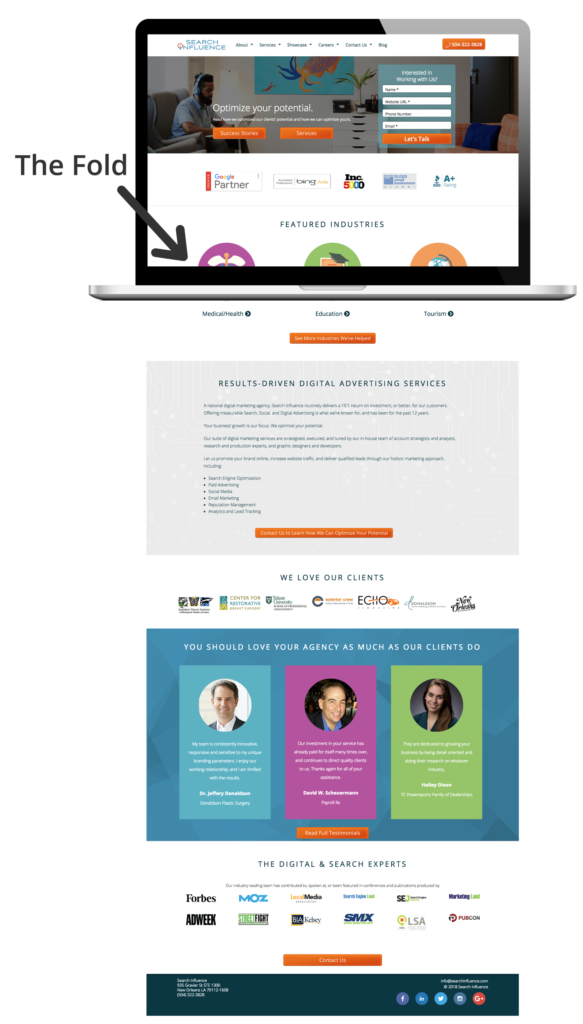
    We’ve all heard for decades that readers rarely make it below the fold (originally used in reference to traditional newspapers), and that we should try to cram everything important above the fold. This doesn’t hold as true today as it once did, and cluttering the top section of your page can actually hurt your conversions. While it is still true that some users won’t make it below the fold at all, if what you have above the fold is compelling enough to grab their attention, they will scroll down to read the rest of your content. So while, yes, you do still want your CTA and most important information above the fold, try to limit it to just that. No one wants to read anything that is a cluttered mess, and you’ll retain users’ attention much better by avoiding the clutter.

    Visual representation of above-the-fold content on a landing page - Search Influence

    Do Have Fast Loading Speed

    A fast page load time is absolutely essential for any web page. Users expect a page to load within seconds, and if it doesn’t, they often abandon the page entirely. In fact, a case study from Hubspot found that a 1-second delay in site speed resulted in a 7 percent reduction in conversions. Images and videos often slow down page load time, so be sure to optimize elements like these to avoid losing users. Luckily, you can test out the load speed of your page and address any concerns.

    Don’t Have Endless Content or Jargon

    You don’t want to confuse any potential leads with overly complicated, industry-specific jargon. You should be able to demonstrate your expertise in your field without intimidating or annoying any of your users. While you want to give enough information to draw a user in, you don’t want to overwhelm them with too much information up front. If you do have longer content, try breaking it up with bulleted lists or by using icons.

    Icons used in a landing page - Search Influence

    Do Include Images and Videos

    According to Unbounce, videos can increase conversions by about 80 percent—making them a worthwhile investment for your page. Since videos are often quite big and the play buttons can distract from your CTA, consider making your video considerably smaller than the standard minimum of 960px by 720px, with the option to make the video bigger when it’s actually playing.

    Example of video used in a landing page - Search Influence

    If you don’t have a relevant video for your page, strong visuals are still extremely important. Avoid stock photography whenever possible, but it’s still better to have stock photography than no imagery at all. Users also respond better to images with faces in them than images without.

    Photos aren’t the only type of imagery you can utilize on your landing pages. Depending on the industry, your target audience might respond well to vectors or illustrations, which can also help explain complex subjects when photos aren’t available.

    Example of vector graphics used in a landing page - Search Influence

    Whatever imagery you do end up using on your page should be consistent with the display, Facebook, or any other type of ads that are driving users to the landing page in the first place. When a user clicks on an ad with vector images, for example, they would expect the following landing page they land on to have similar imagery. If the look and feel of the page is completely different than the ad they clicked on, the user could be confused and think they clicked on the wrong ad altogether.

    Don’t Include Navigation

    While it may seem counterintuitive to exclude typical site features like a navigation bar, for landing pages, you actually want to include as few opportunities to leave the page as possible. This includes navigation, which can also be distracting and take away from your main call-to-action.

    Do Conduct A/B Testing

    Once you’ve got your pages built, you should conduct A/B testing by changing out elements of your page to determine what performs best. While audiences typically respond more positively to people in images, for example, maybe yours responds better to objects or vector illustrations. You should also test out CTA placement, button colors, font choices, and content. Keep in mind what you learned in science class though, you only want to change one element at a time when performing these tests. If you change multiple variables at once, you won’t have accurate data on which elements are actually making the page perform better or worse.

    Creating landing pages that convert is no easy feat. Unbounce estimates that achieving a 12 percent conversion rate for your landing page will place you above 90 percent of the competition. With a comprehensive online advertising strategy, every step of the process will be clearly catered to your target demographic, making it as easy and risk-free as possible for users to take action. If you want help creating your online presence, reach out to Search Influence to receive your custom marketing analysis.

  • What’s the Perfect Marketing Budget for Your Company?

    In our years of experience as a digital marketing agency, we’ve found that a typical marketing budget for a business is 5-10 percent of revenue, sometimes more when in growth mode. But don’t stop reading yet! Determining the exact budget for your business, and how to allocate it, depends on a wide range of factors, from goals to company age. Here are five questions that can help your business determine its ideal marketing budget.

    1. What Are Your Needs and Goals?

    Most effective marketing budgets start with a bottom-up approach. This means that your first step is to define your company’s quantifiable goals and objectives. This could be the number of new customers or accounts you’d like to see in the next year. It could also be how quickly you need to see results on your campaigns. The important thing is that the goal is well-defined. This way, you can come up with specific strategies to reach your target, and you can easily measure which strategies are working (and which ones aren’t!). Quantifying your business goals as much as possible will help you create a much stronger marketing budget and marketing campaigns.

    2. What Does Your Historical Data Look Like?

    So you need specific objectives…but how do you determine what those should be? One effective tool is historical data. For example, if you’re trying to figure out how many new leads you need per month, look at data from previous months. How many people typically contact you per month? How many of those people are qualified potential customers? How many typically convert into actual customers? And is this conversion rate providing you with enough customers to keep your company growing? Once you determine how your company has been performing, you’re in a much better position to decide if and how you’d like to change that performance. In other words, you’re in the perfect place to set measurable goals!

    For more information on how to track leads and determine the quality of those leads, visit our Analytics & Lead Tracking page!

    3. How Old Is Your Company?

    Historical data is great—if you have historical data. Brand new companies usually don’t, which can make determining a marketing budget especially challenging. Luckily, the experts are here to provide guidance! Both entrepreneur.com and websolutions.com recommend that new companies should allocate between 12 percent and 20 percent of their gross revenue to marketing costs. While this range might seem a bit high, there is logic behind it. New companies must be more aggressive with marketing spend because survival depends on building lasting brand recognition with an audience that’s never heard of them before. Once companies have established their brand and customer base, they can change their focus to maintaining the awareness and market position they’ve gained, while incrementally growing their business. And they can adjust their marketing budget to the 5-10 percent we recommended earlier.

    4. What Should Your Marketing Plan Include?

    So once you’ve established your goals and consulted your historical data if possible, what sort of marketing tactics should you use to achieve those goals? First, a typical marketing budget covers both public relations and advertising, in addition to the previously discussed branding. It’s a very wide range, but it can most easily be broken down into print and digital communication. Print communication includes traditional marketing efforts, like billboards, newsletters, brochures, and press releases—and don’t forget to budget for design, printing, and mailing costs. Digital communication, on the other hand, includes developing a website that’s both SEO friendly and user-friendly, using online advertising to your advantage, and maintaining active social media accounts. Depending on your industry, you might also want to budget for additional marketing efforts that don’t neatly fit into the print or digital category. This could include broadcast advertising, on radio or television, or special events like conferences and trade shows.

    To learn more about how digital marketing can help your company reach its goals, visit our pages about Content Marketing and Online Advertising!

    5. Where Is Your Target Demographic?

    With all those marketing options to choose from, how do you know which ones are right for your business? One key way to narrow down the list is to define your target demographic—not just who they are, but where they are. This question not only applies to the physical location but also to online behavior. What types of media does your target demographic use? Do they spend more time checking their emails or scrolling through Twitter? Whether you’re marketing in the print or digital arena, knowing the places your target demographic frequents can help you put your content in the best location to make the most efficient use of your marketing dollars. In fact, your target demographic can help you decide whether to use print or digital marketing in the first place. While traditional media can strongly contribute to brand awareness and complement your digital strategy, the right balance of print to digital marketing depends greatly on your industry and your customers. Know your target demographic, and you can feel confident you’re investing in the right media.

    At Search Influence, our goal is to help you grow your business and optimize your potential online. If you’d like professional insight into choosing the ideal marketing budget for your company, call 504-336-3422 or request a proposal online today.

    Images:
    Rihanna

  • Your Referral-Based Business Still Needs Digital Marketing

    Most referral based businesses are pretty happy watching the dollars come in without having to invest in marketing. The business model usually looks a little something like this: company does good work → client is happy → client tells a friend they are happy with great work by company → friend works with company. Badabing.

    But wait, we missed a step! How’s the referral going to find you? Even if your name, number, address, and directions are written down, laminated, framed, and handed to a referral, they will still search online to find any business. According to Google, 97% of consumers use the web to search for local businesses.

    • 96% of people seeking legal advice use a search engine
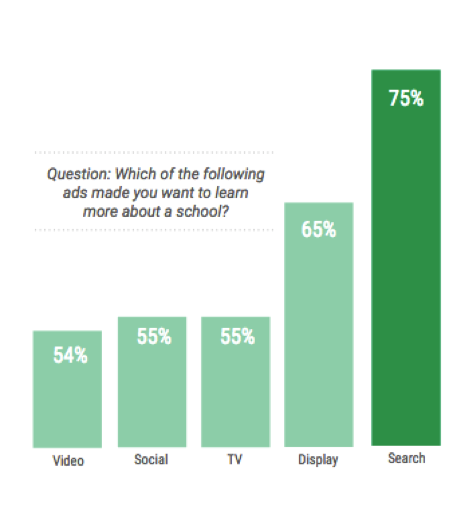
    • 56% of students turn to search when research programs/degrees
    • 78% of local-mobile searches result in offline purchases

    These stats prove search is the best opportunity to influence your audience buying decision and shape their perception of your company. If your business isn’t investing in digital marketing, which of your competitors will the referral contact once they can’t find you online?

    Who’s Representing Your Law Firm Online?

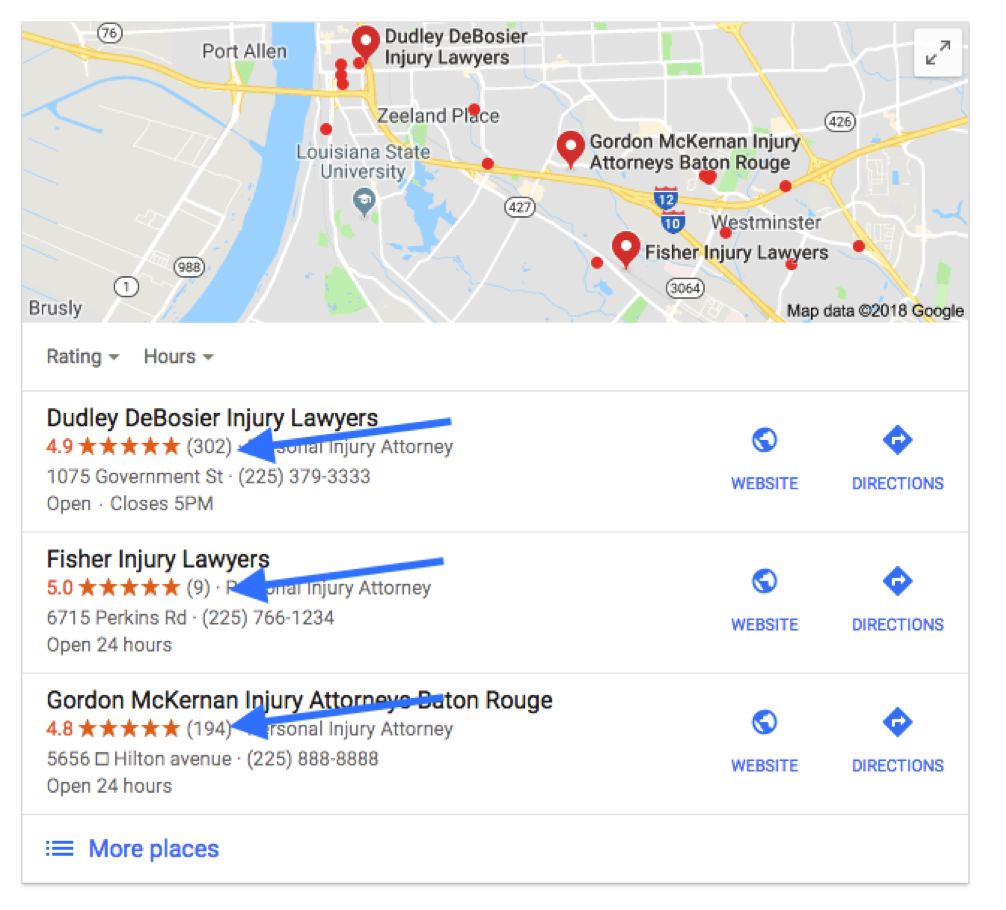
    Only 13% of people are referred to an attorney by a family or friend. If you don’t have a strong brand or search presence online when the referral or new lead is searching for you, what does this say about your reputation? Some may think, “How good can this guy be if I can’t even find him on Google!” Even if you have a compelling slogan, your law firm needs to be competitive in local search results.

    If your law firm generates cases based on client or attorney referrals, make sure to get that word-of-mouth online! Ask for and publish reviews and testimonials on your site. Don’t forget to spread the word and feature testimonials on avvo.com, lawyers.justia.com, findlaw.com, and other industry related platforms.

    72% of people searching for legal advice only contact one attorney. So let’s make sure they find and contact you first!

    Google’s Power in the Universities

    According to Fortune, Millennials spend 27 hours a week consuming media. Getting in front of and grabbing the attention of millennials is becoming more competitive for universities. With educational resources and easy access to student loans, students are no longer applying to universities simply based on legacy or location. According to a Google Ipsos Research study in 2017, 20% of students read 3rd party ratings and reviews to compare schools, but you can expect that a higher percentage of searchers are influenced by the overall online reputation of a school.

    Building Your Reputation Online

    Reviews aren’t promotional advertisements full of promises; they’re hard evidence that your company goes above and beyond for customers. Don’t just sit back and wait for reviews to appear. With 88% of people likely to trust a review from a stranger as they would a referral from a friend or family member, you need to encourage happy clients to leave reviews on your site and on 3rd party sites. Since Google reviews appear alongside search results, those reviews are particularly important for referral-based businesses.

    For 3rd party sites like Findlaw, Angie’s List, and Houzz, claim your profile and make sure all of your business information is accurate and updated. But don’t stop at conventional review sites! Video testimonials can be a great way to make online reviews more relatable. YouTube videos are easy to upload, and they can directly impact your search rankings. Before and after photos and videos for home renovations visually engage with an audience in ways content can’t. However you serve customers, look for a variety of ways to confirm that your services really set your company apart.

    The Market Is Wide Open

    Customers are searching for the products and services you provide, and they are influenced more by trusted and recognizable brands they engage with digitally. Google uses over 200 trust factors to rank websites and is constantly updating its algorithm. If you aren’t actively competing for searched products, services, and your audience’s attention, then you’re giving those undecided potential customers to the competition. So I’ll ask you again, if your business isn’t investing in digital marketing, which of your competitors will your referral contact once they can’t find you online?

    Contact the team at Search Influence for a consultation, and learn how to shift your digital marketing strategy into high gear. Find out about our company’s reputation by reading reviews from other industry leaders in SEO and digital marketing. You know your industry, and we can help make your expertise more evident online. Request a marketing analysis, and we’ll find opportunities to amplify the visibility of your referral-based business.

    Images:
    Search for Universities

  • Are Your KPIs Leading to a Healthy ROI?

    Marketing research displayed on multiple graphs and charts - Search Influence

    One metric that every small business owner should track and strategically work to improve is return on investment (ROI). Improving ROI can depend on boosting any number of individual indicators that help businesses focus on what they’re doing right and where they need to improve. Learn how these indicators apply to digital marketing and how to track, set goals for, and improve those indicators.

    What Are ROI and KPIs?

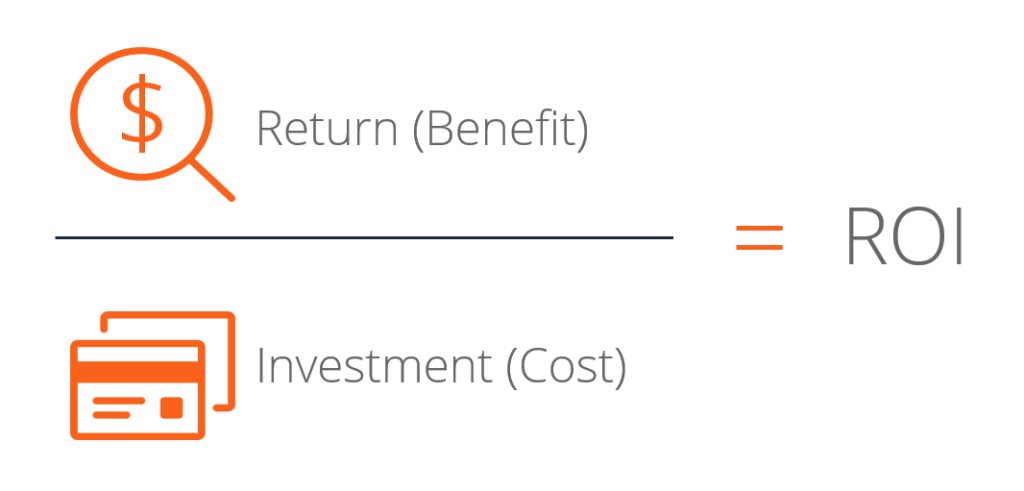
    Most business owners are familiar with the concept of ROI as an important, perhaps the most important, bottom line for any expenditure. ROI provides a simple ratio that expresses how successful an expenditure is relative to the income it generates. For some business decisions, calculating ROI is relatively straightforward. The ROI for a rental property, for example, would be based on the cost of buying the property plus taxes and upkeep divided by the amount paid by tenants each year. In the world of digital marketing, however, it can be difficult to determine the value of clicks, shares, and retweets, and to draw a direct line from any specific customer to a specific advertisement.

    Key performance indicators (KPIs) are more specific data that provide the metrics to analyze the effectiveness of a digital marketing strategy. In fact, ROI itself is a KPI. A business may select ROI as their #1 KPI, and then other secondary KPIs to watch as leading indicators of success. Paying attention to the right KPIs, and understanding how they relate to and inform ROI, can allow businesses to agilely hone a lean marketing approach around what works by cutting out the fat failing to provide a return.

    How to Determine Your KPIs

    It’s important to realize that not every metric is a KPI. For example, a tourism company might find it especially helpful to track how often promotional emails are forwarded or social media posts are shared. People like to share vacation experiences with friends who often rely on recommendations, and people also like to vacation with their friends. A high share rate could indicate a multiplier effect for some promotions, meaning that the marketing strategy is generating customers outside of a business’ subscriber list or social media following who nonetheless engage with the content. (Read more about creating customer advocates for tourism businesses). While every metric might not be important for your business, here are some common KPIs:

    Website traffic sources – Visitors enter your site from many avenues. The traffic sources can be organic, direct, referral, or paid. Each source can be reviewed to provide high-level information about your site traffic. Organic search traffic, when a visitor finds your website by searching keywords in a search engine and clicking through to your site, is the top source for generating traffic. It’s essential to improve SEO in order to increase your organic traffic.

    Engagement metrics – Take a moment to compare your favorite website to a website that you dislike. What impacted your experience on those sites? Optimizing your website for an intuitive user experience is essential. Bounce Rate and Average Time on Page are two key indicators of how visitors are interacting with your site. Be sure to monitor these metrics and optimize your website layout and content as needed.

    Conversion rate – This is a KPI that any business owner wants to see continually increase. Filling out an on-site form, clicking your number to call, or purchasing your product are just a few conversions that you want to encourage on your site. Each conversion can generate a lead for your campaigns. The higher the conversion rate, the higher the ROI.

    How Do KPIs Affect ROI?

    In a certain sense, ROI is the mother of all KPIs. The best performance indicator of almost any business investment is how much return it produces. Calculating ROI, however, requires an understanding of how a business’ applicable KPIs determine ROI.

    A simple formula is just the return minus investment and then divided by the investment:

    Your result can then be expressed as a percentage. In order to account for your KPIs, your return should take into consideration factors such as the average lifetime value of a customer and conversion rate of turning leads into customers, in addition to the average profit margin.

    How to Set S.M.A.R.T. Goals for Your KPIs

    Businesses commonly use the acronym S.M.A.R.T. when setting KPIs; it stands for specific, measurable, achievable, results-oriented, and time-bound. Focus on goals that are detailed and clearly defined, and that can be tangibly measured to determine success or failure unequivocally. They should be within reach (a business that constantly falls short of its goals needs to rethink their achievability) and based on the objective ends rather than the means. Finally, they should have a definitive deadline to make sure goals aren’t kicked to the next quarter or year.

    Digital marketing may not quite be rocket science, but it does get pretty complicated. It’s important to determine what KPIs are most important to your industry, look to competitors and market leaders to see where indicators are comparable and where there’s a discrepancy, then develop strategies to boost those indicators. Small business owners have enough on their plate to worry about without poring over the nitty-gritty of analytics and lead tracking. Search Influence is a nationally recognized leader in search-focused digital marketing, with the expertise to help small businesses succeed in an ever-more digital world. Read testimonials from our clients to get a feel for how we can help your business grow, or contact us today to see what our understanding of KPIs can do for your ROI.

    Images:

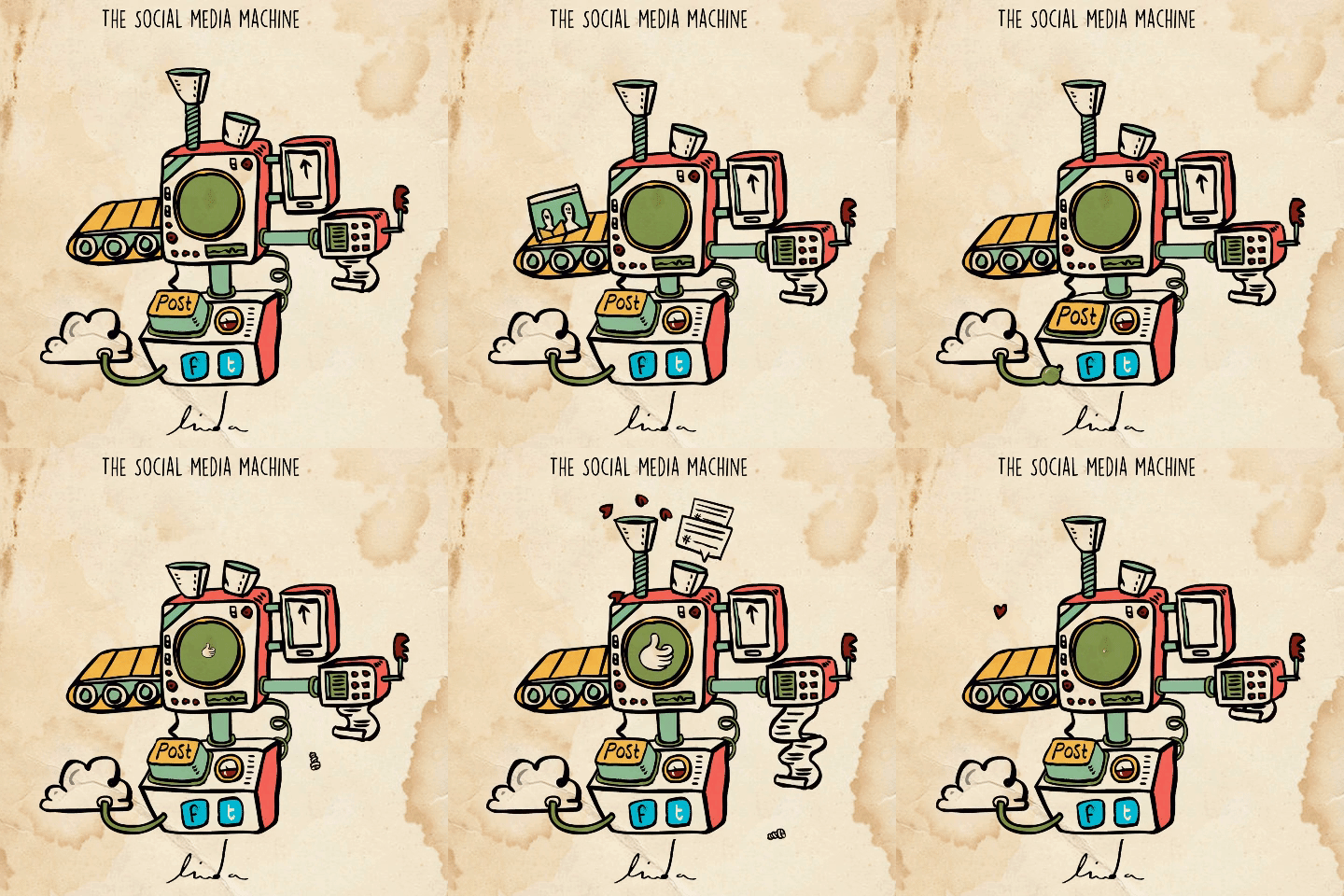
    Social Media Machine

    ROI Calculator

    Rockets Away

  • How to Navigate the NEW Google Adwords Experience

    AdWords recently announced that they are fully switching to the new experience by the end of the year, and I’m here to tell you it’s going to be okay! The new experience has been available to all advertisers since October, but we’ve had exclusive access for a while and have been able to get acquainted with the new UI and I’m here to share our findings.

    For those of you thinking, “Google’s changing something AGAIN?” I’m right there with you! But with the following tips and resources, you’ll soon love all the new experiences it has to offer.

    So What’s so Different?

    Google updated the interface to provide, “a faster and more intuitive experience that’s focused on helping you reach your goals.” All the features you rely on are available in the new experience, and Google incorporated feedback as well, since this has been in beta for a while. They’ve also rolled out some exclusive features that are available in the new interface, so you have to switch to take advantage of them. Some of my favorite new features are below.

    A New “Overview” Page

    The overview tab provides performance insights that are generated by Google depicted as charts and graphs for you to quickly review and take action. These make reviewing data for devices and time of day much more visually appealing and easier to understand.

    Bid Adjustments for Calls

    Adjust your bids on call extensions to show call interaction ads more frequently. This allows you more flexibility and control over how often these ads appear and how customers can connect with your business. The bid adjustments range from -90% (I don’t want these to show as much) to +900% (yes, please, show these all the time!).

    Promotion Extensions

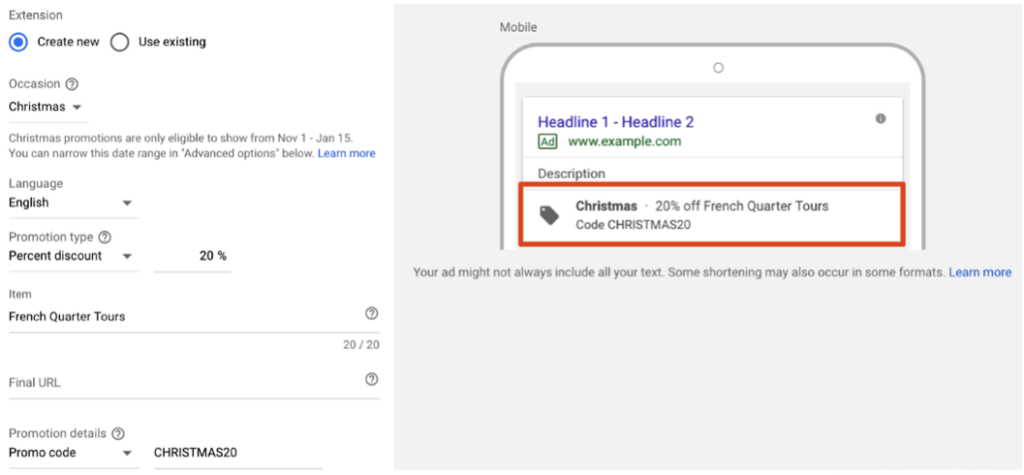
    Promotion extensions are pretty fantastic! They allow users to show and link to a special offer in their search ads and even include a tag icon to help the promotion stand out. You can highlight specific sales and offers, all while taking up more valuable real estate in the SERPs.

    Shortcuts

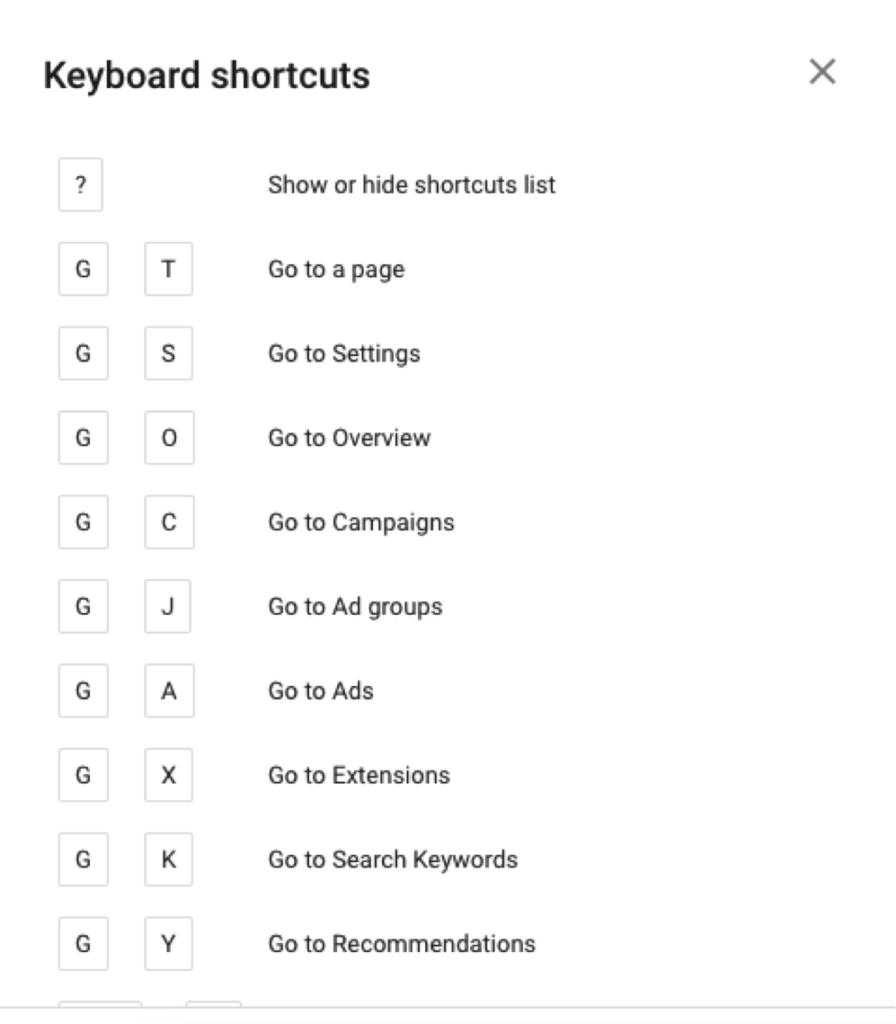
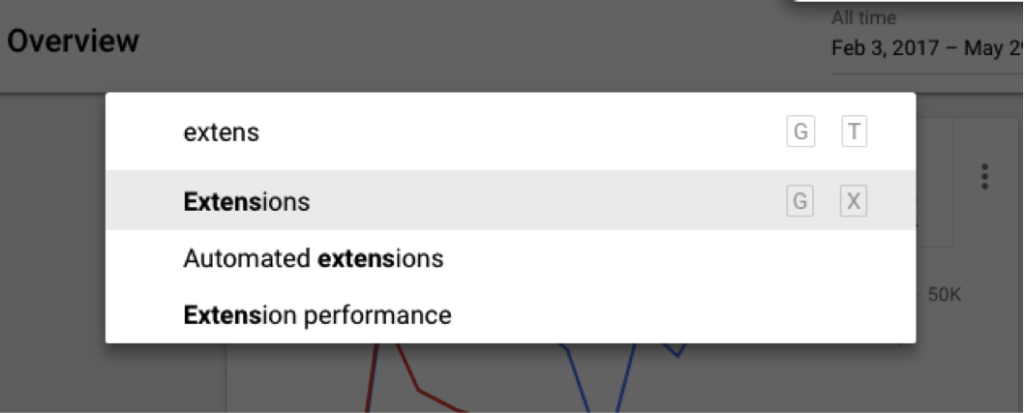
    One of my all-time favorite new features is the introduction of shortcuts. You can pretty much navigate to anywhere in the interface in a matter of seconds! Need a list of shortcuts, just hit the question mark on your keyboard. Hit G and T (GoTo) to bring up a search bar, making it super easy to find anything you need!

    Need More Help?

    I couldn’t possibly cover all of the benefits of the new AdWords experience but wanted to include a few more tips and resources to get you started.

    • The dimensions tab used to be one of my favorite places to go to pull reports to find actionable insights. I thought it was gone, but AdWords has re-named this and moved these reports to “Predefined reports,” found under the little graph icon in the upper right corner.
    • Google has a guided tour of the new interface, which is great for beginners to get familiar with the changes. They also have a Help Center, which has been updated to help you navigate all the new features (bookmark this page!).
    • Follow this page to view new information on AdWords features as they are added to the platform.
    • If learning by video is more your thing, check out the guides to the New AdWords Experience Part 1 and Part 2.
    • There are a few things that are changing and some features that are not yet available, so familiarize yourself with these in case you need to find a different solution.

    Getting on board with big changes like this can take some time, so I recommend that you start poking around now. The end of the year will come quickly and is a critical time for most advertisers, so the more experience you have with the platform the more you’ll be able to take advantage of all the new features to set your campaigns up for success. If you have any questions or need help navigating this switch, the Online Advertising team at Search Influence has experts that can help.

    All screenshots captured by Jeanne Gaudet Lobman on May 30, 2018

  • Why Are My Ads Disapproved by Google’s Misleading Content Policy?

    In its continual quest to better serve users, Google has cracked down on misleading content in advertisements as well as website content. When your advertising campaign is slammed for “misleading content,” it can come as quite a surprise. Because Google holds advertisers to a high standard, some of the violations might seem like harmless marketing strategies. Regardless of how the situation arose, it’s important to bring your website and account back in line with Google’s expectations. The sooner you resolve potential violations, the sooner you can get back to building your brand’s online reputation.

    What Is the Google AdWords Misleading Content Policy?

    “Misleading content” is an umbrella term that includes several types of violations, ranging from problematic testimonials to deceptive branding. The main objective of the misleading content policy is to provide a set of clear standards for online advertisers to follow as to not deceive users with exaggerated or false content. The central component of these standards states that:

    – Disclaimers need to be included alongside perceived claims, even if the claims are direct quotations from past customers.

    – Images that show before-and-after results also need disclaimers. More broadly, improbable assertions are likely to draw the attention of the Google AdWords team.

    We’ve all seen investment opportunities and weight loss programs that sound “too good to be true.” As you might imagine, some of the standards allow room for interpretation, and many affected advertisers find that they need to resolve multiple policy violations to resume advertising.

    At least, in theory, Google’s policy should benefit both users and advertisers. Users shouldn’t have to scroll past misleading or spammy content, and advertising slots will become more valuable as users learn that paid search results are also informative and trustworthy. When you edit your ads and website to align with the Google AdWords misleading content policy, you’ll also be improving content and sales copy that might have sounded suspicious to potential customers. The things that Google considers “misleading” may also be off-putting to your target audience.

    What Kinds of Businesses Are Most Impacted by This Crackdown?

    With shifting expectations for disclaimers and testimonials, medical businesses like plastic surgeons and dermatologists are particularly vulnerable to being caught on the wrong side of AdWords policies. Whenever possible, peer-reviewed journals and other reputable sources can be referenced to support claims. Images are useful for showing the results of weight loss programs and cosmetic procedures, but those types of images need to include disclaimers to emphasize that individual results vary.

    Investment firms, lawyers, and other businesses may run afoul of Google AdWords misleading content policy, even though they aren’t making medical claims. The misleading content policy looks for vague guarantees and other wording that implies certainty or permanence. Depending on the phrasing used to describe results, virtually any business can find itself on the wrong side of Google’s misleading content policies.

    How Does Google Review and Determine If Content Is Misleading?

    In case there was any doubt, Google doesn’t employ a review board of physicians or lawyers to determine which claims are unjustified. Instead, an editor on the Google team judges whether the wording or formatting of a page is misleading. When the editor finds one or more violations that justify disapproving the account, they may (or may not) make a note in your case file. With the number of campaigns and sites reviewed by editors, it doesn’t make sense for them to make exhaustive lists of recommendations beyond the first one or two violations.

    As a business owner, you might never interact directly with an editor at Google. When you call the account representatives on the Google helpline, they only have the information that editors chose to note in your case file. If you fix the problems that were cited as “misleading,” there may be additional problems found when your site is re-evaluated. It can be a frustrating runaround but don’t get angry at the person on the helpline. They aren’t the ones who flagged your content, and they don’t have the power to reinstate your account. Instead of focusing on the people who made the decision, it’s better to try to understand the aspects of the policy that might apply to your site and campaign.

    What Do I Need to Do to Get My Ads Approved and Running Again?

    Not everyone gets site-specific recommendations in his or her case file, and even if you’re lucky enough to get actionable advice, it’s still important to be proactive about finding additional violations. After your campaign account has been flagged, the responsibility is on your company (and your web developer) to make sure that your site and your PPC campaign meet the standards set by Google. Look through your landing pages in search of other potential violations.

    Could your seals and stamps be perceived as mimicking government seals? Site layouts and deceptive popups can also trigger penalties. Popup windows shouldn’t simulate messages or system errors, displays intended to trick users into clicking through or interacting by accident. As previously discussed, assertions about future results need to be carefully worded. Some violations are more obvious than others but use due diligence to ensure that your site complies with relevant policies.

    How Can I Avoid Getting Ads Disapproved in the Future?

    Look at the penalty “sandbox” as a learning opportunity, and try to avoid repeating the same mistakes in future campaigns. Make a point of looking beyond your PPC campaigns to your website and your company’s approach to branding online. The campaigns flagged by AdWords often have issues on the landing page, marketing strategies that may be mirrored across the rest of the website. Even if a PPC campaign can be restarted with changes to a few key pages, it’s worth adjusting other website content to align with misleading content policies. Search algorithms favor high quality, unique content, and the misleading content policy hints at indicators that could eventually affect overall search rankings.

    If you don’t have time to spend waiting on the Google helpline, consider getting professional help through digital marketing consulting. Google’s policies and expectations shift periodically, and anticipating changes can become a distraction from your day-to-day business.

    As a Google Premier Partner, Search Influence has over 25 employees certified in Google AdWords Search, Video, Mobile, Display, and Analytics. Our digital marketing agency keeps up to date with the latest trends in search engine algorithms and online advertising to best serve our clients. Contact us so we can help get your ads approved and running again.

    Image Credits:

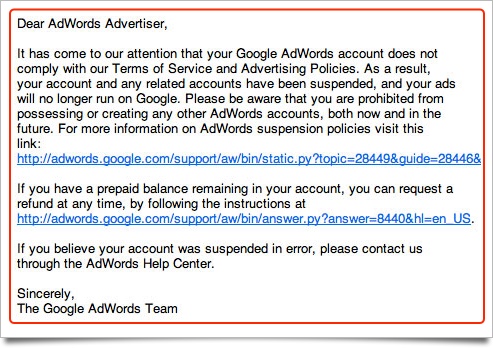
    Google Adwords Email

    Magnifying Glass

  • The Beginning of Google’s Mobile-first Index Rollout Is Underway—Are You Prepared?

    In 2016, Google announced they had begun testing a new ranking system based on indexing all mobile content first. Now, it’s official. The eagle has landed! The beginning of Google’s mobile-first indexing rollout is now well underway. As Google continues to move toward the big shift, it’s important that your company’s website is ready for the change.

    But how do you make the jump? Let’s start from the beginning.

    What Is the Mobile-first Index?

    Previously, GoogleBot would crawl your website and assign rankings based on the desktop version of your company’s website. Now that about 60 percent of search queries are made from mobile devices, Google is replacing desktop versions of sites in the index with their mobile counterparts via this mobile-first index. As a result, Google will determine rankings based on the quality of the mobile version ahead of the desktop version of the site.

    If the mobile performance, content, and user experience are up to scratch, your site receives a better ranking. If they are inferior, other sites will rank higher and you would take a hit.

    Ouch.

    How Do I Know When My Site Will Be Included in the Mobile-first Index?

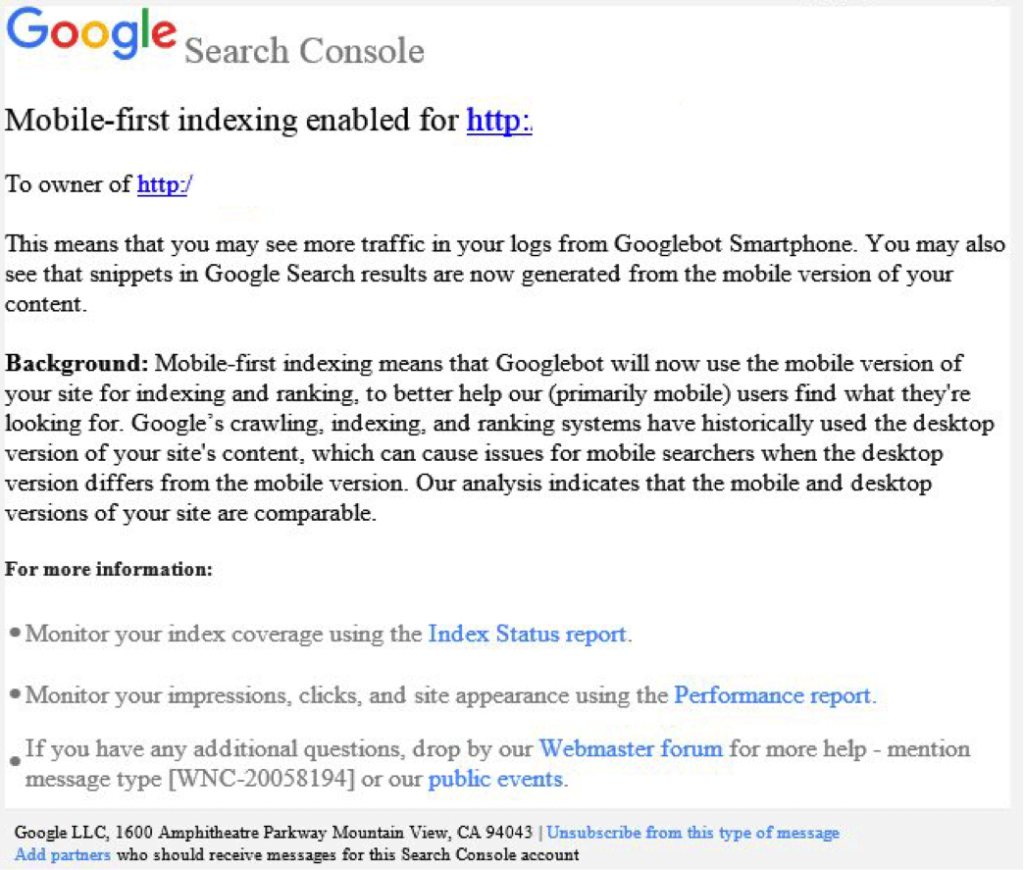
    Beginning this month, Google started notifying site owners and webmasters that their sites are migrating to mobile-first indexing through Search Console. The message looked like this:

    Screenshot of a mobile-first index notice from Google - Search Influence

    How Do I Prepare for the Mobile-first Index?

    Here are some tips to get you started.

    1. Mobile Page-speed

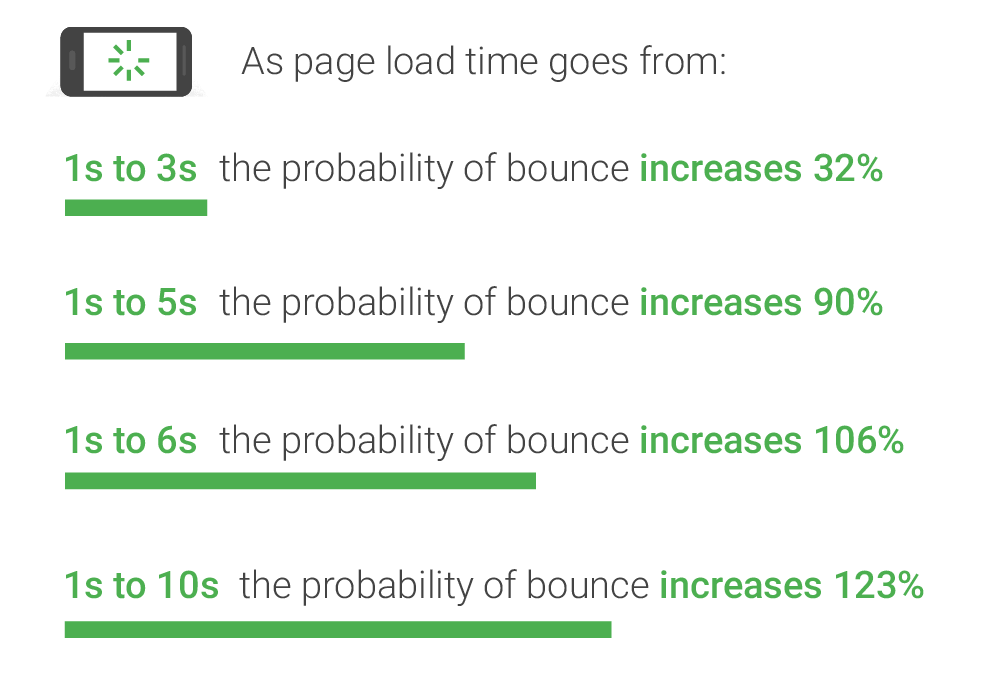
    According to Google’s mobile page speed study on Think with Google, as page load time slows down from one second to six, the bounce rate increases by 106%.

    A graphic of page load time relative to bounce rates - Search Influence

    So, make sure that your mobile website loads quickly and seamlessly. Google’s PageSpeed Insights is a handy tool for a basic test.

    2. Responsive Website

    A responsive website that is mobile-friendly works seamlessly across all devices. How do you make a website responsive?

    If your website is built on the WordPress platform, then creating a responsive design is very easy!
    Jared Jones’ post on the beauty of WordPress will make you a believer.

    3. Search Console Verification

    If you have separate mobile and desktop websites, verify the mobile version in Google’s Search Console. This proves that you own the site and directly affects how Google interprets and indexes it.

    Google’s Search Console help page provides you with all the ammo you need to get this done. More complex solutions for this preparation period includes content and image optimization, on-site directives and redirection, and schema structured data for your website.

    Talk to Us!

    At Search Influence, we are excited to start seeing the mobile-first index take form!

    To fully understand the impact of Google’s mobile-first index on your website, contact us for an audit and review of key aspects of your site’s mobile-friendliness. We’ll help you develop a roadmap to rectify potential risks to your search ranking and the content experience for your customers.

    Images:

    Parks and Rec

    Mobile-first notice Screenshot

    Page-speed Bounce Rates

  • Google to Roll Out Chrome 68 Security Update

    Google to Roll Out Chrome 68 Security Update

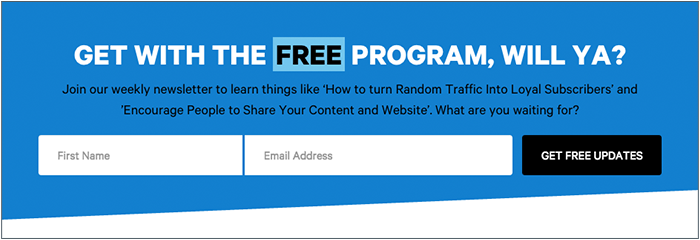
    Is your website safe from google's not secure warning - Search Influence

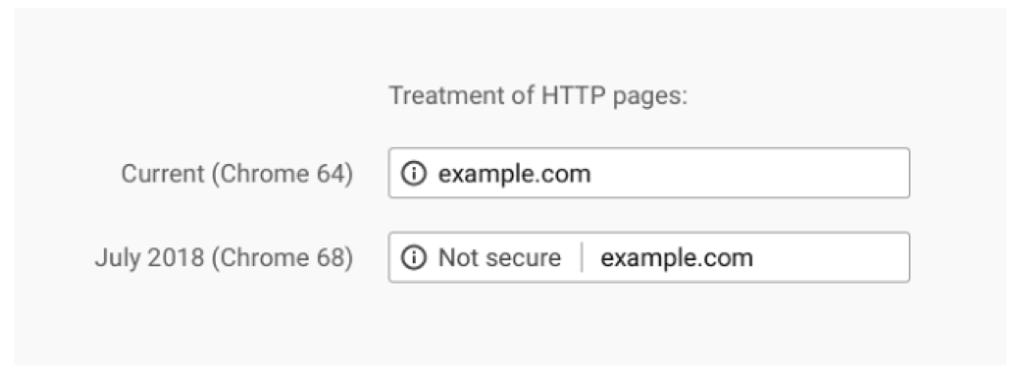
    After years and years of warning, the time is finally upon us. In July 2018, Google Chrome will release its 68th version, which will, for the first time, clearly mark sites that do not have SSL certificates as “Not Secure” in the address bar.

    Previously, a small exclamation point encased in a circle would be included with these websites, but now, the actual words will appear next to the web address to add a bit more shock value to the lack of the SSL certificate. The screenshot below from Google’s Security Blog shows the stark difference that we’ll see once Chrome updates this summer.

    Treatment of HTTP pages image - Search Influence

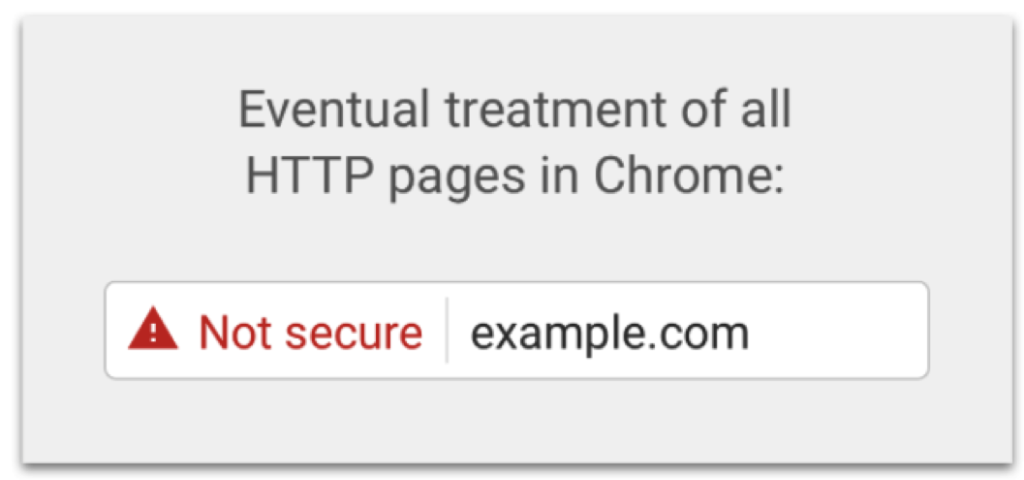
    If that isn’t enough to have you change to https, Google has also revealed an “eventual” timeline for non-https websites to have this even more threatening alert in the address bar:

    Eventual treatment of all HTTP pages in Chrome graphic - Search Influence

    Waiting until the last minute to update your site is a recipe for disaster. Updating your site to https isn’t as easy as flipping a switch, and some technical knowledge is required to help it go off without a hitch.

    To learn more about the switch from HTTP to HTTPs, check out our blog The Final Countdown: Secure Your Website to Align With Google’s Update to Chrome, or contact us for help in the transition.

  • In Press Releases We Trust: Why They Matter More Than Ever in the Fake News Era

    In Press Releases We Trust: Why They Matter More Than Ever in the Fake News Era

    Cision, an ever-growing resource for media and businesses, released their 2018 State of the Media report, which is based on a survey of journalists globally.

    Over 1300 journalists responded from six countries, 48% of which work in print (newspaper and magazine), and most of which no doubt have an online version of their publication.

    Per the Report, These Are the “Key Takeaways”

    • Being accurate is more important than being first.
    • Journalists are concerned about fake news and trust in the media.
    • Reporters and editors still trust the press release the most.
    • PR professionals are being asked to provide accurate, newsworthy information.*

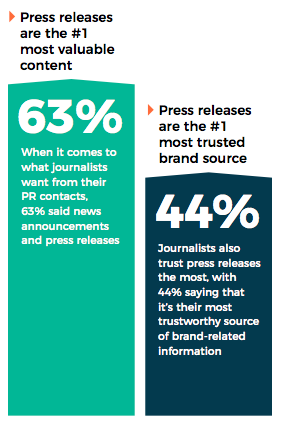
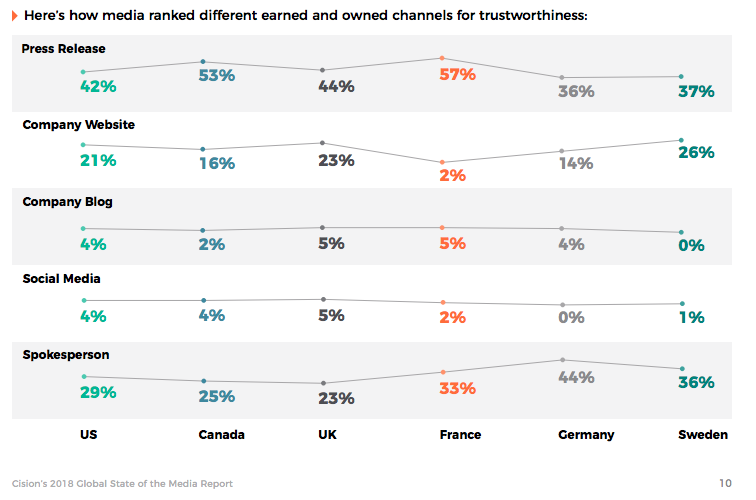
    The most actionable insight for businesses is that “reporters and editors still trust the press release the most”—42% rank press releases as the piece of owned media they trust most for accurate information, followed by 29% for a spokesperson, 21% for a company website, and just 4% each for company blog and social media.

    This was in some way surprising, as, there are so many articles online that reference other news stories. I’m sure you can recall reading something like “…according to a report by The New York Times.” This may be taboo for some publications, so, for your news to be considered as a topic, it’s critical you are publishing press releases for your company news.

    The Best Ways for You to Distribute Press Releases Are:

    1. Publishing on your own website (even if the info lives elsewhere like on your blog)
    2. Distributing through a service like Cision (PRWeb & PRNewsWire)
    3. Sending directly to journalists that have a specific interest in your industry, topic, or business—as the survey says, 27% of journalists say to “tailor the pitch to their beat” (a surprisingly low percentage in this age of personalization).

    SEO & Press Releases Have a Complicated History

    In 2013, with the release of Google’s Penguin algorithm update, there was a lot of chatter in the SEO community about stopping press releases as a link-building tactic. At the time, it was a paid way to generate links back to your site, which is frowned upon. At that time, many services, including PRWeb, changed outbound links to assure they would not penalize your Google rankings (by updating the links to be “nofollow”). Of course, companies continued to publish press releases, especially those who never once thought of PR as an “SEO tactic.”

    In short, take backlinks out of the discussion—distribution of press releases via reputable online sources like Cision is about getting news about your brand out there in a scalable way, which can have a positive downstream impact on your search engine rankings via brand building.

    Tell Me More!

    To fully dive into the State of the Media report, which goes deeper into thoughts on trust and “fake news,” download it from Cision’s website.

    Graphics courtesy of Cision’s State of the Media Report.

    * Key takeaways sourced from Cision’s 2018 State of the Media report.