Tag: local search

  • Sweep Away The Competition By Spring Cleaning Your Backlinks

    So you want to do link building the white-hat way, but it seems these days most link building practices are pretty sketchy. One Google-friendly way to do link building is through identifying and fixing broken backlinks to redirect to pages on your site. Spring backlink cleaning, here we come!

    While there are many ways to approach broken link building, the method I find most doable is scanning relevant, authoritative sites for broken backlinks to pages for more info. Once you find a broken link and determine that a page on your site will adequately replace it, you’ll want to reach out to the owner of the site with the broken link to help them recognize the issue and take your opportunity.

    This practice is best for businesses with sites that already serve as a resource and that have many informational pages regarding various aspects of their industry. It is, however, totally doable for businesses that don’t meet these ideals, but said businesses will have to build out resource pages on the identified subject areas as they identify broken link opportunities.
    Throwing Away Broken Links

    Finding Sites

    So first, you’re going to have to find the best and most authoritative sites in your industry. Moz’s MozBar extension allows you to easily see Domain Authority and Page Authority of sites you’re on and sites in search results, which can be helpful in the hunt for good sites. Think of products and services that complement what your business offers to find more opportunities. For example, if I were trying to find a complementary business or service to Search Influence, the first type of business that comes to mind is a social reputation management service.

    Once you find one or more authoritative reputation management sites, you could use them to find MORE opportunities! To do this, you could use Moz’s Open Site Explorer and find backlinks to the sites you’ve already found that are also authoritative and relevant to your industry. You can use any backlink-finding tools you prefer, though. Other tools that can do this include LinkResearchTools’ Quick Backlink Tool and Majestic’s Site Explorer.
    liam neeson seo meme backlink

    Finding Broken Links

    Once you’ve got the list of sites you’d like to scan for broken links (I’d suggest at least 20 to 30, but it’s up to you), you’ll need to find said broken links. Internally, we use a tool (Screaming Frog’s SEO Spider) to find broken links for all of your sites, but any tool you find will probably do the job just fine.

    If you’re using Screaming Frog, you’d go to “Configuration,” then “Spider” to make sure your settings are set for an internal crawl. Enter the domain you want to crawl, and then click start. Once the crawl is complete, go to “Bulk Export,” then “All In Links.” Open the file, and we’re ready to get organized!

    Since we only want links, the first header you’ll want to filter is “Type” to only show HREF. Then filter “Status Code” to show everything but 200s, since 200 links are O.K. Finally, sort the “Destination” column alphabetically so that you can easily see and prioritize rows with off-site destinations. The site owners are most likely to be willing to replace broken off-site links. They might prefer to fix rather than replace broken internally directing links.

    Once you’ve followed the above steps for finding broken links on your chosen sites, we’re ready to take action.

    Finding Opportunities

    Here’s the tedious (but worth it) part of the whole process. Now that you’ve got lists of broken links, you’ll have to look through them and see if you can find the new page on that site that it should link to. If you can’t find the page and your site has links that will fulfill the objective of the original links, note that replacement link as one of yours instead of one on the original site. Sometimes this means looking at the “Source” column and checking out the context of the broken link. It also might mean creating content on your site, if it’s relevant to your business, to fulfill the needs of the broken link objective before moving forward.

    The last thing you’ll need is a list for each site you’ve investigated that includes the page that has the broken link (“Source”), the broken external link (“Destination”), the fixed URL, and the corresponding page on your site that could replace the broken link or be added to that page.

    Reaching Out

    Once you’ve got your lists of opportunities organized, you can reach out to the site administrator to have the broken link(s) replaced with your good one(s). You can find contacts to sites in multiple ways. The obvious way would be by finding a contact email or form in their “About” or “Contact” pages. I like this option because most times, if a site has created a way for users to contact them on-site, they’re responding to outreach through these mediums. If you’re unable to find any obvious way to contact a site, you can also use a whois lookup. I use the terminal emulator iTerm2 to do whois lookups, but you can also just use a web hosted whois lookup like whois.domaintools.com to find an email for the site Admin or Registrar.

    Here’s an example of a whois lookup for Wikipedia (You probably don’t even want to try to communicate with them, by the way. Possibly too big of a fish to fry.):
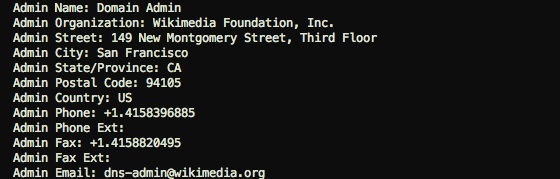
    WhoIS Lookup WIkipedia

    For time-saving purposes, I’d suggest creating a template you can use to email all of these prospects. In doing manual link removal requests in the past, I found some bits of information to be more fruitful to provide than others. You want to seem natural and authoritative (not spammy) while providing clear information, but you also want to be as concise as possible to avoid losing the attention of the receiver.

    You’ll want to include a short intro to introduce your authority and what you do, say that your message is intended for the site’s webmaster (as they would be the one implementing your suggested fixes), and note the Source page, the broken Destination URL, and the recommended replacement URL. If the replacement URL is just one you found originally linked to the site, now is your opportunity to share that you might have some additional information on your site that their readers might benefit from. Send all your messages, and then wait!

    While I’d say to make your own templates to sound more natural and fit your needs, here are two of mine for both use cases.

    Replacing URL With Same-Site URL

    Hi,

    My name’s (insert name here), and I am an industry specialist and was doing some research when I landed on your site…

    I was hoping to pass on some information to your webmaster or web developer, as I found a broken link on your site that your readers might need.

    While looking at this page on your site (source URL), I clicked on the link to this site (broken destination URL) and found that it didn’t work.

    Once on the site, I found that they must have moved that information here (replacement URL).

    While you’re working on updating this page, I was wondering if you’d be interested in including my page about (insert summary of page here) as a resource that might also be beneficial to your readers: (insert link to your site’s relevant URL here).

    Replacing URL With Your-Site URL

    Hi,

    My name’s (insert name here), and I am an industry specialist and was doing some research when I landed on your site…

    I was hoping to pass on some information to your webmaster or web developer, as I found a broken link on your site that your readers might need.

    While looking at this page on your site (source URL), I clicked on the link to this site (broken destination URL) and found that it didn’t work.

    I tried finding the correct page on their site for this info, but it seems that it might be gone altogether.

    My site happens to have some similar information, so I was wondering if you’d be interested in including my page about (insert summary of page here) as a resource that might also be beneficial to your readers: (insert link to your site’s relevant URL here).

    Hopefully, this helpful, good link building practice will aid in your efforts. Let us know your favorite, white-hat link building practice in the comments!

  • Social + SEO: Better When They’re Working Together

    SEO Cycle Image - Search Influence

    Modern search engine optimization has become inextricably linked with content marketing. Yet in many companies, social media strategies are developed separately from the SEO and content marketing plan. This can work—but you’ll realize optimal results by aligning social media with SEO for an overall strategy that boosts brand awareness, improves domain authority, and increases your rankings.

    Here are some tips for social media strategies that can fuel your SEO and help you rank higher in all types of user searches.

    Grow your Following

    In the early days of social media, building a massive following was the number one goal for most marketers. Today, the emphasis has shifted from quantity to quality—but the number of followers you have is still an important factor for domain authority.

    Of course, it’s equally important to develop an authentic audience. Google, in particular, can tell when most of your following is made of spam and bot accounts, so “buying” likes or follows doesn’t help—and in fact can harm your online reputation. Instead, grow your following naturally by posting interesting content on a regular basis. Engage your followers with interactive content and by responding to comments or starting discussions.

    Share your Other Content

    Posting links to your content—such as articles, blog posts, and downloads—along with brief commentary on social media, is a great way to repurpose your content and boost your SEO. Of course, sharing on social media will give you more eyes for your content, but the benefits to SEO go beyond that.

    In addition to extra traffic to your website or blog, which is a peripheral SEO benefit, social media sharing encourages others to share your links. The more often your links are posted on other social media accounts and websites, the more domain authority you’ll build. This type of inbound link-building is much faster than traditional or manual methods.

    Optimize Social Media for Search

    It’s important to know that your social media posts can show up directly in search results—if they’re optimized. When you’re composing posts, be sure to apply basic SEO strategies such as including keywords, placing them strategically and naturally, and tagging image, video, and infographic posts with relevant keywords. Even if your posts don’t make it into search engine results, they’ll still increase your brand authority and contribute to a stronger online reputation.

    Increase Social Shares with Viral Content

    The more shares and retweets your posts have, the greater your domain authority—and the higher your search engine rankings. In order to get your content shared more often, you need to create content that people want to talk about.

    Of course, every marketer wants to release the next viral sensation. There is no guaranteed strategy for making something go viral, but you can increase your chances of catching lightning in a bottle by creating content with a strong visual component (either a visual medium or a blog post that’s heavy on images, for example), and make sure it has the following characteristics:

    • Informative
    • Relevant
    • Entertaining
    • Practical
    • Surprising
    • Unique

    Of these characteristics, the last one is the most important. Create content your audience has never seen before, and they’ll be eager to share it with friends.

    Connect with Similar Companies

    In the world of social media, your “competition” can be your friend—and that’s good for your SEO. Engaging with similar businesses, particularly local companies or those in similar industries, can help you grow your audience and your relevance, which in turn increases your search engine ranking.

    Share content with other companies like yours and comment on their posts. Usually, they’ll return the favor by engaging with you, which will attract their audiences to your social profiles. Google will also start associating you with other brands when you engage with them, which improves your overall authority.

    When it comes to online marketing, social media and SEO should go hand-in-hand. How does your social media strategy complement your SEO approach?

  • Started From The Bottom Now You’re Hired: Tips For The Tech Job Interview

    In the ever-growing tech industry, more and more jobs are becoming available. Sadly, this also means a lot of positions aren’t being filled due to bad interviews. Having interviewed hundreds of prospective employees in the past few months, I’ve learned that many people seem to struggle when considering what employers are looking for in candidates. You practice and prepare for interviews in advance thinking, “How can I show them how great I am?” when you really should be practicing to fulfill the question, “How can I show them I’m what they want?”

    So here are some tips for acing the interview! A lot of these can apply to more than the tech world, so read on and take mental notes for your future!

    Search Influence - New Orleans Tech Industry Interview DOs and DON'Ts

    Do: Talk About What You Have To Offer A Company
    If you’re applying for a position that requires any sort of client-facing or largely communicative capacities, talk about ways in which you’ve exhibited those abilities in the past. If you’re applying to work in a fast-paced, growing industry, talk about how you’ve been adaptive and proactive with change in your past experiences. Also, make it clear that the industry they’re in is the industry you want to work for. You should ALWAYS research what a company does before you attend an interview with them. Being completely clueless about the work they do shows a lack of sincere interest in the job.

    Basically, find any way to show your interviewer that you have what they need and want to be there.

    Don’t: Talk About What A Company Has To Offer You
    One of the biggest mistakes you can make in an interview is saying something like, “I want to work here because I don’t know about insert industry here and want to learn everything I can from working here.” You’d be surprised how often we hear that people want to start their own online marketing companies and just want to work for us to learn how to do what we do. That kind of response is a huge red flag for companies.

    Talking about your capacity and willingness to learn is a GREAT idea, but it needs to be done tastefully. A better way to express that would be something like, “I’d enjoy working in an environment where I’m constantly learning something new and improving.”

     Search Influence Spacer

    Do: Talk About Any Relevant Online / Tech Experience
    If you’re applying for a job in the tech industry, talk about any and all tech experience you have. Even if the job you’re applying for doesn’t require HTML experience, letting your interviewer know that you’ve got that experience shows that you’re well rounded and will be able to communicate effectively in that subject area if you need to (which can be helpful for interdepartmental work within a company). If you’ve got a professional website or blog for yourself, don’t be afraid to share it!

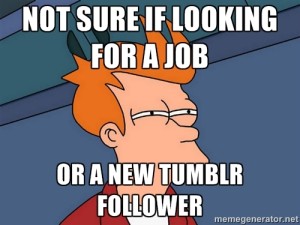
    search influence new orleans - interview meme fry futurama tumblr

    Don’t: Talk About Your Tumblr
    Unless you’ve got a blog or website suitable for the eyes of an employer, refrain from specifics when talking about any blogging, HTML experience, or other relevant experience. Most people who know what Tumblr is know that it is rarely used in a professional capacity, and the last thing you want to do in an interview is to get your employer imagining your possibly-emotional, probably-personal presence. You can still talk about how having a Tumblr or any other non-professional online experience plays into your abilities, but approach it carefully. Instead of “I use Tumblr a lot, so I get HTML,” say something like “Through a few blogging platforms, I’ve had some experience with basic HTML.”

     Search Influence Spacer

    Do: Talk About Your Interests Outside Of Work
    Usually, mentioning that you’ve balanced side projects in life while still working or going to school full time is an indication to future employers that you’re capable of balancing multiple tasks and prioritizing what needs to be done. It also helps to show you’re well-rounded and provides something unique that could make you stand out in the interviewer’s memory. If an employer is trying to weed out top candidates from a recent round of interviews, the good interviewee who played guitar in some band might stand out more than just the good interviewee.

    Don’t: Talk About Starting Your Own Business, Going Back To School, Or Trying To Become An Actor
    Unless you’re applying for a temporary position, most companies are looking for someone who’s in it for the long haul and wants to grow with the company. If you’re indicating to your interviewer that your main interests don’t align with being dedicated to your job, they might not consider you to be an ideal candidate for the position.

     Search Influence Spacer

    Do: Elaborate And Give Examples
    Even when given a general question, never give a general answer. Often, employers ask something about discussing a time when you exhibited a certain characteristic. For example, an employer might ask, “Can you tell us about a time when you had to deliver great customer service?” If you’ve had any service industry experience (which so many of us have), your initial thought is probably, “ALL. THE. TIME.” While it’s great that you’ve got a lot of experience with this, you want to give clear examples that exhibit it. So saying something more explicit gives the employer a clearer picture of what you define as “good customer service.”

    Don’t: EVER Give A Yes Or No Answer
    Along the lines of the suggestion above, even when you’re asked a “yes or no” or “either/or” question, make sure to explain the reasoning behind your answer and never ride the fence. The most common example of this that I see is when candidates are asked if they prefer working individually or on a team, as people often respond that they’re comfortable doing both. While this is seemingly an admirable trait, realistically everyone has a preference, and neither answer is wrong. If an employer chooses to hire you, they’ll want to know if you’re predisposed to work in the type of environment that their company has and be ready to work with you on it if you aren’t.

     Search Influence Spacer

    Do: Prepare Your Online Presence Accordingly
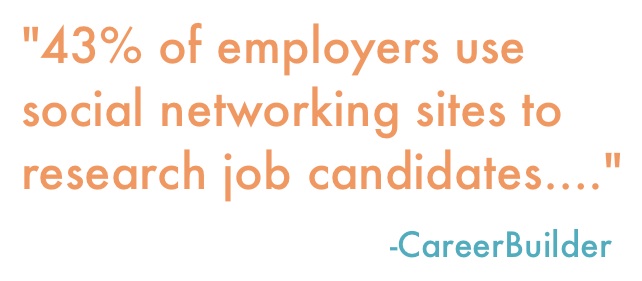
    According to a June 2014 study by CareerBuilder, 43 percent of employers use social networking sites to research job candidates, and 51 percent of employers researching candidates online found content that caused them to not hire the candidate. Even at a laid-back, young office like ours, a profile picture of you doing a shirtless keg stand is probably not going to get you invited to an interview. One safe move you should probably make is to switch your Facebook profile features to private when applying for jobs.

    You should also have a well-built-out LinkedIn profile with references. Though most employers will do reference checks as you move along in the later stages of the hiring process, having good, easy-to-access references from the get-go could improve your chances of moving forward.

    Search Influence New Orleans - Employers Use Social Media Career Builder Quote

    Don’t: Delete Your Entire Online Presence
    Having profiles online, whether it’s Facebook, Twitter, LinkedIn, or your own site, puts you in control of what future employers see when they look for you. Also, if you’re trying to remove incriminating photos of yourself, deleting your profiles will only delete pictures you posted (not ones your friends posted of you). So you’re better off changing your privacy settings and managing your online presence. There are also sites like SimpleWash that connect to your Facebook and Twitter accounts in order to help you identify possibly inappropriate statuses, likes, and pictures.

    Another reason why you should be keeping your social profiles around is that, in the tech industry in particular, employers are typically looking for people with a proclivity for all things techy, and having an online presence is another opportunity to exhibit that inclination.

    Search Influence Spacer

    Use these tips, and good luck in your job searching! Feel free to share your interview experiences below. We’re often looking to fill positions here at Search Influence, so if you’re interested in working with a hard-working, fun bunch, check out our various tech industry job postings.

  • Keywords: Now All-Natural and Gluten-Free

    Google has officially divulged that it rewards the mobile optimization of your website. Hooray! For most people, this doesn’t come as much of a surprise. There are studies dating back to last year claiming that up to 60% of consumers use mobile searches when making purchase decisions. The bottom line is that people are becoming increasingly hooked to their phones as each day passes.

    LookingAtPhonesImage

    How Has Search Intent Changed?

    Okay, so people love their phones—shocking. But what are the larger implications here? How might the mobile revolution affect the way you rank for specific keywords? Well, to answer that question, we need to delve into how search intent is evolving. With the mounting prevalence of semantic searches compared to conventional keyword-happy searches, users are now searching on the go and in an increasingly natural way. Gone are the days where using singular, valuable keywords are getting you exposure. In the ever-evolving search intent environment, content may be king, but nuance is noticed. One 2012 study estimated that “16 to 20% of queries that get asked every day have never been asked before.”

    What Does This Mean For Me?

    It’s officially time that we start thinking outside of the box when it comes to the keywords we are using in our content. Creating helpful, educational content for your users is about anticipating needs and answering questions. To keep up with the changing landscape of SEO, keyword brainstorming sessions need to become less about singular words and more about descriptive phrases.

    thinkoutsideimage

  • How A Little Nip And Tuck Can Improve Your SEO

    Makeovers aren’t just for mommies looking to restore and improve their post-pregnancy appearance through multiple, personalized plastic surgery procedures. Makeovers can also work wonders for websites in the cosmetic medicine industry. If your website isn’t bringing you a consistent stream of new patients, it may be time to give your site a much-needed SEO facelift. Learn how adding graphics to your website can help you get results!

    DoctorImageQuick—what do professional skin care, breast augmentations, and braces all have in common?

    Give up? Well, first of all, if you want any of these things, you’ll need to seek the help of an accredited medical professional—a dermatologist, cosmetic surgeon, or orthodontist, respectively. More importantly, however (at least for the sake of this blog post), is the fact that you can actually see the end results of these types of medicine. So how can medical professionals incorporate these visible results into their SEO strategy?

    If your medical specialty provides some sort of aesthetic benefit, there is a good chance you could (and should) be doing more to improve your rankings in organic search results. “More” in this context doesn’t mean “more keyword-rich text” or “more high-quality links to your site.” Instead, it means taking advantage of industry-specific SEO opportunities. Optimizing and adding images, educational infographics, or patient testimonial videos can have a significant impact on your site’s search visibility.

    Optimize Existing Images

    Optimizing image file names, alt text, and title text will give search engines information about the image and the content on your site. Any images can be optimized with keywords, but before and after images of your patients are an excellent industry-specific opportunity to naturally incorporate relevant keywords into your site’s content.

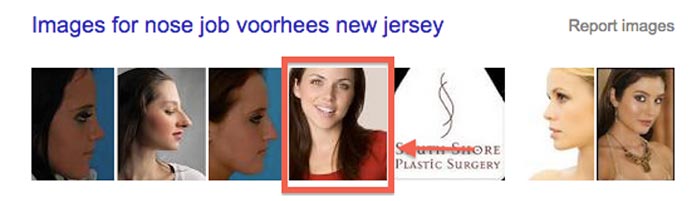
    One of our clients, a plastic surgeon, has a before and after image gallery on his site. We optimized each of the images in the gallery and saw some interesting results. Links to the gallery outperform the corresponding page on his site for the majority of his targeted keywords. The same client even has images that rank in organic search results!

    NoseJobSearchImageResults

    Add Relevant Images

    It’s important to note that Google can’t read or understand images without alt text or title text. But a page with relevant images that have no alt text or title text will most likely still rank better than a page without images! Why? The answer is simple—the ranking algorithm also pays attention to user behavior. If your site’s visitors are happy with what they see, search engines will recognize a pattern and reward your website for providing quality content.

    Another one of our clients, a plastic surgeon in New York, didn’t have a before and after image on his BOTOX® page. As an authorized physician, our client was allowed to use some images provided by Allergan, the manufacturer of BOTOX® Cosmetic. We chose this relevant image and placed it on his site:

    BotoxBeforeAndAfterImage

    In the 30 days after we implemented this image, the average visitor spent 13% more time on the page compared to the previous 30 days. When visitors landed on the page from organic search, the bounce rate improved by 24%. Both of these stats demonstrate to Google that users are not only finding the information that they’re looking for on this page, but that it’s also engaging enough to keep them on the site.

    Create Custom Graphics

    Another behavioral signal that has become increasingly more important is social behavior. Adding custom graphics to your site is a great way to promote social media sharing and demonstrate positive social signals to search engines. And, like other images, custom graphics also give you the opportunity to create keyword-rich file names, alt text, and title text.

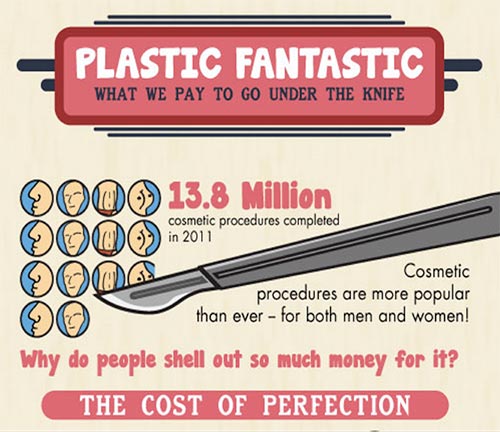
    PlasticFantasticInfographicImage

    The infographic above was shared more than 2,000 times on Facebook. The month it was published, the site saw a 25% increase in referral traffic compared to the previous year. It’s relevant, informative, and interesting for viewers. In other words, it’s exactly the kind of content that helps with SEO.

    Upload Testimonial Videos

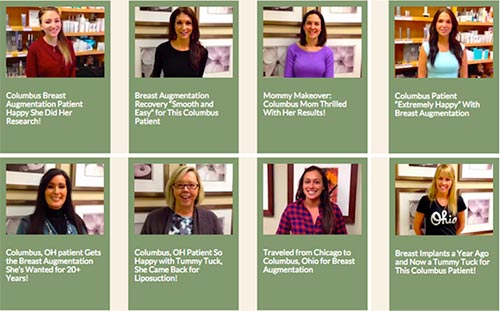
    There are other options if you don’t want to use before and after images or infographics. Another one of our clients in the field of plastic surgery uploads patient testimonial videos to his site. Generating nearly 9,000 page views in 2014, these testimonials have certainly had a positive impact on his site’s search rankings. The fact that these patients were so happy with their results has also helped to bring in new business.

    TestimonialVideoGalleryImage

    *Note the keywords in the video titles.

    Get Results

    In the end, people considering a cosmetic procedure want to know that they’ll be satisfied with the results. Search engines want to see that your site is providing quality results for the people who are searching. Using images, graphics, and videos can help kill both of these birds with one stone. You’ll be rewarded with better organic rankings, website traffic — and, ultimately, more business.

  • Filter In New Clients – The SEO Benefits of Instagram

    As a business, it’s important to connect with potential customers in as many ways as possible. You maintain your website, attend networking events, and post regularly on Facebook, but could you be doing more? Enter: Instagram.

    InstagramForBusinessLogo

    As of December 2014, there are 300 million monthly active users on Instagram and over 75 million daily users, which offers great potential to broaden your brand’s reach. You’re probably familiar with some of the benefits for adding your businesses on Instagram: it’s a visual medium, there’s potential for marketing contests, it has interesting filters, and the list goes on. But did you know there are also SEO benefits

    Increased Social Activity

    The debate rages on over the correlation between social presence and higher search engine rankings. Search engines deny a relationship, but the data overwhelmingly suggests that increased social activity for specific webpages means higher rankings. No matter which side you believe, I think we can all agree that positive branding and increased online presence isn’t a bad thing.

    Optimized Profiles

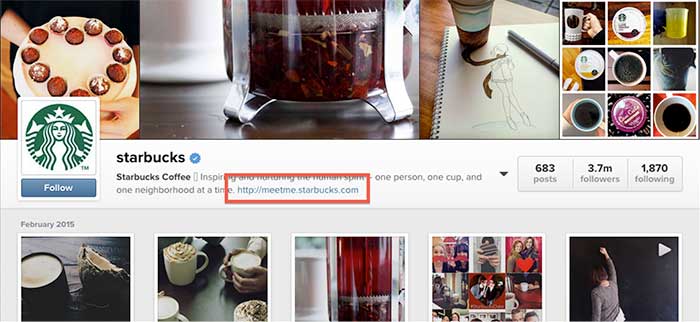
    On Instagram, you can create an optimized profile for your business with a clickable link back to your site, which contributes to your overall link profile. Additionally, Instagram is both searchable and indexed by search engines, contributing to your business’s overall real estate for a branded search.

    StarbucksInstagramImage

    Although images aren’t indexed directly through Instagram, there are third-party sites that utilize their API and make the images indexable by search engines, which furthers your business’s potential to appear in image searches. Some popular web viewers are Websta, Gramfeed, and Followgram.

    Keeping Posts Relevant

    Regardless of whether your potential customers are viewing your Instagram photos through a computer or mobile device, it’s very important to align your business with the interests of your target demographic. A basic guideline to follow is the rule of threes: ⅓ promotional posts, ⅓ informational posts, and ⅓ engagement posts.

    What might that look like on Instagram?

    Let’s say you are a fitness company. Your promotional post might be a photo of your company’s new running shorts right out of the box as they’re hitting the shelves. An informational post could be a photo of a healthy lunch that encourages your followers to eat well. You might also post a scenic landscape of a morning run with a fantastic filter to engage with your followers.

    NikeRunningInstagramImage

    Using #hashtags

    All posts should include #hashtags to increase the likelihood of your content being liked and shared. You can also enable sharing permissions that automatically post to other social media platforms, like Facebook and Twitter, whenever you share on Instagram. By seeding your content to additional social networks, it has the potential to be picked up and shared by even more people in the social space.

    Mobile Benefits

    Since many users access Instagram on a mobile device, there are additional SEO benefits that are more unique to the platform.

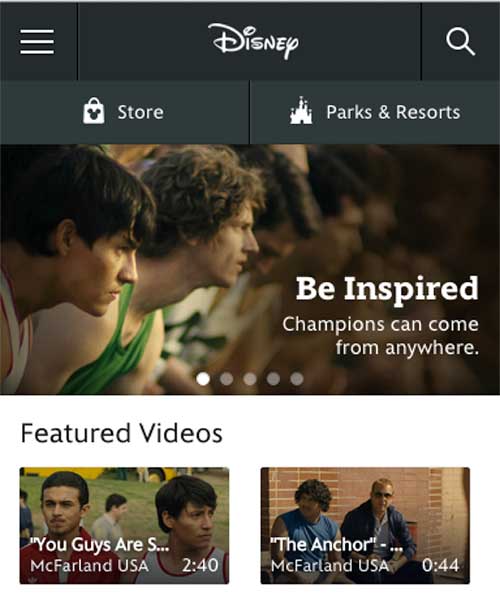
    Even though Instagram doesn’t currently offer clickable links on individual posts, you’re still encouraging followers to interact with your business through mobile devices. Since Instagram users are often looking at your posts on a mobile device, they’re more likely to visit your business’s website on their mobile device as well.

    Websites that are optimized for mobile perform better in search engine results because Google looks at a website’s mobile capabilities as part of their algorithm. By encouraging users to visit your mobile site by interacting with them on Instagram, you’re helping your overall SEO efforts.

    DisneyInstagramImage

    As you can see, there are more reasons for your business to be on Instagram than the awesome filters. This platform enables you to boost your SEO efforts while also connecting with your target demographic and increasing your brand’s reach.

    Sources:

    http://www.litony.com/wp-content/uploads/2014/11/Instagram-for-Business.jpg

    http://blog.instagram.com/post/104847837897/141210-300million

    http://www.theverge.com/2013/12/12/5203578/instagram-now-has-150-million-active-monthly-users

    https://instagram.com/starbucks/

    https://help.instagram.com/147542625391305

    https://instagram.com/nikerunning/

    https://help.instagram.com/365696916849749

    http://m.disney.com/


  • Defibrillate Your Clinic’s Social Media Plan in Five Steps

    Over the past decade, there have been steady increases in the acceptance, usage, and number of social networks. With membership in the hundreds of millions and even billions, social media networks like Facebook, YouTube, and Twitter have become excellent platforms for businesses that want to reach and engage their audiences. Because they form part of a more niche industry, it is crucial for hospitals, healthcare practitioners, pharmaceutical companies, and others in the healthcare industry to have a detailed online strategy in place across various social media platforms. Below are five steps to designing a comprehensive social media plan that take into consideration the challenges and specific needs of the healthcare industry.

    Challenges

    Healthcare providers face a number of unique obstacles when entering the world of social media. Businesses in this industry typically have multiple stakeholders, from existing patients to future patients to other physicians. Each stakeholder has unique expectations regarding communication standards and topics, and a fully fleshed out plan that follows these steps should take these expectations into consideration.

    The healthcare industry is strongly regulated by organizations like the FDA. However, in the recent surge of social media outlets and usage, the healthcare industry has faced a unique challenge: the reigning regulatory offices have not cited clear guidelines regarding the use and management of these social media platforms. Seeing as some information on the topic has been released, it is important that you review these sources before creating a social media plan for a business in the healthcare industry.

    Creating Your Plan

    1. Define Your Personality

    As a business and as a brand, you will need to define your online social personality: how do you want your stakeholders and audience to perceive you? Thinking of your brand as an individual will allow you to adopt a more coherent voice across your chosen social media platforms. To help define your voice, ask yourself questions like the following:

    • What color would you associate with your brand?
    • If your brand was a person, what kind of clothes would they wear?
    • What type of car would this person drive?
    • How would his or her friends describe him?
    • Does this person have likes or dislikes?

    Although it may be difficult in the beginning to uncover the personality of your practice, carefully designing this aspect of your social media strategy will allow you to create a more concrete tone and voice.

    Along with defining your voice, take the time to study and understand your stakeholders. Decide which groups you would like to reach: existing patients, future patients, other healthcare professionals, insurance companies, or any combination of these. This decision will impact the tone and purpose of your social media campaign, as each of your audiences will react best to content that is specifically designed for them. By keeping your target audience in mind, you will enhance your ability to focus your social media updates, allowing you to promote audience engagement and build a stronger, more trusting relationship.

    2. Listen

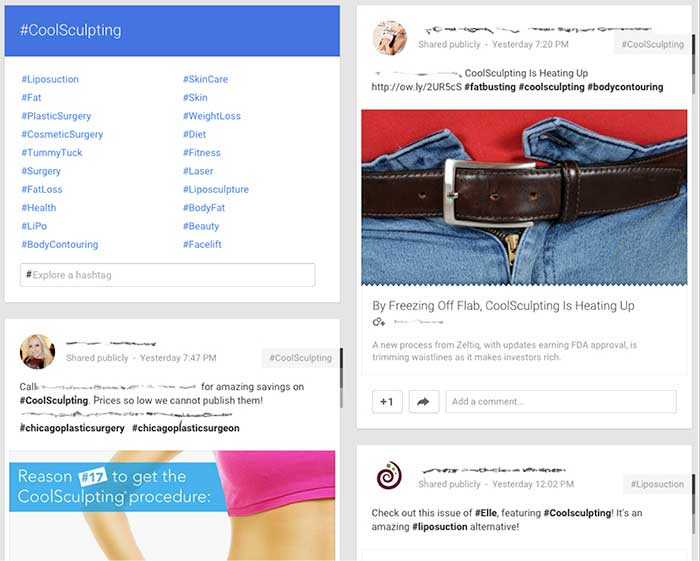
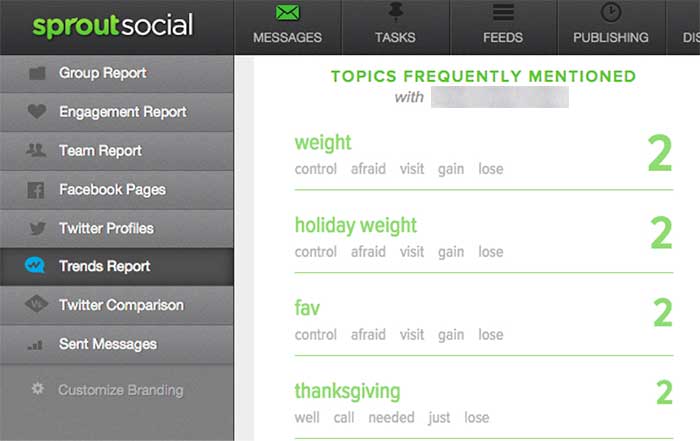
    After you have settled on the tone and audience of your social media strategy, pause to listen to the existing conversation. Determine how your audience and competitors interact within the social space, monitor conversations about your industry, and track the ways in which your brand is discussed online. Using tools like Google Alerts and hashtags, Sprout Social, monitoring forums and other online spaces to understand the existing conversations.

    Listening to the discussions that are in place across the spectrum of social media platforms will allow you to gain a sense of which healthcare topics are currently trending. It will also help you to identify the concerns, questions, and interests of your target audience, allowing you to build a strategy to address these topics during your social media campaign.

    GooglePlusIndustryHashtags

    Example using Google+ to review similar hashtags and industry competitors

    SproutSocialConsumerConversation

    Example of using Sprout Social to understand how consumers are talking about your brand.

    3. Find Your Voice

    Next, begin your own conversations! Look for areas in the industry that lack a strong voice. Use that space to make a name for your brand and to demonstrate your expertise. Also, provide topics and the secure space for conversations regarding the health industry and health issues. Help moderate conversations to keep the discussions moving and the connections building. Encourage your audience to converse with you and with each other to foster a sense of community.

    To make use of your influence on social media, you can use a number of strategies:

    • Add personal, authentic stories: Depending on your goal, these can consist of success stories, anecdotes of achievement, or triumphs over a disease or disability.
    • Facilitate conversations and actions: Give healthy-eating challenges or build a place to help raise awareness for widespread health issues.
    • Wow the crowd with numbers: Build credibility by showing your audience the bigger picture. Share statistics, infographics, and other information about your industry or practice.

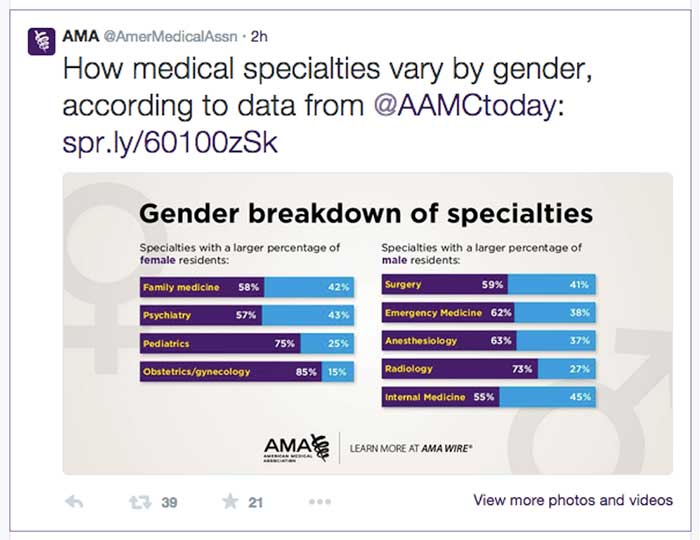
    AmericanMedicalAssociationExample

    Example from the American Medical Association using numbers to engage in a conversation. Only 2 hours after being tweeted this post received 39 retweets and 21 favorites.

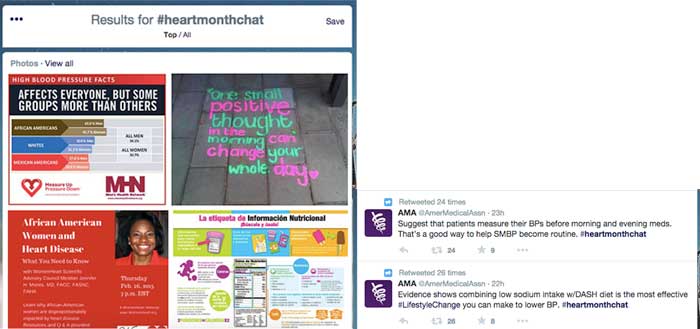
    TwitterHealthcareDiscussion

    Example of Twitter healthcare community discussing heart health online via #heartmonthchat and how the American Medical Association was able to find their voice in the conversation giving advice and statistics. Both tweets were retweeted and favorited several times.

    4. Collaborate

    Social media has become a frequent place of feedback for companies, and you can take advantage of this fact by using the social space to collaborate with your audience and with others in your industry. Do not be afraid to talk to your audience about their experiences and how to improve them in the future.

    Use social media as a place to work with other practitioners and organizations to raise awareness regarding healthcare topics. By working with others, you can increase your audience reach and further your message.

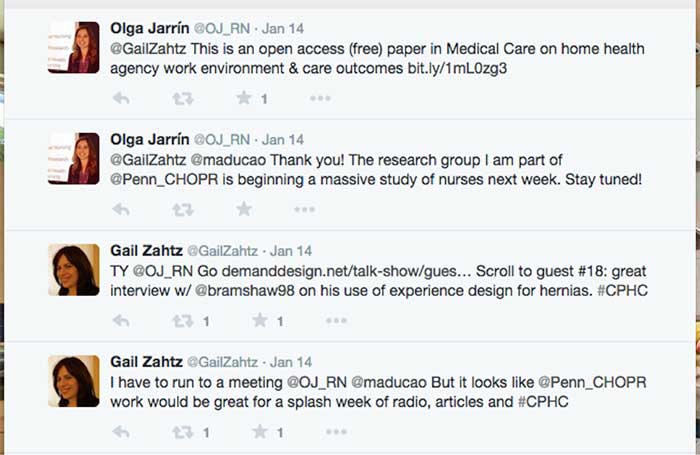
    GailZahtzHealthcareTwitterAdvice

    Example of Gail Zahtz (expert in patient-doctor relationships, offers advice to healthcare industry) collaborating with others in the healthcare industry to make information more readily available.

    5. Measure Your Success

    Although the last step in this plan is to measure your success, it is important to review your achievements on a regular basis and throughout each step of the process. Measure growth and success in the online space by an increase in followers, consistent interaction, and rising mentions across social media platforms.

    ThePlasticSurgeryInstituteFacebookLikes

    Example of growth of likes on Facebook using these steps. Prior to this campaign beginning, The Plastic Surgery Institute of Southeast Texas ~500 page likes.

    Consider the steps above when designing your own social media strategy. For more inspiration, check out some of these healthcare companies that have successfully created an empowering online presence!

  • 4 Internet Marketing Mistakes You Might Be Making

    There is nothing more frustrating than putting all your money and effort into your site’s content only to see a conflicting ROI. Many companies and businesses rely on Internet marketing to increase their profits, but some make simple and even unpredictable mistakes as they go about it. Feeling frustrated or annoyed with your results? You’re not alone.

    WAIT! Don’t break your computer just yet—we’re here to point out some mistakes you might be making.

    1.) Every part of your content concentrates on sales.

    Everyone wants to make sales and increase profits. That’s the whole point of your Internet marketing campaign, right? But new users who visit your site may not purchase your product or service right away. Smart buyers want to research your product, learn more about your brand, see what you offer, and compare your prices to the prices of your competitors. Your potential customers likely won’t have the compulsion to commit to a purchase right away unless you are a well-known company like Amazon. Don’t try to sell your product outright; rather, tell a story with your content. Ease your customer in slowly to make them believe in what you are selling.

    To do this, avoid making your content too product-specific. Let’s say you sell garden hoses, and garden hoses are all you know. You don’t want to talk about just garden hoses all the time; you’ll lose customer interest. And let’s face it—you can’t talk specifically about garden hoses non-stop while keeping your content interesting. So make sure you expand your content beyond your specific product. On certain pages of your site, spill expert gardening secrets, discuss ways to keep your lawn fresh, or start an FAQ section on popular gardening techniques. Always expand on your product and related topics to keep the customer engaged!

    2.) You’re using social media sites…incorrectly.

    One of the biggest components of any company’s campaign is the strategic use of social media. Coordinating posts on Facebook, Twitter, LinkedIn, and other social media platforms can take up exorbitant amounts of time and effort. Concentrating too much or too little on certain posts or topics can lead to fewer followers on a specific page, and no one wants to see multiple, random posts appear on their newsfeed every single day. Creating posts and utilizing social media should be a strategic and intelligent endeavor, not a disorganized, chaotic mess.

    Plan ahead by understanding the goals of your social media strategy. Do you want to drive traffic to your site? Generate more sales? Enhance your email list? Work toward brand awareness? Know your brand and, most importantly, know your customers! You don’t need to use every social media outlet; just figure out which channels your customers use most. If you’re not sure which media sites your customers prefer, just ask! It’s important to learn as much as you can about your clients, their social activity, and how to appeal to them. Absorb yourself in the community’s conversation and interact with your clients. Marketing 101: customer service and knowledge is the number one driving component to any business.

    3.) Your content is SEO-heavy.

    SEO is essential to any marketing campaign. You want Google to find your specific keywords and phrases to generate more traffic. SEO helps human users know you exist within their area!

    While all that is true, you do not want to write all of your content specifically for search engines. No one wants to read website content that has keywords stuffed into every sentence; content needs to be well-written and unique! When creating pages for your visitors, you want the writing to be memorable and easy to read. Once you start to write your content, all of the information you have about your product will flow out naturally, and the content will optimize itself: users will be more likely to share your content through social media, blogs, or websites when the writing is more natural. And if you want to give your content greater authority, be sure to link to other credible websites within your industry.

    4.) You aren’t calling your clients to action.

    You caught the fish, and now you have to reel them in.

    It is a very common misunderstanding that if you drive traffic, you will automatically increase sales. Maybe your new customers aren’t making purchases, and even your old customers who have been following your site and posts since the beginning of time still aren’t biting. Personally, I have followed many company sites without ever buying their products. Why is that?

    Creating an easily accessible path to your product is crucial. You want clients to have a simple conversion from viewing/visiting to buying. By embedding relevant calls to action within your text, you can ensure that content on your site gets potential customers deeply involved with your product. Every page for your products should have a link to sign up for your site, email list, or newsletter in three places: on the sidebar, below the article, and underneath the header.

    Don’t leave your customers to ponder what to do after reading your page. Send them along the right path!

    Image Sources:

    Smashing Computer Gif

    According to Google Gif

    Thumbs Up Gif

  • Five for Friday: Pay for Twitter Verification, Snapchat Goes Local, and More!

    1. If You Want to Be Verified on Twitter, All You’ll Have to Do Is Pay! – Mashable

    If you’ve ever tried, you know that getting verified on Twitter is a lengthy process. Twitter does not accept requests for verification, so users just have to wait until the site feels that your page should be verified—and the process can take an extremely long time. But not anymore: Twitter is considering letting people pay to get that little blue check mark symbol. Hopefully, if this change is adopted, the days of waiting for verification will be gone!

    2. Google Answers the Question “Is Link Building Good?” – Search Engine Round Table

    In any discussion about link building, the conversation usually turns into a debate about whether the strategy is good or bad for a website. If you’ve been searching for the answer, you may finally have it: in a recent Google+ hangout, Google’s John Mueller was asked to answer this common question. Ultimately, Mueller stated that he would “try to avoid” link building in general, but he also gave helpful tips on how to allow others to link to your site.

    3. Snapchat Wants to Show You What’s Happening in Your City – Tech Crunch

    Have you ever ignored a Snap from Team Snapchat because it relates to an event taking place in a different state or even a different country? Well, Snapchat has caught on. The company is currently experimenting with regional Our Stories, which will add content that will be visible only to locals within a specific area. Keep an eye out for these relevant Our Stories!

    4. 4 SEO Landmines to Avoid if You’re Updating Your Website – Search Engine Watch

    From time to time, it becomes necessary for all of us to update our websites—but how do we manage the change without losing the authority our sites have built up? Whenever you update your website, you may leave yourself vulnerable to changes in domain authority and search engine indexing. If you’re thinking about changing your website, a few tips from this recent Search Engine Watch article can teach you what to avoid in order to keep your SEO intact.

    5. Facebook Will Be Revealing the Relevance Score of Your Ad – Marketing Land

    Ever wonder how Facebook chooses which ads to show? The company uses a combination of bid price and relevance scoring to decide which ads will make an appearance, but the process might seem confusing. Well, Facebook has begun to allow marketers to see the relevance score of their ads. In doing this, Facebook hopes to incentivize the creation of better ads that are more relevant to target audiences.

    Image Sources:

    All You Have To Do Is Pay

  • Five for Friday: The Analytics Glitch, Google’s Beginnings, Mardi Gras Madness, & More!

    1. Google Analytics Data Drops Off On Monday, February 9th – SEO Roundtable

    Did you notice that all of your customers suddenly decided to boycott your website this past Monday? You’re not the only one. Luckily, this is not an issue with your website or your business; it’s actually a brief glitch in the data of Google Analytics. This problem appears to have affected thousands of websites. Though Google has yet to give an official statement on the matter, they have assured us that they are looking into the problem.

    MLB.com animated GIF

    2. Your Guide to Everything Mardi Gras – New Orleans Online

    Mardi Gras celebrations are in full swing this week, and New Orleans Online has released an infographic to help us navigate and understand the chaos! Filled with tidbits on the history of Mardi Gras as well as helpful hints for making the most of this year’s events, this infographic can guide both newbies and veterans through the Carnival season in New Orleans.

    mardi gras animated GIF

    3. Lessons Learned from the Early Days of Google – Matt Cutts

    Today, we know Google as the wooly mammoth of the Internet—large and in charge. Whether we are aware of it or not, no company has had a greater impact on how we navigate the World Wide Web. But it wasn’t always that way. Google, like all huge companies today, had humble beginnings, with a lot of blunders and a lot of lessons learned. Matt Cutts revealed all in his presentation at UNC Chapel Hill last month.

    google animated GIF

    4. Is Yahoo Stealing Mobile Search Share from Bing? – Marketing Land

    Yahoo is beginning to make its first divergence from its search alliance deal with Microsoft. The search engine has its eyes set on the mobile market, a segment that was not part of the search alliance deal made five years ago. The search engine has gained traction on mobile devices not at the expense of Google, but at the expense of its ally Microsoft.

    5. 8 Sure-Fire Ways to Beat Out Your Top PPC Competitors – Hanapin Marketing

    Yesterday, Jamie Smith and Cassie Oumedian of Hanapin Marketing presented a webinar on the eight ways to beat out your top PPC competitors. Some of the expert tips included competitive intelligence and monitoring insights, why location targeting is a must, and bid strategies to outrank your competitors. If you weren’t able to catch the webinar live, you can go to the Hanapin Marketing website to get the full recap.

    Image Sources:

    Dog Typing Image

    Mardi Gras Parade Image

    Google Doodle Image