
If you’ve been exploring the world of search engine optimization, “NAP consistency” is probably a phrase that keeps coming up again and again. So what is NAP consistency? Watch this short video to find out.
If you’ve been exploring the world of search engine optimization, “NAP consistency” is probably a phrase that keeps coming up again and again. So what is NAP consistency? Watch this short video to find out.
Mardi Gras is winding down, so it’s time for the second most festive time of year in New Orleans: wedding season! February is National Weddings Month, and happy couples all over the country are prepping and planning for their upcoming big day. For many brides- and grooms-to-be, this process begins online with vendor research, decor inspiration, and even placing orders for things like guestbooks and cake toppers. To see how their expertise in SEO and Internet-driven business affected their plans, I decided to ask several of our recently wed Influencers how the Internet shaped their wedding day dreams.

You’re recently engaged and you have no idea where to start to plan your wedding, so you turn to your go-to resource of infinite knowledge: Google. As Influencer Chris and his wife found out when they were planning their wedding a year and a half ago, sometimes a basic search is all you need to really get the ball rolling.
“New Orleans has a ton of wedding resources, and there were often many options to look at when searching for things like ‘wedding photographer New Orleans’ or ‘popular New Orleans wedding venues,’” he says. In big cities or popular destination wedding locations, the list of available vendors is seemingly limitless, so those with higher SERP rankings really beat out the competition for customers who don’t have the time to thoroughly investigate every result.
When there are so many options, it’s good to find techniques for narrowing your search down to exactly what you want. Influencer Alison knew she wanted to get married in her church and needed a photographer who would capture the day perfectly. When it came time to search for a photographer, she explains “I was hoping to find one that had photographed weddings at my church before (they would know best angles, nuances of the church layout, etc.).”
To find the right person, she searched for “Mater Dolorosa + wedding photos” and found several photographers who had worked in her church before. This search technique is also helpful for viewing potential venues full of people and activity instead of trying to imagine it on a site visit. It is essential for photographers to have their images optimized so they show up in searches like these.

While Google searches were the most popular way to find specific vendors near the wedding location, Pinterest provided plenty of inspiration for our Influencer brides. The image-based format of Pinterest means that thousands of ideas for flowers, decor, fashion, favors, and dramatic exits can be explored, compared, grouped, and saved. Many of these pins also include a link to Etsy or another location to buy the depicted object or instructions on how to copy the look yourself. Influencer Kari had a small, DIY-style wedding and used Pinterest for all her decor inspiration, and she even found a DIY wedding veil. Another Influencer, Michelle, also used Pinterest for design inspiration, allowing her to source most of her ideas from other sites, including a donut-shaped bride and groom cake topper from Etsy and scratch-off save-the-dates.

No discussion on modern wedding planning could be complete without mentioning The Knot. For nearly 20 years, the husband and wife team behind this site have culled countless wedding resources, inspiration, advice and etiquette tips, and organization tools into the ultimate wedding planning portal. Influencer Laura testifies to its power: “I … used The Knot a great deal to conduct searches, make lists, check items off said lists, and place bulk orders of favors, stationery, decorations, invitations, etc. The Knot is awesome because it helps you stay organized and provides links to external vendors to best meet your needs.”
The lists of vendors proved helpful to most of our Influencers. Vendors are searchable by location, price, and style considerations, and each vendor’s page on The Knot includes basic information, photos, a link to the vendor’s website, and customer reviews. Good reviews from other couples often tipped the scale when it was down to the final decision. The Knot also selects the “best of weddings” in each vendor category every year, providing a credential the vendor can put on their website.
Utilizing SEO techniques not only helps wedding vendors as they compete in a heavily saturated market, but it also makes things easier for brides and grooms. Wedding planning can be stressful and overwhelming at times. From optimized searches to social media engagement to customer testimonials, the Internet has quickly and efficiently brought resources from all over to couples, hopefully alleviating that stress and putting the focus back on fun and love.
So you want to take your business to the next level. You built this amazing website, but you have no idea if anyone is even looking at it. You’ve looked around online and found a pretty cool stat counter, but you need more information than that. That’s where Google Analytics comes in.
Google Analytics is a robust tool used to track visitors to your site and how they arrived there—and it’s absolutely free. With Google Analytics, you can track how many visitors have viewed your website, what pages they viewed, how long they stayed on your website, and a lot more. You can even figure out where in your conversion process visitors are most likely to abandon the conversion. This kind of information is essential for truly optimizing your website to appeal to your visitors.
Hopefully, I’ve sold you on Google Analytics, but before we can glimpse any of those sweet, sweet metrics, we have to install it on your website.
Step 1: Sign up for an account.
Navigate to the Google Analytics homepage and select Google Analytics from the “Log In” dropdown. Then select “Sign Up” on the following page.
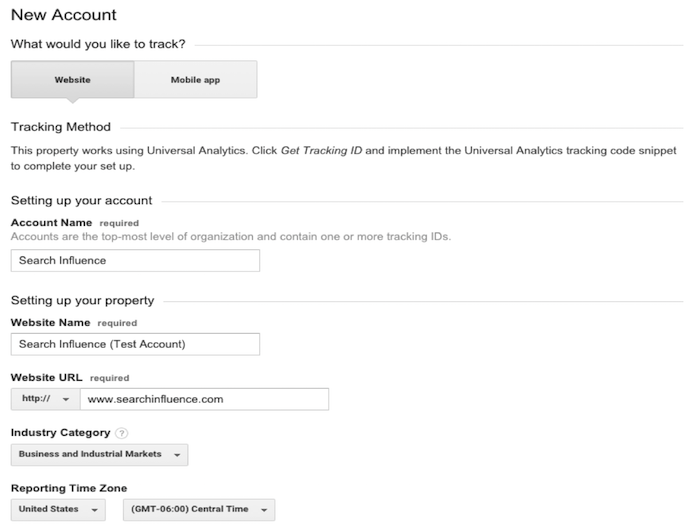
Step 2: Fill out information about your website.
Provide Google with basic information about your website, including its name and location. After filling out this information, accept the terms the conditions, and we’re almost there!
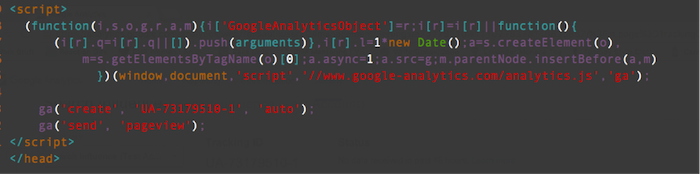
Step 3: Copy and paste the Google-provided JavaScript snippet onto your website.
Make sure you implement the JavaScript snippet so it appears once per page on every page of your website. This is important to make sure we track all users on your website accurately. If you are using a templated website, it is best to insert the snippet above the closing </head> tag.
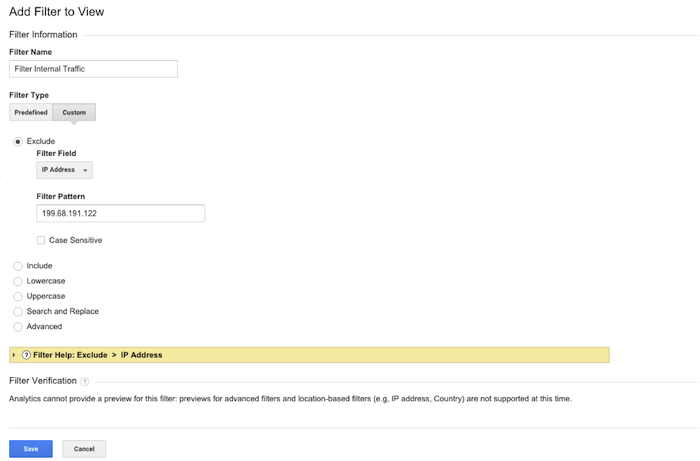
Step 4: Filter all your internal traffic.
You don’t want the pageviews to your website to be skewed by your own visits to your site. That’s why it is important to create a filter that removes any visits from your IP address. You can easily find out what your network’s IP address by clicking on this link. Copy your IP address and navigate to the Admin section of your Google Analytics account. In the rightmost column, select “Filters” and add a new filter titled “Filter Internal Traffic,” as in the image below. Click save, and you’re all set!
Get tracking!

Today’s dental patient is becoming much more Internet-savvy.
It’s no longer good enough to simply have a website. If your site doesn’t show up on the first page of the search engine results pages (SERPs), you are losing potential patients. Maybe you already have a search engine optimization (SEO) strategy but have yet to notice the benefits of increased exposure and web traffic. Or maybe you haven’t thought much about SEO. Either way, there are a few steps worth considering to boost your client referrals. Here are five fundamental and actionable tips to help you maximize the effectiveness of your website.
By adding hyper-targeted and high-converting keywords to your website’s content, you can achieve a higher organic ranking in the SERPs. Instead of choosing “dentists” as your keyword, pick out an area of specialty. It is much easier and more effective to optimize “pediatric dentist” than “top dentist.” With a targeted keyword, you will be able to avoid competition from across the country and reach out to people who need you for specific dental services.
A dental practice website with a blog section is leveraging Google’s algorithm in their favor. A regularly updated blog helps boost your SEO rankings in two different ways. First, you can include your keyword in the first section of the post, which can facilitate organic traffic. Blog posts also help give your website unique, non-duplicate content. When a searcher is searching for your keyword, all duplicate content is noted by the search engine, and those websites are punished for their inauthenticity. Blog posts that include your keyword will help your overall ranking.
Between teeth whitening and root canals, the average dentist does not have a lot of time to devote to a blog. But blogging does not have to be a time-consuming task. When writing a blog post, consider using reader-friendly formatting like lists, including outbound links to resources, providing actionable tips, writing in a conversational tone, and using real-life examples. As an integral content marketing tool, your blog will help boost your SEO ranking and convey a professional, helpful image.
Backlinking is a central element of SEO, and to boost your SEO ranking, you need to generate content that others will want to link to. Having creative, informative blog posts can also help build backlinks, mostly because people will want to share your posts. Another way to build backlinks is to get featured. If you ever have the chance to write a blog post or opinion piece for a medical publication, do it! If a local new station wants your advice on a new dental implant treatment, don’t shy away! When you appear on another website, a link to your website is often included in the story. In the eyes of the search engine algorithms, this is one of the most effective ways to gain authority, boosting your SEO ranking.
You went to dental school, not film school, but if you have the resources, making a short YouTube video can really boost your SEO ranking. YouTube is the second-largest search engine on the Internet, but because videos generally have less competition, a video can rank higher in the SERPs. If you are targeting a region, you should include that area in the video’s title. Even though your video doesn’t have to have Leonardo DiCaprio in it, it also doesn’t have to win an Academy Award. Instead, it should focus on sharing general information about your practice or medical tips. You could even get patients involved and use videos as a platform for sharing patient testimonials. Whatever your approach is, video content will help tag your website as a superior one.

A strong presence on social media can help the trustworthiness of your site. Because Google+ is owned by Google, your dental practice should put an extra emphasis on gaining +1s and building a network. In 2013, then-Google CEO Eric Schmidt said, “Within search results, information tied to verified online profiles will be ranked higher than content without such verification, which will result in most users naturally clicking on the top (verified) results. The true cost of remaining anonymous, then, might be irrelevance.” For optimization purposes, you cannot just have a verified account: you must also regularly post and try to gain followers. Facebook has only minor effects for healthcare SEO ranking, but it is a great tool for building a presence in your community. The number of times your office is tweeted about, as well as the number of tweets you tweet, can also slightly impact your ranking. No matter the platform you choose, make sure all of your posts are relevant and authoritative, as these posts will be most likely to gain a reaction from your audience.
There are many elements that impact your SEO ranking. These are five actionable tips that every dentist should be using for their SEO strategy.
Image Credits:
Dentists at Work Image
YouTube Invisalign Patient Testimonial
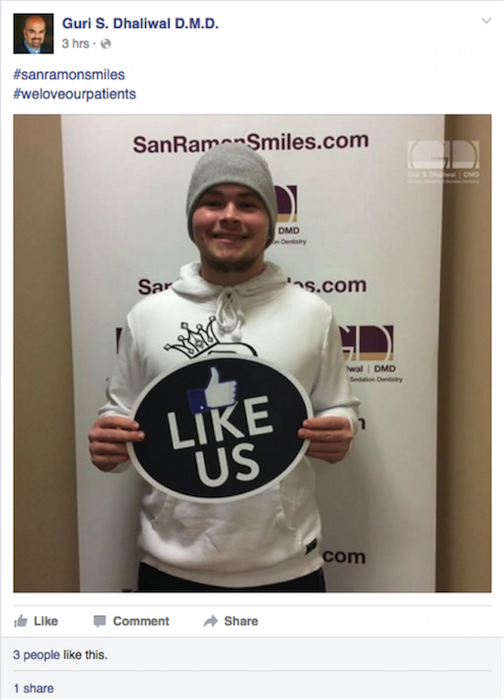
Guri S. Dhaliwal Facebook Page
The Internet isn’t just where people go to find out whether they can self-diagnose a brain tumor. Increasingly, the Internet is where potential patients shop around for the best local clinics and medical services. Fortunately, there are a few SEO principles that can help make your website easier to find. Before you work on drawing traffic to your site, however, it’s important to make sure that your website provides high-quality, unique information. At the most basic level, you need original content, or text that hasn’t been copied from somewhere else.
It may seem like your list of services should be self-explanatory, but a website is an opportunity to demonstrate your knowledge by explaining different medical procedures and conditions. Having a page dedicated to a certain condition can help draw patients looking for treatment. What’s more, the search engines will recognize you as more of an authority if you have more content about the subject being searched.
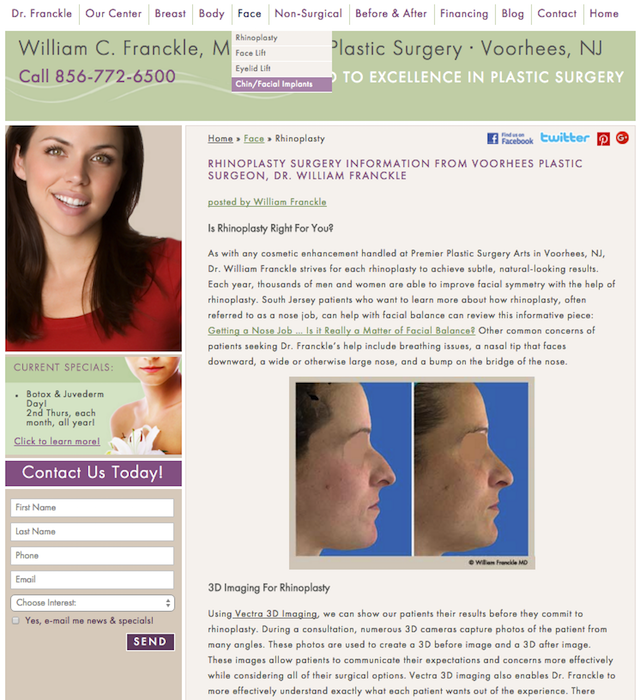
It’s important that each page of your website have original content, which means text that hasn’t been copied from other websites or duplicated across several pages. If your website already offers original content about your key products and services, then you may consider starting a blog. A regularly updated blog keeps your business relevant and allows you to target more search terms.
While the quality of your original content will be visible to anyone who reads your page, it’s only one factor in the on-site optimizations that affect your rankings.
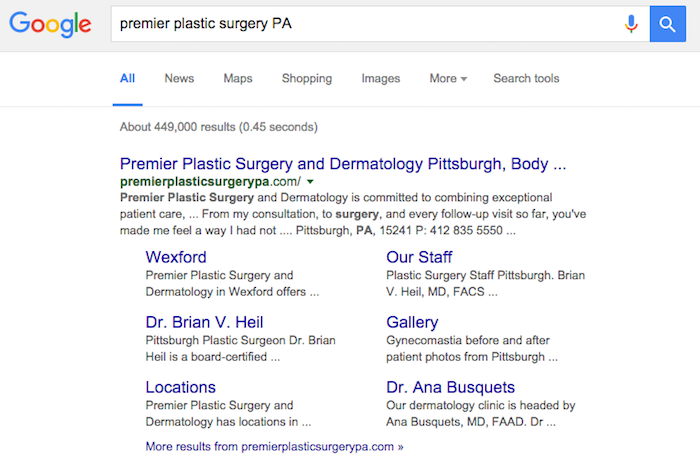
After content, title tags are the second most important thing to optimize on a given page. Title tags are visible as headers among search results and act as the label for the browser tab. Title tags are easy to overlook when first making a website, not unlike image optimizations.
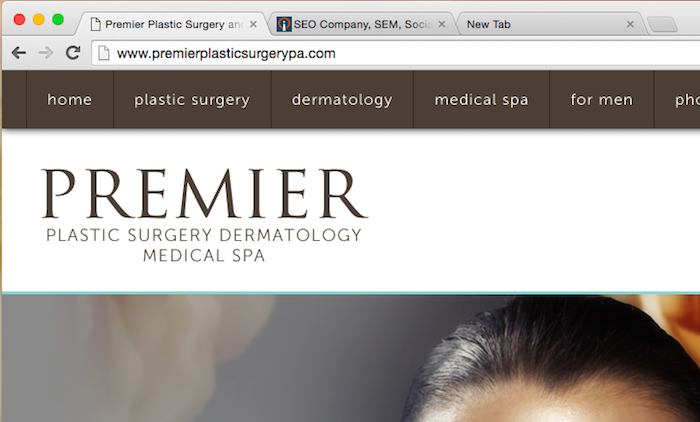
The URL should also indicate the content of the page and its place within the website. Rather than just using a string of letters and numbers, a clear URL indicates the content of the page and often gives an idea of where the page fits into the organization of the overall website.
www.oakridgeplasticsurgeons.com/tt09874425
www.oakridgeplasticsurgeons.com/procedures/liposuction
As you can see, the second URL makes it clear what kind of content to expect on a page. A clear URL also makes the page more linkable across your website and for external links. The pages on your website should link to each other, but you also want links from outside websites.
Your website looks more important when it is referenced on other sites. Of course, not all references carry the same weight: a reference in a medical journal or newspaper carries a lot more weight than a link buried in an anonymous blog. To boost your website’s visibility, it’s good to have a lot of links, but the quality of those links also matter.
While distinct from link-building, you’ll also want to establish an active presence on social media. Regularly posting to Facebook and Twitter will give you opportunities to generate more leads and draw traffic. Your Facebook business page can be optimized for Graph Search, and Google+ Local will also help you show up as a local resource.
Depending on the nature of your business, targeting the area you serve can make a big difference. Instead of competing with offices across the state, focus on becoming the leader in your city or county. Web analytics and Google AdWords can help you determine which search terms are most powerful in your area. Make sure your name, address, and phone number are consistent throughout your website, and get your business listed on local directories. If you have multiple locations, make landing pages for each one without duplicating content.
Encouraging patients to write online reviews can also improve your visibility. Since you already provide great service, the challenge is just getting satisfied customers to share their experience. Ultimately, most of the changes that impact SEO should also provide a better service to your potential patients, whether they make your website easier to navigate or more informative. Find out whether Search Influence may be able to help your business with our SEO services, or sign up to attend an upcoming free webinar to learn how you can enhance your search engine rankings.
Search Influence’s reach is expanding around the country!
Whether you’re on the East coast or the West coast, there’s an Influencer coming near you this spring! CEO Will Scott and Director of Account Management Paula Keller will be representing Search Influence and imparting their local search wisdom in Williamsburg, Seattle, Portland, San Jose, and Nashville in 2016.
Read more below to find out which conference most speaks to your marketing strategy needs!

Diving deep into the world of local marketing and SEO, MozCon is hosting a local-focused conference, MozCon Local, at their world headquarters in Seattle. Gauged at the intermediate to advanced crowd, MozCon Local isn’t your average search conference. Moz has gathered a well-rounded crew of experts to provide you the opportunity to participate in live Q&A, meet and network with fellow industry players, and consult with expert publishers and analysts.
Moz has teamed up with LocalU to bring you workshops on Thursday and a full-day conference of hand-selected speakers on Friday.
Local Search Processes – Expert Panel/Q&A – 12:55 p.m.
Paula Keller, Director of Account Management at Search Influence, joins industry experts Darren Shaw of Whitespark, Mike Ramsey of Nifty Marketing, and Aaron Weiche of GetFiveStars for a panel discussion and Q&A on best practices and best processes to use in marketing your local business online. It’s a powerful info session you won’t want to miss!
Fake It Til You Make It: Brand Building for Local Businesses – Seminar – 2:05 p.m.
Paula will provide real-world examples and success stories about local businesses establishing brands that both customers and Google will recognize and reward! Learn what you can do to keep up in this changing world of ranking factors. As Paula strategizes with businesses on improving their search, social, and online ads results, she lends credible knowledge to the subject matter and will share tactics on how she manages her team’s 800+ local business clients.
Local Targeting of Paid Advertising – Workshop – 2:50 p.m.
Now it’s time to break out and ask your questions directly. If you run or want to run an AdWords campaign for your local business, you have or will very soon realize that Google puts a lot of options in front of you—but you may not be sure how to best leverage them. Paula will be ready to answer your AdWords strategy questions and share her tips for local targeting from choosing the right ad extensions to when to use increased mobile bidding.
Register now for MozCon Local!

Heading to SMX West in San Jose this year? You will want to arrive one day early and attend the Local Search Advantage Workshop. Will Scott will be on-hand at this action-packed event to offer practical advice and best practices for digital marketers, brands and business owners of all sizes looking to be found by online buyers. Sessions range from local presence management and mobile SEO to localizing social media, reputation management and multi-platform attribution.
Register now to attend the workshop or get an all-access pass and stay for SMX West in San Jose.
Meet with all of the experts in the local search game! No matter the size or type company you work for, your search marketing questions will be answered at LocalU Advanced in Williamsburg, VA. Order your tickets for info-packed presentations featuring all of the most up-to-date information about what’s working and what’s not in local SEO. Join experts like David Mihm, Mary Bowling, Mike Blumenthal, Search Influence’s own Will Scott, and more for an informative and fun day!
Search Fundamentals: Inspired Local Linkbuilding Tactics – 9 a.m.
Will Scott joins Mary Bowling of Ignitor Digital, Mike Ramsey of Nifty Marketing, and Mike Blumenthal of GetFiveStars to discuss the power of locally relevant links that build value for your business. If you’re looking to gain a more comprehensive understanding of the power of link building in today’s algorithmic world, look no further!
Deep Dive: Competing And Winning in A Pay-to-Play World – 11:30 a.m.
After the joint session, Will’s going solo! “It’s been said time and again that there’s no such thing as a free lunch.” Learn what it means to join the pay-to-play world of social media marketing and come away with some key strategies for utilizing paid platforms to generate leads for your local business. Leave your preconceived notions about content marketing, social engagement, and lead delivery at the door, and get on the right track so you can stay afloat in the ever-changing world of online marketing.
Register now for LocalU Advanced!
Join the marketing experts at SearchFest, hosted by SEMpdx, at the Sentinel Hotel in Portland to experience multiple learning tracks, including workshops and panel sessions designed to provide direct insight into the most up-to-date strategies and advancements in SEO, SEM, and social marketing. You’ll find some of the biggest names in almost every niche of online marketing at SearchFest.
Lifting Your Local Brand Above the Internet Cesspool – 11 a.m.
Paula Keller shares the stage with Cori Shirk of Seer Interactive to educate us on how a local business can “act” like a big brand and how a big brand can “act” like a truly local business. No matter the size of your business, make sure you’re expressing your brand properly so you can attract the most qualified audience and enhance your ROI.
Beacons & Retargeting – 2:45 p.m.
Take a dive deep into the technology of the “Minority Report” society we live in. Will Scott will discuss the intricacies of retargeting the right audiences, and using actual beacons of technology to deliver your message. Don’t miss this one!
Register now for SearchFest in Portland!

The HMS is a conference focused on Internet marketing and technology and purposely crafted to benefit innkeepers, owners, marketing staff, and vendors in the hospitality industry. Will Scott will lead a session on social media marketing trends, and will provide practical tips and tricks to stay one step ahead of the competition.
Register now to reserve your seat for the HMS in Nashville.
We can’t wait to see you on the road! However, if you can’t meet us in any of these locations, you may want to make plans to attend one of our new Search Influence University webinars, the first of which is on February 25. Click here to see a list of our upcoming topics.
Beginning this February, Search Influence is launching a free online webinar series called Search Influence University to provide business owners the opportunity to learn the ins and outs of online marketing. Designed with small business owners and operators, entrepreneurs, and nonprofit entities in mind, classes will be held during lunchtime (noon CST), be about 40 minutes in length, and provide practical tips and tricks for SEO, local search, and Internet marketing success. The best part is that all of the workshops are free to attend.
Here are details and registration links for the first three classes:
February – Understanding SEO: Onsite, Offsite, and Everything in Between
Taking place on Thursday, February 25 at 12 p.m. CST, this webinar will provide you with a basic understanding of what search engine optimization is and how it works. Topics will include the following:
March – Local Presence Optimization
Taking place on Thursday, March 24 at 12 p.m. CST, this webinar will cover how to optimize a slew of factors to boost your local search rankings. Topics will include the following:
April – Local SEO for Businesses Without a Physical Location
NAP citations, local reviews, and local citations are key to increasing your local search presence. But if you don’t have a physical brick-and-mortar storefront, how can you increase your online visibility? On Thursday, April 28 at 12 p.m. CST, we will look at on- and off-site opportunities that can support and help increase local presence for businesses without a physical location.

In recent weeks, there’s been chatter about a large influx of manual actions. This got me thinking: how many people actually know how to fix manual actions? Stay tuned, ’cause you’re gonna learn today!
A manual action is a manual penalty applied to a website by a member of Google’s Web Spam team. According to Google, there are a few common types of manual actions:
In today’s post, we’ll be discussing a few of the most common types of manual actions.
SEO practitioners know that performance fluctuations are expected, especially since Google’s algorithm is constantly changing. If you’re beginning to see your website rankings drop consistently, that’s usually an indicator of a possible manual action (or partial manual action). However, if you’re unsure, check out Google Search Console (aka Webmaster Tools for those late to the name-change party)! Once in the Search Console, you will see one of two actions displayed on the Manual Actions page:
Each action will display a reason as to why your site received the action, as well as how the action will affect your site.
The good news: we can fix this! The bad news: fixing a manual action takes quite a few steps. The first thing you will want to do is determine what kind of manual action your site has. If you see this message, this means that Google has detected a pattern of unnatural deceptive or manipulative links pointing to your site. According to Google, here are the recommended actions to take:
First, review Google’s Webmaster Guidelines on linking.
Next, follow the steps below to identify and correct the violation(s):
Once you’ve removed or disavowed the unnatural links, the last step is to submit a reconsideration request. A reconsideration request is a formal request to Google to reconsider giving your site a penalty. You will want to let Google know about everything you did to clean up your site, including documentation about the links you removed or tried to remove.
Here comes the bad news: once you submit the request, you have to be patient.

I know, people. I know. Ain’t nobody got time for that! BUT it will all pay off on that beautiful day when Google sends you that wonderful message in Search Console and approves your reconsideration request!
FYI, this will be you:

Google may give your site a partial manual action if it notices that your site has been hacked. If you check the manual actions tab in Google Search Console, you will see a notice called “Hacked Site.”
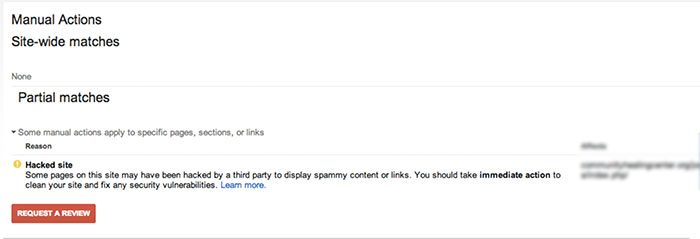
According to Google’s Web Spam team, there are a few steps you will want to take if you’re the victim of a hacking:
Once all hacked content is removed, “Request a Review” in the Google Search Console. Again, patience. Ugh.
For the non-SEO practitioners, you might be thinking, “What does that mean?” In a nutshell, Google launched a quality update in May 2015, specifically for onsite content. This means Google is placing more of an emphasis on sites producing quality content and penalizes those with content that is not useful to visitors.
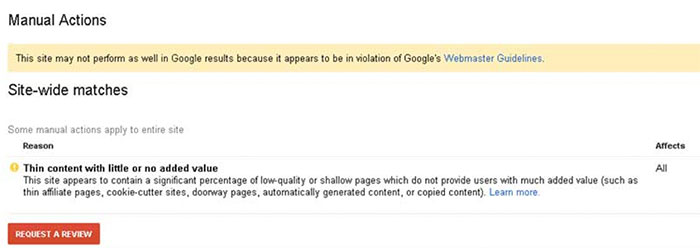
Once again…cue the reconsideration request.
Remember, patience is a virtue!

While most people were recovering from Thanksgiving food comas on December 1st, Google was quietly removing the ability to change the location of your search. For those of you who don’t fondly remember, there used to be an option in the search tools that allowed you to pretend you were in a far off land searching, places like Saginaw and Cleveland.

The impact of this change is now starting to really be felt for those of us in the online marketing world.
Advanced Web Ranking, a popular keyword tracking software, had to make a quick fix for their product. Before this change, tracking keywords anywhere your clients was as simple selecting a location in the software. Just like that, you were seeing the results for “french fries” right along with everyone else located in Newark.
Then, BOOM. Google changed that.
According to Google support, the solution to this problem is now to add the city to see results for that city.

My example of “french fries” while searching in Newark has now become “french fries Newark” while in New Orleans.
If you spend time looking at search volume, you might be aware that there is a difference between any two keywords, no matter how similar they may seem. Everyone is different, and I might search “french fries Newark,” you might search “Newark french fries,” and my neighbor might search “french fries in Newark.”
Since AWR updated their software to fit the new location definition, they are unfortunately changing what is actually being tracked. If you read the comments on their release of the news, users are not happy with the change. AWR needs kudos for their quick response to a large change in online marketing, even though it did not adequately address the change.
As AWR’s change magnifies, Google has drastically changed online marketers’ ability to peer into markets of their clients from afar. It really brings home the point that online marketing and SEO is are ever-changing industries, and you have to always on your toes, even over the holidays.

Image Credit:
Businesses now more than ever need effective, data-driven metrics to drive solid, evidence-based workflows. More and more small- and medium-sized companies are realizing an increased demand for data visualization to be able to quickly and clearly communicate exactly what is happening at every level in their business. A Stanford-born company arose to fill this need: Tableau. Tableau has more than 35,000 customer accounts, so chances are, if you need data analytics, you’re using Tableau.
Our particular needs were a little different and required a little bit of innovation. Tableau has user accounts, but we weren’t satisfied with the level of user account access control to the app, and we couldn’t give everyone access to all of the data. So how could we report metrics to different departments while keeping the irrelevant inner workings of other departments cleanly separated?

The solution lies in having meaningful tags on workbooks and automatically emailing out extracts. Here’s the reference for commands we’ll be using.
What you’ll need:
– A scripting language you’re comfortable with
– An already running Tableau Server
– The username and password to that server to log in and perform general admin tasks
– The site ID that you’re interested in reporting on
The first thing you’ll want to do is write a command in your script to log in to your already running Tableau server. It should have the basic form:
tabcmd login -s SiteURL -u Username -p Password
You can either export PDFs of views or the actual workbooks themselves. The workbooks are more time-consuming to export, but they contain the interactive parts of the workbooks, and the dimensions don’t have to be known beforehand. Either way, you’ll need to perform a GET request.
If you want to get info on the workbooks:
your_site_uri + ‘api/2.0/sites’ + site_id + ‘/users/’ + user_id + ‘/workbooks
If you want to get info on the views:
your_site_uri + ‘api/2.0/sites’ + site_id + ‘/workbooks/’ + workbook_id + ‘/views’
Each workbook and view comes back with a smattering of XML info related to the workbook. The important bits are as follows:
The ID, title, and project are all related to the default Tableau structure. In our case, I have user-defined tags which represent the frequency that the workbooks are emailed out (daily/weekly/monthly), a tag with the email address of each intended recipient, and a tag indicating if the emailing function should be disabled for that particular workbook.
With some simple string substitution, maybe a regex pattern here or there, you should be able to pull out all of the relevant information and create your own class to store the tag information for each workbook.
Unless you want stale data getting sent out, you should refresh each extract related to each workbook. Every call should include information about the workbook title, the project, and the data source. It should also have the synchronous flag to ensure stale data isn’t mailed out before the extract completes refreshing. It should have the form:
tabcmd refreshextracts –workbook WorkBook –project Project –datasource DataSource –synchronous
Exporting the workbooks command should look something like this:
tabcmd get ‘/workbooks/’ + title + ‘.twb -f ‘ + title + ‘.twbx’
Use the tags pulled from step three to create the list of recipients. Use your favorite email class (I used Ruby’s built-in Mail class to do this) to email out each email if the particular report is to be sent out that day.
And that’s it—you’re done! You’ve defeated automated reporting!
