Tag: local search

  • Did You Catch All of That? A Rundown of Our Top May Blogs

    It’s summertime! May was full of so many informative and fun Influencer blog posts, not to mention the laugh-out-loud-worthy gifs. If you haven’t caught up with all of our blogs yet, here’s a quick run-down of all the top blogs from May.

    Kitten Gif

    What Happened to Facebook’s 20% Text Grid Tool?

    The Cliff’s Notes version is that Facebook has 4 categories for the amount of text allowed on an ad: “OK”, “Low”, “Medium,” or “High.” A “High” amount may not reach your audience, but you may also have more room to be flexible with the ad. To every rule there is an exception: Movie posters, book covers, and product images don’t “count” as text.

    Why Social Media Is Critical for the Growth of Your Business

    We all know that social media is here to stay, but here’s the nitty gritty with the reasons why. Bottom Line: your customers are active on social media—a whopping 76%—and Facebook remains the real winner with the most users.

    13 Things We Wish We Could Tell Our Younger Selves: A Guide for Graduating Seniors

    As graduating seniors, there’s so much pressure to go out in the world and do great things. Fear not, 13 of our employees provided solid advice for those entering the workforce. From knowing it’s okay to ask for help, keeping your goals in mind, or reminding yourself that you shouldn’t just accomplish things just to check them off your list, these pieces of advice are bound to make an impact on a young graduate’s mind.

    Oh No! Where Did Medical Schema Go?

    For anyone in the medical field, or anyone interested, there’s a new version of medical Schema. The changes involved include a new extension, which have been moved to another subdomain and more extensions are most likely on their way.

    Seeing Colors? Google Expands Paid Ads

    Hopefully you didn’t miss a major Google update, which involved paid ads in two new areas, Local Finder ads and Maps ads. With the Local Finder, the reduction of five displays to three wasn’t enough for users, so Google integrated some paid ads. Regarding Maps ads, ads are now shown in purple font, positioned at the top of the results, and a purple icon is added directly in the map.

    Kramer Gif

  • 5 Tips to Improve Local Search Rankings Even If You Don’t Have a Physical Location

    SAB Image

    If you’re new to the world of SEO, trying to optimize your business on the internet can feel like you’re trying to solve a Rubik’s Cube: You have an idea of what the finished result should look like, but the process leading to the final product may feel convoluted. Given that SEO strongly emphasizes the importance of NAP consistency, it’s possible to feel even more puzzled on how to optimize your website if your business does not have a physical storefront.

    Follow these five tips and you will be on the path to success.

    Do I own a service area business (SAB)?

    Before diving into how to optimize for a service area business (SAB) website, it’s important to identify whether or not your business is a SAB. A SAB is a business that does not service customers at the business’s physical location. Instead, an employee will travel to the customers to provide goods or services. Examples of SABs include HVAC companies, limousine companies, house cleaning services, landscaping services, mailing services, etc. (My favorite example of a SAB happens to be the ice cream truck that comes to my neighborhood during the summer.)

    Ice Cream Truck

    Know thy service area.

    If your business is a SAB, you will need clear answers to the following questions for a successful online optimization campaign:

    1. What is your service area, and how far will you travel?
    2. Do you have multiple service areas? If so, where?

    Tips & Recommendations

    1. Targeted Area Pages – A targeted area page is content that is specific to the area you are trying to service. The title tag, on-site content, H1, and meta description can be optimized to the specific location you service. For targeted area pages, the content should contain location specific information, such as specials that apply only to that area, customer testimonials from locals, completed projects in the area, and even location-specific videos.
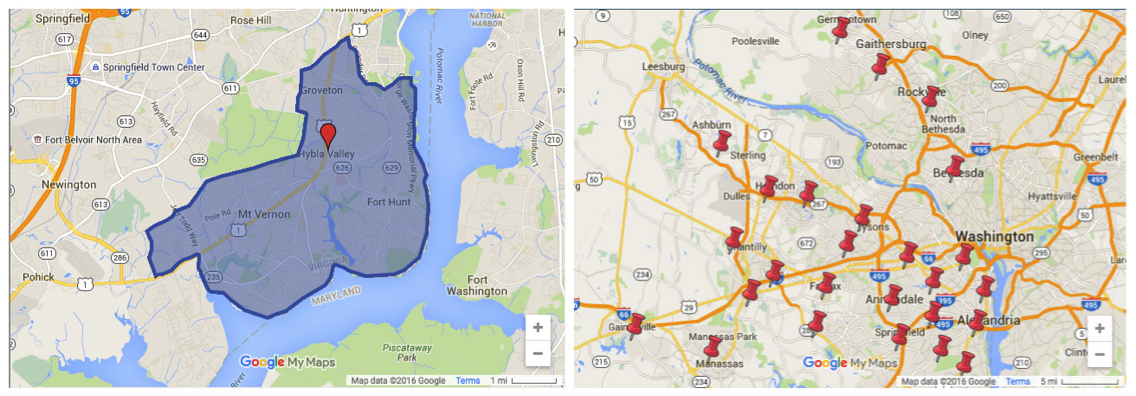
    2. MyMap – A MyMap is a custom map that outlines the specific areas your business serves. It implements a visual on your website for a better user experience. You can create a standard one, shown below on the right, or even customize your MyMap, like the one shown on the left.SAB Search Results
    3. Categorical Directories – When you submit your business to a directory, you are receiving an authoritative link back to your site, which provides referral traffic and in turn strengthens your site authority in the eyes of Google. (The saying “You are judged by the company you keep” is a common expression that is helpful in understanding link building from authoritative sites.) While directories can advance your SEO goals, be sure to submit your business to a categorical directory instead of a local directory. Unlike a local directory that is organized by a business’s NAP, a categorical directory is organized by industry.
    4. Get5Stars – Reviews are a great way to reinforce that your business services multiple areas. Get5Stars is a tool that allows for customers to leave reviews on your website. In turn, you can review the client feedback before publishing it live on your website.
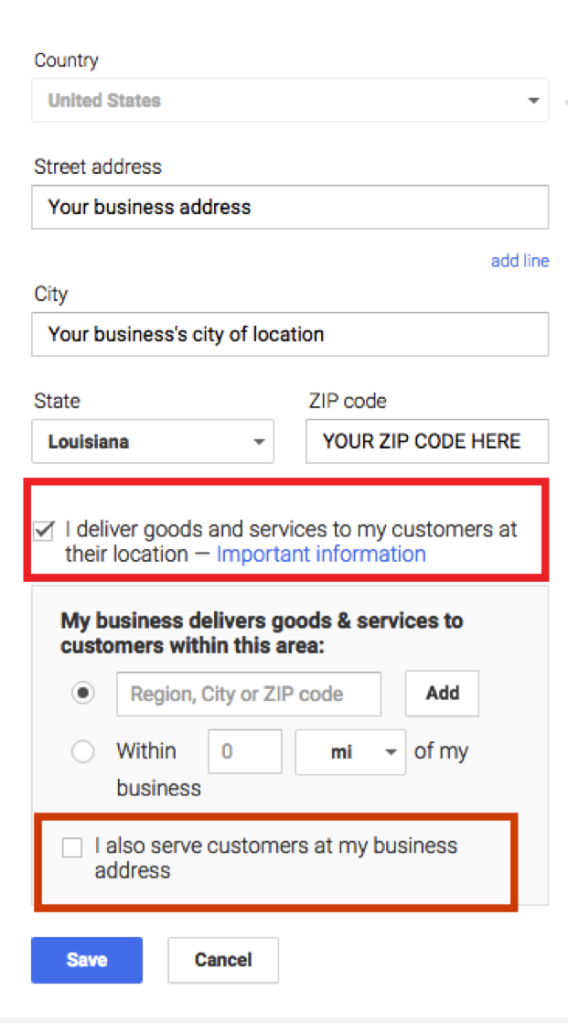
    5. Optimize your Google+ correctly – When you are setting up your Google+ page, be sure to select the box that says “I deliver goods and services to my customers at their location.”

    Google My Business Screenshot

    Follow this up by filling out the ZIP codes you service. If you are a SAB that also accepts customers at your storefront, you can check off the second box. Optimizing your Google+ page correctly will hide your physical location from the viewer while also increasing your page’s authority on the maps pack for the areas you serve.

    Words for the Wise

    When optimizing your SAB online, avoid from these common mistakes:

    1. Advertising your P.O. Box address as a physical location
    2. Portraying an existing business as your own
    3. Using a virtual office address
    4. Creating identical targeted area pages (also called “Find and Replace” pages where the content is exactly the same but only the geo modifiers are different)

    Still have questions? Watch our recent webinar for more information and tips.

    Ice Cream Truck Image Credit

  • The Rise of the Silver Surfers: Engaging Older Americans Online

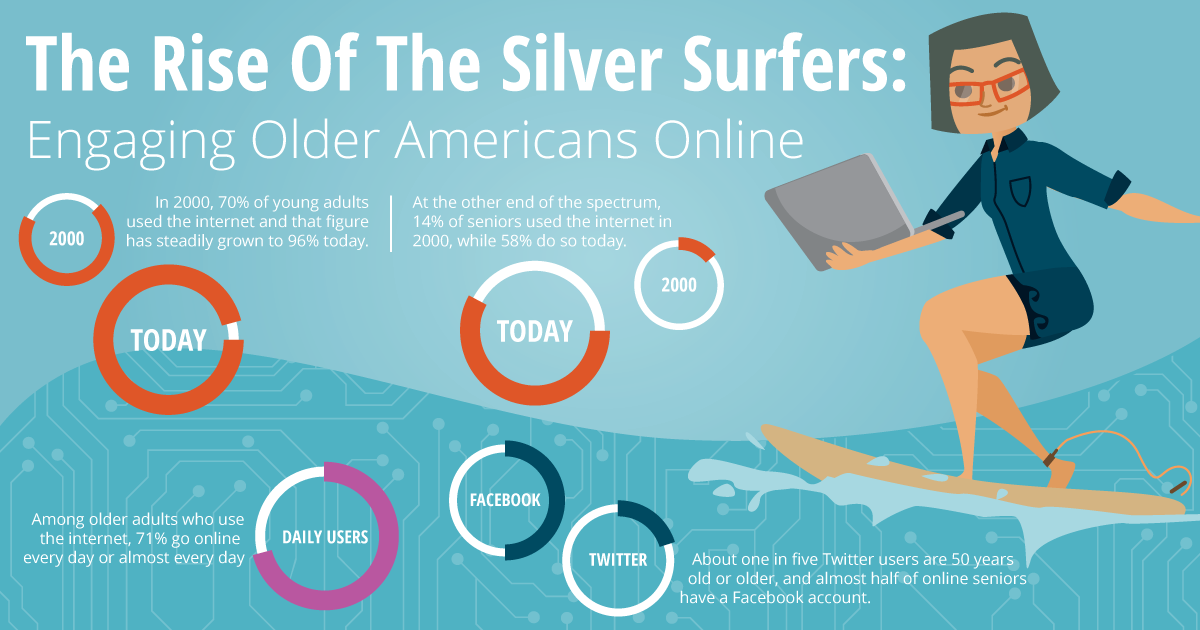
    Mini Infographic Silver Surfers Older Americans Month - Search Influence

    In honor of Older American’s Month, let’s take a look at the latest trends and talk about engaging this audience!

    “So, who exactly is considered an older American?” you might ask yourself. Well, based on the Older Americans Act of 1965, you could say anyone over 60, basically Baby Boomers and older. These are the people who were working in businesses and actively using technologies like PalmPilots and beepers/pagers during the early stages of the rapid technology growth in the 20th and 21st centuries. You may have also previously heard the term “silver surfer” used to refer to anyone over the age of 50 who is an avid internet user.

    According to 97 surveys conducted by Pew Research over the past 15 years (2000-2015), internet usage gaps between older and younger Americans still persist, though they’re lessening. Now about six in ten seniors go online. While adults 65 and older rank the lowest in internet usage between age groups, the number of older Americans online has grown in the past 15 years and will continue to grow in the coming years.

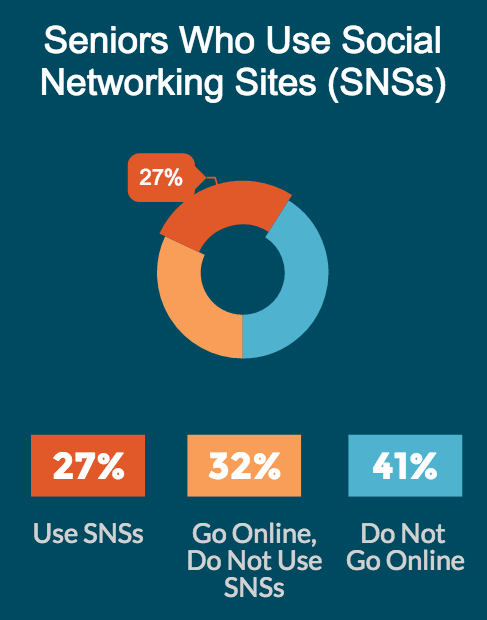
    Another report from Pew Research digs deeper into technology usage trends by analyzing seniors within their age group. Among the older Americans who currently go online, about three-quarters of them go online every day. Just over a quarter of seniors use online social networks.

    The Stat:

    “Older adults have lagged behind younger adults in their adoption, but now a clear majority (58%) of senior citizens use the internet.” — Pew Research Center

    What It Means for Marketers:

    While the previous usage numbers and perceptions would’ve indicated to online marketers that the older age groups aren’t very active online, that is definitely no longer the case. As of 2012, more than half of the senior population is online, and you can bet that number will continue to grow. The silver surfers are now an important and very present audience to consider when marketing online.

    The Stat:

    Seniors have the largest adoption rate change from 2000 to 2015 of any age group (14% to 58% respectively). — Pew Research Center

    What It Means for Marketers:

    This rapid increase in adoption rates shows an increase in technological intelligence among this age group. The previous parallels between chronological age and cognitive age are shifting and advertisers would do well to adjust accordingly. While practicing “ageless” marketing is all well and good, when trying to target this specific audience, be authentic and thoughtful of “the new 65,” a more-tech savvy and a now younger cognitive age group.

    The Stat:

    77% of older adults have a cell phone, but just 18% are smartphone owners. — Pew Research Center

    What It Means for Marketers:

    As many of you reading this know, mobile marketing is quite the focus of today. While a little less than a quarter of older adults have smartphones, over a quarter own tablets or e-book readers. This means that mobile searching and browsing is highly likely for this audience. Consider your potential to reach these seniors when optimizing your website and its content.

    Seniors Older Americans Online Using Social Networking Sites - Search Influence

    The Stat:

    “Today 46% of online seniors (representing 27% of the total older adult population) use social networking sites such as Facebook.” — Pew Research Center

    What It Means for Marketers:

    These silver surfers aren’t just surfing the web; they’re socializing, too! About one in five Twitter users are 50 years old or older, and almost half of online seniors have a Facebook account. Engage with the older American audience to help grow your brand online.

    Biggest Takeaway:

    When you think older Americans, you shouldn’t think, “my grandma who makes me fix her Wi-Fi router and doesn’t understand smartphones.” Instead, think of the generations before you who were in their prime for the technological boom that gave us the first cellphones, computers, and video games. These generations were the first to experience technology and were fortunate enough to grow and adapt with it. So, in reality, they’re part of your market and audience whether or not you realize it. The silver surfers are here and growing, so don’t discount them when you’re planning your marketing campaigns!

    All data and stats came from the following sources:
    http://www.pewinternet.org/2014/04/03/older-adults-and-technology-use/
    http://www.pewinternet.org/2015/06/26/americans-internet-access-2000-2015/
    http://blogs.forrester.com/gina_sverdlov/12-06-08-the_data_digest_digital_seniors

  • Oh No! Where Did Medical Schema Go?

    Schema 3.0 Explained

    While working on implementing some schema markup for a medical clinic last week, I went to schema.org to see my available property choices, but when I went to the same page I’ve visited a hundred times before, https://schema.org/MedicalClinic, instead of the list of properties and their definitions I was expecting, I got this perplexing message:

    Medical Schema Change

    After doing a little poking around on schema.org, I noticed their release notes mentioned the implementation of a new version of schema, Schema 3.0.

    What does that mean for those of us who use schema on our websites? Well, not too much for most industries. Some new schema properties have been added here and there. You can see the release notes for a full list of schema updates. However, if you manage a medical industry website, then you should be aware of a fairly significant change. Schema has re-organized their site and created a new “extension” for Medical schemas. Medical schemas like “MedicalClinic,” “MedicalProcedure,” “Physician,” and even “Dentist” have been migrated to a new subdomain, https://health-lifesci.schema.org/. Most but not all pages on schema.org that used to contain properties available for medical schema types now show the same core vocabulary message. Some pages, like https://schema.org/Physician, still display their property types. ​There are new pages on the health-lifesci subdomain for medical schema types, so we can still mark up these schema types using the new URLs for these pages:

    Currently, Google has not followed suit—their structured data testing tool has not been updated. If you replace https://www.schema.org/MedicalProcedure with https://health-lifesci.schema.org/MedicalProcedure, Google doesn’t throw up an error; it just completely ignores the schema. This update raises some pretty big questions. Will Google update their schema validation, and will the old schema URLs be deprecated and invalid?

    Another variable that makes updating your schema iffy is the information on the new schema extension page, “The terms defined in this extension may be considered moderately stable, but some changes are still likely (including renaming and restructuring) through ongoing community collaboration.” I also think that this may indicate that the restructuring may not be limited to just these schema types, and schema.org may start creating more extensions for specific schemas, rather than including them in the core schema language.

    Right now all we can do is watch and wait. So long as Google is only validating the old schema URLs, we recommend continuing to use those, but stay on the lookout for some big changes yet to come.

    Edited on 5-16-2016 at 3:24 pm:

    “As of this afternoon, Google has already made updates to their validation tool so the new health-lifesci extension will now validate. The old URL for these schema types continues to work as well and does not produce a warning or error. Hopefully this is a sign that those of us with medical schema already implemented on our sites will not have to update the schema to the new format any time soon. Kudos to Google for the swift update.” 

    Feature image credit.

  • Google My Business for Doctors: Visibility, Authority, & SEO

    One of the first steps in improving your searchability with Google is to claim or create a Google My Business listing. With Google My Business, you can manage your information in Google Maps and Google Plus. Since My Business is owned by Google itself, the links gained from these profiles are highly valuable and authoritative.

    However, if you’ve ever tried to claim your Google My Business listing, you may have seen how complex it can be, especially for businesses like medical practices. You may have had questions like: “How do I represent multiple locations for my practice” or “What if I want patients to be able to find their doctors in addition to my practice?” Well, today we’ll go through how to establish your Google My Business presence with exactly those questions in mind, and more!

    1603-SI-KierstensBlog-KG-A-01

    First, let’s dive a little deeper into the world of Google My Business. Google My Business is essentially the dashboard in which you can maintain your information with Google directly. This means that by creating a listing in Google My Business, you’re also creating a Google Plus page and, if establishing a local presence, a Google Maps listing as well. By doing so, you’re telling and verifying with Google, “Hey, I’m a real business, and here’s my real information!” By maintaining that information and posting to your Plus page, you’re proving to Google that you’re the authority on your business and that your business is a valuable resource for users to find.

    Sounds great, right? Who doesn’t want an in with Google? For many businesses, this can be as simple as claiming and verifying a single business listing. But for medical practices, it can get pretty complicated.

    Claiming Your Google My Business Local Listing(s)

    To begin, claim and verify your practice’s primary local business listing. If you are a multi-location business, go ahead and claim the local listings for each of your addresses. Each local listing will need to be verified by either phone or postcard, and no edits can be made until then. Once that’s done, check out these tips and guidelines for building your practice’s Google My Business presence:

    1603-SI-KierstensBlog-KG-B-01

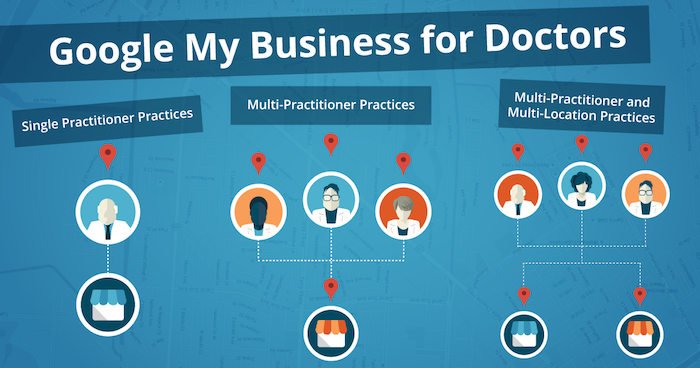
    1. Single Practitioner Practices
      For practices with just one public-facing doctor, you’ll need to decide whether or not to use that doctor’s name instead of the business name. This is wholly a personal decision, but do not create Google My Business pages for both.
    2. Multi-Practitioner Practices
      For practices with multiple public-facing doctors, it is acceptable to create local pages for each doctor, in addition to the practice’s local page. If this is the case, do not include your business name in the name of the practitioners’ pages. And try to differentiate between these pages with either a different phone number or suite number for each doctor, when possible.
    3. Multi-Practitioner and Multi-Location Practices
      For doctors who work at multiple locations, it is acceptable to create separate local pages for each doctor for each location, according to Google’s guidelines. However, it’s even more important that you’re able to differentiate between these pages with separate phone numbers and/or suite numbers. The practical likelihood that Google will flag these as duplicates is higher so proceed with caution! If your goal is to make sure clients can find their doctor’s contact information for each of their locations, then this is a solid practice. Otherwise, if you’re trying to get all of your doctor’s to rank for general searches you’ll need to do more than just add them to Google My Business.

    Brand Pages

    As mentioned before, Google My Business is two pronged; it lets you manage both your local presence via Google Maps and your social presence via Google Plus. If you’re a multi-location practice, consider creating a Google Plus Brand page in addition to your local pages to consolidate your social presence. Brand pages are not linked to Google Maps in any way. Instead, they are purely social platforms for you to manage…you guessed it, your brand! So rather than doing so on each of your local pages, you can post to your one Brand page and gather the same clout with Google.

    That wasn’t so bad, right? Remember to keep these pages updated and treat your primary Google Plus page as a social media profile, like Facebook or Twitter. By doing so, Google will be able to better recognize you as a trustworthy and authoritative source.

    Now that all your pages are claimed, verified, and updated, you’re one step closer to a solid SEO presence!

  • 10 SEO Best Practices To Resuscitate Your Medical Practice’s Website

    Your 2017 Website Checklist Image - Search Influence

    What exactly is SEO, and why should your medical practice be applying it to your website? SEO, or search engine optimization, is a means for building a successful website. It is an on-going strategy for increasing your site’s visibility in the search engine results and helping prospective patients find you and the services and treatments you provide. A well-rounded SEO campaign employs both on-site and off-site work to gain new patients, excel in search engine rankings, and bring in high-quality traffic to your site. The focus of this post is specifically on-site optimizations, which are part and parcel to a successful Healthcare SEO campaign.

    With Google, Yelp, and Bing taking nearly 90% of the market share, your ranking in those search results is essential to the online success of your medical practice. In this post, I give an overview of the 10 SEO tactics that are crucial for not only building a strong and healthy website, but also growing your client base.

    1. Title Tags and Meta Data

    Title tags and meta data are implemented on the backend of your website. They are short and informative, acting as the title of a page of content on your site. Title tags are read by search engine bots as well as users. These title tags are visible at the top of a browser window and appear in search results as a bold blue link title. An optimized title tag includes branding information, your location, and what that specific page of content is about. This allows both search engines and potential patients to know who you are, where you are, and what services you can provide for them.

    There are four types of meta data: meta keywords, meta language, meta robots, and meta description. Most effort is applied to meta descriptions (or meta tags), which act as a summary or description of that page of content. In search results, this information appears in two lines of gray text under the title tag. Every page of your site should have a unique meta description. It is best practice to remain in Google’s 160-character limit while including information on what that page is about as well as a call to action. You want your patients to know not only that you offer tummy tucks, but also that they can easily learn more about the procedure on your website!

    Here’s an example of an optimized title tag and meta description:

    Optimized Meta Data

    2. Call to Action

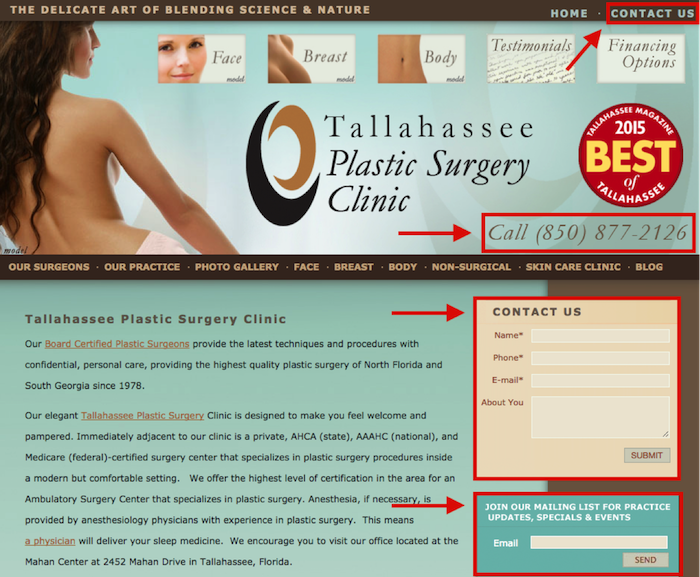
    Your website should have a clear and bold call to action as soon as a patient arrives on your site. What do you want existing and prospective patients to do once they have found your site online? Do you want them to call for an appointment, or do you have online scheduling? Do you offer a weekly newsletter with tips for healthy habits, or maybe an email list with monthly specials on cosmetic procedures? Make sure your site tells patients what the next step is in learning more about your business or coming in for appointment.

    Here’s an example of a call to action and two types of forms:
    Optimized Forms

    3. No Broken Links

    Just one broken link can gravely impact your ranking in the search engine results, create a poor user experience, and result in the loss of a customer. If a potential patient clicks on something in their search results and it 404s, they may never return to your site. 404s can be caused by the removal of content (PDF documents, videos, etc.), external links that are changed or moved, and the renaming or moving of pages within your own site. When possible, fix the problem at the source (update internal links on your site to reflect new URLs). You can also redirect any old URLs that have moved to a new URL. Careful: too many redirects can slow down the speed of your site. And remember, some pages are meant to 404, such as files that are not images or pages, or files that a normal site visitor should not have access to, such as an admin or login area.

    4. Topics and Keywords

    Topics are the more general themes assigned to pages on your site. Keywords are those phrases in your content that help people find your website through search engines. The pages of content on your site should include topics and keywords with the services that your practice offers. Keep in mind that these need to be terms that your patients would type into search engines. For example, there are on average over 40,000 monthly searches for “rhinoplasty,” but you don’t want to miss out on those 12,500 monthly users who are searching for “nose job.”

    The topics and keywords you choose for each individual page of your site should appear in the title tags, meta descriptions, on-page headings, alt tags of images, and on-site content. I will go more into content later, but keep in mind that you should be including one keyword for every 100 words appearing on the page. Google rewards those sites full of unique and fresh content.
    Google will reward you if all on-site content is unique and high quality.

    5. Mobile Friendly

    Your site must be mobile friendly! According to a study by Mobile Behavior Report, 27% of users will leave your site if it’s not optimized for mobile use. That’s a lot of business to miss out on! Many patients are calling for information or scheduling appointments on the go. You want to make sure they can easily access your site from their smartphone, and Google can help you with that! They offer a free tool to check how mobile-friendly your website is.

    6. Quick to Load

    If your site is slow, patients are likely to leave and visit another site in hopes of finding the information they are looking for. You want to create the best user experience by presenting an easily accessible and speedy site! Again, Google is here to save the day with their PageSpeed Insights tool. This tool measures both your desktop and mobile speed, gives it a score ranging from 0 to 100, and makes recommendations on how you can make your site speedier.

    7. Schema

    Schema is a piece of code that is placed on your site to help search engines provide richer and more informative results for your patients. It’s a way of “labeling” important information on pages of your site so that search engines can better read it and produce better search results for users. There are many types of schema that can be applied to your site. For a medical practice, one the most effective types of markup is ratings/reviews schema.

    8. Content

    Implementing optimized content on your site is one of the most important aspects of an SEO campaign. This is the actual text on your site where you describe your practice and the individual services that you offer. Google rewards sites with original, high-quality content. It needs to be unique to your site, natural, and fresh! A list of the services your practice provides may seem sufficient, but your site is an opportunity to show your new and existing patients that you are a knowledgeable expert in your field. Don’t just list that you provide rhinoplasty and breast augmentation; demonstrate that you are well versed in these procedures and their recovery process. Make your patients feel at ease and increase their confidence in choosing you as their physician.

    Unique and fresh content also reinforces your site authority with Google bots. New content implemented on your site brings those bots back to crawl the information on your site. Content should typically be about 500 words per page, but as the medical field is more technical, twice that length is usually appropriate. Use content as a means to stand out to patients and search engines as an authoritative and relevant source in your field!

    9. Blog

    Blogs are another way to place rich content on your site! Like on-site content, they boost your site’s authority, but they also allow you to relate to your patients. Regularly posting on your blog engages readers with valuable and useable information. Your website may have a page on melanoma, but a blog post on skin tips for summer is a friendlier way to attract patients to your site. Here are some helpful tips on choosing the length of your blog posts.

    10. Google Analytics

    Last but certainly not least on the list of must-haves for your website in 2016 is Google Analytics! With all of the items above, you’ll want to track the progress of your newly optimized site. With greater insight comes greater control. Google Analytics allows you to analyze your traffic data to better understand your audience. It also helps you understand which of your marketing strategies are working best for your practice. If you can hone in on your audience and which tools are most effective in reaching them, you can lower your marketing costs and bring in more business!

    These 10 best practices are an inexpensive way to boost awareness of your practice and bring in new, revenue-generating patients. With a little strategy and effort, you can have a comprehensive SEO campaign that brings your practice’s website up to speed!

    Image Credit:

    Nurse Phoebe Image

  • Bloggin’ Like “The” Boss: Think Like Bruce Springsteen to Boost Your SEO

    Keeping up with the ever-evolving world of SEO can be overwhelming. Blogging has been considered a beneficial marketing tool since the late 1990s and continues to be an excellent way to keep your business’s SEO relevant and reliable. However, just because blogging has been around for some time does not mean that it is a simple task. There are questions that arise when blogging, especially if it’s your first attempt. Why should I blog? How do I choose a topic to blog about? Well, in this blog…about blogging, Bruce Springsteen and I offer a few tips and tricks to ensure that you start Bloggin’ Like a (The) Boss.

    1603-SI-Newsletter-0331-KG-A-02

    Why Should You Blog? You’re About to Be “Blinded by the Light.”

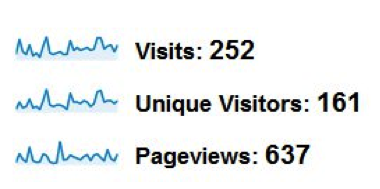
    There are a few reasons why blogging is so beneficial for a business, but one of the most important is that it helps to drive traffic to your website. Here is a screenshot of a business’s analytics the month prior to creating and launching their blog:

    Before Graph 1

    Before Numbers 1

    Here is a screenshot of a business’s analytics for the month after they created and launched their blog:

    After Graph 1

    After Numbers 1

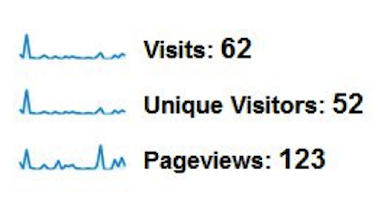
    As you can see, the visits, unique visitors, and pageviews vastly increased the month after the blog went live.

    In short, the more relevant, optimized content you put onto the Internet about your business, the knowledge that you have, or even the services that your company provides, the more opportunities you create for a user to discover your business, its products, and its website. They can also create a direct link back to your website.

    Blogs are an excellent way to help establish your website’s authority. As Google continues to advance and get smarter, so do the ways in which it determines what information is important, natural, and helpful to the user. Consistently creating new and useful content around aspects relating to your business does exactly that.

    Blogs can help to position your business as a leader in your industry. By crafting blog topics and content around current happenings in your industry, you can showcase your knowledge and expertise within your market.

    How to Choose a Topic That Will Make Your Blog Rankings “Born to Run”

    With endless options, choosing a topic can be overwhelming. Start with a category. Although categories are broad, you are creating an overall idea and theme that can easily be narrowed into a specific topic. The category should be one that you are interested in and knowledgeable about.

    Take steps toward narrowing your category. Look at your category as a whole, and then choose the aspects within this area that you know the most about and that you think will be the most helpful and interesting to your readers. For example, if Bruce Springsteen happened to be the broad category that you chose, you could break it down with the following subjects: world tours, autobiography, and best-selling albums. Without even realizing it, you have created potential blog topics. Now all you have to do is choose your topic from the list you created for yourself!

    You will need to elaborate on the topic that you have chosen. Create a list by obtaining facts and details, and develop a list of questions that your blog should answer about your topic. Then make an outline to help structure your blog, incorporate all of the necessary facts and details, and make sure it answers all of the potential questions the reader may have. Once your outline is complete, you are ready to start “Bloggin’ Like a (The) Boss!”

    The digital marketing industry is composed of numerous beneficial and effective ways to better your business and its online presence. Because of this, it can be difficult to choose which strategies to move forward with. Blogging, like Bruce Springsteen, has proved its value for decades and continues to prove its importance in today’s ever-changing world.

    Image Credits:

    America Bruce Springsteen GIF
    Bruce Springsteen Thumbs Up GIF
    Bruce Springsteen Dancing GIF

  • YUUUGE Link-building Opportunities for 2016 and Beyond

    In the SEO world, we say, “a link is like a vote.” The idea being the more links you have, the better. There was a magical time when it didn’t matter where the links came from or how many links came from one source. In a sense, all votes were created equal, and they were all beneficial.

    In recent years since the rollout of Google Penguin, that theory doesn’t really stand up anymore. Today, links are still like votes, but they’re similar to votes in a presidential election. Think of the electoral college, celebrity endorsements, and loyal campaign supporters.

    1603-SI-Newsletter-0331-KG-C-02

    Your Website Is a Presidential Candidate

    Every day, you and your competitors are trying to win the race for #1 on Google. A great way to do this is to build a diverse backlink profile. Every time another website links to you from their site, it’s basically an endorsement from them that tells Google, “Hey, I know this guy—he’s my friend. You like me! You should like him too!”

    Win the Electoral College, Not the Majority

    While it’s great to get links from as many sites as possible, it is important to know that links from some sites are better than links from others. For example, it’s better to get all the votes from Ohio and California than from Puerto Rico and Alaska. The same is true for the links you get from other sites. The more authority, trust, and clout a site has, the better links from that site will help transfer that authority to your site.

    A diverse link profile is important as well. This means in order to boost your site authority, you can’t only get links from sites like California and Ohio. It is important to put in the work and get links from sites like Texas, Florida, and New York, too.

    24643522420_30e914a00f_k

    How Do I Do This?

    First, you need to be able to identify what sites are and are not authoritative. For example, websites that end in .org or .edu are golden. These are your Ohio! You want links back to your site from sites like these.

    Second, you need to find ways to obtain links from these sites. Does your business sponsor or support any local community groups? If so, ask them to add your business as a sponsor on their website and include a link back to your site. You can do the same for any local charities your business supports too! Think of these links like an endorsement from a well-liked, non-controversial celebrity. Has your business been featured in the news recently? If so, reach out to them and ask for a link back! These are great links, and these endorsements will help you win that first-place spot in the search engine results.

    Third, don’t forget about basic guaranteed links. These links are like loyal supporters on the campaign trails and will help you get the top spot in the search engine results. This includes links from directory sites like yellowpages.com or niche directory sites specific to your industry like locateadoc.com. The more links from different sites, the better. One link from one site might not earn you the victory like a celebrity endorsement, but a lot of these from a lot of different sites really add up.

    Lastly, avoid links from sites that can harm your site. Just like a bad endorsement from a hate group or controversial celebrity can harm your chances of winning the top spot, so can links from spammy, irrelevant sites. Ask yourself these questions: “Is this relevant to my business? Does it make sense to have my business listed on this website?” If the answer is no, don’t do it. For example, if you don’t sell designer purses or male enhancement pills, don’t let them link to your site.

    24120120029_54ebe1d8ba_k

    You Can’t Buy Votes, and You Can’t Buy Links!

    If you’re offered a too-good-to-be-true offer like 10,000 links for $1,000, or whatever bogus links are going for these days, don’t do it! I repeat, don’t do it! Just like true votes can be hard to win in an election, so can natural backlinks to your site. It takes time to build a diverse backlink profile, but the reward is much greater than getting caught link farming by Google. Just like a shady politician, once your dirty dealing is found out, you’ll get slammed with a manual action, you may never be able to fully regain trust, and you’ll officially lose out on the #1 position.

    When in doubt, trust the reputable experts to guide your business. Just as an experienced campaign manager can take a presidential candidate to win, an experienced SEO company can guide your business to the #1 position in the search engine results. It will be YUUUUGGEE!

    Image Credits:
    Google Logo Image
    Hillary Clinton Image
    Donald Trump Image

  • A Review Of CODE: Debugging The Gender Gap

    Mary Silva Grace Hopper Code Gender Gap Featured Image

    I recently had the opportunity to attend a viewing of the documentary CODE: Debugging the Gender Gap. From their site, “CODE documentary exposes the dearth of American female and minority software engineers and explores the reasons for this gender gap.”

    In the early days of programming, women dominated the field. Building physical machines was the hard work for men, and programming was seen as the more trivial work for women.

    Women Programmers In History

    As far back as the 1800s, we saw women dominating in computer sciences. I recently learned of Ada Lovelace from one of our web developers, Mattie Kenny. Ada Lovelace was a mathematician and writer who wrote the first algorithm to be read by Charles Babbage’s computer, the Analytical Engine.

    In the first few decades of programming growth, we saw more and more women joining the computing field. Grace Hopper is a great example of women who paved the way early on in this field. She was a Navy admiral who invented the first compiler (a program that transforms source code into another computer language) for a computer programming language in the 1940s. By the mid-1980s, women made up more than 35% of computer science majors, which has consistently fallen over the past 25 years to the now 15%.

    Grace Hopper Portrait Code Press - Search Influence

    So what caused such a drastic decline in the number of female computer science majors? This is exactly the question that CODE: Debugging the Gender Gap hopes to explore.

    The film alludes to the introduction of the brilliant male hacker trope in 80s movies and pop culture being partly to blame. That, along with the targeting of video games to boys, started to really make the computer science field a “man’s world.”

    Even in games like Metroid, which was released in 1987, we found ourselves with our first female main character in video games, but she was only acknowledged as female when seen as a “reward” in the game. While in the mysterious head-to-toe power suit, the protagonist is referred to with male pronouns. The only time the character is seen as a woman is when the player finishes the game in under five hours and unlocks her as a reward.

    Metroid Manual Game Description Scan - Search Influence

    Women In Tech Now

    Moments in history like those referenced above, which could have provided an exciting role for females interested in computer sciences, instead failed by objectifying women rather than empowering them. The results of these events and how the gender gap in this field has grown are exemplified in CODE, which shows us the unwelcoming workplaces commonly found filled with “brogrammers” these days. “A lot of women call it death by a thousand cuts, or microaggressions,” Director / Producer Robin Hauser Reynolds says. “It’s going to work every day and (having) to prove over and over, beyond what a man has to do, that you belong in that place.” The primary tension that this film portrays is that women with an interest in programming face a lot of roadblocks and challenges if they hope to make it in the field. It can be alienating to work in a field surrounded by those who continually make efforts to keep you from succeeding.

    Where CODE succeeded, however, was in showing successful women like Yelp’s software engineer Jen Wang and Pinterest’s software engineer Tracy Chou. These women are powerful, positive role models who love their jobs and clearly believe that having more powerful women in leadership roles in computer science fields can help make the opportunities more approachable and increase the number of women drawn towards these fields.

    While the beginning of the film covers the negative results of previous events (the decline of women studying computer science and the hostility towards females in the tech workplace), the second half of the film provides a light at the end of the tunnel so to speak. Providing positive role models in STEM fields as well as opportunities to learn programming at a young age could surely do some good in reducing the gender gap in technology fields. Also, shedding light on positive workplaces in the tech field that employ a large number of women is a great way to open up the barriers to entry for women.

    Personal Takeaways

    Something I recently said in an interview for another blog post of ours is that it takes just one instance of a young girl seeing a woman in a STEM role to think to themselves, “Hey, I could do that, too.” I hope, by continuing to be a knowledge resource in the industry through blog posts like this on code-focused industry best practices and changes, that I can help positively influence views around women in tech. I am so honored to have had my hard work at Search Influence recognized through continued career growth, and I can only hope that companies like ours that support women in tech continue to pop up around the United States.

    Image Sources:
    Grace Hopper Portrait
    Metroid Game Insert Scan

  • Manage Tags Like a Sys Admin: 5 Ways Google Tag Manager Will Change Your Life

    1603-SI-Newsletter-0331-KG-D-02

    Where would we be without Google? It seems like for every issue that comes up in the field of online marketing, Google is ready with a solution. Google Tag Manager is one such solution. But before we examine the benefits of using this savvy tool, let’s first clarify what a tag is.

    What Is a Tag?

    Simply put, a tag is a snippet of website code that tracks visitors on a website. It allows companies to collect data for affiliate marketing, retargeting, conversion tracking, personalization, and a plethora of other cool marketing techniques.

    What Is Google Tag Manager?

    Back in 2012, Google saw online marketing tools growing more and more sophisticated. But as their sophistication evolved, the need for tags increased to make these tools effective. Though tags provide online marketers with beneficial information, tags can also overburden your website and become too confusing to manage.

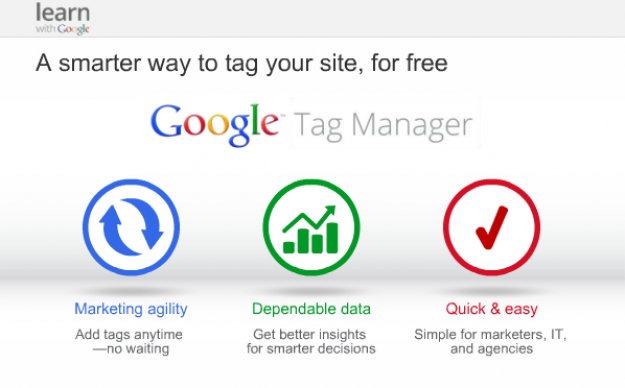
    So Google developed Google Tag Manager, a tool that allows online marketers to consolidate all their tags into a single strand of code and gives them the ability to manage their tags through a user-friendly web interface.

    Now that we know what a tag and Google Tag Manager are, why should you use Google’s tool?

    14741920698_c97a07563f_o

    1. Faster Website Load Times

    Too many tags on your website can slow it to a halt. This has a negative impact on your Google ranking because load times are one of the parameters Google takes into account. With Google Tag Manager, you are allowed to specify when you want a tag to be triggered, which means not all your tags will load at the same time. This increases your website’s performance speed, which makes both your users and Google happy.

    2. Easy-to-Use Tag Template

    With Google Tag Manager, it’s no longer necessary to call up the IT guy every time you need to add a tag to your web interface. Tag Manager eliminates the need to add the code snippet to your website’s source code by introducing an easy-to-use template. This template allows users to quickly add tags for AdWords conversion tracking, Google analytics, GDN remarketing, and more. Tag Manager also supports custom tags.

    3. Error Prevention

    In the world of online marketing, there’s nothing worse than trying to add a feature to your website and causing the website to crash instead. Google Tag Manager prevents this by giving users a preview mode, a debug tool, and access to the version history. These tools show users how proposed changes will affect their sites before the changes go live.

    4. Customizable Permissions

    Another way Google Tag Manager adds to efficiency is by allowing the account admin to delegate access to the tool amongst a variety of users. This means that more than one person can add tags to your website. This feature is essential for projects that involve a lot of collaboration, since you no longer have to worry about giving a third party complete access to your website so they can update your source code. You can give or limit access to the main account as much as you want.

    5. Reduced Costs

    Of course, the best part about being able to manage your tags and increasing your efficiency is the amount of money you save by doing so. Google Tag Manager is a free tool, and by using the wealth of resources at your disposal to learn how it works, you’ll be able to add and customize your tags like a system administrator in no time. Instead of messing around with your source code and picking up the shambles when it all falls apart, you’ll be able to work on what draws people best to your website: creating fantastic and informative content.

    Do you currently use Google Tag Manager? Let us know how it’s working for your website.