Tag: Google

  • 3 Reasons Why Your Business Should be Active on G+

    Google Plus LogoSome may know Google Plus as a weak attempt by Google to compete with Facebook. However, it can be used for much more than just engaging with your target audience. Google’s social media platform can also help your SEO efforts while providing quality content and information to followers.

    Here are three reasons why your business needs to be active on G+:

    1. Google+ Posts are Crawlable

    Unlike other social media platforms, all Google+ posts are crawlable by the search engines. Your business’ Twitter or Facebook profile may show up for your brand name search, but specific posts and updates are not indexed. All Google+ posts are indexed in minutes, and some even say seconds.

    You can use your G+ posted content to target specific keywords. Each post has its own url, and the first 45-50 words in the post become the title tag. Links within Google+ posts are followed links. As you post content linking back to your website and that content is shared, the authority of your Google+ page and website are growing.

    2. Boost CTR with Google Authorship

    Screen Shot 2014-02-03 at 4.05.26 PM

    According to Google, authorship has no impact on the SERPs. However, Google Authorship can help you get more traffic to your website, which is why we are all trying to rank on page 1 to begin with, right?

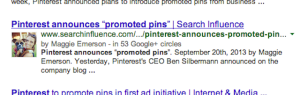
    By associating a G+ profile with pages on you wrote on your website, the profile photo of your G+ shows up with those pages in the search results. The image in the search results sets your site apart from the others and makes it more eye catching. Authorship increases the likelihood a searcher will click your site in the search result. And although authorship does not have a direct correlation with rankings now, we anticipate it will in the near future. And for now, using it for more traffic to your site is enough incentive to get on board.

    3. Potential Increase in Rankings

    The number of +1’s your G+ business page gets has been shown to correlate with top rankings in the SERPs. Moz did a correlation study to determine what aspects of a website show a strong connection to high Google rankings. The number of +1’s came in second only to page authority, with number of linking domains and Facebook shares, likes, and comments as the next most influential. Searchmetrics also did a similar study that found the number of +1’s to be the most highly correlated factor with top Google rankings.

    Yet, Matt Cutts is very adamant that the number of +1’s for a Google business page “has no direct impact on their web search ranking algorithm” and “correlation does not equal causation.” Although this may be true, a business can no longer ignore Google+ and its added SEO value.

    As a social platform, G+ is equally as important as Facebook. And Google+ goes far beyond social reach, it provides a great opportunity to boost your SEO efforts. So go ahead and get active on G+, the benefits are only continuing to grow!

  • The New Google+ and How To Avoid Getting Your Business Account Suspended

    As you all probably know by now, every Google account now has a personal Google+ profile associated with it. A common practice in SEO and setting up a Google Local listing in the past has been to create a Gmail account specifically for business purposes. This generally included using a business name as a First and Last name in the Google account setup. For example, if I owned “Delicious Cupcakes Shop,” the Google account name would be Delicious (First) Cupcakes (Last), not Mary Silva.

    What Changed?

    Now we’ve learned, however, that with the new Google+ profiles being created for accounts, having a non-human name as your profile is grounds for having your account suspended and your Google services revoked. This includes having your account associated business page removed from search results. If your profile goes more than 60 days under suspension, Google will start to automatically remove your content from their system. Learn more about “Google+ Profile Suspensions” here!

    Also, regardless of the Google suspension penalty, having a page with your business name that would now be a public profile would possibly lead to confusion and appear as a sort of duplicate business page. So cleaning up your account name is definitely an essential move to make now.

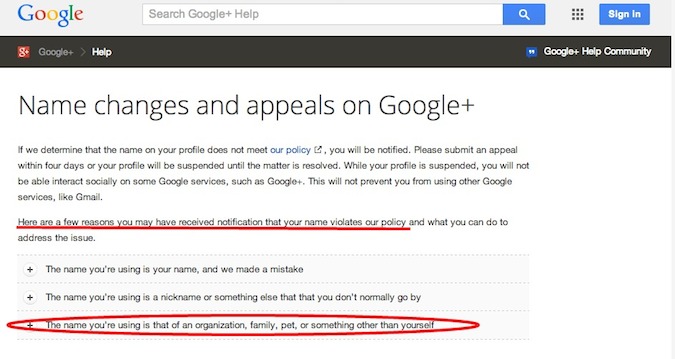
    Even Google has acknowledged that having what they consider an “improper name” will happen, and offer explanation on what happened. They’re clearly aware of the fact that many accounts may have been set up with something other than a person’s name.

    Name changes and appeals on Google+ - Google+ Help

    What Now?

    If you’re like many other business account managers who have set up an account using your business name as the account name, you might ask, “What’s the next step in getting this cleaned up?” Well, it’s actually quite simple! All you have to do is follow the next few steps:

    Step 1: Log in to Google at plus.google.com

    Step 2: There are 3 circumstances you might encounter after login:

    2a: If your account is being accessed for the first time since the Google update that created Plus pages for each account, you will see a form where you will set up the Plus page for your account for the first time. Update the “First” and “Last” name fields with whatever human name you desire.

    2b: If your account has already been set up through Google+, then you’ll have to check that the name of the account is a human name and not the business name. Here’s how!

    • In the top right corner of your homepage, hover over the user photo and then click “view profile”
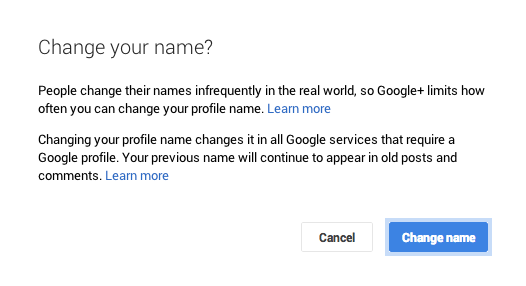
    • Next, hover over the name and you’ll see that you can “click here to change name”. Update the “First” and “Last”name fields with whatever human name you desire.

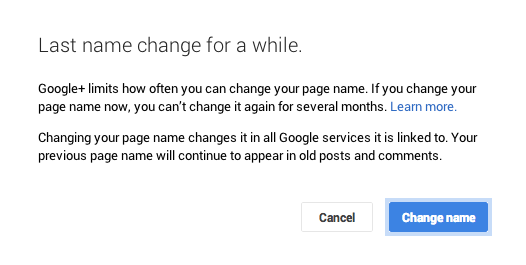
    Note that for both profiles and pages, Google limits how often you can change them, so choose wisely whenever changing this information in your account.

    Screen Shot 2014-01-20 at 12.18.28 PMScreen Shot 2014-01-20 at 12.15.54 PM

    2c: If the your account has already been flagged/suspended, you’ll see a red banner across the top of your page when you login informing you of the suspension. Follow the same steps for part 2b but you’ll have to check back in 48 hours to make sure Google accepts the changes and removes the suspension. You’ll also have to see if the account has lost Google privileges and respond accordingly.

    Hope this has been helpful to anyone who has encountered this issue or has a business account with Google! If you or your business have experienced similar trouble with Google, let us know in the comments!

  • Everything You Need to Know About Google Carousel

    Whether you’re looking to improve your position or simply figure out what the heck this carousel is doing in your Google search results, this blog post is for you. Let’s start out with a little background information.

    What is the Google Carousel?

    As you have probably noticed by now, Google has incorporated a new carousel into several of its search results. If you haven’t seen it yet, the carousel is a row of about 20 listings displayed in a long black box at the top of search results. The image below shows an example of the carousel pulled for the search query “restaurants in new orleans.”

    Click the image below to enlarge
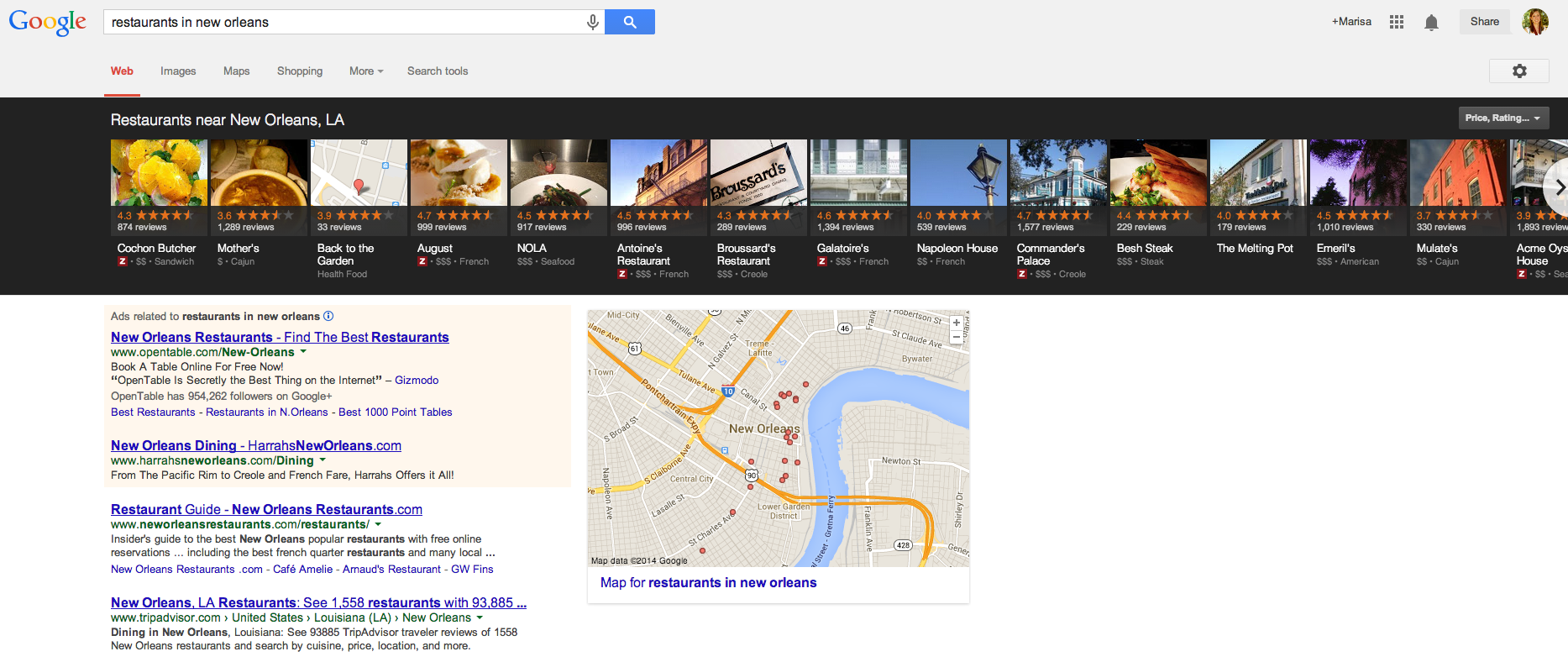
    Search Result Displaying Google Carousel

    How Does it Work?

    Google pulls the information for each carousel listing from the Google+ pages of relevant businesses. Upon clicking a result in the carousel, another search will be performed for that brand. There are pros and cons to having these carousel results display in searches related to your business. Here are just a few:

    Pros of the Google Carousel

    • Your website could potentially be displayed in 2 locations on Google search results: the carousel and regular Google organic results below the carousel. Psst – if you’re looking for some help with those organic rankings I know a guy

    • If you have great reviews and ratings on your Google+ page, your average star rating will appear as a fantastic means of comparison to your competitors (who may not have the same stellar rating as you)

    • Results are displayed ABOVE paid search results, putting you ahead of competitors who are paying to hold that prime real estate above the fold

    • If done carefully, some service area businesses can rank for local searches in the carousel where they may not have appeared in map pack results before the carousel

    Cons of the Google Carousel

    • When clicking a carousel result, another search is done for your brand rather than being taken to your website or Google+ page, which means more clicks are needed to get to your website and may result in a drop off of potential visitors

    • The carousel occupies a lot of space “above the fold” in search results, pushing down those precious organic results you worked so hard to obtain

    • Google chooses the image that is displayed in each carousel result from the images that are uploaded on your Google+ page

    There are a number of keywords and phrases that trigger the carousel. Mike Blumenthal has compiled a list of 300+ keywords and phrases that trigger these results. From a business standpoint, there are several reasons why you want to review these search terms and determine if search queries related to your industry are pulling this carousel, and whether or not your company shows up in the results.

    The Optimal Carousel Location

    A study of user engagement performed by Mike Ramsey suggests that the optimal locations in the carousel are positions 3 and 8, while Ethical SEO did a similar study and found that the 1st and 5th positions in the carousel were most popular. Although the exact prime locations differed, the main takeaways from these studies tell us the following:

    1. Searchers are clicking in the carousel

      • 30% of people in Ethical SEO’s study

      • 48% of people in Mike Ramsey’s study

    2. Reviews and ratings are important

      • Searchers cited Zagat scores and amount of reviews on a particular result as determining factors for clicking

    3. Images should be eye catching

      • In Mike Ramsey’s study, the carousel listing with the highest Zagat rating and number of reviews that contained a boring gray exterior photo of the restaurant was not clicked nearly as much as the result next to it that featured a beautifully plated entree

    Lookin’ Good in the Carousel

    Come See How Good I Look in Google Carousel ResultsIf you have little or no reviews on your Google+ page, what are you waiting for? You’ve worked hard to establish your business and provide positive customer experiences. Build up your following on Google+ and don’t be afraid to remind customers of your brand. Encourage potential and current customers to read your reviews. Highlight previous testimonials or reviews in Google+ status updates. Post pictures of your product, staff, events – anything to send your audience down memory lane and potentially inspire them to recount their experience in the form of a review.

    As mentioned previously, Google will select the image that appears in carousel results, so be mindful of the images you upload to your Google+ page. If you are a restaurant, upload images of plated dishes. If you are a jewelry store, upload images of your most popular designs. A good image will differ from industry to industry, however, across the board a good image will be:

    • Attractive

    • Eye catching

    • Clear (don’t upload stretched out or blurry images!)

    • And depict what you do

    Top Ranking Factors

    If you’ve been diligently working to improve your rankings for the map pack in blended results, many of those efforts also contribute to carousel ranking factors. Search Engine Journal’s recent study cites three top factors for ranking in the carousel: social signals, external factors, and content structure. The strongest of these appeared to be social signals, which include:

    • +1Amount of +1s on your Google+ page

    • Amount of +1s on a website’s URL that is attached to your Google+ page

    • Amount of reviews on your Google+ page

    • Rating of your Google+ page

    Next, external factors proved very important. In particular, the number of citations across the internet was cited as the most important external factor. An additional point to that is these citations should be clean and correct across the board. You may have several location citations, but it will only serve to confuse Google if the information is not consistent from one citation to the next. All this should sound familiar, as citations are nothing new to local search ranking factors and something Search Influence has preached for years.

    The last of these top ranking factors is content structure. Placing the keyword in the title, the location in the title, the keyword in the URL, and the location in the URL were all found to have a correlation to rankings. Although these factors are important, you don’t want to come off as sounding unnatural or spammy. Do exercise caution with these aspects of content structure, as you want this content to be natural.

    With any new update or change Google makes, there is always more to be found and mentioned. What are some things you’ve noticed about the Google carousel? What factors have you seen improve carousel rankings? What trends and/or benefits have you noticed since Google rolled out the carousel? Sound off in the comments!

  • Why is Google Doing That?

    nest

    Techcrunch announced yesterday that Google acquired the connected device company Nest for approximately $3.2 billion dollars USD. [1] While this may seem like a large investment to us laymen (laywomen? laypeople…), it is understood that Google’s disposable capital cannot be quantified by the finite numbers we are used to using. So this investment may not mean as much for the company as the tech-blogosphere would suggest. But what will happen if the people at Wired and Techcrunch are right, and Google keeps doing more Google-y things like buying every robot ever along with the firms that produce them? Well for one thing, SEO will probably work a little differently.

    Prediction 1:

    In the Future Google/Future SEO Realm/Matrix, display space will be even more precious and SEM will get more expensive.

    A lot of SEO bloggers have been beating this drum for a while now. It’s obvious to most that if the screen space is smaller, the amount of results consumers are willing to investigate will reduce as well. The Google Glass has approximately 90% less surface space than traditional smartphone platforms.[2] Intuitively, this kind of face streaming will probably devalue the real estate of any ranking positioned outside of the top three. As the displays get smaller and smaller, SEM will gain more and more popularity as companies like Bing and Google are likely to price gouge for the precious paid display space on these next generation platforms.

    Prediction 2:

    In the forthcoming Future Google Realm, it will be simply irresistible – if not physically irresistible – to share everything.

    With the iphone, consumers were given the opportunity to commodify everything they experienced in their lives.[3] As we begin to wear microphones and cameras on our faces[4] and while the most mundane of our home appliances become members of the global village,[5] there will be more and more opportunities and incentives to share everything. As we begin to create more devices and metrics to record social media, sticking out in the endless void of user created content will become even more challenging, and social currency will become even more invaluable. With the creation of these new outlets, we should expect to see SEO become even more dependent on social media rankings, while performing well in these arenas will be crucial for any successful business.

    In conclusion, now is the perfect time to start honing your SEO and social media chops. Now I’ll leave you with a gif of a stock photo model using different technology.

     output_dAJDKN
    [1]To put this in context, Instagram sold to Facebook for $1 billion in 2012. 

    [2]Made this up.

    [3]A recent study showed that users are three times more likely to share content via their Iphone versus their desktop. http://bit.ly/1d3DAAw

    [4]Shout-out to Google Glass.

    [5]Google’s Nest acquisition will likely lead to the existence of a consumer experience where home appliances – fridge, oven, stove, coffee maker etc. – will all be connected to the internet and synced up to your smart phone.

  • Google +Post Ads Offer Near Limitless Exposure to Social Messages

    Google has just announced a revolutionary social ads concept for brands dubbed “+Post ads.” +Post ads will allow marketers to re-package selected Google+ posts for promotion by way of Google’s display ad network.

    Google-Plus-Logo

    Unlike Facebook ads which live only within the walled garden, Google is taking the revolutionary step of pushing these ads OFF of Google+. In fact, Google+ will, for now, remain pristine, with no apparent ads.

    +Post ads have the potential to be more disruptive due to their “content as display” nature. It is likely the novelty will wear off in time, but in the early going brands who jump into this platform will likely see great exposure for their Google+ social content.

    For more information, see the related Google site. Our own Jeanne Gaudet has also contributed a brief writeup  (published under my account) to the LocalU.org blog.

  • Paying By Email with Google Wallet

    If you use Gmail (and let’s be real, who doesn’t?), chances are you may have noticed a new feature pop up recently.

    Google Wallet

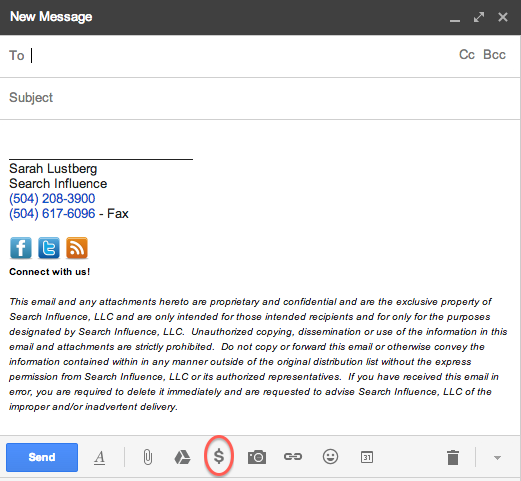
    Unfortunately, clicking the $ doesn’t mean you magically receive money.

    Similar to Venmo, the newly implemented Google Wallet allows you to quickly and securely send money within Gmail.

    When you set up your account, you’ll be prompted to verify your identity. Once that’s done, simply enter the amount you want to send, choose your source and attach. Easy as pie!

    As usual, there’s a catch. While sending money via your Google Wallet balance or linked bank account is free, using your credit/debit card is not — there’s a flat fee of 2.9% per transaction.

    If you’re like me and worried that your money could end up in the wrong hands, Google Wallet Purchase Protection covers you 100% against eligible unauthorized payments. I won’t bore you with the details — you can read more about that here.

    Weirdly enough, no one volunteered to send me money to test this out, but all you have to do to receive money is open the message with attached money and click “Claim Money.” (At this point, if you haven’t already signed up, you’ll be prompted to do so.) All funds are automatically added to your Google Wallet Balance.

    Google Wallet LogoYou can use your Google Wallet Card (which you can request on wallet.google.com or via the Google Wallet app) to make in-store and online purchases anywhere that accepts MasterCard® Debit, as well as to make cash withdrawals at ATMs and banks.

    So what does this mean for us?

    The next time you’re at dinner with a big group of friends and don’t want the hassle of trying to divvy up the check, one person can foot the bill and have their friends pay them back on the spot using Google Wallet. No cash necessary!

    Google Wallet also makes it easier for your parents to give you money. I’m just sayin’…


  • What’s New About the New Google Maps

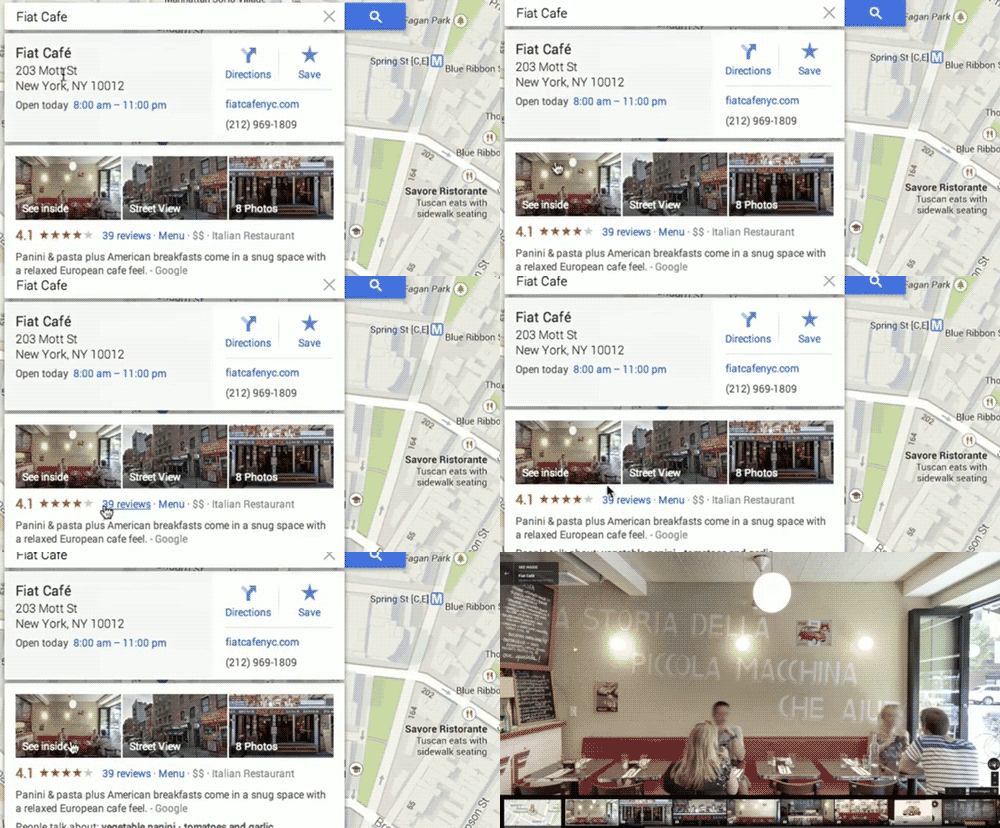
    Screen Shot 2013-12-12 at 1.35.15 PMThis week, Google rolled out a new and improved Google Maps! With this update, many are wondering what exactly is different about Maps besides the obvious physical changes.

    The new design is focused on providing smarter search results immediately and making the user experience much more effortless. In this day and age, consumer satisfaction is highly driven by ease of use, so an update like this is essential to staying on top of the trends in usability.

    Probably the most noticeable change is the way you search. With the new interactive features, you can hover over search results and the map will change to show you those results. This reduces the time spent by users re-searching for what they were looking for because they chose the wrong result.

    So far, I’ve found that the new interactive search results change local search opportunities for businesses to a certain degree. When I search the keyword “internet marketing service” maps displayed only three businesses in the search results but also showed a countless number of business results on the local map. On the map itself, the results were shown with two different kinds of red dots. It looks like the bigger dots are results that Google found more relevant to your search.

    A new goal of Google Maps is to “get better with use,” so as you search the map, star places, and leave reviews, the map adapts and shows you more relevant results. “…the more you use the new Google Maps, the more helpful it becomes.”

    Once you click on the desired result, the map reacts, showing you business information including the hours, location, and the option to go into Street View. They’ve made the new Maps more tailored for getting directions, taking some styles from how the Google Maps Android and Apple apps work. In the past, Street View was something you could access through buttons in the corner of the map or with Pegman, but Street View is now a readily available in your search results.

    Google-MAPS

    While we’re on the topic of Pegman, let’s talk about the new features involved with everyone’s favorite little Street View helper. Besides making him a revamped and fun—sort of—Google Maps’ mascot (Today he’s donning a Santa hat!),Screen Shot 2013-12-12 at 1.22.43 PMScreen Shot 2013-12-12 at 12.47.07 PM
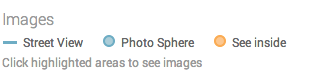
    they’ve moved the Pegman location to the bottom corner of the map. Also, when you use Pegman, you’ll see new color coded dots and lines indicating where you can enter Street View, “See Inside” some locations, and enter a “Photo Sphere”.

    Finally, the new Google Maps is allowing users to submit their own content for Street View, allowing people to share the experience of their favorite and sometimes remote locations. Users have been allowed to share their Photo Spheres since last year, but now these Photo Spheres that once stood alone will be stitched together to create a Street View experience.

    Overall, the new Google Maps has created a more pleasing and a much easier experience for Maps users while also making Maps more engaging and fun to use.

    Video source of gif and first screenshot here.

  • Google Introduces Helpouts

    Haven’t heard of Google Helpouts yet? Don’t worry, you’re not alone. Until recently, Google’s newest venture has been fairly hush-hush, so here’s a brief overview of the product and how to become a part of it.

    What Is Google Helpouts?

    Google Helpouts - Search Influence

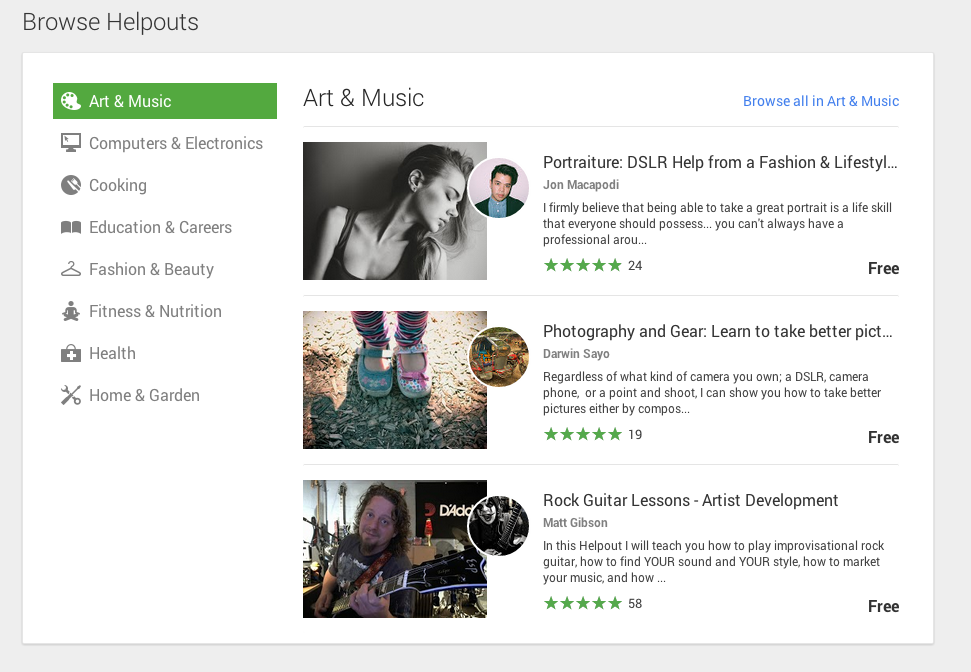
    Helpouts seems to be Google’s attempt to branch out into ecommerce by directly connecting businesses to people via video chat and offering advice, information, or services. The types of information available on Helpouts range from computer diagnostics, to medical advice, to cooking tips, to yoga classes. In speaking with a Google Helpouts rep about this new product, he described it as a search engine that people can use to browse for certain professionals or knowledgeable individuals on a variety of topics and connect with them. Individuals willing to provide their expertise via this new Google product can charge by the minute, offer a flat fee, or, if they feel so generous, can simply do it for free.

    How to Join

    As of now, Google Helpouts is on an invitation-only basis for businesses or professionals looking to share their knowledge for free or for a fee. There is an option to schedule a demonstration of this product with a member of the Google Helpouts team via screen share and chat. There, the reps will give you a preview of the features and answer any of your questions. Presumably they will offer you an invitation code to join if you express interest in offering your business expertise via this platform. Google also offers a link to request an invitation code. However, if you’re just looking to get help or learn more about a topic, you are able to join now and start searching for professionals. The only requirement is that you create a public Google+ profile.

    How successful will this product be? It’s hard to tell at this point. With the increasing number of people more willing to go on Yahoo Answers than ask a friend a question, perhaps Google sees Helpouts as an alternative, providing qualified answers to those curious souls. Or perhaps those people asking ridiculous questions on Yahoo Answers will want to maintain a certain level of anonymity. However, for the sake of not wasting time, let’s hope that those questions no one should’ve ever asked remain on Yahoo Answers.


  • You’re So Vain, You Probably Think This URL is About You: Claiming Your Google+ Vanity URL

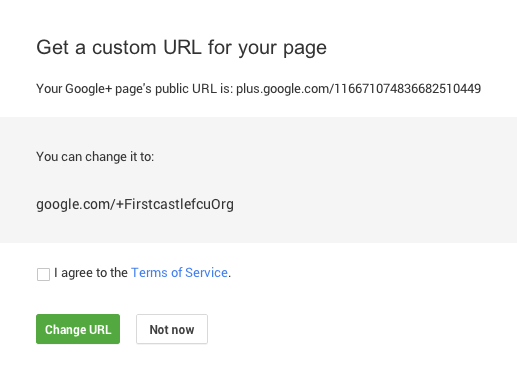
    Google has rolled out a batch of Google+ updates yesterday, and among those updates, they are now offering vanity URLs for Google+ Pages or Profiles.

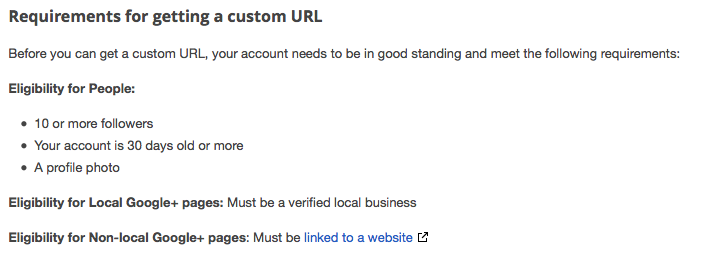
    Requirements for getting a custom URL are pretty straightforward:

    requirements G+ vanity URLs

    Well, this a fun and interesting small project, so I thought I would walk through it with a client.  I logged in, and there it was! I’m not sure it could be any easier.

    Google+ vanity URL is provided with "org" - for non profit?

    Ah, but there is always a catch.  I don’t like the URL they gave me.  What is that “Org” on the end?  I don’t want that.  It’s not part of the client’s name.  I guess it’s there because their domain is a .org? They are a non-profit organization, unlike many domains which are .org, but still.

    custom URL for your Google Plus Page

    After a little investigating, it doesn’t appear we have the option to truly edit the vanity URL although Google mentions they may give you multiple vanity URL options to choose from. Not in this case.  That is an unfortunate scenario, but I’m going for it anyway.

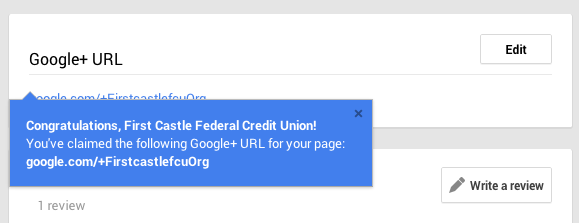
    Super easy to just walk through the steps.  And you can edit it – see the “Edit” button handy right there.

    Screen Shot 2013-10-30 at 12.03.20 PM


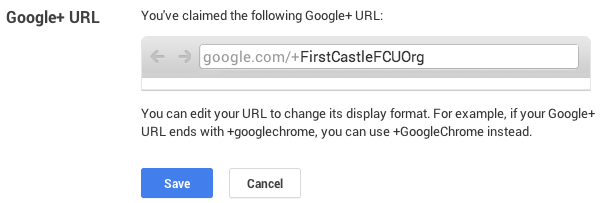
    But when you edit it, you can only edit for capitalization.  I can’t get rid of the “Org.”  Aarrggh.

    edit your Google Plus vanity URL

    It said I can never, ever edit the URL again.  So we can have a vanity URL, but you can’t create it.  You are stuck with what Google gives you.

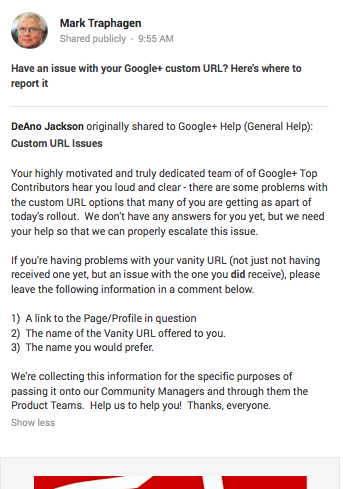
    Or you can pursue it as Mark Traphagen suggests in his G+ post which drives you over to Google+ Help Page

    Mark Traphagen Google Plus vanity URL post

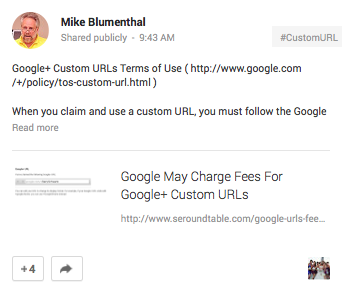
    And Mike Blumenthal gives us a heads up that it may not always be free:

    Mike Blumenthal G+ vanity URL post

    Overall, it’s straightforward and simple (thanks, Google!). If you meet the requirements, this option should be available to you shortly, as Google is currently rolling it out.

  • Hummingbird: Google Answers Your Questions, Anticipates What You Want to Know

    hummingbird

    Google’s most recent algorithm update, Hummingbird, or as some are calling it, the silent update, snuck it’s way into our lives under the radar a few weeks ago. The update was revealed at a celebratory meeting⏤hosted in the legendary garage that Larry and Sergey rented when Google started⏤commemorating the 15-year anniversary of Google’s founding. Although we don’t know much about how the update works (Google wouldn’t release the technical specifics), we do know that it will affect 90% of searches worldwide.

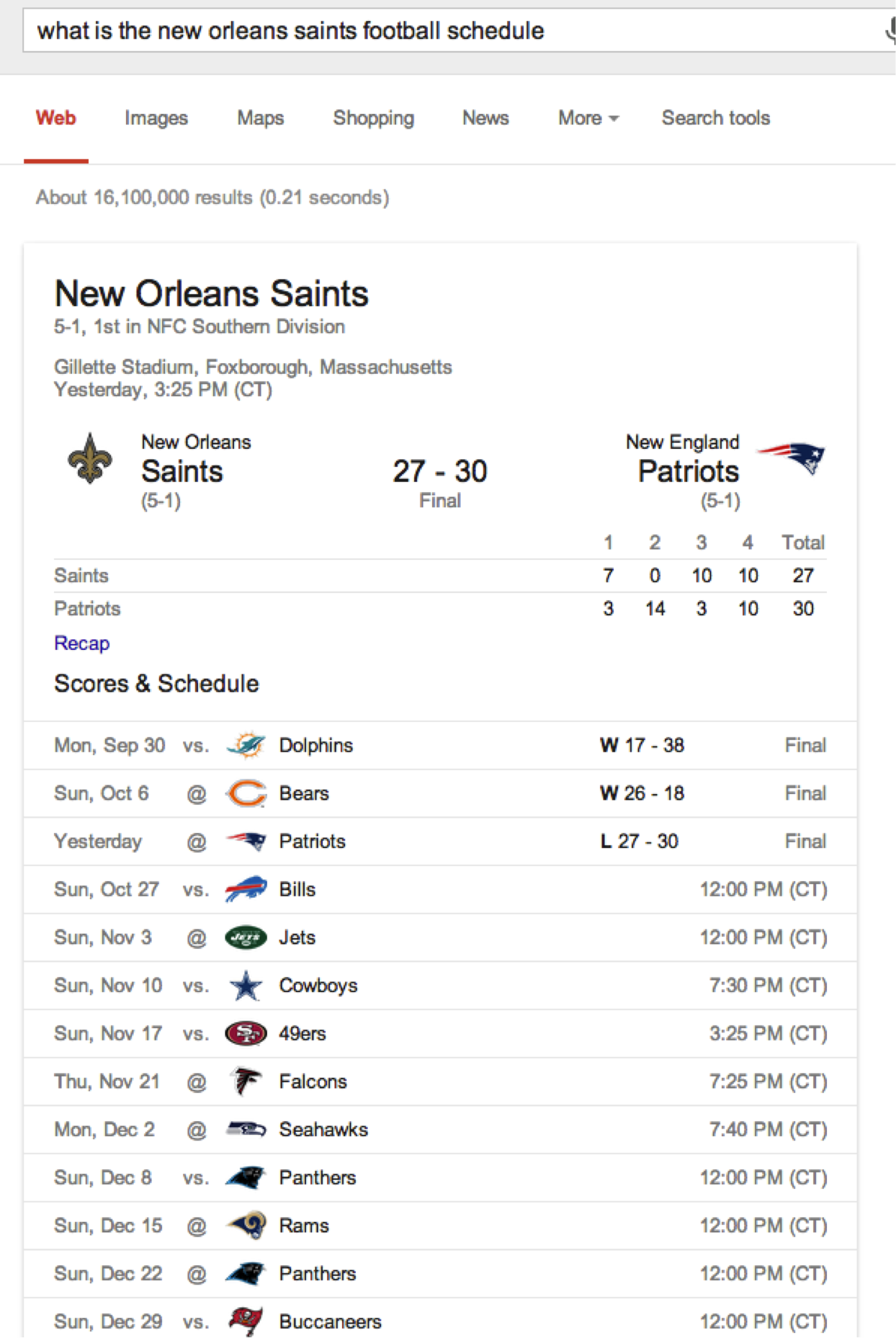
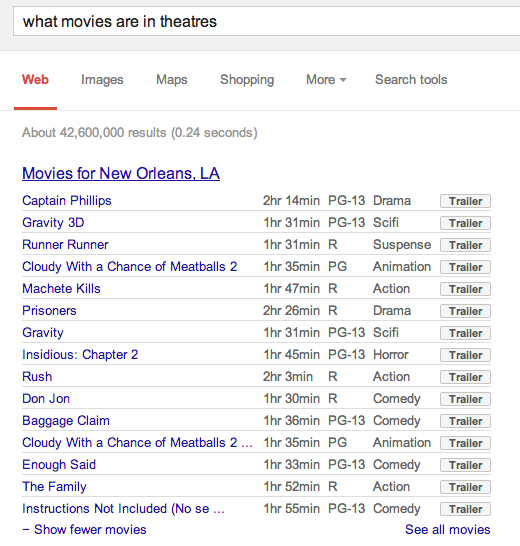
    You may have noticed that Google has gotten better at offering up direct answers to long, complex questions. This update was the most noted change and will allow Google to quickly parse full questions instead of parsing word by word. It will also allow Google to identify and deliver answers to those questions from the content it’s indexed. Other noted changes were updates to Google’s Knowledge Graph that allow for comparison questions and push notifications for Google on iOS. With more people speaking into their phones for searches, Google needed to come up with a new algorithm to turn this process into a more natural conversation and even more accurately anticipate the answer you are ultimately searching for.

    saints schedule

    If Google is using information presented on your site in its Knowledge Graph⏤Google’s encyclopedia of 570 million concepts, or any other display of info on its search engine results page⏤it means that it trusts you so much that it is willing to quote and/or paraphrase your information to searchers. While PC World dubs it to be “poaching pageviews” from the actual websites that are answering our questions, our belief is that it is either an indication of the strength and authority of your site, or that it will help boost such in the long run. The update was less focused on adjustments to SERPs when people are searching for products and services to purchase and more geared at answering questions. Google did say that this was the biggest overhaul to their engine since the 2010 “Caffeine” update (which was focused on speed and including social network results into search).

    movie

    How will this update affect you?

    The algorithm was silently put into place weeks ago, so if you have not already noticed any significant differences in your rankings, you probably will not see them from this Hummingbird  update. It is probable that as you search, you will not notice a huge difference in search results, especially for small businesses. Instead, you will be able to ask Google specific, complex questions and receive a relevant answer.

    Share with us in the comments any interesting shifts in your rankings, or any interesting tricks Google seems to be throwing your way when you search!