Tag: Google

  • Takeaways From Pubcon New Orleans Day Two

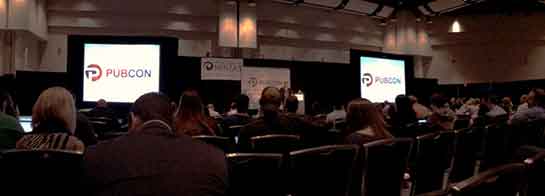
    Last week I had the amazing opportunity to attend Pubcon New Orleans for the first time. It was one of the most fruitful learning and networking experiences I’ve had the chance to be a part of. I felt like I could spend forever just absorbing everything I could from everyone I met. One of the major themes that I got from all the speakers I saw at PubCon was the importance of good content. So, now I’m here to tell you about some of the main takeaways I got from the particular sessions I attended.
    IMG_52111-1024x368-1

    Peter Shankman: Keynote

    The keynote by Peter Shankman focused primarily on the power of good customer service. His four main points were Transparency, Relevancy, Brevity, and Top of Mind. He said you don’t have to go crazy with customer service, just be “one level above crap.” On this note he mentioned the Morton’s Steakhouse story where he jokingly tweeted at them about wanting a porterhouse steak upon landing in New Orleans from a flight. They then sent someone to meet him with a steak when he got off the plane. This simple gesture(although not scalable for every brand) led to a lot of great publicity for Morton’s. It’s all about making your customer feel special.

    An audience you are more transparent and honest with that feels invested in is 78% more likely to buy. Peter also said that when(not if) you screw up, own it. People are 44% more likely to stick with you if you own it. He mentioned the stark difference between how Eliot Spitzer handled his prostitution scandal by admitting the fault and resigning versus how Anthony Weiner handled his sexting scandal by saying he got hacked and not owning up to it.

    Peter mentioned the importance of being relevant and listening to your audience as well. He mentioned a non-profit that saw a 37% increase in donations just by being engaging and active with their audience online.

    The third important facet Peter Shankman mentioned was brevity. He particularly said that brevity is the future of social media and not just in the way we think of it through Twitter now. He said jokingly that we’ve all become the dog from the movie Up, because recent studies show that we have a 2.7 second attention span. Shankman said that mobile messaging is the future and Twitter is just the pipe, so we must learn to write well and concisely.

    Finally, Peter talked about the importance of being top of mind. You want to be the first person someone thinks to go to for whatever they need. He also mentioned the idea of having “zombie loyalists,” or people who have you at the top of their mind for recommendations.

    IMG_5231-768x1024

    Will Scott: Barnacle SEO

    Next I had the opportunity to sit in on Will Scott’s talk about Barnacle SEO(a term he coined in a Local Search News post back in 2008). Barnacle SEO is all about leveraging authority for local search. Specifically, the idea is to attach oneself to a “large fixed object” and wait for customers to “float by in the current.” It’s not as simple as using someone else’s authority, because Will says the most important thing in business is sincerity. “If you can fake that, you’ve got it made,” he says.

    He also mentioned that Google’s weakness is sites they consider super authoritative like YouTube, Yelp, Pinterest, Facebook, YP.com, and such. This is making Barnacle SEO have a huge comeback. YouTube for example dominates universal search and according to a MarketingLand infographic, 8 out of 10 video results are from YouTube.

    Although using backlinks from these authoritative sites and directories like YP.com for local SEO efforts is important, it’s also super important to “keep it clean-ish” by using tools like Whitespark.

    Greg Gifford: Local SEO- It’s No Laughing Matter

    After Will Scott, Greg Gifford, Director of Search and Social at AutoRevo, took to the stage with his presentation about the complications of local search. His awesome presentation featuring punny references to 142 movies and also contained precise, actionable tips. He mentioned the changes in local search like the maps pack finally stabilizing at seven listings and how optimized vertical and local directories now rank very well. A huge opportunity for small businesses to rank well lies in simply adding city and state to title tags.

    Greg also mentioned how the goal of Google Plus Local(aka Google Places) seems to be like a drive through, a place for people to get what they need by getting in and out quickly. He also brought up the Google email about “duplicate listings” that rolled out with Google finally merging the old dashboard to the new. If you want to know more about this email, check out my blog post here.

    His optimization tips for G+ included writing long, “awesome” descriptions using formatting and links, uploading lots of photos, using as close to the max 10 categories as possible while keeping them relevant, engaging in the fairly few number of users on G+, and circling users as a business. As far as reviews on G+ go, he mentioned that you have to earn them and ask for them, you need at least five reviews to see the star average, you should shoot for 10 then diversify, one to two reviews a month is normal, and having them come in consistently rather than in bursts is important.

    IMG_5215

    Casey Markee: The “Big Easy” Guide to Google-Friendly Link Earning

    Casey Markee started his presentation with a quote from Matt Cutts saying, “The objective is not to make your links appear natural, the objective is that your links are natural.” He mentioned that the “four tenants of Google-friendly links” are those that provide clear value for the user, are niche-relevant, get clicked to send some measurable form of trackable analytics traffic, and are “earned” freely versus being given.

    He listed nine link “earning” classes that Google still loves which included:

    1. Link Bait Type Content- Sharable and Buzz-Worthy
    2. Evergreen Content- No Expiration Date
    3. Local Link Earning- Publish Local Resources
    4. Scholarship Link “Earning”- Ex: SilverCross.com Ability Achievement Scholarship
    5. Beneficial Link “Earning”- Participate in Online Forums
    6. Sponsorship/ Partner Building- Support Causes
    7. Profile Links- Social Profile Building
    8. Selective Guest Blogging- Quality not Quantity
    9. Brand Mentions- Get Regular Mentions Turned Into Live Links

    He ended with saying that link earning is a marathon not a sprint, and that quality content is key!

    Mike Stewart: Building a Future Proof Plan for Organic Local Search Rankings

    The biggest takeaway I got from Mike Stewart’s presentation was to think beyond Google search and about other places where people often search like Siri, Amazon, Facebook, and Bing. He also explained the difference between some white hat and black hat SEO tactics, and the importance of doing it right. Mike took us back to basics explaining that “SEO is about creating, editing, organizing, and delivering content and metadata to increase relevance to specific keywords on the web.”

    Finally he gave us “Seven Simple Content Ideas That Drive Shareability” which are as follows:

    1. GIVE: Offers, discounts, deals, and contests that everyone can benefit from
    2. ADVISE: Tips, especially about problems that everyone encounters; how to do something
    3. WARN: Warnings about dangers that could affect anyone
    4. AMUSE: Funny pictures and quotes, as long as they’re not offensive to any group
    5. INSPIRE: Inspirational quotes
    6. AMAZE: Amazing pictures or facts
    7. UNITE: A post that acts as a flag to carry and a way to brag to others about your membership in a group

    This is just a very small portion of the many helpful tips and tools I learned at PubCon this year! Let me know what you think about all the tactics you’ve learned here today.


  • What to Watch for on the Web: Tips From PubCon 2014

    There was a lot to learn at Pubcon New Orleans 2014! Read below for the inside scoop on some exciting web-related trends we can expect to see in the not-so-distant future.

    Photo Of Influencers At Pubcon 2014

    A Trend Toward the Visual

    The belief is that the deeper into the future we go, the more visual-based our web experience will become. Pictures, and moving gifs, are increasingly at the heart of web developers’ designs. Just take a look at what amazon.com looks like today versus February 2000 or even compared to January 2008. And take a look at Disney World’s home page now versus what it looked like in 2000. It will be very interesting to see just how picture and gif-centric the web will become.

    Wearable Technology

    Image Of Google GlassOptimizing for Wearable Technology might also be a big part of the future. Google Glasses and Fit Bits are just the beginning when it comes to this trend; think watches that control your home, clothing-embedded phone chargers, (and even wearable couture in the form of solar-powered color-changing clothes!). Nobody knows exactly what the trajectory of wearable technology will be, or how in the world we would optimize for it (!), but it definitely makes sense to stay on top of the learning curve when it comes to these advances.
    And Google Says…

    Of course a blog about PubCon wouldn’t be complete without some interesting updates from Google! According to Danny Bernstein, Google’s Head of Product Partnerships, we can expect to see a lot of interesting expansions from Google coming our way; so, straight from the horse’s mouth, here are some interesting developments that we can be on the lookout for:

    App Indexing in Searches

    For one, Google is working to populate deep links to your relevant downloaded apps in searches, specifically on Android devices. So, for example, if you Google “Jurassic Park,” (because who wouldn’t want to do that?!) a hit that might populate in your search results could be a direct link to the Jurassic Park page in your IMDb app. Google is currently working on indexing all of these applications so that they can populate in an intuitive way in our searches.

    Photo Of Google Wallet LogoGoogle Wallet

    Google is also working to bring Google Wallet to the next level, which is an application that will make paying for various web services even easier than it is now. App developers can incorporate Google Wallet into their programming so that users can purchase their app’s related services with just a push of a button or tap of a finger. Additionally, businesses will be able to use Google Wallet to push various product promotions to their app’s users.

    I’m sure I am not alone in my excitement to observe these exciting developments as they come to life!

  • 8 Tips for Handling Bad (and Good!) Online Reviews

    Have you ever had a bad experience at a business? How did it affect your opinions of that company? More often than not, one bad experience will hinder how someone views a business, even if the experience was handled in the best way possible by the business owner/manager. This can affect the online reputation of a business greatly if people decide to write an online review about you.

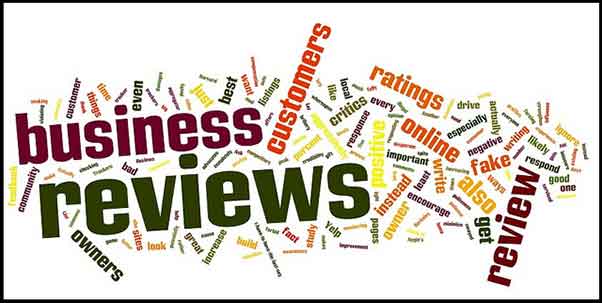
    Reviews

    While the thought of negative reviews may scare you, do not let these reviews discourage you! Remember that a dissatisfied customer is more likely to write a review after a bad experience than a satisfied customer writing about a positive experience. Negative reviews can even help you learn how to improve your business. Here are some tips for actively handling these reviews:

    1. Actively check your reviews on various platforms across the web.

    A good way to keep up is to assign one day per month (or bi-weekly) to check your online reputation on the different platforms. The list can be endless, but these are some important ones to consider:

    **Note that you will most likely have to create an account and verify that you are the owner / manager to be able to respond to the reviews as the business owner.

    2. Always be transparent with your customers. This includes:

    • NEVER posting (or having your staff post) fake reviews.

    • NEVER deleting reviews that are negative. This will just anger the person that posted the review, in turn causing a downward spiral effect. Most likely, the angry reviewer will continue to post reviews until they are acknowledged by the business. Instead, take the time to listen to your customer and their concerns.

    3. Make an effort to respond to every review – positive and negative.

    • For positive reviews: A quick, “Thank you for your feedback, NAME! We appreciate your business. We hope you continue to be a BUSINESS NAME supporter!” is sufficient for a positive review. Responding to positive reviews can reinforce the already positive opinion that the reviewer has of your business, and reinforce brand loyalty with that person (because who doesn’t like being responded to by a business?).

    • For negative reviews: The dissatisfied customer will appreciate being heard, and outsiders will appreciate that the business takes the time to respond when something isn’t right.

    4. Be personal in your responses.

    Use the customer’s name if provided, and bring in information from their original review. This will keep the customer from thinking you just have a generic response to all reviews.

    • For example, if a person leaves a bad review on a spa page and you notice in their review they had a massage that day, you could say something along the lines of: “Hi NAME, I’m sorry your massage was not up to par….”

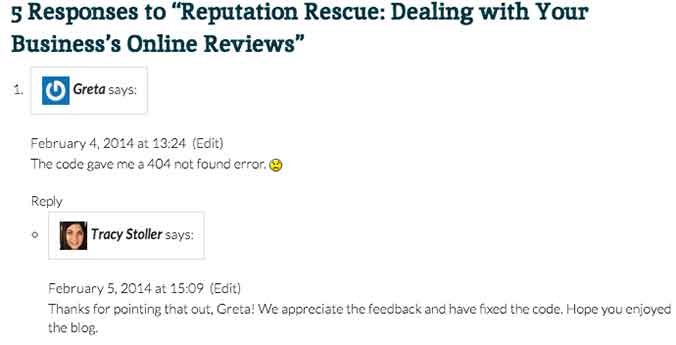
    • Another example comes from our blog! Check out how Tracy Stoller responded to a comment about an error in a code we provided in a previous blog.

    response

    5. Provide a business email that the reviewer can contact you on.

    Don’t try to make it all perfect on the review. You will be able to go more in depth with the customer through an email, depending on the severity of the review/situation. It’s up to you to decide when to try to go into more depth to resolve the issue.

    • You could say something along the lines of, “I truly apologize for XYZ. Please contact [email protected] to help us resolve this issue for you.”

    6. Remember that sometimes people have unrealistic expectations of a business.

    yelp-meme

    If something happened that is completely out of your control, explain yourself in the reply. However, do not have a negative tone toward the customer – simply explain the situation to the best of your ability.

    • For example, a customer leaves a horribly negative review after coming to your restaurant and you are all out of their favorite beer. You can apologize for the inconvenience, but explain that things like this happen occasionally. Explain when the product would be restocked and invite them back. This would be an example of when to NOT provide a contact email, because the situation is not that extreme.

    7. Do not offer gift cards or other repayment for a negative experience on the review site.

    If something is serious enough that you feel the need to refund the customer, provide your contact email and do so through email. Offering repayment or gift cards publicly can be seen as bribery by an outsider reading reviews.

    8. Invite your customers to leave reviews!

    Post a link to your Yelp! page (or other review site) to your social media accounts and invite your followers to talk about their experiences. This could lead to people leaving positive reviews that would not have normally done that on their own.

    It’s important to remember that you can’t please everyone, but continuously having timely responses to your reviews can only benefit your business.

  • Google suggests: An overview of SEO

    Three months ago I started working at Search Influence. I thought I knew a lot about SEO, boy was I wrong. After what seemed like a crash course in everything we do here, I thought I would put together an overview of what I’ve learned:

    SEO

    After 45 (!) trainings I know a lot more about SEO, but I also found out you are never done learning. SEO continuously evolves, and that’s because of Matt Cutts, the head of Google’s Webspam team. To be honest, I only knew him from the 30 Day challenge he talked about at my favorite platform TED. He is the one that changes Google’s algorithm 600 times a year! Another honest confession, I thought this algorithm only changed 25 times a year. I was just a little off.

    Keyword Research

    One of my first trainings was on keyword research. This is a process in which we look at the historical online search behavior for a given product or service to determine what keywords we are going to focus on throughout a client’s campaign. This is an extremely important process and happens at the beginning of our partnership with a client.

    Google Keyword Tool

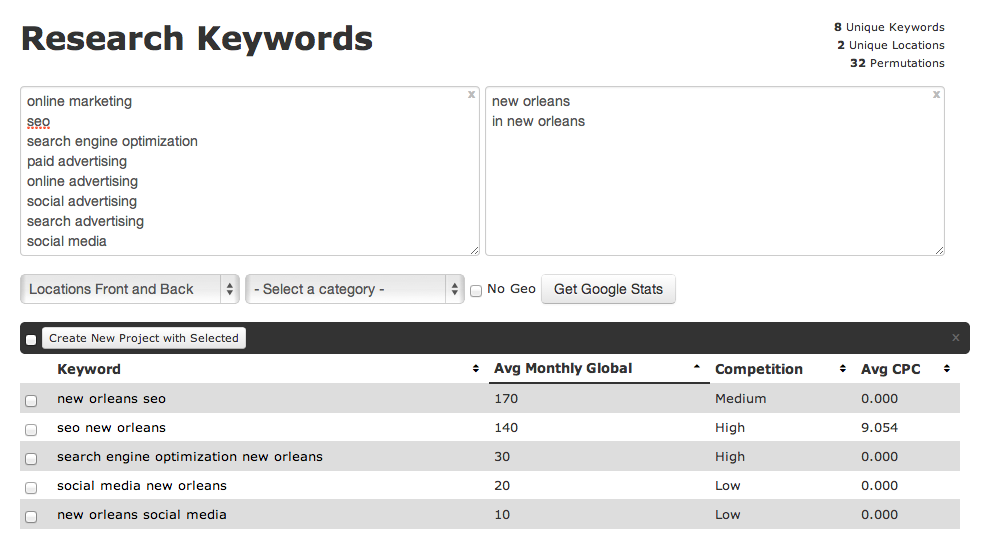
    For the keyword research we use Google’s keyword tool. After adding a long list of root terms and a list of geographic modifiers (the physical location of the client and/or their service areas) the tool shows the approximate number of search queries matching the keywords that were found on Google.

    Google Keyword Tool

    A brilliant tool, but not perfect as it provides search statistics based on Google.com traffic only. But of course, Google captures 72% of all search traffic so we feel better about relying heavily on their research. When needed, we utilize other things like Google Webmaster tools and Google Adwords Keyword tool.

    Google Analytics Organic Keywords

    Before I started working at Search Influence, keyword research was much easier. My colleagues logged into Google Analytics and could see which words people used when searching Google to find the designated website. In October 2013, however, Google stopped offering this information to provide additional privacy and security for its users.

    Google Suggest

    Last month a light bulb went on in the head of a Search Influencer. ‘Why didn’t we think of this earlier?!’ She was talking about Google Suggest, a feature that has been around for five years. Just enter a letter or a word in Google’s search field and you will see associated terms in a dropdown menu. Google describes Google Suggest as:

    “Autocomplete predictions are algorithmically determined based on a number of factors, like popularity of search terms, without any human intervention. Just like the web, the search terms shown may include silly or strange or surprising terms and phrases.”

    Although we benefit from Google Suggest, I agree the search terms shown are sometimes (very) silly or strange, just see for yourself:

    http://youtu.be/DJT67NApROI

    After seeing this, I was curious what Google would suggest when entering ‘Search Influence’:

    Google Suggest

    Reasonable. Logical. But Google also suggested…

    Google Suggest

    What???

    So overall, Google Suggest can be helpful, but it can also make you laugh. (Or make you mad: over the past few years Google Suggest has been sued for racist search suggestions and defamatory language next to individual names or companies).

    So what do I suggest? Use it, but

    Google Suggest

    Do you have any questions about SEO? Let us know in the comments!

  • Addressing Duplicate Listings In The New Google Places for Business

    Welcome back to the wonderful world of Google! Last week I explained in a post the email that Google Places for Business has been sending out to business owner accounts.

    Part of that email included a bit about your account containing listings that were identified by Google as being duplicates existing within your account. Now I’m here to explain to you the two most common ways in which we see duplicate Google listings and how they can be addressed.

    Internal Duplicates

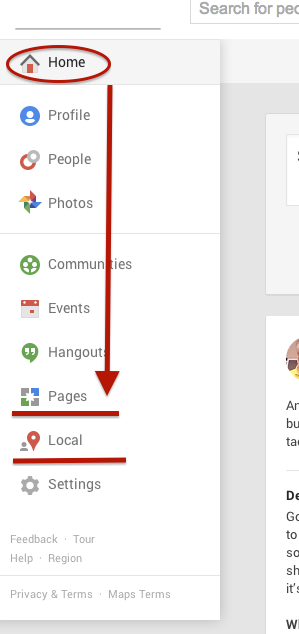
    Screen Shot 2014-03-14 at 1.00.44 PM (2)One way we tend to see duplicate listings in Google Places is from within your business owner account, in your own business dashboard. To see how your businesses are appearing in your account dashboard, go to the Places for Business dashboard, which can be found by going to plus.google.com. Then click “Local”(to see your  Location pages) and “Pages”(to see your Location, Brand, or other Google Plus Pages) in the drop-down on the left.
    The Local dashboard is where we generally identify internal listing duplicates. With the bulk dashboard updates performed by Google, we’ve seen this happening quite often. Since a lot of businesses have been force pulling their listings into the new dashboard by claiming them through the Places section of plus.google.com, there appears to be two listings in the dashboard of these accounts after Google’s mass update.

    Generally, one of these listings appears as verified (the one forced pulled into the new dash) and the other as unverified (the one Google pulled over). Sometimes they both lead to the same G+ page when you click through the “view this listing” link in each. This is just a weird hiccup, and if you wish to clean up the dashboard by deleting the unverified one, it will not affect your listing. As long as you have the verified listing in the new dashboard, you are the sole owner of said listing under this new update.

    In other cases, however, we’ve created a verified local social page through our force pull into the new dashboard that has all of our social content like G+ posting and YouTube videos. Then, when Google pulls in the location page from your old dashboard, that page is a “duplicate” with all your old reviews on it. In this case, both pages would have content that you wouldn’t want your business to lose through “deleting” a duplicate. So, you’d want to make sure the reviews from the location page are moved over to the newer, verified page before having it deleted. This will require a phone call to The Google Places Team support center.

    Obviously if one of these pages has content that you don’t mind losing or doesn’t have any content, that page can be deleted. If the one you want to delete is the verified one and you need the unverified page to be your primary, verified listing, you might be able to avoid having to reverify the listing through getting assistance from The Google Places Team.

    External Duplicates


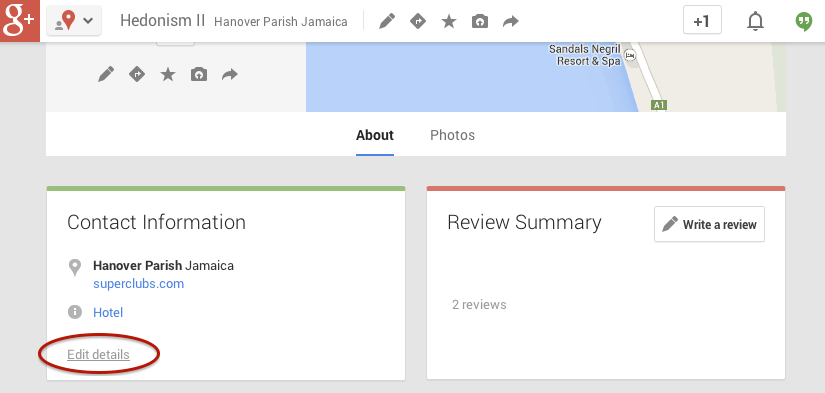
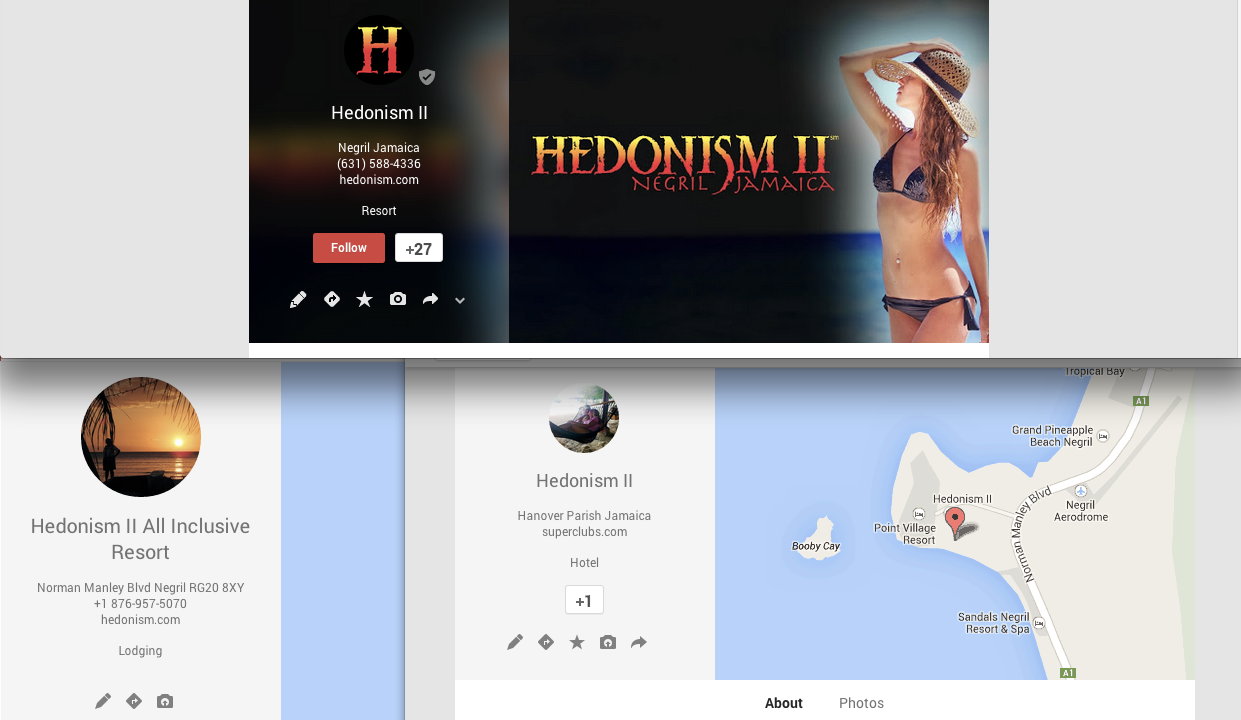
    Another way in which we see duplicate Google business listings is on the front end through Maps search results. You’ll see below that Hedonism II has a couple of duplicates that come up in Maps results. Getting these kind of duplicates cleaned up is a bit easier than the situation explained above. What you’ll do to remove these duplicates is called making a “community edit” or “mapmaker edit.”

    Screen Shot 2014-03-13 at 1.18.56 PM

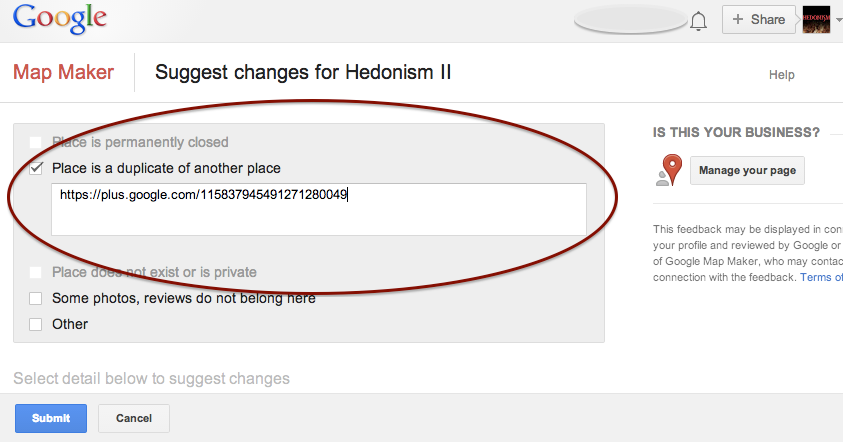
    Go to the duplicate listing you’d like Google to remove. Under the “About” section of the Plus page, then at the bottom of the “Contact Information”  you’ll see the option to “Edit details.” Once you click that, you’ll have to option click a check box to suggest to Google that this “Place is a duplicate of another place.” You’ll also have a box in which you can leave comments about the report. I suggest leaving a link to the correct/verified page in this field to help the duplicate identification process. See screenshots of this process below.

    In my experience, these changes will usually take affect within a week of reporting if Google deems it an accurate report. If no changes take affect in a week, I usually send the report again, wait a week, and repeat again as needed(I’ve never had to report more than 3 times, though).

    Understanding the many nuances of what’s going on here might seem fairly daunting, but the level of which you wish to understand these intricacies is dependent on how much control you wish to have on your business reputation/ presence in Google.

    Screen Shot 2014-03-13 at 1.20.25 PM Screen Shot 2014-03-13 at 1.21.06 PM

    If you have any questions, feel free to comment below!

  • Overview of Three Types of Google+ Pages

    Last week, I had the pleasure of presenting a webinar on Google+ to some of our partners. I shared information on the importance of Google+ for SEO, the work that we do on Google+ for our clients, and some common challenges we work through.The following is a breakdown I presented of the three types of Google+ pages that we work with for our clients.

    1) Google+ Local Page

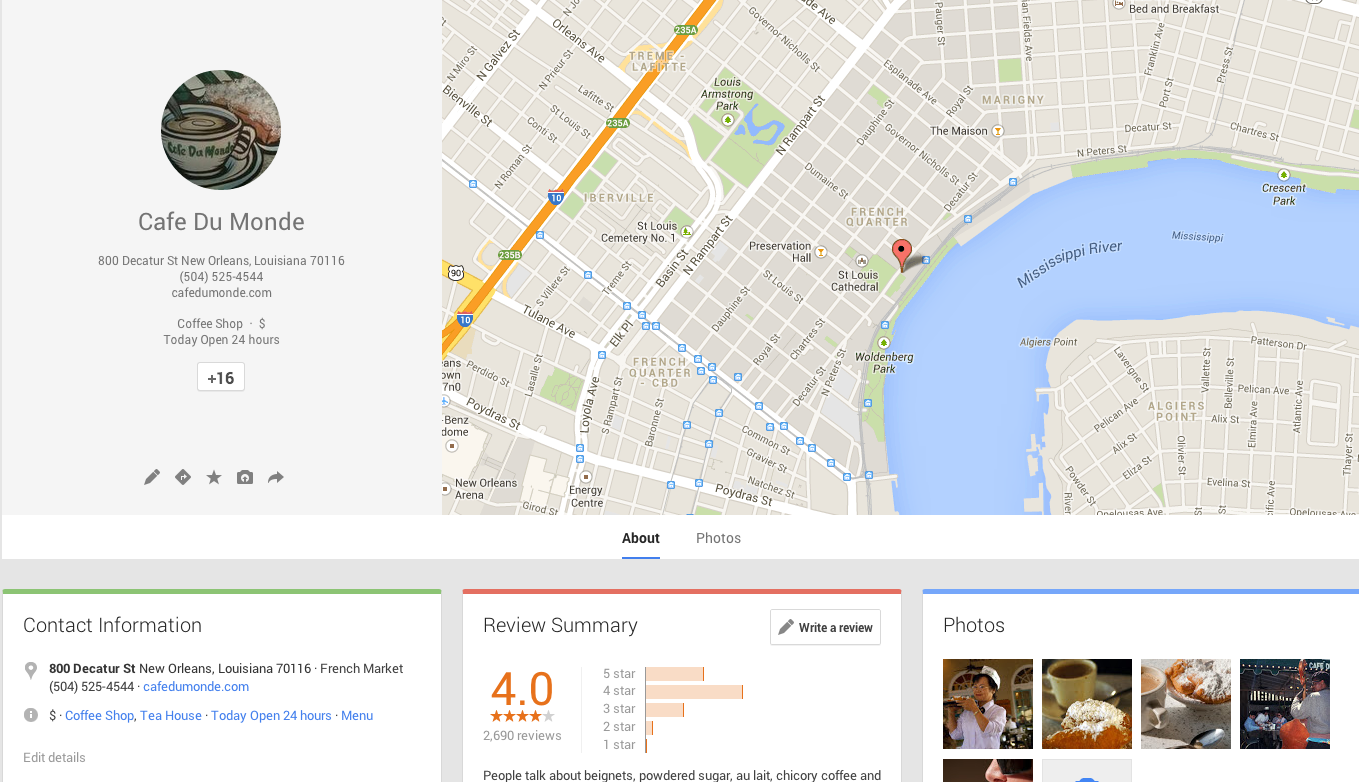
    This is the type of page that many of our client come to us with. It’s a page that hasn’t been verified yet (through phone or postcard verification). It includes information such as location, hours, phone number, reviews, and categories.

    How do you know it’s a Local page, you ask? The easiest identifier is that the cover photo of the listing is a map. When a client comes to us with this type of page, we will convert it to the next type of page: a Local/Social page!

    An unverified local page looks like this:

    Cafe Du Monde, we love you, but you need to verify your Google+ page!

    Screen Shot 2014-03-13 at 9.13.21 AM

    2) Google+ Local/Social Page

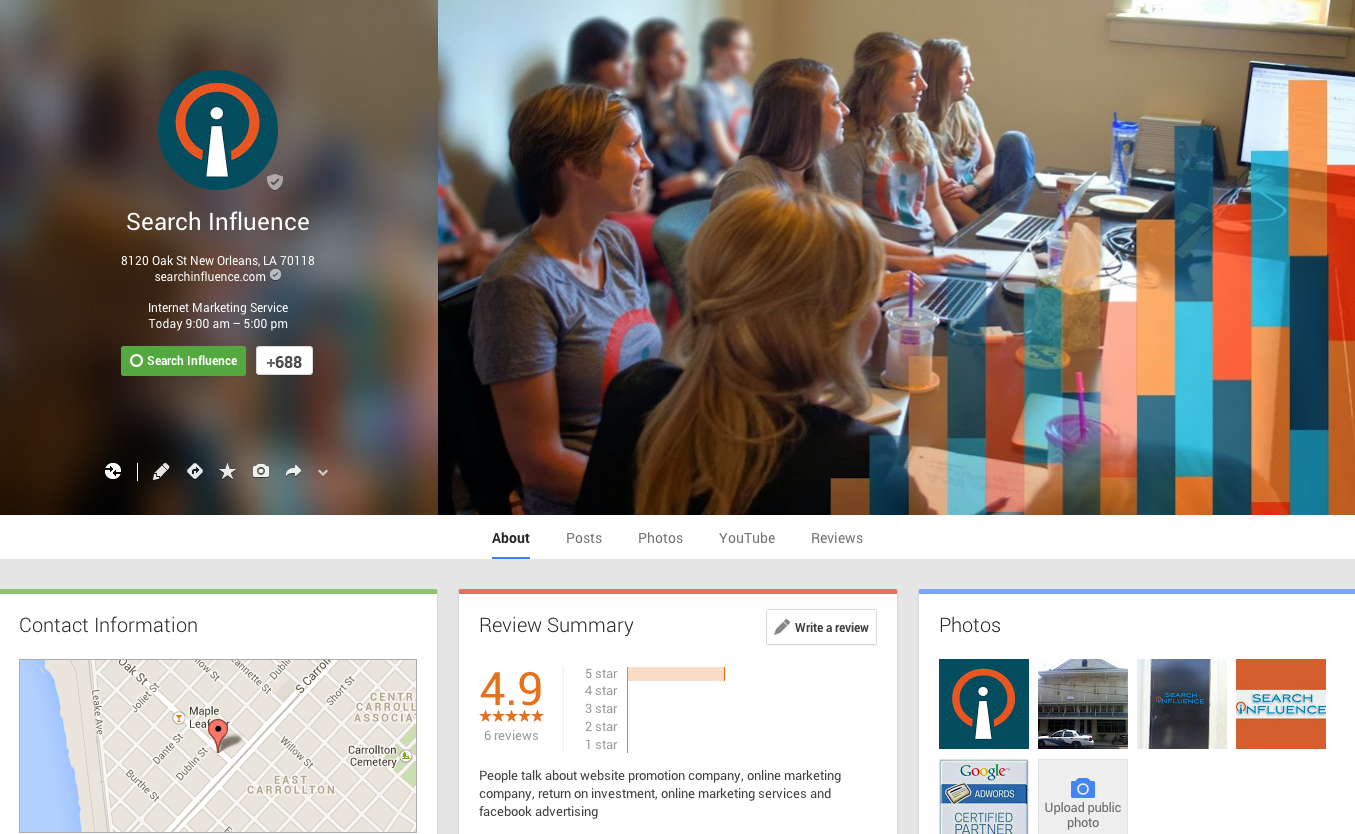
    This page has all the same information as the Local page, and more! When you complete the phone or postcard verification process, Google converts your Local page to a Local/Social page. It carries over all the great information you had on the Local page including your existing reviews and location information. You can tell it’s been converted because the cover photo is no longer a map. The default cover photo is an image with a rainbow of colors, but you can customize the cover photo, just like Search Influence has done with our page!

    This page also has tabs for Posts, YouTube, and Reviews. You can link your Youtube account to this page for a tab to show up on your page as well. This is how we want all of our clients’ Google+ pages to look like.

    Screen Shot 2014-03-13 at 9.13.55 AM

    3) Google+ Brand Page

    For our clients that have more than one location, we create a Google+ Brand page. We have a Local/Social page for each location and create an overall Brand page. This page is the one we use for Google Publisher. On this page, we only list information that applies to the whole brand such as a 1-800 number, link to their Facebook page, website link, and company Youtube channel. This page represents the overall brand, as opposed to a particular location.

    Screen Shot 2014-03-13 at 9.14.27 AM


    Do you have questions about what type of Google+ page to create for your business? Feel free to comment below!

  • Google Places For Business Email Update

    We’re still not panicking about all of Google’s updates! As many of you already know, Google has been sending out a Google Places for Business email that reads as follows:

    The Message

    Hello,

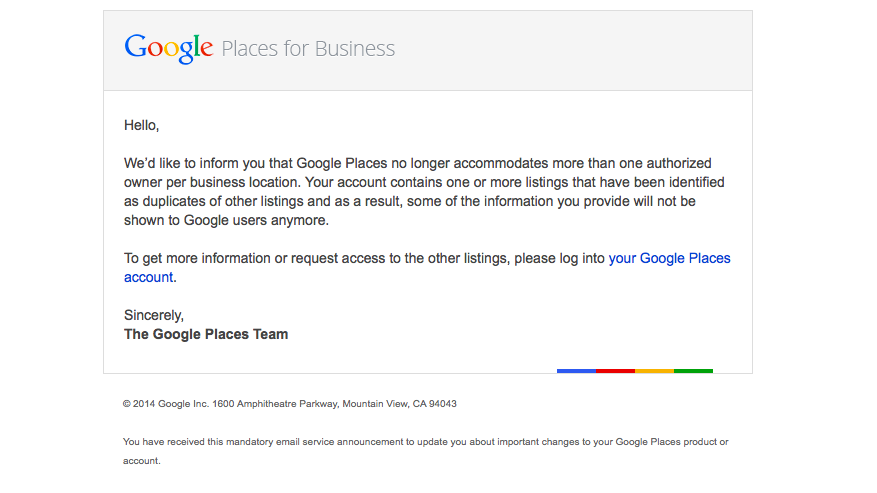
    We’d like to inform you that Google Places no longer accommodates more than one authorized owner per business location. Your account contains one or more listings that have been identified as duplicates of other listings and as a result, some of the information you provide will not be shown to Google users anymore.

    To get more information or request access to the other listings, please log into your Google Places account.

    Sincerely,
    The Google Places Team

    As this message is kind of vague/ confusing, I called a Google rep to get clarification on exactly what’s going on here. Bear with me as I explain what this means exactly and how it’s affecting business listings.

    The Meaning

    PrintGoogle is finally pulling all listings into the new Places for Business dashboard. In the old dashboard there could be multiple owners of a listing, but in the new dashboard there can only be one.

    As Google performs these batch listing upgrades, the first owner whose account is upgraded gets grandfathered in, so to speak, and they will be the sole owner of the listing through the new dashboard. If someone has already claimed and verified a listing in the new dashboard, however, then no one will experience the “grandfather” situation in the batch upgrades as it is already verified in the new dashboard and has its one owner.

    The good news is that many of us have been force pulling businesses into the new dashboard by claiming them through the Places section of plus.google.com. So the latter situation will have already occurred for most, and we will be the current, sole owner of verified listings in the new dashboard. (If you lose ownership of your listing in the batch update by Google, you can still request it back, it will just take time through a two week request period and contact with Google.)

    We have seen cases, however, where after the batch update by Google there appears to be two listings in the dashboard of accounts who have already pulled their listing into the new dash on their own. Generally one appears as verified(the one we forced pulled into the new dash) and the other as unverified(the one Google pulled over), but they both lead to the same G+ page when you click through the “view this listing” link in each. This is just a weird hiccup, and if you wish to clean up the dashboard by deleting the unverified one, it will not affect your listing. As long as you have a verified listing in the new dashboard, you are the sole owner of said listing.

    Now What?

    Basically, anyone who has ever had a listing in the old dashboard is receiving this generic email, and it is not necessarily an indication as to whether or not the listing is owned/verified in the new dash in your account. So, as long as we’re keeping on top of our business listings’ dashboards, there is no cause for alarm! There’s also the note about duplicate listings in the email. Duplicate listing issues are not something that occur in every account which receives this email. More to come on addressing duplicates in the new dashboard next week! If you’d like to see what others are saying about the email, check out Search Engine Land’s post from earlier this morning or these forums where people have been discussing particular, individual issues encountered (Google Product Forums and Local Search Forum).

    Here’s a screenshot of the actual email for those of you who would like to see it:
    Screen Shot 2014-03-05 at 10.42.19 AM

    If you have any questions or comments about this situation, feel free to comment below! Stay tuned for how to handle duplicate listings!

  • Content Marketing: Doing It Right in 2014

    Feb14You might have heard the buzz: content marketing is not only here to stay, it’s critical for business success in 2014. The Internet noise is getting louder every day, and discoverability is becoming a greater challenge as the data streams expand with chatter from websites, blogs, and social media.

    If you’re looking to capture an audience online, you need an effective content marketing strategy in place.

    Why Content Marketing is Key

    Backlinks, keywords, and automated social tools just aren’t going to cut it anymore. Part of the reason is an increasingly Internet-savvy consumer base that can sort the authentic from the spammy at a glance—and the rest is due to major shifts in search engine algorithms, particularly Google.

    Google Hummingbird, the search engine giant’s most recent algorithm update, is all about promoting quality content and pushing it to the top of search engine results. In a definitive acknowledgment of the sharp increase in mobile search, Hummingbird aims to provide results that reflect the way people talk—delivering a conversational and contextual experience, rather than treating searches as keyword strings.

    In order to improve your search engine rankings, you need content that informs, answers questions, and adds value.

    Mistakes that Hold Your Content Marketing Back

    In order to get content marketing right, there are certain objectives you have to accomplish. Your content marketing should attract, engage, expand, and ultimately convert your audience.

    Some of the common mistakes that prevent content marketing from reaching those objectives include:

    • Producing in a vacuum. If your marketing department handles all of the content generation, from conception to execution, they’re eventually going to sound stale. Consider soliciting content ideas from other departments, working with a freelance copywriter, or seeking guest bloggers.
    • Publishing static content. To engage your audience, you need to win them over. This means providing something more than dry facts or market-speak—and giving readers a way to respond with thoughts of their own. Value quality over quantity, and produce content that informs, intrigues, and entertains. Make sure you’re always responding to comments and questions from readers.
    • Sharing on the wrong channels. When it comes to social media, a lot of companies have decided that more is more—and thinned out their efforts in order to reach as many social platforms as possible. This dilutes your brand and wastes your time. Most businesses can’t go wrong with Google+, Facebook, Twitter, and LinkedIn. As for the rest, experiment: keep what works, toss the rest.
    • Failing to analyze results. Content marketing is useless to your organization without analytics. You need to know what, where, and how your marketing efforts are working—where visitors are coming from, why they stay (or leave), and whether they come back.

    So What’s the Right Way?

    The real secret to effective content marketing in 2014 is quality. But what is “quality,” and how can you produce it?

    Quality content starts with defining your audience. Who are you creating this content for, and what do they want or need? What engages them? Find out as much as you can about your target audience—where they are online, what they respond to, even what they don’t like.

    When you move to the content creation phase, keep your target audience in mind. This includes the format of your content, whether your audience prefers text, images, video, interactive apps, or some combination of media. Finally, post your content on the channels your target market is most likely to frequent.

    The Internet changes, but content marketing remains one of the most effective strategies for online marketing success. Make 2014 the year you embrace content marketing done right.

    What’s working for you? Let us know in the comments!

    Image courtesy of Gerd Altmann

    Megan Totka is the Chief Editor for ChamberofCommerce.com. She specializes on the topic of small business tips and resources. ChamberofCommerce.com helps small businesses grow their business on the web and facilitates connectivity between local businesses and more than 7,000 Chambers of Commerce worldwide.

  • Should You be Using Google’s URL Shortener in Your Social Media Campaigns?

    The other day I was visiting my normal news sites, Mashable, Coding Horror, and news.google.com among others. While getting my information download I came across a few postings I thought had true value, and I wanted to share them with my social media friends and family. I immediately went to my handy dandy Google URL Shortener which I had added to my Chrome browser toolbar and – click – presto, I have a short url ready to paste to any social media platform, in my clipboard, cocked and loaded. And so I shared, and then shared some more.

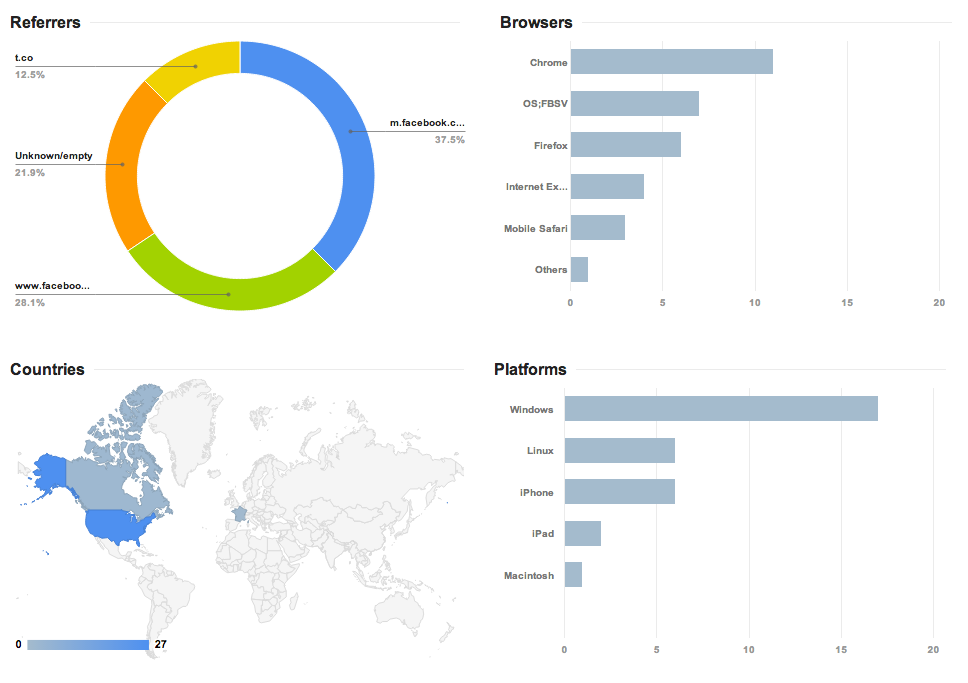
    The nice thing about Google’s service is you can track anyone’s goo.gl URL analytics by adding .info, or simply +, to the end of it. For instance, the analytics to the URL http://goo.gl/zlzlYv, which points to townsend.bunksite.com/, can be seen at http://goo.gl/zlzlYv.info. I occasionally went back to my .info page to see which of the links I shared actually had any value (received clicks on their respective pages) to my friends, family and followers.

    google diagram

    Google gives some good basic analytics data about URL click throughs, although I’ve seen more in depth analytics from URL shortening service competitors. But I digress, it was about this time when I started wondering, with being the obvious search leader and giant, does using the Google URL shortener give an SEO advantage in search results? It might make sense for Google to use URL shortener data(like number of clicks for a shortened URL) in order determine rank worthy content. Also, it seems logical that since this is another metric to look at how users share content, they would want to encourage the use of their shortener, perhaps by giving some advantage to companies using goo.gl for their social media campaigns, much like the seo benefits of using Google Plus Maggie told us about earlier this month.

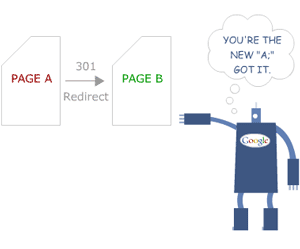
    The obvious benefits of using Google as your URL shortening service include proper redirects. You know if you are using their URL shortener you will never run into problems with shorteners that don’t properly treat the redirect conversion as a 301 redirect or don’t properly transfer PageRank or any future possible negative impact. Most popular shorteners conform to the standards set by Google, but still, it’s better to be safe.

    Another important issue for short url providers is trust. You must trust the service uptime (availability) is as close to 100% as possible. You have to trust that the redirect process will happen at a speed measured in milliseconds, not seconds.  You also need to trust the provider isn’t going to just disappear one day. With an average of 5,922,000,000 (nearly 6 trillion) Google searches every single day, I think they can handle the job of keeping up with this level of service. Besides, you are probably already trusting them to handle your site analytics, search results, pay-per-click advertising and storing documents, among other services. Why not keep all your data in one place?

    It is worth noting that Google has pulled the plug on some beloved services in the past, but they generally provide users with a lot of advanced warning before the twilight date. Also, they always provide a way to migrate user data from the shuttered service.

    So, we know the Google URL shortening service is worthy of using and helps keep our data in one place, but is there actually a positive weight given to these URLS  that translates into higher rankings on the SERPs? For that, I spoke with our Google and Local SEO expert here at Search Influence, Mary Silva.  Here is what she had to say on the subject:

    “There’s not necessarily any kind of weight given to using the Google URL shortener for linking. Also, Matt Cutts has explicitly said that “goo.gl isn’t an effort to kill anything,” and isn’t some sort of attempt to kill other “product X” URL shorteners.

    redirect-google-301
    http://moz.com/learn/seo/redirection

    In terms of SEO effects of the shortener, it’s important to recognize that there have been reports that once in a while the Google URL shortener has created broken links, so that would obviously not be beneficial in terms of back-linking and other similar efforts. Always double check that the short url actually works, regardless of the provider you use.  Another thing to note is that the Google URL shortener creates a 301 redirect which passes 90-99% of link juice to the redirected page, and is the most ideal for redirects for SEO practices, which isn’t the case for all URL shorteners.”

    So, is Google going to rank your linked content higher just because you used their URL shortener?  Nope. Content is king and there is no exception to that just because you use Google’s products. Should you use Google’s URL shortener? While no url shortening service is perfect, using this one is certainly no worse than others. Knowing that the service provider is fairly reliable may bring some peace of mind.

  • Don’t Panic! The Google 3 Weeks Places Update Isn’t Worldwide!

    Now that we’re done making sure your Google business account doesn’t get suspended for a name violation, we’re on the the next Google worry.

    HomeAlone
    http://www.flickr.com/photos/the_napkin/6469892859/

    You may have heard the buzz lately about an email going out to business owners in Google Places telling them that they have three weeks to update their listing. If the listing isn’t updated,  it will no longer be visible to Google users. The good news is that this is actually something that is only occurring for Australian businesses. Basically, you don’t have to worry!

    When we first heard about this issue at Search Influence, we were alarmed because an update like this could potentially affect many of our clients’ accounts. So, I decided to delve deep into the web and find out as much as I could from various online sources, and what I found was even more worrisome and ambiguous. Search Engine Watch’s post was the first that brought this issue to my attention. The post provided great information on what needed to be done by those receiving the email, but nothing about the scale of the email rollout and who was being contacted and why.

    The Word From Google

    Search Engine Journal’s post was awesome enough to give us the exact email google sent out, which reads as follows:

    Hello,
    Due to changes in Google Maps, we’d like to inform you that unless you review and confirm the information in your Google Places account, we will no longer be able to keep and show it to Google users after February 21, 2014.

    If you wish to keep your listing active, follow these three easy steps:

    1. Log in to your Google Places account
    2. Review and update your information
    3. Click the “Submit” button

    Sincerely,
    The Google Places Team

    The fact that the email instructed businesses to click a “Submit” button when updating indicated to me that these were businesses in the old dashboard. So, I thought I had a clue as to who was being contacted at this point.

    Next, I went to discussions on MOZ and Google Product Forums where I started seeing comments that maybe this was only something happening in Australia.

    Calling The Google Places Team

    Google-Plus-Logo

    After seeing both of these slightly alarming, but informative posts I decided to go straight to the source and call The Google Places Team. They were super helpful in taking the time to get to the bottom of the email and were forthcoming about the issue at hand. They also understood that something like this could affect a company like ours on a pretty large scale. The rep on The Google Places Team reached out directly to Google and was able to confirm with me that this is indeed something only happening to Australia Maps.

    There have been speculations as to whether or not this is something that could start happening outside of Australia, because Google has a tendency to do things in a test market before rolling them out worldwide. From what the Google rep told me, however, it seems like this is only happening because of an issue that was occurring specifically with Australia Maps.

    So, DON’T WORRY! United States Places Businesses are NOT at risk!!

    If you’re interested in reaching out to The Google Places Team, log in to your Google places account that has your business listing and click here:  https://support.google.com/business/contact/business_c2c