Tag: Google

  • Why Call Tracking Numbers in Local SEO Make Me Angry

    SEOhulk
    Don’t make me angry.

    At a recent event I found myself ranting – yes, really, ranting and I understand there’s video – about what I think is a very big deal for SMBs and those who market for them. The topic at hand was call tracking and local search.

    Over the course of my interaction with a few of our attendees I discovered that at least a couple of them were using call tracking to demonstrate ROI for their customers in a potentially harmful way. Call tracking in local SEO, if done poorly, is one of the most irresponsible things an online marketing company can do.

    What’s Coming – It’s Kinda Long:

    • The NAP (+W)
    • The History of Call Tracking
    • Why doing it wrong really hurts SMBs
    • When is it OK?
    • How you can do it with less risk

    Your NAP +W and Why It’s So Important Not to Mess It Up

    The first time I heard the NAP (Name, Address, Phone Number) referenced was in a presentation by my friend Gib Olander who at that time worked for Localeze, one of the 3 main data providers for online and offline directories. Gib and I were presenting on a panel at SMX Local & Mobile in July 2008. My presentation was on a concept I called “Barnacle SEO” and Gib’s was all about the NAP. Mike Blumenthal has sinced added the +W (web site).

    NAP +W is:

    • Business Name – you should have one and only one name. It should be the same on your web site, yellow pages listings, Secretary of State web site and everywhere else.

    • Address – the location of your business in the real world. This should be identical, or very close, to the version of your  address in the USPS database.

    • Phone Number – your main business phone number. In the best case this phone will be answered by someone who says “Thanks for calling [Business Name], may I help you”?

    • + Web Address – your home on the web. All about your business, hopefully including your Name, Address and phone number.

    In relational databases there’s a concept of a Primary Key, which is the piece of data which ties together data in different tables. So, in databases, the primary key helps you identify a unique record. In the world of Local Search, the NAP is like that. In other words, your NAP defines your business. It’s like your fingerprint on the web.

    Hopefully it’s self-evident that when you mess with your NAP you run the risk of confusing Google and other local search engines, which is never a good idea. If you screw up your NAP you may find yourself invisible in maps and locally focused searches.

    If you get many customers who came to you from search, this can be devastating for your business.

    History of Call Tracking

    The WorldA lot of folks in online marketing are relatively new to call tracking. To those of us who grew up in and around the Yellow Pages business, they’re nothing new. In the Yellow Pages universe, they refer to them a number of ways. “Metered lines,” “RCF (remote call forwarding) lines,” and other names all describe what we now know as call tracking.

    The Yellow Pages providers and their industry analysts were trying to do the same thing we’re trying to do now. They were trying to show either directly, or by inference from category data, that the ads they were selling had value by demonstrating a direct ROI (Return on Investment). There is little doubt that if your primary goal is to prove the value of your marketing efforts, you can’t beat call-tracking for service and local businesses.

    Over the years, some of those same companies who were providing call-tracking for Yellow Pages have morphed into our current crop of call-tracking providers for local SEO and online marketing.

    Why Doing It Wrong Hurts SMBs

    Small business advertisers typically have a limited budget for marketing and are therefore attracted to “performance based” solutions, in other words, those that feel like they come with a guarantee. Call-tracking is a great way to track leads and demonstrate the performance of these programs.

    Small businesses are also often fickle and impatient. And they’re not professional marketers, so we can’t expect them to think like we do about their investment.

    And they don’t usually understand exactly what it is we as marketers are doing for them. In the case of Call Tracking, they likely have NO idea of the risks of their local and maps rankings if their NAP gets screwed up.

    According to an acquaintance of mine who works for Google in Local Support and Operations, Google’s systems don’t support replacing your local number with an 800 number if they’re still able to verify your local number. Yes, you can have multiple numbers, but Google is going to treat the one they are able to find and confirm through their own data as authoritative. Google is looking for the greatest number of signals — some of them human generated, like phone verification — to assure their data is correct, so if they find a call tracking number in all the places they look for authoritative data it can be incredibly problematic long term.

    There are 3 major data providers in the US, Axciom, Localeze, and InfoGroup. One of those 3 is the origin for 90+ percent of the data you see online. But, like Google, they too get some of those data from crawling the web. So you can see how it becomes a vicious cycle – publish bad NAP, bad NAP get’s crawled and goes back into the ecosystem, bad NAP lives on long after the campaign has ended.

    At Search Influence we have a pretty deep expertise in NAP clean up — that’s right, NAP clean up — and a staff trained in how to manage listings. Most locally focused SMBs, plumbers, roofers, even doctors and lawyers don’t have the expertise to do it themselves. And, this should be obvious, they’ve got businesses to run.

    Putting a bad NAP into the ecosystem can hang around for YEARS. We all know that guy who keeps getting calls for the pizza place which used to have his number, right? Imagine your frustration if you were the pizza place. Think of all the sales you’d be missing.

    Beyond the NAP issues, for local search call tracking can be a crutch for weak metrics. It’s a heck of a lot easier to tell a customer they got 20 calls than to pick up the phone and ask about their business.

    When is It OK to Use Call Tracking for Local SEO

    NEVER!

    Ok, maybe not never.

    I think it’s OK to use call tracking with PPC and other online ads as long as one takes precautions against those numbers being seen with other referral sources. And, for national accounts (preferably with ads) I don’t feel as strongly given the lower, perhaps negligible impact of maps. But I realize that’s not Local SEO.

    For local / maps SEO, I want to state clearly that tracking numbers in local search should be avoided at all costs.

    My friend Thomas Ballantyne says he’d be OK with lead gen services in local as long as the business name wasn’t a match for his. In other words, if you want him to buy leads that use local search you’d better not muck up his NAP. From a home-service provider we hear it clearly, think about using a slightly different business name in the same way some providers use a slightly different URL. That way you don’t have to worry about your lead-gen stuff winding up in the cluster.

    If, however, a client is adamant that they need to see the calls generated or they need to record calls that come from search it can be done, but the proper precautions have to be in place.

    How You Can Do It with Less Risk

    SMB NAPThe safest way to track phone leads is by dynamically switching the number using Javascript.

    Search engine robots are increasingly capable of “seeing” dynamic content so this is an imperfect method by itself.

    It does, however, reduce the likelihood your tracking numbers will be identified and muck up your NAP+W.

    A little more technological implementation can reduce the likelihood of NAP confusion even further:

    • First, determine the User Agent of the visitors to your site – the identifier of the browser – and ensure that it’s not a robot, such as GoogleBot or BingBot. If you determine the visitor is a robot, you must show your proper NAP.

    • If at all possible, ONLY show a call-tracking number when there is a utm_source, or other tracking code on the URL string. Doing this will explicitly assure your tracking numbers are only present for visitors from a specific source, or ad campaign.

    Finally, if you want to be absolutely certain your numbers won’t get spidered you can render them in images. By replacing the image which contains the phone number you assure it won’t be misread. This is not the preferred method given it’s not mobile friendly and clickable.

    End of Rant…Phew!

    I hope it’s clearer now why call-tracking is such a dangerous tool. Yes, it’s a tool we use, but much like using a chainsaw, we take every precaution available.

    Our local business clients don’t know what they don’t know and often don’t know to ask “what are the risks.” So we, as their shepherds, need to be sure that we do no harm.

    I’d love to hear some other opinions. Do we have an ethical responsibility to our clients to educate them in the risks, or does the end justify the means?

  • 5 For Friday — Links, Stories & Posts For Your Weekend

    2068779988_4422f1bf5e_b1. Dusting The Website For Spring: Optimization and SEO Cleaning — SEOmoz

    How long has it been since you spent some time cleaning up your website? I’m sure for many of us, it’s been far too long. In this post, Scott Wyden Kivowitz gives some great tips for dusting on-site and off. A cleanup might be exactly what you need to increase your web presence. A good deal of the post focuses on social media and the benefits of linking your website to your various accounts. When it comes to off-site initiatives, social media is important once again, as you want to make sure you’re active on your accounts. Overall, this article has a lot of great advice when it comes to the little things you can do to get your website out there!

    2. Facebook To Add More Support For Emoji Within Status Updates, Comments — AllFacebook

    According to AllFacebook, the “Unofficial Facebook Blog,” the social media giant is fully embracing the popularity of Emojis. I’m sure you’ve noticed the recent addition to your status bar, where Facebook now asks how you are feeling. Apparently this was only the first step. Comments are now Emoji-laden as well, and Facebook is adding new support for the animated addition. Unlike most Facebook changes, the presence of Emojis seems popular with users, who are apparently grateful for an additional way to express themselves—especially such an adorable way. I’m sure you can all expect to see many more cartoon cats on your newsfeed in the upcoming weeks.

    3. Hipstamatic Battles Instagram With Oggl iPhone App — PC Mag

    Apparently Hipstamatic is making attempting to regain lost popularity with a new product called Oggl. Could this possibly be enough to replace Instagram in our hearts? As a latecomer to the iPhone, I’ve never used Hipstamatic, as Instagram was already the go-to photo app by the time I switched from Droid. Maybe this makes me biased toward Instagram, but I don’t foresee a big shift. Apparently Oggl allows you to edit photos after you’ve already taken them. The same filters and lenses from Hipstamatic are still available, though. According to this post, it seems like the makers are marketing the new venture as a more art-focused app (Oggl is NOT for selfies!). I guess we’ll just have to wait and see if edgy marketing can overtake Instagram’s immense popularity.

    4. Instagram Now Lets Anyone Tag You [Or Brands] In Photos, Adds Them To “Photos Of You” Profile Section — TechCrunch

    In case you missed, it, last week Instagram launched photo tagging. I know what you’re thinking: “It’s about time!” There’s now even a Photos Of You section, so you can keep track of pictures you’ve been tagged in. I’m still trying to decide if I like this switch, as I kind of enjoyed Instagram’s focus on photos rather than people. In this post, TechCruch’s Josh Constantine explains how this signals a new emphasis on identity for Instagram. (He has another interesting blog post linked on this page that further examines the issue.) He also tells you exactly how to use it, in case you’re interested!

    5. Google Removes Related Searches – Blind Five Year Old

    For those who haven’t noticed, Google has removed the Related Searches feature from Search. For many of us, this was an important tool when it came to keyword research and will be sorely missed. In this post, Blind Five Year Old owner AJ Kohn, who’s pretty upset about the change, laments Google’s neglect of SEOs. It’s really interesting to hear his take on why Internet marketing matters, and how individuals working in SEO actually benefit Google. According to the post, it’s SEOs that are “demystifying search,” to help websites, which helps Google in turn. In fact, spurning SEO may end up hurting Google in the long run.


  • What Local U can do for Your Business

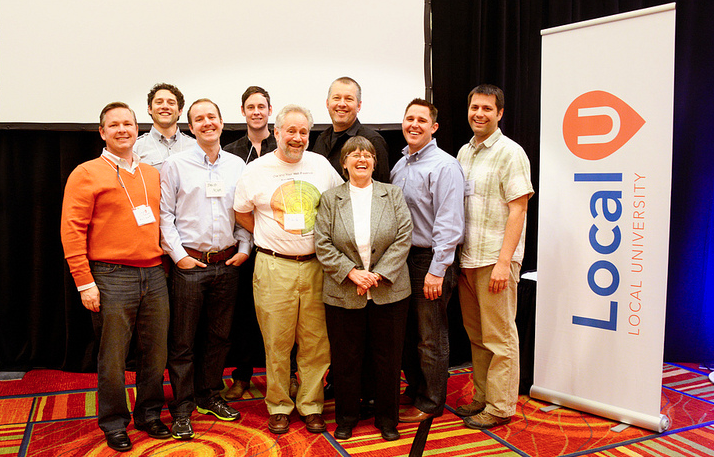
    Local University Staff
    Local U brings together the brightest minds in Local Search.

    With Local U just around the corner, I’m getting really excited about the opportunity it’s bringing to New Orleans. While there are so many things I love about the this city, it’s not necessarily known for its booming tech industry… yet. Local businesses could use a technological boost, and that’s exactly why I’m so eager to have Local U in our city. This informative event brings together some of the top players in local search to give entrepreneurs an introductory training session in Internet marketing.

    Local University will take place at Tulane’s Lavin-Bernick Center on May 7, from 8:30 am – 1 pm, featuring tons of great speakers and topics. It’s extraordinary to have so many great minds come together to share their wisdom. Experts in the field such as Mike Blumenthal, Mary Bowling, Ed Reese, Aaron Weiche, and Mike Ramsey will all be there, as well as the lead Consumer Support staffer from Google Places.

    Local U logoI see local U as the perfect way for anyone who is managing their local online marketing, or managing those who do, to learn practical tools they can use for any current or future enterprise. There’s no better way to spread the word about your business in this day and age than online, and this conference gives you the know-how to do just that. I know a lot of people who have no idea how to clean up their reputation online or connect with clients through social media, and they often don’t know where to turn to harness these skills.

    With sessions like Getting Social Online and Going Local with Google, individuals who have never previously taken an interest in search engine optimization, local search, or even social media can learn how simple techniques can maximize their online presence. If you’re interested in learning more about marketing your business online, make sure to sign up now!

    See you at the conference!

    Click Here to Sign up for Local U New Orleans!

  • 5 For Friday — Links, Stories & Posts For Your Weekend

    Round 1-051. Bing Places For Business replaces Bing Business Portal – Small Business Search Marketing

    Bing has made some significant changes in its local business listing management platform. Bing Places will replace the old Bing Business Portal, and along with the name change comes a simpler system that strips away much of the non-local search functionality that previously existed. Learn more about the update and decide whether you think this is a good move for Bing.

    2. 10 Inbound Discoveries That Will Disrupt Marketing Forever – HubSpot

    HubSpot’s 2013 State of Inbound Marketing Report has been released, and they’ve distilled the findings down to the 10 biggest discoveries. More than 3,000 marketing professionals from all over the world participated by sharing their thoughts on everything from strategy and organizational alignment to channel and budget management.

    3. How to Build an Online Community for Your Business – SEOmoz

    Building a better online community around your business has a number of advantages. This author urges you to focus on the hard work of attracting the right kind of customers to your community rather than chasing the latest algorithm updates.

    4. Top Google Website Optimization Resources – Search Engine Watch

    All of the best tips, guides, tutorials, and resources that Google has offered on SEO are all here in one place. You can find everything from beginners guides to some advanced programming concepts that will help you become an optimization expert.

    5. How Dynamic Search Ads Can Take Over Your AdWords Account With Devastating Effects – Search Engine Journal

    Dynamic search ads became a hot topic when they were recently added to all AdWords accounts. Advertisers expecting to increase profits simply by using DSAs on standard settings should think again. Here are some tips to make the most of your dynamic ads.

  • 5 For Friday — Links, Stories & Posts For Your Weekend

    1. Back to Basics: Meta Descriptions 101 – Search Engine Journal
    If you haven’t looked at your meta descriptions in over a year or 6 months, it may be time to refresh your meta data. Meta descriptions are the ones that will show up in search results, so they should sound coherent to humans. Read this refresher on meta tags.

    five-for-friday2. Thinking about adding 10,000 pages to your site at once? Take caution. – Search Engine Land
    If you are adding a large number of pages to your site, it is better to do so in stages according to Google’s Matt Cutts. Adding them in batches may be better. Releasing thousands of pages at once may cause Google to manually review your site for any suspicious behavior.

    3. Want to learn how to segment out your image search in Google Analytics? – Blind Five Year Old

    Google image search, universal image search, Bing image search. How do you keep them all separate? AJ Kohn from Blind Five Year Old walks you through the process of setting up filters for image searches in Google Analytics. Read and implement.

    4. Foursquare emphasizes its local search in its latest app update.  Search Engine Land

    Attempting to take on Facebook and Yelp, the social check-in company rolls out its 6.0 update for its app. With local search as the primary focus of the new update, Foursquare users will see nearby recommendations and discovery features. Check it out.

    5. Are Facebook fans really worth it?  – Mashable

    According to a Syncapse report, a Facebook fan is valued at $174. The study takes a look at Facebook fans versus non-fans and analyzes their spending behavior along with their brand loyalty and several other factors. Would you agree with their estimation?

  • Google Places For Business Dashboard Update: News Roundup

    Peugeot 207 dashboard

    Earlier this month, Google started slowly rolling out the new Google Places For Business Dashboard which includes an updated interface, deeper integration with Plus, and a promise of faster updates. The dashboard is now available to all new users in the U.S. To help better understand the new features, we have compiled a great list of resources on this much-needed updated.

    From Google:


    From Mike Blumenthal a.k.a. Professor Maps:


    From Around the Web:

  • 5 For Friday — Links, Stories & Posts For Your Weekend

    Number 5 Street Falmouth1. The Marketing Value of YouTube – SEO MOZ

    The author here discusses the impacts YouTube can have for your product. YouTube is a great resource if you are looking to build your brand. It is important that you put up quality videos over the quantity of videos. Check out the article for some great information if you are looking to build a presence on YouTube.

    2. Google Places Is Being Updated To Google + Local – Search Engine Journal

    This talks about the transition from Google Places to Google + Local.  The post describes how this should make the process easier to use, faster updates, and integration with Adwords (Express) and G +.

    3. SEO & Keywords: Think Conversions, Not Rankings – Search Engine Watch

    Here the author talks about how rankings should not be the ultimate goal when it comes to SEO services. The author lists 4 steps you should take to produce stronger SEO results in the long run.

    4. Indecision 2.0: Are Apps Taking Away Your Power to Decide? –  Mashable

    Are we too dependent on social media to make simple decisions we face on a daily basis? I sure hope not. This is an interesting article about different apps that can help you make decisions you are not comfortable making, or if you just want some help making a decision.

    5. Google On Developing For Google Glass – Search Engine Round Table

    This post has an informative video on how developers can develop apps for Google Glass. In this article, it lists four key developer guidelines from the video to help you better understand the process.

  • 5 for Friday — Links, Stories, & Posts for Your Weekend

    Round 1-041. Who is Winning the Apple vs. Google iPhone Driving Directions Battle? Too Close to Call — Mike Blumenthal
    Even if you don’t keep up with the war between Apple and Google, you’re probably familiar with Apple Maps and it’s not-so-impressive emergence last fall. Well, since then, the app’s gotten its ducks in a row, and I know quite a few people that use it as their primary navigation tool. But how does it compare to Google Maps? Mike Blumenthal decided to find out. Check out this blog post to see how the two compare now that Apple Maps has matured a bit. I assumed that Google Maps was still the outright leader and was surprised by the results. Who knows, maybe I need to switch over to Apple Maps!


    2. The Woman’s Guide to Having it All — Outspoken Media

    I’ve been thinking a lot lately about the role of women in SEO and the tech industry in general. It amazes me how few women there are, and I often wonder how we can change that. There are several active initiatives to get girls interested in technology, and I truly hope that they can change the future demographics of the tech world. But how do we get women noticed right now? In this blog post, Rhea Drysdal discusses her idea of what it means to be a successful female in the industry and what she thinks needs to change. Drydal is currently pregnant, which adds an interesting twist to her view on the situation.


    3. How To Protect Your Home Business From A Natural Disaster — Graywolf’s SEO Blog

    Living in New Orleans, disaster preparedness is a necessary part of life. Most people have a plan for storms, whether it involves evacuation routes or a cabinet full of MREs and batteries. While life necessities are obviously the first priority when it comes to hurricanes or any other disasters, business owners must have a disaster readiness plan in place just in case. I once heard Chris Slaughter, WWL-TV’s former executive news director, speak on what he learned about disaster preparedness from Katrina, and I was surprised by what I learned. There are so many small details that are easy to forget when you’re not actually in the situation. I recently came across this blog post from Michael Gray that touches on the subject. It’s filled with some great tips on how to protect your home business when Mother Nature strikes.


    4. Zynga relaunches gaming site, loosens Facebook ties — Reuters

    Zynga and Facebook. What a tragic love story. It seems that the divorce process continues, as game publisher Zynga relaunched its website on Thursday after previously relying wholly on Facebook for online play. Users no longer have to login through their Facebook accounts, proving further division of the two companies. By the end of the month, Zynga and Facebook will officially just be friends again. Alas, not all relationships are meant to be! And it seems that Zynga might not need Facebook after all. In this article, Reuters’ Gerry Shih gives a report on what led to this shift and what it means for the two companies.


    5. Facebook Begins Rolling Out New, Customizable Timeline — AllFacebook

    I’m sure all of you savvy Facebook users are aware of the new changes taking place on your News Feed, but just in case you haven’t heard—or if you just want to learn more about the shift—AllFacebook, the Unofficial Facebook Blog, has you covered. Facebook’s spokespeople say the change makes for a cleaner page with less clutter, but what do you think? I like the new bigger images, but there’s not that much else that I’ve noticed really affecting my use. I’m also a little wary of the advertising suddenly melded into my feed. I guess only time will tell what this change means for users.

  • 5 for Friday — Links, Stories, & Posts for Your Weekend

    Round 1-101. Top 4 Strategic SEO Trends to Watch for in 2013 – Search Engine Journal

    Don’t get lost in the mix! Take a broad look at your organization to make sure you’re producing top quality content, including social media, making your site mobile friendly, and understanding the knowledge graph.


    rss2. Google Announces Retirement of RSS Reader – The Content Standard 

    Google has just announced that on July 1, 2013 Google Reader will retire. This is part of Google’s plan to remove irrelevant and no longer useful services. If most of your audience is using this to get your updates, now is the time to transition them to a new service.


    twilert-1

    3. How To: Use Twitter as a Listening Station – Small Business SEM

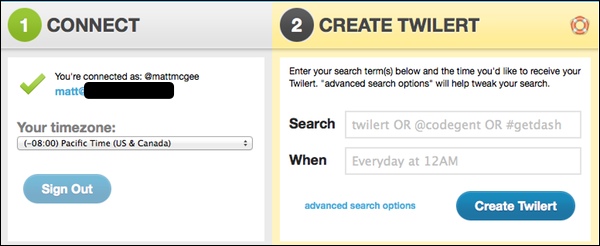
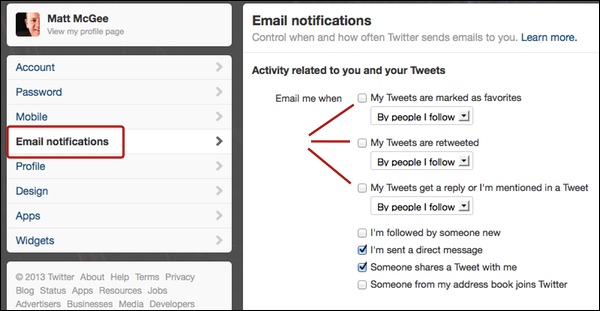
    If being active on Twitter doesn’t seem to be producing the results that you’re looking for, then try being passive by listening first and then responding. Twilert allows you to create timed alerts for when certain phrases, handles, or hashtags are used. If that is too much, you can always go the traditional route by creating email notifications through Twitter itself.

    twitter-alerts


    4. Mobile Searchers Do It at Night – Marketing Pilgrim

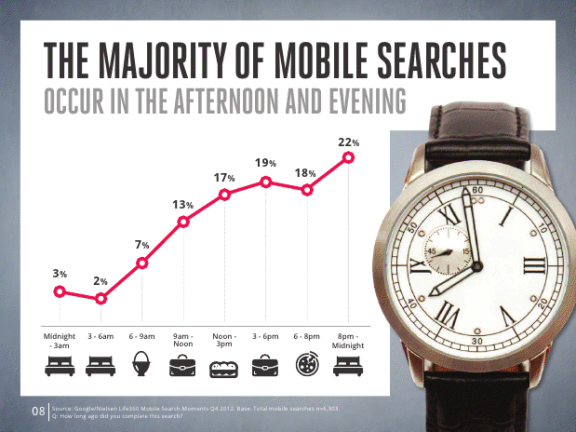
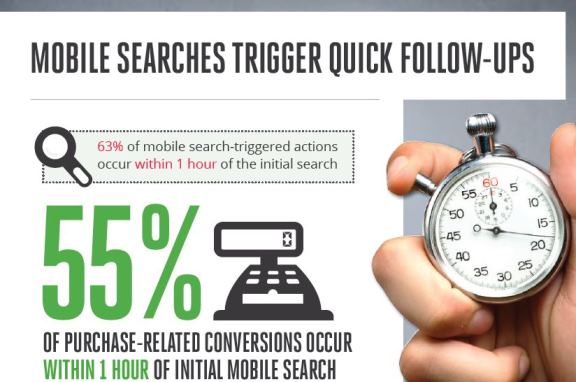
    Google and Nielsen recently put together a new report using data from 6000+ mobile searches to discover how it drives conversions. Did you know that 77% opt to use their mobile over a PC? So it’s important to make sure that you’re showing up in the first few results of a search otherwise you’ll never even make it onto their mobile screen.

    mobile-search

    mobile-followup

    5. Deadeye Keyword Research: Advanced Tips for Choosing the Right KWs from #SMX – aimClear Blog

    The better the research, the better the keywords…even if Google stopped providing all referring keywords in analytics for “privacy reasons.”

    privacywhat

    Key Relevance’s Christine Churchill provides some alternatives to gathering this information because as Avalaunch Media’s Matt Siltala stressed, “you can’t skip over keyword research. You can’t get annoyed with it. You HAVE to do it.” Read on for more about keyword intent and keyword research tools.