Tag: Google

  • Google Plus Rolls out Vanity URLs! Kind of…

    Google+ has rolled out new costume vanity URLs to select brands and users. This is pretty awesome, if I do say so myself. The vanity URLs look cleaner and are easier to remember, so they are better associated with brands. Also, it looks so much better on your professional printed materials than, “Follow me on G+ https://plus.google.com/u/0/111184837779438209699/posts.”

    If you or your business are one of the lucky chosen ones, you will receive a message from Google via email and notification in your Places Dashboard (or LBC…not quite sure. Get it together, Google!). They will present you with the vanity URL of their choosing. You can request a different URL if you like, and after several business days, Google will contact you saying it has been approved or denied.

    I am sure there is method to the madness. I just cannot tell what that method is. For example, if you are Lady Gaga (https://plus.google.com/+LadyGaga/posts), who has over 7.8 million people followers you get one. Or, if you are MTV UK (https://plus.google.com/u/0/+mtvuk/posts) who only has 240,000 followers, you get one as well.

    One for you Lady Gaga. You go Lady Gaga!

    YouGoGlenCoCo

    But, if you’re Jimmy Kimmel (https://plus.google.com/u/0/107381356195126362734/posts), who has just over 1 million followers, you will not get one.

    And none for Jimmy Kimmel!

    The vanity URL does not come without concessions. The URL can be revoked at anytime. Google has even stated they may charge for it one day. I’m not sure why they would charge for it other than the fact that they can. Hopefully they roll these vanity URLs out to everyone for free. Let’s face it, we know the have the ability to do so. Facebook and Twitter do it!


  • Influencer Spotlight: Gabrielle Benedetto

    gab

    Native New Orleanian, Gabrielle Benedetto has been working on the Search Influence account management team for over a year and a half. When she isn’t at the office, you can probably catch her running around New Orleans training for her next big race or enjoying time with friends and family.

    As an Account Manager what do you find yourself doing on an average day?  

    As all members of the account management team, my goal everyday is to make sure my clients are happy! Regardless of how simple a client’s question may be, my job is to make sure they feel confident about their SEO campaign and they understand what our team is doing to improve their online presence.

    Many of the accounts I work on have very niche markets. I make it a point to spend quality time with each client so I can get a better understanding of their marketing goals to insure we are running a great campaign.

    What would you say is your specialty and what do you enjoy most about it?

    I’m one of the few members of the account management team who works on site audits. This is basically a report run on an entire site that analyzes everything from internal links, HTML coding, optimized content, site navigation, and even off-site marketing. I really enjoy working on these as it provides me with a pretty deep understanding of how the site is currently optimized and shines light on opportunities to improve.

    Many client come to me saying “I have a user friendly site and provide visitors with unique content about my business, but I just can’t seem to increase my rankings.” In presenting a site audit, this allows me to spend time with the client and not only show them what areas of their site need improvement but how my team can address each issue.

    You’ve had a great deal of experience working with a wide range of clients, from local business to some national companies.  After working with and analyzing their websites, you’ve discovered some funky stuff along the way.  Any easy tips out there for an average Joe looking to improve their site?

    Ah great question! I have three rules: make it natural, make it pretty, make it search engine friendly. This may be a little easier said than done, but that’s where Search Influence comes into play.

    When optimizing or looking for ways to improve your site, you can’t go wrong if you follow these three rules.  

    1) Make it natural: Although sites with all the bells and whistles can be really nice to look at, they don’t always work properly. When optimizing a site, do what comes natural. This applies to something simple like making sure the content on your site reads naturally and is well optimized for your keywords. You could even take a more technical approach with this in making sure that you’re setting up an easy-to-use navigation and structure for your site.

    2) Make it pretty: I think we have all visited a site that wasn’t organized well and looked unattractive. Having a site that isn’t organized properly or comes across as ugly or outdated is immediately going to make you think of the “s” word… spammy. Having an updated, attractive, and welcoming site allows for a better user experience and also allows for your site to be seen as a little more trustworthy when compared to some of your competitors.

    3) Make it search-engine friendly: So you now have a site that just looks stunning! Your site is organized properly, attractive to visitors, and reads and functions naturally to the human eye. Regardless of how good it looks, if the search engine spiders can’t access your site’s information, no one will be able to visit your site. Make sure all content, pictures, pages, and URLs (just to name a few) are accessible to the search engines.

    If you could give advice to a new client starting up their first SEO campaign, what would you say?

    SEO is a marathon, not a sprint.  I have many clients who come to me with larger-than-life goals for their campaign. While the competitive streak in me is eager to accept a challenge, I always want to make sure realistic goals and expectations are set properly. If you want to rank on page one tomorrow, launch a paid search campaign. If you want to build strength, trust, and authority to your site, run a properly optimized SEO campaign. Results traditionally aren’t immediate, but SEO is a great way to naturally increase your search presence.  Once we lay the foundation and the campaign starts to pick up speed, we can see the rankings “increase to infinity and beyond” as one of my clients put it.

    What’s your favorite thing about working at Search Influence?  Anything in particular you could live without?

    Something that makes Search Influence different than other companies is our staff and work space. Our office is full of monitors, MacBooks Airs, and extremely talented young professionals plugged in and focused on their work. Our staff is not only talented, but energetic and brings so much personality to this company. The team is constantly looking for ways to improve day-to-day internal processes, deliverables to increase the success of our clients’ campaigns, as well as our overall brand.

    SI has a finite amount of candy at the office. There is a love/hate relationship between the team members and the candy supply. I’m trying to quit, but candy is always in the office taunting me.  There are brief periods when the candy supply is low. I secretly enjoy this time without candy, but everyone else in the office starts shaking and needs their candy fix. I think I could live without the candy in the office, but I might miss the constant battle to cut down the candy.  Strange enough, this bonds us a little. But let’s quickly move on to the next question before someone yells at me for speaking out against our candy supply.

    Tell us a little more about your life growing up around The Big Easy.  In your free time, what do you do for fun?

    I am New Orleans through and through. Although we may be called the “Big Easy” there are always events going on in this town. Between races, social events, restaurant openings, or fundraisers there’s always something to do down here.

    gab2

    In a perfect world, left to your own devices, what would you be doing all day?

    When I’m not at the office I’m probably at one of the events mentioned above.  Yet, subconsciously I’m still working, networking, and meeting new people.  Since a lot of people aren’t extremely familiar with SEO or Internet marketing for that matter, I’m always explaining how Search Influence helps companies all over the country promote their business and increase their search presence. I never leave the house without a stack of business cards.

    One last hard hitting question —- If you could identify yourself with one designer brand what would it be and why?

    That’s easy, DVF (Dianne Von Furstenburg)! Her line is classic, professional, and fashion forward. She’s been rocking it for decades and still vogue — just one of my own aspirations!

  • How To De-Personalize Your Search Results

    As Google continues to update its algorithm to deliver more local and personalized results to searchers, it becomes harder to get a true sense of where your site ranks in the search results. Below are a few different options for “de-personalizing” the search results you see.

    First things first, Sign out of Google

    Since your Gmail or Google+ account may be tied to various searches or a specific location, you should sign out of your account. If you would like to remain signed in, there are a couple of precautions to take:

    Hide Private Results:
    1) In the upper right hand corner there will be an icon for a person and a globe. Select the globe.
    Hide Private Results

    Turn Off Private Results:
    1) In the upper right hand corner select the gear > Search settings
    Update Google Search Settings for Private Browsing

    2) Scroll down to the “Private Results” Section and select “Do not use private results”
    Do Not Use Private Results in Search Settings

    3) Select Save

    De-personalizing your Results: &pws=0

    1) Go to google.com and do a search

    De-Personalize Search Results

    2) In your address bar, scroll to the end of your URL and add “&pws=0” and hit enter

    De-Personalize Search Reults with pws=0

    2) Voila! Your results have been de-personalized.

    Tip: you can also add “&num=100” to display 100 results on your search engine results page instead of just 10!

    Using Chrome? Use an Incognito Window

    If you are using Chrome, you can take an extra step and use an incognito window, which will have no history attached to it.

    1) Go to File > New Incognito Window
    TIP: The shortcut is Command-Shift-N on a Mac (on Windows it is Control-Shift-N)
    De-Personalize Search Results with Incognito Window

    2) Proceed to Google.com to perform your search (or search directly in the address bar)

    De-Personalize Search Results with Incognito Window for Chrome

    3) Finally, for extra precaution, use the &pws=0 method above

    4) Chrome also has this handy extension called Disable Google Personal Search that you can install that will automatically add &pws=0 to all of your searches. This speeds up the process quite a bit!

    Take Advantage of Private Browsing

    Safari
    If you are using Safari, you can browse the Internet using “Private Browsing.” The difference between private browsing and using an incognito window is that this setting is for the Safari Application, as opposed to just one window.

    1) Go to Safari > Private Browsing…
    Private Browsing in Safari

    2) A pop up will appear, select “OK”
    Turn on Private Browsing in Safari

    3) Proceed to Google.com to perform your search (or search directly in the address bar)
    Private Browsing in Safari Address Bar

    4) Finally, for extra precaution, use the &pws=0 method above

    Firefox
    Firefox has a similar feature. Here’s how to turn it on:

    1) Go to Tools > Start Private Browsing
    TIP: The shortcut is Command-Shift-P on a Mac (on Windows it is Control-Shift-P)
    Private Browsing in Firefox

    2) A pop up will appear, select “Start Private Browsing”
    Turn on Private Browsing in Firefox to start browsing

    3) Proceed with your search!
    Turn on Private Browsing in Firefox

    4) I came across this extension, which works in Firefox and in Chrome. It’s called Google Global, and can be used to see search results in other countries but also has a de-personalization option.
    Google Global De-Personalized Search results

    Internet Explorer
    Lastly, Internet Explorer also has a private browsing option. Follow the below steps:

    1) Go to the gear icon in the top-right corner and choose Safety > InPrivate Browsing
    TIP: The shortcut is Command-Shift-P on a Mac (on Windows it is Control-Shift-P)

    2) I haven’t personally tested it out, but there is a plugin you can use for Firefox and Internet Explorer to prevent you from seeing personalized search. Download it here.

    Clear Your Cookies

    If you want to be absolutely sure you have no personalized search,  you can clear all of your cookies. I prefer not to do this as it will also make you sign back in to any accounts that you may have previously been logged in to, but it will definitely do the trick. Here’s a great article on clearing your cookies depending on your browser and computer.

    Thinking About Your Online Results

    Looking at the de-personalized results will only give you a sense of your online presence. Google’s move toward greater personalization around location and search history makes a focus on rankings a less accurate depiction of your overall online presence. Although these are the “truer” results, because most everyone else using the Internet will have personal results, you can see how any one search result page is not 100% accurate or true for everyone.

    Your rankings are a key performance indicator for your online results, but they are by no means the definition of success. It is important to look at a variety of factors which include an increase in traffic for organic traffic, both branded and non-branded, and an increase in conversions, leads, or transactions that are completed as a result of organic searches.

  • Turn Quiet Customers into Brand Ambassadors with the Right Social Media Content Strategy

    Thanks to Panda and social signals becoming more prevalent than ever in Search Engine algorithms, content both on and off-site is moving to the forefront of most SEO and online marketing strategies. Truly exceptional content not only ranks well, but is shared virally and provides a real value to the reader.

    Something I really began believing at PubCon NOLA this year is that social signals for search go beyond just whether someone likes or shares your content. The social signals Google is looking for have more to do with whether your customers are talking online about their experience with you after their purchase.

    Source: mvellandi Flickr http://bit.ly/8vqROG
    Source: mvellandi Flickr http://bit.ly/8vqROG

    The problem here is the ratio between people who want to shout it from the rooftops when they have a bad experience to those who openly share when they are excited or had a positive experience. In today’s social age, everyone is a journalist, food critic, secret shopper and referral source. The average Facebook user has 229 friends on the social network, meaning that if they so choose, they can instantly alert at least 229 friends to stay far away from the new Italian restaurant in the neighborhood after finding a hair on the pizza.

    That’s pretty powerful. There aren’t many other platforms that allow one individual to communicate with so many others so quickly, and to be so expressive while doing it.

    As a business, you’ve probably been told that you need to be marketing on social media to protect your reputation online and grow your business by generating leads or driving more customers into your store. I would challenge you to think beyond that.

    When is the last time you had a great experience at a local restaurant? Did you tell anyone about it? If so, how many people? Now think about the reverse. Chances are, you told a few more people about the negative experience than you did the positive one.

    Source: LetoLab.comIt is time to change our thinking when it comes to social messaging, beyond the traditional “lead gen” mindset. Rather than trying to push your product on someone who’s never used it or heard of it, why not look for opportunities to engage your existing happy but quiet customers and get them talking? Social media gives marketers and businesses the opportunity to turn a customer into a brand ambassador.

    Yes, we have to make sure we watch out for Panda and keep an eye on that pesky Google and their algo updates when it comes to on-site content strategy. I don’t mean for my focus on social to suggest that you should move your entire content strategy off your own website and onto social platforms. But, if we think about using our online content strategies to lift up our happy customers, get them sharing and engaging with us, just imagine the viral potential to reach their friends and family–new business you haven’t yet tapped into.

    You’re probably like, “Ok, I get your point, but how do I DO that?” Funny you should ask! Social media content strategies will vary by business and industry, but here are some tips for converting your social media following into brand ambassadors:

    1. Tone down the sales messages and pushy language. No more than about 20% of your social messaging should be self-referential or portray a sales message. Within this 20%, remember that the goal of these posts should be to provide a real value proposition to the audience. This could include specials, deals or contests.

      Content Strategy for Social Media - Provide a Value
      While this is basically a self-promotional post for Shutterfly, an online photo service, they are providing a value to their customers with a create-your-own cover photo featuring dad for Father’s Day.
    1. Reward your loyal customers and followers with exclusive information. Whether is a sneak peak into an upcoming in-store special or just a “Did You Know” fact, people love to feel like they have the inside scoop, so give it to them!

      Social Media Content - Give Fans Exclusive Info
      Online retailer HauteLook hosts designer pop-up sales for a limited time until inventory is sold. They effectively use social media to make their audience feel like they’re getting the inside scoop while also promoting the upcoming sale.
    2. Feature your fans. Everyone loves to be recognized, so give your fans a moment to shine by choosing to feature them every once in awhile. They’re more likely to share the content with their friends and family (increasing the potential reach of your future posts).
      Content Strategy - Fan Features

    3. A little subtlety goes a long way. I’m a big proponent of including a call to action in your post, but it’s best not to take it to the extreme. Providing a share-worthy piece of content to your pre-qualified audience with a slight nudge can never hurt.

      Social Media Strategy - Calls to Action Increase Engagement
      Disneyland provides a great piece of content with a direct call to action: share. And share they did! The piece resonates well with their audience and was timely for the Mother’s Day holiday.
    1. Post well and post often. At PubCon New Orleans this year, Alison Zarella (another AZ girl!) said it best: “the newsfeed is crowded.” As a business or brand, your competition on Facebook is not limited only to the business across the street that sells the same product. You’re also competing for your audience’s attention with the likes of their moms, distant cousins, besties and frenemies. If you don’t post great content and do it consistently, you’ll never be seen.

    2. Reply, reply, reply! Make sure to reply to your customers who comment or post with questions! Facebook and social networks are where people spend a lot of their time these days, so getting a quick reply and notification of that reply is what they expect.
      Social Media Content - Reply to Your Customers' Questions

    3. Be flexible and test for yourself. Above all else, try new things and test multiple approaches with your fans. There’s lots of information and data out there about what works, when to post and how to do it, but the truth is that every industry is different. You’ll never know what is the most effective for your brand until you try new things, compare results and adjust your approach.

  • Local U New Orleans: 14 Things You’ll Want to Know

    About a month ago, my team and I attended Local ULocal U Logo
    an online marketing seminar held at Tulane University. It was an extremely valuable, very energizing half-day! Various industry leaders in local SEO have dedicated their time and resources to helping small businesses learn the basics. It was more than worth the price of admission!

    Not only did I take away a lot of valuable information, but I’ve already started thinking about how I can apply the topics discussed to help Audubon improve our online presence. I’m excited to put a plan into action and work with my team to make the website even better.

    Below are my top takeaways from the day.  If Local U is coming to your city, I highly recommend attending.

    Takeaways:

    1. Does your website answer the top 10 most frequently asked questions that you hear from customers in your physical space/store?
    2. Is your NAP (business name, address, phone number) easy to find on every page?

      White Bengal Tiger NAP
      This tiger needs a nap! Too bad this type of nap won’t help your local presence!
    3. Remove all Marketing Speak.
    4. Are you consistently blogging? (Tip: Top 10 FAQs make excellent blog post topics.)
    5. Are you building links on your site to other reputable sites? Links are gold! Search engines move from link to link.
    6. Content is not just text. Content is photos, graphics, video, reviews.
    7. Future of online marketing is customer reviews. Do you have a review process built into your sales process – to both encourage reviews and deal with negative reviews?
    8. When asked what do you do on Google, 46% say read customer reviews. Reviews are social proof.
    9. If you are not talking about something on your site, you cannot rank in search for it! Create pages for what you want to rank for.

      Sea Otter
      It’s important to add enticing photos and videos. Who wouldn’t love to look at cute pictures of animals all day?
    10. There is no single Google search results page. 50-200 different algorithms at work at any given time and results are personalized. We are all seeing slightly different results.
    11. Rank for what you are best at, be specific!
    12. YouTube is the world’s second largest search engine. What will users find there about you?
    13. You cannot own or control Facebook. You can own and control your website. Your website is most important, at the heart of all your online marketing.
    14. Emails must be readable on all devices. 42% of all mails are opened on a mobile device.

    Lani McWilliams is the Director of Audubon Nature Institute Logo Member Services & Ecommerce at Audubon Nature Institute. Audubon Nature Institute is a 501(c)3 not-for-profit organization dedicated to celebrating the wonders of nature and educating their visitors about the natural world.

  • Google Slider Replacing the Maps Seven Pack?

    Many people have seen the slider on the top of Google search results when searching for “things to do various city,” but have you seen it when searching other local terms lately? When I searched the term, “Pizza New Orleans,” I noticed the slider appearing instead of the seven pack for the first time today! I search this term often–not because of my love for pizza, but because of my client’s pizza chain. Never in the history of everdom have I seen the slider show up for this particular term.

    What if Google is leaning more towards this instead of the seven pack? This can be a good and bad for local businesses. Good because your business will not be pushed all the way to the bottom of page one, way under the seven pack. Potentially bad, because many people may be driven to click the pretty images on top of the screen vs. clicking on the plain jane search results.

    What does this mean for me, you ask? How can I be a part of this beautiful slider? As our fearless leader says, “Barnacle SEO is the answer!” A well optimized Google Place listing and page are the first steps.  Your best possible scenario is to be the Theo’s Pizza of the page! Theo’s is the first Google Place listing in the slider AND the third organic listing on the page. As per usual, the more real estate the better.

    It’s going to be very interesting to see where Google takes this and how far it will go. Will it eventually replace the seven pack? Only God–I mean Google knows!

    P.S. This doesn’t show up for everyone. A few of my co-workers have seen this in the wild and a few have not. Have you noticed this type of result for other queries besides “pizza” or “things to do?” Tell us in the comments below!

  • 5 for Friday — Links, Stories, & Posts for Your Weekend

    five1. Google Acquires Waze to Improve Local Search Experience – Brafton

    On June 13, Google announced that it had acquired Waze, a social-sharing platform that uses crowdsourcing to gather real-time information about road closures and traffic jams to give mobile searchers accurate, up-to-the-minute directions. The deal will provide new data for Google Maps that might improve local search capabilities and help fuse online content marketing with in-store sales.


    2. Apple Makes Bing The “Default Search Engine” For Siri – Search Engine Land

    Apple announced this week that when iOS 7 comes out this fall, Siri will have a new integrated web search feature powered by Bing. This update could go a long way toward making the voice activated virtual assistant a better web search option for iPhone users, and could potentially drive a lot of new traffic to Bing.


    3. Twitter Offers Free Analytics For All Users – Search Engine Watch

    New analytics are available on Twitter to help users identify trends in their accounts without having to go to a third-party tool. While the data is basic, it may provide marketers and small businesses with valuable insights into the behavior of their followers.


    4. Marketers See Big Data Analysis As Critical Skill for Success – Marketing Pilgrim

    A recent study shows that the “ability to use data analysis to extract predictive findings from big data” is the most prized skill for a marketer to have. You might be surprised by which skill ranked second. Overall, the list shows that some “old school” skills still have a lot of value.


    5. How to Build Links to Your Blog – A Case Study – Moz

    Proper link building is a key ingredient in developing a successful blog. Paid advertising and social media strategies will only take so far. This author shares the story of how he got the links he needed to get his travel blog out to a wide audience.

  • Keyword Rankings are Important … Just Maybe Not as Important

    I have always been hesitant to use keyword ranking reports as the focus for a successful SEO campaign. They are a useful measure, but they aren’t the most important, nor are they reliable and trustworthy. Don’t get me wrong.  Ranking reports have value.  Just not as the primary reporting standard.

    The prescription for success is focusing on the website performance rather than obsessively watching over the rankings. This image shows this client hit the #1 spot in April then again in May, and within that time the #1 spot garnered them 8 visits.

    A website needs to be a dynamic living entity. Google respects business owners who take care of their website properties and make those sites engaging, interesting places to visit.  Website owners need to be mindful of which pages on the website are the strongest and most visited.  What pages have the highest and lowest Bounce rates, and why?  Which pages have the highest and lowest time spent on page – is there room for improvement?

    A positive user experience is influential to the site strength.  Quality backlinks.  Author trust.  Engagement in the industry discussions online.  These are the things that will make a site strong, and from that strength, the site will show up in the SERPs, but maybe not for the phrases you want or expect.

    Things ain’t what they used to be

    A brief blog post  in mid-May says it very succinctly:

    “Keyword ranking as a metric is diminished in importance and relevance as performance metrics are starting to replace it.”

    “Performance” encapsulates so many details. It’s a lot of what is already mentioned: the behavior of the visitor once they land on your site.

    • If they are digging around to other pages,
    • reading more information,
    • spending time on the site,
    • taking the quizzes sitting in the sidebar,
    • watching the videos embed on the page,

    – if they are doing these things, Google is rewarding that site as being trusted as a resource.

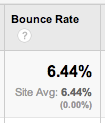
    An excellent Bounce rate, not seen very often in this client's industry.
    An excellent Bounce rate, not seen very often in this client’s industry.

    If visitors land on a page and immediately see the content is not rich enough, there is no multi-media experience, there are no big happy buttons encouraging that visitor to go read about the doctor or lawyer, baker or candle stick maker, it’s boring.  And they will leave.  When visitors Bounce,

    • you lose a potential customer,
    • and it sends signals to Google that your page has little value.

    In Wasting Time Worrying About Keywords,  the blogger asks:

    “If Not Keywords, What SHOULD you be looking at?” Well, it depends on your business and your goals, but traffic and conversions are going to be more useful than keyword rankings alone.”

    I’m not drawing a line in the sand saying that ranking reports no longer have any value.  What I am saying is for years we used rankings as the thumbnail data for reporting.  Rankings were the first thing discussed in new client kick-off calls and the first thing addressed in monthly conference calls.

    However, keyword ranking reports are flawed.  They have been since the beginning of keyword ranking reports.  But they were, and still ar,e one measurement to use; one that is becoming a little less relevant.

    Rankings are always moving around.  How many times have I said “The keyword rankings are simply a snapshot in time.  The report is not reflective of reality for all searchers all of the time.”  I have said that a LOT.

    Ranking reports tell a very specific story.  You’ve chosen keyword A, B, and C, and that’s what you will be chasing.   But what if your site ranks for X, Y, and Z?  You won’t necessarily know it because those phrases aren’t in your list.  This is bad tunnel vision.

    Google is showing us with every algo update, that what the business owner or the SEO thinks that a website should rank for is not necessarily what it will rank for.

    A ranking report can’t predict the success or failure of a business online; it can absolutely help guide decision making and improving the website property, but it is not the definitive measure telling us that we have achieved the #1 spot and can now expect to dominate.

    So What’s Important Now?

    Rankings are still important. We still use rankings as a weather vane. But we have to remember that between the increasing personalization of search results and the localization of search results, rankings data is skewed.  We have to recognize that.

    I am quoting 4 bullet points from Why You Shouldn’t Worry About SEO Ranking Reports:

    • Search results are personalized, based on website browsing history in some cases

    • Results are location based, so if you live in town A you will see something different if you move to town B

    • Previous search history is used to predict the most relevant links

    • People use different devices to search–although as people increasingly sync their smartphones, laptops, and tablets with each other, this may become less of a factor in the future

    Or in Keyword Rankings are Dead: Long Live the ROI:  “A keyword searched in New York by a logged-in Google account user showed different results than those done by a first-time user in Baltimore.  A surfer searching on Google in Montana displayed different results than one in Texas.  The more we searched, the more we realized Google has taken the rankings game one step further and personalized it based on a visitor’s search history, along with other important geographical and demographical information.”

    This is simply more background as to why ranking reports are flawed data, and more evidence why we cannot rely on these as our primary gauge of achievement.

    Search Engine Land posted 5 Reasons Why Rankings are a Poor Measure of Success, suggesting among other things:  “start measuring the things that matter.”

    Our team here has had some fairly intense discussions on improving Bounce rates on select pages and strategies around increasing conversions.  Looking at length of page visits and flow of site visits. Trying to pinpoint ways to improve the user experience and help them stick around longer on site.  These are the things we are talking about and measuring and testing.

    In Rankings are dead – long live conversion!: “With Google’s continued focus on location based rankings, we strongly believe that rankings are becoming much more dependent on their specific location. For example, one keyword could rank much higher in Scotland than it does in Brighton. Even today when our clients mention that their highest paid person in office spots that their website isn’t ranking high for a particular ‘money word’, it can be tempting to scream at nobody in particular “It’s not just about rankings!!”.”


  • 5 For Friday — Links, Stories & Posts For Your Weekend

    1.  A New Google Search Result in Beta – Search Engine Land

    fiveforfriday As usual, Google is always testing new search results and the way the results display. Dr. Peter Meyers of Moz recently noticed a change in the Google search interface. The results displayed included restaurant reviews from Reason, New York Times, and the Wall Street Journal when he searched [mexican restaurants].

    2.  Facebook Cuts Ad Units – Facebook

    In a recent announcement, Facebook plans to consolidate its ad offerings down from 27 to close to half of that. Offers for online deals will disappear and they are changing way “Sponsored Stories” are laid out. Expect these changes to slowly roll out.

    3. Beware of Big Brother – The Guardian

    If you have heard of this NSA PRISM program, you should pay attention now. The Guardian uncovered a top secret document that showed that officials had direct access to systems of Google, Facebook, Apple and other internet bigwigs. The document was allegedly used to educate intelligence operatives on the program.

    4. Google is now Displaying Option to Claim Local Business in Search Results – Mike Blumenthal

    Jade W of Google announced that Google will now start displaying “Are you a business owner?” to direct branded search results. Although it is a minor change, it seems as though Google is attempting to engage small business owners more. Have you started seeing this change for other SMBs?

    5.  Yahoo’s New Search Results – Search Engine Journal

    For those who still use Yahoo as their primary search engine will notice a change in the search results. Yahoo has attempted to de-clutter the SERPs and moving search results higher up on the page. Do you like the new changes? Will you start using Yahoo?


  • 3 Time Saving SEO Chrome Extensions

    3 Time Saving SEO Chrome Extensions

    If you’re like me, you love to find any and all ways to save a little time here and there. That is why I have compiled a list of my top 3 time saving SEO Chrome extensions.

    1. SEO SERP

    What does it do?

    SEO SERP is arguably the best thing since sliced bread. I am embarrassed to admit that I ever googled a keyword then proceeded to count the actual location of the site I wanted to see rank for that term on a search engine result page. What this extension does is it allows you to type in a keyword or phrase and the website you hope to see rank. Press submit, then it tells you the page’s position on search engine results. Don’t make the awful time sucking mistake I did. Download the SEO SERP Google Chrome extension today!

    SEO SERP

    Get the Extension

    Visit SEO SERP’s Chrome extension page to add this extension now!


    2. SEO Mozbar

    What does it do?

    Better put, what doesn’t it do? Quickly view meta data on a particular page, reference page and domain authority, view page load time, see followed, no-followed, internal, and external links, and so much more. All of that information sits right there at the top of your Chrome window, awaiting the inquisitive click of your mouse.

    Get the Extension

    Seriously though, if you don’t already have this fantastic reference, download the SEO Mozbar now!


    3. Notes Anywhere

    What does it do?

    Sticky notes have long since been a great tool for reminding yourself of important tasks and helping clutter your desk with vibrantly colored bits of random information. Like their tangible cousins, the Notes Anywhere Chrome extension does exactly what its name implies. It leaves notes anywhere on any page of any website you want. Close that tab, quit Chrome, or even restart your computer and the notes will still be there next time you visit the site. This is a fantastic tool for adding reminders to yourself of things to adjust, pictures to add, additional content to include, or whatever you want! Best of all, your actual desk isn’t flooded with a rainbow of reminders about various website changes.

    Notes Anywhere

    For the organizationally minded person, you can also view a summary of your notes by clicking on the Notes Anywhere button at the top of the Chrome window. Use this extension as you please, but for me personally, this tool has helped cut out the time I spend searching for the exact location I want to remember to add a link or insert a picture on a specific page.

    Get the Extension

    Visit Notes Anywhere’s Chrome extension page to add this extension now!

    Whether you hope to save time, like to stay organized, or just enjoy learning about great Chrome extensions, I highly recommend adding any and all of the above. You’d be amazed at the time you save when you don’t have to dig around for information. All that’s left now is to find an extension that cuts down on my procrastinating habits.

    With so many fantastic Chrome extensions out there, it’s hard to name them all in one blog post. Which time saving Chrome extensions make your top 3 list? Share them in the comments below.